DB151 - Iron ELTA - Free user manual and instructions
Find the device manual for free DB151 ELTA in PDF.



Frequently Asked Questions - DB151 ELTA
User questions about DB151 ELTA
0 question about this device. Answer the ones you know or ask your own.
Ask a new question about this device
Download the instructions for your Iron in PDF format for free! Find your manual DB151 - ELTA and take your electronic device back in hand. On this page are published all the documents necessary for the use of your device. DB151 by ELTA.
USER MANUAL DB151 ELTA
INSTRUCTION MANUAL DB151
Dear customer,
Please read these Operating Instructions through carefully before connecting your device to the mains, in order to avoid damage due to
you pass the device of
ASSEMBLY
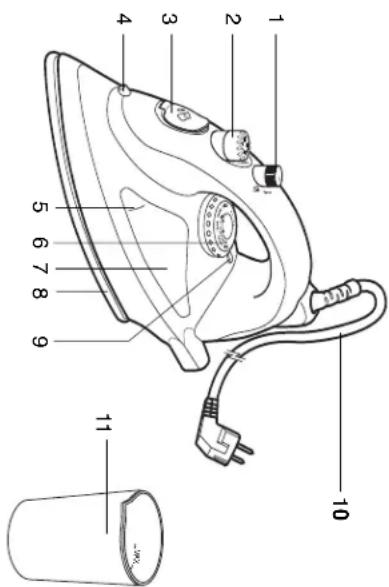
- Water fill-in opening
- Sorey puzzle
-
Spray nozzle
-
Water tank
-
Steam/Spray button
- Power indicator
- Power indicator 10. Power cord with
- Indication mark MAX 6.Temperature regulator
- Measuring cup
- Switch the appliance off before disconnecting from the mains.
-
Never use the cord to carry the appliance.
-
Danger! Nominal voltage is still present in the appliance as long as the appliance is connected to the mains socket.
-
Switch the appliance off before disconnecting from the mains.
-
Danger! Nominal voltage is still present in the appliance as long as the
use and each time before it is cleaned.
appliances without supervision. Always remove the plug from the socket when the appliance is not in
- Never leave the appliance unattended while it is in use.
- Children cannot recognise the dangers involved in the incorrect use of
open air.
-
This appliance is not suitable for commercial use nor for use in the
-
If an extension cord is used it must be suited to the power consumption of the appliance, otherwise overheating of the extension cord and/or plug may occur.
-
Make sure that there is no danger that the cord or extension cord may inadvertently be pulled or cause anyone to trip when in use.
than somA: Ask your electrical for advice.
with a fault current breaker with a rated breaking current of not more than 20mA. Ask the manufacturer for details.
- For extra protection it is possible to fit the electric household installation
- Do not allow the cord to hang over sharp edges and keep it well away
- Never attempt to repair the appliance yourself. This could cause an electric shock!
GB
- Do not touch the plug with wet or damp hands.
- Check the cord and the plug regularly for any
cord or plug is damaged , it must be replaced by the manufacturer or a
GB
SPECIAL SAFETY INSTRUCTIONS
-
Burn hazard! The iron base is very hot when in use. Hot steam
-
Escapes while steam flowing. Hold the appliance on the mantle only.
-
Make sure to unplug the appliance before refilling the water tank.
-
Turn off and unplug the appliance whenever it is not in use.
in a safe place out of reach of children.
BEFORE FIRST USE
-
Remove all packaging material and protection foil from the iron base.
-
When first used, a light odour or smoke may emit. However, this is
harmless and of a short duration only. Ensure sufficient ventilation. Once the lid of the tube filling is open (2), and fill the tube well, (7).
Upon the line of the water line opening (5) and in the water tank (4) with tap water up to the indication mark MAX (5). The supplied
measuring cup (11) can be used for this. If the water is very hard, use
distilled water only. Do not use chemically decalcified water!
Close the lid of the water fin opening and set the steam selection switch (2) into the position 0.
- Connect the power plug (10) with a suitable socket and set the
temperature regulator ( 6 ) to the highest temperature level MAX . Thepower indicator ( 9 ) will light up . When the power indicator turns off ,
the steam selection switch into position . To remove the remaining
-
Turn the steam/spray button (1) into position and blast out steam
-
turn the steam/spray button (1) into position and blast out steam several times by pressing the steam/spray button.
-
When all the steam has escaped, the iron is ready to operate.
OPERATION
OPERATION
Dry Ironing Fill the wa
Ironing, the water tank does not need to be filled with water. To dry iron, set the steam selection switch to position 0.
To dry iron, set the steam selection switch to position 0.
semit the power plug to a reliable contact and turn the temperatureregulator clockwise to the desired temperature. The power indicator
will light up. As soon as the desired temperature is reached the power
indicator will turn off. If the steam iron has cooled down too much, the power indicator will light up again to indicate that the iron is heating up
The power indicator will light up again to indicate that the iron is heating up again.
-
Before draining the water, let the appliance cool down completely. Burn hazard!
-
Open the lid of the water fill-in opening, place the iron upside down, and carefully drain the remaining water while shaking the appliance carefully.
carefully drain the remaining water while snaking the appliance carefully . - Press the steam/spray button to let the remaining water drain easily.
Burn hazard! - Open the lid of the water fill-in opening, place the iron upside down, and carefully drain the remaining water while shaking the appliance carefully.
- Press the steam/spray button to let the remaining water drain easily.
GB
0 = OFF
Nylon, Silk
Wool
Cotton
Before looking at the temperature, please
Before selecting the temperature, please read the care instructions on the apparel label.
- Note: If there are no care instructions, you should start with the lowest
temperature level. Less steam is produced. Caution: Synthetic fibres may melt.
Caution: Synthetic fibres may melt. Iron the piece of clothing
To turn off the appliance, set the temper
selection button to the 0 position. Place the iron in an upright position and use the option
and unplig the appliance. Steam ironing
- Steam ironing can be used in the temperature ranges ... and MAX. Do
not use other temperature levels due to the fact that water can escape
from the iron base. Fill water into the water tank as described below in Before First Use
For reliable functioning of the steam iron, the water tank should be
filled with enough water at all times. Select the desired amount of steam with the steam selection switch. In
- Select the desired amount of steam with the steam selection switch. In
the position the amount of steam is the highest. Always keep the invariable horizontal position.
Iron in a horizontal position.
For an extra blast of steam press the steam/spray button in the position. The steering function should be used at the highest
position. The steaming function should be used at the highest temperature level only. To avoid dripping water from the iron base, wait
temperature fever only. To avoid chipping water from the iron base, water at least 1 minute between every blast of steam.
Spray function:
Turn the steam button to mix
Batter to prevent the spot to be filled. Water escape from the spray nozzle (4).
Vertical steam ironing:
- Hold the iron in a vertical position about 15 to 30~cm away from the clothes.
To remove wrinkles on hanging apparel, curtains, or any other fabrics, simply press the steam/oven button in the position , blast out steam - Simply press the steam/ spray button in the position - blast out steam. Warning! The steaming temperature is very high. Do not use steam
on apparel or fabrics while there are being worn by humans or pets.
Turning off the iron: - To turn off the appliances, set the temperature regulator and steeing
To turn on the appliance, set the temperature regulator and steaming selection switch to position 0 and unplug the power plug. - Before draining the water, let the appliance cool down completely.
GB
CLEANING AND MAINTENANCE
- Be sure to read the safety instructions beforehand. To dry the iron, drain the water and then set the fan
To dry the iron, obtain the water and then set the temperature regulator to position MAX for a short time while the iron is still switched on.
-
Turn the iron off as described.
-
Make sure that the plug is pulled out of the socket and allow the iron
to cool down completely. Clean the outside of the i
-
Clean the outside of the iron with a soft, damp cloth and use a mild detergent.
-
Do not use abrasive detergents or hair
-
Wipe the iron base with a damp cloth.
- Make sure to clean the water tank, as described below, from time to
time. Fill the water tank with water and then shake the tank sufficiently. Drain the water to remove possible residues.
- If the iron is to be stored, always allow it to cool down completely. Wrap
up the power cord. Keep the iron in a safe place out of reach of children.
-
Dry the appliance before plugging it in.
-
Store the iron in the wrap the power core
-
wrap the power cord around the iron.
- Self-cleaning system
This iron should not be cleaned with decalcified solvents.
- chalk residue. If hard water is used, you should repeat this measure.
more often. Fill the wort
- Place the iron vertically on a flat surface and connect the appliance
with the power source. Set the temperature regulator to MAX and wait until the power
Set the temperature regulator to MAX and wait until the power indicator turns off. Turn the temperature regulator back to MIN
indicator turns off. Turn the temperature regulator back to MIN and
- Hold the iron horizontally over a basin and turn the steam se
switch to position the switch will lift up a little bit
- Turn the steam/spray button to position then press it. In doing so,
swing the iron slightly. Repeat these steps if the calcification remains
too prevalent. Clean the iron base after the self-cleaning process. Be sure to let the
device cool down completely before cleaning.
- Decalcifying the steam selection switch mechanism: If the steam selection switch is in the position, the bar can be removed easily.
selection switch is in the position; the bar can be removed easily
by pulling it upwards. Remove the bar and put it into a customary decalcifying solvent over night.
TECHNICAL DATA
Rated Voltage: 230V 50Hz
Rated Power : 2200 W
Water tank capacity:280 ml Measurements: 295× 115× 135mm
Measurements: 295 × 115 × 135 ~mm
TECHNICAL DATA
Rated Voltage : 230 V~ 50 Hz
Rated Power : 2200 WWater tank capacity : 280 ml
Water tank capacity: 203 m³ Measurements : 295 x 115 x 135 mm
INSTR


will inform about the methods for disposal
The materials are recyclable as mentioned in its marking. By recycling, material is recycled in the form of a collection of solidified
making an important contribution to protect our environment.
Please inquire at the community administration for the authorized disposal
Please inquire at the community administration for the authorized disposal location.
GUARANTEE AND CUSTOMER SERVICE
Before delivery our devices are subjected to rigorous quality control. If,
despite all care , damage has occurred during production or transportation ,please return the device to your dealer . In addition to statutory legal rights
please return the device to your dealer . In addition to statutory legal rights ,the purchaser has an option to claim under the terms of the following
guarantee:
For the purchased device we provide 2 years guarantee, commencing
from the day of sale . During this period we will remedy all defects free orcharge , which can be demonstrably attributed to material , or
charge, which can be demonstrably attributed to material or
manufacturing defects, by repair or exchange. Defects which arise due to improper handling of the device and
malfunctions due to interventions and repairs by third parties or the fitting
of non-original parts, are not covered by this guarantee.
0709/DB151

63322 Rodermark
device cool down completely before cleaning: - Decalcifying the steam selection switch mechanism: If the steam
selection switch is in the position; the bar can be removed easily
by pulling it upwards. Remove the bar and put it into a customary closetailing cohort over night.
decalcifying solvent over high
F
DB151
FER A REPASSER
Chere Cilente, cher Client
on Incorrect Preparation Part
er or a le
date d'achat.
on ou vice de
es garannes
m = 311 ;
lesuite
pareils
pas etre remis a
13/14
CONNECTION
ACTION:DF
(1)
□
2 Rodermark
eita GmbH
I-Zeiss-Str. 8
0709/DB151
utes que les
on Incorrect Preparation Part
er or a le
H
HASZNALATI UTASITAS
DB151
VASALO
R 888888888888888888888888888888888
1 + u8 = 1.5
m = 311
DANE TECHNICZE
Ditt annarvat is neh ve rccmical gubrik neh ve gubrik in
OCTIUNI PENTRU PROTECTIA MEDIULUI
imprenucauseseuricaseinscnormal,ci trebuie das la un punct
indicat e
pachet.
ste reutilizabil potrivt precizanior de pe eticheta. Prin reutilizare se
CEBHK3EH TEXHMK 3A NOPPANK
Hnkora He onntBaIte da nonpaBnTe ypeDa cam. OnachOCT ot
eNERTpueecn WOK!
TANOTOPENIMINIMINIMINIMINIMINIMINIMINIMINIMINIMINIMINIMINIMINIMINIMINIMINIMINIMINIMINIMINIMINIMINIMINIMINIMINIMINIMINIMINIMINIMINIMINIMINIMINIMINIMINIMINIMINIMINIMINIMINIMINIMINIMINIMINIMINIMINIMINIMINIMINIMINIM
dane 10peepn peimn nnnm BcN Kato 10nno4ate cncena,
BrpadeH npeKbCbae HeHaDbNuaBaa 30Ma MoKe Da doabn DonbHnteHa
3aunHa BaWeto DOMAKHHCTBO.KOHCYTNHPaIte Ce cbc CNEUHnCT no
eKtpnecBo 3a no-HaTaBbHn CbBeH.
IocTaBeTe Kabena H eBentyAnHnTe yDbNkHnTeNo TaKbB NaHn,Ye Da He
npeCTaBnBaT onachOCT ot cnBaHe n da He Morat da ce n3dbpNBAT no
CNYAHHc1.
CbTBETHnT eNEKTMueCKN KanauntET, Hnae e B3MOKHO da IoperOpN.
103n ypeH He e npedHa3HaueH 3a TbproBcKa yntpeBa KaTo n yntpeBa Ha
HnKpra he octabte ypea be3 h6nlohe nokato e b vnoptpeba
- Deuata He pa3no3Habat onachocHTe OT HenpaBnHTo 3No3yBaHe Ha
enektpnuecknypeN.CneobateHNO,HNKORA da no3BONBAHTe Ha deua da
H3no3yBaT eNeKtpueeckn ypeDn 6e3 Ha6nIOJeHne.
BHHMaHHe! Ypea e 3axpaHeH c eneKtpnueCTBO DOKaTo e CBpb3aH KbM
eNeKtpnueckkata Mpeka.
- HNKORA He HocTe ypeDa
HOCT
eIeIeKtpnueCkn yap!
BG
HHCTPYKUIN 3A YNOTPE6A
OnachocT OHRAPHE! OCHOBATA HA KITRA Tc HARopeuBa CNHNO
P 1
BnHaHn 3KJIIOUBAIte OT KOHTAKTa npeDn da HaneEe BOa B pe3epBOapa 3a
BODa.
H3K10uBaTe ypeDa of KOHTaKaTa Korato He Ro nnon3BaTe.
OCTABETAE 3A CXPDAHEHNE HA B630PCHNO HNDGTTHNO OT NAA MRCTO
PPEHIIbPBAVOTPEEA
PasonakobaiTe n maxhete 3aunTHoto ofoio ot ochOBata Ha kTINrta.
NoCTeOCHOBaT8Bk.10nCTBaHnIODbPkaHe).
Pn npbpa ynoptpeMoKe Da ycTeNe pyuek n neKa MmnsMa.Toba
630nachno H Tpae KpaTko.Ochrypete do6pa npoBertmoct!
OTBOPETe KanaHTo Ha OTbopa 3a HANBaHe Ha BODa (3) HAnbHnTe
YeumHa B0a B peepBoapa (7)do HnBTo Ha MapKnpoBkata MAX(5
HnIbI3aJIe MepHa TaIka (1), 3a Da I3MepHe neBocOIMoIIO
EHNHCTBEHO DECTINNPAHA BODA. He n3non3BaHTe BOA, KOTo e 6nla
.3a da naHnat BbMOxHN OCTaTbU ON pON3BOJCTBeHN IPOUC,
NRTANETEPDXAHNITKONTOHEMNOBATE
3aepreepnep 100
Sabspfte npapcipnbytoaBnnsmnn HnatcknKToT
Korato BCnukata napa n3ne3, IOTnra e roTOBa 3a ynoTpe6a.
PABOTACYPEDA
Cyxo rnaene
HnBnHete Boda B pe3epBoapa KaKTo e OIncaHO B IpeN nPba yNorpeBa.
3a cyxo thanehe, 3abptte 6ytoha 3a npda ha noohn
Bknoyete uencela B noxoadkohtakn 3a3bptetke knoya 3a perynpahe
Ha TEMnepatypata B nocoka Ha yacobnikobata cTpeIka do JKeIahata
temnepayps. CBeTNHHHHT HNDAKATOp 1e CBeThe. IOM JENAHATA
TMMPPATy aocmHHT, CEBHHHMT MHAKOTU 13
NOKAKeYeIOTnRAe3aONuHnAdaCeHARpRaOTHOBO.
- OTBopTe KanaeTo Ha OTBopa 3a HaNBaHe Ha Boda,ObbPHeTe IOTnTAtc
BG
CTeHn:
=HAIIO
= Bb HbHa
MAX=ENH.HAH-BVOCKA TEMNepaTPOA
pei Da h3bepeTe CTeneHTa Ha TEMne
3a6epejkaAkoTAKnHcHaOzAHueHHZAOHETeIaHEHTOHNH
HnCKa CTENH, PnN NO-HNCKO TEMNEPAYDHA CTENH, HANHOTO KONHECTBO
napa e no-MaJIko. BHMaHHe: CHTeTHuH NlaToBe Morat da ce cTOnAT
Hannane npoxata
3a da n3KIOHnTe ypeDa, 3aBbPTeTe KIOUa 3a perynipane Ha
TeMhepatypata n byoHa 3a npapa Ha no3nmu U. Ioctabete oitna Ta B
H3npaBeHo nONoJKeHne H3KIOUoTe OT KOHTaTa.
mepnne napa
MAX.He BkIOyBaIte Ha CTeNEH N3BbH Ta3n cKa7a, Tb KaTO BODaT
B IOTNtA MoKe Da N3Teue OT OTbOpTe Ha OCHOBaHa IOTnTa.
HaneTe B0aBpeepBoapa KaTo CneBate HnCTpyKunTe OnncAH B
Ipei Iipba yIippea. Sa da oCn yIpneopnOyHKnOHaPnA H
KONUcTBO BO BDA.
Cenektnapane JenaHoro konmecTo npa c byoHa sa npa. Han-BincoK
KINHecBnnapeHaNbHnHnBnHnBnBnBnBnBnBnBnBnBnBnBnBnBnBnBnBnBnBnBnBnBnBnBnBnBnBnBnBnBnBnBnBnBnBnBnBnBnBnBnBnBnBnBnBnBnBnBnBnBnBn
Harnacete napa/cnpey 6ytoHa Ha no3uHa 3ynoBnHTepHa napa
Функиета 3аnapa trpo6Ba da sbde n3non3BaHa ednHCTBEHO no Bpeme H
TnadeHe C Hai-BvcoKa TemnepaTyPhA CTeneH. 3a Da n36BerHete KaneHETO Ha
Oda of ochoaata hia mHa, Hsaknne 1 Minhya MeNdy Beka ondem
Функцн Ha cnper:
3aBbPte napa/cnpe bHa no3nna Hro HnatHe, 3a da
BbpxHa cnper (4).
BepTKaJIHO npHO nlaHe:
124 1300000000000000000000000000000000000000000000
HATNCHTe npa/cnpe 6yToHa Ha No3nua 3a Da NOnyUHe CTpyn npa.
BHHMaHHe! Temnepatypata Ha napata e MHoro Bucoka. He rnaTe c npata
DpexnKoTcAoCleqenOfXopaNIOMaAaHIOOMmIe.
3a da nKIOHHTe ypeDa, 3aBbptete KIOUa 3a perynpaHe Ha TemnepaTpaHa 6byToHa 3a npapaHa no3uHa 0 npbnHete uenceHa OT
KnA: -PpeiDa HsIeete BODaTa. OCTABETe YpeDa Da HcTHe HaBbHc. OnachOCT
OT H3rapn
- OTBopete Kaanayeto Ha OTBopa 3a HaNBaHe Ha Boda,ObbpeTe IOTnTAta C
BG
OCHOBaTa HArOpE H3neTe OCTaHaJaTbOda. EHNOBpeMeHcTOBa
paHatele ypeDa BnMaTeIHO.
EQUITYAUE14F087PVAUE
IpooyTeE INHCTpyKUN
NouchBaHHe Na ypeia:
Ha TEMNepaTypata Ha no3MUNA MAX 3a KpatKO Bpeme DOKATO IOTNRTA e BCE
3KIOHcTe IOTnTa KaKTo e OINCAHO B INCTpyKUHNTe.
Pnepnto nepn pnnnne nnnnne nnnnne nnnnne nnnnne nnnnne nnnnne nnnnne nnnnne nnnnne nnnnne nnnnne nnnnne nnnnne nnnnne nnnnne nnnnne nnnnne nnnnne nnnnne nnnnne nnnnne nnnnne nnnnne nnnnne nnnnne
HeoXdmo H3nON3BaIte OMeKOTe NOnCTBaI npenapat.
He 31013BaTe arpeCnB
HnD-puTcE OCHOBATA HOTNCTC BNAHKA Kp-dna
Pouhctbaitepe3epboapa 3a B0da oT Bpeme Ha Bpeme.3a ceta HarnbHneTe
peepboapa c Boda n ro pa3knate fo Oope. Hnnefte BoData u C Hea Ie ce
H3MnT Bb3MOxH N OCTaTbN.
BnHn npEi Da npoeepe 6tHa 3a cbpaHeHne, octabe H da
6e30nacHO HnOCTbHNO OT Deua MACTO.
CxbpaHbBaeIOTnHTaBOpINHHaHATAOnaKOBKa.He 3aBbBaeKa6eNa
OKONO IOTNATA, 3a da N36eRHeTe HapaHbAHe Ha KaBena.
Tn 103768a 67- ne PNOCTBAC C. dekanunnaepnnnnpenaptn
Cannonoyctbaaata cnctemTaTb6Ba na 6b ne 3nnon3BHa eHn pT
MeceHNO,3a Da 6bDat NoCHTeHN KaIeBnTE HaCnARBaHn. Ako H3noN3BaTe
BbDdBaDda, nHcHbAeTnHnHa HnCt
IocTabeTe IOTnRA BepTNKaJIHO Ha paBHa NOE
KOHTaKTA.
3abbprete KIOa 3a perynipHa H aemepatypara Ha no3nIMAX
Deynepune Ha Temperapvata, Ophato Hn Pooaunu MINN Kshnye
ypea ot KOHTaKaTa.
3aDpBkTeIOTnTaXOpH3OHTaHNOHaJIeHININdpyIbI6OKcb3aBOda
3aBbptete npapCnpen ByToHa Ha No3nur -BytoHbT 3a npape ce
3aepnne npe npna 100
JIeKo IOTnTa. NObTOpTe npOueCa B CnyaH Na yIopHTN KaIcneBn
Hacnarbanr.
IIOHCTeOCHOBaHaKOTnTaCneCaMOOnHCTBaunn npouec. 3aBnKHeIO octabeTe ypeDaHaNcTHe npeDn Da pncTbnte KbM
noCTBAHE. Dekannnnahe na bryora 3a napa: Korato npaa/cnpai bryo
DekalHHnHa Ha 6yToHa 3a npapa: Korato npapa/cnpel 6yToHbTe
3aBbPTAH Na N03nIa;MOKeTe IeCHO Da r H3BaIITe KaTO r

63322 RTbdermark
Carl-Zeiss-Str. 8
elta GmbH
0709/DB151
MOHTnpaHeTo Ha yKnn qactn, He ce 06Xbaat OT Ta3n rapaHua.
NORBNIc Ce Cnei Hameca NnonpaBkn OCTpHaHa TpeTn Iua KaKTo n Cnei
HeoctaBc, B3HKNHn BCNECTBHe Ha aBeHe C ypeHa, n deEeKTH,
Ha MATEPHANA HIN Ha PDOH3BOJCTBOTO.
HUN 3AMSHA, BCHUKH HENOCTAHU, KOTU BOZCOPNO CE JI-DKHAT NA DEPHKTH
I npodaKbata. I Ip3 T03n nepnoo OTOCTpnaHbAme 63nlaTHO, 4pe3 pmoHTnpaHc
MOHTHPaHTo Ha yJxN qAChn, He ce 0xbuataT Ta3n rapaHnra.
NoBnIe Ce CneHama NnonpaBKn OT CtpaHa Ha TpeT Nua, KaKTo n CneI
HeoctaBc, B3HKNHn BCNECTBHe Ha aBeHe C ypeHa, n deEeKTH,
Ha MATEPHANA HIN Ha PDOH3BOJCTBOTO.
HUN 3AMSHA, BCHUKH HENOCTAHU, KOTU BOZCOPNO CE JI-DKHAT NA DEPHKTH
I npodaKbata. Ipe3 To3n nepnoo OTcTpaHbame Be3nnaTHO, 4pe3 peMOHTnpaHe
TAPAHUNIOBCLNYKBAHE HA KINNEHTN
TAPAHUNOBCLJYRBAHEHA RJINEHTN
noDxOAnn npepaobTbaTeen eneHTbp.
KohcytnpaaiTe ce Baata Mecha aamnHCTpaun 3a da HamepHTe
MaTepeNaHte Ce npepa6oBtBat kaKTo e 063NaueHo Ha TeXHHe HApNc. Upe NaPepa6oTkaTa HA MaTepeNaHte, KaKTo n Ha DpyrMaTepeNaHn BbB BaWeto DomakHNCTBO,BHe dOpnpHacTe 3a ona3BaHETo Ha haata OkonHa cpea.
yntpe6a 0603haayabat TOBA
Cnmbona Ha onakobkata, ca
N eJektpoHHN VpeDN.
CneuaHn3npaunBc6paHETNO npepa60rkataHa
otnaIbTu. Tp6Ba Da 6bIe ocTaBeH B cbOpaxHe
To3n npOyKT He Tp86Ba Da ce H3XBpRnB HopMaHnHTe Dena 3a
OT1A3BAHE HA OROTH
A
Pametron : 295 x 115 x 135 MM
06bempeepnepnepnepnepnepnepnepnepnepnepnepnepnepnepnepnepnepnepnepnepnepnepnepnepnepnepnepnepnepnepnepnepnepnepnepnepnepnepnepnepnepnepnepnepnepnepnepnepnepnepnp
PpeCTaBnBaT ONaCHOCT OT CnBaHe N Da He MoRat Da Ce N3DbPnBaT No
chuyauHocT.
cBtHnTneKrueckn Ranaun, HNaue e Bb3MoJHO da nporpn.
OTKPNTO.
MnHtAe HcBaeHbEYpeOe cEs HnDnEmeNcEIOe E BnTepeo.
eneKtpueckn ypei. CneIOBATEHNO, HNKORA da no3BOJRABaTe Ha deua da
mshnybAerntnepnckypeae haoHdienie:
BAMMAHNE:pepa e 3axpaenC ceneKIpNcTBO DOKaTo e CBp3aH KBM
-
ɪəkʌhɒyete yɒpədɪnʌpɒdɪnʌɪsʌbɒpnte kɑbèna.
-
HnKora He Hocete ypea 3a eNeKtpuueckna Ka6en.
Rus
OCOBIE INHCTPYKUNI NO B3ONACHOCTN
Orheonacho! OchoBaHne ythra oeyh harpeBaetc npn pa6ote. Pn
YbneHtBbT B Tom. 701Pn60 OTKJHHeHn Hn HANHHEHN DE3EPBAPDA JIN
BOIbl.
- BbIKIOuATb N OTKIOUATb H3 cETH, KOrTa npBOp BPemHe He NCnONb3aYetcA. - Pocne HCnONb3OBAHHa YCTPOINCTBO DOJXHo 0ctbTb, NoCte Yero Ero HyKHO
NOMeCTnB HEDOCTyHoe DETAM MeCTO.
- Ecnn BbIeN BeCb nap, yTIO rTOB K nCnONb3OBAHNO.
PABOTA
CyxhnytkoKka
- HanonHnTb pe3epByap dans BObl, kak onncaho B pa3dene Nepeed nepbBIM
Ncnpb3oBaHMe.M. ycxon yTOXKOn pe3epByap nla BObl He HkyKHO
HANONIBBODI.
Dy cyxh yIbcky tcyabohn Hpekehoyeht B IIOHOeHKe 0. PdokhthneBtEepnHccknHvHvB COTBETCTVYHvNpO38THK
yctaHOBHTb perynTOp TEmnepaTybl no yacobO CTpenKe Ha JeknaeMyIO
temepatypy. INHikatop HapRkEHN BIOUHTCn. KaK TonBko JenaMaal TMPOPAPN 000000000000000000000000
yTOFOCTATOHNOOCTBNET,INMDKATOP HANPAXENNAOTbAQPONTC.
yka3bBA, yTO yTIO CHOBa HArpeBaETcR.
πρηδορ.
OTKpbItb KpIbIky OTBepCTnI dIaIaONHeHn BODOn InepeBepHyTb yIIOr, nOcne yero aKKypatHO cNtB BoY. Nocne 3TOrO OCTOpOXn OToPactn
Rus
HactpoKn:
·H
MAX = Ден, Наьсшая Temnéратура - - - - - - - - - - - - - - - - - - - - - - - - - - - - - - - - - - - - - - - - - - - - - - - - - - - - - - - - - - - - - - - - - - - -
- Teped BbOoPm TemnepatpyB, HoKa
BHHMaHHe: Ecn Hn HnCTpyKnn no yxOy, NaHnTe C cAmo Hn3KoN
PON3BOIDTCBHHMaHHe:CHHTeTHueckneTKaHHMOryTIIaBHtbcra.
- IipornaIbte oJeKdy.
mepnne nnnnne nnnnne nnnnne nnnnne nnnnne nnnnne nnnnne nnnnne nnnnne nnnnne nnnnne nnnnne nnnnne nnnnne nnnnne nnnnne nnnnne nnnnne nnnnne nnnnne nnnnne nnnnne nnnnne nnnnne nnnnne nannne nannne nannne nannne nannne nannne nannne nannne nannne nannne nannne nannne nannne nannne nannne nannne nannne nannne nannne nannne nannne nannne nannne nannne nannne nannne nannne nannne nannne nannne nannne nannne nannne nannnee
Otknoyntnpbop
Iapobaa yIOxka
Tapobah yIrkKMOBKe mChonIsbOatbch B fEmiepeAtyPbX bckmMax 100 MAX HAI KAKKAR, DITIOY TINOTNNTNNTNNTNNTNNTNNTNNTNNTNNTNNTNNTNNTNNTNNTNNTNNTNNTNNTNNTNNTNNTNNTNNTNNTNNTNNTNNTNNTNNTNNTNNTNNTNNTNNTNNTNNTNNTNNTNNTNNTNNTNNTNNTNNTNNT
MAX.He nCnObl3oBaTb DpyryIe TEmnepaTyP,NOTOMy ITO N3 OCHOBHNA
yiora oyder nocylnab boda.
HcnoIb3OBAHnEM.Дla naleKho pa60TH npaboro y1rora pe3epBvap dla
BOdbI DOnJIeH 6bITb BcERda HAnONHeH.
yBnAHHHnHnHnHnHnHnHnHnHnHnHnHnHnHnHnHnHnHnHnHnHnHnHnHnHnHnHnHnHnHnHnHnHnHnHnHnHnHnHnHnHnHnHnHnHnHnHnHnHnHnH
npncnocobneHn dna paacnbneHn (4)
Bertnakbna napobay yIOKka:
-ДеркгпЕунВ Бернштейн Воронжий На расстони 15-30сm ot
IUTOPAX INN ADYROI TKAHIN, NPOCTO YCTAHOBHTE KHONKY NAP/PAcNbJIeHME B
noJooKeHHe 10To6bBbInyCTnTb nap.
- Ппдунрекдени! Temнература наразьвicкаг. He Испоньбовы nap
HaTnH,KoepaHaedraHaNIOeHJXOBHTB BbIKOHTyYTOF
- To6bI BHKIOHHTb np60p, yCTAHOBITE peryIaTOp TEMNEPAtpyI INKHOky
Rus
HaxMITE KNONky nap/pacbneneHne,TO6bIOCTaBwAraCBAOJeKBOBiteKa.
CHCTKA I NOIDEPKHA
- Ipeep HauaIOM BHNMaTeIbHo npOHTHe HcTpyKmH.
B NOJOKENHE MAX HA He6bIooBpe BnKIOUeH.
OTKJIIOHTe yIou, KaK 6bIIO OINcAHO.
- YbEaNTecB TOM, yTO BnIKA BblKIO
0CTB.
CnHCTB BHEWCHQCTbYbTHaTIPINHOOMIJI MIOHN BIAHNOI TRAHNI, a TIPIN Heo6XIMIOOMCT HcNOJb3OBATN JERKOE MOOJIeepCEDCTBO.
- He nCnoIb3ObaTb a6pa3HBHbMe
npdMeTb. ·PpOtnPeYTOB BnAaHHoN TkaHbHO
BpeMOTpEMHnHNOptHpTaBpe3eByapIINBObl.10ncE 20rO
Hannn Hspeyb BODmIaTeBnOHTpsepeyap. CnBt Body 006y annhB O3MOKKnOcAOK
PepnXpaHcEMVTHaBPCeBnapaHTOyPOHOCTIOOCTHTI
HepaenpHpybIyIeKTPnECKN IuHyp. XpaHNTbIyIurB 6eOzpanHom, HeoocTyHOM
Ддгдетмс.
XpaHHTbYtHbBOPM
yIOrA BO I3eJHAnaeCnCTMe CamOuHCTN
He nctntb yTOIg deKaIbunHkKatopamn.
Cimeta camoohmck MOKET hnohloBbCTBa3 B Mech. 008b ydaHHTB MenobM ocAodK. Ecnn nncnoyctre JcEeTka Boa, 37y npoeDpyu HNYKO
NOBTOPTB CHAE.
HIOHOIIEEpeepyBnBIOHOIOHOIOHOYU YctAHOBHTI yTOB BEPTKANBOHO NA POBHYIO NOBEPXHOCTb IOKNIOHOITe
yctpoTcBvBcTb.
YtAHOTBITE peryHPTTEMEPHTPAIbIaNHOHEHMAWIMHOHEMNAHINHAKOTAP HANPRHENHOr OTKLIQHTCRA. YCTAHOTBITE peryHPTTEMEPHTbIbHa3d
B NOJIOJIeHMe MIN N OTKIIOHHTe yCTPOJCTBO.
- Jeprnhtte yHrT ORp30HTaBHO HAD paKOBHHO IYCTAHOBITE nepeKb Rana B NoPcWuHc - PpRbOHHTaB OReKHa BOHMMtE
Kohcytnpaate ce c Bawaata mecha aMHHCTpaing 3a nHaMepe
NnHnnnne nnnnne nnne nnnnne nnnnne nnnnne nnnnne nnnnne nnnnne nnnnne nnnnne nnnnne nnnnne nnnnne nnnnne nnnnne nnnnne nnnnne nnnnne nnnnne nnnnne nnnnne nnnnne nnnnne nnnnne nnnnne nnnnne nnnnne nnnnee
TAPAHNTHNOE OBCJNYKUBAHNE INCEPBNC
HECMOTDHA 80CPOHHTHE MDPNPOO20ACTREKPAHCHOPNDOPKE
B03HnK1IIOOMKa, 010hne HncipBaHoe N3dme IpoaBcy, y KOTopo
OHO 6bIIO npnoBpeTeHO. NOMMIO yCTaHOBnEHbIX 3aKoHOM peKnamaOnHHbIX
Tepen, y hcynnae enctb BosmoNocBt nped BABNTpeoobannB
Ha npwo6poeHHHn npwbo nepctyot ranaHTB TTOOHNE 2 pT HauHae CO
Hn Hn Hn Hn Hn Hn Hn Hn Hn Hn Hn Hn Hn Hn Hn Hn Hn Hn Hn Hn Hn Hn Hn Hn Hn Hn Hn Hn Hn Hn Hn Hn Hn Hn Hn Hn Hn Hn Hn Hn Hn Hn Hn Hn Hn Hn Hn Hn Hn Hn Hn
OCyUecTBnTb peMOHTnn 3aMeHy n3deenn C NIObIMn HEnCnpBaHObTAMN,
eepnne eannnnn ennnn nnnn ne aenennn
opaKa. LaHHa rapaHTHa He paCnPoCTpaHReTc H a DeFeKtbl, KOtOpBle 6bln
BssBaHn HnpsbA hNnNnNnNnNnNnNnNnNnNnNnNnNnNnNnNnNnNnNnNnNnNnNnNnNnNnNnNnNnNnNnNnNnNnNnNnNnNnNnNnNnNnNnNnNnNnNnNnNnNnN
BosHMKwE BcIeBtBgMMeAeBcBaWbPemHAtCtOpHApTbM
0709/DB151
chTei.
0709/DR151
0709/DB151