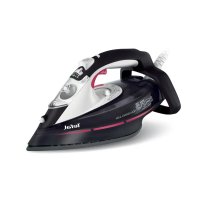
USER MANUAL Aquaspeed FV5356 TEFAL
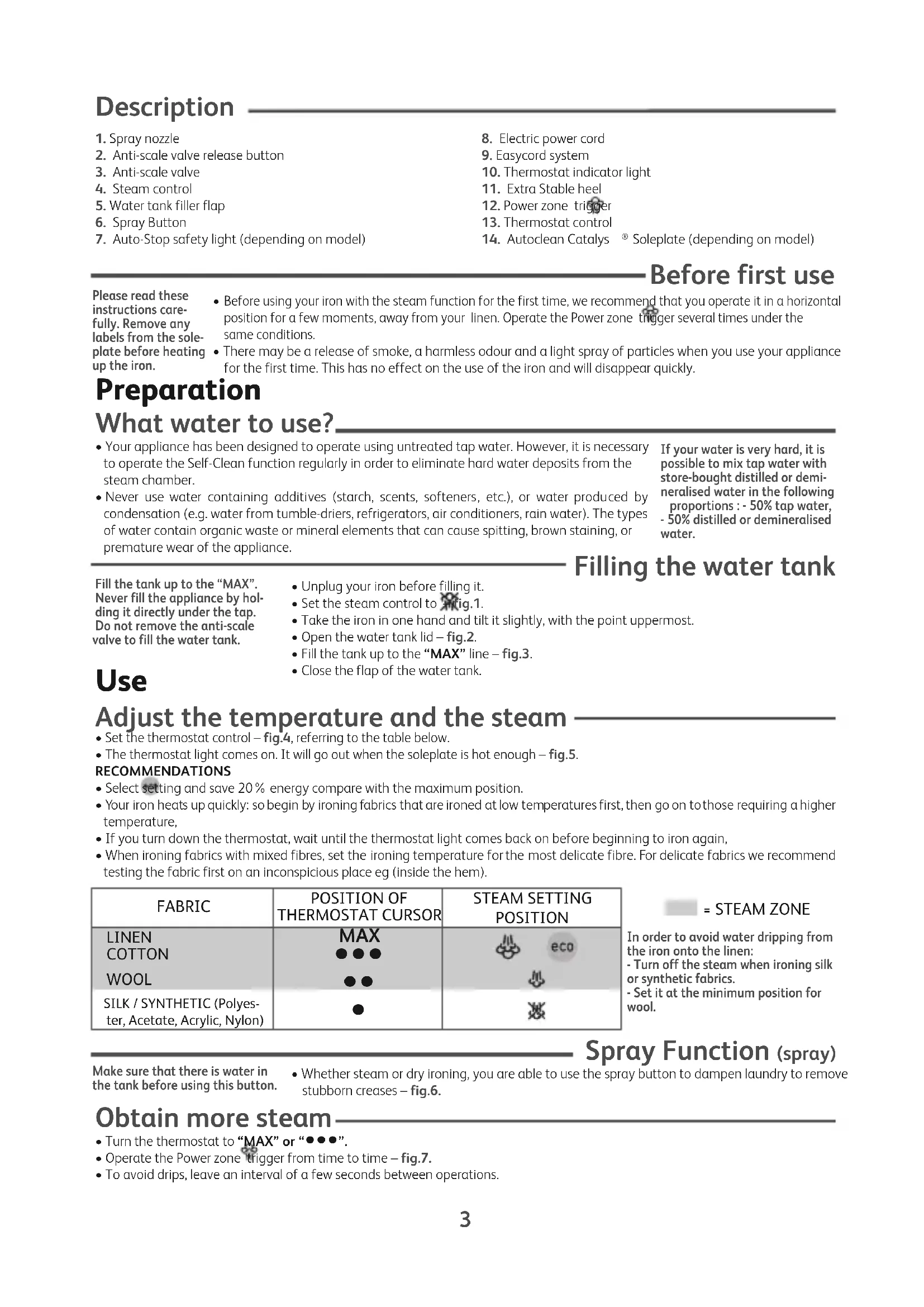
- Spray nozzle
- Anti-scale valve release button
- Anti-scale valve
- Steam control
- Water tank filler flap
- Spray Button
-
Auto-Stop safety light (depending on model)
-
Electric power cord
- Easycord system
- Thermostat indicator light
- Extra Stable heel
- Power zone trigger
- Thermostat control
- Autoclean Catalys ⑤ Soleplate (depending on model)
Before first use
Please read these instructions carefully. Remove any labels from the soleplate before heating up the iron.
- Before using your iron with the steam function for the first time, we recommend that you operate it in a horizontal position for a few moments, away from your linen. Operate the Power zone trigger several times under the same conditions.
- There may be a release of smoke, a harmless odour and a light spray of particles when you use your appliance for the first time. This has no effect on the use of the iron and will disappear quickly.
Preparation
What water to use?
- Your appliance has been designed to operate using untreated tap water. However, it is necessary to operate the Self-Clean function regularly in order to eliminate hard water deposits from the steam chamber.
- Never use water containing additives (starch, scents, softeners, etc.), or water produced by condensation (e.g. water from tumble-driers, refrigerators, air conditioners, rain water). The types of water contain organic waste or mineral elements that can cause spitting, brown staining, or premature wear of the appliance.
If your water is very hard, it is possible to mix tap water with store-bought distilled or demineralised water in the following proportions : - 50% tap water,
- 50% distilled or demineralised water.
Filling the water tank
Fill the tank up to the MAX Never fill the appliance by holding it directly under the tap. Do not remove the anti-scale valve to fill the water tank.
- Unplug your iron before filling it.
- Set the steam control to Fig.1.
Take the iron in one hand and tilt it slightly, with the point uppermost.
- Open the water tank lid - fig.2.
- Fill the tank up to the "MAX" line - fig.3.
- Close the flap of the water tank.
Use
Adjust the temperature and the steam
- Set the thermostat control - fig.4, referring to the table below.
- The thermostat light comes on. It will go out when the soleplate is hot enough - fig.5.
RECOMMENDATIONS
- Select setting and save 20% energy compare with the maximum position.
- Your iron heats up quickly: so begin by ironing fabrics that are ironed at low temperatures first, then go on to those requiring a higher temperature,
If you turn down the thermostat, wait until the thermostat light comes back on before beginning to iron again.
- When ironing fabrics with mixed fibres, set the ironing temperature for the most delicate fibre. For delicate fabrics we recommend testing the fabric first on an inconspicious place eg (inside the hem).
| FABRIC | POSITION OF THERMOSTAT CURSOR | STEAM SETTING POSITION |
| LINEN | MAX | eco |
| COTTON | ●●● |
| WOOL | ●● |
| SILK / SYNTHETIC (Polyes-ter, Acetate, Acrylic, Nylon) | ● | ∞ |

= STEAM ZONE
In order to avoid water dripping from the iron onto the linen:
- Turn off the steam when ironing silk or synthetic fabrics.
- Set it at the minimum position for wool.
Spray Function (spray)
Make sure that there is water in the tank before using this button.
- Whether steam or dry ironing, you are able to use the spray button to dampen laundry to remove stubborn creases - fig.6.
Obtain more steam
- Turn the thermostat to "MAX" or "●●●".
- Operate the Power zone trigger from time to time - fig.7.
- To avoid drips, leave an interval of a few seconds between operations.
Hold the iron a few centimetres from the fabric to avoid burning delicate fabrics. Every five pulses return the iron to a horizontal position.
- Hang the garment on a hanger and hold the fabric slightly taut with one hand. The steam is very hot, so you should always do this with the garment on a hanger – never iron clothes which someone is wearing.
- Set the thermostat control to "MAX" - fig.8.
- Operate the Power zone trigger by pulsing - fig.7 moving the iron from top to bottom - fig.9.
Dry ironing
- Set the temperature for the fabric to be ironed.
- Set the steam control to Fig.1.
- You may start ironing when the thermostat light goes out.
Autoclean Catalys® Soleplate (depending on model)
- Your iron is equipped with a self-cleaning soleplate which works by catalysis.
- Its exclusive coating helps eliminate all the impurities generated by normal use.
- It is recommended that you always stand your iron on his heel to preserve its self-cleaning coating.
Integral anti-scale system
Your iron is equipped with an integral anti-scale system. This system will help to provide:
- a better ironing quality with a constant flow of steam,
- lasting performance from your appliance.
Auto-Stop safety feature (depending on model)
The auto-stop light will be lit during normal use!
- The electronic system cuts off the electric power and the Auto-Stop warning light flashes if the iron is left vertically on its heel for more than 8 minutes, or in a horizontal position for more than 30 seconds - fig.10.
- To restart the iron, just move it gently until the warning light stops flashing.
Anti-drip function (depending on model)
- When the iron is no longer hot enough to produce steam, the water feed will stop automatically to avoid dripping.
Maintenance and cleaning
Cleaning the anti-scale valve (once a month)
- Unplug your iron and empty the water tank.
- Adjust the steam setting to "Eco".
To remove the anti-scale valve, open the water tank lid and press the release button - fig.11 and then pull the valve upwards - fig.12. Be careful - Never touch the end of the
- Soak the valve in a cup of white spirit vinegar or plain lemon juice for 4 hours - fig.14.
- Rinse the valve under running water.
- Replace the anti-scale valve; press until it clicks in to place - fig.15.
- fig.11 and then pull the valve upwards - Be careful - Never touch the end of the valve - fig.13.
- The iron will not function without the anti-scale valve.
Self-cleaning
The self-cleaning function helps to slow down scaling in your iron. In order to extend the life of your iron, use the Self-Cleaning function once a month.
- Fill the tank of your iron with untreated tap water. Stand the iron on it's heel with the thermostat set to "Max" and heat it up.
-
When the thermostat light goes out, unplug the iron and hold it in a horizontal position, over a sink. Remove the anti-scale valve - fig.11-12 (see previous chapter).
-
Shake the iron gently, over the sink, until some of the water in the water tank (with the impurities) has flowed out through the soleplate - fig.16.
- At the end of the operation, replace the anti-scale valve; press it in until it clicks - fig.15.
- Plug the iron back in and leave it resting on its heel for two minutes to dry the soleplate.
- Clean the soleplate with a damp, non-metallic cloth while it is still warm.
Cleaning the soleplate
Your steam iron is fitted with a self-cleaning soleplate (depending on model):
Attention! The use of a scouring pad will
The exclusive active coating helps eliminate all the impurities generated by the normal cause damage to your soleplate's self-cleaning (depending on model) coating - fig.17.
- However, if you iron using an unsuitable programme, some traces may be left which require manual cleaning. In this case, it is recommended that you use a soft damp cloth on the warm soleplate, in order not to damage the surface.
Your steam iron is fitted with an Ultraglide soleplate (depending on model):
- Clean the soleplate with a damp, non-metallic cloth while it is still warm.
- Unplug the iron and wait for the soleplate to cool down - fig.18.
- Empty the water tank and set the steam control to a little water may remain in the tank.
- Wind the cord around the heel at the back of the iron. Store the iron on its heel - fig.19.
Storing your iron
Never use aggressive or abrasive products.
Environment protection first!
① Your appliance contains valuable materials which can be recovered or recycled.
Leave it at a local civic waste collection point.
If there is a problem
| PROBLEM POSSIBLE | CAUSES SOLUTIONS | |
| Water drips from the holes in the soleplate. | The chosen temperature is too low and does not allow for the formation of steam. | Position the thermostat in the steam range (from ** to MAX). |
| You are using steam while the iron is not hot enough. | Wait until the thermostat light goes out. |
| You are using the Power zone trigger too often. | Wait a few seconds between each use of the Power zone button. |
| There is too much steam. Reduce the steam. | |
| You have stored the iron horizontally, without emptying it and without setting it to | See the section "Storing your iron". |
| The anti-scale valve is not fully inserted. Replace the anti-scale valve: press down until it clicks into place. |
| Brown streaks come through the holes in the soleplate and stain the linen. | You are using chemical descaling agents. Do not add any descaling agents to the water in the water tank. |
| You are not using the right type of water. Perform a self-cleaning operation and consult the section "What water to use?" |
| Fabric fibres have accumulated in the holes of the soleplate and are burning. | Perform the self-cleaning operation and clean the soleplate with a damp sponge. Vacuum the holes of the soleplate from time to time. |
| The soleplate is dirty or brown and can stain the linen. | You are ironing with an inappropriate setting (temperature too high). | Clean the soleplate as indicated above. Select the appropriate setting. |
| Your linen has not been rinsed sufficiently or you are using starch. | Clean the soleplate as indicated above. Always spray starch onto the reverse side of the fabric to be ironed. |
| There is little or no steam. | The water tank is empty. Fill the water tank. | |
| The anti-scale valve is dirty. Clean the anti-scale valve. |
| Your iron has a build-up of scale. Clean the anti-scale valve and carry out a selfclean. |
| Your iron has been used dry for too long. | Carry out a self-clean. |
| The soleplate is scratched or damaged. | You have placed your iron flat on a metallic rest-plate or ironed over a zip. You have cleaned your soleplate with an abrasive or metal pad. | Always set your iron on its heel. Try to avoid ironing over zips. Refer to the chapter "Clean the soleplate". |
| Your soleplate is releasing particles. | Scale is building up on the soleplate. | Carry out a self-clean operation. |
| Water is running out of the water tank flap. | You have not closed the water tank flap properly. | Check that the water tank flap is locked properly. |
| Steam or water leak from the iron as you finish filling the tank. | The steam control is not set to the position. | Check that the steam control is set to the position. |
| The spray does not spray. | There is not enough water in the water tank. | Fill up the water tank. |
If you have any problem or queries, please contact our Helpline: 0845 602 1454 - UK / (01) 677 4003 - ROI or consult our website - www.tefal.co.uk
Autoclean Catalys Taban (modeline gore)
IpeHaarpibaHHM IpaCKN BHaJIaHTe 3 IIIOIBH eTHKeTKH, Aki MOKyb Byn Ha Hi IpiHCyTHIM.
-Пердпршим ВИКОРиСТАннЯм BaWoI npackу NOLOXeHHI napu, MИ Bam peKOMeHnyE mo BKNIOUHTn II Ha DeKINbKa CekyHd B TropN3OHTaJIbHOMy NOLOXeHHI Ha BiDCTaHI BiD 6iIN3Hn ДЯ npacyBaHHa. B cIbOMy Jx pexmI DeKINbKa pa3IB AKTINByIte KnaBiy Power zone.
-Пд чс nepшх ВИКОпСТань можл ue TВОрeHHЯДИМу,6e3neuHOrO 3aNaxy a60 He3HaUHOI KINbKOci YAcTOK. L'He MaTmE HacnIDKIB dIЯ ekCnpyatai i WbUdKO 3HnKHe.
Плдrostовka
Ky BOny CIIBnBnKOpNCTOByBaTN?
- EKcIpyataqia BaWoO npuNaIy nepeBbauaE BnKOpNCTAHH BODonpOBiHOI BOY 1 pa3 Ha MicraB Heo6xIDHO npOBoNTn cMoOChUeHH NpuaNy. Y 6yNb-RAKOmy BnnaKy, Heo6xIDHO BnKOpNCtOByBaTn fYHKciIO cMoOChUeHH nI naNo3baJIeHH BID OcaNy y napOBOMy BiDcKiY.
Hikon He BnKOpncToBny Te BOn, 0 Mae IobabKn (KpOxMaJIb, apOMaTn3aTOp, apOMaTnHi cy6tAnu, nom'ar7yUoHi 3acO6u), a TAKOX KOHehCOBaHy BoHy (HaPnKnAd, BOny 3 Cywok nIg 6IIn3Hn, XOLOINbHNKIB, KOHNzioHepiB, DIOOBy BoHy). BOny, 0o MicNTb oprAHuHi BiXOaN abo mHepaN, 0o MoKyTB npn3BeCTN Do NpeDuachoro NcyBaHHIO, ipKaBiHHIO NOKpTTra PnlaNy.
KuOyBaIOMyBODOnPBODi dyKe
KOPCTKa BOda,3MIuIyHe T3
JeminepaIi3ObaHOIO BOIOIO,
HAIBHOIO B KOMepuiHm MepeKi, B
HaCtynHnI npOnOpui:
-50% BOДИЗ BOДОПВОДУ,
-50% deminehpalizobaohoi BOH.
HeIepeBmUyBaTHpiBeHbIO3Ha4KN
MAXpe3epByapy.
HikoJIHe HAnOBHHoIte IpaCKy 6e3IOcepeHbO II KpaHOM.
IIo6 HAnOBHHTpe3epByap, He Notpi6HO BHTIaTH IIOPTBaIHINHH CTpIKeHB.
HaIOBHiTb pe3epByap
- Npeed HanoBHeHnM BOIOIO BiIDKnIOuITb npacky BiD eNEKtpomepexi.
BnCTaTe pyky napu B noJoxKeHHaMaI.1.
Bizbmitb npacky B pyky Ta Tpoxn Haxnilitb, roctpiu kiHeu piOwBu nIBNTbcB BBepx.
BiiKpnIe oTbip pe3epByapy - maI.2.
- Hanobhitb pe3epByap do no3HaKn "MAX" - maI.3.
- 3akpiTeKpniUkype3epByapa.
BukopncTaHn
BidperyIIOte Tempeatypi napy
BnctaBte pyuKy TepmoCTata -MaJ.4, TaK, YK NOKa3aHO Ha Ta6nui HnKue.
JaMnOuKa TepMOCTaYBIMKHeTcBAHOBaBIMKHeTcTaToJ,KOJI NiIOoWbHarpiEbCdoNtpiHoI TempePaTyPi -MaJI.5
- npacka He npaIOBaTmE 6e3 npOTnHaKInHOrO KlaanaHa.
ФункцяCAMOочишеня
PekomeHdaui: yHKciy selfcleaning (camoouueHH)cnpnae ynoBilbHeHHOytBopenhHaKuny y npacui.Дla noobKeHHa TepmiHycIy6n Baooi npacknBNKOpNCTOByte fynkuio Self-Cleaning (camoouueHH) OINn pa3 HaMicra.
- HanobHbIb pe3epByap npackn Heo6pObeHoIO BOIO IO 3-niD kpaHy. IocTaBte npacky Ha n'rTy, BnCTaBnBUn TepMOCTat Ha MaKcIMyM, i HarpiTe ii.
Koln lamnocka Tepmoctata norache, Biikniouitb npacky Bi ekeTpmeiTe II B rOpnsOHTaBHomy noLoXeHHi Haid paKOBHIO. 3HiMitb npOTnHaKaTnnH- man.11- 12(INB. nonepedhi po3dn).
-3JERKa NOTpyCITb npacKy HAD paKOBHIO, NOKN BOa 3 pe3epByapa dJa BOi (3I CTOpOHIMN DOMiHKAMn) He BNTeue chepe3 NiOuBBy- man.16.
-ПисязавершениonepaцьВСТАНБИТьпOTиВанг希нСТРИЖЕнHaMiCц;HaTиCKaTe DoKlaцHHa-m15.
BiiKJIIOHITb npacKy BiEeIeKTpomepeXi Ta NoCTaTe n'ATy Ha JeKJIbKa XBNIN, NOTIMBNTpTiB II BONORO M'AKOHO TKAHNHO.
-ДOKи niooBa ige TeNla, OuHCTiB ii 3a DonomoroBO BONOrI HEmTaIiyHOI r6Kn dIy OunueHH.
Ponuctb iDowBy
Bawa npacka o6laHaHa NiOuBoIO, 0c amooUyEcbra (B 3anexKHOCTi BiM OJeni):
-Пися пасуванья за Hectандарноюnpогамою,Oннak,MOжутб
3алшпсь сidiи,ио notpe6byotb puhyoro ouhiueneHЯ.ИобHe noш
NOKpTTY,у takOMy BInaIky,peKKOMeHdyETbcR BYKOpNCOTobyETcBBO
ry6kyДЯ TORO,IIOb He yshKOdITN NOBepxHIO npinady.
Baana npacka 06naHaHa niooWoIO Ultraglide (B 3aIeKHOCTi BiM oae:6pa3nBHI 3aco6n.
-ДOKи NiOswBa иe TeNla, OuHCTiB II 3a DonOMoIO BONOrI HEmTaJIiHoiI r6Kn IJRA OUHcEHnR.
YbaralBnKOpuctaHHry6Kn3 a6pa3nBHoro MaTeiany nouKOjXyE NOKpTTI niOoBN, JKe cAmooNHyETbCra (zaneKHO BiD moDeni)- Man.17.
HikonHe BnKOpncToByTe arpecnBHI
36epirahnBaioi npackn
BiiKIOHITb npacky BiE nEeKTPoMepeXi IIOeKaIte, nOKn iIOwBa He OxIoHe - Man.18.
BnInne BoDy 3 peepByapa i BnctBaTe pyuKny napN B noLoXHH. B peepByapi Moke 3aJIiunTncr Tpox BoDn.
3MOTaIe eNekTpOuHyp B 3aHi yactnHi npackn HABKOLO n'ATn. Pid qac 36epirAHn npacka NOBHHa cTOrTHa n'RTi - man.19.
3axnct HaBkoIuHbOro cepiIOBnuIa!
①BaW npncpii MiCtntb ciHHi MaTepiann, kI MOxHa Nepepo6nTu N BuKOpNCTaTn 3HOy.
KIO nCtpi Bam 6inbwe He notpi6eH, 3aIIuTe Ioro B CneuaIbHomy KOHTeHepi nn noi6Hnx peeu.

Kakyu Bovy nCnoIb30BaTb?
Baw np6op n3roToBneH dny pa60tbc BOOpnpoBOHO BDO. OOnn pa3 B Meca npON3BOUNTE aBTOOuNCTky np6opa.
- Hikorda He nCnoB3yIte BDO, coepkauyo Doabk (Kpaxmam, apomatn3aT apomatnueckne cy6tAHcH, CMraHOpuie CpeCTBa T.D., a Takke KOHeHCPOBAHHyIO BDO (HaPnMep, BDO u3 cyuINOK dJa 6enb, XOIOINbHIKOB, KOHNIOHepOB, DOXDeByIO BDO). TaKoT NTO BObl COePKNT OPraHueckne OTXoDbI INN MInHpAIBHbIe 3JeMeHTb, KOTOpbE MOrY T cTaTb npUHHO WInHeH, NOABLeHNAI PATeH pRn rnaKke INN npexKeBpeMeHHORO n3HaWnBaHnnp60pa.
EcnB Oda y Bac JecTkA,
CmeaaiTe BOonpoBOHHyO BDOy C
EMHHpaN3OBaHHoN 3
MaraHa B cneDyUoSei
npopOpu:
50% BOONPOBOHOI BObl
50% DEMHHpaN3OBaHHO BODbl
3aopoHnTe pe3epByap
He npebbwaIte Max OTMeTky.
HnKOrda He norpjkaTe yTHor B Body.
YTo6bl HanoHnHTb pe3epByap, He
TpE6yETc N3BLeKaTb
npOTNBON3BecTKOBbI CTepXeHb.
-Передзалоннемpe3epByapaOTKJIIOUHTeYIIG
- YCTaHOBInTe KHONky NODaunnapa B NOLOKeHne Jpnc.1.
- Bo3bMnte yTIOB B pyky i HEMHoro eero HaKIOHnTe, OCTpbI KHeu NOIOWBbl CMOTpNT BBepx.
- OTKpoIte 3acNoHky pe3epByapa - pnc.2.
- 3aonHnTe pe3epByap do oTMeTKN "MAX" - pnc.3.
- Choba 3akpoite OTBepCTne pe3epByapa.
Исpenb30Ванne
YctaHOBInTe TempepaTypu nnoauch npap
- YCTAHOBITE pyuKy ynpaBHeHn TepMOCTaOM - puc.4, B COOTBETCTBnC PnpueHHo HnKe Ta6nCeI.
CnHaBHa narnOyKa 3aropaeTcA. OHa norachET, KaK TOnbKO noDOWBa DOCTaTOHOr HaPeeTcA - pnc.5.
IodowBa Autoclean Catalys (B 3aBnCmOCTn OT MoJeN)
Baw yTIOOBpyoBaH cAmooUaOuSeIc nOIOwBOi, fYHKnOHPOBaHHe KOtopo OCHOBaHO Ha npHcIne KaTaIIN3a
- YHikalbHe NOKpTTaOpM KaTani3aTopa Do3BOJnE BuaJIaTIa 6pydHeHH, aKi BUNHKaiOb npN HopMaJIbHOMy BUKOPuCTaHHI npackn..
-Дя coхpaHEHNA KaueCTBa cAMOOUHuaOuIeNc NIOoWbI peKOMeHdyEeTc BcERda CTaBnTB BaI yTIOr Ha OCHOBAHHe.
BcTpoEHHa cnCTema npOTuB HaKnPi
BaW yTIO OCHaIeH BCTPOeHHo CnCTeMOI npOTiB HAKIN. 3Ta CnCTeMa o6ecneuBaet:
- 60onne kauectbeHHoe rnaKeHne c noauey noCToHHoro npap,
-ybelenueHne cpoKa cnykbBi BaWero npnbopa.
ABTOMATUYeCKoe OTKJIouyeHne
B ZeIax 6e3OpaCHOCTN (B 3aBnCmOcTn OT MoJeI)
PnHOpMaJIbHOM nCNoJIb3OBAHmI rOpNT nHdNkATop
ABTOMaTHUeCKOTO
otknouhenyauto-stop!
- ΘηκτροHHa CNTeMa OTKJIIOUaET NOaCy ΘηκτρoHTaHnI N CnIHbHa JAMNoUKa aBTOMaTNUeCKOrO OTKJIIOUeHHa MInraE, eCIN yTfQ HaxOJNTcR 6e3 DBNIXeHHa 60nee 8 MInyT B BEpTNkAIBHom NOLOXeHH (HeNOBnKHO CTOUT Ha NtKe) INN 60nee 30 cekyH b Trop3OHTaBbHom NoLOXeHH (CTOUT Ha NoDOWBe) - pnc.10.
- TTo6bI CHOBA BKNIOUHTb yTIO, IOCTaTOUHO CJIeRka BCTpXHyTb erO, NOKA CNrHaJIbHArJAMnOuKa He nepeCTaHET MmTaTb.
IpoTnBOKaJIbHaJyHKUa (B 3aBcIMOCTn OT MoJeJI)
Kornda TemnepaTypbI yTiora He XBaTaET nIy BbIpa6OTKn napa, BOIOChA6KeHne aBTOMaTIueCKn npepbIBaETc, TTO6bl Ha NODOWBE He BbICTypanN KaNN BODbI.
RU
yXoI n YnCTka
OuNTka npOTnBON3BeCTKOBOTO CtepXHRA (oIN pa3 B Meca)
- BbIKHIOHTe yTIOI IN BbJIeTIe BOy u3 pe3epByapa.
- YctaHOBIne pepyIaTOp npa B noIooKeHne Eco.
-ДяиИЗВLEЧЕНЯ ПОТИВОПЗБЕСТКOBОТOCTePЖн,OTКpoNTe 3aCNoHky HANOJIHeHЯ pe3ePbByapa,HaKMnTe Ha KHOJKy I3BLECHEN - pnc.11 nNotAHHTe CTEpXeHb BBepx-Pnc.12.
hikorda He doTparnBaTecbdo KOHua cTePxHry -pnc.13.
6e3 npotubon3BcKOBoro cTepknryTIOrHe pa6oTaET.
-ПомеCTITE npOTINBOUN3BecTkoBbI CTepKcEh Ha 4 yaca B cTaKaH C 6eJbIM CnnpTOBbIM YKCycOM JIN HaTpaJIbHbIM JIMMOHHbIM COKOM - pnc.14.
-ПOMОТeсторжень по КраHOM.
- YCTAHOBNTe INPOTNBOUN3BecTKOBbI CTepeXKeHb Ha MeCTO; HaxIMaHTe Ha Hero Do Uenka - pnc.15.
3anycntte cncTeMy aBTOOuNCTKn
CamOoNCTka
npenrTCTByeT
OTNOXKeHnIO HaKNPiN.
IyBENuHnCpoka CnyKbI yTOra BInONHnTe
cAmOuNCTKy OINH pa3 B Mecu.
3aONHnTe pe3epByap, noCTabte yTIOB BepTNKaIbHO Ha TnTKy-ONOpy n daIte emy HArpeTbcra (pyka TepMOcTaTa yCTaHOBNeHa Ha MaKcIMym).
Korda CnHbHa JAMNoUka NOraChET, BblKnIOHTeYTOI NEepKeT eero Ha paKOBuHO. Chmnte npOTIBON3BecTKOBb CTepKeHb - puc.11-12 (cm. npeDyuyu rnaBy).
Clerka BCTpXnBaTe yTOr Ha PaKOBHOB B Rop3OHTaBHom NIOJKeHN, NOKA BOda (c 3arpa3HeHnA Mn) He BbTeue Tpe3 NooWBy - pnc.16.
3aBepuINB OpeauNIO, yCTaHOBInTe npOTNBON3BeCTKOBbI CTePKeHb Ha MeCTO; HaxIMaIte Ha Hero Do UeJUka - pnc.15.
IOCTaBbTe yTtHa nIpy N BkNIOuHTe ero Ha DBe MmHytbl, YTObbl BbcCyUHTb NOOswBy.
- Noka noDOWBa eue TeTnla, ouHCTnTe ee, nCnoJb3yra BnaXHyIO HEmTaJIInueckyIO NOdyUeKy dNn YnCTKn.
OuNTka nooWbbl
BawnapoBoy yTIOOBaH cMoOuNuaIoUeCn noDooB0B (B 3aBncMocTn OT MoJeN):
- YhikalbHe NOKpTTaIapOM KATAI3aTopa Do3BONRe BnDAnrA 6pydHenn, aKi BnHnKaIOb npn HopMaJIbHOMy BnKOpNCTaHHI npackn.
-Ohako, npri rnajkeHHn C He npabunbHO BbipapHHo nporpammo, Ha noIOwBE MOrT OCTaTbcra Cnebl, KOToPbIe Tpe6yOT pyHoi OOCTKn. B 3TOM clyuae peKomeHnyETc npotepeB eue TeNpyIO NOOswBy C NOMOUIMOrKO IN BlaJxHO TkaHN, DnA TOR, YTO6bl HE NOBpeDITb NOKpbITne.
BawnapoBoyuyTOrO6OpdyoBaHnoDooBouUltragliss(B3aBncmocnOTMoJeN):
BHMMaHHe! UcNoIb3ObaHHe a6pa3nVBHO rY6Kn MoKTe NOBpeDntb cAmooUuAIOueecr NOKpbITne NOoWbBy yTOra (B 3aBNCmOCTN OT MOeJI) - pnc.17.
- Ioka nooBa eue Te nnay, ouhntte ee, nCnoB3yra BnaKHyIO HEmTaJIHueCKyIO NOUweuKy dIa NCTKN.
Hikorda He nCnObn3yIte KecTKne nn a6pa3nBhble cpeCTBa.
XpaHeHne yTjora
BbIKNoHTe yTIOI n daITe NOOOWBe OCTbITb -PUC.18.
- BbIeTe BoVy n3 pe3epByap n yCTaHOBnTe pepyIaTOp B nOIOKeHne . HcTpaUHo, eCIn HeMHOrO BoDbl octaHETcB pe3epByape.
- Hamotaite uHyp nHTaHn Ha duHy, paCnoJoxeHHyO c3aHyu yTOra. NocTaBbTe yTIOr H a nTky - pnc.19.
He 3aqrpa3nayTe OkpykaIoUyO cpeNy!
Baw npnbop coepnnt MaepnaIb, KOToPbIe MOXHO nepepa60TaTb I NCNoJb3OBaTb BTOpHNO.
OTdaIte erO B nyHKT c6opa BtOpcbIpb.
Злектуеске утюг с napoyвлжнтелем Tefal FV53xxxx
I3rOToBnEHO Bo OpaHcnn dny xoJInHra "GROUPE SEB", France