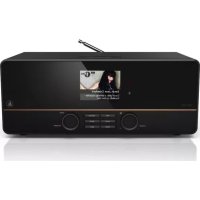
DIR3115MS - Radio HAMA - Free user manual and instructions
Find the device manual for free DIR3115MS HAMA in PDF.



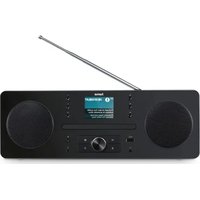
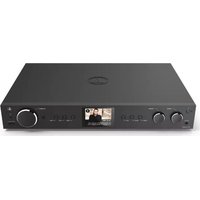
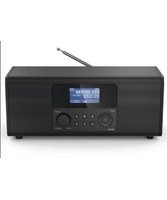
| Product type | DAB+/FM/Internet Radio |
| Brand | Hama |
| Model | DIR3115MS |
| Power supply | Mains via AC adapter (mains cable supplied) |
| Power consumption | Approx. 6 W |
| Display | 2.8-inch colour display with brightness sensor |
| Dimensions (W x H x D) | Approx. 200 x 130 x 70 mm |
| Weight | Approx. 0.8 kg |
| Connectivity | Wi-Fi (2.4 GHz, 60 mW EIRP), Ethernet LAN (RJ45), USB host, Headphone jack (3.5 mm), AUX IN (3.5 mm), LINE OUT (3.5 mm) |
| Radio reception | DAB+/DAB (Band III), FM (87.5-108 MHz), Internet radio (via Wi-Fi or LAN) |
| Antenna | Replaceable coaxial telescopic antenna (active or passive antenna possible) |
| Main functions | DAB+/FM/Internet Radio, Media Player (USB), AUX, Alarms (2), Snooze, Sleep, Equalizer, Presets (10), Info, Setup menu |
| Remote control | Supplied, LR03/AAA batteries included |
| Included accessories | Mains cable, telescopic antenna, remote control, 2 LR03/AAA batteries, user manual (PDF) |
| Cleaning and maintenance | Slightly damp, lint-free cloth, without aggressive detergent |
| Safety | Do not open the device, use only on an accessible socket, keep out of reach of children |
| Repairability | Do not repair yourself; contact Hama after-sales service if necessary |
| Warranty | Statutory warranty; unauthorized modifications void warranty |
| General information | User manual available as PDF at www.hama.com; telephone support +49 9091 502-115 |
Frequently Asked Questions - DIR3115MS HAMA
User questions about DIR3115MS HAMA
0 question about this device. Answer the ones you know or ask your own.
Ask a new question about this device
Download the instructions for your Radio in PDF format for free! Find your manual DIR3115MS - HAMA and take your electronic device back in hand. On this page are published all the documents necessary for the use of your device. DIR3115MS by HAMA.
USER MANUAL DIR3115MS HAMA
Further information and features are available on:
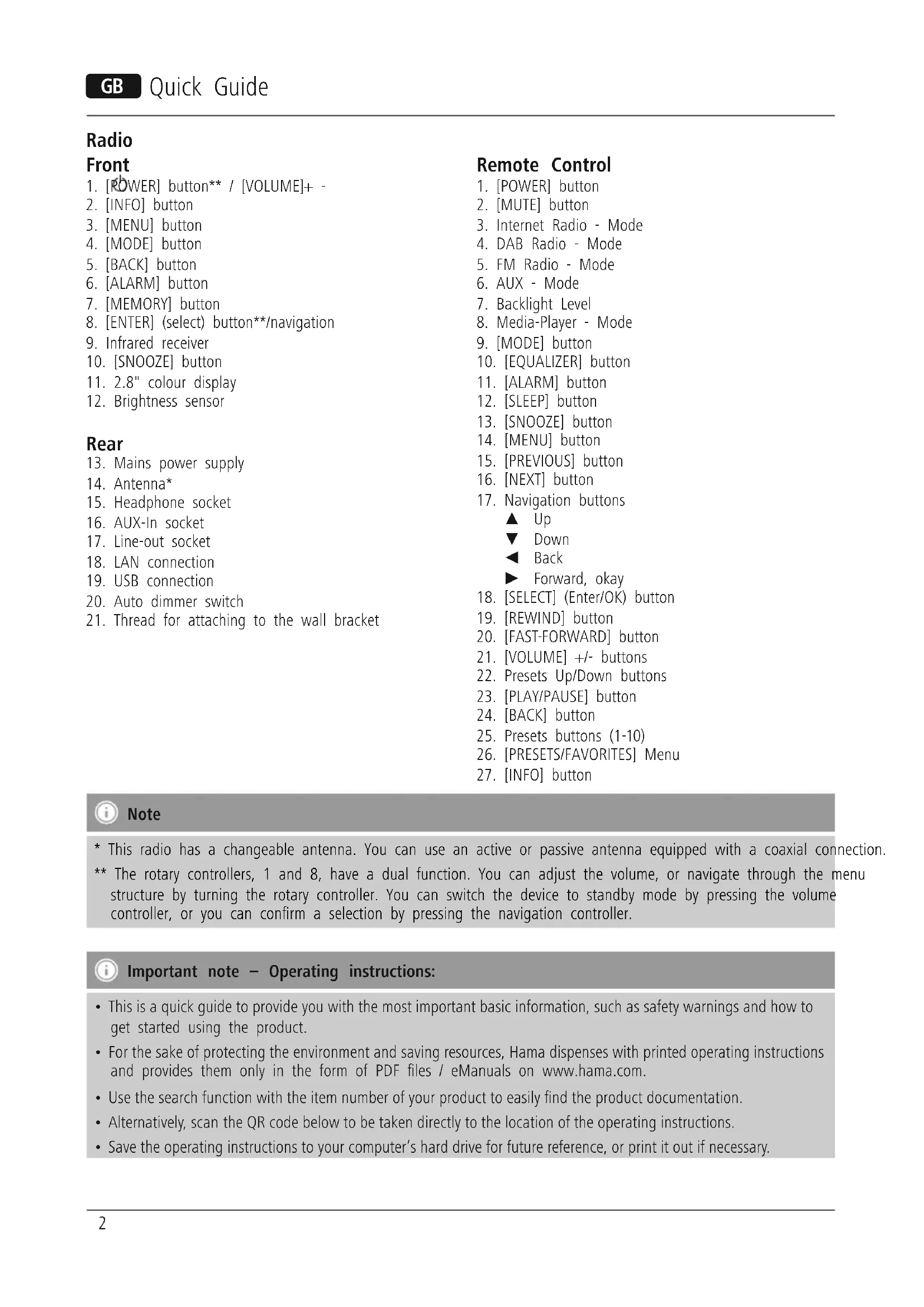
- Mains power supply
- Antenna*
- Headphone socket
- AUX-In socket
- Line-out socket
- LAN connection
-
USB connection
-
Auto dimmer switch
- Thread for attaching to the wall bracket
Remote Control
- [POWER] button
- [MUTE] button
- Internet Radio - Mode
- DAB Radio - Mode
- FM Radio - Mode
- AUX - Mode
- Backlight Level
- Media-Player - Mode
- [MODE] button
- [EQUALIZER] button
- [ALARM] button
- [SLEEP] button
- [SNOOZE] button
- [MENU] button
- [PREVIOUS] button
- [NEXT] button
- Navigation buttons
Up
Down
Back
Forward, okay
- [SELECT] (Enter/OK) button
- [REWIND] button
- [FAST-FORWARD] button
- [VOLUME] +/- buttons
- Presets Up/Down buttons
- [PLAY/PAUSE] button
- [BACK] button
- Presets buttons (1-10)
- [PRESETS/FAVORITES] Menu
- [INFO] button

Note
- This radio has a changeable antenna. You can use an active or passive antenna equipped with a coaxial connection.
** The rotary controllers, 1 and 8, have a dual function. You can adjust the volume, or navigate through the menu structure by turning the rotary controller. You can switch the device to standby mode by pressing the volume controller, or you can confirm a selection by pressing the navigation controller.

Important note - Operating instructions:
- This is a quick guide to provide you with the most important basic information, such as safety warnings and how to get started using the product.
-
For the sake of protecting the environment and saving resources, Hama dispenses with printed operating instructions and provides them only in the form of PDF files / eManuals on www.hama.com.
-
Use the search function with the item number of your product to easily find the product documentation.
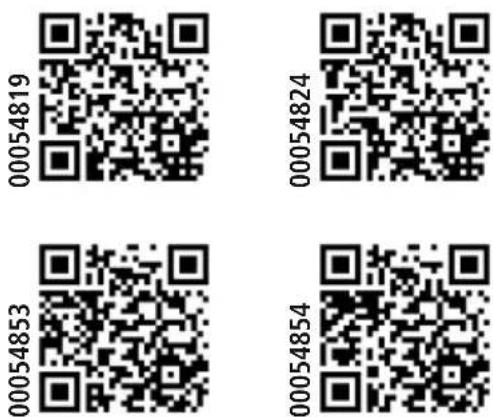
- Alternatively, scan the QR code below to be taken directly to the location of the operating instructions.
- Save the operating instructions to your computer's hard drive for future reference, or print it out if necessary.
1. Explanation of Warning Symbols and Notes

Warning
This symbol is used to indicate safety instructions or to draw your attention to specific hazards and risks.

Note
This symbol is used to indicate additional information or important notes.

Risk of electric shock
This symbol indicates product parts energized with a dangerous voltage of sufficient magnitude to constitute a risk of electric shock.
2. Package Contents
- DAB+ / FM / Internet radio
- Telescopic antenna with coaxial connection
Remote control - 2x AAA batteries
- Quick guide, brochure
3. Safety Notes
- The product is intended for private, non-commercial use only.
- Protect the product from dirt, moisture and overheating and use it in dry rooms only.
- As with all electrical devices, this device should be kept out of the reach of children.
- Do not drop the product and do not expose it to any major shocks.
- Do not operate the product outside the power limits given in the specifications.
- Keep the packaging material out of the reach of children due to the risk of suffocation.
- Dispose of packaging material immediately according to locally applicable regulations.
- Do not modify the device in any way. Doing so voids the warranty.

Risk of electric shock
- Do not open the device or continue to operate it if it becomes damaged.
- Do not use the product if the AC adapter, adapter cable or power cable is damaged.
- Do not attempt to service or repair the device yourself. Leave any service work to qualified experts.

Warning - Batteries:
- When inserting batteries, note the correct polarity (+ and - markings) and insert the batteries accordingly. Failure to do so could result in the batteries leaking or exploding.
- Do not allow children to change batteries without supervision.
- Do not mix old and new batteries or batteries of a different type or make.
- Remove the batteries from products that are not being used for an extended period
- Do not short-circuit batteries.
- Do not charge batteries.
- Do not throw batteries in a fire.
- Keep batteries out of the reach of children.
4. Before starting

Notes on Use
- The [OK] and button on the remote control have the same function as the [ENTER] button on the front of the radio.
- The button on the note control has the same function as the [BACK] button on the front of the radio.
e- The buttons on the remote control have the same function as turning the navigation controller on the front of the radio to the left and right. (right controller)
Activating the remote control
Open the battery compartment cover. It is located on the rear of the remote control and can be opened by sliding in the direction indicated. Two AAA batteries are included in the delivery, they should be inserted in the battery compartment of the remote control. Observe the correct polarity when inserting batteries. The polarity (+ / -) is indicated in the battery compartment.)
Setting up a network connection
4.1 LAN (wired network)
- Connect the LAN connection of your router to the LAN connection on your radio. You will require an Ethernet cable, which is not included in the delivery, to do this.
- Make sure that the router is on and working properly, and that you have an Internet connection.
- See the operating instructions for your router regarding properly functioning LAN connection.
- Then proceed as described in point 5, "Getting Started"
4.2 WLAN (wireless network)
- Ensure that the router is switched on, is functioning correctly and that there is a connection to the internet.
- Activate the WLAN function of your router.
- Follow your router's operating instructions as regards the correct functioning of the WLAN connection.
- Then proceed directly as described under section 5,Getting started'.
5. Getting started

Note - Optimal reception
This product is equipped with an antenna connection for external antennas with coaxial connection. A telescopic antenna that enables DAB, DAB+ and FM reception is included in the delivery. Alternatively, you can use an active or passive antenna to improve reception, or according to your requirements. Note the following:
- Pull the antenna out completely.
- We recommend you adjust the antenna vertically to ensure optimal reception.
5.1 Switching the device on
- Connect the power cable to a properly installed power port socket.

Warning
- Only connect the product to a socket that has been approved for the device. The electrical socket must always be easily accessible.
-
Disconnect the product from the power supply using the on/off switch - if this is not available, unplug the power cord from the socket.
-
Wait until the radio initialisation procedure has finished.
- Press the [POWER] button to switch the radio on. (Press a the left rotary controller)
5.2 Language and setup wizard
The first time the system starts the radio uses English. To change this, proceed as follows:
Press [MENU] > System settings > Language > Select language
Confirm your selection by pressing the [ENTER] or [OK] button.

Note
- You can choose from the following languages: English, German, Danish, Dutch, Finnish, French, Italian, Norwegian, Polish, Portuguese, Spanish, Swedish, Turkish, Czech and Slovak.
6. Care and Maintenance
- Only clean this product with a slightly damp, lint-free cloth and do not use aggressive cleaning agents.
- If you do not use the product for a long time, turn off the device and disconnect it from the power supply. Store it in a clean, dry place out of direct sunlight.
7. Warranty Disclaimer
Hama GmbH & Co. KG assumes no liability and provides no warranty for damage resulting from improper installation/mounting, improper use of the product or from failure to observe the operating instructions and/or safety notes.
8. Service and Support
Please contact Hama Product Consulting if you have any questions about this product.
Hotline: +49 9091 502-115 (German/English)
Further support information can be found here: www.hama.com
9. Recycling Information
Note on environmental protection:
After the implementation of the European Directive 2012/19/EU and 2006/66/EU in the national legal system, the following applies:
Electric and electronic devices as well as batteries must not be disposed of with household waste. Consumers are obliged by law to return electrical and electronic devices as well as batteries at the end of their service lives to the public collecting points set up for this purpose or point of sale. Details to this are defined by the national law of the respective country. This symbol on the product, the instruction manual or the package indicates that a product is subject to these regulations. By recycling, reusing the materials or other forms of utilising old devices/Batteries, you are making an important contribution to protecting our environment.
10. Declaration of Conformity
Hereby, Hama GmbH & Co KG declares that the radio equipment type [00054819, 00054824, 00054853, 00054854] is in compliance with Directive 2014/53/EU. The full text of the EU declaration of conformity is available at the following internet address: www.hama.com->00054819->Downloads. www.hama.com->00054824->Downloads. www.hama.com->00054853->Downloads. www.hama.com->00054854->Downloads.
| Frequency band(s) | 2412 - 2472 MHz |
| Maximum radio-frequency power transmitted | 60 mW EIRP |
Radio
Frontseite
- [POWER]-Taste**/[VOLUME] + -
- [INFO]-Taste
- [MENU]-Taste
- [MODE]-Taste
- [BACK] (Zurück)-Taste
- [ALARM]-Taste
- [MEMORY]-Taste
- [ENTER] (Select)-Taste** / Navigation
- Infrarotempfänger
- [SNOOZE]-Taste
- 2.8" Farbdisplay
- Helligkeitssensor
Rückseite
IyIbT InCTaHcNoHHOrO ynpaBneHnA
- Khonka [POWER]
- Khonka [MUTE]
- Pexmm INTepHeT-paDnO
- Pexmm DAB-paio
- Pekim UM-paio
- Pekim AUX
- Apkoctb NODCBETKn
- Pekmm MeuapanJeepa
- Khonka [MODE]
- KhoNka [EQUALIZER]
- Khonka [ALARM]
- Khoŋka [SLEEP]
- Khonka [SNOOZE]
- Khonka [MENU]
- Khonka [PREVIOUS]
- Khoika [NEXT]
- Khonkn nepemeeHHN NO NvHKTam MeHIO
Bbepx Bn3
Ha3aD Bnepe, OK
-
Khoika [SELECT] (Enter/OK)
-
Khonka [REWIND]
- Khonka [FAST-FORWARD]
- Khonkn nepemeeHHN [VOLUME] +/-
- KhoNk npedyctaHObK BBEPX/BHN3
- Khonka [PLAY/PAUSE]
- KhoNka [BACK] (Ha3aI)
- Khonkn npedcytaHOBKn (1-10)
- MeHIO [PRESETS/FAVORITES]
- Khonka [INFO]

PpimueaHne
* AnHHbI paHIOnpmHMK OCHAeH CbeMHO aHTEHNO. MoXHO NCIOB3OBaTB aKTNBHyO nIN naccnBHyO aHTEHy C rHe3DOM dIg KOAKCnJIbHOrO Ka6en.
** PerylajTopb1 18 BbIOnHJOT DBOHyO fHyKcHIO. PpN NobopoTe perylaTopa n3MeHaeTcra rpoMkoCTb IIN ocUeCTBnEaTcpeXoD MeJy 3JeMeHTaM MeHIO. PpN Haxattn 3ToR opeYlAToPA yCTpoiCTBO nepeXoNT B KdyuN peXIM (peYlAToP rpoMcoTn) IIN NoTBePjKaAeTc BbIbop (peYlAToP nepeXoDa MeJy 3JeMeHTaM MeHIO).

Baxhoe npmeaHne - PykoBoCTBO no 3Kcnnyatau:
- 3To KpaTkoe pyKOBOCTBO, B KOtOpOM CoIepXaTcBaxHbIe Ba3ObIe CBeJeHn, TaKne KaK yKa3aHn no TexHnke 6e3OnacHOCTN IN BBOyB 3Kcnnyatauio yCtpoiCTBa.
- I3 coo6paxhen oxpaHbOkpykaIOe cpebl n KOHOMn CEHHbIX cbipbebIX pecypcoB fnpMa Hama otKa3bBaetc OT nCnoJIb3OBaHn neaTHbIX pyKOBOCTB no 3KCIyatauun npedlaerX INCKLIQUHTelbHO nIar3arpzkn B opmate PDF nnn B vide 3NeKTPOHHO pyKOBOCTBA Ha caTe www.hama.com.
- TTo6bI InerHe HauTn HxKyHIO INHΦopMaIIO, INcNoIb3yIte ΦyHKUIO noncka. B Ctpoke nOcKa BBeIte Homep u3dEINRA, TTo6bI nOlyuHTb DocTyN K DOKyMeHTaUIN No 3TOMy u3dEINIO.
Kpome toro, nanyuhenna kpykoobctby no ekcnnyataun moxho ncnojboaibyka3aHHb Hnke QR-KoI.
CoxpaHHTe HactoIuee pyKOBOCTBO NO 3KcNpyatauHa KOMNbIOTepe, YTO6bl npn Heo6xoIMOCTN BceFda 6bla BO3MOXHOCTb MM BOCNOJIb3OBaTbCRA, IN NO BO3MOXHOCT paCneayataite erO.
1. IpeynpeuTeHbIe NIKTORpaMMbl n HnCTpyKcnn

BHHMaHHe
Данньим 3нанчКOM OTмeчЕнbl INHCTpyKци, Heco6люденге кOTopbIX MOжET npINBeCTn K onaCHO cnTyaци.

PpMueaHne
IOnONHHTeJIbHaNJI BaxHaN HOpMaun.

Onachocb nopaxKeHn 3JneKtpnuecknM TOKOM
3naok npdpnpexdaet 06 onachoctn nopA BbICOKM HappxeHem B Cnyae KacAHN HeuOJIPOBaHHbIX TOKOBdyux DeTaNen.
2. KomnJIeKT nOcTaBKn
DAB+/FM/INHTepHET-paIIO
TeNeckOnnuecka aHTeHHa C rHe3dOM dJa KoAKcnaJIbHOrO Ka6eJia
-Пульт ДИСТАнцИОНHOrуУпразВе_HЯ
26atapen AAA
KpaTkoe pyKOBO,CTBO noJIb3OBATeIa, peKJIaMHi npocneKT
3. Texhika 6e30nachOCTM
-ИЗделпpeДнэЧеHo TOLьКО ДлЯ ДOMaшHERO npIMeHEnHЯ.
-Bepeb ot rpa3n, BnaI n neperpeBaHna. 3KcNlyaTnpoBaTb TOnbKO B cyxnx NOMeueHnX.
He daBaTb dTeaM!
He poHraTb. Bepeyb ot CnIbHbIx yIapOB.
CobJIOdaTb TexHueckne XapaKTepcntIKN.
- YnakOBky He daBaTb DeTAM: OnaCHOCTb acfHKcM.
- YtɪnɪʒɪpəBaMb yɪnəKOBKY B COOTBETCTBUN C MecTHbIMN HOpMaMn.
3aPpeaaetcBHOCTb N3MeHEnB KOHCTpyKUIO. B npOTNBOM cIyae rapaHTnHbIe o8aTeJIbCTBa aHHynpyIOTc.

Onachoctb nopaxeHHa TOKOM
- N3dJIne He OTKpbIbTaB. 3aPpeJaaTc8 EKcNpyaTnpoBaTb HncnpaBHOe N3dJIne.
3anpeaetcKcnnyataun npn HeNCpabHom 6loke nntahnn nn nobpexdeHHom kaabe ne nntahnn.
3anpeaetc caMOCToTeIbHO BbINOHbTexHnueckoe 06CnyKuBaHne nn peMOHTycpoiCTBa. JIObIe paObTb IIO TexHnueCKOMy 06CnyKuBaHIO nn peMOHTy pa3peaETcBbINOJIHrTb TOnbKO KBaIIΦNupOBaHHOMy nepcoHany.

PpeynpeKdHne - BaTapeN
- 3arpyxay6atapeu,co6nOaTe noJapHocTb (+ n -). Heco6nOeHne noJapHocTm MoKet CtaTb npUHHOB BbITEKaHnI Nnn B3pbBa 6atapei.
-ДETЯМЗANPEUaEeTc3aMeHЯr6bATApEn 6e3 npuCMOTpa B3pOcNbIX.
He npimehaBb6atapeu pa3hbx TUNOB,pa3hbx npoun3BODHTeEn HIOHBoIcTapBIE 6atapeu BmecTe.
Bcnyae 60nbwo ro nepepbIBa B kcnnyataun n3Bnueb 6aTapeu n3 yctpoNCTBa. - He 3aKopaayuBaTb KOHTaKTb6aTapei.
- 06bIyHbIe 6aTapeH He 3apJxAtb.
He 6pocatb 6aTapeu B OROHb.
XpaHntb 6atapen B MceTe, HeIOCTyHnOM IJIr ITeT.
4.ДeнCTBnI nepeH hauJOM pa60TbI

HCTpyKnn no 3Knnyataa
- Khonka [OK] nnn ▷ ha nyIbTe duCTaHcNHOHorO ynpabHeHH coOTBeTCTByeT KhONKe [ENTER] Ha nepeDnei naHEn paAnOpnpemHnKa.
KhoNka Ha npBbndTaHcnoHHoro ynpaBneHncooTBeTCTByET KhoNke [BACK] Ha nepedne nahepnpaanopnemHnka. - Khonkn ▲ Ha nyIbTe InCTaHIOHOrO ynpablenHn COOTBeTcByIOT NOBOPoTy BJeBO n Bnpabo peryJlTopa nepeXoJa MExJy 3JeMeHTaM MeHIO Ha nepeJdHe naHeJI paAnOpnpemHnka (npabbl peryJlTop)
Hauano pa60tbI c nybTom duCTaHcNOHoro ynpabHeHH
Chmnte KpbIuKy OTeKa 6aTape. OHa HaxOHTcH a3aHHe CTOpHe NylbTa DnCTaHUnOHOro ynpabLeHnna.ДЯ OTKpbITNa CdbINbTe ee B O6O3HaueHHOM HanpaBLeHn. B KOMIIeKT NoCTaBKN BXODT DBe 6aTapeAAA, KOtOpBie nepei Haayanom pa60Tb Heo6xOIMOBCTaBtB B OTEcK 6aTape. BCTaBJIa 6aTapeN, Co6JIIOdaIte NOJrPHocTB. HyXHAn NOJrPHocTB (+/-) 6o63NaeHa B OTeCe 6aTapei.
Co3dHHe cTeBOro coeHNHeHn
4.1 LAN (npoBnHa cTeb)
CoeHnHTe Ka6eIeM pa3bem LAN mappyTu3aTopa c aHaIOruHbIM pa3bEmOM paIIOnpneMHNka. IJIa 3ToRo Heo6xOJMo NcIOnb3OBAb Tb Ka6eIb Ethernet, KOTOpBn He BXODIT B KOMJIeKT NOCTaBKn.
- Y6eIntecb, yTO MapuPytn3aTOp BKNHoeH, npaBnIbHO pa6oTaet n eCt nbNkNIOUeHne K INHTepHety.
-Дя obecneueHЯ npabunbHOB pa6Otby coeHHeHNAI LAN co6nHOaIte pyKOBoDCTBO no 3KcnnyatauImMapspTyN3aTopa.
3aTeM HENOCpeIcTBeHNO IepexOJte K BbINOJIHeHIO DeIcTBn, ONuCaHHbIX B pa3JeIe 5. «BBoD B EKcNJIyataUHO».
4.2 WLAN (6ecnpoBnHa cTeb)
- Y6eIntecb, yTO MapuPytn3aTOp BKNHoueH, npaBnIbHOpa6oTaET n eCTb NODKNHoueHne K INHTepHeTy.
- AKTINBUPyIte yHKnIu WLAN mapIpyTu3aTopa.
-Дяобсесеняправиьног pa6otb coeHHeHnWLANco6IooJaTe pykoBoOcTBoNo3KcnIyatauHmApupTyu3aTopa. - 3aTeM nepexoInte K BbInonHeHIO DeiCTBn, OncaHHbIX B pa3dJe 5. «BbOJ B EKcnnyatauio»
5.BBOD B 3KcNlyatauHIO

yKa3aHne - ONTMaIbHbI npHeM
Данhoeидение осашениразбемОлп NOДКЛHOUЕнь ВЕШ�н с раЗБЕМOM Дп КОАКСИАЛьНOrO Ka6Я.В KOMПЛeKТ NOCTaВКИ BXODIT NOДхОДУSSA TeJeCKONUYeCKa AHTeHHa, OБecпeчИBAIOUI npiem DAB,DAB+ n FM.B KaueCTBe aIbTePHaTINBbI MoXHO NcNoJIb3OBaTb AKTNBHyO IIN NaCCNBIHYO aHTeHHy, CnOCo6HyO NOBbICITb MOUHOCt b PnHIMMaEMOrO CnHHaJa IIN yDObJIETBOPuTb KOHKpeTHbIe NOTpe6HocTn.
BHHMaHHe!
Bcerda nonHocbO packKaDbBaIte aHTEHy.
-Дя ONTUMaNbHOrO npnema Mbl peKOMeHnyem paCNoIaratb aHTeHHy BeptNKaJIbHO.
5.1 BkIIOUeHne
-ПодсоeДинITE ceteBOI KaBENb K NaДлeжашIM obpa3OM yCTaHOBJIeHHoN pO3eTKe.

PpeynpexkdeHne
- Pp6op pa3pewaaetcnoKnOaTb TOnbKO K COOTBeTCTByIOUeI PO3eTke 3JekTpocEtN. Po3eTKa 3JekTpocETN DOJXHa 6bITb JERKO DoCTynHa.
- OTKIIOUaIte yCTPOINCTBO C NOMOuBbIKIIOuATEJIa 3JIeKTPoCETn, a npn erO OTcyTCTBn BbITaUNTe npoBoD n3 po3ETKn.
-Дохдntecb, noka 3aBepuNTcra HnuaJna3aupaIIO.
- HaxmTe KhoNky [POWER], YTO6bI BKJIOHTb paHNOnpnEMnK. (HaxaTne JEBORo peryIaTopa.)

PpmeaHne - Pn nepbOM BKIOueHm
- Пп порвом Вклочени abTomatueckn 3anyckaetca мостернachtpoikn (Setup Wizard).
- MacTeP HacTpoKn BbIIOJIHЯETcHa aHrJInCKOM 3bIKe.
Pa60Ty MaCTepa MoXHO npOnyCTnTb n 3aTeM BHOBb Bbl3BaTb eRo Ha npYROM 3bIKe.
5.2 Ra3bIK n MaCTep HAcTpoiKn
Pn nepBOM 3anycke paHIOnpneMHnka nCNOJb3yeTc aHrJIINCKM J3bIK. YTo6bl N3MeHHTb J3bIK, BbIIOJIHNITE yKa3aHHbIe HNKe DeICTBnI.
Bb6epnto nocleobateIbHO [MENU] > Systemeinstellungen (CnCTemHbIe HactpoIKN) > Sprache (r3bIK) > Sprache auswahlen (Bb6paTb r3bIK)
YTO6bI NOITBepINb CBOI BbIOp, HaxMnTe KhoNky [ENTER] nn [OK].

PpmeaHne
Ha BbI6Op IocTynHbI CneJeYIOuIe Ra3bIKa aHrnnckn, HeMezKn, DaTCKn, rOJIaHdCKn, fHcKn, fpaHcy3CKn, nTaJIbHcKn, HopBexckn, noJbCKn, nopTuRaIbCKn, nCnaHcKn, WBeDcKn, typeckn, Yewcka n CnoBaIka
6. YxOД n Texo6cnyxuBaHne
- YnCTky n3dennn npOn3BOoNTb TOnbKO 6e3BOPCOBn Cnerka BnaXHo nCanfeto. 3anpeaetc npImeHrTa arpeccNBhie nCTraune cpeCTBa.
- Ecln n3dJIe He nCNoJb3yETcH Ha npToJxHeHn DOIrO BpeMeHn, BblKIOUHTe erO n OTKIOUHTe OT cEtN. XpaHnte erO B uCTOM cyXOM MeCTe, HeIOCTynHom dIra npAmoro CoJIHeuHO rN3JyueHn.
7. OTKa3 OT rapaHTnHbIX 6o3aTeNbCTB
KomnaHamaGmbH&Co.KGHe He Hecet OTBeTCTBeHHOCTb 3a yUeep6,BO3HNKUnB CJIeDCTBne HEpBaNlbHOrMOHTaxa,PODKJIIOueHn I NcNoJIb3OBaHnI NdEINr He No Ha3NaYeHnO,a TaKKe BCJeDCTBnE HeCO6JIIOJeHn IHCTpyKuIN P0 EKnJyataun IN TexHnK 6e3OnaCHOCTn.
8.ОтделТexo6cIyXmBaHnA
No Bopocam pemonta nn 3amehbl HeucnpabBbIX n3deJn o6paauTecb K npodabuy nn B cepBncHyO cnjxby komnaHn Hama.
Topua JINHNAOTdeJATExO6CnyXnBAHHA+49 9091502-115 (HeMeUKn,aHrnnckn)
Poiop6Hee cmOTpnte 3decb: www.hama.com
www.hama.com ≥ 00054853 - > Downloads.
www.hama.com >00054854-> Downloads.
Kmitoctové pásmo (kmitoctová pásma)
2412-2472MHz
86652 Monheim/ Germany
www.hama.com
The Spotify software is subject to third party licenses found here: www.spotify.com/connect/third-party-licenses
All listed brands are trademarks of the corresponding companies. Errors and omissions excepted, and subject to technical changes. Our general terms of delivery and payment are applied.


- Remote Control
- Note
- Important note - Operating instructions:
- Explanation of Warning Symbols and Notes
- Warning
- Risk of electric shock
- Package Contents
- Safety Notes
- Warning - Batteries:
- Before starting
- Notes on Use
- Activating the remote control
- Setting up a network connection
- LAN (wired network)
- WLAN (wireless network)
- Getting started
- Note - Optimal reception
- Switching the device on
- Language and setup wizard
- Care and Maintenance
- Warranty Disclaimer
- Service and Support
- Recycling Information
- Note on environmental protection:
- Declaration of Conformity
- Radio
- Frontseite
- Rückseite
- IyIbT InCTaHcNoHHOrO ynpaBneHnA
- PpimueaHne
- Baxhoe npmeaHne - PykoBoCTBO no 3Kcnnyatau:
- IpeynpeuTeHbIe NIKTORpaMMbl n HnCTpyKcnn
- BHHMaHHe
- PpMueaHne
- Onachocb nopaxKeHn 3JneKtpnuecknM TOKOM
- KomnJIeKT nOcTaBKn
- Texhika 6e30nachOCTM
- Onachoctb nopaxeHHa TOKOM
- PpeynpeKdHne - BaTapeN
- 4.ДeнCTBnI nepeH hauJOM pa60TbI
- HCTpyKnn no 3Knnyataa
- Hauano pa60tbI c nybTom duCTaHcNOHoro ynpabHeHH
- Co3dHHe cTeBOro coeHNHeHn
- LAN (npoBnHa cTeb)
- WLAN (6ecnpoBnHa cTeb)
- 5.BBOD B 3KcNlyatauHIO
- yKa3aHne - ONTMaIbHbI npHeM
- BHHMaHHe!
- BkIIOUeHne
- PpeynpexkdeHne
- PpmeaHne - Pn nepbOM BKIOueHm
- Ra3bIK n MaCTep HAcTpoiKn
- PpmeaHne
- YxOД n Texo6cnyxuBaHne
- OTKa3 OT rapaHTnHbIX 6o3aTeNbCTB
- 8.ОтделТexo6cIyXmBaHnA
Brand : HAMA
Model : DIR3115MS
Category : Radio