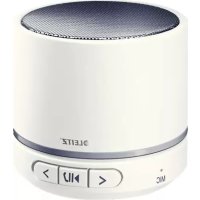
63581001 - Docking station LEITZ - Free user manual and instructions
Find the device manual for free 63581001 LEITZ in PDF.



| Product Type | Portable Bluetooth speaker with hands-free kit |
| Brand | Leitz |
| Model | 63581001 |
| Power | Built-in lithium-polymer battery 400 mAh |
| Battery life | Approximately 6 hours |
| Charging time | Approximately 2 hours |
| Rated output power | 2.5 W |
| Maximum power | 3 W |
| Frequency response | 100 Hz – 20 kHz |
| Wireless connectivity | Bluetooth v4.1, range 10 m (Class 2) |
| Bluetooth profiles | A2DP, AVRCP, HFP, HSP |
| Supported audio formats | MP3, WAV |
| Maximum microSD card capacity | 32 GB |
| Wired input | AUX IN via Mini-USB connector |
| Main functions | Bluetooth and microSD audio playback, hands-free kit, call control |
| Dimensions (H × Ø) | 54 mm × 60 mm |
| Weight | 235 g |
| Safety | Do not open, modify or repair; keep away from children and flames |
| Maintenance and cleaning | Clean with a damp cloth, avoid solvents and liquids |
| LED status indicator | Red (charging), blue (Bluetooth connected), green (microSD) |
Frequently Asked Questions - 63581001 LEITZ
User questions about 63581001 LEITZ
0 question about this device. Answer the ones you know or ask your own.
Ask a new question about this device
Download the instructions for your Docking station in PDF format for free! Find your manual 63581001 - LEITZ and take your electronic device back in hand. On this page are published all the documents necessary for the use of your device. 63581001 by LEITZ.
USER MANUAL 63581001 LEITZ
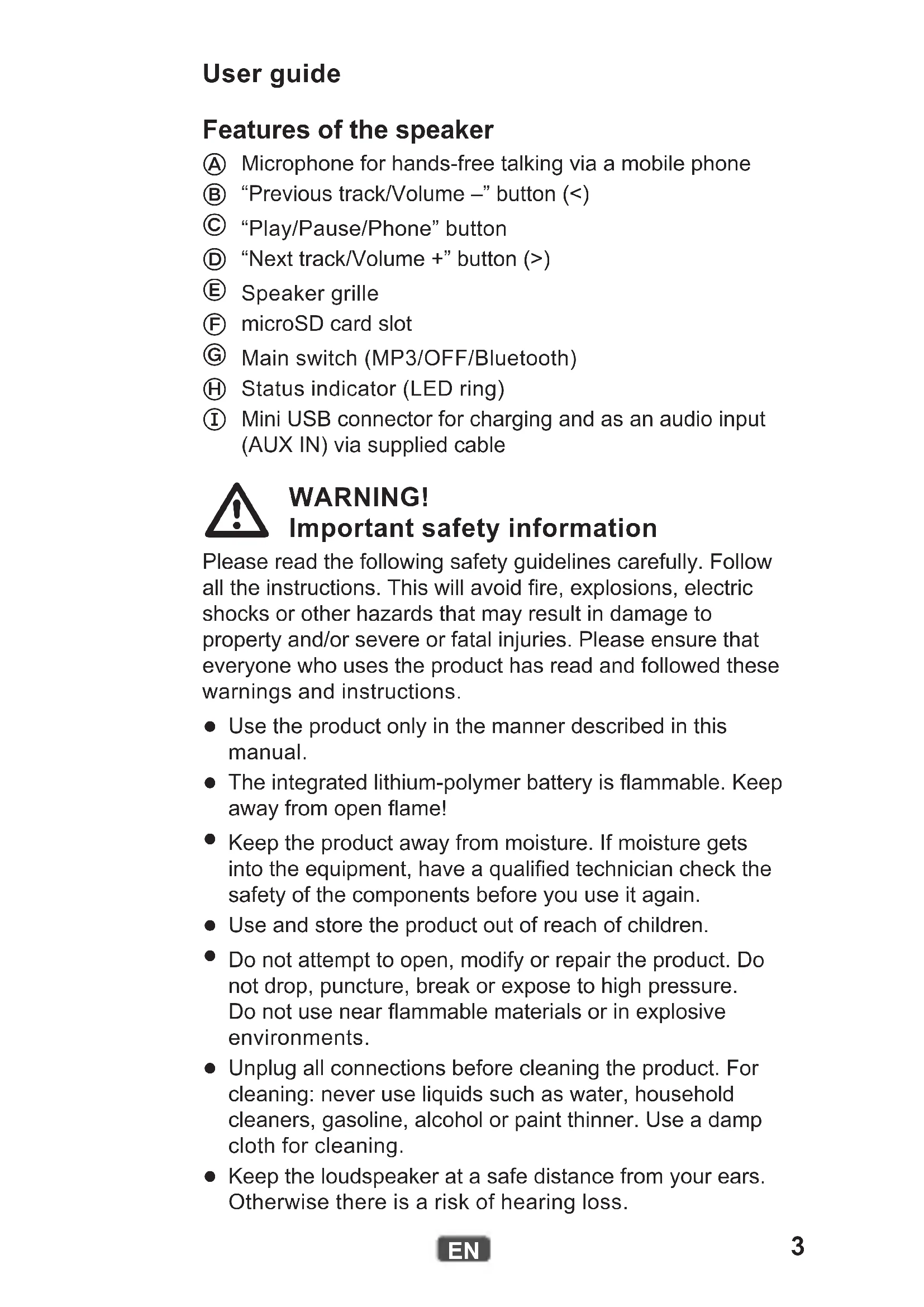
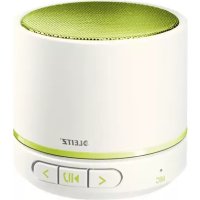
Features of the speaker
A Microphone for hands-free talking via a mobile phone
(B) "Previous track/Volume -" button (<)
© "Play/Pause/Phone" button
"Next track/Volume ^+ button (>)
E Speaker grille
F microSD card slot
Main switch (MP3/OFF/Bluetooth)
Status indicator (LED ring)
① Mini USB connector for charging and as an audio input (AUX IN) via supplied cable

WARNING! Important safety information
Please read the following safety guidelines carefully. Follow all the instructions. This will avoid fire, explosions, electric shocks or other hazards that may result in damage to property and/or severe or fatal injuries. Please ensure that everyone who uses the product has read and followed these warnings and instructions.
- Use the product only in the manner described in this manual.
- The integrated lithium-polymer battery is flammable. Keep away from open flame!
- Keep the product away from moisture. If moisture gets into the equipment, have a qualified technician check the safety of the components before you use it again.
- Use and store the product out of reach of children.
- Do not attempt to open, modify or repair the product. Do not drop, puncture, break or expose to high pressure. Do not use near flammable materials or in explosive environments.
- Unplug all connections before cleaning the product. For cleaning: never use liquids such as water, household cleaners, gasoline, alcohol or paint thinner. Use a damp cloth for cleaning.
- Keep the loudspeaker at a safe distance from your ears. Otherwise there is a risk of hearing loss.
Charging the internal battery
Before first use, the battery must be fully charged (approx. 2 hours).
- Make sure the product is switched off (the status indicator does not light).
- Use the cable supplied to connect the mini USB connector to the USB port of a computer or to an optional USB power adapter. The status indicator lights red while charging. It will go out when the charging process is complete.
Meaning of the status indicator
| Colour State Meaning | |
| Green | Blinking microSD card selected for MP3 playback |
| Steadily lit microSD card playback paused or AUX IN active | |
| Blue Blinking Bluetooth connection established | |
| Blue/red Blinking Bluetooth pairing mode active | |
| Red | Blinking Battery is discharged |
| Steadily lit Battery is charging | |
| Off Battery is fully charged | |
Pairing the speaker with a device
If you have already paired the speaker with the device, it is normally sufficient to turn both devices on. Otherwise perform the following actions.
- Slide the main switch to the Bluetooth position.
While the speaker is searching for an already paired device, the status indicator blinks 6 times blue. If no device is found, the status indicator blinks alternately red and blue. - Activate the searching mode on the other device. (Refer to the other device's manual for details if necessary.)
- Once the speaker appears as a found device ("Leitz 6358"), select it.
- If prompted, enter "0000" as a code or password.
Once the connection is established, the status indicator lights steadily blue. Audio reproduction and control are now carried out through the speaker.
Note: The device pair coupled via Bluetooth operates according to the supported protocols. Smartphones, for example, usually use HFP (Hands-free profile) and A2DP (Advanced Audio Distribution Profile). Therefore, in this case, the speaker can both manage calls and control audio reproduction. With an MP3 player with A2DP only audio reproduction will work, and with a simple mobile phone only calls can be handled.
Playing back audio files from a microSD card
You can use this product to play back MP3 and WAV format audio files saved on a microSD card.
- Insert the microSD card into the card slot until it snaps into place. Make sure the contacts are facing upwards when inserting the card.
- Slide the main switch to the MP3 position.
Use the buttons on the speaker to control audio reproduction.
Controlling audio reproduction
Audio reproduction via Bluetooth or microSD card can be controlled in the following manner:
| Objective Action | |
| Start/stop playback Press the “Play/Pause/Phone” button. | |
| Skip to the next track Press the right arrow button (>). | |
| Skip to the previous track Press the left arrow button (<). | |
| Adjust the volume | Press and hold the appropriate arrow button (< or >). |
| Switch between microSD card and AUX IN | Press and hold the “Play/Pause/Phone” button for two seconds. |
Audio reproduction over wire connection
You can also use the speaker if your audio source does not have Bluetooth or there is no Bluetooth connection. Use the supplied cable for this purpose.
- Connect the 3.5-mm mini jack of the cable to the headphones or line output of your audio source.
- Connect the mini USB plug of the cable to the mini USB connector on the speaker.
- Slide the main switch to the MP3 position.
- Operate your audio source as usual to control playback. To adjust the volume, use the arrow buttons as explained below.
Note: The speaker cannot control the audio source via the cable connection. It only reproduces the audio signal received via the cable.
Controlling mobile phone calls
When there is an incoming call on your paired mobile phone, the speaker sounds an incoming call tone. Your mobile phone may also sound an incoming call depending on its settings. The following table shows what you can do with the speaker in this situation.
| Objective Action | |
| Answer an incoming call Press the “Play/Pause/Phone” button. | |
| Reject an incoming call | Press and hold the “Play/Pause/Phone” button for two seconds. |
| End a call Press the “Play/Pause/Phone” button. | |
| Redial | Press the “Play/Pause/Phone” button twice in quick succession. |
When a call comes in while audio is played back over the loudspeaker, the playback signal is faded out. Audio playback stops, and only the call will be audible. Once you end the call, playback will resume and the playback signal will be faded in again.
Troubleshooting
Note: The speaker attempts to restore the connection with the last paired device. To connect to a different device paired earlier, pair that device again (see "Pairing the speaker with a device " on page5).
| Issue Solution | |
| The Bluetooth connection is lost. | The range may be exceeded. Move both devices closer together again. Turn the speaker off and back on. The connection should be re-established. |
| Make sure that no other Bluetooth devices, wireless devices or other devices which may interfere with the connection are on in the area. Switch off such devices as necessary. | |
| Sound is not clear or there is no sound at all. | Turn the speaker off and back on. |
| Turn off your devices's equalizer. | |
| Make sure the speaker's volume level is not too high. | |
| No audio output from the speaker. | Make sure your Bluetooth device supports A2DP. |
| Make sure both devices are paired. | |
| Turn the speaker off and back on. The connection should be re-established. | |
| The volume cannot be adjusted. | Change the volume on the other device. |
| Charge the internal battery. | |
| No LEDs light up. | Make sure that the main switch is in the MP3 or Bluetooth position. |
| Charge the internal battery. | |
| A call is not indicated on the speaker. | Make sure your mobile phone is equipped with HFP. |
| Make sure both devices are paired. | |
| Turn the speaker off and back on. The connection should be re-established. | |
| Audio playback does not resume after ending a call. | Press the "Play/Pause/Phone" button to resume playback. |
| Playback control is not possible with the speaker. | Make sure your mobile phone is equipped with AVRCP. |
Technical Data
| Rated output power 2.5 W | |
| Maximum output power 3 W | |
| Sound pressure level (1 kHz) 86 dB, ±3 dB | |
| Frequency range 100 Hz – 20 kHz | |
| Bluetooth compatibility Bluetooth v4.1 | |
| A2DP v1.2, AVRCP v1.0, HFP v1.6, HSP v1.2 | |
| Bluetooth operating range max. 10 m (Class 2) | |
| microSD card maximum capacity 32 GB | |
| Supported audio file formats MP3, WAV | |
| Battery capacity 400 mAh | |
| Usage time, battery fully charged approx. 6 hours | |
| Charging time approx. 2 hours | |
| Permissible ambient temperature (operation) | 0–40 °C |
| Permissible ambient temperature (storage) | 0–40 °C |
| Dimensions (H × Ø) 54 mm × 60 mm | |
| Weight 235 g | |
Guidelines for Electromagnetic Compatibility
This device has been tested for compliance with the limit values specified in EMC Directive 2004/108/EC of the European Community. These limit values are designed to provide reasonable protection against harmful interference in residential areas. If this equipment is not installed and used in accordance with this manual, it may cause harmful interference to radio or television reception or affect other electronic devices. Use only shielded cable to connect the components in order to avoid such interference. Non-compliance invalidates the permission to operate this equipment.
Disposal
The crossed-out wheelie bin indicates that this product must not be disposed of with household waste (residual waste). You must dispose of electric and electronic appliances and empty batteries at specially provided public locations. There is no charge for disposal. For more information, contact your local city or district council or the shop where you purchased the product.
Gebrauchsanweisung
KepyBaHnB ViTbOpEHm aydio
KepyBaTn BiIbTbOpEnHЯm ayio uepe3 Bluetooth a6o kapTKy microSD MOxHa HAcTyuHIM YInHOM:
YcynHnHeHecnpaBHOcteN
Приитka: Динамік hamara\'ься BiДнOBИТи 3'\'EDHaHHЯ 3 OCTaHHIM npinctpoem, i3 якIM 6уNo CTBOPeHO napy. Для пidКлIOчЕнЯ do iHswOro npinctpoI, 3 якIM 6уNo CTBOPeHO napy paHIwe, CTBOpITb i3 Hmnpy 3HOBy (ДИВ. "CTBOPeHHЯ napn Динamika 3 npinctpoem" Ha cTOp. 125).
| ПюбLEMа Рihuения | |
| 3'едненьBluetoothВtrраун. | ДIANAZONMOKE6bTNIpeBUNSEHO.Po3TaUyIeOBuApnICrpoi 6bIMKHeOJIOOJIOO3HOBy.BIMKHITb 3HOByBBIMKHITb DInHaMik. 3'EDHANNA MAc 6bTu BIDHOBJIeNO. |
| Пееконайтеся,шо iINsI pricstpoIBluetooth,провodobiChIINsI pricstpoI,Як MOxUbIpeBUNOJATN 3'EDHANHIO, He po3-TaSObaHI IObIaY. BIMKHITb Taki pricstpoI,Якшо HeO6XIDNo. | |
| 3buk Heчitken aboB3aralni BIDcUTHi. | BIMKHITb 3HOBY BBIMKHITb DInHaMik. |
| BIMKHITb ekBaIaN3ep y cBOIx pricstpoX. | |
| Пееконайтеся,шо рIBeH b rYHOCtI DInHaMika He NaTO BIVcOKn. | |
| BIDcUTnii 3buk i3DINAmika. | Пееконайтеся,шо BAùn pricstpiBBluetooth nIDTPmYe A2DP. |
| Пееконайтеся,шо mix pricstpoMn CTBOpEnnapy. | |
| BIMKHITb 3HOBy BBIMKHITb DInHaMik. 3'EDHANHЯ MaE 6bTu BIDHOBJIeNO. | |
| He VdaetbcBvIDpergulovatnruhnicrb. | 3MiHITb pIBeH b rYHOCtI Ha iINOMU pricstpoI. |
| ЗapdIb VbUdoBAnHn akymynlAToP. | |
| CbitnojIoHi iNDkAtopn HeCBITbCS. | Пееконайтеся,шо roLobHn BIMkaupe6bVbAc BnoLoXeHnI MP3 a6o Bluetooth. |
| ЗapdIb VbUdoBAnHn akymynlAToP. | |
| BIVklnk HeBIDobpaxKaETbcnHaDINAmiky. | ПееконaiTees,шо BAùn mobIbHn TelefoH OCHaSeHOrHFP. |
| ПееконaiTees,шо mix pricstpoMn CTBOpEnnapy. | |
| BIMKHITb 3HOBy BBIMKHITb DInHaMik. 3'EDHANHЯ MaE 6bTu BIDHOBJIeNO. | |
| BIDTBOPENH YAidioHe noHOBJIIOCTbcnPiSCnZakInChennPor3MOBn. | HatncHITb KhoNkY "BIDTBOPENH/Play3a/TeloefoH",шoB BIDHOBHTn BIDTBOPENH. |
| KepybatNiBIDTBOPENHAMemOJINBO 3aДОpOMOrO DInHaMika. | ПееконaiTees,шо BAùn mobIbHn TelefoH OCHaSeHOrAVRCP. |
Texhichi xapaKtepncnkn
MaNbI3dI kayinci3dk aKnapaTbI
KeNeci kayinci3dk HycKaynapbH MKNrT OKbIN 8bIFbIH3. BapnbK HcaynapdbOpbHdaHb3.ByI ePTTih 8bIFybH, XapblbICTapdbH, 3JIeKTP TorbHbIH COYbIH Hemece 6yIMHBH 3aKbIMdAnybiHa JxHe/ Hemece KaTbI Hemece 9im Kayni bap japaKaTTapra ce6en 60nybl MyMkiH backa kayintepdi 60ndbipMaNbI. OHIMdi naJaHaHaTBH 6apbIK aadamap ocbI eCkeTpynepdi JxHe HycaynapdbI OKbIFahbIHa JxHE opbHdaFaHbIHa Ke3 JeTKi3iHi3.
- Θhimdi ocbi HycayIbIKTa CUNaTTaJFaH Typde faHa naJaHaHBiHbI3.
- BipiKTIpiIReH NITn-NoJImep 6aTapecbl KaHfblw 6OJbIn KeJeDi. AwbIK XaJIbHHaH KaWbIK caKaTahbl3!
- ΘиIMdi bINfaiDah aIbIC yCTaHbI3. Erep KypblfbiFa bINfa 3aT kipren 6oIca, KypblfbiHbI KaIta naIdaIahyDah 6ypbIH KypamDa6eJIkTepiH kayinci3diRiH 6iIKTi MAmHa TeKceptiH3.
- Θhimdi 6aIanaIapdbH, KOJIxKeTneTih Jepde naJaIaNbIHbI3 XHe caKaTaHbI3.
- Θhimdi awyfa, e3reptyre Hemece XeHdeyre apeket etnehi3. Θhimdi Tycipin anMaHbI3, TecneHI3, cblNbIpMaHbI3 Hemece KaTbIKbcIM ocepIH 6oJbIpMaHbI3. Θhimdi Te3 XaHfblM MaTePnAJaapDbIH XaHbIHda Hemece Xapblny kayni bap optada naJaHaHa6aHbI3.
- Θhimdi Ta3aaydah 6ypbH 6apnbK KocblbIMapdbI axbipTaBHbI3. Ta3anay ywiH cy, TypmbICTbIK Ta3apTkbiTap,
6eH3nH, cnpT Hemece epitkiu CnaKTbI CynbK 3aTTap naHaHaHaHaB13. DbIMkbI Iy6epeKeHn Ta3aHaHb13.
-ДинамкTi KyaIaIbIbI3dAn Kayinci3 apaIbIKTa YCTaHbI3.Болмаган kardaIda ecty kaIeTIHeN aIbIPbIpy kayni 6ap.
Iшк iбатapestянь iЗapяdTay
Anfawkbl naIdaIahydan 6ypbH 6aTapeHbI TOnbIK 3apdTay KepeK (wamameh 2 carat).
- ΘΗΜΗΙΝ ἐωιρίπητινήε Κθ3 ΜεΤΚιδις (Κγή ένησικαTΟβι καύνδαμάβαι).
- miniUSB kockbuih komnbHepiH USB nopTbHa Hemece KocbIMsa USB kyat aanTepeine xaIray ywiH 6epiIreH ka6eIbI naJaIaHbIHbI3.
3apay 6apbicbHda Kyn INHnKaTOpbl KbI3bl TycTe XaHaDbI.
3apay ydepici aKaTaNfah Ke3de cHeDi.
Kyu HndnKaTopbIHbIH MafbHaCbl
| Tyci Kyni MałbIHacBi | ||
| Жасыл | Жасылblыктайды | MP3 ойнатуfa aphaflgan microSD kaptasbl |
| Туразыл жаныл тур | microSD кар Tasындаы ойнату ТOKтылган немece AUX IN белсан di | |
| КекЖасылblыктайдыBluetooth косылмы opнатылды | ||
| Кек/KьзылЖасылblыктайдыBluetooth чуп tacу рекимi сelenс di | ||
| Кьзыл | Жасылblыктайды Баразец разюдталган | |
| Туразыл жаныл турБаразец зapадтоу устінде | ||
| ЕшіруліБаразец толык зapадтолган | ||
YHdETkIwTi KypbInfBImeH XyntactbIpy
Erep yHndeTkiWti KypblfBImeH xynTactbipraH 6oJcaHbI3, eki KypblfBInbI Kocy xetkiNikTi 6oJaDbI. ΘnTnerHe, KeNeci opeKeTTepDi opbIHdaHbI3.
- Heri3ri axbipatkbIWBtbl Bluetooth kyniHe cbipfblHbI3.
YHdTeKiw aIeKaWah KyNTactbIPbINFaH KypblfblHbi i3dey Ke3iHde, Kyu HndnKaTOpbl 6 pet KeK TycTe XblnbIKtaaDbI. Erep eKhdaan Kypblfbl Ta6blmaca, Kyu HndnKaTOpbl Kb13bl JxHe Kek TycTI 60JbIn XblnbIKtaaTbIH 60JaDbI.
2.Баcka KypbIINfblIaflbl i3dey peXIMiH icKe KoCbIHbI3.(Erep KaKeT 6oIca, mJIImeT any ywiH 6acKa KypbIINfblIHbIH HycKayIbIFbIH KapaHbI3.) - YHdTeKiw Ta6blrHan Kypblrbl ("Leitz 6358") 60nbin naJa 6oNca, OHbl TaHdaHbI3.
- Erep cypala, kOJ HeMeCe KynIe ce3 petiHde "0000" eHri3iHi.
KocblbIM opHaTbIJaH coH, XapbIK dIOdTbI caKHa TypaKTbIKek TycTI 60bln JkaHaDbI da. EHdi Dbl6bICTbI YHdETKiIw apKblbl WbIfapyra XHe 6aCkapyra 6oJaBl.
Eckepim: Bluetooth apKbIbI JxynTacTbIpbIrlfAn Kypblfbl KOJday KepceTilreH npoTOkOJaapFa caikec xMbcic icTei. MbiCaJIb, cMapToHap, aDeTTe HFP (Hands-free profile) xeHe A2DP (Advanced Audio Distribution Profile) npoTOkObln naJaHaHaDbI.
CoHdbkTaH, 6yJ xaFdaJa yHdEtKiWi KOhbpaynapDbI da JxHe Dbl6bICtBIn, 8bIfyBH Da 6ackapaDbI. A2DP npoToKOJIbI rHa 6ap MP3 OHaTKblw TEK Dbl6bIC 8bIfapadbl JxHe KapaanbIM YraBl TelefoHMen TEK KOhbpaynap Ka6blnDaHaDbI.

- Features of the speaker
- WARNING! Important safety information
- Charging the internal battery
- Meaning of the status indicator
- Pairing the speaker with a device
- Playing back audio files from a microSD card
- Controlling audio reproduction
- Audio reproduction over wire connection
- Controlling mobile phone calls
- Troubleshooting
- Technical Data
- Guidelines for Electromagnetic Compatibility
- Disposal
- Gebrauchsanweisung
- KepyBaHnB ViTbOpEHm aydio
- YcynHnHeHecnpaBHOcteN
- Texhichi xapaKtepncnkn
- MaNbI3dI kayinci3dk aKnapaTbI
- Iшк iбатapestянь iЗapяdTay
- Kyu HndnKaTopbIHbIH MafbHaCbl
- YHdETkIwTi KypbInfBImeH XyntactbIpy
Brand : LEITZ
Model : 63581001
Category : Docking station