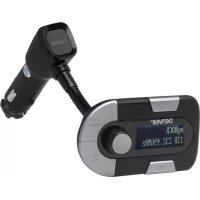
DAB11 - Car stereo DENVER - Free user manual and instructions
Find the device manual for free DAB11 DENVER in PDF.



| Product type | DAB+/DAB car radio with FM transmitter |
| Brand | DENVER |
| Model | DAB11 |
| LCD display | 37 x 23 mm |
| Power supply | 12-24 V DC via cigarette lighter |
| Connectivity | FM transmitter (87.6 to 107.9 MHz), 3.5 mm audio output, USB charging port |
| Main functions | DAB+/DAB reception, auto scan, manual search, volume control, FM transmission, RDS, line out (AUX), 5V/2.1A charger |
| DAB frequency range | Band III from 174 to 240 MHz |
| FM transmission range | 87.6 to 107.9 MHz |
| Charging output | 5 V / 2.1 A |
| Interface languages | English, German, Norwegian |
| Installation | Plug into cigarette lighter, turn on, auto scan, set FM frequency on car radio |
| Maintenance and cleaning | Wipe with a slightly damp lint-free cloth. Do not use products containing alcohol, ammonia or abrasives. |
| Safety | Do not remove the cover. No user-serviceable parts. Refer servicing to qualified personnel. |
| Spare parts and repairability | Not applicable: the device contains no user-serviceable parts. |
| Included accessories | AUX cable, cigarette lighter adapter, external antenna |
| Certifications | Compliant with directive 1999/5/EC |
| General information | Brand: DENVER, Model: DAB11, Manufacturer: Inter Sales A/S, Denmark |
Frequently Asked Questions - DAB11 DENVER
User questions about DAB11 DENVER
0 question about this device. Answer the ones you know or ask your own.
Ask a new question about this device
Download the instructions for your Car stereo in PDF format for free! Find your manual DAB11 - DENVER and take your electronic device back in hand. On this page are published all the documents necessary for the use of your device. DAB11 by DENVER.
USER MANUAL DAB11 DENVER
- Wireless transmission for DAB+/DAB radio to your existing car radio amplifier by FM transmission technology
- Quick SCAN to search the next available free DAB stations/FM frequency
- FM transmitter function is combined in this model
- Line out function, to get the best sound quality through the connecting to Car's Aux-in
- With 2.1AMP charging function, charge your mobile devices on the way
- Draws power from the car's cigarette lighter.
- With goose neck easy to adjust the angle of the device
- With RDS
Specification:
- Frequency range: DAB Band III 174-240MHz
- FM transmit range: 87.6-107.9MHz
- Output Connectors: 3.5mm stereo output connecting to car stereo aux-in (if available)
- LCD display: 37*23mm
- Car Charge output: 5V/2.1A
- USB output for charging
CAUTIONS:
TO REDUCE THE RISK OF ELECTRIC SHOCK, DO NOT REMOVE ANY COVER. NO USERSERVICEABLE PARTS INSIDE, REFER ANY SERVICING TO QUALIFIED SERVICE PERSONNEL.
To clean the DAB-11 radio, wipe the case with a slightly moist, lint-free cloth. Do not use any cleaning fluids containing alcohol, ammonia or abrasives.
Product Overview
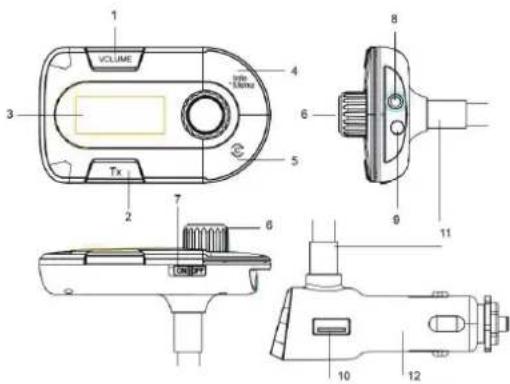
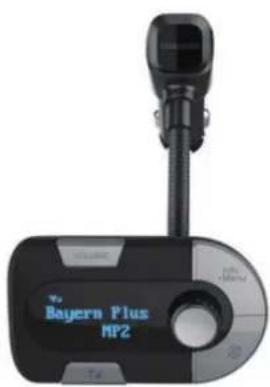
- VOLUME button
- FM Transmission
- LCD Display
- Menu/Info
- Automatically scan DAB stations/best transmitting frequency
- Spin Button Control
- ON/OFF switch
- Audio out Jack
- Antenna jack
- Output charger 5V/2.1A
- Connector fixed with the goose neck
- Power supply plug
Installation
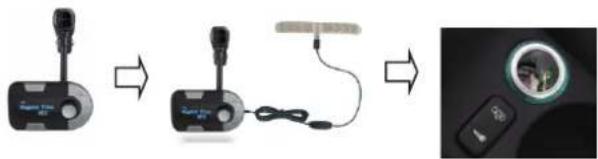
- Insert the "Power Supply Plug" into the car cigarette power port (Input:12-24V)
- Switch on the unit using the "ON/OFF" switch
- You can adjust the direction of the unit with goose neck
- Install the external antenna as per the below diagram:
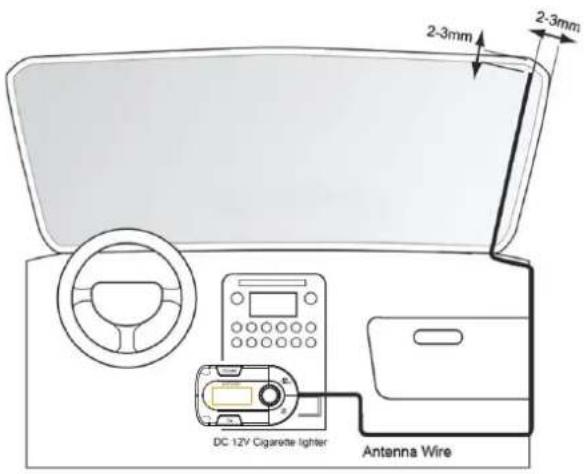
ENG 3
How to use:
- Insert the Power Supply Plug into the car cigarette power port (Input:12-24V)
- Switch on the unit using "ON/OFF" switch
- It will perform a Full Scan of DAB stations automatically within 5 seconds after "Full scan" shows on the display
- Press TX button on the DAB-11 will get to the "FM Transmit Mode" and the screen will show the current FM transmitting frequency, make a note of that number. You can change to other frequencies manually to suit better to the district you are driving in. You are recommended to tune your car FM radio to an unoccupied FM frequency, so that the car radio is not interfered and to get a better audio quality.
- Turn on your in-car audio system
- Switch the car radio's FM frequency to match the DAB-11 FM transmitting frequency setting
Press and hold "MENU/INFO" button for 2 second, and spin "Spin Button Control" button clockwise, and to see some options, below are listed in sequence:
1) Full scan: press the "Spin Button Control" and spin to start a full automatic scanning
2) Manual tune: press the "Spin Button Control" and spin to start search stations manually, and press it again to set
3) Volume set: press the "Spin Button Control" and spin to adjust the volume, and press it again to set up
4) System reset: keep pressing the "Spin Button Control" until "OK" show up
USING THE AUX OUTPUT
To get better sound quality, you can use the LINE OUT function below:
- Connect the AUX connect wire (included) from the out jack of the DAB-11 car adaptor to the AUX input jack of your car
The audio signal of the car DAB adaptor will be transferred to your car speakers directly
ENG 4
ALL RIGHTS RESERVED, COPYRIGHT DENVER ELECTRONICS A/S
DENVER
www.denver-electronics.com

Electric and electronic equipment contains materials, components and substances that can be hazardous to your health and the environment, if the waste material (discarded electric and electronic equipment) is not handled correctly.
Electric and electronic equipment is marked with the crossed out trash can symbol, seen below. This symbol signifies that electric and electronic equipment should not be disposed of with other household waste, but should be disposed of separately.
All cities have established collection points, where electric and electronic equipment can either be submitted free of charge at recycling stations and other collection sites, or be collected from the households. Additional information is available at the technical department of your city.
Hereby, Inter Sales A/S, declares that this Denver DAB-11 is in compliance with the essential requirements and other relevant provisions of Directive 1999/5/EC. A copy of the Declaration of Conformity may be obtained at
INTER SALES A/S
Omega 5a, Soeften
DK-8382 Hinnerup
Denmark
www.facebook.com/denverelectronics

Bedienungsanleitung
DAB-11
www.denver-electronics.com
German
Merkmale:
www.facebook.com/deverelectronics
NOR 5

Brand : DENVER
Model : DAB11
Category : Car stereo