OS826 - Alarm system MARMITEK - Free user manual and instructions
Find the device manual for free OS826 MARMITEK in PDF.


Frequently Asked Questions - OS826 MARMITEK
User questions about OS826 MARMITEK
0 question about this device. Answer the ones you know or ask your own.
Ask a new question about this device
Download the instructions for your Alarm system in PDF format for free! Find your manual OS826 - MARMITEK and take your electronic device back in hand. On this page are published all the documents necessary for the use of your device. OS826 by MARMITEK.
USER MANUAL OS826 MARMITEK
natural_image
Close-up of a transparent container with a black liquid level at the bottom (no text or symbols visible)USER MANUAL 2
text_image
Upper Mounting Hole Backup Battery Pack Rear Tamper Switch Main Terminal Block Lower Mounting Hole Rear Tamper Terminal Block Transmission LED External Tamper Jumper Front Tamper Terminal Block Transmitter Delete Button Siren Cable Entry Hole Lower Mounting Hole Battery Connector Mode Jumper (JP1) Arming Tones Jumper (JP2) Front Cover Tamper Switch Location of Cover ScrewFigure 1; cover off
OS826
SAFETY WARNINGS
- Do not expose the components of your systems to extremely high temperatures or bright light sources.
- In case of improper usage or if you have altered and repaired the product yourself, all guarantees expire. Marmitek does not accept responsibility in the case of improper usage of the product or when the product is used for purposes other than specified. Marmitek does not accept responsibility for additional damage other than covered by the legal product responsibility.
- This product is not a toy. Keep out of reach of children.
- The product should only be repaired or serviced by a qualified repairman.
- Keep batteries out of the reach of children. Dispose of batteries as chemical waste. Never use old and new batteries or different types of batteries together. Remove the batteries when you are not using the system for a longer period of time. Check the polarity (+/-) of the batteries when inserting them in the product. Wrong positioning can cause an explosion.
- Only connect the adapter to the mains after checking whether the mains voltage is the same as the values on the identification tags. Never connect an adapter when it is damaged. In that case, contact your supplier.
INTRODUCTION
The OS826 is a wireless siren is a part of the Marmitek ProGuard800 series, and operates together with the ProGuard800 alarm system. When you wish to know more about the complete system, its possibilities and its settings, then you can check out the installation manual or visit www.marmitek.com.
In the event of an alarm the control panel activates the siren and strobe. The siren is sounded until the end of the siren cutoff programmed at the control panel. After the siren cutoff has expired, the strobe continues to flash until the system is disarmed.
INSTALLATION
WARNING: Wear hearing protection when installing the siren.
- Open the housing. To do so, remove the cover screw located at the bottom of the housing and lift the front cover away from the rear housing.
- Remove the strobe cover. To do so, carefully lift the bottom of the strobe cover away from the rear housing and remove it from the strobe cover holding hooks.
- Using a Phillips screwdriver, remove the two screws that secure the metal anti-vandal casing and lift the casing from the back cover of the siren.
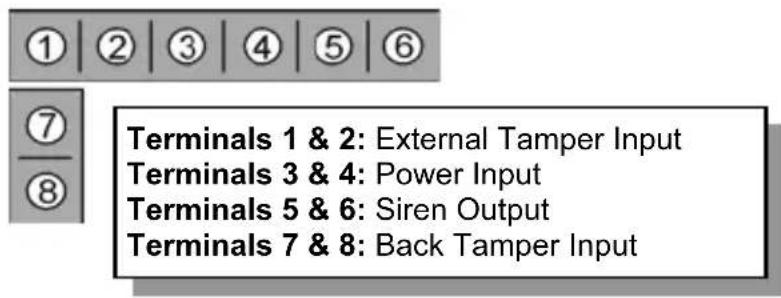
- Connect a 12VDC or 9VAC, 500mA transformer to terminals 3 and 4 on the siren's terminal block (polarity is not important) – see Figure 2.
text_image
① ② ③ ④ ⑤ ⑥ ⑦ Terminals 1 & 2: External Tamper Input Terminals 3 & 4: Power Input Terminals 5 & 6: Siren Output Terminals 7 & 8: Back Tamper InputFigure 2: Wiring Connections
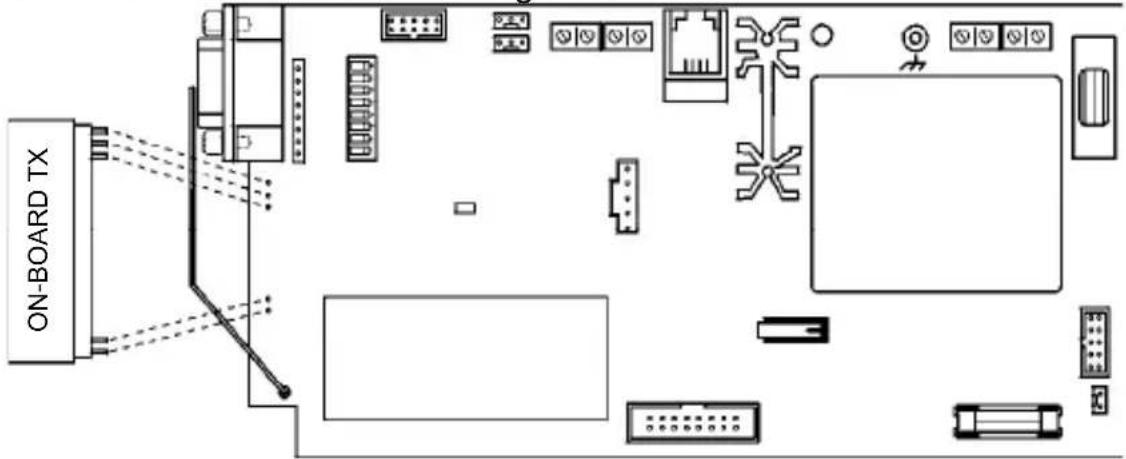
- To support the OS826, the ProGuard800's Main board must have the on-board transmitter installed. Plug the on-board transmitter into the control panel's Main board as shown in Figure 3.
text_image
ON-BOARD TXFigure 3: Plugging in the On-Board Transmitter
Note: Power down the control panel before plugging in the on-board transmitter.
- On the control panel, define the siren type as "2-Way Siren" as follows:
- From the Programming menu, select Devices, Siren, Ext. Siren Type [9152].
- Select "2-Way Siren".
- Define the siren delay
-
Enter a siren delay time (00-59 sec).
-
Define the Siren Cut-off as follows:
- From the Programming menu, select Devices, Siren, Cut-Off [9154].
- Enter a siren cut-off time (00:10 - 20:00 minutes).
- Set the siren to Registration mode by placing the Mode jumper (JP1) as shown in Figure 4.

text_image
REGISTRATION MODE > JP1 TRANSMISSION MODE > JP1Figure 4: Mode Jumper Configuration
-
Press the Transmitter Delete button on the siren in order to clear the siren's register; the siren sounds an acknowledge tone.
-
On the control panel, perform the External Siren Test twice in order to register the control panel's transmitter to the OS826's receiver.
To perform an External Siren Test:
- From the Service menu, select WL. Siren Test [7▼▼]; Press √ for each transmission. The siren sounds an acknowledge tone when each transmission is received. When you push √ for a third time, you will hear a double acknowledge tone.
Note: During the registration procedure, make certain that no other wireless devices are transmitting so as not to interfere with registration. In the event that the wrong transmitter is registered to the siren's receiver, you can delete the transmitter by pressing the Transmitter Delete button while the Mode jumper (JP1) is set to Registration mode and repeat step 10.
-
Register the OS826's transmitter to the control panel's receiver.
-
Set the control panel to Registration mode as follows:
- From the Programming menu, select Devices, Siren, 1.WL. SIREN REG. [915]. On the display you will see TRANSMIT 1
- Set the siren to Transmission mode by placing the Mode jumper (JP1) as shown in Figure 4; the siren transmits a signal every few seconds.
- When Save? appears on the control panel's LCD display, press √ on the control panel's keypad.
-
Remove the Mode jumper (JP1) on the siren and place it over one pin for storage and disconnect the power supply.
-
Configure the Arming Tones jumper (JP2) as required. If the jumper is removed, the siren sounds tones and flashes the strobe on arm/disarm. If the jumper is installed, the siren flashes the strobe on arm/disarm but no tones are sounded.
-
Choose a suitable mounting position for the siren. The siren should be mounted on a flat surface in a highly visible position for maximum deterrence against potential intruders.
-
Before permanently mounting the siren, test the reception from the exact mounting position. If necessary, relocate the siren to a better position.
-
To mount the OS826, place the back cover in position against the wall and mark the upper and lower mounting holes. Install wall anchors in the appropriate positions.
-
Thread the cables through the cable entry hole on the back cover and mount the back cover to the wall using four screws.
- Connect the transformer to the terminal block and the backup battery to the battery connector.—see Figure 2 for further information on wiring connections.
- Replace the metal anti-vandal casing and the strobe cover.
- Replace the front cover and secure using the cover screw provided. Make certain that the screw is secured tightly so that it closes the front cover tamper switch.
TECHNICAL DATA
Frequency: 868.35MHz FM
Antenna:
Built-in
internal
whip
Operating Voltage: 12VDC or 9VAC (nominal)
Current Consumption: 250mA (alarm + strobe)
10mA (standby)
Backup Battery: 7.2V/910mAh NiMH (rechargeable)
Siren Output: 106dB (A) @ 1m
Tamper Protection: Front cover, removal from wall and external power supply.
Dimensions: 300 x 170 x 75mm
Specifications may be modified without prior notice.

Environmental Information for Customers in the European Union
European Directive 2002/96/EC requires that the equipment bearing this symbol on the product and/or its packaging must not be disposed of with unsorted municipal waste. The symbol indicates that this product should be disposed of separately from regular household waste streams. It is your responsibility to dispose of this and other electric and electronic equipment via designated
collection facilities appointed by the government or local authorities. Correct disposal and recycling will help prevent potential negative consequences to the environment and human health. For more detailed information about the disposal of your old equipment, please contact your local authorities, waste disposal service, or the shop where you purchased the product.
OS826 DRAHTLOSE AUßENSIRENE MIT BLITZGERÄT

VEILIGHEIDSWAARSCHUWINGEN
DECLARATION OF CONFORMITY
Hereby, Marmitek BV, declares that this OS826 is in compliance with the essential requirements and other relevant provisions of the following Directives:
Directive 1999/5/EC of the European Parliament and of the Council of 9 March 1999 on radio equipment and telecommunications terminal equipment and the mutual recognition of their conformity
Council Directive 89/336/EEC of 3 May 1989 on the approximation of the laws of the Member States relating to electromagnetic compatibility
868.35MHz is not intended for use in BG, GR, PL & SI.
Copyrights
Marmitek is a trademark of Marmidenko B.V. | OS826 is a trademark of Marmitek B.V. All rights reserved.
Copyright and all other proprietary rights in the content (including but not limited to model numbers, software, audio, video, text and photographs) rests with Marmitek B.V. Any use of the Content, but without limitation, distribution, reproduction, modification, display or transmission without the prior written consent of Marmitek is strictly prohibited. All copyright and other proprietary notices shall be retained on all reproductions.