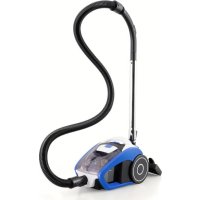
IDEAL ID5901 - Vacuum Cleaner Eldom - Free user manual and instructions
Find the device manual for free IDEAL ID5901 Eldom in PDF.



| Product type | Bagless vacuum with transparent dust container |
| Power | 700 W |
| Supply voltage | 220-240 V ~ 50-60 Hz |
| Dust container capacity | 1.5 L |
| Filters | Internal filter (inlet) and external filter (exhaust) |
| Filtration type | Replaceable filters (ref. IDF5901) |
| Cable length | Automatic cord rewinder, yellow mark for max. extraction |
| Included accessories | Large brush, dual-use nozzle, round brush, small brush, telescopic tube |
| Main functions | Adjustable suction power, horizontal parking, tube storage |
| Usage | Domestic: carpets, rugs, curtains, upholstered furniture |
| Maintenance and cleaning | Empty the container when it is 2/3 full; clean the internal filter; replace filters every 100 h |
| Safety | Do not use without filters; do not vacuum hot ashes, water, sharp objects; unplug before maintenance |
| Spare parts and repairability | Filters available under ref. IDF5901; repairs only by authorized service center |
| General information | Brand: Eldom, Model: IDEAL ID5901, Weight: not specified, Dimensions: not specified |
Frequently Asked Questions - IDEAL ID5901 Eldom
User questions about IDEAL ID5901 Eldom
0 question about this device. Answer the ones you know or ask your own.
Ask a new question about this device
Download the instructions for your Vacuum Cleaner in PDF format for free! Find your manual IDEAL ID5901 - Eldom and take your electronic device back in hand. On this page are published all the documents necessary for the use of your device. IDEAL ID5901 by Eldom.
USER MANUAL IDEAL ID5901 Eldom
natural_image
Line drawing of a vacuum cleaner with coiled hose and handle (no text or symbols)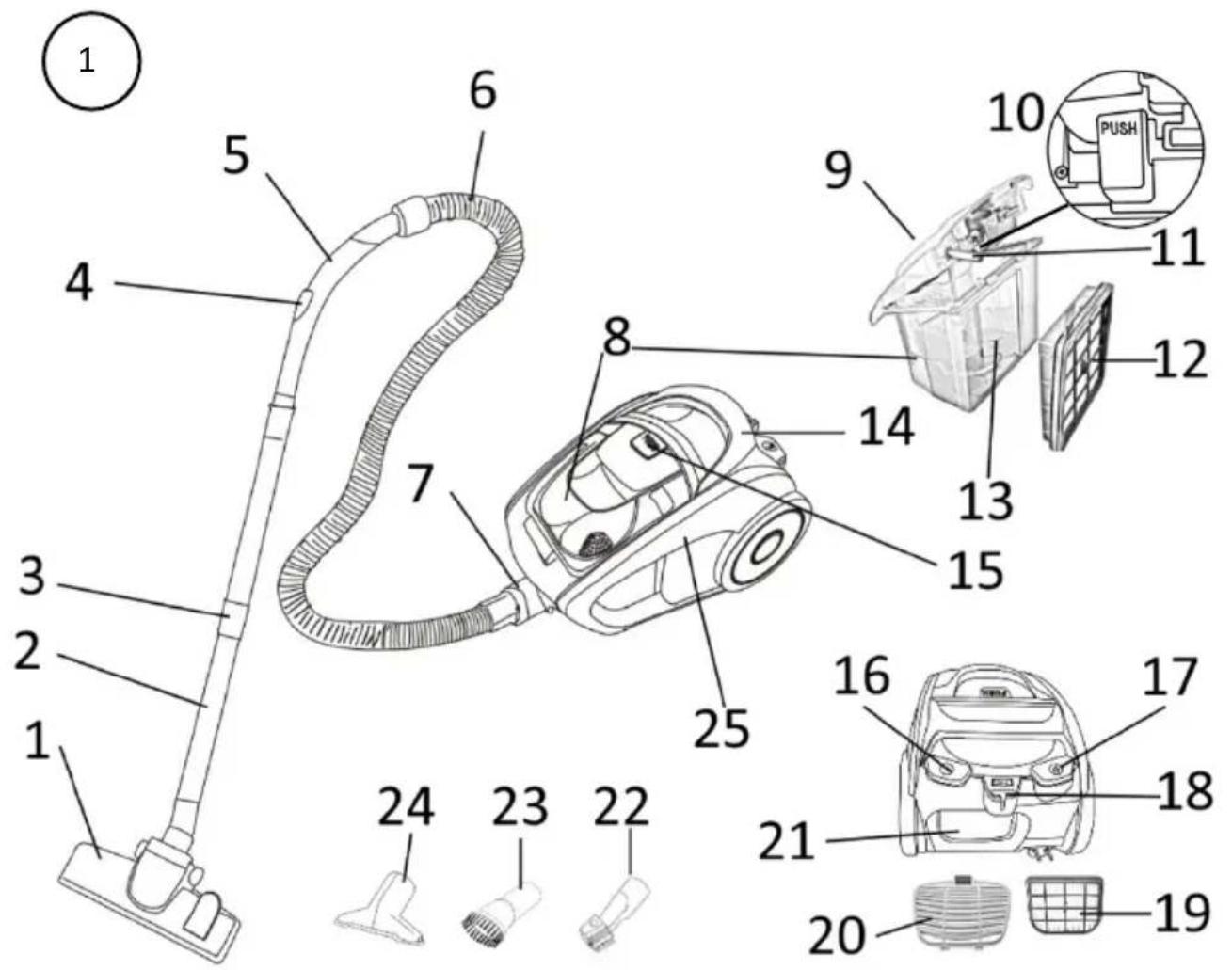
natural_image
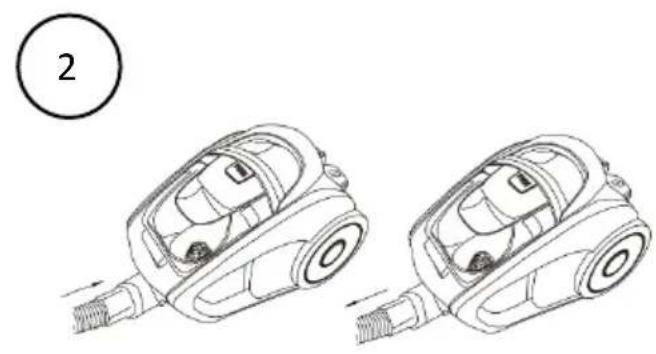
Line drawing of two different car components with arrows indicating motion, no text or symbols present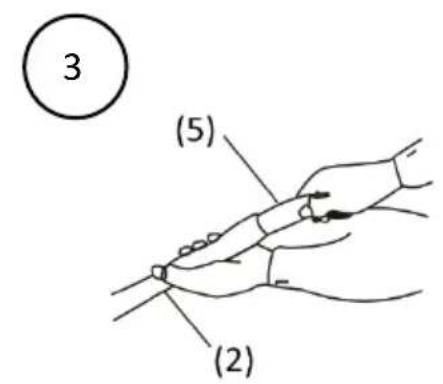
WSKAZÓWKI BEZPIECZEŃSTWA
Before first use, please thoroughly read the entire manual.
It is recommended to keep this instructions manual for future reference.
- The connection cable must be connected to an electrical network with the parameters as indicated on the rating plate.
- Care must be taken to ensure that too many consumers are not switched on to a single circuit.
- Keep the power cable away from heated surfaces.
- This equipment is for domestic use only, in the event of industrial operation, not in accordance with the intended use or contrary to these instructions, the vendor assumes no responsibility and warranty entitlements lapse.
- This equipment may be used by children of at least 8 years of age and by people with reduced physical and mental capabilities and lack of experience and familiarity with the equipment, if supervision or instruction is provided on how to use the equipment safely so that the associated risks are understood. Children should not play with the equipment. Unsupervised children should not carry out cleaning or maintenance of the equipment.
- Do not use outdoors.
- Do not vacuum people or animals with the hoover, and in particular do not bring the suction nozzles close to eyes or ears.
- Do not use the hoover to vacuum wet carpet surfaces e.g. after washing with laundry shampoos. Allow the foam to fully dry and the vacuumed surface to dry.
-
Carry the hoover using the handle (do not pull on the hose).
-
Do not use the hoover to pick up hot ash, cigarette butts and matches, sharp objects (glass shards), plaster, cement, stone dust and flour etc., debris, water and other liquids.
- Do not handle the appliance with wet hands.
- Do not immerse the appliance in water or other liquids.
- Protect the hoover from moisture and do not place vessels with liquids on it.
- Never leave the hoover switched on unattended.
- To disconnect the appliance from the mains never pull on the cord, always use the plug.
- Unplug the appliance from the mains when it is no longer in use and before cleaning it.
- Before switching on the appliance, make sure that all its components are properly assembled. Never switch on the appliance before it is assembled.
- Do not stand on the suction hose or place heavy objects on the suction hose.
- Do not block the inlet opening.
- Only use with the originally supplied accessories.
- Unplug the appliance from the mains before every cleaning and emptying of the container.
- Do not use if the power cord is damaged or if the appliance is damaged in any other way. Have your appliance repaired by an authorised service centre.
- Repairs to the equipment may only be carried out by an authorised service centre. Any upgrading or use of other than original spare parts or components of the appliance is forbidden and endangers the safety of use.
- Eldom Sp. z o. o. company shall not be held liable for any damage resulting from improper use of the appliance.
WARNING: Improper use of the appliance may cause injury.
WARNING: Plastic bag can be dangerous, to avoid danger of suffocation keep this bag away from babies and children.
• GENERAL DESCRIPTION
- Large brush
- Telescopic tube
- Telescopic tube adjustment
- Adjusting air flow
- Hand grip
- Hose
- Socket
- Dust container
- Dust container lid
- Dust container lid lock
- Safety element
- Internal filter
-
Space for external filter
-
Handle
- Dust container lock
- Switch
- Cord retractor
- Socket for brush
- Exhaust filter
- Exhaust filter cover
- Outlet filter slot
- Dual-function nozzle
- Round brush
- Small brush
- Body
• TECHNICAL DATA
- power: 700 W
– supply voltage: 220-240V\~ 50-60Hz - container capacity: 1,5 l
- INTENDED USE
The ID5901 vacuum cleaner is intended to clean dust from carpets, padded carpets, sheer curtains, curtains, and upholstered furniture. The appliance is equipped with a transparent container that enables easy monitoring of the accumulated dust.
• USE
- Before using the device, make sure that the device, plug and power cord are in working order and that all parts of the packaging have been removed.
– Before use, check that the device is complete and not damaged. - The vacuum cleaner can be carried using the handle (14).
- OPERATION
- Before starting work, check that the filters (12, 19) and the container (8) are installed - fig. 1.
NOTE. Do not use the vacuum cleaner without filters (12, 19) and container (8) installed.
- Insert the end of the hose (6) into the socket (7) - fig. 2.
- Then connect the tip (5) to the telescopic tube (2) - fig. 3.
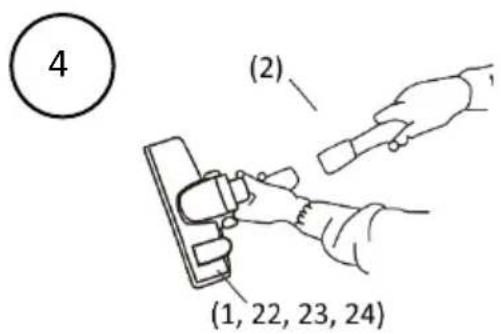
- On the other end of the pipe (2), install the corresponding tip (1, 22, 23, 24) - fig. 4.
- Adjust the length of the telescopic tube (2) with the button (3).
- Grab the plug and pull the power cord to the desired length.
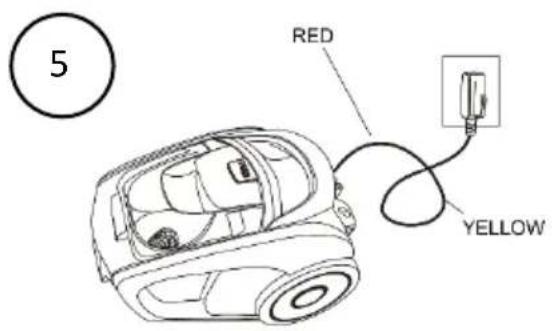
NOTE. The cable can be pulled out to the maximum up to the yellow marker - fig. 5.
In no case pull the cable out to the red marker, because you can damage the cable retractor mechanism in this way.
- If the cable is pulled beyond the yellow marker, retract it using the button (17).
- Plug the power cord into an outlet with the parameters as specified in the instructions.
- The vacuum cleaner starts working after pressing the switch (16).
– During vacuuming, you can change the suction power with the regulator (4). - Observe the state of filling of the container (8), if the level of 2/3 of the height of the container has been reached, the container (8) should be emptied (see EMPTYING THE CONTAINER).
NOTE. Do not vacuum if the level of 2/3 of the height of the container (8) has been reached.
- Press the button (16) to stop operation of the device,
- When finished working, unplug the cord and coil it by pressing and holding the button (17).
Hold the cord firmly to prevent uncontrolled movement.
• TIPS AND TRICKS
- The vacuum cleaner can be stored in a horizontal position. There is a handle (18) on the back of the unit to park the suction tube, and there is a corresponding clip on the brush (1).
- When vacuuming upholstery, small rugs or delicate fabrics, it is recommended to reduce the suction power with the regulator (4).
- If the cord is jammed during retraction, it is recommended to unroll it slightly and try to retract it again
- Use the dual-function nozzle (16) to vacuum hard-to-reach areas (corners, crevices, etc.). This tip is also equipped with a brush for removing dust from furniture, books, etc.
• EMPTYING THE CONTAINER
- Regular emptying of the containers ensures proper operation of the vacuum cleaner and maintenance of optimal suction power.
- Turn off the device with the button (16) and disconnect the cord from the mains.
- Remove the hose end (6) from the socket (7) - fig. 2.
- Grasp the handle in the lid of the container (9), press the lock button (15) and, holding the handle (14), remove the container (8) from the body.
- Over the garbage can, pull out the filter (12) from the garbage can, then press the lock button (10) and pull off the lid (9).
- Remove the trash from the container, then replace the lid and close it.
– Clean the filter (12) over the garbage can, and then place the filter (13) in the container (8). - When inserting the filter (12), the element (11) should be pressed into the lid of the container (9).
- Place the container (8) with the lid (9) on and the filter (12) installed in the body (25).
- CLEANING AND MAINTENANCE
– Before any maintenance or repair operations, turn off the device and disconnect it from the
– it from the power supply.
- Proper operation of the device is guaranteed by regular cleaning and replacement of filters (12,19) and emptying the container (8).
– Clean the housing, equipment components and power cord with a soft, slightly dampened cloth
– with a little dishwashing detergent.
Do not immerse the device in water of another liquid substance.
- Do not use any harsh cleaning agents for cleaning that may damage the surface of the housing.
- FILTERS
- Check the condition of the filters (12, 19) regularly and clean them if necessary. The vacuum cleaner is equipped with two filters:
- internal - inlet filter (12) protects the motor from damage, among other things.
- the external filter (19), is a protection against air pollution in the vacuumed rooms. The filter can be accessed by opening the filter cover (20).
- Filters (12, 19) should be replaced periodically (after about 100 hours of operation).
- The filter set is available under the symbol IDF5901.
Filters are consumable items and are subject to natural wear, so they are not subject to replacement under warranty.
- WARRANTY
- This appliance is designed for domestic use only.
- It cannot be used for professional purposes or for other than the intended use.
- Improper use will nullify the guarantee.
/EN/ The disposal of used electrical and electronic equipment (applies to European Union countries and other European countries with separate waste-collection systems).
This symbol on the product or its packaging indicates that it should not be classified as household waste. It should be handed over to an appropriate company dealing with the collection and recycling of electrical and electronic equipment. The correct disposal of the product will prevent potential negative consequences for the environment and human health resulting from hazardous substances present in the product. Electrical devices must be handed over to restrict their re-use and further treatment. If the device contains batteries, remove them, and hand them over to a storage point separately. DO NOT THROW EQUIPMENT INTO THE MUNICIPAL WASTE BIN. Material recycling helps to preserve natural resources. For detailed information on how to recycle this product, please contact your local authority, the recycling company, or the shop where you bought it.

- WSKAZÓWKI BEZPIECZEŃSTWA
- Before first use, please thoroughly read the entire manual.
- It is recommended to keep this instructions manual for future reference.
- • GENERAL DESCRIPTION
- • TECHNICAL DATA
- - INTENDED USE
- • USE
- - OPERATION
- NOTE. Do not use the vacuum cleaner without filters (12, 19) and container (8) installed.
- NOTE. The cable can be pulled out to the maximum up to the yellow marker - fig. 5.
- NOTE. Do not vacuum if the level of 2/3 of the height of the container (8) has been reached.
- • TIPS AND TRICKS
- • EMPTYING THE CONTAINER
- - CLEANING AND MAINTENANCE
- - FILTERS
- - WARRANTY
Brand : Eldom
Model : IDEAL ID5901
Category : Vacuum Cleaner