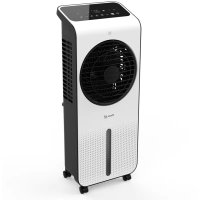
CA104 - Air Conditioning Clean Air Optima - Free user manual and instructions
Find the device manual for free CA104 Clean Air Optima in PDF.



| Product Type | 3-in-1 evaporative air cooler (fan, humidifier, cooler) |
| Brand | Clean Air Optima |
| Model | CA-104 (CA-104B / CA-104W) |
| Recommended Area | 40 m² (100 m³ / 430 ft²) |
| Power Supply | 220-240 V ~ 50 Hz |
| Rated Power | 24 W |
| Air Flow | 720 m³/h |
| Humidification Capacity | 160 to 350 ml/h |
| Water Tank | 4.5 L |
| Air Purification | Built-in ionizer |
| Noise Level | 48 dB(A) (high speed) |
| Dimensions (L × W × H) | 264 × 211 × 644 mm |
| Weight | 3.3 kg |
| Available Colors | White (CA-104W), Black (CA-104B) |
| Number of Speeds | 24 |
| Ventilation Modes | Normal, Natural, Sleep |
| Timer | 0-24 hours |
| Oscillation | Yes, automatic |
| Cooling | Water pump + 2 cooling packs (to freeze) |
| Evaporation Filter | Replacement recommended every 600 h (2-3 months) |
| Tank Cleaning | Weekly with Clean Air Optima Cleaner & Descaler (sold separately) |
| Safety | Indoor use, 20 cm clearance, do not use if cord damaged, supervision for children >8 years |
| Warranty | 2 years |
| Compliance | CE, WEEE, RoHS |
Frequently Asked Questions - CA104 Clean Air Optima
User questions about CA104 Clean Air Optima
0 question about this device. Answer the ones you know or ask your own.
Ask a new question about this device
Download the instructions for your Air Conditioning in PDF format for free! Find your manual CA104 - Clean Air Optima and take your electronic device back in hand. On this page are published all the documents necessary for the use of your device. CA104 by Clean Air Optima.
USER MANUAL CA104 Clean Air Optima
Clean Air Optima® 3in1: Aircooler, Circulator fan & Air humidifier
Model: CA-104B/ CA-104W
(EN) User manual
(DE) Gebrauchsanweisung
(NL) Gebruiksaanwijzing
(FR) Mode d'emploi
(ES) Manual del usuario
(PL) Instrukcja obslugi
(CZ) Uživatelská príručka
(RO) Manual de utiliser
(LT) Naudotojo vadovas
(EE) Kasutusjuhend
(LV) Lietosanas pamaciba
Find more languages on: www.cleanairoptima.com/ info/manuals
(RU)PykoBoOdCTBO NOIb3OBaTeJIa
Read these instructions carefully before you start using this Clean Air Optima device and keep the manual for future reference.
Clean Air Optima
Table of contents
English 3
German 19
Dutch 35
French 51
Spanish 67
Polish 83
Czech 99
Romanian 115
Lithuanian 131
Estonian 147
Latvian 163
English
Thank you for purchasing the Clean Air Optima® 3in1: Aircooler, Circulator fan & Air humidifier CA-104B/ CA-104W.
We wish you many years of healthy indoor air with this efficient and effective product. Ensure that all safety precautions are followed when using this electrical appliance for the proper operation of the device. These instructions describe the safety precautions to be observed during operation. They are meant to prevent injuries and to avoid damaging the device.
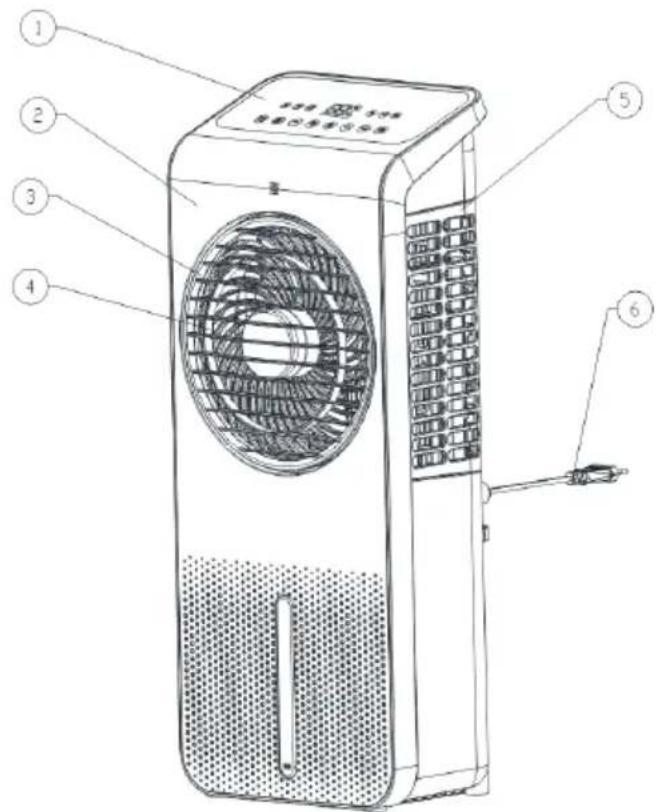
CA-104B/ CA-104W Main unit
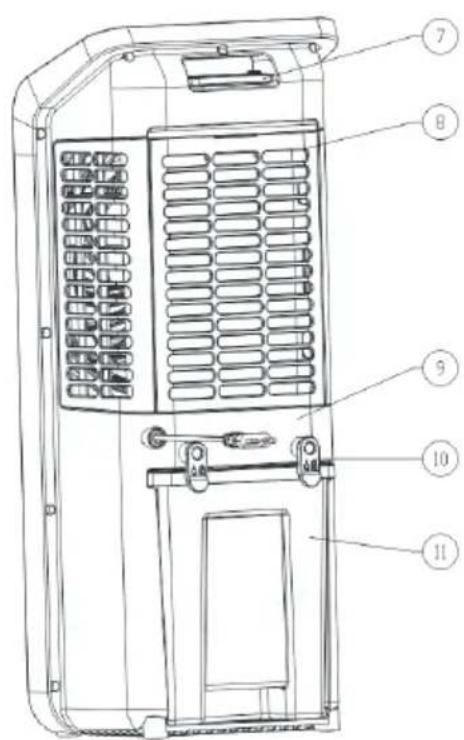
Description
This Clean Air Optima device consists of the following main components:
- Control panel
- Front cover
- Front grill
- Air outlet
- Side cover
- Power cord
- Handle and remote control holder
- Filter cover
- Rear shel
- Fixation clips for watertank
- Water tank
Safety warnings
This device may only be used in accordance with this safety instructions. Take the following steps to minimize the risk of personal injury caused by for example electric shocks or fire.
- Leave the device to stand for at least two hours before use, especially after transportation.
- Only for indoor use. Do not use or store outdoors.
- Use proper voltage: AC 220V - 240V, 50Hz.
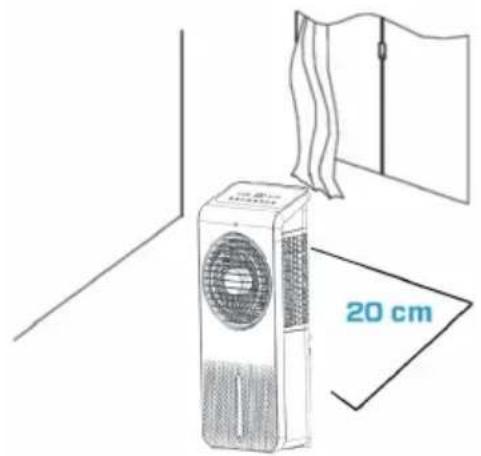
- Allow a free space of min. 20 cm around the air inlet and air outlet of the device.
- This device can be used by children aged from 8 years and above and persons with reduced physical, sensory or mental capabilities or lack of experience and knowledge if they have been given supervision or instruction concerning use of the device in a safe way and understand the hazards involved. Children shall not play with the device. Cleaning and user maintenance shall not be made by children without supervision.
- Do not use the device when there is visible damage on the electrical cord or on the device itself. Do not repair the device yourself in case of damage. Never pull the device by its cord. If the power cord is damaged, then it must be replaced by an authorized service person to prevent electric shock or fire.
- Repairs may only be performed by authorized service personal. Do not try to repair the device yourself to prevent electric shock or fire.
- Do not touch the power cord and plug with wet hands.
- Always switch off the device before disconnecting the plug.
- Never attempt to turn off the device by disconnecting the plug.
- Pull the plug when you do not use the device or when you clean internal or external parts of it.
- For safety use put the device in a steady, horizontal position. Do not move while using.
- Do not use the device in rooms where inflammable liquids, gases are stored or close to heat sources like radiator, fire place or heat-generating devices like ceramic heater.
- Never insert any other object into the body to avoid breakdown.
- Never cover the air inlet and air outlet grid.
- Never disassemble or replace the device's inner parts.
- Use and store the device not under 5^ or above 32^ .
- Do not tip the unit to any side when the water tank is full.
- Do not ingest the battery, the battery is a Chemical Burn Hazard.
- This device contains a coin / button cell battery. If the coin / button cell battery is swallowed, it can cause severe internal burns in just 2 hours and can lead to serious complaints or decease.
- Keep new and used batteries away from children.
- If the battery compartment does not close securely, stop using the device and keep it away from children.
- If you think batteries might have been swallowed or placed inside any part of the body, seek immediate medical attention.
- The batteries contain materials, which are hazardous to the environment, they must be removed from the device before it is scrapped and that they are disposed safely.
- Do not put heavy objects on the unit.
- Please avoid places with direct sunlight. There is a risk that the device discolors.
-
Never immerse the device in water or other liquids.
-
Clean the filter cover regularly, if the filter cover is saturated with dust, it will lead to poor cooling, purifying, air washing, and circulating effect. The power consumption will increase, it can cause failure.
- Replace the HEPA H13 Filter and the Cooling Pad every 2 - 3 months, if the HEPA H13 Filter and the Cooling Pad are saturated, it will lead to poor cooling, purifying, air washing, and circulating effect. The power consumption will increase, it can cause failure.
- Never leave water in the water tank when the device is not in use.
- Use, maintain and clean the device as described in this manual.
- The device is not a toy. Keep children and animals away. Only use the device under supervision.
- Unplug the appliance during filling and cleaning.
- Be aware that high humidity can promote the growth of biological organisms in the environment.
- Make sure that objects in the vicinity of the device do not become damp or wet. If moisture develops, emissions must be reduced. Switch the device to a lower setting. If the emissions cannot be reduced, the device may only be used intermittently. Switch off the device completely for a short time. Make sure that absorbing materials, such as carpeting, curtains, net curtains or tablecloths, do not become damp.
- Make sure the water in the water tank is changed every 3 days. Otherwise there is a risk that micro-organisms will develop in the water tank, which will enter the air or water and pose a health risk.
- Only fill the water tank with fresh drinking water, ice cubes made from drinking water and/or suitable ice packs.
- The ice packs are not toys. Keep children and animals away.
- Never open the ice packs. The liquid in the ice packs can be harmful to health.
- The ice that may form on the ice packs is not suitable for consumption. There is a health risk!
- Never leave water in the tank when the appliance is not in use.
- Empty and clean the aircooler before storing. Clean the aircooler before next use.
Clean Air Optima
Installation
Make sure that the distance from the device is 20 cm away from walls and furniture, see the illustration below.
Remote control
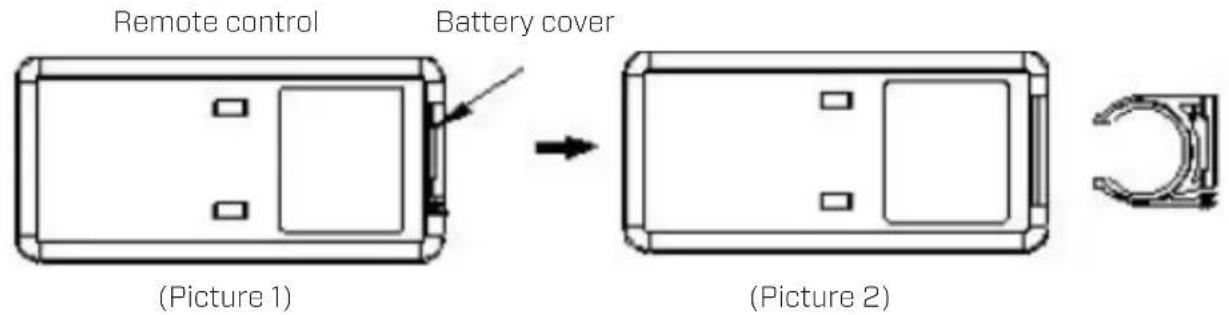
- Open the battery cover at the back side of remote control to place the battery. (see Picture 1).
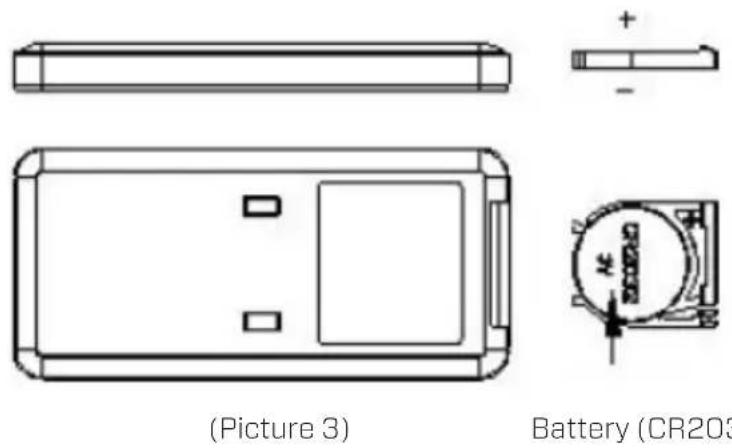
- To place the battery: there is a "security tab" at the bottom of the remote control that you first have to slide to the right and then pull out the battery holder. (see Picture 2). Insert the battery with the correct polarity. (see Picture 3).
- Push the battery cover back into the remote control.
Fill the water tank
Attention: Make sure that the plug is not yet plugged into the socket.
Clean the water tank before using the device, see chapter 'Cleaning and maintenance'.
The device requires fresh drinking water for air cooling.
- Unlock the water tank by turning the two clips from the vertical position to the horizontal position.
- Pull the water tank halfway out of the appliance.
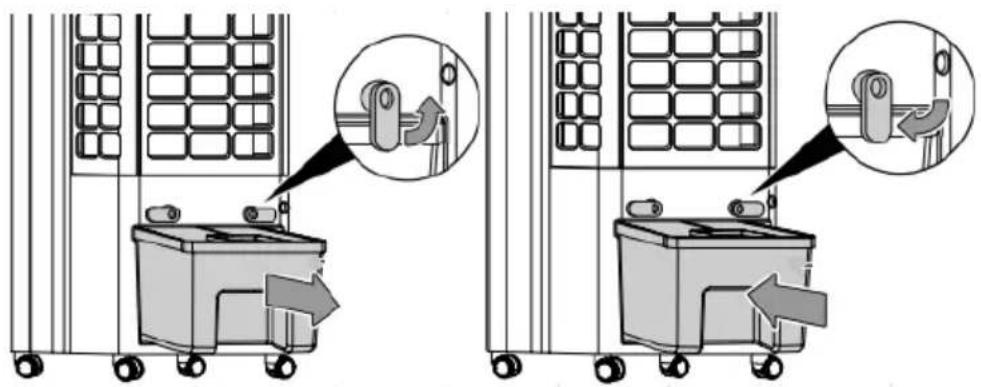
- Fill the water tank with a watering can, take into account the maximum waterlevelindicator, see at the front of the device.
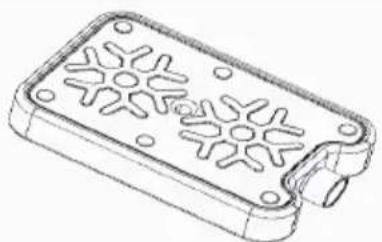
- Place the cooling element in the water tank to achieve an extra cooling effect. Place the cooling element on the right side.
- Only fill the water tank with fresh drinking water. You can add ice cubes to the water for extra cooling.
Attention: Only fill the device with fresh drinking water.
The water temperature may be max. 40^
Attention: Change the water in the water tank every 3 days
to prevent bacterial growth.
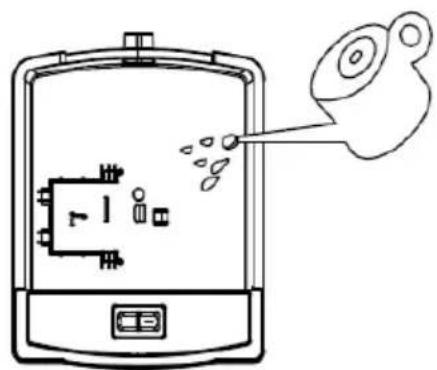
Use of ice pack
The ice pack has unique cold storage and heat preservation properties, which can slowly absorb the heat in the water, so that the water temperature in the tank is always lower than the ambient temperature for several hours, so that the air blowing out of the air cooler is cooler.
- Place the ice pack in the freezer until it is completely frozen;
- Place the frozen ice pack into the water tank and push the water tank back to its original position. After about ten minutes, the water temperature in the water tank will be lower than the ambient temperature.
- The device is equipped with 2 ice packs, so continuous use is not a problem.
- Do not open the lid of the ice pack!
Ice pack
Control panel / Operation instruction

(1) ON/OFF (Power)
Press the Power Button to activate the device.
Press the Power Button again, the device turns off.
The device starts in the low speed (position 8) and only the fan function and anion function is working. The anion function is automatically turned on and the negative ion
indicator light is on.
MODE Button Press the MODE bu
- Normal wind set by the user.
- Natural wind :The fan motor runs irregularly according to the preset program and can be set to low (position 8), medium, (position 16) and strong (position 24) natural wind in combination with the wind speed button. Natural wind is to imitate the effect of natural wind, making the air volume softer and more comfortable. The wind speed level indicator only shows the initial wind speed status.
The image below shows the working principle of the natural wind mode:
Wind speed table natural wind:



- Sleep mode : In sleep mode, the display will turn off and the fan is running in the lowest speed level.
Press the MODE button to switch back again in the settings before.

SPEED Button
D By pressing the Speed button, you can change the speed level with the button + and the button
The 24 fan speeds offers individual air flow.
24 levels are divided into three groups:
1-8 low level.
9-16 middle level.
17 - 24 high level.
TIMING OFF/ON
Press the button to activate the timing function.
The time selection range is 1-12 hours and is shown on the display. In power-on state, press this button to set the working time of the machine. The timer indicator and time indicator turn on and the digital tube flashes to display the set time, indicating that it is in the timer setting state. At this moment, you can press the timer button to set the time, and press any key (except the switch key) or wait 5 seconds to exit the setting. After setting the timer, the digital tube alternately displays the set timer and current wind speed at 10 second intervals, and the wind speed indicator and time indicator display correspondingly. When the internal timing program reaches the set time, the machine will shut down and stay in standby state.

SWING button
Press the button to switch the swing function on or off.
The air guide slats rotate automatically when the swing function is switched on and ensure continuous air circulation.

AIRCOOLER/ AIRHUMIDIFIER button
the water tank with water first.
Press the button to activate the cooling/ humidifying function.
Cooling/ Humidifying on: the water pump starts to work and the led light is on.
Cooling/ Humidifying off: the water pump stops work and the led light is off.
Water tank empty signal
Should the water tank be empty, a tenfold acoustic signal sounds. The device will automatically stop cooling/ air humidifying. In this case, turn off the device with the ON/ OFF button. Refill the water tank.
If the device is switched on, the acoustic signal is off.
Dry evaporative filter
A. Press the SPEED button for 3 seconds to turn on the dry wind function, the wind will run at
the highest speed (speed 3), the LED light will flash and stay on for 20 minutes.
B. During the operation of the dry wind function, other function keys do not work. Press the SPEED button again for 3 seconds to exit the dry wind function.
C. After running at high speed for 20 minutes, the device will automatically shut down and enter standby mode.
Anion function: The anion function is switched on when the device starts up and switched off once the device is switched off.
Clean Air Optima
Cleaning and maintenance
You can ensure that your Clean Air Optima CA-104B/ CA-104W Aircooler will provide years of trouble-free operation by following a few simple maintenance procedures. If your water is hard and contains high concentrations of calcium and other minerals, over time white dust (lime) will start to settle on the various surfaces in the room. A white deposit (lime scale) will also form in the interior of the water tank. Lime deposits will impair the proper functioning of the aircooler and the efficient hygienic function of the unit.
We recommend the following:
- Clean the water tank once a week if you use the appliance daily with Clean Air Optima Cleaner & Descaler.
- As soon as the water tank needs refilling, pour out any remaining water and fill it with fresh water.
- Clean the entire device and keep all parts completely dry when the device is not in use.
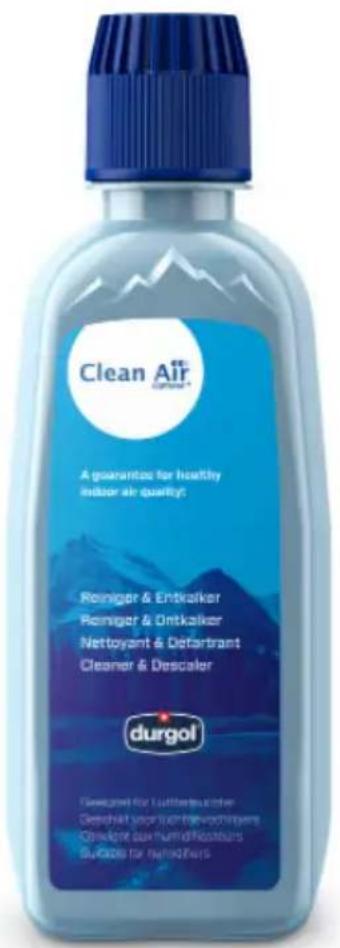
Specially developed for Clean Air Optima® aircoolers, humidifiers and dehumidifiers:
-Not aggressive
- Protects plastic and ceramic materials of the aircooler, humidifier and dehumidifier
- Odour neutral
- Cleans & descapes quickly and thoroughly
- Biodegradable
You can order the Clean Air Optima® Cleaner & Descaler from our online shop at www.cleanairoptima.com.
Cleaning the water tank of the Clean Air Optima® Air Cooler
- Switch off the device and pull the plug. During cleaning and descaling, the device must not be used.
- Unlock the water tank by turning the two clips from the vertical position to the horizontal position.
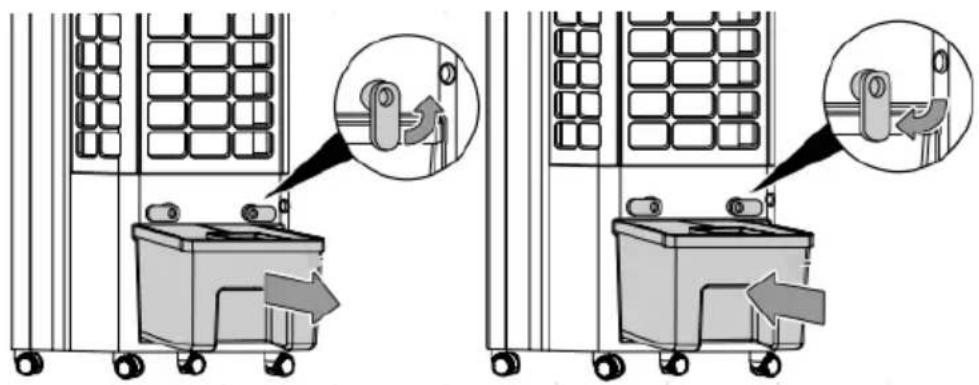
- Pull the water tank halfway out of the appliance.
- Turn the water pump handle from the vertical to the horizontal position, see the schematic diagram below for disassembling and assembling the water pump.
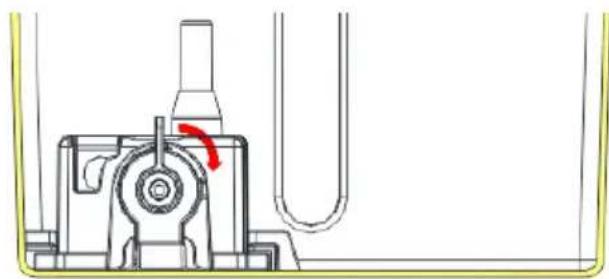
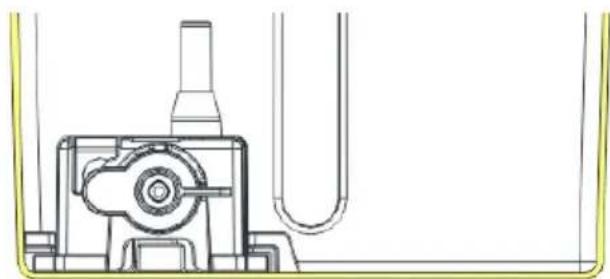
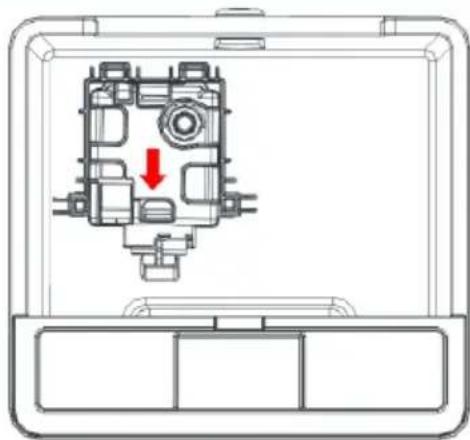
- Slide the waterpump out of the bracket, see the schematic diagram here on the left.
- Clean the inside of the water tank with Clean Air Optima Cleaner & Descaler and rinse with clean water. Pour two capfuls of Clean Air Optima Cleaner & Descaler into the water tank and leave for between two and five minutes. Then add water up to the rim of the watertank and leave for a minimum of 30 and a maximum of 60 minutes.
Rinse the watertank thoroughly with water.
- Remove any splashes of Clean Air Optima Cleaner & Descaler from work surfaces or the outside of the device with a soft, damp cloth.
After cleaning and descending, your device is hygienically clean, free of limescale, free of bacteria, free of viruses and immediately ready for use again.
Please note:
For cleaning and descending, the device must be turned off/unplugged.
Replacing the Evaporative filter/ cleaning and maintenance
The Clean Air Optima CA-104B/ CA-104W is equipped with a filter lifespan surveillance mechanism that signals that the Evaporative Filter have to be replaced after 600 working hours. To
show that the Evaporative Filter need to be replaced, the device emits a double zero indicator light. Reset the timer for the Evaporative Filter by pressing and holding the button
AIRCOOLER/ AIRHUMIDIFIER) for about 3 seconds. If the indicator light goes out, the timer has been successfully reset.
Depending on the use, the Evaporative Filter has a lifespan of approx. 2 - 3 months.
Take out the filter from the filter frame compartment. After filter replacement or filter cleaning reinstall the filter back into the filter frame compartment and assemble back to the device.
Install the evaporation filter
Attention: Make sure that the plug is not yet plugged into the socket.
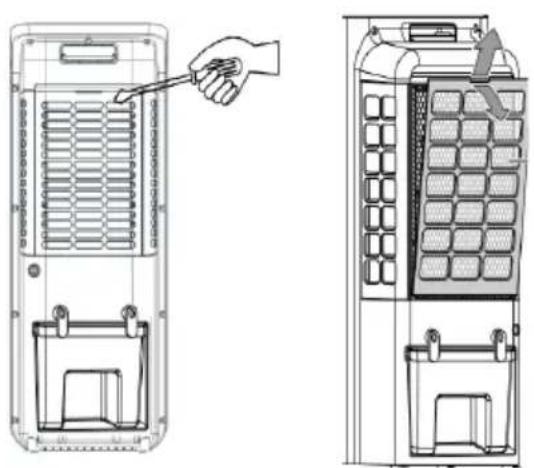
- Use a screwdriver to take out the back cover
-
Slide the filter cover up at the back to insert the evaporative filter.
-
Install the backcover.
Attention:
Never use the device without an evaporation filter!
Cleaning the housing of the Clean Air Optima Air Cooler
- Switch off the device and pull the plug.
- Use a soft and humid piece of cloth to clean the device. Do not use chemical solvent such as benzene, alcohol or gasoline.
- Make sure that no water gets into the device, do not sprinkle with water.
Warning!
Do not damage the filters, the filters must not be cracked. Damaged filters needs to be replaced.
Signs for used up filters that needs to be replaced
If the evaporative filter becomes porous, starts to smell or causes increased noise, it should be replaced.
How to order filters:
Contact Clean Air Optima Customer Service tel. +31 (0) 742670145 or visit our webshop: https://www.cleanairoptima.com/-accessoes
Clean Air Optima® Aircooler storage
If the Aircooler will not be used for an extended period of time:
1. Drain the water tank completely and make sure that there is no water stocked inside the water tank.
2. Unplug the device and fold up the power supply cord.
3. Remove and clean the filters. After cleaning reinstall the filters back into the device.
4. Store the Aircooler in a cool, dry location, away from direct sunlight, extreme temperature and excessive dust.
Directive 2009/125/EC on the Ecodesign of energy related products.
| Model identifier: CA-104B/ CA-104W | |||
| Clause Ecodesign requirements - GENERICECODESIGN REQUIREMENTS | Result Verdict | ||
| (d) From 1 January 2014 -- | |||
| Off mode Power consumption of equipment in any off-mode condition shall not exceed 0,50 W | N/A | ||
| Standby mode | The power consumption of equipment in any condition providing only a reactivation function, or providing only a reactivation function and a mere indication of enabled reactivation function, shall not exceed 0,50W | 0,4 W Pass | |
| The power consumption of equipment in any condition providing only information or status display, or providing only a combination of reactivation function and information or status display, shall not exceed 1,00 W | N/A | ||
| Availability of standby and/or off mode | Equipment shall, except where this is inappropriate for the intended use, provide off mode and/or standby mode, and/or another condition which does not exceed the applicable power consumption requirements for off mode and/or standby mode when the equipment is connected to the mains power source | Standby Mode | Pass |
| Power management | When equipment is not providing the main function, or when other energy- using product(s) are not dependent on its functions, equipment shall, unless inappropriate for the intended use, offer a power management function, or a similar function, that switches equipment after the shortest possible period of time appropriate for the intended use of the equipment, automatically into:- standby mode, or- off mode, or- another condition which does not exceed The applicable power consumption requirements for off mode and/or standby mode when the equipment is connected to the mains power source. The power management function shall be activated before delivery. | N/A | |
| Contact details Clean Air Optima International GmbH | |||
Troubleshooting
The following is a troubling shooting guide to help you solve any issues that you may have using the Clean Air Optima® aircooler CA-104B/ CA-104W.
| Problem Possible | Cause Solution | |
| Device does not switch on. | The power cord does not connect correctly. The power cord or power plug may be damaged. | Connect the power plug and power socket correctly. Check the power cord and plug for damage. |
| The device makes a lot of noise or vibrates. | The device is installed askew. The filters are blocked. | Make sure the device is installed uprightly. Clean or replace the filters. |
| The device does not work or with reduced capacity. | Check the filters for contamination. Check the minimum distances to walls and objects. | Clean or replace the filters if necessary. Move the device away from walls and objects. |
| The device runs, but there is no air cooling. | The device is not in cooling mode. Water pump inlet is blocked. Water pump is not correctly mounted in the water tank. | Activate cooling mode. Check that the water pump inlet is not blocked in the water tank. Make sure the water pump is mounted correctly. |
| Water leakage Filter cover evaporative filter is not proper closed. | Insert filter cover evaporative filter properly. | |
| The device does not respond to the remote control. | There are obstacles between the device and the remote control. Battery installed correctly. | Remove obstacles and ensure visual contact between remote control and device. Check battery charge status. |
| Display shows double zero | The evaporative filter needs to be replaced. | Reset the timer for the filter by pressing and holding the AIR-COOLER/ AIR HUMIDIFIER button for about 3 seconds. When the indicator light goes out, the timer has been successfully reset. |
Clean Air Optima
WARNING!
If the above recommended solutions do not work, please contact Clean Air Optima technical support at the telephone number for your region. Do not attempt to disassemble, reassemble, or repair the device as this may void the warranty.
Specifications CA-104B/ CA-104W
| Model | CA-104B/ | CA-104W |
| For rooms up to | 40m² / 100m³ / 430ft² | |
| Rated voltage | 220V - 240V, 50Hz | |
| Rated power | 24W | |
| Fan capacity | 720 m³/h | |
| Humidifying capacity | Min. 160 ml/h - Max. 350 ml/h | |
| Water tank | 4,5 | liter |
| Air purification with: lonizer | ||
| Sound level | Silent fan < 10dB(A) Low / 48dB(A) High | |
| Dimensions | 264 x 211 x 644mm | |
| Weight | 3.3kg | |
| Colour | White/ black | |
| Complies with EU regulations | CE / WEEE / RoHS | |
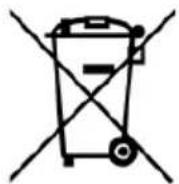
Ask your retailer or your municipality for updated information regarding the disposal of the packaging and of the device.
Service
Warranty Certificate for the Clean Air Optima® Aircooler CA-104B/ CA-104W.
Date of purchase:
Customers name:
Address:
Telephone:
Email:
Seller's name:
Address:
-
Please fill in completely this Warranty Certificate. Send it with the invoice and the unit, postage pre-paid and using the original packing box, to your distributor. Make sure to include the appropriate return postage for the package.
-
Please enclose a short description of the damage, fault or malfunction, and the circumstances under which these problems arose.
The Clean Air Optima® Aircooler CA-104B/ CA-104W is subjected to strict testing procedures before leaving the factory. If within two years from the date of purchase the product does not perform according to the specifications, because of factory defects, the purchaser is entitled to free repairs or replacement of parts upon presentation of this warranty (provided that the malfunction or damage to the device and/or parts occurred under normal operating conditions). What is covered: All parts defective in material and workmanship. For how long: two years from purchase date. What we will do: Repair or replace any defective parts.
Other Conditions
The provisions of this warranty are in lieu of any other written warranty whether express or implied, written or oral, including any warranty of merchantability or fitness for a particular purpose. The manufacturer's maximum liability shall not exceed the actual purchase price paid by you for the product. In no event shall the manufacturer be liable for special, incidental, consequential, or indirect damages. This warranty does not cover a defect that has resulted from improper or unreasonable use or maintenance, faulty assembly, accident, natural catastrophes, improper packing, or unauthorized tampering, alteration, or modification as determined solely by us. This warranty is void if the label bearing the serial number has been removed or defaced.
Thank you for reading!

Share your feedback about the Clean Air Optima
Aircooler CA-104B/CA-104W on:
www.cleanairoptima.com

For frequently asked questions about the CA-104B/ CA-104W
go to: www.cleanairoptima.com and search for the CA-104B/ CA-104W

Download PDF instruction manual on:

airoptima.com/info/manuals
Clean Air Optima International B.V. | David Ricardostraat 9-7 / 9-9 | 7559 SH Hengelo (ov)
www.youtube.com
The Netherlands | Phone: +31 (0) 74 - 2670145
Clean Air Optima Germany GmbH | Enschedestraße 14 | 48529 Nordhorn | Germany
Phone: +49 (0) 5921 879-121
E-mail: info@cleanairoptima.com
Internet: www.cleanairoptima.com
Deutsch
(1) MARCHE/ARRÉT (Alimentation)
Ask your retailer or your municipality for updated information regarding the disposal of the packaging and of the device.
Obstuga serwisowa
Specifications CA-104B/CA-104W
Model CA-104B/CA-104W
Pentru incaperi de pana la 40 m²/100 m³/430 ft²
Tensiune nominalä 220 V-240 V, 50 Hz
Putere nominală 24W
Capacitateventilator 720m³/h