
Alloy FPS - Keyboard HYPERX - Free user manual and instructions
Find the device manual for free Alloy FPS HYPERX in PDF.
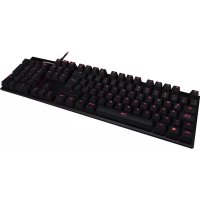



| Product type | Mechanical gaming keyboard |
| Brand | HyperX |
| Model | Alloy FPS |
| Switch type | Mechanical (red, blue, or brown depending on version) |
| Backlighting | Red LED with 6 modes (fixed, breathing, trigger, explosion, wave, customization) |
| Number of keys | 104 keys (full size) |
| Connectivity | USB 2.0 (2 connectors) |
| Compatibility | Windows, Mac (partially) |
| Dimensions (approx.) | 44.5 x 13.2 x 3.3 cm |
| Weight (approx.) | 1.1 kg (with wrist rest) |
| Power | USB port (5V, 500 mA) |
| Key features | Mechanical switches, customizable LED backlighting, Game mode, multimedia keys, detachable wrist rest |
| Care | Clean with a soft dry cloth; avoid liquids. |
| Safety | Unplug before cleaning; do not expose to moisture. |
| Spare parts | Keycaps and USB cable (subject to availability) |
| Repairability | Key replacement possible; other components not user-repairable. |
| Warranty | 2 years (estimate) |
| Box contents | Keyboard, wrist rest, quick start guide, keycap puller |
Frequently Asked Questions - Alloy FPS HYPERX
User questions about Alloy FPS HYPERX
0 question about this device. Answer the ones you know or ask your own.
Ask a new question about this device
Download the instructions for your Keyboard in PDF format for free! Find your manual Alloy FPS - HYPERX and take your electronic device back in hand. On this page are published all the documents necessary for the use of your device. Alloy FPS by HYPERX.
USER MANUAL Alloy FPS HYPERX
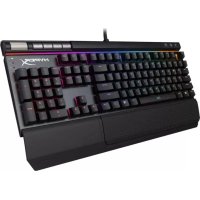
HyperX Alloy Elite Mechanical Gaming Keyboard
Find the language and latest documentation for your HyperX Alloy Elite Mechanical Gaming Keyboard here.
HyperX Alloy Elite Mechanical Gaming Keyboard User Manual
For instructions in English
Para instrucciones en Español
Für Anleitungen in Deutsch
Pour des instructions en Français
...... Per le istruzioni in Italiano
Por as instruções em Português
Instrukcje w języku polskim
Для инструкции на русском
C. Turkce talimatlar icin
Japanese
Korean
Thai
Vietnamese
Simplified Chinese ..... 中文说明
Traditional Chinese ....中文說明
HyperX Alloy Elite Mechanical Gaming Keyboard
| Part Numbers | ||
| Cherry® MX Blue | Cherry® MX Brown | Cherry® MX Red |
| HX-KB2BL1-UK/R1 | HX-KB2BR1-UK/R1 | HX-KB2RD1-UK/R1 |
| HX-KB2BL1-FR/R1 | HX-KB2BR1-FR/R1 | HX-KB2RD1-FR/R1 |
| HX-KB2BL1-DE/R1 | HX-KB2BR1-DE/R1 | HX-KB2RD1-DE/R1 |
| HX-KB2BL1-NO/R1 | HX-KB2BR1-NO/R1 | HX-KB2RD1-NO/R1 |
| HX-KB2BL1-RU/R1 | HX-KB2BR1-RU/R1 | HX-KB2RD1-RU/R1 |
| HX-KB2BL1-LA/R2 | HX-KB2BR1-LA/R2 | HX-KB2RD1-LA/R2 |
| HX-KB2BL1-US/R1 | HX-KB2BR1-US/R1 | HX-KB2RD1-US/R1 |
| HX-KB2BL1-US/R2 | HX-KB2BR1-US/R2 | HX-KB2RD1-US/R2 |
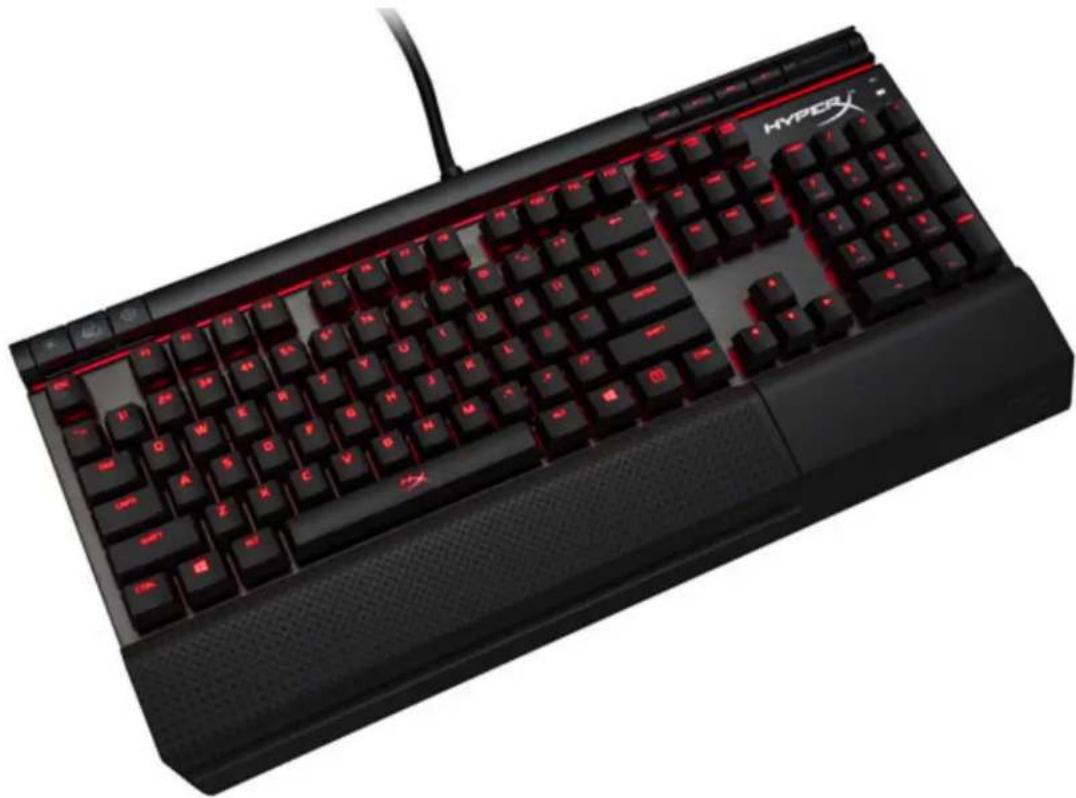
What's included:
• HyperX Alloy Elite Mechanical Gaming Keyboard
•8x Gaming keycaps
•Keycaps puller
•Wrist rest
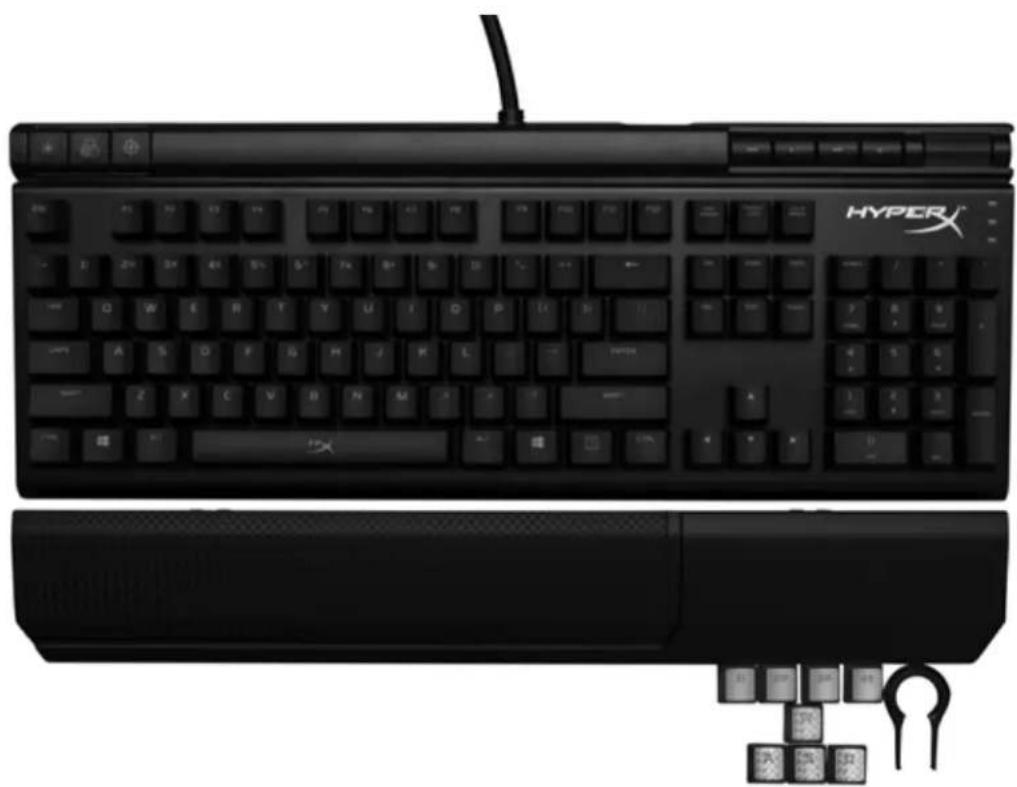
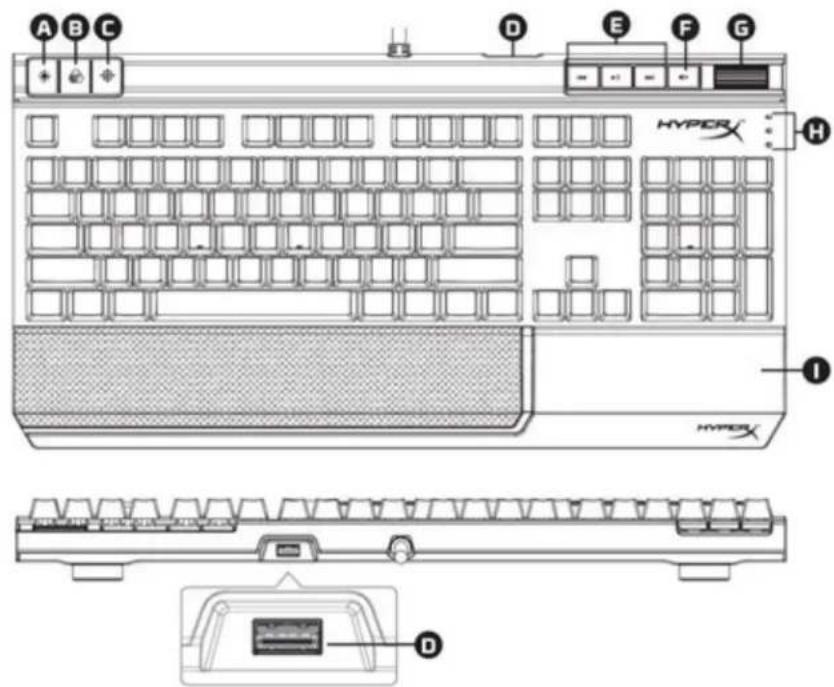
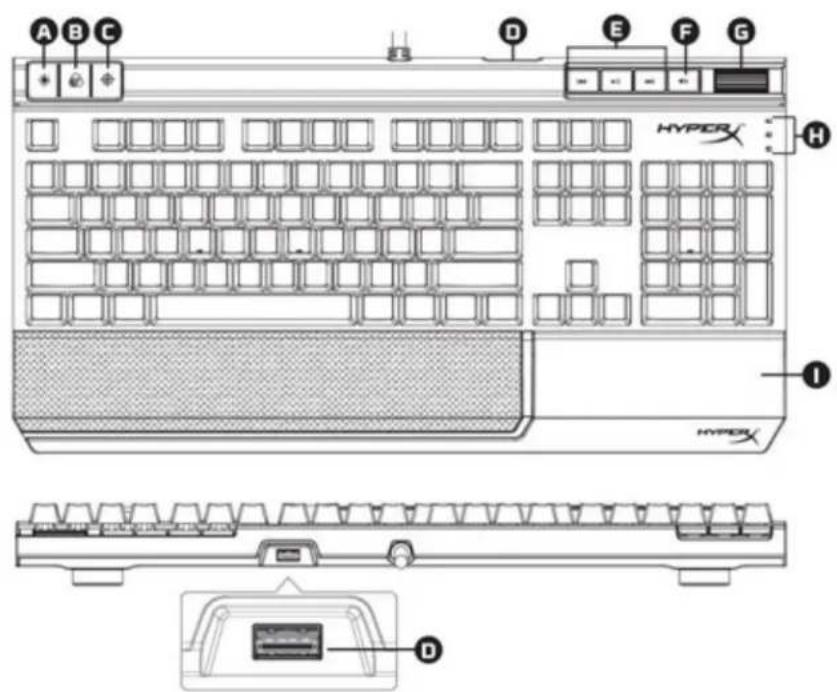
Keyboard Overview:
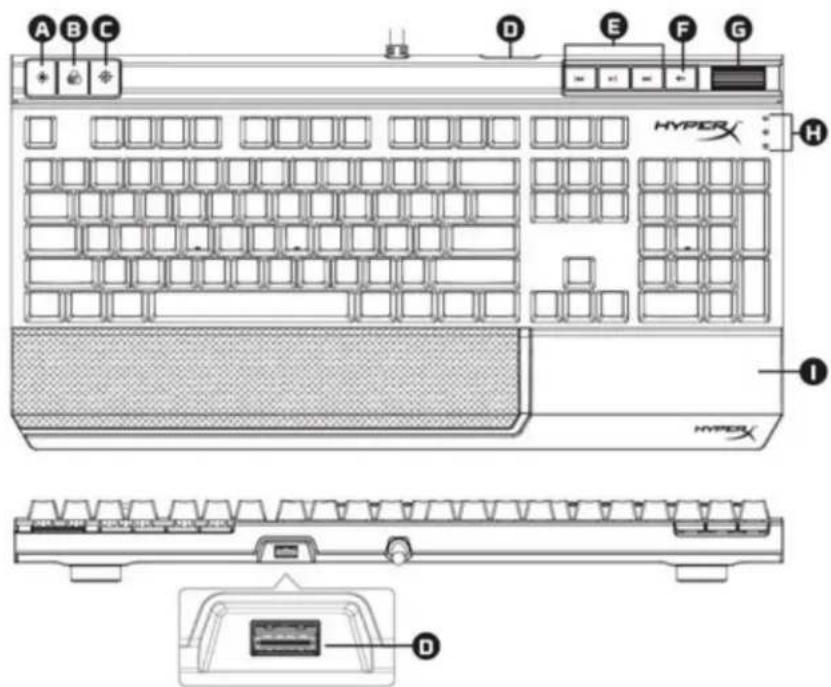
A- Brightness control button
B- LED mode control button
C- Game Mode button
D- Back USB port (USB 2.0 pass-through)
E- Media control buttons
F- Volume mute button
G- Volume control wheel
H- Game Mode / Num Lock / Caps Lock indicators
I- Detachable wrist rest
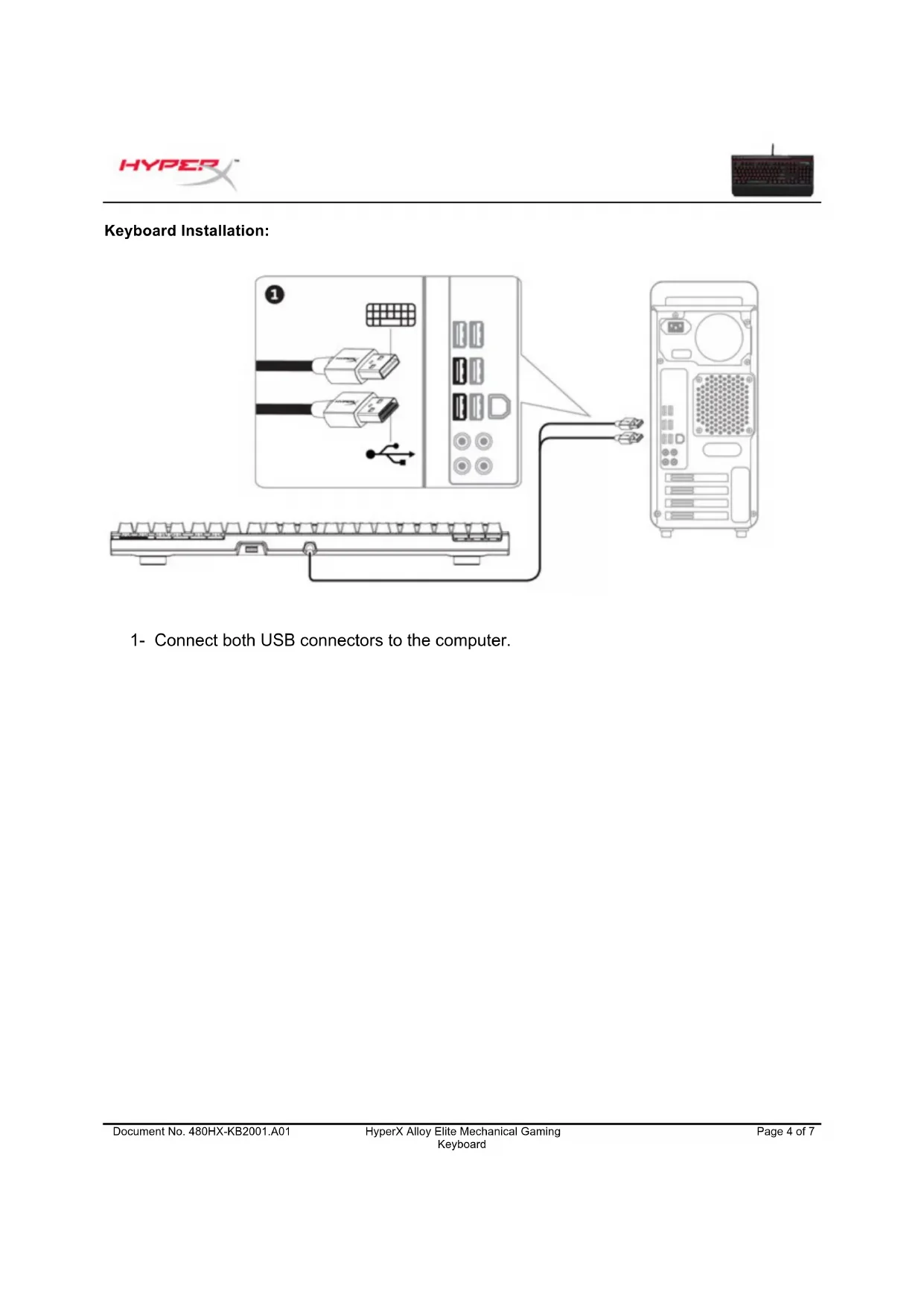
Keyboard Installation:
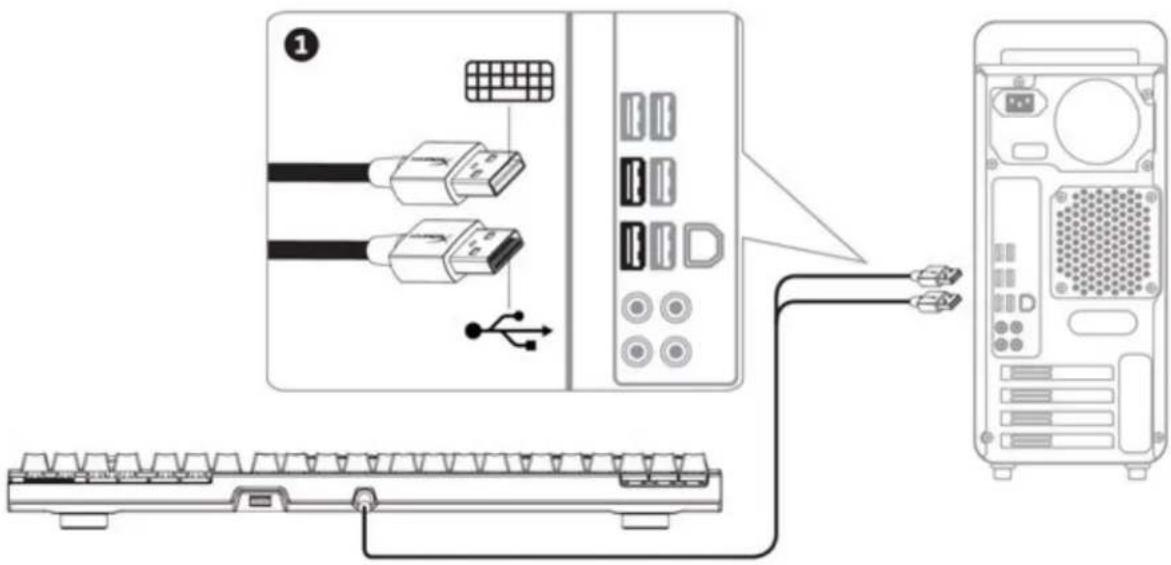
1- Connect both USB connectors to the computer.
Function Keys:
| Function Keys | Secondary Feature |
 | Change the LED Backlight brightness. There are 4 levels of brightness: OFF, low, medium and high. |
 | Switch between the LED backlight modes. |
 | Enable Game Mode to disable the Windows key and prevent accidental interruption during gaming. When Game Mode is enabled the indicator will illuminate. |
 | Play/pause ▶skip backwards or skip forward while listening to music or watching videos. |
 | Mute computer audio. |
 | Increase or decrease computer audio volume. |
LED backlight modes:
There are six LED backlight modes: ▶ Solid (default) ▶ Breathing ▶ Trigger ▶ Explosion ▶ Wave ▶ Custom.

Solid: Constant lightning (default setting).

Breathing: Slow rhythmic blinking that mimics breathing.

Trigger: Individuals keys will light up when pressed and slowly fade after one second.

Explosion: A lighting effect will radiate from individual keys when pressed.

Wave: Keys will light up from left to right in a wave pattern.

Custom: You can choose which keys you want to light up.
Follow these steps to customize:
1- Switch the backlight mode to Custom.
2- Hold until the backlight turns off.
3- Press the key or keys you want to have backlight ON.
4- When finished, press again to save your custom backlight profile.
Keyboard factory reset:
If you are experiencing any issue with the keyboard you can perform a factory reset. You will lose your custom LED profile by doing this.
| Function Keys | Secondary Feature |
| Press all three keys simultaneously until the keyboard LED backlight blinks twice. |
| Números de pieza | ||
| Cherry® MX azul | Cherry® MX marrón | Cherry® MX rojo |
| HX-KB2BL1-UK/R1 | HX-KB2BR1-UK/R1 | HX-KB2RD1-UK/R1 |
| HX-KB2BL1-FR/R1 | HX-KB2BR1-FR/R1 | HX-KB2RD1-FR/R1 |
| HX-KB2BL1-DE/R1 | HX-KB2BR1-DE/R1 | HX-KB2RD1-DE/R1 |
| HX-KB2BL1-NO/R1 | HX-KB2BR1-NO/R1 | HX-KB2RD1-NO/R1 |
| HX-KB2BL1-RU/R1 | HX-KB2BR1-RU/R1 | HX-KB2RD1-RU/R1 |
| HX-KB2BL1-LA/R2 | HX-KB2BR1-LA/R2 | HX-KB2RD1-LA/R2 |
| HX-KB2BL1-US/R1 | HX-KB2BR1-US/R1 | HX-KB2RD1-US/R1 |
| HX-KB2BL1-US/R2 | HX-KB2BR1-US/R2 | HX-KB2RD1-US/R2 |
| Artikelnummern | ||
| Cherry® MX Blue | Cherry® MX Brown | Cherry® MX Red |
| HX-KB2BL1-UK/R1 | HX-KB2BR1-UK/R1 | HX-KB2RD1-UK/R1 |
| HX-KB2BL1-FR/R1 | HX-KB2BR1-FR/R1 | HX-KB2RD1-FR/R1 |
| HX-KB2BL1-DE/R1 | HX-KB2BR1-DE/R1 | HX-KB2RD1-DE/R1 |
| HX-KB2BL1-NO/R1 | HX-KB2BR1-NO/R1 | HX-KB2RD1-NO/R1 |
| HX-KB2BL1-RU/R1 | HX-KB2BR1-RU/R1 | HX-KB2RD1-RU/R1 |
| HX-KB2BL1-LA/R2 | HX-KB2BR1-LA/R2 | HX-KB2RD1-LA/R2 |
| HX-KB2BL1-US/R1 | HX-KB2BR1-US/R1 | HX-KB2RD1-US/R1 |
| HX-KB2BL1-US/R2 | HX-KB2BR1-US/R2 | HX-KB2RD1-US/R2 |
Im Lieferumfang:
Tastaturübersicht
| Références produits | ||
| Cherry® MX Blue | Cherry® MX Brown | Cherry® MX Red |
| HX-KB2BL1-UK/R1 | HX-KB2BR1-UK/R1 | HX-KB2RD1-UK/R1 |
| HX-KB2BL1-FR/R1 | HX-KB2BR1-FR/R1 | HX-KB2RD1-FR/R1 |
| HX-KB2BL1-DE/R1 | HX-KB2BR1-DE/R1 | HX-KB2RD1-DE/R1 |
| HX-KB2BL1-NO/R1 | HX-KB2BR1-NO/R1 | HX-KB2RD1-NO/R1 |
| HX-KB2BL1-RU/R1 | HX-KB2BR1-RU/R1 | HX-KB2RD1-RU/R1 |
| HX-KB2BL1-LA/R2 | HX-KB2BR1-LA/R2 | HX-KB2RD1-LA/R2 |
| HX-KB2BL1-US/R1 | HX-KB2BR1-US/R1 | HX-KB2RD1-US/R1 |
| HX-KB2BL1-US/R2 | HX-KB2BR1-US/R2 | HX-KB2RD1-US/R2 |
Le produit inclut :
I- Repose-poignet amovible
| Numeri di parte | ||
| Cherry® MX Blue | Cherry® MX Brown | Cherry® MX Red |
| HX-KB2BL1-UK/R1 | HX-KB2BR1-UK/R1 | HX-KB2RD1-UK/R1 |
| HX-KB2BL1-FR/R1 | HX-KB2BR1-FR/R1 | HX-KB2RD1-FR/R1 |
| HX-KB2BL1-DE/R1 | HX-KB2BR1-DE/R1 | HX-KB2RD1-DE/R1 |
| HX-KB2BL1-NO/R1 | HX-KB2BR1-NO/R1 | HX-KB2RD1-NO/R1 |
| HX-KB2BL1-RU/R1 | HX-KB2BR1-RU/R1 | HX-KB2RD1-RU/R1 |
| HX-KB2BL1-LA/R2 | HX-KB2BR1-LA/R2 | HX-KB2RD1-LA/R2 |
| HX-KB2BL1-US/R1 | HX-KB2BR1-US/R1 | HX-KB2RD1-US/R1 |
| HX-KB2BL1-US/R2 | HX-KB2BR1-US/R2 | HX-KB2RD1-US/R2 |
| Referências | ||
| Azul Cherry® MX | Castanho Cherry® MX | Vermelho Cherry® MX |
| HX-KB2BL1-UK/R1 | HX-KB2BR1-UK/R1 | HX-KB2RD1-UK/R1 |
| HX-KB2BL1-FR/R1 | HX-KB2BR1-FR/R1 | HX-KB2RD1-FR/R1 |
| HX-KB2BL1-DE/R1 | HX-KB2BR1-DE/R1 | HX-KB2RD1-DE/R1 |
| HX-KB2BL1-NO/R1 | HX-KB2BR1-NO/R1 | HX-KB2RD1-NO/R1 |
| HX-KB2BL1-RU/R1 | HX-KB2BR1-RU/R1 | HX-KB2RD1-RU/R1 |
| HX-KB2BL1-LA/R2 | HX-KB2BR1-LA/R2 | HX-KB2RD1-LA/R2 |
| HX-KB2BL1-US/R1 | HX-KB2BR1-US/R1 | HX-KB2RD1-US/R1 |
| HX-KB2BL1-US/R2 | HX-KB2BR1-US/R2 | HX-KB2RD1-US/R2 |
Conteúdo da caixa:
D- Porta USB traseira (USB 2.0 pass-through)
E- Botões de controlo de multimédia
| Numery katalogowe | ||
| Cherry® MX Blue | Cherry® MX Brown | Cherry® MX Red |
| HX-KB2BL1-UK/R1 | HX-KB2BR1-UK/R1 | HX-KB2RD1-UK/R1 |
| HX-KB2BL1-FR/R1 | HX-KB2BR1-FR/R1 | HX-KB2RD1-FR/R1 |
| HX-KB2BL1-DE/R1 | HX-KB2BR1-DE/R1 | HX-KB2RD1-DE/R1 |
| HX-KB2BL1-NO/R1 | HX-KB2BR1-NO/R1 | HX-KB2RD1-NO/R1 |
| HX-KB2BL1-RU/R1 | HX-KB2BR1-RU/R1 | HX-KB2RD1-RU/R1 |
| HX-KB2BL1-LA/R2 | HX-KB2BR1-LA/R2 | HX-KB2RD1-LA/R2 |
| HX-KB2BL1-US/R1 | HX-KB2BR1-US/R1 | HX-KB2RD1-US/R1 |
| HX-KB2BL1-US/R2 | HX-KB2BR1-US/R2 | HX-KB2RD1-US/R2 |
Zawartość zestawu:
| Номера по каталогу | ||
| Cherry® MX Blue | Cherry® MX Brown | Cherry® MX Red |
| HX-KB2BL1-UK/R1 | HX-KB2BR1-UK/R1 | HX-KB2RD1-UK/R1 |
| HX-KB2BL1-FR/R1 | HX-KB2BR1-FR/R1 | HX-KB2RD1-FR/R1 |
| HX-KB2BL1-DE/R1 | HX-KB2BR1-DE/R1 | HX-KB2RD1-DE/R1 |
| HX-KB2BL1-NO/R1 | HX-KB2BR1-NO/R1 | HX-KB2RD1-NO/R1 |
| HX-KB2BL1-RU/R1 | HX-KB2BR1-RU/R1 | HX-KB2RD1-RU/R1 |
| HX-KB2BL1-LA/R2 | HX-KB2BR1-LA/R2 | HX-KB2RD1-LA/R2 |
| HX-KB2BL1-US/R1 | HX-KB2BR1-US/R1 | HX-KB2RD1-US/R1 |
| HX-KB2BL1-US/R2 | HX-KB2BR1-US/R2 | HX-KB2RD1-US/R2 |
Комплект поставки:
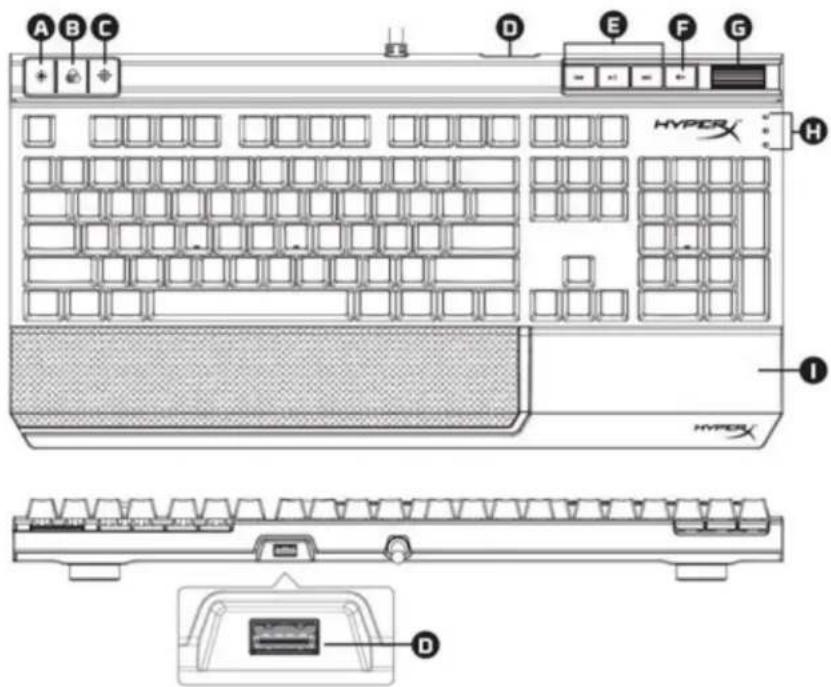
Обзор клавиатуры:
| Parça Numaraları | ||
| Cherry® MX Blue | Cherry® MX Brown | Cherry® MX Red |
| HX-KB2BL1-UK/R1 | HX-KB2BR1-UK/R1 | HX-KB2RD1-UK/R1 |
| HX-KB2BL1-FR/R1 | HX-KB2BR1-FR/R1 | HX-KB2RD1-FR/R1 |
| HX-KB2BL1-DE/R1 | HX-KB2BR1-DE/R1 | HX-KB2RD1-DE/R1 |
| HX-KB2BL1-NO/R1 | HX-KB2BR1-NO/R1 | HX-KB2RD1-NO/R1 |
| HX-KB2BL1-RU/R1 | HX-KB2BR1-RU/R1 | HX-KB2RD1-RU/R1 |
| HX-KB2BL1-LA/R2 | HX-KB2BR1-LA/R2 | HX-KB2RD1-LA/R2 |
| HX-KB2BL1-US/R1 | HX-KB2BR1-US/R1 | HX-KB2RD1-US/R1 |
| HX-KB2BL1-US/R2 | HX-KB2BR1-US/R2 | HX-KB2RD1-US/R2 |
キーボードの概要:
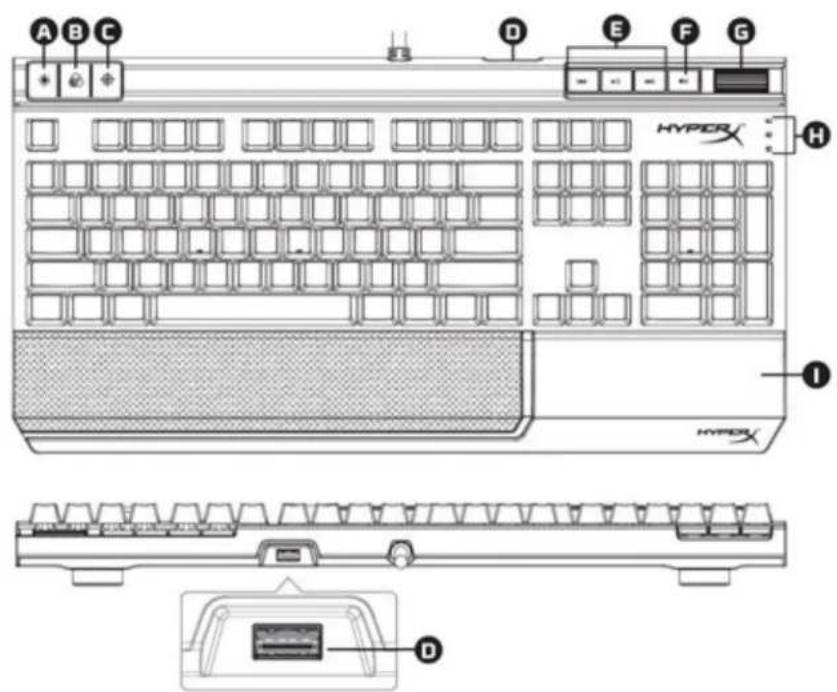
A- 明度コントロールボタン
B- LED モードコントロールボタン
C- ゲームモードボタン
| 부품 번호 | ||
| Cherry® MX Blue | Cherry® MX 브라운 | Cherry® MX 레드 |
| HX-KB2BL1-UK/R1 | HX-KB2BR1-UK/R1 | HX-KB2RD1-UK/R1 |
| HX-KB2BL1-FR/R1 | HX-KB2BR1-FR/R1 | HX-KB2RD1-FR/R1 |
| HX-KB2BL1-DE/R1 | HX-KB2BR1-DE/R1 | HX-KB2RD1-DE/R1 |
| HX-KB2BL1-NO/R1 | HX-KB2BR1-NO/R1 | HX-KB2RD1-NO/R1 |
| HX-KB2BL1-RU/R1 | HX-KB2BR1-RU/R1 | HX-KB2RD1-RU/R1 |
| HX-KB2BL1-LA/R2 | HX-KB2BR1-LA/R2 | HX-KB2RD1-LA/R2 |
| HX-KB2BL1-US/R1 | HX-KB2BR1-US/R1 | HX-KB2RD1-US/R1 |
| HX-KB2BL1-US/R2 | HX-KB2BR1-US/R2 | HX-KB2RD1-US/R2 |
구성품:
키보드 개요:
A- 밝기 제어 버튼
B- LED 모드 제어 버튼
C- 게임 모드 버튼
| เลขชีนส่วน | ||
| Cherry® MX Blue | Cherry® MX Brown | Cherry® MX Red |
| HX-KB2BL1-UK/R1 | HX-KB2BR1-UK/R1 | HX-KB2RD1-UK/R1 |
| HX-KB2BL1-FR/R1 | HX-KB2BR1-FR/R1 | HX-KB2RD1-FR/R1 |
| HX-KB2BL1-DE/R1 | HX-KB2BR1-DE/R1 | HX-KB2RD1-DE/R1 |
| HX-KB2BL1-NO/R1 | HX-KB2BR1-NO/R1 | HX-KB2RD1-NO/R1 |
| HX-KB2BL1-RU/R1 | HX-KB2BR1-RU/R1 | HX-KB2RD1-RU/R1 |
| HX-KB2BL1-LA/R2 | HX-KB2BR1-LA/R2 | HX-KB2RD1-LA/R2 |
| HX-KB2BL1-US/R1 | HX-KB2BR1-US/R1 | HX-KB2RD1-US/R1 |
| HX-KB2BL1-US/R2 | HX-KB2BR1-US/R2 | HX-KB2RD1-US/R2 |
สิ่งที่จัดมาให้:
| Mã sản phẩm | ||
| Cherry® MX Blue | Cherry® MX Brown | Cherry® MX Red |
| HX-KB2BL1-UK/R1 | HX-KB2BR1-UK/R1 | HX-KB2RD1-UK/R1 |
| HX-KB2BL1-FR/R1 | HX-KB2BR1-FR/R1 | HX-KB2RD1-FR/R1 |
| HX-KB2BL1-DE/R1 | HX-KB2BR1-DE/R1 | HX-KB2RD1-DE/R1 |
| HX-KB2BL1-NO/R1 | HX-KB2BR1-NO/R1 | HX-KB2RD1-NO/R1 |
| HX-KB2BL1-RU/R1 | HX-KB2BR1-RU/R1 | HX-KB2RD1-RU/R1 |
| HX-KB2BL1-LA/R2 | HX-KB2BR1-LA/R2 | HX-KB2RD1-LA/R2 |
| HX-KB2BL1-US/R1 | HX-KB2BR1-US/R1 | HX-KB2RD1-US/R1 |
| HX-KB2BL1-US/R2 | HX-KB2BR1-US/R2 | HX-KB2RD1-US/R2 |
Bộ sản phẩm gồm có:
| 产品型号 | ||
| Cherry® MX Blue | Cherry® MX Brown | Cherry® MX Red |
| HX-KB2BL1-UK/R1 | HX-KB2BR1-UK/R1 | HX-KB2RD1-UK/R1 |
| HX-KB2BL1-FR/R1 | HX-KB2BR1-FR/R1 | HX-KB2RD1-FR/R1 |
| HX-KB2BL1-DE/R1 | HX-KB2BR1-DE/R1 | HX-KB2RD1-DE/R1 |
| HX-KB2BL1-NO/R1 | HX-KB2BR1-NO/R1 | HX-KB2RD1-NO/R1 |
| HX-KB2BL1-RU/R1 | HX-KB2BR1-RU/R1 | HX-KB2RD1-RU/R1 |
| HX-KB2BL1-LA/R2 | HX-KB2BR1-LA/R2 | HX-KB2RD1-LA/R2 |
| HX-KB2BL1-US/R1 | HX-KB2BR1-US/R1 | HX-KB2RD1-US/R1 |
| HX-KB2BL1-US/R2 | HX-KB2BR1-US/R2 | HX-KB2RD1-US/R2 |
包含内容:
键盘概览:
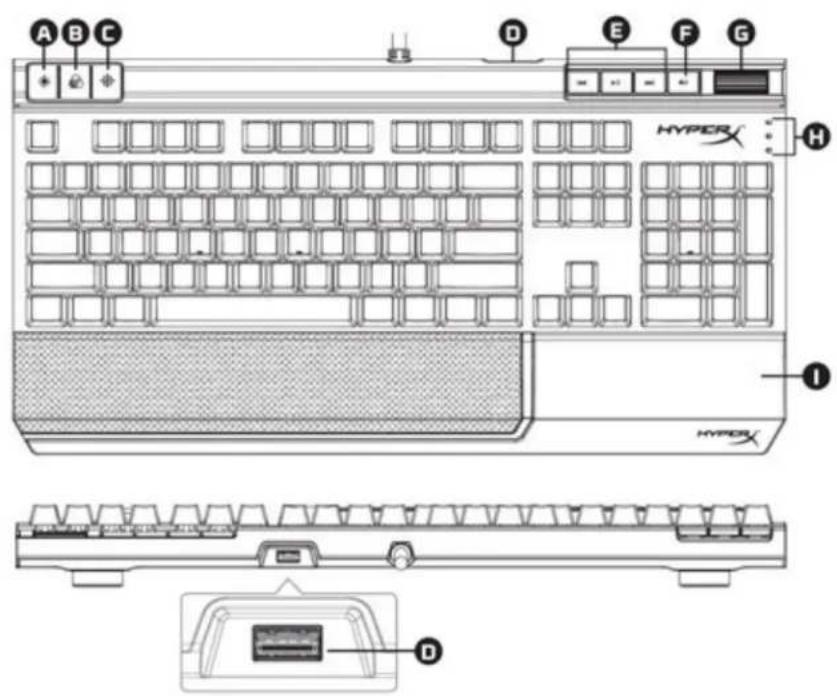
1- 将两个 USB 接头连接到电脑。
功能键:
| 產品型號 | ||
| Cherry® MX 青軸款 | Cherry® MX 茶軸款 | Cherry® MX 紅軸款 |
| HX-KB2BL1-UK/R1 | HX-KB2BR1-UK/R1 | HX-KB2RD1-UK/R1 |
| HX-KB2BL1-FR/R1 | HX-KB2BR1-FR/R1 | HX-KB2RD1-FR/R1 |
| HX-KB2BL1-DE/R1 | HX-KB2BR1-DE/R1 | HX-KB2RD1-DE/R1 |
| HX-KB2BL1-NO/R1 | HX-KB2BR1-NO/R1 | HX-KB2RD1-NO/R1 |
| HX-KB2BL1-RU/R1 | HX-KB2BR1-RU/R1 | HX-KB2RD1-RU/R1 |
| HX-KB2BL1-LA/R2 | HX-KB2BR1-LA/R2 | HX-KB2RD1-LA/R2 |
| HX-KB2BL1-US/R1 | HX-KB2BR1-US/R1 | HX-KB2RD1-US/R1 |
| HX-KB2BL1-US/R2 | HX-KB2BR1-US/R2 | HX-KB2RD1-US/R2 |
内容物:
鍵盤概覽:
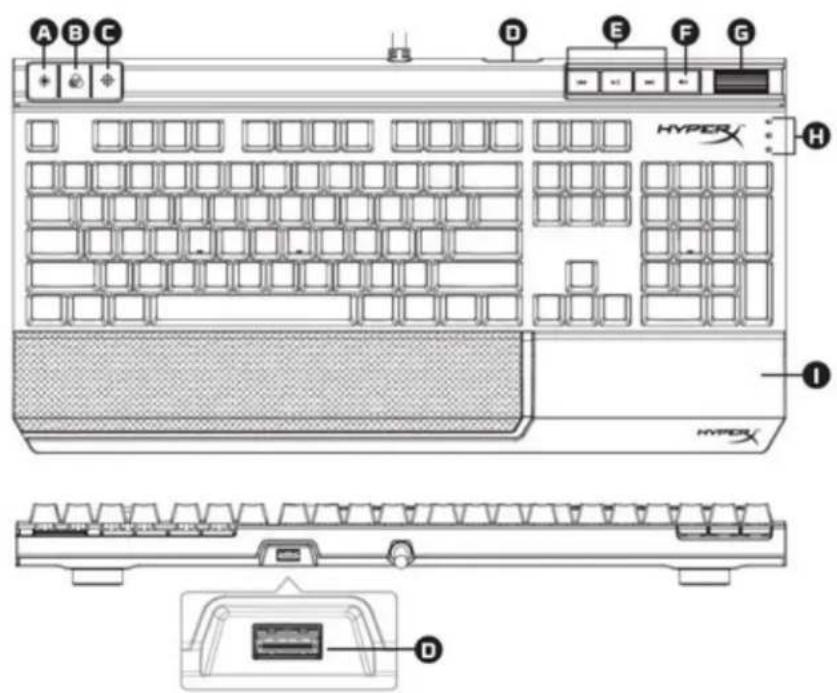
1- 將兩組 USB 接頭連接至電腦。
功能鍵:
- HYPERX ALLOY ELITE MECHANICAL GAMING KEYBOARD
- HYPERX ALLOY ELITE MECHANICAL GAMING KEYBOARD USER MANUAL
- WHAT'S INCLUDED
- KEYBOARD OVERVIEW
- KEYBOARD INSTALLATION
- FUNCTION KEYS
- LED BACKLIGHT MODES
- FOLLOW THESE STEPS TO CUSTOMIZE
- KEYBOARD FACTORY RESET
- IM LIEFERUMFANG
- TASTATURÜBERSICHT
- LE PRODUIT INCLUT
- CONTEÚDO DA CAIXA
- ZAWARTOŚĆ ZESTAWU
- КОМПЛЕКТ ПОСТАВКИ
- ОБЗОР КЛАВИАТУРЫ
- キーボードの概要
- 구성품
- สิ่งที่จัดมาให้
- BỘ SẢN PHẨM GỒM CÓ
- 包含内容
- 键盘概览:
- 内容物:
- 鍵盤概覽:
Brand : HYPERX
Model : Alloy FPS
Category : Keyboard