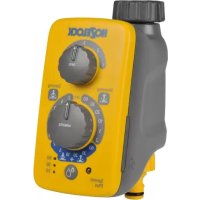
AC Pro 2701 - Irrigation timer HOZELOCK - Free user manual and instructions
Find the device manual for free AC Pro 2701 HOZELOCK in PDF.



| Product Type | Watering Timer |
| Brand | Hozelock |
| Model | AC Pro 2701 |
| Power Supply | 2 C-type alkaline batteries (1.5V) |
| Display | Backlit LCD screen |
| Programming | Ultra Easy (1 button), Very Easy (13 presets), Easy (wizard), Expert (manager) |
| Number of Programs | Up to 4 programs per day |
| Watering Modes | Normal, Turbo (double duration), Thrifty (half duration) |
| Manual Watering | Yes, with adjustable duration (up to 59 min) |
| Tap Connection | 1" adapters supplied (part 1, 2, 3) |
| Rain Sensor | Compatible (optional AC Pro sensor) |
| Child Lock | Yes (button combination) |
| Watering Pause Function | Yes |
| Language Setting | Yes (French and others) |
| Time & Day Setting | Yes |
| Dimensions (approx.) | 150 x 80 x 100 mm |
| Weight (approx.) | 300 g (without batteries) |
| Frost Protection | Remove from tap in winter |
| Warranty | 2 years (excludes frost damage) |
Frequently Asked Questions - AC Pro 2701 HOZELOCK
User questions about AC Pro 2701 HOZELOCK
0 question about this device. Answer the ones you know or ask your own.
Ask a new question about this device
Download the instructions for your Irrigation timer in PDF format for free! Find your manual AC Pro 2701 - HOZELOCK and take your electronic device back in hand. On this page are published all the documents necessary for the use of your device. AC Pro 2701 by HOZELOCK.
USER MANUAL AC Pro 2701 HOZELOCK
- This product meets the requirements of Pollution Degree 4 and therefore can be used in exposed weather conditions.
- This product is not suitable for supplying drinking water.
- Threaded water connections are suitable for hand tightening only.
- This product should only be fitted to a mains water supply.
- Please follow the instructions to make sure that you get the most from your timer for simple and efficient watering.
GB
IMPORTANT: RECHARGEABLE BATTERIES MUST NOT BE USED. REPLACE BATTERIES EACH SEASON. (MAX 12 MONTHS USE). PROTECT YOUR WATER TIMER FROM FROST. REMOVE FROM THE TAP IN WINTER. PRODUCT NOT GUARANTEED AGAINST FROST DAMAGE. REMOVE BATTERIES WHEN NOT IN USE.
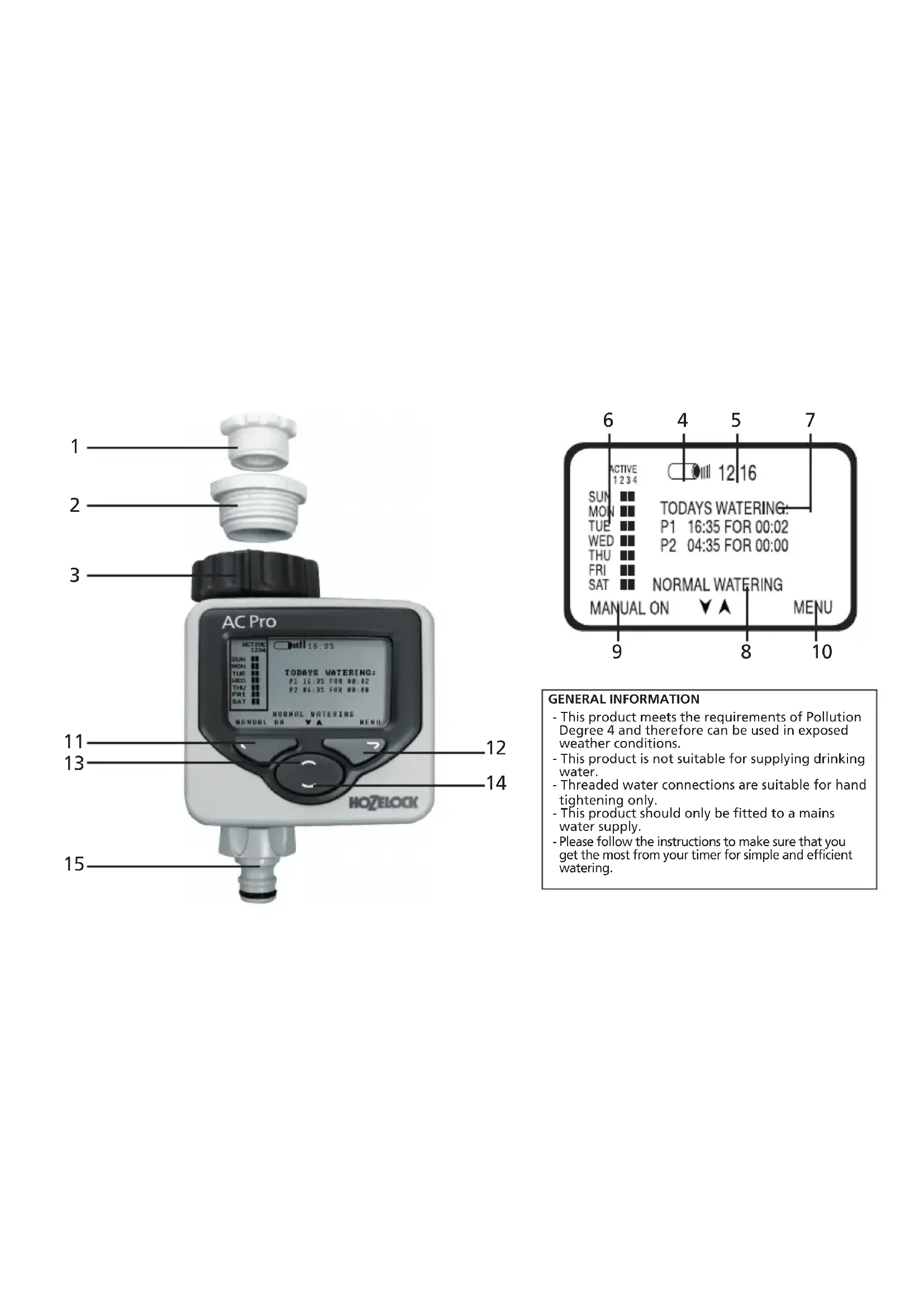
1 1/2 Inch adaptor
2 3/4 Inch adaptor
31 Inch Adaptor (fitted)
4 Battery level
5 Current time
6 Watering program overview
7 Today's watering programs (if set)
8 Watering mode
9 Left button screen prompt
10 Right button screen prompt
11 Left button (red)
12 Right button (green)
13 Up button (blue)
14 Down Button (blue)
15 Hose pipe connector
Please follow the instructions to make sure that you get the most from your timer for simple and efficient watering.
INSTALLING THE BATTERIES
You must use Alkaline batteries: Alternatives will result in incorrect operation.
i. Remove screws and back cover
ii. Insert two 1.5V 'C' Alkaline batteries. (Check + and - are correct).
iii. Ensure rubber seal is positioned correctly; failure to do so will break the waterproof seal and may cause the Water computer to fail.
iv. Replace back cover and screw down tightly. Repeat steps iii & iv every time the back cover is removed.
CONNECTING THE WATER COMPUTER TO THE TAP. (FIG.3/4)
i. Choose the correct tap adapter for your tap. The largest size (part 3) is permanently fitted to the Water computer. Part 1 screws into part 2. Part 2 screws in to part 3.
ii. With the correct adapters in place, hold the Water computer up to the tap. Tighten firmly to avoid leaks.
SETTING LANGUAGE AND TIME
i. Select your language using the and buttons and press
ii. Select the day by using the and buttons and press. Repeat to set the hour and minutes, pressing each time. iii. Press if you are happy with the settings, if not, you can go back to make changes ( ).
MANUAL OPERATION
This will operate watering immediately, without using any programs. It will override any active programs.
i. Press when MANUAL ON is displayed. Watering will start and continue for the displayed time. This can be changed using the and buttons. (Displayed in minutes, up to 59) ii. Press the button (MANUAL OFF) at any time to stop watering.
PROGRAMMING THE TIMER
There are four ways to set the timer:
1. ULTRA EASY - ONE TOUCH PROGRAMMING
The quickest way to get the Water computer to start automatic watering is:
i. Press and hold the button on the Main menu until the screen displays: 5 MINUTES WATERING EVERY 24 HOURS. START NOW?
ii. Press the button and the water computer will immediately start watering for 5 minutes and will repeat this every day at the same time. Or press to return to Main menu.
Press when MENU is displayed, and use to access the Main Menu which includes 3 other ways of programming the timer. Press to enter each of the following:
2.VERY EASY-WATERING PRE-SETS
There are 13 preset programs built in to the computer that will cover most people's requirements. Use the arrows to select the most appropriate program and press to select.
3. EASY - WATERING WIZARD
The watering wizard allows easy selection of watering start time, watering duration, watering frequency and the watering days.
i. Select 1 of 4 program types and press
ii. Use and to enter watering start time and watering duration.
iii. For pick day program types, use to answer Yes or No to the watering day question.
iv. A summary of the watering program will be displayed. Press if you are happy with the settings. If not, takes you back to make changes.
4. EXPERT - WATERING MANAGER
The Watering Manager allows editing of any existing program (created either by 1 touch, Preset, or Wizard), and lets you create new watering programs.
Choose the day you wish to edit using the buttons, then press
Select from:
EDIT /VIEW - gives you complete control over all programs.
i. Use the buttons to change the start time, watering duration and the program status (ON or OFF).
ii. Press to scroll through all 4 programs.
iii. A summary of the watering program will be displayed. Press if you are happy with the settings. If not, takes you back to make changes.
COPY TO ALL DAYS - copies the selected day's program settings to all other days. This overrides any existing programs.
CANCEL DAY - deletes the selected day's programs. Press to confirm all changes.
WATERING MODE
This is a quick way of adjusting watering duration without having to alter the programs settings. If, for example, weather conditions require a longer or shorter watering duration then
use watering mode to quickly double or halve the program duration. Change the mode (8) by using the buttons on the main menu. Choose from:
NORMAL WATERING - watering duration as programmed.
TURBO WATERING - doubles watering duration indefinitely.
MISER WATERING - halves the watering duration indefinitely NB: actual increase / decrease can be modified in the SETTINGS menu (see MISR % and TURBO%).
PROGRAM REVIEW
Press and hold to activate the program review. Use the buttons to display the programmed waterings for each day.
ADDITIONAL FEATURES
Press when MENU is displayed, and use to access the Main Menu for additional features
SETTINGS
LANGUAGE - Select the desired display language using the buttons. Press to set the language and display the Main menu.
SET DAY AND TIME - Select the clock's day, hour, & minute values using the buttons. Press to set new values and display the Main menu.
MISER % - sets how much watering times are reduced by when the timer is in Miser mode. A lower % will give a shorter watering. Press to set new values and return to Settings menu.
TURBO % - sets how much watering times are lengthened by when the timer is in Turbo mode. A higher % will give a longer watering. Press to set new values and return to Settings menu.
CONFIRMATIONS? - Set to ON to display a YES / NO
confirmation screen when program values are going to be changed, after selecting a watering preset for example. Press
to set new value and return to Settings menu.
MANUAL ON TIME - Select the default time for manual watering. Press to set new values and return to Settings menu.
RESTORE FACTORY DEFAULTS - Pressing reloads all the original settings and then displays the Main menu.
PAUSE WATERING
This Watering Menu option stops current and future programmed watering. Press the button to resume watering.
CANCEL ALL PROGRAMS
This Watering Menu option stops any current watering and clears all programs. You will be asked to confirm. stops watering and clears all programs, takes you back to the Main menu.
CHILD KEYBOARD LOCK
The timer can be locked to prevent abuse: press and hold whilst pressing (at the same time), hold for 2 seconds. Any existing watering will be carried out, but no changes can be made to the timer until it is unlocked by repeating this process.
REDUCE WATER WASTE - USE AC PRO RAIN SENSOR An AC Sensor is available separately. This plugs into the computer via a 10m wire, and overrides the programming when it is raining.
PROBLEM SOLVING
| Trouble Shooting Guide | ||
| PROBLEM | POSSIBLE CAUSE | SOLUTION |
| Screen is Blank | Display is in power-saving mode | Press and hold any key to continue |
| Wrong batteries, incorrect fitting or flat batteries | See “installing the batteries” section of the instructions | |
| Direct Sunlight | Shade display from direct sunlight | |
| No water | Tap is off | Turn on tap; also, check the mains water supply is connected/on |
| Hosepipe is twisted/ blocked | Unblock hose pipe | |
| No Programs are set and manual watering is off | Set a program or manual watering to activate | |
Contact Details
If you have any further problems with your AC Pro, please contact Hozelock customer services.
Hozelock Limited
Midpoint Park, Birmingham. B76 1AB.
Tel: +44 (0)121 313 1122
Internet: www.hozelock.com
Email: info@hozelock.com

IMPORTANT: NE PAS UTILISER DES PILES RECHARGEABLES. REMPLACER LES PILES A CHAQUE SAISON.
(UTILISATION 12 MOIS MAXI.)
PROTEGEZ VOTRE MINUTEUR D'EAU CONTRE LE GEL. RETIREZ-LE DU ROBINET PENDANT L'HIVER. CE PRODUIT N'EST PAS GARANTI CONTRE LES DOMMAGES DUS AU GEL. RETIREZ LES PILES EN CAS DE NON-UTILISATION
1 Adaptateur 1/2
2 Adaptateur 3/4
2. VELDIG LETT - WATERING PRE-SETS
2. MEGET NEM - WATERING PRE-SETS
3. NEM - WATERING WIZARD
INSTALACAO DAS PILHAS
2. BARDZO LATWA - WATERING PRE-SETS
2. COK KOLAY - WATERING PRE-SETS
2. NAGYON KÖNNYU - WATERING PRE-SETS
3. KÖNNYÜ - WATERING WIZARD
3 Adapter 1" (namontovany)
4 Uroven baterie
5 Presny cas
3. SNADNE - WATERING WIZARD
Watering wizard (prùvodce nastaveni zalévani) umožnjue snadnou volbu zaćatku zalévani (start time), doby zalévani (watering duration) a intervalu a dnu zalévani.
Bb6epnte DeHb, KOTOpbI Tpe6yeTcH OTepaKaTnpoBaTb, C NOMOuH KOHOK a 3aTEM HaKMNTe KHONKY
Bb6epnte n3:
PEDAKTNPOBAHVE/BND-daetBAMBO3MOXHOCTbKOHTpONHaDBCEMnporpammm.
i. C NOMOJIbIO KHOJOK 3MeHITe start time, watering duration n cTaTc nporpaMMbl (ON nn OFF).
ii. HaxmTe KhONky DnI NOcneObaTeNbHOro nepexOa Meky BcEMN 4 nporpamMAMn.
iii. OTo6pa3ITcA CbOHaN HInOpMaIa NpOrpAmme NOnBa. HaXMMte KHNKy, ecn Bbl yIOBNeTbOpEnbI hAcTpoiKaMm. B pOtnBHom cHyuea c NOMOuB KOHONB BEPHTncB hAsad, YTObB bBlIOINHb I3MeHENHIA.
COPY TO ALL DAYS - Konipuyet nporpammbHbIe NaCTPOIKN Bb6paHoro DnA Bcex dpyrnx dne. 3Ta phynzni HmEeT npemmyeCTBO nepe IIO6oI pyroou cyuectbyuOeepnporpammoi.
CANCEL DAY - ydaanet nporpammbi nBb6paHoro dHaXMMTE KONIKY , YTO6bl NOITBepNTb BCE N3MeHeHNA.
WATERING MODE
3to npoctoi cnooc hactoikn npdojnkntbHoctn nojna 6e3 Heo6xOIMOCtN i3MeHeHHI nporpamMbHIX hactoek. Ecn, Hanpumep, npoDhBbc yCIOBNA Tpe6yIOT BoNEe nn Meee dInTeBHOI
npoJONKHTeBHOCTN NOnIBa,HCNoIb3yTepeXMM NOINBa Dn8 bICTPO yDBoEHHN INCOKpaueHIN BDBOE BpEmHn pa6Obl npORpAMMb.ImMeHNTe peXMM C NOMOuBIO KHNCK INN B rnaBHOM MeHIO. BblepnE n3 cJeDyUHcero:
NORMAL WATERING - 3anporpammmipoBaHHa npdoJnxKtEnbHocTb nonBa. TURBO WATERING - HeorpaHnueHNO yDbaBaet npdoJnxKtEnbHocTb noJNaB. Miser WATERING - HeorpaHnueHNO cokpaaaet TBdoe npdoJnxKtEnbHocTb noJNaB.
ПРМЕЧАНЕ: Ф金融机构 eckoe ybeJIeHne nI IN COKpaueHne MOKET m3MeHrtbCBA MeHIO SETTINGS (cM.MISER%nTURBO%).
OB3OP IPOPTPAMMBI
Haxmnte n yedeKnBaTe KhoNky ,TTo6bI aKTBNPOBaTb 063op nporpamMb. C NOMOsbIO KHOON OTO6pa3nte 3anporpamMPOBaHHoe pacncaHne noJnBa Ha KaXdbI DeHb.
DONOJIHHTENbHbE ΦYHKUIN
Haxmte KhoNky ,KoIa OTo6paXa8TcR MEHO, n c NOMOuBIO KHOON BOINTE B INaBHe MEO dIra DoCTyna KdoONHInTeIbHbIM yHKUAM
SETTINGS
LANGUAGE - Bb6epnte Tpe6yembIaIK OTo6paKeHnC NOMOsbIO KHOONOK .HaKMNTe KNONky ,YTO6bl YCTAHOBNTb a3bIK NOT6pa3NTb
TnabHOe MeHIO.
SET DAY AND TIME - Bb6epnte 3aHcEHNIH, HAcOB IN MHNHTCNCHEMbIX YacOB c NOMOIOB KOHONK .HaKMITE KONKY ,TO6bI 3aDaTb HOBIE 3AHCENY I OTO6P3ATb IaBHOE MEHO.
MISER % - yctahabnBaet KonuYeCTBO noNtOB, Ha KOTOpBe COKpaAaETcnporpAmna noIbBA, eCN Taimep HaxOOnTCB P pexKHe "MinHMaNbHb" (Miser). Mehblee 3aueHne % Bbl3bBaet cokpaueHne noNtBa. HaxMtE KHONKY , YTObbl aDaTb HOBle 3aueHn IN BO3BpaNTbCBA MeHIO HAcToPkn.
TURBO % - yctahablnbaeT KONUecTO NOINBOB, Ha KOTOpbIy BvEnuHBAeTcN nporpamma noInBa, ecn TaImeP haxOunTCB PexmE "Typ60" (Turbo). Bonbuee 3haeHHe % Bbl3bIaBETnpOJneHne noInBa. HaxMITE KONky
T06b3a4bHOBBIE 3HaueHnI B03BaPTbCB B MeHIO HaCTpOKN. CONFIRMATIONS? -YCTaHOBtE Ha "BKJ." (ON), T06bI OTO6pa3ITb 3KpaH noDTBepxJHeN YES /NO cnporpaMMHbIM 3HaueHnIM, KOToPbIE Tpe6yeTCa I3MeHNTb, NOcNE Bb6Op npEbnBPteJIbHO 3aDaHHOro NOniBA B KaeeCTBe npImePA.HaxMnte KhoNKy ,T06bI yCTaHOBtB HOBoe 3HaueHne I BO3BpATNTCB B MEHIO HaCTpOKN.
MANUAL ON TIME - Bby6eprrte 3haeHne BpeMeHN NO yMOnHaHmIO dIra pyHoro noINBa. HAnKMTE KONKY , QTObI 3aDaTb HOBBe 3haeHn I BepHYbCBA B MeHIO HAcptpnKn.