AS 1110 - To scan AGFA - Free user manual and instructions
Find the device manual for free AS 1110 AGFA in PDF.



Frequently Asked Questions - AS 1110 AGFA
User questions about AS 1110 AGFA
0 question about this device. Answer the ones you know or ask your own.
Ask a new question about this device
Download the instructions for your To scan in PDF format for free! Find your manual AS 1110 - AGFA and take your electronic device back in hand. On this page are published all the documents necessary for the use of your device. AS 1110 by AGFA.
USER MANUAL AS 1110 AGFA
Macintosh: Mass Storage Class Mac OS9.x or Mac OSX
Configuration minimum
20-70% (sans condensation)
Scanner
With the purchase of this device, you have chosen a quality AgfaPhoto product brand. Their device fulfils the most varied requirements for private use or in your office and business everyday.
Scan photos or business cards and transfer the data automatically on to memory cards or onto compatible digital picture frames.
In addition, you also use the scanner as a memory card reader in combination with a computer.
We hope you enjoy your device and its many functions!
About this User Manual
With the installation guide on the following pages, you can start using your device quickly and easily. Detailed descriptions can be found in the following sections of this user manual.
Read the entire user manual carefully. Follow all safety instructions in order to ensure proper operation of your device. The manufacturer accepts no liability if these instructions are not followed.
Symbols Used
DANGER!

DANGER!
Warns about dangers for people, damage to the device or other objects as well as possible loss of data. Injuries or damage can result from improper handling.
Notice

Troubleshooting
This symbol designates tips that will help you to use your device more effectively and easily.
1 Introduction Dear Customer 1 About this User Manual 1
2 General Safety Information
3 Device Overview
External View 4 Connections on the Rear Side 4
4 Initial Operation Packing Contents 5 Connecting power supply 5 Inserting a Memory Card 5 Using the digital photo frame 5
5 Scanning Loading Photos 6 Cleaning the Scanner Glass . 7 Computer Connection . 7
6 Service Cleaning . 8 Power Cycling . 9
7 Appendix Technical Data 11 Guarantee 11
General Safety Information
Read the following information before using the device in order to avoid or minimise any risk of injury or damage.
Setting Up the Device
Protect the device against direct sunlight, heat, large temperature fluctuations and moisture. Do not place the device in the vicinity of heaters or air conditioners. Observe the information on temperature and humidity in the technical data.
In the event that the device becomes too hot, or if you see smoke coming from the device, you must immediately pull the power cable out of the power socket. Have your device examined by trained professionals at a technical service location. To prevent the spread of fire, open flames should be kept away from the device.
Do not plug in the device in moist rooms. Never touch the mains cable or the mains connection with wet hands.
Under the following conditions, a layer of moisture can appear inside the device which can lead to malfunctions:
-
if the device is moved from a cold to a warm area;
-
after a cold room is heated;
-
when this device is placed in a damp room.
Proceed as follows to avoid any moisture build-up:
1 Seal this device in a plastic bag for it to adapt to room conditions.
2 Wait one to two hours before you take the device from the plastic bag.
The device should not be used in a very dusty environment. Dust particles and other foreign objects may damage the unit.
Do not expose the device to extreme vibrations. It may damage the internal components.
Do not allow children to handle the device without supervision. The packing materials should be kept out of the hands of children.
Power Supply
Do use the AC adapter and USB cable provided with the scanner. When using other power supply units and cables, the device may not work.
Turn the device off using the on/off switch before you remove the plug from the socket.
Never touch the power cable if the insulation is damaged. Replace damaged wires immediately. Use suitable cables only; if necessary please contact our technical customer service or your retailer.
Set up your device so that the power socket is easily accessible. In an emergency, disconnect your device from the power supply by pulling the power plug.
Before cleaning the surface of your device, disconnect it from the power network. Use a soft, lint-free cloth. Never use liquid, gaseous or easily flammable cleansers (sprays, abrasives, polishes, alcohol). Do not allow any moisture to reach the interior of the device.
Remove the mains cable if you are not using the device for a long time to avoide the risk of fire.
Do not attempt to take the device apart. There is danger of an electrical shock. Opening the device voids the warranty.
Repairs
Do not make any repairs to the device yourself. Improper maintenance can result in injuries or damage to the device. Only have your device repaired by an authorised service centre.
Do not remove the type label from your device; this would void the warranty.
Device Overview
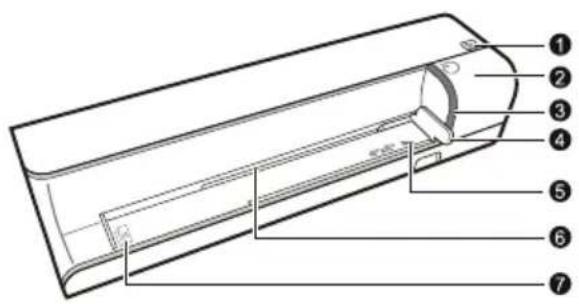
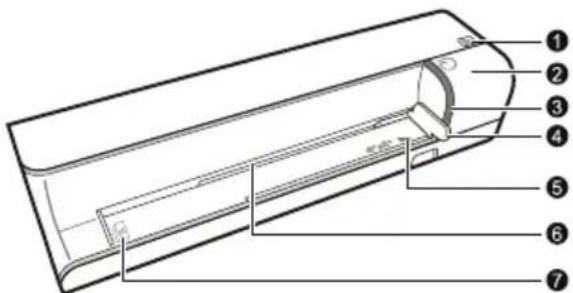
External View
STATUS - status indicator - displays the device status
Lit: Scanner in cleaning mode
Flashing quickly: Document jam
Flashing slowly: Scans the document, saves data, sensor is being cleaned
- switch the device on/off / press and hold for longer than 5 seconds to clean the feed roller with the cleaning sheet
3 - POWER - Operating status indicator - displays the operating status of the device
Lit: Scanner ready, or scanning the document Flashing quickly: Document jam, memory card error
Flashing slowly: Initialisation, saves data, sensor is being cleaned
4 Document guide - inserting the document/ remove the tape before using it for the first time
Markers for 10× 15cm photos
6 Document feed slot
Symbol for direction of feed - insert the document into the document feeder with the printed side facing up and the top edge facing the key
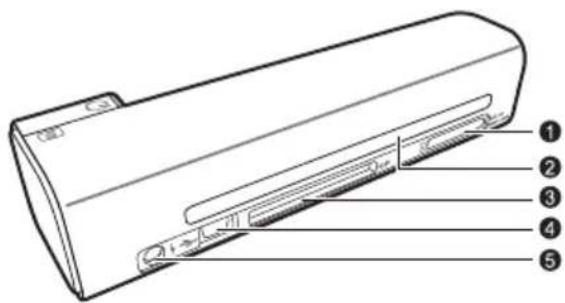
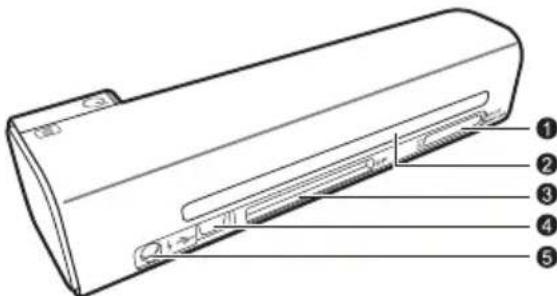
Connections on the Rear Side
Slot for memory card - only insert the following memory cards here: SD/xD/MMC/MS
2 Document outlet
Slot for Compact Flash memory card Type 1
4 Mini USB connection - for connecting a computer (only as a memory card reader) or a digital photo frame
- Socket - Port for power supply
EN
Initial Operation
Packing Contents
Photo scanner
Calibration sheet
Cleaning sheet for the feed rollers
Cleaning pen for scanner
Power supply
USB cable
User Manual
Notice

Missing Package Contents
If one of the parts is missing or damaged, please contact your retailer or our customer service.
Connecting power supply
CAUTION!

Mains Voltage at the Site of Installation!
Check whether the mains voltage of your device [indicated on the type label] matches the mains voltage available at the setup location.
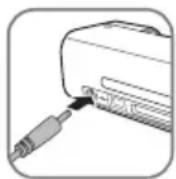
1 Insert the small plug of the power supply into the socket on the rear side of your device.
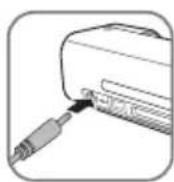
2 Insert the power supply unit into the socket.
Inserting a Memory Card
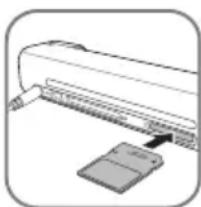
1 Insert a memory card which is not read-only into the appropriate card slot at the rear of the device. Your photo frame supports the following memory cards: SD, xD, MMC, MS, CF.
DANGER!

Inserting a Memory Card!
Only use storage media that are compatible with the device. In order to prevent damage to the card or the unit, please turn off the power before removing or inserting the card.
Never pull out the memory card while the device is accessing it. This could cause data to be damaged or lost.
Notice

Inserting a Memory Card
If both slots are occupied, the data is saved in the following sequence: SD [MMC] > CF > xD > MS.
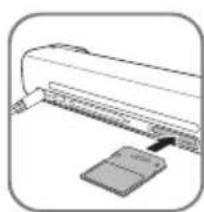
2 Press and hold the key until the control lamp for the device status is constantly on.
Notice

Control Lamp
If this control lamp flashes, this could stem from one of the following causes.
- no memory card inserted
- insufficient memory capacity available on the memory card (less than 1MB)
- The read-only option of the memory card is active
-memory card defective
Please note that the initialisation process of a memory card with a capacity of 2GB or more takes longer. The control lamp can blink for up to 20 seconds
Using the digital photo frame
Notice

Using the digital photo frame
If the device is connected to a compatible digital photo frame, the scanned photos can be transferred directly to the memory of the digital photo frame.
1 Switch the device off using the on/off switch on the upper side.
2 Connect the digital photo frame to the MiniUSB of the device using a USB cable.
3 Switch the device on using the on/off switch.
Scanning
Loading Photos
You can insert different types of document into your device. Follow the specifications in the technical data.
You can scan documents using the protective cover to avoid the photo or document being damaged by scratches or creases.
Notice

Scanning documents with the protective cover
If smaller documents are scanned using the protective cover, in certain cases, the automatic cutting off function does not function properly. Either important parts of the image are cut off or too much edge remains around the document. In this case, scan the documents without using the protective cover.
CAUTION!

Unsuitable Documents!
No paper clips, staples, fixing pins or similar may be retained on the documents.
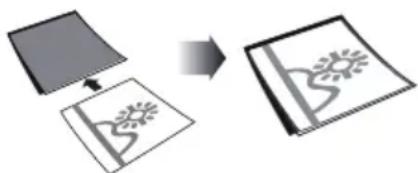
1 Open the protective cover and insert the document with the printed side facing up.
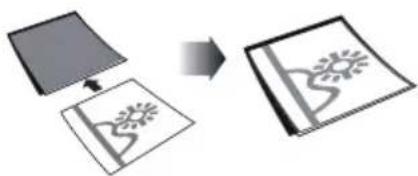
2 Lay the protective cover into the document feeder with the printed side facing upwards, the closed side of the page (black lines) forward and the page header in the direction of the button.
3 Align the protective cover to the left hand edge.
4 Fix the protective cover in place using the document guide on the right hand side. The document guide should lightly touch the protective cover.
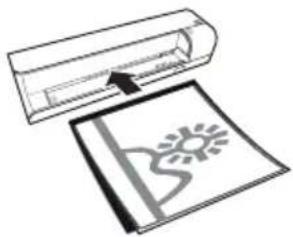
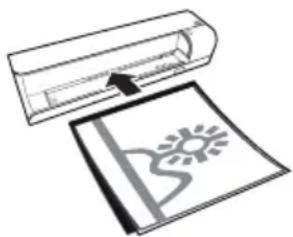
5 Slide the protective cover horizontally as far into the document feeder until it is automatically fed into the scanner and the scanning process is started. Ensure you do not bend the document. The control lamp POWER flashes during the scanning process.
DANGER!

Document Jam!
Do not insert documents into the feeder whilst the device is scanning. This can lead to a paper jam.
6 Wait until the control lamp POWER and the control lamp STATUS are no longer flashing and the control lamp STATUS is continually on. This means that the scanning process is completed and the data was saved onto the memory card.
DANGER!

Document Jam!
Wait until both control lamps are no longer flashing before you insert the next document in order to prevent a document jam.
7 The file name is assigned according to the DCF (Design Rule for Camera File System) standard.
Notice

Scanning documents with the protective cover
Remove the document from the protective cover after the scanning process in order to avoid the document sticking to the protective cover.
Notice

Stand-by Mode
If the scanner has not been used for approx. 15 minutes, it automatically switches off.
Cleaning the Scanner Glass
If lines appear on the scanned image or the image is not sharp, you need to clean the scanner glass.
1 Switch the device off.
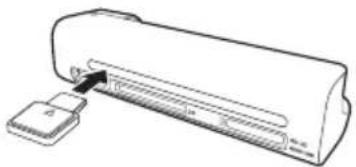
2 Insert the cleaning pen into the left hand end of the document ejector.
Notice

Instructions for Cleaning
The cleaning pen must be free of any dust.
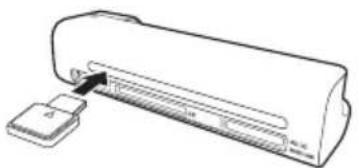
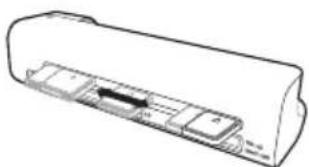
3 Move the cleaning pen carefully two or three times to the other end of the document ejector.
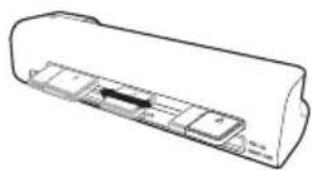
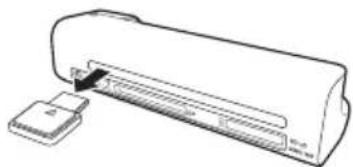
4 Move the cleaning pen to the left hand side of the document ejector again and then remove the cleaning pen.
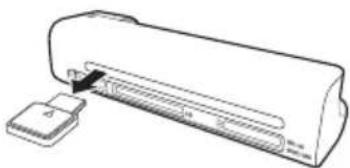
Computer Connection
You also use the scanner as a memory card reader in combination with a computer.
Requirements
Your computer must meet the following minimum requirements:
Operating System
Windows: Windows 2000 · XP · Vista · or later versions
Macintosh: Mass Storage Class Mac OS9.x or Mac OSX
Connecting to the PC
The device is Hot-Plug-and-Play capable which means you can link your computer to the device, whilst its running. You do not need to close down your computer to link the device to it.
1 Connect the device to your PC by means of the USB cable.
2 If the USB is working correctly, the device is recognised automatically. A drive letter is assigned to each memory card slot.
Notice

Connecting to an USB hub
If you would like to connect the device to a USB hub = [USB distributor], ensure that the USB hub is connected to the computer before you connect the device to the USB hub.
3 You can access the memory card (drive) and edit the saved files.
Service
Cleaning
DANGER!

Switching off the device!
Turn the device off using the on/off switch before you remove the plug from the socket.
DANGER!

Instructions for Cleaning!
Use a soft, lint-free cloth. Never use liquid or easily flammable cleansers (sprays, abrasives, polishes, alcohol, etc.). Do not allow any moisture to reach the interior of the device. Do not spray the device with any cleaning fluids.
Wipe over the surfaces gently. Be careful that you do not scratch the surfaces.
Cleaning the feed rollers
1 Switch the device off.
2 Press and hold the key until the control lamp POWER light up.
3 The scanner is now in cleaning mode.
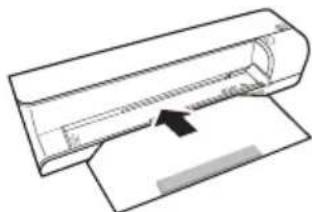
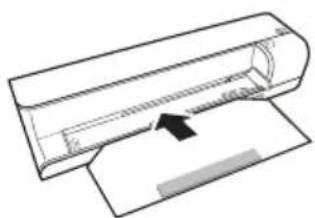
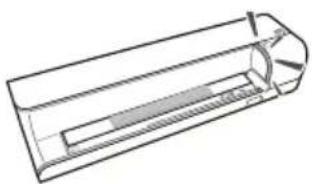
4 Push the cleaning sheet into the document feeder.
Notice

Instructions for Cleaning
Observe the direction of feed. The white sponge must be on the upper side.
Do not use any cleaning agents or cleaning fluids. Doing so can permanently damage the feed rollers.
5 The sheet is automatically fed and the cleaning process started. During cleaning, the control lamps POWER and STATUS flash.
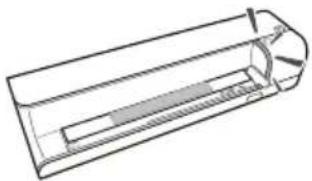
6 After cleaning is complete, the sheet is ejected and the control lamp POWER goes out.
Notice

Cleaning sheet for the feed rollers
Store the cleaning sheet in a dust-free location.
Calibrating the scanner
Calibrate the scanner if colors appear in areas that should be white, or colors of the scanned image and the original vary a lot. This allows you to adjust and compensate for variations that can occur in the optical component over time by its nature.
1 Clean the feed rollers and the scanner glass first before calibrating the scanner.
2 Insert a memory card which is not read-only into the appropriate card slot at the rear of the device.
3 Press and hold the key until the control lamp for the device status is constantly on.
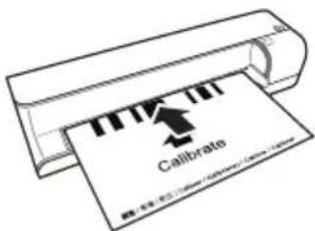
4 Place the calibrating sheet in the document feeder with the arrows facing the feed rollers.
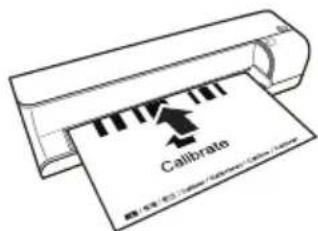
5 The sheet is automatically fed and the calibration process started.
Notice

Calibrating the scanner
Observe the direction of feed. If the calibration sheet is inserted incorrectly, the calibration process cannot be started.
Power Cycling
If a problem occurs that cannot be corrected with the instructions in this user manual (also see the help below), proceed as follows:
1 Disconnect the mains.
2 Wait at least ten seconds, then plug the power plug back into the socket.
3 If the problems repeats, please contact our technical customer service or your retailer.
| Problems Solutions | |
| The device cannot be switched on Check that power supply is connected to the device properly. | |
| The device feels warm · After a certain period of operation, the surface reaches approx. 30°C to 45°C. This is normal. If an unusual smell comes from the device or the surface becomes too hot, disconnect the scanner immediately from the power supply and/or the computer / digital photo frame. | |
| Lines are present on the scanned picture or the image is not sharp | ·Check whether the document is dirty or scratched. ·Check whether the protective cover used is dirty or scratched. ·Clean and calibrate the scanner if it has not been used for a longer period. |
| With scanned images, parts of the image are cut off. | ·The scanner is equipped with a function for automatic cutting off of black edges. With small images, the image is only saved without the edge. When using this function, cutting off of important picture information can occur with images with a black background (e.g. night shot). In this case, rotate the image and scan it again. |
| The document is stuck in the feeder | ·Switch the device off using the ♂ button. You can now remove the document. |
| The control lamp STATUS flashes quickly, scanning not possible / memory card is not recognised | ·Check whether you have used a compatible memory card and whether you have inserted the memory card correctly. ·Remove the memory card and insert it into the slot again ·Switch any active read-only options on the memory card off. ·Make sure the memory card is not damaged. ·Check the available memory space on the memory card. If the available space is less than 1MB, the scanning process cannot take place ·Check the file format of the memory card Only memory cards with the FAT or FAT32 file format can be used. ·Check whether the next document was inserted too quickly. When scanning several documents, wait until the data transfer of the first scan has ended (status lamp continuously on) ·Check the document length (see technical data) |
| Transfer to a digital photo frame is not working | This function is only available with certain photo- to frames. |
| Photos with a grey or black back will not be scanned. | Place a white piece of paper over the back of the photo and put it into the protective cover. Place the protective cover into the document feeder. |
EN
Appendix
Technical Data
Type Color Contact Image Sensor [CIS]
Dimensions (× × ) 156×46×38mm
Weight 0.17kg
Mains Connection
Input: 100 - 240V [± 10% ] / 50 - 60Hz
. Output: 6V---/1.5A
Power Consumption
Operation. <9W
Recommended Ambient. 15-35°C
Relative humidity
20-70% (non-condensing)
Scanner
Input format. 48 bit colour
Output format 24-Bit
Maximum hardware resolution ...1800 x 1200 Pixel
Document feed slot
Maximum thickness of cheque cards/plastic cards 1.5mm
Paper formats supported
Minimum [B× L] 42x20mm
Maximum (× ) 105×304,8mm
Paper Weight .50-105g/m2
Computer connection
Connection Type ....Compatible with USB 2.0 High Speed
Technical specifications subject to change without notice.
Guarantee
[Terms and Conditions for United Kingdom only]
In order to supply the guarantee, you should contact your dealer or Sagem Communications Helpdesk. The proof of purchase will be required.
Please make usage of your equipment for the purpose for which it was designed and under normal usage conditions. Sagem Communications do not accept any liability for any usage made out of the frame of its original designed purpose and any consequence that may arise from this usage.
Should any malfunctioning arise, the dealer or Sagem Communications Helpdesk will advise you what to do.
A) General Guarantee Conditions
Sagem Communications undertakes to remedy by repair or exchange at its own convenience, free of charge for labour and replacement parts, any defects in the equipment during the guarantee period of 12 - twelve- months (3 - three- months for ac
cessories], from the date of original invoice of the Equipment, where those defects are a result of faulty workmanship.
Unless the customer has concluded with Sagem Communications a maintenance contract in respect of the equipment which specifically provides for repairs to be carried out at the customer's premises, the repairs will not be carried out on the equipment at the customer premises. The customer must however return the defective equipment at his/her own expense, to the address given by the dealer or Sagem Communications Helpdesk.
In case a product needs to be sent in for a repair, it always has to be accompanied by a proof of purchase [which is not altered, written on or in any way be made illegible] showing that the product is still under warrantee. In case no proof of purchase is enclosed, the Sagem Communications repair center will use the production date as a reference of establishing the warrantee status of the product.
Apart from all legal obligatory rules, Sagem Communications, do not give any Guarantee, either implicit or explicit which is not set force in the present section, and could not be hold responsible for any direct or indirect, material or immaterial damage, in or out of the frame of the present guarantee.
If any provision of this guarantee shall be held to be in whole or in part invalid or illegal due to an ob
ligatory rule applicable to consumers pursuant to their national legislation, such invalidity or illegality shall not impair or affect the remaining provisions or parts of this guarantee.
This guarantee does not affect the Customer statutory rights.
B) Exclusions From Guarantee
Sagem Communications shall have no liability under the guarantee in respect of:
- Damage, defects, breakdown or malfunction due to one or more of the following:
- Failure to properly follow the installation process and instructions for use
- An external cause to the equipment (including but not limited to: lightening, fire, shock, vandalism, inappropriate conditions of electrical network or water damage of any nature)
- Modifications made without the written approval of Sagem Communications
- Unsuitable operating conditions, particularly of temperature and humidity
- Repair or maintenance of the equipment by persons not authorized by Sagem Communications
-] Wear and tear from normal daily use of the equipment and its accessories - Damage due to insufficient or bad packaging of equipment when returned to Sagem Communications
- Usage of new versions of software without previous approval of Sagem Communications
-] Work on any equipment or software modified or added without the prior written consent of Sagem Communications - Malfunctions not resulting from the Equipment or from software installed in user workstations for the purpose of use of the equipment.
Communication problems related to an unsuitable environment including:
- Problems related to access and/or connection to the Internet such as interruptions by access networks or malfunction of the line used by the subscriber or his correspondent
- Transmission faults (for example poor geographical coverage by radio transmitters, interference or poor line quality)
- The local network fault (wiring, servers, workstations) or the failure of the transmission network (such as but not limited to interferences, fault or poor quality of the network)
- Modification of the parameters of the cellular network carried out after the sale of the Product
-] The normal servicing (as defined in the user guide supplied with the equipment) as well as malfunctioning due to servicing not being carried out.
Servicing costs are in any event always borne by the customer.
- Malfunctions resulting from the usage of products, consumables or accessories not compatibles with the equipment.
C] Out of Guarantee Repairs
In the cases set forth in B) as well as after expiry of the guarantee period, the customer must ask the Authorized Sagem Communications Repair Centre for a cost estimation.
The repair and delivery costs will be invoiced to the customer.
The foregoing shall apply unless otherwise agreed in writing with the customer and only for the United Kingdom.
Helpdesk: 0871 - 075 22 50
AgfaPhoto is used under license of Agfa-Gevaert NV & Co. KG or Agfa-Gevaert NV. Neither Agfa-Gevaert NV & Co KG nor Agfa-Gevaert NV manufacture this product or provide any product warranty or support.
For service, support and warranty information, contact the distributor or manufacturer.
Contact:AgfaPhoto Holding GmbH, www.agfaphoto.com
Manufacturer: Sagem Communications, www.sagem-communications.com
![AGFA AS 1110 - C] Out of Guarantee Repairs - 1](/content/2026/02/416218/images/c903b1c604e32b9f7643c97de014ab5e816fa9639f7e0da11e1f64e64975e139.jpg)
The CE symbol confirms conformity with the EU directives that apply to the device.
Preservation of the environment as part of a sustainable development logic is an essential concern of AgfaPhoto. The desire of AgfaPhoto is to operate systems observing the environment and consequently it has decided to integrate environmental performances in the life cycle of this products, from manufacturing to commissioning use and elimination.
![AGFA AS 1110 - C] Out of Guarantee Repairs - 2](/content/2026/02/416218/images/40f20a31760f2707a3d00b8a2d1253585626624fb45da6ff9f5192f01a35240a.jpg)
Packaging: The presence of the logo [green dot] means that a contribution is paid to an approved national organisation to improve package recovery and recycling infrastructures to facilitate. Please respect the sorting rules set up locally for this kind of waste.
Batteries:If your product contains batteries, they must be disposed of at appropriate collection points.
![AGFA AS 1110 - C] Out of Guarantee Repairs - 3](/content/2026/02/416218/images/028c0dd01992017078795aad871d2e09ee667bc88fe98624400d682e6e46962e.jpg)
Product: The crossed-out waste bin stuck on the product means that the product belongs to the family of electrical and electronic equipment. In this respect, the European regulations ask you to dispose of it selectively;
- At sales points in the event of the purchase of similar equipment.
- At the collection points made available to you locally [drop-off centre, selective collection, etc.].
In this way you can participate in the re-use and upgrading of Electrical and Electronic Equipment Waste, which can have an effect on the environment and human health.
The paper and cardboard packaging used can be disposed of as recyclable paper. Have the plastic wrapping and Styrofoam packaging recycled or dispose of it in the non-recyclable waste, depending on the requirements in your country.
Trademarks: The references mentioned in this manual are trademarks of the respective companies. The lack of the trademarks and TM does not justify the assumption that these dedicated terminologies are free trademarks. Other product names used herein are for identification purposes only and may be trademarks of their respective owners. AgfaPhoto disclaims any and all rights in those marks.
The reproduction of certain documents (e.g. by scanning, printing, copying) is prohibited in many countries. The list of such documents below is not intended to be complete, it only offers a general overview. In case of doubt, consult your legal advisor.
Passports (personal identification)
- Entrance and exit visa papers [immigration papers]
Military service documents
Bank notes, travel checks, payment orders
- Postage stamps, tax stamps (stamped or unstamped)
- Loan papers, certificates of deposit, bonds
Documents protected by copyright
Follow the statutory regulations of your country with regard to the legal validity of fax transmissions—particularly in connection with the validity
of signatures, meeting delivery deadlines or disadvantages resulting from the loss of quality in the transmission, etc.
Take care to maintain the statutory regulations of your country regarding telecommunications secrecy and data privacy.
Neither AgfaPhoto nor its affiliates shall be liable to the purchaser of this product or third parties for damages, losses, costs, or expenses incurred by the purchaser or third parties as a result of accident, misuse, or abuse of this product or unauthorized modifications, repairs, or alterations to this product, or failure to strictly comply with AgfaPhoto operating and maintenance instructions.
AgfaPhoto shall not be liable for any damages or problems arising from the use of any options or any consumable materials other than those designated as original AgfaPhoto products or AgfaPhoto approved products.
AgfaPhoto shall not be held liable for any damage resulting from electromagnetic interference that occurs from the use of any interface cables other than those designated as AgfaPhoto products.
All rights reserved. No part of this publication may be reproduced, stored in a retrieval system or transmitted in any form or by any means, electronic, mechanical, photocopying, recording, or otherwise, without the prior written permission of AgfaPhoto. The information contained herein is designed only for use with this product. AgfaPhoto is not responsible, if this information is applied to other devices.
This user manual is a document that does not represent a contract.
Errors, printing errors and changes are reserved.
Copyright © 2009
Introduzione
Stimato cliente,
TipColor Contact Image Sensor [CIS]
Dimensioni (× × ) 156x46x38mm
Peso 0.17kg
Macintosh: Mass Storage Class Mac OS9.x or Mac OSX
Macintosh: Mass Storage Class Mac OS9.x o Mac OSX
TipColor Contact Image Sensor [CIS]
Dimensoes [L× A× P] 156x46x38mm
Gramagem. 0.17kg
Ligação à rede
...Entrada:100-240V\~[±10%]/50-60Hz
.Saida: 6V--/1.5A
Consumo de energia
Opera. < 9W
Maximum hardware resolution .... 1800x1200dpi
Vstupni Čast podavače
Max. tloustka šekovych/plastovych karet
1.5mm
1.5mm
Podporované formaty papiru
Minimum [B× L] 42×20mm
Maximum (× ) 105×304.8mm
Vyrobce: Sagem Communications, www.sagem-communications.com

Symbol CE potvrzuje shodu tohoto vyrobku s naifenimi EU.
Maximum hardware resolution .... 1800x1200 dpi
Iratadagoló res
Maximum hardware resolution .... 1800x1200dpi
Podajnik dokumentów
Macintosh: Mass Storage Class Mac OS9.x or Mac OSX
Conectarea la un calculator
Maximum hardware resolution .... 1800x1200 dpi
Maximum hardware resolution .... 1800x1200 dpi
Max. hrubka šekovych/plastovych kariet 1,5mm
Macintosh: Mass Storage Class Mac OS9.x veya Mac OSX
Maximum hardware resolution 1800x1200dpi
Belge alma mekanizmasi
Kredi kartleri/Plastik kartlar azami kalinligi 1.5mm
Desteklenen kajit formatari
Asgari (B× L) 42x20mm
Azami [B× L] . 105x304,8mm
Fabrikator: Sagem Communications,
www.sagem-communications.com

Macintosh: Mass Storage Class Mac OS9.x n Mac OSX
Maximum hardware resolution .... 1800x1200dpi
Tpofooia yypaawv
MéyiTo πáxocπiOTwiKwV/πλaOTIKwV kApTsw
1.5mm
YtOoTnpiOcmeva eVeyeH xapTiou
Kpome TORO, cKaHep MOxHO NcNoIb3oBaTb I KAK CHTbIBaHOUIe yCTpoNCTBO DJIa KapT NaMAtn, NOdkJIOUHb ERO K KomNbIoTepy.
Mbl haedeemc, yTo Bbl noJyHte ydoBOJIbCTBne OT pa6oTbI c annapaTom n erO MHOROHCJIeHHbIX dyHKUIN!
O6 3tOM pyKOBoDCTBe
ПОЛьЗВаТЕЛЯ
C nomoubI npBBeHHO daJIe pyKOBOcTBa no yctahOBKe Bbl CMOKTe 6bICTpo npNCTyNTb K 3KcIIyatauBaWero annapata. NOpbo6hoe OINCAHHe pYHKmI npBVeDeHO B nOcJIeDyUoX pa3dJIax pyKOBOcTBa NOIb3OBaTeJI.
BHHMaTeIbHo 03HaKoMbTeCb C pyKOBoDCTBOM nIb3OBaTeJ. DnA o6cneueHn 6e3Oanachoi pa6oTbI annapata co6nOdaIte BCE yka3AHn texHKn 6e3OanacHOCTn. N3rOToBnteH He Hecet OTBeTCTBeHHocTn B cIyae HecO6NIODeHn npabn I texHKn 6e3OanacHOCTn.
IcnoJb3yemblie 06o3HaueHnra
OTACHOCTb!

ONACHOCTb!
Ppeynpekdaet o6 onachocTx InIIOe, BO3MOXHOCTN NOBpeKDeHnI annapata nnI dpynx yctpoiCTB, a TaKKe O BO3MOXHOH NOTepe DaHHbIX. HenpaBnIbHa 3KcNpyataun MOKET npNBecTN K TpaBMam nnIOBpeKDeHIO annapata.
3aMeuHa

CObeTbI n pekomehdaun
3TOT CMMBOI 06O3Haayet COBeTbI, KOtOpBIE NOMORAJOT HAn6OJIee IpocTo N 3ΦΦeKTHBHO NCNoJIb3OBaTB yCTPOINCTBO.
1 BBeJeHne yBaKaembI nokyNaTeJIb, 1 O6 3TOM pyKOBoDCTBe nolb3OBaTeJIa 1
2 6hzaHOpMaunO TeHNKe 6e3oNaChocn
3 O63op annapaTa BnD cnapyKu 4 Hyp ceTeBOrO 3neKeTpOniTaNHn 4
4 BBOB B 3Kcnpnyatauio KomnneKT nocTabKn .5 IokknueHne cetEBoro aanTepa .5 YctahOBka KapTbI naMrtn .5 IcnoJIb3OBAHne uΦpOBoN φOTopamKn .6
5 CkaHnpoBaHne 3aRpy3kaΦoTOrpaФn 7 OuNcTka cTeKna cKaHepa 8 POnkIouHeNe K KomIbIoTepy 8
6 TexHnueckoe 0bcnyKuBaHne OocTka 9 BbIKIOUeHne IN BKIOUeHne PNTAHNA 10
7 IpnloXeHne Texnueckne daHHbIe 12 TapaHTnHbIe o6a3aTeJIbCTBa 12
ObzaHOpMaZnO TexNke 6e3OpacHOCTN
Ipeed nCNoJIb3OBAHnEM yCTpoiCTBa O3HaKoMbTeCb CO CNeDyIOUe BaxHOINHΦopMaueN, YTO6I NCKJIOHTb IIN CHN3NTb PnCKI TpaBMnPOBaHnI INI NOBpeXdEHnI ObOpYDoBaHnI.
PpoeDypa HacTpoiKn annapata
3aunuane annapaT ot nonadnna nprmoro cOnHeUHOro CBeta, BO3dEInCTBnA TeNnA, pe3Knx nepenaoB TEMnepaTpybI IN Bnarn. He pa3MeuaTe annapat B6Jn3n HargBeBaTeJeN KOHNIOHEPOB BO3dyxa.CMOTpTE NnHΦopMaunO O dONyCTHMoN TEMnepaType IN BnaXHoCTN BO3dyxa B TexNHueckNX xapaKTepncTKax.
EcnBaw annapat cnwKOM cnJbHO harpeetc HNN Bbl yBnDnte BbIXOJaun N3 Hero DbIM,TO HeMeJeHNO OTKnIOUHTe WHyp CTeBOrO 3NeKTPoNTAHN N3 po3ETKn. OTraIte BaW annapat Ipn OCMOtpa KBaINuPupOBaHHbIM CneuHaNCtAm NNI B CEHTp cepBnCHORO 06CnyKInBaHN. JnI npDoTbpaueHn BO3RopAHn 3anPeuaETcnoHocntb K annapaty nCTOuHKn OTKpbITOro PnAmEHn.
HnKOrda He NpOKnIyauaTe aannapat K cetn n K TeJefoHHo JINHN B CbIpbx NOMEueHnX. HnKOrda He KacaTecb ceTeBOB BNkN np03eTKn n TeJefoHHoro pa3bema BnaJhblm pyKaMn.
Pn cnJeDyUOxu yCNoBnX BHyTpN uCTpOnCTBa MOKET npONCXODNTb 3aIOTeBAHHe, YTO npINBOoNT K c6oM B pa6ote:
ecnn yctpoaCTBO nepeHocntcN 3 XOJIOHO B TeJIIOE NOMEeHHe;
- npn HaraBauHn XoJOnHOr OmoueHnra;
- Pn HaxoJdeHn B NOMEeHn C BbICOKO BnaXHOCTbIO.
InpedotbpaueHn3anoteBaHnco6JIOaTe CneDyUOuHyeKa3aHn:
1 YnyakyIte yctpoCTBO B nlaactNKOBbI naKeT, npexJe qem nepeHocntb ero B pyroe nomeueHne.
2ПодождпеДВачaca,празждчemdoctabaустоИЗпаCTNKOBOrO naKeTa.
He nCNoIb3yIte yCTpoINCTBO B CnIbHO 3aIbIeHHOM nOmeueHnn. YactuBIs PbIIN IdpYrne NocToPOHHne IpeDMeTbI MOrYT NOBpeDNTb yCTpoINCTBO.
He donyckaIte BO3deIcTBnHa yctpoIcTBO cnIbHo Bn6paun. 3TO MOKeT npNBecTu K NOBpeKDeHIO BHTpeHHNX KOMNOHETOB.
He no3B0JNe Te DeTAM NOJIb3OBAtbcra annapaTOM 6e3 npncMoTa. He donyckaTe Deten K ynaKOBouHbIM MaTePnAJaM.
3NeKtpnueeckoe nntaHne
IcnoB3yTe TOJbKO opuHnHaNbHbI CTeBOAanTep n USB-ka6eNB, BXoJaUne B KOMPNeKTNoCTaBN. Pnp IcnoB3OBAHn DpyrNxC CeTeBbIX aanTepOB n Ka6eNe yCTpOInCTBO MoKET He pa6oTaTb.
BknIOuHTe yCTPOINCTBO npn nOMOUI BbIKIouaTeJI, npexJe cHm3BLeKaTb CeTeByU BUNKy H3 p03eTKI. He KacaItecb shhpya 3neKTPoNTAHNc NOBpeXDeHHo H3OJyuei. HeMeDNeHHO 3aMeHIne NOBpeXDeHHbI Ka6JIb. IcNoB3yIte TOJIbKO COOTBeTCTByUOUIke Ka6eJI; npn Heo6xOdIMOCtN o6paauTecb B Cny6y TeXnueckO JODepkKn INn K BaWeMy NoCTabUKNY.
YctaHOBtBe Bau annapat TaK, YTo6bI y Bac 6bln yDo6HbI DoCTyn K po3eTke 3NeKTponHTAHnB 3KCTpeHHo CHTyaun OTCoeDInHte annapat OT NCTOCHNk 3NeKTponHTAHnnyTEM OTKnIOueHNy UHypa cTeBOrO nHTAHn.
IpeD OoNCTKO NOBepxHocTn annapata
63aTeNbHO OTKIOUHTe erO OT cETn
3NeKTPonTuHa. DnA OoNCTKn HCNoNb3yIte
MMyKyo CyXyO 6e3BOPCOByo TkaHB.He
npmehnTe dJa OoNCTKn XnDkNx, rA30o6pa3hbx n
roPounx OoNCTnTeen [a3pO30Jn, a6pa3NBhble n
nonpyuOnne CpeDCTBa, cnpt]. He donyckaTne
nonaHaHn Blanr BHyTp b annapata.
N3BneKeIte cTeBOKa6eJIb,ecn yCTpoIcTBo He NcNOJb3yeTcB TeYeHne IINTeHbHO BpeMeHN, YTO6bl NCKIOUCHITb BEPOrTHOCTb BO3ROPaHn.
He nbitaTecb pa3o6paTb yctpoiCTBO. CyueCTbyeT onacnoctb nopaxKeHHN 3neKtpoTOkOM. OtkpbIbaHne yctpoiCTBa BeTe K nOtepe rapaHTm.
PemOH
He nbItaIteCb camOCToTeNbHO peMOHTnpOBaTb annapat. HenpaBnIbHbI peMOHT moKeT npBeCTN K TpaBMam N NOBpeKdEHHO annapata. Baw annapat MOxHO peMOHTnpOBaTb TOJIbKO ByNOJHMOUeHHOM cepBNCHOM ueHTpe.
He chImaTe 3aBODcK WJIbIck c annapata, npn 3TOM OTMeHraTc rapaHTnHbIe o6raTeNbCTBa.
O63op annapata
Budchapykn
STATUS INHДИКATOP COCTOHA OTO6paXaET COCTOAHHe yCTpOInCTBa
Topnt: ckaHep B pexnme OunchTKI
BbICTPO MnaeT: 3actpeBaHne DokymeHTa
MnaeTe MeJIeHHO: cKaHnpye TOKyMeHT, coXpaHReT DaHHbIe, BbIOnHReTcR OunchTkacHeCopa
2- -BKNIOUeHHe/BBIKIOUeHHe yCTpoiCTBa /ydepkaHHe B HaxaTOM NIOJOKeHHN 6OJIe 5 cekyHd-BTBaHOxN BANKOB npN NOMOuOuOauoero JnCTa
3 - POWER - INДикaTOp pa6oуero pexIMa - oTo6paKaaet pa6oynpexIM yCTpoiCTBa
TOpNT: cKaHep rToB K pa6Ote nn nckaHnpyeT DOKyMeHT
BbICTPO Miraet: 3actpI NOKyMeHr, OUn6ka KapTbI nAMrTu
Miraet MeJenHoo: HnUaJIn3aun, coXpaHaret DaHHle, BbINONHReTc OUnCTka ceHCopa
HanpaBnIouaJ DOKMeHTOB - CnKcaun JOKMeHTOB/nped nepBbIM nCNoJIb3OBAHneM ydaJIte KJIeNkyU JeHTy
cm5 Metka nla foTorpapn 10x15cm
6 ABToIOnaTUnK DOKyMeHTOB
7 CmB0J HnPaBHeHn BTrnBaHn - yIOxnte DOKyMeHT JInCeBOB CTOpOHn BBepX, a BepXHM Kpaem B HnPaBHeHn KHONK O B NODaTcNK DOKyMeHToB
山Hyp ceteBoro 3neKtponntaHnra
1「He3do DnA KapT nAMrTu - npEHa3NaueHo TOnbko DnA CneDyUoUx KapT nAMrTu: SD/xD/ MMC/MS
2 BbIXoHoi JOTOK nIa DOKyMeHTOB
3「He3do DnRA KOMNaKTHbIXΦJ3u-HaKoNTeJe, TUN1
4 Pa3bem MHNH-USB -ДЯ NOДКЛЮЧЕНЯ KOMNBJOTEpa [TOnbko B KaueCTBe yCtpoiCTBa dЯ YTeHnA KapT NaMAnI] NIN UΦpOBoN ΦOTopamKn
Pa3beM - noDCoeHNHeHne cTeBOro aanTepa
BbOДВэКсПлуаТaцию
KOMnneKT NOCTaBKn
ΦoTOCKaHep
KaJIIN6pOBoUHbI JInCT
OuIaIOUIN JInCT IINBTAIBAOUXPONIKOB
UcTayn kapaHdaaI dna cKaHepa
3neKtpnueeckoe nTaHne
USB-ka6eInb
PykoBoDCTBO NOIb3ObaTeTnA
3aMeuHua

HenonHbI KOMnJIeKr NOcTaBKn
Ecn OUnH n3 3TNX npedmetOB
OTcyTCTByeT INI INOBpeKdEh,
6bTaTcB K BaUeMy NoCTaBzKuY IIN B Cnyk6y NOpDepKKn.
IopKIOUeHne cTeBOrO aAnTepa
OCTOPOXHOCTb!

HapnxHeHcTeBMeCTyTaHOBkn!
PpOBepbTe, COOTBetCTByeT JIN TUN
3JIeKTpONHTaHnBaWero annapata
[ya3aHa 1nIbDnKe] Tny
3JIeKTpONHTAHN B MeCTe yCTaHOBKN
annapata.
1 BctaBbTe MaJIeHbKyU BnIky Ka6JIy CeTeBOrO aIaNTepa B pa3bEm Ha 3aJHei CTOpOHe yCTpOJCTBa.
2 BCTaBbTe cTeBOi aanTep B cTeByIO pO3eTKy.
YCTAHOBKa KapTbI NaMaRTN
1 BctaBbTe KapTy namrTn, He 3aunueneHHyO OT 3aHNCn, B COOTBeTcTByUouee rHe3do Ha 3aHnei CTopoHe yCTpoNcTba. OHO noDepKINBaHT kapTbI namrTn cJeDuOuNX φopMaTOB: SD, xD, MMC, MS, CF.
OTACHOCTb!

YctaHOBNTe KapTy narnTn!
IcnoB3yTe ToIbKO COBmecTnMbIe C yctpOienTBOM HOCHTeIN INHOpMaun.
Bcerda otKnHouaIte 3JIeKtpOnuTaHne yctpoiCTBa npexde, Yem n3Bnepb n3 Hero KapTu NaMrtN BO n36ExKaHn NOBpeXdEHHa KApTbI NaMrtN Jn60 yctpoiCTBa.
HnkOrda He BbITACKnBaIte KapTy namrTu, KOtOpa NcNoJb3yETcB TEkyuNIMOMeHT. 3TO MOKET
npuBecTN K NOBpeKdeHNo Hn K yTpate DaHHbIX.
3aMeuHua

YcTaHOBka KapTbI NaMaTn
Ecnn 3aHrTbI 06a rHe3da, daHbIe coXpaHnOTcB CneDyUoIe nocNeIOBaTeIbHoCTn: SD (MMC) > CF > xD > MS.
2 YdepKnBaTe HkaToH KhoNky Do Tex nop, noka KOHTpOblHbI INDnKaTOp COCToHnYcTpoiCTBa Ropnt NoCToHNo.
3aMeuHaHua

KoHTpoJIbHbI INHdNkAtOp
Ecn3OT KOHTPOJIbHbIN HNDNKATOp MnraeT, PnUHHbl MOryT 6bITb CJeDyUOuMMI:
- He BCTabJIeHa KapTa nAmrTn
HeoctaToHc MeTa IJIa COxpaHeHn DaHHbIX Ha KapTe NaMrti [Mehee 1 M6]
-
BKNIOUeHa 3aIITa OT 3aINcN KapTbI nAMrTI
-
NOBpeKdeHa KapTa nAmrTn
YuNbBaIeTo, YTO nJa KapT naMaTn EMKocTbIO 6OJee 2 T6 npoecc HnHuaN3aun 3aHmaeT 60JIwe BpeMeH. KoHTpONbHbIn HnDnKaTOp MOKeT Mrratb Do 20 cekyHd.
IcnoJb3OBAHne uΦpOBoiΦOTopamKn
3aMeuHaHua

IcnoJIb3OBAHHe zHΦpOBoB ΦOpTaMKn
PnnoKJIIOUeHm yCTpoNCTBa K COBMeCTUMoI cHpOBoI FOToPAmKe OTCKaHIpOBAHHbIe FOToRpaHn NepeHocrTc HEnOpEJaCTBeHHO Ha 3aONMHaIoUe yCTpoNCTBO cHpOBoI FOToPAMKn.
1 BbIKJIOHTe yCTpoIcTBO npn NOMOuN BBKJIIOUaTeJI Ha BepxHei cTOpOHe.
2 POnkIIOUHTe UFOPOByO FOToPamKy npn nOMoUs USB-ka6eR K pa3bemy MmHn-USB yctpoiCTBa.
3 BkIIOUHTe yCTpoIcTBO npn NOMOJIy BBIKIOUaTeJI.
Сkaн投降
3arpy3kaΦoToRaΦn
B yctpOCTBO MOXHO NOMEaTb pa3nHbIe TINbI DOKyMeHTOB. DoONHNTenbHa INHOpMaUra npuBeHeBA pa3dJe O TexHuecknx xapaKTepeNCTkax annapata.
3aunthaa 6bokka nCnoIb3yETcA 3aunTbI
fotorpaan nn DOKymeHTOB OT capanHn
o6pa3oBaHna CKnADOK BO BpeM cKaHIpObaHn.
3aMeyAHU

CkaHnpoBaHne DOKyMeHTOB B 3aunTHoN o6nOxke
Ecni BbINOJIHReTc cKaHIpOBaHne DOKymeHTOB 3aUHTHOJ O6LoXKe,TOB ONpeIeHHbIX Cnyaex FyHKuABTOMaTuYeCKOrO 6pe3AHn MoKet pa6oTaB HnpabINbHo. POnCXoINT o6pe3aHn Yactei N3o6paKeHN, N60 BOKpyr DOKymeHTa OCTaOTc CnUWKOM 6oJIbUne non.B TAKOM cNyae BblONHnTe cKaHIpOBaHne DOKymeHTOB 6e3 3aUHTHOJ O6ONoKn.
OCTOPOXHOCTb!

HenoDxaOnaIe DOKyMeHTbI
Ha DOKyMeHtax He DoJHXo 6bItb KaHcEJIpaRcKnx CKepeNok, CkO6 dIa CUnBaHn8 6ymar, 6ynabOK nT.I.
1 OTkpoIte 3aunTHyO 6bIOKky N BIOXnTe B Hee DOkymeHTIuCeBOB CTOPOHO BBepx.
2 YIIOXInTe 3aunTHyO o6oNoKy JINueBOI CTOPOH BBePx, 3aKpbTOn CTOPOH [eepNa IIOJocA] Bnepei, a CTOPOH 3arOJOBKa B HAnpaBJIeHn KHOJIK B NOaTtIK.
3 BbipOBHnTe 3aunTHyIO o6oOnOky no JeBOMy Kpaio.
4 3aФИКСИРУTe 3aUHTHNoO O6ONoUcKpy npn NOMOuN HAnpaBJIIOUeI C PpABoI CTOpOnbI.
HaipablaHoua DOLJXHa CJeRka Kacatbca 3aunTHoI o6oNoKn.
5 BCTaBbTe 3aUHTHyO o6nOxKy C DOKymeHtOM B TROP30HTaJIbHOM NIOJoxKeHN B NOaTtHK, YTO6bl npOn3oUNo ee aBTOMaTHueCKoe BTaRbAHne H 3anyCTnncr PPOcecc cKaHIpOBaHn. He donyckaIte cr6aHn JOKymeHToB. KOHTpOJIbHbI INdNkAtOp POWER MInraet BO BpeM npOcecca cKaHIpOBaHn.
OTACHOCTb!

3aCTpeBaHne DOKymeHTa!
3aRpy3ka DOkymeHTOB NODaTnK npOxCoDNT BO BpeMcKaHnpOBaHnJ. 3TO MOKeT pNBecTN K 3actpeBaHnIO 6yMaI.
6 NIOOxDInTe, NOKa KOHTpOJIbHbI INHdNKaTOp POWER N STATUS He npeKpaTt MIRatb, a KOHTpOJIbHbI INHdNKaTOp STATUS He 6yJeT ropetb NoCToRrHc.3To O3HaayeT, yTo npOcecc cKaHnPoBaHnra 3aBepWeH n daHHbIe COXpaHehbl Ha KapTy pAmrTu.
ONACHOCTb!

3aCTpeBaHne DOKymenta!
O6ra3aTeIbHo DoKdnteCb, noka He nepeCTaHT Mrratb oba KOHTpOJIbHbIX INDnKaTOpA, npexde Yem 3arpyXaTb CJeDuOuN JOKyMeHT, TTo6bl NCKIIOHTB BepoTHOCTb er0 3aCTpeBaHn.
7 Imra ha3haaetc cornacho cTaHapTy DCF [IpaBnla faIIOBOI CNTEmbl dIra foToannapaTOB].
7 Nmra ha3hauaetc cornacho cTanhapTy DCF [Ppabnla faIIOBOCNCTeMbI dna foToannapatOB].
3aMeuHua

CkaHnpoBaHne DOKyMeHTOB B 3aunTHoN o6noKke
Iocne 3aBepueHn npouceCa cKaHnpOBaHn N3BNeKHTe DOKMeHT n3 3aunTHoN O6IOKKn, YTO6bI npDeOTbPaTnTb BO3MOXHOe npNKJeuBaHn EOKMeHTa K 3aunTHoN O6IOKKe.
3aMeuHua

PexnOxuaHna
Ecn cKahep He nCnOJb3yeTcB TeueHne npImepHo 15 MNHyT, npONCXoJNT erO aBTOMaTHueeCKoe BblKIOUeHne.
OuInCTka CTeKna cKaHepa
EcHn Ha otckaHnpOBaHHom N3o6paXeHNn IMeOTcA JINHN nJN N3o6paXeHNHO He XBaTaET pe3KoCTN, HEO6xoJIMO OUHCTNb CTekNo cKaHepa.
1 BbIKJIIOHTe yCTpOINCTBO.
2 BCTaBbTe YnCTaUm KapaHdau W JneBbKpAOTBepCTN Bblpy3Kn DOKyMeHTOB.
3aMeuHaHua

PekomeHdaunno nCtke
Ha nctraeem kapaHdaahe He doJxHo 6bIb nn.
3 AkkypaTHo nepemecNTe YnCTaun KapaHdaU BbA-tpn pa3a K Dpyromy kpaIO OTBepcTna BBIpy3KN DOKymEHTOB.
4B3aBepWeHne cHOBa nepemecHTe YnCTaun KapaHdaaK JNeBOMy KpaIO OTBepCTNa BbIRpy3KN DOKyMeHTOB N N3BNEKeTRe 10.
IopKJIIOUeHne K KOMNbIoTepy
Takke ckahep MOXHO NcNoJIb3ObaTb n KaCHTbIbAlOuEe yCTpoNCTBO dJa KapT naMaTn, NOdkJIIOHIVB eR K KOMNbIoTepy.
Tpe6obAHn
BaW KOMNbIOTeP DOJXeH yIOBJIeTbOpraTb cNeIyUOUM MUNHMMaJIbHbIM Tpe6oBaHNAM:
OnepaunOHna cnCTema
Windows: Windows 2000 · XP · Vista · iPhone no3dHne Bepnn
Macintosh: Mass Storage Class Mac OS9.x nn Mac OSX
IopKJIIOUeHne K KOMNbIoTepy
YcTpoIcTBO MOKeT ABTomauCeckn KOHpIpynpoBaTbC B《Topaem》peXnme,T.e. yCTpoIcTBO MoKHO NODKnIOUChTb K pa6OtaHoMey KOMNbIoTepy.ДЯ NOkNIOUChENr YcTpoIcTBA He HEOxOIMOCTN BBIKJIHOuTaB KOMNbIoTeP.
1Подклочиte yctpoiCTBO K KOMnbIOTepy npn nOmoU USB-ka6eJ.
2 Ecnn noKluHcHne no USB pa6oTaET HopMaJIbHO, yCTpOINCTBO paCnO3HaETcA abTOMaTHueCK. C KaJdbIM rHe3dOM JIЯ KapTbI nAMrT coOTHeceHa 6yKbA dNcKa.
3aMeuHaH

IoiKJIouHHe N K USB-KoHcEHTpaTOpy
При подклioчени устpoиctba uepe3 KOнцentpaTop USB Heo6xodnmo chauana nodklIOuHTb KOHcETpapot USB K KOMnbIoTepy, a 3aTeM - yстpoiCTBO K KOHcETpApOpY USB.
3 MoXHo OTKpbBaTb KapTy NaMn [Dnck] npdaKTHpOBaTb COxpaHeHHbIe DaHHbIe.
TexHnueckoe obcIyJxNbaHne
OuInCTka
OTACHOCTb!

OTKJIOHTe annapat!
BkIIOHTe yCTPOINCTBO npn NOMOUN BbIKIOHaTeJI, npeJde Yem 3BNEKaTb ceTeByo BNky n3 po3ETKn.
ONACHOCTb!

PekomeHdaun no nuctke!
Дя OUCNTKIN CNOJb3yIe MЯrkyIO cyxyo 6e3BOPCOYU TkaH. He npimeHnTe dny OUCNTKIN XNdknx, ra30o6pa3HbIX IN RopOuXO uocntteJe [a3po3Onn, a6pa3NBhIe I nonpyUoIe cpeCTBa, cnpt n T.n]. He donyckaIte nonaDaHn Bnarn BHyTpB annapata. He nCNoJb3yIe Tdny UcTKn YcTpoIcTBa YnCTraIue cnpei.
AkkypaTHo npotnpaTe NOBepxHOCTn C haDnncm. Co6IIOdaTe octopoXHOCTb, TTO6bI He noUapanatb NOBepxHOCTn.
YnCTKa B'TaIbBaHOx BaIINKOB
1 BbIKIOHHTe yCTpOncBO.
2 YdepnBaTe KONky B HaxaTOM NOIOXeHnI Do Tex Nop, noka He 3aropTc8 OHTpOJIbHbI INHdkaTop POWER.
3 CkaHep HaxoDITcB B pexnme YncTkn.
4 BCTaBbTe OuHuaUoHn JnCT B NODaTnK DOKyMeHTOB.
3aMeuHua

PekomeHdaunno YnCTke
YyntbIbaIte HnnpabJIeHne nOdaH.
Bena r6ka DoJnxHa haoNtbcra Ha
BepxHei CTopoHe.
He nCnoB3yIe DnA YnCTKn pactBopntEn Hn NcTaeJe KnDkoCTN. 3TO MoKeT PnBecTN K Heo6paTMbIM NOBpeJKeHnRA BTAIBaIOxN BaJIKNOB.
5 JnCT aBTOMaTnueckn BTRnBaETc, n 3anyckaetc npoceDpya NCTKn.BoBpemy NCTKN MrraOT KOHTPOJbHbIe INDNkATOpbl POWERNSTATUS.
6 Nocne 3aBepseHn npOeDpybI qNCTKn JNCT BblpaCbIBaETc, N KOHTpOJIbHbI INHdNKaTOP POWER rachet.
3aMeuHaHua

Ouetaouni Jnct dIByrBaioxpoJIKOB
XpaHnTe OuHuaOuI NmCT B MeCTe, rHe HET nblnn.
KaIInbpoBka cKaHepa
KaJIb6pOBkA cKaHepa Heo6xOJMa B TOM Cnyuae, ecn 6eIbIe NOBepXHOCTn Ha npEdBapntelbHOM npOCMOtpe OkpaunBaOTcB DpyrIe UBeTa IIN OTobpaKaemble CBeta CNbHO OTnUaHOTc O T opnHaJIbHbIX. Pn NOMOUI KaJIb6pOBKn MOxHO KOMNEHCUPOBaTb OKNIOHEHn I NORpeWHOCTn N3MepeHn, KOtOpBle BO3HNKAOT BO BCEX ONTNuecknx Pnp6opax No nCTeueHn HEKOTOPORo BpemeH.
1 Npeed npoBeHnem KaJIIN6pOBKn BbINOJNHTe ONUCTKy BTaIINBaHOUx BaJIINKOB n CTeKJa cKaHEpa.
2 BctaBbTe KapTy nAMrTn, He 3aunuEHHyO OT 3aHNCn, B COOTBeTCTByUouee rHe3do Ha 3aHHe CTOpOHe yCTpOInCTBa.
3 YdePbBAe TaHxAToi KhONKy Do Tex nop, NOKa KOHTpOJIbHbI INHdIKaTOp COCTOHNy yCTPOJCTBa RopNT NOCTOHNHO.
4Bloxknte kaH6pOBOHyI JnCT CTpeJikamn B HappaBHeHH BtRnBaIOux BaIKOB INoaTcIK DOKymeHTOB.
5 NCT BTRnBaETc, n 3anyckaetc npoceDypa KaN6pObKn.
3aMeyauHua

Kan6poBka cKaHepa
YuHtbiBaIte HnpaBJIeHne nOdaU.
Ecnn KaINb6pOBoCHyI JInCT BINOKeH
HeNPaBnIbHo, PPOcEdupa
KaINb6pOBKn He 6yDet 3anyueHa.
BbIKJIIOUeHne IN BKJIIOUeHne NITaHnIa
Ecnn Bo3HnKla npo6Jema, KOtopyIO He ydaetcay yCTpaHNTb c NOMOuBIO ONUcaHHbIX 3decb yka3aHNI [CMOTpIte TaKke CnpaBOUYhBI TEKT HNKe], TO BbINONHTe CneDyUOUIne DeiCTBnI.
1 OToCoeHnHTe HHyp 3JKeKTPoNtAHnO p03eTKI.
2 POnOxKdnte He MeHee DecaTn cekyHd, 3aTeM BHOBb POnKIIIOHTe UHyp 3JIeKTpONITaHnA K ceTeBOI po3eTKe.
3 Ecnn Oun6ka He ycTpaHeHa, To oBpaauiTecb B cnJyK6y TexHnuecko NODepkKn IIn K BaUeMy NoCTabuKy.
| Немправносту Устpanения | |
| Устroduю несядевET ВКЛЮЧаьс. Убадиесь в ТOM, чTo сTeВойaadANTер поДКПЮЧЕн К устroduясту надожашихом образим. | |
| Устroduю ошутумо награвается • Росте ор dedepepepepepepepepepepepepepepepepepepepepepepepepepepepepepepepepepepepepepepepepepepepepepepepepepepepepepepepepepepepepepepepepepepepepepepepepepepepepepepepepepepepepepepepepepepepepepepepepepepepepe pepepepepepepepepepepepepepepepepepepepepepepepepepepepepepepepepepepepepepepepepepepepepepepepepepepepepepepepepepepepepepepepepepepepepepepepepepepepepepepepepepepepepepepepepepepepepepepepepepepepePepepepepepepepepepepepepepepepepepepepepepepepepepepepepepepepepepepepepepepepepepepepepepepepepepepepepepepepepepepepepepepepepepepepepepepepepepepepepepepepepepepepepepepepepepepepepepepepepepepepePEPEPEPEPEPEPEPEPEPEPEPEPEPEPEPEPEPEPEPEPEPEPEPEPEPEPEPEPEPEPEPEPEPEPEPEPEPEPEPEPEPEPEPEPEPEPEPEPEPEPEPEPEPEPEPEPEPEPEPEPEPEPEPEPEPEPEPEPEPEPEPEPEPEPEPEPEPEPEPEPEPEPEPEPEPEPEPEPEPEPEPEPEPEPEPEPEPEPEPE PEPEPEPEPEPEPEPEPEPEPEPEPEPEPEPEPEPEPEPEPEPEPEPEPEPEPEPEPEPEPEPEPEPEPEPEPEPEPEPEPEPEPEPEPEPEPEPEPEPEPEPEPEPEPEPEPEPEPEPEPEPEPEPEPEPEPEPEPEPEPEPEPEPEPEPEPEPEPEPEPEPEPEPEPEPEPEPEPEPEPEPEPEPEPEPEPEPEPEPEPPEPEPEPEPEPEPEPEPEPEPEPEPEPEPEPEPEPEPEPEPEPEPEPEPEPEPEPEPEPEPEPEPEPEPEPEPEPEPEPEPEPEPEPEPEPEPEPEPEPEPEPEPEPEPEPEPEPEPEPEPEPEPEPEPEPEPEPEPEPEPEPEPEPEPEPEPEPEPEPEPEPEPEPEPEPEPEPEPEPEPEPEPEPEPEPEPEPEPEPAPEPAPEPAPEPAPEPAPEPAPEPAPEPAPEPAPEPAPEPAPEPAPEPAPEPAPEPAPEPAPEPAPEPAPEPAPEPAPEPAPEPAPEPAPEPAPEPAPEPAPEPAPEPAPEPAPEPAPEPAPEPAPEPAPEPAPEPAPEPAPEPAPEPAPEPAPEPAPEPAPEPAPEPAPEPAPEPAPEPAPEPAPEPAPEPAPEPAPEPAAPEPAPEPAPEPAPEPAPEPAPEPAPEPAPEPAPEPAPEPAPEPAPEPAPEPAPEPAPEPAPEPAPEPAPEPAPEPAPEPAPEPAPEPAPEPAPEPAPEPAPEPAPEPAPEPAPEPAPEPAPEPAPEPAPEPAPEPAPEPAPEPAPEPAPEPAPEPAPEPAPEPAPEPAPEPAPEPAPEPAPEPAPEPAPEPAPEPAPETAPEPAPEPAPEPAPEPAPEPAPEPAPEPAPEPAPEPAPEPAPEPAPEPAPEPAPEPAPEPAPEPAPEPAPEPAPEPAPEPAPEPAPEPAPEPAPEPAPEPAPEPAPEPAPEPAPEPAPEPAPEPAPEPAPEPAPEPAPEPAPEPAPEPAPEPAPEPAPEPAPEPAPEPAPEPAPEPAPEPAPEPAPEPAPEPAPEPAPEDAHAPAN | |
| Ha OTСанИрованнOM ИЗБрахен.N ИМЕТСЯ ЛИНИМ NII INI INI I3ОБрахен.NI H XBAATAE Pe3KOSTN | • Посте ры.T He T L Na ДOKУМЕТЕ 3АгРAZHEн. • Посте ры.T He T L Na 3A rgY3HEN.N I N I C apaПИ. • Oчіstп.T He T L Na OblOч. • СанЕр IMeETФункцIN NOB T A TOMATUчecКО OBpeZKИч.YerpbHbIX KpaEB.Пri ScaHinрован.N He6OlbshInx IN3ОБрахен.N BlaRogdApT ETOI ФункцIN COxPAnYeTCE TOnbKO CamO IN3ОБрахенNE 6e3 PoneL. 3TaФункцIN MochET cTAtb PnChINOH OBpeZAHN BaxHbIX 3JIeMentOB IN3ОБрахен.N HaФoTOrpaФИХ C TeMHbIMФОHm [Haprimep, HouHЯ CbemKa].B TAKOM cIpyaE NOBepHITe IN3ОБрахен.N OTСанИрουп.Tе ER ose pa3. |
| ДokумЕТ 3aCTPЯВ в NOДaTчIKE | • ВБИКЛIOчINE UcTpoIcSTBO рппnomоци КнОПКИФ. Посте оТOTO можно IN3Вl-eч b DOKUMENT. |
| HéncnPraBnOCTN UcTpaHene | |
| БыICTPO MИгаET KOHTPОЛьнБИ ИДИКaTOP STATUS, санироваиме He 3aunyckaetcya/KapTa пamЯтNi He paclno3HaETcY | ·Пювер bjTe, COBmecTIma Ли 3ta KapTa пamЯтNi с apпарatOM и правильно Ли Вbl yctahOBuIMn eeВ ГHe3dO. ·ИзbleКITE KapTu пamЯтNi ChObA BcTabYe eëв ГHe3dO ·ОТКЛIOChIte 3aUNTy OT 3aINscN KapTbI пamЯтNi (eСлу yctahOBuNEHa). ·Пювер bjTe, He KapTa пamЯтNi He nobpeJdeHa. ·Пювер bjTe KapTu пamЯтNi Ha NaIIuYne cbo6oHOrO MeCTa Ддя XpAHENrJaDHHbIX.Еслд ДocTуNHbI OБьeM пamЯтNi CoCtABJIeT MeHee 1 M6, сkaHINpOBaHIne HeBO3MOxHо ·Пювер bjTe ФормAT DaHHbIX Na KapTe пamЯтNi ПODERJXIBaETcY 3aINcB DaHHbIX Na KapTbI пamЯтNi TOnbKO B φopMaTe FAT UII FAT32 ·Пювер bjTe, He 6blл NcIIshKOM 6blcTrpo 3aRpyKeH cIeDyUOsiN IdoKymeNT. Пи санирobavHIMn HeCKOLbKIX DOKymeNTOB DoXdntEcB, poka He 6bIeT 3aBepSheHaпердач aDaHHbIX npeDbIduUSeTo cKaHINpOBaHIna (ИнDIкaTop coCtOryHr rOpIT noCTOraHNo) ·Пювер bjTe Длиу DoKymeNTa (cM. texHueeckne xapakTepnCTnKi) |
| He ydaetcЯ поедать ИЗобрахение на сiФровую photopamky | ·Эта Функця DoCTynHa TOnbKO c onpeDeIeHbIMN φotopamkamN. |
| ΦotorpaФИС C capoIи Или чернoi образнoi CTOPOHON He sKaHINpUOTcY. | ВложITE ФотorpaФИС Вмесе C ЛисTom Белов 6умаги с obpatнoi CTOPOHи B 3aUHTHyO obLOXKy. 3atem bLOXITE 3aUHTHyO obLOXKy B noDAtchuk DoKymeNTOB. |
Приложения
TexHnueckne daHHbIe
Tun.. CIS-cehcop
「a6apnTHbipea3Mepbl[山XBx]156×46×38MM
Bec. 0,17K
Cetb 3JektponntaHn
BxoI: nepem. Tok 100-240B~ [±10%]/50-
60Γu
BbIXoJ: noCT. Tok 6B\~/1.5T
Notpe6nemam MoHocTb
Bpa6ooyempexime. <9BT
PekomeHnyembIe ycnoBna 3Kcnnyatau..15- 35^
OTHOCINTeBHaB BnAaXHOCTb BO3Dyxa
20-70% [6e3 KOHdHcaun]
CkaHep
ΦopMaT BbOda 486nT, CBeTHoH
BbIXoHoiΦopMaT. 246nT
ΦopMaT BVOJa 16 6nt, OTteHKn ceporo
BbIXoHNoΦopMaT. 86nt
16nt, Yepno-6eBbI (BeKTopHoe n3o6p.)
Maximum hardware resolution .... 1800 x 1200 dpi
NCKIIOUHTeJIbHO IJIa YcIOBnA IJIa PocCnn]
IcnoB3yTe yCTpoICTBO B COOTBeTCTBn C Ha3NaYeHnEM N B HopMaJIbHbIX 3KcNpyaTaUHOHHbIX ycNoBnx. Sagem Communications He Hecet HNKaKo OTBeTCTBeHHOCTn 3a IcNoB3OBaHne He NO Ha3NaYeHnIO n 3a Bo3NkaUOuNE B pe3yNbTaTe TaKOrO IcNoB3OBaHnI NocJeDCTBnJ.
3a rapaHTnHbIM 06cnykBaHnem 06paauTecb K BaWemy npoabuy. Heo6xOIMO npeIbYBnTb DOKyMeHT, NOdTBePckDaIOUoiN φaKT COBepSeHnR NOKynK.
PnIIO6OM c6oe npokOHcyIbTnpuYTeEc b Baunm npoDaBcOm.
A] O6uine rapaHTnHbIe ycNoBna
Sagem Communications He onJaHbAeB T TeueHne cpoKa DeIcTBnra rapaHTn C 12 (DbEHaIaTaB) MecaeB [12 (DbEHaIaTaB] Mecaa dIpy KpHaIaJeXHoCTeN C DaTb I npOaJx 6ez KaIbKyIaunu N no Co6CTBeHHOMy yCMOTpeHIO paCxObl No pEmoHTy nPpNo6peTeHIO 3anaChbIX qacte N pN O6HapUKeHnn B yCTpoiCTbe HEnCnpabHocTe, PpUnHOI KOToPbIX YBJIHOTCr HeppaBOMepHbIe nepeDenKn.
Kpome Tex clyuaeb, kOrda KIneHT 3aKInouaet C Sagem Communications DorOBop O TexHueckOM o6cnykmbAHn, corlachO KOtOpomy peMOHT BbINOHNrEeTc Ha npednpnTn KIneHTa, pMoHT ycTpoiCTBa Ha npednpnTn KIneHTa He npoBOIDTC. KIneHT dOnJKeH OTnpaBNTb ycTpoiCTBO no aDpecy, kToPbI emy coo6uaeT npoDaBeu.
Pn Heo6xoDMOCtN OTnpaBKn yCTpoNCtBa dJa peMOHTa K Hemy Heo6xoDMO npINOxNtB DOkymeHT, NOdTBePjXdAIOUmN fAkt COBepSeHn NOKyKN [6e3 N3MeHeHn, pIMMeuAHn N HeuNTaEMbIX MeCt], N0 KOtOpMg MOxHO npOBepNTb, DeIcTByET JN eEe rapaTHn. B cNyuae OTCYCTBn DOKyMeHTa, NOdTBePjXdAIOUe foAkt COBepSeHn NOKyKN, peMOHTHa MaCTepCKaJ Sagem Communications paccMaTpnaeB KaueCTBe DaTb Haayana DeIcTBN rapaHTn DaTy BblNycka yCTpoNCtBA.
HecmotpHa npaOBbIe 683ateJIbCTBa,Sagem Communications He coepKHT HnKaKHX nOpa3yMeBaEMbIX INn RaBbIX rapaHTN, KOToPbIE He npuBeDeHb I DaHHOM pa3Je, IN He Hecet OTBeTcBeHHocTb 3a KaKoB To Hn 6blNo npraMoINn KOCBeHHbI, MaTePnaJIbHbI INn
HemaTePnAaBbHbI yueep6, KpOme TOrO, KOToPbI OROBOpeH B paMKaX daHHoR rapaHTm.
Ecni KaKoe-JIb6o noJIOKeHne DaHHoR rapaHTnNOJINHO tBIO IINu YACTNUHO HeJeCTBnTeJIbHO IINHeNpabOMepHO Ha OCHOBaHNn HApUSeHnO63aTeJIbHOrO K NcNoJIHeHIO npeDnucHnno 3aUNTe npAB NOTpe6bTeNe HauNoHaJIbHOrO3aKOHDoTaTeNbCTBa, OCTaJIbHbIe ONpeDeJeHnDaHHoR rapaHTnO OCTaIOTcB B cnJIe.
OnpeHeneHHbIe 3aKOHOM o6raTeJIbCTBa rapaHTn npOn3BODNTeJI He OTMeHReT.
[B] NckJIIOUeHnI n3 rapaHTnI
Sagem Communications He npedocabnreT HnkaKoro rapaHTnHoro 06cnyxmbaHnB CneDyUOuX cnuhaX:
] NOBpeKdEHH, DeeKeTbI, NOJOMKn NIN C60N NO ODHON HNECKOJIbKIM N3 CJeDyUOUX npuHn:
- HecobJIOeHne yka3aHnNo MOHTaKy N 3Kcnnyatauinn;
-BHEWHHe BO3DeIeCTBnHa YcTpoIcTBo [BKnIOUaY, NOMMO npOyeo: yDap MOHNH, NOXAp, 3emNetpIeHne, BaHdaJIIN3M, HEnOxDxOJaIe/ INOXoe CeTeBOe NITAHne INN JIO6OE BO3DeIcTBnE BOIbI]
- MoDnΦnKaun yCtPoNCTB 6e3 NcBmEnHOro pa3peSeHn Sagem Communications;
- HENODXOJIAUNE 3KCNJyatauONHbIe ycNOBnB, BOCo6eHNHOCTn TemnepaTpaN BlaxKHOCTb BO3dyxa;
- pemont nnn Texo6cnyXnBaHne ycTpoiCTBa Sagem Communications nuaamn, He mmeouuMn COOTBETCTbYIOUero donycka;
]n3HOC yCTPOINB IN pNHaJNeXHOCTe B XOHe HOpMaIbHOI NOBCEdHEBHOJ 3KcPiNyatauNi;
] NOBpeXdHn, npuHNOI KOtOpO JbJIaTcH HeoCTaTOUHa NIN pIOxA yNaKOBka OTnpabJIeMbIX B Sagem Communications ycTpOiCTB;
] nCnoB3OBAHne HOBbIX BepcN npoRpaMMHOro
obecneueHn 6e3 npedBaPntJIbHoro corIacn
Sagem Communications;
-] n3MeHeHnI nn DOnOJIHeHnI K KOHCTpyKcnn UcTPOINCTB INI pIporpaMMHO OBeCneHnI 6e3 npEaBapnteJIbHOro corJaacn Sagem Communications;
]Функионаьньсбои,прунькOTOBIX He OTHOCYTCaH K Camm yCTpoiCTBaM, HN K 3KcNJIyatauIN yCTaHOBJIeHHORO Ha yCTpoiCTbax nporpaMMHOro obecneueHnI
Pp6nmbi CBA3N, npuHNO KOTopbIX YBnIETc H6NaornpaTHoe OKpyxHe, B Oco6eHHoCTn:
-
npo6JIembl, C83aHHbIe C DOCTynom N/INN INOKJIIOUHeHEM K cETn INTEpHET, HAnpIMep, c60N DOCTyna K cETn INN HApUWeHnA pN INOJKIOUHeHn A6OHeHTA INN erO CO6ecEDHnK;
-
npo6nembl nepedaun daHbIX [Ha npimep, HeNoctaToUHoe reorpaqneueckoe NOKpbITne 3OHbI nepeadaTukOM, INTEppepeuun nn n IIOXoe coeDInHeHne];
- OwH6Kn MeCTHO cTeN [npOKJaKa Ka6eJe, cepBep, KOMIbIoTePn3nPoBaHHbIe pa6OHe MeCTa] nIN OwH6Kn B cTeN nepeDaun [He orpaHUnBaJc bHTerpepeHcne, c6oAMn B cyHKUOnHpOBaHm nIN pIOxIM KaueCTBOM cTeN);
- n3MeHHe napametpoB 6ecnpoBOHOcTn nocne npno6peTeHn yctpOCTBa;
-] HeNCnpaBHOCTN BCNEcTBnE nPoBeHnraCTAHapTHORo TeKyuIero peMOHTa [KaK ONiCaHO B npInaraeMOM pyKOboDcTBe no 3KcnNyatauNi], a TAKKe c60N, pInuHNO KOTOpbIX RaJIeTcR OTKa3 OT npOBeEHn KaNTaJIbHO rpeMOHTa; pacXoDbI NO TeKyuIeMy peMOHTy B IIObOM Clyuae OTHocrTaHa CHT KIneHTA;
c60n, npuHNO KOTOpbIX RBLIETcN CNOJIb3OBAHHe HECOBMeCTUMbIX PPOyKTOB, pacXoJNbIX MaTePnaJIOB INI npHaJNeKHOCTeI.
C) Pemont nocne nCTeueHna cpoka DeiCTBnra rapaHTnn
B Ha3BaHbIx NoJ nyHKToB) cnyaX n no nCTeueHn Cpoka DeiCTBna RapaHTn KIneHTy Heo6xoJMo 06paTntbcra B ABTOpu3OBaHHbI Sagem Communications cepBucHbI ueHTp dJa COCTaJIeHn IpeDbapntelbHO cxembl paCXoJIOB.
PacxobI no pemOnTy n nepecbInke OTHocrTcHa Cuet KIneHTa.
BbIweyka3aHHbIe ycNoBnJeCTByIOB B Tex cnUyax,ecnn C KIneHToM He 3aKnUoHeHa HnA nCbMeHHa DOrOBOpEHOCt b TOJbKO B DeNCTBYOT TOnbKO B Poccn.
I3dennnoTropBooMapKo AgfaPhoto npOn3BODaTcNo NnueH3nn KOMnaHn Agfa- Gevaert NV & Co.KG nN Agfa-Gevaert NV. Hn Agfa-Gevaert NV & Co.KG, Hn Agfa-Gevaert NV He npOn3BODNT daHHbIe yCTpOncTba, a TaKKe He npedocTaNReT rapaHTnHbIe ycnyr nn noDepkKy.
No Bonpocam 06cnykBaHnna, noDepKKn HnnpaHTnn 06paauTecb K nocTabuNky HnnpoN3BoDnteJIHO.
KontakThaMHopMaun: AgfaPhoto Holding GmbH, www.agfaphoto.com
AgfaPhoto is used under license of Agfa-Gevaert NV & Co. KG or Agfa-Gevaert NV. Neither Agfa-Gevaert NV & Co. KG nor Agfa-Gevaert NV manufacture this product or provide any product warranty or support. For service, support and warranty information, contact the distributor or manufacturer.
AS 1110·AS 1111
Booklet
253222514-F