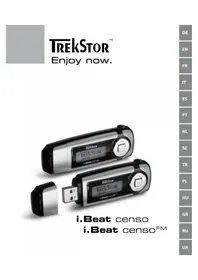
I.Beat censo FM - Mp3 player TrekStor - Free user manual and instructions
Find the device manual for free I.Beat censo FM TrekStor in PDF.

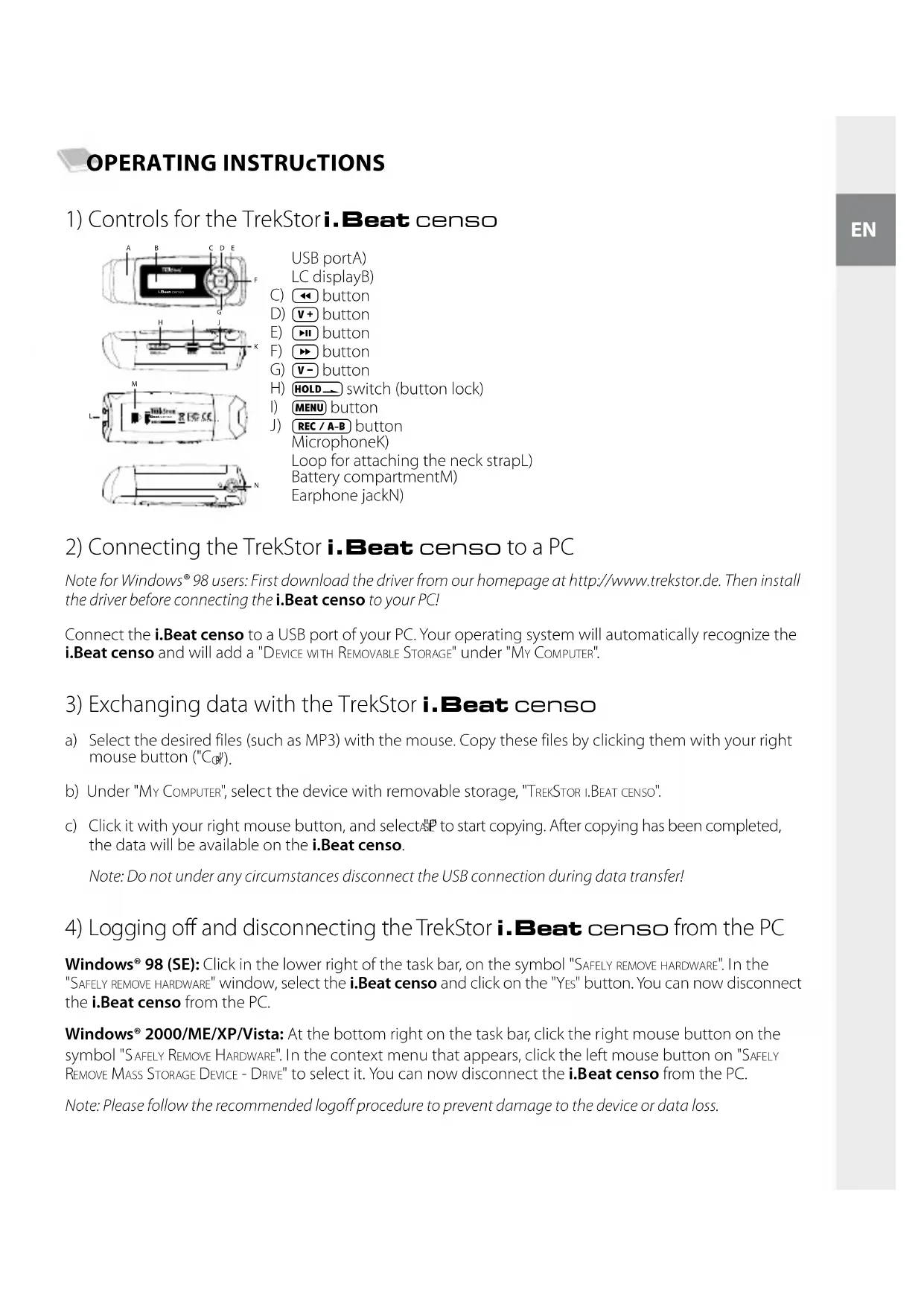


| Product type | MP3 player with FM radio |
| Dimensions (approx.) | 80 x 40 x 15 mm |
| Weight (approx.) | 70 g |
| Power | Rechargeable battery via USB port |
| Main functions | MP3 playback, FM radio, voice recording, folder navigation |
| Screen | LCD with adjustable backlight |
| Connectivity | USB 2.0 |
| FM Radio | Yes, with 20 memory presets and automatic search |
| Recording | Built-in microphone for voice and FM radio recording |
| Equalizer | 6 presets |
| Playback modes | 6 modes (normal, repeat, shuffle, etc.) |
| Volume control | + and - buttons |
| Lock | HOLD switch |
| Menu languages | Multi-language (French, English, German, etc.) |
| Included accessories | Earphones, USB cable, strap (approx) |
| Care and cleaning | Clean with a soft, dry cloth |
| Safety | High volume may damage hearing; do not use while driving |
| Spare parts and repairability | Not specified |
| General information | Brand: TrekStor, Model: I.Beat censo FM |
Frequently Asked Questions - I.Beat censo FM TrekStor
User questions about I.Beat censo FM TrekStor
0 question about this device. Answer the ones you know or ask your own.
Ask a new question about this device
Download the instructions for your Mp3 player in PDF format for free! Find your manual I.Beat censo FM - TrekStor and take your electronic device back in hand. On this page are published all the documents necessary for the use of your device. I.Beat censo FM by TrekStor.
USER MANUAL I.Beat censo FM TrekStor
2) Connecting the TrekStor i. Beat censo to a PC
Note for Windows® 98 users: First download the driver from our homepage at http://www.trekstor.de. Then install the driver before connecting the i.Beat censo to your PC!
Connect the i.Beat censo to a USB port of your PC. Your operating system will automatically recognize the i.Beat censo and will add a "DEVICE WITH REMOVABLE STORAGE" under "MY COMPUTER".
3) Exchanging data with the TrekStor i.Beat censo
a) Select the desired files (such as MP3) with the mouse. Copy these files by clicking them with your right mouse button (^ _0|)
b) Under "MY Computer", select the device with removable storage, "TREKSTOR I.BEAT CENSO".
c) Click it with your right mouse button, and select to start copying. After copying has been completed, the data will be available on the iBeat censo.
Note: Do not under any circumstances disconnect the USB connection during data transfer!
4) Logging off and disconnecting the TrekStor i. Beat censo from the PC
Windows® 98 (SE): Click in the lower right of the task bar, on the symbol "SAFELY REMOVE HARDWARE". In the "SAFELY REMOVE HARDWARE" window, select the i.Beat censo and click on the "Yes" button. You can now disconnect the i.Beat censo from the PC.
Windows® 2000/ME/XP/Vista: At the bottom right on the task bar, click the right mouse button on the symbol "SAFELY REMOVE HARDWARE". In the context menu that appears, click the left mouse button on "SAFELY REMOVE MASS STORAGE DEVICE - DRIVE" to select it. You can now disconnect the iBeat censo from the PC.
Note: Please follow the recommended logoff procedure to prevent damage to the device or data loss.
5) Firmware update for the TrekStor i. Beat censo
a) Connect the i.Beat censo to a USB port on your PC.
b) Back up all the important files on your i.Beat censo onto your PC.
c) You can update the i.Beat censo with the most current firmware from the Internet (on the TrekStor homepage at http://www.trekstor.de).
d) Download the firmware (*.zip-file), and unzip it to a folder of your choice.
e) Follow the attached update instructions.
Warning: Please read all of the update instructions, and follow the update procedures exactly to keep from damaging the i.Beat censo!
6) Formatting the TrekStor i. Beat censo
a) Connect the i.Beat censo to a USB port on your PC.
b) Back up all the important files on your i.Beat censo onto your PC.
c) Open "My Computer", and click your right mouse button on "DEVICES WITH REMOVABLE STORAGE".
d) Select "F" from the context menu.
e) Select the "FAT32" option under "FILE SYSTEM" from the dialog window that appears.
f) Click the "S" button to start the formatting.
7) Controls for the TrekStor i.Beat censo
Turning the device on and off
Turn on the i.Beat censo by briefly pressing the button. To turn the i.Beat censo off, hold the button for approximately 3 seconds.
Note: Make sure that the HOLD switch has been moved to the left position, i.e., that the button lock is turned off. If the button lock is activated, the button lock symbol will appear.
Different modes
The i.Beat censo has different modes. To go to a mode, briefly press the (MENU) button. Press the or button to select the desired mode, and confirm by briefly pressing the button. Exit the menu by pressing the (MENU) button.
Mode: Music
Switch to "Mu" mode.
Playback
Briefly press the button to play an audio file.
Pause
Briefly press the button to stop playback. Repress the button to continue playback.
Stop
Press the button for approximately 1 second to stop playing the file. Repress the button to start playback at the beginning of the song.
Change track
Briefly press the button to select the next song. If you press the button within 5 seconds after a song starts, you switch to the prior song. If you push the button after a playback starts and after at least 5 seconds, the i.Beat censo returns to the beginning of the current title.
Rewind/fast-forward within a track
You can navigate within the current song by holding down the or button. Hold down the or button to fast-forward or rewind.
Note: The longer you hold down the 比 or button, the faster you fast-forward or rewind.
Increase/lower volume
Briefly press the + or - button to raise or lower the volume.
Note: If you hold down the + or - button, the volume changes gradually.
Mode: Folder navigation
Switch to "F" mode.
Press the or button to select the next or previous file. To play the selected file, press the button. To change to a subfolder, press the button if the folder is marked. To return to the main directory, briefly press the button. To leave folder navigation, press the button when you are in the Main Directory.
Deleting a file
Select the file you want to delete using folder navigation, and briefly press the REC/A-B button. To confirm that you want to delete the file, switch to "Yes" by pressing the or button, and then press the button.
Mode: FM radio (optional)
Switch to the "FM mode.
Note: Always connect your earphone or headphone to the headphone jack of the i. Beat censo FM since the earphone/headphone cable serves as an antenna for the internal radio.
To call up the FM radio menu press the (MENU) button for approximately 1 second. Select the desired menu item by pressing the or button and confirm by pressing the button. Briefly press the (MENU) button to exit the FM radio menu.
Switching between manual station selection and memory mode
In the FM radio menu you can switch between memory mode "STATION" and manual station selection "SCAN". Select the desired mode by pressing the or button and confirm by pressing the button.
Automatic memory assignment / automatic station scan
To start the automatic station scan, select "AUTO SCAN" in the FM radio menu and confirm the subsequent query by selecting "YES" with the button. The iBeat censo FM now automatically searches for the radio stations with the strongest reception and saves them in 20 memory locations.
Switching between saved stations
In memory mode "STATION", you can switch between the existing memory locations by briefly pressing the or button.
Manual frequency change / manual scan
In manual station selection mode "SCAN", briefly press the or button to change the reception frequency by 0.1 MHz. Hold down the or button for the iBeat censo FM to automatically scan the upper and lower frequencies for stations with strong reception.
- Saving individual stations
Change to manual station selection "SCAN". Set the desired frequency, and select "SAVE" from the FM radio menu. Select the desired memory by pressing the or button and confirm by briefly pressing the button.
Deleting individual stations
In the FM radio menu select "Delete". Select the station to be deleted by pressing the < or button and confirm the deletion by briefly pressing the button.
Recording FM radio
Hold down the REC/A-B button for approximately 1 second to start radio recording. To pause the current recording, briefly press the button. To restart the current recording, briefly press the button again. Briefly press the REC/A-B button to stop recording.
Note: All radio recordings are saved in the "FM" folder of the i.Beat censo FM.
Mode: Voice recording
Switch to "V" mode.
You can record your voice using the integrated microphone. Hold the REC/A-B button for approximately 1 second to start recording. To pause the current recording, briefly press the button. To restart the current recording, briefly press the button again. Briefly press the REC/A-B button to stop recording.
Note: All voice recordings are saved in the "VOICE" folder of the i.Beat censo.
The operation and functions in this mode are analogous to the "Mu" mode.
Mode: Settings
Switch to "SELNS" mode.
In this mode, you can configure the equalizer, play mode, contrast, background illumination, automatic shutdown, sleep timer and the record set quality.
Press the or button to select the desired setting, and confirm by briefly pressing the button. Leave the settings by pressing the MEN button.
Equalizer: You can select from 6 preset equalizers under the menu item "E2"
Playback mode: You can select one of six preset play modes under the menu item "Play"
Contrast: Under the "CONRASI" menu item, you can adjust the contrast of the LC display.
Background illumination: Under the menu item "BAAH", you can set the length of time until the background illumination automatically shuts off.
Sleep Timer: Under the menu item "SLEEP TIMER", you can set how long the player should wait before it automatically shuts off.
FM radio: Under the menu item "FM you can set the radio reception mode and region. By using the button to select "Mode" you can switch between stereo and mono reception. Under "FM REGION" you can undertake region-specific radio settings.
Shutdown: Under the menu item "SHUT DOWN," you can set how long the player should wait when it is not used before it automatically shuts off.
Record set quality: You can set the recording quality for the integrated microphone under the menu item "RECORD SET".
Mode: System
Switch to the "System" mode.
In this mode, you are provided with information on the memory and the installed firmware version. In addition, you can change the user language and load the factory settings.
Firmware: Under the menu item "FwWt", you are provided with informationen about the installed firmware version of the i.Beat censo.
Memory: Under the menu item "M", you are provided with information about the total and free disk space of the i.Beat censo.
Language: Under the menu item "LANGUAGE", you can select the menu language of the i.Beat censo.
Default settings: Under the menu item "DEFAULT SET", you can restore the original settings of the i.Beat censo. The saved files are not deleted when you do this.
Notes:
This MP3 player is optimized for the provided headphones (32 Ohm impedance). Using other earphones with a lower impedance can damage the MP3 player or earphone, especially MP3 players with 2 earphone jacks.
In certain circumstances, exposing the device to an electrostatic discharge may interrupt the data transfer between the device and the computer and impair the functions of the device. If this occurs, the device should be unplugged from the USB port and then plugged in again.
Note: This device can produce high volumes. To prevent hearing loss, do not listen to high volumes for long periods. If you notice ringing in your ears, lower the volume immediately or stop using the MP3 player. Please keep in mind that using earphones or headphones at loud volumes may result in permanent hearing loss. You become accustomed to higher volumes over time, so that they may seem normal to you; however, your sense of hearing can still be impaired. The higher you adjust the volume, the faster your sense of hearing can be damaged.
Note: Using earphones while driving a motor vehicle is not recommended and is prohibited in some countries. Always drive carefully and with full concentration. Stop using your MP3 player if you become distracted or interrupted by it when driving a motor vehicle or during other activities that require your full attention.
Do not use USB cables longer than 3 meters.
The manufacturer retains the right to continually improve the product. These changes may be made without being directly described in these operating instructions. For this reason, the information provided in these operating instructions may not reflect the current technical design.
The manufacturer only guarantees suitability for the product's actual intended purpose. In addition, the manufacturer is not responsible for damages or loss of data and subsequent consequences.
Copyright © 2007 TrekStor GmbH & Co. KG. All rights reserved. Other cited product or company names may be trademarks or brand names of the respective owner.
NOTICE D'UTILISATION
Compartmenta pilesM)
Mode: Radio FM (option)
A operacao e as funcoes nthc mode sao identicas as do mode "Mia
Modo:Definições
Aykiotpo stepewonc yia to laupi wouL)
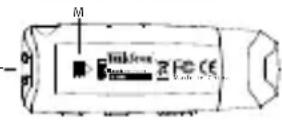
M) Θκη μιαταις
N)Σuδεσηakouotikωv
KoHTpact:BnyHKTe MeHIO "KorMOxHO HacTpoNTb KOHTpact XXK-DinCnIe.
Nocbetka:BnyHKTe MeHIO "MOXHO yCTAHOBNTb Bpem,Yepe3 KOtOpoe NOcCBeTKa DnCInner 6yET BBKJIoueHa aBTOMaTnueckn.
Taimep"cha":BnyHKTe MeHIO TMOXHO yCTaHOBnTB Bpem,Yepe3 KOtOpoe nIeep DoJKeH BbIKJIIOHTbc aBTOMaTnueCKN.
FM-npneMHnK: B nyHKTe MeHIO "FM-IPNEMHNK" MOxHO HaCTpOuTb peXIM npEma n perNoH npEma npEma. PnBbOpe KhoNko "PEKIM" MOxHO nepeKlOuaTb Mekdy npEmOM "cTepeo" n "MOHO". B nyHKTe "FM-MOxHO HaCTpOuTb npEMHK Ha cNeUΦNHyIe dIra perNoHa cTaHcII.
BbIKIOueHHe: B nyHKTe MeHIO "B MOxHO yCTaHOBnTb,Yepe3 KaOe Bpem nIneep IOnKeH BbIKIOHTbC aBTOMaTHueCKN,ecn OH He NCNoB3yeTcA.
KaueCTBO 3aHncn:B nyHKTe MeHIO "3A6MOXHO yCTaHOBNTb KaueCTBO 3aHncn BCTPOEHNO MKNPOOHa.
Pexm: Cnctema
IpeennteBpekm "C
B 3TOM pexKIMe MOXHIO NOnyUHTb INHOpMaIuO O nAmrTn, a TaKxE yCTaHOJIeHHoB BepCIN npOswNBKn. Kpome TOrO, MoXHIO Bbl6paTb J3bIK kPaHHORo MeHIO U 3aRpy3NTb 3aBOJCKne HaCTpoiKN.
PpOuINbKa:BnyHKTe MeHIO "IIMMOxHO NOLyUHTb INHΦOpMaqHIO 6 yCTaHOBHeHHo BepCnnpOuINbKn PnEepa i.Beat censo.
PamrB:B nyHKTe MeHIO "MMOKHO NOJyHTb INHOpMaUIO O BcEM OBeMe NaRTN O CBO6OHN PAMrTNIeepa i.Beat censo.
R3bIK: B nyHKTe MeHIO "R3bIK" MOXHO Bbl6paTb R3bIK 3KpaHHOro MeHIO nIeepa i. Beat ceno.
3aBoDcKne HacTpoKn: B nyHKTe MeHIO "3b HACTP." MoXHO BOCCTaHOBt b HAcTpoKn COCTOHN NOCTaKN pHeepa i. Beat censo. PpN 3OM coXpaHeHHbIe faHbI He 6ydyT ydaJIeHbl.
Yka3aHur:
HacmoaMp3-nneep aBnemc onmumabHybM dny Bxodauux 8 komnnek mocmaBuHayuHkoB (noHoe · conpumuehue 32 Om).IpuMeHeue dpyux HayuHKoC meHbUum noHbIM conpomuehueHemu npu onpeDeenbix o6cmomebcmbax moxem npubecmu K noIOMke MP3-nneepa unu maKxe hayuHKoB; 3mo omHocumc oc6eHHo K MP3- nneepam c 2 pa3bemamu dny HayuHKoB.
- Ecnu ycmpooucmbno nodbepeaemca 3nekmopcmamuueckum pa3paam, mo, cmomprn no o6cmomehcbmam, moxem npepbambcna nepeda daHHbx MEXdy ycmpooucmbom u KOMnbomepom. B mom cnyae ycmpoucmbno Heo6xodmo omcoedunmb om USB-nopma u nodcoedunmb zahobo.
BHMuaue: pomKocmb 3mo2o nneepa moem 6bim b ouh b cunbho. ymo6b npednpdbnopaehue cnxa, He pekomehdyemca npocnyuubahue c 60nbou opmkocmbio. Ecnu Bby ycblwana wym bywax, mo hemedneHno ymehuume opmkocmb uU bkiyumme MP3-nneepeonHocmbio. POMHume, ymo npocnyuubahue ouehb zpomko My3biku uee3 noobie hayuHku moem npuecmu K dnumelbHou nomep ciya.x. Xomra Btu npubikheme co bpehem K npocnyuubauHIO opmko My3biku, maK ymo Bam 6ydem kaambsca, ymo ypoebh zoPMKOCMu HopmaNbHi, odHako BaW cnyx moxem 6bmb ecnedcmue 3mo2o ociaJIeHHbM. Yem 60nbuyo zpomkocmb Bby ycmaHabIuBaeme dn npocnyuubAHur, mem ckopee moxem Hacmynumb nopaxhenue Bauezo cnya.
Bhumahue: Vcnoh3oabHue HayuHkoep npu bokehu mpaHcnopmho cpecmba kpaHe HekenamehU 3anpeeHO B Hekomopbix cmpaHax. Bceea nonHocmbio KOHeHmPupyimeb monko Ha bokehu. Ipekamume npocnyubAHue MP3 nneepa, eCu omo ombekaem Bac uU Meuaem Bam npu ynpaBneHu aemomobunem uU bInonHeuu IIO6bx dpyzux deumu, mpe6youux Bauezo noHooBnHumaHua.
He pekomehoyemcnaucnoj63o6ambUSB-ka6enu dnuhoou 6onee 3 m.
Pon3BOnTeNBocabTn3a cobno npabo Ha nocToHHoe yCObepseHCTBOBaHne N3denn. 3Tu n3MeHeHn MOrTy 6bTb OcyueCTBHeHb63 npAmoro onncAHn IN B HAcToAe HNCTpyKuIN NO EKnPyatauIN. POnTOMy INOpMaUN B HactoIe INHCTpyKUIN NO EKnPyatauIN MOKeT He COOTBeTCTBOBaTb yPOBHIo TEXHnueCKO INcONHeHn.
Pon3BountenrapaHTnpuyet npirodHocb daHHoro n3deNnraTobKIOIcNOB3OBAHnnoHa3HaueHIO.OMMmO 3TORO, npON3BOUNTenb He Hecet OTBeCTBeHHoCTn 3a NOBpeXJeHne IIN NoTepxo DaHHbIX KOCBEHHbYuep6.
Copyright © 2007 TrekStor GmbH & Co. KG. Bce npaba 3aunuenebl. B cnyae npyruyn yonmaHytbx ha3baHn n3eenn n nn fnpm peyb nET, BO3MOXHO, O TOBapbHex 3HaKax nll Mapkax fnpm COOTBETCTBYUxxBnaJeBcE.
Ihctpykul3 Eknpnyatau
1)Еlementуправлий TrekStor i.Beat censo
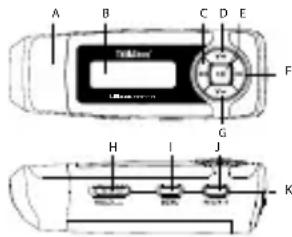
USB-nid'εdHaHaHaA)
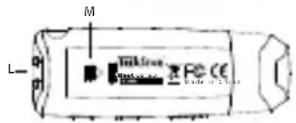
PK-dncnnneB)
Khonka
KhoNkaD) V+
KhoNka E)
KhoNka F)
KhoNka G) V
HOB3yHOK H) (6nokyBaHHKHO
KHONKa MENU
KHONKa J) REc/A-B
MikpoohK)
ByuKo dny KpinneHn cTpiuKuL)
Bicik dny 6atapenokM)
N)Пд'снHaHHЯ ДЯ HabyuHnKiB
2) 3'ειнайтε TrekStori. Beat censo 3 ПК
Bka3iBaKa dIy KOpucmyBaue Windows 98:Cnoaamky,6ybJnacka,3aBaHmaxme dpauBep 3 Hawoi domauHboi cmopinku http://www.trekstor.de. Iomim iHcmanioume dpauBep, i nuwe nicra u0zo niD'edHyume i.Beat censo do PIK!
IiEHaTe i. Beat ceno do USB-03'Emy PK. OnepauiHa cnCTema abTomauHo po3ni3Ha e i. Beat ceno i dOaE Ha "MI KOMTIOTEP" 3MIHHHIOHOJDAHX".
3)Обminданими 3 TrekStor i. Beat censo
a) NomiTbTe Notpi6Hi faaiJn (Ha np., MP3) MmKoIO. 3KoIIOte ix 3a DOnOMOHO HaTNCy npaBOIO KHONKOIO MmIKN ("KoiIOBAtN").
b) Bn6epiB "MI KOMI'OTEP" 3MiHHN HOCi DaHx "TREKSTOR I.BEAT CENSO".
c) HatncihTb npaby KhoNky MmUkni Bn6epiBt onuio "DOnaT", 0o6 noaTu npouec konioBaHH. Iicna 3aBepeHnn npocecy KonoiOBaHH dahi 3haxOraTbcB i.Beat censo.
Bka3iBka: Hi 3a kux o6cmabun He po3'edhyume USB-38'30k nid yac nepedaqi dahux!
4) Buxid i3 cnstemn i BiD'edHaHnra TrekStor i. Beat censo BiD PIK
Windows® 98 (SE): HaTnCHiTB Bn3y CnpaBa Ha NaHeI 3aBdaHb CnMBoN "HaIINHO BnHHTN ANAPATHN INPCTPI". Bn6epiTy bIKHI "HaIINHO BnHATN ANAPATHN INPCTPI" i.Beat censo i HaTnCHiTB KONKy "Ok". Tenep MoXHa BiD'EnHaTI i.Beat censo BiD PIK.
Windows® 2000/ME/XP/Vista: HATNCIb npaBOIO KHONKOIO MNUKIN BHN3y Cnpaba Ha naHeni 3aBdaHb CMMBOJI "HADIIHO BVINHRTN ANAPATHNI PnCTPI". Bn6epiTb 3 KOHTEKCTHORo MeHIO, IIO 3'ABNTbcra, NYHKT "BiD'EDHATN USB-HAKONUBAH - INCKOBOD" HAITNCKAHNM LiBOIO KNONKOIO MNUKIN. TeNep MOXHa BiD'EDHATN i.Beat censo BiD NK.
Bka3iBa: Byob nacka, dompumyimecpekomedobao zo npouecy buxody 3 cuscemu, oob 3anobizmu wkodu npunaoyu bmpami dahux!
5)Оновленnersфірmbape TrekStor i.Beat censo
a)Пд'Енайт e i.Beat censo do USB-po3'Emy ПК.
b) 36epekeiB bci BaeknBi daHi 3 i.Beat censo Ha PK.
c) Bn mojete 3aBaHTaXHTn HauHOBiSy BepciO fipMbape Ira i.Beat censo 3 iHTepHeTy (3 domaunhboi ctopiHKn TrekStor 3a aDpecoIO http://www.trekstor.de).
d) 3aBAHTaXTe fipmbape (faunzip) i pO3nKaYnte uei faunB 6ydb-akn KaTaNor.
e) NotIM DoTpyMnyTEcb BkazIBOK IHCTpyKUII NO OHOBNeHHIO, 0O DOJaETbca.
PonepeJenH: Ipournaume 8c0 iHcmpkyuio no OHOJIeHHIO u moHo dompumyuemcb npouedypu OHoBHeHH, uO63anobizmu wKodu i.Beat censo!
m = 311
+49 431 - 24 89 45 70** support.at@trekstor.de German
BE
+49 431 - 24 89 45 73** support.ch@trekstor.de German
DE
01805 - 87 35 78 67* support.de@trekstor.de German
+49 431 - 24 89 45 76** support.es@trekstor.de Spanish
FR
+49 431 - 24 89 45 79** support en@trekstor de Englis
T
LU
+49 431 - 24 89 45 81** support.en@trekstor.de English
PL
+49 431 - 24 89 45 78** support.en@trekstor.de English
UK
GR
+49 431 - 24 89 45 83** support.en@trekstor.de English
RU

- 2) Connecting the TrekStor i. Beat censo to a PC
- 3) Exchanging data with the TrekStor i.Beat censo
- 4) Logging off and disconnecting the TrekStor i. Beat censo from the PC
- Turning the device on and off
- Different modes
- Mode: Music
- Playback
- Pause
- Stop
- Change track
- Rewind/fast-forward within a track
- Increase/lower volume
- Mode: Folder navigation
- Deleting a file
- Mode: FM radio (optional)
- Switching between manual station selection and memory mode
- Automatic memory assignment / automatic station scan
- Switching between saved stations
- Manual frequency change / manual scan
- - Saving individual stations
- Deleting individual stations
- Recording FM radio
- Mode: Voice recording
- Mode: Settings
- Mode: System
- Notes:
- NOTICE D'UTILISATION
- Mode: Radio FM (option)
- Modo:Definições
- Pexm: Cnctema
- Yka3aHur:
- Ihctpykul3 Eknpnyatau
- 1)Еlementуправлий TrekStor i.Beat censo
- 2) 3'ειнайтε TrekStori. Beat censo 3 ПК
- 3)Обminданими 3 TrekStor i. Beat censo
- 4) Buxid i3 cnstemn i BiD'edHaHnra TrekStor i. Beat censo BiD PIK
- m = 311
- BE
- DE
- FR
- T
- LU
- PL
- UK
- GR
- RU
Brand : TrekStor
Model : I.Beat censo FM
Category : Mp3 player