
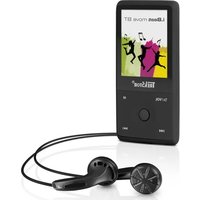
MusicStick 90 - Mp3 player TrekStor - Free user manual and instructions
Find the device manual for free MusicStick 90 TrekStor in PDF.


Pick your language and provide your email: we'll send you a specifically translated version.
| Product Type | MP3 Player |
| Brand | TrekStor |
| Model | MusicStick 90 |
| Dimensions | 90 x 30 x 15 mm |
| Weight | 30 g |
| Power Source | USB 5V, internal rechargeable battery |
| Battery Life | Up to 15 hours playback |
| Storage Capacity | 8 GB internal |
| Audio Formats | MP3, WMA, WAV |
| Display | OLED screen |
| Connectivity | USB 2.0 |
| Controls | Physical buttons (play/pause, volume, skip) |
| Functions | Music playback, FM radio, voice recording, folder navigation |
| Included Accessories | USB cable, earphones, quick start guide |
| Maintenance | Clean with a soft, dry cloth |
| Safety | Keep away from moisture and extreme temperatures |
| Spare Parts / Repairability | Not user-serviceable; no spare parts available |
| Country of Origin | China |
| Warranty | 1 year limited warranty |
Frequently Asked Questions - MusicStick 90 TrekStor
How do I charge the TrekStor MusicStick 90?
Connect the device to a computer or USB power adapter using the included USB cable. Charging is indicated by a red LED that turns green when full. Typical charge time is about 2 hours.
How do I transfer music to the device?
Connect the MusicStick 90 to your computer via USB. It will appear as a removable drive. Drag and drop music files (MP3, WMA, WAV) into the Music folder. Safely eject before unplugging.
How do I reset the device if it freezes?
Press and hold the Reset button (usually a small pinhole) with a paperclip for 5 seconds. Alternatively, hold Power button for 10 seconds until the device restarts.
How do I use the FM radio?
Press the Mode button to switch to FM radio mode. Use the Volume buttons to scan channels. Press Play to store a channel. You can save up to 20 presets.
How do I create playlists?
On the device, navigate to the Playlist menu and select New Playlist. You can add songs by browsing the music library. Alternatively, create a .m3u file on your computer and copy it to the device.
Why is my device not charging?
Check that the USB cable is securely connected. Try a different USB port or power adapter. If the LED does not light up, the battery may be defective. Contact support for battery replacement.
Why is there no sound from the earphones?
Ensure the earphones are firmly plugged in. Check the volume level is not at zero. Try a different pair of earphones to rule out a hardware issue. If still no sound, reset the device.
How do I update the firmware?
Visit the TrekStor support website to download the latest firmware file. Copy it to the device root folder, then safely eject. The device will automatically detect and install the update on next startup.
Can I expand the storage with a microSD card?
No, the TrekStor MusicStick 90 does not support expandable storage. It has 8 GB of internal memory.
Is the device water resistant?
No, the MusicStick 90 is not water resistant. Keep it away from liquids and use in dry conditions only. Exposure to moisture may cause damage.
User questions about MusicStick 90 TrekStor
0 question about this device. Answer the ones you know or ask your own.
Ask a new question about this device
No questions yet. Be the first to ask one.
Download the instructions for your Mp3 player in PDF format for free! Find your manual MusicStick 90 - TrekStor and take your electronic device back in hand. On this page are published all the documents necessary for the use of your device. MusicStick 90 by TrekStor.
USER MANUAL MusicStick 90 TrekStor
Manual assistant
Powered by Anthropic
Waiting for your message
Product information
Brand : TrekStor
Model : MusicStick 90
Category : Mp3 player