Mitros TTL (Sony) - Flash Phottix - Free user manual and instructions
Find the device manual for free Mitros TTL (Sony) Phottix in PDF.


| Product Type | External TTL Flash for Sony DSLR |
| Brand | Phottix |
| Model | Mitros TTL (Sony) |
| Category | Flash |
| Guide Number (105 mm, ISO 100) | 58 / 190 (meters/feet) |
| Flash Coverage | 24-105 mm (14 mm with wide-angle diffuser) |
| Zoom | Auto (Azoom) and Manual (Mzoom) |
| Head Rotation | 360° horizontal, -7° to 90° vertical |
| Flash Modes | TTL, Manual (M), Multi (stroboscopic), Wireless (Master/Slave) |
| Synchronization | First curtain, High Speed (HSS), Second curtain (via camera) |
| Power Supply | 4 AA batteries (alkaline or Ni-MH) + optional external power |
| Recycling Time (AA alkaline batteries) | Approximately 0.1 to 5 seconds (normal), 0.1 to 2.5 seconds (Fast Flash mode) |
| Weight (without batteries) | 416 g |
| Wireless - Channels | 4 (1 to 4) |
| Wireless - Slave Groups | 2 (A and B) |
| Wireless - Approximate Range | Indoor: 12-16 m; Outdoor: 7-9 m |
| Custom Functions | 16 settings (C.Fn 00 to 15): standby, auto zoom, fast flash, etc. |
| Overheat Protection | Yes (Hot! / Stop icon, automatic slowdown) |
| Maintenance and Cleaning | Remove batteries if not used; clean with a dry cloth; do not disassemble |
| Safety | Do not fire near eyes; avoid flammable gases; do not expose to water/excessive heat |
| Spare Parts and Repairability | No spare parts provided; repair by a professional only |
| General Information | Compatible with Sony DSLR; firmware update via USB port |
Frequently Asked Questions - Mitros TTL (Sony) Phottix
User questions about Mitros TTL (Sony) Phottix
0 question about this device. Answer the ones you know or ask your own.
Ask a new question about this device
Download the instructions for your Flash in PDF format for free! Find your manual Mitros TTL (Sony) - Phottix and take your electronic device back in hand. On this page are published all the documents necessary for the use of your device. Mitros TTL (Sony) by Phottix.
USER MANUAL Mitros TTL (Sony) Phottix
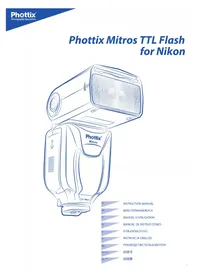
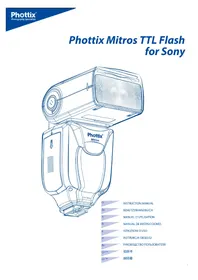
Phottix Mitros TTL Flash for Sony
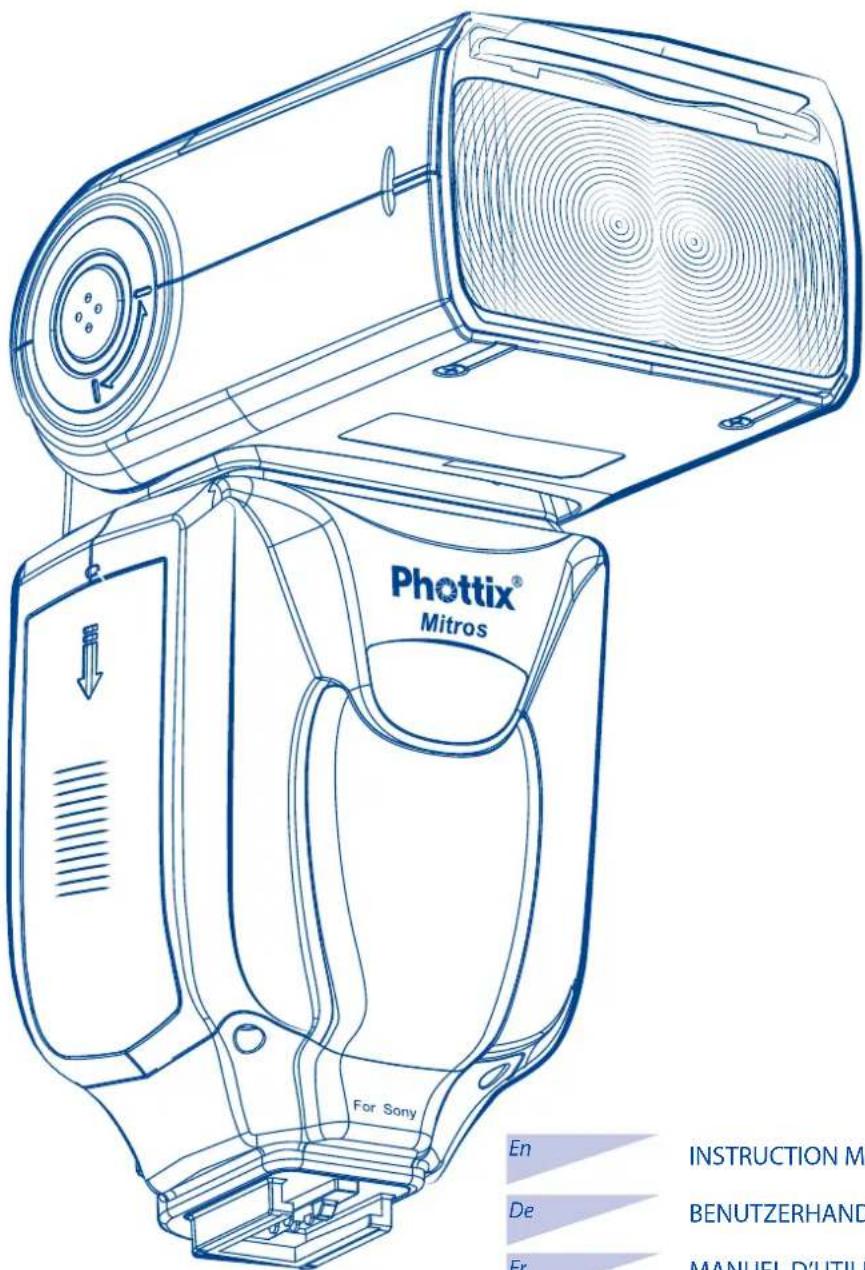
En INSTRUCTION MANUAL
De BENUTZERHANDBUCH
Fr MANUEL D'UTILISATION
Es MANUAL DE INSTRUCCIONES
ISTRUZIONI D'USO
PI INSTRUKCJA OBSLUGI
Ru PYKOBODCTBO NOJIb3OBATEJIa
说明书
Cn^Tod 說明書
Phottix Mitros TTL Flash for Sony
Note: To start immediately using this flash please refer to the quick-start guide. For advanced features please read this manual and be familiar with your camera manual and operations.
The Phottix Mitros TTL Flash for Sony is designed to work with Sony DSLR cameras and features TTL, Manual, Multi modes as well as Wireless Master/Slave triggering.
Warnings
- Use your flash safely. Do not fire the flash into the eyes of people or animals at short distances - damage and/or blindness can occur.
- Be careful using the flash in or around cars, buses, motorcycles or other moving vehicles as accidents can result.
- Never use the flash near combustible gases (gasoline, solvents, etc.).
- Do not expose the flash or batteries to dripping/splashing water, or high humidity.
- Do not leave the flash or batteries in a hot location (direct sunlight, in a closed car, etc.).
- Remove batteries from the flash when not being used for an extended period of time.
- Change the batteries when required. Use undamaged batteries in good condition. Do not mix battery types or new and used batteries.
- Do not put opaque objects in front of the flash lens when firing the flash. The energy emitted by the flash may cause objects to burn, or cause damage to the flash tube or fresnel lens.
- Use caution in touching the flash head after use. It may be hot and can cause burns.
- The flash contains high voltage electronic parts. Do not disassemble or attempt to repair the flash. Never touch the flash's internal components.
- Do not touch the External Power Port contacts with any metal objects – this can cause electric shock and serious injury.
Table of Contents
Parts and Functions 2
6
Wireless Triggering. 9
Custom Functions 11
Technical Specs. 12
Parts
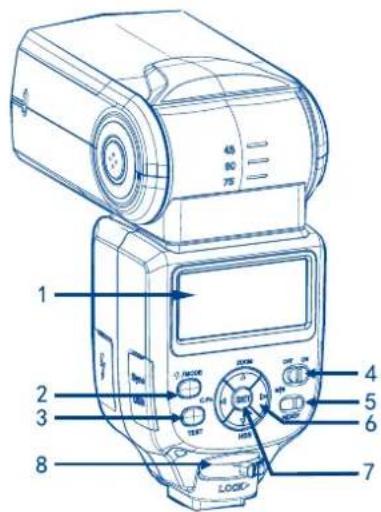
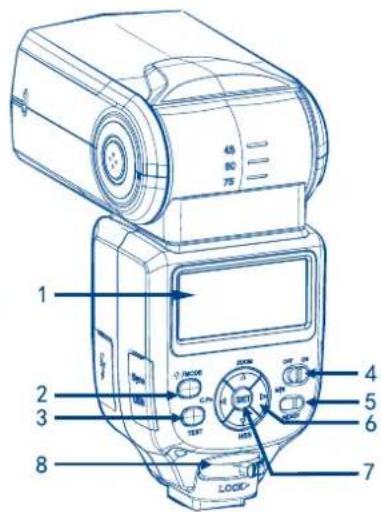
Back/Left Side
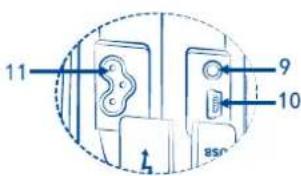
- LCD Display
2.Mode Button - Test Button
- Power Switch
- Ready Light
- Arrow Adjustment Buttons (see below)
- Set Button
- Locking Lever
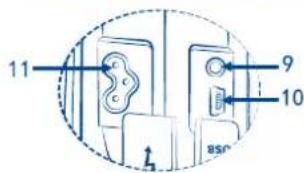
9.3.5mm Sync Port - USB Port
- External Power Port
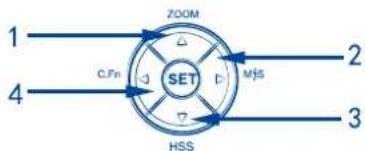
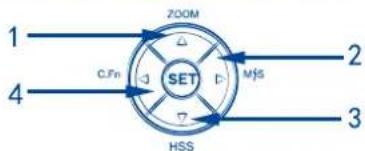
Arrow Adjustment Buttons
- Up Arrow / Zoom Adjustment Mode Button
- Right Arrow / Wireless Flash Mode Button
- Down Arrow / HSS Button
4.LeftButton/CustomFunctionsButton
Front / Right Side
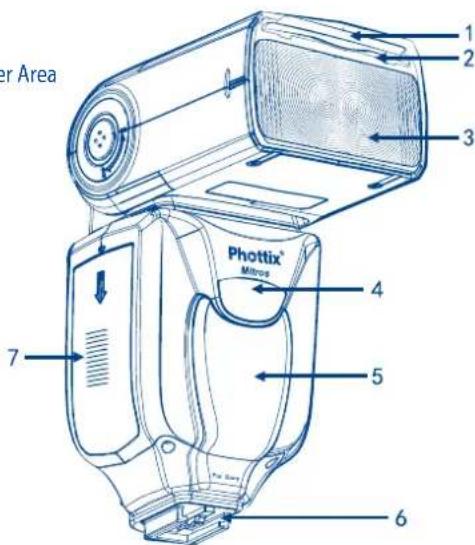
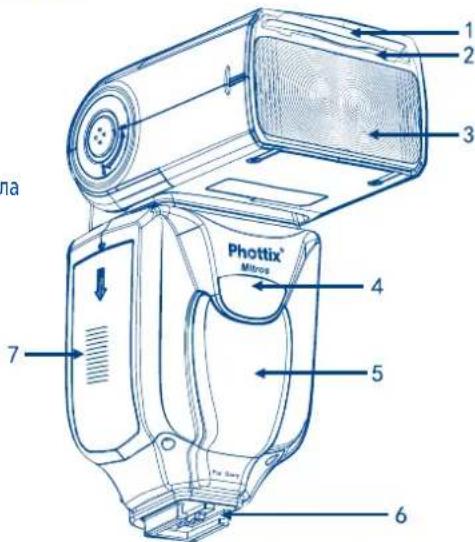
- Bounce Card
- Wide Angle Diffuser
- Flash Head
- Wireless Signal Receiver Area
- AF Assist Light
- Hot Shoe
- Battery Compartment
Please note:
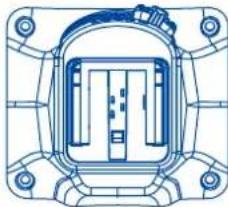
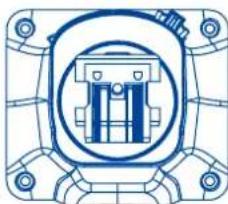
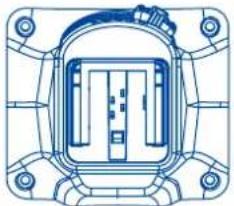
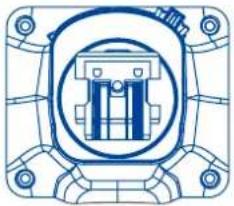
There are 2 types of hot shoe for Mitros for Sony flash. Please make sure to choose the right one for your camera.
Type 1 = Older Style Minolta Hot Shoe
Type 2 = New Style ISO Hot Shoe
This instruction assumes:
- Both the flash and camera are switched on.
- The flash and camera are set to the same settings.
- Camera menu and flash custom functions menu are set to default values.
- The flash is being used with a compatible Sony DSLR.
Installing batteries
- Press the battery cover in while pushing it towards the bottom of the flash. The battery cover will open and raise.
- Insert AA batteries as shown by the diagram inside the battery compartment.
- Lower the battery cover and push back towards the top of the flash, locking it in place.
Please note:
- Please use four standard high-quality batteries of the same brand. Make sure all batteries are at similar powers levels.
- Batteries can get hot when the flash is being used. Use caution when changing batteries.
- If you do not use the flash for an extended period of time, store with batteries removed.
Attaching the flash to a camera
Turn off both the camera and flash
- Align the flash hot shoe with the camera hot shoe.
- Slide the flash into the camera hot shoe until fully inserted.
- Lock the flash in position by pushing the locking lever to the right until the lock engages with a click.
- To Unlock, press the locking release button on the locking lever and slide to the left.
Turning the Flash On / Off
- To power on the flash move the power switch to the on position.
- To power off the flash move the power switch to the off position.
Battery Level Indicator
The Battery Level Indicator on the LCD (see below) will display an approximate indication of how much power remains in the batteries in the flash. Use this as a rough guide as to when a battery change is needed. If flash recycling time has become very long (30 seconds) change the batteries.
Raising and Rotating the Flash Head
- The flash head will elevate from -7 to 90 degrees with stops at -7, 0, 45, 60, 75 and 90 degrees. Gently raise or lower the flash head into the required position.
- The flash head will rotate 180 degrees in either direction with stops at 60, 75, 90, 120, 150 and 180 degrees. Gently rotate the flash head into the required position.
- When the flash head is raised or rotated from the 0 degree standard forward position the flash zoom will set itself to 50mm . "--" will be displayed on the LCD Flash zoom when the head is raised or rotated can be changed in MZoom mode (see below).
- At -7 degrees the flash zoom will act the same as 0 degree – it will not change any settings.
Using the Bounce Card or Wide Angle Diffuser
The Phottix Mitros Flash comes equipped with a white bounce card and wide angle diffuser panel in the flash head.
- The wide angle diffuser panel will cause the flash to spread light to a 14mm equivalent.
- The white bounce card can be used when the flash head is in a raised position to bounce light forward to assist with catch lights in a subject's eyes.
To use:
- Gently pull the diffuser panel and bounce card from the flash head using the ridge on the bottom of the diffuser panel.
- If using the diffuser panel it will drop into position over the flash head. Gently push the bounce card back into the flash head if not needed.
- If using the bounce card only gently push the diffuser panel back into the flash head.
Using the Flash Head Diffuser
The Photix Mitros TTL Flash comes with an attachable diffuser that can be added to the front of the flash head when needed. It is good for softening light, reducing hot spots and shadows and better coverage for macro photography.
To use:
-
Align the diffuser with the flash head, with the "UP" mark on the diffuser facing up.
-
Snap one side of the diffuser mount into the corresponding flash head mount.
- Repeat step 2 on the other side of the diffuser.
Overheating Protection
The Phottix Mitros contains an overheating protection circuit that will slow flash recycle time to avoid overheating-related damage. Continuous full-power flashes in a short amount of time will trigger this protection. A [Hot!] Icon will appear when the overheating protection circuit is in operation.
To avoid further overheating or possible damage the flash will increase the recycling time to assist in lowering the flash temperature. Wait 10 minutes before using the flash.
If the flash continues to be used after the [Hot!] Icon appears and the flash does not cool down a [Stop] icon will appear on the LCD. Cease using the flash and wait 10 minutes for it to cool down.
Sync and USB Ports
- The 3.5mm Sync Port can be used with a 3.5mm sync cable to trigger the flash - from a flash trigger or camera. This port is input only - flash signals are not output from this port.
- The USB port is used for firmware upgrades. Firmware announcements and instructions will be made available on Phottix websites.
Status LED
Left LED: Flash-ready indicator. In Quick Flash Mode, the LED will flash green when the flash has the minimum recycle charge. It will flash red when fully charged.
Right LED: Flash exposure confirmation lamp. If a standard flash exposure is obtained, the flash exposure confirmation lamp will light blue for approximately 3 seconds. If the flash exposure confirmation lamp doesn't light, move closer to the subject or increase the camera ISO setting.
External Battery Port
The External Battery Port is a proprietary Phottix design for use with Phottix flash cables. The external port is compatible with the Sony FA-EB1AM compact battery pack or compatible models when the included adapter is used.
Please note:
- Batteries must be used in the flash even when an external battery pack is used.
- Never use non Sony -compatible battery packs.
The LCD Display
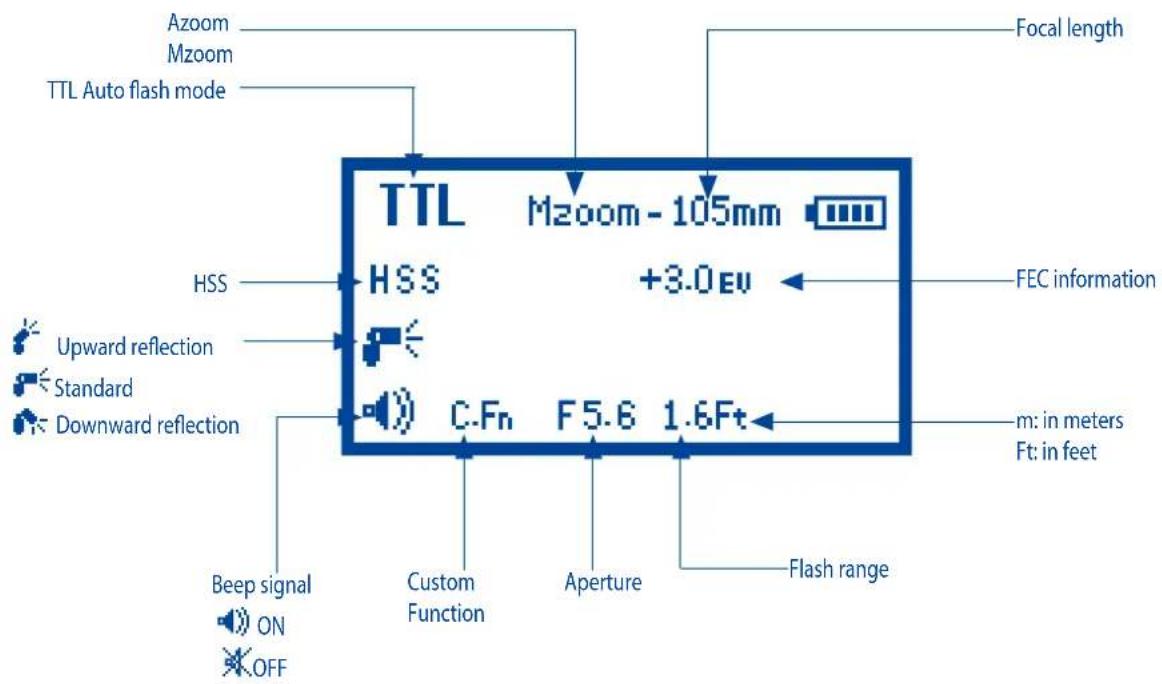
TTL Auto flash mode
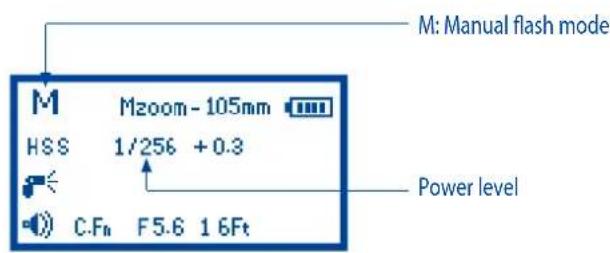
Manual flash mode Wireless Master Mode
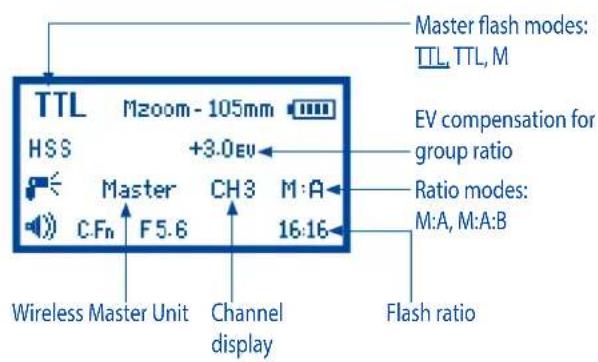
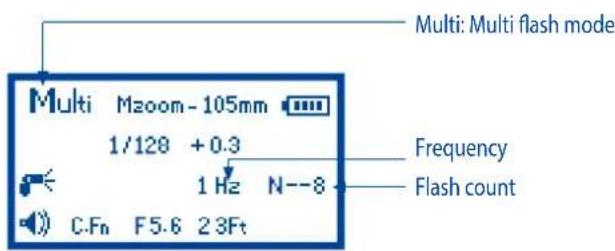
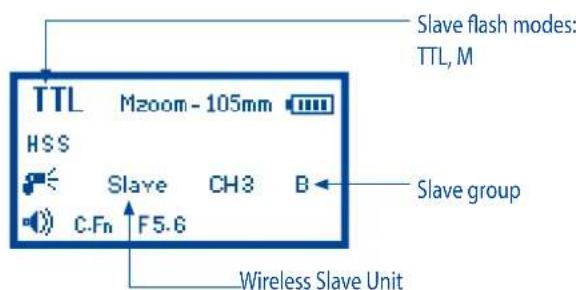
Multi flash mode Wireless Slave Mode
Auto-Save Functions
The Phottix Mitros will remember flash settings. Mode, power levels, etc. will be retained in the flash if it is turned off and then back on.
Setting Flash Zoom
The Phottix Mitros Flash has two flash head zoom modes - Auto (Azoom) and Manual (Mzoom). Auto zoom will dynamically change flash head zoom as a camera's zoom lens is changed to provide optimum lighting. Manual zoom allow the user to set the zoom of the flash head.
To set:
- Press the


- The Zoom area on the LCD will be highlighted and flash.
- Press the or buttons to set the flash head zoom to Azoom or the desired Mzoom manual level.
- Press the SET button when the zoom is properly set.
Please Note:
- When in Azoom and the flash head is raised or rotated from the 0 degree standard forward position - the flash zoom will set itself to 50mm . "---" will be displayed on the LCD. The flash zoom will not change if the head is lowered to -7 degrees.
- Azoom will work ONLY when the flash head is set to either 0 or -7 degrees.
- When in Mzoom and the flash head is raised or rotated from the 0 degree standard forward position - the flash zoom will not be changed from the previous setting.
- Flash Zoom can be adjusted when the head is raised or rotated by switching to Mzoom mode and making desired adjustments.
Setting High Speed Sync
The Phottix Mitros flash has High Speed Sync function. See further details under High Speed Sync later in this manual.
To set:
Pressing the

on will cycle between HSS on / HSS off.
Please note:
- HSS is not supported in Multi mode.
- HSS can be used in wireless flash mode.
Second Curtain Sync-SCS
Second Curtain Sync function makes the flash fire at the end of an exposure, not the beginning. This can be useful with slow shutter speeds for capturing special effect.
- SCS cannot be set on the Mitros flash directly.
- Set the camera flash mode to "SCS". See your camera user manual for more details.
Please note:
SCS function will not work in Wireless modes.
Test Button
Pressing the test button will trigger the flash. This can be used metering (in manual mode only). In Wireless Master Mode pressing the test button will fire Slave flashes on the same channel being controlled by the Master flash. Test firing modes can be configured (see C.Fn-07 below).
Auto-Idle Functions
To save battery power the Phottix Mitros TTL Flash is equipped with Idle and Auto Off modes.
- In Non-Wireless Slave Modes: The flash will go into Auto Idle mode after 90 sec. if no buttons have been pressed or it has not been fired. The flash LCD will go blank. Half-pressing the camera shutter button or pressing the test button on the flash will wake up the Phottix Mitros.
- In Wireless Slave Mode, the flash will go to Slave Idle Mode after 60 minutes if no buttons have been pressed or it has not been fired, "IDLE" will be displayed on the flash LCD. Full-pressing the camera shutter button or pressing the Master flash test button will wake up flashes in idle mode. Slave Idle Timer can be changed from 60 minutes to 10 minutes (see C.Fn-10 below).
- The flash will go into Slave Auto Off Mode after 8 hours if no buttons have been pressed or it has not been fired after "IDLE" is displayed on the flash LCD. Pressing the test button on the flash will wake it up. Slave Auto Off can be changed from after 8 hours to after 1 hour (see C.Fn-11 below).
Autofocus (AF) Assist Light
- In low light/contrast situations the Phottix Mitros' built-in Auto Focus Assist Light will illuminate to assist with AF. The AF Assist Light on the front of the flash will project a focusing target on the subject.
- For cameras with a Built-in AF-assist light, whether the AF-assist light on the camera or flash is used depends on the shooting environment.
Flash Modes
The Phottix Mitros has three flash modes: TTL, Manual (M) and Multi (Stroboscopic).
About Flash Modes
The Phottix Mitros has both Standard and Wireless Flash Modes.
Standard Flash Modes: TTL Auto, Manual and Multi
Wireless Flash Modes: TTL, TTL and Manual
Adjustable flash modes on the Phottix Mitros Flash
Useable Flash modes on the Phottix Mitros TTL Flash for Sony are affected by the camera model and flash modes.
- When using Standard flash mode, set the camera to Non-Wireless flash mode. Otherwise, Standard flash mode cannot be set on the flash. Camera flash modes
can also be limited by the camera's shooting mode. See your camera user manual for more details.
- When using Wireless flash mode, set the camera to Wireless flash mode.
Otherwise, Wireless flash mode cannot be set on the flash.
- Manual and Multi Modes on the flash cannot be used when the following occur simultaneously:
A. When the camera and flash are communicating (data switching and transmitting);
B. When the camera is not set to Manual Mode.
Manual or Multi mode can be set on the flash by using Custom Function C.Fn05 Manual Mode to PASM (See below)
- When the flash is set to Standard TTL flash mode and the camera to Auto flash mode, whether the flash will fire or not is determined by the camera; when the camera is set to Forced Mode or SCS mode, the flash will fire when the shutter button is released.
- The Photrix Mitros Flash can be used as Wireless Master Unit only on some cameras, they are: DSLR-A900, DSLR-A850, DSLR-A700, SLT-A99V/SLT-A99, SLT-A77V/SLT-A77, SLT-A65V/SLT-A65, SLT-A58, SLT-A57, SLT-A37, NEX-7or NEX-6.
- The Mitros Flash in TTL can show EV compensation setting options and make EV compensation adjustment only with SLT-A99V/ SLT-A99 and SLT-A58 cameras (as new cameras are released this list may increase). The Mitros cannot show EV compensation setting options or make EV compensation adjustments when using with other cameras. The EV settings are invalid.
To change Standard Flash Modes
- Press the button.
- The flash modes will cycle through TTL, Manual (M) and Multi modes.
- The current mode will be displayed in the top left corner of the LCD.
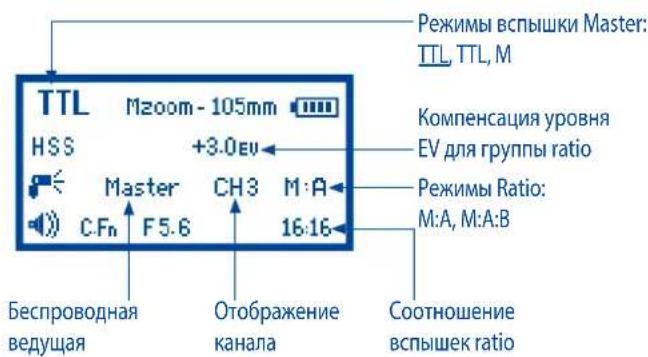
TTL Mode
TTL mode screen
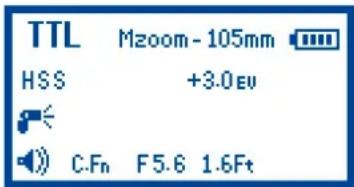
In TTL Mode the flash and camera will work together to calculate the correct exposure for recorded images. When the shutter button is fully depressed the flash will fire a pre-flash that the camera will use to calculate exposure and flash power the instant before the photo is taken.
Flash Exposure Compensation (FEC)
Flash output compensation to only the illuminated subject without affecting the background exposure can be made by changing the flash's EV value in TTL flash mode. Increase the compensation to make the subject brighter, or reduce to make the subject darker.
The Phottix Mitros Flash offers Flash Exposure Compensation (FEC) with adjustments from -3 to +3 in 1/3rd stops. This is useful in situations where fine-tuning of the TTL system is needed.
To set FEC:

- Press the button to enter FEC Adjustment Mode.
- Press the button to exit FEC Adjustment Mode.
Please Note:
- If Flash Exposure Compensation is set on both the camera and the flash, then the total exposure value will be the sum of the two Flash Exposure Compensation values.
- Only the Flash Exposure Compensation value set on the flash will be displayed on the Flash's LCD screen.
- The Mitros Flash in TTL can show EV compensation setting options and make EV compensation adjustment only with SLT-A99V/ SLT-A99 and SLT-A58 cameras (as new cameras are released this list may increase). The Mitros cannot show EV compensation setting options or make EV compensation adjustments when using with other cameras. The EV settings are invalid.
Bracketing-BRK
The Bracketing (BRK) function can be used to automatically change flash power over a series of photos. The camera will record a series of images with different exposures. Exposure count, over and under exposure levels can be set by the user. BRK is useful in run-and-gun situations as well as when shooting scenes with different lighting conditions to help ensure a properly exposed photo. It can also be used for HDR photography. Please see your camera user manual for more details about this function.
Please note
- Bracketing functions cannot be set on the Mitros flash.
- Set Bracketing functions on the camera. See your camera user manual for more details.
- "Bracket Order" can be set in some cameras' setting menus. See your camera user manual for more details.
High Speed Sync-HSS
In HSS mode, the camera/flash maximum sync speed can reach the camera's maximum shutter speed. This is useful when using aperture priority mode or to limit ambient light. HSS may vary with different camera models - see your camera user manual for details.
To use HSS mode:

- The HSS icon will be displayed on the flash LCD.
- Set shutter speeds higher than the camera's flash sync speed and take photos.
- Pressing the HSS button again will turn HSS off.
Manual (M) Mode
In Manual Mode the flash will fire at the power level you set. The Phottix Mitros TTL Flash can be adjusted from 1/1 (full power) to 1/256-9 stops of adjustments in 1/3rd stop increments. Aperture, shutter speed and ISO on the camera need to be manual adjusted. For best results use M-Manual mode on the camera.
To use:
- Press the button until M is displayed on the flash LCD.
- Press the SET button to enter the power adjustment screen. The power level will flash and be highlighted.
- Press the ZOOM or buttons to adjust the flash power.
- Press the set button to exit the power adjustment screen.
- When the flash ready light is illuminated red the flash is fully charged and ready to fire.
- Pressing the button will fire the flash at the manual power level you set. This is useful when taking meter readings.
Please note:
- Half pressing the shutter button will display the effective manual flash power range on the Flash LCD.
- When HSS is enabled, the manual power level can be set to a minimum of 1/128, not 1/256.
Multi: Stroboscopic Mode
With Multi Stroboscopic mode a series of rapid flashes will be fired. The flash count, frequency and power of these flashes can be programmed on the Phottix Mitros. Multi mode is useful for capturing multiple images of a moving subject in the same photo and other special effects.
The frequency of the effect (in Hz. - number of flashes per second), the total number of flashes and output levels can be set.
To use:
- Press the button until Multi is displayed on the flash LCD.
- Press the SET button to adjust Multi settings. Displayed (from left to right on the LCD) Power, Frequency (HZ) and Flash Count. Power is highlighted and flashing upon entering the adjustment screen.
- Press the and buttons to change between Power, Frequency (HZ) and Flash count.
- Press the ZOOM and buttons while the setting is highlighted to adjust Power, Frequency (HZ) and Flash count to the desired levels.
- Press the button to exit the adjustment screen.
Please note:
- Overheating and damage can result from excessive use of the Multi Stroboscopic Mode. Do not use more than 20 times in succession.
- When overheated the flash will automatically increase charging time until the flash temperature has decreased.
- Power level can only be set to a maximum of 1/8 in Multi mode.
Stroboscopic Mode and Shutter Speeds
To determine the proper camera shutter speed to be used with various Stroboscopic Mode variables, use the following formula:
Number of flashes / Frequency = Shutter Speed
Example: 5x (number of flashes) / 10 Hz (Frequency) = .5 second shutter speed.
This is a rough guideline: You may need to increase or decrease the shutter speed to get the desired result.
Multi Stroboscopic Mode Output Chart
Multi Stroboscopic mode output is affected by the battery level. Please refer to the following test result.
Use NI-MH batteries
| Hz Flash Output | 1 | 2 | 3 | 4 | 5 | 6 | 7 | 8 | 9 | 10 | 20 | 30 | 40 | 50 | 60 | 70 | 80 | 90 | 100 |
| 1/8 | 100+ | 100+ | 100+ | 15 | 10 | 10 | 7 | 7 | 7 | 7 | 5 | 5 | 5 | 4 | 4 | 4 | 4 | 4 | 4 |
| 1/16 | 100+ | 100+ | 100+ | 100+ | 100+ | 100+ | 40 | 35 | 20 | 20 | 10 | 10 | 10 | 9 | 9 | 9 | 8 | 8 | 8 |
| 1/32 | 100+ | 100+ | 100+ | 100+ | 100+ | 100+ | 100+ | 100+ | 100+ | 100+ | 25 | 20 | 20 | 18 | 18 | 17 | 17 | 17 | 17 |
| 1/64 | 100+ | 100+ | 100+ | 100+ | 100+ | 100+ | 100+ | 100+ | 100+ | 100+ | 60 | 45 | 40 | 32 | 32 | 32 | 32 | 30 | 30 |
| 1/128 | 100+ | 100+ | 100+ | 100+ | 100+ | 100+ | 100+ | 100+ | 100+ | 100+ | 100+ | 100+ | 100+ | 100+ | 100+ | 100+ | 100+ | 60 | 60 |
| 1/256 | 100+ | 100+ | 100+ | 100+ | 100+ | 100+ | 100+ | 100+ | 100+ | 100+ | 100+ | 100+ | 100+ | 100+ | 100+ | 100+ | 100+ | 100+ | 100+ |
100+ means more than 100 times.
Wireless Triggering Mode
The Phottix Mitros TTL Flash is equipped with wireless triggering. Using pulses of light, a flash on the camera adjusts and fires remote flashes.
The Phottix Mitros Flash can be used as Wireless Master Unit on the following cameras: DSLR-A900, DSLR-A850, DSLR-A700, SLT-A99V/ SLT-A99, SLT-A77V/ SLT-A77, SLT-A65V/ SLT-A65, SLT-A58, SLT-A57, SLT-A37, NEX-7or NEX-6.
A flash set in Master mode must be attached to the camera (or the camera pop-up flash used, if compatible, see below.) Camera's shooting mode must be set to Wireless (WL) mode. Remote flashes must be set to Slave mode.
Wireless triggering is achieved by pulses of light fired by the Master flash. All flashes must be in line of sight. The Wireless Signal Receiver Area must be able to "see" signals from the Master flash. This system may not perform well outdoors or in brightly lit areas.
For increased performance and power control consider using the Phottix Odin TTL Flash Trigger with your Phottix Mitros flash. The Phottix Odin controls and fires TTL flashes via radio signals, not pulses of light, and is less limited in all environments.
Wireless Settings
Flashes must be set to Master or Slave mode and the camera shooting mode must be set to Wireless (WL) mode. A Master flash is needed on the camera to control remote (Slave) flashes. The same transmission channel needs to be set on both Master and Slave flashes. Groups need to be set for Slave flashes, Group Ratio functions need to be set for Master flashes.
To set Master Mode:
- Press and hold the button for 2 seconds to enter wireless mode.
- Pressing the and buttons will cycle between Master and Slave modes.
- Select Master.
- Pressing the button will change the highlighted selection from Master to Channel, Ratio Mode and Ratio.
- Pressing the ZOOM and buttons to adjust the parameters(Channel:
1, 2, 3, 4; Ratio Modes: M:A, M:A:B; Ratio: each group can be set between"-" (OFF), 1, 2, 3, 4, 8, 16). - Press the set button to confirm and exit the screen.
Master Flash Modes
Press the node button to set TTL, Tl or M for the Master.
TTL: The Master flash will not fire. The flash will emit a short burst of light to communicate with Slave flashes but this light will not be a part of the exposure.
TTL: The Master flash and Slave flashes will fire at the TTL metering result and the set flash ratio.
M: The Master flash will fire at the set manual power level. Slave flashes will fire at the TTL metering result and the set flash ratio.
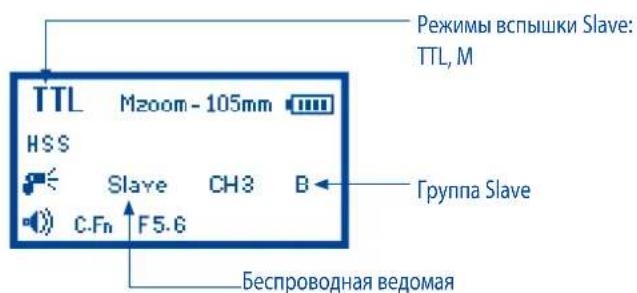
To set Slave Mode:
- Press and hold the

button for 2 seconds to enter wireless mode.
- Pressing the ZOOM and buttons will cycle between Master and Slave modes.
-
Select Slave.
-
Pressing the button to change the highlighted selection from Slave to Channel and Group.
-
Pressing the and buttons to adjust the parameters (Channel: 1,2,3,4;Group:A and B).
- Press the button to confirm and exit the screen.
- When Slave flashes are ready to shoot the AF Assist light on the front of the flash will blink once every 1 second.
- Press the button to set TTL or M for the Slave.
Please note:
- Make sure the Master and Slave flashes are set to the same transmission Channel (1-4).
- Do not place any obstacles between the Master unit and Slave unit(s). Obstacles can block signal transmissions.
- When using wireless bounce flash, please ensure the Slave flash Wireless Signal Receiver Area faces toward the Master flash.
-If Slave flashes are set to M mode, they will fire at the set manual flash power.
Transmission channels
The Phottix Mitros Wireless system has four transmission channels: 1, 2, 3 and 4. Signals from the Master flash are sent to Slave flashes on these channels. If Master and Slave flashes are set to different channels the Slave flashes will not fire.
Using Wireless Triggering
With a flash in Master mode on the camera, the camera shooting mode in Wireless (WL) mode, and remote flashes in Slave mode, pressing the shutter button will fire the Master flash (if set to Master with flash) and flashes set to Slave mode within the range of the Master flash. The camera and flash will meter the scene and fire flashes in TTL mode to properly expose the scene.
Using Built-in Camera flash as Master
- Connect the Mitros flash on a camera hot shoe.
- Set the camera flash mode to WL mode.
- Set the Mitros flash to Slave mode. The flash will transmit the channel information to the camera.
- Disconnect the Mitros from the camera hot shoe and turn on the built-in camera flash.
- Double-check the Mitros flash is in Slave mode.
- The Built-in camera flash will fire the Mitros flash.
*If Slave flashes are set to M mode, flash power can be manually set on the Slave flashes.
Ratio Modes
Slave flashes can be controlled by the Master flash in two different Ratio Modes.
M: A All Slave flashes no matter in groups A or B are regarded as the same group. There are only two groups: Master and Slave group.
M: A: B There are three groups: Master, Slave group A and Slave group B.
Phottix Mitros TTL flash for Sony has two TTL modes: TIL and TTL Auto mode. Please see above "Master Flash Modes" and below for more details.
TTL Modes:
M: A Master flash will not fire. All Slave flashes (no matter in groups A or B) will fire as metered and/or the same flash power.
M: A: B Master flash will not fire. Only Slave group A will fire. Slave group B will not fire.
TTL Modes:
M: A Flash ratio can be set for Master and Slave groups (A and B). Master and Slave groups will fire at the selected flash ratio.
M: A: B Flash ratio can be set for Master, Slave groups A and B. Three groups will fire at the selected flash ratio.
Please note:
- If it is set to M:A ratio mode, any one of the groups can be turned off by setting the flash ratio to "--"(OFF).
- If it is set to M:A:B ratio mode, any two of the groups can be turned off by setting their flash ratio to - (OFF).
Manual Modes
M: A Master flash will fire at the selected manual power level. Slave groups (A and B as the same group) will fire at the TTL metering result and the selected flash ratio.
M: A: B Master flash will fire at the selected manual power level. Slave group A and Slave group B will fire at the TTL metering result and the selected flash ratio.
Please note:
- If it is set to M:A ratio mode, any one of the groups can be turned off by setting the flash ratio to"-"(OFF).
- If it is set to M:A:B ratio mode, any two of the groups can be turned off by setting their flash ratio to "--"(OFF).
Setting and adjusting Master Flash parameters
TTL Modes
- Pressing the button, the EV compensation option will be highlighted and flash on the LCD.
- Press the 200M and buttons will adjust the EV compensation value (from +3 to -3 in 1/3rd stops).
- Pressing and holding the button, Master mode will be highlighted and flash on the LCD to enter parameter setting.
- Press the and buttons to cycle between Channel and Ratio Mode.
- Press the zoom and to adjust the parameters. (Channel: 1, 2, 3, 4;
Ratio Modes: M: A and M: A: B).
- Press the SET button to confirm and exit.
Please note
The Mitros Flash in TTL can show EV compensation setting options and make EV compensation adjustment only with SLT-A99V/ SLT-A99 and SLT-A58 cameras (as new cameras are released this list may increase). The Mitros cannot show EV compensation setting options or make EV compensation adjustments when using with other cameras. The EV settings are invalid.
TTL Mode
- Pressing the Button, the EV compensation option will be highlighted and flash on the LCD.
- Press the and buttons will adjust the EV compensation value (from +3 to -3 in 1/3rd stops).
- Pressing and holding the button, Master mode will be highlighted and flash on the LCD to enter parameter setting.
- Press the and buttons to cycle between Channel, Ratio mode and ratio.
- Press the and buttons to adjust the parameters. (Channel: 1,
2, 3, 4; Ratio Modes: M: A and M: A:B; Ratio: each group can be set between-"-"(OFF), 1, 2, 4, 8, 16). - Press the SET button to confirm and exit.
Please note
The Mitros Flash in TTL can show EV compensation setting options and make EV compensation adjustment only with SLT-A99V/ SLT-A99 and SLT-A58 cameras (as new cameras are released this list may increase). The Mitros cannot show EV compensation setting options or make EV compensation adjustments when using with other cameras. The EV settings are invalid.
Manual Mode
- Pressing the button, manual power level will be highlighted and flash on the LCD.
- Press the 200M and buttons to adjust the power levels (1/256, 1/128, 1/64, 1/32, 1/16, 1/8, 1/4, 1/2, 1/1, in 1/3rd stops).
- Pressing and holding the button, Master mode will be highlighted and flash on the LCD to enter the parameter setting.
- Press the and buttons to cycle between Channel, Ratio Mode and Ratio.
- Press the 2004 and buttons to adjust the parameters (Channel: 1, 2, 3, 4; Ratio Modes: M: A and M: A: B; Ratio: each group can be set between "-(OFF), 1, 2, 4, 8, 16).
- Press the set button to confirm and exit.
Custom Functions
The Phottix Mitros TTL Flash comes with a number of programmable custom functions. To edit these functions (below):
- Press the

button for 2 seconds to enter the C.Fn Menu Screen.
- Press the or buttons to cycle through the menu items - C.Fn 0 to 15.
- Press the 2004 or buttons to change the function within the menu.
- Press the SET button to exit the C.Fn menu.
Custom Functions Chart
| Custom Function No. | Functions | Setting No. | Settings and descriptions |
| C.Fn 00 | Distance units | 0-Meters(m) | Meters(m) |
| 1-Feet(Ft) | Feet(Ft) | ||
| C.Fn 01 | Auto Idle | 0-Enable | Enable |
| 1-Disable | Disable | ||
| C.Fn 05 | Manual Mode: Camera modes to support setting flash to M or Multi Mode | 0-Manual | Camera is set to M mode only. |
| 1-PASM | Camera can be set to all modes | ||
| C.Fn 06 | Quick flash — □ | 0-Disable | Disable |
| 1-Enable | Enable | ||
| C.Fn 07 | Test firing | 0-1 time | Flash 1 time at the set flash power |
| 1-3 times | Flash 3 times at the default frequency and flash power. | ||
| 2-4 sec. | Flash 4 sec. at the default frequency and flash power | ||
| C.Fn 09 | Auto zoom | 0-For sensor size | For sensor size |
| 1-Disable | Disable | ||
| C.Fn 10 | Slave Idle timer | 0-60 minutes | 60 minutes |
| 1-10 minutes | 10 minutes | ||
| C.Fn 11 | Slave auto OFF | 0-After 8 hours | After 8 hours |
| 1-After 1 hour | After 1 hour | ||
| C.Fn 12 | Recycle power | 0-Int. and Ext. source | Internal and external power source |
| 1-External Power | External Power source only | ||
| C.Fn 13 | Beep confirm | 0-Enable | Enable |
| 1-Disable | Disable | ||
| C.Fn 14 | Auto backlight | 0-Enable | Enable |
| 1-Disable | Disable | ||
| C.Fn 15 | TTL Pref | +EV | Add EV |
| -EV | Reduce EV |
Quick Flash Function
The Quick Flash function allows the flash to fire at 1/6 to 1/2 of the full output. Quick Flash recycle times are faster. It helps for snap photography for near subjects.
Quick flash can be used for continuous drive modes, quick flash for continuous shot function can be enabled or disabled (see C.Fn-06 above).
Please note:
The Quick Flash Function makes flash firing a priority. Under-exposure could result if the subject is located too far from the camera.
TTL Pref
TTL may vary slightly when using the flash on different cameras. TTL Pref (C.Fn15) setting allows users to adjust EV from +3 to -3 in 1/3rd stops to compensate for these slight variations. This adjustment is a personal preference based on camera standard TTL and will be stored in memory. When this EV level preference is set, this compensation will be used for images taken in TTL mode. This EV compensation will not be displayed on the LCD during regular use.
Slow Flash Sync
When both the subject and background are in a low-light environment, this feature can be useful to control the flash at slow shutter speeds further to achieve the correct exposure.
The use of a tripod is strongly recommended in this mode when using slower shutter speeds to prevent camera shake.
Resetting to Factory Defaults
The Photix Mitros Flash can reset to factory defaults.
To reset the flash:
- Press and hold the and buts for 3 seconds.
- The flash will reset to factory default settings.
- All custom functions will be reset to factory defaults.
Flash Information Display
For technical support or firmware upgrade checking the Phottix Mitros information may be need. To display the hardware, software, icon library and serial number display:
- Press and hold the HSB button and turn on the flash.
- Press any button to cancel this display and enter the LCD screen.
Changes to the flash capacitor:
If the flash is not used for some time physical changes will take place within the flash's capacitor. Make sure to turn on the flash a minimum of 10 minutes every three months to prevent any physical changes.
Technical Specification
Modes: TTL, Manual, and Multi Stroboscopic
Guide No.: 58/190 (at 105mm focal length, ISO 100 in meters/feet)
Flash coverage: 24-105mm (14mm with wide angle diffuser panel)
Auto zoom (Flash coverage automatically adjusts to match the lens focal length)
Manual zoom (Zoom can be adjusted by changing setting on the flash/camera)
Rotation: 360 degrees, Up-Down: -7 to 90 degrees.
FEC (Flash exposure compensation): Manual
Sync modes: First Curtain Sync and High Speed Sync
Stroboscopic flash: 1-100HZ
Flash exposure confirmation: Blue LED lamp lights up in TTL mode
Flash Recycling (with size-AA alkaline batteries)
Recycling time/Flash-ready indicator:
Normal flash: Approx.0.1-5 sec./Red LED indicator lamp lights up.
Quick flash: Approx.0.1-2.5 sec./Green LED indicator lamp lights up.
Internal power: Four size-AA alkaline batteries or size-AA Ni-MH batteries
External battery: Compatible with Phottix Battery Pack and Sony compact battery pack FA-EB1AM through specific adapter
Power saving: Non-wireless Slave modes: 90 seconds, Wireless Slave mode: 60 minutes or 10 minutes
Wireless flash
Transmission method: Optical pulse
Channels: 4
Wireless options: Master and Slave
The Phottix Mitros Flash can be used as Wireless Master Unit only on some cameras, they are: DSLR-A900, DSLR-A850, DSLR-A700, SLT-A99V/SLT-A99, SLT-A77V/SLT-A77, SLT-A65V/SLT-A65, SLT-A58, SLT-A57, SLT-A37, NEX-7or NEX-6.
Transmission range (Approx.): Indoors:12-16m/39.36-52.48 ft.
Outdoors: 7-9m/22.96-29.52 ft.
Reception angle: ± 40^ (horizontal), ± 30^ (vertical)
Controlled Slave groups: 2(A and B)
Flash ratio control: Each group can be set between- " -"(OFF), 1, 2, 4, 8 and 16
Standby current: ≤ 100uA in sleep mode
Dimensions: (L × W × H) : 201 × 77.5 × 58.3 ~mm
Weight: 416g (flash only, excluding batteries)
www.phottix.com
Dimensions: 201x77.5x58.3mm
Wspomaganie (AF) autofocususa
Napićec: ≤100uA w trybieczuwania
Wymiary: (D × S × W) : 201 × 77.5 × 58.3 ~mm
Waga: 416g (bez baterii)
www.phottix.com
Bcnbuwa Phottix Mitros TTL d'Sony
PnmuemaeHne: NpeaHaON MCNoB3OBAHNA BCNbIuK BHNMaTeNbHO 03HaKOMbTEcB C daHHo INCTpyKuNe. IINcNoB3OBAHNA paCUnpeHHbIX YHKUHOHaBbHX BO3MOXHOCTe BCNbIK HeO6XODMO TaKKe O3HaKOMtbcr C nHCTpyKuNe BaWero fotoaannapata.
Bcnbika Phottix Mitros dans Sony npedhaaeh nla pa60bI c foToKamepaMn Sony DSLR noDepknaeT peKmbl TPL, PyHoi hactpoKn kCkno3uMn Manu-al, Multi ctpo6oconueckn, a TAKKpeKm Bedyue Master/Bedomu Slave.
IpeynpexkdeHua:
- Co6nlodaIte 6e3oNaChOCTb npu nCNoB3oBAHmN BCblIKn. He cIeMyet HanpaBnTb BCblIbKy B rJla3a IIOJeu IIN JXIBOTbIX npu eepa6aTbBAHmN C 6JIn3KOrO paCCToHnR-3TO MOKeT npNBecTn K NOTEpe 3peHnR.
2.CoctopoXHOCTbIO NOIb3yITeCb BCnblKoH haoDcB B6JN3n DnBnKyUeOCA TpaHCnopta BO n36erahne abapnHbIX CNTyaun. - Hnkorda He nCnoB3ynte BCbIbIky B HenocpeDCTBeHHoH 6n3OcTn OT roPouHx ra3OB (6eH3IN, pactBopInTeIN t.D.).
4.ИЗбаягп подаимь ВОБы Ha NOВЕХHOCb BCNbIshKn. He noДБеррагte eB OZdEJICTBIVIO NOБПИЕнHON BnAXHOCHTN.
5.He octabnIte BCnBiky n 6aTapeu B Mectax NOBbIeHHo TEMNepaTypbl (npMOI COJIHeHbI CBET, B3akpbITOM ABTOMOBUNe I T.D.).
6.Cnnyet n3Bnueb 3nemeHt bIITaHn,ecnn BCnblka He 6ydt nCnolb3ObaHa B TeeHHe dInTeBHO BpEmHn.
7.Пи Heo6xOIMOCHTyCTAHOBITE HOBbIe 3JIeMeHbTI NITAHIN. INCNoJIb3yIte HOBIE, HENcNOJIb3OBAHbIe 3JIeMeHbTI NITAHIN. He cIeDyET INCNoJIb3OBAbT ODHOBPeMeHHO CTApBIE IHOBbIe 3JIeMeHbTI NITAHIN.
8.He pacnonaraiTe IerKOBocnnaMeHHIOUmecO6bEketbB H enocpeIcTBHeHoi 6bn30CTn rONOBKn BCbluHK -- cpa6aTbHaHne BCbluKN MoKeT 6bITb npHuHOH IN Bo3ropAHN, OXKOrOB, NOBpeKDeHN BCbluKN. - Bydte octopokhbl npikacacb K rOJbKE BCnblkH HENOCpeCTBeHHO nocne nCIOJIb3OBaHn. OHa moKet OKa3aTc rOpaye n npuBecTu KOKoAam.
10.Данная BCnblka COCTOIN 3JNEKTPUeCKNX KOMNOHEHOB BbICOKOR HapraKeHHa. He nbTaNTECb pa3o6paTb nnn peMOHTnpOBaTb BCnblkky. HNKOrda He npTpaNBAIteCb KO BYTpEHMM KOMNOHEHTAM BCnblkN.
11.He npikacaiTecb K KOHTaKtam pa3bema DnBHeHrero NcTOHnKa nTaHnMeTaNJIuNueCKMn NpEIMeTAMN - 3TO MOKeT pNBeCTN K yBeYbO, a TaKkeNocnykntb npuHHOJ 3NEKTPnEeCKOrO 3AmbKaHn.
Ta6luuKa KomnoHeHm08
Yacmu u OyHKquu.. 69
Pexumbl. 74
Becnpo6oDHOeynpa8lenue. 76
Iolb3oamelbckue yHKquu.. 79
TexHuueckue cneuufkauu 81
KomnoHeHmbi
3aDn/JIeaeamCmopoha
- J.K.-dunrnnei
- KhoNka Bbl6opa Pekima
- Khonika Tect
4.BbIKIOUaTeJIb NIT
5.Индikatop roTOBHOCTN - KhoNkHaCtpoeK (cM. HnJke)
7.Khonka Bb6opa/yctaHOBKn
8.PbUarΦKcTopa yCTAHOBQHNOIPTbI
9.Pa3bEMBHeuHHei
CINHXPOHn3aun 3.5MM - PâSZběmДЯ USB
- Pâşběm dǎn BheuHero nɪtānɪya
Khonku Hacmpouku
1.BBpx/KhONkapeKIMHaHCTPOnkN3yma
2.Bnpabo/KhONka pekmama6ecnpoBOHOrO ynpabNeHHa
3.BHn3/KhONka HSS
4.BneBO/KhONkaNoIb3ObaTeNbcknxΦyHKn
Ipeodn /npaa cmopoha
1.otpaxkaHOua naHnB
2.単pokoyrolbhyi paccenBaTeB
3. TOnOBKa BCnbliWK
4.Obnactb npmHnka 6ecnpoBODHO CnHaHa
5.Bcnomoratenehblnycbeta nABTOFOKcnpOBkn
6.KpeHneHe"ropeuBn 6aumak
7.БатapestиньоТсек
BhumaHue:
IIMEOTc2 TnA KpennenHrnpaHb6aWMAKdN BcBbIKs Nsy. IoxanyctA, y6eNTecbBTOMyTO BblBbIbpaHn npabNlbHOe KpennHne 6aWMAKa dna BaWei KamepbI.
Tun 1 = npexnui zopnyu 6aumak (Minolta)
Tun 2 = Hobbu 20paui 6aumak (ISO)
B daHHou uHcmpykuuu noopa3yme6aemcra, ymo:
1.BcBbIkaNkAmepaBkIIOyeHbI.
2.BcBbIkaNkamepaHactpoeHbTakIMOBa3OM,KaK3TO Tpe6yETCBDaHHOM pykoBOOCTBE.
3. MeHIO kamepbI n NOB3OBaTeBbCKne FyHKuIN BCNbIuKN HAcTPOeHbHaCTaHdApTHbIe No yMOJUHaHIO.
4.BcBbIka nCOnNoB3yETc C COBMeCTHMoM KaMePoI Sony DSLR.
YcmaHO8ka 3JIeMeHmo6 numaHua
1.HaKMTHeHa KpbIuKy 6BaTapeHOrO OTeKa INpeMeCTe eB HAnpaBLeHNn HxHHe Yactn BCbIuKn. KpbIuKa OTKpoETcN pInnoHmEtCra.
2.Bctabte 3JEMENTbI NITAHIN TINOPa3MepA AA B COOTBETCTBN C yka3aHnAMn DnarpamMbI,paCNOJIOKeHHo BHyTpN 6aTapeHoro OTcKa.
3. Haxmte Ha Kpbuky OTeKa u nepemectne e BHOB B nHaaybHoe noJoxehne do nonHoro 3akpbTnIa.
BhumaHue:
-noxanynta,ncnOb3yIteYeIbpeCTaHdapTHbIX 3JeMeHTa NITAHNOHOR npOn3BODNTeJI. Y6eINTecb, yTO 3JeMeHTbI NITAHN IMEOT OINHaKOBBI yPOBEHb MOUHOCTN.
-3nementbI nHTAHN Mory HarpeBaTcB npn dnteHbHom nCnonb3OBaHN BCbluKn. Bydtte octopoxhbl npn 3ame He nemetob nHTAHN.
- Cnnyet nBnueb 3neMeHtbl nTuHa, ecn BCbIuKa He 6yET nCNOJb3OBAHa B TeueHHe DInTeJbHoro BpeMeHN.
YcmaHObKa BCnbluKu Ha Kamepy
BbiknIOuHTe foToaannapTu BCnblkky.
1.YCTAHOBNTeTOpRyHb6aUMKBCNbIbIKHaKpePJIeHNb6aMkaΦoToaIInapaTa.
2.ДоуnapoВсtabbTe BCblIshkyВКреллпене ropчero6aшмakaKaМеры.
3. 3aФнксуп Te BCnblkky B daHHoI nO3uCm CdBnHyB pbUar Фнкcatopa Bnpabo Do ueJka.
4.ДЯСНТИ BCNTIHKHAXMITE KONKФИКCATOPA IN CDBINHbTe pblarФИKCATOPA BNEBO.
BkIoueHue/BbIKIOueHue numaHua
1.ДЯВКЛIOUeHЯ BCNbIK NcYCTaHOBHTe BbIKLIOuHaTeJIb NITaHnB B NOLOKeHHe "ON".
2.ДЯ BBIKIIOHENRA BCNBIUK YCTAHOBITE BBIKIOUaTeIb NITAHIN B NOLOXeHne "OFF".
Hdukamop ypo8na 3apadku
HnDnKaTOp yOBn 3apKn 3neMeHToB nHTaHn Ha KK-3KpaHe (cm. HnKe) OTPaKaet np6bn3ntbHyIO nHopMaunO TOM, KaKo yPoBeHb 3apKn 3neMeHToB nHTaHn OCTaETc DO INx NOnHO pa3pKn. OH Heo6xoMn Dn CnHaN3aUN O CBOEpeMeHHO 3ame He 3neMeHToB nHTaHn Pn INx Hn3KOM yOBHe 3apKn. Ecn BpMa 3apKn BCbluKN CTANO CnWkOM DnTtehBbIM (30 cekyH), Heo6xoMn 3aMeHtB 3neMeHTb I NTaHn.
I3MeHeHue noJoxeHua 20JOBku BCnbIwku
- TONOBKA BCNTIJKMOKET 6bITb NOHHTA B rpaHuaX O-7do 90 rpaDycob co CTONOM Ha-7,0,45,60,75 n 90 rpaDycob. OCTOPOXHO NOHNMTe Nn ONyCTte RONOBKY BCNTIJKYCTAHOBU E B Tpe6yEmoN No3uN.
- FONOBKA BCNBIUK BPAUaETcHa 180 rpaDycob B IIObOM HAnpAbHEnn Co CTONOM Ha 60,75,90,120,150 n 180 rpaDycob.OCTOPOXHO NOBepHIne FONOBKY BCNBIUK B Tpe6yEmOM HApabHeHH.
- B cnyae n3meHenn noOnoxhenr tonOBKn BCbluKn 3 CTaHapTHo npmno n03nui 0 rpaucob (noHrtne, bpaueHne), 3ym BCbluKn 6ydet ABtOMaTneckn yctahOBnEHa 50mm."--" 6ydt OTO6paKeHo Ha KK-dncnnee. Ecnr tonOBKa BCbIuKn 6bna npnoDnHa nn nobepHyta, TO 3ym BCbluKn Moxet 6b1b n3MeHen B pexmme MZoom (cm. Hxke).
4.HaxoBcB NIOJKeHn-7 rpaYcoB 3ym BCbIkw6ydet pa6OtaTb TaKke, KaN npn O rpaYcoB -ycTaHOBOUHbIe npaMeTpbl He n3MeHrTcR.
IcnoIb3ObaHue ompaxaIoUe u naHenu u wupokoy2oJbHo2o pacceubamena
TOnOBKa BCnBbKn Phottix Mitros ochaueHa 6enO otpaxaioe naneHbIO mI npOKoYrOlbHbIM paccenBaTeNEM.
- Pn nCnOlb3OBaHnn NaHeI npaccBaeTner, yron OCBeunBaHna BCbIuKn paCmPraTeTcdo yrna 3peHnOB6ObekTNBOB C oKyChbIM PaCtOHaHem 14 MM.
- Be na Otpaxaoua NaHeIb MoKet 6bIb NcNoB3ObaHa, eCn rOIOBa BCbIuH HAXoDITcB INpINOHrToN No3uIN DnO TpaKeHn CBeta TaKIM 06pa3OM, YTO6bI CO3dTaB 6NIK B rna3ax 06BeKaT.
Cnoco npumehu:
- Octopoxho BbTHHnTe naHnB paccenBaTeN n OTPaTeN n3 CneuaIbHorO OTcKa, HaxoJreroCBA rOJIOBe BCbnIeK eNCnObl3y
BbICTyN B HnKHeu qAChn paCceNBaTeTn.
2.Данн布局 paccenBateNB npNKpbBaet rONOBky BCnbIuKN. OToPOxHNopeMeCTNte naHEnb OTpaXaTeJI Ha3aD BHyTpB rONOBKn BCnbIuKN noOKOHuaHHo erO nCNOB3OBAHn.
3. Ecln Bbl noIb3yeTecb OTPaKaIOeJ naHeJIbO, OCTOPOKHO nepEMeCTNTepaccenBaIOUyIO naHeB b N3HaauJIbHOe nONKeHne.
Ucnolb30baHue pacceubameJia
Bcnbka Phottix Mitros TlL Umeet cbemhbl paeeNBaTeN, KOtOpbl MoKet 6bIb paonnoKeH npn HeoBXOIMOCn CnepeDn rONOBKn BCbnbKn. PaeeNBaTeN NOMaet CMrHTb CBt, yMeNbHTb 30HbI rOPaNX ToeK n TeHe, a TaKke yLyuwaet NOKpbTne npn NcNoB3OBAHn BCbnbKn dJa MaKpOToRpaΦm.
Cnoco6 npumehenua:
- Pacnonoxknte paccenbatebn BdoIb rtonOBKn BCnbiuKn TaKMM 06pa3oM, 4TO6bl Metka "UP"6bIa HanpabneHa BBepx.
2.YCTAHOBHTe 3aIeIKHITe paCCeINBATEb B COOTBETCTBYIOEM KpeJIeHNV TQOBKN BCNbIIKNI.
3.ПовторешагдлкpenненвТОРОСТОПОВI paccenBaTeJI.
3auuma om nepezpeea
Bcblka Phottix Mitros IMeet BCTpoEHny 3aunty ot Ype3mepHoro neperpeba BCblk, KOTOPA yBENnHT Bpem 3apKn BCblk. Pn Cepn HnenpepbIBHO cpa6aTBaHnB BCblk (okono 20 pa3) cpa6oTaet daHHa 3aunTA.3aayOK [Hot] noBnTcPn AKTBAuN daHHo 3auNTb.
Bo n36exaHne daIbHeIwero neperpeBa n Bo3MOxHOI NOIOMKn BCnblIKBpemE e nepe3apJkN yBeINHTc dIra TORo, UTO6bi NOnH3NTb pa6OuyoTEMepaTpy. B 30m clyae cdaeai TepepbB pa6OtB BCblIKHa 10 MInHT.
Ecnn Bbl 6ydtpe npdojnxkab Hcnoh3oBaT BCnblkky nocne noBHeHHa CnHana [Hot], Ha ekpahe BCnblkNn NOBHTCnHAn [Stop].PnpOCTaHOBNTe pa60ty BCnblkN, nnoDooJnte 10 MNHy T OKA OH He OCTbHET.
Pa3bEmblcunxpoHuauuuUSB
1.Pa3bE m CnHxPOHn3aun 3.5 MM MoKet 6bTb NcNob3OBaH dny npabne HBCbIkwO paDnOCnHXPOHn3aTOpOM n6o KaMepo pnp nomo 3.5 MMKa6eJI cHXPOnH3aun. DaHH bpa3bE omHKUHOHpyet kak BxoJ. OH ne npedHa3HaueH dnn BbIOda CnHAnOB BCbIkwN.
2.Pa3bE M I N USB NCNOB3yETcI Dn O6HOBHeHnIO BCNbIuKn. HOBBe BepCnIPO INHCTpyKmN 6dyT DoCTynHb Ha Be6-CTpaHnax Phottix.
Iamnouka-uhukamop cmamyca
Jeea lamnoka: HnKATOP rotOBHcTN BCbIuKN. BpeKMe 6bIcTPOB BCbluKn lamnoka 6yET ropeTB 3eHbIM cBeTom npn DOCTMKeHN MHHMaIbHorO 3apra dna paoBt bCbluKn. Lamnoka 6yET ropeB KpaCHbIM cBeTOM, eCN BCbluKa nonHOCTbIO 3apXeHa.
Ppae naMnoka: lamnoka-nHdkatop noTbepeXdeHn 3Kcno3n npn cBemke co BCbIkwO. Ecn nOCTurHyTA cTaNaptHnA 3Kcno3n npn cbemke co BCbIkwO, Hdkatop noTbepeXdeHn 3Kcno3n npn cbemke
co BCnblkOBI TceHHe npi6n3nteIbHO 3 cek. ropit CnHIM ZBETOM.Ecn HnDnKATOP NOITBepXdHnE NcKo3nNnPnCsbEMKe CO BCnblkOHe 3aRopaetc, nooDInTe 6Jnxke K obekTy nYbemNtte ISO kamepbI.
Pa3bEm dIy BHeuHesO 3neKmponumHa
DaHHb pa3bE M nBn BHeWHe r 3eKTPoNTaHn ABnETcCo6CTBeHHo Pa3pa60TKo Phottix, n npedHa3Haueh dnn nCnoNb3OBaHn C Ka6eMaM nBn BCnblwek Phottix. DaHHb pa3bE m npedHa3Haueh dnn noKnIOueHn K KomnakTHOMy 6atapeHOMy 6loky Sony FA-EB1AM N6o CoBMeCTmMbIM MoDElAMn, ecnn nCnoNb3yeTc COOTBetCTByOuHn aAdntep.
Bhumahue:
-ПиИСОЛБ3OBaHIM BHeIhero 6batapeHOrO 6IOKa B KaueCTBe NcTOHnKa IITAHIN BCNbIbKN, 3JIeMeHTbI NITAHIN DOJXHbI BCERda HAXODNTbCBA 6batapeHOMOTCEKE BCNbIbKN.
- HNKoIa He NcNoB3yIte 6aTapeHbIe 6nOKu HecOBMeCTMbIe c Sony.
KK-3KpaH
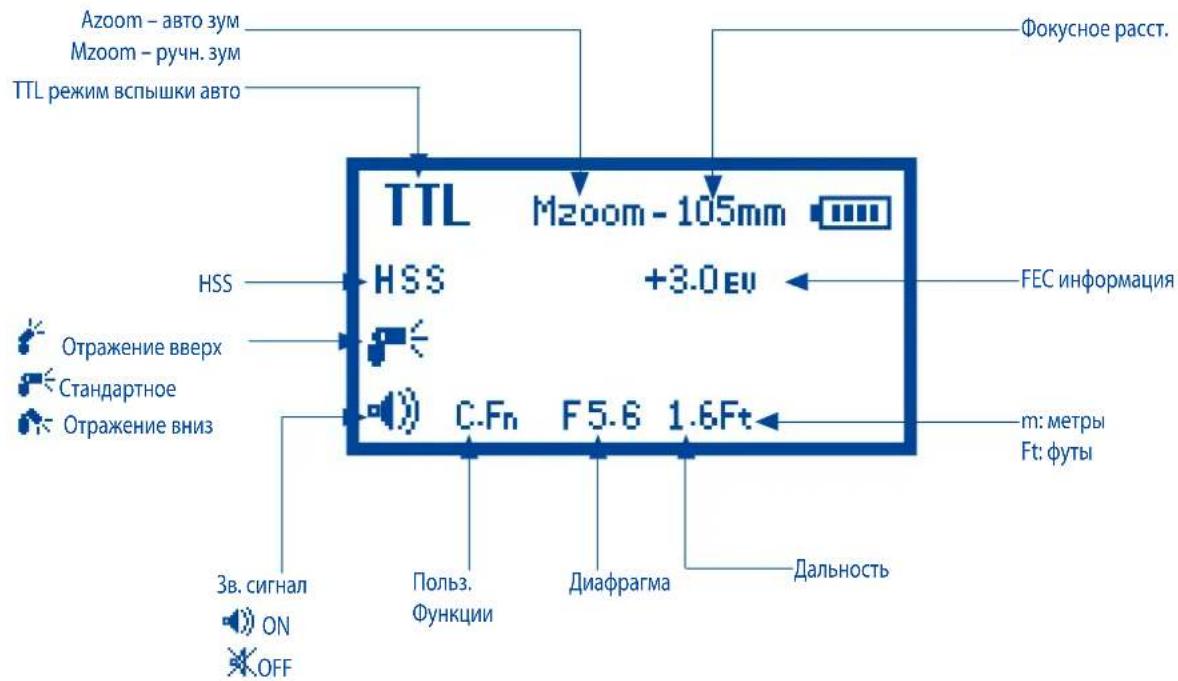
Pexkum aemomamueckou ecnbuuku TTL
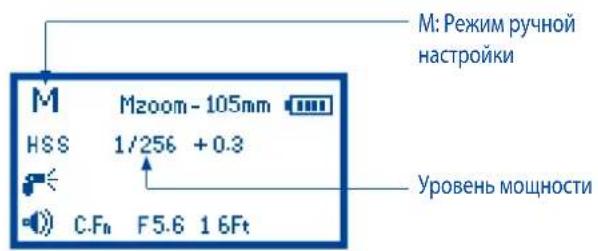
Pekum pyHou hacpmouku cncbIuKu Pekum 6ecnpo8oHOzo ynpaenHeu Master (eedyua)
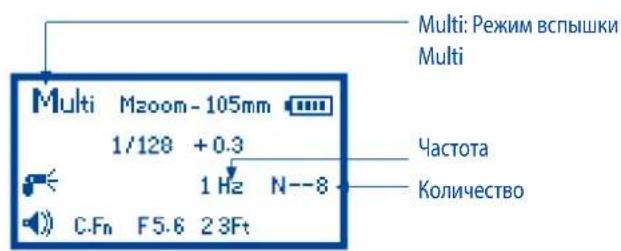
Pekum hacmpouku Multi Pekum becpnoofo ynpaeneu Slave (edomar)
Функцuu abmo coxpanehua
Bcblka Photix Mitros 3anomHnBaun HacTroyn. Pekim, ypOBn MoUHOCTn T.D. 6ydyt CoxpaHeBb B narnT npn BkIIOueHnn N BOCCTaHOBJeHb npn NOcIeHyOeM BKIOueHm BCblskn.
YcmaHOBka 3yMa 8cnbIiHKU
Bcblka Phottix Mitros meeT Dba pexmua yctaOBKn 3yma rOIOBKn BCblkn - ABTomatueckn (Azoom) n Pychon (Mzoom). ABtomatueckn 3ym u3MeHNT okychoe pacCToHne rOIOBKn BCblkN DNHaAMyceKn B COOTBeTCTBN C n3meHeHHMn oKycHoro pacCToHnO o6bKeTnBa, YTO o6ecneHT ONImalhbly ypOBeHb OCBeSeHn. Pychon 3ym no3BOJNT NOIb3OBaTeJIy UCTAHOBITb 3ym BCblkn BpyHyU.
Cnoco6 npumehenua:
- HaxMMTe KhoNky
- 06nactb 3yma Ha 3kpahe 6ydt BbldeJeHa n cTaHET MInatb.
3.HaxMnte KhoNky 1nI yCTaHOBKn rOIOBKn BCbIiKN B pexIM Azoom, n6o Ha xenaemom ypOBHe B pexIme Mzoom.
4.Поссе установки зума нахшпte Кногку SET
Bhumahue:
- HaxoJcB B pexime Azoom, npn 3mHeHn N03nN rOLOBKn BCbIbKn (NoBopT eB Bepx/Bn3, BnpaBO/BneBO) n3 cTaNdapTHoN pRMO N03nN B O rpaYCOB, 3ym BCbIbKN yCTaHOBNTcABTOMaTHueCKn Ha 50MM. "--"6yET oTo6paxeHo Ha 3KpAne. 3ym BCbIbKn He 6yET n3MeHn npn n3MeHne eE rOLOBKn B noIOXeHne-7 rpaYCOB npraMo.
2.Azoom 6ydt pa6oTaTB TOIbKO ecnn roJIOBka BCnblknpacnoJoxHeBa no3uun 0 uinn -7 rpaucob. - HaxoJcB B pexKIMe MzOom, npn 13MeHeHn N03uN rONOBKn BCbIkw n3 cTaNapTho nprMoN O3uNn B 0 rpaDycob, 3ym BCbIkw He n3MeHNTca.
- EcnI rONOBKa BCnblkN HaxoDMTCB NODHrTOM/NOBepHyrT MNoLOKeHM, To NaCTPOiKN 3yMa BCnblkN MoYr 6bITb N3MeHeHbI, NepeKNIuHbUncB B pexmMzoom.
YcmaHOBka BbICOKOscOpocmHOU cunxpoHu3aquu HSS
Bcblka Phottix Mitros noDaepknBaet yHKmH HSS. Danee B Hactoem pykoOCTBe 6yET n3IOKeHO noDpo6HaN HOpMaunno nCnONb3OBaHNO daHHo fHKmN.
Cnoco6 npumehu:
HaKMMTe KhoNky HSS 1nBkIooHn/ BbIKIOueHn FyHKmH HSS.
Bhumahue:
1.Функш HSS He Doctynb Bpekme Multi.
2.ФункияHSS moKet 6bIb nCnoIb3ObaHa B peKIMe 6ecnpoBODHorO ynpaBHeHnBCpbIiKoI.
Cunxponuzua no 3adneu umopke - SCS
Функци снхрониаци no 3aHNeI WToPKe POnI3BODIT BCNbIbky B KOHcE Kcnozun, a He B HauJaIe. DAnHae FyHKZn MoKet 6bItb None3Hoi np6OJIe dInTeIbHbIX bIepeKkax IINoCTNKeHn CneuaIbHbIX ΦΦeKTOB.
1.ФункциSCS He moKet 6bItb yctaHOBnHa HENOCpeDCTBeHHO Ha BCNbIiKe.
2. B MEnHO fOToaannapat BbIbepnTe peKIM pa60Tb BCbIbIKN "SCS". BoJeE nOpRo6Ho O TOM, KaK 3TO CKeNaTb, MoXHO y3HaTb B INHCTpykCmBawero fOToaannapata.
BhumaHue:
Функця SCS He doctунь в ржиме 6ecnpobodnoro ynpabneHna.
Khonka Tecm
Haxatne KhoNk Test npBedeT K cpaBtBbAHNo BCnblsKn. 3To MoKet 6bTb NcNoB3OBAHO dIg 3Ampa (Tolbko B pyHom pexnme). B pexnme 6ecnpobodnoh Bedyue BcblsKn, Haxatne KhoNk Test npBedeT K cpaBtBbAHNO BeDombix BCblweK, HaCTpoeHHbIX Ha TOT Ke KaHAn, yctahOBHeHOM Ha Bedyue BCblsKe. YpOBeHb MoUHOCTn PnHaxaTnn KhoNk Test MOxHo TaK Je N3MeHApTb (CM. HNxE C.Fn-07)
Функцu aemomamuuecko20 biknoyeHua numaHua
Дя ЗКОHOMMнЗергплем entOB nitaHA, BCnblka Phottix Mitros TTL IMeET peKIMbI cnaui n aBTO BbIKIOUcHne.
- B pexkmax He-6ecnpoBODH BOdOMO: BCbIuKa BbIKHouTcABTOMaTnueckn nocne 90 cekyHn IpocToR, ecnn KHOJKN He 6bln HaxaTb WInBCbIuKa He cpa6aTbIbAJa. 3KpAn BCbIuKn NotyxHET. HenoJIHoe HaxaTne KHOJKN Cnyska 3aTBopa KaMepbl, IIn6o HaxaTne KHOJKN TeCT Ha BCbIuKe npnbEdet KaTnBaun BCbIuKn Phottix Mitros.
2.B peximbe6cnpoBHOH BEDOMAR BCbIbKa nepeiTeB pexim OXnDaHn nocne 60 MNHT 6e3dEChTBn (KHOKN He HaxaTb, BCbIbKa He cpa6aTbIBa). "IDLE" 6yET otobpaeHo Ha 3kPaHe. POnHoe Haxatne KHOKN Cnycka 3aTbopa KaMepbln6o HaxaTne KHOKN Test Ha BeyuJe BCbIbKe N03BOInr np6yDnB BCbIbKy n3 pexima OxndAHn. TaMep peXIMMA OXNDAHn DnRA BEDOMO BCbIbKn MoKet 6bITb N3MeHEn C 60 MNHT Do 10 MNHT (CM. HNXe C.Fn-10). - BeDOMaB BCnblska ABtOMaTneCKn BbIKHOHTCn OocNe 8 cAcob IpocToR,ecHn OJHa n3 KhoIOnK He 6bla HaxaTa, n BCblska He 6bla B DeIcTBn NocNe NOBHeHn COo6eHn Ha 3KpaHe "IDLE". Haxatme KhoIOnK Test npO6ydt BCblsKy.TaIMep pexkMa ABtOMaTneCKoro BbIKHOHeNn DnA BeDMoB BCblsKn MoKeT 6blr N3MeHen C 8 cAcob Do 1 Yaca (cm.HnKe C.Fn-11 below).
J lamna nodcbemku aBmofokyca (AF)
- B ycnoBnax Hn3KOrO OCBSeHnra/KoHTpaCTHocTb BO BCnbIwKe Phottix Mitros 3aRopntc BCTpoEHnra lamna NOMOn AF nNoDepkKn ABTOfOKyCa. BcnomoratelbHbI lyu CBeta Ira ABTOfOKycupOBKn OCBetNT UeIb Ha ObBekeTe.
- B clyueae nCnoJb3OBAHnna fOtoaannapaTOB OCHaIeHHbIX BCTpoEHHOJ daNoCBETKoB ATOfOKyCa, NcNoJIb3OBAHne NOcCBETKn ABTOfOKyCa fOToKaMePbI INN BCbIbIKn ABTOMaTHueCKn ONpeJeHReTCNcxOJaN 3YcNOBn CbEMKn.
Pexkmbi BCnbiuKu
BcIbIIka Phottix Mitros HMeet TprpeKIma: TTL, Puyho (M) n Ctrpo6oCkoIIueckn (Multi).
Opexumax 8cbniuku
BcIbIIka Phottix Mitros BkJIohuaet Ka cTaHdapTHbIe peKHMbl, TaK n peKHMbl 6ecIpOBoHOrO ynpaJIeHN.
CraHdapThbIe peKHMbl: TTL Auto, Manual (pyHoi) n Multi (cepHbI).
BecnpoBOdHoe ynpaBHeHe BcNbIHKoT: TTL TTL H Manual (pyhO).
Hacmpaubaembie pekumby ecnbiuku Phottix Mitros
HcnoIb3yemblpeekmbl BCnblkN Phottix Mitros TTL n Sony 3abncrT oMdoJIH fOtoaIIapara H peKHMOB BCTbIIKN.
1.Пи HcnoIb3OBAHIN CtaHdaptHOpeKHMa BCnblHKu, yCTaHOBHTe KaMepy BpeKHMe He6ecIpoBOJHOуnpaJIeHHBcNblIKoB.B IpOTHBOM cLyuae peKHM CTaHdaptHOBcNblIKH He BO3MOxHO 6yDet YCTaHOBHTb Ha cAmO BcNblIKke.HAcTpoKNpeKHMa BCnblIKH FOToaIIIapata TaKKe 6dyT OrpaHueHb B 3aBCHMOCTN OT peKHMa CbEKMn Bb6paHHORHa FOToaIIIapate.Bolee NIOp6HO 06 3tOM MOxHO IpOHTaTB B HHCTpyKUn K BaWemy FOToaIIIapATy.
2. NcTIOJIb3yPeKIM6eCIIPOBOJHOYyPABJIeHnBCIbIJKoY,ycTaHOBHKe KaMepyBpeKHMe 6eCIIPOBOJHOYyPABJIeHnBCIbIIJKoB. B IpOTHBOM CJIyae BbI He CMOKeTe BBIbPaTb peKIM 6eCIIPOBOJHOYyPABJIeHn BCIIbIIJKoHa CaMOB CIIbIIJKe.
3. Pekmbl Manua Multi He Moryt 6bIb HcIOJIb3OBAHbI, ecIn OndHOBpeMeHHo IIPOHCXODT CJeDyIOe:
A. Korda Kaempa H BCbIbIIka COoBIIaOTcra (HdET Ipepea daHbIX);
B. Ecni KaMepa He ycTaHOBLeHa B peKIme Manual.
Pekmbi Manual Ih60 Multi Moryt 6bIb yCTaHOBJIeHb HA BCITbIke npn IOMOUI NIOb3oBaTeJbCKoi FyHKuIN C.Fn05 PeKIM Manual B PASM (CM. HIXKe).
- EcJIN BCIIbIIka yCTaHOBJIeHa B CTaHApTHom peKHMe TTI, a KaMepa B peKHMe aBTOMaTHueCKoB CIIbIIHKn, TO KaMepa 6yDet OIPpeJIaTb cpa6Otae TIN BCIIbIIka HIN Het. EcJIN KaMepa yCTaHOBJIeHa B IIpHHyIHTeJIbHOM peKHMe BCIIbIIHKn (Forced) IIn60 peKHMe CINHXPOHN3aUNI NO 3aIHeN 7tOpKe (SCS), BCIIbIIka cpa6Otae OINHOBPeMeHHO C HAKaTHEm KHOIIKN CIycka
5.BcIbIIa Mitros MoKET HcIOJIb3OBaTcB KaueCTBe 6ecnpoBOHOH Beyuie ToIbko Ha cIeIyUOHX fOToaImaPatax: DSLR-A900, DSLR-A850, DSLR-A700, SLT-A99V/ SLT-A99, SLT-A77V/ SLT-A77, SLT-A65V/ SLT-A65, SLT-A58, SLT SLT-A37,NEX-7Jn6o NEX-6. - BcIIbIIka Mitros, yCTaHOBJIeHHaB B pexKHe TTL, CMOKet OTO6pa3HTb HAcTPOHKn YPOBHN KOMIeHCAUHN EV, IN PPOH3BeCTn H3MeHeHHaDHHo KOMIeHCAUHN Ha CIEyIOuHX FOToKApex: SLT-A99V/ SLT-A99 N SLT-A58 (IO Mepe IOBJIeHHa HObIX MOJeL e FOToKApEep, DaHHbCnHCOK MOKeT 6bITb paIINpeH). BCIIbIIka Mitros He IOKaKeT HAcTPOe YPOBHN KOMIeHCAUHN EV, a TaKKe HE IIO3BOJNT PPOH3BeCTn DAHHbE HAcTPOe HPr HcIOJIb3OBAHH c HHIMKaMepAMn, He YkA3aHHbIMN B CInHCKe BblHE. YCTaHOBKN EV HeJeCTBHTeJIbHbI.
AaBb6pa u ycmahOBku cmahdapmHbix pekumoe 8cnbiuKu
- HaKMHTe KHOIIky
- Bb6op peKHMa BCbluHK 6byet nepemeeuaTcMa MeKdypeKHMamH TTL,
P uhbIM(M) CepniHblM(Multi).
3. Tekyünni peKHM 6byet OTObpaKkE H B ePxHem JEBOM yJy KpHa.
Pexum TTL
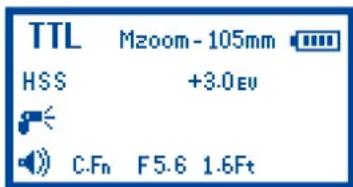
3KpaHpeKIma TTL
BpeKHMe TTL BCIIbIbKa n KaMepa 6yUyt COBMECTHO aBTOMaTHueCKn paCCHTbIbTaT npABHbHyO kCIO3HNo npn CbEMe. IIpn IOnHom HaKaTHN KHOKN CTYcKa cpa6oTaet IpeDbapTeJIbHaB aBCIIbKa, hCIOJIb3yeMaKaMepoI DIA ONPeJeHnna EKCI03Hn H MoIHOCTH BCIIbIKn HeIOcpeiCTBeHH OpeJ OCHOBbIM CHHMKOM.
Komnehcauŋ ḋκηο3uqu npu cβεmke co 8cnbuiukou - FEC
H3MeHra 3HaueHHa EV BCbIuKn BpeKHe TTT Bb COOTBeTCTBeHHO H3MeHareTe KOMHeHCauHIO MOUHcTH BCbIuKn Ha OCBeuaEMb IOBeKT, YTO He BIneT Ha yCTaHOBKn 3KcN03uHn FOHa. YBeJIuHB KOMHeCAuHBO Bc CdeJaTe OBeKT 6OJee JRPKM, YMeHbIIIB KOMHeHCauHBO Bt Hao6Opot CdeJaTe ero 6OJee TEMHbIM.
BcIbIIka Phottix Mitros IO3BOJnEIT IPOIN3BOJNTb KOMIeHCAIINO EKCIIO3HIN INPc CbEMKe CO BcIbIIkoi (FEC) B npedeJax OTR-3do+3C HArom 1/3 cTynH. 3TO IIOMAoAET B CHTyaiHHX, KOJa Tpe6yETc TaOHa HAcTpoHka ChCTeMbTI TLB ONpeJeHHbIX yCIOBHX.
Дусmaновku FEC:
- Haxmte Khoikky BoBbBoHn BpeHM HactpoHN FEC.
2.KHONKAMN ZOOM JINHO yCFAHO - HauKMHTe KhoIiKy ⑤ДЯ BbIXOda ИЗ ржIMа NaCTPoiKN FEC.
BHumaHue:
- EcH KOMHeHCAIIN 3KCTIO3HIIHN BCbIiIKN yCTaHaBJIHBAETcOHOHBpeMeHHo Ha KaMepe HbCtIiKe, TOrJa O6IiH BbIXoJ 3KCTIO3HIIHN 6yEtAIBITBCyCMMapHbIM 3HaueHEm DByx HAcTpoEK FEC.
- Ha 3KpaHc BcIIbIKH 6ydt OTO6paKaTbCt ToIbKO 3HaueHHe FEC IIPOIN3BeJHbHb HcBtIIke.
3.BcIIbIIka Mitros,yCTaHOJIeHHaB BpeKHMe TTL,CMoKET OTo6pa3HtB HAcTPOiKN yOpBH KOMIeHCAUHN EV,N IpoN3BeCTn H3MeHeHHaHHOI KOMIeHCauHN Ha CLeNyOuHX FOToKAMepax:SLT-A99V/ SLT-A99 N SLT-A58 (IO Mepe IOyIeHN HObIX MOJeIe FOTOKaMep, DaHHbI CNHCOK MOKeT 6bITb paINHe).BCIIbIIka Mitros He IIOKAeT HAcTPOeK yOpBH KOMIeHCauHN EV,aTaKKe He IO3BOJNT IPOH3BeCTn DAHHBe HAcTPOiKN IIpH HCIOJIb3OBaHHC n HHbIMKaMepAMH,HE YKa3aHHbIMN B CIHcKE BBIIIE. UCTaHOBNEV HeJeCTBHTeJIbHbI.
BpekemuH2-BRK
Функць 6pekeTHR (BRK) moKET 6bIb HcIOJIb3OBAHaДIa bTOMaTHueCKORH3MeHeHHy yPobHЯ MOIIHOCTH BCIIbIKHДIa cepHN KaIpOB. KaMepa coXpaHHT CepHNo CHHMKB cpa3JIuYbIM yPobHEm KOMIeHCaHHN 3KcIO3nHIN.
KoIuHecTBO CHIMKOB, yPOBeHb KOPpeKunn EKcNo3uunn (HInke/BbIwe) MOryt 6bItb yCTAHOBJIeHb NONb3OBaTeJem. CyHKunr BRK MoKet 6bItb NOE3HOB V CNOBHX Heo6XoDMOCTn 6bICTpo CBEMKn, IN6o PnN 3MeHeHHN YCNOBNI OCBEUENr DnI DOCTNXeHn ONTMaNbHO NcKcNo3uUNn CHUMKa. OHa moKet 6bItb TAKKE IcNoB3ObaHa DnI HDR FOToRpaHn. Boone NoPp6Ho 06 3ToI CyHKUnn MOxHn IpOnHTaTB B HNCTpyKunn NO EKcNlYatauun nI dNfoAnnapata.
Bhumahue
1.ФункциибpekeTNHa He Moryt 6bItb yctaHOBneHbI Ha BCnblIeKc Mitros.
2. UctaHOBtE cyHKuIN 6peKeTInrA B MeHIO foToaannapata. Boone IOnp6HO 06 3tOM MOxHO npOHTaTB B INCTpyKcNIO 3KcNlyatauIN dIra foToaannapata.
3. "PnpaOK 6peKeHTnHra" moKet 6bItb yctAHOBJIe H MeHIO HeKOTopbIX foToaannapatoB. BoIee noJpO6Ho 06 3toI fYHKUIM MoKHO npOHTaTB b HnCTpyKUIM NO 3KcIIyatauIN dIg foToaannapata.
BbICOKOcKOpocmHa cHxpoHu3aua-HSS
B pexmme BbICOKOCOPoCTHOc HnXPOH3aunn HSS MaKcImaJIbHa cKOpocTb CnHXPOH3aunn Kamepb/BCbnIKM MoKet IOCTnIRHyTb CKOPoCTn CaMOI KOPOTKO BByepKk Napepb. IcNoIb3OBaHne daHHOn fYHKUnn nomoraet np CBEMke B pexmme npnopnte Ta BbIepKk, a TAKKe dIra OpaHnueHn paCCeHHORO Cbeta. Bo3MOxHocTN HSS mOryt 6blt pa3hBiIMN, n 3aBncrT OT MoeJI N fOtoaannapata - O3HaKOMbTEcB c DaHHbIMN TexHnueCKMN BO3MOxHocTAMn BpykoBDCTBe NO EKnlyataunn Dnla BaWero fOtoaannapata.
Yactota 3000KcTA (B T. - KOLINUeCTBO cpa6aTBiBAHIN BCbIiHKN B cekyHny), 06uee KOINuCeTBO cpa6aTBiBAHIN, IN Xx BbIXoHnA MOUHOCTb MOryt 6bITb yCTaHOBHeHbl.
Cnoco npumeneHua:
- Haxmte KhoNky 0 tex nop, noka He noaBntc3Haok Multi ha ekpahe.
- Haxkmtte KhoNky SETI IaI N3MeHHeHry cTahOBK Multi. PacnOnoKeHb (CneBa Ha npabo HA ekpahe) MoHocTh, YaCTota (Tc) n KOnuYeCTBO BCnbIeK. 3HaueHHe MOUHcTm Muraet npBxOde B MeHIO daHHo HAcTPOkM.

- KhoNkAMn


actotbl()


- KhoNkamn


- Haxab Kho


BhumaHue:
- Ype3MepHO dOJrOe NcNoB3OBAHnB BCbIuKn B CTpo6oCKOnuYeCKOM pexIMe MoKET npINBeCTN K nepeRpeBy n NobpeXdEnHIO BCbIuKn. He NcNoB3yIte CTpo6oCKOnuYeCKyIO BCbIuKy 60nee yem 20 cpa6aTbIBAHn noDpAid.
- EcnB BcBbIka nepeperpa, AToMaTHueckn yBEnuHTc BpeM e3apdKn, TTO6bChiN3ntb pa6OyUk TemnepaTpy.
- B pexime Multi moHocTb BCnblk MoKeT 6bItb yCTaHOBneHa MaKcMym Ha 1/8.
Cmpo6ockounueecku pekum u ckopocmb bvidepjkku
IpyonpeJeHnOHTMmaJIbHOCKoPocTbBldepKKnKaMepeHHeo6xOuMoI
IpyNCIOJIb3OBaHnI npn pa3NIuHbIX HneOCTOAHbIX 3HaueHnIX
ctpo6oCkONUeCKOrOpexmna,non3yntc bclnyoue fOpmyoN:
KoIuYeCTBO BCnblwek/ Yactota = Ckopoctb Bblpejkn
Ppimep:5x (KoIueCTBO Bcblwek) / 10 Tq (Yactota) = .5 cekynblb bidepejka
3To npn6nn3nteBnaH peKoMeHdaUa:Bo3MOxHo Bam npnDcTb yBeNHTb nn yMeHbWntb Bblpekky nIg DocTnKeHn Jenaemoro pe3ynbTaT.
TabuuaMoHocmu cmo6o-8cnbuiku b pexkme Multi
B pexnme ctpo6o-BCnbIuKm Multi, MoHocTb BCnbIuKm 3aBcunT ot ypOBH3apJkn 3JIeEMeHTOB nHTAHN. CMOTpuTe TaBnUy HnXe.
Icnonb3yute NI-MH 6atapen.
| Tb Mounno tB a#b#ukn | 1 | 2 | 3 | 4 | 5 | 6 | 7 | 8 | 9 | 10 | 20 | 30 | 40 | 50 | 60 | 70 | 80 | 90 | 100 |
| 1/8 | 100+ | 100+ | 100+ | 15 | 10 | 10 | 7 | 7 | 7 | 7 | 5 | 5 | 5 | 4 | 4 | 4 | 4 | 4 | 4 |
| 1/16 | 100+ | 100+ | 100+ | 100+ | 100+ | 100+ | 40 | 35 | 20 | 20 | 10 | 10 | 10 | 9 | 9 | 9 | 8 | 8 | 8 |
| 1/32 | 100+ | 100+ | 100+ | 100+ | 100+ | 100+ | 100+ | 100+ | 100+ | 100+ | 25 | 20 | 20 | 18 | 18 | 17 | 17 | 17 | 17 |
| 1/64 | 100+ | 100+ | 100+ | 100+ | 100+ | 100+ | 100+ | 100+ | 100+ | 100+ | 60 | 45 | 40 | 32 | 32 | 32 | 32 | 30 | 30 |
| 1/128 | 100+ | 100+ | 100+ | 100+ | 100+ | 100+ | 100+ | 100+ | 100+ | 100+ | 100+ | 100+ | 100+ | 100+ | 100+ | 100+ | 100+ | 60 | 60 |
| 1/256 | 100+ | 100+ | 100+ | 100+ | 100+ | 100+ | 100+ | 100+ | 100+ | 100+ | 100+ | 100+ | 100+ | 100+ | 100+ | 100+ | 100+ | 100+ | 100+ |
100 + 03nhaaet6olee100pa3
Pexum Becnpobodnozo ynpablenue BCnbIwko
Bcnbka Photrix Mitros TlO cnaeHa fynknei 6ecnpoBDHO r npablenia.
IcnoIb3yra CBETOBle IMnYnbCbl, Bcnbka, yCTaHOBJIeHHa Ha KaMepe,
no3BOJare peryinpoBaTb HAcTpoKn ydaJIeHHbIX BCbnIweK, a TaXke npuBODIT Kx CpabaTBaBHNO.
Bcblka Phottix Mitros Moket 6bItb nCnOJIb3ObaHa B KaueCTBe 6ecnpoBOHOB Beyuie Ha cnEduoHx Kaepax: DSLR-A900, DSLR-A850, DSLR-A700, SLT-A99V/ SLT-A99, SLT-A77V/ SLT-A77, SLT-A65V/ SLT-A65, SLT-A58, SLT-A57, SLT-A37, NEX-7, NEX-6.
ДяЗТOrEO He6xOIMo NOKInIOHTb IIO6yIO BCnIbIKy B pexIme BeyuCEK KaMepe (NIOBO NcNOJIb3OBaTb BCTPOEHHy IO BCnIbIKy KaMepbI, ecN OHa IMeETCB Kamepe, CM. HIXke.). KaMepa DOJINKa 6bITb yCTaHOBLeHa B pexIme CbEMKn 6ecnpoBOdHOrO ynpabNeHnA (WL). YdaJIeHHbIe BCnBIkN DoJINKh b6bITb yCTaHOBHeHb B pexIme BeDMOn.
BecnpoBODHoe ynpabIeHne DOCTnraETcnyTe mpepaCn CBetOBbIX NMynbcob Bedyuee BCbluKo. Bce BCbluKN DoJXHbI HaxOHTbcra Ha NINN npAOM BuIMOCTN. ObnaCTb npEemHka BecnpoBODHO CnHana DoJXeH "Budet" CnHaNbIOT Bedyuee BCbluKn. DaHHa CnCTema He Bcerda pa6oTaet CTabnlbHo, ECNI CbEMKn pOnCXoJrT Ha yInCe NIN B JRPK OCBeUeHNbIX NOMeueHnx.
B cIeJX NObIeHnHaJeKHoCTNo 6ecnpoBoHOc CNTeMbICbIweK I LyuWero ynpaBHeHn MOUHOCTbIO BCbIweK peKOMeHyETcNcONb3OBAHne 6ecnpoBOHoro paNOCINHXPOHN3aTopa Phottix Odin TlBMeCTe co BCbIwKOI Phottix Mitros.PaNOCINHXPOHN3atop BCbIweK Phottix Odin ynpaBnEeT BCbIwKaMn TTPL npi NMOU pAINO CnHAnOB,a He CBeTOBbIX Nmnybcob, IN B ropa3do MeHbWe CTeneHn ORpaHueH BHeHnHMN ycNOBnMM nPoBeHnN CbeMKn.
Hacmpouku 6ecnpoeodhozo pekuma
Bcnbikn doJNkhbl 6bIb yCTaHOBHebl B pexim Beyuue JIn6o BeDomoi, a foToKamepa doJXhA 6bIb yCTaHOBHeA B pexime 6ecnpoBDHO CBEMKN (WL).Beyuza BCnbIka doJXhA 6bIb yCTaHOBHeHa KaMepe Iy npabEnH YAanEHBMn (BeOMbIM) BCnbIkwAMn. OIN H TOT Ke KaHApnepaun DoJXeH 6bIb yCTaHOBHeHa BeYuue N BeDOMO BcNbIKax. rpynnbl DoJXhBl 6bITb yCTaHOBHebl DnE BeOMbIX BCnbIwek, fYHKUra COOTHOWeHr rpynnbl DoJXhA 6bItb yCTaHOBHeHa BeYuue BCnbIwke.
Дя вьбopa pexuma veуше уcnbiuku (Master):
- Haxmte u yedeKuBAite KhoNky


B TeueHne 2 cekyHd IJIa BxoJa B
pexim 6ecnpoBdoHoro ynpaBneHna.
2.Пи пomoи Кноги И Курсop Вьбopa nepemecntcma MeKdy peximamu Master (Bedyue) n Slave (Befomoi).
3. BbI6epuTe Master.

- Haxab KhoIky Bb6op nepemecntbcr OT Master K KaHany, Pekmmy COOTHOWeHn Ratio n BEHnHe COOTHOWeHn Ratio.


5.Пи пOMOин KHO冈 n MoxHOBbIpbu yctaHOBNTb cnedyuOuHne napametpyi (KaHaNbl:1,2,3,4;PexMbl Ratio:M:A,M:A:B; 3NaueHene Ratio:3NaueHene nJn KaJdoI rpynnbl-""(BbIK.),1,2,3,4,8,16).
6. Haxmte KhoNkny 4nIy noTBeRjkDHeHn I BbXoJa n3 kpaHa.
Pexumbi 8cbniuku Master
Haxmte Khonky DnBb6opapekmoB TTL, TLn6oM dny Bedyue BCnblwn Master.
III: Bényuàn BCnbluka Ha Kaemepe He cpa60aet npn cnyscke foToKamepb. BCbluka npon3BedeT KOPOTKN mNmYnbc CBeta, npedHa3NaeHnhb dIy BeDOMO BCbluIKN, Ondako OH He 6yEET ABnTBCA qactbIO EKnO3nIM.
TTL: Bényuá n Bénoa M Bcbluikn Cpa60taot NcxOy n3 pe3yIbTaT a3amepa TTL n yctahOBneHHoro 3haueHncoTHoWeHn BcblweK (Ratio).
M: BényüaBcπbIka cpa6oTaet Ha ypOBe MoUHocn yctAHOBneHHOM bpyuHyU. BeDombie BCπbIkwC p6oTaOT mCxOJa n3 pe3yIbTaTata 3amepa TTL uYCTAHOBNeHHORO 3HaueHncoothoe HnBCbIweK (Ratio).
Дусmaновku pexkuma bedomou ecnbliuku Slave:
-
Haxmte u yepxmbaite KhoNky B TeueHne 2 cekynd nla BXoDaB pexim 6ecnpobodoro ynpabJeHHA.
2.Пи РОоши КнОпОК 附KypCOP BbIbopa NepeMeCTnTbCmMexdypeKIMAMN BeDyuee Master n BeDMoI Slave.
3.БыберптЕржIMВEDOMOBBcbluKSl Slave. -
Haxmte KhoNky dny nepemeeHn Bb6pa Mexdy pexmOMBedomu N Bb6pOM KaHaIa n rpynnbl.
5.Пи nOMOuN KHOJOK mKHO BbI6paTb uYCTaHOBNTb cnedyuue napametpyi (KaHaI:1,2,3,4;rpynnA:AnB). - Haxmte KhONky 7n para noTBePxDeHnN N bblXoDa n3 MeHIO.
- KOrda BEdomaa BCnblka roTOBa Ka6Ote, BCNOMORAteIbHbI LyuA bTOfoKocya 6yDen Mrratb C nHTepBaIOM B 1 cekHyd.
8.Haxmte KhoNky 0yTo6bI Bbl6paTb TlIi6oMnIeBEmOIMCnblkN.
BhumaHue:
-у6eintecb,чTO BCnIshK BeDyuee N BeDOMO NaCTpoehbHa ODNH I TOJKe KaHJI nepepaun (1-4).
- He pa3meaIte HnkaKx npedMeTob, KOtOpbIe MOrTy NocnyKntb NOMexO, MEkdy BeNyuei N BeDombIMN BCbIkwam. 3To MoKeT cTaB pnuHHO6JoknpoBKn CunHaI nepeDaH.
- Y6eIITecb, yTO BeONMbIe BCblIuKINx O6JIaCTb npIeMa 6ecnpoBODHORO cnHana) HappaBHeB I CToPOHy BeDuye BcbluKIn.
- Ecni BeDomaj BCnblska yctaHOBneHa B pexime M, Oha cpa6oTaet Ha ypOBHe MOUHOCrN, yCTaHOBNeHHbIM BpyHyIO.
Kahalbi nepebadu
Pexim 6ecnpoBdHorO ynpablenHn BCbluKn Phottix Mitros BkIouaet Yetbipe KaHana nepeDau:1,2,3 n4.CnrHai bOt Beyuueh BCbluKn nepeCblaHOTc Hb Edomble BCbluKn Ha 3TuX KaHaJax. Ecnn BCbluKn Beyuuaa H BeDMaHacTPOeHbHa pa3LIuHbke KaHaJIb, TOrDa BeOMa BCbluKa Ha cpa60TaET.
IcnoJIb3O8aHue 6ecnpo8oDHO20ynpaBHeuia
EcnBcNbIka yCTaHOBHeA B pexIMe Beyuue Ha KaMepe, Kamepa yctaHOBHeA B pexIMe CbEmKn 6ecnpoBodHoro ynpabIeHn (WL), a ydaJIeHHble BCbIbIKn B pexIMe BeOMbIX, Haxtne KhoNk cnycka 3aTbopa npBeDeT K cpaBaTBaHnIO Beyuue BCblIKn (ecn OHa YcTaHOBHeA B peXmBEyuue Co BCblIKoN), N BeOMbIX, eCNI OHn HaxOJaTcB PaDyce DeiCTBna Beyuue BCblIKn. Kamepa n BCblIka ZamepT cUeHy n npBeDyT K cpaBaTBaHnIO BCblIeK B pexIMe TTL drr ToCHOrO kCknoHIpOBaHn CuJeBl.
Mcnolb3o8aHue BcmpoEHou BCnbluKu Kamepb6 Kauecmbe eedyue
1.Поклочи BCNskiy Mitros k ropaemy 6aamaky kaemby.
2.YCTAHOBITEpeKIM BCNbiuKn KaMepbI BpeKIM WL.
3.YctaHOBtBe BCbIbKy Mitros B pexkme BeDOMo. Bcblka nepeact daHnyu HΦopMaucuKaMepe.
4. OTKIIOUHTe I OTOeIMHInTe BCNbIuKy Mitros OT fOtoaannapata, 3aTEM BKNIOHTe BCTPOEHHyO BCNbIuKy KAMEpbI.
5.Y6eHNTecb B TOM, YTO BCNIbIka Mitros HaxoJITcB peKIMe BeJOMOi.
6. BCTPOEHHnA BCnblIka KamepbI npBedeT K cpaBaTBaHnIO BCblIkn Mitros.
*EcnBbOmaBcNbIka yctaHObnHea B pexime M, moUHocb BCbIiKMOxET 6bTb yCTaHObnHea BpyHyIO Ha BeOMO BcNbIiKe.
Pekumbo coomhoueHua BCnbiuek (Ratio)
BédombIe BCbIbIKMOrTy ynpaBJIbTbcBa BedyueB DByx pa3nHbIX peKImax COOTHOWeHn Ratio.
M:A BCE BeDMbIe BCnblIKN, BHe 3aBcIMOCtN OT TORO, K KaKoI rpynnne OHI npHaJNeXkAT A NIN B, 6yDyT CHTaTBcR K aOna Hrpynn. B DaHHom clyuayet 6yDet TOnbKO DBe rpynnb: Beduyaar N BeDMaR rpynnbl.
M:A:B Tprpynb:Beyuuaa(M),Bedeomag rpynnA,uBedeomag rpynnB.
Bcblka Phottix Mitros TTL dans Sony nmeet dBa pexkma TTL: TL n TLI. PoXanyiCTa, O3nakombTecb bIwe c pa3dienom "Pexkmbi Bedyuee BCblkn" n HfopMauee Hnke.
PexumblTTL:
M: A Bényuára BCnbiuka He cpa60aet. BCE BeDOMbIe BCnbiKIN (BHe 3aBNCIMOCTN OT rpynnbI A n B) Cpa60taOT NCXoJr n3 pe3yNbTaT aZamepa n/ nJIn Ha OOnHaKOBOM yPObHE MOUHOCTN.
M: A: B Beyuzaa BCnbiuka He cpa6oTaet. Cpa6oTaet TOnbko rpynnA BedeombIX. rpynna B BeDombIX He cpa6oTaet.
Pexumbi TTL
M: A MoXeT 6bIb yCTaHOBnEHO COOTHOWeHne dIy BeUySeI N BeDOMO rpynnbl (A n B).BeUySaI N BeDMaR rpynnbl cpa6oTaIOT uCXoJa n3 BBi6paHHoro COOTHOWeHn BCnblweK.
M: A: B MoKet 6bItb yctaHOBJIeHO COOTHOWeHne dIy rpynn BCbIbIeK BeDyuei n BeDombIX A N B. TpN rpynnblcpa6OtaIOT uCXoJn3 Bbl6paHHoro COOTHOWeHn BCbIbIeK.
BHumaHue:
- EcnBkIIOUeH peKIM COOTHOSeHnM:A, IIO6aI rpynna MoKet 6bITb OKIIIOUeHa Bbl6pab B HAcTpoiKaX COOTHOSeHn BCblIeK"-(BbIKL.).
- EcnBkIIOeH pexm COOTHOeHnM:A:B, IIO6bIe DBe rpyINbMoYr 6bITb BIKIOueHb Bb6pab HAcTpoKax COOTHOeHn BCblweK"-"(BbIK).
Pekumbyi pyHou hacmpouku (Manual)
M: A Bényuàn BCnbIkwca cpa6otaet nCxOa n3 yctaHOBJIeHHoro BpyHuOуpOBH moHocTn. Tpynna BeDombIX BCnbIwek (A u B kaK oHa rpynna) cpa6otaet nCxOa n3 pe3yNbTaTata 3amepa TTL n Bbl6paHHoro COOTHOWeHnRA BCnbIwek.
M:A:B BedyuaB Cbblka cpa6oTaet uXOJa u3 yctAHOBHeHHoro BpyHyu ypoBHa MoHocTn. rypna BeDMbIX BCblweK A, n rypna BeDMbIX BCblweK B cpa6oTaet uXOJa u3 pe3yIbTaT aMePa TTL N Bbl6paHHoro COOTHOWeHRA BCblweK.
BHumaHue:
- EcnB KJIIOUeH pEXMM COOTHOSeHnM A; IIO6aI rpynna MoKet 6bITb OKNIIOUeHa Bbl6pab B HAcTpoiKaX COOTHOSeHn BCblIeK"-(BbIKL.).
- EcIn BkIIOueH peJIM COOTHOeHnM:A:B, IIO6bIe IBe rpyINbI MOryt 6bITb BYIKJIIOUeHbI bIb6paB HAcTPOiKAX COOTHOeHn BCIIbIeK"-(BbIKI.).
BbI6op u hacmpouka napamempob bedyue BCnbIiKu Master
Pexum TTL
- Haxab KhoNky SETbBydt Bb6paHa N HauchET MItaTb Ha 3KpaHe OIcua komnHcaun EV.
2.ПиnomоинКнОнOK mOЖнOBbIбpaTb Heo6xOДМоe 3haueHne KOMTeHcaUm EV (OT+3do-3cWarOMB1/3). - Haxab yedepeKbBnKhOpKy 6ydt BbIbpaHa n HauHET MmraTb Ha 3kpahepezmBeDyueeBCbnIuKn (Master) dAByOaB HacTpouKnnapaMeTPOB
4.Пи пomoши Кногok n hepeMeCTHcB mexу OJIUMK KaHaJIOB npexIMa COOTHOSEHnI.
5.PnPi NMOOu KHOJOK n npo3BeHte Heo6xOIMbIe HaCTpoKn (KaHaJIb:1,2,3,4;PexIMbI COOTHOWeHra (Ratio):M:A u M:A:B). - HaxMMTe KhoNky 7nIy noTBeRxJdeHIn yctaHObOK n BbIXOda m3 MeHo.
Bhumahue
BcNbIka Mitros,yCTaHOBHeHnBa B pexKMe TTL,CMoKet OTo6pa3ntb HacTPOkN yPoBH KOMNeHcauN EV,INpON3BeCTn 3MmHeHn DaHHOI KOMneHcaUHa CnEduOuXh FOToKamepax:SLT-A99V/ SLT-A99 U SLT-A58 (no Mepe NoBHeHn HObIx MoDeJe h FOToKamep, daHHbl cInCOK MOKeT 6bITb
pacunpeH). Bcblka Mitros He nokkct Hactpoekypobn KOMneHcaun EV, a TaKHe He N03BONIT npOn3BecTN daHHbIe HAcTPOKN pN uCnOJIb3OBAHm C NbIMM MoJeMa FOtOKaMeP, KOToBle He yKa3aHHb I CnVcKe Bblwe. UCTAHOBKn EV HeJeCTBnteHbI.
Pexum TTL
- Haxkap KhoKny se6ydt Bb6paHa n Hauchet MiraTb Ha ekpaHe onuia KOMpeHcauu EV.
2.Пи пOMоци KHONOK MoXHO BbI6paTb Heo6xOIMoe 3haueHne KompeHcauM EV (ot +3do-3 c waromB1/3). - Haxab ydepkmba KhoNky 6ydt Bb6paHa N haHcT MraTbHa 3Kpahe pekm Beyuue BcbluKn (Master) dIa BXoDa B HacTppoKn napametpoB.
4.Пи помоши Кногп O HepeMeCTNTecb Мжду onцяMu KaHaJIOBи ржIMa COOTHOWeHnI.
5.Пи nomoои Khonok n npo3BeDnTe Heo6xOIMbIe NaCTpOKu (KaHaNbl:1,2,3,4;Pekmbl cooTHoWEnHra (Ratio):M:A n M:A:B). - Haxmte KhoNky SETI pnoTBePxDHeHry UcTaHOBOK N BbIXOJa N3 MeHIO.
Bhumahue
Bcnbka Mitros,yctahOBJIeHHaB B pexIMe TTL, CMOJET OTO6pa3ntb NaCTPOKNI yPOBHN KOMNEHCAUIN EV, INPON3BcETN N3MeHeHNA DAHHN KOmNEHCAUIN Ha cIeYIOUHX FOToKAMepax: SLT-A99V/ SLT-A99 n SLT-A58 (no Mepe NpOIBNeHn HObIX MOJeN FOToKAMep, DaHHbI CNICOK MOKeT 6bITb paCUnpeH). BCbnbka Mitros He NOKaKeT HAcTPOE KPOBHN KOMNEHCAUIN EV, a TaXke He No3BOJNT POn3BcETN DaHHbIe HAcTPOIKN npNcNoJIb3OBAHm C INHbIMn KaMepaMn, He YKa3aHHbIMN B CnNCKe BblIe. UCTAHOBKN EV HeJeCTBnTeNbHbI.
Pexum pyhou hacmpouku Manual
- Haxab KhoNky Byet Bb6paHa N HauchT MInaTb Ha 3KpaHe OOny pyHou NaCTpOKN yPOBn MOUHOCTn.
2.Пиnomоши КногOK MOKKHO BbI6paTb Heo6xOIMbI ypoBHeMoUHocTN (1/256,1/128,1/64,1/32,1/16,1/8,1/4,1/2,1/1,c7aROM b1/3). - Haxab ydepxmba Khonky, 6ydt Bbipha n HaHcT Mrgatb Ha 3kpahe pekm Beyuie Bcnblk (Master) dna BXoDa B Hactpoikn napametpoB.
4.Пи nOMOUI KHOIOK n HepemecNTeTcB MeKdy onuymu KaHIOB,peXIMARatio n BELINHHb COOTHOWeHn. - Пи поши Кногok n npo3BeHnTe Heo6xOuMbIe нachtpoiKn (KaHaJIb: 1, 2, 3, 4; Pexmbl coOTHOWeHnra (Ratio): M: A n M: A: B; Ratio: ДЯ кждоу Гупь MOкет 6bITb BbIbpaHо 3HaueHne - ""(Выкл), 1, 2, 4, 8, 16).
- HaxMMTe KHNKky 7Iy NIOITBepXKeHnY cTaHOBOK IN BbIXOda IV MEHO.
Poi630aemeBckue yHKquu C.Fn
Bcnbka Phottix Mitros TTT Meet BO3MOXHOCTb nporpammpoBaHn MHOxECTBa NoIb3OBAteJIckx HAcTpoE. IaN 3MeHeHn DaHHbx HAcTpoEk:
-
Haxmte KhoNky u ydepKnaTe eB TeueHne 2 cekynd dny BxoDa B MeHIO C.Fn.
-
Khonkamn n npemecntntecb meky meHou yHKun C.Fn ot 0 do 15.
3.KHONKAMN MIMMeHHaHKnHO HAXOJACB MEHIO.
4.HaMMTe KHOIky SET YTO6bI BbIITn N3 MeHIO NOJIb3OBaTeJIbCKNX FyHKUIN C.Fn.
Ta6nua nOb3oBaTeBcKnx fynKcn