Mitros TTL (Nikon) - Flash Phottix - Free user manual and instructions
Find the device manual for free Mitros TTL (Nikon) Phottix in PDF.


| Product Type | TTL flash for Nikon digital SLRs |
| Brand | Phottix |
| Model | Mitros TTL (Nikon) |
| Guide number (ISO 100, 105 mm) | 58 / 190 (meters/feet) |
| Flash coverage | 17-105 mm (14 mm with wide-angle diffuser) |
| Head rotation | 360° horizontal, -7° to 90° vertical |
| Flash modes | TTL, Manual (M), Multi strobe |
| Zoom | Auto (Azoom) and manual (Mzoom) |
| Synchronization | 1st curtain, 2nd curtain, high speed (Auto FP/HSS) |
| Flash exposure compensation (FEC) | -3 to +3 EV in 1/3 EV steps |
| Wireless functions | Master, Slave (channels 1-4), Optical slave (OS) |
| Slave groups | 3 groups (A, B, C) + master |
| Internal power | 4 AA batteries (alkaline or Ni-MH) |
| External power | Compatible with Phottix and Nikon SD-9 (with adapter) |
| Recycle time | Normal: approx. 0.1-5 s ; Fast: approx. 0.1-2.5 s |
| Power saving | Auto standby (90 s or 60 min depending on mode), auto power off (8 h) |
| Dimensions (L × H × D) | 202.8 × 77.5 × 58.3 mm |
| Weight (without batteries) | 427 g |
| Overheat protection | Built-in system with [Hot!] and [Stop] icons |
| Custom functions | 16 settings (C.Fn 00 to 15) |
| Supplied accessories | Wide-angle diffuser, bounce card, external diffuser |
| Sensor format compatibility | FX and DX (automatic detection) |
| Connectivity | 3.5 mm sync port, USB port (firmware update) |
| CE approval | Yes (EMC directive 2004/108/EC) |
Frequently Asked Questions - Mitros TTL (Nikon) Phottix
User questions about Mitros TTL (Nikon) Phottix
0 question about this device. Answer the ones you know or ask your own.
Ask a new question about this device
Download the instructions for your Flash in PDF format for free! Find your manual Mitros TTL (Nikon) - Phottix and take your electronic device back in hand. On this page are published all the documents necessary for the use of your device. Mitros TTL (Nikon) by Phottix.
USER MANUAL Mitros TTL (Nikon) Phottix
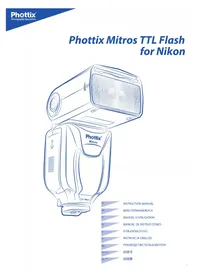
Phottix Mitros TTL Flash for Nikon
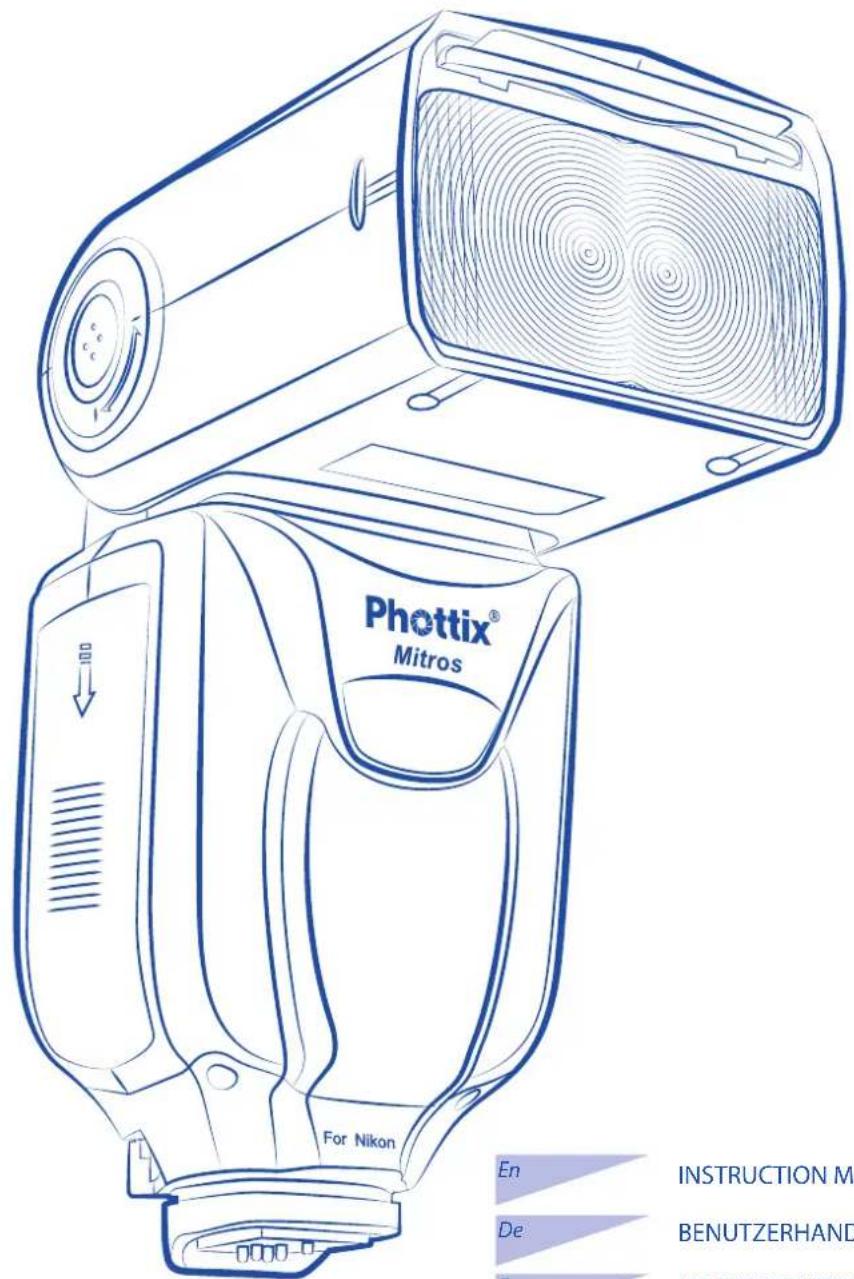
En INSTRUCTION MANUAL
De BENUTZERHANDBUCH
Fr MANUEL D'UTILISATION
Es MANUAL DE INSTRUCCIONES
ISTRUZIONI D'USO
PI INSTRUKCJA OBSLUGI
Ru PYKOBODCTBO NOJIb3OBATEJIa
说明书
Cn^T_Prod 說明書
Photix Mitros TTL Flash for Nikon
Note: To start immediately using this flash please refer to the quick-start guide. For advanced features please read this manual and be familiar with your camera manual and operations.
The Phottix Mitros TTL Flash for Nikon is designed to work with Nikon DSLR cameras and features TTL, Manual, Multi modes as well as Wireless Master/Slave triggering.
Warnings
- Use your flash safely. Do not fire the flash into the eyes of people or animals at short distances - damage and/or blindness can occur.
- Be careful using the flash in or around cars, buses, motorcycles or other moving vehicles as accidents can result.
- Never use the flash near combustible gases (gasoline, solvents, etc.)
- Do not expose the flash or batteries to dripping/splashing water, or high humidity.
- Do not leave the flash or batteries in a hot location (direct sunlight, in a closed car, etc.)
- Remove batteries from the flash when not being used for an extended period of time.
- Change the batteries when required. Use undamaged batteries in good condition. Do not mix battery types or new and used batteries.
- Do not place opaque objects in front of the flash lens when firing the flash. The energy emitted by the flash may cause objects to burn, or cause damage to the flash tube or fresnel lens.
- Use caution in touching the flash head after use. It may be hot and can cause burns.
- The flash contains high voltage electronic parts. Do not disassemble or attempt to repair the flash. Never touch the flash's internal components.
- Do not touch the External Power Port contacts with any metal objects – this can cause electric shock and serious injury.
Table of Contents
Parts and Functions 2
6
Wireless Triggering. 8
Custom Functions 11
Technical Specs. 13
Parts
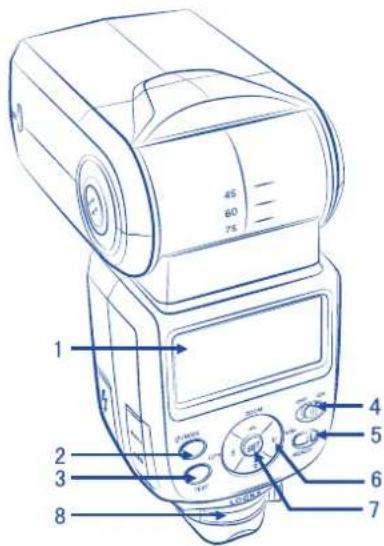
Back/Left Side
- LCD Display
2.Mode Button - Test Button
- Power Switch
- Ready Light
- Arrow Adjustment Buttons (see below)
- Set Button
- Locking Lever
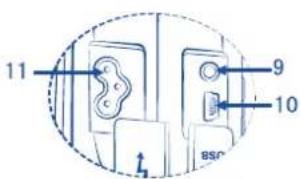
9.3.5mm Sync Port - USB Port
- External Power Port
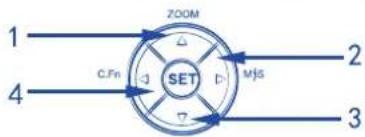
Arrow Adjustment Buttons
1.UpArrow/ZoomAdjustmentModeButton
2. Right Arrow / Wireless Flash Mode Button
3. Down Arrow
4.LeftButton/CustomFunctionsButton
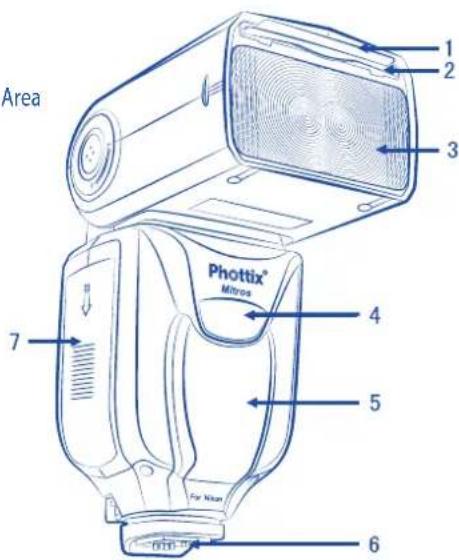
Front / Right Side
- Bounce Card
- Wide Angle Diffuser
- Flash Head
- Wireless Signal Receiver Area
- AF Assist Light
- Hot Shoe
- Battery Compartment
Please note:
These instruction assume:
- Both the flash and camera are switched on.
- The flash and camera are set to the same settings as this manual.
- Camera menu and flash custom functions menu are set to default values.
- The flash is being used with a compatible Nikon DSLR.
Installing batteries
- Press the battery cover in while pushing it towards the bottom of the flash. The battery cover will open and raise.
- Insert AA batteries as shown by the diagram inside the battery compartment.
- Lower the battery cover and push back towards the top of the flash, locking it in place.
Please note:
- Please use four standard high-quality batteries of the same brand. Make sure all batteries are at similar powers levels.
- Batteries can get hot when the flash is being used. Use caution when changing batteries.
- If you are not using the flash for an extended period of time, store with batteries removed.
Attaching the flash to a camera
Turn both the camera and flash off
- Align the flash hot shoe with the camera hot shoe.
- Slide the flash into the camera hot shoe until fully inserted.
- Lock the flash in position by pushing the locking lever to the right until the lock engages with a click.
- To Unlock, press the locking release button on the locking lever and slide to the left.
Turning the Flash On / Off
- To power on the flash move the power switch to the "ON" position.
- To power off the flash move the power switch to the "OFF" position.
Battery Level Indicator
The Battery Level Indicator on the LCD (see below) will display an approximate indication of how much power remains in the batteries in the flash. Use this as a rough guide to know when a battery change is needed. If flash recycling time has become very long (30 seconds) change the batteries.
Raising and Rotating the Flash Head
- The flash head will elevate from -7 to 90 degrees with stops at -7, 0, 45, 60, 75 and 90 degrees. Gently raise or lower the flash head into the required position.
- The flash head will rotate 180 degrees in either direction with stops at 60, 75, 90, 120, 150 and 180 degrees. Gently rotate the flash head into the required position.
- When the flash head is raised or rotated from the 0 degree standard forward position the flash zoom will set itself to 50mm . "---" will be displayed on the LCD Flash zoom when the head is raised or rotated can be changed in MZoom mode (see below).
- At -7 degrees the flash zoom will act the same as 0 degree - it will not change any settings.
Using the Bounce Card or Wide Angle Diffuser
The Phottix Mitros Flash comes equipped with a white bounce card and wide angle diffuser panel in the flash head.
- The wide angle diffuser panel will cause the flash to spread light to a 14mm equivalent.
- The white bounce card can be used when the flash head is in a raised position to bounce light forward to assist with catch lights in a subject's eyes.
To use:
- Gently pull the diffuser panel and bounce card from the flash head using the ridge on the bottom of the diffuser panel.
- If using the diffuser panel it will drop into position over the flash head. Gently push the bounce card back into the flash head if not needed.
- If using the bounce card only gently push the diffuser panel back into the flash head.
Please note:
When the diffuser panel is used the flash head zoom position is locked at 14mm . If flash head zoom needs to be adjusted disable diffuser panel zoom in custom function (see C.Fn 03 below). This custom function is also useful should possible impact damage the diffuser and make zoom adjustments difficult.
Using the Flash Head Diffuser
The Phottix Mitros TTL Flash comes with an attachable diffuser that can be added to the front of the flash head when needed. It is good for softening light, reducing hot spots and shadows and better coverage for macro photography.
To use:
- Align the diffuser with the flash head, with the "UP" mark on the diffuser facing up.
- Snap one side of the diffuser mount into the corresponding flash head mount.
- Repeat step 2 on the other side of the diffuser.
Overheating Protection
The Phottix Mitros contains an overheating protection circuit that will slow flash recycle time to avoid overheating-related damage. Approximately 20 full-power flashes in a short amount of time will trigger this protection. A [Hot!] Icon will appear when the overheating protection circuit is in operation.
To avoid further overheating or possible damage the flash will increase the recycling time to assist in lowering the flash temperature. Wait 10 minutes before using the flash.
If the flash continues to be used after the [Hot!] Icon appears and the flash does not cool down a [Stop] icon will appear on the LCD. Cease using the flash and wait 10 minutes for it to cool down.
Sync and USB Ports
- The 3.5mm Sync Port can be used with a 3.5mm sync cable to trigger the flash from a flash trigger or camera. This port is input only - flash signals are not output from this port. This port will only trigger the flash in Manual (M) mode, no TTL information is gathered or used.
- The USB port is used for firmware upgrades. Firmware announcements and instructions will be made available on Phottix websites.
Status LED
Left LED: Flash-ready indicator. In Quick Flash Mode, the LED will flash green when the flash has the minimum recycle charge. It will flash red when fully charged.
Right LED: Flash exposure confirmation lamp. If a standard flash exposure is obtained, the flash exposure confirmation lamp will light blue for approximately 3 seconds. If the flash exposure confirmation lamp doesn't light, move closer to the subject or increase the camera ISO setting.
The functions of the Right LED can be controlled though custom functions. (See C.Fn 05 below)
External Battery Port
The External Battery Port is a proprietary Phottix design for use with Phottix flash cables. The external port is compatible with the Nikon High-Performance Battery Pack SD-9 or compatible models when the included adapter is used.
Please note:
- Batteries must be used in the flash even when an external battery pack is used.
- Never use non-Nikon compatible battery packs.
Auto-Save Functions
The Phottix Mitros will remember flash settings. Mode, power levels, etc. will be retained by the flash if it is turned off and then back on.
Test Button
Pressing the test button will trigger the flash. This can be used for metering (in manual mode only). In the Wireless Master Mode pressing the test button will fire slave flashes on the same channel being controlled by the Master flash. Test button output levels can be configured in TTL mode (see C.Fn 07 below).
Auto-Idle Functions
To save battery power the Phottix Mitros TTL Flash is equipped with Idle and Auto Off modes.
- In Non-Wireless Slave Modes: The flash will go into Auto Idle mode after 90 seconds if no buttons have been pressed or it has not been fired. The flash LCD will go blank. Half-pressing the camera shutter button or pressing the test button on the flash will wake up the Phottix Mitros.
- In Wireless Slave Mode, the flash will go to Slave Idle Mode after 60 minutes if no buttons have been pressed or it has not been fired, "IDLE" will be displayed on the flash LCD. Fully depressing the camera shutter button or pressing the Master flash test button will wake up flashes in idle mode. Slave Idle Timer can be changed from 60 minutes to 10 minutes (see C.Fn 10 below). The flash will go into Slave Auto Off Mode after 8 hours if no buttons have been pressed or it has not been fired after "IDLE" is displayed on the flash LCD. Pressing the test button on the flash will wake it up. Slave Auto Off time can be changed from after 8 hours to after 1 hour (see C.Fn 11 below).
- Disabling Idle mode (see C.Fn 01 below) will disable all Auto-Idle functions.
Modeling Flash
- For compatible cameras pressing the depth-of-field preview button will fire the flash continuously for 1 second. This Modeling Flash is useful for previewing lighting effects.
- Modeling Flash is available in all modes, TTL, Multi and Manual.
- Modeling Flash can be used in both normal and wireless shooting and can be set (see C.Fn 02 below).
Please note:
- Overheating and damage can result from excessive use of the Modeling Flash. Do not use more than 20 times in succession.
- When overheated the flash will automatically increase charging time until the flash temperature has decreased.
Autofocus (AF) Assist Light
- In low light situations the Phottix Mitros' built-in Auto Focus Assist Light will illuminate to assist with focusing. The AF Assist Light on the front of the flash will project a focusing target on the subject.
- AF Assist Light functions can be set to ON or OFF (see C.Fn 08 below).
- For Cameras with a Built-in AF-assist light, the flash's AF-assist light will take priority (see below- Built-in Camera AF-assist Light)
The LCD Display
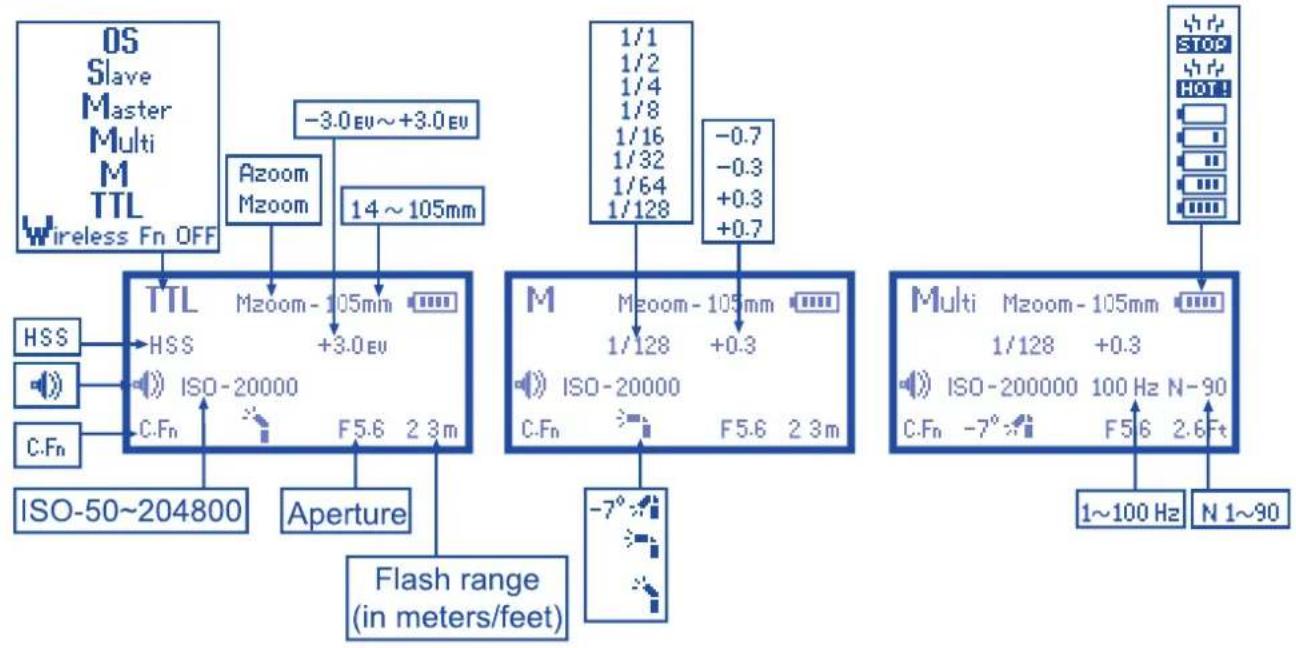
Main Screen
Top Line:
Flash Mode: TTL, Manual (M), Multi, Master, Slave, OS, Wireless Fn OFF
Zoom: Indicates auto or manual flash head zoom
Battery Level Indicator:"HOT!" "STOP"
Second Line:
In TTL mode: FP Sync/High Speed Sync (HSS) icon, EV In M or Multi mode: Power Level
Third Line:
Beep Signal icon, ISO display, In Multi mode: Multi Frequency, Multi Count
Fourth Line:
C.Fn icon, Flash Head Orientation icon, Aperture, flash range
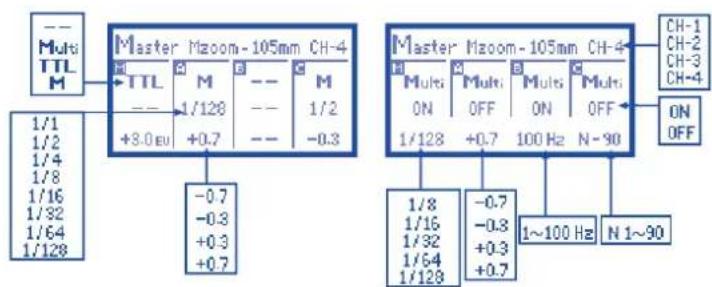
Wireless Triggering - Master Screen
Top Line:
Master Mode display
Zoom: Indicates auto or manual flash head zoom
Transmission Channel: 1 2 3 4
Master / Group Boxes
Each box has setting for:
Flash Mode: TTL, Manual (M), Multi, OFF (-)
Power Level
EV Adjustment
Multi Mode Power Settings, Frequency and Flash Count
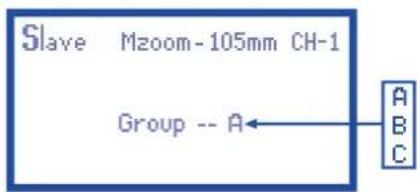
Wireless Triggering - Slave Screen
Top Line:
Slave Mode display
Zoom: indicate manual flash head zoom
Channel: 1234
Second Line:
Group Setting (A, B, or C)
The Optical Slave Screen
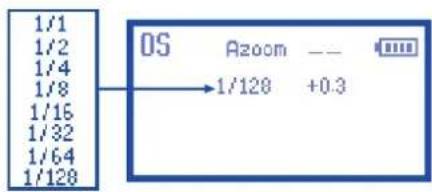
Top Line:
Optical Slave (OS) display
Zoom: Indicates auto or manual flash head zoom and distance
Battery Level Indicator:"HOT!" "STOP"
Second Line:
Flash Power Level
Setting Flash Zoom
The Phottix Mitros Flash has two flash head zoom modes - Auto (Azoom) and Manual (Mzoom). Auto zoom will dynamically change flash head zoom as a camera's zoom lens is changed to provide optimum lighting. Manual zoom allow the user to set the zoom of the flash head.
To set:
- Press the button.
- The Zoom area on the LCD will be highlighted and flash.
- Press the ZOOM or buttons to set the flash head zoom to Azoom on the desired Mzoom manual level.
- Press the set button when the zoom is properly set.
Please Note:
- When in Azoom and the flash head is raised or rotated from the 0 degree standard forward position - the flash zoom will set itself to 50mm . "--" will be displayed on the LCD. The flash zoom will not change if the head is lowered to -7 degrees.
- Azoom will work only when the flash head is set to either 0 or -7 degrees.
- When in Mzoom and the flash head is raised or rotated from the 0 degree standard forward position - the flash zoom will not be changed from the previous setting.
- Flash Zoom can be adjusted when the head is raised or rotated by switching to Mzoom mode and making desired adjustment.
- If the wide angle diffuser panel is pulled out, the zoom position will automatically lock itself to 14mm (see above - Using the Bounce Card or Wide Angle Diffuser).
TTL Mode
In TTL Mode the flash and camera will work together to calculate the correct exposure for recorded images. When the shutter button is fully pressed the flash will fire a pre-flash that the camera will use to calculate exposure and flash power the instant before the photo is taken.
Flash Exposure Compensation (FEC)
By changing the flash's EV value in TTL flash mode, you can make flash output compensation only to the illuminated subject without affecting the background exposure. Increase the compensation to make the subject brighter, or reduce to make the subject darker.
The Phottix Mitros Flash offers Flash Exposure Compensation (FEC) with adjustments from -3 to +3 in 1/3rd stops. This is useful in situations where fine-tuning of the TTL system is needed.
To set FEC:
- Press the button to enter FEC Adjustment Mode.
- Press the or buttons to adjust FEC up or down.
- Press the button to exit FEC Adjustment Mode.
Please Note:
- The flash output value can also be set on the camera equipped with a built-in flash exposure compensation function. For more detailed information, refer to the camera's User Manual.
- If Flash Exposure Compensation is set on both the camera and the flash, then the total exposure value will be the sum of the two Flash Exposure Compensation values.
- Only the Flash Exposure Compensation value set on the flash will be displayed on the Flash's LCD screen.
Manual (M) Mode
In Manual Mode the flash will fire at the power level you set. The Phottix Mitros TTL Flash can be adjusted from 1/1 (full power) to 1/128 - 8 stops of adjustments in 1/3^rd stop increments. Aperture, shutter speed and ISO on the camera need to be manually adjusted. For best results, use M-Manual mode on the camera.
To use:
- Press the button until "M" is displayed on the flash LCD.
- Press the SET button to enter the power adjustment screen. The power level will flash and be highlighted.
- Press the or buttons to adjust the flash power.
- Press the button to exit the power adjustment screen.
- When the flash ready light is illuminated red the flash is fully charged and ready to fire.
- Pressing the button will fire the flash at the manual power level you set. This is useful when taking meter readings.
Please note:
- Half pressing the shutter button will display the effective manual flash power range on the Flash LCD.
Multi: Stroboscopic Mode
With Multi Stroboscopic mode a series of rapid flashes will be fired. The flash count, frequency and power of these flashes can be programmed on the Phottix Mitros. Multi mode is useful for capturing multiple images of a moving subject in the same photo and other special effects.
The frequency of the effect (in Hz. - number of flashes per second), the total number of flashes and output levels can be set.
- When overheated the flash will automatically increase charging time until the flash temperature has decreased.
To use:
- Press the button until Multi is displayed on the flash LCD.
- Press the set button to adjust Multi settings. Displayed (from left to right on the LCD) Power, Frequency (HZ) and Flash Count. Power is highlighted and flashing upon entering the adjustment screen.
- Press the and buttons to change between Power, Frequency (HZ) and Flash count.
- Press the button while the setting is highlighted to adjust Power, Frequency (HZ) and Flash count to the desired levels.
- Press the set button to exit the adjustment screen.
Please note:
- Overheating and damage can result from excessive use of the Multi Stroboscopic Mode. Do not use more than 20 times in succession.
Stroboscopic Mode and Shutter Speeds
To determine the proper camera shutter speed to be used with various Stroboscopic Mode variables, use the following formula:
Number of flashes / Frequency = Shutter Speed
Example: 5x (number of flashes) / 10 Hz (Frequency) = 0.5 second shutter speed.
This is a rough guideline: You may need to increase or decrease the shutter speed to get the desired result.
Multi Stroboscopic Mode Output Chart
| Frequency | Flash output level | ||||||||||||
| M1/8 | M1/8 - 1/3EV | M1/8 - 2/3EV | M1/16 | M1/16 - 1/3EV | M1/16 - 2/3EV | M1/32 | M1/32 - 1/3EV | M1/32 - 2/3EV | M1/64 | M1/64 - 1/3EV | M1/64 - 2/3EV | M1/128 | |
| 1HZ | 14 | 16 | 22 | 30 | 36 | 46 | 60 | 68 | 78 | 90 | 90 | 90 | 90 |
| 2HZ | |||||||||||||
| 3HZ | 12 | 14 | 18 | 30 | 36 | 46 | 60 | 68 | 78 | 90 | 90 | 90 | 90 |
| 4HZ | 10 | 12 | 14 | 20 | 24 | 30 | 50 | 56 | 64 | 80 | 80 | 80 | 80 |
| 5HZ | 8 | 10 | 12 | 20 | 24 | 30 | 40 | 44 | 52 | 70 | 70 | 70 | 70 |
| 6HZ | 6 | 7 | 10 | 20 | 24 | 30 | 32 | 36 | 40 | 56 | 56 | 56 | 56 |
| 7HZ | 6 | 7 | 10 | 20 | 24 | 26 | 28 | 32 | 36 | 44 | 44 | 44 | 44 |
| 8HZ | 5 | 6 | 8 | 10 | 12 | 14 | 24 | 26 | 30 | 36 | 36 | 36 | 36 |
| 9HZ | 5 | 6 | 8 | 10 | 12 | 14 | 22 | 24 | 28 | 32 | 32 | 32 | 32 |
| 10HZ | 4 | 5 | 6 | 8 | 9 | 10 | 20 | 22 | 26 | 28 | 28 | 28 | 28 |
| 20HZ | 4 | 5 | 6 | 8 | 9 | 10 | 12 | 14 | 18 | 24 | 24 | 24 | 24 |
| 30HZ | |||||||||||||
| 40HZ | |||||||||||||
| 50HZ | |||||||||||||
| 60HZ | |||||||||||||
| 70HZ | |||||||||||||
| 80HZ | |||||||||||||
| 90HZ | |||||||||||||
| 100HZ | |||||||||||||
Wireless Triggering Mode
The Phottix Mitros TTL Flash is equipped with wireless triggering. Using pulses of light, a flash on the camera can adjust and fire remote flashes. In this mode remote flashes can be assigned to three groups (A, B, C) with flash mode and flash compensation values can be independently set for each group.
A flash set in Master mode must be attached to the camera (or the camera pop-up flash used, if compatible). Remote flashes must be set to slave mode.
Wireless triggering is achieved by pulses of light fired by the Master flash. All flashes must be in line of sight. The Wireless Signal Receiver Area must be able to "see" signals from the Master flash. This system may not perform well outdoors or in brightly lit areas.
For increased performance and power control consider using the Phottix Odin TTL Flash Trigger with your Phottix Mitros flash. The Phottix Odin controls and fires TTL flashes via radio signals, not pulses of light, and is less limited in all environments.
Optical Slave (OS) Mode
The Phottix Mitros can also be triggered as an Optical Slave (OS). In Optical Slave (OS) Mode the Phottix Mitros will fire when it optically "sees" another nearby flash fire. The Mitros will fire in manual mode at the power levels it was set to.
To Set OS Mode:
- Press and hold the button for 2 seconds to enter wireless mode.
- Press按钮 to cycle to OS mode.
- Press the SET button to confirm and exit the screen.
- The flash will change to Manual-M mode.
- Set the desired power level.
Please note:
- Do not place any obstacles between the master unit and slave unit(s). Obstacles can block signal transmissions.
- Ensure the slave flash's Wireless Signal Receiver Area faces toward the triggering flash.
- When using OS Mode the shutter speed of the camera should not be higher than 1/250s.
- TTL pre-flash from on camera flashes or flashes set to Wireless Master Mode will set off a flash set to OS Mode. The flash will fire before the exposure. Do not mix flashes in TTL or Wireless Master Mode with flashes set to OS Mode.
- Unlike other Wireless Modes, Optical Slave (OS) does not use channels. A flash set in OS mode will fire when it sees any flash trigger.
Wireless Settings
Flashes must be set to Master or Slave mode. A Master flash is needed on the camera to control remote (slave) flashes. The same transmission channel needs to be set on both Master and Slave flashes. Groups need to be set for Slave flashes.
To set Master Mode:
- Press and hold the button for 2 seconds until the "Wireless Fn OFF" highlighted on the LCD.
- Press the and buttons will cycle between Wireless OFF, Master, Slave, OS modes.
- Select Master mode and press button for confirm.
Set the flash modes, flash output compensation values and channels for the master flash
- Press the button to enter the settings mode;
- Press the or will cycle between the adjustable parameters;
- Press the button to adjust the parameters of the selected item;
- Press the set button to exit the setting mode.
Master with Flash mode: The on camera Master flash will fire when a photo is taken.
Master without Flash mode: The on camera Master flash will emit a short burst of light to communicate with slave flashes but this light will not be part of the exposure when a photo is taken.
To set Slave Mode:
- Press and hold the button for 2 seconds to enter wireless mode.
- Press the left arrow or right arrow buttons will cycle between Wireless OFF, Master, Slave, OS modes.
- Select Slave mode and press set button for confirm.
To set the Slave Groups and Channels:
- Press the button to activate the settings mode;
- Press the or will cycle between the group settings (A B C), channel settings (1 2 3 4) and ZOOM settings;
- Press the ZOOM or button to adjust the parameters of the selected item;
- Press the set button to confirm and exit the screen.
- When Slave flashes are ready to shoot, the AF Assist light on the front of the flash will blink once every 1 second.
Please note:
- Make sure the Master and Slave flashes are set to the same transmission channel (1-4).
- Do not place any obstacles between the master unit and slave unit(s). Obstacles can block signal transmissions.
- When using wireless bounce flash, please ensure the slave flash Wireless Signal Receiver Area faces toward the Master flash.
- When using only one flash set Wireless Mode to "OFF".
Transmission channels
The Phottix Mitros Wireless system has four transmission channels: 1, 2, 3 and 4. Signals from the Master flash are sent to Slave flashes on these channels. If Master and Slave flashes are set to different channels the Slave flashes will not fire.
To Exit Wireless Triggering Mode
- Press and hold the button for 2 seconds until "Master" or "Slave" is highlighted in the upper left corner of the screen;
- Press the or buttons to cycle between Master, Slave, OS and Wireless Off modes;
- Select the Wireless Fn OFF (wireless off) and press the button to confirm.
Using Wireless Triggering
With a flash in Master mode on the camera and remote flashes in Slave mode, pressing the shutter button will fire the Master flash (if set to Master with flash) and set off any flashes set to Slave mode within the range. The camera and flash will meter the scene and fire flashes in TTL mode to properly expose the scene.
Master Mode: What can be set on the Master flash?
Master Flash Mode: TTL, Manual, Multi, Master without flash, EV adjustments,
Manual (M) mode power level.
Slave Flash Mode: TTL, Manual, Group Off, EV adjustments, Manual (M) mode power level
Channel: Transmission channel
Zoom: Flash Head Zoom on Master flash
Multi Mode Settings: Multi power levels, frequency, flash count
Slave Mode: What can be set on Slave flashes?
Group:A,B or C
Channel: Reception channel
Zoom: Flash Head Zoom on Slave flash
Please note:
If Multi mode is set on the Master flash, all slave flashes will operate in Multi Mode. Groups can be turned off from the Master. All flashes must use the same flash power, frequency, flash counts.
The adjustable parameters under wireless flash mode are as follows:
| Items | Flash to be set | Remarks | |
| Flash Modes | TTL Mode | Master Flash | ·The master flash mode and slave flash modes can be set independently of the master flash ·Slave flash modes can be set from the master |
| Manual Mode | |||
| Group Off | |||
| Multi Mode | Master Flash | ·If the Master flash is set to the Multi Mode all Slave flashes will operate in Multi mode. ·Group Off can be set for the groups that do not need to fire ·All flash power, frequency, flash counts need to be set to the same values | |
| Flash Output Compensation | Master Flash | ·The EV compensation / Manual Power settings can be set independently for the master and for each slave flash group ·The EV compensation / Manual Power settings of slave flashes can be set from the master flash | |
| Transmission Channels | Master Flash & Slave Flash | ·Select one of the four available channels ·Master flash and Slave flash must be set to the same channel | |
| Groups | Slave Flashh | ·Three groups (A B C) ·NOTE - the Master flash functions as a 4th group | |
| Zoom | Master Flash & Slave Flash | ·The zoom set on the Master flash will only change the zoom on the Master, not on slaves ·To change the zoom of the slave flash, adjust each slave flash independently | |
Please note:
-
When in the Wireless Mode interface, press SE button to enter the setup screen, then press the or buttons to cycle between options.
-
Press the 2020 or buttons to cycle between parameters;
-
Multi Mode cannot be used with TTL or Manual modes;
Settings Available on the Camera
Several functions are available when the Phottix Mitros is mounted on a camera equipped with these functions. These functions need to be set in the camera menus and cannot be set on the Phottix Mitros. (see your Camera User Manual for details)
Auto FP High-Speed Sync Mode
In Auto FP High Speed Sync mode, the camera's x-sync speed (usually 1/200 to 1/250) is overridden and faster shutter speeds, up to the camera's maximum shutter speed, can be used. This is useful when using aperture priority mode or to limit ambient light. Maximum shutter speeds may vary with different camera models - see your Camera's User Manual for details.
The HSS icon will be displayed on the flash LCD when the shutter speed exceeds the camera x-sync speed and Auto FP High-Speed Sync Mode is being used. The flash will set itself to Auto FP High-Speed Sync mode if this function is enabled on the camera body - see your Camera's User Manual for details.
Auto FP High-Speed Sync can be used in wireless flash mode.
Please note:
- Auto FP HSS can drastically reduce flash power, battery power and range.
Flash Exposure Value Lock (FV lock)
Flash Exposure Value Lock (FV Lock) is used to lock the flash exposure level before a photo is taken. This is useful when manual spot metering is being used in a scene with different lighting conditions.
The flash will fire a pre-flash when the FV lock button is pressed, which will be used to calculate flash power during the exposure. This value will be saved in the camera's internal memory. This " " icon will be displayed in the viewfinder of the camera when FV Lock is being used.
Red-Eye Reduction / Red-eye Reduction Fast \Slow Flash Sync
The flash will fire 3 times at a reduced output immediately before a photo is taken in order to prevent the red-eye effect. Red-Eye Reduction with the Slow Flash Sync function can be combined.
The use of a tripod is strongly recommended to prevent camera shake as slower shutter speeds are generally used in this mode.
Exposure Compensation
By changing the camera's exposure compensation value while using TTL flash mode, the exposure on both the subject and the background can be adjusted brighter or darker. In shooting situations with light background the compensation will need to be increased. With a darker background the compensation will need to be reduced.
Slow Flash Sync
When both the subject and background are in a low-light environment, this feature can be useful to control the flash at slow shutter speeds further to achieve the correct exposure.
The use of a tripod is strongly recommended to prevent camera shake as slower shutter speeds are usually used in this mode.
Rear Curtain Sync / Second Curtain Sync
The Rear Curtain Sync (Second Curtain Sync) function causes the flash fire at the end of an exposure, not at the beginning. This can be useful with slow shutter speeds for capturing special effects.
Built-in Camera AF-assist Light
- The Mitros flash's AF-assist light will take priority over a built-in camera AF Assist Light. The camera's AF-assist light will not function when the Phottix Mitros is on the camera.
- To use the camera's AF-assist illuminator disable the flash's AF-assist light (see below C.Fn 08).
Choose the FX/DX
The Phottix Mitros can automatically selects the applicable flash illumination pattern according to the camera's image area settings when the flash is attached to a camera that features both FX format (36× 24) and DX format (24× 16). For more information, see your Camera's User Manual.
FX / DX Flash Zoom range can be manual set in the Mitros Custom Functions (see C.Fn 09 below) to meet different shooting needs.
Custom Functions
The Phottix Mitros TTL Flash comes with a number of programmable custom functions. To edit these functions (below):
-
Press the button for 2 seconds to enter the C.Fn Menu Screen.
-
Press the or buttons to cycle through the menu items - C.Fn 0 to 15.
- Press the or buttons to change the function within the menu.
- Press the button to exit the C.Fn menu.
Custom Functions Chart
| Custom Function No. | Functions | Setting No. | Settings and descriptions |
| C.Fn 00 | Distance units | 0-Meters(m) | Meters(m) |
| 1-Feet(Ft) | Feet(Ft) | ||
| C.Fn 01 | Auto idle | 0-Enable | Enable |
| 1-Disable | Disable | ||
| C.Fn 02 | Modeling flash | 0-Depth of field | Enable (Depth of field button) |
| 1-Test firing key | Enable (Test firing key) | ||
| 2-Both | Enable (Depth of field button and Test firing key) | ||
| 3-Disable | Disable | ||
| C.Fn 03 | Diffuser panel zoom | 0-Enable | Enable |
| 1-Disable | Disable | ||
| C.Fn 04 | Slave flash beep confirm | 0-Enable | Enable |
| 1-Disable | Disable | ||
| C.Fn 05 | Exposure confirmation lamp | 0-Enable | Enable |
| 1-Disable | Disable | ||
| C.Fn 06 | Quick flash-☐ | 0-Disable | Disable |
| 1-Enable | Enable | ||
| C.Fn 07 | Test firing | 0-1/32 | at 1/32 power |
| 1-Full output | Full output | ||
| C.Fn 08 | AF assist light | 0-Enable | Enable |
| 1-Disable | Disable | ||
| C.Fn 09 | DX FX | 0-Auto | Automatically set by the flash based off camera supplied information |
| 1-FX | FX frame flash coverage | ||
| 2-DX | DX frame flash coverage | ||
| C.Fn 10 | Slave idle timer | 0-60 minutes | 60 minutes |
| 1-10 minutes | 10 minutes | ||
| C.Fn 11 | Slave auto OFF | 0-After 8 hours | Slave mode turns off after 8 hours |
| 1- After 1 hour | Slave mode turns off after 1 hour | ||
| C.Fn 12 | Recycle power | 0-Int. and Ext. source | Internal and external power sources are used to recycle the flash |
| 1-External Power | External Power source only is used to recycle the flash | ||
| C.Fn 13 | Button beep confirm | 0-Enable | Enable |
| 1-Disable | Disable | ||
| C.Fn 14 | Auto backlight | 0-Enable | Enable |
| 1-Disable | Disable | ||
| C.Fn 15 | TTL pref | +EV | Add EV |
| -EV | Reduce EV |
Quick Flash Function
The Quick Flash function allows the flash to fire at 1/6 to 1/2 of the full output. Flash recycle times are faster. This is best used for close subjects in situation where photos need to be taken quickly.
Quick flash can be used with continuous drive modes, Quick Flash for continuous shot function can be enabled or disabled (see C.Fn 06 above).
Please note:
The Quick Flash Function makes flash firing a priority. Under-exposure can result if the subject is located too far from the camera or if photos are taken too quickly.
Auto Backlight
By default, pressing any button on the Mitros flash will cause the LCD backlight to illuminate. The backlight will illuminate for 8 seconds and turn off if no buttons are pressed.
This function can be disabled though C.Fn 14. If disabled, pressing the button only will illuminate the LCD backlight.
Slave Flash Beep Confirm
When the flash is used as a wireless slave it will beep twice when an optical signal is received from the Master Flash. This can be disabled (see C.Fn 04 above)
Button Beep Confirm
Using the Phottix Mitros buttons provides audible feedback - beeps - when each is pressed. This function can be turned off (see C.Fn 13 above)
TTL Pref
TTL may vary slightly when using the flash on different cameras. TTL Pref (C.Fn 15) setting allows users to adjust EV from +3 to -3 in 1/3rd stops to compensate for these slight variations. This adjustment is a personal preference based on camera standard TTL and will be stored in memory. When this EV level preference is set, this compensation will be used for images taken in TTL mode. This EV compensation will not be displayed on the LCD during regular use.
Resetting to Factory Defaults
The Photrix Mitros Flash can be reset to factory defaults.
To reset the flash:
- Press and hold the and buttons for 3 seconds.
- The flash will reset to factory default settings.
- All custom functions will be reset to factory defaults.
Flash Information Display
For technical support or firmware upgrade checking the Phottix Mitros information may be needed. To display the hardware, software, icon library and serial number display:
- Press and hold the button, and then turn on the flash.
- Press any button to cancel this display and enter the LCD screen.
Changes to the flash capacitor:
If the flash is not used for some time physical changes will take place within the flash's capacitor. Make sure to turn on the flash a minimum of 10 minutes every three months to prevent any physical changes.
Technical Specification
Modes: TTL, Manual, and Multi Stroboscopic
Guide No.: 58/190 (at 105mm focal length, ISO 100 in meters/feet)
Flash coverage: 17-105mm (14mm with wide angle diffuser panel)
Auto zoom (Flash coverage automatically adjusts to match the lens focal length)
Manual zoom (Zoom can be adjusted by changing setting on the flash/camera)
Rotation: 360 degrees, Up-Down: -7 to 90 degrees.
FEC (Flash exposure compensation): Manual
Sync modes: First Curtain Sync, Rear Curtain Sync, and High Speed Sync
Stroboscopic flash: 1-100Hz
Flash exposure confirmation: Blue LED lamp lights up in TTL mode
Flash Recycling (with size-AA alkaline batteries)
Recycling time/Flash-ready indicator:
Normal flash: Approx.0.1-5 sec./Red LED indicator lamp lights up.
Quick flash: Approx.0.1-2.5 sec./Green LED indicator lamp lights up.
Internal power: Four size-AA alkaline batteries or size-AA Ni-MH batteries
External battery: Compatible with Phottix Battery Pack and Nikon High-Performance Battery Pack SD-9 through specific adapter
Power saving: Non-wireless slave modes: 90 seconds, Wireless slave mode: 60 minutes
Wireless flash
Transmission method: Optical pulse
Channels: 4
Wireless options: OFF, Master, Slave and Optical Slave
Transmission range (Approx.): (Indoors:12-16m/39.36-52.48 ft., Outdoors: 7-9m/22.96-29.52 ft)
Reception angle: ± 40^ (horizontal), ± 30^ (vertical)
Controlled slave groups: 3 (A, B, and C)
Standby current: ≤ 100 A in sleep mode
Dimensions: (L × W × H) : 202.8 × 77.5 × 58.3 ~mm
Weight (Approx.): 427g (flash only, excluding batteries)
EC Declaration of Conformity
We Phottix (HK) Ltd.
Of 10/F Block A, Yip Fat Factory Building, Phase 1, 77 Hoi Yuen Rd, Kwun Tong, Kln, Hongkong
The European Authorized Representative
Phottix Europe Sp. z 0.o.
Piotrkowska 66
90-105 Lodz, Poland
KRS 0000327336
declare herewith that the product designated below:
Product name: Phottix Mitros TTL Flash For Nikon
Model No.:FDN13TA
complies with the relevant fundamental requirements as per EMC Directive 2004/108/EC, insofar as the product is used correctly, and the following standards or other normative documents
EN 61000-6-3:2007+A1:2011
EN 61000-6-1:2007
IEC 61000-4-2:2008
IEC 61000-4-3:2010
IEC 61000-4-8:2009
Signed by:

Paul Czernik
CEO/Prezes Zarzadu
Photrix Europe Sp. z o.o.
Lodz,April 2013
FCC Compliance Information
This device complies with Part 15 of the FCC Rules. Operation is subject to the following two conditions: (1) this device may not cause harmful interference, and (2) this device must accept any interference received, including interference that may cause undesired operation.
Adresse: 10/F Block A, Yip Fat Factory Building, Phase 1, 77 Hoi Yuen Rd, Kwun Tong, Kln, Hongkong
CEO/Chief Executive Officer
Phottix Europe Sp. z o.o.

Lodz,April 2013
Adresse: 10/F Block A, Yip Fat Factory Building, Phase 1, 77 Hoi Yuen Rd, Kwun Tong, Kln, Hongkong