Mitros TTL (Canon) - Flash Phottix - Free user manual and instructions
Find the device manual for free Mitros TTL (Canon) Phottix in PDF.


| Brand | Phottix |
| Model | Mitros TTL (Canon) |
| Product Type | TTL cobra flash for Canon DSLR |
| Guide Number | 58 (at 105 mm, ISO 100, in meters) |
| Flash Coverage | 24-105 mm (14 mm with wide-angle diffuser) |
| Flash Modes | E-TTL II, Manual, Multi Stroboscopic |
| Wireless Modes | Master, Slave, Optical Slave (OS) |
| Synchronization | 1st curtain, 2nd curtain, high-speed (HSS) |
| Zoom | Auto (Azoom) and Manual (Mzoom) |
| Head Rotation | 360° horizontal, -7° to 90° vertical |
| Power Source | 4 AA batteries (alkaline or Ni-MH) or external Canon CP-E4 compatible |
| Recycling Time | Approx. 0.1 to 5 s (normal), 0.1 to 2.5 s (quick flash) |
| Dimensions | 202.8 × 77.5 × 58.3 mm |
| Weight | 427 g (without batteries) |
| Special Functions | Flash Exposure Compensation (FEC), Flash Exposure Bracketing (FEB), Flash Exposure Lock (FEL), AF Assist Light, Quick Flash, Modeling Light |
| Overheat Protection | Yes (Hot! icon then Stop if necessary) |
| Power Saving | Standby after 90 s (wired), 60 min (wireless), auto power off after 8 h |
| Custom Functions | 16 functions (C.Fn 00 to 15) |
| Maintenance | Remove batteries if unused for long time; clean with a dry cloth; do not disassemble |
| Safety | Do not point at eyes; avoid flammable gases; do not expose to water or excessive heat |
| Spare Parts and Repairability | No user-serviceable parts; contact an authorized service center |
| Warranty | Check with retailer or Phottix |
Frequently Asked Questions - Mitros TTL (Canon) Phottix
User questions about Mitros TTL (Canon) Phottix
0 question about this device. Answer the ones you know or ask your own.
Ask a new question about this device
Download the instructions for your Flash in PDF format for free! Find your manual Mitros TTL (Canon) - Phottix and take your electronic device back in hand. On this page are published all the documents necessary for the use of your device. Mitros TTL (Canon) by Phottix.
USER MANUAL Mitros TTL (Canon) Phottix
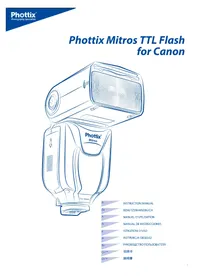
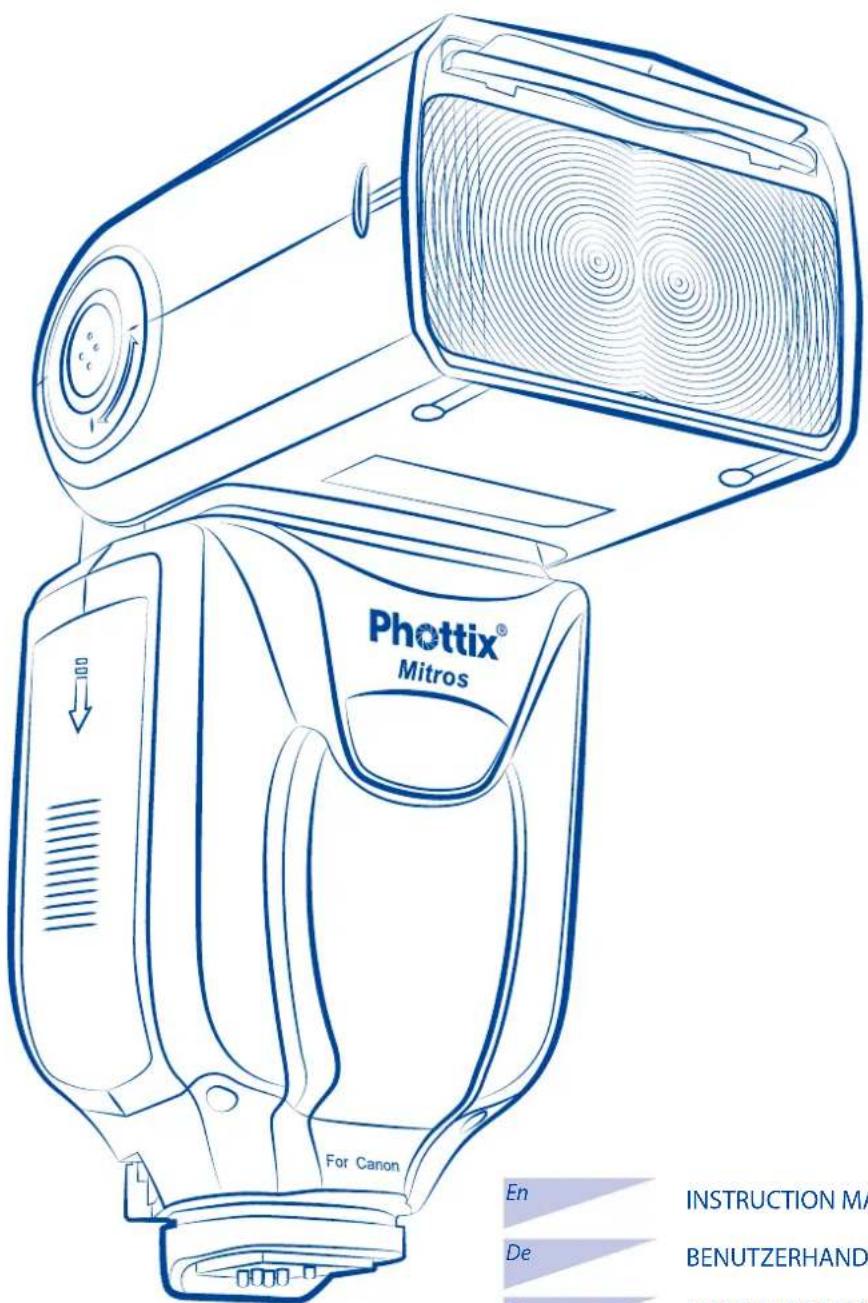
Phottix Mitros TTL Flash for Canon
En INSTRUCTION MANUAL
De BENUTZERHANDBUCH
Fr MANUEL D'UTILISATION
Es MANUAL DE INSTRUCCIONES
It ISTRUZIONI D'USO
PI INSTRUKCJA OBSLUGI
Ru PYKOBODCTBOIIOJIb3OBATEJIa
C_n^Simp 说明书
Cn^Trad 設明書
Photix Mitros TTL Flash for Canon
Note: To start immediately using this flash please refer to the quick-start guide. For advanced features please read this manual and be familiar with your camera manual and operations.
The Phottix Mitros TTL Flash for Canon is designed to work with Canon DSLR cameras and features ETL I/II, Manual, Multi modes as well as Wireless Master/ Slave triggering.
Warnings
- Use your flash safely. Do not fire the flash into the eyes of people or animals at short distances - damage and/or blindness can occur.
- Be careful using the flash in or around cars, buses, motorcycles or other moving vehicles as accidents can result.
- Never use the flash near combustible gases (gasoline, solvents, etc.).
- Do not expose the flash or batteries to dripping/splashing water, or high humidity.
- Do not leave the flash or batteries in a hot location (direct sunlight, in a closed car, etc.).
- Remove batteries from the flash when not being used for an extended period of time.
- Change the batteries when required. Use undamaged batteries in good condition. Do not mix battery types or new and used batteries.
- Do not put opaque objects in front of the flash lens when firing the flash. The energy emitted by the flash may cause objects to burn, or cause damage to the flash tube or fresnel lens.
- Use caution in touching the flash head after use. It may be hot and can cause burns.
- The flash contains high voltage electronic parts. Do not disassemble or attempt to repair the flash. Never touch the flash's internal components.
- Do not touch the External Power Port contacts with any metal objects – this can cause electric shock and serious injury.
Table of Contents
Parts and Functions 2
7 Modes
Wireless Triggering 9
Custom Functions 11
Technical Specs. 12
Parts
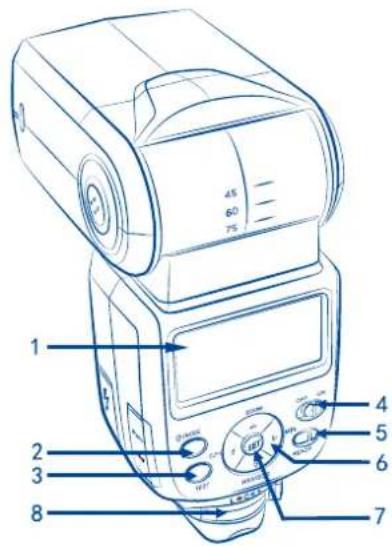
Back/Left Side
- LCD Display
2.Mode Button - Test Button
- Power Switch
- Ready Light
- Arrow Adjustment Buttons (see below)
- Set Button
- Locking Lever
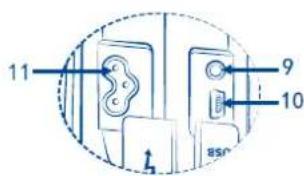
9.3.5mm Sync Port - USB Port
- External Power Port
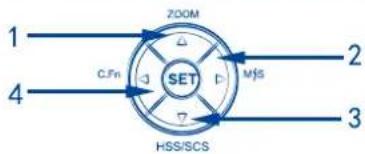
Arrow Adjustment Buttons
1.UpArrow/ZoomAdjustmentModeButton
2. Right Arrow / Wireless Flash Mode Button
3. Down Arrow / HSS / SCS Button
4.LeftButton/CustomFunctionsButton
Front / Right Side
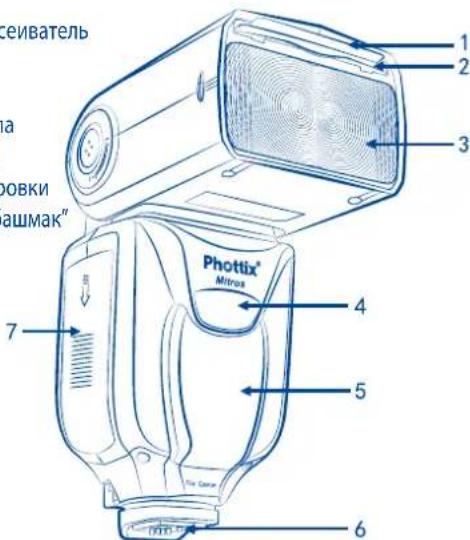
- Bounce Card
- Wide Angle Diffuser
- Flash Head
- Wireless Signal Receiver Area
- AF Assist Light
6.Hot Shoe - Battery Compartment
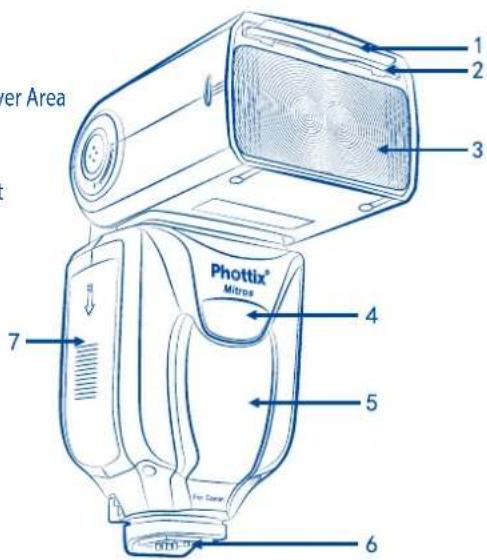
Please note:
These instruction assume:
- Both the flash and camera are switched on.
- The flash and camera are set to the same settings as this manual.
- Camera menu and flash custom functions menu are set to default values.
- The flash is being used with a compatible Canon DSLR.
Installing batteries
- Press the battery cover in while pushing it towards the bottom of the flash. The battery cover will open and raise.
- Insert AA batteries as shown by the diagram inside the battery compartment.
- Lower the battery cover and push back towards the top of the flash, locking it in place.
Please note:
- Please use four standard high-quality batteries of the same brand. Make sure all batteries are at similar powers levels.
- Batteries can get hot when the flash is being used. Use caution when changing batteries.
- If you do not use the flash for an extended period of time, store with batteries removed.
Attaching the flash to a camera
Turn off both the camera and flash
- Align the flash hot shoe with the camera hot shoe.
- Slide the flash into the camera hot shoe until fully inserted.
- Lock the flash in position by pushing the locking lever to the right until the lock engages with a click.
- To Unlock, press the locking release button on the locking lever and slide to the left.
Turning the Flash On / Off
- To power on the flash move the power switch to the on position.
- To power off the flash move the power switch to the off position.
Battery Level Indicator
The Battery Level Indicator on the LCD (see below) will display an approximate indication of how much power remains in the batteries in the flash. Use this as a rough guide as to when a battery change is needed. If flash recycling time has become very long (30 seconds) change the batteries.
Raising and Rotating the Flash Head
- The flash head will elevate from -7 to 90 degrees with stops at -7, 0, 45, 60, 75 and 90 degrees. Gently raise or lower the flash head into the required position.
- The flash head will rotate 180 degrees in either direction with stops at 60, 75, 90, 120, 150 and 180 degrees. Gently rotate the flash head into the required position.
- When the flash head is raised or rotated from the 0 degree standard forward position the flash zoom will set itself to 50mm . "---" will be displayed on the LCD. Flash zoom when the head is raised or rotated can be changed in MZoom mode (see below).
- At -7 degrees the flash zoom will act the same as 0 degree – it will not change any settings.
Using the Bounce Card or Wide Angle Diffuser
The Phottix Mitros Flash comes equipped with a white bounce card and wide angle diffuser panel in the flash head.
- The wide angle diffuser panel will cause the flash to spread light to a 14mm equivalent.
- The white bounce card can be used when the flash head is in a raised position to bounce light forward to assist with catch lights in a subject's eyes.
To use:
- Gently pull the diffuser panel and bounce card from the flash head using the ridge on the bottom of the diffuser panel.
- If using the diffuser panel it will drop into position over the flash head. Gently push the bounce card back into the flash head if not needed.
- If using the bounce card only gently push the diffuser panel back into the flash head.
Using the Flash Head Diffuser
The Phottix Mitros TTL Flash comes with an attachable diffuser that can be added to the front of the flash head when needed. It is good for softening light, reducing hot spots and shadows and better coverage for macro photography.
To use:
- Align the diffuser with the flash head, with the "UP" mark on the diffuser facing up.
- Snap one side of the diffuser mount into the corresponding flash head mount.
- Repeat step 2 on the other side of the diffuser.
Overheating Protection
The Phottix Mitros contains an overheating protection circuit that will slow flash recycle time to avoid overheating-related damage. Approximately 20 full-power flashes in a short amount of time will trigger this protection. A [Hot!] Icon will appear when the overheating protection circuit is in operation.
To avoid further overheating or possible damage the flash will increase the recycling time to assist in lowering the flash temperature. Wait 10 minutes before using the flash.
If the flash continues to be used after the [Hot!] Icon appears and the flash does not cool down a [Stop] icon will appear on the LCD. Cease using the flash and wait 10 minutes for it to cool down.
Sync and USB Ports
- The 3.5mm Sync Port can be used with a 3.5mm sync cable to trigger the flash - from a flash trigger or camera. This port is input only - flash signals are not output from this port.
- The USB port is used for firmware upgrades. Firmware announcements and instructions will be made available on Phottix websites.
Status LED
Left LED: Flash-ready indicator. In Quick Flash Mode, the LED will flash green when the flash has the minimum recycle charge. It will flash red when fully charged.
Right LED: Flash exposure confirmation lamp. If a standard flash exposure is obtained, the flash exposure confirmation lamp will light blue for approximately 3 seconds. If the flash exposure confirmation lamp doesn't light, move closer to the subject or increase the camera ISO setting.
External Battery Port
The External Battery Port is a proprietary Phottix design for use with Phottix flash cables. The external port is compatible with the Canon CP-E4 compact battery pack or compatible models when the included adapter is used.
Please note:
- Batteries must be used in the flash even when an external battery pack is used.
- Never use non Canon-compatible battery packs.
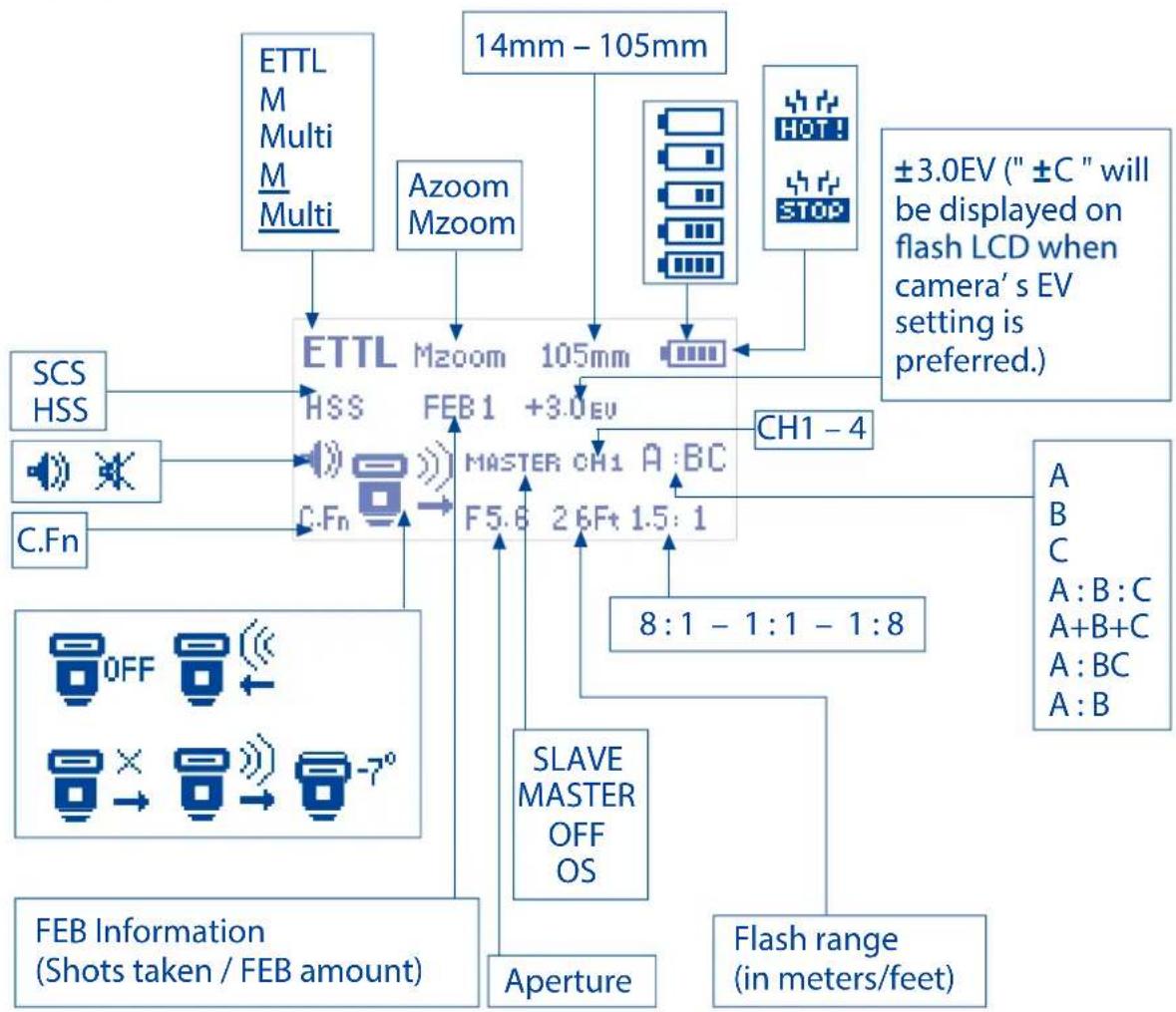
The LCD Display
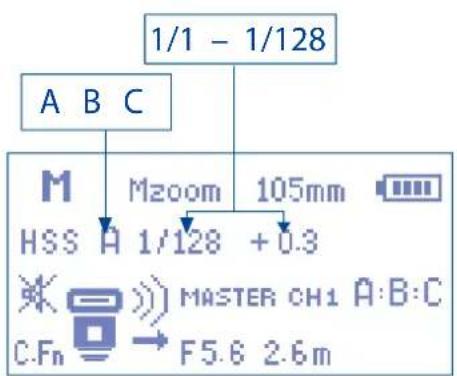
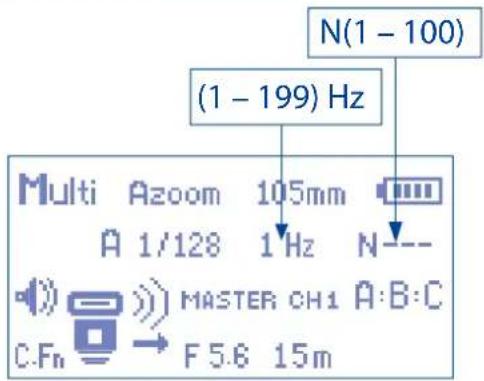
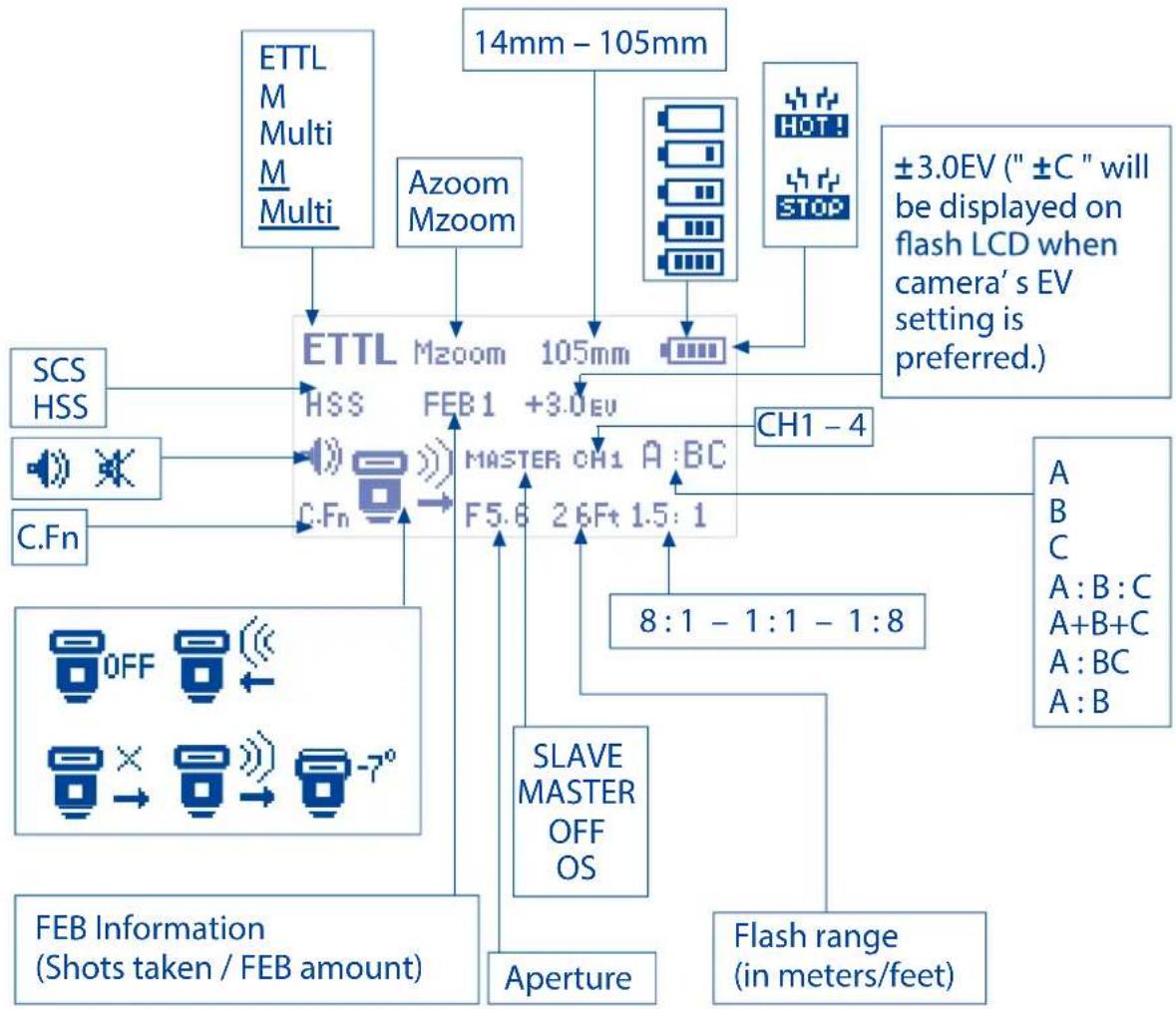
The LCD display on the Phottix Mitros flash contains important information regarding flash settings and functions.
Top Line:
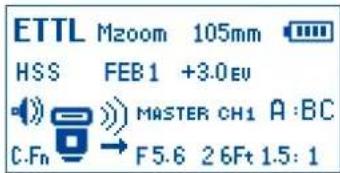
- Flash Mode: Indicates the set mode of the flash - ETL, Manual, Multi, M (slave mode), Multi (slave mode)
- Zoom: Indicates auto or manual flash head zoom and distance
- Battery Level Indicator, Hot!, Stop
Second Line:
High Speed Sync (HSS) / Second Curtain Sync (SCS) icon
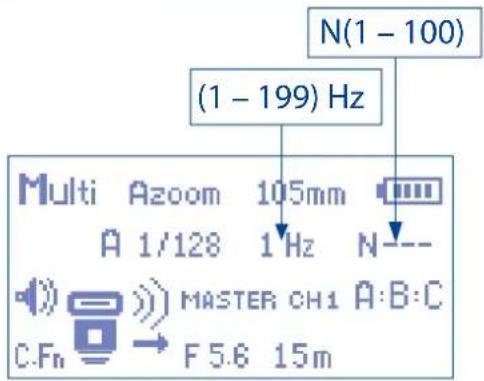
FEB, Group, Power Level, EV, Multi Mode indicators (Frequency and Flash Count)
In ETTL mode: HSS/SCS, FEB, EV
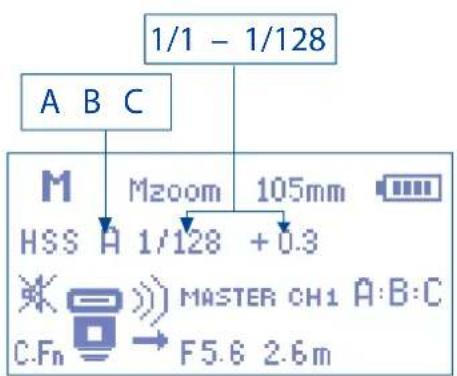
In M mode: HSS/SCS, Group, Power Level
In Multi mode: Group, Power Level, Frequency, Flash Count
Third Line:
Beep Signal Icon, "7" icon, Master / Slave Triggering Area - displays channel, master/slave mode, group information
Fourth Line:
Flash and Exposure information: C.Fn icon, Aperture (f stop), flash range and flash ratio
Auto-Save Functions
The Phottix Mitros will remember flash settings. Mode, power levels, etc. will be retained in the flash if it is turned off and then back on.
Setting Flash Zoom
The Phottix Mitros Flash has two flash head zoom modes - Auto (Azoom) and Manual (Mzoom). Auto zoom will dynamically change flash head zoom as a camera's zoom lens is changed to provide optimum lighting. Manual zoom allow the user to set the zoom of the flash head.
To set:
- Press the zoom button.
- The Zoom area on the LCD will be highlighted and flash.
- Press the or buttons to set the flash head zoom to Azoom or the desired Mzoom manual level.
- Press the SET button when the zoom is properly set.
Please Note:
- When in Azoom and the flash head is raised or rotated from the 0 degree standard forward position - the flash zoom will set itself to 50mm . "---" will be displayed on the LCD. The flash zoom will not change if the head is lowered to -7 degrees.
- Azoom will work ONLY when the flash head is set to either 0 or -7 degrees.
- When in Mzoom and the flash head is raised or rotated from the 0 degree standard forward position - the flash zoom will not be changed from the previous setting.
- Flash Zoom can be adjusted when the head is raised or rotated by switching to Mzoom mode and making desired adjustments.
Setting High Speed Sync or Second Curtain Sync
The Phottix Mitros flash has both High Speed Sync and Second Curtain Sync functions. See further details under High Speed Sync and Second Curtain Sync later in this manual.
To set:
- Press the button.
- The button will cycle between HSS, SCS and turning both off.
Please note:
-HSS and SCS are available in ETL and Manual modes, but not in Multi mode.
Test Button
Pressing the test button will trigger the flash. This can be used for metering (in manual mode only). In Wireless Master Mode pressing the test button will fire slave flashes on the same channel being controlled by the Master flash. Test button output levels can be configured (see C.Fn-07 below).
Auto-Idle Functions
To save battery power the Phottix Mitros TTL Flash is equipped with Idle and Auto Off modes.
- In Non-Wireless Slave Modes: The flash will go into Auto Idle mode after 90 sec. if no buttons have been pressed or it has not been fired. The flash LCD will go blank. Half-pressing the camera shutter button or pressing the test button on the flash will wake up the Phottix Mitros.
- In Wireless Slave Mode, the flash will go to Slave Idle Mode after 60 minutes if no buttons have been pressed or it has not been fired, "IDLE" will be displayed on the flash LCD. Full-pressing the camera shutter button or pressing the Master flash test button will wake up flashes in idle mode. Slave Idle Timer can be changed from 60 minutes to 10 minutes (see C.Fn-10 below). The flash will go into Slave Auto Off Mode after 8 hours if no buttons have been pressed or it has not been fired after "IDLE" is displayed on the flash LCD. Pressing the test button on the flash will wake it up. Slave Auto Off can be changed from after 8 hours to after 1 hour (see C.Fn-11 below).
Modeling Flash
- Pressing the camera depth-of-field preview button (if available) will fire the flash continuously for 1 second. This Modeling Flash is useful in seeing lighting effects and balance on the subject.
- Modeling Flash is available in all modes, ETL, Multi and Manual.
- Modeling Flash can be used in both normal and wireless shooting and can be set (see C.Fn-02 below).
Please note:
- Overheating and damage can result from excessive use of the Modeling Flash. Do not use more than 20 times in succession.
- When overheating the flash will automatically increase charging time until the flash temperature has decreased.
Autofocus (AF) Assist Light
- In low light/contrast situations the Phottix Mitros' built-in Auto Focus Assist Light will illuminate to assist with AF. The AF Assist Light on the front of the flash will project a focusing target on the subject.
- AF Assist Light functions can be set to on or off (see C.Fn-08 below).
Adjustments
The Phottix Mitros will adjust levels in 1/3 stop increments. Some cameras have custom functions to change stop adjustments from 1/3 to 1/2 stop increments for FEB and FEC. If camera custom functions are changed the Phottix Mitros will automatically adjust levels in 1/2 stops.
Flash Modes
The Phottix Mitros has three flash modes: ETL, Manual (M) and Multi (Stroboscopic).
To change modes:
- Press the MODE button.
- The flash modes will cycle through ETL, Manual (M) and Multi modes.
- The current mode will be displayed in the top left corner of the LCD.
ETTL Mode
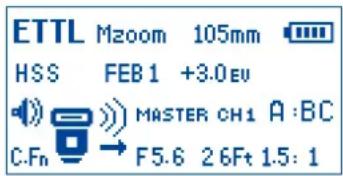
In ETL Mode the flash and camera will work together to calculate the correct exposure for recorded images. When the shutter button is fully pressed the flash will fire a pre-flash that the camera will use to calculate exposure and flash power the instant before the photo is taken.
Flash Exposure Compensation - FEC
The Phottix Mitros Flash offers Flash Exposure Compensation (FEC) functions and adjustments from -3 to +3 in 1/3^rd stops. This is useful in situations where fine-tuning of the TTL system is needed based on the environment.
To set FEC:
- Press the SET button to enter FEC Adjustment Mode.
- Press the or HSSS buttons to adjust FEC up or down.
- Press the SET button to exit FEC Adjustment Mode.
Please note:
- Some cameras have custom functions to change stop adjustments from 1/3 to 1/2 stop increments for FEB and FEC. If camera custom functions are changed the Phottix Mitros will adjust levels in 1/2 stop increments.
Flash Exposure Bracketing - FEB
Flash Exposure Bracketing (FEB) can be used to automatically change flash power over a series of photos. The camera will record three images with different exposures - one exposed as per camera calculations, one over-exposed and another under-exposed. Over and under exposure levels can be set by the user. FEB is useful in run-and-gun situations as well as when shooting scenes with different lighting conditions to help ensure a properly exposed photo. It can also be used for HDR photography.
Some cameras have flash exposure storage function, see your camera user manual for more details.
To Set FEB:
- Press the SET button.
- Press the button. "FEB 0" will be displayed and highlighted on the LCD.
- Press the and buttons to adjust the exposure bracketing amount.
- Press the SET button to confirm the setting.
Please note:
- By default: FEB will be cancelled after three photos are taken. FEB can be set in the Custom Functions screen (see C.Fn-03 below).
- FEB shooting sequence can be changed (see C.Fn-04 below).
- FEB can be used with FEC and FEL (see below).
- For best results set the camera drive mode to "single" and ensure the flash is fully recharged before taking the second and third photos.
- Some cameras have custom functions to change stop adjustments from 1/3 to 1/2 stop increments for FEB and FEC. If camera custom functions are changed the Phottix Mitros will adjust levels in 1/2 stop increments.
Flash Exposure Lock - FEL
Flash Exposure Lock (FEL) can be used to lock the flash exposure before a photo is taken. This is useful when manual spot metering is being used in a scene with different lighting conditions.
While in ETTL mode, press the camera's FEL button (the "×" button) to use this function. See your camera user manual for more information on FEL functions and usage.
Pressing the FEL Button will cause the flash to fire a pre-flash that will be used to calculate flash power during the exposure. This will be retained in the camera memory. The FEL icon will be displayed in the camera viewfinder.
Each time the FEL button is pressed a pre-flash will fire and a new exposure calculated. When the shutter button is fully pressed the flash will fire at the locked exposure.
Please note:
- If the subject is too far away underexposure will result, the "FEL" icon will blink for approximately 0.5 sec. in the camera viewfinder.
- If the subject is too small in the viewfinder, FEL may not be effective.
High Speed Sync-HSS
In HSS mode, the camera/flash maximum sync speed can reach the camera's maximum shutter speed. This is useful when using aperture priority mode or to limit ambient light. HSS may vary with different camera models - see your camera user manual for details.
To use HSS mode:
- Press the button.
- The HSS icon will be displayed on the flash LCD.
- Set shutter speeds higher than the camera's flash sync speed and take photos.
To exit HSS mode:
- Press the button twice.
- It will cycle from HSS to SCS and back to regular FCS mode.
Please note:
- Check that the HSS icon is displayed in the viewfinder.
- HSS drastically reduces flash power, battery power and range.
Second Curtain Sync - SCS
The Phottix Mitros Second Curtain Sync function makes the flash fire at the end of an exposure, not the beginning. This can be useful with slow shutter speeds for capturing special effect.
To use:
- Press the button twice. This will cycle from FCS to HSS and then the SCS mode.
- To cancel: Press the button once. This will return to standard FCS mode.
Please note:
SCS functions will not work in Wireless or Multi modes.
Manual (M) Mode
In Manual Mode the flash will fire at the power level you set. The Phottix Mitros TTL Flash can be adjusted from 1/1 (full power) to 1/128 - 8 stops of adjustments in 1/3rd stop increments. Aperture, shutter speed and ISO on the camera needs to be manually adjusted. For best results use M-Manual mode on the camera.
To use:
- Press the button until M is displayed on the flash LCD.
- Press the SET button to enter the power adjustment screen. The power level will flash and be highlighted.
- Press the ZOOM or buttons to adjust the flash power.
- Press the set button to exit the power adjustment screen.
- When the flash ready light is illuminated red the flash is fully charged and ready to fire.
- Pressing the button will fire the flash at the manual power level you set. This is useful when taking meter readings.
Please note:
- Half pressing the shutter button will display the effective manual flash power range on the Flash LCD.
Multi: Stroboscopic Mode
With Multi Stroboscopic mode a series of rapid flashes will be fired. The flash count, frequency and power of these flashes can be programmed on the Phottix Mitros. Multi mode is useful for capturing multiple images of a moving subject in the same photo and other special effects.
The frequency of the effect (in Hz. - number of flashes per second), the total number of flashes and output levels can be set.
To use:
- Press the button until Multi is displayed on the flash LCD.
- Press the SET button to adjust Multi settings. Displayed (from left to right on the LCD) Power, Frequency (HZ) and Flash Count. Power is highlighted and flashing upon entering the adjustment screen.
- Press the (HZ) and (HZ) buttons to change between Power, Frequency
-
Press the and buttons while the setting is highlighted to adjust Power, Frequency (HZ) and Flash count to the desired levels.
-
Press the SET button to exit the adjustment screen.
Please note:
- Overheating and damage can result from excessive use of the Multi Stroboscopic Mode. Do not use more than 20 times in succession.
- When overheated the flash will automatically increase charging time until the flash temperature has decreased.
Stroboscopic Mode and Shutter Speeds
To determine the proper camera shutter speed to be used with various Stroboscopic Mode variables, use the following formula:
Number of flashes / Frequency = Shutter Speed
Example: 5x (number of flashes) / 10 Hz (Frequency) = .5 second shutter speed.
This is a rough guideline: You may need to increase or decrease the shutter speed to get the desired result.
Multi Stroboscopic Mode Output Chart
| HzFlash Output | 1 | 2 | 3 | 4 | 5 | 6-7 | 8-9 | 10 | 11 | 12-14 | 15-19 | 20-50 | 60-199 |
| 1/4 | 7 | 6 | 5 | 4 | 4 | 3 | 3 | 2 | 2 | 2 | 2 | 2 | 2 |
| 1/8 | 14 | 14 | 12 | 10 | 8 | 6 | 5 | 4 | 4 | 4 | 4 | 4 | 4 |
| 1/16 | 30 | 30 | 30 | 20 | 20 | 20 | 10 | 8 | 8 | 8 | 8 | 8 | 8 |
| 1/32 | 60 | 60 | 60 | 50 | 50 | 40 | 30 | 20 | 20 | 20 | 18 | 16 | 12 |
| 1/64 | 90 | 90 | 90 | 80 | 80 | 70 | 60 | 50 | 40 | 40 | 35 | 30 | 20 |
| 1/128 | 100 | 100 | 100 | 100 | 100 | 90 | 80 | 70 | 70 | 60 | 50 | 40 | 40 |
If the number of flashes is displayed as "N----", the maximum number of flashes will be as shown by the table below regardless of the firing frequency.
| Flash Output | 1/4 | 1/8 | 1/16 | 1/32 | 1/64 | 1/128 |
| Flash count | 2 | 4 | 8 | 12 | 20 | 40 |
Wireless Triggering Mode
The Phottix Mitros TTL Flash is equipped with wireless triggering. Using pulses of light, a flash on the camera adjusts and fires remote flashes.
The Phottix Mitros can also be triggered as an Optical Slave (OS). In OS mode, other nearby fired flashes will trigger the Mitros in manual mode only.
A flash set in Master mode must be attached to the camera (or the camera pop-up flash used, if compatible). Remote flashes must be set to slave mode.
Wireless triggering is achieved by pulses of light fired by the Master flash. All flashes must be in line of sight. The Wireless Signal Receiver Area must be able to "see" signals from the Master flash. This system may not perform well outdoors or in brightly lit areas.
For increased performance and power control consider using the Phottix Odin TTL Flash Trigger with your Phottix Mitros flash. The Phottix Odin controls and fires TTL flashes via radio signals, not pulses of light, and is less limited in all environments.
Optical Slave (OS) Mode
In Optical Slave (OS) Mode the Phottix Mitros will fire when it optically "sees" another nearby flash fire. The Mitros will fire in manual mode at the power levels it was set to.
To Set OS Mode:
- Press and hold the button for 2 seconds to enter wireless mode.
- Press button to cycle to OS mode.
- Press the SET button to confirm and exit the screen.
- The flash will change to Manual-M mode.
- Set the desired power level.
Please note:
- Do not place any obstacles between the master unit and slave unit(s). Obstacles can block signal transmissions.
- Ensure the slave flash's Wireless Signal Receiver Area faces toward the triggering flash.
- TTL pre-flashes will set off a flash set to OS mode. The flash will fire before the exposure. Do not mix OS mode with other flashes using TTL.
- Unlike other Wireless Mode, Optical Slave (OS) does not use channels. A flash set in OS mode will fire when it sees any flash trigger.
Wireless Settings
Flashes must be set to Master or Slave mode. A Master flash is needed on the camera to control remote (slave) flashes. The same transmission channel needs to be set on both Master and Slave flashes. Groups need to be set for Slave flashes, Group Ratio functions needs to be set for Master flashes.
To set Master Mode:
- Press and hold the button for 2 seconds to enter wireless mode.
- Pressing the and buttons will cycle between Master with flash, Master without flash, Slave, OS and Off modes.
- Select Master with flash or Master without flash.
-
Pressing button will change the highlighted selection from Master to Channel and Ratio.
-
Select the transmission channel.
- Select the Ratio mode (see below).
- Press the set button to confirm and exit the screen.
Master with Flash mode: The Master flash on the camera will fire when a photo is taken.
Master without Flash mode: The Master flash on the camera will not fire when a photo is taken. The flash will emit a short burst of light to communicate with slave flashes but this light will not be part of the exposure.
To set Slave Mode:
- Press and hold the button for 2 seconds to enter wireless mode.
- Pressing the and buttons will cycle between Master with Flash, Master without Flash, Slave, OS and Off modes.
- Select Slave.
- Pressing the button to change the highlighted selection from Slave to Channel and Group.
- Select the Transmission Channel.
- Select the group: A, B or C.
- Press the set button to confirm and exit the screen.
- When Slave flashes are ready to shoot the AF Assist light on the front of the flash will blink once every 1 second.
- To set Multi or M modes for the Slave - press and hold the button for approximately 2 sec.
- Set Power Levels or Multi Strobe Frequency / Flash Count using the arrow buttons.
Please note:
- Make sure the Master and Slave flashes are set to the same transmission channel (1-4).
- Do not place any obstacles between the master unit and slave unit(s). Obstacles can block signal transmissions.
- When using wireless bounce flash, please ensure the slave flash Wireless Signal Receiver Area faces toward the Master flash.
- When using only one flash set Wireless Mode to "Off".
Transmission channels
The Phottix Mitros Wireless system has four transmission channels: 1, 2, 3 and 4. Signals from the Master flash are sent to Slave flashes on these channels. If Master and Slave flashes are set to different channels the Slave flashes will not fire.
Using Wireless Triggering
With a flash in Master mode on the camera and remote flashes in Slave mode, pressing the shutter button will fire the Master flash (if set to Master with flash) and flashes set to Slave mode within the range of the Master flash. The camera and flash will meter the scene and fire flashes in TTL mode to properly expose the scene.
Ratio Modes
Slave flashes can be controlled by the master flash in different ratio modes. Available modes are:
ETTL Modes
A+B+C All three groups fire at an average of the total calculated output.
A:BC Groups A and B can be set by Flash Ratio (see below). Group C is independent with its flash output level assigned by the camera.
The EV compensation of Groups A and B can be adjusted.
- Press the set button after exiting the Flash Ratio Setting Screen.
- Press the ZOOM or HSSCS buttons to adjust up or down EV for Groups A and B.
- The EV compensation for Group C can also be adjusted.
- Pressing the button after setting the flash ratio will move the highlighted selection to EV adjustment for Group C.
- Press the or buttons to adjust the EV for Group C.
A:B Groups A and B can be set by Flash Ratio (see below). Group C is not adjustable and does not fire.
The EV compensation of Groups A and B can be adjusted.
- Press the SET button after exiting the Flash Ratio Setting Screen.
- Press the 200M or 800M buttons to adjust up or down EV for Groups A and B.
Setting and Adjusting Ratio Modes
ETTL Modes
- Press and hold the button for 2 seconds to enter wireless mode.
- Pressing the and buttons will cycle between Master with flash, Master without flash, Slave, OS and Off modes.
- Select Master with flash or Master without flash.
- Pressing button will change the highlighted selection from Master to Channel and Ratio.
- Select the transmission channel.
- Select the Ratio mode. Pressing the ZOOM and HSBBCB buttons will cycle between A+B+C, A:B and A:BC modes.
- When A:B or A:BC are highlighted pressing the button will highlight the ratio adjustment selection below the ratio.
- Pressing the button will change the ratio from 1:1 to 1:8 in steps of 1:1, 1:2, 1:3, 1:4, 1:6, 1:8.
- Pressing the button will change the ratio from 1:1 to 1.5:1, 2:1, 3:1, 4:1, 6:1, 8:1.
- Press the SET button to confirm and exit the screen.
Manual Modes
A+B+C In manual mode all three groups fire at the same output level. This power level can be set.
A:B:C The output level of each group is individually adjusted by the user (see below). Each group is independent, one not affecting the other.
A:B Groups A and B power level can be set individually by the user (see below). Group C is not adjustable and does not fire.
Setting and Adjusting Manual Modes
- Press the button to change the flash into Manual (M) Mode.
-
Press and hold the button for 2 seconds to enter wireless mode.
-
Pressing the ZOOM and 7 buttons will cycle between Master with flash, Master without flash, Slave, OS and Off modes.
- Select Master with flash or Master without flash.
- Pressing button will change the highlighted selection from Master to Channel and Ratio.
- Select the transmission channel.
- Select the Ratio mode. Pressing the and buttons will cycle between A+B+C, A:B and A:B:C modes.
- Press the set button to confirm and exit the screen.
- Press the SET button to adjust power levels.
- Pressing the or HSBBCB buttons will change the Flash Power Level (1/1 to 1/128 in 1/3rd stops).
- Pressing the button will change the Groups from A to B to C, the button from C to B to A (if applicable).
- Press the button to exit power level adjustment mode.
Multi Mode
A+B+C All three groups fire in Multi Mode at the same power level, frequency and flash count.
A:B:C The output level of each group is adjusted individually by the user (see below). The frequency and flash count of the multi strobe of each group are same and can only be adjusted on Group A.
A:B Groups A and B can be set by power level individually by the user (see below). The frequency and flash count of the multi strobe of Groups A and B are same and can only be adjusted on Group A. Group C is not adjustable and does not fire.
Setting and Adjusting Multi Mode
- Press the MODE button to change the flash into Multi Mode.
- Press and hold the e button for 2 seconds to enter wireless mode.
- Pressing the and buttons will cycle between Master with flash, Master without flash, Slave, OS and Off modes.
- Select Master with flash or Master without flash.
- Pressing button will change the highlighted selection from Master to Channel and Ratio.
- Select the transmission channel.
- Select the Ratio mode. Pressing the and buttons will cycle between A+B+C, A:B and A:B:C modes.
- Press the SET button to confirm and exit the screen.
- Press the SET button to adjust power levels.
- Pressing the or buttons will change the Flash Power Level (1/1 to 1/128 in 1/3rd stops).
- Pressing the buttons will change the Groups from A to B to C, the button from C to B to A (if applicable), and allow power level to be changed on these groups.
- Pressing the button after cycling through the groups will move to the frequency and flash count selections.
- Pressing the or buttons will allow changes to be made to frequency and flash count. These settings can only be changed on Group A and will be applied to Group B or C (if applicable).
- Press the SET button to exit power level adjustment mode.
Custom Functions
The Phottix Mitros TTL Flash comes with a number of programmable custom functions. To edit these functions (below):
- Press the button for 2 seconds to enter the C.Fn Menu Screen.
-
Press the buttons to cycle through the menu items - C.Fn 0 to 15.
-
Press the 200M or ty buttons to change the function within the menu.
- Press the SET button to exit the C.Fn menu.
Custom Functions Chart
| Custom Function No. | Functions | Setting No. | Settings and descriptions |
| C.Fn 00 | Distance units | 0-Meters(m) | Meters(m) |
| 1-Feet(Ft) | Feet(Ft) | ||
| C.Fn 01 | Auto Idle | 0-Enable | Enable |
| 1-Disable | Disable | ||
| C.Fn 02 | Modeling flash | 0-Depth of field | Enable (Depth of field button) |
| 1-Test firing key | Enable (Test firing key) | ||
| 2-Both | Enable (Depth of field button and Test firing key) | ||
| 3-Disable | Disable | ||
| C.Fn 03 | FEB auto cancel | 0-Enable | Enable |
| 1-Disable | Disable | ||
| C.Fn 04 | FEB sequence | 0-0 → - → + | 0 → - → + |
| 1--→0→+ | -→0→+ | ||
| C.Fn 06 | Quick flash — ☐ | 0-Disable | Disable |
| 1-Enable | Enable | ||
| C.Fn 07 | Test firing | 0-1/32 | at 1/32 power |
| 1-Full output | Full output | ||
| C.Fn 08 | AF assist light | 0-Enable | Enable |
| 1-Disable | Disable | ||
| C.Fn 09 | Auto zoom | 0-For sensor size | For sensor size |
| 1-Disable | Disable | ||
| C.Fn 10 | Slave Idle timer | 0-60 minutes | 60 minutes |
| 1-10 minutes | 10 minutes | ||
| C.Fn 11 | Slave auto OFF | 0- After 8 hours | After 8 hours |
| 1- After 1 hour | After 1 hour | ||
| C.Fn 12 | Recycle power | 0-Int. and Ext. source | Internal and external power source |
| 1-External Power | External Power source only | ||
| C.Fn 13 | Beep confirm | 0-Enable | Enable |
| 1-Disable | Disable | ||
| C.Fn 14 | Auto backlight | 0-Enable | Enable |
| 1-Disable | Disable | ||
| C.Fn 15 | TTL Pref | +EV | Add EV |
| -EV | Reduce EV |
Quick Flash Function
The Quick Flash function allows the flash to fire at 1/6 to 1/2 of the full output. Quick Flash recycle times are faster. It helps for snap photography for near subjects.
Quick flash can be used for continuous drive modes, quick flash for continuous shot function can be enabled or disabled (see C.Fn-06 above).
Please note:
The Quick Flash Function makes flash firing a priority. Under-exposure could result if the subject is located to far from the camera.
Auto Backlight
The backlight will light up for 8 seconds and then go off if no buttons are pressed. When the auto backlight function is enabled, pressing any button will light it up after it goes off. When the auto backlight function is set to "disable", pressing the mode button will light it up.
TTL Pref
TTL may vary slightly when using the flash on different cameras. TTL Pref (C.Fn15) setting allows users to adjust EV from +3 to -3 in 1/3rd stops to compensate for these slight variations. This adjustment is a personal preference based on camera standard TTL and will be stored in memory. When this EV level preference is set, this compensation will be used for images taken in TTL mode. This EV compensation will not be displayed on the LCD during regular use.
Resetting to Factory Defaults
The Photrix Mitros Flash can reset to factory defaults.
To reset the flash:
- Press and hold the

and SET
buttons for 3 seconds.
- The flash will reset to factory default settings.
- All custom functions will be reset to factory defaults.
Flash Information Display
For technical support or firmware upgrade checking the Phottix Mitros information may be need. To display the hardware, software, icon library and serial number display:
- Press the

button as the flash is turned on.
- Press any button to cancel this display and enter the LCD screen.
Changes to the flash capacitor:
If the flash is not used for some time physical changes will take place within the flash's capacitor. Make sure to turn on the flash a minimum of 10 minutes every three months to prevent any physical changes.
Technical Specification
Modes: E-TTL and E-TTL II, Manual, and Multi Stroboscopic
Guide No.: 58/190 (at 105mm focal length, ISO 100 in meters/feet)
Flash coverage: 24-105mm (14mm with wide angle diffuser panel)
Auto zoom (Flash coverage automatically adjusts to match the lens focal length)
Manual zoom (Zoom can be adjusted by changing setting on the flash/camera)
Rotation: 360 degrees, Up-Down: -7 to 90 degrees.
FEC (Flash exposure compensation): Manual
FEB (Flash exposure bracketing): ± 3 stops in 1/3 stop increments (Manual flash exposure compensation and FEB can be combined)
Sync modes: First Curtain Sync, Second Curtain Sync, and High Speed Sync
Stroboscopic flash: 1-199Hz
Flash exposure confirmation: Blue LED lamp lights up in E-TTL mode
Flash Recycling (with size-AA alkaline batteries)
Recycling time/Flash-ready indicator:
Normal flash: Approx.0.1-5 sec./Red LED indicator lamp lights up.
Quick flash: Approx.0.1-2.5 sec./Green LED indicator lamp lights up.
Internal power: Four size-AA alkaline batteries or size-AA Ni-MH batteries
External battery: Compatible with Phottix Battery Pack and Canon compact battery pack CP-E4 through specific adapter
Power saving: Non-wireless slave modes: 90 seconds, Wireless slave mode: 60 minutes
Wireless flash
Transmission method: Optical pulse
Channels: 4
Wireless options: OFF, Master, Slave and Optical Slave
Transmission range (Approx.):Indoors:12-16m/39.36-52.48 ft.,Outdoors: 7-9m/22.96-29.52 ft.,Reception angle: ± 40^ (horizontal), ± 30^ (vertical)
Controlled slave groups: 3 (A, B, and C)
Flash ratio control: 1:8-1:1-8:1
Standby current: ≤ 100uA in sleep mode
Dimensions: (L × W × H) : 202.8 × 77.5 × 58.3 ~mm
Weight: 427g (flash only, excluding batteries)
Im M Modus: HSS/SCS, Group, Power Level
1. There is no translation for this
The EV compensation of Groups A and B can be adjusted.
Para ajustar modo flash principal (Master Mode):
Trigger wireless. 54
Opzioni wireless: OFF, Master, Slave e Optical Slave
W trybieETTL:HSS/SCS, FEB, EV
W trybie M: HSS/SCS, Group, wskaznik mocy
Wspomaganie (AF) autofocususa
Ipepe Hn/ npaBc mopoha
1.otpaxkaioa naheB
2.巾pokoyronbHbPiPacceuBaTeIb
3.TolOBKa BCnbliWK
4.Obact npHmHa 6ecnpoBODHO CnHaJa
5.BcnoMOrateBbHbI Nyu CBeta IaABTOOFOKcnpOBKn
6.KpennenHeT"topaHbBaMaK
7.Батуарейнblу OTeСК
BhumaHue:
B daHou uHcmpkyuu noDpa3yMeBaemc, ymo:
1.Bcnblska n kamepa Bkliouhebl.
2.Bcblka n kamepa hactpoehb taKIM O6pa3OM, KaK 3TO Tpe6yETC B daHHom pykoBOOCTBE.
3. MeHIO kamepbI n NOnb3OBaTeIbCKne 0yHKuIN BCnblkN HaCTpoehbl Ha CTaHdapThbIe NO yMOJIuaHIO.
4. Bcblska nCnoJb3yetc c COBmecTmoK kamepoi Canon DSLR.
YcmaHOBka 3IeMeHmo6 numaHua
1.HaKMnTe Ha KpbuKy 6atapeHOro OTeKa n NepemecTe eB HappaBHeHHnHXHeHaCTN BCbIuKn.KpbuKsO TkPoETc n npnoDHMMetcra.
2.BCTabTe 3JEMENTbI NHTAHIN TUNOPa3MePA AA B COOTBETCTBUN C yKa3aHnAMn DaarpAmMbI, paCNOIOXeHHo BHyTpN 6aTapeHoro OTcKa.
3. Haxmnte Ha Kpbikky OTecka N nepemectte eBHOBB BnHaaybHoe nOIOXeHne DO nonHOrO 3aKpbTINJ.
BhumaHue:
- IoxaIyIcTa, nCOnb3yIte cTbIpe CTAHdApTHbIX 3IeMeHTaNtAHnO OndHO npOn3BODnteY. Y6eIITecb, yTO 3IeMeHTbI NtAHHN IMeKOT OndHaKOBbl yPoBeHb MoUHOCtN.
-3nemehtbl nHTAHM Mory HarpBaTcR npu nnTeHbHom NcNOB3OBAHN BCbIwKn. Byte octopoXhbl npn 3aMeHe 3nemehTOB nHTAHN.
-CnEpyETN3BNEybENEMeHTbI NITAHIN,ecNN BCnbIaKa He 6ydtncnObHa BTeueHne DnTEnbHO BPemEH.
YcmaHObKa BCnbluKu Ha KaMepy
BbIKIOUHTe fOToaannapTu BCnblkky.
- YctaHOBnte ropuH 6aMak BCbIuKn Ha KpenJIeHne 6aMaKa fotoannapata.
- Do ynpoa BCTaBbTe BCbIbIky B KpeJIneHne ropJyero 6aMmaka KaMepbI.
- 3aΦκCηpyTe BCnbiKу B daHHo N03uIN CdBnHyB pbUar ΦκCaTopa BnpaBO do ueJyka.
4.ДЯСТИВСПБИКHAЖМTEKHONKYФИКCATOPAиCDBINHTe pblarФИKCATOPA BNEBO
BkIoueHue numaHua
1.ДЯВКИQUЕHINBCNBIISHKYNCTAHOBITeBbIKHOHTENBNTAHAIBNOJIOXEHNE"ON".
2.ДЯ BBKIOUeHn BCbIuY cTaHOBtE BBKIOUaTeN b NtAHn B noJoxHe "OFF".
Hdukamop ypoBna 3apadku
HnkaTOp yOBHa 3apAKn 3nemEHTOB nHTaHn Ha Kk-3KpaHe (cm. Hnke) OTPaKaet np6bnnteBHyIO INHOFMaUNO TOM, KaKoYpOBHe 3apAKn
3nEMeHTOB nITAHN OCTaETcdo INNONHO pa3pKn. OH Heo6xOIM dIg CNHn3aUNO CBOEbpemEHNO 3aMeHE 3nEMeHTOB nITAHN pIN IN HN3KOM yOpBHe 3apKn. EcnBbPem3apKn BCbIkwCtANO cNIWkOM dNITeNBbIM (30cekyH), Heo6xOIMMO 3aMeHNTb 3nEMeHTbl NTAHN.
I3meHeue noJoxeHua 20JOBku 8cnbluKu
- TONOBKA BCNBIKKMOKET 6bITb NOHHTA B rpaHnaux OT-7do 90 rpaDycob co CTONOM Ha-7,0,45,60,75 n 90 rpaDycob. OCTOPOXHO NOHNMTe nn ONyCTNTe RONOBKY BCNBIKK yCTAHOBNB eB Tpe6yEmoNo3uNN.
- FONOBKA BCbliHKn BpaaTaTcH a 180 rpaYcoB bIIO6OM HApPbAeHn co CTOnOM Ha 60,75,90,120,150 u 180 rpaYcoB. OCTOPOXHO NOBepHnTe FONOBKY BCbliHKN B Tpe6yemom HapPbAeHn.
- B cnyae n3meHenn noOnoxhenr tonOBKn BCbIuKn 3 CTaHapTHo npmno nOuun 0 rpaucob (noHrtne, bpaueHne), 3ym BCbIuKn 6ydet ABtOMaTneckn yCTaHOBnEHN Ha 50mm."--" 6ydt OTobpaKeHo H K-dncPiee. Ecnr tonOBKa BCbIuKn 6bIa npnOdHra nn nobepHyta, TO 3ym BCbIuKn MoXeT 6bITb n3MeHen B pexmme MZoom (cm. Hxke).
4.HaxoBcB NonoJKeHm -7 rpaDycoB 3ym BCbIkw 6ydet pa6OtaTb TaKke, Ka n npn O rpaDycoB -ycTaHOBOUHbe napaMeTpbl He n3MeHrTcR.
IcnoIb3ObaHue ompaxaIoUe u naHenu u wupokoy2oNbHOzo pacceubamena
TOnOBKa BCnBbKn Phottix Mitros ochaeta 6enoi Otpaiaoue naneIbu I WpOKOyrolbHbIM paccenBaTeIeM.
1.Пинспльбовим naHEH paccenBaTeJIa,у罗I OCBeUBAHIM BCbIbIK paCuppaETcdo yrna 3peHnOB cOkyChbIM paCtOHaHm 14 MM.
2. Bena Otpaxaoua NaHeB MoKet 6bItb NcNoB3ObaHa, ecn rOOBKa BCbIHK HAXoHITC B PnPNOHrTO N03uIN DnA OTPaKeHn CBeta TaKIM 06pa3OM, yTO6b co3dTaB 6NIK B rna3ax 06Bekta.
Cnoco npumeneHua:
- OctopokHO BbITHnTe naHeB paccenBaTeIe n OtpaKaTeIe n3 CneuaJIbHorO OTcEka, HaxoJaIeroCBA RToNObKE BCnbIuKe IcNoJIb3yR BbICTynB HnXHeYacTn paccenBaTeIe.
2.BoBpemNcNoIb3OBAHnHaHHbI paccEnBaTeIb npIKpbIaEt rOIOBky BCbluKn.OctopoxHo nepEmectnte naHemb OTPkaTeHa3aD BHTpb rONOBKn BCbluKn NO OKOHuaHIO erO cNOJIb3OBAHnA. - EcnBbI noJIb3yTeCb OTpaKaIOUeI naHeIbIO, OCTOpOxHO nepEMecTITepaccenBaIOU yO naHEnB bN3HaunbHOe NOONKeHne.
IcnoIb30BaHue pacceubamena
Bcnbka Photix Mitros TTI mMeet npncoeHnHemb paCCenBaTeN, KOTOpb moKet 6bIb paONoXeH np HeOxOdMocTn cnepeNi rONOBKn BCnbIaKN. PaCCenBaTeN NOMaET CmRyHTb CBET, yMehBwITb 30hbl ropAUX TOeK n TeHei, a TAKKe ynyuAaT NOKpbTne dIra MaKp oToTpaHn.
Cnoco6 npumehu:
- Pacnooxnte paccenBaTeB BDOJI rONOBK INCBNIUK TaKIM 06pa3OM, yTO6bI Metka "UP" 6bla HappaBHe BAepx.
2.YCTaHOBIne n 3aueKHNte paccenBaTeNb B COOTBETCTByIOeM KpenIeHIN TONOBKN BCnblkN.
Ecnn Bbl 6ynde TpoDOnkAaTb NcNoIb3OaTaB BCnbluKy nocne noRABHeHna CnHaHa [Hot!], Ha 3KpaHe BCnbluKn NOBtca CnHaJ [Stop]. PpnoctaHOBnte pa60Ty BCnbluKn INoOxKnTe 10 MInyT Noka OHa He OCTbHET.
Pa3bEmbl cunxpoHu3aquu u USB
1.Pa3bem CnHxpoHn3aun 3.5 MM MoKet 6bTb NcNoB3ObaH dnyu npBaHneHn BCbIshKo paNIOXnHCPOHn3aTOpom n6o KaMepo npn NOMOUn 3.5 MM CnHxPoka6eJn DaHHbIpa3bE om yHKUohpyet kak BxoJ. OH He npedHa3HaueH dnn BbIBoDA CnHAlOB BCbIshKn.
2. P3bEm dIg USB nCnONb3yETcI dIg o6HOBnEHnI PO BCnblkN (npOuINBKn). HObIe BepcnI IO u INCTpyKmI 6dyT DocTynnHb Ha Be6-ctpaHuaX Phottix.
Jamnocka-undukamop cmamyca
Jeea lamnoka: HndkaTOp roTOBHOCTN BCbIuKn. B pexime 6bICTpoi BCbIuKn lamnoka 6yET ropetb 3eIeHbIM cBeTom npn DOCTNKeHm MNHMalbHorO 3apra dna pa6oTb IcBbIuKn. Lamnoka 6yET ropetb KpaCHbIM UCBETOM eCNI BCbIuKNa NIOHOCTbIO 3apXKeHa.
Ppaea Namnoka: lamnoqka-nHnKATOp nOdTBepKeHnE 3KcNo3uHn npCbEMke CO BCnbIshKo. EcnIOCTnHyTA CTAndApTHa 3KcNo3uHn np CbEMke CO BCnbIshKo, B TeueHne np6n3nteHbHO 3 cek. ropNT CNHM CBETOM INDkAToP NOdTBepKeHnE 3KcNo3uHn np CbEMke CO BCnbIshKo. Ecn INDkAToP NOdTBepKeHnE 3KcNo3uHn np CbEMke CO BCnbIshKo He 3aropaetc, nooJnte 6nke K o6bekty u yBeJIuYte yvBCTBHTeHocTb ISO KaMepbl.
Pa3bEm dIy BHeuHezo 3JeKmponumHa
Данн布局аразьем Ддг Всшeroлктponntаняяьяетс co6ctbeHHoу pa3pa6otkoi Phottix,и рпснадзчандг Испалбэваняс кабелmaдг BCnblseK Phottix.Данн布局аразьем рпснадзчандг подкluоевенк KOMnakTHOMy 6batapeHOMy 6NOKy Canon CP-E4 nI60 coBmecTmblmM moDEJIaMn,ecIN nCpONb3yeTc COOTBetCTByOuIM aadanTep.
Bhumahue:
-Пи ИСпОЛьЗВАИ NБЕЧERO 6aТаpeиHOrO 6IOKA B KaueCTBE IcTOCHNka nITaHnB BCbIuKn, 3JIeMENTbI nITaHnДOLJXHbI BceRda HaxODHTbCBA 6aTapeHOM OTeKe BCbIuKn.
- HNKoRgA He nCnObn3yUte 6aTapeHbIe 6JIoKn HecOBmecTImbIe c Canon.
KK-3KpaH
Ha 3KpaHe BCbIuKn Phottix Mitros oTo6pKaeTcBaxHn HOpMaun O NaCTPoukAx BCbIuKn N eE cyHKunx.
Bepxhu pao:
- Pexim BCnblk: OTo6paKaet pexim BCnblk - ETL, Manual, Multi, M (Bedoman), Multi (Bedoman).
- 3ym: OTo6paXaet ABTomuYeckyU Nl6o pyHyU HaCTpoiKy 3yma rOnOBKn BCbluKn npacctOHHne.
- VHdkatop coctoHn 3IeMaTe nHTaHn, Hot!, Stop.
Bmopou pao:
3aOK BbOCOKCKOPoCTHO CnHxPOH3aMn HSS / CnHxPOH3aMn NO BTOPO
Utopke (SCS)
FEB (3Kcno3nHb6peKeTnH BCbIuK),pynn,ypoBeH moHocTN, KomneHcaunMoUHocTN EV,INHdkatOpbypeKmAs Multi (yactota KONueCTBO BCbIweK)
B peximeETTL:HSS/SCS, FEB, EV
B pexime M: HSS/SCS,pynnna, YpOBeHb MoUHOCTN
B pexime Multi:pynnna, ypoBeH mbouhoctn, Yactota, konueCTBO BCbIweK
Tpemu pəd:
3HaOK 3BykoBOro CnHana, 3HaOK "7 ^ " ,O6NaCTb pa60Tb B peKIMe BeyuIe / BeDOMO-OTo6paKaET KaHAI,peKIM BeUyIe/BeDOMO,INHΦOpMaIIO O rpyIne.
Yembeepmbi pyo:
Hhopmaun O BCnblke n 3NaOH C.Fn (noJIb3ObaTeIbckne fynkui), DnaΦparma (F cTOn) n paDyuc DeIcTBnB BCnbluK, COOTHOweHNE MOUHOCTe BcNblueK.
Функцuu abmo coxpanehua
Bcblka Photix Mitros 3anomnBaHn HaCtpoKn. Pexm, yobn moocnt n T.D. 6ydyT coxpaHebl npn BbIKIOUeHNn IN OcneJeOuEeM BkIOUeHNn BCblkn.
YcmaHO6ka 3yMa 8cnbluKU
Bcblka Phottix Mitros Meet Dba pexmua yctaHOBN 3yma rONOBKN BCblkN - ABtOMaueckn (Azoom) n PyhOn (Mzoom). ABTOMaueckn 3ym 6ydt N3MeHrTb fokychoe pacCToHne rONOBKN BCblIK NINHAMueckn B COOTBetCTBn C N3MeHeHnMI fokycHO rOcCToHnN OBeKtNBa, YTO6bI o6ecneuNTb ONIMaJIbHbI ypoBeHb OCBeSeHn. PyhOn 3ym NO3BOJNT PONb3OBaTeIIO yCTaHOBNb 3ym BCblIK BpyHyIO.
Cnoco6 npumehenha:
- HaxMMte KhoNky
2.06laCTb 3yMa Ha 3kpaHe 6yEd TbIeHena H cTaHET MIRaTb.
3.HaKMnTe KhoNkU nn n yctahOBKn 3yma rOIOBKn BCbIuKn B pexm Azoom,na6Ha Jenaemom ypOBHe B peXmme Mzoom.
4.ПосleteустановскийУмаджмтей конingly SET
BhumaHue:
- HaxoRcB B pexime Azoom, npn 3meHEnn no3nCn rOLOBKn BCbIuKn (noBopOT eBvBepx/Bn3, BnpaBO/BneBO) n3 cTaNdapTHoN pRMO N03uNn B O rpaYcoB, 3ym BCbIuKn yCTAHOBITcA bTOMaTneckn Ha 50MM. "--"6yTe OTobpaXeHO Ha 3KpAne. 3ym BCbIuKn He 6yTe n3MeHEn npn n3MeHEne ee rOLOBKn B nIoXeHne-7 rpaYcoB npraMo.
2.Azoom 6ydt pa6oTaTb TOIbKO ecnn roJIOBka BCnblknpacnoJoxHeBA nO3nun 0nn-7 rpaucob. - HaxoJcB B pexKIMe MzOom, npn 13MeHeHn n03uNn rOLOBKn BCbIuKn I3 cTaNaprTHo npraMoNnO3uNn B O rpaDycOB, 3ym BCbIuKn He n3MeHNTca.
- EcnI rOIOBka BCnblkH HAXoDNTcB NODHTOM/NOBepHyTOM NOLOKeHM, TO NaCTPOIKN 3yMa BCnblkM OryT 6bITb N3MeHeHb NepeKIOUHbUNCb B peXm Mzoom.
YcmaHObKa b6ICOKOscOpocmHou cuHXPOHu3aquu HSS unu cunxpoHu3aquu no 3adHeu umopke SCS
Bcnbka Photix Mitros noepknae HSS n cnxponna no 3aHne uToppke SCS. Danee b hacmonuem pykoobcme byed emuznoxeho npo6n anfopmaua no unonb30bau dohhyfkuu.
Cnoco6 npumehenua:
- HaxMMTe KhoNky
- Haukatne KhoNKn no3BOJNT nepMeaTaBc MaKdy FyHKUaMn HSS, SCS uix BbIKIOueHEM.
Bhumahue:
-Функин HSSиSCSdoctynHbIToJIbKOВpeKIMaxETTLnManual,Ne doctynHbBpeKIMeMulti.
Khonka Tecm
HaxaTne KhoNKn npuBeTeK Cp6aTaBHaHIO BcBbIaKN.3To MoKeT 6b1b NcNoIb3OBAHO dJa 3aMePa (TolbKO B pyHOM pexKIMe) B peKIme 6ecnpoBODHO BeyuJe BCnBHK, HaxaTne KhoNKn npuBeTeK Cp6aTaBHaHIO BeombIX BCnBWeK HaCTpoEHbIX HA TOT Xe KaHAI, yCTAHOBHeHHOM Ha BeyuJe BCnBtke. YpOBeHb MoUHocTN pnHaxaTNI KhoNKn Test MoKHO TaK Xe N3MeHATb (CM.HXe C.Fn-07).
Функцua abmomamuuecko20 b6kIIOUeHua numaHua
Дя ЗКОHOMMнЗергплем entOB nitaHA, BCnblka Phottix Mitros TTL IMeet peKIMbI cnaui n aBTO BbIKIOUeHIN.
- B peximax 6ecnpoBHOH BeDOMO: BCblska BbIKIouHTcABTOMaTHueCKn nocne 90 cekyHn IpocToR, KOrda KHONK He 6bln HauKaTbI Nm BCblska He cpaBaTBaNA. 3KpaH BCblsKn NotyxHET. HenOnHoe HauKaTne KHONK cnysca 3aTBopa KaMepbI, IIn6o HauKaTne KHONK TeCT Ha BCblsKe npNBeDet K akTBAuIN BCblsKn Phottix Mitros.
- B pexnme 6ecnpoBHOH BeDMoH, BCnIbIka nepeiDet B cIaIIp n peKIM BeDMoN noCne 60 MNHT 6e3deCTBna (KHONK He hAkaTb, BCnIbIka He cpa6abIbIa). "IDLE" 6ydt OTO6paxHeO Ha 3kPaHe. POnHoe Haxatne KhoNk cnYcKa 3aTbopa KaMepbl NIO HO HaxaTe KhoNk Test HA Bedyue BcNbIke No3BOJNT npObyuNb BCnIbIKuN 3cNAEro pEXnMa. TaMep cNaero pEXnMa dJI BeDMoN BCnIbIKuMOKeT 6bITb N3MeHEn OT 60 MNHT Do 10 MNHT (cm. HnKe C.Fn-10) BeDMaB NCBIUk ABOtMAUeCKN BbIKIOHTc Rocne 8 aCoOB npOCTO, ECNI HN ODAH N3 KHONK He 6bIHa HaxaTa, IN BCnIbIKa He 6bIa B DeICTBm NOcNE NOBLeHnco6UeHnHa 3KpaHe "IDLE". HxAtne KhoNk Test npObyuNT BCnIbIKy. TaMep pEXnMa ABOTMAUeCKOrO BbIKIOUeHn DJI BEOMoB BCnIbIKM MoKET 6bITb N3MeHEn C 8 Yacob Do 1 Yaca (CM. HnKe C.Fn-11 below).
Modelupuoua 8cbiuka
- Ecln kamepa ochaueHa KHONKo npedbapntelbHoro npocmToRa ly6nHbpe3KoCTN, pni ee haxaTIN BCblska HenpepbBHO rOpNT B TeueHne 1 cekyHdb.JaHHa moeInpyuOaB BCblska N03BOJrae OueHHT CBETObE 3fFekTbI n6aHaNC ocBeueHNOCTNo6bKa.
- Moenpya a Bcblka moKet 6bItb nCnoIb3ObaHa BO BCex peKImax, ETL, Multi u Manual.
- Mojenpyuoy BCbIuKy moxHO nCNoJIb3OaTb kak npn O6bHOn CbEMe co BCbIuKo, taK npn 6ecnpoBODHom ynpaBHeHm BCbIuKo (CM. HJKe C.Fn-02 below).
Bhumahue:
- Npeperpe n noBpeKdHeHne BCnblk MoKeT 6bIb pe3yIbTaTOM ue3MepHO DOnrO n cactoro nCNoJIb3OBaHNHa MOeINpUoSe BcNblk. He nCnoJIb3yIte moEINpUOuYO BCnblkky 6oJee 20 pa nOpaI.
- EcnBcblka neperpeIacb, Bpem e3apdKn ABTomatueckn yBeHHTCByeJx OxnaXeHn BCblKn.
Ламна nomоцу Autofocus (AF)
- B ycnobnax Hn3KOrO OcBeueHnra/KoTHpaTcHcTb BO BCnbIwKe Phottix Mitros 3aropntcBCTpoehna Namna NOMOUN AF nnoepkKn ABTOfoKyca. BcnomoratEnbHn lyu CBeTa dna ABTOFOOKCUPOBKN OCBETNT UeJb Ha ObkeTe.
2.Bcnomoratenehna lamn a nmoa AF moket 6bTB BkHoueHa n OTKIOueHa (cm.Hnxke C.Fn-08).
Hacmpouku
Bcnbka Photix Mitros no3bonnet hactpontb ypobehn c warom 1/3 cytnehn. HeKOTOpBie kamepb nmeot nonb3oBaTeNbCKne fynkun, YTO6bI n3MeHNTb WaOBbIE HAcTPOKn C/1/3 Ha1/2 CTyneHN dJa FEB n FEC.Ecnn noNb3oBaTeNbCKne HAcTPOKn kamepb n3MeHeHb TaKIM o6pa3OM, BCnBka Photix Mitros TAKKe AToMaTnueeckn 6ydt N3MeHbYpOBeHb HAcTpoek c warom 1/2 cytnehn.
Pexumbi Bcnbuiuku
Bcblka Phottix Mitros nmeet np pexma: ETL, Puyho (M) n Ctpo6ockonueckn (Multi).
U3MeHua pexumoe:
1.Haxmte KhoNky
2. Pekmbl Bcblu 6byt n3meHbCzKlnueckn ETTL, PyHoi (M) n Ctpo6ocknoueckn (Multi).
3. Bb6paHbH peKm 6ydt OTo6paXeH B BepXhem IeBOM yIpy KpaHa.
PekumETTL
B pexime ETL BCnblka n Kamepa 6ydyt COBMeCTHO abTOMaTHueckn paccuHbBaTb npabunbHyIO kCNO3NIO npn CbEMke. Pnp noHOM haxatnn KhoNKcNcycka cpa6oTaET npedBapntbHaB BCblka, NcNoB3yEmaKaMepo IJr onpeJeHnE 3KcNO3Nm N MOHOCTN BCblk HENOCpeCTBeHHO nepe OCHOBhIM CHIMKOM.
Komnehcauur 3Kcn03uuu npu cBemke co 8cnbuiukou - FEC
Bcnbka Phottix Mitros no3B0nAe npOn3B0nTb KOMneHcauH OKcNo3nnpn cBemke co Bcnbko (FEC) B npedeJax ot-3 do +3 warom 1/3 cTyneH.3To nomoraet B Crtyaunx, Korda Tpe6yete TaOHa HAcTpOka CntEmbl TL B onpeDeneHHbx ycNOHX.
Дяусmaновku FEC:
- Haxmte KhoNky set),TO6bI BOITn B pexm HactpoKn FEC.
- Khonkamn yctahOBNTpe6yemoe 3naeHne FEC.
- HaxMITE KhoNkY setДЯ BixOda n3 pexKMa HacTpoiKn FEC.
Bhumahue:
- HeKOTOpBle KamepbI IMeIOT BO3MOXHOCTb YCTaHOBKn NIOJb3OBeJIbCKoN
fHKmN 3MeHIOUne WaHCTpoKn c1/3 do 1/2 CTyneH nFEB n FEC. Ecnn noJIb3ObaTeBcKne fHKmN KAmepbl 6bln N3MeHeHb, BCbluKa Phot-tix Mitros HAcTPONTcHa WAr B 1/2 CTyneHn.
bpekemu npu cbeMke co 8cnbluokou - FEB
BpeKTHnPn CbEMKe CO BcblIKoN (FEB) NO3BOJAE TCHTb cepHIO KaIPOB CO BCblIKoC ABTOMaTneCKIM N3MeHEHm MOUHOCTN BCblIKu. KaMepa npOn3BeTeT 3 CHMKA c pa3nnuHOn EKNO3nuee - OIN C EKNO3nuee Donyckaemoi KAMepo, BTOPO C nepe3KcNOHPOBAHm, TpETNI C HeO3KcNOHUPOBAHm. YpOBeH nepe- nHn HEO3KcNOHUPOBAHm MoXeT Bb6paTb N0b3ObaTeB. FEB nonE3Ha pRcBME B CNTyaunx, KOrDa y Bac Het DOCTaTOHORo BpeMeHN dIra NDroTobKN, NIOo Pn IN3MeHNoUHXcYcNOBHX OCBESeHHN dIra DOCTNKeHHN ONTMaJIbHOrO YpOBH EKNO3nUHN CHMKB. TaKke FyHKUIN FEB MoXeT 6bITb NCNOB3OBAHa dIra FOToRpaHm HDR.
HekotopbIe KaMepbl IMeOT yHKcIO COxpaHeHHa 3KcNo3uIN BCbIiKN -O3HaKoMbTeCb C NoDpO6HOCTMa DAHHo FyKcN B pyKOBOCTBe no 3KcIIyatauIM Baew KaMepbl.
Дусmaновku FEB:
- HaxMMTe KONkny SET
2.Haxmte KhoNky FEB06byedOTobpaKeHnO6o3HaeHOHaKpae.
3.Pn NOMOu KHONOK HACTPOyTe 3HaueHne dny 6peKeTnHra
4.HaxMITE SETI IaI NOITBePKeHEnBaIbOpa HAcTpoE.
Bhumahue:
- No onpeeneHHo: ΦyHKnna FEB 6ydt OTKnHoeHa cpa3y nocne npOnBBeHnra TpEx CHmKOB. ΦyHKnna FEB MoXe 6bItb yCTaHOBHeBA B nonb3ObaTeBcKnx HacTPOhKaX (cm. HnKe C.Fn-03).
- IocneIOBATEbHOCTb CbeMK KaIPOB BpeXmE FEB MoXHO N3MeHHTb (CM. HIXe C.Fn-04).
-Функш.FEBMOKET6bITbMCNOLB3OBAHaBMecTeC FECnFELcM.HIXe).
-Дяdoctиженnyшerope3ynbTata yctahOBnTEKaMepepeKIMNOKaIPOBOCBemKNipeNdCbeMKOny6eNTecb,HTOBCnbIuKarotobaДЯBTOPOrNTPetBeroCHMka. - HeKOTOpbIe KaMepbI IMMeIOT Nolb3OBAteBckCkne FyHKuIMn IINa 3MeHeHnla WaHa cTpoek C/3 Ha 1/2 CTynEh DnF EFB n FEC. Ecnn NOJb3OBAteBckKe FyHKUIMKaMepbI INMeHEHb TaKIM O6pa3OM, BCnbUka Phottix Mitros TaKke IN3MeHHT WAr IN3MeHEHm Ha 1/2 CTynEH COOTBETCTBeHHO.
Фukcaua3Kcn03uuu npu cbeMke co 8cbniikou - FEL
ФИКСАУДЕТСО XIIIОПИ ПР ИСБЕМКЕ CO BСВИШКОI (FEL) OБECNEЧИBAET ФИКСАУДЕТСО XIIIОПИ ПР ИСБЕМКЕ CO BСВИШКОI. ИСПОЛБЗОВАНЕ DAHHО ФИнкци NOMORAЕ ПР ИСПОЛБЗОВАнUE pyHORO 3aMepa NO TOTKHe Na CцЕп N3MEHAJOUIMMCRA YCNOBIMMRC OCBETLEHIN.
HaxoIacb B pexmme ETT, haxmnte KhONky kamepbf FEL (the " " ^ 心 button) dIn NCNoIb3OBAHnHa daHHo fynKuIN. PIOpO6HO O3HaKOMbTeCb C NcNoIb3OBAHnEM daHHo fynKuIN FEL B pykoBOdCTbe No 3Knpyataun daHHo BCbluKoN.
HaKATne KhONKn FEL npBBeTeK CpabaBbAHIO npEaBapTeBHO BcNbIkw, KOtOpA86yDet NcNoIb3OBAHa KaMepo IINBbUcIeHn OITmAmBHO MOuHocTn BCbIkw Heo6XoIMo IIN EKcNOzIu. DaHnA INΦOpMaIu COxpaHReTcB NaMAtn KaMepbl. 3HaOH K FEL 6yDet OTobpaKaTbcR B BuOnckatene KaMepbl.
BcKn pa3 npn Haxatnn KhoNk FEL cpa6otaet npedbapntenbna BCbIwka
nΦNkCnpyETc HOBoe 3NaueHne 3KnO3nU npn Cbemke co BcnblkoEcn KOnka Cnycka Haxkata NnHOCTbO, BCnblka cpa6otaet nCxOJa3aΦNkCnpoBaHHoro 3NaueHn EKcno3nU.
BhumaHue:
- Ecnn 06bekt HaxoNTcra CnHsKOM daJeKO n 6ydt HeO3KcNOHPOBaH, B BuONCKaTeNe kamepbI 6ydt MrtBt 3Haayok "FEL" B TeueHne O,5 cekyHdbI.
- Ecn pa3MepbI o6BeKTA cNIuKOM MaJIbI, fIKCaUNA KCKO3NIN Pn CbeMeKcBO BCbUHKo MOKeT OKa3aTBcRA MAnO3ΦeKTHBHO.
BbICOKOcKOpocmHa cHxpoHu3aua-HSS
B pexnme BvcoKocOpocTHo CnHxpoHN3aunn HSS MaKcImaJbHaar cKoOCTb CnHXPOH3aunn KaMepb/BCnbIuKN MoKet DOCTNHyTb CKoPOTn CaMOI KopoTKo BByePckn KaMepbl. Ucnolb3obAHne daHHoY fYHKUN nomoraet np CBemke B pexnme npOpntera BbyepeKK, a TaKke IJr ORpaHmUeHn paCCeHHORO CBeta. Bo3MOXHOCTn HSS MOryt 6bIt Pa3bIMn n 3abNCt OT ModenfoToaannapata - O3HaKOMbTEcb C DaHHbIMN TexHueCKMN BO3MOXHOCTMaB pykoBOCTBe NO EKnpyataunn BaWero foToaannapaTa.
Cnocob npumehenpuexkuma HSS:
1.HaxMnte KhONKy HSSBCS
2. Ha ekpahe noarBtca 3aouk HSS.
3.Bb6epnte 3haueHne BbIepKn BbcUyHo, cem CKOpOCTb CnHXPOH3aun Kamepbco BCbnkO IN pOnu3BeNTe CHMOK.
Дяьбixoda u3 pekuma HSS:
1.HaKMTeDbaxkblKnHONKy HSSBCS
2. Bb6op 6ydt cuknunno nepemueaTbcM mKdy pekmamHSS, SCS n FCS.
BhumaHue:
- y6eIntecb, yTO 3NaOH HSS OTo6paKeH B BuOnckaTeNe.
-Исплбзованe Функции HSS cyuцьевноумьшаet уровь моцюctи BCbliUKN,Зард ЗелentOB NITaHIM n PaDnyc DeIcTBNA BCbliUKN.
Cunxponu3aue no bmopou umopke - SCS
Bcblka Phottix Mitros cpa6aTaBbTaH enocpeCTBeHHo nepe 3akpyTneM 3aTbopa. DaHHa yHKnma MOKeT 6bTb None3HO npu dNtEbnbIX BbIepKkax Dnco3dHa nCneuaNbHbIX eΦeKTOB.
Cnoco6 npumehenua:
1.HaKmteIbpa3aHa KhoNky .Bb6op 6ydtuKnHNo nepemeuaTcbMexdypekmamn HSS,SCS n FCS.
2.ДЯ ВьхODа: Habmte Ha KhONky ODNH pa3.Bb BEpHETecB CTaHdApTHbI peXIM FCS.
BhumaHue:
Функш SCS He 6byr pa6oTaB b peKImax 6ecnpoBHO r npabneHn n cTpo6OckOnuueckOM.
PyHou Pekum (M)
B pexnme pyhno BCnblk (M) BCnblka cpa6oTaet nCxOJa n3 HINDBUYalbHorO yCTaHOBNEHORO yPOBHa MOUHOCTn. yPOBeH MOUHOCTn Ha BCnblke Phottix Mitros TTL moKet 6bIty yCTaHOBJeH OT 1/1 (nonHa MOUHOCTb)do 1/128 - no 8 CTONOB HAcTpoE K WaROM B 1/3 CTyneHN. 3HaHeHHA
Iaeparmbl, BbIepKKn n CBetooyBCTBNTeHbOCTn ISO kamepbI dOnJhbI 6bItb yctaHOJIeHb BYpUHyIO. Ira DoCTmKeHn JyUHX Pe3yNbTaTob NcNoIb3yIte pekmM Ha Kamepe.
Cnoco6 npumehue:
1.HaxMITE KhoNky OToTexnop, noka He noaBntc3HaoyK Maekpahe.
2.HaxMnTe KHOHkY 7, YTO6bI BOITN B MEHOCTaHOBKn yPOBn MOHOCn. YoBeHb MoHOCn 6yDeT BblJeH N MIRatb.
3.HaxMITE KhoNky 7 nnn HACTPOKn ypoBHOIOHOCn.
4. Haxmte KhoNkY SETIy BbIXOda n3 MeHIO hAcTPOKIMoUHOCTM.
5. Ecnn lamnocha roTOBHOCTN BCnblkN rOpNT KpaChbIM CBETOM,30 O3Haayet, YTO BCnblka nonHOCTbIO 3apXeHa N rOToBA K cpa6aTbIBAHIO.
6. HaxaTne KhoNKn npuBeTeK cpabTaBHaHnIO BCbIkwN IcXOJa N3 BblpaHHoro Bamn ypOBHr MOHOCn BCbIkwN. 3To MoXeT NOMOyB npn pOn3BeHnn 3amePOB EKcNo3uNN.
BhumaHue:
- HenonHoe HaxaTne KONKn cnYcKa 3aTBopa OtpaNT Ha 3KpaHe 3ΦΦeKTHBbI paNyc MoUHcOHTyPCHOBnBbIKN.
Multi: Cmpo60ckonuuecku pexum
Pn nomou cpo6ocnueckoro pekma Multi moxno npon3Bectn cepno 6bictpbix BCnbIeK. Ix konuieCTBO, yactota m MOUHOCTb MOXET 6bITb 3anporpammpoBaHa Ha BCnbIeKe Phottix Mitros. Pekm Multi cnoco6ctByet 3aneaTneHIO MHOXECTBa CHMKBOB DBNXyeroCg OBekTA Ha OHOI FOtorpaFIM N MHOXECTBO dpynx 0fkeTOB.
Achota 3000KTA (B F. - KONUeCTBO BCbIwek B CekyHny), O6uue KOINueCTBO BCblwke Hx BBIXoHNa MOIOHOCb MoKeT bItb yctaHOBneHbI.
Cnoco npumehua:
- HauMnte KhoNky do tex nop, noka he noaBtca 3hauok Multi ha ekpaHe.
- HaxMnTe KhoNky SET nI3MeHHeN yCTaHObK Multi.PacNoJoxHeB (CneBa Ha npabo Ha 3kpaHe) MoHocb, YaCTota (Tc) u KonuYeCTBO BCblweK. 3HaueHHe MOUHcT MInraet pnp BxOe B MeHIO DaHHo HAcTPOKn.
3.Khonkamn m BbI6epnte MeXny HactoKammoHOctn, aactotbl (T) n KOnuYeCTBOM Cpa6aTaBHaHn BCbIuKn.
4.KHONKAMN MOXHO yCTaHOBt Heo6xOdMbI yPOBeHb 3HaHeHH HAXOABCB MEHO ONDH N3 KAKDOH HaCTPOE:MOUHOCTb, YaCTOTa (T)u KOJIueCTBO Cpa6aTbIbAHIN BCNIbIKN. - Haxab KONky SET BBy BbIeTe N3 MeHIO HAcTPOKNI.
BhumaHue:
- Ype3MepHO DOnroe NcNoB3OBAHnB BCbIuKn B CTpo6ocKOnuYeCKOM pexime moKeT npNBeCTN K nepepeBy n NobpeXdEnHIO BCbIuKn. He cNoB3ynte CTpo6ocKOnuYeCKyHO BCbIuKy 6oonee yem 20 pa3 noJpA.
2.Ecnn BCnblka neperpeTa,ABTomatueckn yBelenuHTc Bpema e3apdKn, TTO6bI CHN3NTb paOoyu TEMnepaTyP.
Cmpo60ckonuuecku pekum u ckopocmb bvidepkku.
Длгопрдения ONTIMальбнОСКОРСТВБIDePЖК KAMepbl HeO6xOДMOMДлгИ NcNoIb3OBaHINЯ ПП рaJIMuHbIX HENOCTOHbIX 3HaueHnIXCTpo6oKoNJIueCKOrO peKImA, NOJIb3yIteCb cIeDyIoUeI φopMyIOn:
KoIueCTBO BCbIwek/ Yactota =CkoOpOCTbBbIepeXkn
Pnmupe:5x (KoInueeTOBcNbIwek)/10T(Yactota)=.5cekyHbIbIbepeXka
3To npn6bnntenbnae peKomeHdaun: Bo3moXHO Bam npndcra yBeNtBnnyMeHbwnb BbIepkky dnn doctnkeHHJKeJaemOrpe3ynbTaT.
Ta6Iuca MoUHcTb BCnbIbIKN B CToPo6OckOnmueckompeXIMe
| Г汞 Мошноctь Всплык | 1 | 2 | 3 | 4 | 5 | 6-7 | 8-9 | 10 | 11 | 12-14 | 15-19 | 20-50 | 60-199 |
| 1/4 | 7 | 6 | 5 | 4 | 4 | 3 | 3 | 2 | 2 | 2 | 2 | 2 | 2 |
| 1/8 | 14 | 14 | 12 | 10 | 8 | 6 | 5 | 4 | 4 | 4 | 4 | 4 | 4 |
| 1/16 | 30 | 30 | 30 | 20 | 20 | 20 | 10 | 8 | 8 | 8 | 8 | 8 | 8 |
| 1/32 | 60 | 60 | 60 | 50 | 50 | 40 | 30 | 20 | 20 | 20 | 18 | 16 | 12 |
| 1/64 | 90 | 90 | 90 | 80 | 80 | 70 | 60 | 50 | 40 | 40 | 35 | 30 | 20 |
| 1/128 | 100 | 100 | 100 | 100 | 100 | 90 | 80 | 70 | 70 | 60 | 50 | 40 | 40 |
Ecn KOnIueCTBO BcNbIeK OTO6paXaETCBA BnDE "N---",MAKcImaJIbHOe KOnIueCTBO BCNbIeK 6yDen paBHO yka3aHHOMy B npuBeHHOH HnKe Ta6nIe He3aBNCMO OT aCtOTb Cpa6aTbBaHn.
Becnpobodhoeynpablenue BCnblukou
Bcblka Phottix Mitros TtL ochauena H sykne H 6ecnpoBDHORO ynpablenia. IcnoIb3yra CBetOBbe IMnyIbCby, BCblka ycTaHOBNEHHa Ha kamepy (Beyu) nepeaET heo6xOIMMbIe HAcTpoKn ydaJIeHHbIM (BeOMbIM) BCblzkam, a TAKKe npINBOMDN Knx CpaBaTBaHNIO.
Bcnbka Photrix Mitros TAKKe MOKET BbINONHtB fHKUN BeOMO npn NOMOu ONTueckoro ceHCopa (OS). HaxoNcB b peKIMe OS BCbniKa Mitros cpa60taet B peKIMe pyHOH NaCTPOkN ODNOBpeMeHH C BeNyueB BCbniKoH hoxoJaeC RbN3N.
ДлэЗTORO Heo6xOДIMо NOKINCHbI IO6yIO BCNbIaKy B pexMme BeDyuee K Kamepe (n60 nCOnB3OaBb BCTpoEHHyIO BCNbIaKy KamepbI,ecm OHa IMeTcA).YdaneHHbIe BCNbIaKN DoJXHbI 6bIbY cTaHOBJIeHb I B pexMbeDOMO.
BecnpoBODHoe ynpabHeHne DoCTnraetryntem nepedau CBeTobix MMnybCoB Bedyue BcblIKo. BCE BCblIKN DOJHKbI HaxOHTbcra Ha IINHH npraMoi BNIMOCtN. Obnact npEeMHnka BeCnpoBOHorO CnHana DOJKeH "BnTe" CNrHaJIb OT Bedyue BCblIKN. DaHHa CnCTema He Bcerda pa6otaet CTAbHb, ecn CbEMKn PpOxCxOJrHa yInu e Nn B JRPKOCEeHHbIX NOMeHnx.
B ceJnx nobIiHeHn HaedKHOCTn 6ecnpoBDHO CNTeMbI BCblIeK n lyuIero ynpabHeHn MoUHOCTbIO BCblIEK peKOMeHyETcN cNOnb3OBAHne 6ecnpoBDHO rAO pAnocnHXPOHN3aTopa Phottix Odin TT BmEcTe co BCblIKoB Phottix Mitros. PAnocnHXPOHN3aTOp BCblIEK Phottix Odin ynpabJIeT BCblIkwAMn Tl npn NMOOpi PAIO NO CnHANOB, a He CBetOBbIX NmNylbcOB, n B ropazdo MehWe CTeneHn ORpAHueH BHeHIMN YCIOBnMn IPOBEeHn CbEMKn.
Pekum onmuueckou bedomou cnbiuku (OS)
HaxoIcB b pexime OS BCbIbIka Mitros cpa6otaet B pexime pyhoi HactpoKn ONDOBpeMeHHO C BeyuJe BCbIbIKo HaxoJaeeCBAbIaKa Mitros cpa6otaet B pexime pyhoi HaCTpoKN Ha TOM ypOBHe MOuHOCTn, KOTOpBbIbIHa HeYcTaHOJIeH.
Дягбобра реким OS:
1.HaMnTe u depKnaBte KhoNky B TeueHne 2 ckyHd nra BXoDa B peXm 6ecnpoBODHO npabHeHH.
2.HaXMMTe KONKy u BbI6epupe pexm OS.
3.HaXMMTe KHNKy SETIINIOITBepxDHeHn N BbIXoDa DAHHORMeHIO.
4. BcBbIka 6ydt yCTaHOBnEHa B pEXIMe pyHou yCTaHOBKn M.
5.Bb6epnte jenaemby ypoBeh MOUHCTN BCnblkN.
BhumaHue:
- He pa3meaIte HnKaknx npdeMetOB, KOtOpBle MOryT nocnykntb nomexoMekdy Bedyue IN BeDombIMN BCnblkamN. 3TO MOxET CTaTB npuHNOHnotepn CnHana nepedaun.
-86eHTecb,TOBEBOMBLEBCBtIKN (NXOBACTb npnema 6ecnpoBDHORO CTHana) HapabHeBbCTOpOHyBeDyuee BCBtIKN. - npedbapntenbHaB Cnblska TTL ABtOMaTneueckn nepeKlnouH BCblsiKy B pekm OS. Bcblska cpa6oTaet do 3amepa kKnO3uHn. He cIeNyET MeuaB pekm OS cDpymMn BCblskaAM nCnoB3yA TTL.
B OTNIHNE Dpyrnx pexHMOB 6ecnpoBOHOY ynpabIeHNRA BcblHKAMN, BCblIKn HAcTPOEHHbIX B peKIMe ONTNUeCKoB BeDOMOi (OS) He IMeHT BO3MOXHOCTN NcONJb30BaTb pa3NIuHbIe KaHbJI. BCblIka YctAHOBLeHNHaB B peKIMe OS cpa6OtaeB TOT MOMHT, KOrda OHa "BMDIT" Cpa6aTBBAHMe IIO60I DPyROB CBNblIKN.
Hacmpouku 6ecnpoobodho2o pekuma
BcblkN DOnKbHb 6bTb yctaHOBHeB B pexIM BeyuJe NIO Bo BedOMoB. BeyuJa BcblkKa DoJXHa 6bTb yCTaHOBHeHa KaMepe nIynpabNeHH ydaJIeHHbIMN (BeDOMbIMN) BCblkKaMn. OINH nTO TKe KaHAn nepeDaH dONKe H 6bTb yCTaHOBHeHa BeYuSeu N BeDMoB BCblkXak. rpynnb IOnKhb 6bTb yCTaHOBHeHa DaBEOMBX BCblke, fYHKUa COOTHOWeHH rpynnb IOnKHa 6bTb yCTaHOBHeHa Ha BeyuSe BcblkKe.
JaBb6opa pexuma beyuue acnbiuuK:
1.HaMnTe u depKbAte KhoNky B TeueHne 2 cekynd nBxOJaB pexm6ecnpoBODHO npabHeu ydaHcHOB BCbIko.
2.Пи nOMOuN KHOONK 乌 BBi6Op nepeMeCTnBcMexNy peXMMaMn Beyuue Co BCbIuKo, Beyuue 6e3 BCbIuKu, BeDOMo, OS n peXMM Off (BbIKn.).
3. BbIbePHTe peXm Bedyue co BCblkOu nnBedyue 6e BCblkN.
4. Haxatne KhoNkN 3MeHnT BbIeHbB bIbOp n3 Beyuue,Ha KaHai COOTHOWeHne.
5. BbI6Op KaHaJa nepeDaun.
6. BbIbepuTe pexKm Ratio (cooTHoWeHne) (CM.HIXKe).
7. Haxmte KhoNky dna noTBePckJeHnI bBixOda n3 MeHIO.
PexMM Bedyue co BCnblkoB: Bedyuaa BCnblka yctahOBneHHa Ha kamepe cpa6otaet npn cnyske kamepb.
PexnBeyue 6e3 BcBbIKn: Bnyua BcBbIka Ha Kaeme He cpa6oTaet npn Cnycke Kamepb. BcBbIka npon3BeTeKopOTkn MMpybc CBeta PpeHa3HaueHbI dJa BeOMO BCbIbIKn, OHaKO daHHa BcBbIka He ABNAETCACTbIO EKCN03uIN.
AynycmaHOKpexkMa eodomoucnbwiKu
- HaxMMte u yedePknBaIte KhoNky B TeueHne 2 cekynI dIy BXoJB peKMM beCnpOBoHOrO ynpabLeHnry ydaJIeHHoB BCnbIkwOi.
2.Пи пошьнКНОК 200m HSSCS BbI6OpпepeMeCtntbCЯ Мжу peKIMamN BeyuSey co BCnblsKoB,BeyuSey 6e3 BCnblsKn,BeDOMO,OS n peKIM Off (BbIKL.). - BbIbepeTe peKIM BeDOMoI.
- HaxkTne KhoNkN 13MeHnT BbIeJIeHHbI BbI6Op n3 BeDuJe,Ha KaHaJI COOTHOWeHne.
- BbIbepeNTe KaHaN pepeJaH.
- BvIbepeurTrepynny:A,BunnC.
- HaxMMTe KhoNkky SET IINI NOITBePKeHn N BbIXOda N3 MeHIO.
- EcIN BeOMa BCbIbIka roTOBa K pa6Ote, TOrDa BCnOMaIOuN JyU aBOToΦOKyCa NaHET MmraTc INHTepBaNOM B 1 CeKHyD..
9.ДЯ Вьбopa ржима Multi MДя ВEDOMO BCNBIKK -нжмte u ydepkmbaTe KhoNkY B TeYeHne 2 cekyHd. - Пи пошп Кногь Вьбopa HanpaBHeNу yctaHOBite Heo6xOuMbIy npOBH MOnHOCn, YacTObI N KOJIInyeCTBa BCbIeK dIry CTpo6ockOnuYeCKOrOpexkima Multi.
BhumaHue:
- y6eHntecb, YTO BCblIKN BeDyUeN BeDOMO HAcTpoEHb Ha OINH I TOXKe KaHaI nepeDaun (1-4).
- He pa3meaIte HnkaKx npdeMToB, KOtOpbI MOrT NocnyKtB NOMexO, MExdy BeyuIe I BeDOMbIMN BCblIkwam. 3TO MoKet CtaTB npuHHO notepncnHana nepedaun.
- Y6eIntecb, yTO BeOMbIe BCblIuKn (nx oBlaCTb npIema 6ecnpoBODHORO cnHana) HanpaBHeBb B CTOpOHy BeDuJeBcblIuKn.
- Ecnn nCpOJIb3yETcTOnIbKO Onda BCIIJka yCTaHOBInTe peXIM 6ecnpoBOHOrO ynpabHeHnBCIIJHKn Ha "Off"(BbIKL.).
Kahanblnepedayu
Pexm 6ecnpoBodHoro ynpabEnn BcbluKn Phottix Mitros BKlouaet Yetbpe KaHana nepeDaun:1,2,3 n4.CirhAnbI OT Beyuue BcbluKn nepeCblaHOTc H Ba BedOMble BCbluKn Ha 3Tnx KaHanaX. EcnN BCbluKn Beyuua n BeDMa HAcTPOeHbHa pa3LIuHbe KaHaNbI, TOrDa BeDMa BcbluKa Ha cpa60TaET.
IcnoJIb3OBAHue 6ecnpoBodHO20 ynpaBHeuia
Ecn Bcblska yctaHOBnHa B pexime BeyuJe Ha Kamepe, a ydaenHbIe BCblkN B pexime BeOmbix, HkaTne KNONK cnycka 3aTBopa npNBedet K cpabtibAHIO BeyuJe BCblsIK (ecn OHa YCTAHOBNeHa B pexim Bedyue Co BCblko), n BeOMbx, ecn OHn HaxoJrC B padNyce DeiCTBna BEyUe BCblsKn. Kamepa n BCblska ZamepT cEnHy n npNBeyT K cpabtibAHIO BCblwek B pexime TTL dnn npabInbHorO kcnOHPOBaHm CceHbI.
Pekmbi coomhoueHu 8cnbiwek (Ratio)
Bedomble BCnblk Moryt ynpablaTbca Bedyuee BCblkoB pa3lnHbIX peximax COOTHOWeH.NIOCTyNtble peXIMbl:
Pexumbi ETL
A+B+C Bce trp rpynnbI cpa6aTbIbAIOT Ha cpeHem 3HaueHIn ypoBn MOUHOCTN.
A:BC Tpynnb A N B MOrTy 6bItb yCTaHOBneHb npn nOMoOni YHKuIN COOTHOWeHn BCbIeK (CM. HIXe). Tpynna C He3aBcUm, n eE yPOBeHb MOUHOCr ONpeDJIeTcKaMepoN.
KOMneHcaunna 3nauhenra Kcno3n moKeT 6bIb yctaHOBHeHa B pyHyO dnnrpynn A n B.
- Haxmte KhoNky SET nocJe BbIXOa IV3 MeHOp pexMma COOTHOeHnRA BCblweK.
- KhoNkamn nnn Bb6epuTe Heo6xOumbI yPoBeHb COOTHOWeHNA KOMPHeHCaUN EV dRyPnA uB
- Komnehcauny EVI rpynnbI C TaKKe MoXHo HAcTpOnTb.
- HaxaTne KhoNkn nocNe hAcTpoKn cooTHoWeHn nepeMeCTNT BCbIbUkY BbIbOp Ha yctaHOBky EV dny rpynnbl C.
5.KhONkAMN 2008 HSSCb Bbl6epnte Heo6xOaMlb ypoBeHb komnncauu EV dny rpynnb C.
A:B Frpynbl A N B MOrTy 6bItb yctahOBJIeHbI npn NOMOuN φyHKUIN KOMTHeHCaUN BCnblIKN (CM. HIXe). Frpynn Cy HeNb3r HaCTpOnTb N He 6ydet cpa6aBtblBaTb.
KOMnHcaZyE VrpynnbA uB MOrTy 6bItb HacTpoeHbI.
- Haxmte KhONky SET NOcNE BbIXOa N MeHIO yCTaHOBOK COOTHOWeHIM BCnblweK.
2.Пи nOmoU KhoNOK HnHnHsSbCnEeKOMneHcauHcEv 1Ia rpynn A n B.
YcmaHoska u Hacmpouka pexumo coomhoweHua
Pexumbi ETL
- Haxmte yndeepxmbai Te KhoNky B TeueHne 2 ckyndIy BXoDa B pexim 6ecnpobOHO rO npabHeHH.
2.Пи поши Кногok ZOM HSSBCS bI6op nepeMeCTnTbCЯ Мжу pexIMamN Bedyuee co BCnbIshKoB, Bedyuee 6e3 BCnbIshKu, BeDOMO, OS n pexIM Off (BbIK). - Bb6epnte pexMM Beyuue co BCnblIkoon IIn6o pexMM Beyuue 6e3 BCnblIKN.
- Haxatne KhoNkU 13MeHNT BbIeHbI BbIbOp n3 Beyuue Ha KaHaJI N COOTHOWeHne.
- BbIbEpNTe KaHaN pepeaH.
6.BbIeepntepexmmcooTHoueHnHaXaTneKhONkIN HSSBCS NO3BOJNTBampeMeuTaBcmaKdypeXmMaMnA+B+C,A:BnA:BC. - EcnBb6paHbA:Bnnn A:BC, TOrda HaxaTne KhoNKn BbIeJIIT yCTaHOKBy HAcTPOKN COOTHOWeHnA.
- Haxatne KhoNkn NO3BOUNI NT3MeHHTb COOTHOseHne ot 1:1 do 1:8 cwarom 1:1.5, 1:2, 1:3, 1:4, 1:6, 1:8.
- Haxatne KhoNkn 3MmHnT COoTHOWeHne c 1:1 do 1.5:1, 2:1, 3:1, 4:1, 6:1, 8:1.
- Haxmte KhoNky SET dIe noTBePxJdeHn nn BbXoHa n3KpaHa.
Pexkmbi Pyhou Hacmpouku
A+B+C B pexime pyHOn HAcTpoiKn BCE TpI rpynnbI cpaOtaOT Ha Odnom n TOM KE yPOBHe MOUHOCTN. DaHHb IyPOBeHb MOUHOCTN.
A:B:C MouHocTb KaJdoI rpynnbl yCTaHaBnBaETcN HINBnayalbHO nOJIb3OBaTeNEM (CM. HIXe). KaJdA rpynnna He3aBnCmua N He BnIaRt Ha OCTaJIbHbIe rpynnbl.
A:BypoBeHMoUHOCTrpynnA uBnOb3OBaTeNbMOKeT yctHaabNtBaTB HINMBUYaJIbHo. rpynny C HeIb3aHactpOnTb N OHa HEAKTNBA.
YcmaHOKa u HacmpouKa pyHbIX pexumOe
1.HaMMte Ha KHONKy DnY yCTaHOBKn BCNbIuKn B pexmpeyHOn HAcTPOINM.
2.HaXMMTe uYdePbNBAitE KHOKNy B TeueHne 2 cekyndIra BXoDaB pexm6ecnpobOHorO ynpabJeHnA.
3.Пи nOMOuN KHOJOK HSSSCH Bbl6op nepeMeCTnTbCm Mekny peKIMAMn Beyuue co BCnblkoi, Beyuue 6e 8cBnblkn, BeDOMo, OS npexM Off (BbIK).
-
Bb6epnTe peKMM Beyuue Co BCnbIkwO JIn6o peKMM Beyuue 6e3 BCnblkN.
-
Haxknte KhoNkn 3MeHNT BbIeHbBb6Op n3 BeyuJe Ha KaHaJI COOTHOWeHne.
-
BbIbepeNTe KaHAn IepedaM.
7.Bb6epnte peximcooTHouenHaXkTne KONKn HSSBCE N03BOJNT BAM nepemueatbceMekdypeximmamnA+B+C,A:BnA:B.C.
8.HaXMMTe KHOHkny SETIIN NOITBVEPKeHnI IN BbXoHa n3 EKpaHa.
- Haxmte KhoNky setДгнHAcTpoKn yPoBHeM MoHOCtN.
10.KhONkAMN UIN MOXHO N3MEHrB yPOBEb MOUHOCTN BCnbiueK (OT 1/1do1/128 B war 1/3).
-
Haxatne KhoNk n3MeHnT rpynnbI O A Do B Do C, Haxatne KhoNk n3MeHnT rpynnbI O C Do B Do A (ecn 3o npImeHmO).
-
Haxmte KhONky SET dna BbIXOda n3 pexnma HacptpouKn ypoBn MOUHOCTN.
Pexkum Multi
A+B+C B pexnme Multi BCE TpnpynbI cpa6aTbBAHO Ha OINHaKOBbIX yPOBHE MOUHOCTH, NaCTOTE N KONUcTeBE BCNBIeK.
A:B:C YpOBeHb MOUHcTn KaXdoI rpynnbHaCTpaNbaETc NIOB3OBATelem HINMBUYaJIbHO (CM.HIXe).Yactota IN KONuYeCTBO BCNbIeK MyNbTn CTpo6a KaXdoI rpynnbO OINHaKOBbIMoMgYt 6bITb HaCTpoEHbIMn EINHCTBeHHo dIra rpynnbA.
A:BpynnbI A N B MOryT 6bItb HAcTpoehbl NOnb3oBATEenm HnDnBnyanbHO (cm.Hnxke).YactotaN KOJInueCTBO BCnbIweK MyIbTN CTpOba rpynnbI A N B OOnHaKOBbl MOryT 6bItb HAcTpoehbl dIra rpynnbl a. rpynna C He HAcTpaNaBaETcHneAKTNBA.
Hacmpouka u ycmanobka pexuma Multi
1.HaXMMTe KHNkY DnA BbIbOpa pexKMa Multi Ha BCnbIwke.
2.HaMnTe u yepKbBaIe KhoNky B TeueHne 2 cekyHd Ira BXoDaB pexm6ecnpobOHorO ynpabJeHn.
3.Пи nOMOuN KHOON Bb6Op nepeMeCTnTcMexypeXIMAMn Beyuue Co BCbIuKoBeyuue 6e3 BCbIuKu,BeDOMO,OS mpeXIM Off (BbIK).
- Bb6epnte pexm Bedyue co BCbIkoon Iiope xm Bedyue 6e3 BCbIku.
5.Haxknte KhoNkn 3MeHnT BbIeHbBbIOp n3 Bedyue H
Ru
5.There is no translation for the sentence "Pressing the Up Arrow / Zoom Adjustment Mode Button or
Kahal coDownArrow/HSS/SCS buttons will
- BbI6epuT allow changes to be made to
frequency and flash count" so we
BAM NEPEM 13
8.HaXMMTe KHNkY SETIIN NOITBepKdHnN BbIXOa n3 kpaHa.
9.HaxMMTe KhoNkSy SET dIy HAcTpoKn ypOBHeM MoUHcTn.
10.KhONkAMn ZOOM mMOXHO N3MeHrTb yPOBEb MOUHOCTN BCNbiueK (OT 1/1 do1/128 b war 1/3).
-
Haxatne KhoNk n3MeHnT rpynnbO A do B do C, haxatne KhoNkn n3MeHnT rpynnbO t C do B do A (ecn 3to npnemno), n 03BONNT n3MeHnT b ypoBeH MOUHOCT N HA 3NX rpynnax.
-
HaxaTne KhoIkn NoCne BbI6pa rpynn nepemecnT Ba cHa BbI6p TaCTOTbl KOnuYcEBA BCbIweK.
-
3Tn INMHeHn HAcToeK MoXHo npOn3BecTu TOnbKO nIg rpynnbA, n6yDyT COOTBeCTBeHHO INMHeHb dNr rpynB uIN C (ecIn 3TO npmEmmo).
-
Haxmte KhONky SETIy BbIXOa n3 peXIMHaCTpOKn yPOBHO MOUHOCn.
Poi630aemeBckue yHKquu C.Fn
Bcnbka Phottix Mitros TTT Meet BO3MOXHOCTb nporpamMPOBaHn MHOxECTBa NoIb3OBAteJIckx HAcTpoE.K. JyctAHOBKn DaHHbIX yHKn:
1.HaMMTe KONky uyepeKnBaIte eB TeueHne 2 cekyHd nBxOa B MeHIO C.Fn.
2.KHONKAMn 1nn nepeMeCTntecb MeKdy MeHIO yHKuN C.Fn ot 0do 15.
- Khonkamu

NIM N3MeHnTe ΦyHKUHO HxOJrCB MeHIO.
4.HaKMnTe KHOKky SET yTO6b bBmTH N3 MEHIO NOIb3ObaTeNbckx FyHKun C.Fn.
Ta6nua nonb3oBaTeBcknx fynKcn
BcNbIka Phottix Mitros IMeET BO3MOXHOCTb BOCCTaHOBJIeHrA CTaHdApTHbIX NaCTpoE.
Ira BocmaHOBneHua cMaHdapmHbIX HacmpoeK BCnbluKU:
1.HaxMNTe uJdepKnBaIte KHOKN 8 SET B TeHeHne 3 cekyHd.
2.CtahapthbIe HacTPOKIN BCNbIIKN BOCCTaHOBJIeHbI.
3. Bce nactpoikn nonb3oBaTeIbcknx fynKcui 6ydyt c6poWehnyctaHOBHeHNo yMOJIuHaHIIO.
Omo6paXeHue uHΦopMaquu o 8cnbuiike
Дя Тхическоюпдержknлб60обнгеля ПОВ3мoxн HoEO6xOIMo 6уду3нathифорmaцио BCblшke Phottix Mitros.ДяТOrO,ч6bI OTO6pa3nTb annapatrblc cpeCTBa, nporpaAMHoe obecneueHHe, 6N6lnOTeKy CmBBOJOBИсерньнHomeP BCblшк:
1.При ВКлочень BCNblke NaXMITE KHONKу HSS9CS
2.Haxmnte IIO6yIO KHOIIkyIaI OTMHeIbOTo6paXeHnI bXoDaB O6bHybpeXIM.
U3MeHeHuKoHdeHcamopa 8cnbliuku:
EcIn BCnblIka He nCnOJb3yETcB TceHne IINTeNbHoro BpeMeHH, BO3MOXHbI HeKOTOpBle fN3UeCKHe N3MeHEnHa KOHeHcTaOpBa BCnblIKu. IIna N36ExAHn TaKnx N3MeHEnPi peKomeHdyETcB KJIIOuAtb BCnblIKy KaK MmHmym Ha 10 MNHyT pa3 B Tprn Mecaua.
Texhueckue xapakmepucmuku
PexmbI: E-TTL n E-TTL II, PyHoi, n Multi cTpo6ocknueckn
Beyuee ucnlo: 58/190 (m/foTybl, npn fokychom pacctoarHHN 105MM, ISO 100)
YrOcBueHbA BcIbIK:24-105 MM(14MM C WnPOKoYroNbHOI NaHbIO)
ABTo3ymnpoBaHne (yTOnOCBeuHbHnBCNbIiKU yCTaHaBJINaBaeTCABTOMaTHueCKN B COOTBEcTBUN C OOKyChbIM pacCTOHRmE 06BeKTNaB)
PyuHoe 3ymnpoBaHne (3ym yctHaHbNBAeTcBpyHyu Ha BCbIwKe/KaMepe)
Bpaaemoctb:360 rpaaycoB, Bbepx-BHn3:0T-7do 90 rpaaycoB
FEC (Kommencauia 3Kcnoaun npu cbeMe co Bcnbikko): Pyhna
FEB (6pekeTnHr FEB):±3ctynenC 7aorom 1/3ctynenpyhnaKOMneHcaun n 6pekeTnHr FEB moryt 3adabatbcoBmecTHO)
Pexmbi cnHxpoHn3aun: CnHxpoHn3aun no nepeDne HtOpKe, cnHxpoHn3aun n 3aDne HtOpKe, n BbICOKOCOPoCTHa cnHxpoHn3aun HSS.
PexnM CTpo6oKoNmueckoB CbbluKn:1-199Tu
IodTBePckDHeHne 3KcNo3nU npu CbEmke co BcNbUko: 3aropaetca cnHra INdkaTopHaJ lamna B pexmE E-TTL
3apka BCbIshK (co 1eOnHbIMn 3emeHTAMn nTtHaN TINopa3Mepa AA)
Bpem3apdKn/UnndkaTop roTOBHOCT BCnbIkwK:
06bHnA BcBbIka: npn6n. 0,1 - 5 c/3aropaetc KpaCha HndikaTopHa JAMna
bIcTpaBcBbIka: npn6n. 0,1 - 2,5 c/3aropaetc Zeneha HndikaTopHa JAMna
Bnytpenhee nHTaHne: Yetbipe 5eNochbix Nn6o Ni-MH 3NeMeHTa nHTaHn Tnnpa3mepa AA
Bheuhee nHTaHHe: CoBMeCTnMoCTb C 6IOKOM nITaHn Phottix Battery Pack NIN KOMnAeKTHbIM 6IOKOM 3IeMeHToB nITaHn Canon CP-E4 uepe3 COOTBeTCTByIOUAn aADAntep
3neproc6epexhen: B pexnme BeDOMO npn nomoo ciHxpoka6en 90 cekynd; B pexnme BeDOMO beCnpoBDoHoi: 60 MNyT
BecnpobodhoeynpablenHe BCnbIkoK
Cnoc6 nepedaun: Otnueckn mnybc
Kahanyi: 4
Peximb6ecnpoBODoro ynpabEnn:OTKJI.,Bedyua,Bedomay BeDomay ONTtueckn
Дальноапегдау (npn6n):(Вnomошени:12-16m/39,36-52,48ута,Bне nomошени:7-9M/22,96-29,52ута
YrO npIeMa Bedyuei BcBbUkN: ± 40^ (no ropuHOnTaN), ± 30^ (no bepTKaN)
UnpabnembIe rpynnbBeDombix BCnbIweK:3(A,B,and C)
UnpaBneHnme MooHocTbIO BCblIuKn:1:8-1:1-8:1
ToK B pexnme npocTOn: ≤ 100uA BCnAe m pexnme
Ta6apntb(DxUxB):202.8×77.5×58.3mm
Bec:427r (TOnbKO BCnbiUka,6e3JNEMeHTOB NITAHNA).