OSP 502 - Cooker OK - Free user manual and instructions
Find the device manual for free OSP 502 OK in PDF.


| Brand | OK |
| Model | OSP 502 |
| Product Type | Portable Induction Cooker |
| Power Supply | 220-240 V~, 50 Hz |
| Maximum Power | 1800 W |
| Number of Power Levels | 8 (P1 to P8: 400-1800 W) |
| Temperature Levels | 6 levels (60°C to 240°C) |
| Timer | 1 to 99 minutes |
| Plate Type | Ceramic |
| Cooking Zone Diameter | Single zone, suitable for containers 10 to 22 cm in diameter |
| Compatible Materials | Steel, cast iron, enameled sheet with flat and magnetic bottom |
| Container Detection | Yes (automatic shutdown if missing or unsuitable) |
| Automatic Shutdown | After 2 minutes of inactivity and at the end of timer |
| Ventilation | Air intake and exhaust openings (do not obstruct) |
| Anti-slip Feet | Yes |
| Protection Class | Class II |
| Child Safety | Not specified (adult supervision recommended) |
| Cleaning | Soft, slightly damp cloth; neutral detergent for stubborn stains |
| Weight | Not specified |
| Dimensions | Not specified |
Frequently Asked Questions - OSP 502 OK
User questions about OSP 502 OK
0 question about this device. Answer the ones you know or ask your own.
Ask a new question about this device
Download the instructions for your Cooker in PDF format for free! Find your manual OSP 502 - OK and take your electronic device back in hand. On this page are published all the documents necessary for the use of your device. OSP 502 by OK.
USER MANUAL OSP 502 OK
C C 6.5.13.16 (in Japanese)

$ git merge README/README.md $ git merge README.md $ useradd human.lc $ useradd mania12 $ manualize DE BASTICURIO $ make MODE 3.00 $ feishu@feishu.com:ROCKY
1 ANGUSKAR KILICHIAN TAYLOR
2 OZAKHSAKAMANZIMOV
3 FENTHERICCA GESLLA
4 MANUAL VILLAGE 1640
5 RUDOLPH DURKE
6 KULAMAN ELAVELUZI 7

DE
HERZLICHEN GLUCKWUNSCH
M. Koupi On/Off avaouvnc
PINTHN P0TH XPHsH
KaapioTe noukeun+Kaapioooc ka (povtida).
Eaiaacnsdiakaoiaouakooueitaloynkataokeun,ouokueunmuopeivaavauduiiaaappaouhiatocotavneleitoupyia npwtnpopa.Auto to oumuTwaivai quioloiyoikokai dev anotei evdei enlambda wato,c kivduvou.
AEITOYPTIA
Apnvete Toulambdaotov 20 ekatoota anoTaon metaTwv nepioxov nou Eiva Euaiogntc otn cokai tnc ouokeun. MHN leitoupye to npoiov o nlaotikó xaptivo tpanecouavtnlo.
2 SuVseTe To kaWdi Tpoopdoiaoc e KaTALn npica.Akouyeta iia nxtikn EIDOnioinon. Oa avapei ng wteiv evdei n aeitoupyiac.
3 ToioeTe kataaAa nla maayepiKa okeun otyn eotia mayepepaTOC.
KataaAeta okeun: Eineo aopole n tyavia kataokuaoueva ano (avoEio8wto) xaluba, xuto iO npn eayie (taietpou 10 eoc22 eato
Thanks for your purchase of this ok. product.
IMPORTANT SAFETY INSTRUCTIONS. READ CAREFULLY AND KEEP FOR FUTURE REFERENCE.
1. CAUTION! HOT SURFACE!

- The temperature of accessible surfaces may be high when the appliance is operating. Touch cookware by its handles only.
- This appliance can be used by children aged from 8 years and above and persons with reduced physical, sensory or mental capabilities or lack of experience and knowledge if they have been given supervision or instruction concerning use of the appliance in a safe way and understand the hazards involved. Children shall not play with the appliance. Cleaning and user maintenance shall not be made by children unless they are older than 8 and supervised.
- Keep the appliance and its cord out of reach of children less than 8 years.
- The appliances are not intended to be operated by means of an external timer or separate remote-control system.
- Never use a damaged appliance! Disconnect the appliance from the wall outlet and contact your supplier if it is damaged.
- Do not leave any food in aluminium foil, cutlery, pot lids, or other metal objects on the cooking plates, as they may become very hot.
- Danger of electric shock! Do not attempt to repair the appliance yourself. In case of malfunction, repairs are to be conducted by qualified personnel only.
Regularly check the power plug and power cord for damage. If the supply cord is damaged, it must be replaced by the manufacturer, its service agent or similarly qualified persons in order to avoid a danger or injury. -
When the display shows error code E2, switch off and unplug the appliance. Return the product to the authorized service agent.
-
Only use this appliance for its intended use. The appliance is not suitable for commercial use. This appliance is only suitable for indoor and household use.
-
Read these instructions carefully before using the appliance. Observe all safety instructions, to avoid damage through improper use!
-
Keep this instruction manual for future use. Should this appliance be passed on to a third party, this instruction manual must be included.
-
No responsibility is accepted for damage resulting from improper use or non-compliance with these instructions.
Before inserting the power plug into the socket, check that the power supply voltage and current rating corresponds with the power supply details shown on the appliance rating label.
-
Avoid damage to the power cord. Do not squeeze, bend, or scour on sharp edges. Keep away from hot surfaces and open flames.
-
Only connect the appliance with a properly earthed wall outlet.
-
Do not pull the plug out of the wall outlet by the cord, and do not wrap the power cord around the appliance.
-
If an extension cord is used, its capacity needs to be suitable for the power consumed by the appliance.
-
Never use accessories which are not recommended by the manufacturer. They could pose a safety risk to the user and might damage the appliance. Only use original parts and accessories.
-
Securely route the power cord and extension cord, if necessary so that no unintentional pulling or tripping over it is possible.
-
Connect the power plug with an easily reachable wall outlet so that in case of an emergency the appliance can be unplugged immediately.
-
Warning! During cleaning or operation do not immerse the electrical parts of the appliance in water or other liquids. Never hold the appliance under running water. Do not pour water on the appliance while it is switched on. Danger of electric shock!
-
Do not touch the power plug with wet hands.
-
Do not operate the appliance with wet hands or while standing on a wet floor.
-
Under no circumstances should you open the product casing yourself. Do not insert any foreign objects into the inside of the casing.
-
Unplug from the wall outlet when not in use and before cleaning.
-
Always switch the appliance off before disconnecting from the wall outlet.
-
Do not place the appliance on a hot plate (gas, electric, charcoal cooker etc.). Keep the appliance away from any hot surfaces and open flames. Always operate the appliance on a level, stable, clean, heat resistant, and dry surface.
-
Do not use the appliance near explosive or flammable materials, magnetic discs, or radios.
-
Do not cover the appliance's air vents. Ensure that there is always adequate ventilation around the appliance.
-
Clean the appliance thoroughly before first use.
-
The appliance is powered automatically when connected to the wall outlet.
-
This appliance generates heat and steam during use. Proper precautions must be taken to prevent the risk of burns, fires, or other injury to persons and damage to property.
-
Do not cook food in a sealed can or similar container. Risk of explosion!
-
Avoid heating an empty pan. Doing so may damage the appliance and the pan.
-
Danger of burns! Hot oil, liquids, and hot food can cause serious burns. Do not move the appliance during operation.
-
Do not cook on a damaged ceramic plate. If the ceramic plate should be damaged, spillovers may penetrate the broken ceramic plate and create a risk of electric shock.
-
Clean ceramic plate with caution! If food spills over, switch the appliance off for cleaning and let it cool down completely. Clean it with slightly damp cloth.
-
Do not move, clean, or store the appliance before it is completely cooled down.
-
Never leave the appliance unattended during use.
-
We recommend that persons with heart pacemakers stay clear from the appliance.
EN
14
INTENDED USE
This appliance is used exclusively for preparing food.
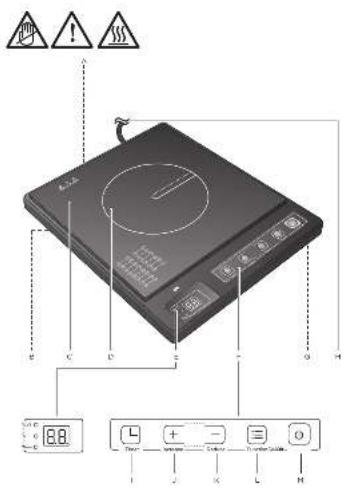
COMPONENTS
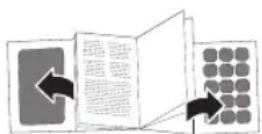
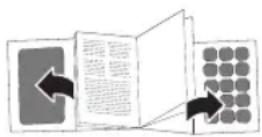
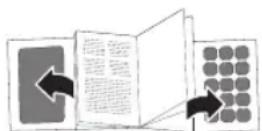
Fold out front and rear page for product illustrations.
A. Air inlet (not illustrated)
B. Air outlets (not illustrated)
C. Cooking plate
D.Cooking zone
E. Display with mode indicators
F. Control panel
G. Non-slip feet (bottom of appliance, not illustrated)
H. Power cord with plug
- Timer button
J.Increase ^+ button
K. Reduce - button
L. Function button (Power / Temperature)
M. On/Off standby button
BEFORE FIRST TIME USE
Clean the appliance (Cleaning and care).
- Due to the manufacturing process, the appliance may emit a slight burning odour when switched on for the first time. This is normal and does not indicate any defect or hazard.
OPERATION
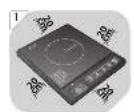
1 Leave at least 20~cm of distance to heat-sensitive areas and appliances around the appliance.
DO NOT operate the product on plastic table cloth or paper.
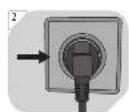
2 Connect with plug with a suitable wall outlet. An audio signal sounds. The display lights up.
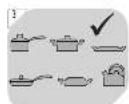
Place suitable cookware on the cooking field.
Suitable: Flat pots or pans made from (stainless) steel, die-cast or enamelled iron (diameter 0 to 22cm ).
| Recommended types and sizes of cookware |
| Material Cookware with a bottom made of iron or magnetic stainless steel. |
| Shape Cookware with a flat bottom. |
| Size Cookware with a bottom diameter of 10 to 22 cm. |
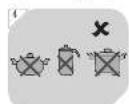
4 Not suitable: Unstable or easy-to-tilt cookware. Pots or pans made from ceramic, glass, aluminium or magnetised stainless steel (diameter smaller than 10cm or larger than 22cm ).
| Unsuitable cookware |
| Material Cookware made of ceramic, glass, aluminium, copper. |
| Shape Cookware with a non-flat bottom (i.e. rounded). |
| Size Cookware with a bottom diameter of < 10 or > 22 cm. |
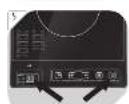
5 Press the On/Off button. Display: .
Use the Function button to select a cooking mode ( following chapters).
Note: If no button is pressed within 1 minute, the appliance will change to standby mode.
Cooking power
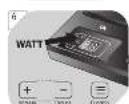
6 Press the Function button repeatedly until the light indicator Watt lights up. Use the Increase +/Reduce - buttons to set your desired cooking power:
| Display | Power |
| P1 | 400 W |
| P2 | 600 W |
| P3 | 800 W |
| P4 | 1000 W |
| Display | Power |
| P5 | 1200 W |
| P6 | 1400 W |
| P7 | 1600 W |
| P8* | 1800 W |
*: Default setting
Cooking temperature
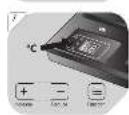
7 Press the Function button repeatedly until the light indicator ^ lights up. Use the Increase + Reduce - buttons to set your desired cooking temperature:
| Display Temperature | |
| H1 60°C | |
| H2 100°C | |
| H3 140°C |
| Display Temperature | |
| H4 180 °C | |
| H5 220 °C | |
| H6 * 240 °C |
*: Default setting
Recommended settings for different cooking styles
| Cooking style mode Cooking | time (minutes) Power setting | /Watt |
| Fry 120 400 to1800 W | ||
| Hot pot 120 600 to1800 W | ||
| Water 20 400 to1800 W | ||
| Steam/Stew 60 400 to1800 W | ||
| Roast 120 400 to 800 W |
Cooking time
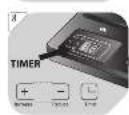
Press the Timer button. Use the Increase +/Reduce - buttons to steplessly set the cooking time:
| Display (cooking time in minutes) | |
| 01 | Min. cooking time |
| 10 | Default setting |
| 99 | Max. cooking time |
- When the time has elapsed, the induction cooker turns off automatically.
Notes:
- The active cooking modes (Watt, °C and/or Timer) are flashing alternately.
- If no button is pressed within 2 hours, the appliance will switch off automatically.
After use
Switching off: Press the On/Off button. the display goes off. Disconnect the appliance from power.
Unplug the appliance after the fan stops working.
TROUBLESHOOTING
| Problem / Error code display | Cause | Solution |
| Appliance does not heat up. Display: EQ | • Cookware not placed / not placed correctly on cooking field. | • Only place suitable cookware onto the appliance, in the middle of the cooking field. |
| Continuous audio signal (approx. 15 seconds). | • Cookware not suitable. | • Refer to → illustrations 3 and 4 and to → sub-chapter Recommended types and sizes of cookware. |
| Display: E1/E2 | The appliance is damaged or is malfunctioning. | Return the appliance to your authorized service agent. |
EN
| Problem / Error code display | Cause Solution | |
| Display: EA The power supply voltage is either too high or too low. | Switch off the appliance. Only use again when standard power supply is available again. | |
| Appliance does not heat up. | The cooking plate or cookware temperature is too high. | Let the cooking plate or cookware cool down for a while. |
| Display: ES | ||
| Display: EA The inner temperature of the appliance is too high. | Check if the ventilation slots are covered. The appliance will start working again after it has cooled. |
CLEANING AND CARE
Warning! Before cleaning, switch off the appliance and disconnect it from the electrical outlet and let it cool completely.
Warning! Never immerse the appliance in water or other liquids.
- Clean the appliance with a soft, slightly damp cloth. Make sure that no moisture is entering the appliance during cleaning.
- Ceramic cooking field and user panel: Use a soft cloth to wipe off lightly soiled areas. A neutral cleaning agent can be used in conjunction with a soft cloth if the cooking area is smeared with cooking oil. Wipe off the remainder of the cleaning agent with a moist, soft cloth.
- Use a cotton bud to remove dust from ventilation inlets/outlets. An old toothbrush and oven cleaning agent comes in handy to remove oil spills from the housing. Dry the appliance with a soft cloth afterwards.
- Never use corrosive detergents, wire brushes, abrasive scourers, metal or sharp implements to clean your appliance.
- Dry the appliance thoroughly after cleaning.
Storage
- Before storage, always make sure the appliance has already been disconnected from the electrical outlet and cooled completely.
- Store the appliance in a cool, dry location, away from children and pets, preferably in its original package.
SPECIFICATIONS
Rated voltage: 220 - 240V ,50Hz
Rated power: 1800 W
Protection class: Class II
DISPOSAL
The crossed-out wheeled bin logo requires the separate collection of waste electric and electronic equipment (WEEE). Electric and electronic equipment may contain dangerous and hazardous substances. Do not dispose of this appliance as unsorted municipal waste. Return it to a designated collection point for the recycling of WEEE. By doing so, you will help to conserve resources and protect the environment. Contact your retailer or local authorities for more information.
FELICIDADES
I. Bouton Timer
J. Bouton Increase +
K. Bouton Reduce -
L. Bouton Function (Puisance/Temperature)
M. Bouton de veille On/Off
AVANT LA PREMIÈRE UTILISATION
M. On/Off stand-by knop