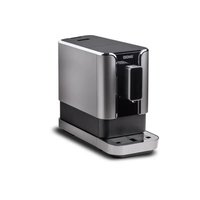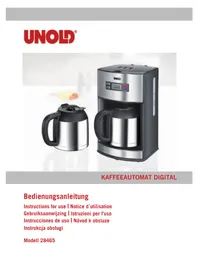
Digital 28465 - Coffee machine UNOLD - Free user manual and instructions
Find the device manual for free Digital 28465 UNOLD in PDF.



Frequently Asked Questions - Digital 28465 UNOLD
User questions about Digital 28465 UNOLD
0 question about this device. Answer the ones you know or ask your own.
Ask a new question about this device
Download the instructions for your Coffee machine in PDF format for free! Find your manual Digital 28465 - UNOLD and take your electronic device back in hand. On this page are published all the documents necessary for the use of your device. Digital 28465 by UNOLD.
USER MANUAL Digital 28465 UNOLD
Instructions for use Model 28465
Technical Specifications. 19
Explanation of symbols. 19
Important Safeguards. 19
Tips for perfect coffee enjoyment 22
Before using the appliance the first time....22
Setting the time 23
Brewing coffee without the timer function..23
Brewing coffee with the timer function ....24
Cleaning and Care 25
Dscaling. 25
Guarantee Conditions 26
Waste Disposal /
Environmental Protection 26
Service 17
Grosse (B/T/H): Ca. 24,0 x 17,0 x 37,4 cm (B/T/H)
E-Mail office@esc-service.at
SCHWEIZ
MENAGROS SA
Route der Servion
CH-1083 Mezières
Telefon +41 (0)21 90301-15
Telefax +41 (0) 21 9 03 01-11
E-Mail info@menagros.ch
Internet www.menagros.ch
POLEN
"Quadra-net" Sp. zo.o.
Skadowa 5
61-888 Poznan Skadowa 5
Internet www.quadra-net.pl
TSCHECHIEN
befree.cz s.r.o.
Skroupova 150
537 01 Chrudim
Telefon +420 464601881
Pot: Thermo jar made of non-breakable double walled stainless steel
Volume: 1.2 litres = approx. 10 cups
Filter size: Permanent filter, optionally paper filter size 1 x 4
Dimensions: Approx. 24,0 × 17,0 × 37,4 cm (B/T/H)
Weight: Approx. 2,73 kg
Power cord
length: Approx. 90 cm
Features: Digital display, timer, pre-programmable up to 24 hours, clock function, integrated water tank, detachable filter support with permanent filter and drip-stop
Accessories: 1 additional heat-insulated jar, measuring spoon instruction manual, permanent filter
Equipment features, technology, colours and design are subject to change without notice. Errors and omissions excepted
EXPLANATION OF SYMBOLS

This symbol denotes a possible hazard which could cause injury or damage to the appliance.

This symbol indicates a potential burning hazard. Please be especially careful at all times here.
IMPORTANT SAFEGUARDS
Please read the following instructions and keep them on hand for later reference.
- This appliance can be used by children aged from 8 years and above and persons with reduced physical, sensory or mental capabilities or lack of experience and knowledge if they have been given super
vision or instruction concerning use of the applicance in a safe way and understand the hazards involved. Children shall not play with the appliance. Cleaning and user maintenance shall not be made by children without supervision.

- Children of less than 3 years should be kept away unless continuously supervised.
- Children aged from 3 years and less than 8 years shall only swith on/off the appliance provided that it has been placed or installed in its intended normal operating position and they have been given supervision or instruction concerning use of the appliance in a safe way and understand the hazards involved. Children aged from 3 years and less than 8 years shall not plug in, regulate and clean the appliance or perform user maintenance.
- CAUTION - Some parts of this product can become very hot and cause burns. Particular attention has to be given where children and vulnerable people are present.
- Children should be supervised in order to ensure that they do not play with the appliance.
- Keep the appliance out of the reach of children.
- Connect appliance only to an AC power supply with voltage corresponding to the voltage on the rating plate.
- Do not operate this appliance with an external timer or remote control system.
-
For reasons of electrical safety, never immerse the appliance or the power cord in water or other liquids.
-
For reasons of electrical safety, do not clean the appliance in the dishwasher.
- The switch and power cord should never come into contact with water or other liquids. In case this ever happens, all parts must be completely dry before operating the appliance again.
- Never touch the appliance or power cord with wet hands.
- This appliance is intended to be used in household and similar applications such as:
staff kitchen areas in shops, offices and other working environments;
farm houses;
by client in hotels, motels and other working environments;
bed and breakfast type environments.
- For safety reasons, never place the appliance on hot surfaces, a metal tray or a wet surface.
- Do not place the appliance or power cord near open flames during operation.
- Always use the coffeemaker on a level, uncluttered and heatresistant surface.
- The appliance is approved for household use only and may be used only for brewing coffee, never for heating milk or other liquids or keeping them warm.
- Make sure that the power cord does not hang over the
edge of the countertop or table, since this can cause accidents, for example if small children pull on the cord.
- Route the power cord so that there is no possibility of the cord being pulled or tripped over.
- Do not wrap the power cord around the appliance and avoid kinking of the power cord to prevent damage.
- Use the coffeemaker only indoors.
- When in use, never cover the coffeemaker, since this could cause the appliance to overheat.
- Only use fresh, cold water to brew coffee. Fill the water container at least up to the lowest marking (4 cups) and do not overfill.
- Do not switch on the appliance until after you have filled the water tank with water.
- In case of repeated use, allow the appliance to cool off at least 5 minutes between use.
- Never use the coffee pot in the microwave; it is not suitable for such use.
-
Do not move the appliance as long as it is in operation, to prevent injuries.
-
Make sure that all users, especially children, are aware of the danger of injury from emerging steam and hot splashing water - danger of burns!
- Do not use the appliance with accessories of other manufacturers or brands, to prevent damage.
- Unplug the appliance from the power supply after use and prior to cleaning. Never leave the appliance unattended when it is plugged in to the power supply.
- Check the appliance, the plug and the power cord regularly for wear or damage. In case of damage to the power cord or other parts, please send the appliance or the power cord for inspection and repair to our after sales service.
- Unauthorized repairs can result in serious risks to the user and void the warranty.
- If the supply cord is damaged, it must be replaced by the manufacturer or its service agent or a similarly qualified person in order to avoid a hazard.


Caution! During and after operation, the appliance is very hot!
Never open the housing of the appliance. This can result in electric shock.
The manufacturer will not be liable in the event of incorrect assembly, improper or incorrect use or if repairs are carried out by unauthorized third parties.
TIPS FOR PERFECT COFFEE ENJOYMENT
- Make sure that your coffeemaker is clean and descaled at all times. (see chapter Cleaning and descaling).
- Keep coffee beans and ground coffee in a tightly closed can and store in a cool, dark place, but not in the refrigerator.
-
For optimal coffee enjoyment we recommend grinding the coffee beans right before use.
-
Use only fresh water.
- Coffee tastes best freshly brewed. If coffee is kept warm too long, it can become bitter.
- Tip: If you rinse out the pot with hot water before brewing coffee, the coffee will be kept warm for a longer time.
BEFORE USING THE APPLIANCE THE FIRST TIME
Before brewing coffee for the first time, please run one or two brewing cycles with water only to remove any residue from the manufacturing process. We also recommend running one brewing cycle without coffee if the appliance has not been in use for an extended period.
- Remove all packaging materials and any transport safety devices.
- Check to make sure that all accessories are present.
- Clean all parts with a damp cloth, as described in the chapter "Cleaning and care".
- Check to make sure that all parts are assembled correctly and the appliance is stable.
- Connect the appliance via the power cord to the power supply (230V, 50Hz)
- Open the lid of the appliance.
- Fill the water tank with clear, cold water to the "Max" marking. Please note that the water tank has a small hole at the top, for safety reasons. The water tank cannot
be filled with more than the maximum capacity of the coffee pot, so it cannot overflow during the brewing process.
- Close the lid.
- Pace the pot with the lid closed on the plate.
- Press the "EIN/AUS" button.
- The indicator lamp in the "EIN/AUS" button lights up red and the brewing cycle begins.
- When the brewing cycle is complete, switch the appliance off by pressing the "EIN/AUS" button two times consecutively. If you do not push the „EIN/AUS“ button twice after the brewing process has finished, the appliance will
be automatically turned off after 5 minutes.
- Pour out the water from the first brewing cycle.
SETTING THE TIME
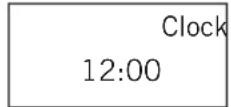
- As soon as the coffeemaker is connected to the power supply the display shows 12:00.
- Press the "PROG" button.
- The display shows "CLOCK" at the upper right.
-
Now press the "STD" and "MIN" buttons until the current time is set.
-
Remove the pot and the filter.
-
The appliance is now ready for operation and you can start brewing coffee.
-
After about 10 seconds with no input the appliance returns to the initial state; you now see the current time and can start brewing coffee.
- In case of a power outage lasting longer than about 10 seconds the time is not saved, which means you have to reset the time whenever the appliance has been unplugged.
BREWING COFFEE WITHOUT THE TIMER FUNCTION
- Prepare the appliance as described in the section "Before using the appliance the first time".
- Open the lid of the appliance.
- Fill the water tank with clear, cold water for the number of cups you want to brew, but not past the "Max" marking.
- Check to make sure that the filter is correctly inserted in the filter holder. The filter can only be inserted one way in the filter holder.
- Put the required quantity of ground coffee in the filter. Make the coffee according to your personal preference; we recommend 5 to 7 grams of medium-fine ground coffee per cup. Coffee that is ground too fine can clog the pores in the
filter, which can cause the coffeemaker to overflow.
- Close the lid of the appliance.
- Pace the pot with the lid closed on the plate.
- Press the "EIN/AUS" button.
- The indicator lamp in the "EIN/AUS" button lights up red and the brewing cycle begins.
- When the brewing cycle is complete, switch the appliance off by pressing the "EIN/AUS" button two times consecutively. If you do not push the „EIN/AUS“ button twice after the brewing process has finished, the appliance will be automatically turned off after 5 minutes.
- You can interrupt the brewing cycle any time by pressing the
button "EIN/AUS" two times consecutively. The indicator lamp in the button lights up blue for about 10 seconds. As soon as you press the "EIN/AUS" button again, the brewing cycle resumes.
- You can also remove the pot to pour coffee any time during the
brewing cycle. However, the pot must be put back on the plate within 30 seconds, since otherwise the filter could overflow.
- Remove the permanent filter and dispose of the coffee grounds.
BREWING COFFEE WITH THE TIMER FUNCTION
- First, make sure that the appliance has been set to the correct time; otherwise, the timer cannot function correctly (chapter "Setting the time").
- Prepare the appliance as described in the section "Brewing Coffee without the timer Funktion", step 1 - 7.
- Press the "PROG" button - the current time is displayed.
- Press the "PROG" button again. The display shows "Timer" at the upper left.
Timer 15:00
- Now press the "STD" and "MIN" buttons until the desired start time for the brewing cycle is set. After about 10 seconds with no input, the appliance returns to the initial setting.
- Then press the "PROG" button until the words "Clock" and "Timer" no longer appear on the display. The indicator lamp in the "PROG" button lights up for about 10 seconds and then goes out again.
- Press the "EIN/AUS" button two times consecutively. The indicator
lamp in the button lights up blue and blinks.
- If you wish to check the set time, press the "PROG" button again. The display shows "TIMER" and the set time at the upper left. You can now change the time if you wish.
- When the set time is reached, the brewing cycle begins.
- When the brewing cycle is complete, switch the appliance off by pressing the "EIN/AUS" button two times consecutively.
- You can interrupt the brewing cycle any time by pressing the button "EIN/AUS" two times consecutively. The indicator lamp in the button lights up blue for about 10 seconds. As soon as you press the "EIN/AUS" button again, the brewing cycle resumes.
- You can also remove the pot to pour coffee any time during the brewing cycle. However, the pot must be put back on the plate within 30 seconds, since otherwise the filter could overflow.
- Remove the permanent filter and dispose of the coffee grounds.
CLEANING AND CARE

Before cleaning the appliance, switch it off and disconnect the power cord from the socket.

Allow the appliance to cool down.
- Do not immerse the appliance and power cord in water or other liquids or wash them in the dishwasher.
- Open the lid of the appliance and remove the permanent filter. Dis- pose of the coffee grounds.
- Condensation can collect above the filter. After brewing coffee,
wipe off the bottom of the lid with a dry cloth.
- Wipe off the housing and the plate with a damp cloth and a little dishwashing detergent. Do not use any abrasive scouring agents, steel wool, metal objects, hot cleaning agents or disinfectants, since they can damage the appliance.
- Clean the pot, its lid, the filter holder and filter in water with a little dishwashing detergent added.
- The appliance must be completely dry before you use it again.
DESCALING
- Regular descending allows the coffeemaker to operate more efficiently and prolongs the service life.
- If the appliance switches off before the end of the warming period or if water remains in the water tank after brewing, the appliance has to be descaled
- Use a commercially available descaling product, following the instructions on the package.
- Fill the water tank to the MAX marking with the descending solution.
- You can also use citric acid instead. Use 25 to 50g of citric acid for one liter of water.
-
Place the coffee pot on the plate.
-
Now press the "EIN/AUS" button and let about one-third of the water run through.
- Switch off the appliance by pressing the "EIN/AUS" button twice and allow the descending solution to work for about 15 to 30 minutes. In case of heavy scaling, you can leave the solution in the appliance overnight.
- Then press the "EIN/AUS" button again and let the rest of the descending solution run through.
- Pour out the descending solution and run clear water through the appliance at least two times.
GUARANTEE CONDITIONS
We grant a 24 months guarantee, and in case of commercial use a 12 months guarantee, starting from the date of purchase for any damage demonstrably due to manufacturing defects and when the appliance has been used according to its intended use. Within the warranty period we will remedy defective materials or workmanship through repair or replacement, at our option. Our warranty terms apply only to appliances sold in Germany and Austria. For other countries, please contact the responsible importer. In the event of a claim for remedy of defects, please send the appliance to our after sales service, properly packaged and postage paid, together with a copy of the automatically generated sales receipt, which must show the date of purchase, and a description of the defect. If the defect is covered by the warranty, the customer will be reimbursed for the shipping costs only in Germany and Austria. The warranty does not cover damage from normal wear, improper handling and failure to comply with the maintenance and care instructions. The warranty is void if repairs or modifications are made to the appliance by third parties. Any claims of the end consumer vis-à-vis the retailer are not limited by this warranty.
WASTE DISPOSAL / ENVIRONMENTAL PROTECTION
Our appliances are produced on a high quality level for a long lifetime. Regular maintenance and expert repairs by our after-sales service can extend the useful life of the appliance. If an appliance is defective and repair is not possible we ask you to follow the following instructions for disposal.
Do not dispose this appliance together with your standard household waste. Please bring this product to an approved collection point for recycling of electric and electronic products.
By separate collection and disposal of waste products you help to protect natural resources and ensure, that the product is disposed in an adequate way to protect health and environment.

The instruction booklet is also available for download: www.unold.de
NOTICE D'UTILISATION MODELE 28465
SPÉCIFICATION TECHNIQUE
Puissance: 1.000 W, 230 V~, 50 Hz
CONDITIONS DE GARANTIE
Ingombro: 24,0 x 17,0 x 37,4 cm (B/T/H) circa
Peso: 2,73 kg circa
Velikost: Cca. 24,0 x 17,0 x 37,4 cm (B/T/H)