TX800 - Treadmills REX - Free user manual and instructions
Find the device manual for free TX800 REX in PDF.
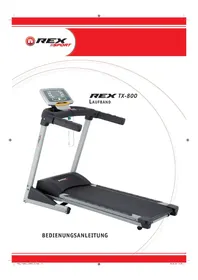


| Product type | Electric treadmill |
| Brand | Rex |
| Model | TX800 |
| Dimensions (L x W x H) | approx. 178 x 80 x 138 cm |
| Weight | approx. 80 kg |
| Power supply | 220-240 V ~ 50/60 Hz |
| Maximum continuous output power | 1.3 kW |
| Maximum power | 2.2 kW |
| Running speed | 1 - 16 km/h |
| Incline adjustment | 12 levels (1.25° - 7.5°) |
| Maximum user weight | 130 kg |
| Usage class | HB (domestic) |
| Training programs | 24 preset programs + heart rate program H1 + manual + settings |
| Display | Time, speed, distance, calories, heart rate, incline, program |
| Heart rate measurement | Hand grip sensors (HR receiver optional) |
| Safety | Safety key with emergency stop clip |
| Folding and transport | Folding system with lock and transport wheels |
| Maintenance | Deck lubrication, belt centering and tension |
| Warranty | 2 years |
| Use | Domestic only |
Frequently Asked Questions - TX800 REX
User questions about TX800 REX
0 question about this device. Answer the ones you know or ask your own.
Ask a new question about this device
Download the instructions for your Treadmills in PDF format for free! Find your manual TX800 - REX and take your electronic device back in hand. On this page are published all the documents necessary for the use of your device. TX800 by REX.
USER MANUAL TX800 REX
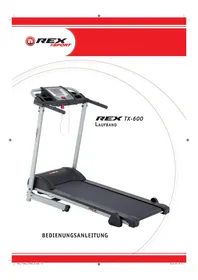
Model: TX-600 Treadmill
TX-800 Treadmill
Preface GB-29 Identification of important notes GB-29 Important safety instructions GB-30 Exploded view GB-32 Parts list GB-33 Assembly GB-36 Folding mechanism/Transport GB-39
Exercise 10.3.2. (Continued)
Exercise Notes 2013 A Intensity GB-40 B Frequency GB-40 C Motivation GB-40 D Organisation of workout sessions GB-40 1. Warming up phase GB-40 2. Workout phase GB-41 3. Cooling down phase GB-41 E Muscle development GB-41 F Weight loss GB-41
Operation GB-42
Default settings GB-42 Safety key GB-42 Button functions GB-42 Display information GB-43 Exercise 10.3.2 (Continued) AP1-P24/H1 GB-43 B Training parameters GB-46 C Manual GB-46
Care/Maintenance GB-47 Technical data GB-49 Disposal GB-49 Warranty GB-51
Preface

Congratulations on your purchase of our fitness machine. You have purchased a really excellent product and will certainly enjoy using it.
To avoid injuring yourself or damaging the machine, please read the operating instructions carefully
before using the machine for the first time. Keep the operating instructions in a safe place.
Identification of important notes
Particularly important notes are identified in the operating instructions as follows:

This warning alerts you to possible hazards to your health or life or that of other persons which may occur with the handling or operation of this machine.
This information provides you with additional advice and tips.

This note alerts you to possible hazards for your machine.
Important safety instructions

Keep the operating instructions in a safe place. Make sure they are included in case you sell or pass the fitness machine on to someone else.

It is important for you to read through the instructions completely before assembling and using the machine.
The safe and highly productive use can only be achieved if the machine is properly assembled, maintained and used correctly. It is your obligation to inform all users of this machine about the hazards and safety precautions before use.
The machine complies with DIN EN 957-1/6 and is suitable only for private home use and may not be used commercially or for therapeutic purposes.
Use the machine only in dry indoor rooms at room temperature. Protect it from moisture, dust/dirt and extreme temperature fluctuations.
Only set up the machine on a solid, level surface and use a protective cover for the floor/carpet. Remove all sharp-edged objects from the surroundings and leave a free space of at least 0.5 m around the machine.
Make sure to prevent liquids (including perspiration!) from leaking into the inside of the machine or in the fitness computer.
Use the machine only as specified! If you find defective components during the assembly or the inspection, or if you hear unusual noises during use, stop your training immediately. Do not use the machine until the problem has been remedied.
Before using the exercise machine, check to see if all screws and nuts have been securely fastened and tightened.
The safety level of the machine can only be maintained if it is regularly checked for damage and wear. Have professionals carry out repairs and use only original spare parts.
Keep the machine away from children and house pets. It is only suitable for adults.
The machine is not designed for use by persons with restricted physical, sensory or mental abilities or lack of experience and/or knowledge unless they are supervised by a person responsible for their safety or have received instructions on how to use the machine from such a person.
The approved maximum weight of the user may not exceed 130 kg.
Before you begin training, consult your doctor to determine whether training could represent a risk to your health. Your doctor's advice is imperative if you are taking medication that affects your heart rate, blood pressure or cholesterol level.
Be aware of your body's signals! Incorrect or excessive training can impair your health or even damage it. Stop if any of the following symptoms occur: pain, tightness of chest, irregular heartbeat, shortness of breath, feelings of lightheadedness, dizziness or nausea. If only one of these conditions occurs, consult your doctor before continuing your exercise programme.
Wear suitable clothing when working out! Do not wear loose clothing with which you could get caught in the machine or which could restrict or hinder your movements. Always wear sturdy footwear during your workout.
The safety key is used to immediately stop the treadmill in case someone falls, or if there is an emergency situation. Therefore, never use the treadmill without carefully attaching the safety clip to your clothing. Before you begin your workout, make sure the safety clip cannot detach itself from your clothing unintentionally.
In an emergency situation (e.g. sudden dizziness, pain, etc.), step off from the exercise machine as follows:
- Hold on to the side handgrips.
- Step onto the side bases.
- Remove the safety key.
Never jump onto a running treadmill!
DANGER
Keep the operating instructions in a safe place. Make sure they are included in case you sell or pass the fitness machine on to someone else.
WARNING
Let the belt fully come to stand still before you descend.
Shut off the fitness machine after the workout, or when cleaning or maintaining the device and disconnect the mains plug from the power outlet.
Use caution when lifting and moving the machine to, e.g., prevent injuries to your back. Always use lifting techniques if possible, or get someone to help you.
Exploded view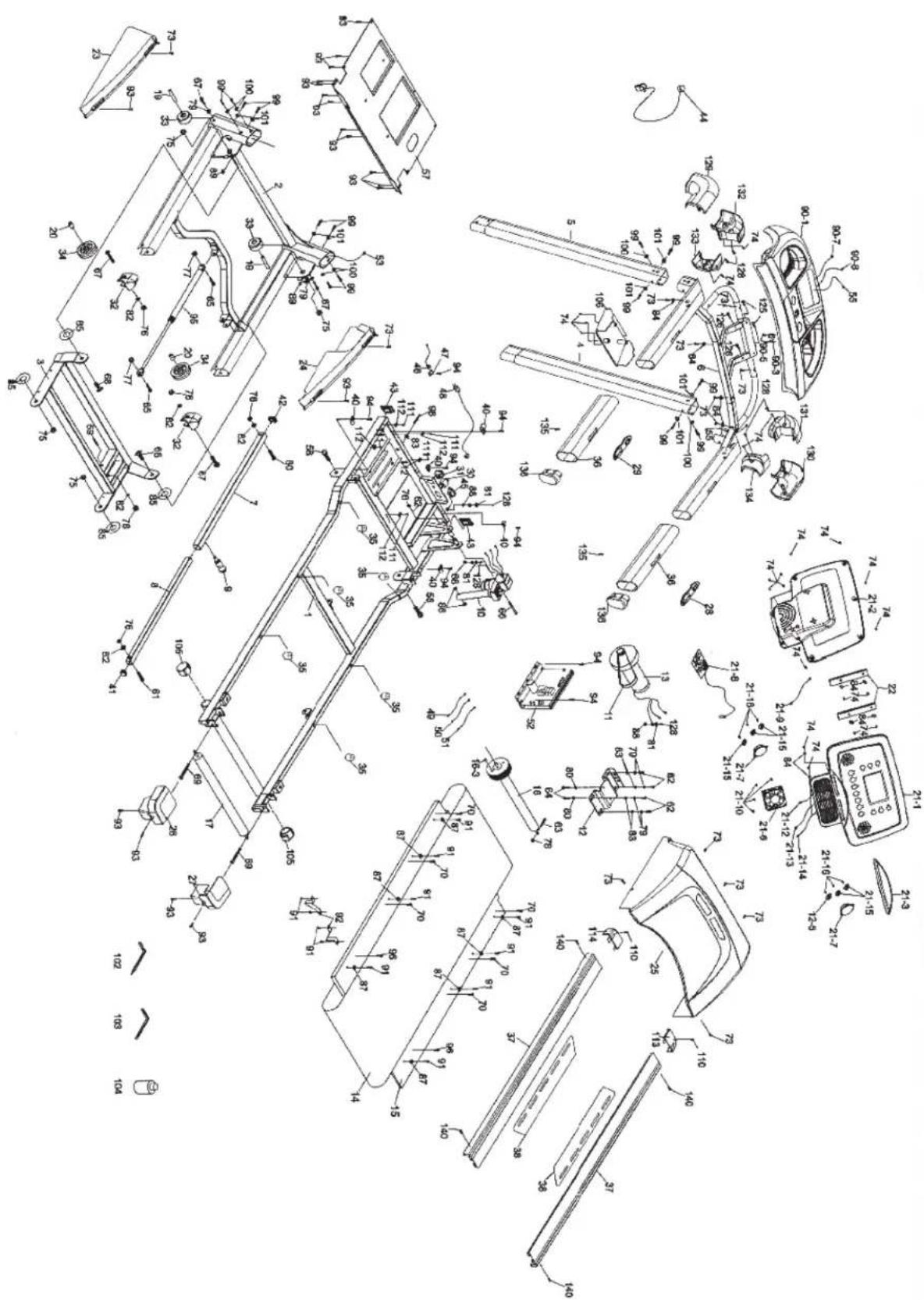
Parts list
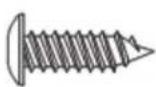
74.99.
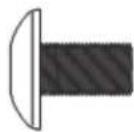
100.
101.
125.
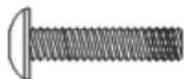
126.
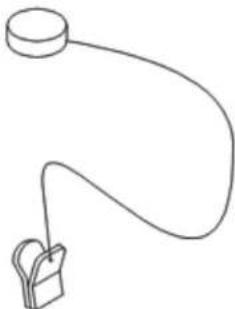
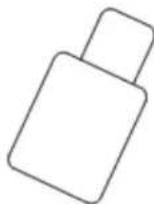
104.
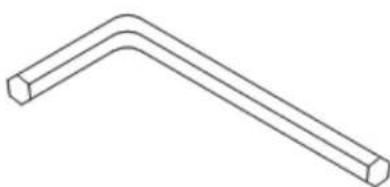
| No. Name Size Quantity | ||
| 1 Main frame 1 | ||
| 2 Base frame 1 | ||
| 3 Incline angle 1 | ||
| 4 Bar right 1 | ||
| 5 Bar left 1 | ||
| 6 Console 1 | ||
| 7 Outer cable 1 | ||
| 8 Inner cable 1 |
| No. Name | Size Quantity | ||
| 9 Locking knob 1 | |||
| 10 Pitch motor 1 | |||
| 11 V-belt 1 | |||
| 12 Motor mount 1 | |||
| 13 Motor 1 | |||
| 14 Walking belt 1 | |||
| 15 Deck 1 | |||
| 16 Front roller 1 | |||
| 16~3 Magnet | 1 | ||
| 17 Rear roller | 1 | ||
| 19 Sleeve | 2 | ||
| 20 Sleeve | 2 | ||
| 21 Display | 1 | ||
| 21-1 | Display front side | 1 | |
| 21-2 | Display rear side | 1 | |
| 21-3 | Cover | 1 | |
| 21-6 | Fan | 1 | |
| 21-10 | Sheet metal screw | 3.5 x 32 m/m | 4 |
| 21-12 | Connecting cable display | 150 m/m_12P | 1 |
| 21-13 | Computer cable | 200 m/m_10P | 1 |
| 22 Holder display | 2 | ||
| 23 Cover base frame (L) | 1 | ||
| 24 Cover base frame (R) | 1 | ||
| 25 Motor cover top | 1 | ||
| 26 Rear adjustment base (L) | 1 | ||
| 27 Rear adjustment base (R) | 1 | ||
| 28 Speed/Hand-Pulse complex | 1 | ||
| 29 Incline/Hand-Pulse complex | 1 | ||
| 30 Power switch | 1 | ||
| 31 Switch on/off | 1 | ||
| 32 Plug | 2 | ||
| 33 Transport roll front | 2 | ||
| 34 Transport roll rear | 2 | ||
| 35 Rubber bases | 6 | ||
| 36 Handtip | 2 | ||
| 37 Guard rail | 2 | ||
| 38 Non-skid rubber | 2 | ||
| 40 Motor cover 5 | |||
| 41 Plug | ☐ 21.4 x 21.4 m/m | 1 | |
| 42 Plug | ☐ 25.4 x 25.4 m/m | 1 | |
| 43 Plug | ☐ 20 x 40 m/m | 2 | |
| 44 Safety key | 800 m/m | 1 | |
| 45 Power outlet | 1 | ||
| 46 Cable | 1000 m/m | 1 | |
| 47 Inlet connector | 1 | ||
| 48 Power cable | 1 | ||
| 49 Connecting cable (white) | 20 cm x 764 x 764 | 2 | |
| 50 Connecting cable (black) | 20 cm x 764 x 764 | 1 | |
| 51 Connecting cable (black) | 100 m/m | 1 | |
| 52 Controller | 1 | ||
| 53 Computer cable bar | 1900 m/m | 1 | |
| 55 Computer cable console | 650 m/m | 1 | |
| 57 Floor cover | 1 | ||
| 58 Hexagon head screw | 1/2" x 1" | 2 | |
| 59 Allen screw | 3/8" x 3-3/4" | 1 | |
| 60 Hexagon head screw | 3/8" x 1-3/4" | 1 | |
| 61 Hexagon head screw | 3/8" x 1-1/2" | 1 | |
| 62 Hexagon head screw | 3/8" x 3/4" | 4 | |
| 63 Hexagon head screw | M8 x 60 m/m | 1 | |
| 64 Hexagon head screw | M8 x 12 m/m | 2 | |
| 65 Allen screw | 5/16" x 1" | 2 | |
| 66 Allen screw | 3/8" x 4" | 1 | |
| No. Name Size Quantity | |||
| 67 Countersunk screw 3/8" × 2" 4 | |||
| 68 Screw 1/2" × 28 m/m 2 | |||
| 69 Pin M8 × 3" 2 | |||
| 70 Countersunk screw M6 × 1" 6 | |||
| 73 Screw 5 × 16 m/m 13 | |||
| 74 Sheet metal screw 3.5 × 12 m/m 22 | |||
| 75 Nut 1/2" × 8T | 4 | ||
| 76 Nut 3/8" × 7T | 6 | ||
| 77 Nut 5/16" × 7T | 2 | ||
| 78 Nut M8 × 7T | 1 | ||
| 79 Spring clip 3/8" × 2T | 6 | ||
| 80 Spring clip M8 × 1.5T | 2 | ||
| 81 Spring clip M5 | 3 | ||
| 82 Washer | 3/8" × 19 × 1.5T | 6 | |
| 82 Washer | 3/8" × 19 × 1.5T | 6 | |
| 83 Washer | 3/8" × 25 × 2T | 5 | |
| 84 Washer | ∅ 5 × 13 × 1.0T | 10 | |
| 85 Nylon pinion (B) | ∅ 50 × 0 13 × 3T | 4 | |
| 86 Nylon pinion (A) | ∅ 10 × 0 25 × 3T | 2 | |
| 87 Washer | ∅ 6.5 × 0 25 × 1.5T | 8 | |
| 88 Washer | M5 | 3 | |
| 89 Quick-action nut clip | 5 × 2T | 2 | |
| 90 Beverage holder assembly | 1 | ||
| 90-1 Beverage holder | 1 | ||
| 90-3 Safety switch module | 300 m/m | 1 | |
| 90-5 Sheet metal screw 3 × 10 m/m | 2 | ||
| 90-7 Connecting cable | 250 m/m | 1 | |
| 91 Sheet metal screw 14 × 12 m/m | 2 | ||
| 92 Belt guide | 2 | ||
| 93 Sheet metal screw 5 × 16 m/m 22 | |||
| 94 Sheet metal screw 5 × 19 m/m | 8 | ||
| 95 Cylinder | 1 | ||
| 96 Flat head countersunk screw | M8 × 1" × 1/4" | 2 | |
| 98 Hexagon head screw | 3/8" × 3" | 1 | |
| 99 Hexagon head screw | 5/16" × 1/2" | 14 | |
| 100 Washer | 5/16" × 18 × 1.5T | 6 | |
| 101 Washer | 5/16" × 23 × 1.5T | 8 | |
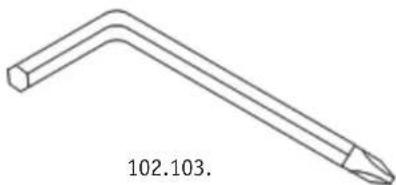
| 102 Allen wrench / Phillips spanner | M5 | 1 | |
| 103 Allen wrench | M6 (66 × 88) | 1 | |
| 104 Lubricant | 1 | ||
| 105 Plug | 2 | ||
| 106 Cover | 1 | ||
| 110 Sheet metal screw 3.5 × 20 m/m | 2 | ||
| 111 Sheet metal screw 3.5 × 16 m/m | 5 | ||
| 112 Cable tie | 5 | ||
| 113 Foot skirting strip (R) | 1 | ||
| 114 Foot skirting strip (L) | 1 | ||
| 125 Phillips screw | M5 × 25 m/m | 2 | |
| 126 Phillips screw | M5 × 35 m/m | 2 | |
| 128 Phillips screw | M5 × 12 m/m | 7 | |
| 129 Outer handlebar covering (L) | 1 | ||
| 130 Outer handlebar covering (R) | 1 | ||
| 131 Lower inner handlebar covering (R) | 1 | ||
| 132 Lower inner handlebar covering (L) | 1 | ||
| 133 Upper inner handlebar covering (L) | 1 | ||
| 134 Upper inner handlebar covering (R) | 1 | ||
| 135 Sheet metal screw 3 × 63 m/m | 2 | ||
| 136 Plug | 2 | ||
| 137 Starter flap | 1 | ||
| 138 Filter | 1 | ||
| 139 Connecting cable motor | 400 m/m | 1 | |
| 140 Sheet metal screw 4 × 19 m/m | 4 | ||
Assembly
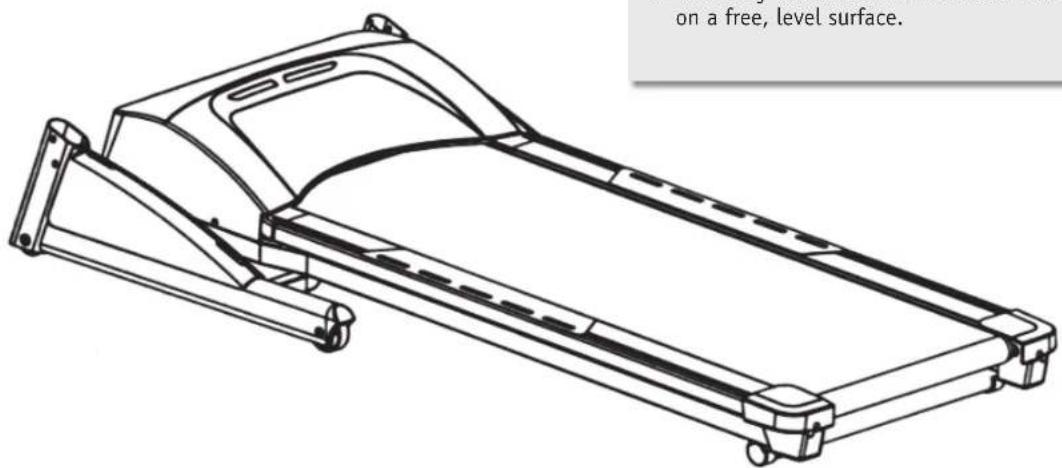
STEP1

- Carefully take the treadmill out of the box and lay it on a free, level surface.
STEP2
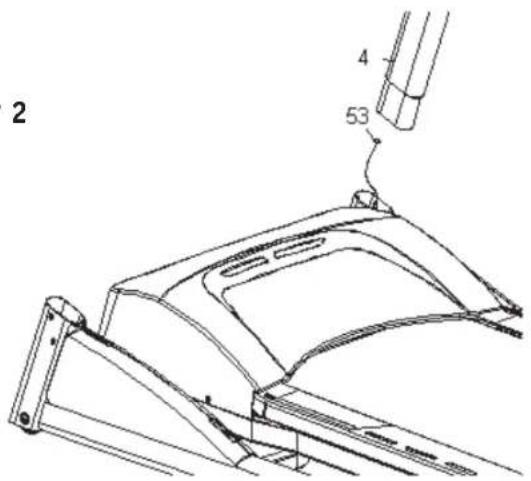

- Connect the lower computer cable (53) to the computer cable of the right bar (4).
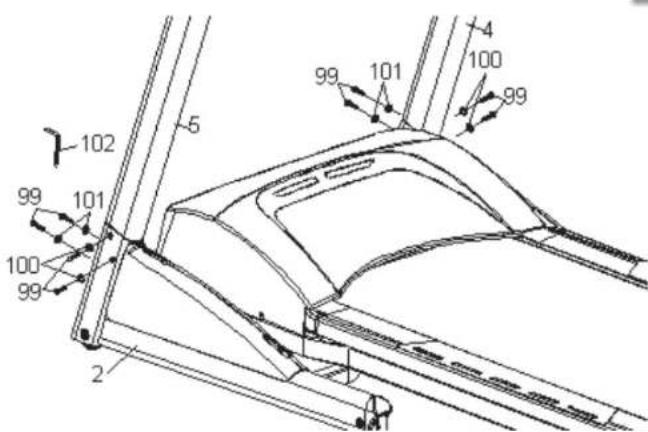
- Guide both bars (L, R / 5, 4) into the base frame (2) and screw together with eight 5/16" x 1/2" screws (99), four 5/16" x 18 x 1.5T washers (100) and four 5/16" x 23 x 1.5T washers (101). Use the supplied Allen key (102) to tighten.
GB-36
Assembly
STEP3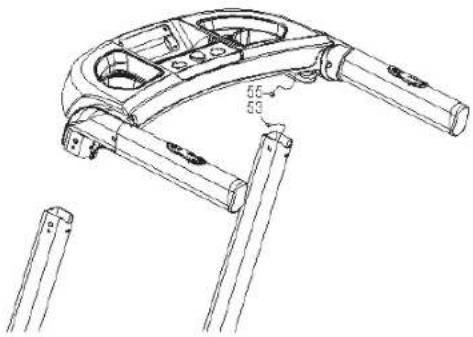

- Connect the computer cable of the console (55) to the computer cable of the bar (53).
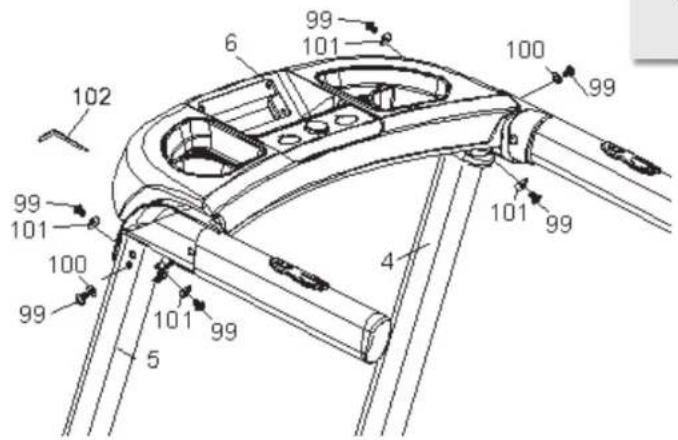
- Then fix both consoles (6) with both bars (L, R / 5, 4) with six 5/16'' x 1/2'' screws (99), two 5/16'' x 18 x 1.5T washers (100) and four 5/16'' x 23 x 1.5T washers (101). Use the supplied Allen key (102) to tighten.
STEP4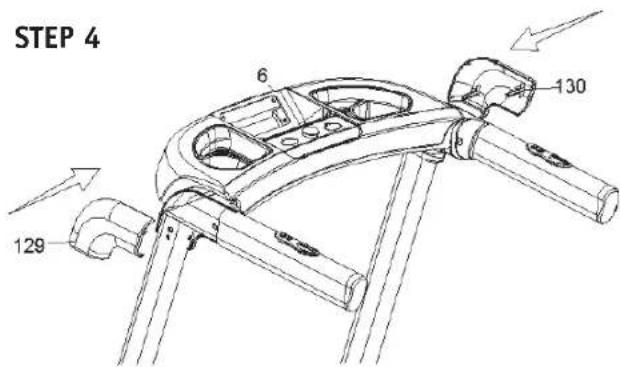

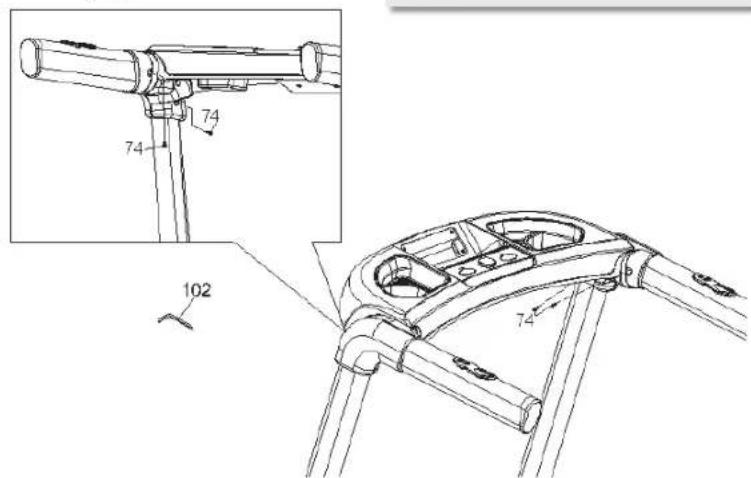
- Assemble the outer handlebar covering (L, R / 129, 130) to the ends of the console (6) with four 3.5 x 12 mm screws (74). Firmly tighten the screws using the supplied tool (102).
Assembly
STEP5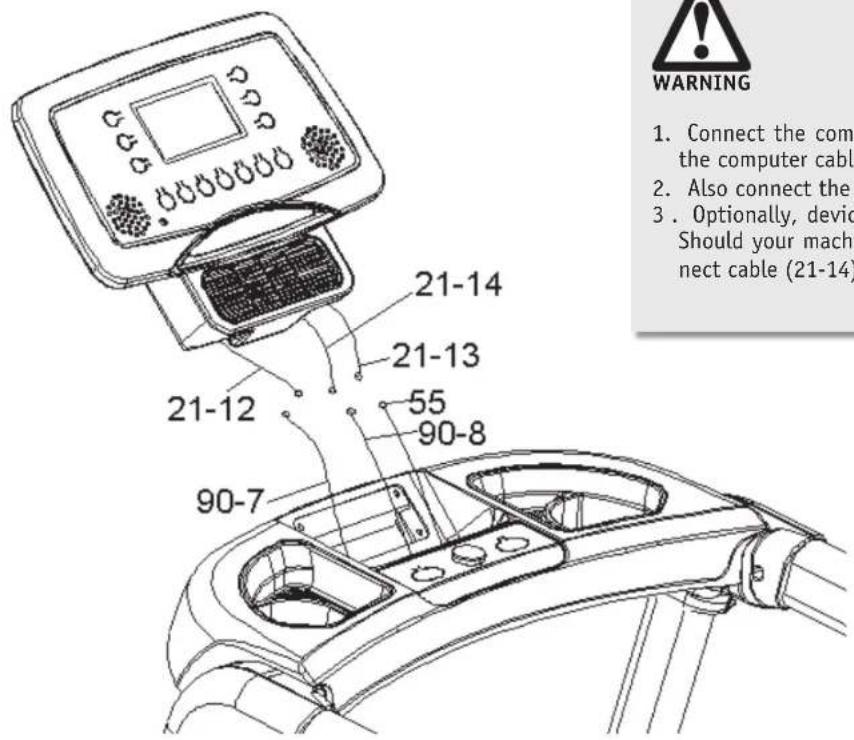

- Connect the computer cable of the console (55) to the computer cable of the display (21-13).
- Also connect the cable (90-7) to (21-12).
- Optionally, devices with an HR receiver are offered. Should your machine have such a device, then connect cable (21-14) to cable (90-8).
STEP6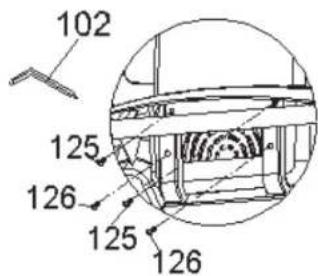

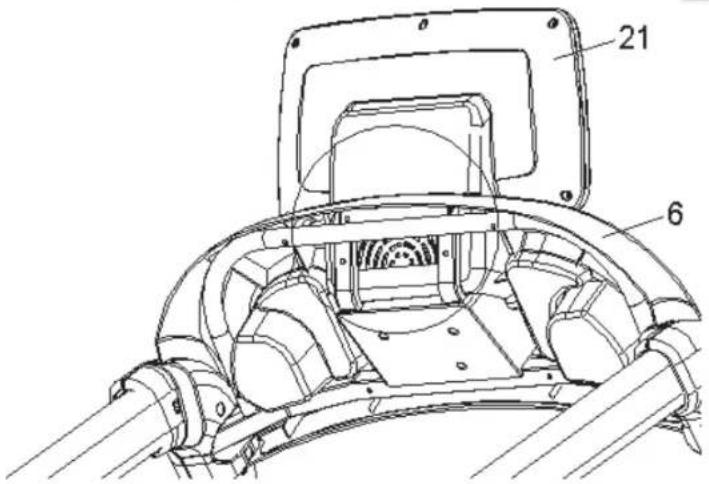
- Carefully push the display (21) into the holder of the console (6) and screw both parts with two M5 x 25 mm screws (125) and two M5 x 35 mm screws (126). Use the supplied tool (102) here as well.
GB-38
Folding mechanism/Transport
Opening out
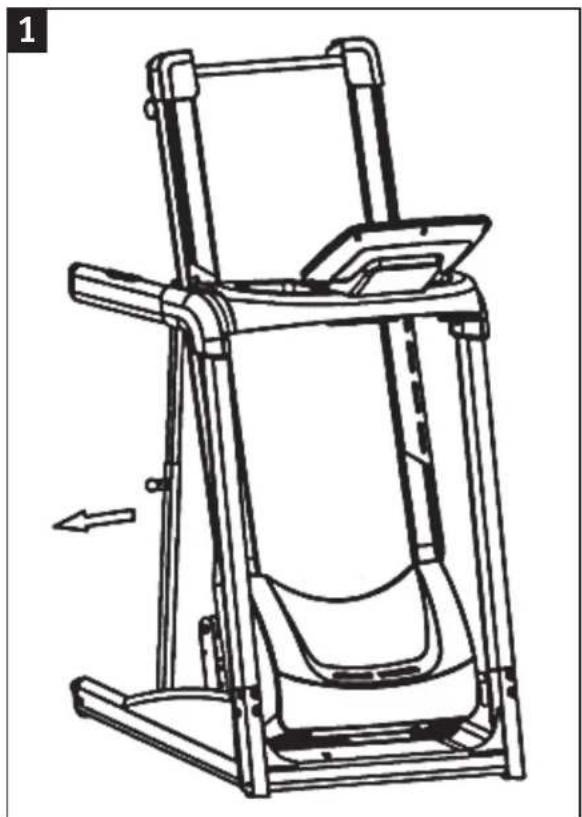
- Stand behind the machine and pull the locking knob (Fig. 1).
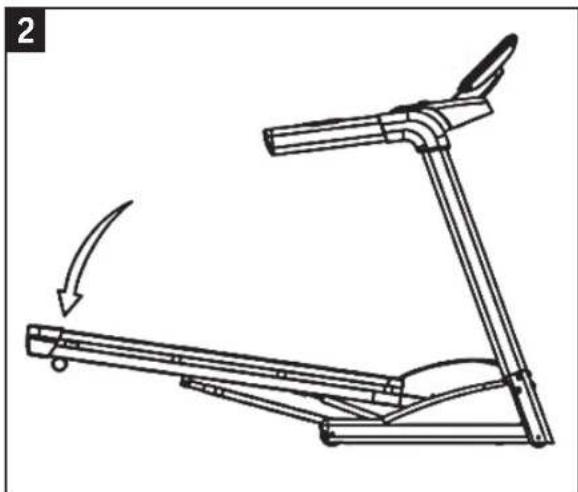
- Slowly lower the treadmill onto the ground (Fig. 2).
Folding together
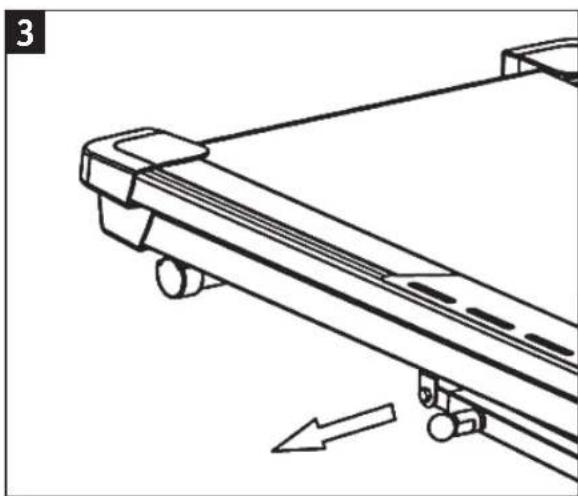
- Pull the locking knob (Fig. 3) with your right hand and with your left hand lift up the treadmill to approx. 30 cm height.
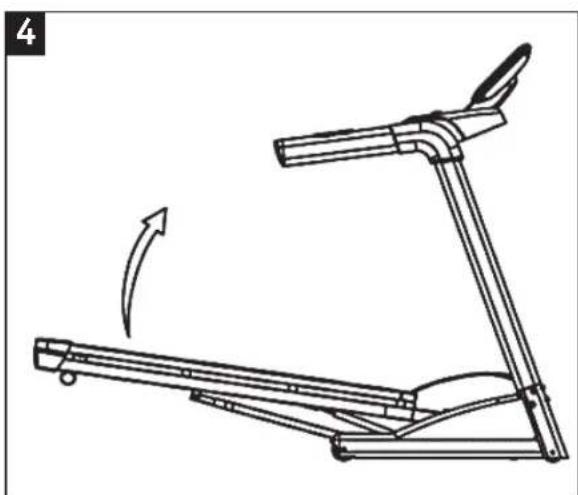
- Now lift the treadmill with both hands until it firmly engages in the locking mechanism (Fig. 4).
Transport
To shift the treadmill, the machine must be first folded together (see point "Folding together"). Make sure that the locking knob is engaged.
Slowly tilt the treadmill back until it stands on the transport rolls. You may now carefully move the device to the desired location. When choosing a suitable location, please observe the safety instructions at the beginning of these operating instructions.
Exercise
Using your fitness machine will provide you with numerous advantages. It will improve your physical fitness, emphasize your muscles, and help you lose weight in conjunction with a calorie-reduced diet.
DESIGNING YOUR WORKOUT/NOTES
To achieve an optimal workout, you should consider several important things regarding the manner (of working out) and organization of your workout before you begin. To improve your health and body, you should consider the following factors when planning your workout:
A Intensity
The workout must be organised in such a way that the physical effort during the workout is higher than your normal effort. But breathlessness or exhaustion may not occur. During an effective workout, your pulse should be between 70% and 85% of your maximum pulse (see also the "Workout Phase" chapter).
During the first few weeks of your workout, your pulse should be at roughly 70% of your maximum pulse and slowly increase to 85% of your maximum pulse in the following weeks and months. The workout requirements could be increased, e.g., by extending the workout duration and/or increasing the levels of difficulty according to your increasing condition. The following resources can help you to check your pulse rate:
a) You can feel your pulse rate yourself and count the beats per minute (e.g. at your wrist) -> Measurement of pulse rate by the usual methods. b) You can measure your pulse with the sensor surfaces attached to the handle. c) You can also determine your pulse rate using specific calibrated pulse measuring devices.
Pulse measurement by sensor is only an orientation, as movement, friction, perspiration etc. can cause deviations from the actual pulse. The pulse beat related electrodermal effect of some people is so low that the result is insufficient for accurate pulse measurement.
B Frequency
Experts recommend 3-5 workout sessions per week, depending on your training goal. Your workout should be accompanied by a balanced and healthy diet. An average adult requires at least 3 workout sessions per week to change their body weight or improve their condition, or 2 workout sessions per week to maintain their current condition.
C Motivation
To successfully complete a training programme, regularity is a very important point. Mental preparation as well as a fixed time period and space per workout session will also contribute to that goal. We recommend you always keep your personal goal in sight and if possible, to workout only when you are in a good mood. Work out continuously so that each day helps you come closer to your training objective.
D Organisation of workout sessions
There are three workout phases that should be done during every workout:
a) Warming up phase b) Workout phase c) Cooling down phase
1. Warming up phase
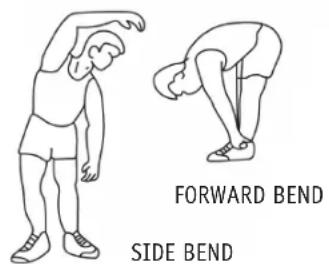
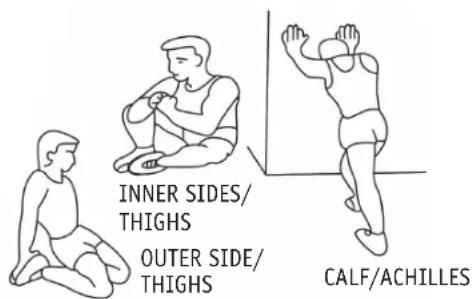
This phase contributes to improved circulation in your body and correct muscle function. It also decreases the risk of cramps and muscle injury. It is therefore recommended to start with a few stretching exercises (see figure) before every workout session. Each exercise should last approx. 30 seconds. Avoid sudden movements and do not strain your muscles. Stop the stretching exercise as soon as it hurts.
2. Workout phase
When working out, make sure you keep an even and consistent speed. Optimal training means choosing a workout that keeps your pulse at a value of approx. 70% - 85% of your maximum pulse (target zone). Use the graphic to read the matching target zone for you.
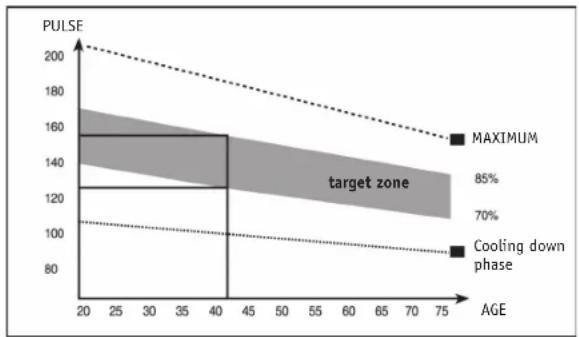
The workout phase should last at least 12 minutes. At the beginning, a workout time of approx. 15-20 minutes is usual.
Once you have reached a higher degree of fitness, you may have to work out longer and harder.
Watch your posture during the workout:
- Keep your torso upright
- Keep your eyes directed forwards
- Movement should occur from your legs
- Do not exercise without holding on! - Your arms are meant to stabilize your body.
- Lift your heels up slightly during the workout just as for the classic cross-country method.
- Change your grip position regularly
3. Cooling down phase
This phase is intended to relax your muscles and your cardiovascular system. To do so, e.g. reduce your speed for approx. 5 minutes. Then repeat the stretching exercises as described in Phase 1. Remember not to make any sudden movements in this phase and do not strain your muscles.
E Muscle development
To develop your muscles with the home exercise machine, you will have to choose a higher workout intensity. You may discover that your fitness is not sufficient enough to keep to the workout programme in its entirety.
In this case, modify your workout plan as follows:
You should work out during the warm up and cool down phase as usual. But at the end of the exercise phase, increase the intensity so that your legs receive a more intense workout. However, if you exceed the target zone of your pulse, you will have to decrease your speed!
F Weight loss
For your body to work correctly, it will need "fuel" just like a motor. The muscles receive oxygen from the cardiovascular system of the body. This oxygen supplies energy to the muscles on the one hand and is also used to burn carbohydrates or fats on the other hand. Due to the chemical composition, the conversion of body fats to energy can only then occur, if you do aerobic training, meaning you have sufficient oxygen while exercising. Anaerobic training ("being breathless") causes oxygen deficiency, which means fat cannot be broken down. The body still has enough oxygen at 50% to 80% of the maximum pulse (maximum pulse = 220 - age) and can achieve the best results in this area regarding fat burning. Fat burning is increased the more often and longer you complete such a workout.
Operation
DEFAULT SETTINGS
Insert the mains plug into a 220/240 V power outlet (observe the safety instructions!) and switch on the fitness machine by using the master switch on the rear side.
SAFETY KEY

Therefore, never use the treadmill without carefully attaching the safety clip to your clothing. Before you begin your workout, make sure the safety clip cannot detach itself from your clothing.
The treadmill can only be put into operation if the safety key ② is inserted in the contact point of the computer console.
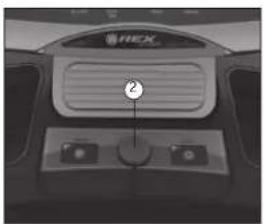
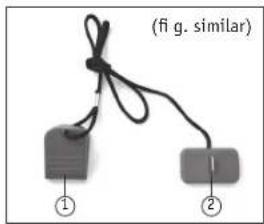
The safety key is used to immediately stop the treadmill in case someone falls, or if there are other emergencies.
If the safety key ③ is inserted back into the console, then all previously entered workout programmes or parameters will have to be entered again!
BUTTON FUNCTIONS
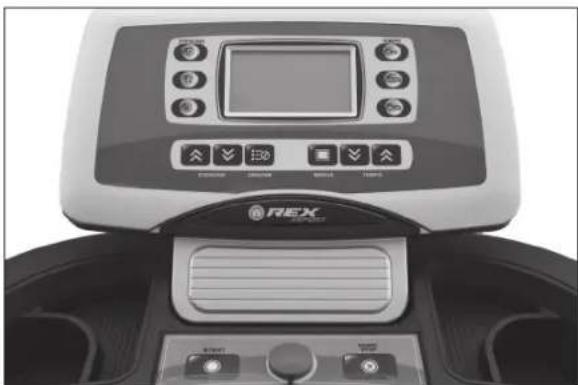
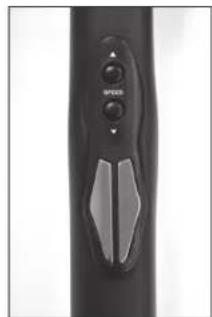
fig.1 fig.2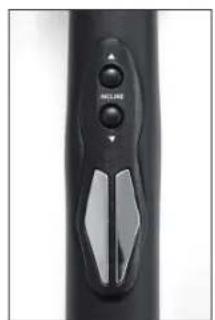
START:
Your workout can be started with the START button. If the button is pressed during your workout, the speed of the treadmill is slowly reduced until standstill. If the button is pressed again, the workout programme that was paused with the standstill of the treadmill can then be continued.
RESET/STOP:
With the RESET/STOP button you can stop the treadmill until it comes to a standstill. Pressing it again resets the selected programs and settings.
INCLINE:
Use the arrow keys to adjust the incline of the treadmill. You can also change this setting using the arrow keys on the left grip (see Figure 1).
ENTER:
You can enter the workout parameters with the ENTER button.
MODE:
The MODE button lets you choose the workout program.
SPEED:
Use the arrow keys to adjust the speed of the treadmill, or change it in 0.5 km/h steps. You can also control this setting with the arrow keys on the right handle (see Figure 2).
INCLINE 9/6/3:
The shortcut keys let you set the incline to 9, 6, or 3.
RUN/JOG/WALK:
You can set a specific speed with the RUN, JOG, and WALK buttons.
RUN: 9 km/h, JOG: 6 km/h, WALK: 3 km/h
DISPLAY INFORMATION
The following display information can be called up:
- TIME
The computer displays the current workout time. When a specified time is entered, the time runs backwards (countdown). Once the specified value is reached, the machine stops and an acoustic signal sounds.
- SPEED
The computer displays the set target speed in km/h.
- DISTANCE
The computer shows you the distance you've travelled. When a specific distance is entered, the display runs backwards (countdown). Once the specific value is reached, the machine stops and an acoustic signal sounds.
- CALORIES
The computer shows you the calories you have burned during the workout. After the number of calories to be burned has been entered, the display runs backwards (countdown) to zero. Once the specified value is reached, the machine stops and an acoustic signal sounds.
The PULSE display reflects your current pulse rate in heartbeats per minute. The display can only reflect the correct values if you properly grasp both sensors with the palms of your hands. Under certain circumstances, it can take up to 2 minutes until the pulse rate is displayed.
- INCLINE (inclination)
The computer displays the set incline value.
7. PROGRAM
The computer displays the set workout programme.
WORKOUT PROGRAMMES
A Workout programmes (P1-P24/H1)
There are 24 different available workout programmes. One workout session lasts respectively 30 minutes. The programmes P1-P14 differ in the sequence of the treadmill speed. The programmes P15-P24 differ regarding the treadmill speed as well as the incline setting. They are therefore only suitable for people in good physical condition.
In the H1 programme, enter your desired workout time (min. 5 minutes) as well as your personal target pulse (60-220 BPM) using the EINGABE button. The computer adapts the inclination of the treadmill to your target pulse every 15 seconds.
You can select one of the 24 workout programmes or the H1 programme with the MODUS button and the TEMPO arrow keys. The current workout programme is displayed in the centre of the right display area (P1-P24/H1). You start the selected programme by pressing the START button.
It is possible to individually adjust the speed or the inclination during the workout at any time using the TEMPO or STEIGUNGS arrow keys.
PROGRAM SURVEY
Program P1
| Min 1 2 3 | 4 5 | 6 7 8 | 9 10 11 | 12 13 | 14 15 | 16 17 | 18 19 | 20 21 | 22 23 | 24 25 | 26 27 | 28 29 | 30 | ||||||||||||
| km/h 1 3 | 4 5 | 5 5 4 | 3 2 | 1 2 3 | 4 5 | 6 5 4 | 3 2 | 1 2 3 | 4 5 | 6 5 | 4 3 2 | 1 |
Program P2
| Min 1 2 3 | 4 5 | 6 7 8 | 9 10 11 | 12 13 | 14 15 | 16 17 | 18 19 | 20 21 | 22 23 | 24 25 | 26 27 | 27 28 | 29 30 | |||||||||||
| km/h 1 3 | 3 3 | 3 4 4 | 4 4 4 | 4 4 | 4 4 | 4 4 | 4 4 | 4 4 | 4 4 | 4 4 | 4 4 | 4 2 | 2 2 1 | 1 |
Program P3
| Min 1 2 3 | 4 5 | 6 7 8 | 9 10 | 11 12 | 13 14 | 15 16 | 17 18 | 19 20 | 21 22 | 23 24 | 24 25 | 26 27 | 27 28 | 29 30 | ||||||||||||
| km/h 2 4 | 6 8 | 5 6 4 | 4 2 | 2 2 | 4 6 8 | 6 6 4 | 4 2 | 2 2 | 4 6 8 | 6 6 | 4 4 2 | 2 |
Program P4
| Min 1 2 3 | 4 5 | 6 7 8 | 9 10 11 | 12 13 | 14 15 | 16 17 | 18 19 | 20 21 | 22 23 | 24 25 | 26 27 | 27 28 | 29 30 | ||||||||||||
| km/h 2 6 | 6 6 | 6 6 6 | 6 4 | 4 4 | 4 4 | 4 6 | 6 6 | 6 6 | 6 3 | 3 | 3 3 | 3 | 3 3 | 1 |
Program P5
| Min 1 2 3 | 4 5 | 6 7 8 | 9 10 11 | 12 13 14 | 15 16 17 | 18 19 20 | 21 22 23 | 24 25 26 | 27 28 29 | 30 | |||||||||||
| km/h 3 4 | 6 8 | 10 8 | 6 4 2 2 2 | 4 6 8 10 | 8 6 4 2 2 | 2 4 6 | 8 10 8 6 | 4 2 2 |
Program P6
| Min 1 2 3 | 4 5 | 6 7 8 | 9 10 11 | 12 13 | 14 15 | 16 17 | 18 19 | 20 21 | 22 23 | 24 25 | 26 27 | 27 28 | 29 30 | ||||||||||||
| km/h 3 6 | 6 6 | 6 6 6 | 6 7 | 7 7 | 7 7 6 | 6 6 6 | 6 6 | 6 3 3 | 3 3 | 3 3 3 | 1 |
Program P7
| Min 1 2 3 | 4 5 | 6 7 8 | 9 10 11 | 12 13 14 | 15 16 17 | 18 19 20 | 21 22 23 | 24 25 26 | 27 28 29 | 30 | |||||||||||
| km/h 4 2 | 6 6 | 8 10 | 6 6 2 2 2 | 2 6 6 8 10 | 6 6 2 2 | 2 2 6 6 8 | 10 6 2 2 |
Program P8
| Mi n | 1 | 2 | 3 | 4 | 5 | 6 | 7 | 8 | 9 | 1 | 0 | 1 | 1 | 1 | 2 | 1 | 3 | 1 | 4 | 1 | 5 | 1 | 6 | 1 | 7 | 1 | 8 | 1 | 9 | 2 | 0 | 2 |
| km/h 4 5 | 5 5 | 6 6 | 8 8 | 8 5 | 5 5 | 5 6 | 6 6 | 9 9 | 9 5 | 5 5 | 5 5 | 5 9 | 9 9 | 6 6 | 5 5 |
Program P9
| Mi n | 1 | 2 | 3 | 4 | 5 | 6 | 7 | 8 | 9 | 1 | 0 | 1 | 1 | 1 | 2 | 1 | 3 | 1 | 4 | 1 | 5 | 1 | 6 | 1 | 7 | 1 | 8 | 1 | 9 | 2 | 0 | 2 |
| km/h 5 3 | 4 5 | 2 3 4 | 5 3 | 2 2 3 | 4 4 5 | 2 3 4 5 | 3 2 3 | 4 5 3 | 2 2 3 | 4 4 5 | 2 3 4 | 5 3 | 2 |
Program P10
| Min 1 2 3 | 4 5 | 6 7 8 | 9 10 11 | 12 13 | 14 15 | 16 17 | 18 19 | 20 21 | 22 23 | 24 25 | 26 27 | 28 29 | 30 | |||||||||||
| km/h 6 4 | 6 2 | 4 6 2 | 4 6 | 2 2 | 4 6 | 4 6 | 2 4 6 | 3 3 | 4 6 2 | 4 6 | 2 4 6 | 2 |
Program P11
| Mi n | 1 | 2 | 3 | 4 | 5 | 6 | 7 | 8 | 9 | 1 | 0 | 1 | 1 | 1 | 2 | 1 | 3 | 1 | 4 | 1 | 5 | 1 | 6 | 1 | 7 | 1 | 8 | 1 | 9 | 2 | 0 | 2 |
| km/h 6 6 | 7 7 | 7 8 8 | 8 8 | 9 9 9 | 9 9 | 8 8 | 9 9 | 8 8 8 | 9 9 | 9 8 8 | 9 9 | 9 8 8 | 8 |
Program P12
| Mi n | 1 | 2 | 3 | 4 | 5 | 6 | 7 | 8 | 9 | 1 | 0 | 1 | 1 | 1 | 2 | 1 | 3 | 1 | 4 | 1 | 5 | 1 | 6 | 1 | 7 | 1 | 8 | 1 | 9 | 2 | 0 | 2 | |||
| km/h | 7 | 3 | 4 | 5 | 6 | 5 | 4 | 3 | 2 | 1 | 1 | 3 | 4 | 5 | 6 | 5 | 4 | 3 | 2 | 1 |
Program P13
| Min 1 2 3 | 4 5 | 6 7 8 | 9 10 11 | 12 13 | 14 15 | 16 17 | 18 19 | 20 21 | 22 23 | 24 25 | 26 27 | 28 29 | 30 | |||||||||||
| km/h 8 4 | 6 8 | 5 6 4 | 4 2 | 2 1 | 4 6 8 | 6 6 4 | 4 4 2 | 2 1 | 4 6 8 | 6 6 | 4 4 2 | 2 |
Program P14
| Min 1 2 3 | 4 5 | 6 7 8 9 | 10 11 | 12 13 | 14 15 | 16 17 | 18 19 | 20 21 | 22 23 | 24 25 | 26 27 | 28 29 | 30 | |||||||||||
| km/h 9 9 | 9 8 | 8 8 8 | 8 7 | 7 7 | 6 6 | 6 6 5 | 5 5 | 5 4 | 4 4 4 | 3 3 | 2 2 1 | 1 |
Program P15
| Min 1 2 3 | 4 5 | 6 7 8 9 | 10 | 11 | 12 13 | 14 | 15 16 | 17 | 18 | 19 | 20 | 21 22 | 23 | 24 25 | 26 | 27 | 28 | 29 | 30 | |||||||||||||
| km/h 3 4 | 5 6 | 5 6 6 | 5 4 | 2 1 | 2 3 6 | 7 6 | 6 5 4 | 2 6 | 5 | 3 6 | 4 3 | 6 5 4 | 2 | |||||||||||||||||||
| Inclination | 3 | 4 | 5 | 6 | 3 | 4 | 5 | 6 | 5 | 4 | 3 | 4 | 5 | 6 | 3 | 4 | 5 | 6 | 3 | 4 | 3 | 4 | 5 | 6 | 3 | 4 | 5 | 6 | 5 | 6 | 5 | 4 |
Program P16
| Min 1 2 3 | 4 5 | 6 7 8 9 10 11 | 12 13 | 14 15 16 | 17 18 19 | 20 21 22 | 23 24 | 25 26 | 27 28 | 29 30 | ||||||||||||
| km/h 5 5 | 5 5 | 5 5 5 | 5 5 | 5 5 | 5 5 | 5 5 | 5 5 | 5 5 | 5 5 | 5 5 | ||||||||||||
| Inclination | 2 4 | 5 8 | 10 | 12 | 8 6 4 | 2 4 | 6 8 | 10 | 12 | 10 8 | 6 4 |
Program P17
| Min 1 2 3 | 4 5 | 6 7 8 9 10 | 11 | 12 13 | 14 | 15 16 | 17 | 18 | 19 | 20 | 21 22 | 23 | 24 25 | 26 | 27 | 28 | 29 | 30 | ||||||||||||
| km/h 5 5 | 3 3 | 3 9 9 | 9 9 | 7 7 | 7 6 6 | 9 9 | 9 9 | 5 5 | 7 7 | 7 7 | 6 6 6 | 6 | ||||||||||||||||||
| Incination | 3 | 7 | 7 | 9 | 1 | 1 | 9 | 7 | 7 | 3 | 3 | 3 | 7 | 7 | 9 | 1 | 1 | 9 | 7 | 7 | 3 | 3 | 3 | 7 | 7 | 9 | 1 | 1 | 9 | 7 |
Program P18
| Min 1 2 3 | 4 5 | 6 7 8 | 9 10 | 11 | 12 13 | 14 | 15 16 | 17 | 18 19 | 20 | 21 22 | 23 | 24 25 | 26 | 27 | 28 | 29 | 30 | |||||||||||||
| km/h 1 2 | 6 6 | 8 10 | 6 6 | 2 2 1 | 2 6 | 6 8 | 10 6 | 2 2 | 1 2 6 | 6 8 | 10 6 | 6 2 | 2 | ||||||||||||||||||
| Inclination | 7 | 5 | 3 | 5 | 9 | 4 | 2 | 4 | 6 | 8 | 1 | 0 | 1 | 2 | 1 | 2 | 3 | 4 | 5 | 6 | 7 | 8 | 9 | 2 | 1 | 2 | 1 | 2 | 1 | 1 |
Program P19
| Min 1 2 3 | 4 5 | 6 7 8 | 9 10 | 11 12 | 13 14 | 15 16 | 17 18 | 19 20 | 21 22 | 23 24 | 24 25 | 26 27 | 28 29 | 30 | ||||||||||||||||
| km/h 2 3 | 4 5 | 2 3 4 | 5 3 | 2 1 3 | 4 5 | 2 3 4 | 5 3 | 2 1 3 | 4 5 3 | 2 3 | 2 | |||||||||||||||||||
| Inclination | 3 | 1 | 2 | 3 | 4 | 4 | 3 | 2 | 1 | 0 | 1 | 1 | 2 | 3 | 4 | 4 | 3 | 2 | 1 | 0 | 1 | 1 | 2 | 3 | 4 | 4 | 3 | 2 | 1 | 0 |
Program P20
| Min 1 2 3 | 4 5 | 6 7 | 8 9 | 10 | 11 | 12 13 | 14 | 15 16 | 17 | 18 | 19 | 20 | 21 | 22 | 23 | 24 | 25 | 26 | 27 | 28 | 29 | 30 | ||||||||||||
| km/h 3 4 | 6 2 | 4 6 | 2 4 6 | 2 1 | 4 6 2 | 4 6 2 | 4 6 2 | 4 6 2 | 2 1 | 4 6 2 | 2 4 6 | 2 4 6 | 2 | |||||||||||||||||||||
| Inclination | 1 | 3 | 5 | 7 | 9 | 1 | 1 | 9 | 7 | 5 | 3 | 1 | 3 | 5 | 7 | 9 | 1 | 1 | 9 | 7 | 5 | 3 | 1 | 3 | 5 | 7 | 9 | 1 | 1 | 9 |
Program P21
| Min 1 2 3 | 4 5 | 6 7 | 8 9 | 10 11 | 12 13 | 14 15 | 16 17 | 18 19 | 20 21 | 22 23 | 24 25 | 26 27 | 27 28 | 29 30 | |||||||||||||
| km/h 2 3 | 3 3 | 3 3 | 3 4 | 4 4 | 4 4 | 4 5 | 5 5 | 5 5 | 5 6 | 6 6 | 6 6 | 7 | |||||||||||||||
| Incination | 0 | 3 | 3 | 3 | 3 | 3 | 3 | 3 | 6 | 6 | 6 | 6 | 6 | 6 | 1 | 0 | 1 | 0 | 1 | 0 | 1 | 0 | 1 | 0 | 1 | 0 | 3 |
Program P22
| Min 1 2 3 | 4 5 | 6 7 | 8 9 | 10 | 11 | 12 13 | 14 | 15 16 | 17 | 18 19 | 20 | 21 22 | 23 | 24 25 | 26 | 27 | 28 | 29 | 30 | |||||||||||||
| km/h 2 4 | 4 4 | 4 4 | 4 4 | 6 6 | 6 6 | 6 6 | 6 8 | 8 8 | 8 8 | 8 8 | 8 5 | 5 | 5 5 | 5 | 5 3 | 3 | ||||||||||||||||
| Inclination | 9 | 9 | 9 | 9 | 9 | 9 | 9 | 9 | 9 | 9 | 9 | 9 | 9 | 9 | 9 | 9 | 9 | 9 | 9 | 9 | 9 | 9 | 9 | 9 | 9 | 9 | 9 | 9 | 9 | 9 | 9 | 9 |
Program P23
| Min 1 2 3 | 4 5 | 6 7 | 8 9 | 10 | 11 | 12 | 13 | 14 | 15 | 16 | 17 | 18 | 19 | 20 | 21 | 22 | 23 | 24 | 25 | 26 | 27 | 28 | 29 | 30 | ||||||||||||||
| km/h 2 4 | 4 4 | 4 4 | 4 4 | 4 6 | 6 6 | 6 6 | 6 6 | 6 8 | 8 8 | 8 8 | 8 8 | 8 8 | 6 6 | 6 6 | 6 6 | 5 | ||||||||||||||||||||||
| Inclination | 10 | 10 | 10 | 10 | 10 | 10 | 10 | 10 | 10 | 10 | 10 | 10 | 10 | 10 | 10 | 10 | 10 | 10 | 10 | 10 | 10 | 10 | 10 | 10 | 10 | 10 | 10 | 10 | 10 | 10 | 10 | 10 | 10 | 10 |
Program P24
| Min 1 2 3 | 4 5 | 6 7 | 8 9 | 10 11 | 12 13 | 14 | 15 16 | 17 | 18 | 19 | 20 | 21 | 22 | 23 | 24 | 25 | 26 | 27 | 28 | 29 | 30 | |||||||||||||
| km/h 3 4 | 4 4 | 4 4 | 4 4 | 4 7 | 7 7 | 7 7 | 7 7 | 7 12 | 12 | 12 | 12 | 12 | 12 | 12 | 3 | 3 | 3 | 3 | 3 | 1 | ||||||||||||||
| Incination | 0 | 9 | 9 | 9 | 9 | 9 | 9 | 9 | 9 | 9 | 9 | 9 | 9 | 9 | 9 | 9 | 9 | 9 | 9 | 9 | 9 | 9 | 9 | 9 | 9 | 9 | 9 | 9 | 9 | 9 | 9 | 9 | 9 |
B Working out with workout parameters
You can set one of the three available workout parameters in this programme. Workout parameters are objectives
which you can set according to your personal level of fitness, motivation, or available time.
The following workout parameters are available:
| Parameter | Setting | range | Step |
| TIME 0:00~99:00 Min | ± 1:00 | specifi ed value = 5:00 min | |
| DIST (distance) | 0.00~99.0 km | ± 1 | specified value = 5 km |
| CAL (calories) | 10~9990 Cal | ± 10 | specified value = 500 Cal |
Remark
Press the EINGABE button for 3 seconds to choose the required workout parameter and then enter the required value with the STEIGUNGS or SPEED button.
If a workout parameter is not specified, you can use the EINGABE button to jump to the subsequent parameter.
After having entered all of the required workout parameters, you may begin running. Press the START button to do so. The machine emits an acoustic signal directly before the treadmill begins to move. You can individually adjust the speed using the SPEED buttons, or by using the RUN/JOGGEN/WALK buttons. The treadmill reaches the specified target speed after a short time. You can also vary the inclination using the STEIGUNGS arrow keys or the 9/6/3 quick-selection buttons.
Training is ended as soon as the specified workout parameter has been reached. An audible tone sounds before the treadmill stops.
C Manual
Instead of working with one of the specified workout programmes or workout parameters, you can also work out in the so-called manual workout programme. In this programme you can manually set the speed or adjust it at any time during your workout.
You start the manual workout programme by pressing the START button. If you have set one of the workout parameters or selected one of the 25 workout programmes, briefly remove the safety key to delete the entered values. The machine emits an acoustic signal directly before the treadmill begins to move. The beginning speed is 1 km/h. You can individually adjust the speed with the SPEED buttons or with the RUN/JOGGEN/WALK buttons at any time during your workout. The treadmill reaches the specified target speed after a short time. You can also vary the inclination using the STEIGUNGS arrow keys or the 9/6/3 quick-selection buttons. The workout is ended by pressing the STOP button.
Care/Maintenance

You must disconnect the mains plug from the power outlet before any care and maintenance work! MORTAL DANGER!
We recommend checking all machine parts that could loosen (screws, nuts, etc.) regularly every 2 to 4 weeks, depending on the frequency of use. Use a soft, perhaps slightly moistened cloth to clean. Do not use aggressive cleaning agents. Keep liquids of any type away from the computer and the machine interior, as the liquids could cause considerable functional impairments. The belt in the lower area of the exercise machine can develop rubber skid marks. This is completely normal.
Treadmill adjustment

Make sure the treadmill is not in operation during the adjustment. Remove the safety key to ensure your safety.
After a longer period of use or after transport, the walking belt may no longer be centred or may "slip away" during your workout. In this case you will have to readjust the walking belt, as damage and functional impairments could occur.
Centring the walking belt:
You can adjust the walking belt with an M6 Allen key at the right rear end of the main frame (see Fig.).
If the walking belt has slipped over to the right, turn the right adjusting screw clockwise (no more than a 1/4 revolution). Then let the treadmill run for at least 2 revolutions to check if the adjustment is sufficient. Repeat this procedure until the belt is centred.
If the walking belt has slipped over to the left, turn the right adjusting screw anti-clockwise (no more than a 1/4 revolution). Then let the treadmill run for at least 2 revolutions to check if the adjustment is sufficient. Repeat this procedure until the belt is centred.
Tensioning the walking belt:

Make sure not to tension the walking belt too strongly as this results in increased wear or even damage.
You can tension the walking belt with the two adjusting screws at the right rear end of the main frame (see Fig.). Turn the left and right adjusting screws evenly a quarter turn to the right (clockwise). Use an M6 Allen key for this. Then switch on the treadmill and check if it is sufficiently tensioned.
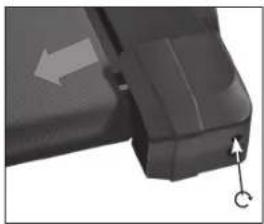
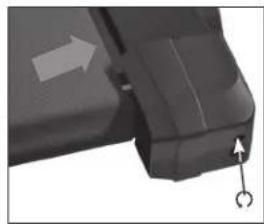
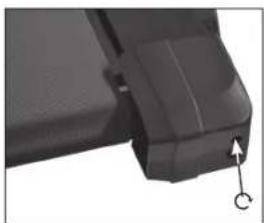
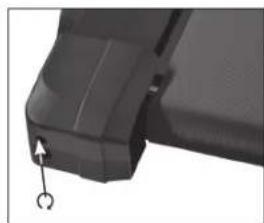
Repeat the procedure until the walking belt stops "slipping away" during running. However, never turn the adjusting screws more than a quarter turn after each check. If the walking belt is adjusted too tightly, evenly loosen both adjusting screws.
Treadmill lubrication

WARNING
Make sure the treadmill is not in operation during the adjustment. Remove the safety key to ensure your safety.
The treadmill has been constructed so that it only required minimum maintenance effort. However, it is necessary to lubricate the deck from time to time. Thorough lubrication guarantees proper function and increases the service life of the machine. We recommend the first lubrication after the first 25 operating hours (2-3 months) and then every 50 operating hours (approx. 5-8 months). Therefore use commercially available silicone oil or spray.
Inspection
Lift up one side of the walking belt and feel the top side of the deck. If you can still feel the silicon, then lubrication is not necessary. But if the surface feels dry, you must relubricate the deck.
Lubrication

DANGER
Do not apply too much lubricant - no more than half a tube per application! Use a cloth to wipe off excess lubricant that may ooze out at the sides. DANGER OF FALLING!
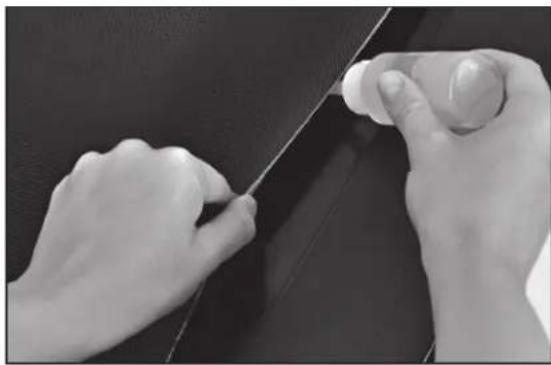
- Lift up one side of the walking belt.
- Apply no more than half of the lubricant tube (included in the delivery) onto the surface of the deck. (see Fig.)
- Then run on the treadmill for approx. 3-5 minutes at a low speed to help distribute the lubricant.
Technical data
Dimensions: approx. 178 cm (L) x 80 cm (W) x 138 cm (H)
Running speed: 1-16 km/h
Weight: approx. 80 kg
Pitch adjustment: 12-fold (1.25° - 7.5°)
Classification: HB
Max. continuous output power: 1.3 kW
Max. Weight load: 130 kg
Maximum output: 2.2 kW
Disposal
Disposing of the fitness machine
At the end of its useful life, the fitness machine may not be disposed of in normal household rubbish. Instead, it must be deposited at a collection point for the recycling of electrical and electronic devices.
Packaging recycling

The packaging material is partially reusable. Dispose of the packaging in an environmentally friendly manner and add it to the recyclable waste. Dispose of the packaging at a public collection point. Enquire of your city/municipal administration for your nearest available disposal point.
CE Declaration of Conformity
prophe
keep moving
Index-01
Company: Prophete GmbH u. Co.KG
Address: Lindenstr. 50
Designation: New York
Model: TX-600 Treadmill
TX-800 Treadmill
For the designated product we hereby confirm that it complies with the requirements of the following European directives.
2004/108/EC EMC Directive
Directive of the European Parliament and of the Council dated 15.12.2004
2006/95/EC Low Voltage Directive
Directive of the European Parliament and of the Council dated 12.12.2006
The product conforms to the directives as is proven by full compliance with the listed harmonized and non-harmonized standards:
EN 55014 Electromagnetic compatibility, requirements
EN 60335 Safety of electrical devices for household use
EN 61000-6-1 Electromagnetic compatibility, generic standard
EN 61000-6-3 Electromagnetic compatibility, generic standard
EN 61000-6-6 Electromagnetic compatibility, generic standard
Andre Fuchs
Technical Management
Prophete GmbH & Co. KG
Torsten Wynarski
Conformance Officer
Prophete GmbH & Co. KG
Place of issue, Rheda-Wiedenbrück, dated 04.04.2012
This declaration certifies the conformance to the stated directives, but does not guarantee any attributes in the meaning of the product liability act.
Warranty
- You may only assert warranty claims within a period of max. 2 years as of the purchase date. Our warranty is limited to the elimination of material and fabrication defects, or the replacement of the machine. Realisation occurs according to our choice through repair to the machine. Our warranty is free of charge.
The malfunction and its causes are always examined by our customer service and includes:
- Spare parts delivery for the repair work within the scope of the warranty
Repair or replacement of the defective component
(Replaced spare parts will be passed to our possession.)
- For eligible warranty claims, the costs for shipping and the costs for disassembly and installation will be charged at our expense. Warranty claims must be verified by submitting the purchase receipt.
- The buyer agrees to use the purchased machine for no other purpose than as designated in the operating instructions.
- The warranty expires if the machine is modified by third parties, or changed by installing outside parts, or defects that occurred in initial conjunction with the change. Further, the warranty claim also expires if the regulations regarding the management of the machine were not observed.
- Not included in the warranty:
- Expendable items not associated with repair work on recognised malfunctions.
- All maintenance work or other work that developed due to wear, accident or operating conditions as well as use with disregard to the manufacturers' specifications.
All events, such as noise development, vibrations, wear, D
etc. that do not affect the machine qualities.
- Damage caused by:
- installing parts by third parties or the efforts of the user to remedy the damage himself.
- Components subject to wear or use (except clear material or manufacturer defects), such as: - Bearings - Lamps - Stickers - Belts - Batteries, etc. Costs for maintenance, inspection and cleaning work.
- Warranty claims only authorize the customer to demand the elimination of the defect. Claims for return or reduction of the purchase price only apply after subsequent improvement fails.
- The examination and decision about a warranty claim is incumbent upon the manufacturer.
- The replacement of direct or indirect damage will not be granted.
- Warranty claims will only be considered if lodged with SI-Zweirad-Service-GmbH directly after finding the defect.
- An executed warranty will neither renew nor extend the period of warranty. Asserting warranty claims after the period of warranty has expired is precluded.
- Arrangements other than the above-mentioned only then apply if they are confirmed by the manufacturer in writing.
- If your machine sustained damage during the delivery, please record all damage on the delivery note. Have the supplier (market, carrier) sign the damage report and then contact us immediately.
- Should you have a technical problem with the machine you have acquired, our customer service staff are available:
SI-Zweirad-Service GmbH Phone: 0524241089824
Lindenstraße 50 Fax: 05242/410872 33378 Rheda-Wiedenbrück E-Mail: si-service@prophete.net Germany www.rex-sport.de
AT CH
SI-Zweirad-Service GmbH Phone: +49 52 42 41089824 Lindenstraße 50 Fax: +49 52 42 410872 -33378 Rheda-Wiedenbrück E-Mail: si-service@prophete.net Germany www.rex-sport.de
REX TX-800
TREADMILL
USER MANUAL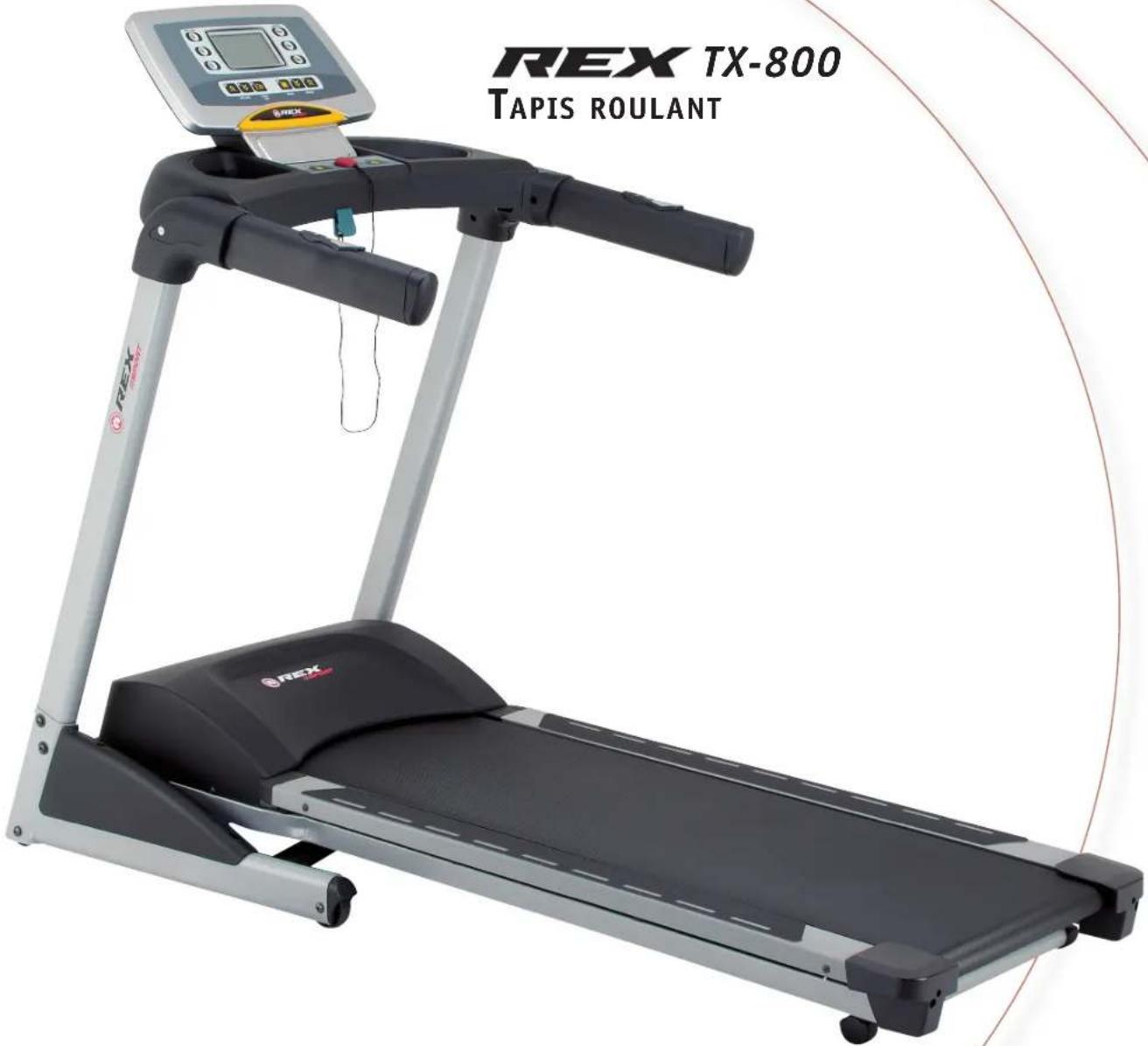
Table of Contents
vice@prophe.net




- PREFACE
- IDENTIFICATION OF IMPORTANT NOTES
- IMPORTANT SAFETY INSTRUCTIONS
- PARTS LIST
- ASSEMBLY
- FOLDING MECHANISM/TRANSPORT
- OPENING OUT
- FOLDING TOGETHER
- TRANSPORT
- EXERCISE
- DESIGNING YOUR WORKOUT/NOTES
- A INTENSITY
- B FREQUENCY
- C MOTIVATION
- D ORGANISATION OF WORKOUT SESSIONS
- WARMING UP PHASE
- WORKOUT PHASE
- COOLING DOWN PHASE
- E MUSCLE DEVELOPMENT
- F WEIGHT LOSS
- OPERATION
- DEFAULT SETTINGS
- SAFETY KEY
- BUTTON FUNCTIONS
- START
- RESET/STOP
- INCLINE
- ENTER
- MODE
- SPEED
- RUN/JOG/WALK
- DISPLAY INFORMATION
- WORKOUT PROGRAMMES
- A WORKOUT PROGRAMMES (P1-P24/H1)
- PROGRAM SURVEY
- B WORKING OUT WITH WORKOUT PARAMETERS
- C MANUAL
- CARE/MAINTENANCE
- TREADMILL ADJUSTMENT
- CENTRING THE WALKING BELT
- TENSIONING THE WALKING BELT
- TREADMILL LUBRICATION
- WARNING
- INSPECTION
- LUBRICATION
- DANGER
- TECHNICAL DATA
- DISPOSAL
- DISPOSING OF THE FITNESS MACHINE
- PACKAGING RECYCLING
- CE DECLARATION OF CONFORMITY
- PROPHE
- EC EMC DIRECTIVE
- EC LOW VOLTAGE DIRECTIVE
- WARRANTY
- AT CH
- REX TX
- TREADMILL
- TABLE OF CONTENTS
Brand : REX
Model : TX800
Category : Treadmills