Home Air Filter - Air purifier LANAFORM - Free user manual and instructions
Find the device manual for free Home Air Filter LANAFORM in PDF.



Frequently Asked Questions - Home Air Filter LANAFORM
User questions about Home Air Filter LANAFORM
0 question about this device. Answer the ones you know or ask your own.
Ask a new question about this device
Download the instructions for your Air purifier in PDF format for free! Find your manual Home Air Filter - LANAFORM and take your electronic device back in hand. On this page are published all the documents necessary for the use of your device. Home Air Filter by LANAFORM.
USER MANUAL Home Air Filter LANAFORM
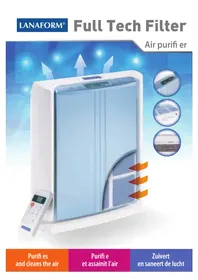
Thank you for choosing the LANAFORM "HOME AIR FILTER". With its unique design, this appliance can purify air effectively and help you combat the symptoms of allergies. With the "HOME AIR FILTER" you can eliminate smoke and particles like pollen and dust that are present in the air. This air purifier comes with a multi-layer filter kit at its core, as well as two ultraviolet lamps that help to sterilise the air, so it can provide purified, clean air at all times, removing "harmful particles" from your own and your loved ones' environment and improving your quality of life.
PLEASE READ THE INSTRUCTIONS BEFORE USING YOUR "HOME AIR FILTER", ESPECIALLY THESE BASIC SAFETY GUIDELINES:
- Only use this appliance according to the instructions in this manual.
- Make sure that the voltage indicated on the appliance matches your power supply.
- This appliance is not intended to be used by anybody (including children) with reduced physical, sensory or mental abilities, or anybody without the necessary experience or knowledge, unless they are supervised or given instructions beforehand on how to use this appliance by somebody responsible for their safety. Children should be supervised to make sure they do not use the appliance as a toy.
- Do not use accessories that have not been recommended by LANAFORM® or that are not provided with the appliance.
- If the power lead is damaged, it should be replaced with a special or similar lead available from the manufacturer or its technical service department.
- Do not use this appliance is the plug is damaged, if the unit is not working, if it has been dropped or if it is damaged or has been dropped in water. If any of these things happens, take the appliance to your supplier or its technical service department to be examined and repaired.
- Do not carry this appliance by its power lead or use the lead as a handle.
- Turn off the air purifier before unplugging.
- Always unplug the appliance after use and before cleaning or moving.
- If the unit falls into water, unplug immediately before taking it out of the water.
- An electrical appliance should never be left plugged in unattended. Unplug it when not in use.
- Keep the power lead away from hot surfaces.
- Never use this appliance in a room where aerosol products (sprays) are used, or in a room where oxygen is administered.
- Never obstruct the appliance's ventilation outlets and never put the appliance on an unstable surface such as a mat or a mattress as this could prevent it from working properly. Make sure that the air vents are not blocked up by hair, fluff, dust etc., and do not insert anything into them.
- Always position the air purifier on a hard, flat, level surface, at least THIRTY centimetres away from any walls, and keep it away from sources of heat such as stoves, radiators etc. The purifier cannot function properly on a surface that is not level.
- Never try to plug in or unplug this appliance if you are in contact with water or in a damp environment. This could cause an electric shock.
- Never immerse the appliance in water or any other liquid to clean it.
- Never use abrasive detergents, brushes or thinners to clean it.
The air purifier must be cleaned regularly. To do this, refer to and follow the cleaning instructions in this manual. - Never shake the appliance as this can affect how it works.
-
Make sure the area is ventilated in advance if it is sealed or if it contains sources of heat such as an open fire or water heater. In the event of a faulty gas appliance, this appliance does not protect users from CO1 (= Carbon Monoxide) poisoning.
-
If you are aware of a suspicious smell when the appliance is in normal use, turn it off, unplug it and take it to the manufacturer or its technical service department.
- Never dismantle the unit yourself as you could damage it.
- This appliance is intended exclusively for domestic use.
1) PRODUCT SPECIFICATIONS
Model: Home Air Filter.
Power:50W.
Air flow: 200m^3 /h (118cfm).
Surface area covered: 30m^2 (≈ 323ft^2)
Speed settings: High/Medium/Low.
Sound level: ≤ 50dB in High Speed mode.
Purification system: Particle pre-filter, activated carbon filter, HEPA filter, photo-catalytic filter, ultraviolet lamps, ioniser.
Filter: 1 (multi-filter, replaceable cartridge).
Screen: LCD.
Multi-filter cartridge lifespan: around 1 year in normal use.
This "Home Air Filter" air purifier comes with a multilayer filtration kit that totally purifies your air in six stages:
1) A particle pre-filter that picks up the biggest particles.
2) An activated carbon filter:
The grains of activated carbon effectively hold in the chemical gases and odours from cigarette smoke, organic waste and cooking.
3) An incredibly effective HEPA filter:
This very effective filter traps up to 99.97% of dust, pollen, mould, bacteria and all other particles that are carried in the air with a diameter of 0.3 m or more.
4) A photo-catalytic filter:
This process destroys the chemical and microbiological pollutants that are present in the air.
5) Ultraviolet lamps:
This purifier has two ultraviolet lamps that sterilise the air.
6) Release of anions:
An ioniser that releases a large quantity of negative ions and refreshes the air inside.
THE PRINCIPLES of IonNIsaTioN
The appliance produces a large number of negative ions, more commonly known as anions. These electrical charges are represented by a " - " symbol, because of their negative electrical charge.
Volatile particles such as pollen and allergen-bearing dust have positive electric charges.
The laws of physics tell us that particles with negative charges are attracted to positive charges.
So the negative ions produced combine with the positively charged particles, making them heavier and less volatile.
These particles will then fall to the floor and are therefore much less likely to be inhaled.
Cleaning the floor every day will therefore help minimise allergic reactions.
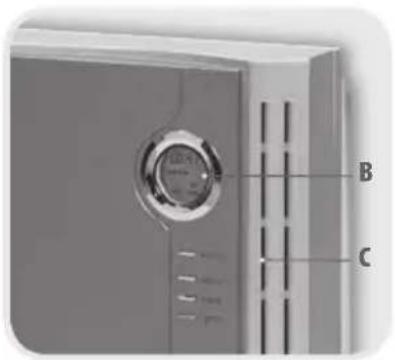
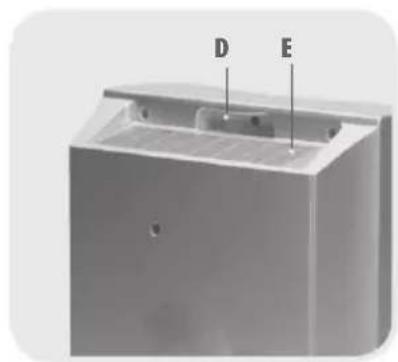
DiagRam of THE aPPLIaNCE
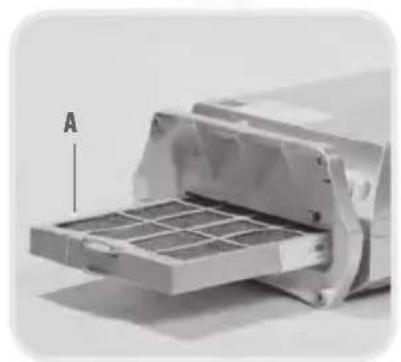
A-Multi-filter cartridge
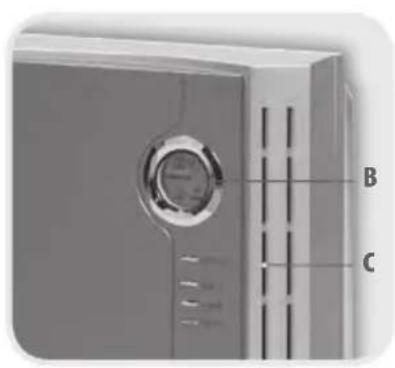
B-LCD control screen
C-Air inlet
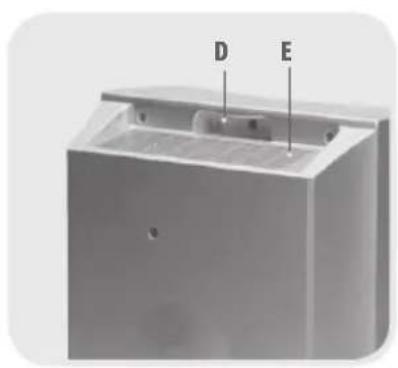
D- Handle
E-Air outlet
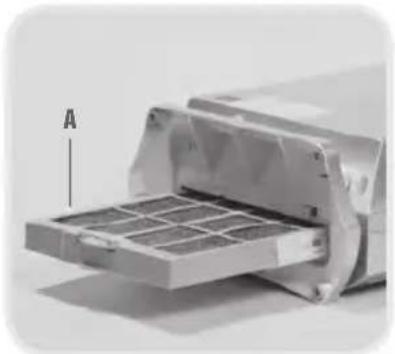
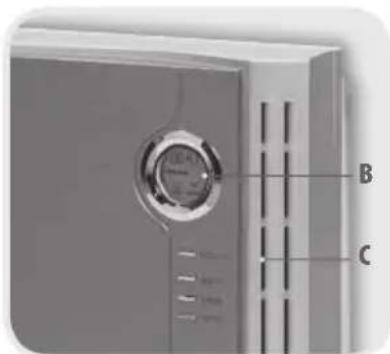
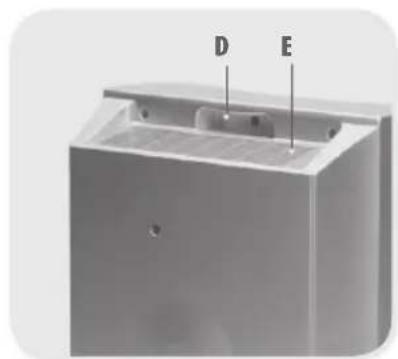
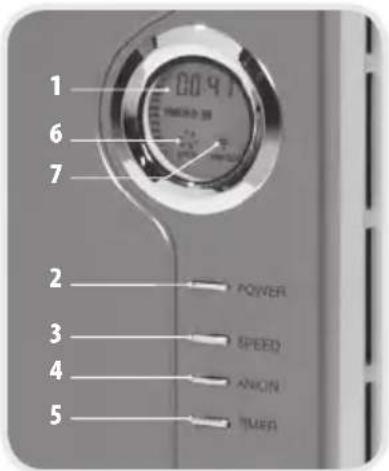
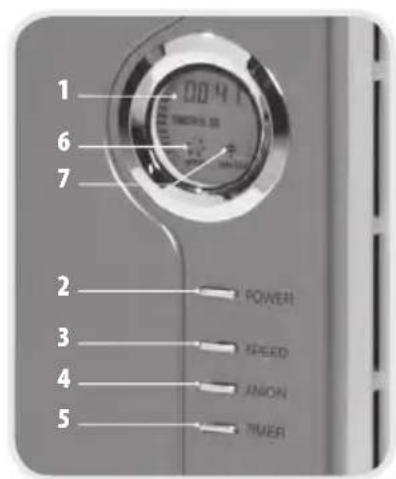
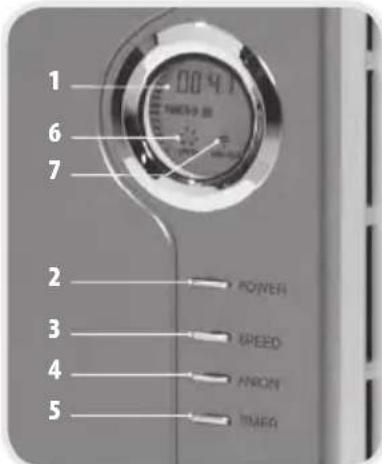
DiagRam and fuNCTioNS of THE CoNTRoL PaNEL
1-LCD screen
2-“POWER”: On/Off
3- "SPEED": Speed setting (high-medium-low speed)
4- "IONISER": Anion release/UV setting
5-“TIMER”: Set the time (1, 2, 4, 8 hours or continuous)
6-Motor: Display showing the motor setting
7- Ioniser/UV: Display showing the ionisation and UV mode
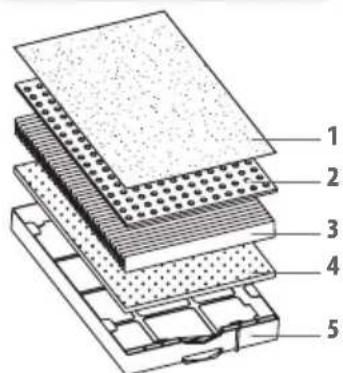
DiagRam of THE multi filters
1-Non-woven layer (= pre - filter)
2- Activated carbon filter
3-HEPA filter
4- Photo-catalytic filter
5-Case
INSTRUCTION for use
- Remove the air purifier from its box and take away all the packaging. Take off the protective cover from the multi-filter cartridge, making sure that you do not damage the motor.
- Position the air purifier at least 30cm away from the wall.
-
Plug in the air purifier.
-
When the appliance is plugged in, you will hear a sound, indicating that it is plugged in properly.
- Press the "POWER" button to switch the appliance on. Press the "SPEED" button several times to set the speed of the fan (high, medium, low). The engine fan will appear on the screen, showing that it is working.
- To use the ioniser/UV, press the "IONISER" button once. A small tree will appear on the screen, which means that this function is activated. Press the button again to switch it off.
- Press the "TIMER" button several times to select 1, 2, 4 or 8 hours or continuous mode. The selected time will flash then start automatically after 3 seconds.
- The screen comes on whenever you press a button and goes off automatically after 10 seconds. The appliance also makes a sound every time you press a button when in normal use.
- When a time appears on the LCD screen, this indicates how long the appliance is on for.
Important safety instructions:
N.B.: follow these instructions for the best results from your air purifier.
- Leave at least THIRTY centimetres around all sides of the air purifier.
- Do not put the air purifier next to a fan as this will disrupt normal air circulation.
- Do not put the air purifier near a window or door. This could prevent air from entering or coming out of the unit.
- Make sure you put the air purifier in a well-ventilated area.
- The air will be purified more effectively if the unit is near the source of any pollution.
- Looking after your multi-filter cartridge is the key to making sure it lasts as long as possible. If it is not cleaned for a long time, the multi-filter cartridge will become covered in dust. The appliance will therefore start to be less effective and make more noise.
3) CLEANING AND LOOKING AFTER THE APPLIANCE
CLEANING THE APPLIANCE (AROUND ONCE A MONTH)
- Make sure you unplug the appliance before cleaning/maintenance.
- Clean the air purifier with a soft, dry cloth. For stubborn marks, use a cloth soaked in hot water.
- Do not use volatile substances such as benzene, paint thinner, corrosive detergents or scouring powder, as these could damage your appliance.
- Keep your air purifier dry and avoid any contact with water.
- Clean the wall behind the air outlet of your air purifier regularly, as it may become dirty.
CLEANING THE MULTI-FILTER CARTRIDGE
Use a vacuum cleaner to clean the filters once every three months.
- Replacing the multi-filter cartridge
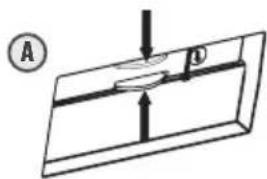
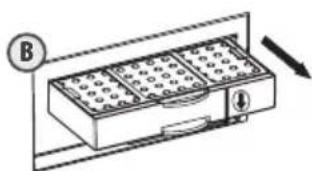
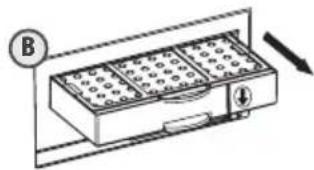
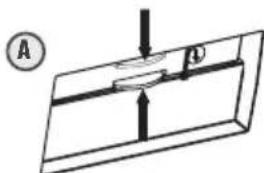
Lie the unit on its side so you can see the filter cartridge at the bottom of the appliance. Hold the grip on the filter cartridge and press in the direction of the arrow to release the hooks that hold the cartridge in the unit. Remove the cartridge, holding it by this grip (B).
A-Downward arrow
B-Filter cartridge
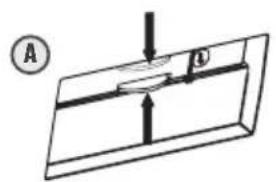
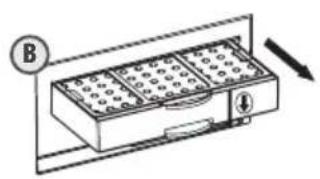
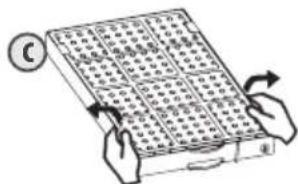
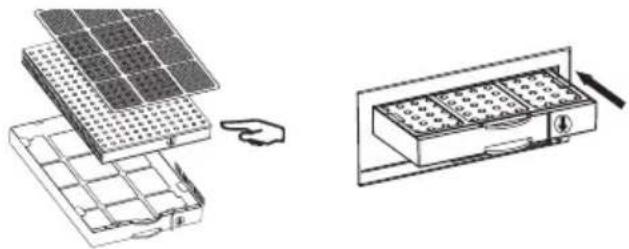
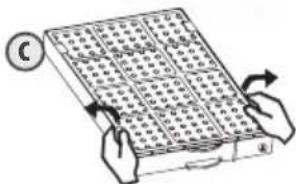
One by one, gently straighten the fasteners along the filter cartridge and remove the multi-layer filter from the case. C- Fasteners
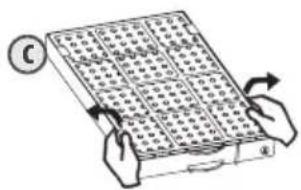
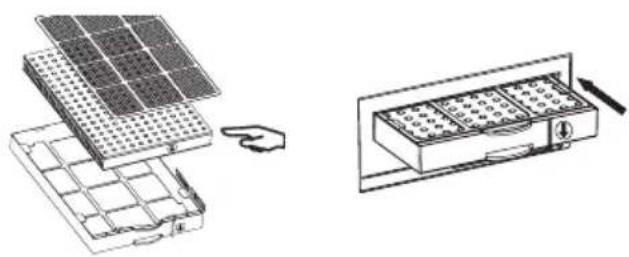
Remove the plastic cover from the new multi-layer filter and insert it in the cartridge case, loosening the fasteners until the filter is fully inserted in the cartridge. Secure the filter with the fasteners. When the filter is in place, write the date on the side of the box to remind you when you replaced it.
Align the arrows on the side of the filter and the case.
Replace the cartridge containing the new filter by gently pushing it into the bottom of the appliance until you hear it click into place. When you hear this click, it means that you have finished changing the filter.
Important:
- If the multi-layer filter is damaged the appliance may be less effective.
- Do not remove the sticker from the filter.
- Never wash the filter with water.
- Do not turn the used multi-layer filter over to make it last for longer as the dust that it has absorbed will be blown out into the room.
- Contact the retailer or technical support to get a replacement filter.
TROUBLESHOOTING
Before you contact a repair service or technician, please refer to the following table:
| Problem Solution | |
| The appliance is not working. Make sure that the appliance is properly plugged in. | Odours are not eliminated. The air inlet may be obstructed. The multi-layer filter clogged up. |
| Dust in the air is still present. Clean the ducts or replace the filter if it is not working. | The appliance is unusually noisy. Clean the filter or replace it if it is not working. Remove the plastic packaging from the multi-layer filter (before use). |
Please send the air purifier to technical support for repair if you cannot resolve the problem or if water or foreign bodies have got into the purifier and are affecting how it works.
ADVICE REGARDING THE DISPOSAL OF WASTE
-
All the packaging is composed of materials that pose no hazard for the environment and which can be disposed of at your local sorting centre to be used as secondary raw materials. The cardboard may be disposed of in a paper recycling bin. The packaging film must be taken to your local sorting and recycling centre.
-
When you have finished using the device, please dispose of it in an environmentally friendly way and in accordance with the law.
LIMITED WARRANTY
LANAFORM® guarantees this product against any material or manufacturing defect for a period of two years from the date of purchase, except in the circumstances described below.
The LANAFORM guarantee does not cover damage caused as a result of normal wear to this product. In addition, the guarantee covering this LANAFORM product does not cover damage caused by abusive or inappropriate or incorrect use, accidents, the use of unauthorized accessories, changes made to the product or any other circumstance, of whatever sort, that is outside LANAFORM's control.
LANAFORM may not be held liable for any type of circumstantial, indirect or specific damage.
All implicit guarantees relating to the suitability of the product are limited to a period of two years from the initial date of purchase as long as a copy of the proof of purchase can be supplied.
On receipt, LANAFORM® will repair or replace your appliance at its discretion and will return it to you. The guarantee is only valid through LANAFORM®'s Service Centre. Any attempt to maintain this product by a person other than LANAFORM®'s Service Centre will render this guarantee void.
MANUEL D'INSTRUCTION
AVERías Y MEDIDAS CORRECTIVAS
BESCHRANKTE GARANTIE
as sasosj aso jso 0s1g aee n sljL .aJb siny
g wioo jolSws j osaalj wjgol g ubi yu lqit caiol Uggmo
oslaowol olsws olaa wogj y bawg as jgl j
0gcls 5o j cww s L ss wol oos
g w ySul oolos mgsw Ldsu
oosg j1 o5s g wjI uSi osleuol osw sJ uW osol J
12gjgl
ssoslaa aws uigc g pwwg s1>ol
.
.
11111111111111111111111
S OBC = S AOB + S_ BOC
s olaol 1s osolo. slo y jy bio y doo oos
Ss
.
20 1520 L gws osai wol j 1s as gll sss
Jsi oslaowol Ujg Jus
Jololgabw y ololgs g sioo 1,olcs aagglg .
lau a as iuiu ayio 1o agao s Jolw HOME AIR FILTER" ouaaai
Jus Jols aai,100 alo,oo, 5 li ads,oo oJ>
(1)
000000000000(
sallj 1500000000000000000000000000000000000000000
a
HEPA
1 1
LisgaoaogosraIjuiuuaaleiUjiguoJiaio IgsIas
()
1,(Sgogg)logo,2suggsoo0jolgo gagwsslglgga
S OBC = S BOC + S_ CDF
(0
1g0s0jwslglw golg0vJolos
00s1
oJU JI 1sglu uu uu uuuu
u
JU 1. igssso ool ogil logac as 25 so sio J U Ug sslo os
gso ooln gao coale ygao a liu w gao jy sljls ay s
sJl l s1,1s 1s2jI oS sLc g g J5 sloo3 wilo g gloo ul
.
0000 000000000000000000000000000000000
.
sglw j 035 yjsw l, uul g duiu yo o aoo
=
LgWgGgSgSgSg
L
05
a b > solvea b,A
g1g2w_1 ≥ a = 0,B
10 : 5 : 4
0.5mol·D
| g + | < g > g. > E
j01jUusls
LCD a240.1
wog/ogols:《g》.2
(a5-bwgo-sb)cωpaw
dUV/0g o1o aBw:《osSog
LcIwA.5.1)UoJauBj:(aWoloJ)Jol> .5
Co3.20
jigoJacCuaingjulai:jjigo.6
uJg as 2s o ulw a2o s, jgo ous agpi
Sj. jgJLw Jwq 0uS oogjfoos Sj, JU u/ ouus oogo slaow
JUe 0s ojg as cwiol ados ulai as gno jy a2o sgs sgs
JgLJg0aSs, 5uUw golc
cLwAUYr1UolwlsljgJLw9(cuW UoJ)QssG, j
TjgSaa>JUaSooBolosLglojogla
.5gω, no ωι, lS2s, jBa α
a1j 1 jy jgs> gbsgsw yuolaoos S s, jiu jiu a
aiu oigg y jgl so jua sgs as 01s .gogol
.
olss 10eaiu o, 0o uLCCD aoo s9, ooiogj ojo
:1sauol023,190
15 Jae aeggi 9a Iao aieaiolss l osgai cui, la Jaaillgws w/ bluc
.
g 200 a9g1s s g Jg5 6g u> Jlao j, gao o
.5guiuugua
15s9g05215g>g|Gol u> 1uov g 1g o> ugl> 10
Dg.1 = 0, 2 , > 0
aolgagglolg21s0g>gsla 05 aos 19 05
.
1g 5, Lw oogll gwo sssj jsl, 2golgs qaiq aaoa olsws sloc
S_3 = 12 · 2^2 × ( 3 - 2) = 52
1111111111111111111111111111111111
saa oolwuy j 1 aV u2uJls sL sS Jua
35 10g> jS iW W sI aog jos c0sU oLgws,
.1025 1>9,11,olssos as uogw jiaobo
ooglaos
aololalolololololololololololololololololololololololololololololololololololololololololol
goggslaoswss,JsJLsgo sssgwsu wlo slggl
100000000000000000000000000000000000000000000
.
aJ 1 aai jai J Cwai a95 jg oSsw Cwai jas aS jgs wj gab
a>gsolgo g uJ aS JyLj Jg 10s j 10s i 10s i 10s i 10s i 10s i 10s i 10s i 10s i 10s i 10s i 10s i 10s i 10s i 10s i 10s i 10s i 10s i 10s i 10s i 10s i 10s
1
J 1 J 1 J 1 J 1 J 1 J 1 J 1 J 1 J 1 J 1 J 1 J 1 J 1 J 1 J 1 J 1 J 1 J 1 J 1 J 1 J 1 J 1 J 1 J 1 J 1 J 1 J 1 J 1 J 1 J 1 J 1 J 1 J 1 J 1 J
jgl 1000
gdoil
LANAFORM
- j = 1,( j - 1) ( j + 1) = 0
LANAFORM
LANAFORM
EkeHbBna y6OpKa nOOBn03BoJAEy MeHbUHTb KOJIueCTBO IPOABJIeHn aJIpeRNUeCKNX peakm.
CXEMA YCmPoHcmbA
A-MHOrocnoHybIΦnIbTp-KapTpIaX
B-PaHEnb ynpabNeHnC ducnneem LCD
C-OTBepTnIa3a6opaBo3dyxa
D-Pyka
E-BbIXoB03vxa

CXEMA NФУHKUIN PAHEEN YNPABJIENH
1-DucnneLCD
2- POWER (BKJIIOUHNEI): KHOIIKA BKNIOUeHINBbIKIOUeHIN
3-SPEED (CKOPOCTb):peryIaTOp ckoPoTei (BbICOKa/creHna/Hn3Ka)
4-IONIZER(HOHN3ATOP):peyunpoBka 3MnCCnn aHNOHB/ ynbTpaΦnoTeOBbIX BONH
5-TIMER (TAMMEP):perynipobka BpeMeHHoro peKmA 1,2,4,8u nnoctoHHa pa60ta)
6-MOTOP: nokaatelb coctoHn pa60tbi MoToPA
7-NoHn3aTOp/ynbtpaΦnoJeTOBoe n3nyeHHe: nHdNkaTOp peXmAmoHn3aunu yNbTpapΦnoEToBOrO n3nyeHn
CXEMA MHOROCIONHOHOrΦHbTPA
1—HeTKaHbI cNoI (ΦnJIbTp npedBaupTeJbHO uOncTKn)
2-AKTUBHbIy yOJIbHbIy ΦNJbTp
3-HEPA-ФильТР
4-0ToKaTaIHTnuecknФJIbTp
5-PaMka

3KcPnyATAU
- OoctaHbTe OuchnteB Bo3dyxa H3 Kopo6kn N noJHoCTbU CHMnTe yNaKOBky. CHmnte 3aunTHyIO nlaCTNKOBYIOIpeHKy C MHOrOcNoHOrO KaPtpuJa KocToPOxHO BCTaBbTe eO B yCTpoNCTBO TaK, YTO6bl He NOBpeDnTb MOTOp.
- YctaHOBInTe OuINCTeJIb BO3dYxa Ha paCtOAHm He MeHee 30 cm OT CTehbl.
-Подклочпte очсntteь Bo3dyaха к Зл ektpocetи. - Pn BkIoueHm yCtpoiCTBa B ceTb pa3dactc KOpOTKm 3ByKOBo CnHaJ, yKa3bIbaIOuMn Ha To, YTO yCtpoiCTBO HxOoITcnoHapjKeHneM.
- UcpoCTBO BkIooaETcHaxaTne KONKPOWER. Pn 3OM HauHaeT CBeHTbcr DaCnnie. T06bI OTpeRyIpOBaTBCKOpocTb BEHTnIaTOPa (BbICOKa, CpeHra, H3Ka) HeckoBko pa3 HaxmTe Ha KONky SPEED. Ha DnCnlee NoBHTcNtKTOrpaMa BeHTnIaTOPa MOTopa: OHa NOKa3bIbAet, YTO MOTOP pa6OtaE.
-Дявкючени IOHn3aTopa/ynbtpaФнoJeTOBOnIaMnbl OINH pa3 HaxmTe Ha KhoNky IONIZER.Ha dinCnnee NOBtca MaJIeHbKoe DepeBO,уTO yKa3bIbAeT ha pa6Ory 3ToTOro pexnma.То6bl npeKpaNTb pa6Oty IOHn3aTopa/YNbTpapNoJeTOBOnIaMnbl CHOBA HaxmTe Ha Ty Xe KhoNky.
Bb6op BpeMeHHo pexHMa noCToHHo pa60tBu nn Ha npToXeHN 1,2,4 nN8 uacOB ocUcEcbnEeTcnyTeM NOBTOpHO Hxatna HA KONky TIMER. Ha dncIe e Otpa3ntc BA6paHHbI nepnoD pa60tBu yctpoiCTBa, 3HaOK 6ydet MrrA Tb B TeueHne 3 cekHyd, a 3aTeM yCTPOCTBO ATOmatueeCKn HaHET pa60TaB B B6paHHom peXmme.
-3KpaHIOBAAIEcIINpKaJDM HAaTmN KHOKN aBTOMaTneCKn rachET uepe3 10 ckyH. Ipn KaJDM HaaTmN KHONB PEXHMe HOPMAbHoN EKCNlyaTaun yCTPOBCTBO TAKKe U3DaET 3BYKOBo CnHaH.
Bpem, BbICBeuBaHooeeCnHa dncnnee LCD, yka3bIbaeT Ha nepnoD pa60tbyyctpoiCTBa.
BaxKbI npa8una 6e3onachocmu:
BnMaHHe: co6IIOdaIte 3Tu npabuNa B cIeX oecneueHn onTmAlbHo pa6OtBi ouHCTnteYBaO3dyxa.
- OctabBe Tc KaKdoi CTopoHbI OuchntTeNa BO3Dyxa CBO6OdHoe IpocTaHCTBo He MeHee TPNlLATn caHTmMeTpOB.
- He cTbTe OuchntTeB Bo3dyxa HapotNB BcHTnlaTopa - 3TO MOKET NOMeUaTb HopMaIbHOB BeHTnlaUIN.
He cTAbTe 0uHCTHTeB Bo3dyxa B6IIM3n OT OKHa IIM DBeR. 3To MoKcET NOMEaTb OTBOy IIM IpNTOKy Bo3dyxa BycTPOIcTBO. - Ctabbte OuchnteIb B03dyaB Xopoio npoBeTpnaEMoe MeCTO.
- Ouchka Bo3dyxa 6yndet 60Je eΦeKtubHoi, ecn yctpoiCTBO HaxoJNTcBA6bIM3O NTocUHnKa 3aPr3HeHnA.
Ttataebhoe 6cbnykBaHne npoDnBeaet cpoK pa60tbMHorocnoHoro Kaptpdxka. Ecnn fnbTp dOnrroe Bpemr He ouuatab,TO MHOrcNoHbIK KaptpnxN pOKpbHbaetc nbIbIO. Pn3OM yCTpoiCTBO pa60tae Mehee eKHTBHO n co3daet 6obhe Wyma.
3) UNCTKA N OBCJIYXINBAHNE
YNCmKA KoPITyCA YCmPoIcM8A (IPNIMEPHO PA3 B MECaU)
-ДоHaayana 6ObnykBaHЯ He 3a6yIbTe BbIKIOuHTb OuNCTIteJb Bo3dYxa N3 CeTn.
- IpoTpuTe yCTpOInCTBO cyXoN MmKoT TpAnKo. Ecnn Ha yCTpOInCTBe eCTb TpyHouJaIeMbte nTHa, To nCnOJb3yTe TpAnKy, CMOeHHU O B rOpaeB Boe.
He nCnoB3yIeIeTuye BeIeCTBa (HaNPIMep, 6eH30JI), pAcTBOpNTeIN IJRA KpaCKN, Koppo3nHbIE MOUuine CpeCDTBA nn npOwKn dJa YIcTKn, TaK KaK OHN MoYr NOBpeDIT yCTpoiCTBO.
OuHCTnTeIb Bo3Dyxa DOnJxHe OCTaBaTbC cyxIM.He DonyckaTe ero KOHTaKTa C BDOi.
- Perynpho ouuau Te CteHy 3a OTBepCTneM OTBOda BO3dyxa, TAK KaK B npouceCe MCNOJIb3OBaHna yCTpoiCTBa OHa MOXeT 3aRpa3HHTbcra.
UHcMaMHoFoCnoHOrKAPmPnJKA
Hcntte fnlbtpblnbilecoom He pese oDnro pa3a B 3 Mecaua.
- 3aMeHa MHorocnoHoro KaptpnJa
IIOJXte yCTPOCTBO TaK, YTO6bM HMOROcNOHbIK KapTPnIX OKa3aIcB N ONe BaWero 3peHna - OH paCnoJoxe HBN3y yCTPOCTBa. HaxmTe Ha 3axmik KapTPnIX B HAnpaBJIeHm CTrpeKN (A), YTO6b I BbICBO6OuNTb yDepxNBAIoUne KAPTPnIX KpOuKn. DePka KapTPnIX 3a3axm, BbTaunTe ero n3 yCTPOCTBa (B).
A-CtpeIka Bn3
B-KaptpnJxIJIaΦnIbIpa
Clerka oToXMMte cKo6bI no nepuMeTpMy MHOroCNOHOro KapTpndJa N BbTaUHTe fNtBtpn3 KOpnyca.
C-Cko6bl
RU
CnHmIte nlaCTNKOByU npakOBky C HOBOro MHorocnoHoro fNbTpnaBCTaBbTe erO B Kopnyc KaptpnJa, ocna6nraCKobbldoTexnop, noka fNbTpHe 6ydt nonHOctbIO nOmeueH B Kopnyc.3aKpeHnTe fNbTp c nOmou bIO cko6. Pocne 3TOrO 3anWnte daty yctahOBKn HOBOrO fNbTppa Ha 60ky Kopnyca.
HapabnneHne cTePOk Ha 60ky fIbTpna I KOpnyca DoJxHo CoBnadaTb.
IomeCTte KaptpnIX C HOBbIM fNtBpOM Ha MeCTo, 3aDburra erO B zuKoJIb yctpoiCTBa Do uenka. TOT 3Byk O3Haayet, YTO npouecc 3aMeHb fNtBtpa 3aBepWeH.
BaxHbIe 3ame4aHu:
- NOBpeKdEHeHne MHOrOcNoHOro FOuNbTp a MoKeT cHn3ntb 306eKtNBHOCTb pa60Tb yCTPOIcTBa.
-He CHIMaITe C ΦIbTpa HakJeKy. - HN B KOem Cnyahe He MoIte ΦnIbTp BOIo.
- He yctaHaBnBaIte NOBtOPOH yJKe IcNolb30BaHHbMHOrcNoHbIM HNOBtp, nepeBepHyB erOpYrO CTopoHOH. HAKONJIeHHa B HEM nbIb 6yTe BblyBaTbc B NOMEueHMe.
-ДЯпwo6peTeHnCMeHnHOФиNbTpaO6paTntEcK npoDaBуИIb TExNueScKy cnyk6y.
HENOLADKINIXYCTPAHEHNE
Ipejke yem obpatntbca B cnykby cepBnchoro 6cnyKuBaHna nIi CdaTb yCTpOietBO B peMOHT, npOBepbTe npaBnblHoctb ocuyeCTBneHna cneDyUoIx DeiCTBni.
jolll jolll jolll jolll jolll jolll
30 30
y
jlls y 1yaae aae eaae jall
iabai (a) yjy Lao aill jal all a yjy jybi iij. (aikiaiaiaiaiaie) a, jall
y j 1
j 1
J 10 1
sall paiyit oii jil biaally p
LCD 1
j 1
102 102
30 3
aal 1gll aeg g jnai y gaae g aag
aia jiaai jiaai jai aai yaiyai jai ai jai jai jai
aegill 1010000000000000000000000000000
j 1
jll jll jll jll jll jll jll jll jll jll jll
a 1
13
()
Aa()=12jdu jydl
a a a a a a a a a a a a a a a a a a a a a a
y 1
1
Jellal aoo o jy jol y jll jil jie l
g 1
a 15
#
a
(B)
B
1.1.11,4571-A
1
C
CIHAZ GOVDESININ TEMIZLIGI (AYDA EN AZ BIR KERE)
Pouon tauyntow: Ypn/Meon/Xaunn.
Evtaon xou: ≤ 50 dB otnv uynan taxutnta.