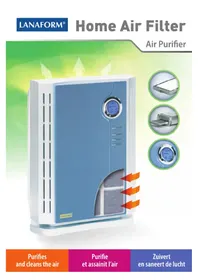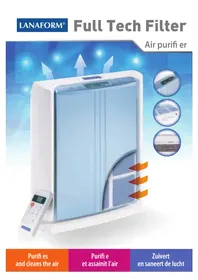
Full Tech Filter - Air purifier LANAFORM - Free user manual and instructions
Find the device manual for free Full Tech Filter LANAFORM in PDF.


| Product type | Air purifier |
| Brand | Lanaform |
| Model | Full Tech Filter |
| Power consumption | 45 W |
| Airflow rate | 180 m³/h (106 cfm) |
| Covered area | 40 m² (≈ 450 ft²) |
| Speed settings | High / Medium / Low |
| Noise level | ≤ 45 dB (at high speed) |
| Anion density | 1 million/cm³ |
| Purification system | Washable pre-filter, non-woven fiber filter, activated carbon filter, HEPA filter, Nano cold catalyst filter, ionizer |
| Filter lifespan | 9 to 15 months (normal use) |
| Display | LCD with LED display |
| Operation | Remote and manual control |
| Sensors | Odors and dust |
| Timer | Programmable 1, 2, 4 or 8 hours |
| Pre-filter cleaning | Every 3 months (washable with water and mild detergent) |
| Filter replacement | Pre-packaged replacement kit, 9-15 months |
Frequently Asked Questions - Full Tech Filter LANAFORM
User questions about Full Tech Filter LANAFORM
0 question about this device. Answer the ones you know or ask your own.
Ask a new question about this device
Download the instructions for your Air purifier in PDF format for free! Find your manual Full Tech Filter - LANAFORM and take your electronic device back in hand. On this page are published all the documents necessary for the use of your device. Full Tech Filter by LANAFORM.
USER MANUAL Full Tech Filter LANAFORM
Purifi es and cleans the air
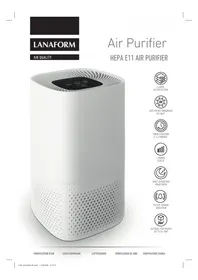
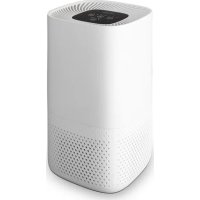
Thank you for choosing the "FULL TECH FILTER" air purifier from LANAFORM®. Its unique design means that it can purify air effectively and combat all symptoms of allergies. With the "FULL TECH FILTER", you can eliminate smoke and particles present in the air such as pollen and dust. This air purifier is fitted with a central multi-layer filtration kit, and can therefore produce a permanent output of clean, pure air. It removes potentially harmful particles from the air around you and your loved ones, thus improving your quality of life.
PLEASE READ ALL THE INSTRUCTIONS BEFORE YOU USE YOUR "FULL TECH FILTER", PARTICULARLY THE BASIC SAFETY INSTRUCTIONS:
- Only use this appliance as described in this manual.
- Make sure that the voltage indicated on the device matches your power supply network.
- This device is not intended to be used by anybody (including children) with reduced physical, sensory or mental abilities, or by anybody without the necessary experience or knowledge, unless they are supervised or given instructions beforehand on how to use the device by somebody responsible for their safety. Children should be supervised to make sure they do not use the device as a toy.
- Do not use accessories not recommended by LANAFORM® or not supplied with the device.
- If the power lead is damaged, it should be replaced with a similar lead or a special fitting available from the manufacturer or its after-sales representative.
- Do not use this device if the plug is damaged, if the unit is not working, if it has been dropped or if it is damaged or has been dropped in water. If any of these things happens, take the device to your supplier or its after-sales department to be examined and repaired.
- Do not carry this device by its power lead or use the lead as a handle.
- Switch the air purifier off before unplugging.
• Always unplug the unit after use and before cleaning or moving. - If the unit falls into water, unplug immediately before taking it out of the water.
- An electrical appliance should never be left plugged in unattended. Unplug it when not in use.
- Keep the power lead away from hot surfaces.
- Never use this appliance in a room where aerosol products (sprays) are used, or in a room where oxygen is administered.
- Never obstruct the ventilation outlets and never put the appliance on an unsteady surface such as a mat or a mattress. This could impede ventilation. Make sure that the air holes are not blocked up with hair, fluff or dust etc. Never insert any objects.
- Always position the purifier on a hard, flat, level surface, at least THIRTY centimetres away from any walls, and keep it away from sources of heat such as stoves and radiators etc. The purifier will not work properly on an uneven surface.
- Never try to plug in or unplug this appliance when in contact with water or in a damp environment. This could cause an electric shock.
- Never immerse or plunge the appliance in water or any other liquid to clean.
- Never use abrasive detergents, brushes or thinners to clean.
- The air purifier needs to be cleaned regularly. To do this, refer to and follow the cleaning instructions in this manual.
-
Never shake the appliance as this could affect its performance.
-
Ventilate the area when appropriate if the room is sealed or contains sources of heat such as an open fire or water heater. If you have any faulty gas appliances, this unit will not protect users from CO1 (= Carbon Monoxide) poisoning.
- If you notice a suspicious smell when you are using the unit normally, turn it off, unplug it and take it to the manufacturer or its service representative.
- Never dismantle the unit yourself as you may damage it.
- This appliance is intended exclusively for family use.
1) PRODUCT SPECIFICATIONS
Model: Full Tech Filter
Power supply: 45W
Air flow: 180m³/h (106 cfm)
Coverage: 40m ^2 (≈ 450 ft2)
Speed settings: High/Medium/Low
Sound level: ≤ 45dB in Fast mode
Anion density: 1 million/cm ^3
Purification system: Washable pre-filter, non-woven mesh filter, activated carbon filter, HEPA filter, Nano cold catalyst filter and ioniser
Filter: 1 (multi-filter, replaceable cartridge)
Filter service life: 9-15 months in normal use
Screen: LCD
Display: LED
Operating controls: Remote control/manual
Sensors: Odour and dust sensors
SILENT
The air purifier is fitted with a 3-speed motor that can operate noiselessly. This option can be useful if you use the unit at night.
EASY TO MAINTAIN
Remove the filter cartridge at the bottom of the air purifier and remove any dust from the pre-filter. You can then carry on using your appliance (the pre-filter can be washed: refer to the paragraph entitled "Cleaning the pre-filter").
SIMPLE TO USE
With the remote control, it's easy to operate your air purifier. The LED display tells you which mode has been selected.
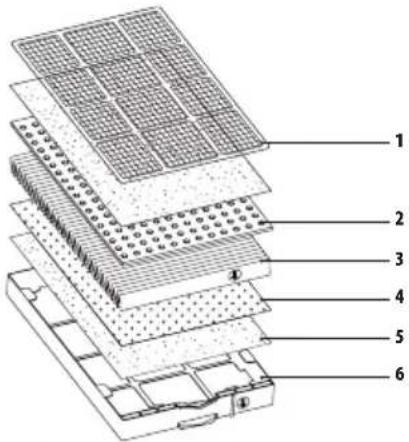
This "Full Tech Filter" comes with a multi-layer filtration kit so there are six stages to purifying your air:
1) Washable pre-filter
This reusable pre-filter collects large particles such as pollen, animal hair, fluff etc. It can be washed and used several times
2) Non-woven mesh filter
This anti-bacterial and anti-mildew filter also picks up large particles and extends the life of the other filters. It collects dust, pollen, mildew and microscopic organisms.
3) Activated carbon filter
The activated carbon granules trap chemical gases and odours from cigarette smoke as well as organic and kitchen waste.
4) HEPA filter
This incredibly effective filter traps up to 99.97% of dust, pollen, mildew, bacteria and any other particles carried in the air smaller than 0.3 microns.
5) Nano cold catalyst filter
This filter effectively decomposes dangerous chemical gases, such as formaldehyde, benzene, ammonia etc.
6) Ioniser
The final stage in the air purification processes involves the release of anions (= negative ions) into the air to increase air purity.
ODOUR AND DUST SENSORS
The “Full Tech Filter” can automatically detect the levels of odours and dust in the room and adjusts the ventilation speed accordingly.
THE PRINCIPLE OF "IONISATION:
- The unit produces a large number of negative ions, more commonly known as anions. These electrical charges are symbolised by a negative sign “—” because of their negative electric charge.
- Volatile particles, such as pollen and allergen-bearing dust, have positive electrical charges.
- The laws of physics tell us that particles with negative charges are attracted to particles with positive charges.
- The negative ions produced by the unit will therefore combine with the positively charged particles, making them heavier and less volatile. These particles will then fall to the ground and become much less likely to be inhaled.
- Cleaning the floor every day will minimise allergic reactions.
INSTALLING THE AIR PURIFIER:
- Before using the air purifier, remove the protective cover from the filter cartridge at the bottom of the unit.
- Plug in the air purifier to the power.
- When the unit is plugged in, you will hear a sound indicating that the power is working
Important safety instructions:
N.B.: follow these instructions for the best results from your air purifier.
- Leave at least THIRTY centimetres around all sides of the air purifier.
- Do not put the air purifier next to a fan as this will disrupt normal air circulation.
- Do not put the air purifier near a window or door. This could prevent air from entering or coming out of the unit.
- Make sure you put the air purifier in a well-ventilated area.
- The air will be purified more effectively if the unit is near the source of any pollution.
START-UP:
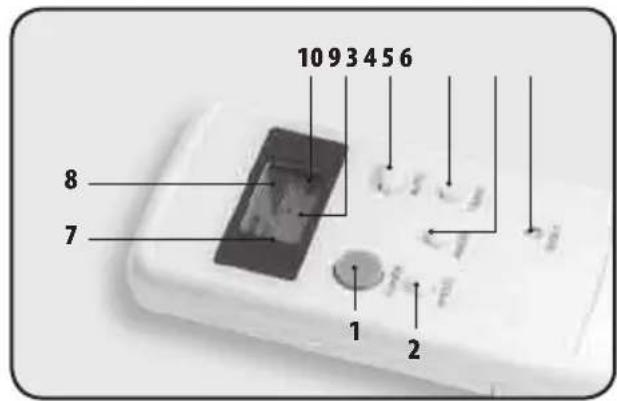
Remote control functions
- Power button
- Speed control button
- AUTO button
- Timer button
- Anion (= negative ions) release button
- Reset button
- LCD screen
- Speed indicator
- Timer indicator
- Anion (= negative ions) indicator
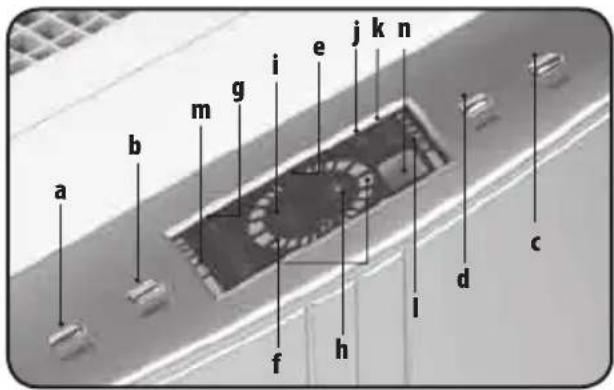
"FULL TECH FILTER" CONTROL PANEL
a) Power button
b) Speed control button
c) Timer button
d) Anion (= negative ions) release button
e) On/Off button
f) Speed indicator
g) Timer indicator
h) Anion (= negative ions) indicator
i) AUTO indicator
j) Odour detection indicator
k) Dust detection indicator
I) Dust pollution level indicator
m) Odour pollution level indicator
n) Remote control window
"FULL TECH FILTER" FUNCTIONS
POWER BUTTON
Use the On/Off button to switch the unit on and off. When you press this button, you will hear a sound. When the unit is on, the default speed setting is "medium", and the "anion" mode is activated. The indicators showing that the unit is working and the ioniser are on. Two thirds of the half-moon shaped speed indicator will be lit.
AUTO BUTTON
Use this button when you want the appliance to function automatically. Press a second time to cancel automatic mode.
SPEED
The speed control button chooses between the "High", "Medium" and "Slow" settings. A fan symbol appears on the LCD screen when the motor is running normally. The number of blades displayed on the screen changes according to the speed selected.
NEGATIVE IONS OR "ANIONS"
This button controls the release of anions. Press once to release anions.
The anion indicator appears on the LCD screen. Press again to stop the release of anions.
TIMER
Use this button to programme how long you want your air purifier to stay on. Press the button to set the time for 1, 2, 4 or 8 hours. The time selected will flash and the unit will adjust automatically within 3 seconds.
RESET (only on the remote control)
Press this button when the remote control is not responding but the batteries are fully charged. This does not happen very often.
N.B.: the "power", "speed", "anions" and "timer" buttons are the same on the unit control panel.
CLEANING AND LOOKING AFTER THE APPLIANCE
CLEANING YOUR AIR PURIFIER
- Clean the air purifier with a soft, dry cloth. For stubborn stains, use a cloth soaked in hot water.
- Do not use volatile substances such as benzene, paint thinner or scouring powder as these might damage your appliance.
- Keep your air purifier dry and avoid any contact with water.
- Clean the wall behind the air outlet of your air purifier regularly, as it may become dirty.
REPLACING THE FILTER
- The colour of the sticky label on the side of the filter cartridge will tell you when to replace the filter. The frequency with which it will need replacing will depend on how much the appliance is used. For normal use, you should change the filter between every 9 and 15 months.
- The non-woven mesh filter, the activated carbon filter, the HEPA filter, the Nano cold catalyst filter and the ioniser are supplied in a pre-packed replacement kit.
- For optimum air purification, clean the pre-filter every three months.
Caution: before replacing or cleaning any of these filters, make sure you have unplugged the appliance! Do not wash and reuse the HEPA filter. It will no longer work effectively if cleaned.
HOW TO REPLACE THE FILTER
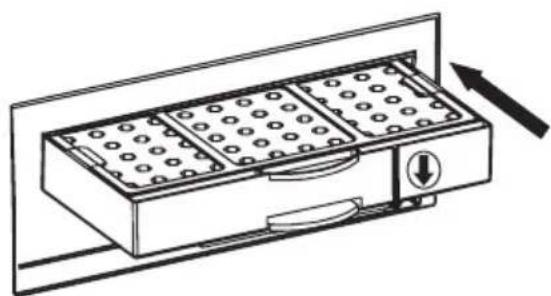
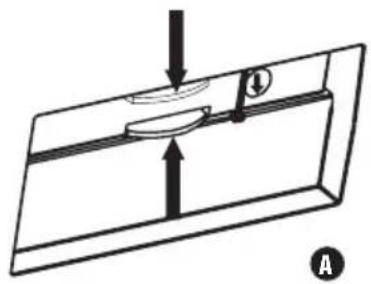
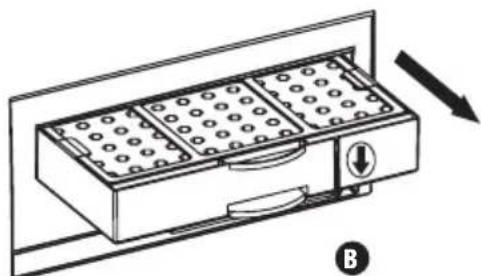
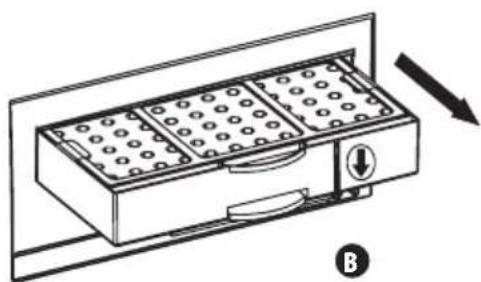
- Lie the unit on its side so you can see the filter cartridge at the bottom of the appliance. Hold the grip on the filter cartridge and press in the direction of the arrow to release the hooks that hold the cartridge in the unit. Remove the cartridge, holding it by this grip.
A- Downward arrow B- Filter cartridge
natural_image
Diagram of a mechanical or electrical component with arrows indicating direction, no visible text or symbols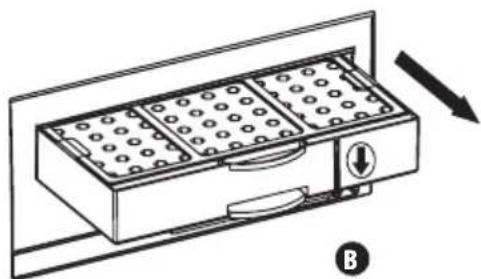
natural_image
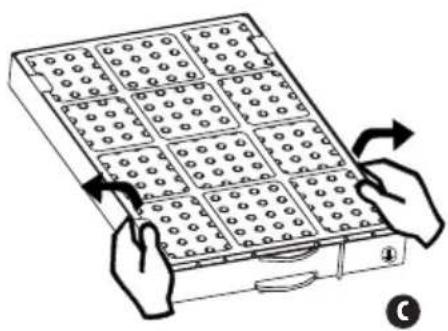
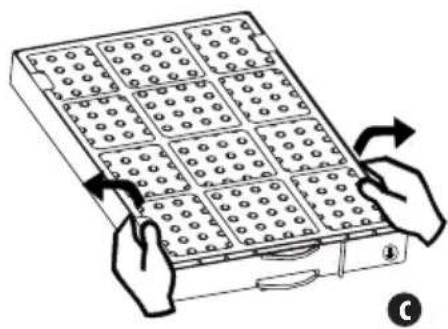
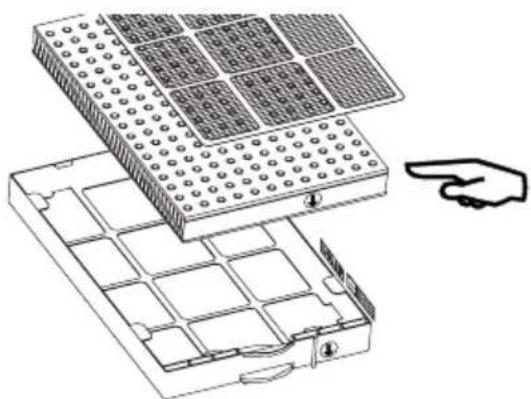
Diagram of a mechanical device with internal compartments and directional arrows, no text or symbols present- One by one, gently straighten the fasteners along the filter cartridge and remove the washable pre-filter from the case. Do the same for the activated carbon HEPA filter and the layer of the Nano cold catalyst filter.
C- Fastener
natural_image
Illustration of hands holding a grid-based device with circular patterns, no text or symbols present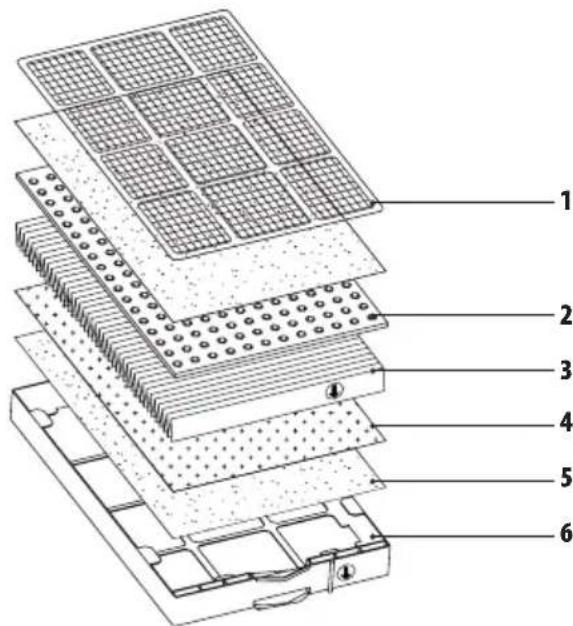
-
Washable pre-filter
-
Activated carbon layer
-
HEPA Filter
-
Nano cold catalyst layer
-
Non-woven mesh
-
Filter cartridge case
- Remove the plastic cover from the new filter. One by one, gently straighten the fasteners along the cartridge case and insert the filter in the cartridge case, loosening the fasteners until the filter is fully inserted in the cartridge. Secure the filter with the fasteners. When the filter is in place, write the date on the side of the box to remind you when you replaced it.
- Align the arrows on the side of the filter and the case.
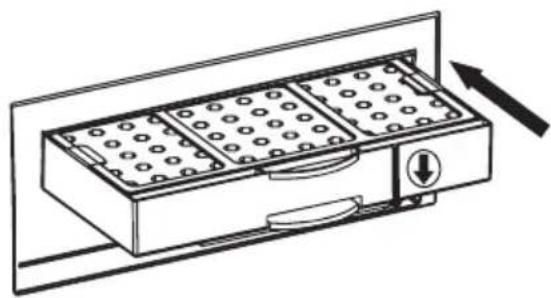
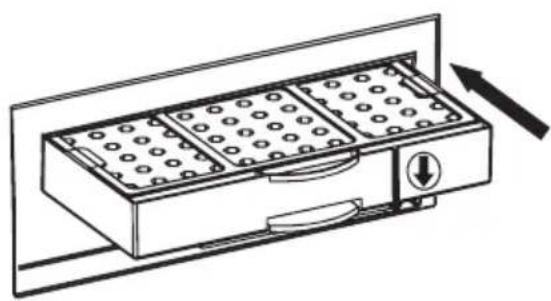
- Replace the cartridge containing the new filter by gently pushing it into the bottom of the appliance until you hear it click into place. When you hear this click, it means that you have finished changing the filter.

natural_image
Technical line drawing of a multi-case electronic device with grid panels and an open base, showing internal components and a pointing hand (no text or symbols)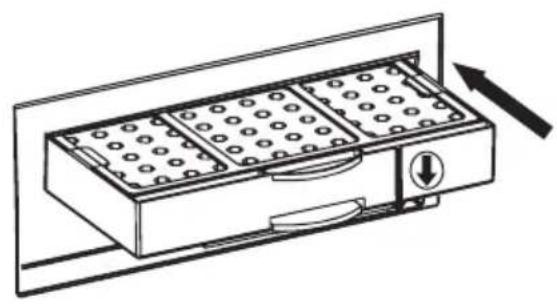
natural_image
Line drawing of a multi-chamber appliance with circular wells and a directional arrow (no text or symbols)
CLEANING THE PRE-FILTER
- Lie the unit on its side so you can see the filter cartridge at the bottom of the appliance.
- Hold the grip on the filter cartridge and press in the direction of the arrow to release the hooks that hold the cartridge in the unit. Remove the cartridge, holding it by this grip.
- One by one, gently straighten the fasteners along the filter cartridge and remove the washable pre-filter (a blue mesh) from the case.
- Gently clean the pre-filter with a vacuum cleaner. If you want to wash the pre-filter, do so with water and a mild household detergent, then rinse and shake to remove excess water.
N.B.: For normal use, you should clean the filter every three months. The frequency with which it will need replacing will depend on the room in which it is used. Follow the instructions given above to clean the pre-filter.
TROUBLESHOOTING
For any problems during normal use, please refer to the following table:
| PROBLEMS POTENTIAL CAUSES SOLUTIONS | ||
| The remote control is not working. • The batteries are flat.• The batteries are not inserted correctly. | Replace the batteries.Make sure that the batteries are inserted correctly in the remote control. | |
| The air purifier is not working. • The fuse has blown.• The filter is not fully inserted.• The appliance is not plugged in properly. | Replace the fuseMake sure the filter is fully inserted.Make sure the appliance is plugged in properly. | |
| The air purifier is not working properly. | • The filter is not assembled properly.• The filter cartridge is in the wrong way round.• You have forgotten to remove the plastic cover from the filter.• The filter is too dirty to work. | Check the assembly of the filter.Take out the filter and put it back the right way round.Remove the plastic cover from the filter.The pre-filter may need cleaning or the multi-layer filtration kit needs to be replaced. |
ADVICE REGARDING THE DISPOSAL OF WASTE
- All the packaging is composed of materials that pose no hazard for the environment and which can be disposed of at your local sorting centre to be used as secondary raw materials. The cardboard may be disposed of in a paper recycling bin. The packaging film must be taken to your local sorting and recycling centre.
- When you have finished using the device, please dispose of it in an environmentally friendly way and in accordance with the law. Prior to disposal, please remove the battery and dispose of it at a collection point so that it can be recycled.
Please note: under no circumstances should spent batteries be disposed of with household waste!!!
LIMITED WARRANTY
LANAFORM ^® guarantees this product against any material or manufacturing defect for a period of two years from the date of purchase, except in the circumstances described below.
The LANAFORM ^® guarantee does not cover damage caused as a result of normal wear to this product. In addition, the guarantee covering this LANAFORM ^® product does not cover damage caused by abusive or inappropriate or incorrect use, accidents, the use of unauthorized accessories, changes made to the product or any other circumstance, of whatever sort, that is outside LANAFORM ^® 's control.
LANAFORM ^® may not be held liable for any type of circumstantial, indirect or specific damage.
All implicit guarantees relating to the suitability of the product are limited to a period of two years from the initial date of purchase as long as a copy of the proof of purchase can be supplied.
On receipt, LANAFORM ^® will repair or replace your appliance at its discretion and will return it to you. The guarantee is only valid through LANAFORM ^® 's Service Centre ^® . Any attempt to maintain this product by a person other than LANAFORM ^® 's Service Centre will render this guarantee void.
MANUEL D'INSTRUCTION
1) CARACTERISTIQUES DU PRODUIT
natural_image
Pure diagram of a rectangular object with internal lines and arrows, no text or symbols present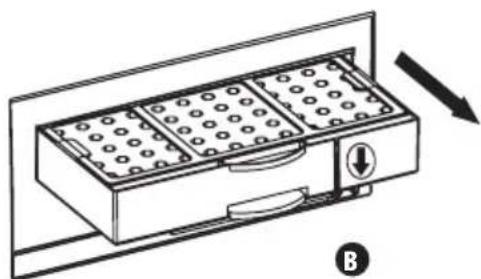
natural_image
Line drawing of a rectangular device with circular patterns and a directional arrow, no text or symbols presentnatural_image
Illustration of hands holding a grid-based device with arrows indicating rotation (no text or symbols)
natural_image
Diagram of a multi-case electronic device with grid panels and an open case, showing internal compartments and a pointing hand (no text or symbols)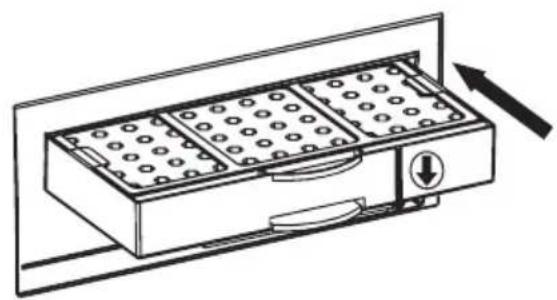
natural_image
Line drawing of a multi-gidded appliance with a handle and control panel, no text or symbols presentNETTOYAGE DU PRÉFILTRE
natural_image
Pure diagram of a rectangular object with internal lines and arrows, no text or symbols presentB- Filterpatroon
natural_image
Line drawing of a rectangular appliance with internal compartments and a directional arrow indicating motion (no text or symbols)natural_image
Illustration of hands holding a grid-based device with circular patterns, no text or symbols present
natural_image
Technical line drawing of a multi-tiered electronic device with grid panels and a pointing hand (no text or symbols)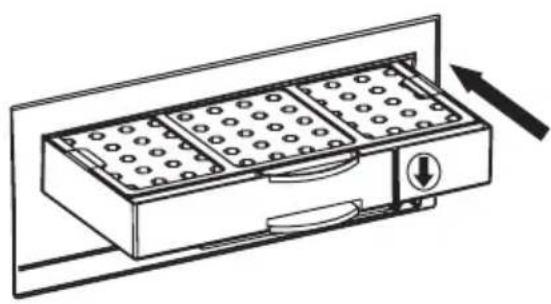
natural_image
Line drawing of a multi-chamber electric stove with cooling fins and directional arrow (no text or symbols)REINIGING VAN DE VOORFILTER
natural_image
Pure diagram of a rectangular object with internal lines and arrows, no text or symbols present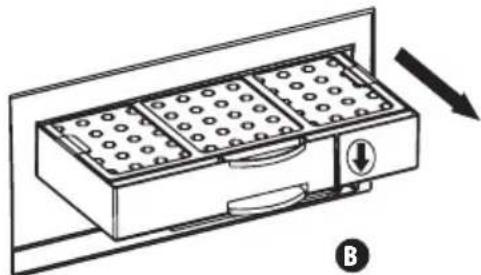
natural_image
Line drawing of a rectangular device with internal compartments and a directional arrow, no text or symbols presentnatural_image
Illustration of hands holding a grid-based device with circular patterns, no text or symbols present
natural_image
Technical line drawing of a multi-case electronic device with grid panels and an open base, showing no text or symbols.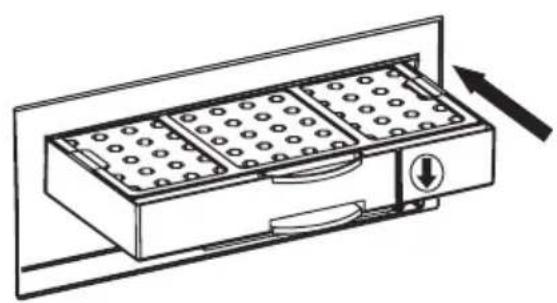
natural_image
Line drawing of a multi-gidded appliance with a handle and control panel, no text or symbols presentLIMPIEZA DEL PREFILTRO
AVERÍAS Y MEDIDAS CORRECTIVAS
natural_image
Pure diagram of a mechanical or electrical component with no text, numbers, or symbolsB- Filterkartusche
natural_image
Diagram of a multi-compartment storage unit with directional arrow indicating movement (no text or symbols)natural_image
Illustration of hands holding a grid-based device with circular patterns, no text or symbols present
natural_image
Technical line drawing of a multi-case electronic component with grid patterns and a pointing hand (no text or symbols)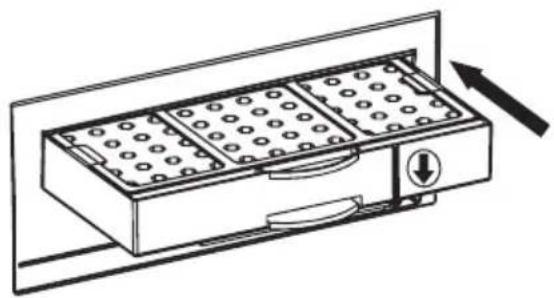
natural_image
Line drawing of a multi-chamber appliance with grid patterns and directional arrows (no text or symbols)REINIGUNG DES VORFILTERS
BESCHRÄNKTE GARANTIE
ACCENSIONE ("POWER")
natural_image
Pure diagram of a rectangular object with internal components and arrows, no text or symbols present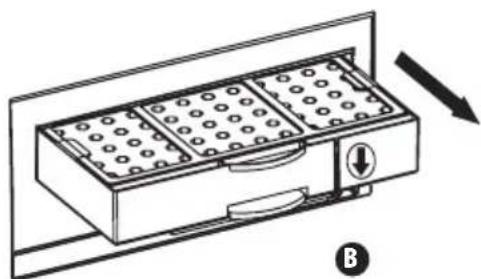
natural_image
Diagram of a multi-compartment storage unit with directional arrow indicating movement (no text or symbols)natural_image
Illustration of hands holding a grid-based device with arrows indicating rotation (no text or symbols)
natural_image
Technical line drawing of a multi-case electronic component with grid patterns and a pointing hand (no text or symbols)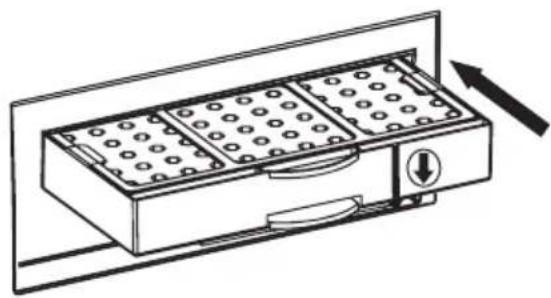
natural_image
Line drawing of a multi-gas washing machine with cooling fins and directional arrow (no text or symbols)PULIZIA DEL PREFILTRO
natural_image
Pure diagram of a rectangular object with internal lines and arrows, no text or symbols present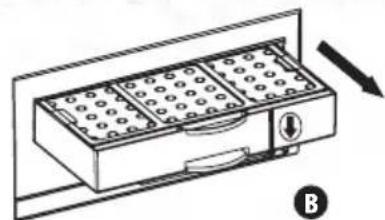
natural_image
Diagram of a rectangular drawer with circular patterns and a directional arrow, no text or symbols presentnatural_image
Illustration of hands holding a grid-based device with arrows indicating rotation (no text or symbols). C گیره
natural_image
Technical line drawing of a multi-tiered electronic device with grid panels and an open base, showing internal compartments and a pointing hand (no text or symbols)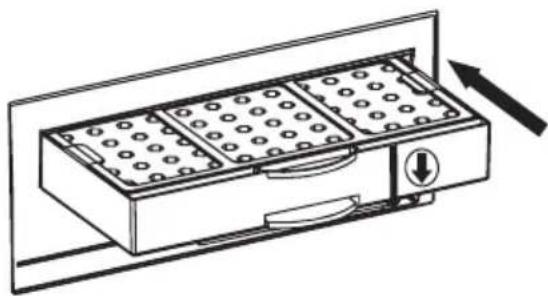
natural_image
Line drawing of a multi-gas washing machine with buttons and a directional arrow (no text or symbols)تميرکردن صافي اوليه
natural_image
Pure diagram of a rectangular object with internal components and arrows, no text or symbols present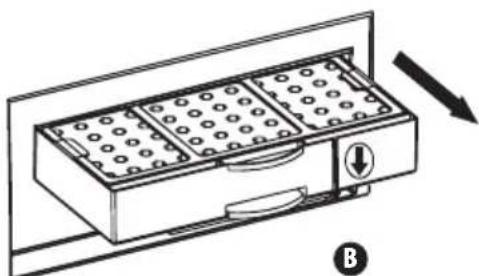
natural_image
Diagram of a rectangular device with internal compartments and a directional arrow, no text or symbols present
natural_image
Illustration of hands holding a grid-based device with arrows indicating rotation (no text or symbols)natural_image
Technical line drawing of a multi-tiered electronic device with grid panels and an open base, plus a hand pointing to the component (no text or symbols)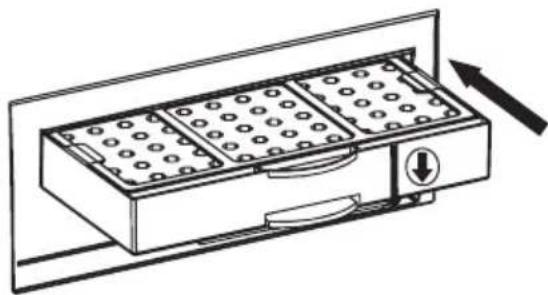
natural_image
Line drawing of a multi-compartment drawer with slots and a directional arrow (no text or symbols)natural_image
Pure diagram of a mechanical or electrical component with no text, numbers, or symbols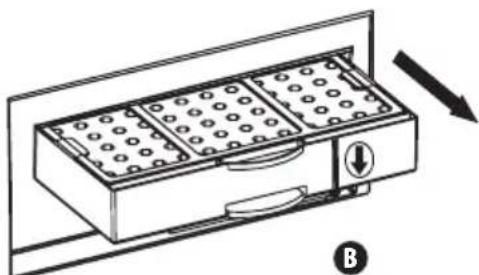
natural_image
Diagram of a rectangular device with grid pattern and directional arrow, no text or symbols presentnatural_image
Illustration of hands holding a grid-based device with circular patterns, no text or symbols presentnatural_image
Technical line drawing of a multi-chamber electronic device with grid panels and an arrow pointing to it (no text or symbols present)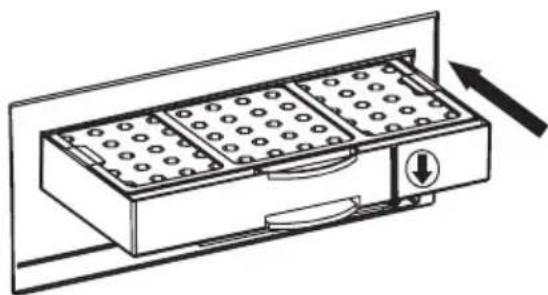
natural_image
Line drawing of a multi-gas washing machine with cooling fins and a directional arrow (no text or symbols)CZYSZCZENIE FILTRA WSTĘPNEGO OCZYSZCZANIA
natural_image
Pure diagram of a rectangular object with internal components and arrows, no text or symbols present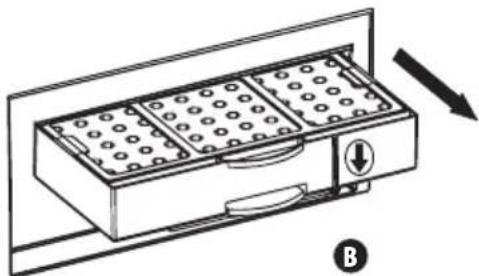
natural_image
Diagram of a multi-gidded appliance with a directional arrow indicating movement (no text or symbols)- Nježno poravnajte spojnice, jednu po jednu, raspoređene uzduž patrone filtra i izvucite perivi filtar iz kućišta. Na isti način izvucite filtar HEPA ili aktivni ugljen te niskotemperaturni katalitički filtar nanočestica.
C – spojnica
natural_image
Illustration of hands holding a grid-based device with arrows indicating rotation (no text or symbols)- perivi predfiltar
- sloj aktivnog ugljena
- filtar HEPA
- niskotemperaturni katalitički filtar nanočestica
- sloj netkanih vlakana
-
kućište patrone filtra
-
Izvucite plastični uložak novog filtra. Poravnajte jednu po jednu spojnice raspoređene uzduž kućišta patrone i umetnite filtar u kućište patrone otpuštajući spojnice sve dok filtar potpuno ne uđe u patronu. Učvrstite filtar pomoću spojnica. Nakon umetanja filtra, upišite datum stavljanja novog filtra sa strane kućišta.
- Poravnajte strelice na bočnoj strani filtra i kućišta.
- Zamijenite patronu s novim filtrom nježno je gurajući s donje strane uređaja sve dok ne začujete „klik“. Kada začujete ovaj zvuk, to znači da je postupak zamjene filtra završen.
natural_image
Diagram of a multi-tiered electronic device with grid panels and an open base, showing internal compartments and a pointing hand (no text or symbols)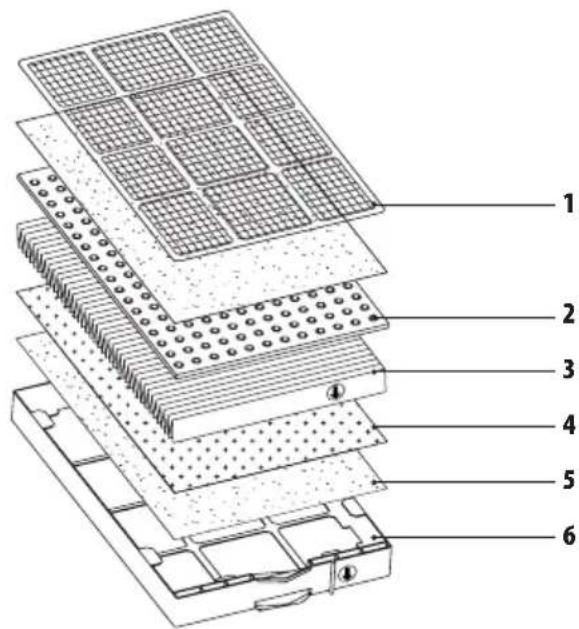
natural_image
Line drawing of a multi-chamber appliance with buttons and a directional arrow (no text or symbols)
ČIŠĆENJE PREDFILTRA
- Položite uređaj, tako možete vidjeti patronu filtra pri dnu uređaja.
- Primate zaponac patrone filtra i pritisnite u smjeru strelice da biste oslobodili kukice koje drže patronu u uređaju. Izvadite patronu iz uređaja držeći je za zaponac.
- Nježno poravnajte spojnice, jednu po jednu, raspoređene uzduž patrone filtra i izvucite perivi filtar (plava mrežica) iz kućišta.
- Nježno ispušite predfilter. Ako želite oprati predfilter, operite ga vodom i blagim deterdžentom, isperite ga i protresite da biste ga prosušili.
Napomena: ako se uređaj normalno upotrebljava, preporučuje se pranje filtra svaka tri mjeseca. Učestalost zamjene filtra ovisi o stanju prostorije u kojoj se uređaj upotrebljava. Za pranje predfiltra slijedite ovdje navedene upute.
PROBLEMI I RJEŠAVANJE PROBLEMA
natural_image
Pure diagram of a mechanical or electrical component with no text, numbers, or symbols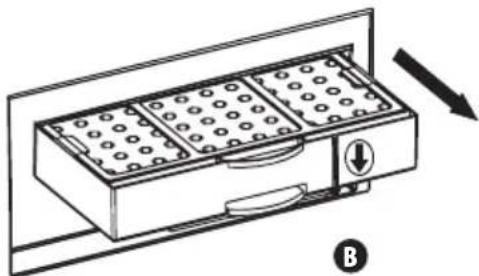
natural_image
Diagram of a multi-gas washing machine with a handle and control panel, showing internal compartments and a directional arrow (no text or symbols)natural_image
Illustration of hands holding a grid-based device with circular patterns, no text or symbols presentnatural_image
Technical line drawing of a multi-case electronic component with grid patterns and a pointing hand (no text or symbols)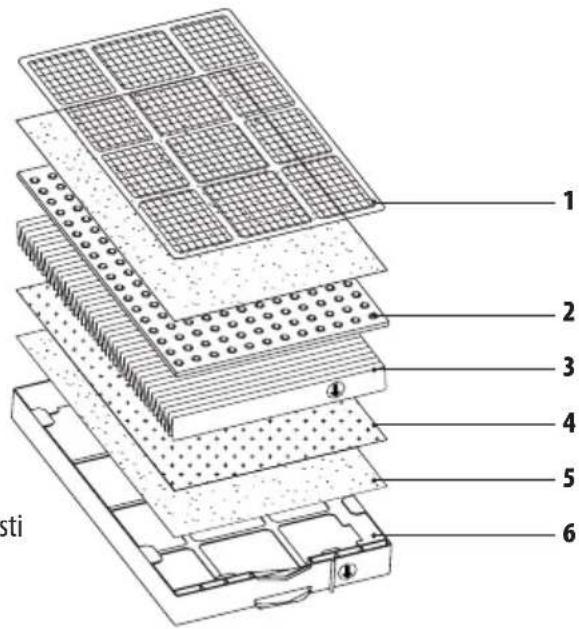

natural_image
Line drawing of a multi-chamber appliance with circular wells and a directional arrow (no text or symbols)ČIŠČENJE PREDFILTRA
natural_image
Pure diagram of a mechanical or electrical component with no text, numbers, or symbols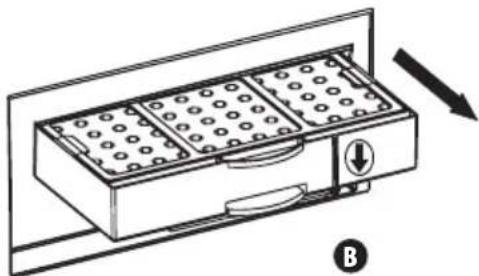
natural_image
Diagram of a rectangular device with internal compartments and a directional arrow, labeled B (no text or symbols on the device itself)natural_image
Illustration of hands holding a grid-based device with circular patterns, no text or symbols presentnatural_image
Technical line drawing of a multi-tiered electronic device with grid panels and an open base, showing internal components and a pointing hand (no text or symbols)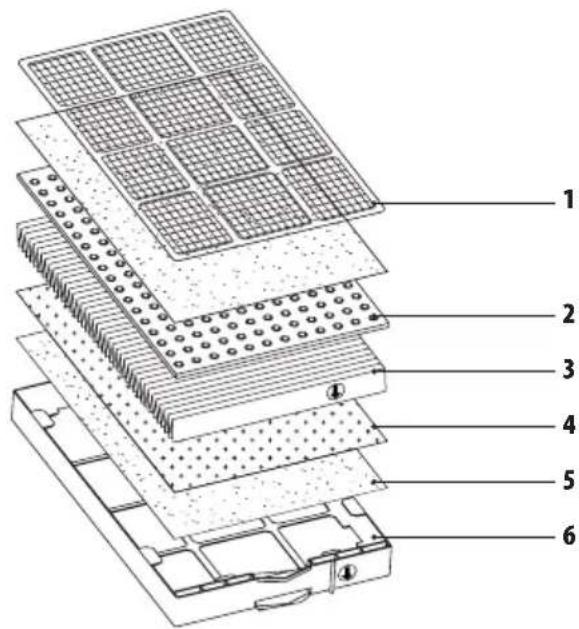
natural_image
Line drawing of a multi-chamber appliance with grid and control buttons, no text or symbols present
"FULL TECH FILTER" "FULL "FULL "FULL "FULL "FULL "FULL "FULL "FULL "FULL "FULL "FULL "FULL "FULL "FULL "FULL "FULL "FULL "FULL "FULL "FULL "FULL "FULL "FULL "FULL "FULL "FULL "FULL "FULL "FULL "FULL "FULL "FULL "FULL "FULL 'FULL 'FULL 'FULL 'FULL 'FULL 'FULL 'FULL 'FULL 'FULL 'FULL 'FULL 'FULL 'FULL 'FULL 'FULL 'FULL 'FULL 'FULL 'FULL 'FULL 'FULL 'FULL 'FULL 'FULL 'FULL 'FULL 'FULL 'FULL 'FULL 'FULL 'FULL 'FULL 'FULL ' FULL
que must choose what the latter is thinking the always because in the purpose of this. We want to go on the purpose of this.
السرعة "السرعة"
natural_image
Diagram of a mechanical or electrical component with arrows indicating direction, no visible text or symbols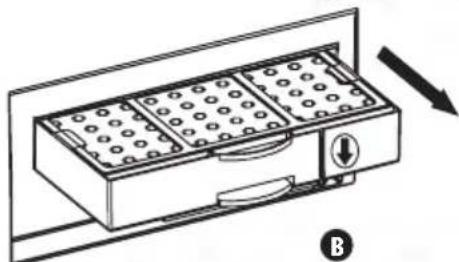
natural_image
Diagram of a rectangular device with internal compartments and a directional arrow, no text or symbols presentnatural_image
Diagram of a multi-tiered storage or rack system with grid patterns and a hand pointing to it (no text or symbols present)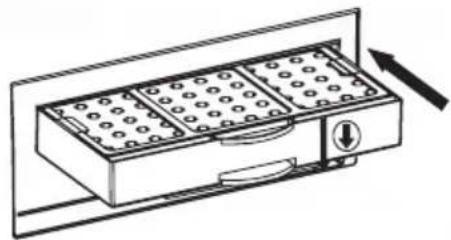
natural_image
Line drawing of a multi-chamber appliance with circular components and directional arrows (no text or symbols)تنظيف المرشح الأولى
natural_image
Pure diagram of a rectangular container with internal components and arrows, no text or symbols present
natural_image
Line drawing of a rectangular appliance with internal compartments and a directional arrow indicating motion (no text or symbols)natural_image
Illustration of hands holding a grid-based device with arrows indicating rotation (no text or symbols)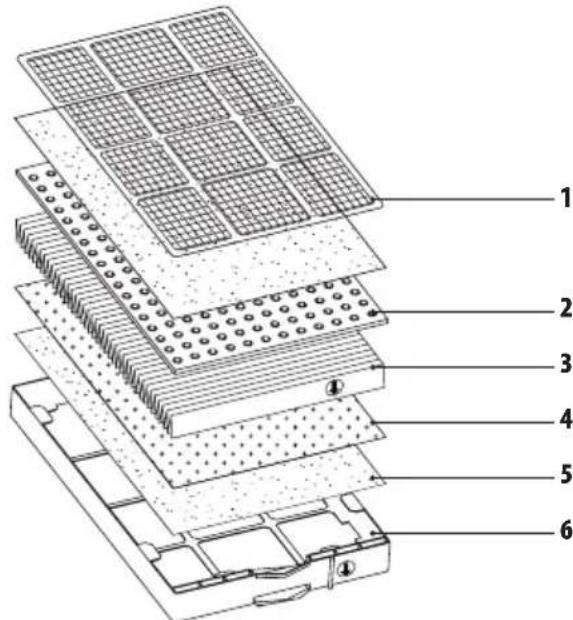
natural_image
Technical line drawing of a multi-case electronic device with grid panels and an open base, showing internal components and a pointing hand (no text or symbols)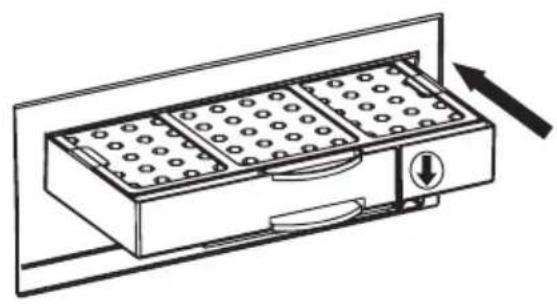
natural_image
Line drawing of a multi-gas washing machine with cooling fins and directional arrows indicating airflow (no text or symbols)ÖN FILTRENIN TEMIZLIĞI
natural_image
Pure diagram of a rectangular container with internal components and arrows, no text or symbols present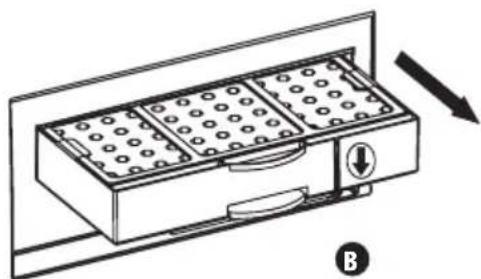
natural_image
Line drawing of a rectangular appliance with internal compartments and a directional arrow indicating motion (no text or symbols)natural_image
Illustration of hands holding a grid-based device with arrows indicating rotation (no text or symbols)natural_image
Diagram of a multi-tiered electronic device with grid panels and an open base, showing internal components and a hand pointing to it (no text or symbols present)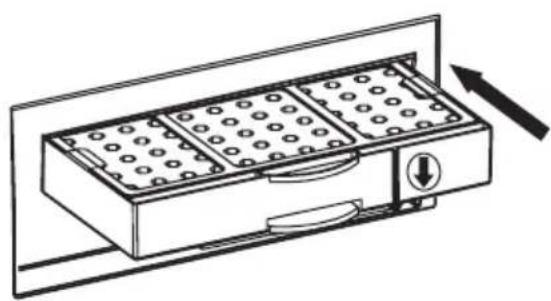
natural_image
Line drawing of a multi-gas grater with cooling fins and a directional arrow (no text or symbols)MANUAL DE INSTRUÇÕES
natural_image
Pure diagram of a rectangular object with internal components and arrows, no text or symbols present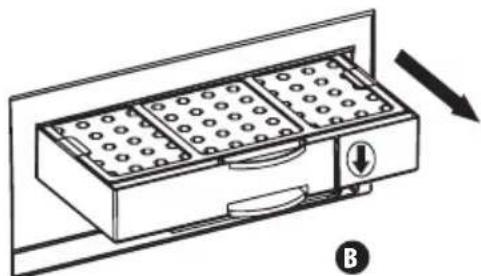
natural_image
Line drawing of a rectangular appliance with internal compartments and a directional arrow indicating motion (no text or symbols)natural_image
Illustration of hands holding a grid-based device with circular patterns, no text or symbols present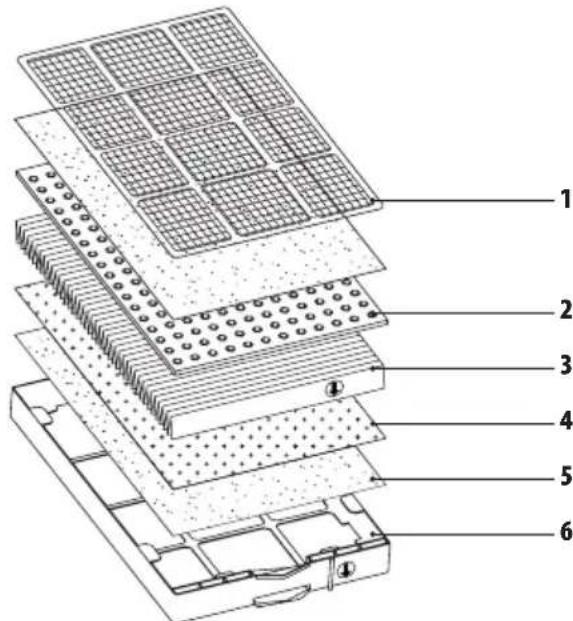
natural_image
Technical line drawing of a multi-case electronic device with grid panels and an open base, showing no text or symbols.
natural_image
Line drawing of a multi-gas washing machine with cooling fins and directional arrows indicating airflow (no text or symbols)natural_image
Pure diagram of a rectangular container with internal components and arrows, no text or symbols present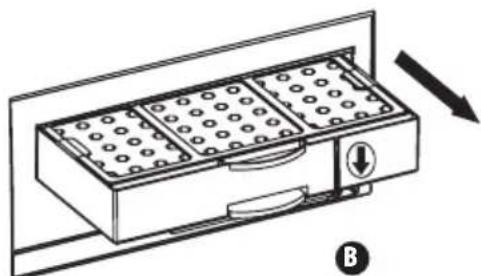
natural_image
Line drawing of a rectangular appliance with internal compartments and a directional arrow, no text or symbols presentnatural_image
Illustration of hands holding a grid-based device with arrows indicating rotation (no text or symbols)natural_image
Diagram of a multi-tiered electronic device with grid panels and an open base, showing internal components and a pointing hand (no text or symbols)