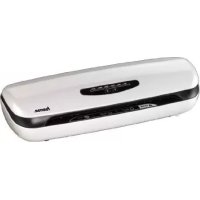
KHL38 - Laminating machine HAMA - Free user manual and instructions
Find the device manual for free KHL38 HAMA in PDF.



| Product Type | Laminating machine |
| Brand | Hama |
| Model | KHL38 |
| Dimensions (L x H x D) | 49.0 x 16.7 x 12.0 cm |
| Net weight | 3.0 kg |
| Gross weight | 4.0 kg |
| Power supply | 230 V ~ 50 Hz |
| Maximum power | 450 W |
| Max. laminating width | 320 mm |
| Max. document thickness | 0.7 mm |
| Max. pouch thickness | 175 µm |
| Warm-up time | 5 minutes |
| Laminating speed | 300 mm/min |
| Number of heating rollers | 2 |
| Heating system | Heating shoe |
| Motor type | Single-phase motor |
| Hot lamination | Yes |
| Cold lamination | Yes |
| Manual emergency stop | Yes (lever) |
| Film thickness adjustment | Yes (button) |
| Maintenance | Cleaning paper included |
| Cleaning | Dry cloth, do not immerse |
| Safety | Automatic stop? Not specified, but follow instructions |
| Spare parts | Cleaning paper, rollers? |
| Repairability | Entrust to a qualified technician |
| General information | Instructions included, manufacturer's warranty |
Frequently Asked Questions - KHL38 HAMA
User questions about KHL38 HAMA
0 question about this device. Answer the ones you know or ask your own.
Ask a new question about this device
Download the instructions for your Laminating machine in PDF format for free! Find your manual KHL38 - HAMA and take your electronic device back in hand. On this page are published all the documents necessary for the use of your device. KHL38 by HAMA.
USER MANUAL KHL38 HAMA
Introduction . Handliag and operation. 31
Foreword . Application2 instructions 31
Information on this instruction Switching the unit on and using1 it
manual . Hot lamination 1. 31
Copyright Cold. lamiation
Warning instructions. 3
Intended use 23
Liability disclaimer 23
Safety Cleaning and care 34
Fundamental safety precautions .24 Safety precautions 3
Electric shock hazard. 22
Risk of injury . 25
Warning symbols on the unit 26
Removal of failure 3
Setup and connection . . . . . . . . . . . . . . . . . . . . . . . . . . . . . . . . . . . . . . . . . . . . . . . . . . . . . . . . . . . . . . . . . . . . . . . . . . . . . . . . . . . . . .
Unpacking . . . . . . . . . . Cause and removal of failure. . . .35
Scope of supply and transport
inspection. Annex 27
Disposal of the packaging . . . . . . Notes on EC Declaration of
Demands on the Conformity
installation location Technical data
Electrical connection 28
Unit elements 29
Controls 30
Introduction
Foreword
Dear customer,
By purchasing this Hama laminator, you have chosen a quality product which conforms to state-of-the-art development standards in technology and functionality.
Please read the information contained in this booklet to familiarise yourself quickly with the unit and to be able to make full use of its functions.
We wish you a lot of pleasure with the unit.
Information on this instruction manual
About these operating instructions
These operating instructions are an integral part of the KHL-38 laminating device (hereinafter referred to as the "device"), and provide important information on the intended use, safety, connection and operation of the device.
The instruction manual has to be kept near the unit at all times. It has to be read and applied by all persons who use this unit or remove all faults of the unit.
Keep this instruction manual in a safe place and pass it on with the to any future owners.
Copyright
This piece of documentation is protected by copyright.
Any duplication or reprinting, in whole or in part, and the reproduction of the illustrations even in modified form is only permitted with the written approval of the manufacturer.
Warning instructions
The following warnings are used in the present instruction manual:
DANGER
A warning of this category draws attention to an impending dangerous situation.
If the dangerous situation is not avoided, it may lead to serious injury or even death.
Follow the instructions in this warning to avoid the danger of serious injury or even death.
WARNING
A warning of this category draws attention to a potentially dangerous situation.
If the dangerous situation is not avoided, it may lead to injuries.
Follow the instructions in this warning to avoid the risk of injury.
CAUTION
A warning of this category draws attention to potential material damage.
If the situation is not avoided, it may lead to material damage.
Follow the instructions in this warning to avoid material damage.
NOTE
A note draws attention to additional information that simplifies the use of the appliance.
Intended use
This device is only intended for laminating documents indoors.
Use in any other or further way is not considered an intended use.
WARNING
Danger from use for other than the intended purpose!
If not used for its intended purpose or used in any other unit may be or become a source of danger.
way, the
Use the unit only for its intended purpose.
Observe the procedures described in this instruction manual.
No claims of any kind will be accepted for damage or injury resulting from use of the unit for other than its intended purpose.
The risk has to be borne solely by the unit's owner.
Liability disclaimer
All technical information, data and instructions for the operation contained in this operating manual are in conformity with the last status prior to printing and shall be rendered on the basis of our previous experience and knowledge to the best of our belief.
The manufacturer assumes no liability for damage or injury resulting from failure to observe the instruction manual, use for other than the intended purpose, unprofessional repairs, unauthorised modifications or use of non-approved spare parts.
Safety
This chapter contains important safety instructions for handling the unit.
This appliance complies with the prescribed safety regulations. Improper use can, however, result in personal injury and/or appliance damage.
Fundamental safety precautions
Observe the following safety instructions to ensure safe handling of the unit:
- Inspect the unit for visible signs of damage before use. Do not use a damaged unit.
- Persons who due to their physical, mental or motor response abilities are unable to operate the unit may only use the unit under supervision or instruction by a responsible person.
- Permit repairs of the unit to be carried out only by an expert. Inexpert repairs shall cause the guarantee to expire.
Defective parts may only be replaced with original spare parts. Only these parts guarantee that the safety requirements are satisfied. - Protect the unit against humidity and penetration of liquids and/or objects. In case of contact with liquids disconnect the unit from the power supply immediately.
- Do not place any objects on the unit.
Electric shock hazard
DANGER
Electric shock hazard!
Contact with live leads or components poses a risk of serious injury or even death!
Observe the following safety precautions to avoid any electric shock hazard:
Do not use the unit if the mains lead or mains plug are damaged
- On no account should the housing of the unit be opened. Electric shock hazard if live connections are touched and/or the electrical and mechanical configuration is changed.
- Never immerse the unit or the mains plug in water or other liquids.
Risk of injury
WARNING
Risk of burns from casing
Observe the following safety precautions to avoid any injuries:
Do not touch the casing.
Warning symbols on the unit
The following warning symbols (see illustration in the chapter titled unit elements) have been attached to the unit:

Always insert the laminate into the device with the closed side of the film first.

Always make sure the size of the laminating film is correct.

Do not touch the casing as it can become very hot.
WARNING
Risk of injury
Observe the warning symbols in order to prevent injury or damage of the unit.
Setup and connection
Unpacking
DANGER
Risk of suffocation caused by packaging material.
- Packaging materials must not be used as toys. Risk of suffocation.
Remove all parts of the unit and the operating manual from the box.
Prior to first use, remove all packaging materials and protective films from the unit.
NOTE
Do not remove the rating plate or any warning signs.
Scope of supply and transport inspection
As a standard feature, the unit is supplied with the following components:
- Laminating device
- Cleaning paper for cleaning the rollers
- Operating instructions
NOTE
Inspect the delivery for completeness and obvious signs of damage.
Disposal of the packaging
The packaging protects the unit from transport damage. The packaging materials have been selected according to environmental and waste disposal aspects and can therefore be recycled.

The return of the packaging to the material cycle helps conserve raw materials and reduces the production of waste. When no longer required, dispose of the packaging materials in accordance with the local regulations in force.
NOTE
- Keep the original packaging, if possible, during the warranty period in order to be able to pack the unit properly in the event of a warranty claim.
Demands on the installation location
For safe and trouble-free operation of the unit, the installation location has to satisfy the following requirements:
- Place the unit on a level horizontal surface.
- Do not install the unit in a hot, wet or very humid environment or the vicinity of inflammable materials.
- Set the unit up in such a way that it is not exposed to direct insti tion.
The mains socket has to be easily accessible so that the mains connection can be severed fast, if and when required.
Electrical connection
For safe and trouble-free operation of the unit, the following instructions have to be observed for the electrical connection:
Before connecting the unit, compare the connection data (voltage and frequency) on the rating plate with those of your mains power supply. The data have to correspond in order to avoid damage to the unit.
- Protect the connecting cable from hot surface and sharp edges.
Make sure that the connecting cable is not taut or kinked.
- Do not permit the connecting cable to hang over edges (trip wire effect).
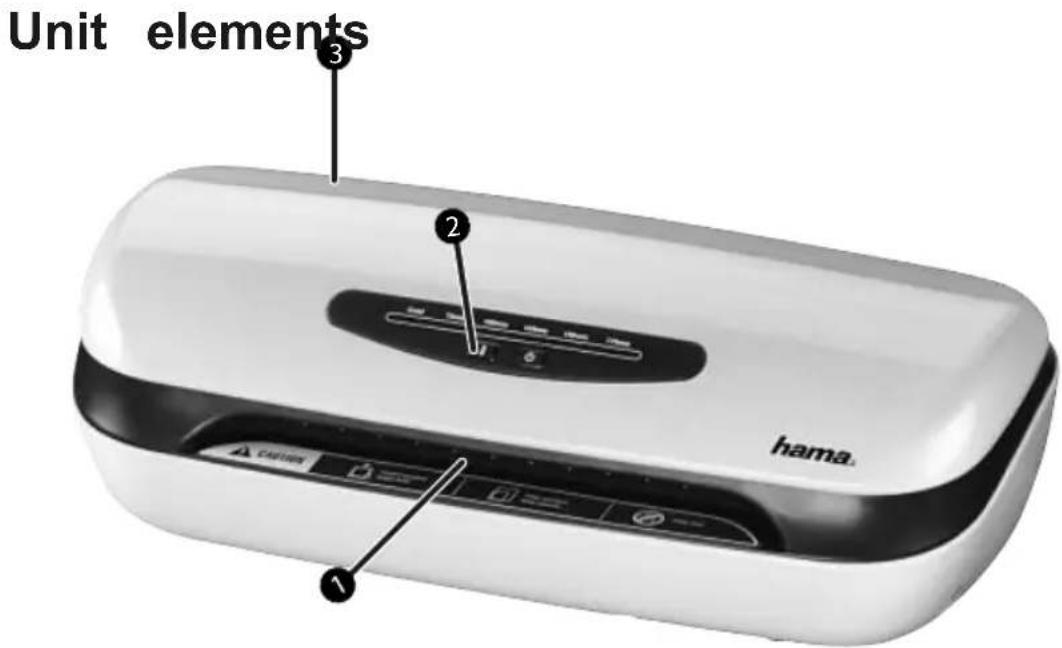
Warning symbols
Controls
3 Connection line
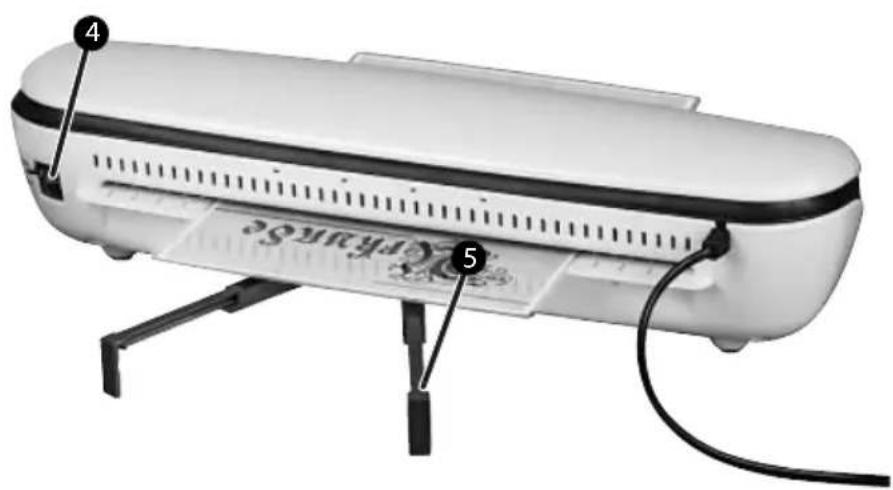
4 Manual reverse
Film tray
Controls
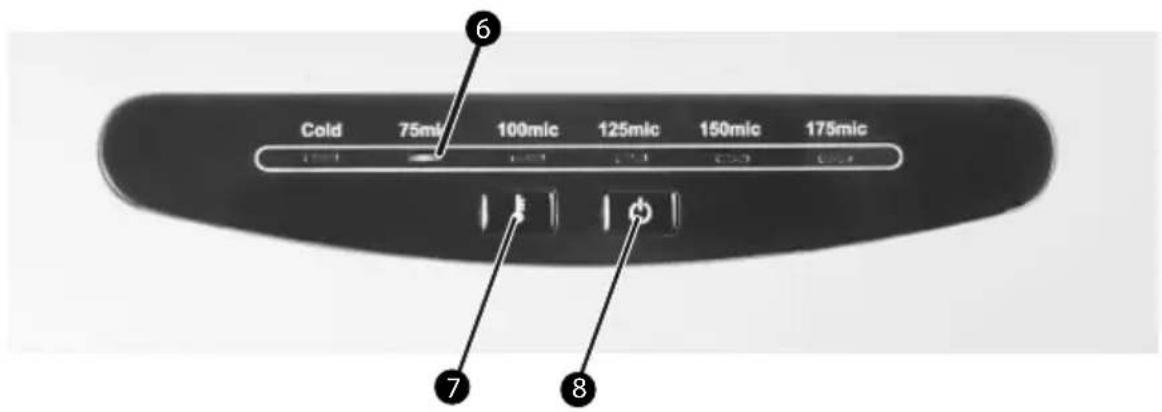
Display of the selected film thickness
Button for setting the film thickness
8 On/Off button
Handling and operation
Application instructions
- Always set the correct temperature for the thickness of the laminating film being used.
- When laminating thick paper or several sheets it is recommended to use film with a low thickness.
Always wait until the first lamination is complete before starting the next.
Switching the unit on and using it

Press the on/off butto8 to switch on the device.
Extend the rails to the film tray.
Hot lamination
After the device has been switched on, the default setting is 75~ l which is shown on operating coobs the corresponding LED is illuminated.
To change the setting, press but7repeatedly until the LED next to the required film thickness flashes
Place the document to be laminated in the appropriate pouch.
When the required operating temperature has been reached, the corresponding LED stays lit.
Insert the film pouch into the front opening of the device. Make sure that the sealed end is inserted first.
The document is returned at the rear.
If the item has not been fully laminated, repeat the first steps.
Press lever ④ downwards if you wish to run the item through again for any reason.
DANGER
Laminated items coming out of the device may be too hot to touch.
NOTE
The laminated item is hot and easily bent. Place the item on a flat surface and leave to cool, so that it does not roll up.
Cold lamination
After the device has been switched on, the default setting is 75~ which is shown on operating coobs the corresponding LED is illuminated.
For cold lamination, press butn repeatedly until the LED next to "Cold" flashes.
Place the document to be laminated in the appropriate pouch.
If the device has previously been used for hot lamination, it can take approx. 25 minutes until it has cooled down. The LED next to "Cold" then stays lit.
Insert the film pouch into the front opening of the device. Make sure that the sealed end is inserted first.
The document is returned at the rear.
f the item has not been fully laminated, repeat the first steps.
Cold lamination
HINWEIS
If the item to be laminated has not passed through all 4 rollers approx. 15 seconds after the film pouch was inserted into the device, the reverse function is automatically switched on and the item is returned at the front of the device.
Press lever ④ downwards if you wish to run the item through again for any reason.
Switching the unit off
Press button. The currently illuminated LED goes out.
Servicing
The rollers in the laminating device need to be cleared of dirt and an adhesive residue regularly. To do so, proceed as follows:
Switch the device on as previously described.
When the LED next to 75~ stays lit, insert the cleaning paper into the device.
If a lot of dirt sticks to the paper turn it over and repeat the process again.
Cleaning and care
This chapter contains important information on cleaning and care of the unit.
Safety precautions
DANGER
Electric shock hazard!
- Pull the mains plug out of the plug socket before starting cleaning.
WARNING
Risk of burns from casing!
Observe the following safety precautions to avoid any injuries:
Wait until the device has fully cooled down..
CAUTION
Damage of the unit caused by humidity!
Make sure that no humidity can get into the unit whilst cleaning in order to prevent an irreparable damage of the unit.
Cleaning
- Clean the unit with a dry cloth. In case of heavy soiling, the cloth may be moistened a bit.
Storage
If you do not want to use the unit for a longer period of time, switch unit off and disconnect it from the power supply, and keep it at a clear and dry location without direct insolation.
Removal of failure
This chapter contains important information on cleaning and care of the unit. Please observe the notes to prevent dangers and damage.
Safety precautions
| △WARNING |
| Observe the following safety precautions to avoid any injuries and damage: ► Repairs to electrical unit may only be carried out by specialists trained by the manufacturer. Unqualified repairs can pose considerable dangers for the user and serious damage to the unit. |
Cause and removal of failure
The following table will help you locate and remedy smaller failures:
| Fault Possible | cause Remedy | |
| No LED flashes on the control ② after press-ing button8. | On/off button has nopress the on/off button to been pressed. | Make sure that mains plug has been connected to the mains socket. |
| Mains cable not con- nected correctly. | ||
| The mains socket does not provide anyCheck the fuses. | ||
| Unit is defective. | Contact after-sales service. | |
| Pouches are not properly laminated. | The temperature has not been set to the film thickness being used. | Set the thickness to be used in the device by pressing the butto7. |
| The inserted pouch does not come out the rear side | The item to be laminated is possibly stuck or is too large to pass through the rollers. | Press the leve4down- wards to dispense the item from the front side. Check that the item is not above the maximum allowed thickness. |
NOTE
If you cannot resolve the problem with the steps described above, please contact after-sales service.
Annex
Notes on EC Declaration of Conformity

Hama GmbH & Co. KG declares herewith that this unit is in conformity with the fundamental requirements and the other relevant regulations and stipulations of the Low-Voltage Directive 2006/95/EU and of the EMC Directive 2004/108/EU.
The complete original declaration of conformity is available on the Internet at http://www.hama.com.
Technical data
| Input voltage 230 VAC | |
| Mains frequency 50 Hz | |
| Maximum power consumption | 450 W |
| Dimensions (L x W x H) 49,0 x 16,7 x 12,0 cm | |
| Weight 3,5 kg | |
| Weight 4,0 kg | |
| Maximum laminating width 320 mm | |
| Maximum laminating thickness 0.7 mm | |
| Maximum pouch thickness 175 μm | |
| Maximum warm-up time 5 minutes | |
| Maximum speed 300 mm/minute | |
| Number of heating rollers 2 | |
| Heating system | Heat shoe |
| Motor type | AC motor |
| Cold lamination Yes | |
Table des matieres
Introduction
Avant-propos 39
Plastification a chaud 49
Chere cliente, cher client,
Note on environmental protection:
After the implementation of the European Directive 2002/96/EU and 2006/66/EU in the national legal system, the following applies: Electric and electronic devices as well as batteries must not be disposed of with household waste. Consumers are obliged by law to return electrical and electronic devices as well as batteries at the end of their service lives to the public collecting points set up for this purpose or point of sale. Details to this are defined by the national law of the respective country. This symbol on the product, the instruction manual or the package indicates that a product is subject to these regulations. By recycling, reusing the materials or other forms of utilising old devices/Batteries, you are making an important contribution to protecting our environment.
Support and contact information
If products are defective:
Please contact your dealer or Hama Product Consulting if you have any product claims.
Internet / World Wide Web:
Product support, new drivers or product information can be found at www.hama.com
Support Hotline - Hama Product Consulting:
Tel. +49 (0) 9091 / 502-115 Fax +49 (0) 9091 / 502-272
E-mail: Produktberatung@hama.de

Support technique et contact


- Introduction . Handliag and operation. 31
- Safety Cleaning and care 34
- Unit elements 29
- Introduction
- Foreword
- Information on this instruction manual
- Copyright
- Warning instructions
- DANGER
- WARNING
- CAUTION
- NOTE
- Intended use
- Liability disclaimer
- Safety
- Fundamental safety precautions
- Electric shock hazard
- Risk of injury
- Warning symbols on the unit
- Setup and connection
- Unpacking
- Scope of supply and transport inspection
- Disposal of the packaging
- Demands on the installation location
- Electrical connection
- Controls
- Handling and operation
- Application instructions
- Switching the unit on and using it
- Hot lamination
- Cold lamination
- HINWEIS
- Switching the unit off
- Servicing
- Cleaning and care
- Safety precautions
- Cleaning
- Storage
- Removal of failure
- Cause and removal of failure
- Annex
- Notes on EC Declaration of Conformity
- Technical data
- Table des matieres
- Note on environmental protection:
- Support and contact information
- Support technique et contact
Brand : HAMA
Model : KHL38
Category : Laminating machine