
Basic L42A - Laminating machine HAMA - Free user manual and instructions
Find the device manual for free Basic L42A HAMA in PDF.


| Product type | Laminating machine |
| Brand | Hama |
| Model | Basic L42A |
| Maximum document format | A4 (216 x 303 mm) |
| Power supply | 230 V, 50 Hz |
| Power consumption | 300 W |
| Heat-up time | 3 to 5 minutes |
| Laminating speed | 300 mm/min |
| Maximum film thickness | 125 microns |
| Compatible pouch types | Hot and cold laminating pouches |
| Number of rollers | 2 |
| Functions | Hot / cold lamination, auto shut-off |
| Indicator lights | Power and ready LEDs |
| Dimensions (L x W x H) | 350 x 150 x 80 mm |
| Weight | 1.2 kg |
| Color | Black / Grey |
| Care and cleaning | Clean the rollers with a dry cloth after use; do not use solvents |
| Safety | Automatic shut-off in case of overheating; lock release button |
| Spare parts and repairability | Laminating pouches available separately; repair by an approved professional |
| General information | Entry-level laminating machine, ideal for home or light office use |
Frequently Asked Questions - Basic L42A HAMA
User questions about Basic L42A HAMA
0 question about this device. Answer the ones you know or ask your own.
Ask a new question about this device
Download the instructions for your Laminating machine in PDF format for free! Find your manual Basic L42A - HAMA and take your electronic device back in hand. On this page are published all the documents necessary for the use of your device. Basic L42A by HAMA.
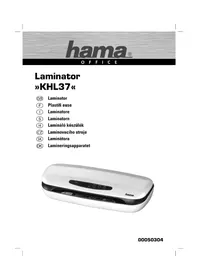
USER MANUAL Basic L42A HAMA
OperatingInstructions
Bedienungsanleitung
Moded'emploi



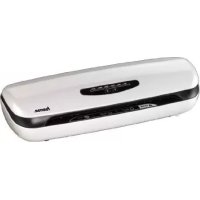
Parts
①Connectionline
②Readylamp
③On/off switch
④Paperfeed
⑤Laminationoutput(rear)
1. Introduction
1.1 Foreword
Dearcustomer,
By purchasing this Hama laminator, you have chosen a quality product which conformstothelatestdevelopmentstandardsintechnology and functionality.
Pleasereadtheinformationcontainedinthisbooklettofamiliarise yourselfquicklywiththeunitandtobeabletomakefulluseofits functions.
Wewishyoua I otofpleasurewiththeunit.
1.2 Information on this instruction manual
ThisinstructionmanualispartoftheBasicL42Alaminator(hereinafter referredtoasunit)givingyouimportantinformationontheintended use,safety, c onnectionaswellasoperationoftheunit.
Theinstructionmanualhastobekeptneartheunitatalltimes.lthas tobereadandappliedbyallpersonswhousethisunitorremoveany faultsoftheunit.
Keep this instruction manual in a safe place and pass it on with the unit toanyfutureowners.
1.3 Copyright
Thispieceofdocumentationisprotectedbycopyright.
Anyduplicationorreprinting,inwholeorinpart,andthereproduction oftheillustrationseveninmodifiedformisonlypermittedwiththewrittenapprovalofthemanufacturer.
1.4 Liability disclaimer
Alltechnicalinformation, data and instructions for the operation contained in this operating manual are inconformity with the last status prior to printing and shall be rendered on the basis of four previous experience and knowledge to the best of four belief.
Themanufacturerassumesnoliabilityfordamageorinjuryresulting fromfailuretoobservetheinstructionmanual,useforotherthanthe intendedpurpose,unprofessionalrepairs,unauthorisedmodifications oruseofnon-approvedspareparts.
2. Fundamentals safety precautions
■Inspecttheunitforvisiblesignsofdamagebeforeuse.Donotuse a d amagedunit.
■Personswhoduetotheirphysical,mentalormotorresponseabilitiesareunable t o o peratetheunitmayonlyusetheunitunder supervisionorinstructionbya r responsibleperson.
■Permitrepairsoftheunittobecarriedoutonlybyanexpert.Inexpertrepairsshallcausetheguaranteetoexpire.
■Defectivepartsmayonlybereplacedwithoriginalspareparts. Onlythesepartsguaranteethatthesafetyrequirementsaresatisfied.
■Protecttheunitagainsthumidityandpenetrationofliquidsand/or objects.Incaseofcontactwithliquidsdisconnecttheunitfromthe powersupplyimmediately.
Electricshockhazard
DANGER
Electricshockhazard!
Contactwithliveleadsorcomponentsposesa r iskofserious injuryorevendeath!
Observethefollowingsafetyprecautionstoavoidanyelectric shockhazard:
▶ Do not use the unit if the mains lead or mains plug are damaged.
On no account should the housing of the unit be opened. Electric shockhazardifliveconnectionsaretouchedand/ortheelectrical andmechanicalconfigurationischanged.
▶ Neverimmersetheunitorthemainspluginwaterorother liquids.
Riskofinjury
WARNING
Riskofcutsattheshreddingrollers!
Observethefollowingsafetyprecautionstoavoidanyinjuries:
▶ Donottouchthecasing.
3. Installation and Assembly
■Removeallpackagingmaterialsfromthedevice.
■ Do not place the device in a hot, wet or very humid environment.
- Place the device on a level, horizontal surface so that it is stable.
■ Thesocketmustbeeasilyaccessiblesothatthepowersupplycan bedisconnectedquicklyincaseofanemergency.
■Beforeyouconnectthedevice,comparetheconnectiondatafor thedevice(voltageandfrequency)onthetypeplatewiththatof yourmainspowersupply. Thisdatamustmatchtoavoiddamage tothedevice.
- Keep the connection cable away from hot surfaces and sharp edges.
■ Do not to bend the connection cable or pull it too tightly.
■ Donotallowtheconnectioncabletohangovercorners,asper-sonsmaytripandfall.
4. Handling and Operation
4.1 Instructionsforuse
■ Always wait for a lamination process to finish before starting the next.
4.2 Switchingonthedevice
Pressthe o n/off s w i t 3 to switchonthe d evice.
The device automatically heats to the correct temperature for laminating films with a thickness of 80 µ m. The ready lamp (2) turns greenassoonasthedeviceisready.
4.3Lamination
■Placethedocumenttobelaminatedintheappropriatepouch(see figure).
- Insert the film pouch into the front opening of the device (4). Make surethatthesealedendisinsertedfirst.
NOTE
▶ Filmpouchesofallsizesshouldbeinsertedatthecentreof thefrontopeningsothattheypassthroughthesensor.
■ Thedocumentisreturnedattherear(5).
■Ifanitemhasnotbeenfullylaminated,repeatthefirststeps.
CAUTION!
▶ Laminateditemscomingoutofthedevicemaybetoohotto touch.
NOTE
The laminated sheet is hot and can be bent easily. Place the itemonaflatsurfaceandleavetocoolsothatitdoesnot curlattheedges.
4.4 Switchingoffthedevice
■Presstheon/off switch ③ toswitchoff the device. Theready lamp ② goesout.
5.CleaningandCare
DANGER
Dangerofdeathduetoelectricalcurrent
▶ Removethemainsplugfromtheelectricalsocketbefore cleaningthedevice.
WARNING
Riskofcuttinginjuryfromrollersofthecutting a ttachment!
Observethefollowingsafetyinstructions to a voidinjury:
▶ Donottouchthecasing.
CAUTION!
Moisturecandamagethedevice!
▶ To prevent irreparable damage, make sure that no moisture gets into the device when you clean it.
Therollersinthelaminatingdeviceneedtobecleanedregularlyto remove dirt and any adhesive residue. To do so, proceed as follows:
■Switchonthedeviceaspreviouslydescribed.
■Whenthereadylamp device. ② stayslit, insert a piece of paper into the
■ If a lot of dirt sticks to the paper, turn over the paper and repeat theprocess.
Clean the outside of the device with a dry cloth. You can lightly dampen theclothifthedeviceisverydirty.
6.Troubleshooting
| FaultPossiblecauseSolution | ||
| Thereadylamp2 doesnot flashorisnot solidgreen. | Theon/off switch3 wasnotpressed correctly. | Presstheon/off switch3 toswitchonthedevice. |
| Thepowercable1 isnotconnected correctly. | Ensurethattheplugis connectedtotheelectricalsocket. | |
| Nomainspower. | C heckyourfusebox. | |
| Deviceisfaulty. | Informourcustomer servicedepartment. | |
| Pouchesare notlaminated properly. | Therequiredtemperaturehasnotyet beenreached. | Waitforthereadylight tobecomesolidgreen. |
NOTE
▶ Contactourcustomerservicedepartmentiftheproblemremainsafteryouhavetakenthestepsdetailedabove.
7.Technicaldata
| Input voltage | 220-240 V~ |
| Mainsfrequency50 Hz | |
| Max.powerconsumption250W | |
| Dimensions (W x H x D) | 11,8 x 8,8 x 33,0 cm |
| Weight(net)1,1835kg | |
| Weight(gross)1,33kg | |
| Maximumlaminatingwidth236mm | |
| Maximumlaminatingthickness0,6mm | |
| Maximumpouchthickness80μ | |
| Maximumwarm-uptime | 6minutes |
| Maximumspeed | 250mm/minute |
| Numberofheatingrollers | 2 |
8.Supportandcontactinformation
PleasecontactHamaProductConsultingifyuhaveanyquestions aboutthisproduct.
Hotline: +49 9091 502-115 (German/English)
Furthersupportinformationcanbefoundhere:
www.hama.com
Maschinenaufbau
3. Installation/structure
After the implementation of the European Directive 2002/96/EU and 2006/66/EU in the national legal system, the following applies: Electric and electronic devices as well as batteries must not be disposed of with household waste. Consumers are obliged by law to return electrical and electronic devices as well as batteries at the end of their service lives to the public collecting points set up for this purpose or point of sale. Details to this are defined by the national law of the respective country. This symbol on the product, the instruction manual or the package indicates that a product is subject to these regulations. By recycling, reusing the materials or other forms of utilising old devices/Batteries, you are making an important contribution to protectingourenvironment.
⑤Remarquesconcernantlaprotectiondel'environnement:

86652 Monheim/Germany
www.hama.com

- PARTS
- INTRODUCTION
- 1.1 FOREWORD
- 1.2 INFORMATION ON THIS INSTRUCTION MANUAL
- 1.3 COPYRIGHT
- 1.4 LIABILITY DISCLAIMER
- FUNDAMENTALS SAFETY PRECAUTIONS
- ELECTRICSHOCKHAZARD
- DANGER
- CONTACTWITHLIVELEADSORCOMPONENTSPOSESA R ISKOFSERIOUS INJURYOREVENDEATH
- RISKOFINJURY
- WARNING
- RISKOFCUTSATTHESHREDDINGROLLERS
- INSTALLATION AND ASSEMBLY
- HANDLING AND OPERATION
- 4.1 INSTRUCTIONSFORUSE
- 4.2 SWITCHINGONTHEDEVICE
- 4.3LAMINATION
- NOTE
- CAUTION
- 4.4 SWITCHINGOFFTHEDEVICE
- 5.CLEANINGANDCARE
- DANGEROFDEATHDUETOELECTRICALCURRENT
- RISKOFCUTTINGINJURYFROMROLLERSOFTHECUTTING A TTACHMENT
- MOISTURECANDAMAGETHEDEVICE
- 6.TROUBLESHOOTING
- 7.TECHNICALDATA
- 8.SUPPORTANDCONTACTINFORMATION
- MASCHINENAUFBAU
- INSTALLATION/STRUCTURE
- ⑤REMARQUESCONCERNANTLAPROTECTIONDEL'ENVIRONNEMENT
Brand : HAMA
Model : Basic L42A
Category : Laminating machine