CDR05L - Tumble dryer Ardo - Free user manual and instructions
Find the device manual for free CDR05L Ardo in PDF.



| Product type | Condenser tumble dryer |
| Brand | Ardo |
| Model | CDR05L |
| Dimensions (W x H x D) | 59.5 x 85.0 x 60.4 cm |
| Maximum capacity | 5.0 kg (dry laundry) |
| Power supply | See rating plate (voltage and rated power) |
| Drying type | Condensation with collection tank or direct drainage |
| Programs | Cotton (Extra dry, Ready to store, Ready to iron, Very damp), Synthetics, Delicates, Wool, Timed programs |
| Functions | Delayed start (up to 16 h), Anti-crease (60 min), Delayed drying, Adjustable acoustic alarm |
| Filters | Lint filter in door and in loading opening, removable condenser |
| Condenser cleaning | Recommended 2 to 3 times per year |
| Water collection tank | To be emptied after each cycle if not connected to drain |
| Stackable | Yes, with suitable stacking kit for front-loading washing machine |
| Interior light | Bulb max 15 W (depending on model) |
| Door opening direction | Reversible (modification by after-sales service) |
| Safety | Automatic stop if tank full, grounding required, lockable door |
| Repairability | Original spare parts, repair by authorized after-sales service |
Frequently Asked Questions - CDR05L Ardo
User questions about CDR05L Ardo
0 question about this device. Answer the ones you know or ask your own.
Ask a new question about this device
Download the instructions for your Tumble dryer in PDF format for free! Find your manual CDR05L - Ardo and take your electronic device back in hand. On this page are published all the documents necessary for the use of your device. CDR05L by Ardo.
USER MANUAL CDR05L Ardo
natural_image
Illustration of three white washing machines on a blue background, no text or symbols presentGentile Cliente,
ACCESSORI OPTIONAL
natural_image
3D rendering of a white industrial fan or vent with a circular grille and mounting brackets (no text or symbols visible)natural_image
Illustration of a hand holding a tool near a cabinet, with blue arrows indicating rotation or movement (no text or symbols)COLLEGAMENTO ALL'IMPIANTO ELETTRICO
natural_image
Hand holding a plug inserted into an electrical socket, with a symbol (no text or labels)natural_image
Mechanical assembly diagram showing a pipe connection with a blue arrow indicating direction (no text or symbols)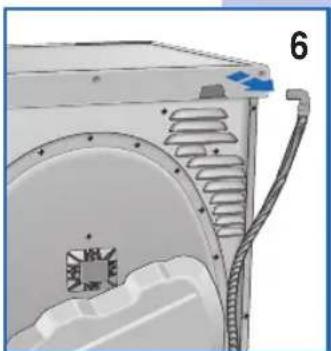
natural_image
Technical diagram of a mechanical component with internal channels and a labeled part (6), no readable text or symbols present.APERTURA E MODIFICA ROTAZIONE PORTA
natural_image
Illustration of a hand pressing down on a device panel with blue arrows indicating force or movement (no text or symbols)natural_image
Illustration of a washing machine with blue cables connecting the door and fan (no text or symbols)natural_image
Illustration of a washing machine with blue arrows indicating air flow or circulation (no text or symbols)natural_image
Hand placing a button into a device component (no text or symbols visible)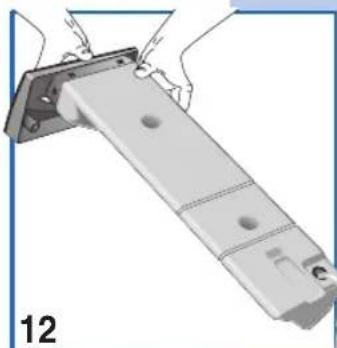
natural_image
Mechanical assembly diagram showing a metal bracket with mounting holes and a numbered label (12), no text or symbols present.natural_image
Diagram of a device with a blue upward arrow indicating motion or force, showing a mesh component and panel (no text or symbols)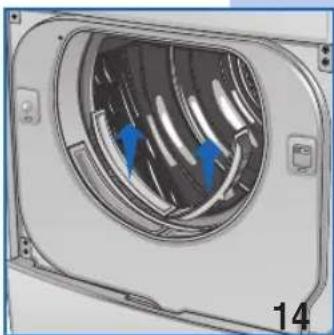
natural_image
Diagram of a device interior with blue arrows indicating airflow or flow direction (no text or symbols)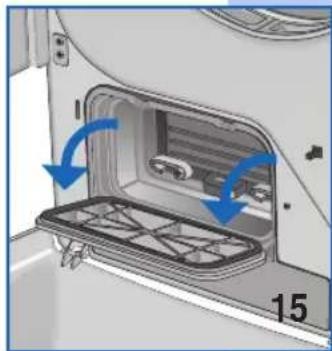
natural_image
Interior view of a car showing a door, vent, and rack with blue arrows indicating direction (no text or symbols)natural_image
Interior view of a vehicle air conditioner unit with blue directional arrow indicating airflow (no text or symbols)natural_image
Illustration of a hand holding a handheld device next to a cylindrical device with blue arrows indicating rotation (no text or symbols)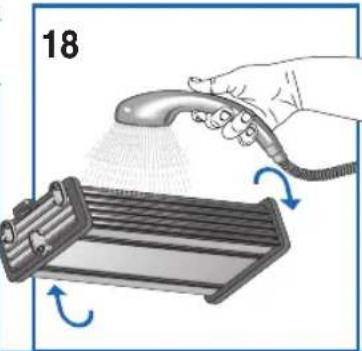
natural_image
Illustration of a hand spraying a hairdryer onto a rack with blue arrows indicating motion (no text or symbols)Thank you for choosing our product.
Please read these instructions carefully before connecting and using the appliance.
Knowledge of the operating principles will help guarantee correct and safe use of the appliance.
This instruction booklet contains the technical characteristics of the drier and is full of useful information regarding its operation, all designed to help you get the best out of your appliance.
If the appliance is sold or handed over for use by others, remember to give the new user the instruction booklet.
CONTENTS


OTES AND ADVICE FOR THE USER 13-14
• Technical information 13

DESCRIPTION OF THE APPLIANCE 15
- Optional accessories 15

INSTALLING THE APPLIANCE 15-17
- Installation 15
• Levelling the drier 16
- Connecting to the mains supply 16
- Connecting the condensation drain to the drainage system. 16
- Changing the door opening direction 17

USING THE DRIER
• Precautions for fabrics 17
- Recommendations prior to drying 17
• Description of the control panel 18
- Programme
- How to dry 19

MAINTENANCE
- Internal light 19
- Draining the condensation reservoir 20
- Cleaning and maintenance 20-21
- Troubleshooting 21
- Resolving problems 21
NOTES AND ADVICE FOR THE USER

TECHNICAL DATA
| Dimensions: | Width cm.: | 59.5 |
| Height cm.: | 85.0 | |
| Depth cm.: | 60.4 | |
| Max. capacity | 5,0 kg. dry | |
| Power rating | see characteristics plate | |
| Voltage | see characteristics plate | |
MODEL: ..... SERIAL NUMBER: ..... DATE OF PURCHASE: ....
14

NOTES AND ADVICE FOR THE USER
This appliance has been designed for use as a domestic drier. Any other use is considered as improper and therefore dangerous.
- Keep this instruction book near to the appliance always, so that it can be easily consulted when necessary.
▼ Any modifications or attempts to interfere with the appliance can be dangerous for the user and may damage the product.
On delivery of the appliance, check that it has not been damaged during transport. If any damage is discovered, report the matter to the retailer immediately.
▼ Do not cover the drier with washing or any other items.
When positioning the appliance, ensure that the power supply cable is not kinked or squashed and is accessible.
▼ Always close the door after using the drier.
This will prevent children from leaning on the door and possibly overturning the drier.
▼ The appliance must not be used by children unless supervised.
▼ Do not use the drier for drying dirty clothes.
▼ Never dry items that have been soiled with substances such as cooking oil, petroleum, acetone, alcohol, petrol, kerosene, stain removers, turpentine, wax.
▼ Remove these substances in a hot wash using an additional quantity of detergent prior to loading the items in the drier.
Do not dry items such as foam rubber, latex, raincoats, waterproof fabrics, rubber mats, preformed items, clothes or cushions with foam rubber inserts, as these may melt and damage other items in the washing or even the appliance itself.
▼ Fabric softeners, or similar products, must be used respecting the manufacturer's instructions on the packaging.
If the appliance is sold or given away, remember to hand over this instruction book with it. This will help the new owner use the drier both correctly and safely.
Do not attempt to repair any appliance faults alone, in that repairs carried out by a non-professional may cause serious damage and will invalidate any rights to repairs under guarantee.
▼ Repairs to the appliance can only be carried out by personnel authorised by the customer service centres. All repairs must make use of original spare parts only.
▼ Spin dry or wring the washing well before
loading it into the drier. Spun dry washing will dry quicker.
√ Clean the filter thoroughly each time the drier is used in order to guarantee perfect air circulation.
▼ Never insert or remove the plug from the mains socket with wet hands.
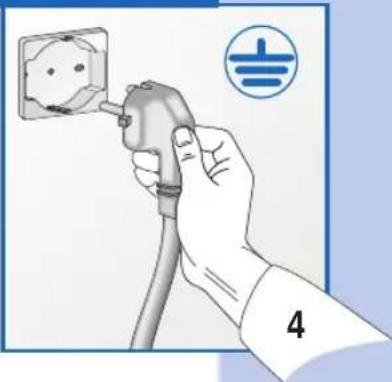
The drier must be connected to a mains socket fitted with an efficient earth complying with current safety standards.
Do not use extension leads or multiple plug adapters to connect the appliance to the mains supply.
▼ Do not expose the appliance to atmospheric agents.
When servicing or cleaning the appliance, remember to disconnect it from the mains supply.
Do not pull the power supply cable to unplug the appliance from the mains supply. Pull the plug only.
This appliance is marked as complying with European Directive 2002/96/EC, Waste Electrical and Electronic Equipment (WEEE). Make sure that the product is disposed of in a correct manner. The user is obliged to contribute towards preventing any negative consequences for health and the environment.
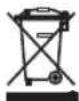
The symbol affi xed to the product or accompanying documents signifi es that the product must not be treated as normal domestic refuse, but must be delivered to an authorised collection centre to enable the electric and electronic equipment to be recycled.
When disposing of the appliance, comply with local waste disposal regulations.
For further information on the treatment, recovery and recycling of this product, refer to the appropriate offi ces, local domestic waste collection service or the retailer from where the appliance was purchased.
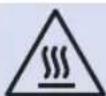
Warning!!! Surfaces on which this symbol appears may heat up during normal operation.
THE MANUFACTURER WILL NOT BE HELD RESPONSIBLE FOR ANY INCIDENTS RESULTING FROM NON-COMPLIANCE WITH SAFETY STANDARDS OR THE REQUIREMENTS OF THIS INSTRUCTION BOOK.
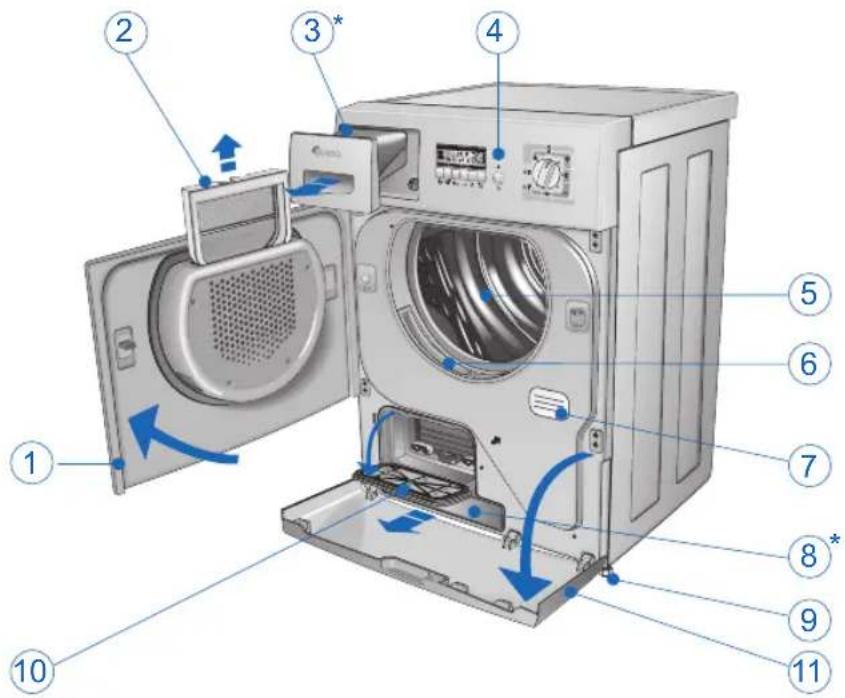
DESCRIPTION OF THE APPLIANCE
1 Drum door.
2 Drum door filter.
3 Upper condensation water reservoir*. (The condensation is collected in this reservoir when the condensation drain hose is not connected directly to the drainage system).
4 Control panel.
5 Drier drum.
6 Drum mouth fi Iter.
7 Rating plate.
8 Lower condensation water reservoir*.
9 Adjustable feet
10 Condenser door.
11 Lower door.
* according to model
OPTIONAL ACCESSORIES
The retailer can provide an accessory to enable the drier to be mounted on top of a front - loading washing machine, thus saving space. The installer will inform you of the appliance model for which this option is possible.
INSTALLING THE APPLIANCE

INSTALLATION
natural_image
Close-up of a white industrial air duct with a circular vent and flanged side (no text or symbols visible)▼ Installation must be carried out by qualified personnel in line with the instructions supplied by the manufacturer. Incorrect installation may result in damage and/or injury.
▼ Do not install the drier in rooms subject to freezing temperatures. Freezing temperatures could damage the electronics.
▼ Position the drier in a well-ventilated room.
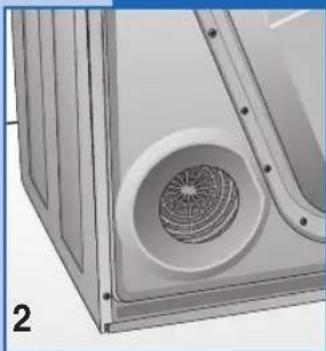
▼ Do not cover the ventilation hole on the back (fig. 2) and do not place the drier on thick carpet.
▼ Clean the inside of the drying drum using a damp cloth to remove any dust deposits.
LEVELLING THE DRIER
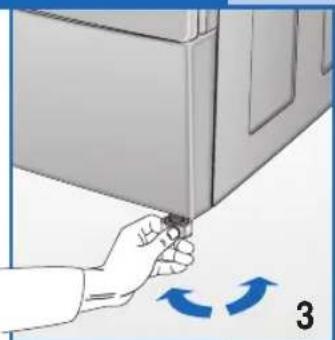
Adjustable feet. Place the drier upright so that it rests firmly on all four feet. Level the drier by adjusting the feet as follows:
▼ Lift the drier slightly.
▼ Adjust the feet to the correct height (fi g. 3).
▼ Lower the drier.
NB. A badly levelled appliance may cause damage to the bearings and lead to their premature wear. This drier does not need to be anchored to the floor.
natural_image
Illustration of a hand holding a tool near a refrigerator with blue directional arrows indicating rotation (no text or symbols)CONNECTING TO THE MAINS SUPPLY
▼ Make sure that the voltage indicated on the identification plate attached to the back of the appliance corresponds to that of the mains supply.
All cut-outs, electric wiring and mains sockets must have a rating such that enables them to support the maximum load indicated on the identification plate.
▼ Once the appliance has been installed, it must be connected to the mains supply through a single-pole switch.
The mains supply to which the appliance is connected must be fitted with an earthing system. If this is not the case, the manufacturer will not be held liable for any incidents that may occur (fi g. 4).
If the power supply cable is damaged in any way, contact the appropriate specialised customer technical service centre.
The drier must not be connected to the mains supply using indirect methods such as extension leads or multiple adapters.
▼ Position the appliance so that the power supply cable is easily accessible for disconnection when the need arises.
natural_image
Illustration of a hand holding an electrical plug with a socket, no text or symbols presentImportant: On completion of the drying cycle, disconnect the appliance from the mains supply to prevent young children from operating the drier.
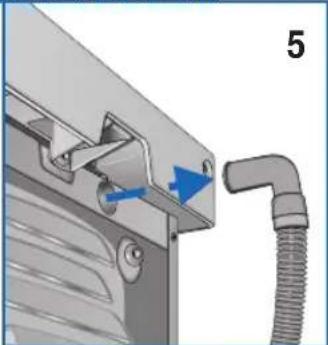
The condensation can be collected in the reservoir (fi g. 10) or, alternatively, the hose can be connected directly to the drainage system.
In this case, the collected water is pumped out.
To connect the condensation hose directly to the drainage system, proceed as follows:
Before starting any operations, unplug the appliance from the mains socket.
Extract the hose on the back of the appliance by pulling it from its housing, (fig. 5/6) and insert it in the waste water pipe.
natural_image
Mechanical assembly diagram showing a pipe connection with a blue arrow indicating direction (no text or symbols)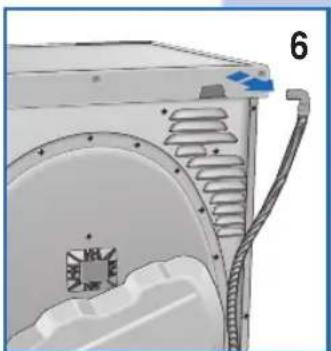
natural_image
Technical illustration of a mechanical component with internal channels and a labeled part (6), no readable text or symbols present.OPENING THE DOOR AND CHANGING THE OPENING DIRECTION
natural_image
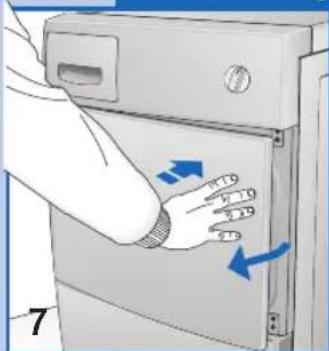
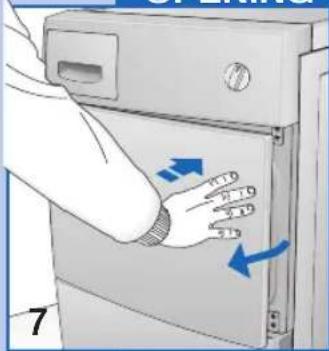
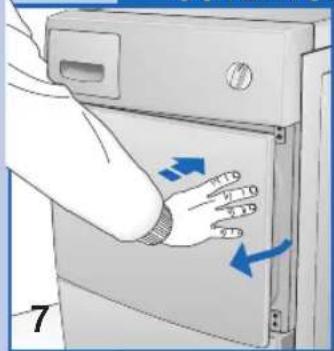
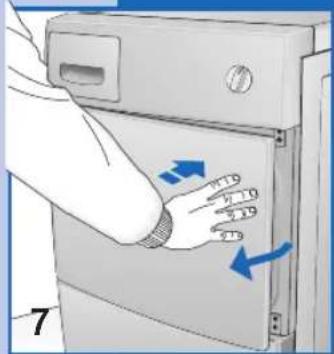
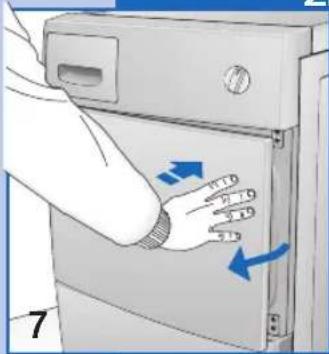
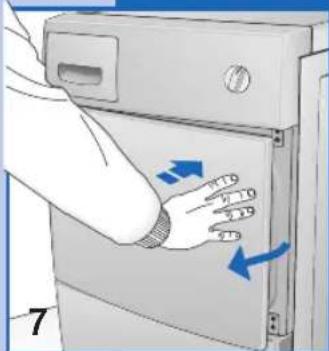
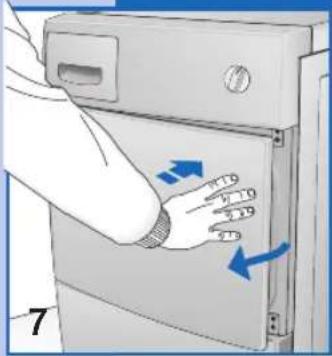
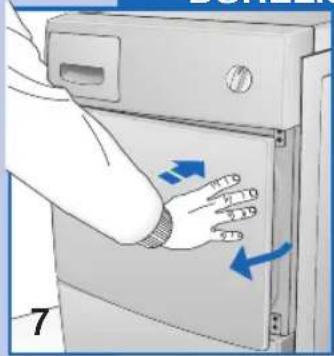
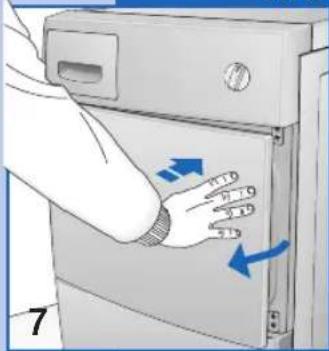
Illustration of a hand pressing down on a device panel with blue arrows indicating force or movement (no text or symbols)▼ Press the right side of the door (fig. 7) to open it. If the door has been reversed, press the left side.
natural_image
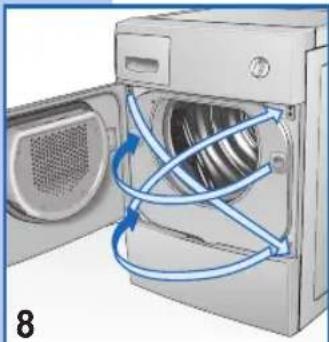
Diagram of a washing machine with blue tubing connecting its internal components (no text or symbols)The direction of the drum door opening can be modified according to needs (fig. 8).
- N.B.: This operation must only be carried out by a qualified technician. Contact the customer service centre.
USING THE DRIER

PRECAUTIONS FOR FABRIC TYPES
In the case of doubt as to the type of fabric, read the label on the item itself.
Almost all items that can be machine dried have this information specified on the label.
To avoid static electricity being generated in the items, add a conditioner to the rinse cycle of the washing machine.
Remove synthetic materials from the drum immediately to prevent them from creasing.
RECOMMENDATIONS PRIOR TO DRYING
SORTING THE WASHING
Before drying the washing, spin it at the recommended rpm for the type of load. Spinning at maximum rpm will result in up to a 35% saving in energy. The higher the spin speed, the better the drying result. Using a softener in the wash cycle will improve drying and save time. Before drying the washing in the drier, check the items to make sure they can be machine dried. Refer to the clothing care symbols on the labels.
If the label has no drying symbol, proceed as follows:
▼ White/coloured washing and crease-proof washing can be dried at normal temperature using the appropriate drying programme.
▼ Delicate washing, acrylics for example, must always be dried at low temperature.
General advice:
Jersey often shrinks, not only in the wash but also during drying.
Pure linen.
▼ Only dry garments with specific drying instructions on label, otherwise, the fabric could roughen.
In order to avoid staining, never dry dark coloured washing together with light coloured washing.
DESCRIPTION OF THE CONTROL PANEL.
9
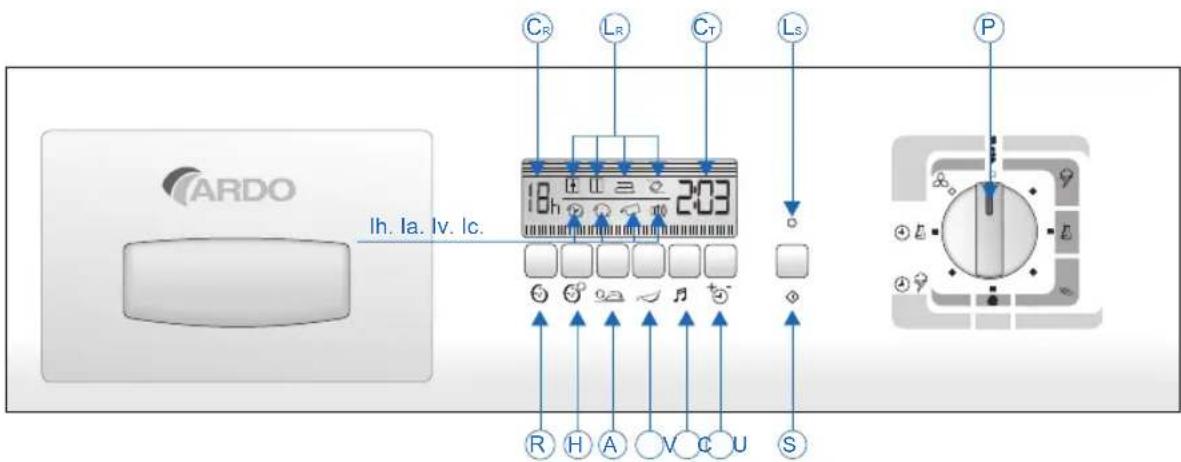
P. Programmer Knob. Used to select the required programmes according to the type of fabric and drying needs. In addition to switching off the display, the STOP button also resets the appliance. If, for any reason, you want to change the programme or add more washing to the load during the drying cycle, simply place the programmer knob in the "STOP" position. Then re-position the knob on the required programme and press the "START" button.
NB. Warning!! Only use this function if strictly necessary and then only if the program to reset has been running for less than 3 minutes.
N.B. On some models fitted with a Delay function, when the function is enabled or at the end of the cycle, the backlit display will switch off after a few minutes. Pressing any button will switch the display light on again.
S. Start Button. Press this button to start the programmed drying cycle.
Ls. Start LED. Off indicates the "STOP" position. On fixed indicates the programme is running. Fast fl ashing indicates the set programme is ready to start. Slow fl ashing indicates the end of the drying programme.
U. Drying selector button. This is used to select the degree of dampness on electronically controlled programmes and the time on manual programmes.
Not all the options are available for all programmes.(see: "PROGRAMME TABLE")
LR. There are 4 icons for the electronically controlled drying programme. The selected icon will fl ash while the other 3 remain lit. When the cycle starts, only the selected icon remains lit.
CT. Drier timer. Displays the set time in steps of 20 minutes, up to a maximum of 2 hours and 40 minutes for the cotton programme and 2 hours for the synthetics programme.
C. Beep silencer button. Disables the beep function, which would otherwise be permanently enabled. The
selection remains memorised even when the appliance is switched off.
The beeps signal as follows:
1 long beep (cycle started)
4 long beeps (cycle completed)
4 short beeps (drum rotating for anti-crease function)
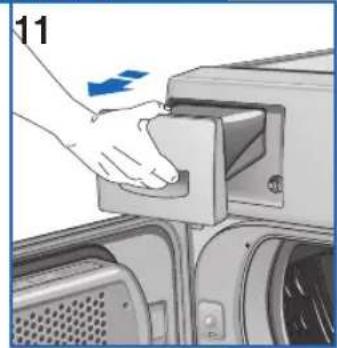
V. Water reservoir alarm reset button. Used to restart the cycle after the condensation water reservoir has been emptied (fi g. 11)
Lv. Reservoir full alarm icon. A flashing icon indicates that the reservoir is full and needs to be emptied (the drying cycle stops). After the container has been replaced, a fixed lit icon indicates that the function is restarting. Icon off indicates that the alarm has been reset (the cycle restarts).
A. Anti-crease button. Activates a function that, at the end of the drying cycle, rotates the drum and the washing loaded in it in one direction then in the other for a further sixty minutes to reduce creasing. Each rotation is signalled by a short beep.
H. Drying delay anti-crease button. This rotates the washing in the drum during the delayed start in order to reduce creasing.
lh. la. lc. The beeper, anti-crease and delayed start icons appearing on the display indicate that the functions are active.
R. Delayed start button. Used to delay drier start-up for up to a maximum of 16 hours. Each time the button is pressed, the start is delayed for one hour. When the START button is pressed, the letter h will fl ash on the display signalling that the function has been activated. The machine will wait for the number of hours set to elapse and then start the drying cycle automatically. If the power supply is interrupted while the delayed start function is active, the function itself will be annulled. Pressing the START button will start the drying cycle immediately.
CR. Delayed start counter. Displays the delay time set in steps of one hour up to a maximum of 16 hours.
PROGRAMME TABLE
ELECTRONIC DAMPNESS CONTROL PROGRAMMES
| FABRIC | MAX. WASHING LOAD | EXTRA DRY | WARDROBE DRY | IRON DAMP | VERY DAMP | |
 | COTTON | 5.0 kg. |  |  |  |  |
 | SYNTHETICS | 2.5 kg. |  |  |  |  |
 | DELICATES | 2.5 kg. |  |  |  |  |
 | WOOL | 1.5 kg. | —— |  |  | —— |
TIMED PROGRAMMES
1) Load the washing in the drum and close the door.
2) With dry hands, insert the plug in the mains socket.
3) Position the programmer knob on Stop to reset any previously set programmes. Then rotate the knob to the most suitable programme for the type of fabric loaded.
4) Use the drying selector to select the degree of dampness required (see Programme Table).
5) Select the required options by pressing the appropriate buttons.
6) Press the START button to start the drying cycle.
7) The end of the drying cycle is signalled by the fl ashing start led, the beeper and the word END appearing on the display. At this point, return the selector to the STOP position.
8) Open the drum door and remove the washing.
9) Re-close the door.
10) With dry hands, remove the plug from the mains socket.
MAINTENANCE

INTERNAL LIGHT (AVAILABLE ACCORDING TO MODEL)
natural_image
Illustration of a washing machine with blue arrows indicating airflow or circulation (no text or symbols)The drier is fitted with an internal light.
To replace the bulb, proceed as follows:
▼ Remove the plug from the mains socket or switch off the main power supply;
▼ Remove the lamp cover.
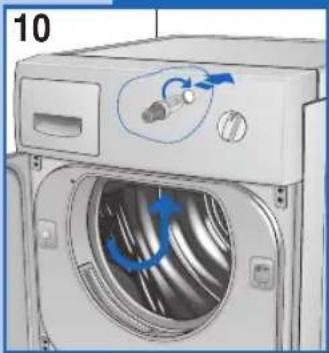
▼ Remove the bulb (fi g. 10).
▼ Warning: Do not use bulbs of rating higher than 15 W!
▼ Replace the lamp cover.
DRAINING THE CONDENSATION WATER RESERVOIR
If the condensation drain hose is not connected directly to the drainage system, the condensation is collected in the reservoir (fi g. 11). The reservoir must be emptied after each drying cycle.
To empty the reservoir, proceed as follows:
▼ Remove the reservoir from the drier (Fig. 11).
▼ Empty the reservoir. The drain hole is located on the top right (fig. 12).
▼ After emptying, replace the container in its housing making sure it is properly seated.
If the reservoir is not emptied or it fills up excessively during a drying cycle, the condensation reservoir warning light will flash and the drier will stop. If this happens, proceed as described above.
▼ To restart the programme, press the reservoir alarm reset button (V) (fig. 9).
natural_image
Hand placing a component into a device, showing a blue arrow indicating motion (no text or symbols present)
natural_image
Mechanical assembly diagram showing a metal bracket with mounting holes and a labeled part (no text or symbols present)CLEANING AND MAINTENANCE
Disconnect the drier from the mains supply before cleaning. It is important to clean the drier after each drying cycle in order to save in drying time and consequently save energy.
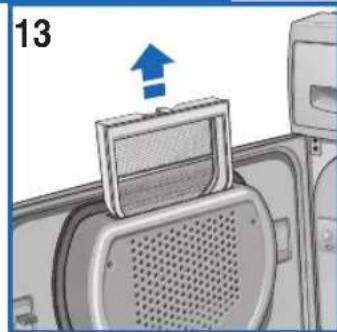
- Door fl uff fi lter (fi g. 13).
- Fluff filter in the loading aperture (fig. 14).
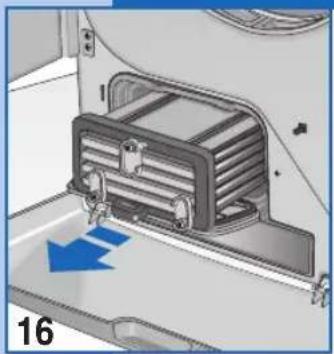
- Condenser (fi g. 15).
▼ Remove the filter by pulling upwards and then clean it (fig. 13).
It is also possible to remove the two fluff filters from the door opening and clean them (fi g. 14).
NB. The presence of fl uff in the fi lter is not the result of the drying procedure. The fl uff comes from the fi bres of fabrics damaged or unthreaded during the wash and, above all, as a result of wear.
The filters can be cleaned by simply placing them under hot running water.
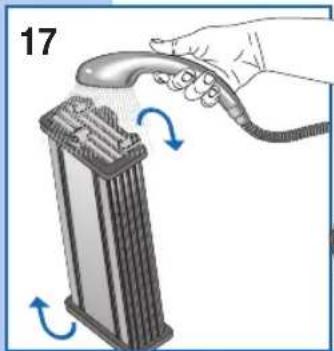
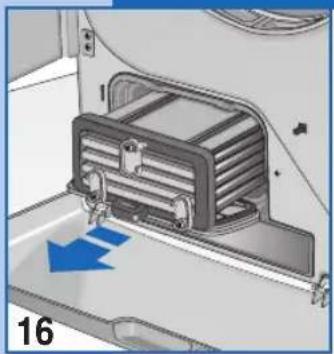
▼ The condenser should be cleaned two or three times a year (fig. 15/18).
▼ Open the door, rotate the lever to the vertical position and remove the cover (fig. 15).
natural_image
Diagram of a device interior with a blue arrow indicating upward motion (no text or symbols)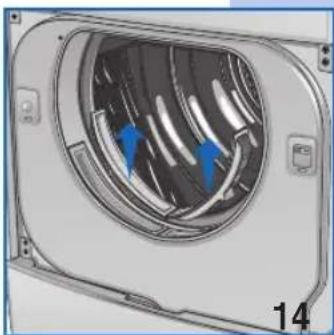
natural_image
3D rendering of a mechanical component with internal fan-like structure and blue arrows indicating direction (no text or symbols)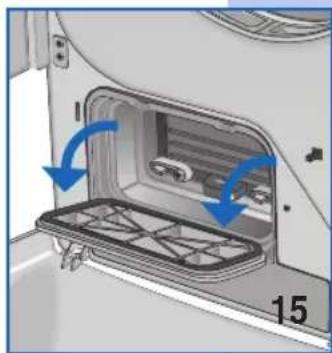
natural_image
Interior view of a vehicle showing a door opening with a tray and blue arrows indicating direction (no text or symbols)CLEANING AND MAINTENANCE
natural_image
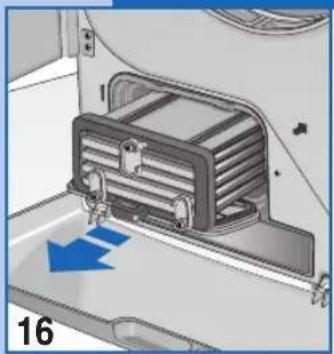
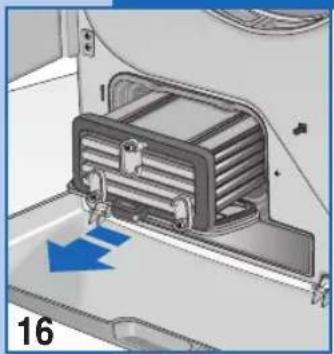
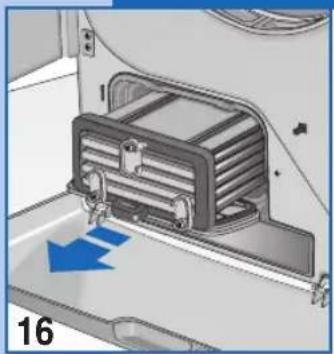
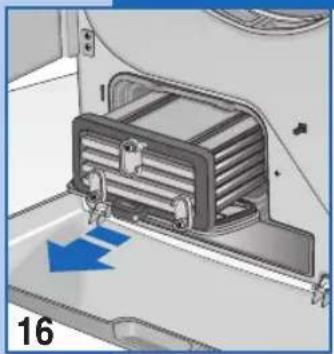
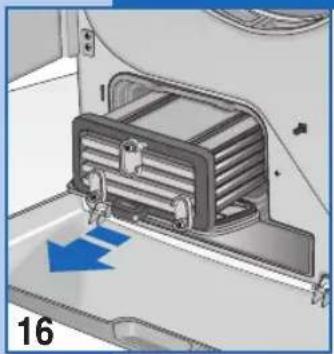
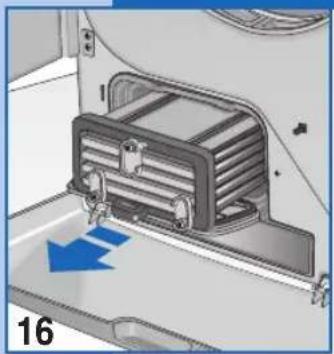
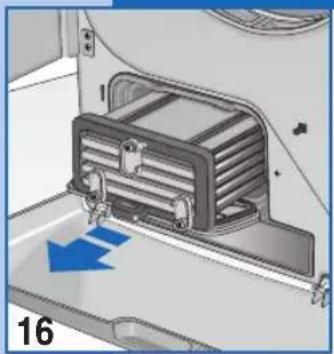
Interior view of a vehicle air conditioner unit with blue directional arrow indicating airflow (no text or symbols)▼ Rotate the 3 levers to the vertical position and remove the condenser (fig. 16).
natural_image
Illustration of a hand holding a handheld device next to a cylindrical device with blue arrows indicating rotation (no text or symbols)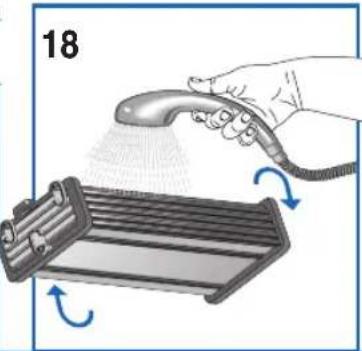
natural_image
Illustration of a hand spraying a hairdryer onto a rack with blue arrows indicating motion (no text or symbols)▼ Wash the front, back and sides of the condenser, aiming the jet of water as shown (fi g.17/18).
To dry the condenser thoroughly, place it on its side on a towel.
When the condenser is dry, replace it following the same procedure in reverse order.
TROUBLESHOOTING
All electric appliances may break-down at some time.
Remember to call a qualified technician in these cases. However, many problems can be resolved without the need for external intervention.
Important: If a fault occurs, disconnect the appliance from the mains supply immediately.
Before calling the customer service centre, check the points listed below.
RESOLVING PROBLEMS
If the drier doesn't start
- Check that:
1) The appliance is plugged into the mains supply.
2) The mains socket is working correctly: 2a) The fuse has not blown. (Check by plugging in another appliance such as a table lamp and see if that works)
2b) All the instructions in the manual have been followed.
If the drier doesn't start
- Check that:
1) The door is closed properly
2) The start button has been pressed.
The washing does not dry
- Check that:
1) The air exhaust aperture is not blocked.
2) The filter is not blocked. (Remember that when the door is opened, the internal parts of the drier and the washing may be very hot).
If, after all these checks have been carried out, the appliance still does not work, inform the nearest customer service centre. When contacting the service centre, inform them of the appliance model, serial number and type of fault. This information will help the service centre operator in procuring the necessary spare parts, thus guaranteeing a speedy and efficient repair.
Verehrter Kunde,
OPTIONALES ZUBEHÖR
natural_image
Close-up of a white industrial air duct with a circular vent and flanged side (no text or symbols visible)natural_image
Illustration of a hand holding a tool near a refrigerator, with blue arrows indicating rotation or movement (no text or symbols)natural_image
Illustration of a hand holding an electrical outlet plug with a medical cross symbol (no text or labels)natural_image
Mechanical component with blue arrow indicating direction, no visible text or symbols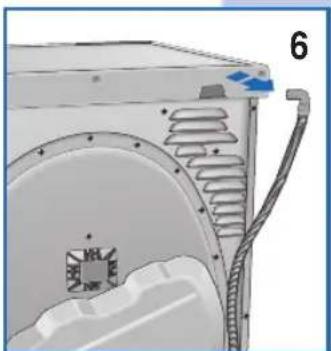
natural_image
Technical illustration of a mechanical component with internal channels and a labeled part (6), no readable text or symbols present.natural_image
Illustration of a hand pressing down on a device panel with blue arrows indicating force or movement (no text or symbols)natural_image
Diagram of a washing machine with blue cables connecting the door and fan (no text or symbols)natural_image
Illustration of a washing machine with blue arrows indicating airflow or circulation (no text or symbols)natural_image
Hand pressing a button on a computer monitor (no text or symbols visible)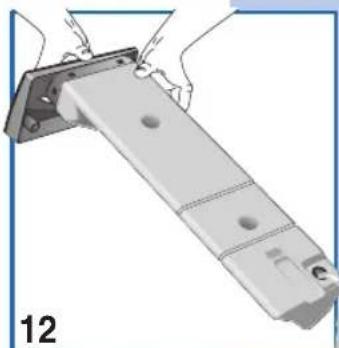
natural_image
Illustration of a mechanical assembly with hands holding a bracket and a numbered label '12' (no text or symbols on the main subject)natural_image
Diagram of a device with a blue arrow pointing upward, showing a component or assembly (no text or symbols present)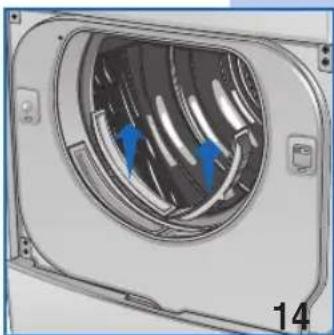
natural_image
Interior view of a mechanical device showing a circular opening with blue arrows indicating direction (no text or symbols)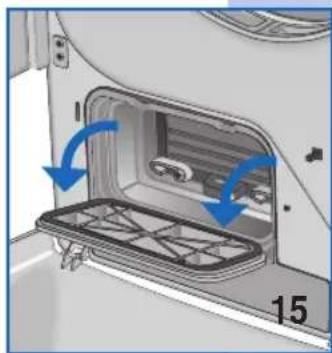
natural_image
Interior view of a car showing a door opening with blue arrows indicating direction (no text or symbols)natural_image
Interior view of a vehicle air conditioner unit with blue directional arrow indicating airflow or movement (no text or symbols)natural_image
Illustration of a hand holding a tool next to a cylindrical device with blue arrows indicating rotation (no text or symbols)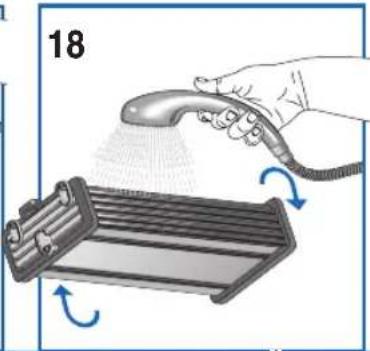
natural_image
Illustration of a hand using a spray gun to dispense or spread material around a metal tray (no text or symbols)ACCESSOIRES EN OPTION
natural_image
Close-up of a white industrial air duct with a circular vent and flanged side (no text or symbols visible)natural_image
Hand holding a tool near a kitchen appliance, with blue arrows indicating rotation or movement (no text or symbols)BRANCHEMENT À L'INSTALLATION ÉLECTRIQUE
natural_image
Illustration of a hand holding an electrical plug with a socket, no text or symbols presentnatural_image
Mechanical assembly diagram showing a pipe connection with a blue arrow indicating direction (no text or symbols)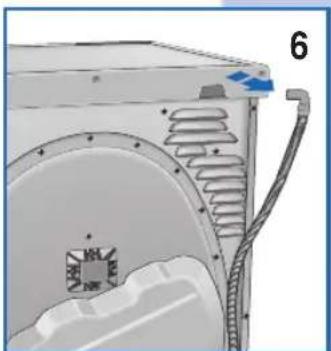
natural_image
Technical illustration of a mechanical component with internal channels and a labeled part (6), no readable text or symbols present.OUVERTURE ET MODIFICATION DU SENS D'OUVERTURE DE LA PORTE
natural_image
Diagram of a washing machine with blue tubing connecting its door to the front panel (no text or symbols present)natural_image
Illustration of a washing machine with blue arrows indicating airflow or circulation (no text or symbols)natural_image
Hand placing a button into a device component (no text or symbols visible)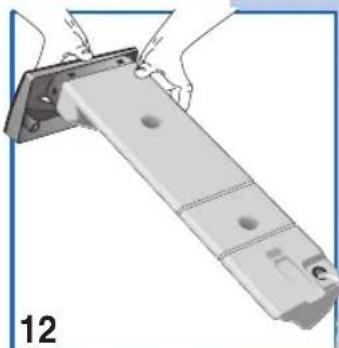
natural_image
Mechanical assembly diagram showing a metal bracket with mounting holes and a labeled part (no text or symbols present)NETTOYAGE ET ENTRETIEN
natural_image
Diagram of a device with a blue arrow pointing upward, showing a mesh structure inside a panel (no text or symbols)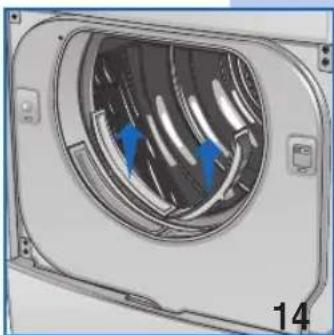
natural_image
Interior view of a mechanical device with a circular opening and blue arrows indicating direction (no text or symbols)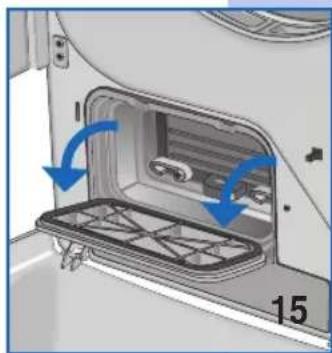
natural_image
Interior view of a car showing a door opening with blue arrows indicating direction (no text or symbols)NETTOYAGE ET ENTRETIEN
natural_image
Interior view of a vehicle air conditioner unit with blue directional arrow indicating airflow or movement (no text or symbols)natural_image
Illustration of a hand holding a handheld device next to a cylindrical device with blue arrows indicating rotation (no text or symbols)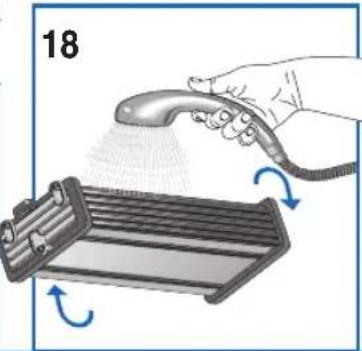
natural_image
Illustration of a hand spraying a hairdryer onto a rack with blue motion arrows indicating rotation (no text or symbols)natural_image
Close-up of a white industrial air duct with a circular vent and ventilation grille (no text or symbols visible)natural_image
Illustration of a hand holding a tool near a cabinet, with blue arrows indicating rotation or movement (no text or symbols)natural_image
Hand holding a plug inserted into an electrical socket, with a symbol (no text or labels)natural_image
Mechanical assembly diagram showing a pipe connection with a blue arrow indicating direction (no text or symbols)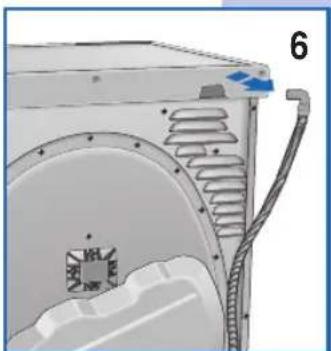
natural_image
Technical diagram of a mechanical component with no visible text or symbolsnatural_image
Illustration of a hand pressing down on a device panel with blue directional arrows indicating motion (no text or symbols)natural_image
Diagram of a washing machine with blue tubing connecting the door and fan (no text or symbols)natural_image
Illustration of a washing machine with blue arrows indicating air flow or circulation (no text or symbols)natural_image
Hand placing a button into a device component (no visible text or symbols)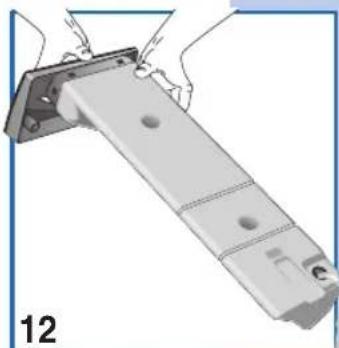
natural_image
Illustration of a mechanical assembly with hands installing components (no text or symbols visible)LIMPIEZA Y MANTENIMIENTO
natural_image
Diagram of a device interior with a blue arrow indicating upward motion (no text or symbols)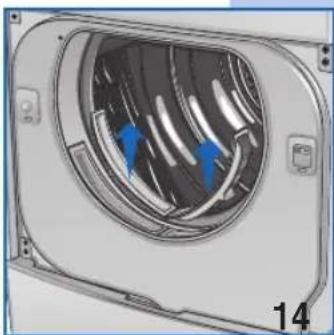
natural_image
Diagram of a device interior showing airflow or ventilation through a circular duct (no text or symbols)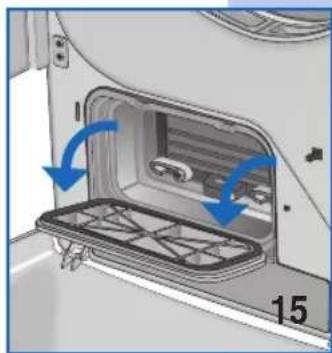
natural_image
Interior view of a car showing a door opening with blue arrows indicating direction (no text or symbols)LIMPIEZA Y MANTENIMIENTO
natural_image
Interior view of a vehicle air conditioner unit with blue directional arrow indicating airflow or movement (no text or symbols)natural_image
Illustration of a hand using a handheld tool to press down a cylindrical device with blue arrows indicating rotation (no text or symbols)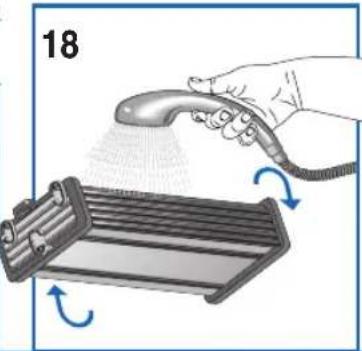
natural_image
Illustration of a hand spraying a spray onto a rack with blue arrows indicating rotation (no text or symbols)ACESSÓRIOS DE OPÇÃO
natural_image
Close-up of a white industrial air duct with a circular vent and ventilation grille (no text or symbols visible)natural_image
Illustration of a hand holding a tool near a cabinet, with blue arrows indicating rotation or movement (no text or symbols)natural_image
Hand holding a plug inserted into an electrical socket, with a symbol (no text or labels)natural_image
Mechanical assembly diagram showing a pipe connection with a blue arrow indicating direction (no text or symbols)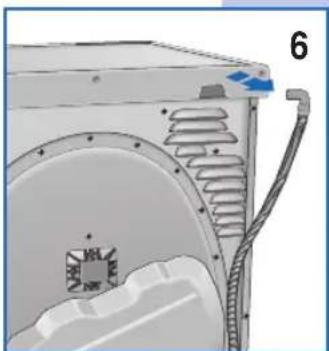
natural_image
Technical diagram of a mechanical component with internal channels and a labeled part (6), no readable text or symbols present.natural_image
Illustration of a hand pressing down on a door panel with blue arrows indicating force or movement (no text or symbols)natural_image
Diagram of a washing machine with blue tubing connecting its door to the front panel (no text or symbols)natural_image
Illustration of a washing machine with blue arrows indicating air flow or circulation (no text or symbols)natural_image
Hand pressing a button on a computer monitor (no text or symbols visible)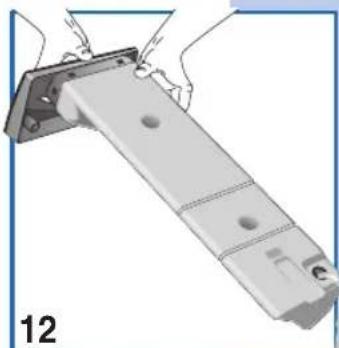
natural_image
Illustration of a mechanical assembly with hands holding a bracket and a numbered label '12' (no text or symbols on the diagram itself)natural_image
Diagram of a device with a blue arrow pointing upward, showing a component inside a container (no text or symbols)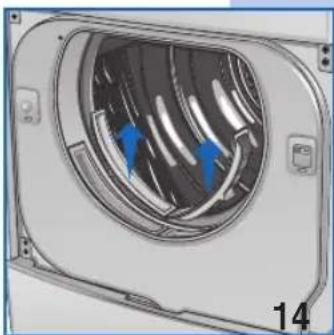
natural_image
Diagram of a device interior showing airflow or ventilation through a circular duct (no text or symbols)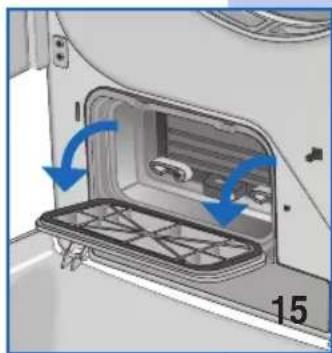
natural_image
Interior view of a car showing a door opening with blue arrows indicating direction (no text or symbols)natural_image
Interior view of a vehicle air conditioner unit with blue directional arrow indicating airflow (no text or symbols)natural_image
Illustration of a hand using a handheld tool to press down a cylindrical device with blue arrows indicating rotation (no text or symbols)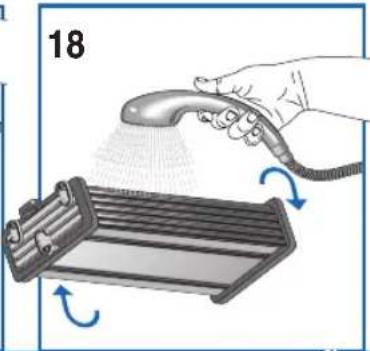
natural_image
Illustration of a hand spraying water onto a rack with arrows indicating motion (no text or symbols)ESCHRIJVING VAN HET APPARAAT 65
• Optionele accessoires 65

INSTALLATIE VAN DE MACHINE 65-67
• Installatie 65
BESCHRIJVING VAN HET APPARAAT
OPTIONELE ACCESSOIRES
natural_image
3D rendering of a white industrial fan or vent with a circular grille and mounting brackets (no text or symbols visible)natural_image
Hand holding a tool near a cabinet, with blue arrows indicating rotation or movement (no text or symbols)AANSLUITEN OP HET ELEKTRICITEITSNET
natural_image
Hand holding a plug inserted into an electrical socket, with a symbol (no text or labels)natural_image
Mechanical assembly diagram showing a pipe connection with a blue arrow indicating direction (no text or symbols)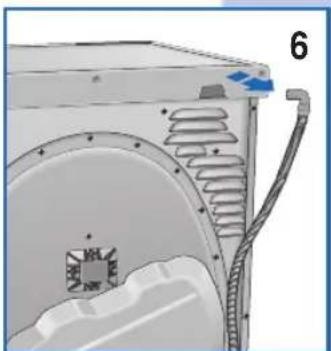
natural_image
Technical diagram of a mechanical component with internal channels and a labeled part (6), no readable text or symbols present.OPENEN EN OMKEREN VAN DE DEUR
natural_image
Illustration of a hand pressing down on a device panel with blue arrows indicating force or movement (no text or symbols present)natural_image
Diagram of a washing machine with blue tubing connecting the door to a fan (no text or symbols)natural_image
Illustration of a washing machine with blue arrows indicating airflow or circulation (no text or symbols)natural_image
Hand pressing a button on a computer monitor (no text or symbols visible)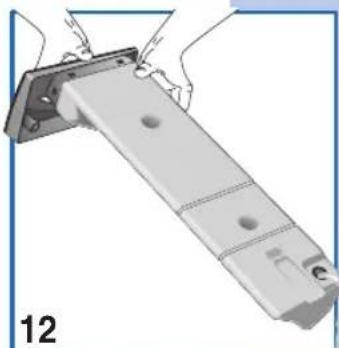
natural_image
Mechanical assembly diagram showing a metal bracket with mounting holes and a base plate (no text or symbols)REINIGING EN ONDERHOUD
natural_image
Diagram of a device with a blue arrow pointing to a component, no text or symbols present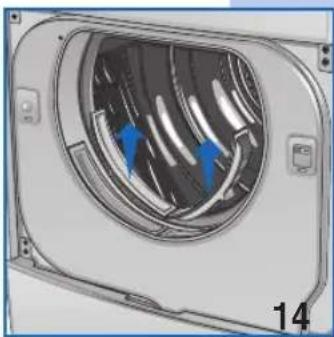
natural_image
Diagram of a washing machine interior showing airflow direction and blue arrows (no text or symbols)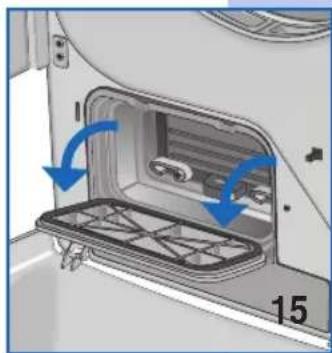
natural_image
Interior view of a car showing a door opening with blue arrows indicating direction (no text or symbols)REINIGING EN ONDERHOUD
natural_image
Interior view of a vehicle air conditioner unit with blue directional arrow indicating airflow or movement (no text or symbols)natural_image
Illustration of a hand holding a handheld device next to a cylindrical device with blue arrows indicating rotation (no text or symbols)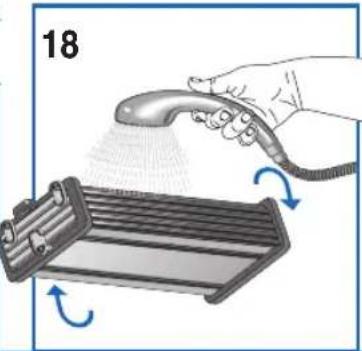
natural_image
Illustration of a hand spraying a hairdryer onto a rack with blue motion arrows indicating rotation (no text or symbols)AKCESORIA OPCJONALNE
natural_image
Close-up of a white industrial air duct with a circular vent and mesh pattern (no text or symbols visible)natural_image
Illustration of a hand holding a small object near a refrigerator, with blue arrows indicating rotation (no text or symbols)natural_image
Hand holding a plug with an electrical socket, symbolizing electrical power or appliance (no text or symbols present)natural_image
Mechanical assembly diagram showing a pipe connection with a blue arrow indicating direction (no text or symbols)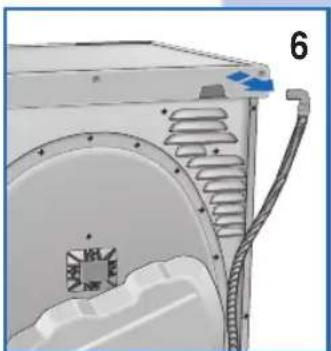
natural_image
Technical diagram of a mechanical component with internal channels and a labeled part (6), no readable text or symbols present.ZMIANA KIERUNKU OTWIERANIA DRZWICZEK
natural_image
Illustration of a hand pressing down on a device panel with blue arrows indicating motion (no text or symbols)natural_image
Diagram of a washing machine with blue cables connecting internal components (no text or symbols)natural_image
Diagram of a washing machine with blue circular arrows indicating airflow or circulation (no text or symbols)natural_image
Hand pressing a button on a computer monitor (no text or symbols visible)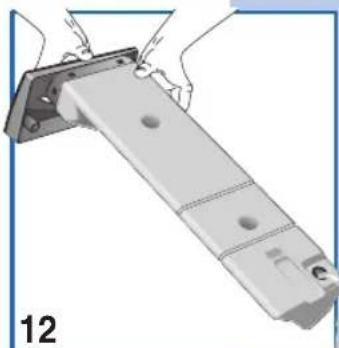
natural_image
Illustration of a mechanical assembly with hands holding a bracket and a numbered label '12' (no text or symbols on the diagram itself)CZYSZCZENIE I KONSERWACJA
natural_image
Diagram of a device interior with a blue arrow indicating upward motion (no text or symbols)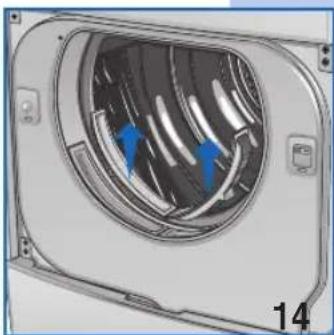
natural_image
Diagram of a washing machine interior showing airflow direction arrows (no text or symbols)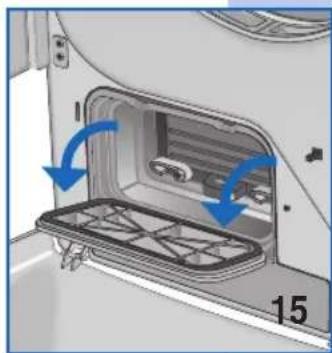
natural_image
Interior view of a car showing a door opening with blue arrows indicating direction (no text or symbols)CZYSZCZENIE I KONSERWACJA
natural_image
Interior view of a vehicle air conditioner unit with blue directional arrow indicating airflow (no text or symbols)natural_image
Illustration of a hand holding a handheld device next to a cylindrical device with blue arrows indicating rotation (no text or symbols)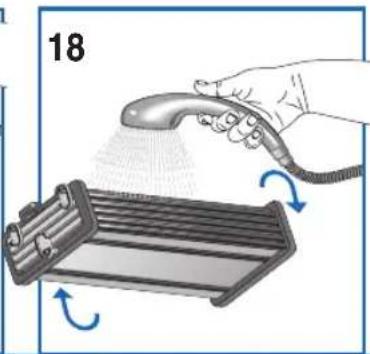
natural_image
Illustration of a hand spraying water onto a rack with arrows indicating motion (no text or symbols)VOLITELNÉ PŘÍSLUŠENSTVÍ
natural_image
Close-up of a white industrial air duct with a circular vent and mesh pattern (no text or symbols visible)natural_image
Illustration of a hand holding a tool near a kitchen appliance, with blue arrows indicating rotation or movement (no text or symbols)PŘIPOJENÍ K ELEKTRICKÉMU SYSTÉMU
natural_image
Hand holding a plug with an electrical socket, symbolizing power or appliance (no text or symbols present)natural_image
Mechanical assembly diagram showing a pipe connection with a blue arrow indicating direction (no text or symbols)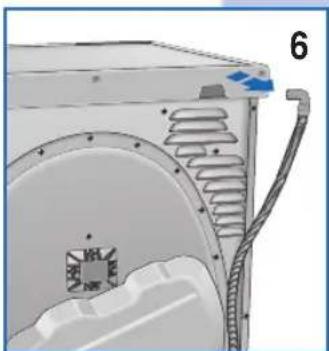
natural_image
Technical diagram of a mechanical component with internal channels and a labeled part (6), no readable text or symbols present.OTVÍRÁNÍ A ZMĚNA OTVÍRÁNÍ DVÍŘEK
natural_image
Diagram of a washing machine with blue tubing connecting its internal components (no text or symbols)natural_image
Illustration of a washing machine with blue arrows indicating internal flow or circulation (no text or symbols)natural_image
Hand pressing a button on a computer monitor (no text or symbols visible)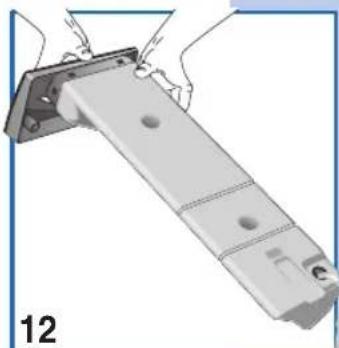
natural_image
Illustration of a mechanical bracket with hands holding it, no text or symbols presentČIŠTĚNÍ A ÚDRŽBA
natural_image
Diagram of a device interior showing a ventilation grille and a blue upward arrow (no text or symbols)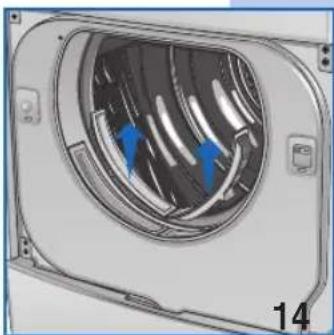
natural_image
Interior view of a mechanical device showing a circular opening with blue arrows indicating direction (no text or symbols)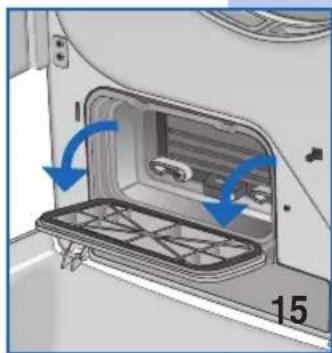
natural_image
Interior view of a car showing a door opening with blue arrows indicating direction (no text or symbols)ČIŠTĚNÍ A ÚDRŽBA
natural_image
Interior view of a vehicle air conditioner unit with blue directional arrow indicating airflow or movement (no text or symbols)natural_image
Illustration of a hand holding a handheld device next to a cylindrical device with blue arrows indicating rotation (no text or symbols)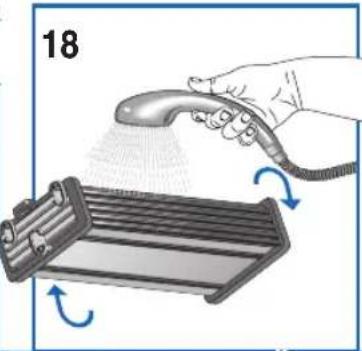
natural_image
Illustration of a hand spraying a spray gun onto a rack with motion arrows indicating rotation (no text or symbols)DOPLNKOVÉ PRÍSLUŠENSTVO
natural_image
Close-up of a white industrial air duct with a circular vent and mesh pattern (no text or symbols visible)natural_image
Hand holding a tool near a kitchen appliance, with blue arrows indicating rotation or movement (no text or symbols)ZAPOJENIE K ELEKTRICKEJ SIETI
natural_image
Hand holding a plug inserted into an electrical socket, with a symbol (no text or labels)REGULÁCIA ODTOKU SKONDENZOVANEJ VODY VON
natural_image
Mechanical assembly diagram showing a pipe connection with a blue arrow indicating direction (no text or symbols)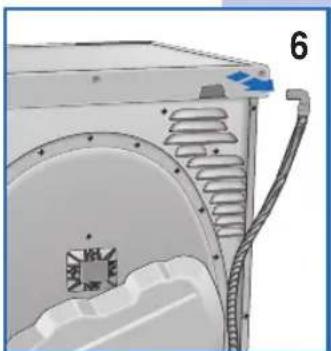
natural_image
Technical diagram of a mechanical component with labeled parts (no readable text or symbols)ZMENA ROTÁCIE DVERÍ
natural_image
Diagram of a washing machine with airflow lines indicating internal components (no text or symbols)natural_image
Illustration of a washing machine with blue airflow arrows indicating circulation (no text or symbols)natural_image
Hand pressing a button on a computer monitor (no text or symbols visible)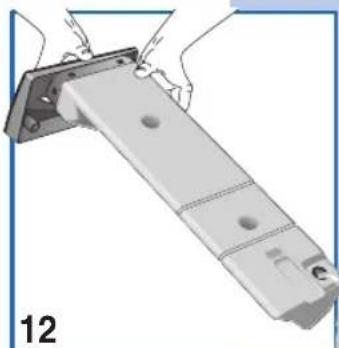
natural_image
Illustration of a mechanical assembly with hands holding a bracket and a numbered label '12' (no text or symbols on the main subject)ČISTENIE A ÚDRŽBA
natural_image
Diagram of a device interior with a blue arrow indicating upward motion (no text or symbols)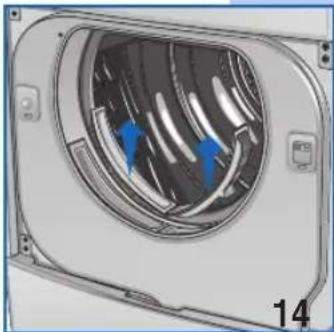
natural_image
3D rendering of a mechanical component with internal blades and blue arrows indicating direction (no text or symbols)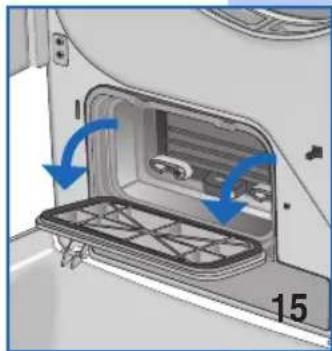
natural_image
Interior view of a vehicle showing a door, vent, and rack with blue arrows indicating flow direction (no text or symbols)ČISTENIE A ÚDRŽBA
natural_image
Interior view of a vehicle air conditioner unit with blue directional arrow indicating airflow or movement (no text or symbols)natural_image
Illustration of a hand holding a handheld device next to a cylindrical device with blue arrows indicating rotation (no text or symbols)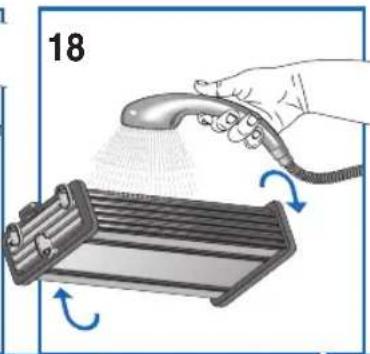
natural_image
Illustration of a hand spraying water onto a rack with arrows indicating motion (no text or symbols)VÁLASZTHATÓ TARTOZÉKOK
natural_image
Close-up of a white industrial air duct with a circular vent and mesh pattern (no text or symbols visible)natural_image
Illustration of a hand holding a tool near a kitchen appliance, with blue arrows indicating rotation (no text or symbols)CSATLAKOZTATÁS AZ ELEKTROMOS HÁLÓZATRA
natural_image
Hand holding a plug inserted into an electrical socket, with a cross symbol and number 4 visible (no text or symbols on the plug itself)natural_image
Mechanical assembly diagram showing a pipe connection with a blue arrow indicating direction (no text or symbols)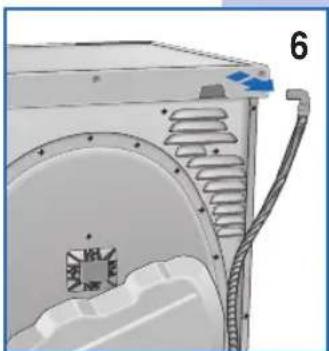
natural_image
Technical diagram of a mechanical component with internal channels and a labeled part (6), no readable text or symbols present.natural_image
Diagram of a washing machine with blue tubing connecting the door and fan (no text or symbols)natural_image
Interior view of a washing machine with blue circular arrows indicating clockwise motion (no text or symbols)natural_image
Hand pressing a button on a computer interface (no text or symbols visible)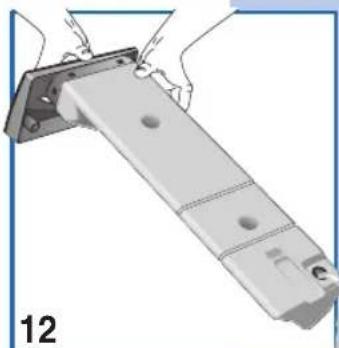
natural_image
Illustration of a mechanical assembly with hands installing components (no text or symbols visible)natural_image
Diagram of a device interior with a blue arrow indicating upward motion (no text or symbols)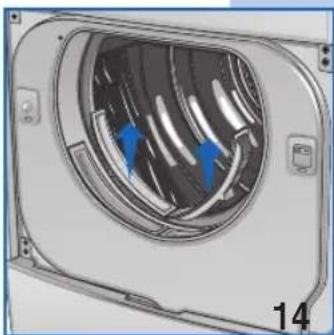
natural_image
Diagram of a device interior with blue arrows indicating flow or movement, no text or symbols present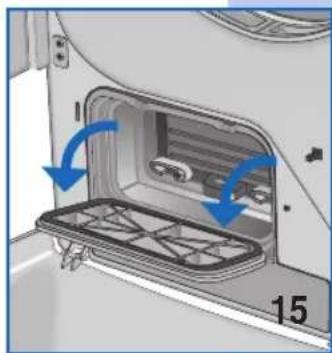
natural_image
Interior view of a car showing a door opening with blue arrows indicating direction (no text or symbols)natural_image
Interior view of a vehicle air conditioner unit with blue directional arrow indicating airflow (no text or symbols)natural_image
Illustration of a hand holding a handheld device next to a cylindrical device with blue arrows indicating rotation (no text or symbols)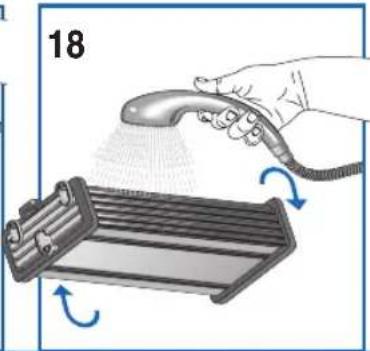
natural_image
Illustration of a hand using a spray gun to dispense or spread material around a tray (no text or symbols)PASIRENKAMI PRIEDAI
natural_image
Close-up of a white industrial air duct with a circular vent and mesh pattern (no text or symbols visible)natural_image
Hand holding a tool near a kitchen appliance, with blue arrows indicating rotation or movement (no text or symbols)JUNGIMAS J ELEKTROS TINKLA
natural_image
Hand holding a plug inserted into an electrical socket, with a cross symbol and number 4 visible (no text or symbols on the plug itself)natural_image
Mechanical assembly diagram showing a pipe connection with a blue arrow indicating direction (no text or symbols)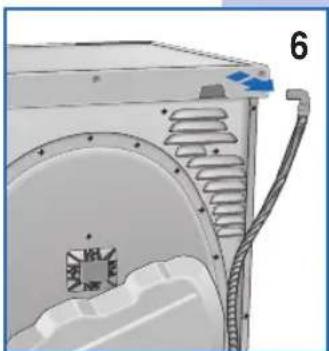
natural_image
Technical diagram of a mechanical component with internal channels and a labeled part (6), no readable text or symbols present.DURELIŲ ATIDARYMAS IR ATIDARYMO KRYPTIES KEITIMAS
natural_image
Diagram of a washing machine with blue tubing connecting internal components (no text or symbols)natural_image
Illustration of a washing machine with blue arrows indicating internal components (no text or symbols)natural_image
Hand pressing a button on a device component (no visible text or symbols)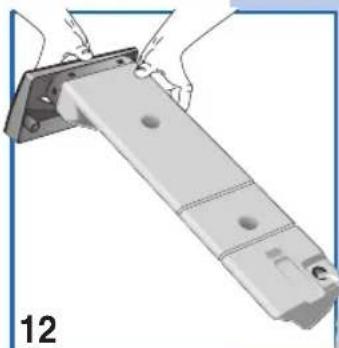
natural_image
Illustration of a mechanical assembly with hands installing components (no text or symbols visible)VALYMAS IR TECHNINĖ PRIEŽIŪRA
natural_image
Diagram of a device interior with a blue arrow indicating upward motion (no text or symbols)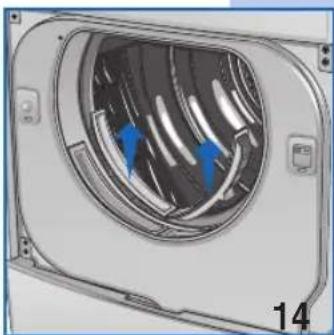
natural_image
3D rendering of a mechanical component with internal fan-like structure and blue arrows indicating direction (no text or symbols)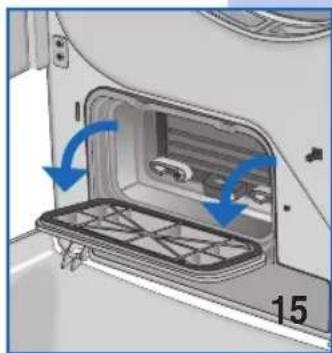
natural_image
Interior view of a car showing a door opening with a tray and blue arrows indicating direction (no text or symbols)VALYMAS IR TECHNINĖ PRIEŽIŪRA
natural_image
Interior view of a vehicle air conditioner unit with blue directional arrow indicating airflow or movement (no text or symbols)natural_image
Illustration of a hand holding a handheld device next to a cylindrical device with blue arrows indicating rotation (no text or symbols)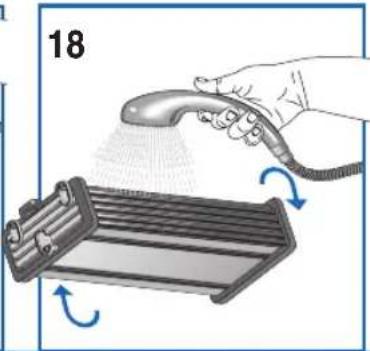
natural_image
Illustration of a hand using a spray gun to dispense or spread material onto a tray (no text or symbols)Додатна опрема
natural_image
3D rendering of a mechanical ventilation unit with a circular vent and side panel (no text or symbols visible)natural_image
Illustration of a hand holding a tool near a cabinet, with blue arrows indicating rotation or movement (no text or symbols)natural_image
Illustration of a hand holding an electrical outlet plug with a symbol (no text or labels)natural_image
Mechanical assembly diagram showing a pipe connection with a blue arrow indicating direction (no text or symbols)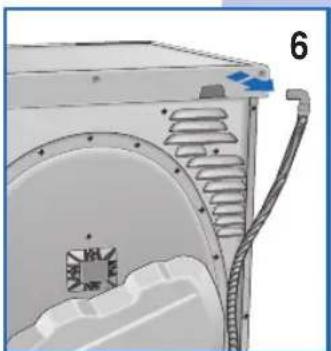
natural_image
Technical illustration of a mechanical component with internal channels and a labeled part (6), no readable text or symbols present.natural_image
Diagram of a washing machine with blue tubing connecting internal components (no text or symbols)natural_image
Illustration of a washing machine with blue arrows indicating airflow or movement, no text or symbols presentnatural_image
Hand pressing a button on a computer monitor (no text or symbols visible)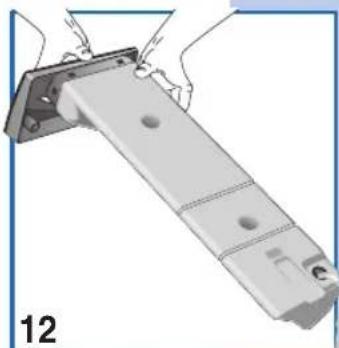
natural_image
Illustration of a mechanical assembly with hands holding a bracket and a numbered label '12' (no text or symbols on the diagram itself)ЧИШЪЕЊЕ И ОДРЖАВАЊЕ
natural_image
Diagram of a device with a blue arrow pointing upward, showing a component inside a container (no text or symbols)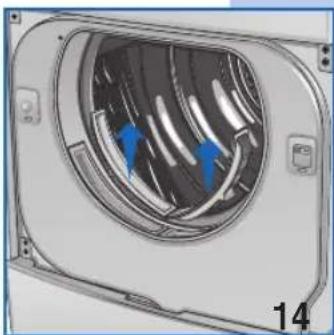
natural_image
Diagram of a device interior showing airflow or ventilation through a circular duct (no text or symbols)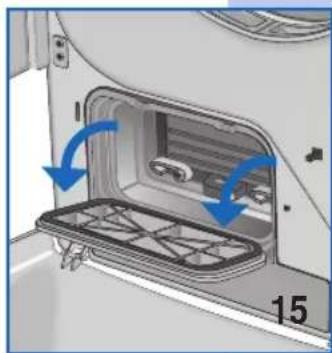
natural_image
Interior view of a vehicle showing a door opening with blue arrows indicating direction (no text or symbols)ЧИШЪЕЊЕ И ОДРЖАВАЊЕ
natural_image
Interior view of a vehicle air conditioner unit with blue directional arrow indicating airflow (no text or symbols)natural_image
Illustration of a hand holding a handheld device next to a cylindrical device with blue arrows indicating rotation (no text or symbols)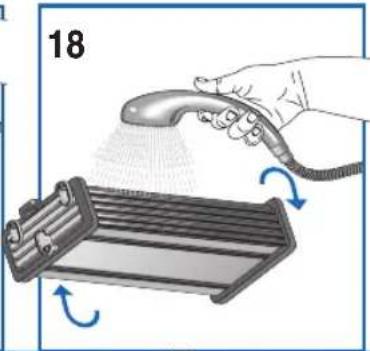
natural_image
Illustration of a hand using a spray gun to dispense or spread material around a rack (no text or symbols)ДОДАТКОВІ ПРИСТРОЇ
natural_image
Close-up of a white industrial air duct with a circular vent and ventilation grille (no text or symbols visible)natural_image
Illustration of a hand holding a tool near a cabinet, with blue curved arrows indicating rotation or movement (no text or symbols)natural_image
Hand holding a plug with an outlet, symbolizing electrical power or appliance (no text or symbols present)natural_image
Mechanical assembly diagram showing a pipe connection with a blue arrow indicating direction (no text or symbols)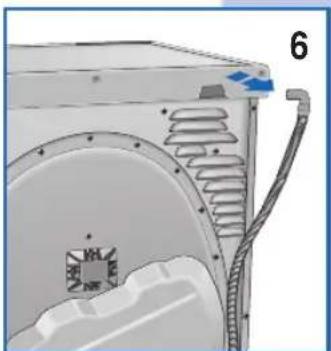
natural_image
Technical diagram of a mechanical component with internal channels and a labeled part (6), no readable text or symbols present.natural_image
Illustration of a washing machine with blue tubing connecting internal components (no text or symbols)natural_image
Illustration of a washing machine with blue arrows indicating airflow or movement, no text or symbols presentnatural_image
Hand placing a component into a machine component (no visible text or symbols)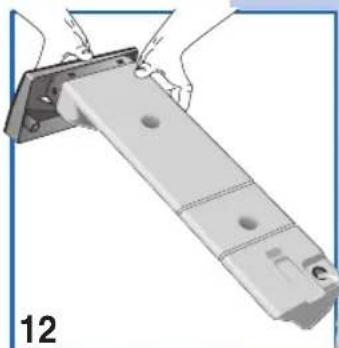
natural_image
Mechanical assembly diagram showing a bracket with mounting holes and a numbered label (12), no text or symbols present.natural_image
Diagram of a device interior with a blue arrow indicating upward motion (no text or symbols)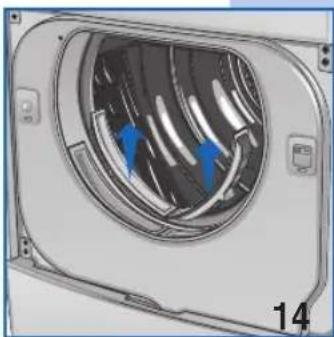
natural_image
Interior view of a washing machine showing airflow direction and blue arrows (no text or symbols)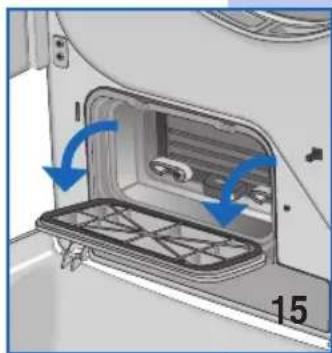
natural_image
Interior view of a car showing a door panel with blue arrows indicating direction (no text or symbols)natural_image
Interior view of a vehicle air conditioner unit with blue directional arrow indicating airflow or movement (no text or symbols)natural_image
Illustration of a hand holding a handheld device next to a battery stack with blue arrows indicating rotation (no text or symbols)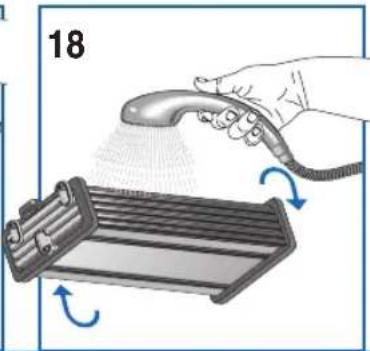
natural_image
Illustration of a hand spraying a hairdryer onto a device with motion arrows indicating rotation (no text or symbols)ACCESORII OPTIONALE
natural_image
Close-up of a white industrial air duct with a circular vent and ventilation grille (no text or symbols visible)natural_image
Illustration of a hand holding a tool near a cabinet, with blue arrows indicating rotation or movement (no text or symbols)BRANŞAREA LA INSTALATIA ELECTRICĂ
natural_image
Hand holding a plug inserted into an electrical socket, with a symbol (no text or labels)REGLAREA EVACUĂRII APEI DE CONDENS ÎNSPRE EXTERIOR
natural_image
Mechanical assembly diagram showing a pipe connection with a blue arrow indicating direction (no text or symbols)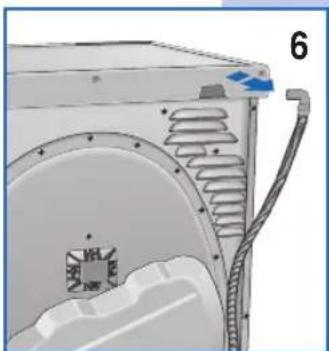
natural_image
Technical diagram of a mechanical component with internal channels and a labeled part (6), no readable text or symbols present.MODIFICAREA SENSULUI DE DESCHIDERE A UŞII
natural_image
Illustration of a hand pressing down on a door panel with blue arrows indicating clockwise motion (no text or symbols)natural_image
Diagram of a washing machine with blue tubing connecting its interior panel to the door (no text or symbols)natural_image
Illustration of a washing machine with blue airflow indicators (no text or symbols)natural_image
Hand pressing a button on a device component (no visible text or symbols)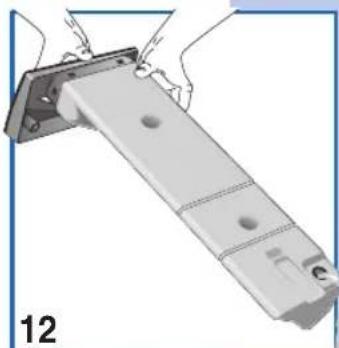
natural_image
Illustration of a mechanical bracket with hands holding it, no text or symbols presentnatural_image
Diagram of a device interior with a blue arrow indicating upward motion (no text or symbols)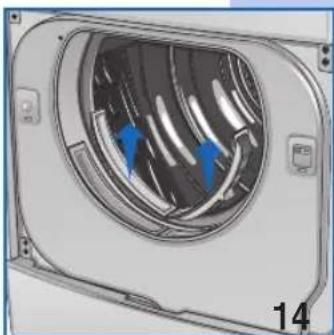
natural_image
Diagram of a device interior with blue arrows indicating flow or movement, no visible text or symbols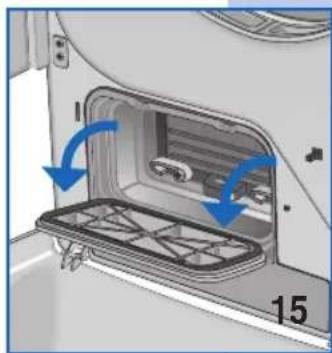
natural_image
Interior view of a car showing a door opening with blue arrows indicating direction (no text or symbols)natural_image
Interior view of a vehicle air conditioner unit with blue directional arrow indicating airflow or movement (no text or symbols)natural_image
Illustration of a hand holding a handheld device next to a battery stack with blue arrows indicating rotation (no text or symbols)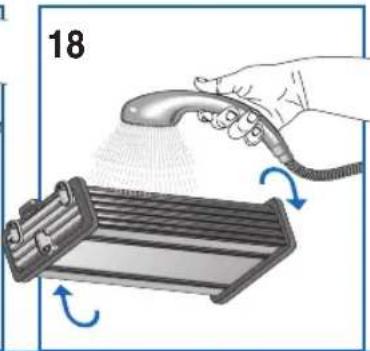
natural_image
Illustration of a hand spraying a hairdryer onto a device with motion arrows indicating rotation (no text or symbols)natural_image
3D rendering of a white industrial air duct with a circular vent and ventilation grille (no text or symbols)natural_image
Illustration of a hand holding a tool near a refrigerator, with blue curved arrows indicating rotation or movement (no text or symbols)natural_image
Hand holding a plug inserted into an electrical socket, with a symbol (no text or labels)natural_image
Mechanical assembly diagram showing a pipe connection with a blue arrow indicating direction (no text or symbols)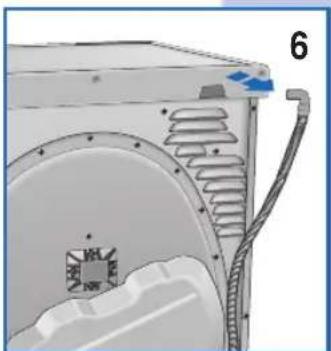
natural_image
Technical diagram of a mechanical component with internal channels and a labeled part (6), no readable text or symbols present.natural_image
Illustration of a hand pressing down on a door panel with blue arrows indicating clockwise motion (no text or symbols)natural_image
Diagram of a microwave oven with airflow lines indicating internal components (no text or symbols)natural_image
Illustration of a washing machine with blue arrows indicating air circulation or mechanical motion (no text or symbols)natural_image
Hand placing a button into a device component (no text or symbols visible)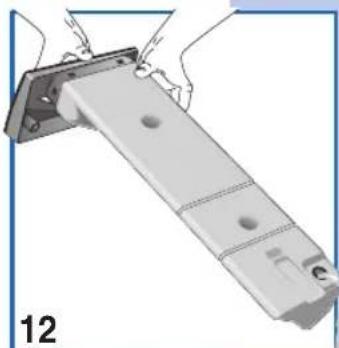
natural_image
Illustration of a mechanical assembly with hands holding a bracket and a numbered label '12' (no text or symbols on the diagram itself)natural_image
Diagram of a device with a blue arrow pointing to a component, no text or symbols present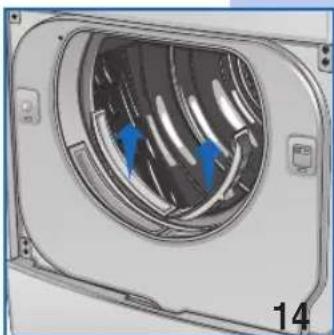
natural_image
Diagram of a device interior with blue arrows indicating flow or movement, no text or symbols present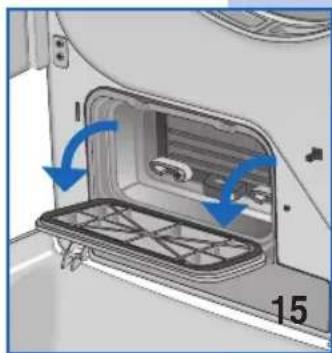
natural_image
Interior view of a car showing a door panel with blue arrows indicating direction (no text or symbols)natural_image
Interior view of a vehicle air conditioner unit with blue directional arrow indicating airflow or movement (no text or symbols)natural_image
Illustration of a hand holding a handheld device next to a cylindrical device with blue arrows indicating rotation (no text or symbols)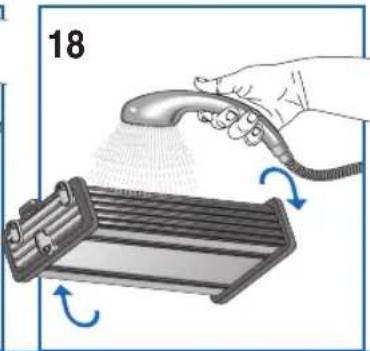
natural_image
Illustration of a hand spraying a hairdryer onto a rack with blue motion arrows (no text or symbols)

- Gentile Cliente,
- ACCESSORI OPTIONAL
- COLLEGAMENTO ALL'IMPIANTO ELETTRICO
- APERTURA E MODIFICA ROTAZIONE PORTA
- CONTENTS
- OTES AND ADVICE FOR THE USER 13-14
- DESCRIPTION OF THE APPLIANCE 15
- INSTALLING THE APPLIANCE 15-17
- USING THE DRIER
- MAINTENANCE
- NOTES AND ADVICE FOR THE USER
- DESCRIPTION OF THE APPLIANCE
- OPTIONAL ACCESSORIES
- INSTALLING THE APPLIANCE
- INSTALLATION
- LEVELLING THE DRIER
- CONNECTING TO THE MAINS SUPPLY
- OPENING THE DOOR AND CHANGING THE OPENING DIRECTION
- PRECAUTIONS FOR FABRIC TYPES
- RECOMMENDATIONS PRIOR TO DRYING
- SORTING THE WASHING
- General advice:
- Pure linen.
- DESCRIPTION OF THE CONTROL PANEL.
- 9
- PROGRAMME TABLE
- INTERNAL LIGHT (AVAILABLE ACCORDING TO MODEL)
- DRAINING THE CONDENSATION WATER RESERVOIR
- To empty the reservoir, proceed as follows:
- CLEANING AND MAINTENANCE
- TROUBLESHOOTING
- RESOLVING PROBLEMS
- If the drier doesn't start
- The washing does not dry
- Verehrter Kunde,
- OPTIONALES ZUBEHÖR
- ACCESSOIRES EN OPTION
- BRANCHEMENT À L'INSTALLATION ÉLECTRIQUE
- OUVERTURE ET MODIFICATION DU SENS D'OUVERTURE DE LA PORTE
- NETTOYAGE ET ENTRETIEN
- LIMPIEZA Y MANTENIMIENTO
- ACESSÓRIOS DE OPÇÃO
- ESCHRIJVING VAN HET APPARAAT 65
- INSTALLATIE VAN DE MACHINE 65-67
- BESCHRIJVING VAN HET APPARAAT
- OPTIONELE ACCESSOIRES
- AANSLUITEN OP HET ELEKTRICITEITSNET
- OPENEN EN OMKEREN VAN DE DEUR
- REINIGING EN ONDERHOUD
- AKCESORIA OPCJONALNE
- ZMIANA KIERUNKU OTWIERANIA DRZWICZEK
- CZYSZCZENIE I KONSERWACJA
- VOLITELNÉ PŘÍSLUŠENSTVÍ
- PŘIPOJENÍ K ELEKTRICKÉMU SYSTÉMU
- OTVÍRÁNÍ A ZMĚNA OTVÍRÁNÍ DVÍŘEK
- ČIŠTĚNÍ A ÚDRŽBA
- DOPLNKOVÉ PRÍSLUŠENSTVO
- ZAPOJENIE K ELEKTRICKEJ SIETI
- REGULÁCIA ODTOKU SKONDENZOVANEJ VODY VON
- ZMENA ROTÁCIE DVERÍ
- ČISTENIE A ÚDRŽBA
- VÁLASZTHATÓ TARTOZÉKOK
- CSATLAKOZTATÁS AZ ELEKTROMOS HÁLÓZATRA
- PASIRENKAMI PRIEDAI
- JUNGIMAS J ELEKTROS TINKLA
- DURELIŲ ATIDARYMAS IR ATIDARYMO KRYPTIES KEITIMAS
- VALYMAS IR TECHNINĖ PRIEŽIŪRA
- Додатна опрема
- ЧИШЪЕЊЕ И ОДРЖАВАЊЕ
- ДОДАТКОВІ ПРИСТРОЇ
- ACCESORII OPTIONALE
- BRANŞAREA LA INSTALATIA ELECTRICĂ
- REGLAREA EVACUĂRII APEI DE CONDENS ÎNSPRE EXTERIOR
- MODIFICAREA SENSULUI DE DESCHIDERE A UŞII
Brand : Ardo
Model : CDR05L
Category : Tumble dryer