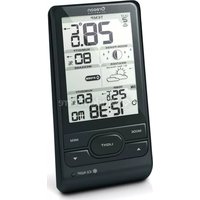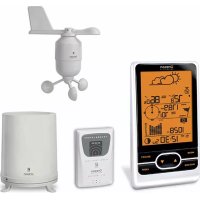
BAR623PU - Weather Station OREGON SCIENTIFIC - Free user manual and instructions
Find the device manual for free BAR623PU OREGON SCIENTIFIC in PDF.



User questions about BAR623PU OREGON SCIENTIFIC
0 question about this device. Answer the ones you know or ask your own.
Ask a new question about this device
Download the instructions for your Weather Station in PDF format for free! Find your manual BAR623PU - OREGON SCIENTIFIC and take your electronic device back in hand. On this page are published all the documents necessary for the use of your device. BAR623PU by OREGON SCIENTIFIC.
USER MANUAL BAR623PU OREGON SCIENTIFIC
Easy Barometer Projection Clock
Model: BAR623P / BAR623PU
User Manual
P/N:086L003564-068 REV1
1/146

regon
SCIENTIFIC
Barometer Projection Clock
Model: BAR623P / BAR623PU
User Manual
CONTENTS
Contents 1
Introduction 2
Product Overview 2
Front View 2
Back View 3
LCD Display 4
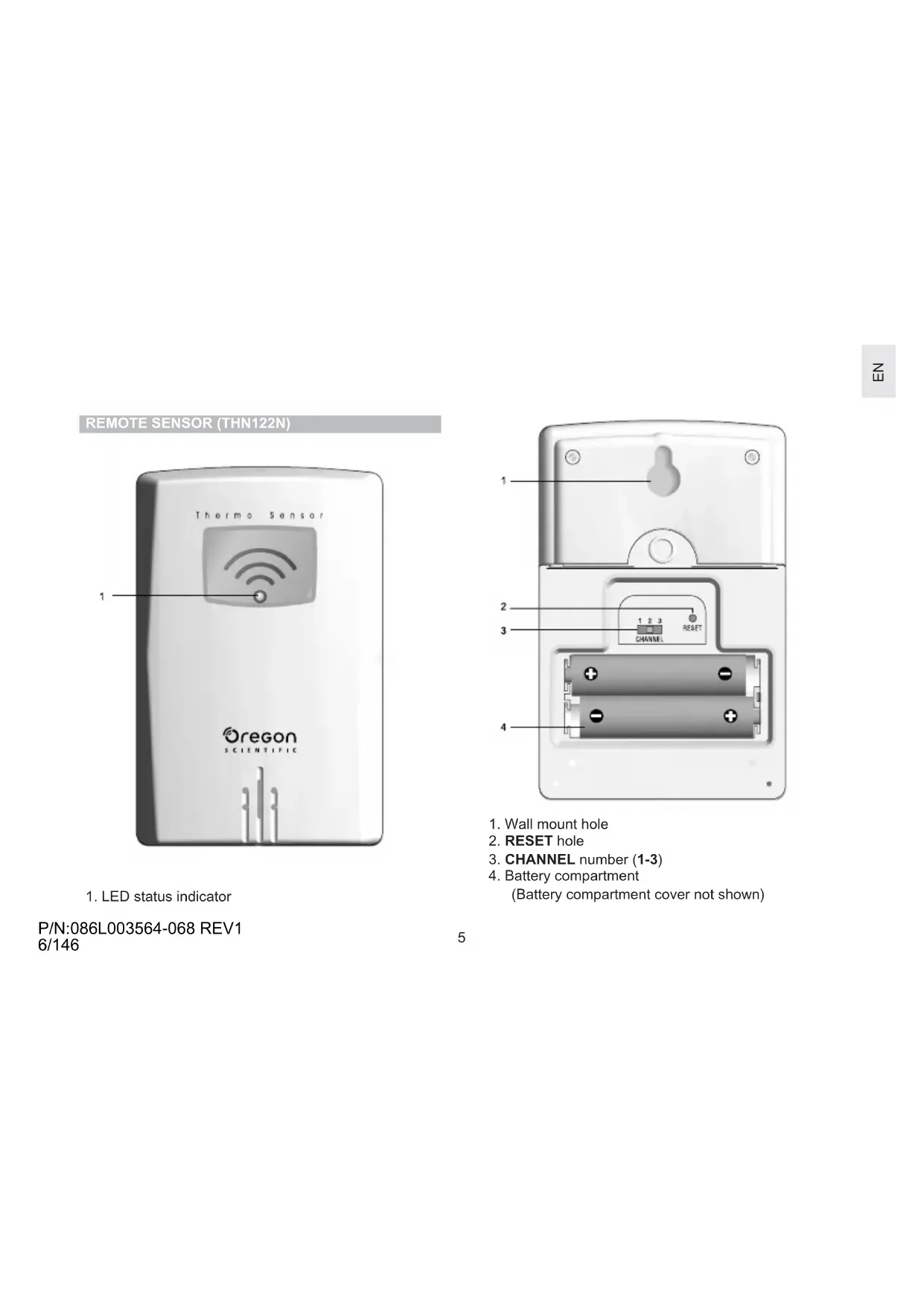
Remote Sensor (THN122N) 5
Getting Started 6
Batteries 6
AC Adaptor 7
Change Settings 7
Remote Sensor (THN122N) 8
Setup Sensor 8
Data Transmission 9
Search for Sensor 10
Clock 10
Turn Clock ON / OFF 10
Set Clock / Calendar 11
Switch Clock Display 11
P/N:086L003564-068 REV1
2/146
Alarm 11
View Alarm Settings 11
Set Alarm 11
Activate Alarm 11
Silence Alarm 12
Weather Forecast 12
Temperature 13
Select Temperature Unit 13
Minimum / Maximum Records 13
Moon Phase 13
Backlight 13
Reset System 14
Projection Unit 14
Safety and Care 14
Warnings 14
Troubleshooting 15
Specifications 16
Main Unit Dimensions 16
Remote Sensor Dimensions 16
Temperature 16
Remote Sensor (THN122N) 16
Clock / Projector 16
Power 17
About Oregon Scientific 17
EC-Declaration of Conformity 18
INTRODUCTION
Thank you for selecting the Oregon Scientific™ Barometer Projection Clock (BAR623P / BAR623PU). This device bundles precise time keeping with a projection clock, weather forecast, and indoor and outdoor temperature monitoring features into a single tool you can use from the convenience of your home.
In this box, you will find:
- Main unit with projection clock
- Main unit batteries, 3 x UM-3 (AA) 1.5V
• Main unit 4.5V AC / DC adaptor with jack
• Remote sensor (THN122N) - Remote sensor batteries, 2 x UM-4 (AAA) 1.5V
Keep this manual handy as you use your new product. It contains practical step-by-step instructions, as well as technical specifications and warnings you should know.
P/N:086L003564-068 REV1
3/146
PRODUCT OVERVIEW
FRONT VIEW

text_image
1 2 3 4 5 LEMON CATERMEL 20 t 28 t 10:30 26/3 Oregon 7 6- SNOOZE / LIGHT button
- ▲ and ▼: Increase or decrease setting / activate or deactivate RF Clock
- MODE: Change display / settings
- : View alarm status; set alarm
- : Press to activate or deactivate alarm
- Clock and outdoor temperature projector unit
- LCD display
BACK VIEW

text_image
1 2 3 4 5 6 7 8 9 10 11P/N:086L003564-068 REV1
4/146
- Projector FOCUS knob
- Projector IMAGE ROTATION knob
- PROJECTION ON / OFF switch
- AC / DC adaptor plug cover
- Battery compartment (cover off)
- SEARCH button to locate the remote sensor
- MEM: View current, maximum, and minimum temperature readings
- °C / °F switch
- RESET hole
- Battery compartment (cover on)
- Fixed table stand
LCD DISPLAY

text_image
1 2 3 4 5 (+) (+) AM PM -100.8 -100.8 -100.8 -100.8 -100.8 -100.8 -100.8 -100.8 -100.8 -100.8 -100.8 -100.8 -100.8 -100.8 -100.8 6 7 8 9 10 11 12 13- Weather display
- Radio Frequency (RF) reception icon
- Alarm activated
- Alarm setting
- Time
- Indoor temperature
- Low battery icon for main unit
- °C / °F (Outdoor temperature)
- Sensor signal
- Low battery icon for sensor
- Outdoor temperature
- Calendar
- Moon Phase
P/N:086L003564-068 REV1
5/146
REMOTE SENSOR (THN122N)

text_image
Thermo Sensor 1 Oregon SCIENTIFIC- LED status indicator
P/N:086L003564-068 REV1
6/146

text_image
1 2 3 CHANNEL RESET 4- Wall mount hole
- RESET hole
- CHANNEL number (1-3)
- Battery compartment (Battery compartment cover not shown)
BATTERIES
Batteries are supplied with this product:
Main unit 3 x UM-3 (AA) 1.5V batteries
Remote unit 2 x UM-4 (AAA) 1.5V batteries
Insert batteries before first use, matching the polarity (+ and -) as shown in the battery compartment. For best results, install batteries in the remote sensor before the main unit. Press RESET after each battery change.
NOTE Do not use rechargeable batteries.
shows when batteries are low.
NOTE It is recommended that you use alkaline batteries with this product for longer performance.
Installing the batteries:

natural_image
Close-up of a computer monitor with a download arrow overlay (no text or symbols)
natural_image
Close-up of a battery pack with three batteries and a labeled section (no readable text or symbols)| UNIT | LOCATION |
| Main Indoor Temperature Area | |
| Remote Outdoor Temperature Area | |
AC ADAPTOR
The main unit has a 4.5V AC / DC adaptor with jack, which provides continuous clock / temperature projection.
Inserting the adaptor:

natural_image
Close-up of a car's side panel showing a knob and scroll (no text or symbols visible)
natural_image
Close-up of a plug inserted into a car electrical socket, showing airflow direction (no text or symbols)P/N:086L003564-068 REV1
8/146
CHANGE SETTINGS
To change, time, calendar and language settings:
- Press and hold MODE for 2 seconds to enter setting mode.
- Press ▲ or ▼ to change settings. (To reach the setting you want quickly, press and hold ▲ or ▼.)
- Press MODE to confirm.
REMOTE SENSOR (THN122N)
This product is shipped with a THN122N Thermometer Sensor that collects Temperature data. The main unit can be connected to only 1 remote sensor.
SETUP SENSOR
- Open the remote sensor battery compartment with a small Phillips screwdriver.
- Insert the batteries, matching the polarity (+ and -) as shown in the battery compartment.
- Set the channel switch to any channel. The switch is located in the battery compartment.
- Place the sensor near the main unit. Press RESET on the sensor. Then, press and hold SEARCH on the main unit to initiate signal sending between the sensor and the main unit. The reception icon on the main unit will blink for approximately 3 minutes while it is searching for the sensor. (Refer to the Sensor Data Transmission section for more information.)
- Close the remote sensor battery compartment.
- Secure the sensor in the desired location using the wall mount or table stand.
Installing the batteries:

natural_image
Close-up of a hand using a tool to adjust or install a component, no visible text or symbols
natural_image
Close-up of a mechanical component with two battery-like components and mounting holes (no visible text or symbols)Using the stand or wall mount:

natural_image
Illustration of a remote control panel with a cable and arrow indicating cable attachment (no text or symbols)
natural_image
White remote control panel with right-hand arrow indicator (no text or symbols)P/N:086L003564-068 REV1
9/146
For best results:
- Insert the batteries and select the channel before you mount the sensor.
- Place the sensor out of direct sunlight and moisture.
- Do not place the sensor more than 30 metres (98 feet) from the main (indoor) unit.
- Position the sensor so that it faces the main (indoor) unit, minimizing obstructions such as doors, walls, and furniture.
- Place the sensor in a location with a clear view to the sky, away from metallic or electronic objects.
- Position the sensor close to the main unit during cold winter months as below-freezing temperatures may affect battery performance and signal transmission.
You may need to experiment with various locations to get the best results.
P/N:086L003564-068 REV1
10/146
DATA TRANSMISSION
Data is sent from the sensor every 40 seconds. The reception icon shown in the Temperature Area shows the status.
| ICON | DESCRIPTION |
 | Main unit is searching for the sensor |
 | A Channel has been found |
 | The sensor cannot be found. Search for the sensor or check batteries |
SEARCH FOR SENSOR
To search for the sensor, press and hold SEARCH for 2 seconds.
NOTE If the sensor is still not found, check the batteries, obstructions, and remote unit location.
NOTE Signals from household devices such as doorbells, electronic garage doors, and home security systems may cause temporary reception failure. This is normal and does not affect general product performance. The reception will resume once the interference ends.
CLOCK
The clock automatically synchronizes the current time and date when it is brought within range of the radio signal DCF77 generated from Frankfurt, Germany for Central Europe (model BAR623P) or MSF60 generated from Anthorn, England (model BAR623PU).
NOTE The signals are collected by the main unit when it is within 1500 km (932 miles) of a signal.
Initial reception takes 2-10 minutes, and is initiated when you first setup the unit, and whenever you press RESET.
P/N:086L003564-068 REV1
11/146
Once complete, the reception icon will stop blinking. The icon is shown in the Clock Area.
| STRONG SIGNAL | WEAK SIGNAL NO | SIGNAL |
To force a manual search for clock signals, press and hold ▲ for 2 seconds. If no signal is found, check the batteries.
TURN CLOCK ON / OFF
Perform this step if you cannot receive clock signals. Press and hold ▼ for 2 seconds. Then, manually set the clock following the "Set Clock" instructions (below).

The signal icon indicates that the clock feature is
ON. No icon means that it is OFF.
SET CLOCK / CALENDAR
You only need to do this if you have disabled the clock feature (for example, if you are too far from or cannot receive a signal).
- Press and hold MODE for 2 seconds. The Clock Area will blink.
- Select the hour, minute, year, month, day, and day of the week language. Press ▲ or ▼ to change the setting.
- Press MODE to confirm.
The language options are (E) English, (F) French, (D) German, (I) Italian, and (S) Spanish.
SWITCH CLOCK DISPLAY
Press MODE to toggle between Clock with Seconds and Clock with Weekday display.
P/N:086L003564-068 REV1
12/146
ALARM
This product is equipped with a 2-minute crescendo alarm.
VIEW ALARM SETTINGS
Press ((·)) . The alarm time and status will show in the Clock Area.
SET ALARM
- Press ((·)) to switch to alarm display.
- Press and hold ( · ) again for 2 seconds. The alarm settings will blink.
- Select the hour and minute. Press ▲or ▼to change settings. Press ((•)) to confirm.
ACTIVATE ALARM
Press 🔔 to activate or deactivate the alarm. 🔔 shows in the Clock / Alarm Area when the alarm is activated.
SILENCE ALARM
When the alarm time is reached, the crescendo alarm will sound for 2 minutes. To silence the alarm:
- Press SNOOZE to silence it for 8 minutes.
OR
- Press any key except SNOOZE to mute the alarm and activate it again after 24 hours.
If no button is pressed, the alarm will automatically silence after 2 minutes. It will then sound again after 8 minutes.
WEATHER FORECAST
This product forecasts the next 12 to 24 hours of weather within a 30-50 km (19-31 mile) radius with 70 to 75 percent accuracy. The weather forecast is always displayed.
| SUNNY PARTLY CLOUDY | DY RAINY CLOUDY | ||
 |  |  | |
TEMPERATURE
This product can display current, minimum, and maximum temperature information collected by the remote sensor and main (indoor) unit.
Outdoor data is collected and displayed every 40 seconds. Indoor data is collected and displayed every 10 seconds.
SELECT TEMPERATURE UNIT
Slide the °C / °F switch into the desired location. The switch is located in the main unit battery compartment. The setting for the main unit overrides the remote sensor setting.
The MEM button is located in the main unit battery compartment. Press MEM to toggle between current, maximum (MAX) and minimum (MIN) records. To clear the records, press and hold MEM for 2 seconds. A beep will sound to confirm that the memory has been cleared.
P/N:086L003564-068 REV1
14/146
MOON PHASE
The Calendar must be set for this feature to work, see "Set Clock" section.
- Press or to view the moon phase for the next or previous day.
- Press and hold ▲r ▼o scan quickly through the years (2001 to 2099).
| New Moon | |
| Waxing Crescent | |
| First Quarter | |
| Waxing Gibbous | |
| Full Moon | |
| Waning Gibbous | |
| Last-quarter | |
| Waning Crescent |
BACKLIGHT
Press SNOOZE / LIGHT to activate the backlight for 8 seconds.
RESET SYSTEM
The RESET button is located in the main unit battery compartment. Press RESET when you change the batteries and whenever performance is not behaving as expected (for example, unable to establish radio frequency link with remote sensor or clock).
PROJECTION UNIT
The projection unit can display both time and outdoor temperature. To use this feature:
- Press the SNOOZE / LIGHT button to project the time and outdoor temperature for 8 seconds.
OR
- Slide the PROJECTION switch to ON to activate continuous projection. However, this function will not work unless the AC / DC adaptor is used.
P/N:086L003564-068 REV1
15/146
You can also:
- Adjust the FOCUS knob to make the image clearer.
- Adjust the IMAGE ROTATION knob to rotate the image clockwise or anti-clockwise.
- Manually tilt the projection unit to position the image vertically upwards or downwards.
SAFETY AND CARE
Clean the product with a slightly damp cloth and alcohol-free, mild detergent. Avoid dropping the product or placing it in a high-traffic location.
WARNINGS
This product is designed to give you years of service if handled properly. Oregon Scientific will not be responsible for any deviations in the usage of the device from those specified in the user instructions or any unapproved alterations or repairs of the product. Observe the following guidelines:
- Never immerse the product in water. This can cause electrical shock and damage the product.
- Do not subject the main unit to extreme force, shock, or fluctuations in temperature or humidity.
- Do not tamper with the internal components.
- Do not mix new and old batteries or batteries of different types.
- Do not use rechargeable batteries with this product.
- Remove the batteries if storing this product for a long period of time.
- Do not scratch the LCD display.
NOTE The technical specification of this product and contents of this user guide are subject to change without notice. Images not drawn to scale.
P/N:086L003564-068 REV1
16/146
TROUBLESHOOTING
| PROBLEM | SYMPTOM | REMEDY |
| Calendar | Strange date / month | Change language (→11) |
| Clock | Cannot adjust clock | Disable clock (→10) |
| Cannot auto-synchronize the date and time | 1. Adjust batteries (→6)2. Press RESET (→14)3. Manually activate clock feature (→11) | |
| Temp | Shows “LLL” or “HHH” | Temperature is out-of-range |
| Remote sensor | Cannot locate remote sensor | Check batteries (→8) |
| Check location (→9) | ||
| Data does not match main unit | Initiate a manual sensor search (→10) |
SPECIFICATIONS
MAIN UNIT DIMENSIONS
L x W x H 92 x 167 x 53 mm
(3.6 x 6.6 x 2.1 inches)
Weight 228 grams (8.04 ounces)
without battery
REMOTE SENSOR DIMENSIONS
L x W x H 92 x 60 x 20 mm
(3.6 x 2.4 x 0.79 inches)
Weight 63 grams (2.22 ounces)
without battery
TEMPERATURE
Unit °C / °F
Indoor range -5°C to 50°C
(23°F to 122°F)
Outdoor range -20°C to 60°C
(-4°F to 140°F)
Resolution 0.1°C (0.2°F)
P/N:086L003564-068 REV1
17/146
Display Rainy, cloudy, partly
cloudy, sunny
REMOTE SENSOR (THN122N)
RF frequency 433 MHz
Range 30 metres (98 feet)
with no obstructions
Transmission Every 40 seconds
Channel No.
1
CLOCK / PROJECTOR
RF Clock Auto or manual (disabled)
Clock display HH:MM:SS
Hour format 12hr AM / PM
(Model BAR623PU)
24hr (Model BAR623P)
Calendar DD / MM; weekday in
5 languages (E, D, F, I, S)
Alarm Single alarm with
2-minute crescendo and
8-minute Snooze
Projector Outdoor temperature
and time
POWER
Main unit batteries 3 x UM-3 (AA) 1.5V
Sensor batteries 2 x UM-4 (AAA) 1.5V
AC / DC adaptor 4.5V with jack
NOTE It is recommended that you use alkaline batteries with this product for longer performance.
P/N:086L003564-068 REV1
18/146
ABOUT OREGON SCIENTIFIC
Visit our website (www.oregonscientific.com) to learn more about Oregon Scientific products such as digital cameras; MP3 players; children's electronic learning products and games; projection clocks; health and fitness gear; weather stations; and digital and conference phones. The website also includes contact information for our customer care department in case you need to reach us, as well as frequently asked questions and customer downloads.
We hope you will find all the information you need on our website, however if you'd like to contact the Oregon Scientific Customer Care department directly, please visit:
www2.oregonscientific.com/service/support
OR
Call 949-608-2848 in the US.
For international enquiries, please visit:
www2.oregonscientific.com/about/international/default.asp
EC-DECLARATION OF CONFORMITY
This product contains the approved transmitter module that complies with the essential requirements of Article 3 of the R&TTE 1999 / 5 / EC Directive, if used as intended and the following standards have been applied:
Safety of information technology equipment
(Article 3.1.a of the R&TTE Directive)
Applied Standard EN 60950: 2000
Electromagnetic compatibility
(Article 3.1.b of the R&TTE Directive)
Applied Standards
ETSI EN 301 489-1-3 (Ver.1.4.1): 2002-08
Efficient use of radio frequency spectrum
(Article 3.2 of the R&TTE Directive)
Applied Standards
ETSI EN 300 220-3 (Ver1.1.1): 2000-09
Additional information:
The product herewith complies with the requirements of the Low Voltage Directive 73 / 23 / EC, the EMC Directive 89 / 336 / EC and carries the CE marking accordingly.

text_image
with
Carmelo Cubito
Agrate Brianza (MI) / Italy January 2004
Manufacturer's EU R&TTE Representative

COUNTRIES RTTE APPROVAL COMPLIED
All EC countries, Switzerland Ⓒ
and Norway Ⓝ
P/N:086L003564-068 REV1
19/146

SCIENTIFIC
natural_image
Close-up of a device's screen with a downward arrow indicating compression or disassembly (no text or symbols visible)
natural_image
Close-up of a handheld electronic device with three batteries and indicator lights (no visible text or symbols)natural_image
Close-up of a car's dashboard and steering wheel (no visible text or symbols)
natural_image
Close-up of a fuel nozzle with an arrow indicating downward pressure, no visible text or symbolsnatural_image
Close-up of a hand using a tool to apply material to a mechanical component (no visible text or symbols)
natural_image
Close-up of a mechanical device with multiple ports and mounting holes (no visible text or symbols)natural_image
Illustration of a silver remote control panel with a paperclip and arrow indicating left-hand rule (no text or symbols)
natural_image
White remote control panel with a curved handle and arrow indicating left-side direction (no text or symbols)Agrate Brianza (MI) / Italia January 2004
Turn Clock ON / OFF....10
Set Clock / Calendar 1
Switch Clock Display 1
Alarm 11
Activer / Désactiver l'horloge 11
VUE D'ENSEMBLE DU PRODUIT
FACE AVANT

text_image
1 BROG CENTRALLED 2 3 4 5 6 7 Oregonnatural_image
Close-up of a handheld electronic device with a paper cutout and a downward arrow indicating action (no text or symbols visible)
natural_image
Close-up of a handheld electronic device with three cylindrical components and a labeled section (no readable text or symbols)natural_image
Close-up of a car's side panel showing a hand pressing down on the dashboard (no text or symbols visible)
natural_image
Close-up of a plug inserted into a socket, showing internal components and a downward arrow (no text or symbols)P/N:086L003564-068 REV1
44/146
natural_image
Close-up of a hand using a tool to apply material to a component with four holes (no visible text or symbols)
natural_image
Close-up of a mechanical component with battery housing and mounting holes (no visible text or symbols)natural_image
3D rendering of a remote control panel with a paperclip and arrow indicating left-side motion (no text or symbols)
natural_image
White remote control panel with a right-handled scroll and handle (no text or symbols visible)| SINAL FORT S | GNAL FAIBLE AUCUN SIGNAL | |
text_image
Garcia Whitetext_image
1 2 3 4 5 6 7 8 9 10 11 12 13 -100.0 -100.0 -100.0 -100.0 -100.0 -100.0 -100.0 -100.0 -100.0 -100.0 -100.0 -100.0 -100.0 -100.0 -100.0 AM PM 38:08 38/38natural_image
Close-up of a computer monitor with a downward arrow indicating compression or download action (no text or symbols visible)
natural_image
Close-up of a handheld electronic device showing three batteries and a battery pack (no visible text or symbols)natural_image
Close-up of a car's dashboard and steering wheel (no visible text or symbols)
natural_image
Close-up of a plug inserted into a car, showing airflow direction (no text or symbols)P/N:086L003564-068 REV1
62/146
| Starkes Signal | Schwaches Signal | Kein Signal |
 | (sUTC) |
24hr (Modell BAR623P)
Barometer Projection Clock
Model: BAR623P / BAR623PU
Manual De Uso
ÍNDICE
Índice 1
natural_image
Close-up of a computer monitor with a paper lid and a downward arrow indicating compression (no text or symbols visible)
natural_image
Close-up of a handheld electronic device showing three batteries and a socket (no visible text or symbols)natural_image
Close-up of a car's dashboard showing steering wheel and gear shift (no text or symbols visible)
natural_image
Close-up of a car being charged with a plug, showing the nozzle and valve (no text or symbols visible)P/N:086L003564-068 REV1 80/146
natural_image
Close-up of a hand using a tool to apply material to a component with mounting holes (no visible text or symbols)
natural_image
Close-up of a mechanical device with two battery modules and mounting holes (no visible text or symbols)natural_image
Illustration of a white electronic device with a paperclip attached, showing a black arrow pointing to its side (no text or symbols present)
natural_image
White rectangular device with a curved handle and arrow indicating left-side motion (no text or symbols)P/N:086L003564-068 REV1
81/146
Alcance interior -5°C to 50°C (23°F to 122°F)
Alcance exterior -20°C to 60°C (-4°F to 140°F)
Resolución 0.1°C (0.2°F)
P/N:086L003564-068 REV1 89/146
Display Lluvia, nublado, parcialmente nublado, sol
SENSOR REMOTO (THN122N)
Agrate Brianza (MI) / Italia January 2004
natural_image
Close-up of a computer monitor with a paper icon and a downward arrow, no visible text or symbols
natural_image
Close-up of a device's internal battery pack with three leads (no visible text or symbols)natural_image
Close-up of a car's dashboard and steering wheel (no visible text or symbols)
natural_image
Close-up of a car's fuel nozzle with an arrow indicating downward pressure (no text or symbols visible)P/N:086L003564-068 REV1
98/146
natural_image
Close-up of a hand using a tool to apply plastic components on a metal package (no visible text or symbols)
natural_image
Close-up of a mechanical component with two cylindrical batteries and mounting holes (no visible text or symbols)natural_image
3D rendering of a remote control panel with a black arrow indicating left-side force (no text or symbols)
natural_image
White rectangular device with a right-pointing arrow and a small knob, shown in 3D perspective (no text or symbols)P/N:086L003564-068 REV1
99/146
natural_image
Close-up of a device's screen with a downward arrow, no visible text or symbols
natural_image
Close-up of a handheld electronic device with three internal components and a label '1018-1' on the side (no readable text or symbols beyond basic markings)natural_image
Close-up of a car interior showing a hand holding a propeller and a directional arrow (no text or symbols visible)
natural_image
Close-up of a car fuel nozzle with airflow direction arrow (no text or symbols)P/N:086L003564-068 REV1
116/146
natural_image
Close-up of a hand using a tool to adjust or install a component with mounting holes (no visible text or symbols)
natural_image
Close-up of a mechanical component with two cylindrical pins and mounting holes (no visible text or symbols)natural_image
Illustration of a silver remote control panel with a paperclip and cable, showing no text or symbols.
natural_image
White rectangular device with a right-pointing arrow, no visible text or symbolsKalender DD / MM; weekdag in
5 talen (E, D, F, I, S)
text_image
1 2 3 4 5 6 7 8 9 10 11 12 13 -100.0 -100.0 -100.0 -100.0 -100.0 -100.0 -100.0 -100.0 -100.0 -100.0 -100.0 -100.0 -100.0 -100.0 -100.0 AM PM 38:08 38/38natural_image
Close-up of a hand using a tool to apply material to a component with mounting holes (no visible text or symbols)
natural_image
Close-up of a battery pack with two batteries and a partially open casing (no visible text or symbols)ENHET PLATS

natural_image
Close-up of a car's dashboard and steering wheel (no visible text or symbols)
natural_image
Close-up of a car fuel nozzle with an arrow indicating direction (no text or symbols visible)P/N:086L003564-068 REV1
134/146
ÄNDRA INSTÄLLNINGAR
natural_image
Close-up of a hand holding a small electronic device component with mounting holes (no visible text or symbols)
natural_image
Close-up of a metallic electronic device with two batteries and a lock (no visible text or symbols)natural_image
3D rendering of a remote control panel with a paperclip and arrow indicating left-hand rule (no text or symbols)
natural_image
3D rendering of a rectangular device with a curved handle and an arrow indicating direction (no text or symbols)För bästa resultat:
© 2008 Oregon Scientific. All rights reserved.
P/N.: 086L003564-068
P/N:086L003564-068 REV1
146/146