ECLIPSE - Weather Station OREGON SCIENTIFIC - Free user manual and instructions
Find the device manual for free ECLIPSE OREGON SCIENTIFIC in PDF.



| Product type | Wireless weather station |
| Model | ECLIPSE |
| Brand | Oregon Scientific |
| Dimensions (main unit) | 94 x 51 x 182.5 mm (3.70 x 2.01 x 7.19 inches) |
| Weight (main unit) | 236 g (8.3 oz) without batteries |
| Power (main unit) | 3 UM-3 (AA) 1.5 V batteries |
| Dimensions (sensor) | 50 x 22 x 96 mm (1.97 x 0.87 x 3.78 inches) |
| Weight (sensor) | 49 g (1.73 oz) without batteries |
| Power (sensor) | 2 UM-4 (AAA) 1.5 V batteries |
| Indoor temperature range | -5°C to 50°C (23°F to 122°F) |
| Outdoor temperature range | -20°C to 60°C (-4°F to 140°F) |
| Humidity range | 25% to 95% |
| Transmission range | 30 m (98 ft) without obstruction |
| Radio frequency | 433 MHz |
| Radio-controlled clock reception | DCF-77 (EU), MSF-60 (UK), WWVB-60 (US) |
| Weather forecast | 12 to 24 hours, 30-50 km radius |
| Functions | Clock, frost alarm, moon phase, warning messages (heat, wind, storm, fog, frost), backlight |
| Supported sensors | Up to 3 wireless sensors |
| Display | LCD with backlight (5 seconds) |
| Languages | English, German, French, Italian, Spanish |
| Care | Clean with a soft dry cloth. Do not immerse in water. Remove batteries if not used for a long time. |
| Safety | Do not expose to excessive force, dust, temperature variations, or humidity. Use only new batteries of the required type. |
| Disposal | Do not dispose with household waste. Recycle according to local regulations (crossed-out wheeled bin symbol). |
Frequently Asked Questions - ECLIPSE OREGON SCIENTIFIC
User questions about ECLIPSE OREGON SCIENTIFIC
0 question about this device. Answer the ones you know or ask your own.
Ask a new question about this device
Download the instructions for your Weather Station in PDF format for free! Find your manual ECLIPSE - OREGON SCIENTIFIC and take your electronic device back in hand. On this page are published all the documents necessary for the use of your device. ECLIPSE by OREGON SCIENTIFIC.
USER MANUAL ECLIPSE OREGON SCIENTIFIC
Advanced Wireless Weather Station
USER MANUAL
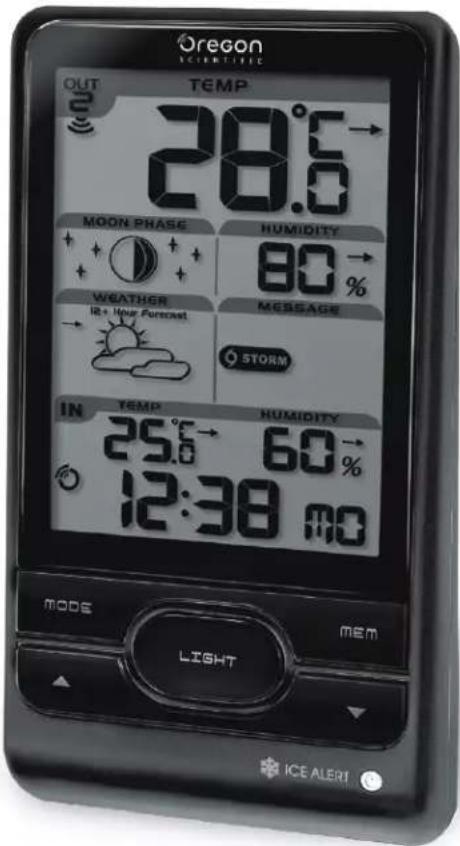
ECLIPSE
Advanced Wireless Weather Station Model: ECLIPSE USER MANUAL
CONTENTS
Overview. 2
Front View 2
Back View 3
Remote Sensor 3
Getting Started. 3
Insert Batteries 3
Remote Sensor 4
Sensor Data Transmission 4
Clock 5
Clock Reception 5
Manually Set Clock 5
Weather Forecast. 6
Weather Warning Message. 6
Temperature and Humidity 6
Ice Warning 7
WeatherTrends 7
Moon Phase 7
Backlight 7
Reset. 7
Precautions 8
Specifications 8
About Oregon Scientific 9
EU-Declaration of Conformity 9
FCC Statement 9
Declaration of Conformity 10
Information For Users 10
OVERVIEW
FRONT VIEW (FIG 1)
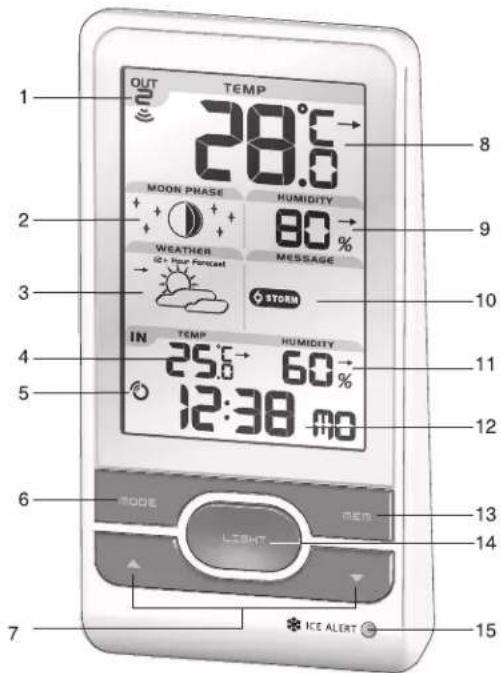
- Remote sensor reception indicator
- Moon phase reading
- Weather forecast
- Indoor temperature with temperature trend
- Clock signal reception indicator
- MODE: Change settings / display
- : Increase / decrease settings; activate / deactivate clock reception signal
- Outdoor temperature with temperature trend
- Outdoor humidity with humidity trend
- Weather warning message
- Indoor humidity with humidity trend
- Clock with weekday
- MEM: View current, maximum and minimum temperature / humidity
- LIGHT: Activate backlight for 5 seconds
- Ice alert LED indicator
BACK VIEW (FIG 2)
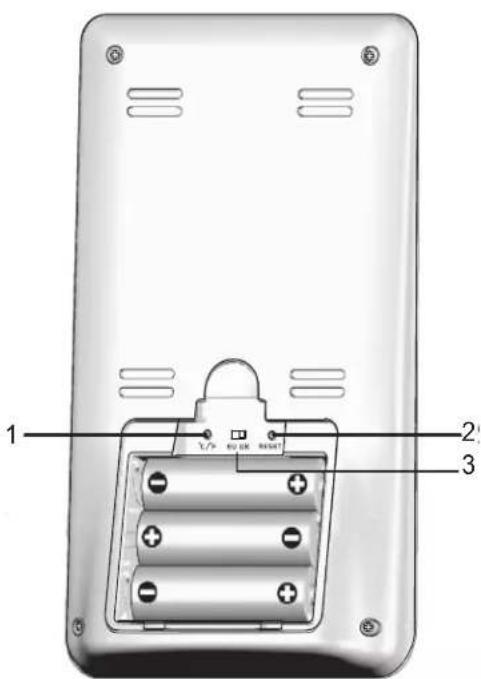
- ^ C / ^ : Select temperature unit
- RESET: Reset unit to default settings
- EU/UK: Select the nearest radio signal
REMOTE SENSOR (FIG 3)
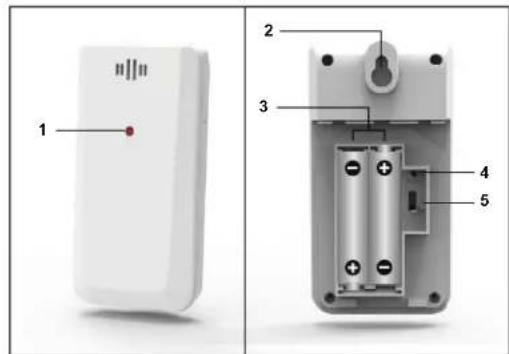
- LED status indicator
- Wall mount hole
- Battery compartment
- RESET hole
- CHANNEL switch
GETTING STARTED
INSERT BATTERIES
- Remove the battery compartment.
- Insert the batteries, matching the polarities (see FIG 2).
- Press RESET after each battery change.
备
| LOCATION | MEANING |
| Clock / alarm and Indoor temperature area | Main unit batteries low |
| Outdoor temperature area S | Sensor batteries low |
REMOTE SENSOR
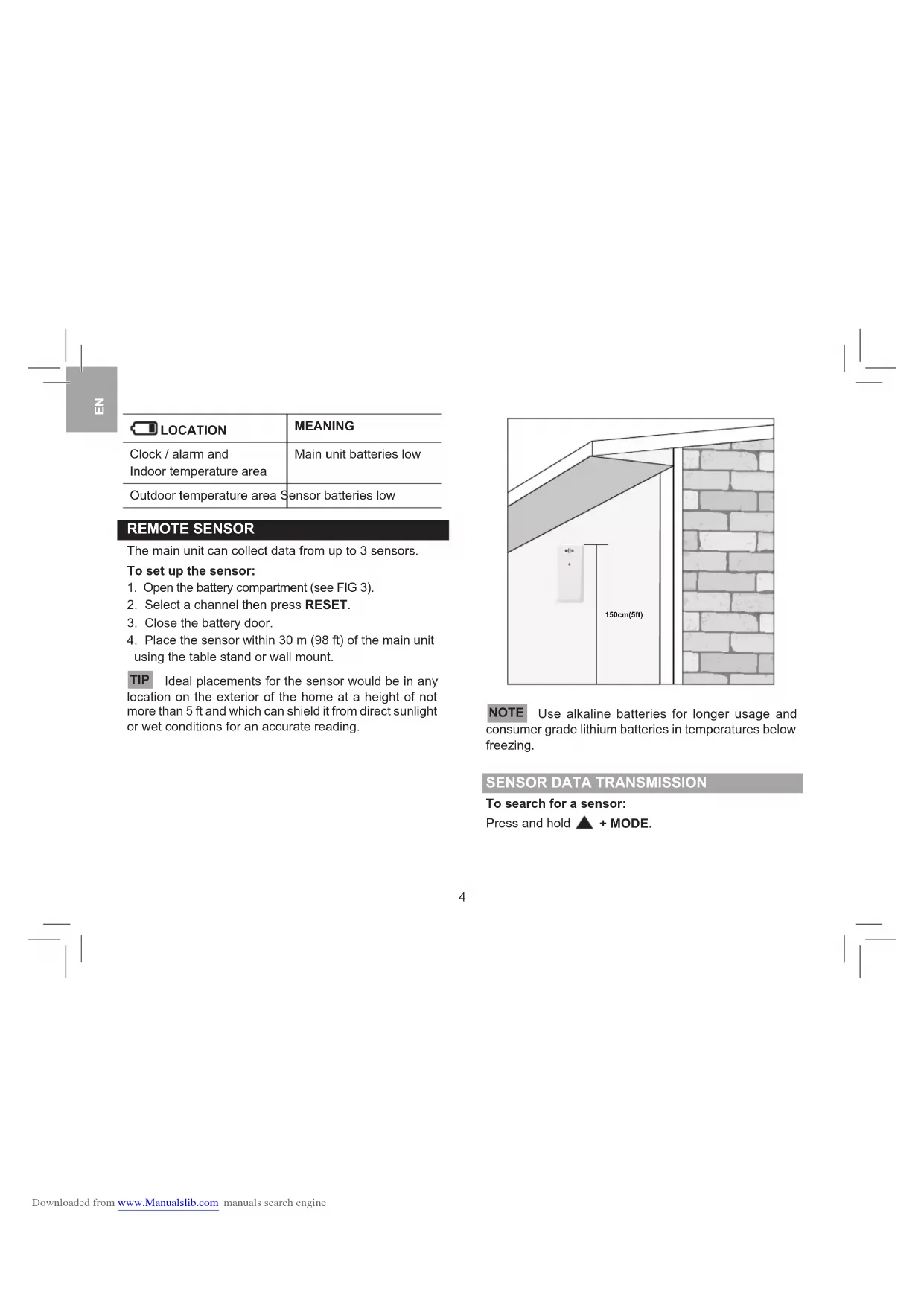
The main unit can collect data from up to 3 sensors.
To set up the sensor:
- Open the battery compartment (see FIG 3).
- Select a channel then press RESET.
- Close the battery door.
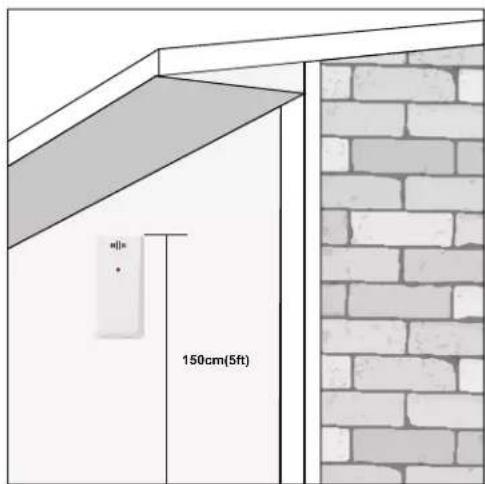
- Place the sensor within 30m (98 ft) of the main unit using the table stand or wall mount.
TIP Ideal placements for the sensor would be in any location on the exterior of the home at a height of not more than 5 ft and which can shield it from direct sunlight or wet conditions for an accurate reading.
NOTE Use alkaline batteries for longer usage and consumer grade lithium batteries in temperatures below freezing.
SENSOR DATA TRANSMISSION
To search for a sensor:
Press and hold + MODE.
The sensor reception icon in the remote sensor area shows the status:
| ICON DESCRIPTION | |
| OUTOUT | Main unit is searching for sensor(s). |
| OUTOUTOUTOUT | A channel has been found. |
| OUT | The sensor cannot be found. |
TIP The transmission range may vary depending on many factors. You may need to experiment with various locations to get the best results.
CLOCK
CLOCK RECEPTION
This product is designed to synchronize its clock automatically with a clock signal.
EU/UK:
Slide EU / UK to select the signal received.
EU: DCF-77 signal: within 1500 km (932 miles) of Frankfurt, Germany.
UK: MSF-60 signal: within 1500 km (932 miles) of Anthorn, England.
US:
- WWVB-60 signal: within 3200km (2000 miles) of Fort Collins Colorado.
To enable / disable signal reception:
Press and hold to enable or to disable signal reception.
NOTE Reception takes 2-10 minutes. If the signal is weak, it can take up to 24 hours to get a valid signal. If signal reception is unsuccessful, place your unit next to a window, press and hold force another signal search.
Clock signal reception indicator:
| STRONG SIGNAL | WEAK SIGNAL | NO SIGNAL |
MANUALLY SET CLOCK
To set the clock manually, disable the signal reception first.
- Press and hold MODE.
- Press or change the settings.
- Press MODE to confirm.
- The settings order is: time zone, 12/24 hr format, hour, minute, year, calendar mode (day - month / month - day), month, day and language.
EU: Time zone offset sets the clock +/- 23 hours from the received clock signal time.
US: Select the time zone: (P) Pacific, (E) Eastern, (C) Central or (M) Mountain.
NOTE The language options are English (E), German (D), French (F), Italian (I), and Spanish (S).
To select display mode:
Press MODE to choose between clock with seconds / weekday / calendar / moon phase.
WEATHER FORECAST
This product forecasts the next 12 to 24 hours of weather within a 30 - 50km (19-31 mile) radius with a 75% accuracy.
| Sunny | |
| Partially Cloudy | |
| Cloudy | |
| Rainy | |
| Snowy |
WEATHER WARNINGMESSAGE
The weather warning messages provide indications of probable circumstances that may arise based on the weather station's calculations. The meanings for the warnings are illustrated below:
| Warning Meaning | |
| HEAT | Risk of high temperatures |
| WIND | Risk of fast wind speeds |
| STORM | Risk of a storm |
| FOG | Risk of foggy conditions |
| FROST | Risk of icy conditions |
TEMPERATURE AND HUMIDITY
To toggle temperature unit:
Press ^ / ^
To auto-scan between sensors:
Press and hold + MEM to display each sensor's data for 3 seconds.
To end press ▲.
To toggle between current, minimum and maximum records for the selected sensor:
Press MEM repeatedly.
To clear the records:
Press and hold MEM.
ICE WARNING
If the channel 1 sensor falls between 3^ to -2^ ( 37^ to 28^ ), LED indicator will flash, and will stop flashing once the temperature is out of this range.
WEATHERTRENDS
The temperature, humidity and pressure trend icons are based on recent sensor readings.
In moon phase mode, press to scan through the years (2001 to 2099).
| ○ | New Moon Full Moon | ○ | |
| ○ | Waxing Crescent | Waning | Gibbous |
| ○ | First quarter Last quarter | ○ | |
| ○ | Waxing Gibbous | ○ | Crescent |
NOTE Star icons around the moon phase will be displayed from 6 o'clock in the evening to 6 o'clock the next morning.
BACKLIGHT
Press LIGHT to activate backlight for 5 seconds.
RESET
Press RESET to return to the default settings.
PRECAUTIONS
- Use only fresh batteries of the required size and type. Do not mix old and new batteries, different types of batteries.
-
Do not dispose old batteries as unsorted municipal waste. Collection of such waste separately for special treatment is necessary.
If you do not plan to use the product for a long time, remove the batteries. Batteries can leak chemicals that can damage electronic parts. -
Do not subject the device to excessive force, shock, dust, temperature or humidity.
- Do not immerse the device in water. If you spill liquid over it, dry it immediately with a soft, lint-free cloth.
- Do not clean the device with abrasive or corrosive materials.
- Do not tamper with the device's internal components. Doing so invalidates the warranty.
Images shown in this manual may differ from the actual display. - When disposing of this product, ensure it is collected separately for special treatment.
- The contents of this manual may not be reproduced without the permission of the manufacturer.
NOTE The technical specifications for this product and the contents of the user manual are subject to change without notice.
NOTE Features and accessories will not be available in all countries. For more information, please contact your local retailer. To download an electronic version of the user manual, please visit http://global.oregon scientific.com/customerSupport.php.
SPECIFICATIONS
| TYPE DESCRIPTION | |
| MAIN UNIT | |
| L x W x H | 94 x 51 x 182.5 mm (3.70 x 2.01 x 7.19 in) |
| Weight 236 g (8.3 oz) | without battery |
| Temperature range -5°C to 50°C (23°F to 122°F) | |
| Resolution 0.1°C (0.1°F) | |
| Signal frequency 433 MHz | |
| Humidity range 25% - 95% | |
| Humidity resolution 1% | |
| Power 3 x UM-3 (AA) 1.5 V batteries | |
| REMOTE UNIT (THGR511) | |
| L x W x H | 50 x 22 x 96 mm (1.97 x 0.87 x 3.78 in) |
| Weight | 49 g (1.73 ounces) without battery |
| Transmission range 30 m (98 ft) unobstructed | |
| Temperature range -20°C to 60°C (-4°F to 140°F) | |
| Humidity range 25% - 95% | |
| Power 2 x UM-4 (AAA) 1.5 V batteries | |
ABOUT OREGON SCIENTIFIC
Visit our website www.oregonscientific.com to learn more about Oregon Scientific products.
For any inquiry, please contact our Customer Services at info@oregonscientific.com.
Oregon Scientific Global Distribution Limited reserves the right to interpret and construe any contents, terms and provisions in this user manual and to amend it, at its sole discretion, at any time without prior notice. To the extent that there is any inconsistency between the English version and any other language versions, the English version shall prevail.
EU-DECLARATION OF CONFORMITY
Hereby the manufacturer, Oregon Scientific Global Distribution Limited, declares that the radio equipment type Advanced Wireless Weather Station (Model: ECLIPSE) is in compliance with 2014/53/EU Directive. The full text of the EU Declaration of Conformity is available at the following internet address:
http://global.oregonscientific.com/customerSupport.php.


COUNTRIES RED APPROVED COMPLIED
All EU countries, Switzerland (CH)
and Norway N
FCC STATEMENT
This device complies with Part 15 of the FCC Rules. Operation is subject to the following two conditions: (1) This device may not cause harmful interference, and (2) This device must accept any interference received, including interference that may cause undesired operation.
WARNING: Changes or modifications to this unit not expressly approved by the party responsible for compliance could void the user's authority to operate the equipment.
NOTE: This equipment has been tested and found to comply with the limits for a Class B digital device, pursuant to Part 15 of the FCC Rules. These limits are designed to provide reasonable protection against harmful interference in a residential installation.
This equipment generates, uses and can radiate radio frequency energy and, if not installed and used in accordance with the instructions, may cause harmful interference to radio communications. However, there is no guarantee that interference will not occur in a particular installation. If this equipment does cause harmful interference to radio or television reception, which can be determined by turning the equipment off and on, the user is encouraged to try to correct the interference by one or more of the following measures:
Reorient or relocate the receiving antenna.
- Increase the separation between the equipment and receiver.
- Connect the equipment into an outlet on a circuit different from that to which the receiver is connected.
- Consult the dealer or an experienced radio / TV technician for help.
DECLARATION OF CONFORMITY
The following information is not to be used as contact for support or sales. Please call our customer service number (listed on our website at www.oregonscientific.com, or on the warranty card for this product) for all inquiries instead.
We
Name: Oregon Scientific Inc.
Address: Brea Corporate Park 3020
Saturn St. Suite 200 Brea,
CA 92821
Telephone No.: 1 (888) 950-8889
declare that the product
Product No.: ECLIPSE
Product Name: Advanced Wireless Weather Station
Manufacturer: Oregon Scientific Global Distribution Limited
Address: Block C, 9/F, Kaiser Estate, Phase 1,41 Man Yue St., Hung Hom, Kowloon, Hong Kong
is in conformity with Part 15 of the FCC Rules. Operation is subject to the following two conditions: 1) This device may not cause harmful interference. 2) This device must accept any interference received, including interference that may cause undesired operation.
DISPOSAL INFORMATION FOR USERS
Pursuant to and in accordance with Article 14 of the Directive 2012/19/EU of the European Parliament on waste electrical and electronic equipment (WEEE), and pursuant to and in accordance with Article 20 of the Directive 2013/56/EU of the European Parliament on batteries and accumulators and waste batteries.
The barred symbol of the rubbish bin shown on the equipment indicates that, at the end of its useful life, the product must be collected separately from other waste.
Please note that the batteries/rechargeable batteries must be removed from the equipment before it is given as waste. To remove the batteries/accumulators refer to the specifications in the user manual. Therefore, any products that have reached the end of their useful life must be given to waste disposal centers specializing in separate collection of waste electrical and electronic equipment, or given back to the dealer when purchasing a new WEEE, pursuant to and in accordance with Article 14 as implemented in the country.
The adequate separate collection for the subsequent start-up of the equipment sent to be recycled, treated and disposal of in an environmentally compatible way contributes to preventing possible negative effects on the environment and health and optimizes the recycling and reuse of components making up the apparatus. Abusive disposal of the product by the user involves application of the administrative sanctions according to the laws in force.
http://global.oregon scientific.com/customerSupport.php.
CHARACTERISTIQUES
Uber Oregon Scientific. 9
VOORZORGSGMAATREGELEN
© 2018 Oregon Scientific. All rights reserved.

- Advanced Wireless Weather Station
- Advanced Wireless Weather Station Model: ECLIPSE USER MANUAL
- CONTENTS
- OVERVIEW
- FRONT VIEW (FIG 1)
- BACK VIEW (FIG 2)
- REMOTE SENSOR (FIG 3)
- GETTING STARTED
- INSERT BATTERIES
- REMOTE SENSOR
- To set up the sensor:
- SENSOR DATA TRANSMISSION
- CLOCK
- CLOCK RECEPTION
- EU/UK:
- US:
- MANUALLY SET CLOCK
- To select display mode:
- WEATHER FORECAST
- WEATHER WARNINGMESSAGE
- TEMPERATURE AND HUMIDITY
- ICE WARNING
- WEATHERTRENDS
- BACKLIGHT
- RESET
- PRECAUTIONS
- ABOUT OREGON SCIENTIFIC
- EU-DECLARATION OF CONFORMITY
- COUNTRIES RED APPROVED COMPLIED
- FCC STATEMENT
- DECLARATION OF CONFORMITY
- We
- declare that the product
- DISPOSAL INFORMATION FOR USERS
- VOORZORGSGMAATREGELEN
Brand : OREGON SCIENTIFIC
Model : ECLIPSE
Category : Weather Station