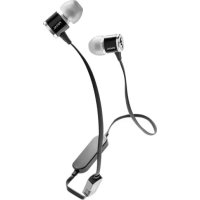
Spark Wireless - Earphones FOCAL - Free user manual and instructions
Find the device manual for free Spark Wireless FOCAL in PDF.



| Product type | Bluetooth In-Ear Headphones |
| Brand | Focal |
| Model | Spark Wireless |
| Wireless technology | Bluetooth 4.1 |
| Frequency band | 2402 MHz - 2480 MHz |
| Operating distance | 10 m |
| Frequency response | 20 Hz - 20 kHz |
| Impedance | 16 Ω |
| Sensitivity | 103 dB (SPL 1 mW, 1 kHz) |
| Total harmonic distortion | < 0.3 % |
| Speaker type | Electrodynamic 9.5 mm, Mylar |
| Microphone | Omnidirectional |
| Weight | 14 g |
| Battery life | Up to 8 hours |
| Charging time | Approximately 2 hours |
| Power supply | Rechargeable battery, USB charging |
| Pairing memory | Up to 4 devices |
| Simultaneous connection | Up to 2 devices |
| Box contents | Spark headphones, 3 pairs of silicone ear tips (S/M/L), USB cable, clip, rigid carrying case |
| Maintenance and cleaning | Clean ear tips with a dry or slightly damp cloth; clean the grille with a soft cloth or cotton swab |
| Safety | Complies with RF exposure standards; do not use while charging |
| Warranty | Register product online at www.focal.com/garantie |
Frequently Asked Questions - Spark Wireless FOCAL
User questions about Spark Wireless FOCAL
0 question about this device. Answer the ones you know or ask your own.
Ask a new question about this device
Download the instructions for your Earphones in PDF format for free! Find your manual Spark Wireless - FOCAL and take your electronic device back in hand. On this page are published all the documents necessary for the use of your device. Spark Wireless by FOCAL.
USER MANUAL Spark Wireless FOCAL
Français : page 5
English: page 8
Deutsch : seite 11
Español : página 14
Italiano : pagina 17
flowchart
graph LR
    A["+"] --> C["+"]
    B["+"] --> C["+"]
    D["+"] --> E["-"]
    F["x1"] --> C["+"]
    G["-"] --> C["+"]
    C["+"] --> H["3s"]
    C["+"] --> I["3s"]
    C["+"] --> J["3s"]
    C["+"] --> K["3s"]
    C["+"] --> L["3s"]
    C["+"] --> M["3s"]
    C["+"] --> N["3s"]
    C["+"] --> O["3s"]
    C["+"] --> P["3s"]
    C["+"] --> Q["3s"]
    C["+"] --> R["3s"]
    C["+"] --> S["3s"]
    C["+"] --> T["3s"]
    C["+"] --> U["3s"]
    C["+"] --> V["3s"]
    C["+"] --> W["3s"]
    C["+"] --> X["3s"]
    C["+"] --> Y["3s"]
    C["+"] --> Z["3s"]
    C["+"] --> AA["3s"]
    C["+"] --> AB["3s"]
    C["+"] --> AC["3s"]
    C["+"] --> AD["3s"]
    C["+"] --> AE["3s"]
    C["+"] --> AF["3s"]
    C["+"] --> AG["3s"]
    C["+"] --> AH["3s"]
    C["+"] --> AI["3s"]
    C["+"] --> AJ["3s"]
    C["+"] --> AK["3s"]
    C["+"] --> AL["3s"]
    C["+"] --> AM["3s"]
    C["+"] --> AN["3s"]
    C["+"] --> AO["3s"]
    C["+"] --> AP["3s"]
    C["+"] --> AQ["3s"]
    C["+"] --> AR["3s"]
    C["+"] --> AS["3s"]
    C["+"] --> AT["3s"]
    C["+"] --> AU["3s"]
    C["+"] --> AV["3s"]
    C["+"] --> AW["3s"]
    C["+"] --> AX["3s"]
    C["+"] --> AY["3s"]
    C["+"] --> AZ["3s"]
    C["+"] --> BA["3s"]
    C["+"] --> BB["3s"]
    C["+"] --> BC["3s"]
    C["+"] --> BD["3s"]
    C["+"] --> BE["3s"]
    C["+"] --> BF["3s"]
    C["+"] --> BG["3s"]
    C["+"] --> BH["3s"]
    C["+"] --> BI["3s"]
    C["+"] --> BJ["3s"]
    C["+"] --> BK["3s"]
    C["+"] --> BL["3s"]
    C["+"] --> BM["3s"]
    C["+"] --> BN["3s"]
    C["+"] --> BO["3s"]
    C["+"] --> BP["3s"]
    C["+"] --> BQ["3s"]
    C["+"] --> BR["3s"]
    C["+"] --> BS["3s"]
    C["+"] --> BT["3s"]
    C["+"] --> BU["3s"]
    C["+"] --> BV["3s"]
    C["+"] --> BW["3s"]
    C["+"] --> BX["3s"]
    C["+"] --> BY["3s"]
    C["+"] --> BZ["3s"]
SPARK WIRELESS
Quick Start
2

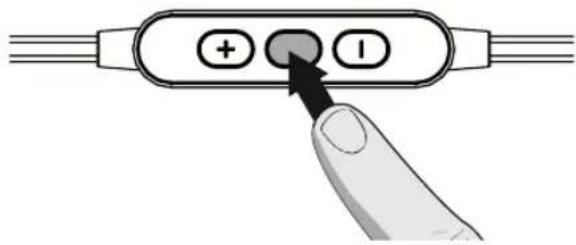
ON/OFF
PUSH 4s

Bluetooth®
1.
2.
3.
Français
SPARK WIRELESS
Characteristics / Specifications
English
Register your product online at www.focal.com/warranty to receive your warranty certificate.
Package contents
• 1 Spark in-ear headphones (Silver)
• 3 pairs of silicone tips (sizes S/M/L)
- 1 USB cable
• 1 battery fastening clip for sports or activities
• 1 rigid carrying case
Charging your headphones
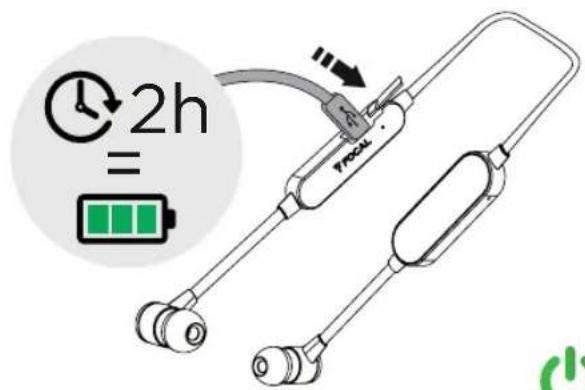
Before using your headphones for the first time, charge their battery for 5 hours in order to optimise the battery capacity and service life. Only use the original USB cable in order to avoid causing any damage. End your call before charging your headphones because they will turn off when the charger is first connected. To recharge your headphones, connect the USB cable supplied to the micro-USB port on the battery module and to a computer USB port or a USB mains adapter. The indicator light will light up white when charging, and it will turn off when the headphones are fully charged.
The headphones can take up to 2 hours to fully charge.
Pairing the headphones to your Bluetooth devices
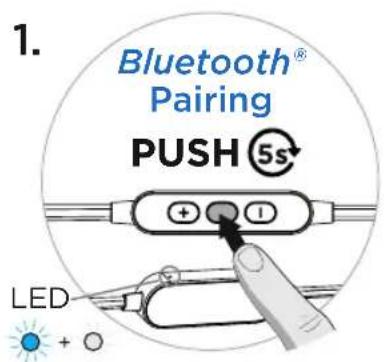
Your Spark Wireless headphones can store up to 4 Bluetooth devices in memory and can be paired with 2 different devices at the same time.
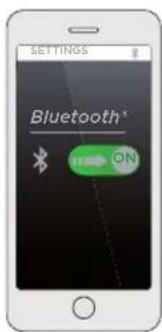
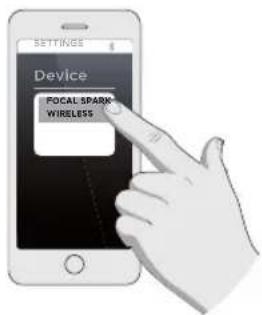
Once your headphones have charged, press and hold the Play/Pause button until the indicator light flashes blue and white. The headphones will stay in "pairing" mode for 5 minutes. Activate the Bluetooth mode on your Bluetooth device, then connect your Spark Wireless headphones. For more details, refer to the user manual of your Bluetooth device.
NOTE: Some Bluetooth versions may require a password when you try to connect them to your Spark Wireless. If so, enter 0000 when prompted.
Using your headphones
Turning on the headphones:
Press the Play/Pause button to turn on your headphones. The indicator light flashes blue. Before using your headphones for the first time, first read the paragraph "Pairing the headphones to your Bluetooth devices".
Otherwise, Spark Wireless will connect to the last device used. If that device is not turned on, they will connect to the device used before that, and so on.
NOTE:
- Your headphones should be turned on before activating the Bluetooth function on your device, otherwise you will have to connect to your Bluetooth device manually.
- Spark Wireless will turn off after 5 minutes if no Bluetooth device is detected.
Storage
Wind up your headphones and place in the appropriate compartment in the carrying case. The thickness of the cables helps to avoid tangling.
SPARK WIRELESS
Characteristics / Specifications
We recommend cleaning your headphones regularly in order to not obstruct the output which could reduce the performance of your in-ear headphones.
Cleaning the tips
Carefully remove the tips from the in-ear headphones to avoid damaging them. Clean the memory foam tips with a dry cloth, and clean the silicone tips with a slightly damp cloth.
Cleaning the duct and the protective grille
Over time, the duct of your headphones may become blocked with earwax or other impurities (dust...). We recommend cleaning them regularly. To do so, remove the tips from the headphones, then delicately wipe the grille inside the duct using a soft cloth or a cotton bud. Then, put the tips back on.

Note
Focal reserves the right to revoke the warranty if cleaning instructions aren't respected.
SPARK WIRELESS
Characteristics / Specifications
LED meanings
State Indicator light Duration
| Spark Wireless is in pairing mode | Flashing blue and white | 5 min |
| Spark Wireless is turned on but not connected | Rapidly flashing blue | 5 min |
| Spark Wireless is connected to a Bluetooth device in stand-by mode | Flashing blue | Every 8 secs |
| Music is playing | Flashing blue | Every 8 secs |
| Low battery | Flashing white | 3 times every 10 secs until Spark Wireless is out of battery |
| Battery charging | White indicator light on | continuously lit |
| Battery full | White indicator light turns off | briefly lit |
Controlling calls and music
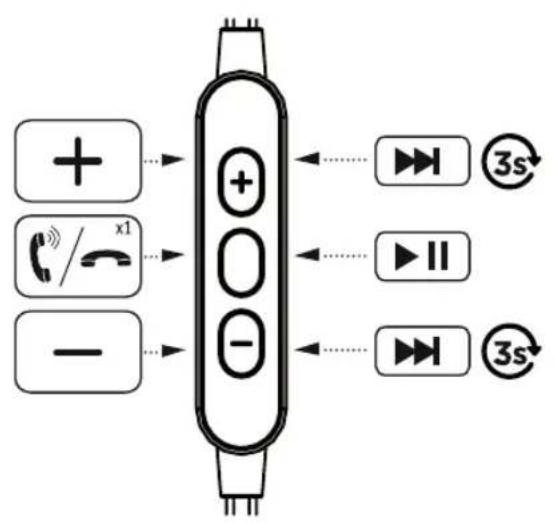
| Function Button Action | Sound signal and indicator light | ||
| Turn on the headphones Long press 4 secs | White indicator light gradually gets dimmer | ||
| Turn off the headphones Long press 4 secs | |||
| Control music | |||
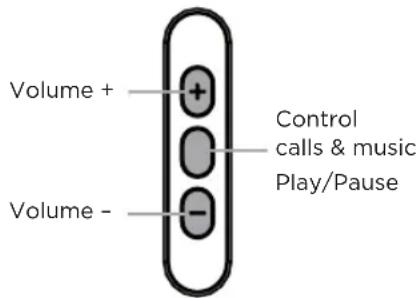
| Play or pause music Short press | |||
| Volume control | + or - | Short press | |
| Next track Keep pressed | |||
| Previous track Keep pressed | |||
| Control calls | |||
| Answer call / End call Short press Short sound signal | |||
| Ignore call Press for 2 secs Long sound signal | |||
| Three-way call Press twice Short sound signal | |||
| Activate or deactivate mic | + and - | Short press Short sound signal | |
SPARK WIRELESS
Federal Communication Commission Interference Statement
This device complies with Part 15 of the FCC Rules. Operation is subject to the following two conditions: (1) This device may not cause harmful interference, and (2) this device must accept any interference received, including interference that may cause undesired operation.
This equipment has been tested and found to comply with the limits for a Class B digital device, pursuant to Part 15 of the FCC Rules. These limits are designed to provide reasonable protection against harmful interference in a residential installation. This equipment generates, uses and can radiate radio frequency energy and, if not installed and used in accordance with the instructions, may cause harmful interference to radio communications. However, there is no guarantee that interference will not occur in a particular installation. If this equipment does cause harmful interference to radio or television reception, which can be determined by turning the equipment off and on, the user is encouraged to try to correct the interference by one of the following measures:
• Reorient or relocate the receiving antenna.
- Increase the separation between the equipment and receiver.
- Connect the equipment into an outlet on a circuit different from that
to which the receiver is connected.
- Consult the dealer or an experienced radio/TV technician for help.
FCC. Caution: Any changes or modifications not expressly approved by the party responsible for compliance could void the user's authority to operate this equipment.
This transmitter must not be co-located or operating in conjunction with any other antenna or transmitter.
Radiation Exposure Statement:
The product comply with the FCC portable RF exposure limit set forth for an uncontrolled environment and are safe for intended operation as described in this manual. The further RF exposure reduction can be achieved if the product can be kept as far as possible from the user body or set the device to lower output power if such function is available.
Industry Canada statement:
This device complies with ISED's licence-exempt RSSs. Operation is subject to the following two conditions: (1) This device may not cause harmful interference, and (2) this device must accept any interference received, including interference that may cause undesired operation.
Radiation Exposure Statement:
The product comply with the Canada portable RF exposure limit set forth for an uncontrolled environment and are safe for intended operation as described in this manual. The further RF exposure reduction can be achieved if the product can be kept as far as possible from the user body or set the device to lower output power if such function is available.
• Directive RoHS (2011/65/UE)
www.fucal.com/spar€-wireless/consformi.y
Italiano
www.foca.com/spark-wireless/conformity
Português
www.focal.com/spark-wens/conform
English
LC Declaration of Conformity
• RE? Directive (2014/53/E,.)
• General Product Safety Directive
(2001/95/E)
- 3.5% (10%) (2.6%) (10%)
The EU declaration is available on
O.T W:051C
www.focal.com/spark-wireless/contormity
Español
www.focal.com/spark-wireless/conformity
Deutsch
natural_image
Color palette bar with grayscale shades and a central crosshair symbol (no text or labels)

FOCAL®
LISTEN BEYOND


Complies with IMDA Standards DA105282
Focal-JMlab* - BP 374 - 108, rue de l'Avenir - 42353 La Talaudière cedex - France - www.focal.com Tel. (+33) 04 77 43 57 00 - Fax (+33) 04 77 43 57 04 - SCAA/170910/2


- SPARK WIRELESS
- Characteristics / Specifications
- Register your product online at www.focal.com/warranty to receive your warranty certificate.
- Package contents
- Charging your headphones
- Pairing the headphones to your Bluetooth devices
- Using your headphones
- NOTE:
- Storage
- Cleaning the tips
- Cleaning the duct and the protective grille
- Note
- LED meanings
- Controlling calls and music
- Federal Communication Commission Interference Statement
- Radiation Exposure Statement:
- Industry Canada statement:
- Italiano
- Português
- English
- Español
- Deutsch
Brand : FOCAL
Model : Spark Wireless
Category : Earphones