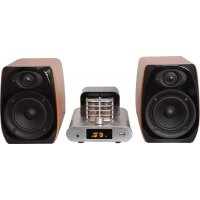
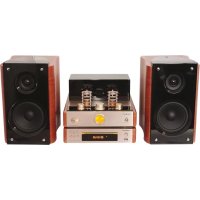
MADTA15BT - Hi-fi system MADISON - Free user manual and instructions
Find the device manual for free MADTA15BT MADISON in PDF.



| Product type | Hi-Fi system |
| Brand | Madison |
| Model | MADTA15BT |
| Power supply | 220-240 V AC, 50 Hz |
| Output power | 40 W |
| Frequency response | 20 Hz – 20 kHz ±2 dB |
| Signal-to-noise ratio | > 85 dB |
| Input impedance | 47 kΩ |
| Input sensitivity | < 600 mV |
| Bass/treble adjustment | ±10 dB |
| Supported audio formats (USB) | MP3, WMA, APE, FLAC, WAV |
| Bluetooth | Version 2.1, range 10 m |
| FM tuner | 87 – 108 MHz |
| Auxiliary input | RCA jack (LINE IN) |
| Headphone output | 3.5 mm jack socket |
| Remote control | Yes, included |
| Safety | Detailed safety instructions in the user manual |
| Maintenance and cleaning | Unplug before cleaning, use a dry cloth |
| Spare parts and repairability | Contact the retailer for any repairs |
| Certification | CE |
Frequently Asked Questions - MADTA15BT MADISON
User questions about MADTA15BT MADISON
0 question about this device. Answer the ones you know or ask your own.
Ask a new question about this device
Download the instructions for your Hi-fi system in PDF format for free! Find your manual MADTA15BT - MADISON and take your electronic device back in hand. On this page are published all the documents necessary for the use of your device. MADTA15BT by MADISON.
USER MANUAL MADTA15BT MADISON
Imported from China by LOTRONIC SA - Av. Z. Gramme 9 - B1480 Saintes
Explanation of signs

The triangle containing a lightning symbol is used to indicate whenever your health is at risk (due to electrocution, for example).

An exclamation mark in a triangle indicates particular risks in handing or operating the appliance.

The hand symbol refers to useful tips and additional information on using the appliance.
Important Safety instructions and danger warnings
- Please read the manual carefully and keep it for future reference.
- All safety instructions and warnings must be adhered to. They are part of the manual and must be kept with the manual.
- Any guarantee claims are rendered invalid if damage occurs due to non-observance of these operating instructions. We assume no liability for any consequent damage.
- We assume no liability for personal injury or damage to property caused by incorrect handling or nonobservance of the safety instructions. Any guarantee claims expire in such cases.
- Unauthorized conversions and/or modifications of the appliance are not permitted for safety and licensing reasons (CE).
- The appliance is approved for operation in dry, closed rooms only. Do not operate the device nearby water, such as in bathrooms or nearby swimming pools.
- The appliance may not be exposed to extreme temperatures (< +5ircC / > +35ircC) in operation.
- The appliance may not be subjected to strong vibrations or heavy mechanical strain.
- The appliance may not be exposed to excessive moisture (due to dripping or sprayed water, for example).
-
Do not place any recipients filled with liquids, such as glasses or vases, on top of or directly next to the appliance. They could fall over, causing water to enter the appliance. Never pour out liquids above the appliance. Do not place any small objects, such as coins or paper clips, on the appliance since they could fall inside the appliance. You run a high risk of causing a fire or life-threatening electrocution! If any liquid or objects enter the appliance nevertheless, pull the mains plug out of the socket immediately and contact a specialist.
-
Electrical appliances must be kept out of the reach of children. Be particularly careful if children are present. Children are not aware of the hazards involved in handing electrical appliances improperly. Children could attempt to poke objects into the appliance. There is a life-threatening danger of electrocution.
- Do not leave the appliance unattended while operating it.
- Never place the appliance on an unstable or movable surface. Persons could be injured or the appliance damaged by it falling down.
- Live components can be exposed by opening covers or removing components (unless this can be done without tools). Contact points can also be live. If the appliance has to be opened in order to calibrate, service, repair or replace components or assemblies, all of its poles must be disconnected from all sources of voltage first. If the appliance has to be kept open and under voltage during maintenance or repairs, this work may only be carried out by a specialist who is familiar with the risks involved and the relevant regulations.
- Never connect the appliance directly after transferring it from a cold to a warm room. The condensation water that forms could destroy the appliance or result in an electric shock. Allow the device to reach room temperature before connecting it. Wait until the condensation water has evaporated. This can take some hours.
- Do not place any naked flames such as those of burning candles on or next to the appliance.
- Do not place the appliance on soft surfaces such as carpets or beds. Do not cover the air vents of the appliance. Do not obstruct the air circulation with objects such as magazines, table cloths or curtains. This prevents the dissipation of heat from the appliance and can result in overheating.
- Only use the appliance in a moderate climate, not in tropical environments.
- If you are not sure about the correct connection or if questions arise which are not answered by the operating instructions, please do not hesitate to contact support or a specialist of your choice. Consult a specialist if you are in doubt the operating principle or the safety of the product.
Disconnection from the mains
Where the MAINS plug or an appliance couples is used as the disconnect device, the disconnect device shall remain readily accessible.
If a switch is used to disconnect the device, the switch and its function must be clearly identified and remain easily accessible.
Description of the front panel
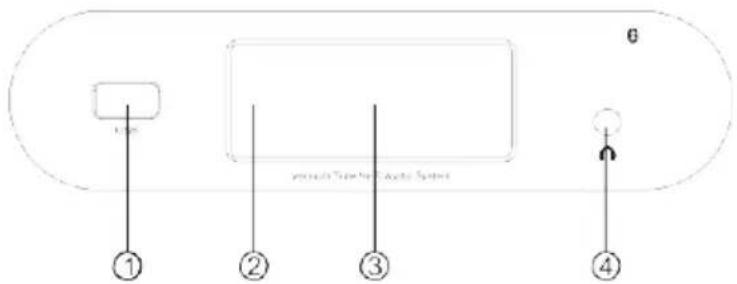
- USB interface
- Remote control signal receiver
- Display
- Earphone socket
Description of the Control panel
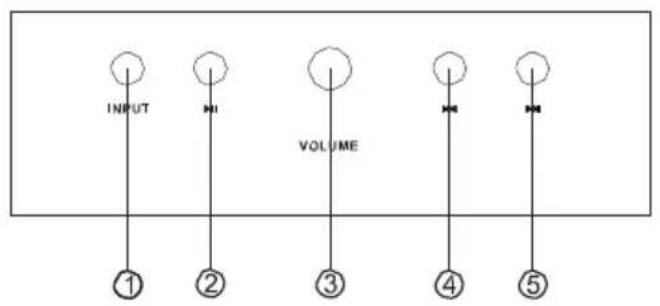
- Input selector switch
- Play/Pause button
- Volume button
- Previous track/channel
- Next track/channel
Connections
Prior to connecting the unit, make sure that the mains outlet voltage complies with the indicated input voltage.
Connect all cables securely in order to avoid noise and bad sound quality.
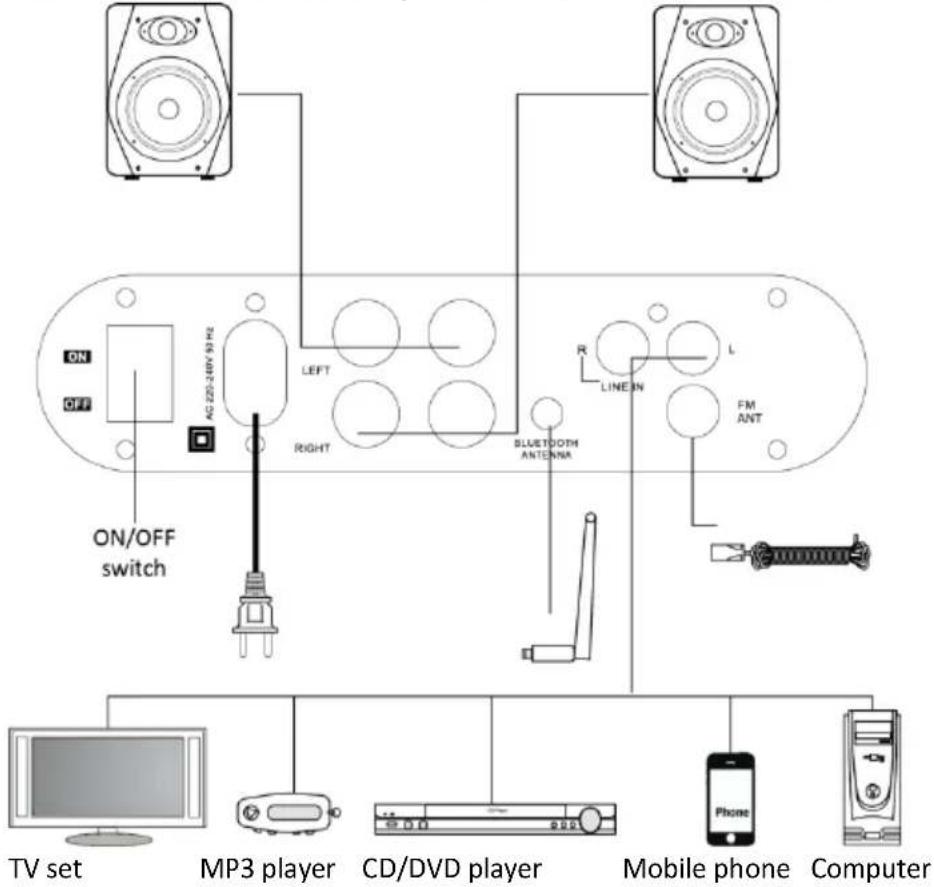
LEFT: Left speaker connector
Bluetooth antenna connector
RIGHT: Right speaker connector
FM ANT: FM antenna connector
LINE IN: Input connector for an external device
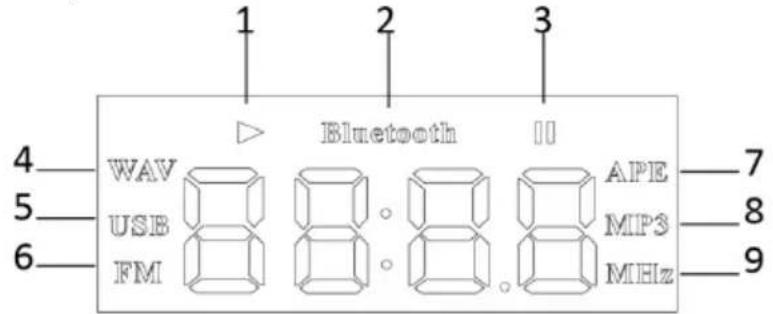
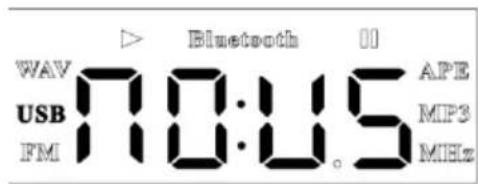
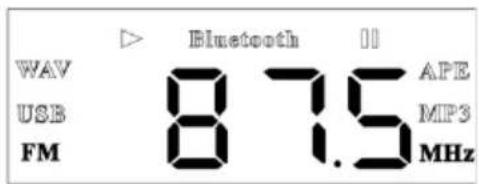
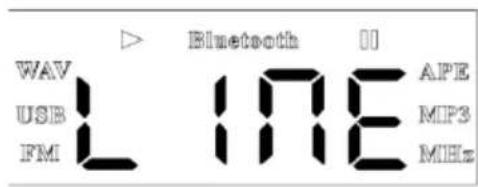
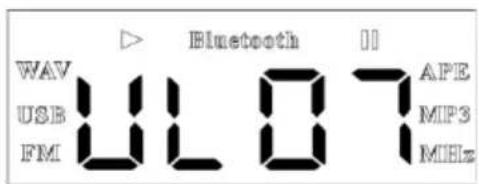
Display Description
1
2
3
4
5
6
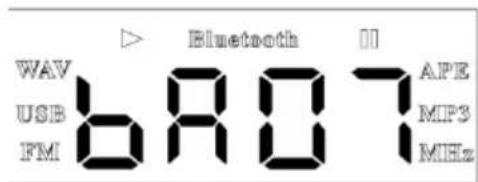
7
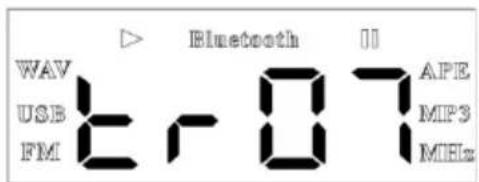
8
| 1. Play mode | ① Bluetooth pairing mode |
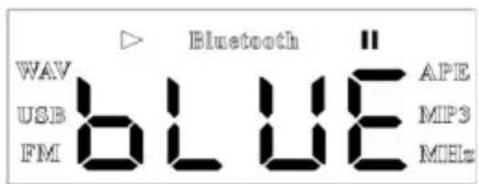
| 2. Bluetooth mode | ② successful Bluetooth pairing |
| 3. Pause mode | ③ Cannot find/read USB |
| 4. WAV format | ④ FM radio mode |
| 5. USB mode | ⑤ Line IN mode |
| 6. FM mode | ⑥ Main volume |
| 7. APE format | ⑦ Bass adjustment |
| 8. MP3 format | ⑧ Tweeter adjustment |
| 9. FM frequency |
Remote Control Operation
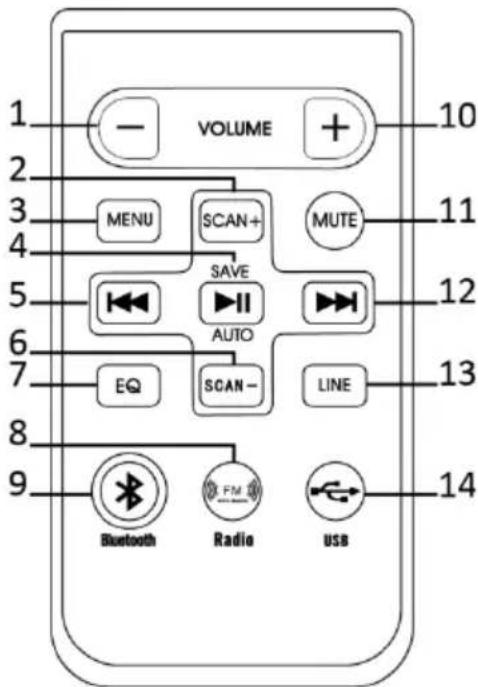
- VOLUME/TONE down
- Scan frequency up
- Menu setting
- Play/Pause/Auto scan/Save channel
- Previous track
- Scan frequency down
- Equalizer
- FM mode direct switch key
- Bluetooth mode direct switch key
- VOLUME/TONE up
- Mute
- Next track/channel
- LINE IN direct switch key
- USB mode direct switch key
Operation
USB Input
The system can play audio files stored in a flash memory USB stick which is formatted to FAT32 file system.
The playable audio files are: MP3 / WMA / APE / FLAC / WAV
Set the ON/OFF switch to ON to turn the system on.
While in any input mode, insert a compatible USB key into the USB port on the front panel. Press the USB key on the remote control or INPUT on control panel to switch to USB input mode.
Press the Play/pause button on the remote control or front panel and start playing track 1 on the USB stick. Press again to pause play and once again to resume play.
Playing a desired track
During playback press Previous or Next button on the remote control to select the desired track.
BLUETOOTH Input
You can connect the unit to a Bluetooth enabled smartphone or other music player. Set the ON/OFF switch to ON to turn the system on.
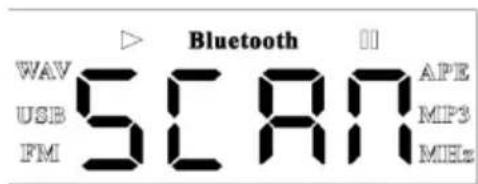
Press the INPUT key on the control panel or the BLUETOOTH key on the remote control to select BLUETOOTH mode. "SCAN" is displayed.
Pairing a new device
When SCAN is displayed, turn on the Bluetooth feature on your smartphone or portable music player and enter into 'Search for new device' menu.
Select TA-15BT in the list of found devices.
If your smartphone or portable music player prompts you for a pairing code, enter 0000.
Please note: This audio system cannot connect to computer Bluetooth
Reconnect an existing paired device:
The system reconnects automatically to the last connected device.
Enter into the Bluetooth menu of your smartphone and select TA-15BT from the list of previously connected devices and select CONNECT. Your device is now reconnected to the system.
Playback control
The remote can control following functions:
Volume up/down
- Next/previous track
- Play/pause
Mute
Notes:
If pairing fails the first time, turn off your system and back on. Then follow the procedure from the beginning of this section.
If you are unable to reconnect to a previously connected device, remove or erase the TA-15BT from the list of paired devices from your smartphone and follow the instructions of 'Pairing a new device'.
LINE INPUT (RCA sockets)
This system has a L/R stereo RCA line input on the rear panel that is compatible with any common line output signal audio component.
Basic operation steps
Connect the RCA stereo leads from your home audio component to the red and white LINE IN jacks on the rear panel.
Control the volume via the remote control or front panel of this system.
Press the INPUT button repeatedly until LINE appears on the front panel display.
Listening to the FM radio
The FM radio operates on the 87MHz - 108MHz frequency band.
Set the ON/OFF switch to ON to turn the system on.
Press the INPUT button repeatedly until a radio station frequency appears on the display.
Tuning the radio
There are 2 tuning modes:
Fully automatic tuning:
Whilst in radio mode, keep the AUTO key pressed on the remote control and the systems will search automatically and save all strong station frequencies found.
Semi-automatic tuning
Once you have found your desired radio station frequency, you can save the station in presets. Do this by pressing the SAVE button on the remote control. Then, find your desired preset number by pressing the NEXT or PREVIOUS button on the remote control.
Specifications
Power supply. 220-240Vac 50Hz
Bluetooth specification Version 2.1
Receiver support: HFP1.5, HSP, A2DP 1.0, AVRCP 1.0, OPP, PBAP
Freq. range: 2402-2480MHz
Operating range: 10m
Amplifier output power 40W
Impedance 47kOhms
Sensitivity. <600mV
Bass/Treble +/-10dB
S/N ratio. >85dB
Main channel. < 0.01%
Frequency 20Hz-20kHz +2dB

IMPORTANT NOTE: Electric products must not be put into household waste. Please bring them to a recycling centre. Ask your local authorities or your dealer about the way to proceed.

Canal principal .<0.01%
S/Rverhouding. >85dB
Canal principal .<0.01%
Protocol: HFP1.5, HSP, A2DP 1.0, AVRCP 1.0, OPP, PBAP
Distanta de actiune Bluetooth: 10m
Putere iesire amplifier 40 W
Impedanta intrare 47 kOhm
Sensibilitate. < 600mV
Bass/Treble +/-10dB
Raport S/N >85 dB
Canal principal. < 0.01%
Raspuns in freventa 20Hz-20kHz +2dB
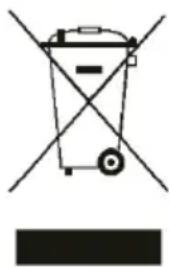
RECICLAREA CORECTA A ACESTUI PRODUS
Receptor: HFP1.5, HSP, A2DP 1.0, AVRCP 1.0, OPP, PBAP
Canal principal .<0.01%
Frequencia de responsta. 20Hz-20kHz +2dB

Receiver podporuje: HFP1.5, HSP, A2DP 1.0, AVRCP 1.0, OPP, PBAP
Freq. rozsah: 2402-2480MHz
Main channel. < 0.01%
EC Declaration of Conformity
Hereby we,
LOTRONIC SA
Avenue Zénobe Gramme, 9
1480 SAINTES
Belgique
+32.2.390.91.91
Certify and declare under our sole responsibility that the following product:

Trade name:
Product name:
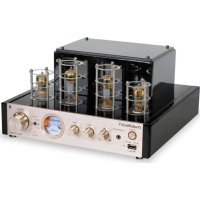
TUBE AMPLIFIER WITH BLUETOOTH
Type or model:
MAD-TA10BT/MAD-TA15BT/MAD-TA20BT
Conforms to the essential requirements of the:
LVD directive 2006/95/CE and RTTE directive 1999/5/EC
Based on the following specifications applied:
Safety: EN50065:2002 + A1:2006 + A11:2008 + A2:2010 + A12:2011
Place and date of issue: Saintes (Belgium), on 08/10/2015
AKBAR Guive
Technical Manager
LOTRONIC SA
Av. Zenobe Gramme 11
1480 Saintes
Belgium
Tel. +32.2.390.91.91
Fax +32.2.390.93.19
TVA BE 0887,125 178
LOTRONIC
international

C E
Directive LVD 2006/95/CE - Directive R&TTE 1999/5/CE
Responsible technique
LOTRONIC SA
Av. Zenobe Gramme 11
1480 Saintes
Belgium
Tel. +32.2.390.91.91
Fax +32.2.390.93.19
TVA BE 0887125178

- Explanation of signs
- Important Safety instructions and danger warnings
- Disconnection from the mains
- Description of the front panel
- Description of the Control panel
- Connections
- Remote Control Operation
- Operation
- USB Input
- Playing a desired track
- BLUETOOTH Input
- Pairing a new device
- Reconnect an existing paired device:
- Playback control
- Notes:
- LINE INPUT (RCA sockets)
- Basic operation steps
- Listening to the FM radio
- Tuning the radio
- Specifications
- RECICLAREA CORECTA A ACESTUI PRODUS
- EC Declaration of Conformity
- LOTRONIC
- international
- C E
- LOTRONIC SA
Brand : MADISON
Model : MADTA15BT
Category : Hi-fi system