USER MANUAL MADCENTER200CDBK MADISON
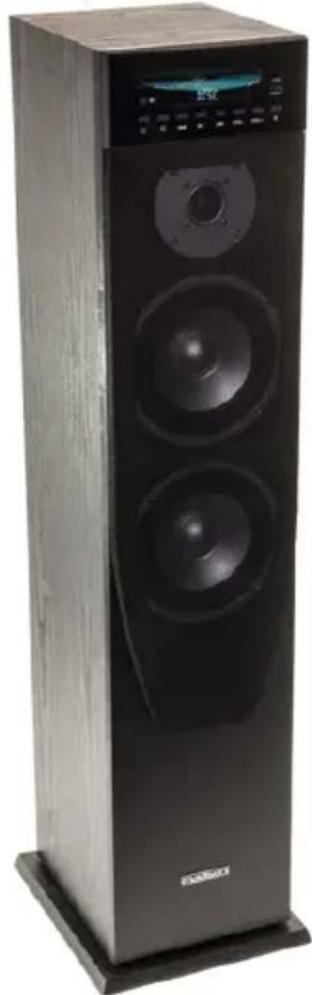
natural_image
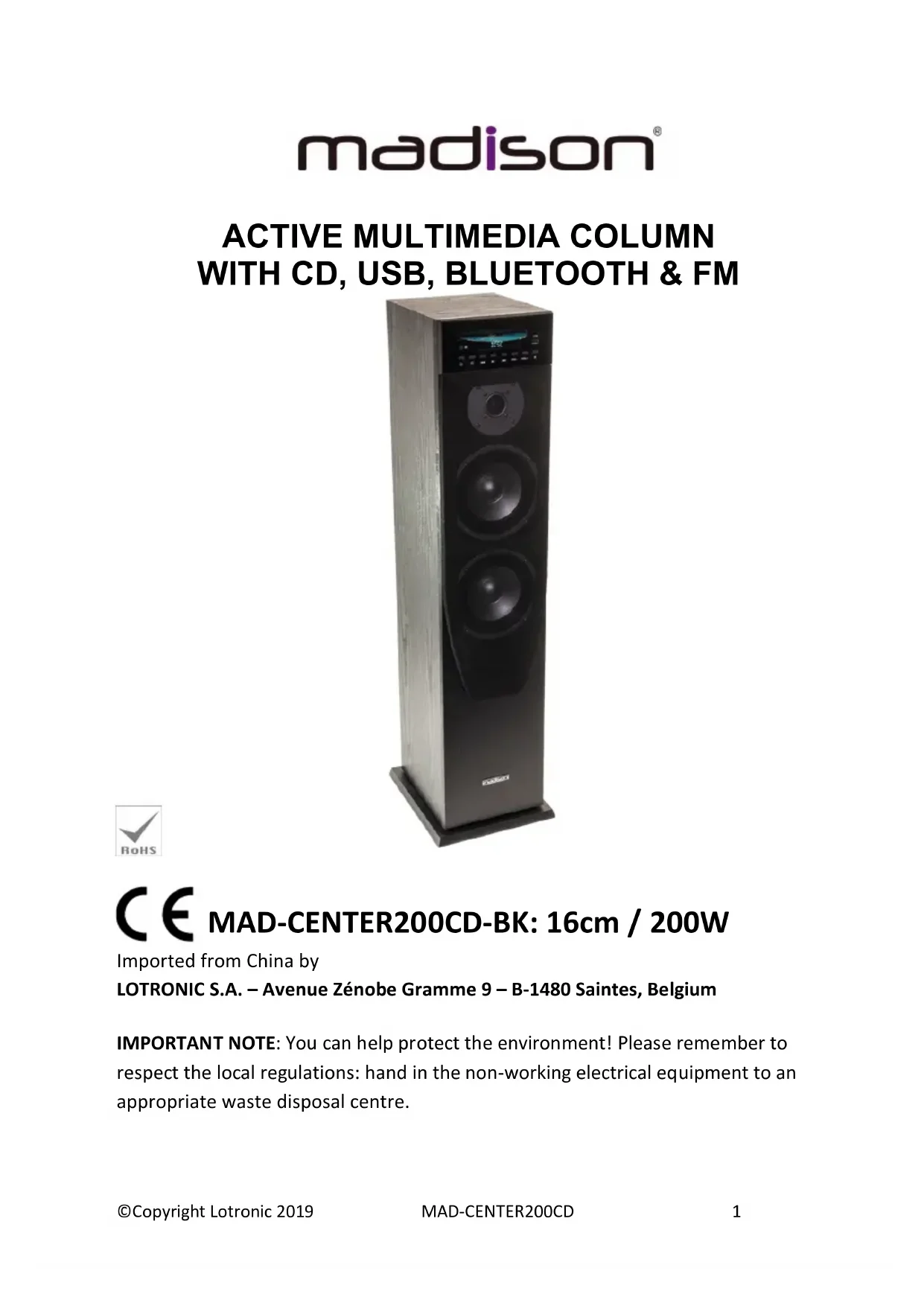
Black multi-tiered speaker tower with visible sound waves and digital display (no text or symbols)

Imported from China by
LOTRONIC S.A. – Avenue Zénobe Gramme 9 – B-1480 Saintes, Belgium
IMPORTANT NOTE: You can help protect the environment! Please remember to respect the local regulations: hand in the non-working electrical equipment to an appropriate waste disposal centre.

Operating Instructions
Congratulations to the purchase of your new speaker.
Warnings

Explanation of signs

The triangle containing a lightning symbol is used to indicate whenever your health is at risk (due to electrocution, for example).

An exclamation mark in a triangle indicates particular risks in handling or operating the appliance.
In circuit diagrams or lists of components, a symbol is used to indicate that a specific component shall be replaced only by the component specified in that documentation for safety reasons.

LASER CLASS I: A laser warning sign is on the back of the appliance and in the CD compartment. Do not remove the warning signs from the appliance.
Do not open the appliance or try to gain access to the inside of the appliance. Never stare into the laser beam. Laser radiation can damage your eyes.
Important Safety instructions and danger warnings
- Please read the manual carefully and keep it for future reference.
- The unit shall be connected to a power supply only of the type described.
- To reduce the risk of fire or electrical shock, do not expose this unit to rain or moisture.
-
Unplug the unit from the wall socket when it is not to be used for a long period of time.
-
Adequate care shall be taken so that foreign objects do not fall, or liquids are not spilled into the enclosure through openings.
- Do not remove the cover or back, as there are no user-serviceable parts inside.
- The apparatus shall not be exposed to dripping or splashing and that no objects filled with liquids, such as vases, shall be placed on the apparatus.
- For indoor use only
- Do not place on the apparatus as naked flame source, such as lighted candles.
- Do not use the unit in a tropical climate. Only for use in temperate climates.
• In conformity with RoHs standard
- The unit should only be used in moderate climates
- A minimum distance of 0.5m around the unit must be kept to ensure sufficient ventilation and avoid overheating.
- All safety instructions and warnings must be adhered to. They are part of the manual and must be kept with the manual.
- Any guarantee claims are rendered invalid if damage occurs due to non-observance of these operating instructions. We assume no liability for any consequent damage.
- We assume no liability for personal injury or damage to property caused by incorrect handling or disrespect of the safety instructions. Any guarantee claims expires in such cases.
- Unauthorized conversions and/or modifications of the appliance are not permitted for safety and licensing reasons (CE).
- The appliance is approved for operation in dry, closed rooms only. Do not operate the device nearby water, such as in bathrooms or nearby swimming pools.
- The appliance may not be exposed to extreme temperatures (< +5°C / > +35°C) in operation.
- The appliance may not be subject to strong vibrations or heavy mechanical strain.
- DISCONNECT DEVICE: Where the MAINS plug or an appliance coupler is used as the disconnect device, the disconnect device shall remain readily operable.
CAUTION
- Danger of explosion if battery is incorrectly replaced.
- Replace only with the same or equivalent type.
- Batteries shall not be exposed to excessive heat such as sunshine, fire or the like.
- When the internal batteries are not to be used, remove them to avoid damage caused by battery leakage or corrosion.
- Batteries shall not be exposed to excessive heat like sunshine, fire or the like
Instructions of Front panel
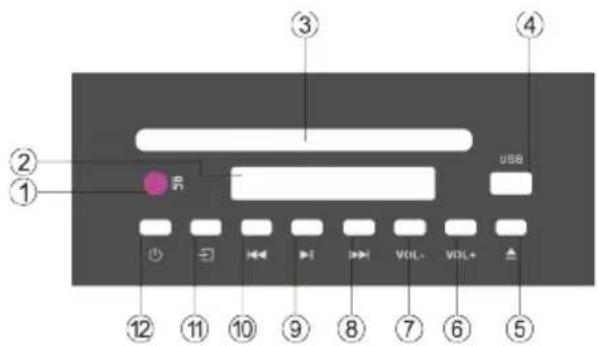
- Remote control window
- Display
-
CD slot: the unit is fitted with an anti-shock laser that draws the CD in automatically, so that you don't need a Close button. Just insert the CD with the label upside gently into the slot and the player will draw the CD in.
-
USB stick input
-
Eject button for the CD player
-
Press to increase vol, max. 40
-
Press to decrease volume, minimum 00
-
In BT/DISC/BT mode: Press to select next song. In FM mode, press to select next station. In DISC mode: Long press to fast forward
-
In BT/DISC/BT mode: Play/pause music. In FM mode, press to select the next station. Long press to start auto searching stations. FM band: 87.5-108MHz in 0.1 MHz steps
-
In BT/DISC/BT mode: Press to select previous song. In DISC Mode: Long press to fast rewind. In FM mode: press to select previous station. Max. 55 stations can be stored.
-
Input selection: Press to select AUX/BT/FM/DISC/USB input
-
Standby button: Press to enter Standby, press again to activate the speaker
REMOTE CONTROL
ON: Switches the unit on.
OFF: Switches the unit off
MUTE: Mutes the audio on the amplifier. Press again to cancel. (Press VOL+ or VOL- will cancel Mute as well).
INPUT: Select the input source among USB/CD, BLUETOOTH, FM, LINE IN
STOP: Stops the music playback from USB/CD
TONE: Press to select TREBLE, BASS and press VOL+ / VOL- to increase/decrease bass or treble
REP: Press once to repeat current song on the USB/CD input source. Press again to repeat all songs on the USB/CD input.
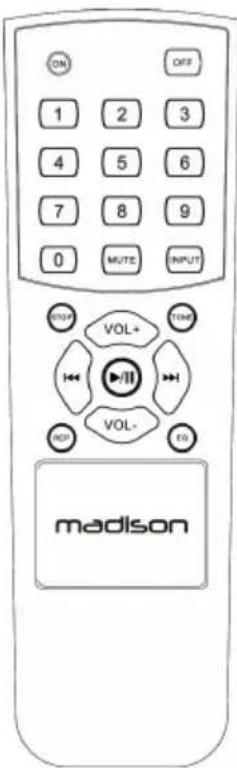
EQ: Select one of the 3 EQ pre-sets for the USB/CD music source.
Number buttons: In DISC/USB mode, select the number of the song you want to play. In FM mode, press the memory number of the desired FM station.
VOL+: Press to increase the volume
VOL-: Press to decrease the volume
◀: Press to select previous song/previous station
▶: Press to select next song/next station
▶ II : Press to play/pause music from USB/CD/BLUETOOTH input source
In FM mode, press to enter auto search and auto store stations.
The stations found are stored automatically in the memory locations one after the other, without the user being able to interfere in any way whatsoever. You also do not have the ability to manually store a station of your choice.
To access the memories, press the number buttons while the speaker is in FM mode.
There are 55 memory locations available but if, for example, the tuner only receives 15 stations, only these 15 stations will be stored.
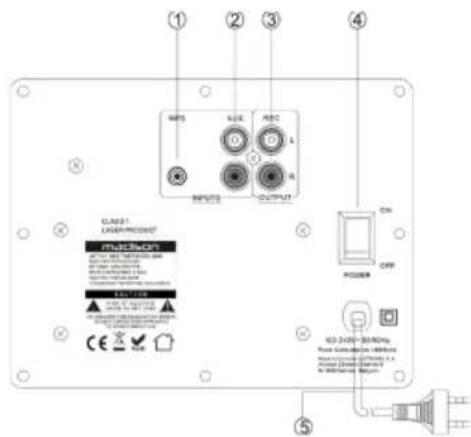
Rear panel of MAD-CENTER200CD
- MP3 input jack
- AUX input jack
- REC output to connect to another speaker
- Power switch
- Power cable
Operating Instructions
- Before starting the power, please connect the system properly according to the illustration. Make sure to connect the polarity correctly and turn the volume button to minimum position.
- Please turn input selector button to correct position and switch the unit on. After a few seconds, the amplifier is in normal working condition. Set the volume to an adequate level and enjoy your music.
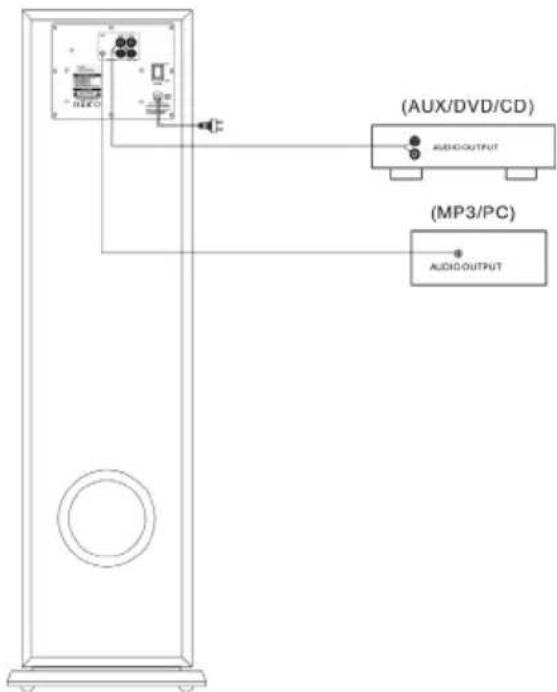
- The power fuse is inside the set. If it blows, it must be replaced by a trained technician. The new fuse must have the same specifications as the original one.
- If the LED is not bright once the system is switched on, the set is under abnormal condition. Switch the unit off and solve the problem. Turn power on again.
Connection of Bluetooth: Press input selector key on the front panel or on the remote control and select the Bluetooth input. Turn the Bluetooth function on your equipment on (such as mobile phone) and search for a Bluetooth device. The Bluetooth name is "MAD-CENTER", pair your mobile to "MAD-CENTER", and connect it. Now you can play your music.
Play CD Disk
This product supports CD, MP3 & WAV music formats. Please insert the CD with the label side upside and accept standard CD disks only.
Trouble-Shooting
If the product is not operating properly, make a check of the items in the table below. If the problem persists, a malfunction may be assumed. Disconnect the power immediately and contact the store where the unit was purchased.
| Problem | Causes | Corrections |
| No sound | Insecure speaker lead connection.Audio frequency input terminal connected improperly.Mains plug & AC jack connection is insecureVolume control set to minimum.Speaker output not in right position | Connect securely.Check the audio frequency terminal.Connect the power properly.Tum volume up to a suitable level.Put the speaker output at right position |
| Distortion | The volume is too loud. | Reduce volume. |
| Unit can’t be turned on | Power plug is not plugged in properly or is damaged | Try to plug it in again |
| Remote control doesn’t work | No batteries inserted or exhausted | Replace batteries |
| Remote control is used out of the operational range | Use in within the operational range |
| Disk cannot be played | Disk error | Label side should be upside |
| Loader doesn’t draw the CD in | Reload disk |
| No disk in tray | Put disk in tray |
Specifications
| Output power RMS/max | 100/200W @ 4 ohm |
| THD (at rated conditions) | ≤2% (50-20kHz) |
| S/N ratio (line in) | ≥75dB (A-weighted) |
| FM tuner | 87.5 – 108MHz |
| FM step | 0.1MHz |
| BT frequency | 2402-2480MHz |
| Max RF output power | 0.43dBm |
| Impedance | 4 Ohms |
| Frequency response | 50Hz – 20kHz |
| Rated input level/impedance | Line in: 300mV |
| Input voltage | 100 – 240V~ 50/60Hz |
| Consumption | ≤65W |
| Dimensions | 256 x 214 x 1000mm |
| Net / Gross weight | 13.1kg / 14.8kg |
The above specifications are for reference only.
Design and specifications are subject to change for improvement without prior notice.

COLONNE CENTRALE AMPLIFIEE AVEC USB/CD/FM & BLUETOOTH
Fonctionnement
Instructies
Hereby we, LOTRONIC SA
Avenue Zénobe Gramme, 9
1480 SAINTES
Belgique
+32.2.390.91.91
Certify and declare under our sole responsibility that the following product:
Trade name:
madison®
Product name: MULTIMEDIA COLUMN WITH USB-SD-BLUETOOTH-CD
Conforms with the essential requirements of
RED 2014/53/EU - ROHS 2011/65/EU
Based on the following specifications applied:
and therefore, complies with the essential requirements and provisions of the LVD, RED, EMC and ROHS Directive.
Place and date of issue: Saintes (Belgium), on 23/08/2017
Guive AKBAR
Technical manager
LOTRONIC SA
Av. Zenobe Gramme 9
1480 Saintes - Belgium
Tel. +32.2.390.91.91
Fax +32.2.390.93.19
info@lotronic.net
www.lotronic.com
CE
Responsible technique
LOTRONIC SA
Av. Zenobe Granitex - Belgium
1480 Saintes 390.91.91
Tel. +32.2.390.93.19
Fax +32.2.59
info@lotronic.com
www.lotronic.com