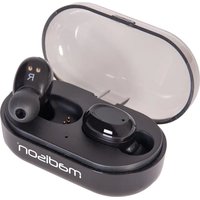
ETWS150 - Earphones MADISON - Free user manual and instructions
Find the device manual for free ETWS150 MADISON in PDF.


| Product Type | Bluetooth Stereo Earphones |
| Brand | Madison |
| Model | ETWS150 |
| Total weight (case + earphones) | 45 g |
| Weight per earphone | 4.5 g |
| Color | Black (ETWS150-BK) |
| Standby autonomy | Approximately 120 hours |
| Operating autonomy (music/call) | Approximately 4 hours |
| Battery capacity of charging case | 3.7 V / 550 mAh |
| Battery capacity of earphone | 3.7 V / 50 mAh |
| Input voltage of charging case | 5 V / 1 A (micro USB) |
| Bluetooth range | Approximately 10 m |
| Bluetooth frequency band | 2408-2420 MHz |
| Maximum RF output power | 3.33 dBm |
| Controls | Touch zone on each earphone |
| Microphone | Yes, built-in |
| LED indicators | LED on earphones (red/blue) and case (blue) |
| Functions | Play/pause, track change, volume, answer/end call, reject call, standby mode, mono or stereo use |
| Pairing | Automatic when taking out of case; manual possible |
| Safety | Keep out of reach of children, avoid extreme temperatures, exposure to water, prolonged high volume |
| Standards | RED 2014/53/EU, ROHS2.0 2015/863/EU |
Frequently Asked Questions - ETWS150 MADISON
User questions about ETWS150 MADISON
0 question about this device. Answer the ones you know or ask your own.
Ask a new question about this device
Download the instructions for your Earphones in PDF format for free! Find your manual ETWS150 - MADISON and take your electronic device back in hand. On this page are published all the documents necessary for the use of your device. ETWS150 by MADISON.
USER MANUAL ETWS150 MADISON
natural_image
Black and white photo of a Madison wireless earbuds with open case, no visible text or symbols on the device itself.madison®
HIGH QUALITY BLUETOOTH STEREO EARPHONES WITH CHARGING BOX ETWS150-BK
Code: 10-1008MA
natural_image
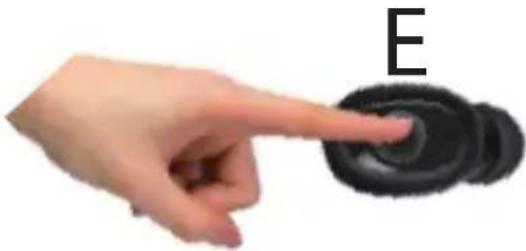
Hand pointing at a black circular object with 'E' label, no other text or symbols visible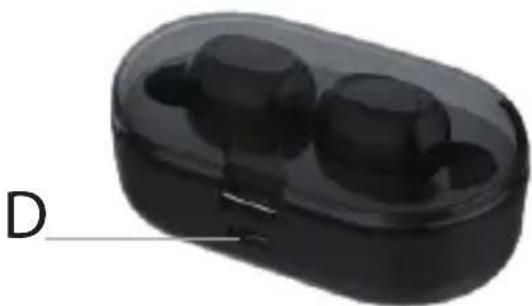
natural_image
Black electronic device with two small earbuds, labeled 'D' (no text or symbols on the device itself)User Manual
Important Recommendations
- Please use this earphone in accordance with local laws and regulations.
- Keep the earphone out of the reach of children, small parts may cause serious consequences such as suffocation of swallowed.
- Please don't expose the earphone to extreme temperatures (below 0^ or above 45^ ).
- Do not expose the earphones to water or humidity.

- Do not use the earphone for a long time at high volume because this will damage your hearing. Please listen to music or call with a minimum volume.
- Please charge the product at least one ca month to extend the life time of the battery.
- Please use the supplied 5V 1A charger to charge the battery.
- If the product is not used for a longer period of time, it will lose power.
- Caution: if the battery used in this product is not properly used, it may cause fire or chemical burns. The battery may explode if it is damaged.
- Dispose of the battery according to local regulations and recycle if possible. Do not dispose of the battery as household waste or throw it into fire to avoid explosion.
Product Description
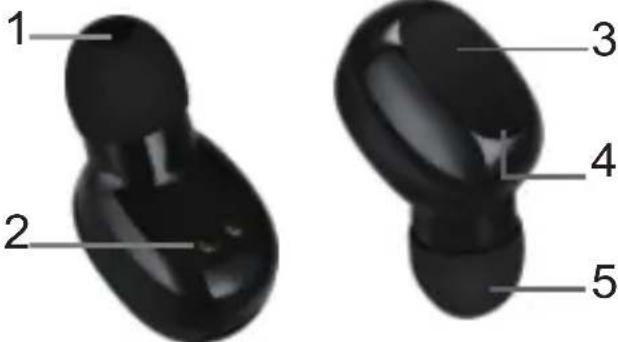
- Earpiece 2. Charging contact
- Touch button area 4. Microphone (earphone indicator)
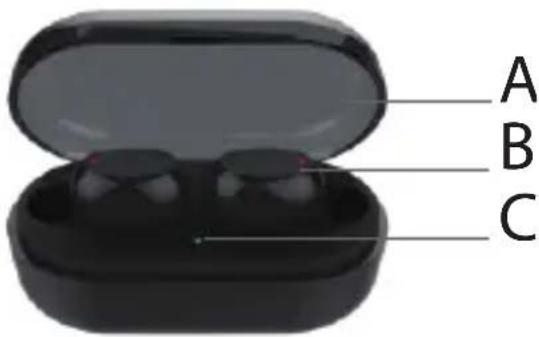
- Ear cap A. Charging box cover
B. Wireless earphone C. Charging indicator
D. Charging port E. Touch button area
How to charge
Prior to using the product for the first time, place the earphone on the charging compartment. Connect the micro USB cable to charge the headset. Lightly cover the lid when charging. Insert charging lead into socket D.
The blue indicator light on the charging box will flash during the charging process:
A) Flashing once very 2 seconds means that the charging box has reached 25% of its capacity
B) Flashing 2 times at 2 seconds intervals means that the charging box has reached 50% of its capacity
C) Flashes 3 times at 2 seconds intervals means that the charging box has reached 75% of its capacity
D) Flashes 4 times at 2 seconds intervals means that the charging box is fully charged.
Note: The charger must have an output current of at least 1A.
Charging the wireless earphones
A) When the earphones are charging, they automatically turn off and the red indicator light stays on.
B) When the earphones are fully charged, the red indicator goes out
C) When both earphones are fully charged, the charging box indicator goes off after about 20 seconds.
D) The charging box indicator flashes continuously while the charging box is charging the earphones.
Note: When charging the earphones, pay attention to the charging box indicator. If the blue light flashes once every 2 seconds, the battery in the charging box is low. Please charge the charging box in time.
Pairing procedure
As soon as the earphones are removed from the charging box, they will automatically connect to each other within an interval of about 5 seconds. Once they have successfully paired, the left earphone which is the main earphone in dual earphone mode, enters into pairing mode. The red and blue lights of the left earphone flash alternately. The blue light of the right earphone flashes once every 3 seconds. Turn on the Bluetooth function of your device, select ETWS150 and pair with the device.
Tip: Tis earphone remembers the devices that were previously paired. If you have successfully paired before, you only need to turn on your device's Bluetooth mode and earphone, they will automatically connect without having to enter pairing mode.
Note: The pairing process must be completed within 5 minutes, otherwise the earphones will automatically shut down and you need to put them back into the charging box and remove them again to boot the pairing process.
Operation
| Power on Remove the earphones from the charging box or keep the touch button area pressed for 3 seconds |
| Power Off Put back the earphones into the charging box to shut them down automatically or keep the touch button area pressed for 5 seconds. |
| Play/pause Right side earphone: Click the left button once while playing music |
| Wake-up In standby mode: Right side earphone: click and hold the left button for 2 seconds. |
| Answer the phone Right side earphone: Click the left button once |
| End a call Right side earphone: Click the left button once |
| Reject a call Right side earphone: Click and hold the left button for 2 seconds |
| Last song Left side earphone: Click button twice while music is playing |
| Next song Right side earphone: Click button twice while music is playing |
Single ear use
A) Pick up a single earphone from the charging box and click the button twice. When the earphone
indicator flashes red and blue, turn on the Bluetooth function that needs to be connected to the device, and select the newly searched Bluetooth name ETWS150.
B) To restore the binaural use state, you need to put the left and right earphones into the charging box. After about 30 seconds, remove the earphones from the charging box at the same time. The left and right earphones will pair automatically.
Manual pairing of left and right earphone
If the left and right earphone don't pair automatically, you have to do it manually.
A) Press and hold simultaneously the left and right earphone buttons for 5 seconds. When the left and right earphone indicators turn red, the left and right earphones will turn off. Release the touch buttons.
B) Wait for 5 seconds and then press and hold simultaneously the left and right touch buttons. When the left earphone light turns red and blue, the blue light flashes alternately. When the right blue light flashes, the left and right earphones are successfully paired.
C) Complete the connection to the phone (device) as described above.
Note: If the pairing is unsuccessful, please clear all Bluetooth pairing records in the mobile phone, refresh the Bluetooth interface to be connected to the mobile phone, search for ETWS150 and click for pairing.
Specifications
Standby time....About 120 hours
Operating time ....About 4 hours
Input voltage & capacity of charging box....5V== /1A
Input voltage & capacity of charging box battery....3.7V== / 550mAh
Input voltage & capacity of earphone battery 3.7V= / 50mAh
BT frequency band 2408-2420MHz
Max RF emission power 3.33dBm
Weight 45g
Single earphone weight 4.5g
Operating area.....about 10m
Supporting protocols....HFP1.7; HSP1.2; HD voice; Voice prompts A2DP1.3;
.AVRCP1.6; IOS battery state monitor, Voice reporting, Multipoint
This marking indicates that this product should not be disposed with other household wastes throughout the EU. To prevent possible harm to the environment or human health from uncontrolled waste disposal, recycle it responsibly to promote the sustainable reuse of material resources. To return your used device, please use the return and collection systems or contact the retailer where the product was purchased. They can take this product for environmental
safe recycling.
Protocoles compatibles....HFP1.7; HSP1.2; HD voice; Voice prompts A2DP1.3;....AVRCP1.6; IOS battery state monitor, Voice reporting, Multipoint
Operating area...... ca. 10m
Unterstützte Protokolle ...... HFP1.7; HSP1.2; HD voice; Voice prompts A2DP1.3;
.AVRCP1.6; IOS battery state monitor, Voice reporting, Multipoint
.AVRCP1.6; IOS battery state monitor, Voice reporting, Multipoint
Visit our website: www.madison-sound.com
The CE declaration is available on the product page of our website
Made in China for LOTRONIC S.A. - Avenue Z. Gramme 9 B-1480 Saintes


CE
EU Declaration of Conformity
Hereby we, LOTRONIC SA
Avenue Zénobe Gramme, 9
1480 SAINTES
Belgium
+32.2.390.91.91
Certify and declare under our sole responsibility that the following product:
Trade name:
madison®
Product name: STEREO BLUETOOTH EARPHONES
Type or model:
ETWS150-BK
Conforms with the essential requirements of
RED 2014/53/EU & ROHS2.0 2015/863/EU
Based on the following specifications applied:
ETSI EN 301 489-1 V2.1.1 (2017-02)
ETSI EN 301 489-17 V3.1.1 (2017-02)
ETSI EN 300 328 V2.1.1 (2016-11)
EN 50663 : 2017
EN 60950-1 : 2006+A11 : 2009+A1: 2010+A2: 2013
EN 55032
Place and date of issue: Saintes (Belgium), on 20/03/2019
Manuel De Sousa
Quality manager

CE

Brand : MADISON
Model : ETWS150
Category : Earphones