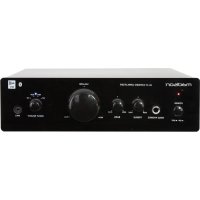
MAD1000 - Receiver MADISON - Free user manual and instructions
Find the device manual for free MAD1000 MADISON in PDF.



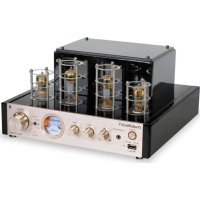
| Product Type | Amplified receiver |
| Brand | Madison |
| Model | MAD1000 |
| Dimensions (W x D x H) | 244 x 202 x 67 mm |
| Weight | 2.9 kg |
| Power supply | 220-240 V ~ 50/60 Hz |
| Power consumption | < 80 W |
| Output power (RMS) | 2 x 30 W at 4 Ω, 2 x 25 W at 8 Ω |
| Total harmonic distortion | < 2% (30 Hz - 20 kHz) |
| Frequency response | 30 Hz - 20 kHz |
| Signal-to-noise ratio | > 77 dB (A-weighted) |
| Nominal load impedance | 4 Ω |
| Nominal input level | 500 mV |
| Audio inputs | BT, MP3, CD, AUX (3.5 mm jack) |
| Outputs | Speakers (L/R), headphones |
| Bluetooth functions | Yes, with NFC |
| Controls | Volume, bass, treble, input selector |
| Indicators | Power, Bluetooth |
| Maintenance and cleaning | Wipe with a dry cloth; do not use liquids |
| Safety | Do not expose to humidity, do not open the casing |
| Spare parts and repairability | Fuse replaceable by a technician; other repairs by a professional |
| Included accessories | User manual, 3.5 mm jack cable (20 cm) |
Frequently Asked Questions - MAD1000 MADISON
User questions about MAD1000 MADISON
0 question about this device. Answer the ones you know or ask your own.
Ask a new question about this device
Download the instructions for your Receiver in PDF format for free! Find your manual MAD1000 - MADISON and take your electronic device back in hand. On this page are published all the documents necessary for the use of your device. MAD1000 by MADISON.
USER MANUAL MAD1000 MADISON
Congratulations to the purchase of your new amplifier. Please read the manual prior to using the unit and keep it for future reference.
Warnings:
WARNING! TO REDUCE THE RISK OF FIRE OR ELECTRIC SHOCK, DO NOT EXPOSE THIS PRODUCT TO RAIN OR MOISTURE. DO NOT REMOVE CHASSIS (OR BACK). NO USER-SERVICEABLE PARTS INSIDE, REFER SERVICING TO QUALIFIED SERVICE PERSONNEL.

The triangle containing a lightning symbol is intended to alert the user to the presence of uninsulated dangerous voltages within the product's enclosure that me be of sufficient magnitude to constitute a risqué of electric shock to persons.

An exclamation mark in a triangle is intended to alert the user to the presence of important operating and maintenance (servicing) instructions in the literature accompanying the appliance.
Electric products must not be put into household waste. Please bring them to a recycling centre. Ask your local authorities or your dealer about the way to proceed.
SAFETY INSTRUCTIONS
- Connect the unit only to a power supply that is of the type described in the specifications
- Where the MAINS plug or an appliance coupler is used as the disconnect device, the disconnect device shall remain readily operable
- Where an all-pole MAINS SWITCH is used as the disconnect device, the location on the apparatus and the function of the switch shall be described and the switch shall remain readily operable.
Unplug the unit from the mains when it is not used for a long period of time - Do not let any objects nor liquids enter the housing.
- Don't put any recipients filled with liquids on the housing.
Front and Rear panel description
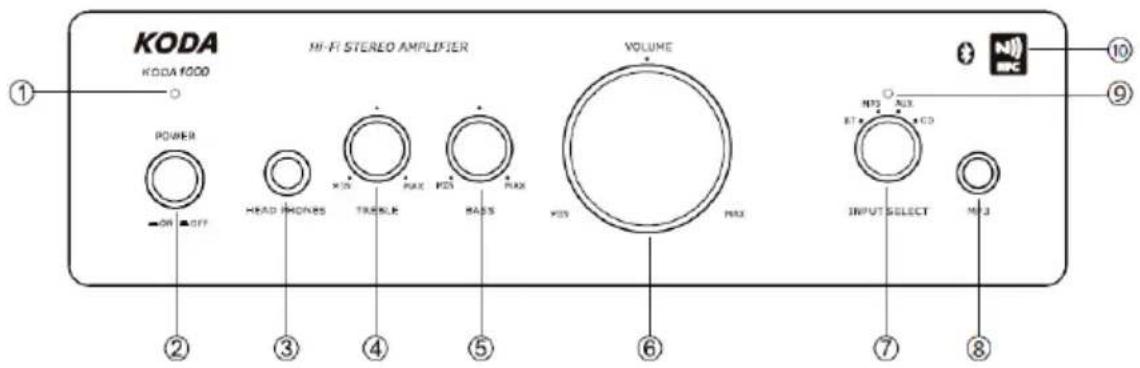
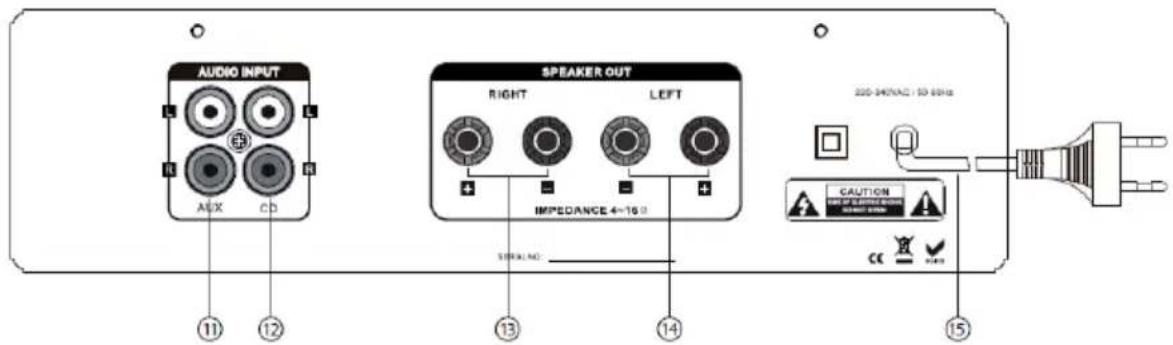
- Power LED
- Headphone output
- Bass button
- Input selector button (BT/MP3/CD/AUX)
- Bluetooth LED
- AUX in jack
- Right channel speaker output
-
Power cable
-
Power switch
- Treble button
- Volume button
- MP3 in jack
- NFC (Near Field Communication)
- CD in jack
- Left channel speaker output
Operating instructions
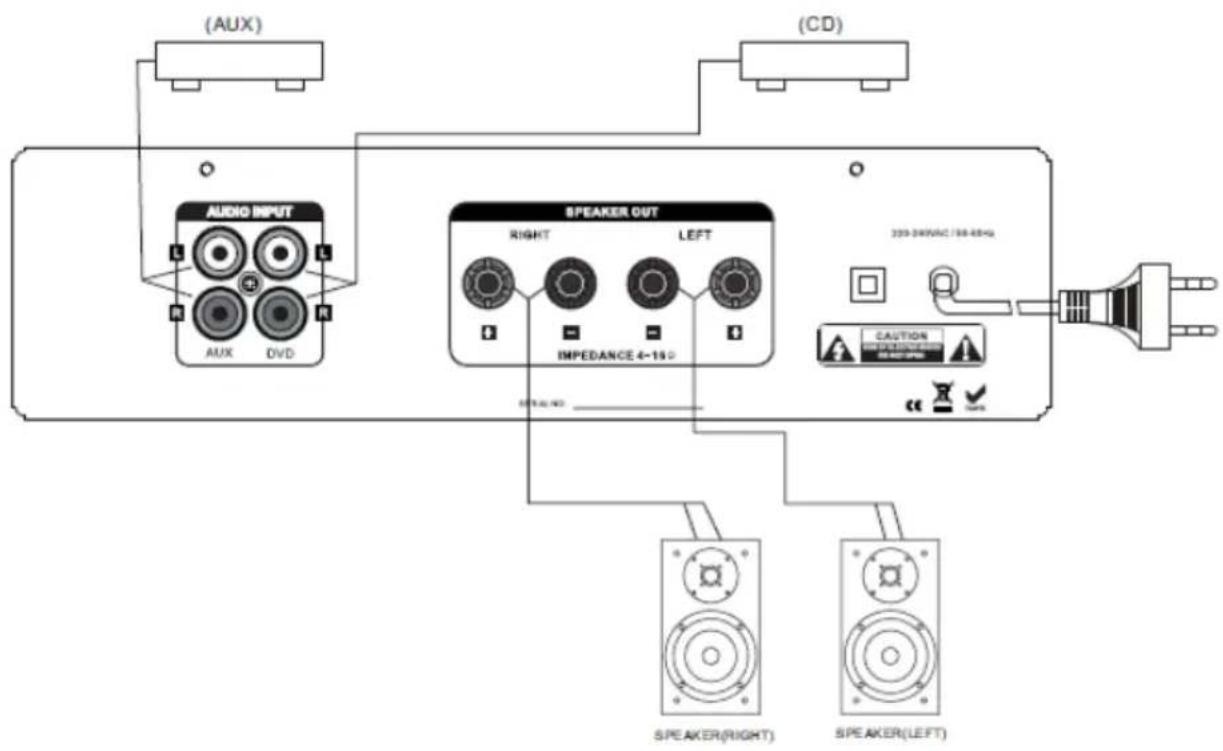
Prior to switching the system on, please make all connections properly according to the below chart.
Please pay particular attention to the polarity. Turn all volume controls down to the minimum.
Turn the input selector switch to the correct position and power the unit on. A few seconds later, the unit has reached normal working condition. Adjust the volume according to your taste.
If the fuse blows, please contact a technician to replace the fuse by a new one that is identical to the original one.
If the LED doesn't light up when the amplifier is switched on, it means that there is a malfunction. Please turn the power immediately off and solve the problem. Turn power on again.
Bluetooth Pairing Procedure
- Turn the input selector to BT position. The blue LED will flash. Activate the Bluetooth function in your equipment (such as mobile phone), search for Bluetooth equipment, the Bluetooth name is "AMPLIFIER". Pair your mobile to "AMPLIFIER" and connect it (blue LED will stay bright), then play your music.
- By NFC function: Turn the input select to BT position, turn on your Bluetooth equipment NFC function, then put your equipment ( such as mobile) close to the NFC symbol on the front panel, then it is ok.
Trouble-shooting
If the amplifier doesn't operate properly, check the points in the table below. If this doesn't solve the problem, please contact your dealer.
| Problem | Causes | Solution |
| No sound | Bad speaker connectionWrong connection of audio input socketBad connection of power plugVolume turned down to the minimumSpeaker output selector not in | Connect securelyCheck the audio input socketConnect the power cable properlyTurn the volume up to a suitable level |
| the correct position | • Select the correct speaker output | |
| Distortion | • The volume is too loud | • Reduce the volume to an acceptable level |
| Sound only from one channel | • Incomplete speaker connection • Incomplete input/output lead connections • Left/right balance is off on one side | • Connect securely • Connect securely • Adjust the balance properly |
Specifications
Output power (RMS) 2 x 25W @ 8 Ohms 2 x 30W @ 4 Ohms
THD <2% (30-20kHz)
Frequency response. 30Hz - 20kHz
Signal to noise ratio >77dB (A-weighted)
Rated input level/impedance. 500mV
Rated load impedance 4 Ohms
Power consumption. <80W
Power supply 220-240Vac 50/60Hz
Dimensions 244 x 202 x 67mm
Net weight 2,9 kg
Notes:
- The above specifications are only for reference
- Design and specifications are subject to change for improvement without prior notice
Accessories:
1x user manual
WARNING! TO REDUCE THE RISK OF FIRE OR ELECTRIC SHOCK, DO NOT EXPOSE THIS PRODUCT TO RAIN OR MOISTURE. DO NOT REMOVE CHASSIS (OR BACK). NO USER-SERVICEABLE PARTS INSIDE. REFER SERVICING TO QUALIFIED SERVICE PERSONNEL.

WARNING! TO REDUCE THE RISK OF FIRE OR ELECTRIC SHOCK, DO NOT EXPOSE THIS PRODUCT TO RAIN OR MOISTURE. DO NOT REMOVE CHASSIS (OR BACK). NO USER-SERVICEABLE PARTS INSIDE. REFER SERVICING TO QUALIFIED SERVICE PERSONNEL.

Signaal ruis verhouding. >77dB (A-weighted)
Ingangsniveau/impedantie 500mV
Lastimpedantie 4 Ohm
Opogenomen Vermogen. <80W
Voeding. 220-240Vac 50/60Hz
Afmetingen 244 x 202 x 67mm
Nettogewicht 2,9 kg
Opmerkingen:
WARNING! TO REDUCE THE RISK OF FIRE OR ELECTRIC SHOCK, DO NOT EXPOSE THIS PRODUCT TO RAIN OR MOISTURE. DO NOT REMOVE CHASSIS (OR BACK). NO USER-SERVICEABLE PARTS INSIDE. REFER SERVICING TO QUALIFIED SERVICE PERSONNEL.

Sinal / ruido Nominal >77dB (A-weighted)
Nivel de entrada/impedancia Nominal 500mV
Carga de impedencia Nominal 4 Ohms
Consumo <80W
Fonte de alimentacao 220-240Vac 50/60Hz
Dimensoes 244 x 202 x 67mm
Peso liquido 2.9 kg
Notas:
WARNING! TO REDUCE THE RISK OF FIRE OR ELECTRIC SHOCK, DO NOT EXPOSE THIS PRODUCT TO RAIN OR MOISTURE. DO NOT REMOVE CHASSIS (OR BACK). NO USER-SERVICEABLE PARTS INSIDE. REFER SERVICING TO QUALIFIED SERVICE PERSONNEL.

Raport S/N >77dB (A-weighted)
Nivel intrare nominala/impedanta 500 mV
Impedanta sarcina nominala 4 ohmi
Consum .<80W
Alimentare 220-240Vac 50/60Hz
Dimensiuni 244 x 202 x 67 mm
Greutate neta. 2.9 kg
Note:
Moč (RMS) 2 x 30W @ 4 Ohms 2 x 25W @ 8 Ohms
Popačenje <2% (30-20kHz)
Razmerje Signal / Šum ..... >77dB (A-weighted)
Rated input level/impedance 500mV
Impendanca 4 Ohms
Poraba. <80W
Napajanje. 220-240Vac 50/60Hz
Mere. 24 x 202 x 67mm
Teza 2.9 kg
Opombe:
Imported from China for:
CE
Responsible technique
C E
EC Declaration of Conformity
Hereby we,
LOTRONICSA
Avenue Zénobe Gramme, 11
1480 SAINTES
Belgique
0032.2.390.91.91
Certify and declare under our sole responsibility that the following product:
Trade name:
KODA
Product name:
POWER AMPLIFIER
Type or model:
KODA1000
conforms with the essential requirements of the RTTE directive 1999/5/EC based on the following specifications applied:
EU harmonized standard: EN60950-1:2006 + A11:2009 + A1:2010 + A12:2012
EN301489-1V1.9.2
EN301489-17 V2.2.1
EN300328-1V1.7.1
and therefore complies with the essentials requirements and provisions of the RTTE directive
Place and date of issue: Saintes (Belgium), on 19/03/2014
AKBAR Guive / Technical Manager
LOTRONIC SA
Av. Zenobe Grandma, Saintes
1480 Sami Belgium
Tel. +32.2.390.91.91 2002.390.93.19
Fax+32.2.356.178
TVA BE 087


Brand : MADISON
Model : MAD1000
Category : Receiver