BR 816 - Radio CLATRONIC - Free user manual and instructions
Find the device manual for free BR 816 CLATRONIC in PDF.


| Brand | CLATRONIC |
| Model | BR 816 |
| Product type | Portable radio |
| Frequency bands | FM and AM (mono) |
| Mains power supply | External adapter 230-240 V ~ 50 Hz, output 6 V / 600 mA |
| Battery power supply | 4 × 1.5 V type UM2 / R14 (not supplied) |
| Output power | 20 W PMPO |
| Net weight | 2.4 kg |
| AUX IN socket | Yes, 3.5 mm stereo jack |
| FM antenna | Built-in flexible antenna |
| AM antenna | Built-in ferrite antenna |
| Volume control | Rotary knob (MIN / MAX) |
| Function selector | OFF / FM / AM |
| Operation indicator | LED POWER |
| Automatic switching to AUX | Yes, as soon as a device is connected |
| Cleaning | With a damp cloth, without detergent |
| Protection | Do not use near water, do not open |
| Protection class of the adapter | II (double insulation) |
| Adapter polarity | Center positive |
| Included accessories | Mains adapter, instruction manual |
Frequently Asked Questions - BR 816 CLATRONIC
User questions about BR 816 CLATRONIC
0 question about this device. Answer the ones you know or ask your own.
Ask a new question about this device
Download the instructions for your Radio in PDF format for free! Find your manual BR 816 - CLATRONIC and take your electronic device back in hand. On this page are published all the documents necessary for the use of your device. BR 816 by CLATRONIC.
USER MANUAL BR 816 CLATRONIC
Location of Controls.. Page 3
User manual . Page 20
Technical Specifications . Page 22
FRANÇAIS
JEZYK POLSKI
Table des matieres
Portee de frquence: FM 87.5 ~ 108,0 MHz
AM 530 ~ 1600 kHz
General Safety Guidelines
Before using this device, carefully read this user manual and keep it together with the Warranty Certificate, cashier receipt and if possible, the original package inclusive its interior packing. If you hand on the device to any third person, include the user manual as well.
- To reduce the risk of fire or electric shock do not subject the unit to rain or humidity. Do not operate the unit in close proximity of water (e.g. bath room, swimming pool).
- Use the device for private and its intended purpose only. The device is not intended for commercial use.
- When using external AC power adaptor confirm that output current, voltage and polarity correspond with the specifications of the connected unit!
- Do not touch the connected AC power adaptor with wet hands!
Always observe the polarity when exchanging the batteries. - Regularly check the device and cable for signs of damage. Do not continue to operate the device in case of damage.
- Do not repair the device by yourself. Please contact authorized personnel. In order to avoid hazards, a damaged mains cable must be replaced with an equivalent cable by the manufacturer, our customer service or any other qualified specialist.
- Install the unit in such way that ventilation openings are not covered.
- Disconnect from mains power supply and remove the batteries during longer periods of nun-use.
These symbols may be found on the device and shall indicate the following:
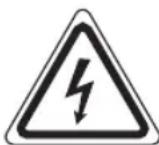
The lightning symbol warns the user of dangerously high voltages inside the case.

The exclamation mark symbol points to important instruction or maintenance remarks in the accompanying guidelines.
Children and disabled persons
- For the safety of your children, keep any packing parts (plastic bags, cartilage, Styrofoam etc.) out of their reach.
Warning!
Don't let small children play with foils for
danger of suffocation!
- This device is not intended for use by persons (including children) with reduced physical, sensory or mental capabilities, or lack of experience and/or knowledge unless they have been given supervision or instructions concerning the use of the device by a person responsible for their safety.
Supervise children to ensure they do not play with the device.
Symbols in this user manual
Important notes for your safety are marked distinctively. Pay absolute attention to them to avoid accidents and damage to the device:
Warning:
Wards of dangers for your health and indicates potential risks of injury.
Caution:
Indicates potential dangers for the device or other objects.
Note:
Highlights tips and information for you.
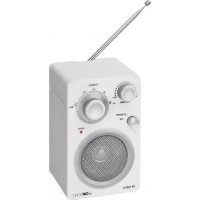
Location of Controls
1 Volume control (VOLUME MIN/MAX)
2 Carry handle
3 Function selector (OFF/FM/AM)
4 Speaker
5 Status indicator (POWER)
6 Frequency selector (FM/AM)
7 FM antenna
8 AUX-IN socket
9 6V DC IN socket
10 Battery compartment
Start-Up/Introduction
- Read the user manual carefully before operating the unit!
- Select a suitable location for the unit, such as a dry, level and non-slip surface, where you can easily operate the unit.
- Ensure adequate ventilation of the unit!
Power Supply
- Flap the rubber cover down.
- Connect the plug to a properly installed 230 V, 50 Hz wall outlet. Connect the power adaptor to the 6 V DC IN socket (9) of the unit.
- Ensure that the mains power matches the specifications on the type label.
Caution:
- Only use the supplied AC power adaptor for this unit; do not use for other appliances.
- Only use AC power adaptor 6 V ( ) any other power adaptor can damage the unit.
Note:
Disconnect the power adaptor from mains power during longer periods of non-use.
Insert Batteries (batteries not supplied)
- Open the battery compartment (10) at the rear, loosen the screw with a screw driver.
- Insert 4 batteries type UM 2/R14 1.5 V. Observe correct polarity (see battery compartment)!
- Close the battery compartment and tighten the screw.
- To avoid battery leakage remove the batteries during longer periods of non-use.
Note:
- Battery operation is automatically deactivated after connecting the power adaptor.
- Exchange the batteries as soon as the brightness of the status indicator POWER (5) decreases.
Warning:
Do not subject batteries to heat or direct sunlight. Do not dispose of batteries by burning. Danger of explosion!
Caution:
- Different battery types or new and used batteries must not be used together.
- Do not dispose of batteries with the household waste. Return exhausted batteries to collection points or your dealer.
Basic Operation
Turn Unit Off
The unit is turned off by setting the function selector (3) to OFF Position.
Volume
Turn the VOLUME knob (1) to set the desired volume.
AUX IN Socket
Connect analog playback devices here. Listen to connected devices, such as MP3 players, CD players, etc.
- Flap the rubber cover down.
- Connect the external device via 3.5mm stereo jack to AUX IN (8).
- Set the function selector (3) to FM or AM position. The unit automatically turns to AUX IN operation. The radio sound is muted.
- The unit plays the sound from the connected external device. Turn the VOLUME knob (1) to set the desired volume.
- Operate your external device as described in its user manual.
Note:
Set the volume of the external device to an appropriate level.
Listen to Radio
- Set the function selector (3) to select the desired frequency band.
$$ V H F = F M, \text {M e d i u m} W a v e = A M (M o n o) $$
- Turn the frequency selector (6) to tune into your favorite station. The upper dial scale shows the FM frequencies. The lower dial scale shows the AM frequencies.
The flexible antenna (7) receives FM stations.
The AM antenna is integrated in the unit. Turn the unit for best reception. This frequency band broadcasts programs in mono only.
Cleaning and Maintenance
- Before cleaning disconnect the unit from mains power supply.
- Clean the casing with a damp cloth without detergents.
Technical Specifications
Model: BR 816
Power supply: External AC power adaptor
Input: AC 230-240 V, 50 Hz
Output: DC 6 V/600 mA
Polarity:
Adaptor protection class:
Battery operation: 4 x 1.5 V, type UM 2/R14
Power Output: 20 W PMPO
Net weight: 2.40 kg
Radio:
Frequency Range: FM 87.5 ~ 108.0 MHz
AM 530 ~ 1600 kHz
Technical modifi cations reserved!
This device complies with all current CE directives, such as electromagnetic compatibility and low voltage directive and is manufactured according to the latest safety regulations.
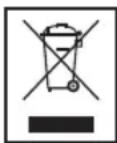
Meaning of the "Wheelie Bin" Symbol
Take care of our environment, do not dispose of electrical applications via the household waste.
Dispose of obsolete or defective electrical appliances via municipal collection points.
Please help to avoid potential environmental and health impacts through improper waste disposal.
You contribute to recycling and other forms of utilization of old electric and electronic appliances.
Your municipality provides you with information about collecting points.