
BR 835 BT - Radio CLATRONIC - Free user manual and instructions
Find the device manual for free BR 835 BT CLATRONIC in PDF.


| Product Type | Radio with Bluetooth, USB, AUX |
| Brand | Clatronic |
| Model | BR 835 BT |
| Power Supply | AC 100-240V, 50/60Hz (adapter output DC 6V/1A) or 4x UM2/R14 1.5V batteries |
| Radio Bands | FM 88-108 MHz, AM 530-1600 kHz |
| Bluetooth Version | V2.0 + EDR |
| Bluetooth Range | Approx. 15 meters |
| Bluetooth Profiles | A2DP, AVRCP |
| Playable Formats | MP3 |
| Net Weight | Approx. 2.5 kg |
| Protection Rating | IPX4 |
| Power Consumption | 7 W |
| Functions | AM/FM radio, Bluetooth streaming, USB playback, AUX input, Auto standby after 10 min no signal |
| Controls | Volume/Off, Function selector (AM/FM/USB/BT), Tuning, Play/Pause, Next/Prev |
| Connections | 6V DC IN, AUX IN (3.5mm), USB port |
| Antenna | Flexible FM antenna (screw-on) |
| Cleaning | Wipe with slightly damp cloth, do not immerse |
| Safety Features | Polarity protection, automatic standby, battery compartment lock |
Frequently Asked Questions - BR 835 BT CLATRONIC
User questions about BR 835 BT CLATRONIC
0 question about this device. Answer the ones you know or ask your own.
Ask a new question about this device
Download the instructions for your Radio in PDF format for free! Find your manual BR 835 BT - CLATRONIC and take your electronic device back in hand. On this page are published all the documents necessary for the use of your device. BR 835 BT by CLATRONIC.
USER MANUAL BR 835 BT CLATRONIC
Overview of the Components ...... Page 3
Instruction Manual Page 10
Technical Specifications Page 13
Disposal Page 13
Overview of the Components
Bedienungsanleitung
Thank you for choosing our product. We hope you will enjoy using the appliance.
Symbols in this user manual
Important notes for your safety are marked distinctively. Pay absolute attention to them to avoid accidents and damage to the device:

WARNING:
Warns of dangers for your health and indicates potential risks of injury.

CAUTION:
Indicates potential dangers for the device or other objects.

NOTE:
Highlights tips and information for you.
General Safety Guidelines
Before using this device, carefully read this user manual and keep it together with the Warranty Certificate, cashier receipt and if possible, the original package inclusive its interior packing. If you hand on the device to any third person, include the user manual as well.
- To avoid the risk of fire or an electric shock, you should not expose the device to rain or moisture. Consequently, do not use the device in the immediate vicinity of water - for example near a bath tub, a swimming pool or in a damp cellar.
- Use the appliance only for the intended, private use. This appliance is not intended for commercial use.
- The power adaptor is only intended for use in dry environment.
- Ensure that the output voltage, currency and polarity of the power adaptor correspond to the nameplate specifications!
- Do not touch the power adaptor with wet hands!
- Unplug the power adaptor from the appliance when cleaning or if a fault occurs.
- Make sure that the adaptor cable is not bent, crushed, run over or does not come into contact with heat sources.
- Only connect the device at a properly installed plug socket. Pay attention that the specified voltage corresponds to the voltage of the plug socket.
- When using external mains supply, pay attention to the correct polarity and voltage. Always place the batteries in the correct direction.
- Assemble the device in such a way that the available ventilation openings are not covered.
- Never open the housing of the device. Incorrect repairs can constitute a considerable risk for the user. Should the device become damaged, in particular the mains supply cable, do not operate the device any longer, but rather
have it repaired by an expert. Check the mains supply cable regularly for damage.
- For safety reasons a broken or damaged mains lead may only be replaced by an equivalent lead from the manufacturer, our customer service department or a similar qualified person.
- If the device is not used for a longer period, remove the plug connector from the plug socket or take out the batteries.
These symbols may be found on the device and are intended as warnings:

The lightning flash is intended to alert the user to the presence of dangerous voltage within the device.

User to the presence of important operating and maintenance instruction accompanying this device.
Children and disabled persons
- For the safety of your children, keep any packing parts (plastic bags, cartilage, Styrofoam etc.) out of their reach.

WARNING!
Don't let small children play with foils for danger of suffocation!
- This device is not intended for use by persons (including children) with reduced physical, sensory or mental capabilities, or lack of experience and/or knowledge unless they have been given supervision or instructions concerning the use of the device by a person responsible for their safety.
- Supervise children to ensure they do not play with the device.
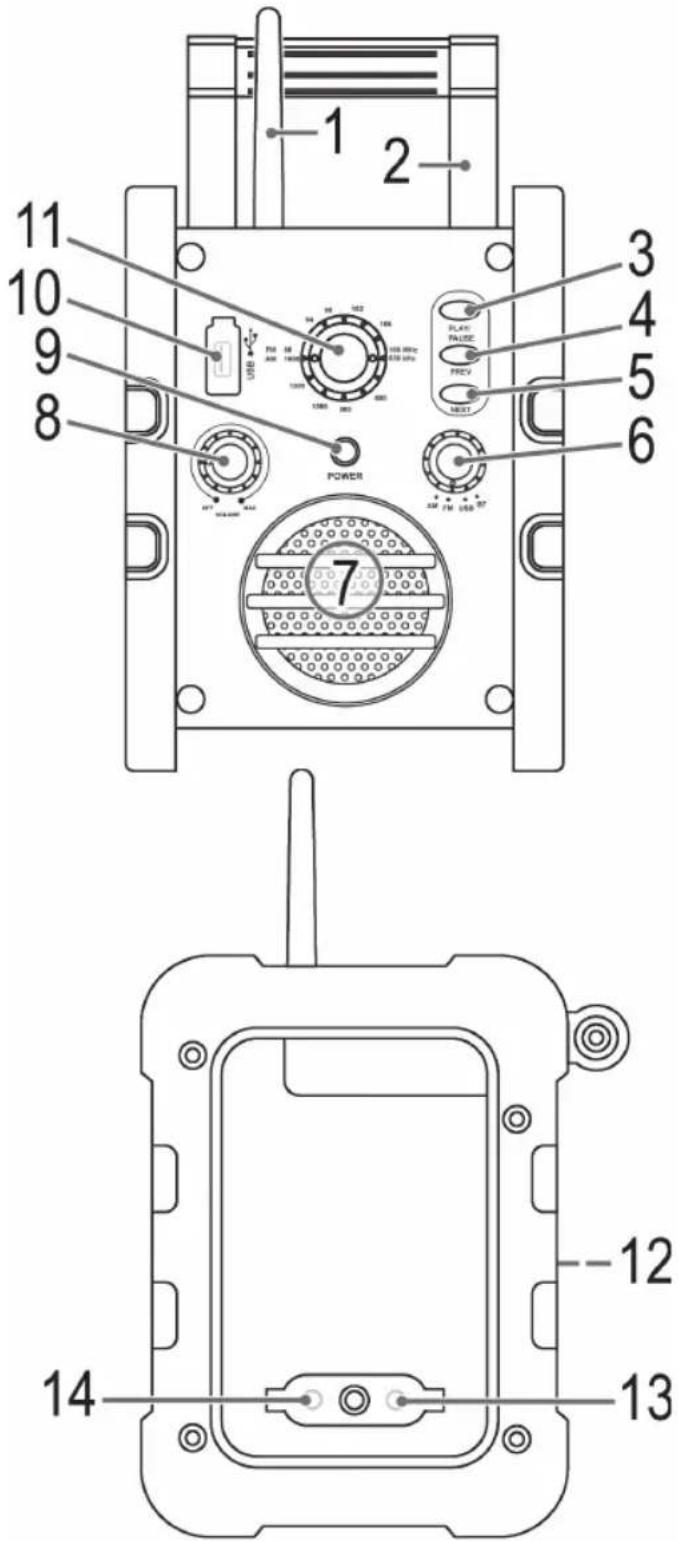
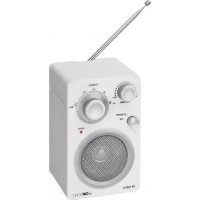
Overview of the components
1 FM Antenna
2 Handle
3 PLAY/PAUSE button (play/pause)
4 PREV button (previous track)
5 NEXT button (next track)
6 Function selector
7 Speaker
8 OFF/VOLUME control (off/volume)
9 POWER control lamp
10 Cover USB connection
11 Tuning control
12 Battery compartment
13 6V DC IN jack
14 AUX IN jack
Accessories (without illustration)
Power adaptor
Installation
- Read the manual thoroughly before operating the device!
- Choose a suitable location for the device. Suitable locations are dry, even and antislip surfaces on which you may operate the device easily.
- Make sure there is proper ventilation for the device!
- If necessary, screw the flexible antenna onto the correct connection.
Power supply (Adaptor)
- Insert the grid plug into a properly installed three prong socket. Connect the device with the plug connector by inserting its plug into the 6V DC IN jack of the device.
- Make sure the grid voltage corresponds to the figures on the rating plate.

CAUTION:
- Only use the supplied power adaptor for this device. Do not use for other devices.
- Only use power adaptor with 6V (⊖—C—⊕), other adaptors may cause damage to the device.

NOTE:
Disconnect from mains power supply during longer periods of non-use.
Battery Operation (Batteries not included)
You can also operate the device with 4 batteries.
- Open the battery compartment (12) at the rear, loosen the screw with a screw driver.
- Insert 4 batteries type UM 2/R14 1.5 V. Observe correct polarity (see battery compartment)!
- Close the battery compartment and tighten the screw.
- To avoid battery leakage remove the batteries during longer periods of non-use.

NOTE:
Battery operation is automatically deactivated after connecting the power adaptor.

WARNING:
Do not expose batteries to intense heat, such as e.g. direct sunlight, fire or similar sources. Risk of explosion!

CAUTION:
- Different battery types or new and used batteries must not be used together.
- Do not dispose of batteries with the household waste. Return exhausted batteries to collection points or your dealer.
General operation
Switching the unit on/off and adjusting the volume
Use the control (8) to switch the unit on. The control can also be used to adjust the volume as required. To switch off the unit, turn the control to the left to the "OFF" position. The control audibly clicks into place.

IOTE:
After approx. 10 minutes without a signal or if the signal is too weak, the unit automatically switches to standby. To continue using the unit, switch the unit off and then back on.
Setting the operating mode
Use the control (6) to select the desired mode. Set the control to AM, FM, USB or BT.
Listening to the radio
Scan stations
- Use the function selector to select the desired frequency band.
$$ \mathrm{FM} = \text { VHF }, \mathrm{AM} = \text { Medium wave } $$
- Use the control (11) to tune into the desired station.
- If the reception is too weak, or if there is interference on the station being received, try to improve the reception by changing the position of the device.
Connection of external devices
AUX IN jack (14)
Connect analogue playback devices. When connecting to this jack you may also listen to the audio of other devices, such as MP3 or CD players etc., via the speakers.
- Fold down the rubber flap.
- Connect the external device to the AUX jack with a 3.5 mm mono jack plug. If necessary, use a suitable adapter. (Adapter not included.)
- The unit automatically switches to AUX IN mode.
- You will hear the audio playback from the external unit via the speaker. You can use the VOLUME control (8) to adjust the volume.
- For further functions please refer to the user manual of the external audio device.
Always keep the flap closed when not in use.

IOTE:
- Set the volume of the external device to a proper audible level.
- If the audio cable is connected to the AUX IN jack, the unit cannot be operated in AM, FM, USB and BT Mode.
USB port
This device has been developed in line with the latest technical advances in the USB field. The wide range of different USB storage devices of all types which are currently on the market, unfortunately do not allow us to guarantee full compatibility with all USB storage devices. For this reason, in rare cases there may be problems in playing back files from USB storage devices. This is not a malfunction of the device.
- Flip open the cover (11).
- Set the function selector (6) to the "USB" position.
- Directly connect a USB storage medium to the respective port. Playback then begins.
i NOTE:
- Always directly connect a USB storage medium to the USB port to prevent any malfunctions.
- The USB port is not suitable for charging external devices.
4. Operation:
- Skip to the next, previous title respectively with the NEXT / PREV buttons (5/4). If you keep the buttons pressed down, a music search will start.
- You can interrupt the replay with the PLAY/PAUSE buttons (3). The number of the current title will flash in the display. If you push the button again, the replay will start in the same location.
Always keep the cover closed when not using it.
CAUTION:
Before you remove the USB memory medium, switch the device to Radio operation.
i NOTE:
- The USB operating voltage is only active in "USB mode".
- The 5V needed for USB mode cannot be guaranteed if the batteries are not sufficiently charged. Insufficiently charged batteries may lead to breaks in sound when playing music from the USB in battery mode. If this is the case, insert new batteries or operate the unit with the mains adapter.
Playing back music via Bluetooth
Bluetooth involves a technology for wireless radio connection of devices over a short distance. Devices with Bluetooth standard are transmitting between 2.402 and 2.480 GHz in the ISM band (Industrial, Scientific and Medical). Interference can be caused for example by WLAN-networks, DAB radios, cordless phones, or microwave ovens which work on the same frequency band.
This device offers you the possibility to use a Bluetooth-enabled device. The functional radius is limited to approx. 15 metres depending on the surroundings and the unit used.
If your playing device supports the A2DP profile (Advanced Audio Distribution Profile) and has a music-player function, then you can also wirelessly transfer music to the device. The A2DP profile involves a multi-vendor Bluetooth profile. By streaming, stereo-audio signals are wirelessly transferred between the playing device (source) and the receiving device. To be able to remotely control the source, the playback device must support the AVRCP profile (Audio Video Remote Control Profile).
Due to the different device manufacturers, models, and software versions, a full functionality cannot be guaranteed.
Logging on devices (Pairing)
Before you listen to music via the unit, you must pair the devices.
- Ensure, that the Bluetooth function is activated in your player (e.g. mobile phone). For this, refer to the operation manual of your player.
- Set the function selector (6) to the "BT" position. The POWER control lamp flashes blue. This indicates that the unit is in pairing mode.
- Choose the Bluetooth menu in your player and register the device in your player. For this, refer to the operation manual of your player. The device "BR 835 BT" will show in your player as a selection.
i NOTE:
Only one playback device can be connected with the device at one time. If the device is already connected with another playback device, the device will not appear in the BT selection menu.
- Now enter the password "0000" in your player, depending on the device manufacturers, model, and software version.
If pairing has been successfully completed, the POWER control lamp will light up blue. For the further procedure, please refer to the user manual of the playback unit. If possible, adjust the volume of the external unit to a comfortable level.
NOTE:
- Depending on the device manufacturer, you need to perform the registration (PAIRING) again to connect the devices.
- In case of problems with the registration of a replay device, deactivate the WiFi-/ and mobile data function in your playback device.
- The Bluetooth compatibility cannot be ensured for devices (e.g. mobile phones) getting released in the future.
- To ensure an optimal connection, make sure that the battery of your player is completely charged.
- Some of the mobile phone brands have an energy-saving mode. Deactivate the energy-saving mode as it can otherwise result in problems during the data transfer through Bluetooth.
- To be able to transfer audio data, Bluetooth needs to stay activated in your player. Observe the operation manual of your player.
- If a mobile phone on which you are playing music receives a call, the music will be interrupted. However, the sound is not played back by the device. After you have ended the call, the devices are connected to each other again and playback continues.
Control buttons
NOTE:
Not all functions may be supported, depending on the player.
- Skip to the next, previous title respectively with the NEXT / PREV buttons (5/4). If you keep the buttons pressed down, a music search will start.
- You can interrupt the replay with the PLAY/PAUSE buttons (3). The number of the current title will flash in the display. If you push the button again, the replay will start in the same location.
Cleaning and Maintenance

WARNING:
Do not immerse the device in water.
- Always remove the mains plug before cleaning the machine.
- Any marks on the surface can be wiped off with a slightly damp cloth without any additives.
Troubleshooting
| Symptoms Course Solution | ||
| The unit cannot be operated | The unit is blocked and “hangs” | Pull the mains plug for approximately 5 seconds. Then connect the unit again |
| No sound Volume is too low | Increase the volume | |
| Audio cable is connected | ||
| Poor sound quality | Radio signal too weak | Try to improve the reception by changing the location. |
| Batteries too weak | Insert new batteries, or operate the device via the power adaptor. | |
| No audio signal during bluetooth connection. | The device is not registered with the audio source. | Ensure that there is a connection. Register the device with the audio source again, if necessary. |
| Volume too low. | Increase the volume on the device. | |
| Increase the volume on the audio source. | ||
| Device can not be connected. | Registration does not work. | Check to see if the audio source supports the A2DP protocol. |
| Audio source is shut off. | Turn on the audio source. | |
| Bluetooth is shut off on the audio source. | Turn on the Bluetooth function on the audio source. | |
| Bluetooth version is not supported. | Use a different playback device. | |
Technical Specifications
Model: BR 835 BT
Battery operation: 4x 1.5 V UM2/R14
Protection rating: IPX 4
Power consumption:....7 W
Playable formats: MP3
Net weight:......approx. 2.5 kg
Radio:
Frequency ranges:.....FM 88 \~ 108.0 MHz
.....AM 530 \~ 1600 kHz
External power adaptor
Input: AC 100-240 V, 50/60 Hz
Output: DC 6 V / 1 A
Polarity: ⊖-C-⊕
Protection Class: II
Bluetooth
Bluetooth support: V2.0 + EDR
Range: ....approx. 15 metres
Transmission frequency: 2,402-2,480 GHz
Protocols:....A2DP/AVRCP
The right to make technical and design modifications in the course of continuous product development remains reserved.
This device complies with all current CE directives, such as electromagnetic compatibility and low voltage directive and is manufactured according to the latest safety regulations.
Disposal
Meaning of the "Wheelie Bin" Symbol
Take care of our environment, do not dispose of electrical appliances via the household waste.
Dispose of obsolete or defective electrical appliances via municipal collection points.
Please help to avoid potential environmental and health impacts through improper waste disposal.
You contribute to recycling and other forms of utilization of old electric and electronic appliances.
Your municipality provides you with information about collecting points.
GARANTIEKARTE
warranty card · garantiekaart · carte de garantie · scheda di garanzia · tarjeta de garantía · cartão de garantia · garantikort · karta gwarancyjna · záruční list · kartica jamstva · carte de garanție · Гаранционна карта · záručný list · garancijski list · garanciajegy · гарантійнийформуляр · Гарантийный талон · نامض قاقاطب
BR 835 BT
24 Monate Garantie gemäß Garantieerklärung · 24 months warranty according to warranty declaration · 24 maanden garantie volgens garantieverklaring · 24 mois de garantie selon la déclaration de garantie · 24 mesi de garanzia secondo la dichiarazione di garanzia · 24 meses de garantía de acuerdo con la declaración de garantía · 24 meses de garantía, de acordo com a declaração de garantía · 24 máneders garanti i henhold til garantibetingelsene · 24 miesiące gwarancji na podstawie oświadczenia gwarancyjnego · záruka 24 mésiců podle prohlásení o záruce · 24 mjesečno jamstvo u skladu s jamstvenom deklaracijom · 24 luni garantie conform declarației de garantie · 24 meseća гаранция в съответствие с гаранционната декларация · 24-mesačná záruka podla vyhlásenia o záruke · 24-mesečna garancija, skladno z garancijsko izjava · 24 hónap garancia a garanciafeltételekben leirtak szerint · гаранția на 24 місяці відповідно заяві про гаранțию · Гарантия 24 месяца согласно заявленным гарантийным правилам · نامطリア داتیفیا کوَفْر وَأَرْدُهُ 24. تَمْدُّل دَامِس
Kaufdatum, Händlerstempel, Unterschrift - date of purchase, dealer stamp, signature - aankoopdatum, dealerstempel, handtekening - date d'achat, tampon du concessionnaire, signature - data di acquisto, timbro del rivenditore, firma - fecha de compra, sello del distribuer, firma - data de compra, carimbo do distribuer, assinatura - kypodato, forhandlerstempel, signatur - data zakupu, pieczeg sprzedawcy; podpis - datum zakoupeni, razitko prodejce, podpis - datum kupovine, zig trgovca, petpis - data de achizije, stampila furnizorului, semnatura - Data na покупata, Plear na 'Prodavaca', Podпис - datum nákupu, pečiatka obchodnika/predajcu, podpis - datum nakupa, zig trgovca, podpis - vásárias dátuma, kereskedő belyezgjde, alárlás - data придbanня, печatca prodavacı, podпис - Data приобретения, štamsít prodavaca, Podпись

CATRONIC® INTERNATIONAL GMBH
www.clatronic.com

CLATRONIC® INTERNATIONAL GMBH
Internet: http://www.clatronic.de
- Bedienungsanleitung
- Symbols in this user manual
- WARNING:
- CAUTION:
- NOTE:
- General Safety Guidelines
- Children and disabled persons
- WARNING!
- Overview of the components
- Accessories (without illustration)
- Installation
- Power supply (Adaptor)
- Battery Operation (Batteries not included)
- General operation
- Switching the unit on/off and adjusting the volume
- IOTE:
- Setting the operating mode
- Listening to the radio
- Scan stations
- Connection of external devices
- AUX IN jack (14)
- USB port
- i NOTE:
- Operation:
- Playing back music via Bluetooth
- Logging on devices (Pairing)
- Control buttons
- Cleaning and Maintenance
- Technical Specifications
- External power adaptor
- Bluetooth
- Disposal
- Meaning of the "Wheelie Bin" Symbol
- GARANTIEKARTE
- BR 835 BT
Brand : CLATRONIC
Model : BR 835 BT
Category : Radio