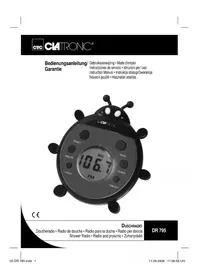
DR 795 - Radio CLATRONIC - Free user manual and instructions
Find the device manual for free DR 795 CLATRONIC in PDF.


| Product Type | Portable Radio |
| Brand | Clatronic |
| Model | DR 795 |
| Power Supply | 4 x 1.5 V batteries type R03/AAA (not included) |
| Frequency Range | FM 87.5 ~ 108 MHz |
| Display | LCD |
| Main Functions | Volume control, auto scan (SCAN), reset (RESET), time setting (12-hour format) |
| Protection | Splash-proof (can be used in the shower) |
| Net Weight | 0.185 kg |
| Mounting | Suction cup and stand on the back |
| Care and Cleaning | Clean with a damp cloth, do not use detergent |
| Safety Instructions | Do not immerse in water, do not open the motor unit, respect battery polarity, do not recharge non-rechargeable batteries |
Frequently Asked Questions - DR 795 CLATRONIC
User questions about DR 795 CLATRONIC
0 question about this device. Answer the ones you know or ask your own.
Ask a new question about this device
Download the instructions for your Radio in PDF format for free! Find your manual DR 795 - CLATRONIC and take your electronic device back in hand. On this page are published all the documents necessary for the use of your device. DR 795 by CLATRONIC.
USER MANUAL DR 795 CLATRONIC
Overview of the Components 3
D-47906 Kempen/Germany

$$ A M = \text {m a t i n}, P M = \text {a p r e s - m i d i}. $$
2 fixations possibles:
General Safety Instructions
Read the operating instructions carefully before putting the appliance into operation and keep the instructions including the warranty, the receipt and, if possible, the box with the internal packing. If you give this device to other people, please also pass on the operating instructions.
- Use the device only for the intended purpose.
- Always insert the batteries the right way round.
- Assemble the device in such a way that the available ventilation openings are not covered.
- Never open the housing of the device. Incorrect repairs can constitute a considerable risk for the user. Do not use the device any more if it is damaged, but have it repaired by a specialist.
- If you intend not to use the device for a prolonged period, please remove the batteries.
These symbols may be found on the machine and are intended to indicate the following:

The lightning symbol should advise the user of parts in the inside of the device which carry dangerously high voltage levels.
The symbol with an exclamation mark should advise the user of important operation or maintenance instructions in the accompanying documentation.
Children and Frail Individuals
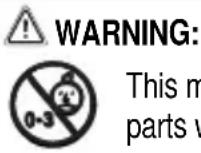
- In order to ensure your children's safety, please keep all packaging (plastic bags, boxes, polystyrene etc.) out of their reach.
WARNING!
Do not allow small children to play with the foil as there is a danger of suffocation!
- In order to protect children or frail individuals from the hazards of electrical equipment, please ensure that this device is only used under supervision. This device is not a toy. Do not allow small children to play with it.
Symbols in these Instructions for Use
Important information for your safety is specially marked. It is essential to comply with these instructions in order to avoid accidents and prevent damage to the machine:
WARNING:
This warns you of dangers to your health and indicates possible injury risks.
CAUTION: This refers to possible hazards to the machine or other objects.
NOTE: This highlights tips and information.
Special Safety Instructions
- Non-rechargeable batteries must not be charged up. Danger of explosion!
- Rechargeable batteries should only be charged up under the supervision of adults.
- Please remove used batteries from the device.
Overview of the Components
1 Volume button (+) 5 LCD display
2 Frequency band reset button 6 Set hours (HOUR) (RESET) 7 Set minutes (MINUTE)
3 POWER (Off) 8 Scan button (SCAN)
4 TIMESET Time adjustment 9 Volume button (-)
Start-up of the device/introduction
Read the operating instructions thoroughly before the start-up!
- Select an appropriate location for the device, e.g. a dry, flat, non-slip surface on which the device can be easily operated.
Inserting the Batteries (not supplied)
- Open the battery compartment cover on the rear by releasing the screws of the battery compartment with a screwdriver. Then remove the cover.
- Insert 4 1.5V R03 / AAA type batteries. Match the polarities correctly (see the inside of the battery compartment). If the device is not used for a long period of time, remove the batteries to avoid the „spilling“ of battery acid.
- Close the battery compartment again and retighten the screws.
CAUTION:
- Batteries are not to be disposed of together with domestic wastes. Dispose of the used batteries at the relevant collection bin or at your dealer's.
- Different battery types or new and used batteries must not be used together.

WARNING:
Do not expose the batteries to high temperatures or direct sunlight. Never throw batteries into the fire. There is a danger of explosion!
Start-up the device
Turn the device on by the POWER button (3).
Listening to the Radio
- Press the SCAN button (8) repeatedly to set a radio station.
- When the end of the frequency band is reached the scanning process stops.
If you would like to start scanning again from the beginning of the frequency band, press the RESET button (2).
- The volume is set with the volume buttons (1, 9).
$$ F M = V H F $$
- An aerial is integrated into the device for the reception of stations. If reception is too weak, try changing the position of the device in order to improve reception.
- After use, turn the device off again by the POWER button (3). The display shows the time that has currently been set.
Setting of the Clock (12 h)
Hours: Press the TIMESET key (4) and the HOUR key (6) simultaneously.
Minutes: Press the TIMESET key (4) and the MINUTE key (7) simultaneously.
I NOTE:
The following appears in the case of the 12 hour display
$$ A M = \text {i n} \quad P M = \text {i n} \quad \text {a f t e r n o o n / e v e n i n g}. $$
There are 2 ways for mounting:
- A suction cup on the back with which you can attach the device to smooth surfaces
- A support on the back of the device to place the device on a flat surface.
Splash-proof
The appliance is splash-proof. It can be used also inside the shower box.
CAUTION:
Do not dip it in water (e.g. in the bathtub), as the electronic parts of the appliance may be damaged.
Cleaning and storage
- Clean the device with a moist cloth and dry it well.
- Do not use abrasive detergents!
Technical Data
Model: DR 795
Power supply: 4 x 1,5 V Batteries, type R03 / AAA
Frequency ranges: FM 87,5 ~ 108 MHz
Net weight: 0,185 kg
This device has been tested according to all relevant current CE guidelines, such as electromagnetic compatibility and low voltage directives, and has been constructed in accordance with the latest safety regulations.
Subject to technical changes without prior notice!
GB
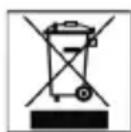
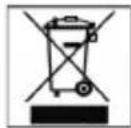
Meaning of the "Dustbin" Symbol
Protect our environment: do not dispose of electrical equipment in the domestic waste.
Please return any electrical equipment that you will no longer use to the collection points provided for their disposal.
This helps avoid the potential effects of incorrect disposal on the environment and human health.
This will contribute to the recycling and other forms of reutilisation of electrical and electronic equipment.
Information concerning where the equipment can be disposed of can be obtained from your local authority.