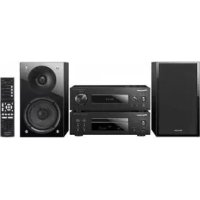
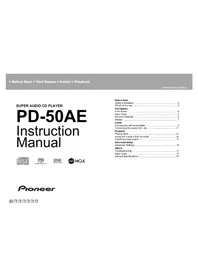
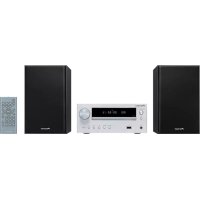
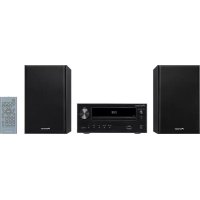
XCP1DAB - Audio System PIONEER - Free user manual and instructions
Find the device manual for free XCP1DAB PIONEER in PDF.



| Brand | Pioneer |
| Model | XCP1DAB |
| Category | Audio system (stereo receiver + CD player) |
| Type | Compact hi-fi system |
| Main functions | CD player, FM/DAB radio, iPod/iPhone/iPad mini connectivity, front USB port, optical and coaxial digital inputs, subwoofer output, timer, clock |
| Connectors | RCA audio jacks (CD IN), FM/DAB antenna, front USB, REMOTE CONTROL IN/OUT, NETWORK IN, DIGITAL IN (optical and coaxial), SUB WOOFER OUT |
| Sound adjustment type | Treble and Bass, Direct mode, Mute |
| Speaker impedance | 4 Ω to 16 Ω |
| Laser class | Class 1 (IEC 60825-1:2007) |
| Operating temperature | -5°C to +35°C |
| Operating humidity | Less than 85% (unobstructed ventilation) |
| Power supply | Mains via power cord (2 cords supplied) |
| Included accessories | 2 power cords, speaker precaution sheet, remote control, RCA audio cables, remote control cable, FM/DAB antenna, batteries |
| Remote control batteries | 2 batteries (type not specified) |
| iPod/iPhone/iPad compatibility | iPod, iPhone, iPad mini (via included USB cable or compatible) |
| USB compatibility | USB mass storage devices |
| Radio antenna type | FM (XC-P01) or DAB/FM (XC-P01DAB) antenna supplied |
| Maintenance | Clean with a dry cloth; do not use solvents |
| Safety | Do not obstruct ventilation slots; do not expose to water; disconnect if not used for a long time; laser class 1 |
| Repairability | No user-serviceable parts; contact qualified service personnel |
| Environmental symbols | Selective collection WEEE (valid EU) |
Frequently Asked Questions - XCP1DAB PIONEER
User questions about XCP1DAB PIONEER
0 question about this device. Answer the ones you know or ask your own.
Ask a new question about this device
Download the instructions for your Audio System in PDF format for free! Find your manual XCP1DAB - PIONEER and take your electronic device back in hand. On this page are published all the documents necessary for the use of your device. XCP1DAB by PIONEER.
USER MANUAL XCP1DAB PIONEER
Thank you for buying this Pioneer product. This Quick Start Guide includes instructions for basic connections and operations to allow simple use of the unit. For detailed descriptions of the unit, see the "Operating Instructions" provided on the included CD-ROM (⑦).
Speaker caution sheet
For detailed descriptions of the unit, see the "Operating Instructions" provided on the included CD-ROM. The operating instructions can also be downloaded from the Pioneer website (http://www.pioneer.eu). See below for instructions on handling the CD-ROM.
Operating Environment — This CD-ROM can be used with Microsoft® Windows® 95/98/Me/NT/2000/XP/Vista/7 and Apple Mac OS X 10.4. Adobe Reader (Version 4.0 or later) is required to read this CD-ROM. Precautions For Use — This CD-ROM is for use with a personal computer. It cannot be used with a DVD player or music CD player. Attempting to play this CD-ROM with a DVD player or music CD player can damage speakers or cause impaired hearing due to the large volume. License — Please agree to the "Terms of Use" indicated below before using this CD-ROM. Do not use if you are unwilling to consent to the terms of its use. Terms of Use — Copyright to data provided on this CD-ROM belongs to PIONEER CORPORATION. Unauthorized transfer, duplication, broadcast, public transmission, translation, sales, lending or other such matters that go beyond the scope of "personal use" or "citation" as defined by Copyright Law may be subject to punitive actions. Permission to use this CD-ROM is granted under license by PIONEER CORPORATION. General Disclaimer — PIONEER CORPORATION does not guarantee the operation of this CD-ROM with respect to personal computers using any of the applicable OS. In addition, PIONEER CORPORATION is not liable for any damages incurred as a result of use of this CD-ROM and is not responsible for any compensation. The names of private corporations, products and other entities described herein are the registered trademarks or trademarks of their respective firms. * When Using a Mac OS: Place this CD-ROM in a CD drive and then double-click on the CD-ROM icon to start up the application.
Information for users on collection and disposal of old equipment and used batteries
(Symbol for equipment)
(Symbol examples) for batteries
These symbols on the products, packaging, and/or accompanying documents mean that used electrical and electronic products and batteries should not be mixed with general household waste.
For proper treatment, recovery and recycling of old products and used batteries, please take them to applicable collection points in accordance with your national legislation.
By disposing of these products and batteries correctly, you will help to save valuable resources and prevent any potential negative effects on human health and the environment which could otherwise arise from inappropriate waste handling.
For more information about collection and recycling of old products and batteries, please contact your local municipality, your waste disposal service or the point of sale where you purchased the items.
These symbols are only valid in the European Union.
For countries outside the European Union:
If you wish to discard these items, please contact your local authorities or dealer and ask for the correct method of disposal.
K058a_A1_En
WARNING
To prevent a fire hazard, do not place any naked flame sources (such as a lighted candle) on the equipment.
D3-4-2-1-7a_A1_En
Operating Environment
Operating environment temperature and humidity: +5 °C to +35 °C (+41 °F to +96 °F); less than 85 %RH (cooling vents not blocked) Do not install this unit in a poorly ventilated area, or in locations exposed to high humidity or direct sunlight (or strong artificial light)
D3-4-2-1-7c ^* A1 En
CAUTION
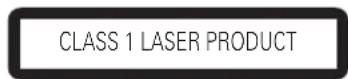
This product is a class 1 laser product classified under the Safety of laser products, IEC 60825-1:2007.
D58-5-2-2a_A1_En
CAUTION
TO PREVENT THE RISK OF ELECTRIC SHOCK. DO NOT REMOVE COVER (OR BACK). NO USER-SERVICEABLE PARTS INSIDE. REFER SERVICING TO QUALIFIED SERVICE PERSONNEL.
D3-4-2-1-1 B1 En
CAUTION
The /I STANDBY/ON switch on this unit will not completely shut off all power from the AC outlet. Since the power cord serves as the main disconnect device for the unit, you will need to unplug it from the AC outlet to shut down all power. Therefore, make sure the unit has been installed so that the power cord can be easily unplugged from the AC outlet in case of an accident. To avoid fire hazard, the power cord should also be unplugged from the AC outlet when left unused for a long period of time (for example, when on vacation).
D3-4-2-2-2a ^* A1 En
POWER-CORD CAUTION
Handle the power cord by the plug. Do not pull out the plug by tugging the cord and never touch the power cord when your hands are wet as this could cause a short circuit or electric shock. Do not place the unit, a piece of furniture, etc., on the power cord, or pinch the cord. Never make a knot in the cord or tie it with other cords. The power cords should be routed such that they are not likely to be stepped on. A damaged power cord can cause a fire or give you an electrical shock. Check the power cord once in a while. When you find it damaged, ask your nearest PIONEER authorized service center or your dealer for a replacement.
5002 ^* _A1_En
WARNING
This equipment is not waterproof. To prevent a fire or shock hazard, do not place any container filled with liquid near this equipment (such as a vase or flower pot) or expose it to dripping, splashing, rain or moisture.
D3-4-2-1-3 A1 En
VENTILATION CAUTION
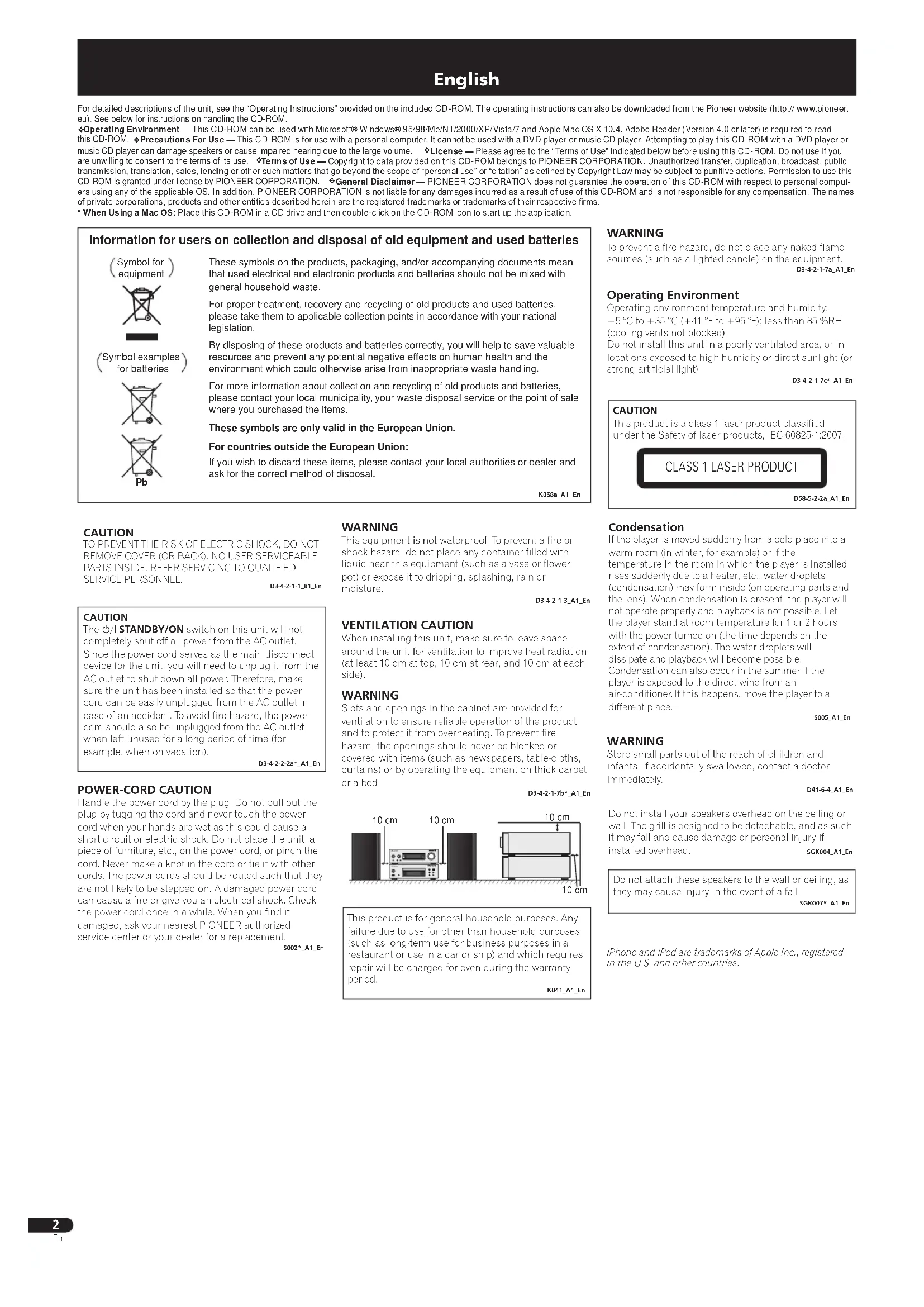
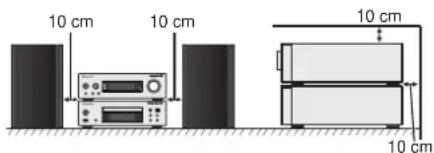
When installing this unit, make sure to leave space around the unit for ventilation to improve heat radiation (at least 10 cm at top, 10 cm at rear, and 10 cm at each side).
WARNING
Slots and openings in the cabinet are provided for ventilation to ensure reliable operation of the product, and to protect it from overheating. To prevent fire hazard, the openings should never be blocked or covered with items (such as newspapers, table-cloths, curtains) or by operating the equipment on thick carpet or a bed.
D3-4-2-1-7b ^* _A1_En
This product is for general household purposes. Any failure due to use for other than household purposes (such as long-term use for business purposes in a restaurant or use in a car or ship) and which requires repair will be charged for even during the warranty period.
K041_A1_En
Condensation
If the player is moved suddenly from a cold place into a warm room (in winter, for example) or if the temperature in the room in which the player is installed rises suddenly due to a heater, etc., water droplets (condensation) may form inside (on operating parts and the lens). When condensation is present, the player will not operate properly and playback is not possible. Let the player stand at room temperature for 1 or 2 hours with the power turned on (the time depends on the extent of condensation). The water droplets will dissipate and playback will become possible. Condensation can also occur in the summer if the player is exposed to the direct wind from an air-conditioner. If this happens, move the player to a different place.
S005_A1_En
WARNING
Store small parts out of the reach of children and infants. If accidentally swallowed, contact a doctor immediately.
D41-6-4_A1_En
Do not install your speakers overhead on the ceiling or wall. The grill is designed to be detachable, and as such it may fall and cause damage or personal injury if installed overhead. SGK004_A1_En
Do not attach these speakers to the wall or ceiling, as they may cause injury in the event of a fall.
SGK007 ^A1 _En
iPhone and iPod are trademarks of Apple Inc., registered in the U.S. and other countries.
Connecting the speakers
Be sure to complete all connections before connecting the unit to the AC power source.
Right speaker Left speaker
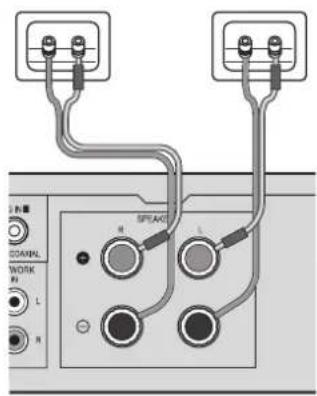
Make sure you connect the speaker on the right to the right (R) terminal and the speaker on the left to the left (L) terminal. Also make sure the positive and negative (+/-) terminals on the stereo receiver match those on the speakers.
You can use speakers with a nominal impedance between 4 Ω and 16 Ω.

CAUTION
• These speaker terminals carry HAZARDOUS LIVE voltage. To prevent the risk of electric shock when connecting or disconnecting the speaker cables, disconnect the power cord before touching any uninsulated parts.
- Make sure that all the bare speaker wire is twisted together and inserted fully into the speaker terminal. If any of the bare speaker wire touches the back panel it may cause the power to cut off as a safety measure.
Connecting playback components
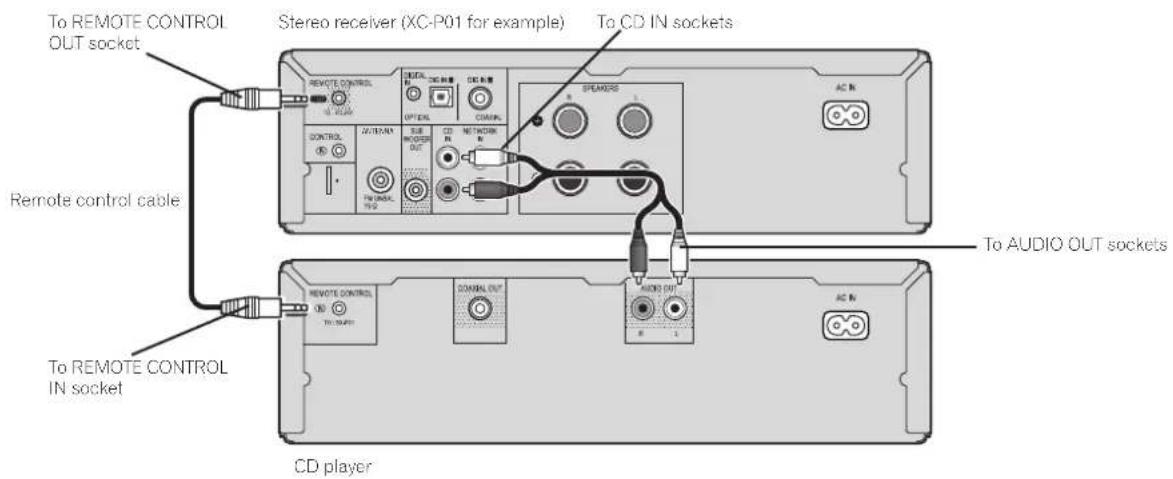
Connect the stereo receiver and CD player with the supplied remote control cable and RCA audio cable.
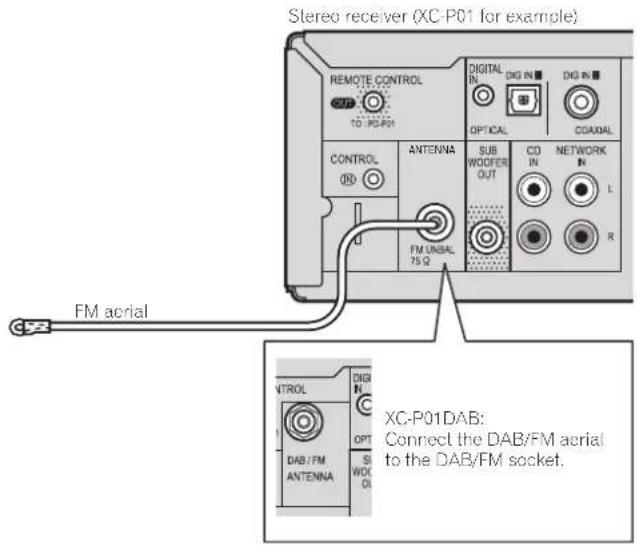
Connecting aerials
Connect the FM aerial wire (XC-P01) or DAB/FM aerial wire (XC-P01DAB) as shown below.
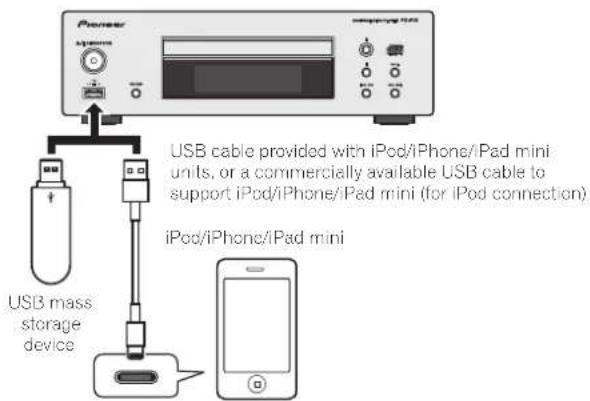
Connecting your iPod/iPhone/iPad mini or USB device
Connect your iPod/iPhone/iPad mini or USB device to the iPod/iPhone/iPad mini/USB terminal on the front panel of the CD player.
Basic control
Installing the unit
- When installing this unit, make sure to put it on a level and stable surface.
Don't install it on the following places:
- on a color TV (the screen may distort)
- near a cassette deck (or close to a device that gives off a magnetic field). This may interfere with the sound.
- in direct sunlight
- in damp or wet areas
- in extremely hot or cold areas
– in places where there is vibration or other movement
– in places that are very dusty or that have hot fumes or oils (such as a kitchen)
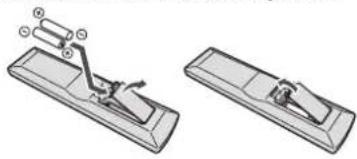
Loading the batteries
The batteries included with this unit are to check initial operations; they may not last over a long period. We recommend using alkaline batteries that have a longer life.
natural_image
Technical line drawing of a mechanical device with two views: top shows a lever mechanism, bottom shows a flat base (no text or symbols)WARNING
- Do not use or store batteries in direct sunlight or other excessively hot place, such as inside a car or near a heater. This can cause batteries to leak, overheat, explode or catch fire. It can also reduce the life or performance of batteries.
CAUTION
- Incorrect use of batteries may result in such hazards as leakage and bursting. Observe the following precautions:
– Never use new and old batteries together.
- Insert the plus and minus sides of the batteries properly according to the marks in the battery case.
– Batteries with the same shape may have different voltages. Do not use different batteries together.
- When inserting the batteries, make sure not to damage the springs on the battery's (-) terminals. This can cause batteries to leak or overheat.
- When disposing of used batteries, please comply with governmental regulations or environmental public institution's rules that apply in your country/area.
Switching the unit between standby and on
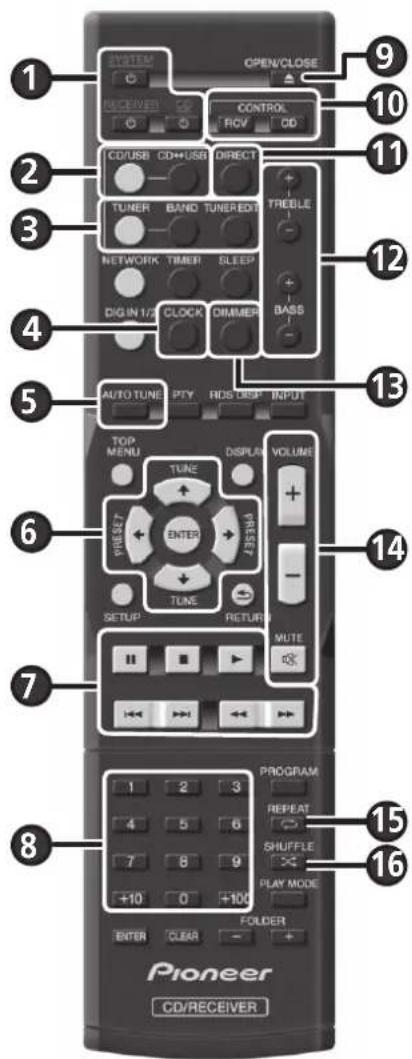
- Press ⏻ SYSTEM (1) to turn on the stereo receiver and CD player.
- Press ⏻ RECEIVER (1) to turn on the stereo receiver only.
- Press ⏻ CD (1) to turn on the CD player only.
Setting the clock
- Press CONTROL RCV (10).
- Press CLOCK (④) and press ENTER (⑥).
- Use / and ENTER (6) to adjust the day of the week and time.
Control the display brightness
- Press CONTROL RCV (for the stereo receiver) (10) or CONTROL CD (for the CD player) (10).
- Press DIMMER (13) to switch the display brightness in four steps.
Control sound and adjust volume
- Press DIRECT (1) to listen to the sound source in the original sound quality.
- Press TREBLE +/- (12) or BASS +/- (12) to adjust sound quality.
- Press VOLUME +/- (14) to adjust the listening volume.
- Press MUTE (14) to mute the sound.
Listening to the audio CD
- Press CD/USB (②).
- Press CD ↔USB (②) to select CD function for the CD player.
- Press ▲ OPEN/CLOSE (9) to open the disc tray, and place a disc.
- Press ▶ (⑦) to start playback. Use numeric buttons (⑧) or ◀◀/▶▶I (⑨) to select a track.
- Press REPEAT (15) or SHUFFLE (16) to adjust the play mode.
Playing iPod/iPhone/iPad mini/USB device
- Press CD/USB (②).
- Press CD ↔USB (②) to select iPod/USB function for the CD player, and connect your iPod/iPhone/iPad mini/USB device to the iPod/iPhone/iPad mini/USB terminal.
- Press ▶ (⑦) to start playback.
Listening to the radio
- Press TUNER (③).
- Press CONTROL RCV (10), and press BAND (3) to select a band (FM MONO or FM STEREO).
- Use TUNE ↑/↓ (6) to tune.
Listening to DAB (XP-01DAB only)
- Press TUNER (③).
- Press CONTROL RCV (10), and press BAND (3) to select DAB.
- Press TUNE ↑/↓ (6) to select a DAB service, and press ENTER (6).
- When listening to DAB for the first time, press AUTO TUNE (5) instead of the operation in step 3.
Français
natural_image
Technical line drawing of a mechanical device with two views (no text or symbols)AVERTISSEMENT
natural_image
Technical line drawing of a mechanical device with two views (no text or symbols)ADVERTENCIA
natural_image
Technical illustration of a mechanical device with two views (no text or symbols)WARNING
natural_image
Technical line drawing of a mechanical device with two views (no text or symbols)AVVERTENZA
KLASSE 1 LASERPRODUCT
D58-5-2-2a_A1_NI
WAARSCHUWING
OM HET GEVAAR VOOR EEN ELEKTRISCHE SHOCK TE VOORKOMEN, DEKSEL (OF RUG) NIET VERWIJDEREN. AAN DE BINNENZIJDE BEVINDEN ZICH GELN ELEMENTEN DIE DOOR DE GELBRUIKER KUNNEN BEDIEND WORDEN. ENKEL DOOR GEKWALIFICEERD PERSONEEL TE BEDIENEN.
D3-4-2-1-1 B1 NI
LET OP
WAARSCHUWING NETSNOER
natural_image
Technical line drawing of a mechanical device with two views (no text or symbols)WAARSCHUWING
natural_image
Technical illustration of a mechanical device with two views (top and side), no visible text or symbolsПРЕДУПРЕЖДЕНИЕ
Discover the benefits of registering your product online at http://www.pioneer.co.uk (or http://www.pioneer.eu).
Download an electronic version of this manual from our website.
© 2014 PIONEER HOME ELECTRONICS CORPORATION.
All rights reserved.
© 2014 PIONEER HOME ELECTRONICS CORPORATION.
PIONEER HOME ELECTRONICS CORPORATION
1-1, Shin-ogura, Saiwai-ku, Kawasaki-shi, Kanagawa 212-0031, Japan
PIONEER ELECTRONICS (USA) INC.
P.O. BOX 1540, Long Beach, California 90801-1540, U.S.A. TEL: (800) 421-1404
PIONEER ELECTRONICS OF CANADA, INC.
340 Ferrier Street, Unit 2, Markham, Ontario L3R 2Z5, Canada TEL: 1-877-283-5901, 905-479-4411
PIONEER EUROPE NV
Haven 1087, Keetberglaan 1, B-9120 Melsele, Belgium TEL: 03/570.05.11
PIONEER ELECTRONICS ASIACENTRE PTE. LT D.
253 Alexandra Road, #04-01, Singapore 159936 TEL: 65-6472-7555
PIONEER ELECTRONICS AUSTRALIA PTY. LTD.
5 Arco Lane, Heatherton, Victoria, 3202, Australia, TEL: (03) 9586-6300
PIONEER ELECTRONICS DE MEXICO S.A. DE C.V.
Blvd.Manuel Avila Camacho 138 10 piso Col.Lomas de Chapultepec, Mexico, D.F. 11000 TEL: 55-9178-4270
K002* B5 Ru
Сделано в Китае

- Information for users on collection and disposal of old equipment and used batteries
- WARNING
- Operating Environment
- CAUTION
- POWER-CORD CAUTION
- VENTILATION CAUTION
- Condensation
- Connecting the speakers
- Connecting playback components
- Connecting aerials
- Connecting your iPod/iPhone/iPad mini or USB device
- Basic control
- Installing the unit
- Loading the batteries
- Switching the unit between standby and on
- Setting the clock
- Control the display brightness
- Control sound and adjust volume
- Listening to the audio CD
- Playing iPod/iPhone/iPad mini/USB device
- Listening to the radio
- Listening to DAB (XP-01DAB only)
- Français
- AVERTISSEMENT
- ADVERTENCIA
- AVVERTENZA
- WAARSCHUWING
- LET OP
- WAARSCHUWING NETSNOER
- ПРЕДУПРЕЖДЕНИЕ
- PIONEER HOME ELECTRONICS CORPORATION
- PIONEER ELECTRONICS (USA) INC.
- PIONEER ELECTRONICS OF CANADA, INC.
- PIONEER EUROPE NV
- PIONEER ELECTRONICS ASIACENTRE PTE. LT D.
- PIONEER ELECTRONICS AUSTRALIA PTY. LTD.
- PIONEER ELECTRONICS DE MEXICO S.A. DE C.V.
Brand : PIONEER
Model : XCP1DAB
Category : Audio System