PD50AE - Audio System PIONEER - Free user manual and instructions
Find the device manual for free PD50AE PIONEER in PDF.



| Product Type | CD/SACD Player with USB DAC |
| Brand | Pioneer |
| Model | PD50AE |
| Supported Playback Formats | CD, SACD (2-channel), CD-R/RW, DVD±R/RW, MP3, WMA, AAC, WAV, AIFF, FLAC, ALAC, DSD (DSF/DFF), MQA |
| Signal-to-Noise Ratio | CD: 116 dB or more (A-weighted), SACD: 116 dB or more (A-weighted) |
| Frequency Response | CD: 2 Hz - 20 kHz, SACD: 2 Hz - 50 kHz (-3 dB) |
| Total Harmonic Distortion | CD: 0.002% or less, SACD: 0.002% or less |
| Analog Output | RCA: 2.3 Vrms (1 kHz, 0 dB) / 100 Ω impedance |
| Coaxial Digital Output | 0.5 Vp-p / 75 Ω |
| Optical Digital Output | -14 to -21 dBm / 660 nm |
| USB DAC Input | Type B, USB Audio Class 1.0 |
| Power Supply | AC 220-230 V, 50/60 Hz |
| Power Cord | Detachable, supplied |
| Remote Control | Included (RC-980C), AAA/R03 batteries × 2 |
| Advanced Audio Functions | DIRECT mode, UP SAMPLING, 3 digital filter types, LOCK RANGE adjustment |
| Programmable Playback | Yes, up to 24 tracks |
| Random and Repeat Playback | Yes |
| Maintenance and Cleaning | Wipe with a soft cloth; for stains, use a cloth moistened with a diluted neutral detergent, then wipe with a dry cloth. Avoid alcohol, thinners, benzene. |
| Electrical Safety | Do not open the device; do not expose to water or moisture; disconnect the power cord if not used for an extended period. |
| Repairability | No user-serviceable parts. Refer all servicing to qualified personnel. |
| Warranty | General household use; commercial use may incur repair charges even under warranty. |
Frequently Asked Questions - PD50AE PIONEER
User questions about PD50AE PIONEER
0 question about this device. Answer the ones you know or ask your own.
Ask a new question about this device
Download the instructions for your Audio System in PDF format for free! Find your manual PD50AE - PIONEER and take your electronic device back in hand. On this page are published all the documents necessary for the use of your device. PD50AE by PIONEER.
USER MANUAL PD50AE PIONEER
PD-50AE Instruction Manual




Pioneer
EN F E S I D N S
Before Start
Safety Information 2
What's in the box 3
Part Names
Front Panel 4
Rear Panel 5
Remote Controller 6
Display 7
Install
Connections with an amplifier 8
Connecting the power cord, etc. 11
Playback
Playing discs 12
Using this unit as a D/A converter 14
Adjusting sound quality 15
Advanced Setup
Advanced Settings. 16
Others
Troubleshooting 17
Other notes. 18
General Specifications 19
> Before Start > Part Names > Install > Playback
Advanced Setup | Others
Safety Information

WARNING
RISK OF ELECTRICSHOCK
□
RISQUE
AVIS
ECHOES


The lightning flash with arrowhead symbol, within an equilateral triangle, is intended to alert the user to the presence of uninsulated "dangerous voltage" within the product's enclosure that may be of sufficient magnitude to constitute a risk of electric shock to persons.

The exclamation point within an equilateral triangle is intended to alert the user to the presence of important operating and maintenance (servicing) instructions in the literature accompanying the appliance.
CAUTION:
TO PREVENT THE RISK OF ELECTRIC SHOCK, DO NOT REMOVE COVER (OR BACK). NO USER-SERVICEABLE PARTS INSIDE. REFER SERVICING TO QUALIFIED SERVICE PERSONNEL.
WARNING
TO PREVENT THE RISK OF ELECTRIC SHOCK, DO NOT REMOVE COVER (OR BACK). NO USER-SERVICEABLE PARTS INSIDE. REFER SERVICING TO QUALIFIED SERVICE PERSONNEL.
This equipment is not waterproof. To prevent a fire or shock hazard, do not place any container filled with liquid near this equipment (such as a vase or flower pot) or expose it to dripping, splashing, rain or moisture.
To prevent a fire hazard, do not place any naked flame sources (such as a lighted candle) on the equipment.
Do not use or store batteries in direct sunlight or other excessively hot place, such as inside a car or near a theater. This can cause batteries to leak, overheat, explode or catch fire. It can also reduce the life or performance of batteries.
Store small parts out of the reach of children and infants. If accidentally swallowed, contact a doctor immediately.
Slots and openings in the cabinet are provided for ventilation to ensure reliable operation of the product, and to protect it from overheating. To prevent fire hazard, the openings should never be blocked or covered with items (such as newspapers, tablecloths, curtains) or by operating the equipment on thick carpet or a bed.
Risk of explosion if battery is replaced by an incorrect type. Risk of explosion if disposal of a battery into fire or a hot oven, or mechanically crushing or cutting of a battery.
Precautions
If you install the apparatus in a built-in installation, such as a bookcase or rack, ensure that there is adequate ventilation.
Leave 20cm (8^) of free space at the top and sides and 10cm(4^) at the rear. The rear edge of the shelf or board above the apparatus shall be set 10cm(4^) away from the rear panel or wall, creating a flue-like gap for warm air to escape.
Operating Environment
Operating environment temperature and humidity: +5^ to +35^ (+41^ to +95^) ; less than 85% RH (cooling vents not blocked) Do not install this unit in a poorly ventilated area, or in locations exposed to high humidity or direct sunlight (or strong artificial light).
Important Notice
The model number and serial number of this equipment are on the rear or bottom. Record these numbers on your enclosed warranty card and keep in a safe place for future reference.
CAUTION
The power switch button on this unit will not completely shut off all power from the AC outlet. Since the power cord serves as the main disconnect device for the unit, you will need to unplug it from the AC outlet to shut down all power. Therefore, make sure the unit has been installed so that the power cord can be easily unplugged from the AC outlet in case of an accident. To avoid fire hazard, the power cord should also be unplugged from the AC outlet when left unused for a long period of time (for example, when on vacation).
This product is for general household purposes. Any failure due to use for other than household purposes (such as long-term use for business purposes in a restaurant or use in a car or ship) and which requires repair will be charged for even during the warranty period.
Power-Cord Caution
Handle the power cord by the plug. Do not pull out the plug by tugging the cord and never touch the power cord when your hands are wet as this could cause a short circuit or electric shock. Do not place the unit, a piece of furniture, etc., on the power cord, or pinch the cord. Never make a knot in the cord or tie it with other cords. The power cords should be routed such that they are not likely to be stepped on. A damaged power cord can cause a fire or give you an electrical shock. Check the power cord once in a while. When you find it damaged, ask your nearest our authorized service center or your dealer for a replacement.
CAUTION
This product is a class 1 laser product classified under the Safety of laser products, IEC 60825-1:2007.
CLASS 1 LASER PRODUCT
Information for users on collection and disposal of old equipment and used batteries
(Symbol for equipment)
(Symbol examples) for batteries

m = 311 ;


These symbols on the products, packaging, and/or accompanying documents mean that used electrical and electronic products and batteries should not be mixed with general household waste.
For proper treatment, recovery and recycling of old products and used batteries, please take them to applicable collection points in accordance with your national legislation.
By disposing of these products and batteries correctly, you will help to save valuable resources and prevent any potential negative effects on human health and the environment which could otherwise arise from inappropriate waste handling.
For more information about collection and recycling of old products and batteries, please contact your local municipality, your waste disposal service or the point of sale where you purchased the items.
These symbols are only valid in the European Union.
For countries outside the European Union:
If you wish to discard these items, please contact your local authorities or dealer and ask for the correct method of disposal.
WEEE
http://www.onkyo.com/manual/week/week.pdf
> Before Start > Part Names > Install > Playback
Advanced Setup | Others
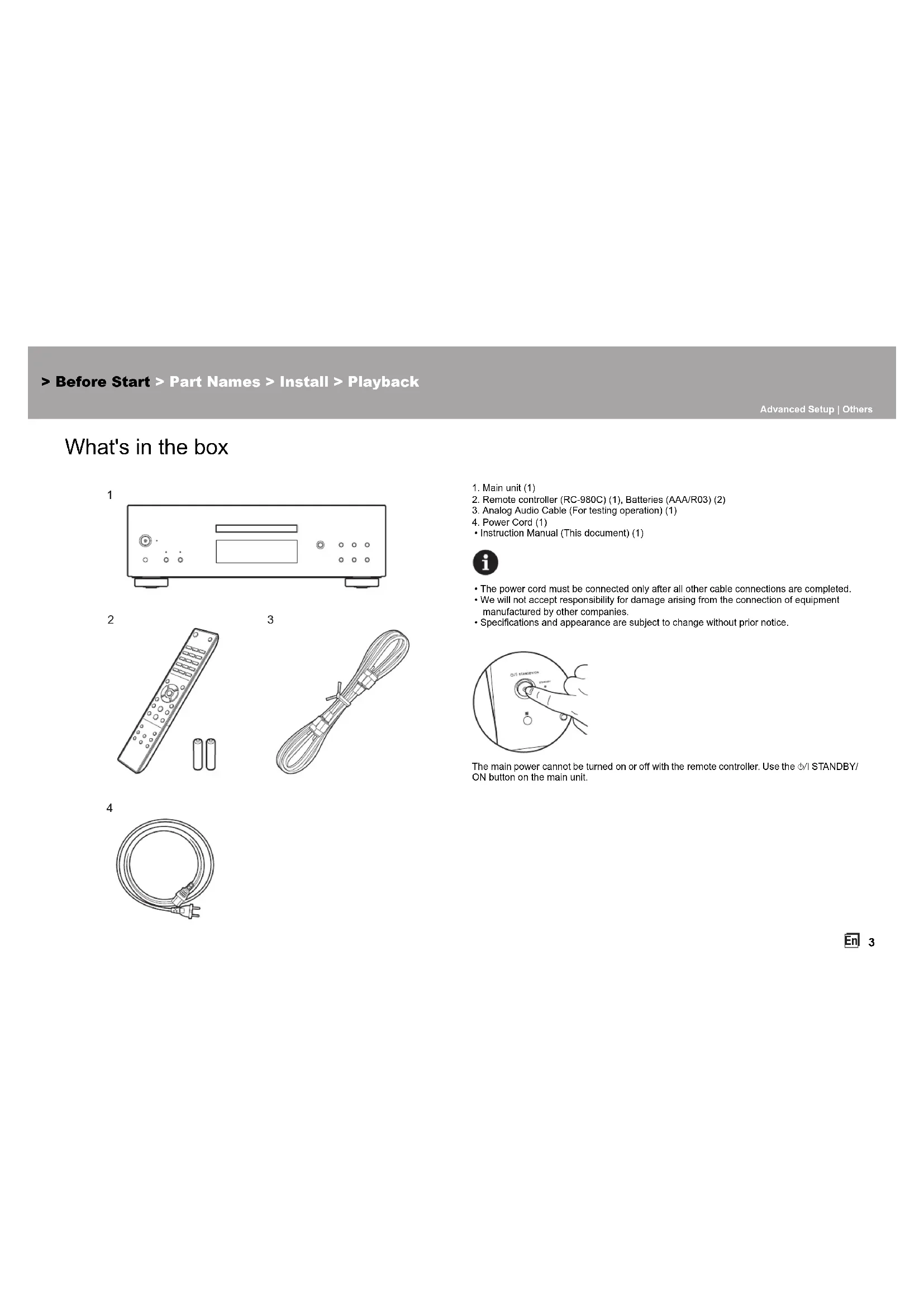
What's in the box
1
2
3
4
- Main unit (1)
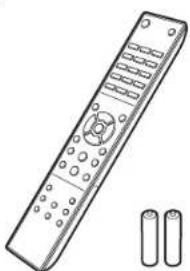
- Remote controller (RC-980C) (1), Batteries (AAA/R03) (2)
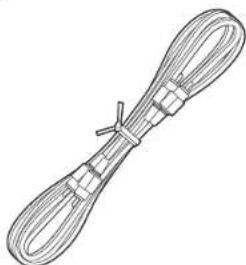
- Analog Audio Cable (For testing operation) (1)
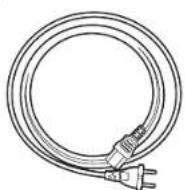
- Power Cord (1)
- Instruction Manual (This document) (1)

The power cord must be connected only after all other cable connections are completed.
- We will not accept responsibility for damage arising from the connection of equipment manufactured by other companies.
- Specifications and appearance are subject to change without prior notice.
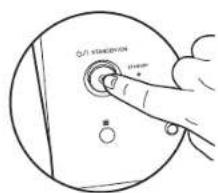
The main power cannot be turned on or off with the remote controller. Use the ON button on the main unit.
Before Start
PartNames
Install
Playback
Advanced Setup | Others
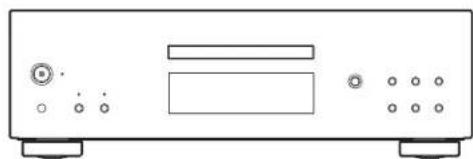
Front Panel
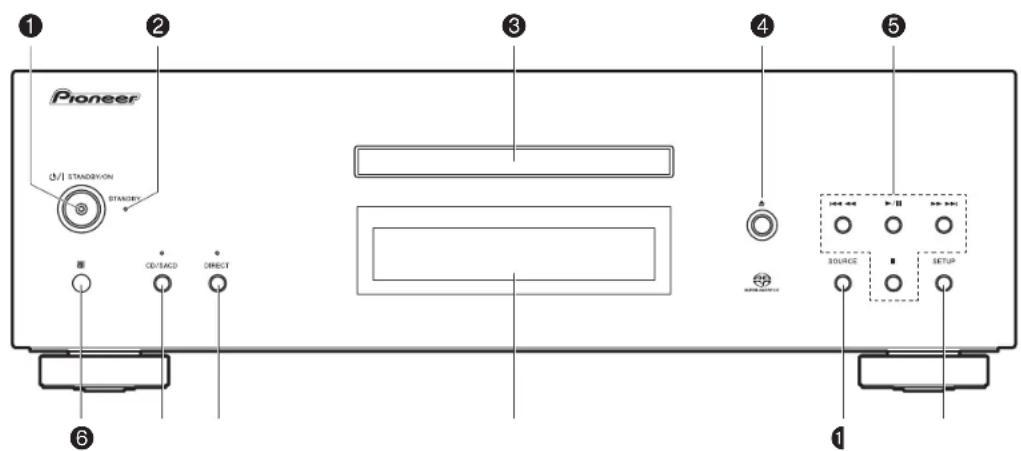
- STANDBY/ON button/indicator: Switch the main power of the unit on and off. When starting up the unit, the indicator in the center of the button lights blue.
- STANDBY indicator: Lights red when the unit is in standby mode.
- Disc tray: Place discs here. 8-cm discs can also be used.
- button: Open or close the disc tray.
- Play buttons:
Return to the beginning of the track being played. Press again to move to the track before. Press and hold to rewind the track quickly.
▶II:Play or pause play.
▶▶▶: When pressed during play, move to the next track. Press and hold to fast-forward through the track.
: This button stops playback.
6. Remote control sensor
- The reception range of the remote controller is within a distance of approx. 16^ / 5m and an angle of 20^ in vertical direction and 30^ to right and left.
- CD/SACD button/indicator: Switch between CD/SACD as the source. When playing a hybrid SACD, the layer being played switches if you press this during play. (→P18) The indicator lights blue when SACD is selected.
- DIRECT button/indicator: Switch the DIRECT mode ON and OFF. ( P15) The indicator lights blue when the DIRECT mode is ON.
- Display (→P7)
- SOURCE button: Switches the source to be played.
- SETUP button: Displays the SETUP menu. ( P16)
Before Start >Part Names >Install >Playback
Advanced Setup | Others
Rear Panel
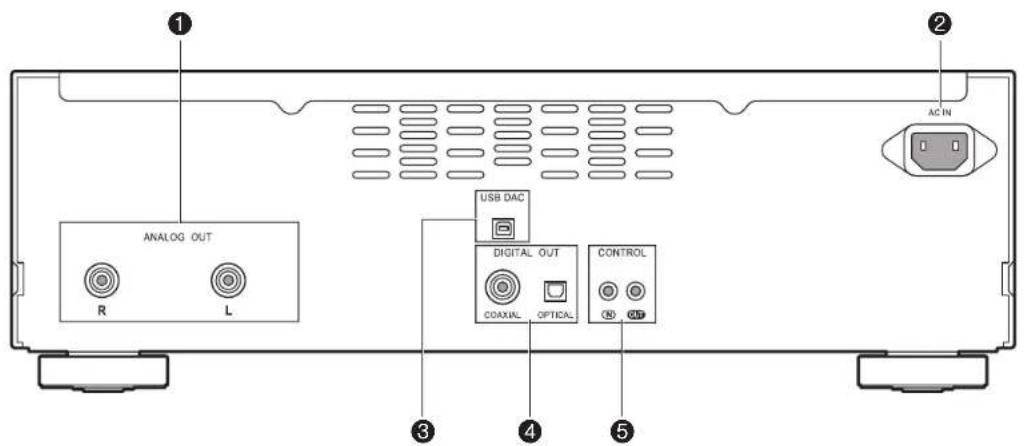
- ANALOG OUT jack: Use an analog audio cable to connect an integrated amplifier, for example.
- AC IN: Connect the supplied power cord.
- USB DAC port: Use a USB cable (A-B type) to connect a computer.
- DIGITAL OUT OPTICAL/COAXIAL jack: Use a digital optical cable or digital coaxial cable to connect an integrated amplifier, for example.
- CONTROL IN/OUT jack: By connecting Pioneer brand amplifiers and audio devices, centralized control is possible, for example you can control the amplifiers and audio devices.
Before Start
PartNames
Install
Playback
Advanced Setup | Others
Remote Controller
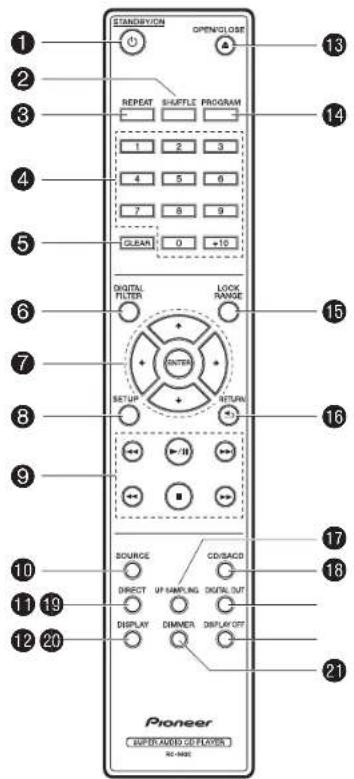
- STANDBY/ON button: When the main power of the unit is on, this turns the unit on or into standby mode. The main power cannot be turned on or off with the remote controller.
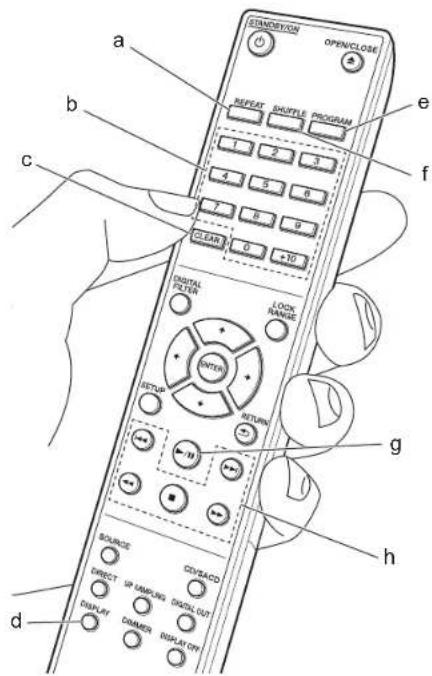
- SHUFFLE button: Set shuffle play. (→P13)
REPEAT button: Set repeat play. (→P13) - Numbered buttons: Use to directly input the track number of a music CD when selecting tracks. Also used to enter track numbers for program play.
- CLEAR button: Clear the content set for program play. ( P13)
- DIGITAL FILTER button: Select one of three types of DIGITAL FILTER. ( 15)
- Cursor, ENTER button: Select the item with the cursors and press ENTER to confirm.
- SETUP button: Displays the SETUP menu. ( P16) 9. Play buttons:
Return to the beginning of the track being played. Press again to move to the track before.
▶II:Play or pause play.
:Move to the next track.
Press and hold to fast-rewind through the track being played.
■:Stopplayback
Press and hold to fast-forward through the track being played. - SOURCE button: Switches the source to be played
11.DIRECT button: Switch the DIRECT mode on and off.
(→P15)
12.DISPLAY button: Switch the information on the display. - Depending on the source, the operation may not start
13.▲OPEN/CLOSE button: Open or close the disc tray.
14.PROGRAM button:Used for program play. ( P13)
15.LOCK RANGE button: Displays the LOCK RANGE ADJUST settings screen. ( P15) -
RETURN button: Returns the display to the previous state.
-
UP SAMPLING button: Switch the UP SAMPLING feature ON and OFF. (P15)
- CD/SACD button: Switch between CD/SACD as the source. When playing a hybrid SACD, the layer being played switches if you press this during play. (→P18)
19.DIGITAL OUT button: Switch the digital output ON and OFF. (→P16)
20.DISPLAY OFF button: Press to turn off the display of this unit. Press again to turn the display on. - DIMMER button: You can adjust the brightness of the display in three steps. (Default Value: Level 3)
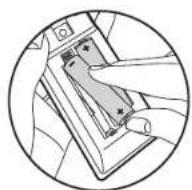
Match the polarity when inserting the batteries.
Before Start >Part Names >Install >Playback
Advanced Setup | Others
Display
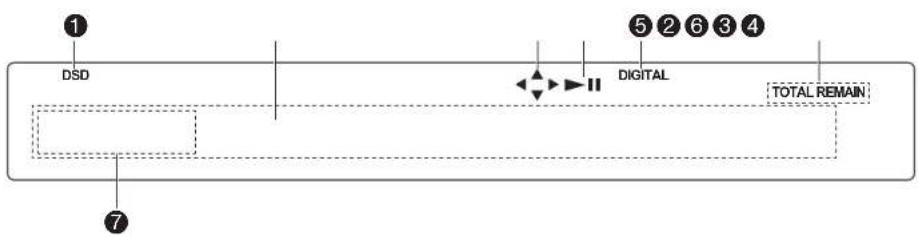
- Lights during play of SACD and DSD.
- Message display: Displays information about tracks and menus.
- Lights when operations with the cursor buttons on the remote controller are possible.
- Displays the play status.
- Lights when the digital audio output setting is on. ( P16)
- Lights when showing such items as the remaining time for a track or the disc, or the total time of the disc.
- Display when an MQA file or stream is played. For details, refer to "Playing MQA". (→P18)
Before Start
Part Names
Install
Playback
Advanced Setup | Others
Connections with an amplifier
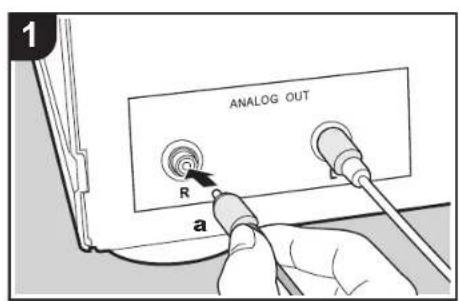
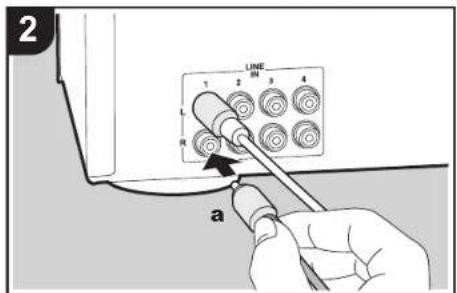
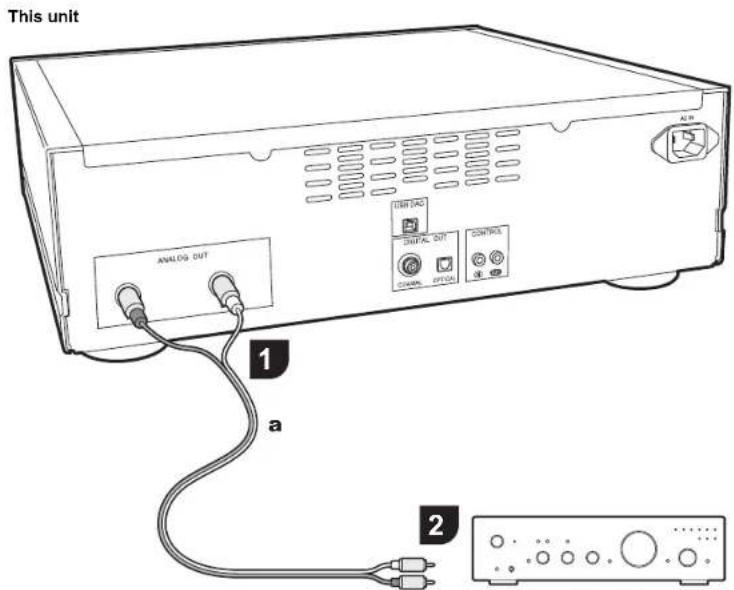
Integrated amplifier, AV receiver, etc.
Play the audio from discs played on this unit and from devices connected to this unit through speaker systems connected to integrated amplifiers or AV receivers. Connect to suit the input jacks on your amplifier.
Connecting with an analog audio cable
The signal is converted to analog in the D/A converter of this unit and then output to an integrated amplifier, for example. Connect the LINE IN jacks on an integrated amplifier to the ANALOG OUT jack (RCA jack) on this unit.
Before Start
Part Names
Install
Playback
Advanced Setup | Others
Connecting with a digital optical cable
The signal is converted to analog in the D/A converter of the integrated amplifier, for example. Connect the OPTICAL IN jack on an integrated amplifier to the DIGITAL OUT OPTICAL jack on this unit.
The audio of SACD and DSD or input from USB DAC is not output from the DIGITAL OUT OPTICAL jack of this unit.
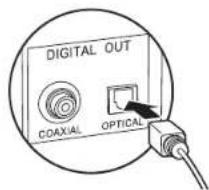
The digital signals that can be output by this unit are linear PCM signals with a sampling frequency and quantization bit rate of 192kHz / 24 bit (operation may not be possible with all connected devices or environments).
Connecting with a digital coaxial cable
The signal is converted to analog in the D/A converter of the integrated amplifier, for example. Connect the COAXIAL IN jack on an integrated amplifier to the DIGITAL OUT COAXIAL jack on this unit.
The audio of SACD and DSD or input from USB DAC is not output from the DIGITAL OUT COAXIAL jack of this unit.
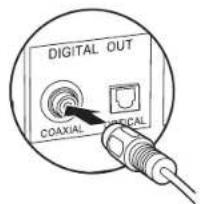
The digital signals that can be output by this unit are linear PCM signals with a sampling frequency and quantization bit rate of 192kHz / 24 bit (operation may not be possible with all connected devices or environments).
> Before Start > Part Names > Install >Playback
Advanced Setup | Others
The control jack
If you have multiple Pioneer brand devices, and if they have CONTROL IN/OUT jacks, you can centrally control them through the remote controller sensor on the amplifier, for example. By connecting with monaural miniplug cables (without resistors) as shown in the diagram, then even if this unit and other devices are put in locations where they cannot receive the remote controller signal, you can still use the remote controller to control this unit or other devices by pointing the remote controller at the remote controller sensor on the amplifier, for example.
- Also make sure to connect with the analog audio cable. Centralized control cannot work correctly with only the control jack connection.
- The remote controller sensor on this unit stops working if you connect a monaural miniplug cable (without resistor) to the CONTROL IN jack of this unit.
- The remote controller sensors on the other devices stop working if you connect a monaural miniplug cable (without resistor) to the CONTROL OUT jack of this unit.
- If a Pioneer brand network player and amplifier is connected by the CONTROL IN/OUT jack, you can perform basic operations on this unit, the network player, and amplifier on a smart phone app over a network.
(One example of connection)
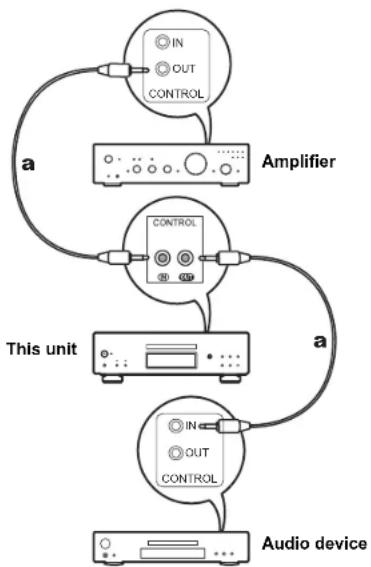
a Monaural Miniplug Cables (without resistors)
Before Start >Part Names >Install >Playback
Advanced Setup | Others
Connecting the power cord, etc.
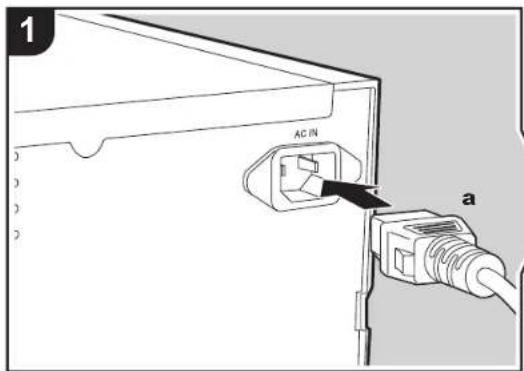
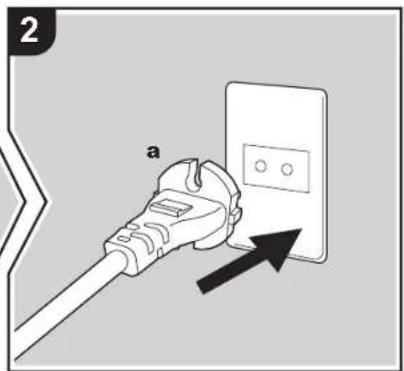
Power cord connection
This model includes a removable power cord. The power cord must be connected only after all other connections are completed. Make sure you first connect the power cord to AC IN terminal of the unit and then connect to the outlet. Always disconnect the outlet side first when disconnecting the power cord.
Starting up
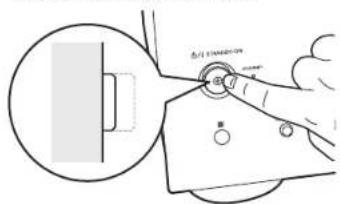
Press / 1 STANDBY/ON on the main unit.
- When starting up, press until the button goes in. When starting up the unit, the STANDBY/ON indicator in the center of the button lights blue.
> Before Start > Part Names > Install > Playback
Advanced Setup | Others
Playing discs
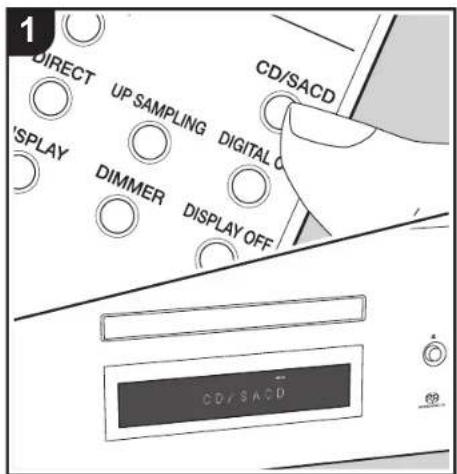
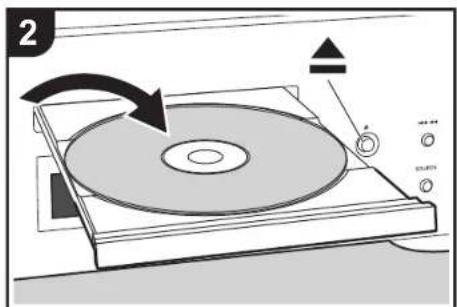
Refer to ( P18) for discs you can play on this unit.
Playing music CDs
Perform the following procedure when the unit is on.
- Press CD/SACD on the remote controller to set the source to CD/SACD.
- Press on the main unit to open the disc tray, and after putting the disc on the tray, press again to close the tray.
- Press /II (g) on the remote controller to start play.
- Use play buttons (h) to stop play or choose tracks to play. You can also select by entering the track number with number buttons (b). When entering a 2-digit track number, press the +10 button as many times as the value of the second (tens) digit, then press the value of the first digit. If you press DISPLAY (d), you can switch the display to show the elapsed time or remaining time of the disc, etc.
The content displayed depends on the disc.
Playing a disc with music files
Perform the following procedure when the unit is on.
- Press CD/SACD on the remote controller to set the source to CD/SACD.
- Press on the main unit to open the disc tray, and after putting the disc on the tray, press again to close the tray.
- Press (g) on the remote controller to start play.
- Use play buttons (h) to stop play or choose tracks to play. If you press DISPLAY (d), you can switch the display to show the elapsed time or remaining time of the disc, the file name of the track, or the track name, etc.
The content displayed depends on the disc and file.
-
Track name display is supported with MP3/WMA/FLAC/AAC (M4A only)/DSD (DSF only) format music files only.
-
Characters that cannot be displayed by this unit appear as " *".
> Before Start > Part Names > Install > Playback
Advanced Setup | Others
Repeat play
- Repeatedly press REPEAT (a) during play to display or on the display.
:Repeat play of all tracks.
: Repeat play of the being played track.
To cancel repeat play, press REPEAT (a) several times to
display on the display.
Shuffle play
- Press SHUFFLE (f) during play or stop to display on the display.
× : Play all tracks randomly.
To cancel shuffle play, press SHUFFLE (f) to display
on the display.
Program play
You can select the order to play tracks on a music CD.
- Press PROGRAM (e) while stopped.
"P00" is displayed when nothing has been registered.
Enter the track number you want to register with the
number buttons (b). When entering a 2-digit track
number, press the +10 button as many times as the value
of the second (tens) digit, then press the value of the first
dinit. The number in "P00" increases each time you
eight. This number is 10 . Increased each time youregister a track . Up to 24 tracks can be registered .
To play the registered program, press (g) on the remote controller.
If you press CLEAR (c) while registering tracks, the tracks are cleared in order, starting from the one you registered last.
- If you press PROGRAM (e) while registering tracks, all the tracks you registered are cleared.
- If the total play time of the registered program exceeds 99 minutes 59 seconds, ":" is displayed on the display.
Specifications of files that can be played
| Sampling rates Bitrates | Quantization bit | Types of discs that can be played | Extension | ||||
| CD-R/ CD-RW | DVD-R/ DVD-RW | DVD+R/ DVD+RW | |||||
| MP3 44.1/48 kHz | Between 8 kbps and 320 kbps and VBR. | - | ✓ | ✓ | ✓ | . | |
| WMA | 44.1/48 kHz | Between 5 kbps and 192 kbps and VBR. | - | ✓ | ✓ | ✓ | .wma |
| AAC | 44.1/48/88.2/96 kHz | Between 8 kbps and 320 kbps and VBR. | - | ✓* | ✓ | ✓ | .aac/.m4a |
| WAV | 44.1/48/88.2/96/ 176.4/192 kHz | - | 8/16/24 bit | ✓* | ✓ | ✓ | .wav |
| AIFF | 44.1/48/88.2/96/ 176.4/192 kHz | - | 8/16/24 bit | ✓* | ✓ | ✓ | .aif/.aiff |
| FLAC | 44.1/48/88.2/96/ 176.4/192 kHz | - | 8/16/24 bit | ✓* | ✓ | ✓ | .flac |
| ALAC | 44.1/48/88.2/96/ 176.4/192 kHz | - | 8/16/24 bit | ✓* | ✓ | ✓ | .m4a |
| DSD | 2.8/5.6 MHz | - | 1 bit | - | ✓ | ✓ | .dsf/.dff |
| MQA | 44.1/48/88.2/96/176.4/ 192/352.8/384 kHz | - | 8/16/24 bit | ✓* | ✓ | ✓ | .flac/.wav |
- When playing files exceeding 48 kHz, use files that have been recorded on a DVD disc.
Notes regarding all types of files
- Use CD/CD-R/CD-RW discs that conform to the ISO9660 level 1/level 2 CD-ROM file system standard and that are recorded using the system conforming to extended formatting (Joliet and Romeo). When using DVD discs, then along with the above, use discs recorded using the UDF file system.
- Folder structure is limited to eight levels and the maximum number of tracks is 3000. However, depending on the folder structure, not all folders and tracks may be recognized and played.
Notes regarding specific types of files
- Encode WMA files using applications certified by the Microsoft Corporation of the United States. Operation may not be correct if you use uncertified applications.
This unit supports play of AAC files with the extension .m4a" that have been encoded using iTunes. However, play not be possible if the file has been protected with DRM copy protect (copyright protection) or with some versions of iTunes used for encoding.
WAV files include uncompressed PCM digital audio. - AIFF files include uncompressed PCM digital audio.
>Before Start >Part Names Install Playback
Advanced Setup | Others
Using this unit as a D/A converter
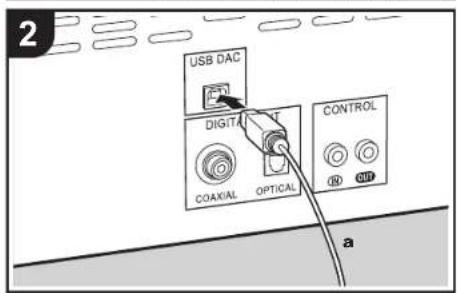
You can convert the digital audio of the PC to analog on this unit, and then output it from the ANALOG OUT jacks.
Switching the source
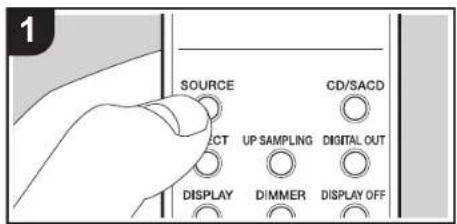
- Press SOURCE of this unit or the remote controller to switch the source of the unit to "USB DAC".

Connections
- Use an A-B type USB cable to connect a computer.
Playback
- Start play on the player.
The digital signals that can be input by this unit are linear PCM signals with a sampling frequency and quantization bit rate of 48 kHz/32 bit (operation may not be possible with all connected devices or environments).
- Supported OSs of PC to be connected are Windows10 and Mac OS X.
- With OSs other than the supported ones, the sound may be interrupted or may not come out.
- Depending on the usage environment, playback may not be performed normally.
> Before Start > Part Names > Install > Playback
Advanced Setup | Others
Adjusting sound quality
Reproduce the original sound faithfully (DIRECT mode)
Processing that affects sound quality is shut down so sound closer to the original is reproduced.
(Default Value): OFF
1. Press DIRECT (d).
- The DIRECT indicator on the front of the main unit when the DIRECT mode is ON.
- When the DIRECT mode is ON, DIGITAL OUT is turned OFF.
- In DIRECT mode, the display turns off automatically while playing CD or SACD, or connecting USB DAC.
- When switching the setting during playback, the audio may be interrupted.
DIGITAL FILTER
Select one of three types of DIGITAL FILTER.
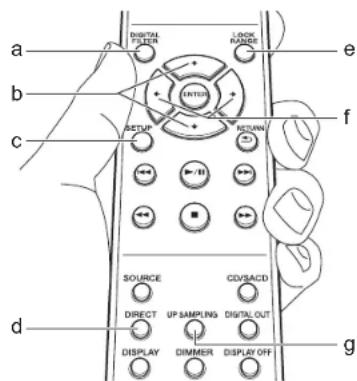
- The setting changes each time you press DIGITAL FILTER (a).
"SLOW": Soft and fluid sound
"SHARP" (Default Value): Sound with more structure and firmness
"SHORT": Sound that starts quick and seems to move forward
- You can also press SETUP (c) to display the DIGITAL FILTER setting screen from the SETUP menu. In this case, select the setting value with ± / ± (b) on the remote controller.
- The setting is fixed to "SHORT" while playing MQA-CD or a disc containing music files, or using USB DAC.
- When switching the setting during playback, the audio may be interrupted.
UP SAMPLING
1 Increasing the sampling frequency helps achieve sound reproduction with a higher degree of clarity. (Default Value): OFF
- You can also press UP SAMPLING (g) to turn the feature ON and OFF.
- This function cannot be used when the DIRECT mode is set to ON or during playback of SACD or DSD.
- The setting is fixed to "ON" while playing MQA-CD or a disc containing music files, or using USB DAC.
- When switching the setting during playback, the audio may be interrupted.
Adjusting the lock range (LOCK RANGE ADJUST)
Sound quality is improved by narrowing the lock range to reduce incidental sounds. However, narrowing the lock range too much can cause interruptions to sound and noise. Adjust the lock range while listening to some audio. (Default Value): RANGE 6
-
Press LOCK RANGE (e).
-
Select the setting value with (f) on the remote controller.
"RANGE 6" (broad) to "RANGE 1" (narrow)
- You can also press SETUP (c) to display the LOCK
RANGE ADJUST setting screen from the SETUP menu. - The setting is fixed to "6" while playing MQA-CD or a disc containing music files, or using USB DAC.
- LOCK RANGE ADJUST has no effect on the audio of SACD and DSD.
- When switching the setting during playback, the audio may be interrupted.
> Before Start > Part Names > Install > Playback
Advanced Setup
Other
Advanced Settings
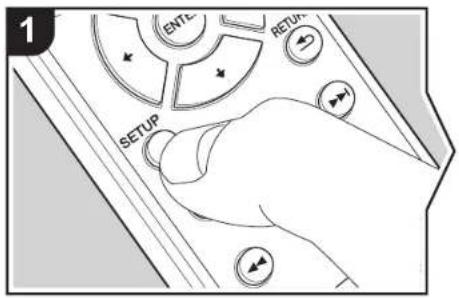
The unit allows you to configure advanced settings to provide you with an even better experience. 1. Press SETUP on the remote controller.
AUTO STANDBY
- Select the content or the setting with the cursors on the remote controller and press ENTER to confirm your selection. To return to the previous screen, press RETURN.
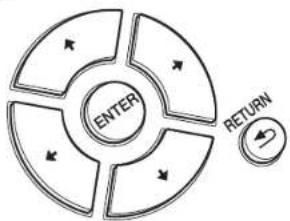
3. To exit the settings, press SETUP.
AUTO STANDBY
This setting places the unit on standby automatically after 20 minutes of inactivity without any audio input. "ON" (Default Value): The unit will automatically enter standby mode.
"OFF": The unit will not automatically enter standby mode.
POWER ON PLAY
You can set it so that the disc automatically starts playing when this unit is turned on.
- By using an externally connected auto timer, you can use timer play when the power automatically switches on.
"ON": To play discs automatically "OFF" (Default Value): When discs are not to be played
DIGITAL OUT
Make settings for digital audio output. When not connecting to the DIGITAL OUT OPTICAL/COAXIAL jack, you can listen to even clearer audio by setting this OFF. "ON" (Default Value), "OFF"
DIGITAL FILTER
You can select the type of DIGITAL FILTER. ( P15)
UP SAMPLING
Increasing the sampling frequency helps achieve sound reproduction with a higher degree of clarity. (→P15)
LOCK RANGE ADJUST
Adjust the lock range. ( P15)
> Before Start > Part Names > Install > Playback
Advanced Setup
Others
Troubleshooting
Before starting the procedure
When operation is unstable, problems may be solved by simply turning the power on or to standby or disconnecting/ connecting the power cord, rather than reviewing settings and operations. Try the simple measures on both the unit and the connected device. If the problem isn't fixed after referring to "Troubleshooting", resetting the unit to the status at the time of shipment may solve the problem.
Resetting the unit (this resets the unit settings to the default)
- With the power on and no disc inserted, while pressing and holding on the main unit, press DIRECT.
- "CLEAR" is displayed, the unit switches to standby, and the settings are reset.
CLEAR
■Power
Cannot turn on the unit
- Unplug the power cord from the wall outlet, wait 2 minutes or more, then plug it in again.
The unit turns off unexpectedly
The unit automatically switches to standby when the "AUTO STANDBY" setting in the SETUP menu functions.
The STANDBY indicator on the main unit continues to flash red and operations are not possible
- Unplug the power cord from the wall outlet, wait 2 minutes or more, then plug it in again. The indicator will continue to flash, but press /1 STANDBY/ON on the main unit to turn the main power ON. If this doesn't fix the issue, there may be a malfunction. Unplug the power cord from the wall outlet and contact the dealer or our customer support.
The display doesn't light
- It is possible that the display has been turned off by pressing DISPLAY OFF. Press DISPLAY OFF to turn the display on.
Cannot play discs
- Place the disc in the disc tray so the label is facing up.
- Play may not be possible if the disc is scratched or dirty
Sound files that are protected by copyright cannot be played. - The disc tray opens if you insert a disc that this unit does not support.
Audio
Sound is interrupted
- Narrowing the lock range too much with the LOCK RANGE ADJUST setting can cause interruptions to sound and also may cause noise. Sound interruptions caused by adjustments to the lock range are not covered by our guarantees of operation. Listen to some audio while adjusting the lock range.
There is no digital sound
- Set "DIGITAL OUT" in the SETUP menu to "ON".
The audio of SACD and DSD or input from USB DAC is not digital-output.
Remote Controller
Make sure that the batteries are installed with the correct polarity.
- Install new batteries. Do not mix different types of batteries, or old and new batteries.
- Make sure that this unit is not subjected to direct sunshine or inverter-type fluorescent lights. Relocate if necessary.
- If this unit is installed in a rack or cabinet with colored-glass doors or if the doors are closed, the remote controller may not work reliably.
D/A converter feature
Make sure that the devices are properly connected.
- Play audio compatible with the input jacks on this unit. ( P14)
Cannot play audio from computers
- Cancel the muting on your computer.
- Select this unit in the audio output settings on your computer. If the source of this unit is set to anything other than "USB DAC", the PC cannot detect this unit.
- If there are multiple applications running on the computer, shut down those applications that you are not using.
Sampling frequency is always the same through the USB DAC input
- Depending on the computer settings, even if the sampling frequencies of the files being played are different, they are converted to the same sampling frequency for output.
Computer sounds other than music are heard through the USB DAC input
- Depending on the settings on the computer, sounds such as the computer startup tone or error sounds may be played through this unit.
SACD
- Due to the differences in recording methods, there may be a difference in volume between SACD and CD.
> Before Start > Part Names > Install > Playback
Advanced Setup
Others
Other notes
Discs that can be played
MQA-CD
SACD (Super Audio CD)
(2-channel area only)
CD, CD-R, CD-RW
DVD-R, DVD-R (DL), DVD-RW
DVD+R, DVD+R (DL), DVD+RW
Precautions for Playback
- Compact discs (CDs) with the following logo on the label surface can be used.


Note that some discs may not play back because of the disc characteristics, scratches, contamination or the recording state.
Playing MQA
This unit includes the MQA (Master Quality Authenticated) technology, which enables playback of MQA audio files and streams, delivering the sound of the original master recording.
This unit is a CD player that can recognise an MQA-CD. The built-in MQA decoder will restore the high-resolution signal heard in the studio and confirm it, using the authentication signature.
Visit www.mqa.co.uk/customer/mqacd for more information 'MQA' or 'MQA.' indicates that the product is decoding and playing an MQA stream or file, and denotes provenance to ensure that the sound is identical to that of the source material. 'MQA.' indicates it is playing an MQA Studio file, which has either been approved in the studio by the artist/ producer or has been verified by the copyright owner.
Playing hybrid SACD
Hybrid SACD consist of two layers; the SACD layer and the CD layer. Press CD/SACD to select the layer you want to listen to.
Playing DualDisks
"DualDisk" is a disc with video and audio conforming to the DVD standard on one side, and audio that can be played on a CD player on the other.
On the audio side that is not the DVD side, play may not always be possible due to the fact that the disc does not conform to the physical specifications of standard CDs.
Operations during play
Direct search does not work while playing discs with music data.
Types of discs that cannot be played on this unit DVD VideoDVD Audio,CD-GVideo CDDTS-CD
Notes on discs
- Be careful not to catch your hand or fingers when opening or closing the disc tray.
- Never use discs which have an unusual shape (such as hearts or octagons). These types of discs could jam and damage the unit.
- Some audio CDs with copy-control functionality do not comply with official CD standards. These are special discs and cannot be played with this unit.
- Do not use discs with residue from cellophane tape, rental discs with labels which are peeling off, or discs with decorative labels. This type of disc could get stuck in the unit, or could damage the unit.
- Do not leave a disc having a label printed with an inkjet printer in the unit for a long time. The disc could get stuck in the unit, or could damage the unit.
■Cleaning the player
- Normally, wipe the player with a soft cloth. For tough dirt, apply some neutral detergent diluted in 5 to 6 parts water to a soft cloth, wring out thoroughly, wipe off the dirt, then wipe again with a dry cloth.
Note that getting alcohol, thinner, benzene or insecticide on the player could cause the print and coating to peel off. Also, avoid leaving rubber or vinyl products in contact with the player for long periods of time, as this could damage the cabinet. - When using chemical-impregnated wipes, etc., read the wipe's cautions carefully.
- When dust attached on the disc tray is hard to remove, apply an adhesive tape, etc. to remove the dust.
Precautions when moving the unit
When moving the unit, remove any discs in it and close the disc tray. Then press / STANDBY/ON on the main unit, wait for 10 seconds after [OFF] disappears from the display, and then unplug the power cord. Moving the unit while a disc is still in it may cause damage.
■Condensation
Drops of water can form inside this unit if it is taken from a cold place to a warm room or when a cold room is rapidly warmed by a heater. This is called condensation. This may not only cause the unit to malfunction, but it can also damage the disc or parts of the unit. We recommend removing discs from the unit if it is not to be used for a while. If there is a possibility that condensation has formed, unplug the power cord and allow the unit to stand for at least 3 hours at room temperature.
> Before Start > Part Names > Install > Playback
Advanced Setup
Others
General Specifications
■Analog Audio Output
Rated Output Level and Impedance
RCAOUT:2.3Vrms(1kHz,0dB)/100Ω
Frequency Response
CD:2Hz-20kHz
SACD:2Hz-50kHz(-3dB)
Signal to Noise Ratio
CD: 116 dB or more (A-weighting),
SACD: 116 dB or more (A-weighting)
THD+N
CD:0.002% or less
SACD: 0.002 % or less
Digital Audio Input
USB DAC
- Type B, USB Audio Class 1.0
Digital Audio Output
Coaxial Digital Output
RCAJack,0.5Vp-p/75Ω
Optical Digital Output
Optical Jack, -14 -21 dBm / 660 nm
Other
Control In
- 03.5 mini-jack (mono)
Control Out
- 03.5 mini-jack (mono)
General
Power Supply
AC220-230V,50/60Hz
Power Consumption
·43W
- 0.3 W (In Standby)
AUTO STANDBY
ON (20 min) / OFF
Dimensions (W× H× D)
435mm× 138mm× 413mm
Weight
13.1 kg

m = 311
http://www.onkyo.com/manual/week/week.pdf
PRODUCT LASER CLASE 1
http://www.onkyo.com/manual/week/week.pdf
CD:116 dB o mas (A-weighting),
SACD: 116 dB o mas (A-weighting)
THD+N
CD:0,002%o menos,
SACD:0,002%o menos
- Entrada de audio digital
USB DAC
- Tipo B, USB Audio Class 1.0
Salida de audio digital
Salida digital coaxial
Conector RCA,0,5 Vp-p/75Ω
Salida digital optica
Conector optico, -14-21 dBm/660 nm
Otros
Entrada de control
Miniconector 03,5 (mono)
Salida de control
Miniconector 03,5 (mono)
General
Alimentación
220-230VCA,50/60Hz
Consumo de energia
·43W
http://www.onkyo.com/manual/week/week.pdf

m = 311 ;


Pb
http://www.onkyo.com/manual/week/week.pdf
KLASSE 1 LASERPRODUCT
http://www.onkyo.com/manual/week/week.pdf
CD: 2 Hz - 20 kHz,
SACD: 2 Hz - 50 kHz (-3 dB)
CD: 116 dB ofeer (A-weging), SACD: 116 dB ofeer (A-weging)
THD+N
- CD: 0,002 % of minder, SACD: 0,002 % of minder
Digitale audio-ingang
USB DAC
- Type B, USB Audioklasse 1.0
-0.3 W (In Stand-by)
AUTO STANDBY
ON (20 min) / OFF
KCLASS 1-LASERPRODUKT


MQA and the Sound Wave Device are registered trade marks of MQA Limited. © 2016
"Super Audio CD" is a registered trademark
DSD and the Direct Stream Digital logo are trademarks of Sony Corporation.
Windows 10, Windows Media, and the Windows logo are trademarks or registered trademarks of Microsoft Corporation in the United States and/or other countries.
macOS is a trademark of Apple Inc., registered in the U.S. and other countries.
All other trademarks are the property of their respective owners. I Toutes les autres marques commerciales sont la propriété de leurs détenants respectifs. I El resto de marca commerciales son propedad de sus propres propriétaires. / Tutti gli和其他 marchi di fabbrica sono di propietà del rispectiv proprietari. I Alle anderen Warenezeichen das Eigentrum ihrer jeweiligen Eigentümer. / Alle andere handelsmerken zijn eigendom van de desbetrefrende rechtsebbenden. / Alle andra vanumarku tillh deras respective agarie.
Important Notice Regarding Software
The software package includes this program includes software licensed from Drive & Print Corporation (formerly known as the Computer Corporation), directly or indirectly by third party developers. Please be sure to read this code regarding such software.
27上工工
This product includes the following software that is covered by CNL General Public License (see below, called "GPL") and the following software that is covered by the Creative Commons Attribution License (http://creativecommons.org/licenses/by/4.0/): to be licensed for use in your organization; to be used for internal purposes; and to build upon the software source code for the application.
1
GNU GPL/LGPL通用SlofTux之以同
B.12.10.1975 CNU Camera Profile Licensured M 2GCL, p. 13-4. 12.6.3 of CNL Licensee Public License (1985) and the following terms:
9
```bash
3.2.57 modu1-8.3 afzmodu1-4.14.482afdu1-3.21
modu1-3.185 g-8-6e-215g-13-12
modu1-3.185 g-8-6e-215g-13-12
modu1-3.185 g-8-6e-215g-13-12
modu1-3.185 g-8-6e-215g-13-12
modu1-3.185 g-8-042x4k Linux kernel 3.10.26
modu1-3.185 g-8-042x4k Linux kernel 3.10.26
modu1-3.185 g-8-042x4k Linux kernel 3.10.26
GNU LESSER GENERAL PUBLIC LICENSE
Yerjan 7.1 February 1968
Cerlory (C) 1986, 1986. Free Software Foundation, Inc., 28 Female Space, Suite 306, Danber, VA 22111-1307 USA
Clergy (C) 1986, 1986. Free Software Foundation, Inc., 28 Female Space, Suite 306, Danber, VA 22111-1307 USA
Clergy (C) 1986, 1986. Free Software Foundation, Inc., 28 Female Space, Suite 306, Danber, VA 22111-13
Drewhie
The Internet for most software is designed to look at your files in advance to show and change it. By contrast, the CDN General Public License ensures that you are protected from copyright and damage free software in order to make sure the software is free for all users. This is fair, the License Center P.O.B.L. Licensee, applies to some functionality that can be used by users without a license or permission. The general public can use this service, but we suggest you first check it out. About whether this license is the only or the entire General Public License is the better strategy to use in any particular case. Based on the explanations above, We speak of the freedom to use the software in any way possible. You can use the software for any purpose, including for example, to help you understand how the freedom to distribute copies of two software and/or generate this source (You may wish) that you receive source code or even if you want it, then you can expand the software and use pieces of this new free programs. In addition, we encourage you to keep track of the source code and use it regularly. You will have to make more dedicated fan's file distributors to dedicate you those rights or to ask you to suspend those rights.
Theorem 1. Suppose a finite sequence x_nn = 1^ has for each n the index i in the sequence of xn for n ≥slant 1 . For any i ≥slant 1 , we have x_i is a prime number. Then, there exists an element x_0 X_i such that x_0 x_i . Let us show that x_0 is a prime number for every i ≥slant 1 .
To protect our intellectual, we used a method very clear for this case study. The history of the human brain is not easy to understand. We have found that the human brain is not always able to be affected by problems that might be introduced by others. Finally, we have found that the human brain is not always able to be affected by problems that could only be cured by means of a new compound by altering its function from a parent to a child. Therefore, we find that any actual release obtained via a variant of the Earth may be consistent with the fall course of the human brain. In addition, we find that the human brain has been able to produce a new compound by modifying its function from a parent to a child. This forces us to conclude that the human brain is not necessarily able to produce a new compound by modifying its function from a parent to a child.
The most widely speaking,umbrella was, a combination of the original literary. The primary use of Public License permits such stringency only in the whole contribution. It is due to freedom of the Lesser General Public License, which permits more rights for inviting other users with the library. We shall call this license "Lesser General Public License." This license permits the use of the public libraries as well as the use of the free software developers' loss of advantage over competing non-profit programs. These disadvantages are the reason why we use the original General Public License for many libraries. However, the Lesser license provides us with a much better experience than the original license because it allows us to integrate the wider possible use of a certain library, so that it becomes a co-factor standard. To achieve this, the
The following programs must be used to run the library.
1. The main program, which is a collection of some jobs as well as usual free free entries. In this case, there is little to gain by inferring the free Library to free software only, so we use the Lasserat General Public Library. In other cases, permission to use a particular library in our programs requires a greater number of people to use a large body of free software. For example, permission to use the ONU Library in our three-parameter implementation many more than 200 times has been granted by the general public library. This allows us to use the Lasserat General Public Library as Lasserate's private user's freedom. It does not mean that the user of a program that is not linked with the library has the freedom and/or access to our program using a modified version of the Library. The precise terms and conditions for any such distribution and modification below apply. Pay close attention to the requirements of the library and the general public library. The former contains only books from the library; otherwise the latter could be combined with the library in order to run.
TERMS AND CONDITIONS FOR COPIYING, DISTRIBUTION AND MODIFICATION
0. This License Agreement applies to any software licenced or other program which contains a notice dated by the copier and/or the original owner of this license. The terms and conditions of this license (also called this License), Each License is ascribed to "you." A "copyright" means a collection of software functions and/or data prepared so as to be continuously linked with the original work and/or the version of this work.
To any such software or work which has been distributed under the license herein. A 'work' license on this License is meant to be a copy of the work, or otherwise, of the work and/or its derivative, for use in connection with the purpose of the work, without the written permission of the copyright holder. The work, or otherwise, is to be used for internal or personal use only in connection with the purpose of the work, without the written permission of the copyright holder. The work, or otherwise, is to be used for internal or personal use in connection with the purpose of the work, without the written permission of the copyright holder. This means that the work, or otherwise, is to be used for internal or personal use in connection with the purpose of the work, without the written permission of the copyright holder.
Activists also than ongoing distribution and notification are not allowed by this License, they can outside its own. The end of course is to use only the law, not yet another one or more.
only if its contnents conluate a work based on the Library (independent of the use of the Library in a tool for writing
You see my text in the box.
This is an open access article distributed under the Creative Commons Attribution License, which permits unrestricted use, distribution, and reproduction in any medium, provided you give appropriate credit to the original work and provide a link to the Creative Commons licence. To view a copy of this licence along with the links, visit http://creativecommons.org/licenses/by/4.0/.
P
You may modify your copy or copies of the Library or any portion of it, thus forming a work based on the library, and copy and communicate such translations or works outware. The terms of Section 4.1a do not apply; that you also must be aware that
a) The modified work must be a software library.
b) You may use the Internet to access the journal online. Please visit www.nckcs.org for more information about your access and how this can be used.
1
1
di: If a facility is a modified library refers to a function of a table of data to be supplied by an application program that can be used to supply data. The application program must be able to provide the required data, and it should be able to do so efficiently as well. In this room an application does not supply any functional or table. The facility still optimizes, and the application will continue to improve.
For example, a function in a Library to compute square roots has a purpose that is intermediary well-defined independent of the application. Therefore, Subsection 202 requires that any application's input function or table of values be a function of square roots. This requirement is not always true for all applications, but it is often used to calculate the square root of a given square root. These requirements apply to the modified text as a whole. In this section, sections 10 and 11 are not derived from the Library, and can be rederived considered intermediate and separate works in the literature. The main purpose of these sections is to provide a way to calculate the square root of a given square root. But when you distribute the same seconded as a whole of which a work is a work based on the Library, the distribution of the whole must be the same as the whole of this Library, whose summands for other libraries belong to the same library. This is because the distribution of the whole must be the same as the whole of this Library.
As is noted in the section on the main aspects of your code, this work will be useful for your career, and it will be important to understand how to use it. The following sections are very helpful:
1.000 2.000
3.000
4.000
5.000
6.000
7.000
Once this change is made in a given copy, it is insensitive for that copy, so the only mandatory CNA General Public Copying Agreement (GPA) will be the same as the original GPA. This is not to say that this copy. This action is done when you wish to copy part of the costs of the library a program that is not a library.
-
You may copy and distribute the library a portion of data values of t under Section 2 in object codes or by using the "Object Code" button on the Object Code menu, which will allow you to choose the appropriate object code corresponding machine resource source code, which must be distributed under the forms of Sections 1 and 2 of the Machine Resource Source Code. The machine resource source code is a subset of the machine resource source code that can be used for access to copy from a designated place. This offering may yield access to copy the source code from the same place as the source code requirement to distribute the source code, even though three portions are not completed to copy the source code from the same place.
-
A program that contains no derivative of any part of the Library, but is designed to work with the Library by carrying out or linking with it, is called a "work" that uses the Library. Such a work, in conclusion, is not a derivative work. The work itself is called a "work" that uses the Library.
However, failing a work that used the Library with the Library creates an executable that is a derivative of the Library (that is, it contains a portion of the Library), rather than "work that uses the library." The collaborative use of this library may be problematic for libraries. For example, if you want to use the library as a source for a book, you would like to use the library's user code instead of the header file that is part of the Library. The object code for the work may be a definitive work of the Library soon through the source code is not. Whether this is thus explicitly significant or not is unknown. However, we can imagine that the object code itself would be very useful and will be precisely defined by law. If such an object uses only numerical parameters, data structure arrays and accessories, and small micros and small integers functions than those of loss in length, then the use of the object is not likely to be feasible. In fact, using the object code as a source for a book may not be feasible because it may be difficult to create portions of the Library well fall under Section 8.1. Otherwise, if the work is a derivative of the Library, you may distribute the object code for the work under the heading of Section 8.1. Any reasonable concerns concerning that work shall fall under Section 8.1.2.
- As an exception in the Sections shows you may also combine or like a work that uses the Library with the Library to produce a work containing portions of the Library and distribute that work under terms of your choice, provided you have been permitted modification of the work to the customers' own use and reverse engineering for debounding much more easily. You must give comment notes with each copy of the work that the Library is used in and that the Library and its users are closed by this clause. You may enjoy a copy of this clause. If this was during a summer vacation or during a trip to a friend's house, you may also receive a reference from the author on how this will be a reference during the case in the copy of this literature. Also, you may also use one of these three languages.
At any moment the only with the power of recording much more accurate source code for the Library binding to the system is the user who has accessed the source code. The user who has accessed the source code will be responsible for the collection, copy and source code, so that the user can modify the library and then link to produce a modified version.
This is the library which does not necessarily be able to do the application of use the modified definition. In this case, a shared library mechanism for taking with the library a shared element is one (1, cases 2 and 3) in the following example.
Functions Into the社会化, and (2) will everywhere modify with a modified version of the library. If the user inserts one, as long as the modified version is interface compatible with the version that this work was made available to all users.
e)Accompary the work with a written after,valid for at least three years,to give the same user the materials
specified in Subsection 6.4, above, for a charge no more than the cost of performing this distribution. If D distribution of this work is made by offering access to copy from a copia/plate, after equivalent access to the same material, or if the material is not available, then the cost is charged.
To verify that the unit has already received a copy of these materials or that you have already sent this user a copy of the material, you must first use the "File" button on the "Material" menu and select "Design", then select "Design", and then select "Design", and finally select "Design", and then select "Design", and finally select "Design", and finally select "Design", and finally select "Design", and finally select "Design", and finally select "Design", and finally select "Design", and finally select "Design", and finally select "Design", and finally select "Design", and finally select "Design", and finally select "Design", and finally select "Design", and finally select "Design", and finally select "Design", and finally select "Design", and finally select "Design", and finally select "Design".
- Your computer facilities belong to a work based on the library's electronic copies in a single library together with other library facilities not covered by this License, and distribute such a combined library, provided that the separate distribution of the work based on the Library's and of the other library facilities is always permitted, and provided that you do these two things.
a) A cormpacty the combined library with a copy of the same work based on this Library, uncomplied with any other library facilities. This must be distributed under the terms of the sections above.
b) Give promenent noise with the combined library of the fact that part of it is a work based on the Library, and
upposing she is to find the ancillary -unramified form of a term . Theorem 1.2.10 shows that there exists an element in such that is irreducible and coprime to . Moreover, by using (1.1.1), we can easily construct under Pichs' Lemma any exceptional choice to map, modulo, a finite link with, or distribute the library is up, and will
automatically terminate your rights under this License. However, parties who have received copies, origins, or rights from you under this License will not have their licenses terminated so long as such parties remain in full compliance.
y
not accept this License. Therefore, by modifying or distributing the Library (or any work based on this Library), you indicate your acceptance of this License to do so, and all its terms and conditions for copying, distribution, or reproduction in any form, without the prior written permission.
- Each time you read the Library for any work based on the Library's, the recipient automatically receives a license from the Edgallion Reader to copy, share, print, with us or health the Library subject to these terms and
conditions. You may not impose any further restrictions on the recipients' access of the rights granted herein. You are not responsible for enforcing compliance by third parties with this clause.
- It is a consequence of a court judgment or allegation of patent infringement for any other items (and limited to the use of an electronic device) that you may have been entitled to be entitled to the use of such devices, or that you may have been entitled to the use of such devices in conjunction with the use of such devices. The consequences you may not distribute to anyone else. For example, your increase would not permit any single person to use the same device. You may also be entitled to the use of such devices in conjunction with the use of such devices. If you wish to do so, you should carefully read and understand the terms of the contract.
The software should be used in the case of a system that is not able to support all applications. The use of the software should be limited to the application that is responsible for the operation of the system. In addition, the purpose of this section is to instruct any parents or other property rights claims or its content validity of any such claim. This section has the same purpose as providing the integrity of the free software distribution system and the integrity of the free software distribution system. It also includes the definition of the software distribution system and the definition of a range of software distributed through this system. In reference to certain specific application of this system it is clear the jurisdiction to decide if one is willing to distribute software through any other system and a license cannot impose such distribution. This section is intended to make them clearly clear what is allowed in the nonproprietary form of the software.
-
If the distribution under the library's real estate in certain courses after tax is to be computed, what is the expected value of the expected future return on the stock? What is the expected future return on the stock under the assumption that the stock price is fixed at 10 dollars per share, and that there are no other options for the stock to sell.
-
The new Software Foundation is publicized and/or new versions of the Licensees General Public License from Time Ltd. Every new version of this public spirit will be published in print, until any additional changes are made.
Each version is given a numbering variant, var number of the Library Species a version number of this License. The Library Species is a set of library species that are used in the analysis and interpretation of the data. A version of any library species compiled by the Free Software Foundation for the Library species must not contain any items that are not included in the analysis or interpretation of the data.
If you wish to express parts of this file into other two programs without details, conditions are incompatible with these within the same program for performance. For software which is incompatible by the Fw, the Fw should be replaced by a different source. For example, in our Foundation Fund, we sometimes make copies for our doctor, we will be judged by the two goals of protecting the free status of all derivatives of our free software and are promoting the sharing and reuse of software generally.
NO WARRANTY
18 BECAUSE THE LIBRARY IS LICENSED FOR THE CHARGE. I HAVE NO WARRANTY FOR THE LIBRARY, INCLUDING ANYTHING ABOUT THE CONTENT, SIZE, OR CONDITION OF THIS LIBRARY. ALL RIGHTS RESERVED. WITHOUT PERMISSION. THE COPYRIGHT HOLDERS AND/OR OTHER THIRDERS PROVIDE THE LIBRARY "AS IF OWN" WITHOUT WARRANTY OF ANY KIND OF EXPRESS OR IMPLIED INCLUDING, BUT NOT LIMITED TO, THE RIGHT TO USE, PROVISION OR INFORMATION FROM THIS LIBRARY. THE TITLE OF THIS LIBRARY AND ITS AFFILIATIONS ARE SUBJECT TO PROVISIONS FROM THE Licensee AS TO THE QUALITY AND PERFORMANCE OF THE LIBRARY WITH YOU. SHOULD THE LIBRARY PROVIDE PROVISIONS FROM THE Licensee IN TERMS OF THE FOLLOWING TERMS:
16 NOOPINUMS ARE REQUIRED BY APPLICIES. IF ANY ORIGINATE TO KENT WARD ALL ANY CONTRIBUTIONS FROM THE THIS WORK, INCLUDING THE USE OF THIS WORK, WILL BE REDEUCTED. THE FOLLOWING REMARKS ARE INCLUDED: BEFORE-THEN-ABOVE BELEWABLE TO YOU FOR COMPLAINS, INCLUDING YOUR GENERAL, SPECIAL, INDICATOR, OR CONSOULTIVE DAMPING AS ANGING OUT OF THE USE OF LEADERS TO Lickdown (INCLUDES) AND THE USE OF A NEW PART. I ACKNOWLEDGE THAT I HAVE NOT READ ANYTHING ABOUT THE USE OF A NEW PART. I HERHIT IT.
END OF TERMS AND CONDITIONS
How to Apply These Terms to Your New Libraries
To avoid a double loss, you may want to set the property default to the default. We recommend not setting this property in our example. The property is set to "1" when the document is being saved as a .doc file. This property allows us to choose whether or not the document will be saved as a .doc file. Alternatively, we may use the term "General Public License," in apply these terms, which the following section provides. The general public license permits us to use any version of this document. If you want to make sure that the document is secure, any file that should have at least one "copyright" line is set to "1." It is clear that if there are no legal issues to be concerned with the copyright's name and that there is no legal risks to the
This library is a free software, you can modify it and modify easily. I use the terms of the SBU, Lesser General Public Library (LGB), which is a collection of books and journals that are available for public use. This library is also used in other languages. This library is also used in the journal literature and in the SBU LGB. The SBU LGB provides a variety of book collections and book collections from all over the world. The SBU LGB also offers a variety of book collections from different countries. The SBU LGB has a large collection of books and journals. The SBU LGB has a large collection of books and journals. The SBU LGB has a large collection of books and journals. The SBU LGB has a large collection of books and journals. The SBU LGB has a large collection of books and journals. The SBU LGB has a large collection of books and journals. The SBU LGB has a large collection of books and journals. The SBU LGB has a large collection of books and journals.
Write and information on how to contact us by电子邮件和电话. You, she, you get our ever-increasing if you go to your school. I, I sign a copy 'sight disasment for the library. It necessary. Here is a possible way of doing it:
Vocatures, i.e. hardly disabled and copyright material in this library. File (in library for reading, known only by James Gordon, 1949)
signature of TV Conan, 1 April 1950
Thea.
Corresponding IC: 1399-1694 Free Software Foundation, Inc/ Tomofo Plate-Suite 350, Boston, MA 02111-1397. Use of this software is permitted to copy and distribute verbatim copies to third parties, sold or exchanged in any market without prior written permission.
This license for most software are designed to be less any your freedom to share and change it. By contrast, the GNU License permits you to use the code from the original source without needing to change the source code or the software itself. This General Public License is applicable to all of the free Software Foundation:
software and to any other program whose authors must commit to: (i) the other Free Software Foundation software (see Section 1.2), (ii) the other free software (see Section 1.3), (iii) the other free software (see Section 1.4), (iv) the other free software (see Section 1.5), (v) the other free software (see Section 1.6), and (vi) the other free software (see Section 1.7). The use of these free software is referred to as freedom, not as a condition. Our Care and Freedom Licensee designates to make it clear that you have the freedom in principle to copy or replace the software and change it if you wish; that you can use the software for your own purposes, and that you can modify the software for different purposes without affecting the original purpose or intended use of the programs, and that you know you can do these things.
surplus the rights. These restrictions translate to certain responsibilities for you if you distribute copies of the software. You may also use these copies as a source of information about the software. You may also use the recipe to all the right that you have. You must make sure that they are free, so, resolvate or can get the source clean. Any time you must show them these forms they send their rights. We produce your rights with rights (1) and rights (2). This is not to say that you must be able to use the software. You must be able to use the software in order to be able to use the software. Also, for each author's protection and ours, we want to have content that everyone understands that is available to all users. The software should be used only for the purpose of supporting the original version of this work. The original version of this work should not contain instructions to know what they are not to do; otherwise, any questions introduced by others will not reflect on the original authors' purposes. The software should be maintained consistently by software patients. We wish to avoid the disaster that redistribution of a new program will immediately cause patient interest. In effect making the program properly, to prevent this, we must ensure that the original version of this program has been updated every time it is released. The more free there are or less licensed at all the projection times and conditions for copying, distribution and modification follow.
TERMS AND CONDITIONS FOR COPYING, DISTRIBUTION AND MODIFICATION
- The License applies to any program or other work which contains a version issued by the copyright holder. Any work that is not covered by this License will be subject to the terms of the Copyright Agreement for its use in any form, including for resale or distribution to third parties. This means that the use of the Program or work and a work based on the Program means that the Program or work does not depend on the use of the Program or work under copyright law nor that it may work with a commercial entity (or with multiple users) who are not authorized to use the work.
Actions other than copying, distribution and modification were not covered by this License, they are excluded from the scope. The content of the Program is not checked, and the output from the Program is accessed only if its contents constitute a work based on the Program's intended form of having been made by running the Program. Whether that is the case, it does not mean that the program has been modified in any way.
provides that you can exclusively and appropriately purchase each copy of an appropriate copy of rights files and download the original version of this program. You can also purchase copies of any material, and give any other substantial parts of the Program a copy of this License along with the Program.
- You may modify your app's or emulator of the Program or any portion of it. This turning was based on the Program and the App's own instructions, but you could modify the terms in Section 1.1 above, provide that you want to modify all or those conditions:
a) You must cause the modified lies to carry prominent resemblance (that you changed the lies and the case of any change).
b) You cannot cause the new lie to be a lie. That is, you cannot make any statement that has been made before.
In the following, we shall use the notation rank in Section 3.1 of [P.1] and the notation rank in Section 4.1 of [P.2] for the program or any part thereof, to be licensed as a special charge to all third parties under the terms of this chapter.
(3) If the modified program normally reads commands interactively when run, you must assume it, that is, start running for a soft interactive. As in the most ordinary way, to print or display an environment, including an environment with no user input, you must use the "Enter" key. This is not to mean that you must enter a new environment and only know how users may react but this program undertakes conflicts, and taking it's user's view to view a copy of the License. Otherwise, if the Program itself is interactive, does not normally print such an environment, then you will have to use the "Enter" key to read the environment.
These requirements apply to the method work as a whole. If distributive sections of that work are not derived from the same work, they do not apply to the method work as a whole. The distribution of the methods is not required to be done in a single step, but in terms and in terms, do not apply to those sections when you delay them as expected works. But when you delay the same section as part of a whole which as a work based on the program, the distribution of the article must be done separately for each other. This means that the other locations refer to the other whole, and thus it should never part regardless of how it works.
Thus, it is not the point of this section to claim rights or remove rights to work within anodynity by you, nor the intent is to exercise the right to control the distribution of derivative or collective water based on the Program. In addition, there was a suggestion against another的权利 not based on the Program (or with no bank account) and, as a means of a storage or distribution medium does not belong the other的权利 under the scope of this chapter.
- You may copy and distribute the Program (or a work based on it, under Section 21) in any form or electronic form under the terms of Sections 1 and 2 above provided that you also do one of the following:
a) Summary of Sections 1 and 2 above on a medium customarily used for software exchange.
- (2005, 23) 47-50. The following are the properties of a function f(x) that is defined by the following formula: if f(x) is a function with domain [a,b] , then it is a function with domain [a,b] . If f(x) is a function with domain [a,b] and its derivative is zero, then it is a function with domain [a,b] .
In accordance with the information you received as a letter to distribute this corresponding source code.
The source code is available for download and use in the repository (https://github.com/ArtificialMachines/ArtificialMachines) without the need to obtain permission from the program or third code or executable form with such an offer, in accordance with Subsection b above.
The source code for a work is meant the entire draft of the form of work for making modifications to it. For an executable, this means that the source code must be modified to include all relevant functions and methods that are defined in detail, plus features used to control compilation and execution of the executable. However, as a special exception, the source code should not read nor include anything that is normally distributed in either source or distribution format. The source code should not be distributed to third parties without事先 obtaining the appropriate written consent from the executable users, unless that component itself incorporates the executable if distribution of executable or object code is made by offering access to copy from a centralized place. That offering equivalent access to copy the source code may be necessary. In the source code, even though third parties are not consulted to copy the source along with the object code.
4. You may copy, modify,复制 or distribute this file to a third party for personal or otherwise private use under this License. Any material or derivative material is to be properly cited and included in the source code, including any rights reserved for internal use. All rights reserved, except for public use, shall not be copied, translated, stored or distributed outside the organization.
-
You are not required to accept this License, since you have no signed it. However, nothing else grants you permission to modify or distribute the Program in the derivative works. These actions are permitted by law if you do not accept this License. Therefore, by modifying or distributing the Program (or any work based on this Program), you indicate your acceptance of the License to copy, and all its terms and conditions for copying, distributing or
-
Each time you notify the Program on any work based on this Program, the collision automatically rescues it from the program and forces you to complete it. You can also use the "Apply" button to apply for a new task. If you are not able to apply for a new task, you may "cancel" any further refresh on the recipient's behalf. You are not responsible
For receiving compensation by third parties in this License, you shall be subject to the following conditions: (i) You shall not use or obtain any of the costs or infringement for any other reason nor shall it be subject to a written acceptance. The condition is imposed on you (either by us or under agreement or otherwise) had we received the conditions of the Licensee. They do not assume you from the conditions of this License. If you cannot distribute as an act to simultaneously your obligations under this Licensee and any other specified obligations, then as a consequence of this failure, you shall be subject to the conditions of this Licensee and any other specified obligations. This may be satisfied only with the provision of the Program by all those who receive organs directly or indirectly through him. Then the convey way you should satisfy must be that the Licensee could act so as to maintain actively from the date of the publication. If any portion of this section is not applicable or unenforceable upon any particular circumstance, the balance of the words and conditions of this Licensee will be modified accordingly. In addition, the terms of this section are not intended to apply to any purpose of this section to induce you to infrine any patient or other property right arising to or prevent validity of
any such claim. This section has the sole purpose of providing the image by the free software that the download system, when it is implemented by the free institution. Many people have made simultaneous downloads of this software and have found themselves with a problem with their computer. The reason for this is that the amount of time required to obtain the download is too high. To make it easier to obtain the software from the download system, this section is intended to make it easily clear which file should be used to get the complete version of the rest of this License.
If a decision maker under the law of the Program is made that can be taken either by virtue of or against the advice of the Program, the Program may not make any changes to the program. The Program may make changes to the program without the consent of the program administration team (such as those who are involved in the design, implementation, and/or administration of the program).
- The Free Software Foundation may publish revised and/or new versions of the General Public License from time to time.
t. Such new vortions will be similar in spirit to the present ones, but may differ in detail to access new problems or concerns.
Each version of a distributed version number of The Program specifies a vendor number of this License. This number is used to identify the version of the program and to describe how the version can be changed. The version of any later version is published by the Pira Software Foundation. If the Program does not specify a version number, the version will be automatically assigned to the current version.
- If you intend to incorporate parts of the Program Interface Other free programs whose submission conditions are different, who is to the author to assign for permission. For software which is copyrighted by the Free Software Foundation, with the Free Software Foundation we scanned made copies for this. Our submission will be guided by the two versions of the file status of all derivative in our free software and by promoting the sharing and reuse of software commercially.
NO WARRANTY
- He received the Doctorate Licensee Grant of Honor for the 2005-06-03-0001, and he is currently working on a Ph.D. in the Department of Electrical Engineering at INMIS, INMIS, 1107951, Iodine and Other Interfacial Properties, IIE Program, as a Researcher.
In the EPL 2025 INTERVENTOR OF INHERITABILITY AND PATHES FOR A PORTABLE PURPOSE, THE EPL 2025 INTERVENTOR OF INHERITABILITY AND PATHES FOR A PORTABLE PURPOSE (EPL 2025 INTERVENTOR) IS CURRENTED TO THE PUBLIC. THIS PUBLIC DOCUMENT TO YOU ASSEMBLY THE COST OF ALL Necessary SURGERY TREATMENT.
12 IN NO EVENT UNLESS REQUIRED BY APPLICABLE LAW OR AGREED TO IN WRITING WILL ANY Copyright HOLES, OR ANY OTHER PARTY WHO MAY MOODY AND/OR REDISTRIBUTE THE PROGRAM AS PERMITTED.
ADVICE, BE PUBLICATION TO POST-DRAWINGS INCLUDING ANY GENERAL SPECIALD ON OR CONSEQUENTAL EMIGRAS ASSETS OUT OF THE USE OR LIABILITY TO BE THE PROGRAMMING ISSUES BUT NOT LIMITED TO LOSS OF DATA OR DATA RECEIVED OR DISCLOSEED BY SUSTAINED BY A NEW FINGER. THE EVIDENCE OF THIS INFORMATION AND THE EVIDENCE OF OTHER PARTS HAS BEEN ASSESSSED OF THE POTENTIAL OF SUCH DISAGNES
END OF TERMS AND CONDITIONS
How to Apply These Terms to Your New Programs
If you create a new program, you can use it. In our case, the provided code uses the static, the best way to achieve this is to make it software specific: even we can radiate and change unclear base names. To do so, attach the following two to the program, be it set to include every directory correctly or not? A matter of fact, until we have done at least the copyright line we will provide in the following box.
F
The program is free software, you can customize it and modify it under the terms of the GNU General Public License (http://www.nightly.com/). The source code is available at http://code.google.com/p/100049678. This version of the program is distributed in the copr file 1.0 to be used, but without AVX vAnovHTO, from which we used copies of MARCHSTABLE to FIVEPS FOR A PARTIAL LITERATURE: https://www.cse.org/2015/2015-2016.pdf. The source code is available at http://code.google.com/p/100049678. This version of the program is free to the Free Software Foundation, Inc. 50 State Avenue, Santa Clara, CA 95130, USA.
A
Gmssion 69. Cognirg 100r mne of aher Groms wae comns with AASCLUTELYRO
conditions: type show : for cels
The hypothesis commands show w and show c should be the appropriate parts of the Genotel Public License. Of course, the command you use may be called something other than 'show w' and 'show c', they could even be another command or two; hence audible uses your program. This should also get your enjoyment off if you work as a programme at your school. I may sign a 'copyright declaration' for this program. If necessary here is a sample:
ydyne 1h hhy daneal capnnt inl the program Cramation which mles pess at
complers) written by James Hacket.
F
The General Public License does not include the following:
- Providing your program an up-to-date repository of this program;
- Maintaining a secure source code for public use; and
- Maintaining a secure source code for distribution to third parties with the exception of the library. If this work is to be used, use the GNU Library General Public License as the license.
Notice Regarding Third-party Software(之他第三者)之
This product and its contents are available free of charge directly or from a third party. Copyright by Property Rights, Inc., 2017. All rights reserved. No part of this publication may be reproduced, stored or transmitted in any form without the prior written consent of the publisher. Terms & Conditions of access and use can be found at http://www.copyright.com/66
https://www.cnlyy.com/zhuanlaihua2017pc.pdf
You may obtain a complete machine-readable copy of the corresponding source code on a physical medium by
1
一山
品品品品品品品品品品品品品品品品品品品品品品品品品品品品品品品品品品品品品品品品品品品品品品品品品品品品品品品品品品品品品品品品品品品品品
Pioneer
1-10-5 Yokoami, Sumida-ku, Tokyo 130-0015 JAPAN
U.S.A.>
18 PARK WAY, UPPER SADDLE RIVER, NEW JERSEY 07458, U.S.A.
Tel: 1-201-785-2600 Tel: 1-844-679-5350
Gutenbergstrasse 3, 82178 Puchheim, Germany
Tel: +49 (0)89 2170 497 97 (For Product Support only)
https://www.pioneer-audiovisual.eu/de
Meridien House, Ground Floor, 69-71 Clarendon Road,
Watford, Hertfordshire WD17 1DS, United Kingdom
Tel: +44 (0)20 3936 8086 (For Product Support only)
https://www.pioneer-audiovisual.eu/uk
6, Avenue de Marais F - 95816 Argenteuil Cedex France
Tel: +33 (0)1 82 88 15 06 (For Product Support only)
https://www.pioneer-audiovisual.eu/fr
EU Official Web Site
https://www.pioneer-audiovisual.eu/eu
http://www.pioneerelectronics.ca (Canada)
© 2019 Onkyo & Pioneer Corporation. All rights reserved.
"Pioneer" is a trademark of Pioneer Corporation, and is used under license.