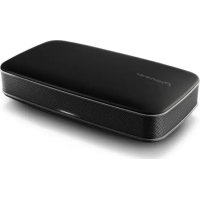
XWLF1K - Audio System PIONEER - Free user manual and instructions
Find the device manual for free XWLF1K PIONEER in PDF.



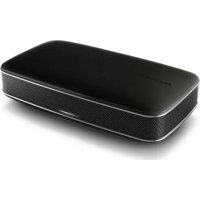
| Product type | Portable audio system |
| Brand | Pioneer |
| Model | XWLF1K |
| Dimensions (W x H x D) | 151 mm x 45.5 mm x 82.5 mm |
| Weight (without packaging or adapter) | Approx. 355 g |
| Power supply | AC 100-240 V, 50/60 Hz, DC output 5.2 V / 2 A |
| Battery | Built-in rechargeable lithium-ion |
| Playback time | Approx. 7 hours (volume at 10), approx. 4 hours (max volume) |
| Charging time | Approx. 150 minutes |
| Wireless connectivity | Bluetooth version 3.0, class 2, range approx. 10 m |
| Supported Bluetooth profiles | A2DP, HSP, HFP |
| Audio codecs | SBC, AAC |
| NFC | Yes (one-touch pairing via NFC) |
| Auxiliary input | AUX jack (3.5 mm stereo mini-jack) |
| Hands-free function | Yes (phone calls via Bluetooth) |
| Speakers | 2 x 4 cm cone, 6 cm × 3.5 cm passive radiator |
| RMS output power | 2 W + 2 W (1 kHz, 10% distortion, 3.2 Ω) |
| Power consumption | 9 W during operation, max 0.5 W in standby |
| Supplied accessories | AC adapter, 2 power connectors, USB cable, mini-jack cable, carrying case, anti-slip sheet, warranty card, instruction manual |
| Cleaning | Soft, dry cloth; do not use chemicals |
| Safety | Do not expose to water, do not block ventilation, use supplied adapter |
| Operating temperature | +5 °C to +35 °C, relative humidity < 85% |
Frequently Asked Questions - XWLF1K PIONEER
User questions about XWLF1K PIONEER
0 question about this device. Answer the ones you know or ask your own.
Ask a new question about this device
Download the instructions for your Audio System in PDF format for free! Find your manual XWLF1K - PIONEER and take your electronic device back in hand. On this page are published all the documents necessary for the use of your device. XWLF1K by PIONEER.
USER MANUAL XWLF1K PIONEER
This equipment is not waterproof. To prevent a fire or shock hazard, do not place any container filled with liquid near this equipment (such as a vase or flower pot) or expose it to dripping, splashing, rain or moisture.
D3-4-2-1-3_A1_En
WARNING
To prevent a fire hazard, do not place any naked flame sources (such as a lighted candle) on the equipment.
D3-4-2-1-7a_A1_En
VENTILATION CAUTION
When installing this unit, make sure to leave space around the unit for ventilation to improve heat radiation (at least 10 cm at top, 10 cm at rear, and 10 cm at each side).
WARNING
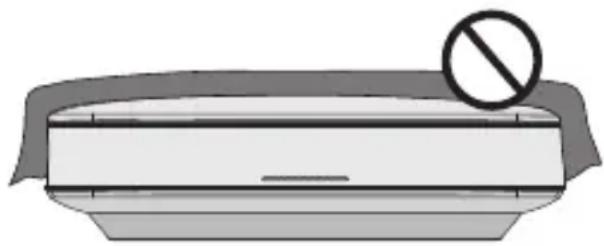
Slots and openings in the cabinet are provided for ventilation to ensure reliable operation of the product, and to protect it from overheating. To prevent fire hazard, the openings should never be blocked or covered with items (such as newspapers, table-cloths, curtains) or by operating the equipment on thick carpet or a bed.
D3-4-2-1-7b* _A1_En
Operating Environment
Operating environment temperature and humidity: +5 °C to +35 °C (+41 °F to +95 °F); less than 85 %RH (cooling vents not blocked) Do not install this unit in a poorly ventilated area, or in locations exposed to high humidity or direct sunlight (or strong artificial light).
D3-4-2-1-7c*_A2_En
CAUTION
The ⏻/1 switch on this unit will not completely shut off all power from the AC outlet. Since the power cord serves as the main disconnect device for the unit, you will need to unplug it from the AC outlet to shut down all power. Therefore, make sure the unit has been installed so that the power cord can be easily unplugged from the AC outlet in case of an accident. To avoid fire hazard, the power cord should also be unplugged from the AC outlet when left unused for a long period of time (for example, when on vacation).
D3-4-2-2-2a* _A1_En
Information for users on collection and disposal of old equipment and used batteries
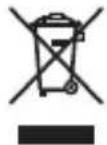
(Symbol for equipment)
Symbol examples for batteries
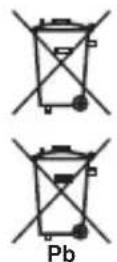
These symbols on the products, packaging, and/or accompanying documents mean that used electrical and electronic products and batteries should not be mixed with general household waste.
For proper treatment, recovery and recycling of old products and used batteries, please take them to applicable collection points in accordance with your national legislation.
By disposing of these products and batteries correctly, you will help to save valuable resources and prevent any potential negative effects on human health and the environment which could otherwise arise from inappropriate waste handling.
For more information about collection and recycling of old products and batteries, please contact your local municipality, your waste disposal service or the point of sale where you purchased the items.
These symbols are only valid in the European Union.
For countries outside the European Union:
If you wish to discard these items, please contact your local authorities or dealer and ask for the correct method of disposal.
K058a_A1_En
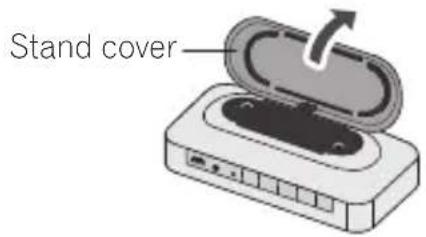
When using this product, confirm the safety information shown on the bottom of the unit and the inside of the stand cover.
D3-4-2-2-4_B1_En
When disposing of used batteries, please comply with governmental regulations or environmental public institution's rules that apply in your country/area.
D3-4-2-3-1_B1_En
WARNING
Do not use or store batteries in direct sunlight or other excessively hot place, such as inside a car or near a heater. This can cause batteries to leak, overheat, explode or catch fire. It can also reduce the life or performance of batteries.
D3-4-2-3-3_A1_En
WARNING
Store small parts out of the reach of children and infants. If accidentally swallowed, contact a doctor immediately.
D41-6-4_A1_En
This product is for general household purposes. Any failure due to use for other than household purposes (such as long-term use for business purposes in a restaurant or use in a car or ship) and which requires repair will be charged for even during the warranty period.
K041 A1 En
Do not attach these speakers to the wall or ceiling, as they may cause injury in the event of a fall.
SGK007_A1_En
POWER-CORD CAUTION
Handle the power cord by the plug. Do not pull out the plug by tugging the cord and never touch the power cord when your hands are wet as this could cause a short circuit or electric shock. Do not place the unit, a piece of furniture, etc., on the power cord, or pinch the cord. Never make a knot in the cord or tie it with other cords. The power cords should be routed such that they are not likely to be stepped on. A damaged power cord can cause a fire or give you an electrical shock. Check the power cord once in a while. When you find it damaged, ask your nearest PIONEER authorized service center or your dealer for a replacement.
S002*_A1_En
Store the AC adapter out of the reach of children and infants.
The AC adapter cord may accidentally wind around the neck and it may cause suffocation.
AC adapter caution
- Make sure to grasp the body of the AC adapter when removing it from the power outlet. If you pull the power cord, it may become damaged which could lead to fire and/or electrocution.
- Do not attempt to plug in or remove the AC adapter with wet hands. This may result in electrocution.
- Insert the prongs of the AC adapter all the way into the power outlet. If the connection is incomplete, heat may be generated which could lead to fire. Furthermore, contact with the connected prongs of the adapter may result in electrocution.
- Do not insert the AC adapter into a power outlet where the connection remains loose despite inserting the prongs all the way into the outlet. Heat may be generated which could lead to fire. Consult with the retailer or an electrician regarding replacement of the power outlet.
- Do not place the unit, a piece of furniture, etc., on the power cord, or pinch the cord. Never make a knot in the cord or tie it with other cords. The power cords should be routed such that they are not likely to be stepped on. A damaged AC adapter and power cord can cause a fire or give you an electrical shock. Check the AC adapter and the power cord once in a while. When you find it damaged, ask your nearest PIONEER authorized service center or your dealer for a replacement.
Radio wave caution
This unit uses a 2.4 GHz radio wave frequency, which is a band used by other wireless systems (Microwave ovens and Cordless phones, etc.). In this event noise appears in your television image, there is the possibility this unit (including products supported by this unit) is causing signal interference with the antenna input connector of your television, video, satellite tuner, etc. In this event, increase the distance between the antenna input connector and this unit (including products supported by this unit).
- Pioneer is not responsible for any malfunction of the compatible Pioneer product due to communication error/malfunctions associated with your network connection and/or your connected equipment. Please contact your Internet service provider or network device manufacturer.
- A separate contract with/payment to an Internet service provider is required to use the Internet.
Handling the built-in lithium-ion battery
This device has a built-in recyclable lithium-ion battery. You should be aware of the following points in regard to the handling of this battery.
DANGER
Please follow the instructions noted.
Failure to do so may cause the built-in lithium-ion battery to leak, overheat, ignite, or rupture.
- Do not dispose of the device in fire or expose it to heat.
- Do not attempt to disassemble the battery or alter it in any way.
- Do not throw the device, strike it with a hammer or other object, or drive nails into it.
- Do not use or leave the device in places where it will be exposed to high temperatures, such as near a stove or inside a closed automobile.
- In the event that the built-in lithium-ion battery leaks fluid and the fluid contacts your eyes, do not rub them, but rinse with copious amounts of clean water and seek immediate medical treatment. Your eyes may be seriously harmed by exposure to such battery fluid.
- Do not allow the battery to be immersed in fresh or sea water, or become otherwise wet.
- Do not charge the battery close to an open fire, or in direct sunlight.
- Do not charge the battery using any method other than those specified in this manual.
- Do not dismantle the device or the battery. Doing so may lead to leakage of fluids, such as alkaline solution.
- To prevent accidents, store the lithium-ion battery out of the reach of young children. In the event the battery is swallowed, seek medical attention immediately.
WARNING
- If you notice an irregular odor, high temperature, changes in color, changes in shape etc. while charging or storing the battery, stop using the device immediately.
- If the battery is not completely charged after the stipulated charge time, cease charging. Continuing to charge will cause the temperature of the device to increase, potentially breaking it or causing a fire.
- The battery should be charged in an environment between 5 °C (41 °F) and 35 °C (95 °F). Charging outside of this temperature range may cause excess heat, break the device, or cause a fire. It may also reduce the capabilities and life of the battery.
- Do not place the device in a microwave oven or expose it to high pressure, since the device may overheat, rupture, or ignite.
- Do not place a leaking rechargeable lithium-ion battery near a source of heat or fire, since the battery could overheat, rupture, or ignite.
CAUTION
- Do not dispose of the device in fire or water, since the rechargeable lithium-ion battery could rupture or leak battery fluid, resulting in fire or personal injury.
- If fluid leaking from a rechargeable lithium-ion battery contacts your skin or clothes, wash immediately with copious amounts of clean water. If left unattended, a skin rash could result.
Please assist with battery recycling
This product uses a lithium-ion battery. Lithium-ion batteries are a vital resource that can be recycled. When throwing the unit away, please remove the lithium-ion battery and endeavor to have it recycled.
Internal Rechargeable Lithium-ion Battery
This device uses an internal rechargeable lithium-ion battery that should last the lifetime of the device. If you suspect your battery may be dead, try charging it several times. If the battery does not recharge, please contact us for repair information.
Installing the unit
- When installing this unit, make sure to put it on a level and stable surface.
Don't install it on the following places:
- on a color TV (the screen may distort)
- near a cassette deck (or close to a device that gives off a magnetic field). This may interfere with the sound.
- in direct sunlight
- in extremely hot or cold areas
- in places where there is vibration or other movement
- in places that are very dusty
- in places that have hot fumes or oils (such as near a kitchen stove)

Caution
- When in use, do not stand the device up, prop it up against anything or hang it from anything.
- Do not sit or stand on top of the device.
- When carrying the device, hold the entire device firmly. Do not swing the device around by the frame.
- Do not attach this unit to the wall or ceiling. It may fall off and cause injury.
- When using the device in a vehicle, never use it close to the driver's seat. There is the potential for it to cause an accident, such as by falling and getting stuck beneath the brake pedals.
- Do not leave the device in any places that could become hot, such as inside a car or in direct sunlight.
About the AC adapter
Safety instructions
To ensure your personal safety and to maximize the full operating potential of your unit, read and follow these safety instructions.
Read & Retain Instructions
Read all operating and user information provided with this product.
Cleaning
Use a damp cloth to clean the exterior housing. Avoid using any fluids including liquid, aerosol or alcohol-based cleaning products.
Water or Moisture
Avoid operating or locating this product near water or other sources of fluid.
Accessories
Do not place this product on an unstable cart, stand, or table. The product may fall and be seriously damaged.
Ventilation
Do not block or cover this product in use. This unit should not be placed in a built-in installation unless properly ventilated.
Environment
Avoid placing this product in a location with exposure to large quantities of dust, high temperatures, high humidity, or subject to excessive vibrations or shocks.
Power Sources
Operate this product only from the recommended power sources. If you are unsure of the power source, consult an authorized Pioneer representative.
Power-Cord Protection
When unplugging the unit, pull on the plug ñ not on the cord. Do not handle the cord or plug with wet hands; doing so could cause an electric short or shock. Do not allow anything to pinch or rest on the power cord and do not place in a walkway.
Power
Turn OFF the system before installing this or any other hardware device.
Overloading
Avoid connecting too many devices to a single wall socket or power source as this can cause fires or short circuits.
Object & Liquid Entry
Never push inappropriate objects in to the device. Avoid spilling any liquids in to or on the outside of the drive.
Servicing
Opening or removing the cover exposes you to possible electrical shock or other danger.
Contact a Pioneer authorized service representative for repairing this product (refer to the enclosed Service & Support Card).
Damage Requiring Service
Unplug the unit and refer servicing to qualified service personnel in the following situations:
- When the power cord, plug, or chassis is damaged.
- If liquid has been spilled, or objects have fallen into the product.
-
If the product has been exposed to rain or water.
-
If the product does not operate normally when the operating instructions are followed. Adjust only those controls that are covered by the operating instructions. Improper adjustment of other controls may result in damage and can require extensive work by a qualified technician to restore the unit to its normal operation.
- When the product exhibits a distinct change in performance - this indicates a need for service.
Check that there are no irregularities with the AC adapter or power plug, then insert the power plug into the specified position of the AC adapter using the specified procedure until a click is heard. For details, see Mounting the power plug on chapter 1. If there are irregularities with the AC adapter or power plug, ask your nearest Pioneer authorized service center or your dealer to carry out repair work.
- Do not use this unit with a coin, paper clip or other metal object stuck between the AC adapter and power plug. Doing so could cause a short circuit, leading to fire or electric shock.
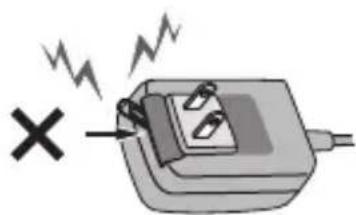
- When mounting the AC adapter on a wall outlet, make sure there is no space between the AC adapter and the wall outlet. Faulty contact or a coin, paper clip or other metal object getting stuck in the space could cause a short circuit, leading to fire or electric shock.
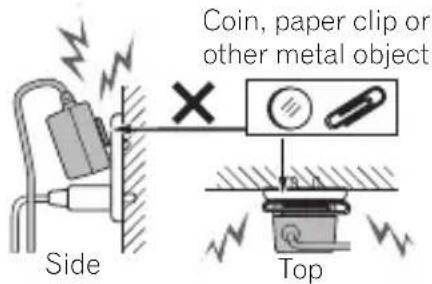
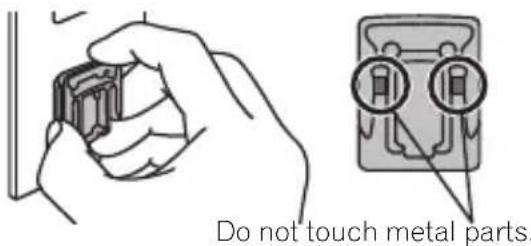
- The power plug could come detached from the AC adapter and remain in the power outlet if someone trips on the AC adapter's power cord or if something hits the AC adapter. If this happens, remove the power plug remaining in the outlet with dry hands, holding it as shown on the diagram below and without touching metal parts. Do not use any tools to remove it.
Thank you for buying this Pioneer product.
Please read through these operating instructions so you will know how to operate your model properly. After you have finished reading the instructions, put them away in a safe place for future reference.
Contents
Before you start 10
What's in the box....10
Mounting the power plug.... 10
Power plug.... 10
Connect DC Power....11
Part names and functions ...... 12
Front Panel/Top Panel 12
Rear Panel 13
Turning on the power 14
Turning on....14
Auto Power Down 14
Switching Input 14
Listening to music using a Bluetooth connection.... 15
Pairing this unit and Bluetooth device (Initial registration).... 15
Connecting to a Bluetooth device with which pairing has been completed.... 16
Pairing and connection using NFC 17
Automatic connection to a Bluetooth device.... 17
Radio wave caution....18
Scope of operation.... 18
Radio wave reflections.... 19
Using Hands-free calling....20
Receive a call....20
Make a call....20
Ending a call....20
Listening to music on an external device....21
Connecting auxiliary components.... 21
Please assist with battery recycling 22
Removing the built-in battery 22
Additional Information....24
Troubleshooting....24
Cautions on use....27
When moving this unit 27
Place of installation 27
Cleaning the unit....28
Caring for the authentic leather parts of the XW-LF3 28
Specifications 29
Before you start
What's in the box
- AC adapter x 1
• Power plug x 2 - USB cable (Power cord) x 1
- Stereo mini-plug cable x 1
- Carrying pouch x 1
- Non-Slip Sheet x 1
- Warranty card x 1
- Operating instructions (This document)
Mounting the power plug
Slide the power plug along the guide rails in the AC adapter unit as shown on the diagram below, then press in until a click is heard.
![graph TD A["Device 1"] --> B["Device 2"] B --> C["Device 3"]](/content/2026/02/395156/images/a6550358dc1cfc3bb3750e1cdb03bac739b03a313fb98c818acd5e97db056c52.jpg)
Removing the power plug
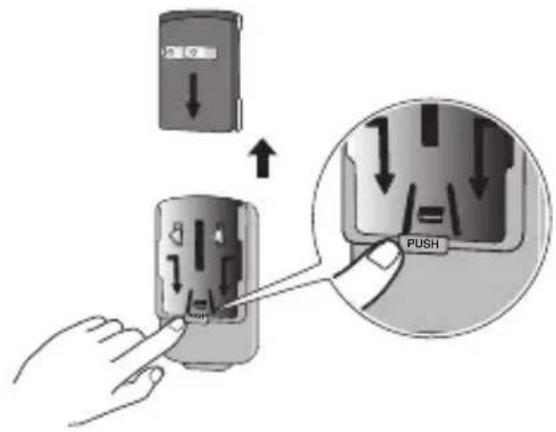
While pressing the [PUSH] button on the AC adapter unit, slide the power plug away from the adapter as shown on the diagram below to remove it.
Once the power plug is mounted, there is no need to remove it.
Power plug
This product comes with the types of power plugs shown below. Use the appropriate power plug for the country or region you are in.
Type 1 (for the Europe)
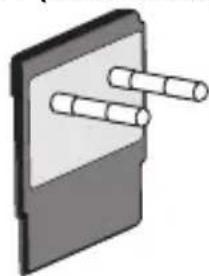
Type 2 (for the UK)
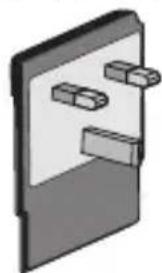
Connect DC Power
- Connect the AC adapter's USB-A connector to unit's USB-microB connector with bundled USB cable. Then connect the power plug on the other end to the power outlet.
- Start to charge the internal battery automatically. (150 min for full charge)
- The unit can play the music even though it is in charging status. The amount of time it takes to reach full charge will increase.
Power outlet
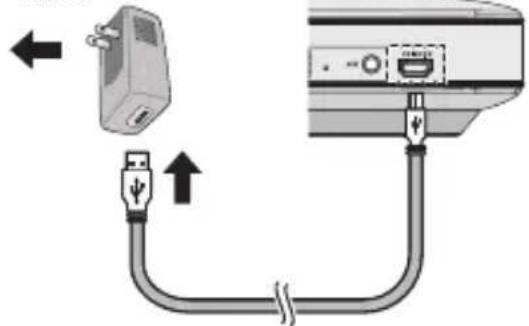

Caution
- Ensure that you only use the AC adaptor and USB cable provided with the unit. Connecting an AC adaptor with different specifications to the unit may prevent the internal battery from charging correctly, or lead to malfunctions or damage.

Important
- Be sure to charge before using for the first time.
- Approximately 150 minutes are required to fully recharge the battery.
-
A fully charged battery provides approximately 4 hours of use at maximum volume and approximately 7 hours at volume 10.
-
Playing time with a fully charged battery changes depending on functions used, frequency of use, ambient temperature, speaker volume and other factors.
- The furnished battery can be recharged about 500 times, although it may be less depending on conditions of use and storage. If the time required to reach a full charge increases substantially, or playing time falls dramatically even after charging, the battery pack is at the end of its life. If you wish to replace the battery pack with a new one, please contact your nearest Pioneer authorized service center.
- When the AC adapter is not connected, the battery will slowly drain even when the unit is in the standby mode. If you are not going to use the unit for an extended period of time, charging it completely at least once every six months will prevent the battery from degrading. When doing this, the charge may take longer than normal.
Part names and functions
Front Panel/Top Panel
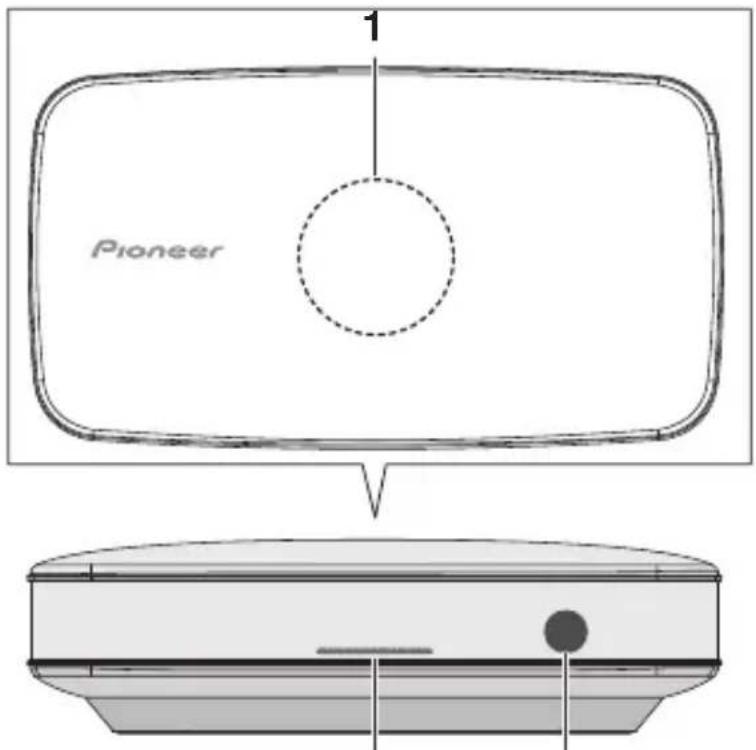
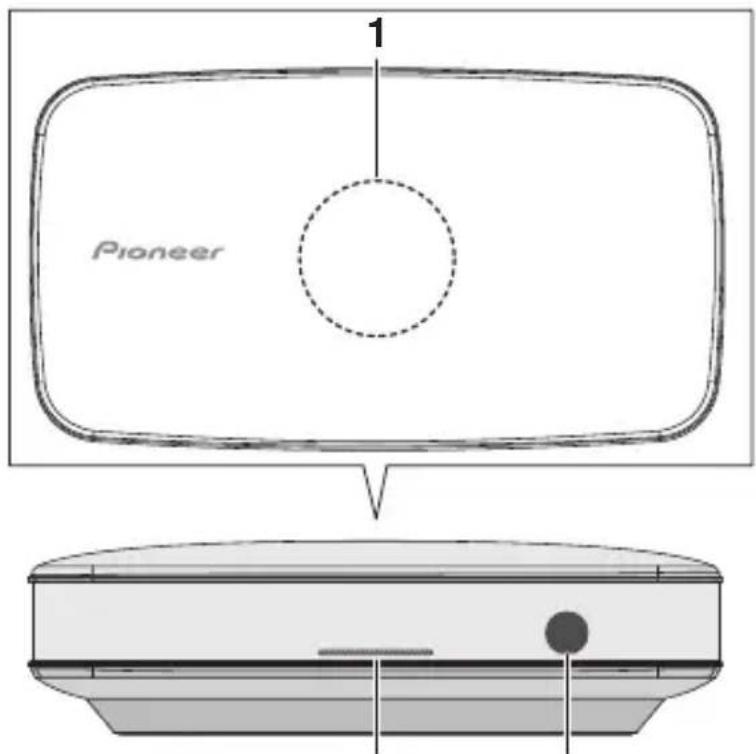
2 Microphone
1 N F C a r e a
Touching the NFC-equipped smartphone to this area, this unit can establish Bluetooth connection simply (See Pairing and connection using NFC on page 17).
2 POWER indicator
The state of the POWER indicator display will change depending on the status of the unit.
Condition Display
| Bluetooth connection completed | Lit |
| Waiting for Bluetooth connection | Blinking Slowly |
| Waiting for Bluetooth pairing | Blinking Quickly |
| After detecting a touch from a NFC-equipped smartphone | Flash Once |
| When unit volume is changed | Flash Once |
| In standby mode Off | |
Rear Panel
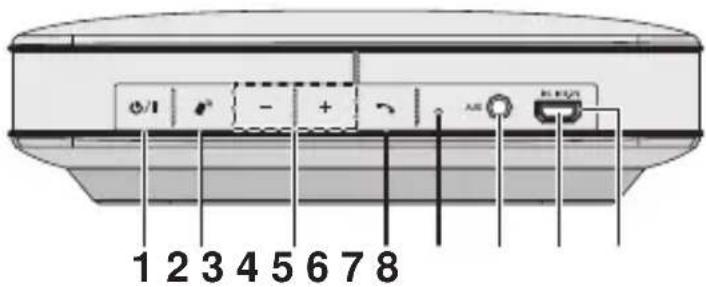
1 STANDBY/ON button
Switches the unit between Standby and on (Press and hold 1 second) (See Turning on the power on page 14).
2 Bluetooth Pairing button
Press to pair with a Bluetooth device (Press and hold 1 second). Press this button again during pairing to cancel pairing controls (See Pairing this unit and Bluetooth device (Initial registration) on page 15).
3 VOL -/+ button
Adjust the listening volume.
• The listening volume has a range from 0 to 15.
(However, the unit is not equipped with a display to visually indicate the volume level). (Default setting: 8)
4 Phone call button
Press to call or operate during a call (Press and hold 1 second) (See Using Hands-free calling on page 20).
5 Reset button
If the unit is not operating correctly then it can be reset. Use something long and thin, like a pin, to press this button.
6 AUX Jack
Connect auxiliary components (See Listening to music on an external device on page 21).
7 DC IN Jack
Connect to the AC adapter via bundled USB cable.
8 Charge/Battery status indicator
The color of the indicator will change.
When using the AC adaptor:
Condition Display
| Charging Slow white | flashing |
Charging completed Off
When using the internal lithium battery:
Condition Display
| Battery life still remaining | Off |
| Low battery life | Fast red flashing |
- A fully charged battery provides approximately 4 hours of use at maximum volume and approximately 7 hours at volume 10.
- The battery indicator may not provide an accurate display of remaining battery life.
Turning on the power
Turning on
Long hold the STANDBY/ON button and the power will come on. The POWER indicator will come on white.

Caution
- Although the indicator light remains off while the unit's power is off (in standby mode), there is still power flowing to the unit at this time.
Auto Power Down
The unit should go to standby mode automatically at following condition.
- If ten minutes pass with no Bluetooth device connected, and without the stereo mini-plug cable inserted into the AUX Jack, then the unit will automatically go into standby mode.
- During battery operation, the unit will automatically go into standby mode when the battery power runs out.
Switching Input
The unit allows music to be enjoyed using either a Bluetooth connection or the AUX Jack connection.
If you wish to output music using a Bluetooth connection, remove the stereo mini-plug cable from the AUX Jack.
If the supplied stereo mini-plug cable is inserted in the AUX Jack, AUX music will be output.
See the sections "Listening to music using a Bluetooth connection on page 15" and "Listening to music on an external device on page 21" for details on controlling these operations.

Note
- Hands-free calls can still be both made and received even when the stereo mini-plug cable is inserted in the AUX Jack.
- Do not operate this unit while driving as it is dangerous.
Listening to music using a Bluetooth connection
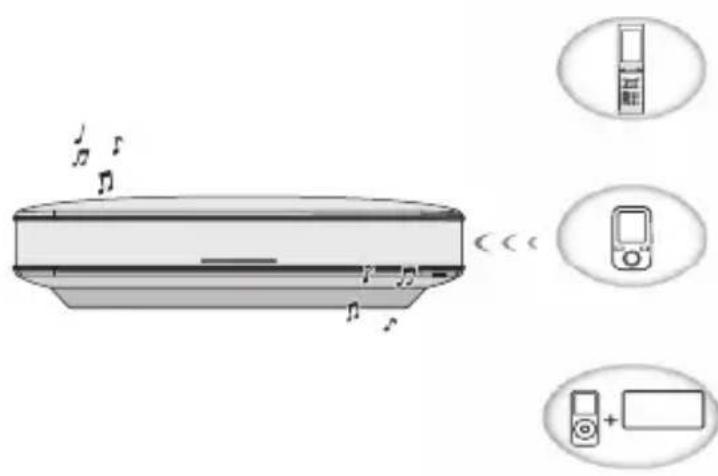
Bluetooth wireless technology enabled device: Smartphone/Cell phone
Bluetooth wireless technology enabled device: Digital music player
Non-Bluetooth wireless technology enabled device: Digital music player + Bluetooth audio transmitter (commercially available)
This product enables you to enjoy listening to music wirelessly from a Bluetooth device (cell phone, digital music player, etc.). You can also enjoy music from a non-Bluetooth device using a Bluetooth audio transmitter available in stores. For details, refer to the user manual for the Bluetooth device.

Note
- The Bluetooth wireless technology enabled device must support A2DP profiles.
- Pioneer does not guarantee proper connection and operation of this unit with all Bluetooth wireless technology enabled devices.
- The Bluetooth® mark and logos are registered trademarks owned by Bluetooth SIG, Inc. and any use of such marks by PIONEER CORPORATION is under license. Other trademarks and trade names are those of their respective owners.
Pairing this unit and Bluetooth device (Initial registration)
To enjoy music from a Bluetooth device, pairing is required with this product. Make sure to perform pairing first time you operate the system or any time pairing data is cleared.
Pairing is a step required to enable communication using Bluetooth wireless technology. For details, refer to the user manual of the Bluetooth device.
- Pairing is required when you first use Bluetooth device and this unit.
- The unit can be paired with up to 8 other devices.
- To enable Bluetooth communication, pairing should be done with both of your system and Bluetooth device.

Note
- Pairing mode of the system is cancelled at below condition.
- Can't connect with Bluetooth device for 3 minutes.
- Push the Bluetooth paring button again during pairing mode.
1 Press and hold Bluetooth paring button for 1 second.
After that the POWER indicator blinks white quickly and the unit will enter the pairing mode.

Note
- When the system is turned on first time, the unit goes to pairing mode automatically.
2 Switch on the Bluetooth device that you want to perform pairing with, place the device within 1 m of the system, and set it to the pairing mode.
Pairing with the unit will begin.
- For more details, see also the operating instructions of your Bluetooth device.
- If a list of supported device is shown on the display of the Bluetooth device, you will need to select "XW-LF1/LF3".
- In case of entering PIN code, use "0000". (Only "0000" works for PIN code in this product.)
3 W hBluetooth device has connected, the POWER indicator will change from blinking to lighting.
4 Start playback of music contents stored in Bluetooth device.
Connecting to a Bluetooth device with which pairing has been completed
1 Confirm that the POWER indicator on the unit is blinking slowly.
If the indicator is not blinking, but remains lit, it means the unit is already connected to a different Bluetooth device.
Operate the connected Bluetooth device to disconnect it from the unit.
2 O n Bluetooth device that is already paired with the unit, select the unit from the Bluetooth list and connect.
The name of the unit is shown as "XW-LF1/LF3".
3 Connection with devices is successful, the POWER indicator will change from blinking to lighting.
Operating range of Bluetooth audio is up to 10 m. (Measured in open space. Walls and structures may affect range of device.)
Pairing and connection using NFC
NFC stands for Near Field Communication. If a smartphone that supports NFC is placed close to the unit, the unit's power will automatically come on, and Bluetooth pairing and connection can easily be established. For details, refer to the user manual for the NFC-equipped device.

Note
• Supported OS: Android 4.1 and above
• This may not operate properly, depending on the smartphone or tablet device.
- The N Mark is a trademark or registered trademark of NFC Forum, Inc. in the United States and in other countries.
• Android is a trademark of Google Inc.
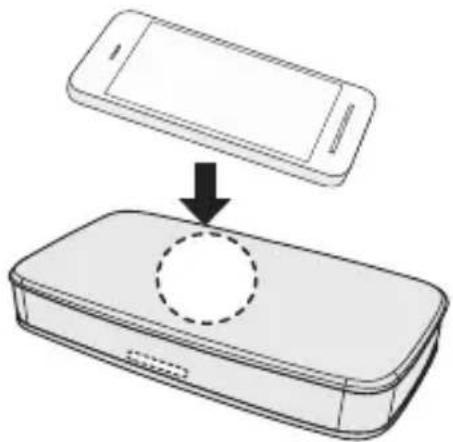
1 Hold the device to be connected up close to the unit center of the top of the unit.
2 Pairing automatically begins.
When a NFC-equipped smartphone is detected, the POWER indicator will flash once.
3 Once connection with the NFC-equipped smartphone is completed, the POWER indicator will change from blinking to remaining lit.
4 Start playback of the music from the NFC-equipped smartphone.

Note
- NFC can also be used to quickly cancel a Bluetooth connection. If you perform Step 1 using a NFC-equipped smartphone that is already connected via Bluetooth, the connected will be cancelled.
Automatic connection to a Bluetooth device
With the Bluetooth function for your Bluetooth device turned on, turn on the power to the unit and it will automatically attempt to connect again to the last Bluetooth device to which it was connected (or that was registered to it).
Radio wave caution
This unit uses a 2.4 GHz radio wave frequency, which is a band used by other wireless systems (see list below). To prevent noise or interrupted communication, do not use this unit nearby such devices, or make sure these devices are switched off during use.
- Cordless phones
- Cordless facsimiles
- Microwave ovens
- Wireless LAN devices (IEEE802.11b/g)
- Wireless AV equipment
- Wireless controllers for game systems
• Microwave-based health aids - Some baby monitors
Other, less common, equipment that may operate on the same frequency:
- Anti-theft systems
- Amateur radio stations (HAM)
- Warehouse logistic management systems
• Discrimination systems for train or emergency vehicles

Note
- In the event noise appears in your television image, there is the possibility that a Bluetooth device or this unit (including products supported by this unit) are causing signal interference with the antenna input connector of your television, video, satellite tuner, etc. In this event, increase the distance between the antenna input connector and the Bluetooth device or this unit (including products supported by this unit).
- If there is something obstructing the path between this unit (including devices supported by this unit) and the device equipped with Bluetooth wireless technology (such as a metal door, concrete wall, or insulation containing tinfoil), you may need to change the location of your system to prevent signal noise and interruptions.
Scope of operation
Use of this unit is limited to home use. (Transmission distances may be reduced depending on communication environment).
In the following locations, poor condition or inability to receive radio waves may cause the audio to be interrupted or stopped:
- In reinforced concrete buildings or steelframed or ironframed buildings.
• Near large metallic furniture. - In a crowd of people or near a building or obstacle.
- In a location exposed to the magnetic field, static electricity or radio wave interference from radio communication equipment using the same frequency band (2.4 GHz) as this unit, such as a 2.4 GHz wireless LAN device or microwave oven.
- If you live in a heavily populated residential area (apartment, townhouse, etc.) and if your neighbor's microwave is placed near your system, you may
experience radio wave interference. If this occurs, move your unit to a different place. When the microwave is not in use, there will be no radio wave interference.
Radio wave reflections
The radio waves received by this unit include the radio wave coming directly from the device equipped with Bluetooth wireless technology (direct wave) and waves coming from various directions due to reflections by walls, furniture and building (reflected waves). The reflected waves (due to obstacles and reflecting objects) further produce a variety of reflected waves as well as variation in reception condition depending on locations. If the audio cannot be received properly due to this phenomenon, try moving the location of the device equipped with Bluetooth wireless technology a little. Also note that audio may be interrupted due to the reflected waves when a person crosses or approaches the space between this unit and the device equipped with Bluetooth wireless technology.
Using Hands-free calling
If the unit is connected to a Bluetooth wireless technology capable smartphone or cell phone, it is possible to use the unit to make or receive hands-free calls. In order to connect the unit with a Bluetooth capable smartphone or cell phone, you first need to perform pairing. (See Pairing this unit and Bluetooth device (Initial registration) on page 15)
Receive a call
1 When you receive an incoming call, your ringtone will be played through the unit.
While it is ringing, long hold the "Phone call" button for 1 second to pick up the call.
2 Speak toward the microphone on the unit.

Note
- If the Bluetooth connected smartphone or cell phone receives a call while the unit is playing back music, it will automatically switch to playing your ringtone.
- If the Bluetooth settings on your Bluetooth capable smartphone or cell phone prevent the unit from outputting the ringtone, an internal ringtone will be played instead.

Note
- If you cannot hear anything from the unit, use the smartphone/cell phone to change the audio output setting to the unit.
Ending a call
1 Long hold the Phone call button for 1 second.
The call will end.

Note
- In order to use the unit and a Bluetooth capable smartphone or cell phone to make hands-free calls, the Bluetooth capable smartphone or cell phone must support Profile: HFP, HSP. Even if the correct profile is supported, you may need to also perform hands-free settings on your smartphone or cell phone. Please see the user manual for your smartphone or cell phone for details on how to make the settings.
- The unit is not guaranteed to connect to all Bluetooth devices.
Make a call
1 Make a call using the smartphone/cell phone.
Listening to music on an external device
- Before making or changing the connections, switch off the power and disconnect the AC adapter from the power outlet. Be sure to connect the AC adapter last.
- When playing music though an AUX connection, the music volume will vary depending on the volume of the music player. If there is distortion when the volume is set at max, lower the music player's volume and to avoid distortion.
Connecting auxiliary components
1 Connecting auxiliary components.
Connect the back panel AUX jack to the analog output jack (or headphone output jack) of the device to be connected using the supplied stereo mini-plug cable.
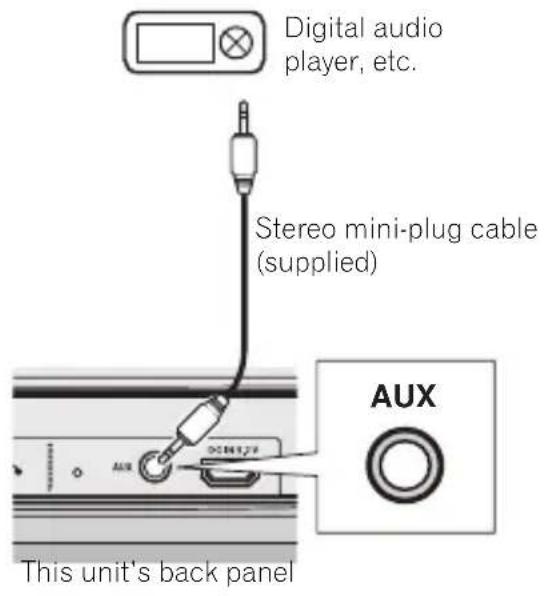
2 When the stereo mini-plug cable is inserted to AUX Jack, the AUX sound is the only sound that will be output by the unit.
If you want to use a Bluetooth connection to listen to music, you must remove the stereo mini-plug cable from the AUX Jack.
3 Start playback of the auxiliary component.
Please assist with battery recycling
This product uses a lithium-ion battery. Lithium-ion batteries are a vital resource that can be recycled. When throwing the unit away, please remove the lithium-ion battery and endeavor to have it recycled. In regard to cautions for when removing the lithium-ion battery, please see "Handling the built-in lithium-ion battery".

Warning
- Disconnect the AC adapter before performing these procedures.
- In the event that the power is turned on while performing these procedures, turn off the power and then begin the procedures again.

Caution
- The instructions provided here to "assist with battery recycling" are meant to allow the device's built-in rechargeable lithium-ion battery to be removed at the end of the device's service life, before final device disposal. The device's warranty is invalidated the moment the device is opened.
- In order to avoid short circuits, remove the battery only after confirming that the battery's storage capacity has been fully depleted. Even when the power no longer turns on, some residual current remains in the battery. It is recommended to remove the lithium-ion battery only after leaving the device with the power turned on for several days, to assure that the battery is fully depleted.
Removing the built-in battery
Preparation
This procedure requires the tools listed below. Be sure to assemble the necessary items before beginning.
• Phillips (+) screwdriver
- Flat-head (-) screwdriver
1 Remove the stand cover on the bottom of the product from the button side.
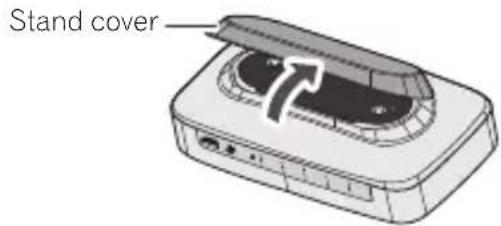
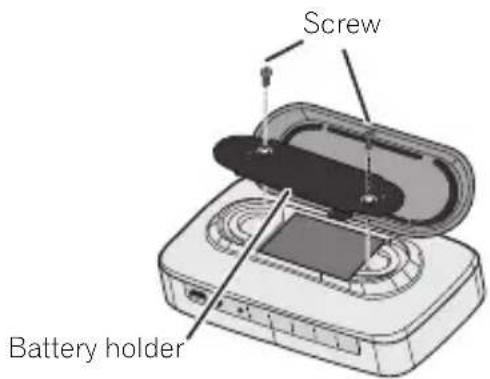
2 Unscrew the two screws and remove the battery holder.

Tips
- Unscrew the screws using a Phillips (+) screwdriver.
3 Remove the battery and disconnect the connectors.
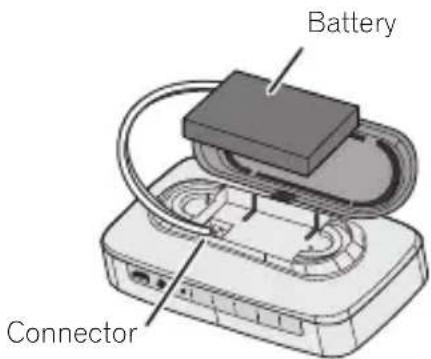

Tips
- Insert the Flat-head (−) screwdriver between the unit and the battery and remove the lithium-ion battery. When doing this, be careful not to damage the lithium-ion battery with the Flat-head (−) screwdriver.
- When disconnecting the connectors, try to hold them as close to the base as possible.
4 Use a piece of adhesive tape to tape the battery connector to the side of the battery.
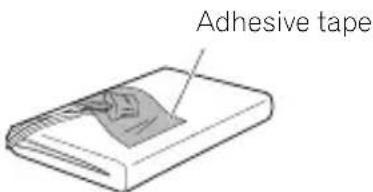

Tips
• To avoid short circuit accidents, cover the entire connector with adhesive tape and fasten it to the battery's body.

Caution
- Please adhere to the points of caution below, and do your part for recycling.
- Do not remove any of the battery's vinyl plastic covering.
- Do not cut the battery's wire or connector.
- Do not attempt to disassemble the battery.
- If the battery's metallic terminal becomes exposed, cover it entirely in electrical insulating tape.
- When disposing of the other parts of the device, follow all local community rules and ordinances regarding disposal.
- When disposing of used batteries, please comply with governmental regulations or environmental public institution's rules that apply in your country/Area.
Additional Information
Troubleshooting
Incorrect operation is often mistaken for trouble or malfunction. If you think that there is something wrong with this component, check the points below. Sometimes the trouble may lie in another component. Inspect the other components and electrical appliances being used. If the trouble cannot be rectified even after checking the points below, ask your nearest Pioneer authorized service center or your dealer to carry out repair work.
- If the unit does not operate normally due to external effects such as static electricity, pressing the RESET button may restore normal operation.
- General problem
Problem Remedy
| The power does not turn on. Check that the battery has not run out of charge. Connect the AC adaptor to the unit to charge it. | |
| The battery does not charge. | Check that the supplied AC adaptor and USB cable are connected correctly. Try disconnecting them once and then reconnecting them. |
| Check that the surrounding temperature is not outside of the range in which charging is possible. The unit should be charged in an environment between 5 °C (41 °F) and 35 °C (95 °F). | |
| Battery charge does not last very long. | Check that the surrounding temperature is not too low. Battery operation time will decrease in a low temperature environment. |
| Check that the battery pack is not at the end of its life. If the time required to reach a full charge increases substantially, or playing time falls dramatically even after charging, the battery pack is at the end of its life. It can be charged approximately 500 times before required replacement. This number may decrease depending on how it is used and how it is stored. If you wish to replace the battery pack with a new one, please contact your nearest Pioneer authorized service center. | |
| Unable to control the unit, or unit is not functioning correctly. | Use a pin or other long, slim object to press the RESET button (page 13). |
| Power automatically switches to standby without user action. | If 10 minutes pass with no Bluetooth device connected, and without the stereo mini-plug cable inserted in the AUX Jack, the unit will automatically go into standby. |
| If battery charge falls to low levels during operation using the battery, the unit will automatically go into standby. | |
Problem Remedy
| TheBluetoothdevice cannot be connected or operated.Sound from theBluetoothdevice is not emitted or the sound is interrupted. | Check that no object that emits electromagnetic waves in the 2.4 GHz band (microwave oven, wireless LAN device orBluetoothwireless technology apparatus) is near the unit. If such an object is near the unit, set the unit far from it. Or, stop using the object emitting the electromagnetic waves. |
| Check that theBluetoothdevice is not too far from the unit and that obstructions are not set between theBluetoothdevice and the unit.Set theBluetoothdevice and the unit so that the distance between them is less than about 10 m* and no obstructions exist between them.*The distance given is to be used as a rough guide. The actual allowable distance between devices may vary depending on conditions in the surrounding environment. | |
| TheBluetoothdevice may not be set to the communication mode supporting theBluetoothwireless technology. Check the setting of theBluetoothdevice. | |
| Check that pairing is correct. The pairing setting was deleted from this unit or theBluetoothdevice. Reset the pairing. | |
| Check that the profile is correct. Use aBluetoothdevice that supports A2DP profile. | |
| Check that thePOWERindicator is not lit white. If it is, it means that the unit is already connected to anotherBluetoothdevice. Use the already connectedBluetoothdevice to cancel the connection, and then try connecting again. | |
| Check that the stereo mini-plug cable is not inserted into the unit.When the stereo mini-plug cable is inserted, the unit will prioritize output of theAUXsound. Remove the stereo mini-plug cable. | |
| Pairing cannot be performed using the NFC function. | Check the device to be connected support NFC. |
| Ensure that the NFC function on the device you are trying to connect is turned on. | |
| When pairing devices, move the NFC area (page 17) on this unit close to where the NFC antenna on the device to be paired. | |
| Use a compatible device with Android OS 4.1 or later. | |
| This may not operate properly, depending on the smartphone or tablet device. | |
| When the NFC-equipped smartphone is held against this unit, confirm that thePOWERindicator on this unit flashes once. If it does not flash, it means that the NFC-equipped smartphone could not be detected by this unit. Move the NFC antenna on the NFC-equipped smartphone close to the NFC area (page 12) on the unit. If the smartphone is using a case, then try this by removing the case. |
Problem Remedy
| Cannot hear the other party during hands free calls, or cannot hear the ringtone from this unit. | Check the supportedBluetoothprofile. Please use aBluetoothdevice that supports HFP or HSP. |
| Check whether the audio output setting for theBluetoothdevice that is connected with this unit is set to this unit. If not, set it to this unit. For directions on how to do the setting, please refer to the operating manual for theBluetoothcapable device. | |
| Check that the volume of theBluetoothdevice that is connected with this unit is not set to low. If so, please turn the volume up. | |
| If the situation does not improve after performing the above, disconnect theBluetoothdevice from this unit, and reconnect. |
Cautions on use
When moving this unit
When moving this unit, press ⏻/1
STANDBY/ON button, and then unplug the power cord.
Damage may occur when another device is connected to the AUX jack.
- Do not place anything easily effected by magnets close to the unit, such as cash cards or commuter tickets. The speakers do not have magnetic shielding, and their magnetic effects may prevent such items from functioning correctly.
- When transporting the unit, it is recommended that you protect it from scratches etc. by using the supplied carrying pouch.
Place of installation
- Do not place this unit on top of a TV or color monitor. Also, install it away from cassette decks and other devices easily affected by magnetic forces.
- Avoid the following locations:
- Places exposed to direct sunlight
• Humid or poorly ventilated places
•Extremely hot places
- Places exposed to vibrations
- Places in which there is much dust
- Places exposed to soot, steam, or heat (kitchens, etc.)
- When the volume on the unit is turned up, depending on the place of installation, the vibration from the speakers may cause the unit to move. Choose the place of installation carefully, and if necessary make use of the supplied non-slip sheet.
- Do not use the unit close to medical electronic equipment. The signals from the unit may disrupt the operation of said equipment.
- Do not remain in contact with the device for long periods while it is turned on. Doing so may lead to injury, including low temperature burns, due to the heat from the unit.
Do not place objects on this unit.
Do not place any objects on top of this unit. Do not attach this unit to the wall or ceiling. It may fall off and cause injury.
Do not obstruct the ventilation holes.
Do not use this unit on shaggy rugs, beds, sofas, etc., or wrapped in cloth, etc. Doing so will prevent the heat from dispersing, leading to damage.
Do not expose to heat.
Do not place this unit on top of an amplifier or other components that generate heat. When rack mounting it, to avoid the heat given off by the amplifier or other audio components, place it on a shelf below the amplifier.
Turn off the power of this unit when not using it.
Depending on signal conditions, striped patterns may appear on a TV screen and noise may enter the sound of radio broadcasts when the power of this unit is on. If this happens, turn off the power of this unit.
Cleaning the unit
- Unplug the power cord from the power outlet when cleaning this unit.
- Clean this unit using a soft cloth. For tough dirt, apply some neutral detergent diluted in 5 to 6 parts water to a soft cloth, wring out thoroughly, wipe off the dirt, and then wipe again with a soft, dry cloth.
- Alcohol, thinner, benzene, insecticides, etc., could cause the print or paint to peel off. Also, leaving rubber or vinyl products in contact with this unit for long periods of time could mar the cabinet.
- When using chemical-impregnated wipes, etc., read the cautions included with the wipes carefully.
Caring for the authentic leather parts of the XW-LF3
- Natural leather is prone to water damage, including loss or change of color. Friction or getting wet may cause the color to transfer to your clothing or other items. Dyes from clothes etc. may also transfer to the leather. When using the unit, do your best to keep it away from sweat, moisture and water.
- If the leather does get wet, absorb the water by pressing and wiping with a dry towel etc., then allow it to dry in a shady and aerated place. Using a source of extreme heat, such as a hairdryer, to dry it may lead to hardening of the leather and changes in its properties or shape; therefore such measures should never be used.
- Any dirt can be removed by gently wiping with a dry, soft cloth. Do not use any of the creams or wax etc. available on the market.
- Coming into contact with alcohol, thinner, benzene, insecticide etc. will cause the color of the leather to change, so do not allow this to happen.
- Avoid placing the unit in direct sunlight. Doing so may lead to the leather changing shape, patches of uneven color, or becoming cracked.
- The leather may retain a distinctive odor for a while after purchase.
Specifications
Amplifier section
RMS Power Output 2 W + 2 W
(RMS, 1 kHz, 10 %, T.H.D., 3.2 Ω)
Speaker section
Enclosure.... Passive Radiator
Speakers:
Fullrange....4 cm cone x 2
Passive Radiator....6 cm × 3.5 cm
Bluetooth section
Version......Bluetooth Specification Ver. 3.0
Output Bluetooth Specification Class 2
Estimated line-of-sight transmission distance* .... About 10 m
Frequency range 2.4 GHz
Supported Bluetooth profiles....A2DP, HSP, HFP
Supported Codec SBC (Subband Codec), AAC
* The line-of-sight transmission distance is an estimate.
Actual transmission distances supported may differ depending on surrounding conditions.
Miscellaneous
Charging time 150 min
Playing time*....7 hour
* A fully charged battery provides approximately 4 hours of use at maximum volume and approximately 7 hours at volume 10.
Power consumption 9 W
In standby 0.5 W or less
Dimensions (W) x (H) x (D). 151 mm x 45.5 mm x 82.5 mm
Weight (without package and AC adapter)
XW-LF3 About 345 g
XW-LF1 About 355 g
AC Adapter
Power Supply Voltage. AC 100 V to 240 V, 50 Hz/60 Hz
Rated Output. DC 5.2 V, 2 A
Accessories
AC adapter....1
Power plug....2
USB cable (Power cord)....1
Stereo mini-plug cable 1
Carrying pouch 1
Non-Slip Sheet....1
Warranty card 1
Operating instructions (This document)

Note
- Specifications and the design are subject to possible modifications without notice, due to improvements.
© 2014 PIONEER HOME ELECTRONICS CORPORATION.
All rights reserved.
ATTENTION
POUR ÉVITER TOUT RISQUE D'ÉLECTROCUTION, NE PAS ENLEVER LE COUVERCLE (NI LE PANNEAU ARRIÈRE). AUCUNE PIÈCE RÉPARABLE PAR L'UTILISATEUR NE SE TROUVE À L'INTÉRIEUR. CONFIER TOUT ENTRETIEN À UN PERSONNEL QUALIFIÉ UNIQUEMENT.
D3-4-2-1-1_B1_Fr
AVERTISSEMENT

2 Microphone
1 Zone de communication NFC
Panel frontal/panel superior 13
Panel trasero....14

Panel frontal/panel superior
2 Microphone
1 Área de NFC
2 Bolton Bluetooth Pairing

Sugerencia
© 2014 PIONEER HOME ELECTRONICS CORPORATION.
PIONEER HOME ELECTRONICS CORPORATION
1-1, Shin-ogura, Saiwai-ku, Kawasaki-shi, Kanagawa 212-0031, Japan
EU Representative's:
Pioneer Europe NV
Haven 1087, Keetberglaan 1, 9120 Melsele, Belgium
http://www.pioneer.eu
[*] XW-LF3-T, XW-LF3-K
XW-LF1-L, XW-LF1-K, XW-LF1-W

English:
Hereby, Pioneer, declares that this [*] is in compliance with the essential requirements and other relevant provisions of Directive 1999/5/EC.
Suomi:
http://www.pioneer.co.uk
http://www.pioneer.fr
http://www.pioneer.es
http://www.pioneer.eu
© 2014 PIONEER HOME ELECTRONICS CORPORATION.
All rights reserved.
© 2014 PIONEER HOME ELECTRONICS CORPORATION.
PIONEER HOME ELECTRONICS CORPORATION
1-1, Shin-ogura, Saiwai-ku, Kawasaki-shi, Kanagawa 212-0031, Japan
PIONEER ELECTRONICS (USA) INC.
P.O. BOX 1540, Long Beach, California 90801-1540, U.S.A. TEL: (800) 421-1404
PIONEER ELECTRONICS OF CANADA, INC.
340 Ferrier Street, Unit 2, Markham, Ontario L3R 2Z5, Canada TEL: 1-877-283-5901, 905-479-4411
PIONEER EUROPE NV
Haven 1087, Keetberglaan 1, B-9120 Melsele, Belgium TEL: 03/570.05.11
PIONEER ELECTRONICS ASIACENTRE PTE. LTD.
253 Alexandra Road, #04-01, Singapore 159936 TEL: 65-6472-7555
PIONEER ELECTRONICS AUSTRALIA PTY. LTD.
5 Arco Lane, Heatherton, Victoria, 3202, Australia, TEL: (03) 9586-6300
PIONEER ELECTRONICS DE MEXICO S.A. DE C.V.
Blvd.Manuel Avila Camacho 138 10 piso Col.Lomas de Chapultepec, Mexico, D.F. 11000 TEL: 55-9178-4270
K002_B3_En

- WARNING
- VENTILATION CAUTION
- OPERATING ENVIRONMENT
- CAUTION
- INFORMATION FOR USERS ON COLLECTION AND DISPOSAL OF OLD EQUIPMENT AND USED BATTERIES
- THESE SYMBOLS ARE ONLY VALID IN THE EUROPEAN UNION
- FOR COUNTRIES OUTSIDE THE EUROPEAN UNION
- POWER-CORD CAUTION
- STORE THE AC ADAPTER OUT OF THE REACH OF CHILDREN AND INFANTS
- AC ADAPTER CAUTION
- RADIO WAVE CAUTION
- HANDLING THE BUILT-IN LITHIUM-ION BATTERY
- DANGER
- PLEASE FOLLOW THE INSTRUCTIONS NOTED
- FAILURE TO DO SO MAY CAUSE THE BUILT-IN LITHIUM-ION BATTERY TO LEAK, OVERHEAT, IGNITE, OR RUPTURE
- PLEASE ASSIST WITH BATTERY RECYCLING
- INTERNAL RECHARGEABLE LITHIUM-ION BATTERY
- INSTALLING THE UNIT
- ABOUT THE AC ADAPTER
- SAFETY INSTRUCTIONS
- READ & RETAIN INSTRUCTIONS
- CLEANING
- WATER OR MOISTURE
- ACCESSORIES
- VENTILATION
- ENVIRONMENT
- POWER SOURCES
- POWER-CORD PROTECTION
- POWER
- OVERLOADING
- OBJECT & LIQUID ENTRY
- SERVICING
- DAMAGE REQUIRING SERVICE
- CONTENTS
- BEFORE YOU START 10
- PART NAMES AND FUNCTIONS ...... 12
- TURNING ON THE POWER 14
- LISTENING TO MUSIC USING A BLUETOOTH CONNECTION.... 15
- USING HANDS-FREE CALLING....20
- LISTENING TO MUSIC ON AN EXTERNAL DEVICE....21
- ADDITIONAL INFORMATION....24
- BEFORE YOU START
- WHAT'S IN THE BOX
- MOUNTING THE POWER PLUG
- REMOVING THE POWER PLUG
- POWER PLUG
- CONNECT DC POWER
- IMPORTANT
- PART NAMES AND FUNCTIONS
- 1 N F C A R E A
- 2 POWER INDICATOR
- REAR PANEL
- 1 STANDBY/ON BUTTON
- 2 BLUETOOTH PAIRING BUTTON
- 3 VOL -/+ BUTTON
- 4 PHONE CALL BUTTON
- 5 RESET BUTTON
- 6 AUX JACK
- 7 DC IN JACK
- 8 CHARGE/BATTERY STATUS INDICATOR
- TURNING ON THE POWER
- TURNING ON
- AUTO POWER DOWN
- SWITCHING INPUT
- NOTE
- LISTENING TO MUSIC USING A BLUETOOTH CONNECTION
- PAIRING THIS UNIT AND BLUETOOTH DEVICE (INITIAL REGISTRATION)
- 1 PRESS AND HOLD BLUETOOTH PARING BUTTON FOR 1 SECOND
- 2 SWITCH ON THE BLUETOOTH DEVICE THAT YOU WANT TO PERFORM PAIRING WITH, PLACE THE DEVICE WITHIN 1 M OF THE SYSTEM, AND SET IT TO THE PAIRING MODE
- 3 W HBLUETOOTH DEVICE HAS CONNECTED, THE POWER INDICATOR WILL CHANGE FROM BLINKING TO LIGHTING
- CONNECTING TO A BLUETOOTH DEVICE WITH WHICH PAIRING HAS BEEN COMPLETED
- 1 CONFIRM THAT THE POWER INDICATOR ON THE UNIT IS BLINKING SLOWLY
- 2 O N BLUETOOTH DEVICE THAT IS ALREADY PAIRED WITH THE UNIT, SELECT THE UNIT FROM THE BLUETOOTH LIST AND CONNECT
- 3 CONNECTION WITH DEVICES IS SUCCESSFUL, THE POWER INDICATOR WILL CHANGE FROM BLINKING TO LIGHTING
- PAIRING AND CONNECTION USING NFC
- 1 HOLD THE DEVICE TO BE CONNECTED UP CLOSE TO THE UNIT CENTER OF THE TOP OF THE UNIT
- 2 PAIRING AUTOMATICALLY BEGINS
- AUTOMATIC CONNECTION TO A BLUETOOTH DEVICE
- SCOPE OF OPERATION
- RADIO WAVE REFLECTIONS
- USING HANDS-FREE CALLING
- RECEIVE A CALL
- 1 WHEN YOU RECEIVE AN INCOMING CALL, YOUR RINGTONE WILL BE PLAYED THROUGH THE UNIT
- 2 SPEAK TOWARD THE MICROPHONE ON THE UNIT
- ENDING A CALL
- 1 LONG HOLD THE PHONE CALL BUTTON FOR 1 SECOND
- MAKE A CALL
- LISTENING TO MUSIC ON AN EXTERNAL DEVICE
- CONNECTING AUXILIARY COMPONENTS
- 1 CONNECTING AUXILIARY COMPONENTS
- REMOVING THE BUILT-IN BATTERY
- PREPARATION
- TIPS
- 3 REMOVE THE BATTERY AND DISCONNECT THE CONNECTORS
- 4 USE A PIECE OF ADHESIVE TAPE TO TAPE THE BATTERY CONNECTOR TO THE SIDE OF THE BATTERY
- ADDITIONAL INFORMATION
- TROUBLESHOOTING
- CAUTIONS ON USE
- WHEN MOVING THIS UNIT
- PLACE OF INSTALLATION
- DO NOT PLACE OBJECTS ON THIS UNIT
- DO NOT OBSTRUCT THE VENTILATION HOLES
- DO NOT EXPOSE TO HEAT
- TURN OFF THE POWER OF THIS UNIT WHEN NOT USING IT
- CLEANING THE UNIT
- CARING FOR THE AUTHENTIC LEATHER PARTS OF THE XW-LF3
- SPECIFICATIONS
- AMPLIFIER SECTION
- SPEAKER SECTION
- BLUETOOTH SECTION
- MISCELLANEOUS
- AC ADAPTER
- ATTENTION
- AVERTISSEMENT
- 1 ZONE DE COMMUNICATION NFC
- 1 ÁREA DE NFC
- 2 BOLTON BLUETOOTH PAIRING
- SUGERENCIA
- PIONEER HOME ELECTRONICS CORPORATION
- PIONEER EUROPE NV
- ENGLISH
- SUOMI
Brand : PIONEER
Model : XWLF1K
Category : Audio System