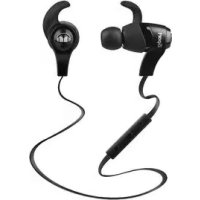
iSport Wireless - Earphones MONSTER - Free user manual and instructions
Find the device manual for free iSport Wireless MONSTER in PDF.



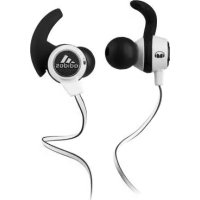
| Product Type | Bluetooth Wireless Earbud |
| Brand | Monster |
| Model | iSport Wireless |
| Dimensions (approx.) | 50 x 40 x 20 mm |
| Weight (approx.) | 28 g |
| Power | Rechargeable lithium-ion battery, charging via micro-USB port |
| Charging time | Approximately 1.5 hours |
| Battery life | Up to 5 hours (varies by usage) |
| Bluetooth version | Bluetooth (not specified, estimated 2.1+EDR or higher) |
| Bluetooth range | Approximately 10 meters |
| Main functions | Hands-free calls, music control, voice dialing, multipoint (2 phones), iOS battery indicator |
| Care and cleaning | Clean with a soft, dry cloth. Do not use abrasive products. |
| Safety | Do not use while driving. Respect sound levels (85 dB max). |
| Spare parts and repairability | Not user-serviceable. Contact Monster customer service for assistance. |
| Warranty | 1 year (North America, South America, Asia-Pacific) / 2 years (Europe) |
| Certifications | FCC ID: RJE190656, IC: 5312A-190656, CE |
| Box contents | iSport Wireless earbuds, micro-USB cable, user manual |
Frequently Asked Questions - iSport Wireless MONSTER
User questions about iSport Wireless MONSTER
0 question about this device. Answer the ones you know or ask your own.
Ask a new question about this device
Download the instructions for your Earphones in PDF format for free! Find your manual iSport Wireless - MONSTER and take your electronic device back in hand. On this page are published all the documents necessary for the use of your device. iSport Wireless by MONSTER.
USER MANUAL iSport Wireless MONSTER
iSport Bluetooth WIRELESS
Manual and Warranty · Manuel et Garantie · Handbuch und Garantieschein · Manual y Garantía
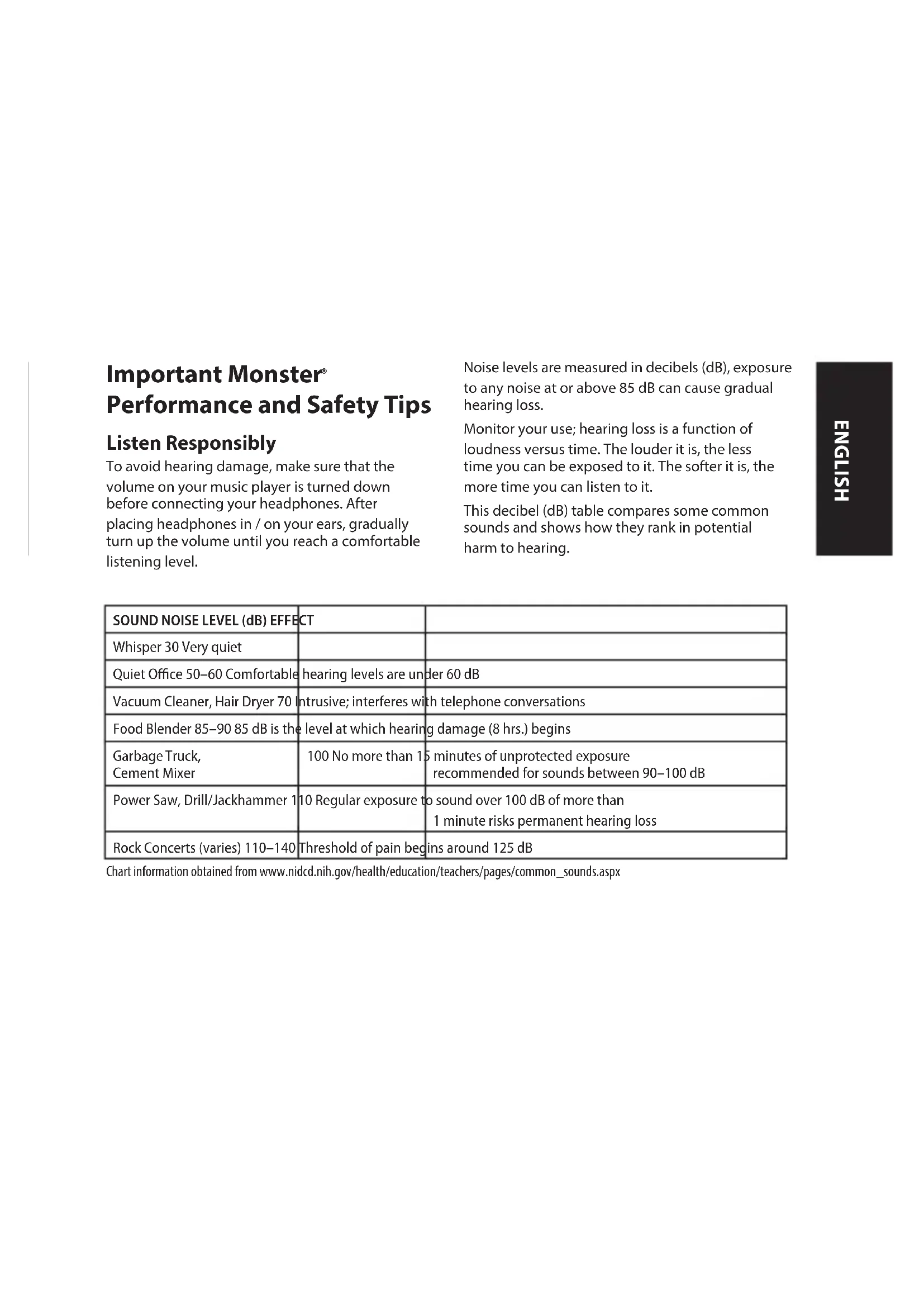
Important Monster® Performance and Safety Tips
Listen Responsibly
To avoid hearing damage, make sure that the volume on your music player is turned down before connecting your headphones. After placing headphones in / on your ears, gradually turn up the volume until you reach a comfortable listening level.
Noise levels are measured in decibels (dB), exposure to any noise at or above 85 dB can cause gradual hearing loss.
Monitor your use; hearing loss is a function of loudness versus time. The louder it is, the less time you can be exposed to it. The softer it is, the more time you can listen to it.
This decibel (dB) table compares some common sounds and shows how they rank in potential harm to hearing.
| SOUND NOISE LEVEL (dB) EFFECT | ||
| Whisper 30 Very quiet | ||
| Quiet Office 50–60 Comfortable | hearing levels are under 60 dB | |
| Vacuum Cleaner, Hair Dryer 70 | Intrusive; interferes with telephone conversations | |
| Food Blender 85–90 85 dB is the level at which hearing damage (8 hrs.) begins | ||
| Garbage Truck,Cement Mixer | 100 No more than 15 minutes of unprotected exposurerecommended for sounds between 90–100 dB | |
| Power Saw, Drill/Jackhammer 1 | 10 Regular exposure to sound over 100 dB of more than1 minute risks permanent hearing loss | |
| Rock Concerts (varies) 110–140 | Threshold of pain begins around 125 dB | |
Chart information obtained from www.nidcd.nih.gov/health/education/teachers/pages/common_sounds.aspx
Get the most out of your equipment and enjoy great audio performance even at safe levels. Our headphones will allow you to hear more details at lower volume levels than ever before.
Learn how to establish a safe listening level and review other important safety guidelines from the Consumer Electronics Association at www.ce.org. Important information on how to prevent Noise-Induced Hearing Loss (NIHL) and a comprehensive list of which noises can cause damage can be found on the Deafness Research Foundation's website, www.drf.org.
Physiology of the Ear and Hearing
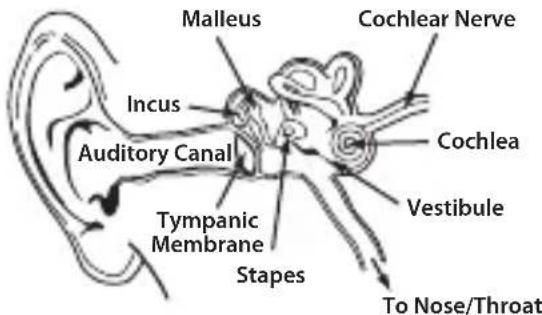
For additional information on what loud noises do to your ear and chart reference www.abelard.org/hear/hear.php#loud-music
Use Responsibly
Do not use headphones when it's unsafe to do so – while operating a vehicle, riding a bike, crossing streets, or during any activity or in an environment where your full attention to your surroundings is required.
It's dangerous to drive while wearing headphones, and in many places, illegal because it decreases your chances of hearing life-saving sounds outside of your vehicle, such as another car's horn and emergency vehicle sirens.
Please avoid wearing your headphones while driving. Use one of Monster's FM transmitters to listen to your mobile media devices instead.
Headphones "Break-in"
Break in time for headphones? We're kidding, right? No we're not. Like any high performance product, whether it's cars or headphones, they're mechanical devices that settle in after use. Your new headphones will sound incredible out of the box, but will "mellow" out after use and sound even better. We recommend playing them for 8 hours. After 20 hours of playing, they should be fully broken in. Enjoy.
Battery
If applicable, battery must be recycled or disposed of properly.

Information to consumers in application of EU WEEE Directive 96/2002
This product is subject to European Union regulations that promote the re-use
and recycling of used electrical and electronic equipment. This product required the extraction and use of natural resources and may contain hazardous substances. The symbol above, on the product or on its packaging, indicates that this product must not be disposed of with your other household waste. Instead, it is your responsibility to dispose of your waste equipment by handing it over to a designated collection point for the recycling of waste electrical and electronic equipment. The separate collection and recycling of your waste equipment at the time of disposal will help to conserve natural resources and ensure that it is recycled in a manner that protects human health and the environment. For more information about where you can drop off your waste equipment for recycling, please contact your local city office, your household waste disposal service, or the store from which you purchased the product. For more information about Monster products, please visit us at: www.MonsterProducts.com.
Monster® Service Have a Problem with Your Headphones? Our Customer Service Team is here for you.
Please don't return headphones to your retailer, CALL our customer service center, 1-877-800-8989 for United States or Latin America, or email us at www.MonsterProducts.com/service/. For Canadian, European, and Asian Pacific customer service numbers, please see the "Telephone Numbers" section in the following "Limited Warranty for Consumers". Our team of experts will assist you with all questions and technical difficulties.
We stand behind our products. Monster headphones deliver the best in sound, quality, and design.
Thank you for your purchase.
Download the complete manual at:
www.MonsterProducts.com
Product Overview
- Indicator light
- Charge jack
- Volume + / Track Backward
- Microphone
- Multifunction button (Power On/Off, Pairing, Activate Voice Dialing)
- Volume - / Track Forward

Guide to Indicator Lights
| INDICATOR LIGHT DESCRIPTION VOICE PROMPTS | ||
| Power on Stays blue 2 seconds Power on | ||
| Power off Stays red 2 seconds Power off | ||
| Standby (connected) Blink blue twice every 5 seconds / | ||
| Pairing Flashes Red and Blue alternately Pairing | ||
| Incoming call Flashes blue continuous / | ||
| Low Battery Changes to Red Battery Low / Recharge | ||
| Charging | Stays on red while charging | / |
Basic operation
Charge the Battery
Your iSport® Wireless initially has enough power to complete the pairing and a few calls. When battery is low, you will hear "Battery low" around every 5 minutes and "Recharge" when the battery needs to be recharged and the indicator light changes to red. The headphone includes a Micro USB cable that can be connected to your computer or other device made for USB charging. Plug the Micro USB end of the included USB cable into the USB micro port charger connector on the right channel side of the headphone. Plug the other end into a USB port on your computer or other devices made for USB charging. The indicator light will be red while charging. Once fully charged, the indicator light will be blue. Charge time is approximately 1.5 hours on an empty battery.
Note: The lifetime of the battery will be significantly reduced if your headphone is left uncharged for a long period. We recommend that you recharge your headphone at least once a month.
Power On/ Power Off
Press the Multifunction button for about 1-2 seconds to power on the headphone. To power off the headphone, press the Multifunction button for about 3-5 seconds.
Volume Control
Press the Volume "+" or "-" to turn volume up or down, you hear beep once you reach the maximum volume.
Pairing
Pair One Phone
- Press and hold the Multifunction button for about 5 seconds until indicator light flashes blue and red alternately, you hear "Power on" then "Pairing". Nowheadphone is in pairing mode.
- Activate Bluetooth ^® on your phone and set it to search for new devices.
- Select "iSport Wireless". If your phone asks, enter 0000 (four zeros) for the passcode or accept the connection. The indicator light stops flashing red and blue once successfully paired, you hear "Connection successful". Some phone list an option to "Play through earphone", select to use the headphone.
Pair Another Phone
Multipoint technology enables you to pair another phone and take a call from either.
To pair with another mobile phone, power off the headphone, then follow the steps for "Pair one phone". After pairing successfully, restart the headphone to connect to 2 paired mobile phone automatically.
Call
Answer a Call: Press the Multifunction button once.
Reject a Call: Press and hold the Multifunction button for about 2 seconds.
End a Call: Press the Multifunction button once.
Redial the Last Call: Double-press Multifunction button in standby mode. The mobile phone will redial the last call number.
Mute On/Off: Press the Volume "-" for about 2-3 seconds to mute on/off.
Switch Between the Headphone and Phone:
Press the Volume "+" for about 2 seconds during a call, the call will be switched to the mobile phone, redo this operation again, the call will be switched to the headphone.
End Current Call and Answer New Call: When a new call rings during a call, press the Multifunction button once to answer new call and end current call simultaneously.
On Hold Current Call and Answer New Call:
When a new call rings during a call, hold the Multifunction button for 2 seconds to hold current call and answer new call. To switch between held call and active call, hold the Multifunction button for 2 seconds.
Activate Voice Dialing: Press the Volume "+" and "-" once simultaneously to trigger the voice dialer, this function varies with user's smartphone.
Music
Play / Pause Music: Press Multifunction button once to play / pause music. (Some phones may require you to start a media player first).
Track Back / Forward: Press the Volume "+" for 2 seconds once to skip track backward, press Volume "-" for 2 seconds once to skip track forward.
Switch Music and Call: When a call rings during a music playing, the music automatically pauses to allow you to answer or ignore the call. Once the call is ignored or ends, the music is resumed.
More Features
Battery Indicator
When the headphone is connected to a device with iOS system, a battery indicator will appear at the upper right of the system, indicating battery status of the headphone.
Auto Power-Off
When the distance between the headphone and the mobile phone is beyond effective range, you will hear warning tone "Beep" and headphone disconnects with the mobile phone, the headphone will power off automatically once no active for 10 minutes.
Automatic Connection After Powering On
When the headphone and phone have been paired once, they will automatically connect when the headphone is on and Bluetooth is activated on the phone.
Connection Standby
After successful pairing and connection, you will hear the voice prompt "Connection successful". The headphone will be in turning on mode or standby mode automatically and the blue LED will flash twice every 5 seconds. When the phone disconnects the headphone, you will hear the disconnect tone.
Reset Paired Device(s)
Power off the headphone first, then hold Multifunction and Volume "+" and Volume "-" buttons simultaneously for 5 seconds, indicator light flashes red 5 times.
Hard Reset
If the headphone cannot be turned on even when fully charged or does not respond during use, follow the instructions below to reset it.
- While pressing and holding the multifunction button, connect the headset to your PC's USB port or a USB power adapter with the charging cable.
- Keep pressing and holding the Multifunction button until the headset turns on. The headset is now reset.
Certification
FCC ID: RJE190656
This device complies with Part 15 of FCC Rules. Operation is subject to the following two conditions: (1) This device may not cause harmful interference, and (2) This device must accept any interference received, including interference that may cause undesired operation. Changes or modification not expressly approved by the party responsible for Compliance could void the user's authority to operate the equipment. Connecting of peripherals requires the use of grounded shielded signal cables. The socket-outlet shall be installed near the equipment and shall be easily accessible.
NOTE: This equipment has been tested and found to comply with the limits for a Class B digital
device, pursuant to Part 15 of the FCC Rules. These limits are designed to provide reasonable protection against harmful interference in a residential installation. This equipment generates, uses and can radiate radio frequency energy and, if not installed and used in accordance with the instructions, may cause harmful interference to radio communications. However, there is no guarantee that interference will not occur in a particular installation. If this equipment does cause harmful interference to radio or television reception, which can be determined by turning the equipment off and on, the user is encouraged to try to correct the interference by one or more of the following measures:
- Reorient or relocate the receiving antenna.
- Increase the separation between the equipment and receiver.
- Connect the equipment into an outlet on a circuit different from that to which the receiver is connected.
- Consult the dealer or an experienced radio/TV technician for help.
CAUTION: Changes or modifications not expressly approved by the party responsible for compliance could void the user's (or your) authority to operate the equipment. Avoid storage in extreme heat or cold. Avoid exposure to liquids, temperature extremes and high humidity. The product's
working temperature range is 0–45°C (32–113°F). This device complies with FCC/IC radiation exposure limits set forth for an uncontrolled environment.
Canada Notice — IC ID: 5312A-190656
This Class B digital apparatus complies with Canadian ICES-003.
This device complies with RSS 210 of Industry Canada. Operation is subject to the following two conditions: (1) this device may not cause harmful interference and (2) this device must accept any interference received, including interference that may cause undesired operation.
Canadian Class B Statement
This digital device does not exceed the Class B limits for radio noise emissions from digital apparatus as set out in the interference causing equipment standard entitled "Digital Apparatus," ICES-003 of the Department of Communications.
CAN ICES-3 (B)/NMB-3(B)
Modification
Any changes or modifications not expressly approved by the grantee of this device could void the user's authority to operate the device.
Europe—EU Declaration of Conformity
The equipment complies according to the Radio Equipment and Telecommunications Terminal Equipment Directive 1999/5/EC.
This equipment meets the following conformance standards:
| Safety EN 60950-1:2006+A11:2009+A1:2010+A12:2011+A2:2013 |
| Health EN 62479:2010 |
| EMC EN 301489-1 V1.9.2EN 301489-17 V2.2.1 |
| Radio EN 300 328 V1.8.1 |


Certification Model Number: 190656 (Blue, Black)
Import: Monster, LLC
Address: 7251 West Lake Mead Blvd., Las Vegas, NV 89128
Import: Monster Technology International, Ltd.
Address: Ballymaley Business Park, Gort Rd., Ennis, Co. Clare, Ireland
LIMITED WARRANTY FOR CONSUMERS
Monster, LLC, 7251 West Lake Mead Blvd., Las Vegas, NV 89128, USA, [PLEASE NOTE THAT MONSTER DOES NOT ACCEPT PRODUCTS SHIPPED TO THIS ADDRESS – FOLLOW INSTRUCTIONS IN "HOW TO MAKE A CLAIM" BELOW] (415) 840-2000
("Monster") extends You this Limited Warranty. Statutory or common law may provide You with additional rights or remedies, which shall not be affected by this Limited Warranty.
DEFINITIONS
"Adequate Use" means personal use of the Product (i) for private (as opposed to commercial) purposes, (ii) in conformance with all applicable law, code or regulations (including without limitation building and/or electrical codes), (iii) in accordance with manufacturer recommendations and/or instructions in the materials and documentation that accompany the Product, and (iv) if applicable, with proper electrical grounding.
"Authorized Dealer" means any distributor, reseller or retailer that (i) was duly authorized to do business and permitted to sell You the Product under the laws of the jurisdiction where You bought the Product, (ii) purchased the Product directly from Monster or from a party with a contractual relationship with Monster and in accordance with the authorized terms and conditions of such agreement, and (iii) sold You the Product new and in its original packaging.
"Formal Warranty Claim" means a claim made in accordance with the section "Formal Warranty Claims" herein.
"Product" means a Product (i) that is listed in the Specifications Table below, (ii) that You bought from an Authorized Dealer new and in its original packaging, and (iii) whose serial number, if any, has not been removed, altered, or defaced.
"Product Defect" or "Defective Product" means an inadequacy of the Product that existed at the time when You received the Product from an Authorized Dealer and that causes a failure of the Product to perform in accordance with Monster's documentation accompanying the Product, unless such failure has been caused completely or partly by (a) any use other than Adequate Use, (b) transportation, neglect, misuse or abuse by anyone other than Monster's employees; (c) alteration, tampering or modification of the product by anyone other than a Monster employee; (d) accident (other than a malfunction that would otherwise qualify as a Product Defect); (e) maintenance or service of the Product by anyone other than a Monster employee; (f) exposure of the Product to heat, bright light, sun, liquids, sand or other contaminants; or (g) acts outside the control of Monster, including without limitation acts of God, fire, storms, earthquake or flood.
"Warranty Period" means the time period during which Monster must have received Your Formal Warranty Claim. The different Warranty Periods related to Product Defects are defined in the Specifications Table below. The Warranty Period commences on the date when You purchased or received (whichever occurs later) the Product from an Authorized Dealer as evidenced by the Authorized Dealer's invoice, sales receipt or packing slip. If You do not have written proof of the date of purchase or receipt, then the Warranty Period commences three (3) months after the date when the Product left Monster or its factory as evidenced by Monster's records. The Warranty Period ends after the time defined in the Specifications Table has expired or after You have transferred ownership of the Product, whichever occurs earlier. Also, You must call Monster and obtain a Return Authorization Number (as described under "How to Make a Claim") within two (2) months after You discover a Product Defect (or should have discovered it, if such Product Defect was obvious).
"You" means the first individual person that purchased the Product in its original packaging from an Authorized Dealer. This Limited Warranty does not apply to persons or entities that bought the Product (i) in used or unpackaged form, (ii) for resale, lease or other commercial use, or (iii) from someone other than an Authorized Dealer.
SCOPE OF THIS LIMITED WARRANTY
PRODUCTS. If a Product contained a Product Defect when You bought it from an Authorized Dealer, and Monster receives a Formal Warranty Claim from You (i) within two (2) months after You discover such Product Defect (or should have discovered it, if such Product Defect was obvious) and (ii) before the end of the Warranty Period
for Product Defects applicable to the Defective Product, then Monster will provide You with one of the following remedies: Monster will (1) repair or, at Monster's sole discretion, replace the Defective Product, or (2) refund to You the purchase price You paid to Monster or the Authorized Dealer for the Defective Product if repair or replacement is not commercially practicable or cannot be timely made. NOTE: TO THE FULLEST EXTENT PERMITTED BY APPLICABLE LAW, MONSTER DOES NOT ASSUME ANY LIABILITY FOR ANY INCIDENTAL, CONSEQUENTIAL OR INDIRECT DAMAGES UNDER THIS LIMITED WARRANTY.
GENERAL PROVISIONS
CHOICE OF LAW/JURISDICTION. This Limited Warranty and any disputes arising out of or in connection with this Limited Warranty ("Disputes") shall be governed by the laws of the jurisdiction where You bought the Product.
OTHER RIGHTS. THIS LIMITED WARRANTY GIVES YOU SPECIFIC LEGAL RIGHTS, AND YOU MAY ALSO HAVE OTHER RIGHTS, WHICH VARY FROM JURISDICTION TO JURISDICTION, AND WHICH SHALL NOT BE AFFECTED BY THIS LIMITED WARRANTY.* THIS WARRANTY EXTENDS ONLY TO YOU AND CANNOT BE TRANSFERRED OR ASSIGNED. If any provision of this Limited Warranty is unlawful, void or unenforceable, that provision shall be deemed severable and shall not affect any remaining provisions. In case of any inconsistency between the English and other versions of this Limited Warranty, the English version shall prevail.
REGISTRATION. Please register Your Product at www.MonsterProducts.com. Failure to register will not diminish Your warranty rights.
SPECIFICATIONS TABLE
| Product Model Warranty Period for headphone | |
| Product that accompanies this warranty statement | One (1) year for product sold in North America, South America and Asia PacificTwo (2) years for product sold in Europe |
FORMAL WARRANTY CLAIM
HOW TO MAKE A CLAIM. In the event of a Product Defect, You must follow these instructions: (1) Call Monster within two (2) months after You discover a Product Defect (or should have discovered it, if such Product Defect was obvious); (2) Give a detailed explanation of how the damage occurred; (3) Obtain a Return Authorization Number; (4) Return the Product, shipping prepaid by You (to be refunded if You are entitled to a remedy under the Scope of this Limited Warranty), to Monster for verification of damage, along with a copy of
Your original sales receipt or proof of purchase (invoice or packing slip) for such Product, the completed claim form, and printed Return Authorization Number on the outside of the return package (the claim form will include
instructions for return).
TELEPHONE NUMBERS. If You bought the Product in the United States (1-877-800-8989), Latin America (Mexico 011-882-800-8989), or Asia Pacific (China 400-820-8973), contact Monster, LLC via postal service at 455 Valley Drive, Brisbane, CA 94005 (PLEASE NOTE THAT MONSTER DOES NOT ACCEPT PRODUCTS SHIPPED TO THIS ADDRESS - FOLLOW INSTRUCTIONS IN "HOW TO MAKE A CLAIM" ABOVE). If You bought the Product in Australia, contact Monster's agent, Convoy International Pty Ltd (02 9700 0111), Unit 7, 1801 Botany Rd, Banksmeadow, NSW 2019 Australia. If You bought the Product anywhere else, contact Monster Technology International Ltd., Ballymaley Business Park, Gort Road, Ennis, Co. Clare, Ireland. You can use one of the following telephone numbers:
United States 1-877-800-8989
Canada 866-348-4171
Mexico 011-882-800-8989
China 400-820-8973
Ireland 353 65 68 69 354
Austria 0800296482
Belgium 0800-79201
Denmark 8088-2128
Finland 800-112768
France 0800-918201
Germany 0800-1819388
Greece 00800-353-12008
Italy 800-871-479
Netherlands 0800-0228919
Norway 800-10906
Russia 810-800-20051353
Spain 900-982-909
Sweden 020-792650
Switzerland 0800834659
Czech Republic 800-142471
United Kingdom 0800-0569520
FURTHER PROCEEDINGS. Monster will determine whether a Product Defect existed. Monster may, at its discretion, direct You to obtain a repair estimate at a service center. If a repair estimate is required, You will be instructed on how to properly submit the estimate and the resulting invoice to Monster for payment. Any fees for repairs may be negotiated by Monster.
TIMING. If You bring a Formal Warranty Claim and fully comply with all terms and conditions of this Limited Warranty, Monster will use its best efforts to provide You with a remedy within thirty (30) days after receipt of Your Formal Warranty Claim (if You reside in the United States – forty-five (45) days if You reside elsewhere), unless obstacles outside Monster's control delay the process.
* Our goods come with guarantees that cannot be excluded under the Australian Consumer Law. You are entitled to a replacement or refund for a major failure and compensation for any other reasonably foreseeable loss or damage. You are also entitled to have the goods repaired or replaced if the goods fail to be of acceptable quality and the failure does not amount to a major failure.
Ver.121912 - GLOBAL
©2003-2015 Monster, LLC
Adresse: Ballymaley Business Park, Gort Rd., Ennis, Co. Clare, Ireland
GARANTIE LIMITÉE POUR LE CONSOMMATEUR
©2003-2013 Monster, LLC
Canadian Class B Statement
Anschrift: Ballymaley Business Park, Gort Rd., Ennis, Co. Clare, Ireland
EINGESCHRÄNKTE GARANTIE FÜR VERBRAUCHER
Monster, LLC, 7251 West Lake Mead Blvd., Las Vegas, NV 89128, USA, [BITTE BEACHTEN SIE, DASS MONSTER KEINE AN DIESE ADRESSE EINGESCHICKTEN PRODUKTE ANNIMMT – FOLGEN SIE DEN ANWEISUNGEN IM ABSCHNITT
©2003-2013 Monster, LLC
©2003-2013 Monster, LLC
Adres: 7251 West Lake Mead Blvd.,
Las Vegas, NV 89128
Import: Monster Technology International, Ltd.
Adres: Ballymaley Business Park,
Gort Rd., Ennis, Co. Clare, Ireland
BEPERKTE GARANTIE VOOR CONSUMENTEN
Monster, LLC, 7251 West Lake Mead Blvd., Las Vegas, NV 89128, VS, [N.B.: MONSTER ACCEPTEERT GEEN PRODUCTEN DIE NAAR DIT ADRES VERZONDEN WORDEN – VOLG DE INSTRUCTIES ONDER "EEN
CLAIM INDIENEN", HIERONDER] (415) 840-2000
©2003-2013 Monster, LLC
Indirizzo: Ballymaley Business Park, Gort Rd., Ennis, Co. Clare, Ireland
GARANZIA LIMITATA PER I CONSUMATORI
Monster, LLC, 7251 West Lake Mead Blvd., Las Vegas, NV 89128, USA, [SI RICORDA CHE MONSTER NON ACCETTA PRODOTTI SPEDITI A QUESTO INDIRIZZO – SEGUIRE LE ISTRUZIONI INDICATE IN “COME FARE UNA RICHIESTA”
©2003–2013 Monster, LLC
A informação do quadro em www.nidcd.nih.gov/health/education/teachers/pages/common_sounds.aspx
Morada: Ballymaley Business Park, Gort Rd., Ennis, Co. Clare, Ireland
GARANTIA LIMITADA PARA CONSUMIDORES
A Monster, LLC, 7251 West Lake Mead Blvd., Las Vegas, NV 89128, USA, [NOTE QUE A MONSTER NÃO ACEITA PRODUTOS ENVIADOS PARA ESTA MORADA – SIGA AS INSTRUÇÕES ABAIXO, NA SECÇÃO “COMO EFETUAR UMA RECLAMAÇÃO”]
©2003-2013 Monster, LLC
©2003-2013 Monster, LLC
Tablo bilgisi www.nidcd.nih.gov/health/education/teachers/pages/common_sounds.aspx
Adres: 7251 West Lake Mead Blvd.,
Las Vegas, NV 89128
İthalat: Monster Technology International, Ltd.
Adres: Ballymaley Business Park,
Gort Rd., Ennis, Co. Clare, Ireland
7251 West Lake Mead Blvd., Las Vegas, NV
89128, USA, [LÜTFEN MONSTER'IN BU ADRESE GÖNDERİLEN ÜRÜNLERİ KABUL ETMEDİĞİNİ UNUTMAYIN – AŞAĞIDAKİ "NASIL TALEPTE BULUNULUR" BÖLÜMÜNDE YER ALAN
©2003-2013 Monster, LLC
Adresa: 7251 West Lake Mead Blvd.,
Las Vegas, NV 89128
Import: Monster Technology International, Ltd.
Adresa: Ballymaley Business Park,
Gort Rd., Ennis, Co. Clare, Ireland
OMEZENÁ SPOTŘEBITELSKÁ ZÁRUKA
Společnost Monster, LLC, se sídlem na adrese 7251 West Lake Mead Blvd., Las Vegas, NV 89128, USA, [VEZMĚTE NA VĚDOMÍ, ŽE SPOLEČNOST MONSTER NEPŘIJÍMÁ VÝROBKY ZASLANÉ NA TUTO ADRESU – POSTUPUJTE PODLE POKYNŮ „REKLAMAČNÍ POSTUP“ NÍŽE]
VOLBA PRÁVA A SOUDNÍ PŮSOBNOSTI.
©2003-2013 Monster, LLC
Adresa: 7251 West Lake Mead Blvd.,
Las Vegas, NV 89128
Dovoz: Monster Technology International, Ltd.
Adresa: Ballymaley Business Park,
Gort Rd., Ennis, Co. Clare, Ireland
OBMEDZENÁ ZÁRUKA PRE SPOTREBITEL'OV
Monster, LLC, 7251 West Lake Mead Blvd., Las Vegas, NV 89128, USA, [UPOZORŇUJEME, ŽE SPOLOČNOST MONSTER NEAKCEPTUJE VÝROBKY ZASLANĚ NA TÚTO ADRESU – POSTUPUJTE PODĽA POKYNOV UVEĐENÝCH NIŽŠIE V ČASTI „AKO REKLAMOVAŤ“]
©2003-2013 Monster, LLC
Адрес: Ballymaley Business Park, Gort Rd., Ennis, Co. Clare, Ireland
©2003-2013 Monster, LLC
表の情報は www.nidcd.nih.gov/health/education/teachers/pages/common_sounds.aspx
住所: Ballymaley Business Park, Gort Rd., Ennis, Co. Clare, Ireland
消費者への限定保証
Monster, Inc., 7251 West Lake Mead Blvd., Las Vegas, NV 89128, USA 電話 (415) 840-2000
©2003-2013 Monster, LLC
魔声产品性能及使用安全重要说明
为您的听力负责
图表信息从如下网站获得:www.nidcd.nih.gov/health/education/teachers/pages/common_sounds.aspx
地址: Ballymaley Business Park, Gort Rd., Ennis, Co. Clare, Ireland
有限保修条款
©2003-2013 Monster, LLC
重要 Monster® 效能與安全提示
負責任地聆聽
圖表資訊來自:www.nidcd.nih.gov/health/education/teachers/pages/common_sounds.aspx

地址: Ballymaley Business Park,
Gort Rd., Ennis, Co. Clare, Ireland
消費者的有限保固
Monster, LLC, 7251 West Lake Mead Blvd., Las Vegas,
NV 89128, USA, [請注意, MONSTER
不接受運至該地址的
產品-請依照上述「如何申請
©2003 - 2015 Monster, LLC
획득한 도표 정보: www.nidcd.nih.gov/health/education/teachers/pages/common_sounds.aspx
주소: Ballymaley Business Park,
Gort Rd., Ennis, Co. Clare, Ireland
소비자에 대한 제한 보증
Monster, LLC, 7251 West Lake Mead Blvd., Las Vegas,
©2003-2015 Monster, LLC
Importer: Monster, LLC
Adres: 7251 West Lake Mead Blvd.,
Las Vegas, NV 89128
Importer: Monster Technology International, Ltd.
Adres: Ballymaley Business Park,
Gort Rd., Ennis, Co. Clare, Irlandia
OGRANICZONA GWARANCJA DLA KLIENTÓW
Firma Monster, LLC, 7251 West Lake Mead Blvd., Las Vegas,
NV 89128, USA, [NIE WYSYŁAĆ ZWROTÓW
PRODUKTÓW
NA TEN ADRES — NALEŻY POSTĘPOWAĆ
ZGODNIE Z INSTRUKCJAMI PRZEDSTAWIONYMI W PONIŻSZEJ CZĘŚCI „JAK ZGŁOSIĆ
REKLAMACJĘ Z TYTUŁU GWARANCJI?"] (415)
WYBÓR SYSTEMU PRAWNEGO/JURYSDYKCJI.
Monster Technology International, Ltd
Monster, the M Monster logo, Pure Monster Sound, iSport, the product and packaging are trademarks or registered trademarks of Monster, Inc. or its subsidiaries in the United States or other countries. Product may vary from images shown. Licensed under Freebit patent number EP2177045 and corresponding international patents. Design is patent pending. The Bluetooth word mark and logos are registered trademarks owned by Bluetooth SIG, Inc. and any use of such marks by Monster is under license. All other trademarks and trade names are those of their respective owners.

- iSport Bluetooth WIRELESS
- Important Monster® Performance and Safety Tips
- Listen Responsibly
- Use Responsibly
- Headphones "Break-in"
- Battery
- Information to consumers in application of EU WEEE Directive 96/2002
- Monster® Service Have a Problem with Your Headphones? Our Customer Service Team is here for you.
- Download the complete manual at:
- Product Overview
- Guide to Indicator Lights
- Basic operation
- Charge the Battery
- Power On/ Power Off
- Volume Control
- Pairing
- Pair One Phone
- Pair Another Phone
- Call
- Switch Between the Headphone and Phone:
- On Hold Current Call and Answer New Call:
- Music
- More Features
- Battery Indicator
- Auto Power-Off
- Automatic Connection After Powering On
- Connection Standby
- Reset Paired Device(s)
- Hard Reset
- Certification
- FCC ID: RJE190656
- Canada Notice — IC ID: 5312A-190656
- Canadian Class B Statement
- CAN ICES-3 (B)/NMB-3(B)
- Modification
- Europe—EU Declaration of Conformity
- LIMITED WARRANTY FOR CONSUMERS
- DEFINITIONS
- SCOPE OF THIS LIMITED WARRANTY
- GENERAL PROVISIONS
- FORMAL WARRANTY CLAIM
- GARANTIE LIMITÉE POUR LE CONSOMMATEUR
- EINGESCHRÄNKTE GARANTIE FÜR VERBRAUCHER
- BEPERKTE GARANTIE VOOR CONSUMENTEN
- GARANZIA LIMITATA PER I CONSUMATORI
- GARANTIA LIMITADA PARA CONSUMIDORES
- OMEZENÁ SPOTŘEBITELSKÁ ZÁRUKA
- VOLBA PRÁVA A SOUDNÍ PŮSOBNOSTI.
- OBMEDZENÁ ZÁRUKA PRE SPOTREBITEL'OV
- 消費者への限定保証
- 魔声产品性能及使用安全重要说明
- 为您的听力负责
- 有限保修条款
- 重要 Monster® 效能與安全提示
- 負責任地聆聽
- 消費者的有限保固
- 소비자에 대한 제한 보증
- OGRANICZONA GWARANCJA DLA KLIENTÓW
- PRODUKTÓW
- NA TEN ADRES — NALEŻY POSTĘPOWAĆ
- ZGODNIE Z INSTRUKCJAMI PRZEDSTAWIONYMI W PONIŻSZEJ CZĘŚCI „JAK ZGŁOSIĆ
- REKLAMACJĘ Z TYTUŁU GWARANCJI?"] (415)
- WYBÓR SYSTEMU PRAWNEGO/JURYSDYKCJI.
Brand : MONSTER
Model : iSport Wireless
Category : Earphones