
Fjord CDFM - Loudspeaker TANGENT - Free user manual and instructions
Find the device manual for free Fjord CDFM TANGENT in PDF.



| Product Type | Audio system with FM radio, CD player and iPhone docking station |
| Brand | Tangent |
| Model | Fjord CDFM |
| Dimensions (W x H x D) | 170 mm x 180 mm x 170 mm |
| Weight | 3.20 kg (with power supply) |
| Power supply | DC 12V / 2A |
| Output power | 2 x 7 Watts RMS (1% THD) |
| Speakers | 2 wideband speakers of 3 inches (7.6 cm) |
| Radio frequency band | FM 87.5 - 108.0 MHz |
| Connectivity | AUX input 3.5 mm stereo jack, iPhone docking station, CD player |
| Main functions | FM radio with 4 presets, CD player, iPhone docking station, AUX input, alarm, proximity sensor, IR remote control |
| Screen type | Vacuum fluorescent display (VFD) 2x16 characters |
| Antenna | Integrated telescopic antenna |
| Design | Design by Jacob Jensen |
| Country of manufacture | China |
| Manual available | 119 pages, multilingual (French included) |
| Maintenance | Clean with a soft, dry cloth. Do not use abrasive products or solvents. |
| Safety | Do not open the casing. No user-serviceable parts. Risk of electric shock. |
| Spare parts and repairability | Contact an authorized service center. Warranty void if opened. |
| General information | Manufactured under license by Tangent. Reference: 21040. |
Frequently Asked Questions - Fjord CDFM TANGENT
User questions about Fjord CDFM TANGENT
0 question about this device. Answer the ones you know or ask your own.
Ask a new question about this device
Download the instructions for your Loudspeaker in PDF format for free! Find your manual Fjord CDFM - TANGENT and take your electronic device back in hand. On this page are published all the documents necessary for the use of your device. Fjord CDFM by TANGENT.
USER MANUAL Fjord CDFM TANGENT
Design by Jacob Jensen
CD / FM
User manual
iPhone® and iPod® are trademarks of Apple Inc., registered in the U.S. and other countries.
“Made for iPod,” and “Made for iPhone” mean that an electronic accessory has been designed to connect specifically to iPod or iPhone, respectively, and has been certified by the developer to meet Apple performance standards. Apple is not responsible for the operation of this device or its compliance with safety and regulatory standards.
UK - USER MANUAL
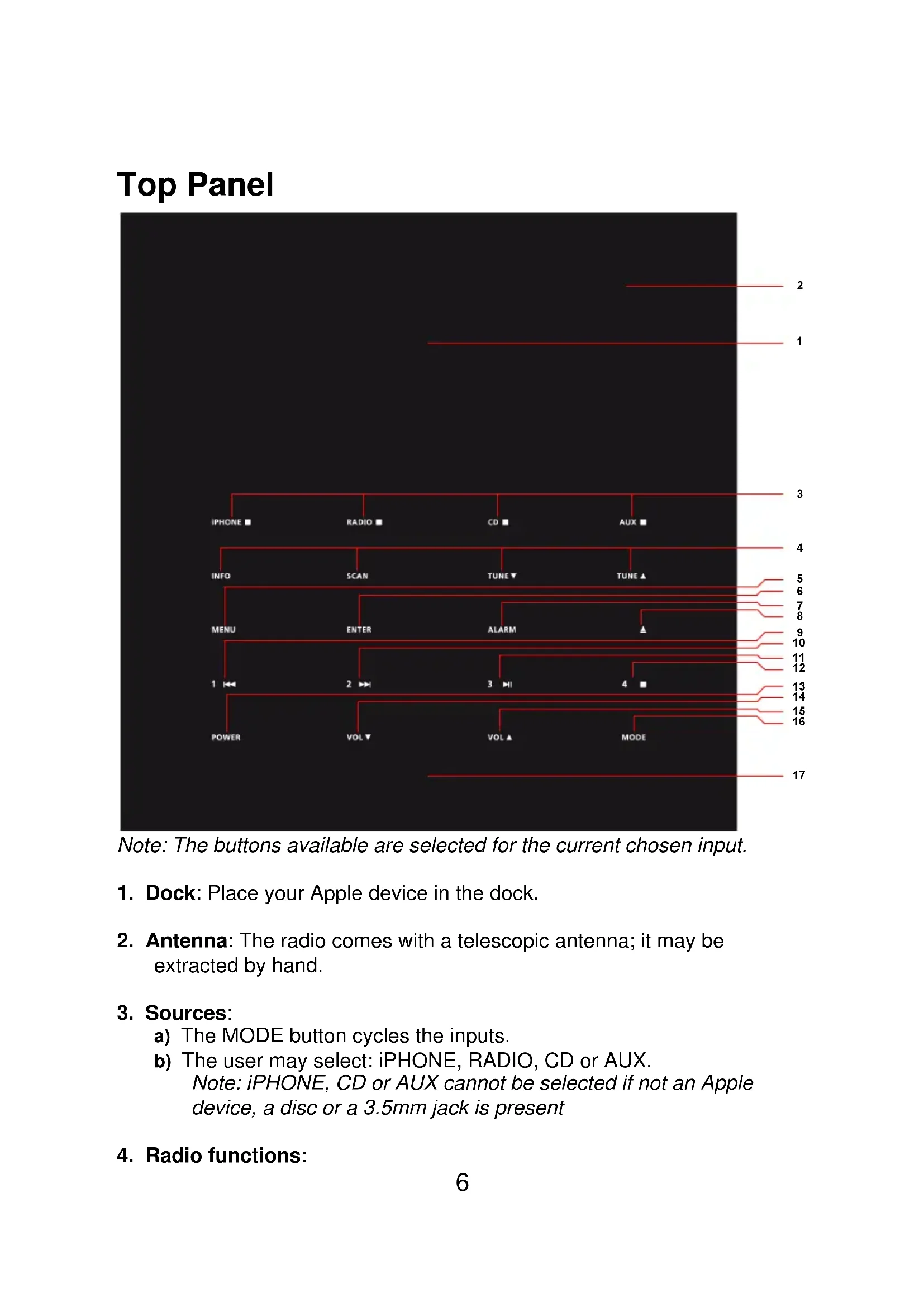
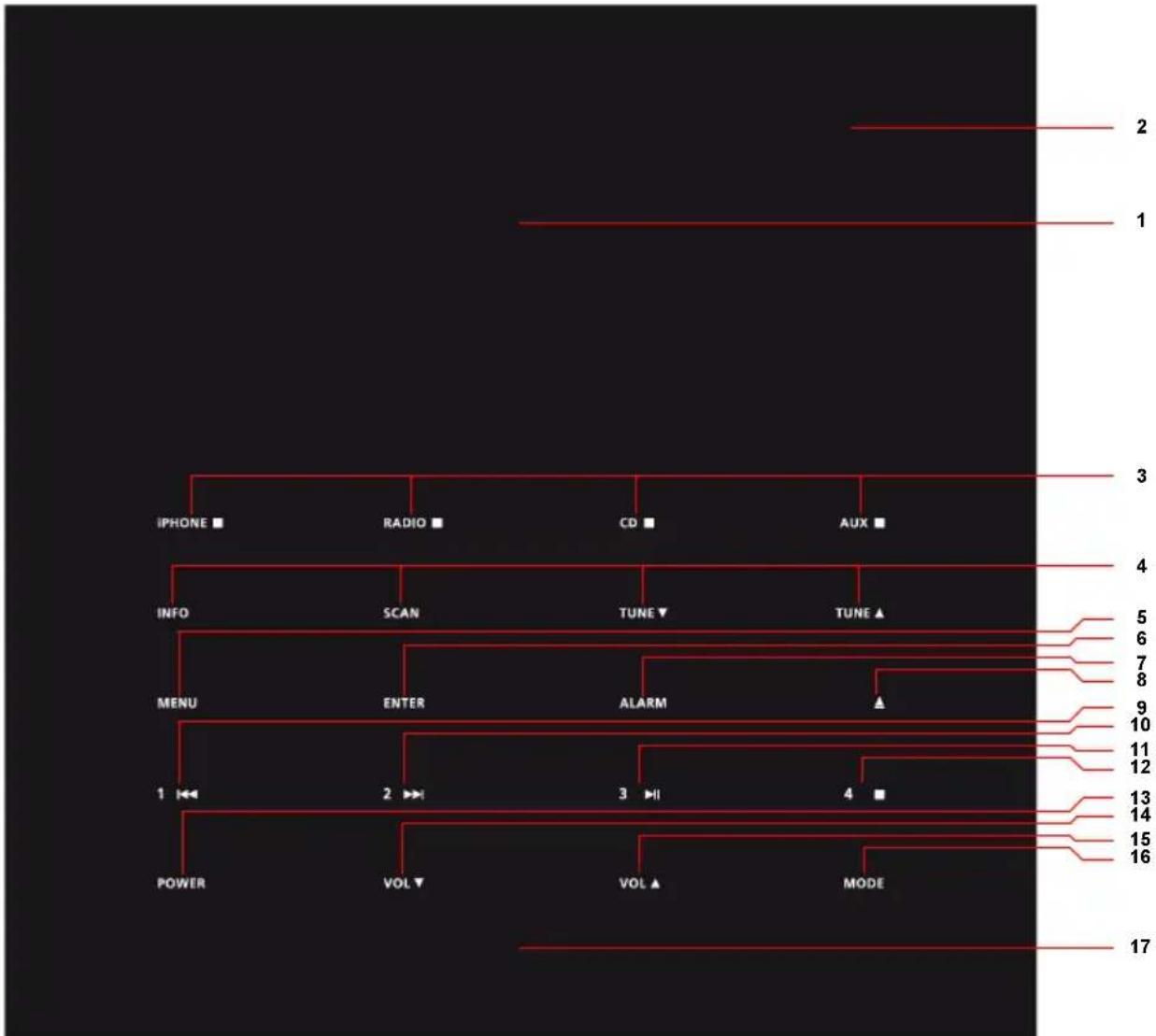
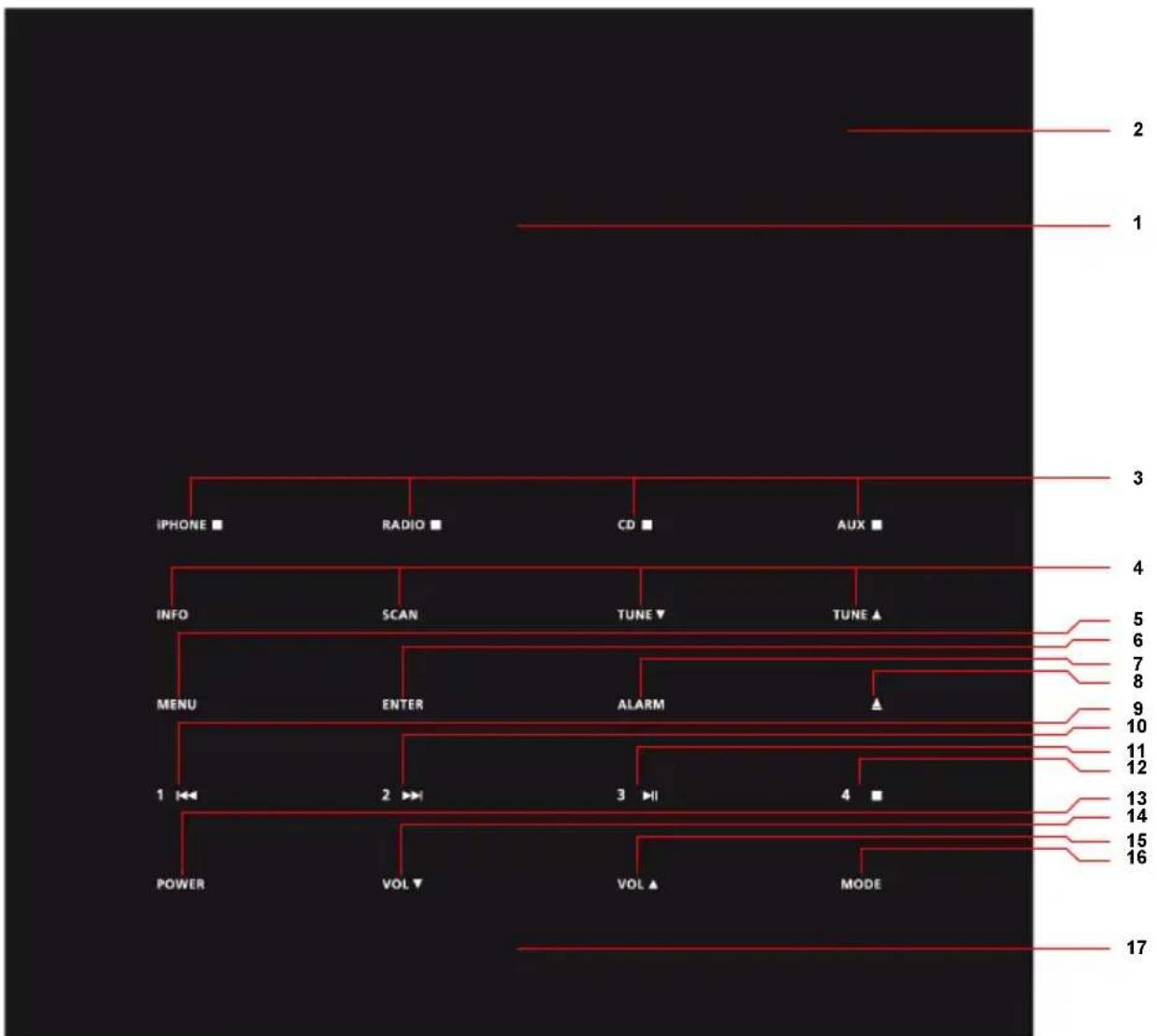
Top Panel
flowchart
graph TD
    A["IPHONE ■"] --> B["RADIO ■"]
    B --> C["CD ■"]
    C --> D["AUX ■"]
    E["INFO"] --> F["SCAN"]
    F --> G["TUNE ▼"]
    G --> H["TUNE ▲"]
    I["MENU"] --> J["ENTER"]
    J --> K["ALARM"]
    K --> L["▲"]
    M["POWER"] --> N["VOL ▼"]
    N --> O["VOL ▲"]
    O --> P["MODE"]
    Q["2"] --> R["17"]
    S["3"] --> T["4"]
    U["5"] --> V["6"]
    W["7"] --> X["8"]
    Y["9"] --> Z["10"]
    AA["11"] --> AB["12"]
    AC["13"] --> AD["14"]
    AE["15"] --> AF["16"]
Note: The buttons available are selected for the current chosen input.
-
Dock: Place your Apple device in the dock.
-
Antenna: The radio comes with a telescopic antenna; it may be extracted by hand.
-
Sources:
a) The MODE button cycles the inputs.
b) The user may select: iPhone, RADIO, CD or AUX.
Note: iPhone, CD or AUX cannot be selected if not an Apple device, a disc or a 3.5mm jack is present
- Radio functions:
a) INFO: Toggles the following radio texts: Time of day, station name, PTY and crawler text.
b) SCAN: Tunes the radio band. A single press seeks the next station in the FM band. Up or down depending upon last manual tune via TUNE▼ or TUNE▲ up is default. A press and hold makes an autotune where the first 4 stations found are loaded into the four presets. By default the first time the radio enters radio mode, the Tangent fjord performs an autotune.
c) TUNE By pressing these buttons the user steps the FM band 0.05MHz down and up respectively.
-
MENU: Press this button to enter the menu system. Layouts is found in section: Menu Description
-
ENTER: Press to confirm to go to the sub level of a topic in the menu system. In the sub level, enter is no longer needed, all changes are instant via 1 and 2
-
ALARM: To set an alarm, press this button. Menu Description explains more details.
-
If a disc is present in the Tangent fjord, press this button to eject the disc.
-
Features skip/search reverse for CD/iPHONE mode, and preset 1 in radio mode. A single press skips/loads preset 1, and a press and hold searches the track/stores preset 1.
-
Features skip/search forward for CD/iPHONE mode, and preset 2 in radio mode. A single press skips/loads preset 2, and a press and hold searches the track/stores preset 2.
-
Features play/pause for CD/iPHONE mode, and preset 3 in radio mode. A single press toggles play and pause/loads preset 3, and a press and hold stores preset 3.
-
Features stop for CD/iPHONE mode, and preset 4 in radio mode. A single press stops the track/loads preset 4, and a press and hold stores preset 4.
-
POWER: Press to switch on/off the Tangent fjord. If the proximity sensor is active, it will also switch on the Tangent fjord.
- Decreases the volume.
- Increases the volume.
- MODE: Cycles the inputs: iPhone, RADIO, CD or AUX.
- Proximity Sensor: Swipe the sensor area to switch on the Tangent fjord. (This function can be disabled in the menu) During an active alarm mode the proximity senor acts as snooze button. (This function cannot be disabled in the menu)
Front Panel
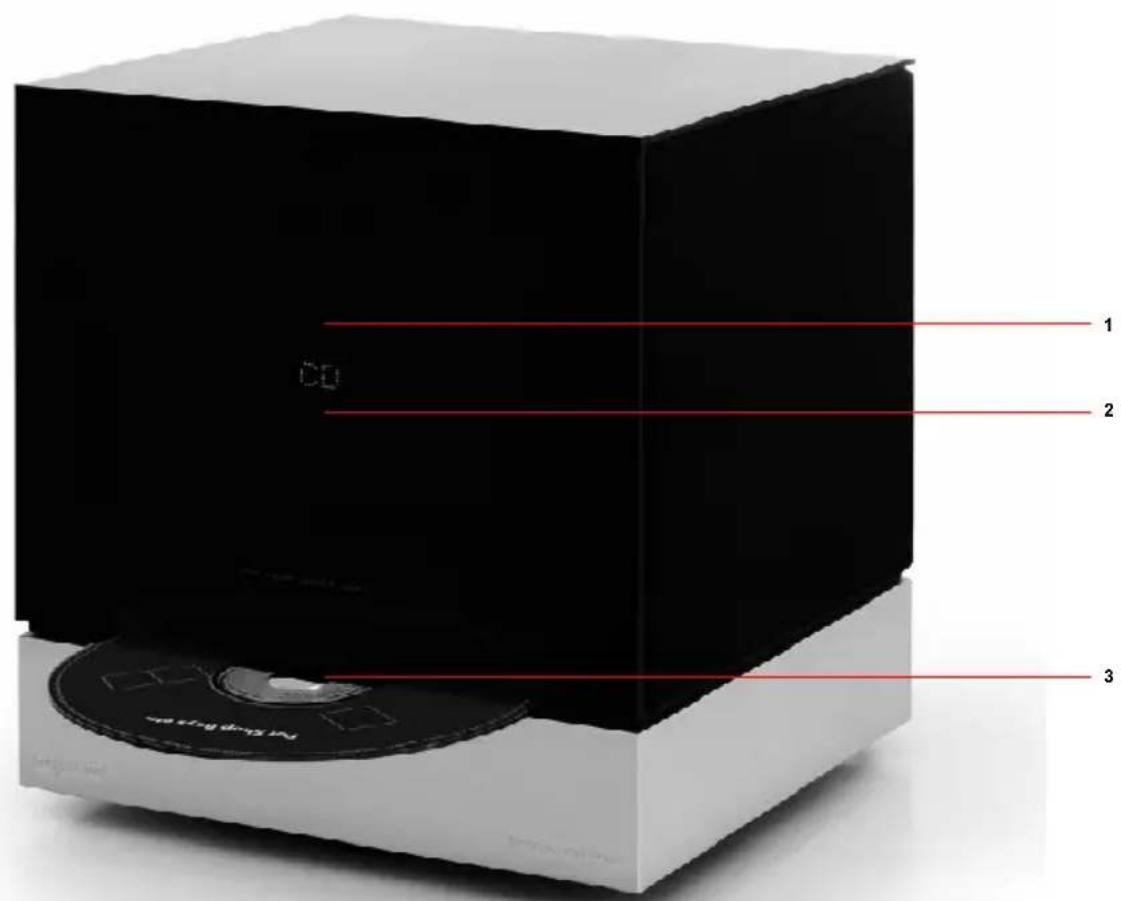
- IR Eye: Infrared receiver.
- Display Screen: 2x16 character VFD.
- CD-Slot: Insert your disc here.
Rear Panel
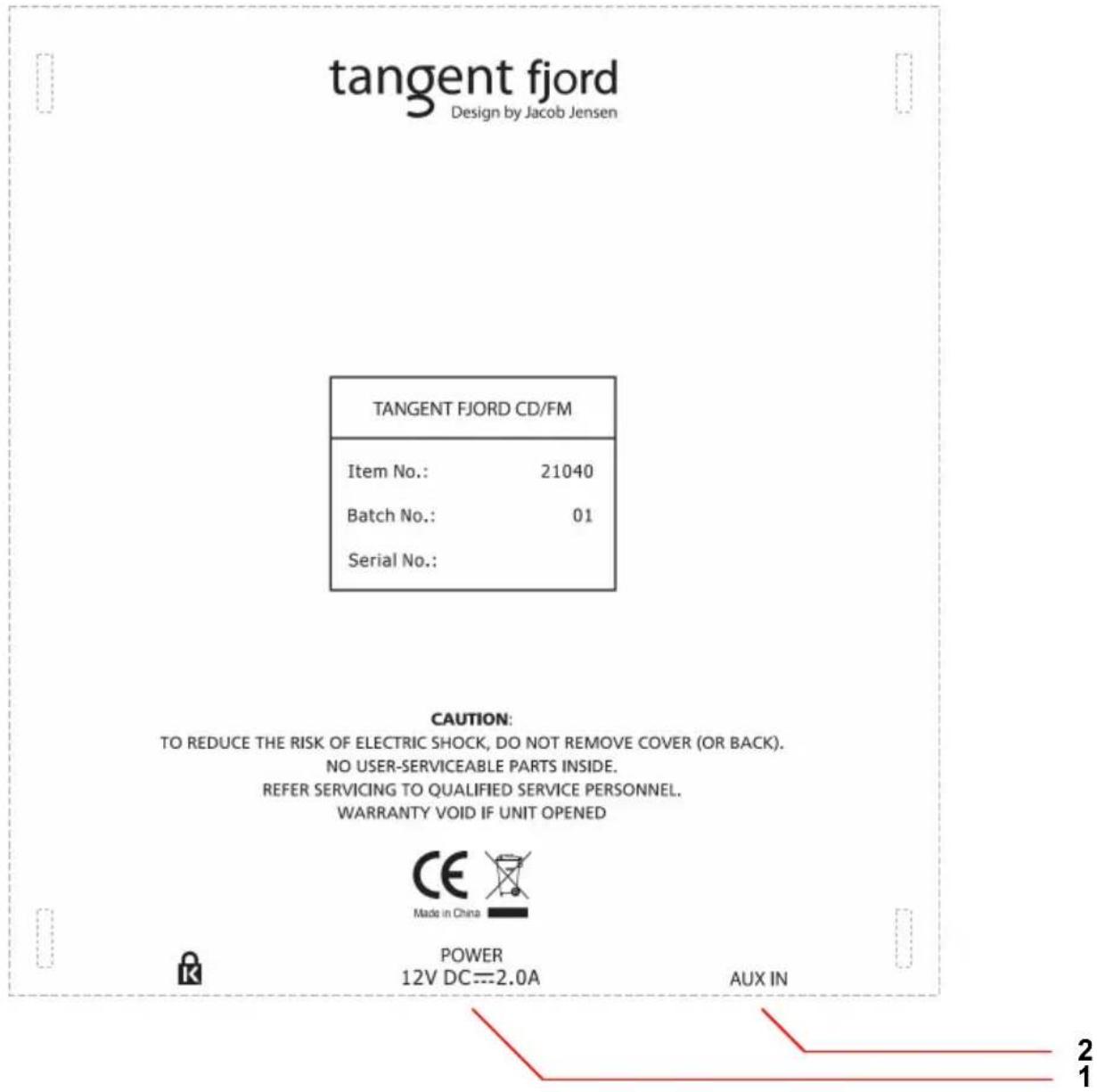
- POWER: Use this input to connect the Tangent fjord's DC power supply; 12V/2A.
- AUX IN: Connect any stereo or mono audio source to this stereo input.
Remote Control
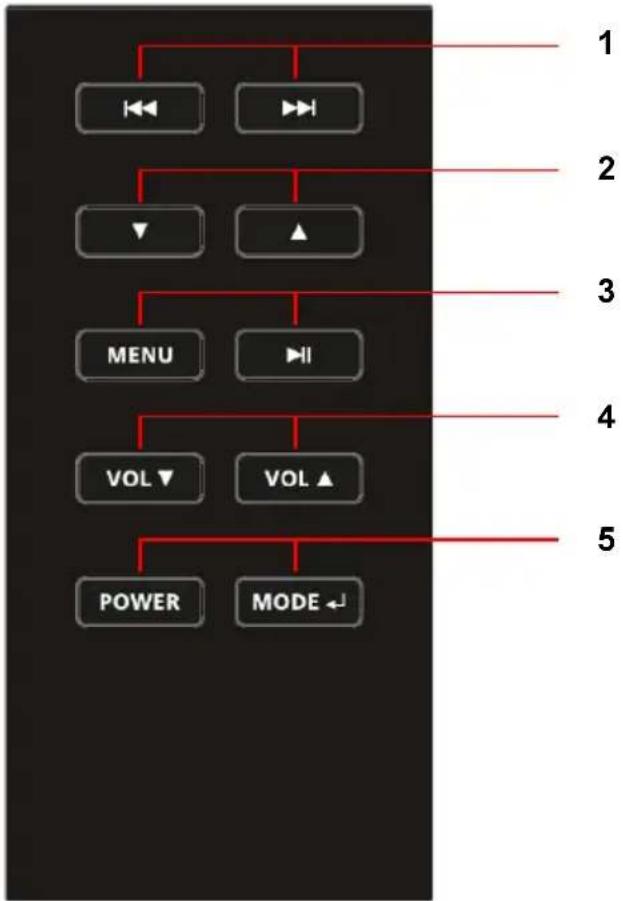
flowchart
graph TD
    A["←"] --> B["→"]
    C["→"] --> D["↓"]
    E["▲"] --> F["→"]
    G["MENU"] --> H["→"]
    I["VOL ▼"] --> J["VOL ▲"]
    K["POWER"] --> L["MODE ←"]
    style A fill:#f9f,stroke:#333
    style C fill:#f9f,stroke:#333
    style E fill:#f9f,stroke:#333
    style G fill:#f9f,stroke:#333
    style I fill:#f9f,stroke:#333
    style K fill:#f9f,stroke:#333
    style L fill:#f9f,stroke:#333
- Skip/search reverse and forward.
- Arrow keys down/up, used for scroll in iPhone mode. When short pressing in FM mode the keys scan down and up respectively in 0.05MHz steps. Upon press and hold the arrows keys scan. [Note a.]
- MENU (for both radio and iPhone) and PLAY/PAUSE.
- Volume down and up respectively.
- POWER and MODE. [Note b.]
See section Top Panel for detailed description of the buttons.
Notes
a. There are no arrow keys on the Top Panel.
b. The MODE button on the remote has two functions. It acts as ENTER button in iPhone menu mode and as MODE button too. The MODE button function requires a long press to switch from iPhone to FM mode. Between other sources a short press is required. The Top Panel MODE button has only one function.
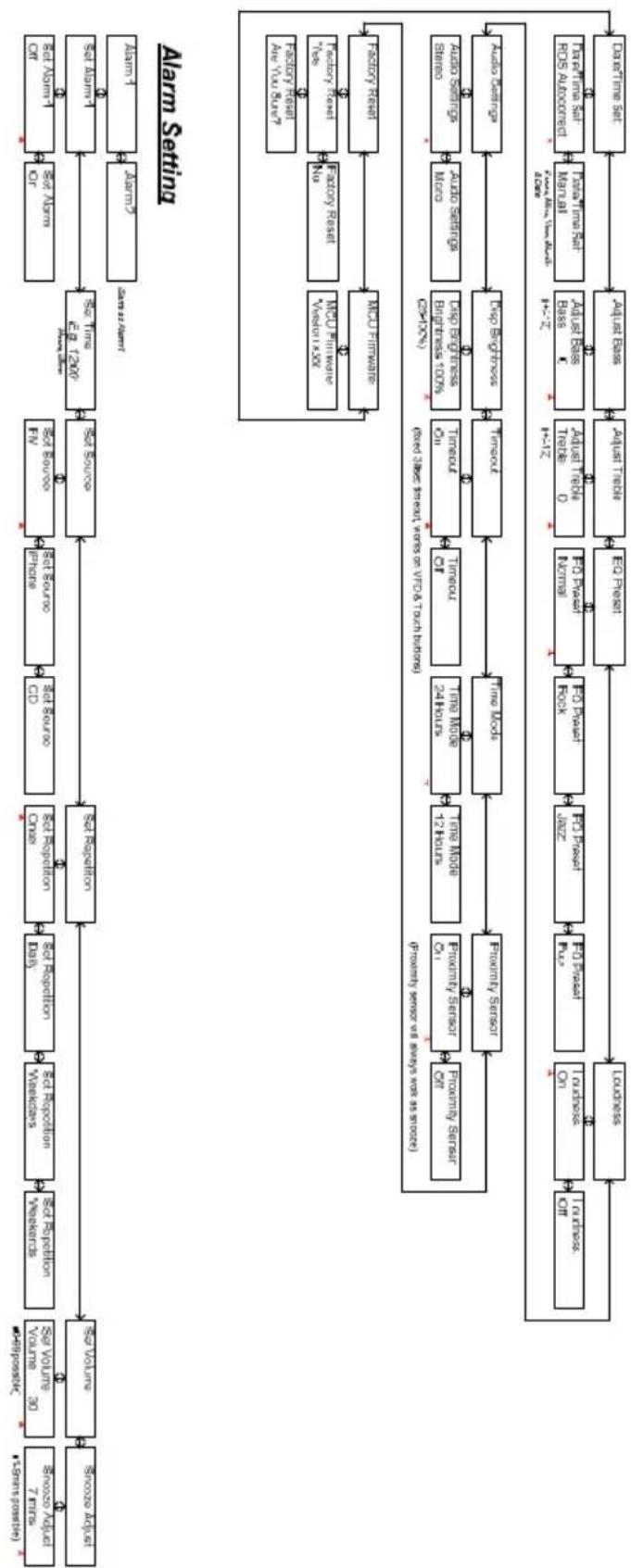
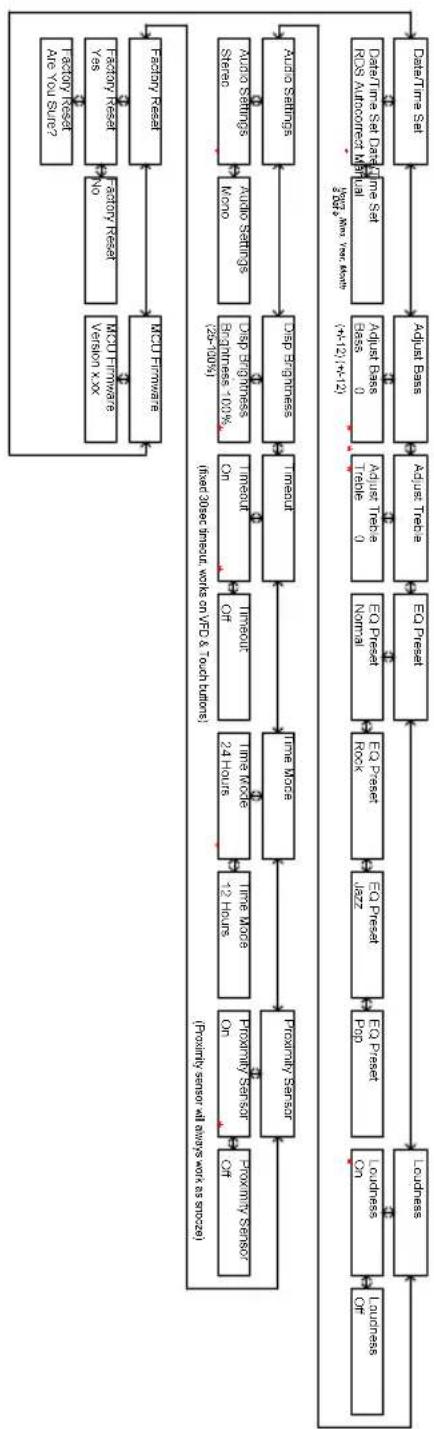
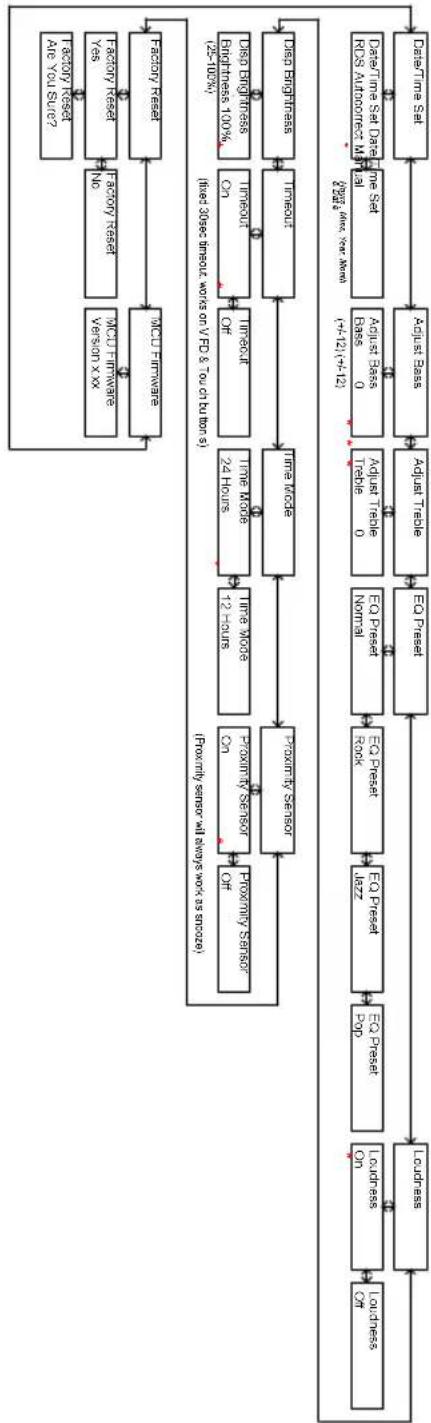
Menu Description – FM Mode
[1] Default volume is 30, Last volume after a power cycle is minimized
[2] Menu limit from anywhere is 5 secs
[3] * indicates default setting
[4] Entering menu level 2 requires a enter press, settings below in level 2 are instant when allowed by "and" and "with the exception of factor
flowchart
graph TD
    A["Alarm Setting"] --> B["Set Alarm"]
    A --> C["Set Alarm"]
    A --> D["Set Alarm"]
    A --> E["Set Alarm"]
    A --> F["Set Alarm"]
    A --> G["Set Alarm"]
    A --> H["Set Alarm"]
    A --> I["Set Alarm"]
    A --> J["Set Alarm"]
    A --> K["Set Alarm"]
    A --> L["Set Alarm"]
    A --> M["Set Alarm"]
    A --> N["Set Alarm"]
    A --> O["Set Alarm"]
    A --> P["Set Alarm"]
    A --> Q["Set Alarm"]
    A --> R["Set Alarm"]
    A --> S["Set Alarm"]
    A --> T["Set Alarm"]
    A --> U["Set Alarm"]
    A --> V["Set Alarm"]
    A --> W["Set Alarm"]
    A --> X["Set Alarm"]
    A --> Y["Set Alarm"]
    A --> Z["Set Alarm"]
    A --> AA["Set Alarm"]
    A --> AB["Set Alarm"]
    A --> AC["Set Alarm"]
    A --> AD["Set Alarm"]
    A --> AE["Set Alarm"]
    A --> AF["Set Alarm"]
    A --> AG["Set Alarm"]
    A --> AH["Set Alarm"]
    A --> AI["Set Alarm"]
    A --> AJ["Set Alarm"]
    A --> AK["Set Alarm"]
    A --> AL["Set Alarm"]
    A --> AM["Set Alarm"]
    A --> AN["Set Alarm"]
    A --> AO["Set Alarm"]
    A --> AP["Set Alarm"]
    A --> AQ["Set Alarm"]
    A --> AR["Set Alarm"]
    A --> AS["Set Alarm"]
    A --> AT["Set Alarm"]
    A --> AU["Set Alarm"]
    A --> AV["Set Alarm"]
    A --> AW["Set Alarm"]
    A --> AX["Set Alarm"]
    A --> AY["Set Alarm"]
    A --> AZ["Set Alarm"]
    A --> BA["Set Alarm"]
    A --> BB["Set Alarm"]
    A --> BC["Set Alarm"]
    A --> BD["Set Alarm"]
    A --> BE["Set Alarm"]
    A --> BF["Set Alarm"]
    A --> BG["Set Alarm"]
    A --> BH["Set Alarm"]
    A --> BI["Set Alarm"]
    A --> BJ["Set Alarm"]
    A --> BK["Set Alarm"]
    A --> BL["Set Alarm"]
    A --> BM["Set Alarm"]
    A --> BN["Set Alarm"]
    A --> BO["Set Alarm"]
    A --> BP["Set Alarm"]
    A --> BQ["Set Alarm"]
    A --> BR["Set Alarm"]
    A --> BS["Set Alarm"]
    A --> BT["Set Alarm"]
    A --> BU["Set Alarm"]
    A --> BV["Set Alarm"]
    A --> BW["Set Alarm"]
    A --> BX["Set Alarm"]
    A --> BY["Set Alarm"]
    A --> BZ["Set Alarm"]
    A --> CA["Set Alarm"]
    A --> CB["Set Alarm"]
    A --> CC["Set Alarm"]
    A --> CD["Set Alarm"]
    A --> CE["Set Alarm"]
    A --> CF["Set Alarm"]
    A --> CG["Set Alarm"]
    A --> CH["Set Alarm"]
    A --> CI["Set Alarm"]
    A --> CJ["Set Alarm"]
    A --> CK["Set Alarm"]
    A --> CB
    A --> CB
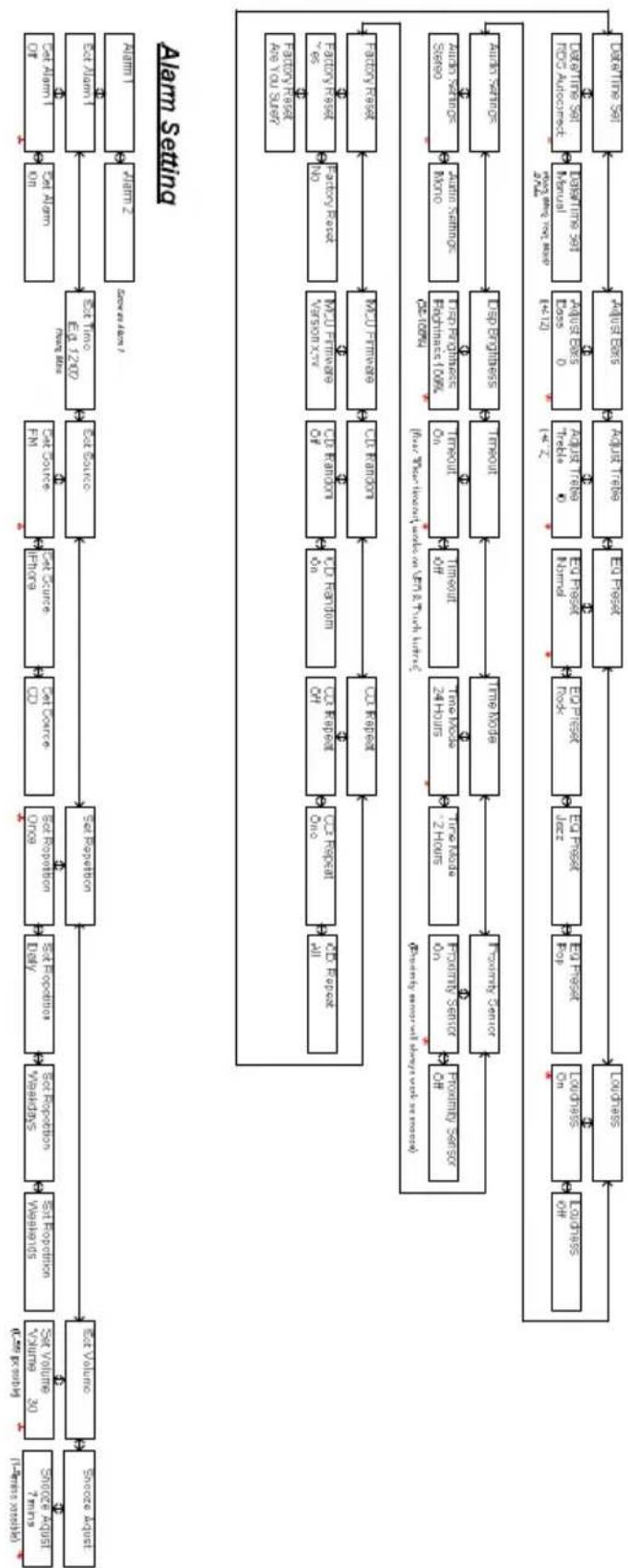
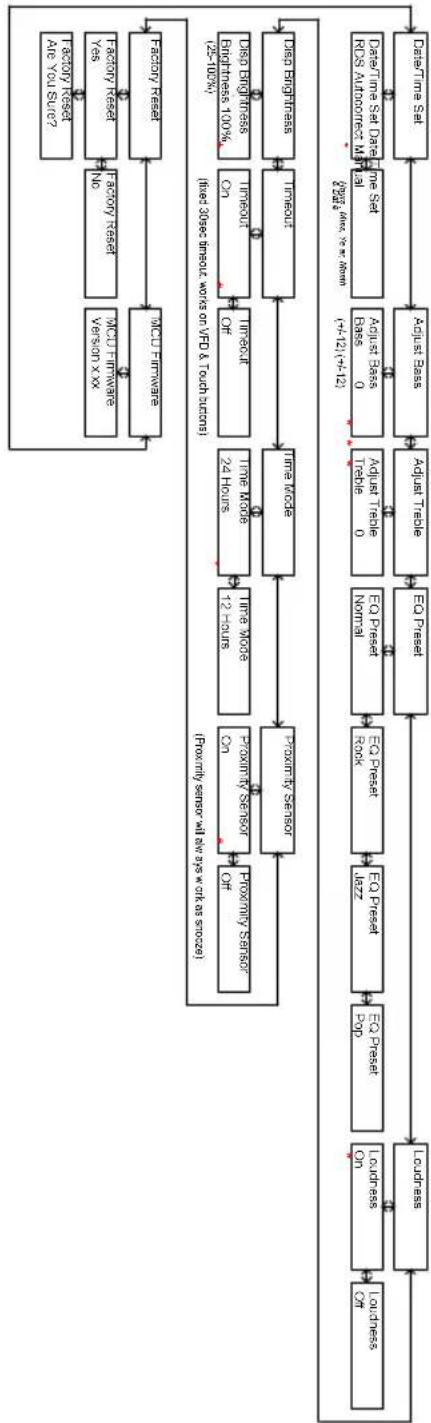
Menu Description – CD Mode
[1] Default volume is 30, last volume after a power cycle is minimized
[2] Menu timeout from anywhere is 5 secs
[3] indicates default setting
[4] Entering menu level 2 requires a center press, settings below in level 2 are instant when altered by 1. and 1. with the exception of Factory Reset, which requires another enter press to be executed.
flowchart
graph TD
    A["Source request"] --> B["Source Request"]
    B --> C["Data Collection"]
    C --> D["Data Review"]
    D --> E["Data Analysis"]
    E --> F["Data Alarm"]
    F --> G["Data Data"]
    G --> H["Data Review"]
    H --> I["Data Analysis"]
    I --> J["Data Review"]
    J --> K["Data Analysis"]
    K --> L["Data Review"]
    L --> M["Data Analysis"]
    M --> N["Data Review"]
    N --> O["Data Analysis"]
    O --> P["Data Review"]
    P --> Q["Data Analysis"]
    Q --> R["Data Review"]
    R --> S["Data Analysis"]
    S --> T["Data Review"]
    T --> U["Data Analysis"]
    U --> V["Data Review"]
    V --> W["Data Analysis"]
    W --> X["Data Review"]
    X --> Y["Data Analysis"]
    Y --> Z["Data Review"]
    Z --> AA["Data Analysis"]
    AA --> AB["Data Review"]
    AB --> AC["Data Analysis"]
    AC --> AD["Data Review"]
    AD --> AE["Data Analysis"]
    AE --> AF["Data Review"]
    AF --> AG["Data Analysis"]
    AG --> AH["Data Review"]
    AH --> AI["Data Analysis"]
    AI --> AJ["Data Review"]
    AJ --> AK["Data Analysis"]
    AK --> AL["Data Review"]
    AL --> AM["Data Analysis"]
    AM --> AN["Data Review"]
    AN --> AO["Data Analysis"]
    AO --> AP["Data Review"]
    AP --> AQ["Data Analysis"]
    AQ --> AR["Data Review"]
    AR --> AS["Data Analysis"]
    AS --> AT["Data Review"]
    AT --> AU["Data Analysis"]
    AU --> AV["Data Review"]
    AV --> AW["Data Analysis"]
    AW --> AX["Data Review"]
    AX --> AY["Data Analysis"]
    AY --> AZ["Data Review"]
    AZ --> BA["Data Analysis"]
    BA --> BB["Data Review"]
    BB --> BC["Data Analysis"]
    BC --> BD["Data Review"]
    BD --> BE["Data Analysis"]
    BE --> BF["Data Review"]
    BF --> BG["Data Analysis"]
    BG --> BH["Data Review"]
    BH --> BI["Data Analysis"]
    BI --> BJ["Data Review"]
    BJ --> BK["Data Analysis"]
    BK --> BL["Data Review"]
    BL --> BM["Data Analysis"]
    BM --> BN["Data Review"]
    BN --> BO["Data Analysis"]
    BO --> BP["Data Review"]
    BP --> BQ["Data Analysis"]
    BQ --> BR["Data Review"]
    BR --> BS["Data Analysis"]
    BS --> BT["Data Review"]
    BT --> BU["Data Analysis"]
    BU --> BV["Data Review"]
    BV --> BW["Data Analysis"]
    BW --> BX["Data Review"]
    BX --> BY["Data Analysis"]
    BY --> BZ["Data Review"]
    BZ --> CA["Data Analysis"]
    CA --> CB["Data Review"]
    CB --> CC["Data Analysis"]
    CC --> CD["Data Review"]
    CD --> CE["Data Analysis"]
    CE --> CF["Data Review"]
    CF --> CG["Data Analysis"]
    CG --> CH["Data Review"]
    CH --> CI["Data Analysis"]
    CI --> CJ["Data Review"]
    CJ --> CK["Data Analysis"]
    CK --> CL["Data Review"]
    CL --> CM["Data Analysis"]
    CM --> CN["Data Review"]
    CN --> CO["Data Analysis"]
    CO --> CP["Data Review"]
    CP --> CQ["Data Analysis"]
    CQ --> CR["Data Review"]
    CR --> CS["Data Analysis"]
    CS --> CT["Data Review"]
    CT --> CU["Data Analysis"]
    CU --> CV["Data Review"]
    CV --> CW["Data Analysis"]
    CW --> CX["Data Review"]
    CX --> CY["Data Analysis"]
    CY --> CZ["Data Review"]
    CZ --> DA["Data Analysis"]
    DA --> DB["Data Review"]
    DB --> DC["Data Analysis"]
    DC --> DD["Data Review"]
    DD --> DE["Data Analysis"]
    DE --> DF["Data Review"]
    DF --> DG["Data Analysis"]
    DG --> DH["Data Review"]
    DH --> DI["Data Analysis"]
    DI --> DJ["Data Review"]
    DJ --> DK["Data Analysis"]
    DK --> DL["Data Review"]
    DL --> DV["Data Analysis"]
    DV --> DW["Data Review"]
    DW --> DXN[数据处理系统, 0, 1, 2, 3, 4, 5, 6, 7, 8, 9, 10, 11, 12, 13, 14, 15, 16, 17, 18, 19, 20, 21, 22, 23, 24, 25, 26, 27, 28, 29, 30, 31, 32, 33, 34, 35, 36, 37, 38, 39, 40, 41, 42, 43, 44, 45, 46, 47, 48, 49, 50, 51, 52, 53, 54, 55, 56, 57, 58, 59, 60, 61, 62, 63, 64, 65, 66, 67, 68, 69, 70, 71, 72, 73, 74, 75, 76, 77, 78, 79, 80, 81, 82, 83, 84, 85, 86, 87, 88, 89, 90, 91, 92, 93, 94, 95, 96, 97, 98, 99, 100 |
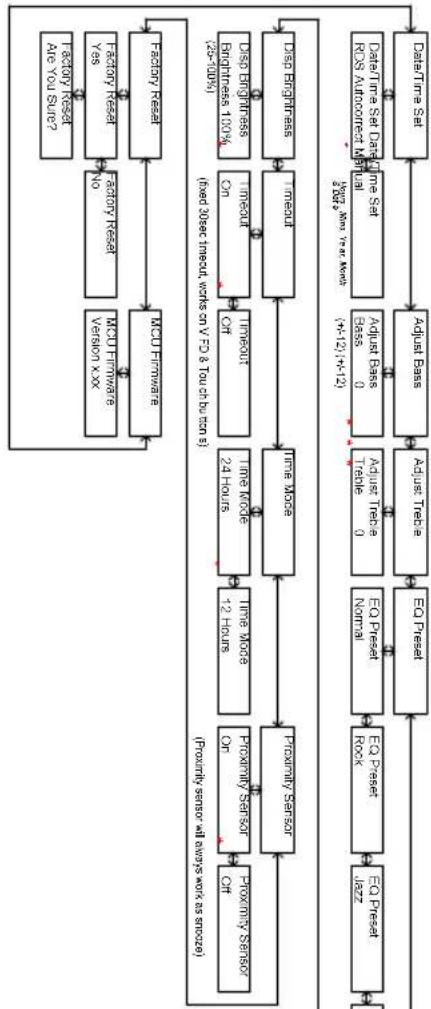
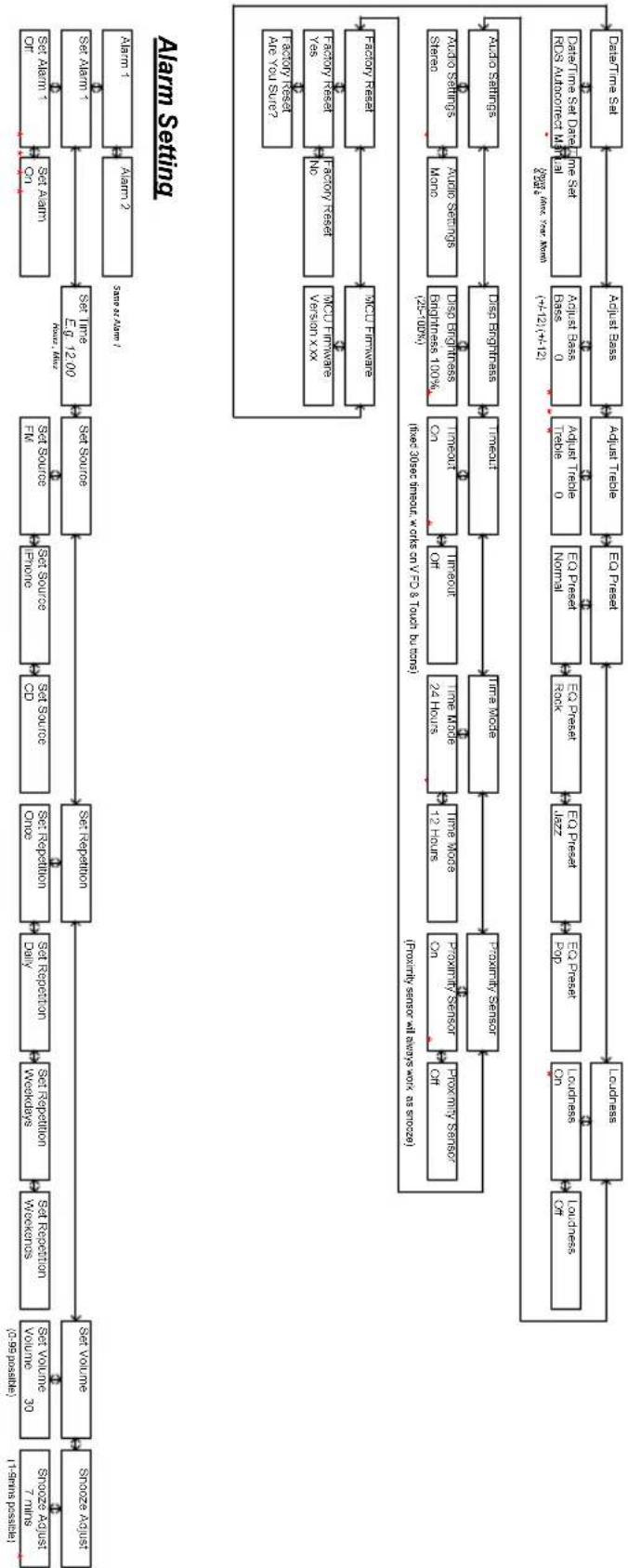
Menu Description – AUX & iPhone Mode
[1] Default volume is 30, last volume after a power cycle is memorized
[2] Menu timeout from anywhere is 5 secs
[3]* indicates default setting
[4] Entering menu level 2 requires a enter press, settings below in level 2 are instant when altered by - and - with the exception of Factory Reset, which requires another enter press to be executed.

flowchart
graph TD
    A["Set Alarm 1"] --> B["Set Alarm 2"]
    B --> C["Set Alarm 3"]
    C --> D["Set Alarm 4"]
    D --> E["Set Alarm 5"]
    E --> F["Set Alarm 6"]
    F --> G["Set Alarm 7"]
    G --> H["Set Alarm 8"]
    H --> I["Set Alarm 9"]
    I --> J["Set Alarm 10"]
    J --> K["Set Alarm 11"]
    K --> L["Set Alarm 12"]
    L --> M["Set Alarm 13"]
    M --> N["Set Alarm 14"]
    N --> O["Set Alarm 15"]
    O --> P["Set Alarm 16"]
    P --> Q["Set Alarm 17"]
    Q --> R["Set Alarm 18"]
    R --> S["Set Alarm 19"]
    S --> T["Set Alarm 20"]
    T --> U["Set Alarm 21"]
    U --> V["Set Alarm 22"]
    V --> W["Set Alarm 23"]
    W --> X["Set Alarm 24"]
    X --> Y["Set Alarm 25"]
    Y --> Z["Set Alarm 26"]
    Z --> AA["Set Alarm 27"]
    AA --> AB["Set Alarm 28"]
    AB --> AC["Set Alarm 29"]
    AC --> AD["Set Alarm 30"]
    AD --> AE["Set Alarm 31"]
    AE --> AF["Set Alarm 32"]
    AF --> AG["Set Alarm 33"]
    AG --> AH["Set Alarm 34"]
    AH --> AI["Set Alarm 35"]
    AI --> AJ["Set Alarm 36"]
    AJ --> AK["Set Alarm 37"]
    AK --> AL["Set Alarm 38"]
    AL --> AM["Set Alarm 39"]
    AM --> AN["Set Alarm 40"]
    AN --> AO["Set Alarm 41"]
    AO --> AP["Set Alarm 42"]
    AP --> AQ["Set Alarm 43"]
    AQ --> AR["Set Alarm 44"]
    AR --> AS["Set Alarm 45"]
    AS --> AT["Set Alarm 46"]
    AT --> AU["Set Alarm 47"]
    AU --> AV["Set Alarm 48"]
    AV --> AW["Set Alarm 49"]
    AW --> AX["Set Alarm 50"]
    AX --> AY["Set Alarm 51"]
    AY --> AZ["Set Alarm 52"]
    AZ --> BA["Set Alarm 53"]
    BA --> BB["Set Alarm 54"]
    BB --> BC["Set Alarm 55"]
    BC --> BD["Set Alarm 56"]
    BD --> BE["Set Alarm 57"]
    BE --> BF["Set Alarm 58"]
    BF --> BG["Set Alarm 59"]
    BG --> BH["Set Alarm 60"]
    BH --> BI["Set Alarm 61"]
    BI --> BJ["Set Alarm 62"]
    BJ --> BK["Set Alarm 63"]
    BK --> BL["Set Alarm 64"]
    BL --> BM["Set Alarm 65"]
    BM --> BN["Set Alarm 66"]
    BN --> BO["Set Alarm 67"]
    BO --> BP["Set Alarm 68"]
    BP --> BQ["Set Alarm 69"]
    BQ --> BR["Set Alarm 70"]
    BR --> BS["Set Alarm 71"]
    BS --> BT["Set Alarm 72"]
    BT --> BU["Set Alarm 73"]
    BU --> BV["Set Alarm 74"]
    BV --> BW["Set Alarm 75"]
    BW --> BX["Set Alarm 76"]
    BX --> BY["Set Alarm 77"]
    BY --> BZ["Set Alarm 78"]
    BZ --> CA["Set Alarm 79"]
    CA --> CB["Set Alarm 80"]
    CB --> CC["Set Alarm 81"]
    CC --> CD["Set Alarm 82"]
    CD --> CE["Set Alarm 83"]
    CE --> CF["Set Alarm 84"]
    CF --> CG["Set Alarm 85"]
    CG --> CH["Set Alarm 86"]
    CH --> CI["Set Alarm 87"]
    CI --> CJ["Set Alarm 88"]
    CJ --> CK["Set Alarm 89"]
    CK --> CL["Set Alarm 90"]
Alarm Setting
flowchart
graph TD
    A["Data Time Set Data/Time Data (NOS Amplification Module)"] --> B["Adjust Pass"]
    B --> C["Adjust Trade"]
    C --> D["Trade 0"]
    D --> E["EX Price Normal"]
    E --> F["EX Price Rock"]
    F --> G["EX Press"]
    G --> H["Ex Press"]
    H --> I["Ex Press"]
    I --> J["Ex Press"]
    J --> K["Ex Press"]
    K --> L["Ex Press"]
    L --> M["Ex Press"]
    M --> N["Ex Press"]
    N --> O["Ex Press"]
    O --> P["Ex Press"]
    P --> Q["Ex Press"]
    Q --> R["Ex Press"]
    R --> S["Ex Press"]
    S --> T["Ex Press"]
    T --> U["Ex Press"]
    U --> V["Ex Press"]
    V --> W["Ex Press"]
    W --> X["Ex Press"]
    X --> Y["Ex Press"]
    Y --> Z["Ex Press"]
    Z --> AA["Ex Press"]
    AA --> AB["Ex Press"]
    AB --> AC["Ex Press"]
    AC --> AD["Ex Press"]
    AD --> AE["Ex Press"]
    AE --> AF["Ex Press"]
    AF --> AG["Ex Press"]
    AG --> AH["Ex Press"]
    AH --> AI["Ex Press"]
    AI --> AJ["Ex Press"]
    AJ --> AK["Ex Press"]
    AK --> AL["Ex Press"]
    AL --> AM["Ex Press"]
    AM --> AN["Ex Press"]
    AN --> AO["Ex Press"]
    AO --> AP["Ex Press"]
    AP --> AQ["Ex Press"]
    AQ --> AR["Ex Press"]
    AR --> AS["Ex Press"]
    AS --> AT["Ex Press"]
    AT --> AU["Ex Press"]
    AU --> AV["Ex Press"]
    AV --> AW["Ex Press"]
    AW --> AX["Ex Press"]
    AX --> AY["Ex Press"]
    AY --> AZ["Ex Press"]
    AZ --> BA["Ex Press"]
    BA --> BB["Ex Press"]
    BB --> BC["Ex Press"]
    BC --> BD["Ex Press"]
    BD --> BE["Ex Press"]
    BE --> BF["Ex Press"]
    BF --> BG["Ex Press"]
    BG --> BH["Ex Press"]
    BH --> BI["Ex Press"]
    BI --> BJ["Ex Press"]
    BJ --> BK["Ex Press"]
    BK --> BL["Ex Press"]
    BL --> BM["Ex Press"]
    BM --> BN["Ex Press"]
    BN --> BO["Ex Press"]
    BO --> BP["Ex Press"]
    BP --> BQ["Ex Press"]
    BQ --> BR["Ex Press"]
    BR --> BS["Ex Press"]
    BS --> BT["Ex Press"]
    BT --> BU["Ex Press"]
    BU --> BV["Ex Press"]
    BV --> BW["Ex Press"]
    BW --> BX["Ex Press"]
    BX --> BY["Ex Press"]
    BY --> BZ["Ex Press"]
    BZ --> CA["Ex Press"]
    CA --> CB["Ex Press"]
    CB --> CC["Ex Press"]
    CC --> CD["Ex Press"]
    CD --> CE["Ex Press"]
    CE --> CF["Ex Press"]
    CF --> CG["Ex Press"]
    CG --> CH["Ex Press"]
    CH --> CI["Ex Press"]
    CI --> CJ["Ex Press"]
    CJ --> CK["Ex Press"]
    CK --> CL["Ex Press"]
    CL --> CM["Ex Press"]
    CM --> CN["Ex Press"]
    CN --> CO["Ex Press"]
    CO --> CP["Ex Press"]
    CP --> CQ["Ex Press"]
    CQ --> CR["Ex Press"]
    CR --> CS["Ex Press"]
    CS --> CT["Ex Press"]
    CT --> CU["Ex Press"]
    CU --> CV["Ex Press"]
    CV --> CW["Ex Press"]
    CW --> CX["Ex Press"]
    CX --> CY["Ex Press"]
    CY --> CZ["Ex Press"]
    CZ --> DA["Ex Press"]
    DA --> DB["Ex Press"]
    DB --> DC["Ex Press"]
    DC --> DD["Ex Press"]
    DD --> DE["Ex Press"]
    DE --> DF["Ex Press"]
    DF --> DG["Ex Press"]
    DG --> DH["Ex Press"]
    DH --> DI["Ex Press"]
    DI --> DJ["Ex Press"]
    DJ --> DK["Ex Press"]
    DK --> DL["Ex Press"]
    DL --> DJ
    DJ --> DV["Dx3.2x3 Inclual, warts on EV & You able by bus ens"] --> DW
    DW --> DX
    DX --> DY
Specifications
Model: Tangent fjord CD/FM
Controls: Touch buttons and an IR remote
Speaker: 2pcs 3" wide range speakers
Power Output: 2x7 Watt RMS@1% THD
Connections: 3.5mm jack for stereo analog audio AUX input 12 V DC input
Power: DC 12V/2A
Tuner band FM (87,5 - 108,0MHz)
Dimensions: 170mm x 180mm x 170mm (W x H x D)
Weight: 3.20Kg (Power supply and radio)
All specifications are subject to change without notice.
FR - MANUEL D'UTILISATION
Vue du dessus
flowchart
graph TD
    A["2"] --> B["iPHONE ■"]
    C["1"] --> D["RADIO ■"]
    E["3"] --> F["CD ■"]
    G["4"] --> H["AUX ■"]
    I["5"] --> J["INFO"]
    K["6"] --> L["SCAN"]
    M["7"] --> N["TUNE ▼"]
    O["8"] --> P["TUNE ▲"]
    Q["9"] --> R["MENU"]
    S["10"] --> T["ENTER"]
    U["11"] --> V["ALARM"]
    W["12"] --> X["MODE"]
    Y["13"] --> Z["POWER"]
    AA["14"] --> AB["VOL ▼"]
    AC["15"] --> AD["VOL ▲"]
    AE["16"] --> AF["MODE"]
    AG["17"] --> AH["MODE"]
[1] Default volume is 30, last volume after a power cycle is memorized
[2] Menu timeout from anywhere is 5 secs
[3] * indicates default setting
[4] Entering menu level 2 requires a enter press, settings below in level 2 are instant when altered by 1 and 2 with the exception of Factory Reset, which requires another enter press to be executed.

flowchart
graph TD
    A["Source A"] --> B["Set Volume"]
    B --> C["Set Replication"]
    C --> D["Set Replication Once"]
    D --> E["Set Replication Weekly"]
    E --> F["Set Replication Weekdays"]
    F --> G["Set Replication Daily"]
    G --> H["Set Replication Weekly"]
    H --> I["Set Replication Weekends"]
    I --> J["Set Volume 30"]
    J --> K["1-99 Position"]
    K --> L["Source A / 7 hours (1-99 possible)"]
    L --> M["Source A / 7 hours (1-99 possible)"]
    M --> N["Source A / 7 hours (1-99 possible)"]
    N --> O["Source A / 7 hours (1-99 possible)"]
    O --> P["Source A / 7 hours (1-99 possible)"]
    P --> Q["Source A / 7 hours (1-99 possible)"]
    Q --> R["Source A / 7 hours (1-99 possible)"]
    R --> S["Source A / 7 hours (1-99 possible)"]
    S --> T["Source A / 7 hours (1-99 possible)"]
    T --> U["Source A / 7 hours (1-99 possible)"]
    U --> V["Source A / 7 hours (1-99 possible)"]
    V --> W["Source A / 7 hours (1-99 possible)"]
    W --> X["Source A / 7 hours (1-99 possible)"]
    X --> Y["Source A / 7 hours (1-99 possible)"]
    Y --> Z["Source A / 7 hours (1-99 possible)"]
    Z --> AA["Source A / 7 hours (1-99 possible)"]
    AA --> AB["Source A / 7 hours (1-99 possible)"]
    AB --> AC["Source A / 7 hours (1-99 possible)"]
    AC --> AD["Source A / 7 hours (1-99 possible)"]
    AD --> AE["Source A / 7 hours (1-99 possible)"]
    AE --> AF["Source A / 7 hours (1-99 possible)"]
    AF --> AG["Source A / 7 hours (1-99 possible)"]
    AG --> AH["Source A / 7 hours (1-99 possible)"]
    AH --> AI["Source A / 7 hours (1-99 possible)"]
    AI --> AJ["Source A / 7 hours (1-99 possible)"]
    AJ --> AK["Source A / 7 hours (1-99 possible)"]
    AK --> AL["Source A / 7 hours (1-99 possible)"]
    AL --> AM["Source A / 7 hours (1-99 possible)"]
    AM --> AN["Source A / 7 hours (1-99 possible)"]
    AN --> AO["Source A / 7 hours (1-99 possible)"]
    AO --> AP["Source A / 7 hours (1-99 possible)"]
    AP --> AQ["Source A / 7 hours (1-99 possible)"]
    AQ --> AR["Source A / 7 hours (1-99 possible)"]
    AR --> AS["Source A / 7 hours (1-99 possible)"]
    AS --> AT["Source A / 7 hours (1-99 possible)"]
    AT --> AU["Source A / 7 hours (1-99 possible)"]
    AU --> AV["Source A / 7 hours (1-99 possible)"]
    AV --> AW["Source A / 7 hours (1-99 possible)"]
    AW --> AX["Source A / 7 hours (1-99 possible)"]
    AX --> AY["Source A / 7 hours (1-99 possible)"]
    AY --> AZ["Source A / 7 hours (1-99 possible)"]
    AZ --> BA["Source A / 7 hours (1-99 possible)"]
    BA --> BB["Source A / 7 hours (1-99 possible)"]
    BB --> BC["Source A / 7 hours (1-99 possible)"]
    BC --> BD["Source A / 7 hours (1-99 possible)"]
    BD --> BE["Source A / 7 hours (1-99 possible)"]
    BE --> BF["Source A / 7 hours (1-99 possible)"]
    BF --> BG["Source A / 7 hours (1-99 possible)"]
    BG --> BH["Source A / 7 hours (1-99 possible)"]
    BH --> BI["Source A / 7 hours (1-99 possible)"]
    BI --> BJ["Source A / 7 hours (1-99 possible)"]
    BJ --> BK["Source A / 7 hours (1-99 possible)"]
    BK --> BL["Source A / 7 hours (1-99 possible)"]
    BL --> BM["Source A / 7 hours (1-99 possible)"]
    BM --> BN["Source A / 7 hours (1-99 possible)"]
    BN --> BO["Source A / 7 hours (1-99 possible)"]
    BO --> BP["Source A / 7 hours (1-99 possible)"]
    BP --> BQ["Source A / 7 hours (1-99 possible)"]
    BQ --> BR["Source A / 7 hours (1-99 possible)"]
    BR --> BS["Source A / 7 hours (1-99 possible)"]
    BS --> BT["Source A / 7 hours (1-99 possible)"]
    BT --> BU["Source A / 7 hours (1-99 possible)"]
    BU --> BV["Source A / 7 hours (1-99 possible)"]
    BV --> BW["Source A / 7 hours (1-99 possible)"]
    BW --> BX["Source A / 7 hours (1-99 possible)"]
    BX --> BY["Source A / 7 hours (1-99 possible)"]
    BY --> BZ["Source A / 7 hours (1-99 possible)"]
    BZ --> CA["Source A / 7 hours (1-99 possible)"]
    CA --> CB["Source A / 7 hours (1-99 possible)"]
    CB --> CC["Source A / 7 hours (1-99 possible)"]
    CC --> CD["Source A / 7 hours (1-99 possible)"]
    CD --> CE["Source A / 7 hours (1-99 possible)"]
    CE --> CF["Source A / 7 hours (1-99 possible)"]
    CF --> CG["Source A / 7 hours (1-99 possible)"]
    CG --> CH["Source A / 7 hours (1-99 possible)"]
    CH --> CI["Source A / 7 hours (1-99 possible)"]
    CI --> CJ["Source A / 7 hours (1-99 possible)"]
    CJ --> CK["Source A / 7 hours (1-99 possible)"]
    CK --> CL["Source A / 7 hours (1-99 possible)"]
    CL --> CM["Source A / 7 hours (1-99 possible)"]
    CM --> CN["Source A / 7 hours (1-99 possible)"]
    CN --> CO["Source A / 7 hours (1-99 possible)"]
    CO --> CP["Source A / 7 hours (1-99 possible)"]
    CP --> CQ["Source A / 7 hours (1-99 possible)"]
    CQ --> CR["Source A / 7 hours (1-99 possible)"]
    CR --> CS["Source A / 7 hours (1-99 possible)"]
    CS --> CT["Source A / 7 hours (1-99 possible)"]
    CT --> CU["Source A / 7 hours (1-98 min)."]
    CU --> CV["Sense as seen?"]
Alarm Setting
flowchart
graph TD
    A["Data Time Set"] --> B["Adjust Pass"]
    B --> C["Adjust Trache"]
    C --> D["EQ Press"]
    D --> E["EQ Press Normal"]
    E --> F["EQ Press Book"]
    F --> G["EQ Press Rock"]
    G --> H["EQ Press Book"]
    H --> I["Time Mode"]
    I --> J["Time Mode 24 Hours"]
    J --> K["Time Mode 12 Hours"]
    K --> L["Proximity Sensor On/Off"]
    L --> M["Proximity Sensor"]
    M --> N["Proximity Sensor Off"]

    subgraph Data Time Set (RDS Approaching Unit)
        O["Data Time Set Data Time Set RDS Approaching Unit (HT2) (HT-12)"]
        P["Data Time Set Data Time Set RDS Approaching Unit (HT2) (HT-12)"]
        Q["Data Time Set Data Time Set RDS Approaching Unit (HT2) (HT-12)"]
        R["Data Time Set Data Time Set RDS Approaching Unit (HT2) (HT-12)"]
        S["Data Time Set Data Time Set RDS Approaching Unit (HT2) (HT-12)"]
        T["Data Time Set Data Time Set RDS Approaching Unit (HT2) (HT-12)"]
        U["Data Time Set Data Time Set RDS Approaching Unit (HT2) (HT-12)"]
        V["Data Time Set Data Time Set RDS Approaching Unit (HT2) (HT-12)"]
        W["Data Time Set Data Time Set RDS Approaching Unit (HT2) (HT-12)"]
        X["Data Time Set Data Time Set RDS Approaching Unit (HT2) (HT-12)"]
        Y["Data Time Set Data Time Set RDS Approaching Unit (HT2) (HT-12)"]
        Z["Data Time Set Data Time Set RDS Approaching Unit (HT2) (HT-12)"]
        AA["Data Time Set Data Time Set RDS Approaching Unit (HT2) (HT-12)"]
        AB["Data Time Set Data Time Set RDS Approaching Unit (HT2) (HT-12)"]
        AC["Data Time Set Data Time Set RDS Approaching Unit (HT2) (HT-12)"]
        AD["Data Time Set Data Time Set RDS Approaching Unit (HT2) (HT-12)"]
        AE["Data Time Set Data Time Set RDS Approaching Unit (HT2) (HT-12)"]
        AF["Data Time Set Data Time Set RDS Approaching Unit (HT2) (HT-12)"]
        AG["Data Time Set Data Time Set RDS Approaching Unit (HT2) (HT-12)"]
        AH["Data Time Set Data Time Set RDS Approaching Unit (HT2) (HT-12)"]
        AI["Data Time Set Data Time Set RDS Approaching Unit (HT2) (HT-12)"]
        AJ["Data Time Set Data Time Set RDS Approaching Unit (HT2) (HT-12)"]
        AK["Data Time Set Data Time Set RDS Approaching Unit (HT2) (HT-12)"]
        AL["Data Time Set Data Time Set RDS Approaching Unit (HT2) (HT-12)"]
        AM["Data Time Set Data Time Set RDS Approaching Unit (HT2) (HT-12)"]
        AN["Data Time Set Data Time Set RDS Approaching Unit (HT2) (HT-12)"]
        AO["Data Time Set Data Time Set RDS Approaching Unit (HT2) (HT-12)"]
        AP["Data Time Set Data Time Set RDS Approaching Unit (HT2) (HT-12)"]
        AQ["Data Time Set Data Time Set RDS Approaching Unit (HT2) (HT-12)"]
        AR["Data Time Set Data Time Set RDS Approaching Unit (HT2) (HT-12)"]
        AS["Data Time Set Data Time Set RDS Approaching Unit (HT2) (HT-12)"]
        AT["Data Time Set Data Time Set RDS Approaching Unit (HT2) (HT-12)"]
        AU["Data Time Set Data Time Set RDS Approaching Unit (HT2) (HT-12)"]
        AV["Data Time Set Data Time Set RDS Approaching Unit (HT2) (HT-12)"]
        AW["Data Time Set Data Time Set RDS Approaching Unit (HT2) (HT-12)"]
        AX["Data Time Set Data Time Set RDS Approaching Unit (HT2) (HT-12)"]
        AY["Data Time Set Data Time Set RDS Approaching Unit (HT2) (HT-12)"]
        AZ["Data Time Set Data Time Set RDS Approaching Unit (HT2) (HT-12)"]
        BA["Data Time Set Data Time Set RDS Approaching Unit (HT2) (HT-12)"]
        BB["Data Time Set Data Time Set RDS Approaching Unit (HT2) (HT-12)"]
        BC["Data Time Set Data Time Set RDS Approaching Unit (HT2) (HT-12)"]
        BD["Data Time Set Data Time Set RDS Approaching Unit (HT2) (HT-12)"]
        BE["Data Time Set Data Time Set RDS Approaching Unit (HT2) (HT-12)"]
        BF["Data Time Set Data Time Set RDS Approaching Unit (HT2) (HT-12)"]
        BG["Data Time Set Data Time Set RDS Approaching Unit (HT2) (HT-12)"]
        BH["Data Time Set Data Time Set RDS Approaching Unit (HT2) (HT-12)"]
        BI["Data Time Set Data Time Set RDS Approaching Unit (HT2) (HT-12)"]
        BJ["Data Time Set Data Time Set RDS Approaching Unit (HT2) (HT-12)"]
        BK["Data Time Set Data Time Set RDS Approaching Unit (HT2) (HT-12)"]
        BL["Data Time Set Data Time Set RDS Approaching Unit (HT2) (HT-12)"]
        BM["Data Time Set Data Time Set RDS Approaching Unit (HT2) (HT-12)"]
        BN["Data Time Set Data Time Set RDS Approaching Unit (HT2) (HT-12)"]
        BO["Data Time Set Data Time Set RDS Approaching Unit (HT2) (HT-12)"]
        BP["Data Time Set Data Time Set RDS Approaching Unit (HT2) (HT-12)"]
        BQ["Data Time Set Data Time Set RDS Approaching Unit (HT2) (HT-12)"]
        BR["Data Time Set Data Time Set RDS Approaching Unit (HT2) (HT-12)"]
        BS["Data Time Set Data Time Set RDS Approaching Unit (HT2) (HT-12)"]
        BT["Data Time Set Data Time Set RDS Approaching Unit (HT2) (HT-12)"]
        BU["Data Time Set Data Time Set RDS Approaching Unit (HT2) (HT-12)"]
        BV["Data Time Set Data Time Set RDS Approaching Unit (HT2) (HT-12)"]
        BW["Data Time Set Data Time Set RDS Approaching Unit (HT2) (HT-12)"]
        BX["Data Time Set Data Time Set RDS Approaching Unit (HT2) (HT-12)"]
        BY["Data Time Set Data Time Set RDS Approaching Unit (HT2) (HT-12)"]
        BZ["Data Time Set Data Time Set RDS Approaching Unit (HT2) (HT-12)"]
        CA["Data Time Set Data Time Set RDS Approaching Unit (HT2) (HT-12)"]
        CB["Data Time Set Data Time Set RDS Approaching Unit (HT2) (HT-12)"]
        CC["Data Time Set Data Time Set RDS Approaching Unit (HT2) (HT-12)"]
        DD["Data Time Set Data Time Set RDS Approaching Unit (HT2) (HT-12)"]
        DE["Data Time Set Data Time Set RDS Approaching Unit (HT2) (HT-12)"]
        FD["Data Time Set Data Time Set RDS Approaching Unit (HT2) (HT-12)"]
        DG["Data Time Set Data Time Set RDS Approaching Unit (HT2) (HT-12)"]
        DH["Data Time Set Data Time Set RDS Approaching Unit (HT2) (HT-12)"]
        DI["Data Time Set Data Time Set RDS Approaching Unit (HT2) (HT-12)"]
        DJ["Data Time Set Data Time Set RDS Approaching Unit (HT2) (HT-12)"]
        DK["Data Time Set Data Time Set RDS Approaching Unit (HT2) (HT-12)"]
        DL["Data Time Set Data Time Set RDS Approaching Unit (HT2) (HT-12)"]
        DV["Data Time Set Data Time Set RDS Approaching Unit (HT2) (HT-12)"]
        DW["Data Time Set Data Time Set RDS Approaching Unit (HT2) (HT-12)"]
        XJ["Data Time Set Data Time Set RDS Approaching Unit (HT2) (HT-12)"]
        YJL["Data Time Select"]
    end

    %% Legend
    %% Legend
    %% Legend
    %% Legend
    %% Legend
    %% Legend
    %% Legend
    %% Legend
    %% Legend
    %% Legend
    %% Legend
    %% Legend
    %% Legend
    %% Legend
    %% Legend
    %% Legend
    %% Legend
    %% Legend
    %% Legend
    %% Legend
    %% Legend
    %% Legend
    %% Legend
    %% Legend
    %% Legend
    %% Legend

    %% Legend
    %% Legend
    %% Legend
    %% Legend
    %% Legend
    %% Legend
    %% Legend
    %% Legend
    %% Legend
    %% Legend
    %% Legend
    %% Legend
    %% Legend
    %% Legend
    %% Legend
    %% Legend
    %% Legend
    %% Legend
    %% Legend
    %% Legend
    %% Legend
    %% Legend
    %% Legend
    %% Legend
    %% Legend

    %% Note
    A -->|No| B --> C --> D --> E --> F --> G --> H --> I --> J --> K --> L --> M --> N --> O --> P --> Q --> R --> S --> T --> U --> V --> W --> X --> Y --> Z --> AA --> AB --> AC --> AD --> AE --> AF --> AG --> AH --> AI --> AJ --> AK --> AL --> AM --> AN --> AO --> AP --> AQ --> AR --> AS --> AT --> AU --> AV --> AW --> AX --> AY --> AZ --> BA --> BB --> BC --> BD --> BE
    %% Note
Description du menu – CD Mode
[4] Entering menu level 2 requires a center press, settings below in level 2 are instant when altered by -1 and -1 with the exception of Factory Reset, which requires another center press to be executed.
[1] Default volume is 30, last volume after a power cycle is memorized [2] Menu timeout from anywhere is 5 secs
(0-89 possible) 11-Sims possible)
| Sesize Ajust | Sesize Ajust | Sesize Ajust | Set Volume | Set Volume | Set Volume | Set Repetition | Set Repetition | Set Repetition | Set Repetition | Set Repetition | Set Repetition | Set Repetition | Set Repetition | Set Repetition | Set Repetition | Set Repetition | Set Repetition | Set Repetition | Set Repetition | Set Repetition | Set Repetition | Set Repetition | Set Repetition | Set Repetition | Set Repetition | Set Repetiation | Set Repetiation | Set Repetiation | Set Repetiation | Set Repetiation | Set Repetiation | Set Repetiation | Set Repetiation | Set Repetiation | Set Repetiation | Set Repetiation | Set Repetiation | Set Repetiation | Set Repetiation | Set Repetiation | Set Repetiation | Set Repetiation | Set Repetiation | Set Repetiation | Set Repetiation | Set Repetition | Set Repetition | Set Repetition | Set Repetition | Set Repetition | Set Repetition | Set Repetition | Set Repetition | Set Repetition | Set Repetition | Set Repetition | Set Repetition | Set Repetition | Set Repetition | Set Repetition | Set Repetition | Set Repetition | Set Repetition | Set Repetition | Set Repetposition | Set Repetition | Set Repetition | Set Repetition | Set Repetition | Set Repetition | Set Repetition | Set Repetition | Set Repetition | Set Repetition | Set Repetition | Set Repetition | Set Repetition | Set Repetition | Set Repetition | Set Repetition | Set Repetition | Set Repetition | Set Repetition | Set Repetition | Set Repetation | Set Repetition | Set Repetition | Set Repetition | Set Repetition | Set Repetition | Set Repetition | Set Repetition | Set Repetition | Set Repetition | Set Repetition | Set Repetition | Set Repetition | Set Repetition | Set Repetition | Set Repetition | Set Repetition | Set Repetition | Set Repetition | Set Repetition | Set Repetion | Set Repetition | Set Repetition | Set Repetition | Set Repetition | Set Repetition | Set Repetition | Set Repetition | Set Repetition | Set Repetition | Set Repetition | Set Repetition | Set Repetition | Set Repetition | Set Repetition | Set Repetition | Set Repetition | Set Repetition | Set Repetition | Set Repetition | Set Repetoption | Set Repetoption | Set Repetoption | Set Repetoption | Set Repetoption | Set Repetoption | Set Repetoption | Set Repetoption | Set Repetoption | Set Repetoption | Set Repetoption | Set Repetoption | Set Repetoption | Set Repetoption | Set Repetoption | Set Repetoption | Set Repetoption | Set Repetoption | Set Repetoption | Set Repetoption | Set Repetption | Set Repetoption | Set Repetoption | Set Repetoption | Set Repetoption | Set Repetoption | Set Repetoption | Set Repetoption | Set Repetoption | Set Repetoption | Set Repetoption | Set Repetoption | Set Repetoption | Set Repetoption | Set Repetoption | Set Repetoption | Set Repetoption | Set Repetoption | Set Repetoption | Set Repetoption | Set Repetion | Set Repetion | Set Repetion | Set Repetion | Set Repetion | Set Repetion | Set Repetion | Set Repetion | Set Repetion | Set Repetion | Set Repetion | Set Repetion | Set Repetion | Set Repetion | Set Repetion | Set Repetion | Set Repetion | Set Repetion | Set Repetion | Set Repetion | Set Repet ion | Set Repetion | Set Repetion | Set Repetion | Set Repetion | Set Repetion | Set Repetion | Set Repetion | Set Repetion | Set Repetion | Set Repetion | Set Repetion | Set Repetion | Set Repetion | Set Repetion | Set Repetion | Set Repetion | Set Repetion | Set Repetion | Set Repetion | Set Repetio | Set Repetion | Set Repetion | Set Repetion | Set Repetion | Set Repetion | Set Repetion | Set Repetion | Set Repetion | Set Repetion | Set Repetion | Set Repetion | Set Repetion | Set Repetion | Set Repetion | Set Repetion | Set Repetion | Set Repetion | Set Repetion | Set Repetion | Set Repetian | Set Repetian | Set Repetian | Set Repetian | Set Repetian | Set Repetian | Set Repetian | Set Repetian | Set Repetian | Set Repetian | Set Repetian | Set Repetian | Set Repetian | Set Repetian | Set Repetian | Set Repetian | Set Repetian | Set Repetian | Set Repetian | Set Repetian | Set Repetician | Set Repetician | Set Repetician | Set Repetician | Set Repetician | Set Repetician | Set Repetician | Set Repetician | Set Repetician | Set Repetician | Set Repetician | Set Repetician | Set Repetician | Set Repetician | Set Repetician | Set Repetician | Set Repetician | Set Repetician | Set Repetician | Set Repetician | Set Repetian | Set Repetian | Set Repetian | Set Repetian | Set Repetian | Set Repetian | Set Repetian | Set Repetian | Set Repetian | Set Repetian | Set Repetian | Set Repetian | Set Repetian | Set Repetian | Set Repetian | Set Repetian | Set Repetian | Set Repetian | Set Repetian | Set RepetIAN | Set Repetian | Set Repetian | Set Repetian | Set Repetian | Set Repetian | Set Repetian | Set Repetian | Set Repetian | Set Repetian | Set Repetian | Set Repetian | Set Repetian | Set Repetian | Set Repetian | Set Repetian | Set Repetian | Set Repetian | Set Repetian | Set Repetian | Set Repetan | Set Repetian | Set Repetian | Set Repetian | Set Repetian | Set Repetian | Set Repetian | Set Repetian | Set Repetian | Set Repetian | Set Repetian | Set Repetian | Set Repetian | Set Repetian | Set Repetian | Set Repetian | Set Repetian | Set Repetian | Set Repetian | Set Repetian | Set Repetlan | Set Repetian | Set Repetian | Set Repetian | Set Repetian | Set Repetian | Set Repetian | Set Repetian | Set Repetian | Set Repetian | Set Repetian | Set Repetian | Set Repetian | Set Repetian | Set Repetian | Set Repetian | Set Repetian | Set Repetian | Set Repetian | Set Repetian | Set Repetia | Set Repetian | Set Repetian | Set Repetian | Set Repetian | Set Repetian | Set Repetian | Set Repetian | Set Repetian | Set Repetian | Set Repetian | Set Repetian | Set Repetian | Set Repetian | Set Repetian | Set Repetian | Set Repetian | Set Repetian | Set Repetian | Set Repetian | Set Repetiana | Set Repetian | Set Repetian | Set Repetian | Set Repetian | Set Repetian | Set Repetian | Set Repetian | Set Repetian | Set Repetian | Set Repetian | Set Repetian | Set Repetian | Set Repetian | Set Repetian | Set Repetian | Set Repetian | Set Repetian | Set Repetian | Set Repetian | Set Repeti | Set Repetian | Set Repetian | Set Repetian | Set Repetian | Set Repetian | Set Repetian | Set Repetian | Set Repetian | Set Repetian | Set Repetian | Set Repetian | Set Repetian | Set Repetian | Set Repetian | Set Repetian | Set Repetian |
Alarm Setting
| Davtime Set | Davtime Set | (047-12) (+4-12) | |
| Davtime Set Dava the Set | Dava less than more | (047-12) (+4-12) | |
| Davtime Set Dava the Set | Dava less than more | (047-12) (+4-12) | |
| Audio Senses | Audio Settings | (25-100%) | |
| Audio Senses | Audio Settings | (25-100%) | |
| Audio Senses | Audio Settings | (25-100%) | |
| Audio Senses | Audio Settings | (25-100%) | |
| Audio Senses | Audio Settings | (25-100%) | |
| Audio Senses | Audio Settings | (25-100%) | |
| Audio Senses | Audio Settings (100%) | (25-100%) | |
| Audio Senses | Audio Settings | (25-100%) | |
| Audio Senses | Audio Settings | (25-100%) | |
| Audio Senses | Audio Settings | (25-100%) | |
| Audio Senses | Audio Settings | (25-100%) | |
| Audio Senses | Audio Settings | (25-100%) | |
| Audio Senses | Audio Settings | (25-100%) | |
| Audio Senses | Audio Settings | (25-100%) | |
| Audio Senses | Audio Settings | (25-100%) | |
| Audio Senses | Audio Settings | (25-100%) | |
| Audio Senses | Audio Settings | (25-100%) | |
| Audio Sensing | Audio Sensing | (25-100%) | |
| Audio Sensing | Audio Sensing | (25-100%) | |
| Audio Sensing | Audio Sensing | (25-100%) | |
| Audio Sensing | Audio Sensing | (25-100%) | |
| Audio Sensing | Audio Sensing | (25-100%) | |
| Audio Sensing | Audio Sensing | (25-100%) | |
| Audio Senses | Audio Senses | (25-100%) | |
| Audio Senses | Audio Senses | (25-100%) | |
| Audio Senses | Audio Senses | (25-100%) | |
| Audio Senses | Audio Senses | (25-100%) | |
| Audio Senses | Audio Senses | (25-100%) | |
| Audio Senses | Audio Senses | (25 -100%) | |
| Audio Senses | Audio Senses | (25 -100%) | |
| Audio Senses | Audio Senses | (25 -100%) | |
| Audio Senses | Audio Senses | (25 -100%) | |
| Audio Senses | Audio Senses | (25 -100%) | |
| Audio Senses | Audio Senses | (25 -100%) | |
| Audio Senses | Audio Senses | (25 -100%) | |
| Audio Senses | Audio Senses | (25 -100%) | |
| Audio Senses | Audio Senses | (25 -100%) | |
| Audio Senses | Audio Senses | (25 -100%) | |
| Audio Senses | Audio Senses | (25 -100%) | (25-100%) |
| Audio Senses | Audio Senses | (25 -100%) | |
| Audio Senses | Audio Senses | (25 -100%) | |
| Audio Senses | Audio Senses | (25 -100%) | |
| Audio Senses | Audio Senses | (25 -100%) | |
| Audio Senses | Audio Senses | (25 - 100%) | |
| Audio Senses | Audio Senses | (25 -100%) | |
| Audio Senses | Audio Senses | (25 -100%) | |
| Audio Senses | Audio Senses | (25 -100%) | |
| Audio Senses | Audio Senses | (25 -100%) | |
| Audio Senses | Audio Senses | (25-100%) | |
| Audio Senses | Audio Senses | (25 -100%) | |
| Audio Senses | Audio Senses | (25 -100%) | |
| Audio Senses | Audio Senses | (25 -100%) | |
| Audio Senses | Audio Senses | (25 -100%) | |
| Audio Senses | Audio Senses | (25 +100%) | |
| Audio Senses | Audio Senses | (25 +100%) | |
| Audio Senses | Audio Senses | (25 +100%) | |
| Audio Senses | Audio Senses | (25 +100%) | |
| Audio Senses | Audio Senses | (25 +100%) | |
| Audio Senses | Audio Senses | (25 -100%) | |
| Audio Senses | Audio Senses | (25 -100%) | |
| Audio Senses | Audio Senses | (25 -100%) | |
| Audio Senses | Audio Senses | (25 -100%) | |
| Audio Senses | Audio Senses | (25+100%) | |
| Audio Senses | Audio Senses | (25+100%) | |
| Audio Senses | Audio Senses | (25+100%) | |
| Audio Senses | Audio Senses | (25+100%) | |
| Audio Senses | Audio Senses | (25+100%) | |
| Audio Senses | Audio Senses | (25-100%) | |
| Audio Senses | Audio Senses | (25-100%) | |
| Audio Senses | Audio Senses | (25-100%) | |
| Audio Senses | Audio Senses | (25-100%) | |
| Audio Senses | Audio Senses | (25-100%) | |
| Audio Senses | Audio Senses | (25+100%) | |
| Audio Senses | Audio Senses | (25-100%) | |
| Audio Senses | Audio Senses | (25-100%) | |
| Audio Senses | Audio Senses | (25+100%) | |
| Audio Senses | Audio Senses | (25-100%) |
Description du menu – AUX & iPhone Mode
[1] Default volume is 30, last volume after a power cycle is memorized
[2] Menu timeout from anywhere is 5 secs
[3] * indicates default setting
[4] Entering menu level 2 requires a enter press, settings below in level 2 are instant when altered by 1 and 2 with the exception of Facility Reset, which requires another enter press to be executed.

flowchart
graph TD
    A["Input Data"] --> B["Set Volume"]
    B --> C["Set Repetition"]
    C --> D["Set Repetition Once"]
    D --> E["Set Source"]
    E --> F["Set Source"]
    F --> G["Set Source"]
    G --> H["Set Source"]
    H --> I["Set Source"]
    I --> J["Set Source"]
    J --> K["Set Source"]
    K --> L["Set Source"]
    L --> M["Set Source"]
    M --> N["Set Source"]
    N --> O["Set Source"]
    O --> P["Set Source"]
    P --> Q["Set Source"]
    Q --> R["Set Source"]
    R --> S["Set Source"]
    S --> T["Set Source"]
    T --> U["Set Source"]
    U --> V["Set Source"]
    V --> W["Set Source"]
    W --> X["Set Source"]
    X --> Y["Set Source"]
    Y --> Z["Set Source"]
    Z --> AA["Set Source"]
    AA --> AB["Set Source"]
    AB --> AC["Set Source"]
    AC --> AD["Set Source"]
    AD --> AE["Set Source"]
    AE --> AF["Set Source"]
    AF --> AG["Set Source"]
    AG --> AH["Set Source"]
    AH --> AI["Set Source"]
    AI --> AJ["Set Source"]
    AJ --> AK["Set Source"]
    AK --> AL["Set Source"]
    AL --> AM["Set Source"]
    AM --> AN["Set Source"]
    AN --> AO["Set Source"]
    AO --> AP["Set Source"]
    AP --> AQ["Set Source"]
    AQ --> AR["Set Source"]
    AR --> AS["Set Source"]
    AS --> AT["Set Source"]
    AT --> AU["Set Source"]
    AU --> AV["Set Source"]
    AV --> AW["Set Source"]
    AW --> AX["Set Source"]
    AX --> AY["Set Source"]
    AY --> AZ["Set Source"]
    AZ --> BA["Set Source"]
    BA --> BB["Set Source"]
    BB --> BC["Set Source"]
    BC --> BD["Set Source"]
    BD --> BE["Set Source"]
    BE --> BF["Set Source"]
    BF --> BG["Set Source"]
    BG --> BH["Set Source"]
    BH --> BI["Set Source"]
    BI --> BJ["Set Source"]
    BJ --> BK["Set Source"]
    BK --> BL["Set Source"]
    BL --> BM["Set Source"]
    BM --> BN["Set Source"]
    BN --> BO["Set Source"]
    BO --> BP["Set Source"]
    BP --> BQ["Set Source"]
    BQ --> BR["Set Source"]
    BR --> BS["Set Source"]
    BS --> BT["Set Source"]
    BT --> BU["Set Source"]
    BU --> BV["Set Source"]
    BV --> BW["Set Source"]
    BW --> BX["Set Source"]
    BX --> BY["Set Source"]
    BY --> BZ["Set Source"]
    BZ --> CA["Set Source"]
    CA --> CB["Set Source"]
    CB --> CC["Set Source"]
    CC --> CD["Set Source"]
    CD --> CE["Set Source"]
    CE --> CF["Set Source"]
    CF --> CG["Set Source"]
    CG --> CH["Set Source"]
    CH --> CI["Set Source"]
    CI --> CJ["Set Source"]
    CJ --> CK["Set Source"]
Alarm Setting
flowchart
```mermaid
graph TD
    A["User Input"] --> B["User Data"]
    B --> C["Data Storage"]
    C --> D["Data Data Set Data RDS Adornment Module"]
    D --> E["Data Data Set Data RDS Adornment Module"]
    E --> F["Data Data Set Data RDS Adornment Module"]
    F --> G["Data Data Set Data RDS Adornment Module"]
    G --> H["Data Data Set Data RDS Adornment Module"]
    H --> I["Data Data Set Data RDS Adornment Module"]
    I --> J["Data Data Set Data RDS Adornment Module"]
    J --> K["Data Data Set Data RDS Adornment Module"]
    K --> L["Data Data Set Data RDS Adornment Module"]
    L --> M["Data Data Set Data RDS Adornment Module"]
    M --> N["Data Data Set Data RDS Adornment Module"]
    N --> O["Data Data Set Data RDS Adornment Module"]
    O --> P["Data Data Set Data RDS Adornment Module"]
    P --> Q["Data Data Set Data RDS Adornment Module"]
    Q --> R["Data Data Set Data RDS Adornment Module"]
    R --> S["Data Data Set Data RDS Adornment Module"]
    S --> T["Data Data Set Data RDS Adornment Module"]
    T --> U["Data Data Set Data RDS Adornment Module"]
    U --> V["Data Data Set Data RDS Adornment Module"]
    V --> W["Data Data Set Data RDS Adornment Module"]
    W --> X["Data Data Set Data RDS Adornment Module"]
    X --> Y["Data Data Set Data RDS Adornment Module"]
    Y --> Z["Data Data Set Data RDS Adornment Module"]
    Z --> AA["Data Data Set Data RDS Adornment Module"]
    AA --> AB["Data Data Set Data RDS Adornment Module"]
    AB --> AC["Data Data Set Data RDS Adornment Module"]
    AC --> AD["Data Data Set Data RDS Adornment Module"]
    AD --> AE["Data Data Set Data RDS Adornment Module"]
    AE --> AF["Data Data Set Data RDS Adornment Module"]
    AF --> AG["Data Data Set Data RDS Adornment Module"]
    AG --> AH["Data Data Set Data RDS Adornment Module"]
    AH --> AI["Data Data Set Data RDS Adornment Module"]
    AI --> AJ["Data Data Set Data RDS Adornment Module"]
    AJ --> AK["Data Data Set Data RDS Adornment Module"]
    AK --> AL["Data Data Set Data RDS Adornment Module"]
    AL --> AM["Data Data Set Data RDS Adornment Module"]
    AM --> AN["Data Data Set Data RDS Adornment Module"]
    AN --> AO["Data Data Set Data RDS Adornment Module"]
    AO --> AP["Data Data Set Data RDS Adornment Module"]
    AP --> AQ["Data Data Set Data RDS Adornment Module"]
    AQ --> AR["Data Data Set Data RDS Adornment Module"]
    AR --> AS["Data Data Set Data RDS Adornment Module"]
    AS --> AT["Data Data Set Data RDS Adornment Module"]
    AT --> AU["Data Data Set Data RDS Adornment Module"]
    AU --> AV["Data Data Set Data RDS Adornment Module"]
    AV --> AW["Data Data Set Data RDS Adornment Module"]
    AW --> AX["Data Data Set Data RDS Adornment Module"]
    AX --> AY["Data Data Set Data RDS Adornment Module"]
    AY --> AZ["Data Data Set Data RDS Adornment Module"]
    AZ --> BA["Data Data Set Data RDS Adornment Module"]
    BA --> BB["Data Data Set Data RDS Adornment Module"]
    BB --> BC["Data Data Set Data RDS Adornment Module"]
    BC --> BD["Data Data Set Data RDS Adornment Module"]
    BD --> BE["Data Data Set Data RDS Adornment Module"]
    BE --> BF["Data Data Set Data RDS Adornment Module"]
    BF --> BG["Data Data Set Data RDS Adornment Module"]
    BG --> BH["Data Data Set Data RDS Adornment Module"]
    BH --> BI["Data Data Set Data RDS Adornment Module"]
    BI --> BJ["Data Data Set Data RDS Adornment Module"]
    BJ --> BK["Data Data Set Data RDS Adornment Module"]
    BK --> BL["Data Data Set Data RDS Adornment Module"]
    BL --> BM["Data Data Set Data RDS Adornment Module"]
    BM --> BN["Data Data Set Data RDS Adornment Module"]
    BN --> BO["Data Data Set Data RDS Adornment Module"]
    BO --> BP["Data Data Set Data RDS Adornment Module"]
    BP --> BQ["Data Data Set Data RDS Adornment Module"]
    BQ --> BR["Data Data Set Data RDS Adornment Module"]
    BR --> BS["Data Data Set Data RDS Adornment Module"]
    BS --> BT["Data Data Set Data RDS Adornment Module"]
    BT --> BU["Data Data Set Data RDS Adornment Module"]
    BU --> BV["Data Data Set Data RDS Adornment Module"]
    BV --> BW["Data Data Set Data RDS Adornment Module"]
    BW --> BX["Data Data Set Data RDS Adornment Module"]
    BX --> BY["Data Data Set Data RDS Adornment Module"]
    BY --> BZ["Data Data Set Data RDS Adornment Module"]
    BZ --> CA["Data Data Set Data RDS Adornment Module"]
    CA --> CB["Data Data Set Data RDS Adornment Module"]
    CB --> CC["Data Data Set Data RDS Adornment Module"]
    CC --> CD["Data Data Set Data RDS Adornment Module"]
    CD --> CE["Data Data Set Data RDS Adornment Module"]
    CE --> CF["Data Data Set Data RDS Adornment Module"]
    CF --> CG["Data Data Set Data RDS Adornment Module"]
    CG --> CH["Data Data Set Data RDS Adornment Module"]
    CH --> CI["Data Data Set Data RDS Adornment Module"]
    CI --> CJ["Data Data Set Data RDS Adornment Module"]
    CJ --> CK["Data Data Set Data RDS Adornment Module"]
    CK --> CL["Data Data Set Data RDS Adornment Module"]
    CL --> CM["Data Data Set Data RDS Adornment Module"]
    CM --> CN["Data Data Set Data RDS Adornment Module"]
    CN --> CO["Data Traffic Node Pop Box Plot & Save Out"]
[1] Default volume is 30, last volume after a power cycle is minimized
[2] Menu timeout from anywhere is 5 secs
[3] * indicates default setting
[4] Entering menu level 2 requires a enter press, settings below in level 2 are instant when altered by 1 and 1 with the exception of Factor Reset, which requires another enter press to be executed.
flowchart
graph TD
    A["Source Request"] --> B["Set Volume"]
    B --> C["Set Review"]
    C --> D["Set Repubation"]
    D --> E["Set Selection"]
    E --> F["Set Source"]
    F --> G["Set Source"]
    G --> H["Set Time"]
    H --> I["Set Alarm"]
    I --> J["Set Alarm"]
    J --> K["Alarm 1"]
    K --> L["Alarm 2"]
    L --> M["Alarm Setting"]

    subgraph Alarm Setting
        N["Search Request"] --> O["Set Volume 30"]
        P["Search Request"] --> Q["Set Review"]
        R["Search Request"] --> S["Set Repubation"]
        T["Search Request"] --> U["Set Selection"]
        V["Search Request"] --> W["Set Source"]
        X["Search Request"] --> Y["Set Time"]
        Z["Search Request"] --> AA["Set Alarm"]
    end

    subgraph Alarm Setting
        AB["Alarm Response"] --> AC["ICU Finance"]
        AD["Alarm Response"] --> AE["MCU Finance Version x.xx"]
        AF["Alarm Response"] --> AG["Tacyy Reset"]
        AH["Alarm Response"] --> AI["MCU Finance"]
        AJ["Alarm Response"] --> AK["Tacyy Reset"]
        AL["Alarm Response"] --> AM["MCU Finance"]
        AN["Alarm Response"] --> AO["Tacyy Reset"]
        AP["Alarm Response"] --> AQ["MCU Finance"]
        AR["Alarm Response"] --> AS["Tacyy Reset"]
        AT["Alarm Response"] --> AU["MCU Finance"]
        AV["Alarm Response"] --> AW["Tacyy Reset"]
        AX["Alarm Response"] --> AY["MCU Finance"]
        AZ["Alarm Response"] --> BA["MCU Finance"]
        BB["Alarm Response"] --> BC["Tacyy Reset"]
        BD["Alarm Response"] --> BE["MCU Finance"]
        BF["Alarm Response"] --> BG["MCU Finance"]
        BH["Alarm Response"] --> BH
        BH --> BH
    end

    subgraph Alarm Setting
        BH1["Three choice functions with risks on NY 6 & Touch by trans"]
        BH2["Three choice functions with risks on NY 6 & Touch by trans"]
        BH3["Three choice functions with risks on NY 6 & Touch by trans"]
    end

    subgraph Alarm Setting
        BI["Auto Settings"] --> BJ["Drip Engines"]
        BK["Auto Settings"] --> BL["Drip Engines 100%"]
        BM["Auto Settings"] --> BN["Brip Engines 100%"]
        BO["Auto Settings"] --> BP["Brip Engines 100%"]
        BP["Auto Settings"] --> BQ["Brip Engines 100%"]
        BR["Auto Settings"] --> BS["Brip Engines 100%"]
        BT["Auto Settings"] --> BS["Brip Engines 100%"]
        BU["Auto Settings"] --> BV["Brip Engines 100%"]
        BW["Auto Settings"] --> BX["Brip Engines 100%"]
        BY["Auto Settings"] --> BYB["Brip Engines 100%"]
        BQ["Auto Settings"] --> BYC["Brip Engines 100%"]
        BX["Auto Settings"] --> BYD["Brip Engines 100%"]
        BYA["Auto Settings"] --> BYE["Brip Engines 100%"]
        BYB["Auto Settings"] --> BYF["Brip Engines 100%"]
        BYG["Auto Settings"] --> BYH["Brip Engines 100%"]
        BYI["Auto Settings"] --> BYJ["Brip Engines 100%"]
        BYK["Auto Settings"] --> BYL["Brip Engines 100%"]
        BYL["Auto Settings"] --> BYM["Brip Engines 100%"]
        BYM["Auto Settings"] --> BYN["Brip Engines 100%"]
        BYO["Auto Settings"] --> BYO-B["Pump"]
        BYP["Auto Settings"] --> BYQ-B["Pump"]
        BYQ["Auto Settings"] --> BYR-B["Pump"]
        BYR-A["Loudness Cx#"] --> BYS["Loudness Cx#"]
    end

    subgraph Alarm Setting
        BQ["Skygy, Phase Year Range: +7-12(+/-12)"]
    end
[1] Default volume is 30, last volume after a power cycle is memorized
[2] Menu timeout from anywhere is 5 secs
[3]* indicates default setting
[4] Entering menu level 2 requires a enter press, settings below in level 2 are instant when altered by != and != with the exception of Factory Reset, which requires another enter press to be executed.
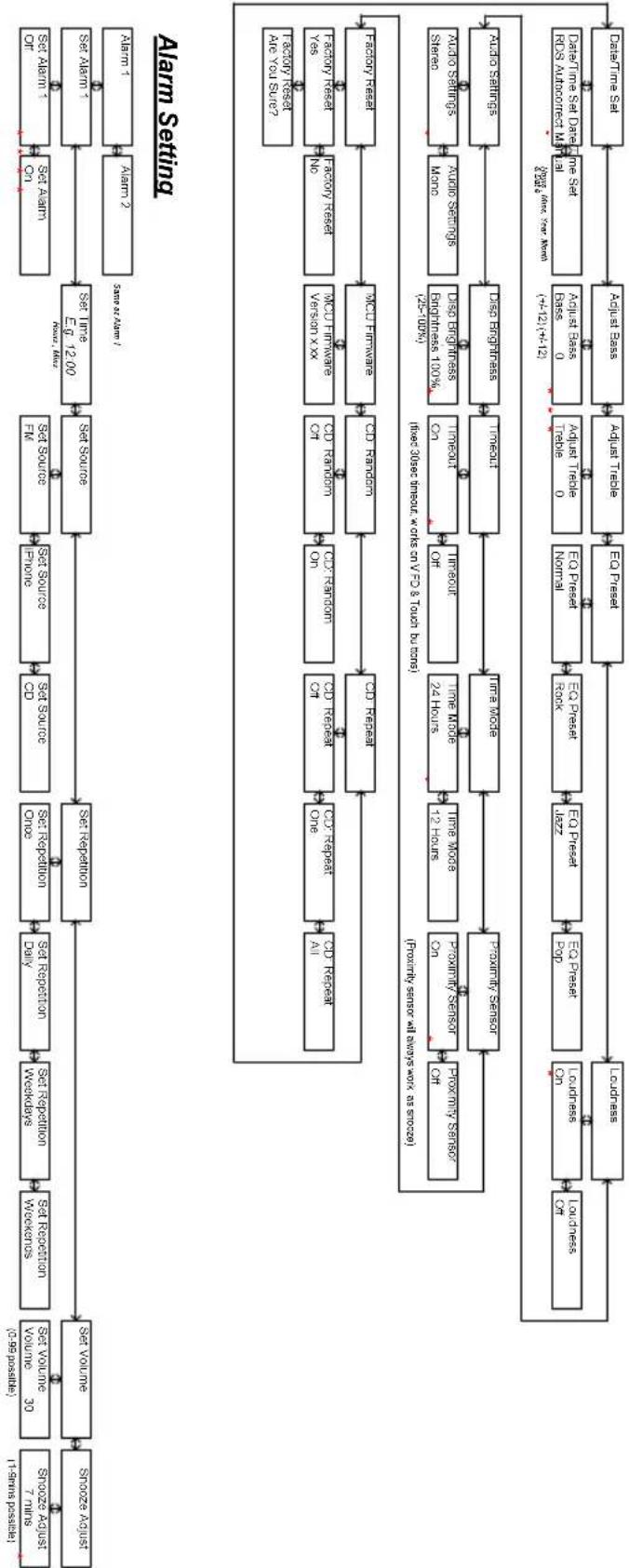
flowchart
graph TD
    A["Start"] --> B["Set Source"]
    B --> C["Set Source One"]
    C --> D["Set Source Two"]
    D --> E["Set Source Three"]
    E --> F["Set Source Four"]
    F --> G["Set Source Five"]
    G --> H["Set Source Six"]
    H --> I["Set Source Seven"]
    I --> J["Set Source Nine"]
    J --> K["Set Source One One"]
    K --> L["Set Source Two One"]
    L --> M["Set Source Three"]
    M --> N["Set Source Four"]
    N --> O["Set Source Five"]
    O --> P["Set Source Six"]
    P --> Q["Set Source Nine"]
    Q --> R["Set Source One One"]
    R --> S["Set Source Two One"]
    S --> T["Set Source Three"]
    T --> U["Set Source Four"]
    U --> V["Set Source Five"]
    V --> W["Set Source Six"]
    W --> X["Set Source Nine"]
    X --> Y["Set Source One One"]
    Y --> Z["Set Source Two One"]
    Z --> AA["Set Source Three"]
    AA --> AB["Set Source Four"]
    AB --> AC["Set Source Five"]
    AC --> AD["Set Source Six"]
    AD --> AE["Set Source Nine"]
    AE --> AF["Set Source One One"]
    AF --> AG["Set Source Two One"]
    AG --> AH["Set Source Three"]
    AH --> AI["Set Source Four"]
    AI --> AJ["Set Source Five"]
    AJ --> AK["Set Source Six"]
    AK --> AL["Set Source Nine"]
    AL --> AM["Set Source One One"]
    AM --> AN["Set Source Two One"]
    AN --> AO["Set Source Three"]
    AO --> AP["Set Source Four"]
    AP --> AQ["Set Source Five"]
    AQ --> AR["Set Source Six"]
    AR --> AS["Set Source Nine"]
    AS --> AT["Set Source One One"]
    AT --> AU["Set Source Two One"]
    AU --> AV["Set Source Three"]
    AV --> AW["Set Source Four"]
    AW --> AX["Set Source Five"]
    AX --> AY["Set Source Six"]
    AY --> AZ["Set Source Nine"]
    AZ --> BA["Set Source One One"]
    BA --> BB["Set Source Two One"]
    BB --> BC["Set Source Three"]
    BC --> BD["Set Source Four"]
    BD --> BE["Set Source Five"]
    BE --> BF["Set Source Six"]
    BF --> BG["Set Source Nine"]
    BG --> BH["Set Source One One"]
    BH --> BI["Set Source Two One"]
    BI --> BJ["Set Source Three"]
    BJ --> BK["Set Source Four"]
    BK --> BL["Set Source Five"]
    BL --> BM["Set Source Six"]
    BM --> BN["Set Source Nine"]
    BN --> BO["Set Source One One"]
    BO --> BP["Set Source Two One"]
    BP --> BQ["Set Source Three"]
    BQ --> BR["Set Source Four"]
    BR --> BS["Set Source Five"]
    BS --> BT["Set Source Six"]
    BT --> BU["Set Source Nine"]
    BU --> BV["Set Source One One"]
    BV --> BW["Set Source Two One"]
    BW --> BX["Set Source Three"]
    BX --> BY["Set Source Four"]
    BY --> BZ["Set Source Five"]
    BZ --> CA["Set Source Six"]
    CA --> CB["Set Source Nine"]
    CB --> CC["Set Source One One"]
    CC --> CD["Set Source Two One"]
    CD --> CE["Set Source Three"]
    CE --> CF["Set Source Four"]
    CF --> CG["Set Source Five"]
    CG --> CH["Set Source Six"]
    CH --> CI["Set Source Nine"]
    CI --> CJ["Set Source One One"]
    CJ --> CK["Set Source Two One"]
    CK --> CL["Set Source Three"]
    CL --> CM["Set Source Four"]
    CM --> CN["Set Source Five"]
    CN --> CO["Set Source Six"]
    CO --> CP1["Tactic Resset Are You Survey"]
    CO --> CP2["Tactic Resset Are You Survey?"]
    CO --> CP3["Tactic Resset Are You Survey?"]
    CO --> CP4["Tactic Resset Are You Survey?"]
    CO --> CP5["Tactic Resset Are You Survey?"]
    CO --> CP6["Tactic Resset Are You Survey?"]
    CO --> CP7["Tactic Resset Are You Survey?"]
    CO --> CP8["Tactic Resset Are You Survey?"]
    CO --> CP9["Tactic Resset Are You Survey?"]
    CO --> CP10["Tactic Resset Are You Survey?"]
    CO --> CP11["Tactic Resset Are You Survey?"]
    CO --> CP12["Tactic Resset Are You Survey?"]
    CO --> CP13["Tactic Resset Are You Survey?"]
    CO --> CP14["Tactic Resset Are You Survey?"]
    CO --> CP15["Tactic Resset Are You Survey?"]
    CO --> CP16["Tactic Resset Are You Survey?"]
    CO --> CP17["Tactic Resset Are You Survey?"]
    CO --> CP18["Tactic Resset Are You Survey?"]
    CO --> CP19["Tactic Resset Are You Survey?"]
    CO --> CP20["Tactic Resset Are You Survey?"]
    CO --> CP21["Tactic Resset Are You Survey?"]
    CO --> CP22["Tactic Resset Are You Survey?"]
    CO --> CP23["Tactic Resset Are You Survey?"]
    CO --> CP24["Tactic Resset Are You Survey?"]
    CO --> CP25["Tactic Resset Are You Survey?"]
    CO --> CP26["Tactic Resset Are You Survey?"]
    CO --> CP27["Tactic Resset Are You Survey?"]
    CO --> CP28["Tactic Resset Are You Survey?"]
    CO --> CP29["Tactic Resset Are You Survey?"]
    CO --> CP30["Tactic Resset Are You Survey?"]
    CO --> CP31["Tactic Resset Are You Survey?"]
    CO --> CP32["Tactic Resset Are You Survey?"]
    CO --> CP33["Tactic Resset Are You Survey?"]
    CO --> CP34["Tactic Resset Are You Survey?"]
    CO --> CP35["Tactic Resset Are You Survey?"]
    CO --> CP36["Tactic Resset Are You Survey?"]
    CO --> CP37["Tactic Resset Are You Survey?"]
    CO --> CP38["Tactic Resset Are You Survey?"]
    CO --> CP39["Tactic Resset Are You Survey?"]
    CO --> CP40["Tactic Resset Are You Survey?"]
    CO --> CP41["Tactic Resset Are You Survey?"]
    CO --> CP42["Tactic Resset Are You Survey?"]
    CO --> CP43["Tactic Resset Are You Survey?"]
    CO --> CP44["Tactic Resset Are You Survey?"]
    CO --> CP45["Tactic Resset Are You Survey?"]
    CO --> CP46["Tactic Resset Are You Survey?"]
    CO --> CP47["Tactic Resset Are You Survey?"]
    CO --> CP48["Tactic Resset Are You Survey?"]
    CO --> CP49["Tactic Resset Are You Survey?"]
    CO --> CP50["Tactic Resset Are You Survey?"]
[1] Default volume is 30, last volume after a power cycle is memorized
[2] Menu timeout from anywhere is 5 secs
[3] * indicates default setting
[4] Entering menu level 2 requires a enter press, settings below in level 2 are instant when altered by 1 and 2 with the execution of Factory Reset, which requires another enter press to be executed.

flowchart
graph TD
    A["Input Processing"] --> B["Set Volume"]
    B --> C["Set Repetition"]
    C --> D["Set Repetition Once"]
    D --> E["Set Source Finance"]
    E --> F["Set Source FIN"]
    F --> G["Set Link Eq 12.00"]
    G --> H["Set Alarm 1"]
    H --> I["Set Alarm ON"]
    I --> J["Set Alarm 2"]
    J --> K["Alarm 1"]
    K --> L["Alarm 2"]
    L --> M["1-1 system process"]
    M --> N["Stoozo Adjust / 1-99 psoriasis / ns / ns / ns persist"]
    N --> O["Stoozo Adjust / 30 ns / ns persist"]
    O --> P["Skoozo Adjust / 1-99 psoriasis / ns / ns persist"]
Alarm Setting
flowchart
graph TD
    A["Data Time Set"] --> B["Adjuist Base"]
    B --> C["Adjuist Trade"]
    C --> D["EO Presset"]
    D --> E["EO Presset Rock"]
    E --> F["FO Presset Pop"]
    F --> G["LO Presset On"]
    G --> H["LOndress Off"]
    H --> I["Proximity Sensor Off"]
    I --> J["Proximity Sensor Co"]
    J --> K["IMU Sensor"]
    K --> L["Proximity Sensor Off"]
    L --> M["Time Mode 12 Hours"]
    M --> N["Time Mode 24 Hours"]
    N --> O["Time Mode 24 Hours"]
    O --> P["Time Mode"]
    P --> Q["Time Mode"]
    Q --> R["Time Mode"]
    R --> S["Time Mode"]
    S --> T["Time Mode"]
    T --> U["Time Mode"]
    U --> V["Time Mode"]
    V --> W["Time Mode"]
    W --> X["Time Mode"]
    X --> Y["Time Mode"]
    Y --> Z["Time Mode"]
    Z --> AA["Time Mode"]
    AA --> AB["Time Mode"]
    AB --> AC["Time Mode"]
    AC --> AD["Time Mode"]
    AD --> AE["Time Mode"]
    AE --> AF["Time Mode"]
    AF --> AG["Time Mode"]
    AG --> AH["Time Mode"]
    AH --> AI["Time Mode"]
    AI --> AJ["Time Mode"]
    AJ --> AK["Time Mode"]
    AK --> AL["Time Mode"]
    AL --> AM["Time Mode"]
    AM --> AN["Time Mode"]
    AN --> AO["Time Mode"]
    AO --> AP["Time Mode"]
    AP --> AQ["Time Mode"]
    AQ --> AR["Time Mode"]
    AR --> AS["Time Mode"]
    AS --> AT["Time Mode"]
    AT --> AU["Time Mode"]
    AU --> AV["Time Mode"]
    AV --> AW["Time Mode"]
    AW --> AX["Time Mode"]
    AX --> AY["Time Mode"]
    AY --> AZ["Time Mode"]
    AZ --> BA["Time Mode"]
    BA --> BB["Time Mode"]
    BB --> BC["Time Mode"]
    BC --> BD["Time Mode"]
    BD --> BE["Time Mode"]
    BE --> BF["Time Mode"]
    BF --> BG["Time Mode"]
    BG --> BH["Time Mode"]
    BH --> BI["Time Mode"]
    BI --> BJ["Time Mode"]
    BJ --> BK["Time Mode"]
    BK --> BL["Time Mode"]
    BL --> BM["Time Mode"]
    BM --> BN["Time Mode"]
    BN --> BO["Time Mode"]
    BO --> BP["Time Mode"]
    BP --> BQ["Time Mode"]
    BQ --> BR["Time Mode"]
    BR --> BS["Time Mode"]
    BS --> BT["Time Mode"]
    BT --> BU["Time Mode"]
    BU --> BV["Time Mode"]
    BV --> BW["Time Mode"]
    BW --> BX["Time Mode"]
    BX --> BY["Time Mode"]
    BY --> BZ["Time Mode"]
    BZ --> CA["Time Mode"]
    CA --> CB["Time Mode"]
    CB --> CC["Time Mode"]
    CC --> CD["Time Mode"]
    CD --> CE["Time Mode"]
    CE --> CF["Time Mode"]
    CF --> CG["Time Mode"]
    CG --> CH["Time Mode"]
    CH --> CI["Time Mode"]
    CI --> CJ["Time Mode"]
    CJ --> CK["Time Mode"]
    CK --> CL["Time Mode"]
    CL --> CM["Time Mode"]
    CM --> CN["Time Mode"]
    CN --> CO["Time Mode"]
    CO --> CP["Time Mode"]
    CP --> CQ["Time Mode"]
    CQ --> CR["Time Mode"]
    CR --> CS["Time Mode"]
    CS --> CT["Time Mode"]
    CT --> CU["Time Mode"]
    CU --> CV["Time Mode"]
    CV --> CW["Time Mode"]
    CW --> CX["Time Mode"]
    CX --> CY["Time Mode"]
    CY --> CZ["Time Mode"]
Technische Daten
Modell: Tangent fjord CD/FM
[1] Default volume is 30, last volume after a power cycle is memorized
[2] Menu timeout from anywhere is 5 secs
[3] indicates default setting
[4] Entering menu level 2 requires a enter press, settings below in level 2 are instant when altered by 1 and 2 with the exception of Facility Reset, which requires another enter press to be executed.

flowchart
graph TD
    A["Start"] --> B["Set Volume"]
    B --> C["Set Repetition"]
    C --> D["Set Source"]
    D --> E["Set Source"]
    E --> F["Set Link"]
    F --> G["End"]
    subgraph Alarm Setting
        H["Alarm 1"] --> I["Alarm 2"]
        J["Alarm 3"] --> K["Alarm 4"]
        L["Alarm 5"] --> M["Alarm 6"]
        N["Alarm 7"] --> O["Alarm 8"]
        P["Alarm 9"] --> Q["Alarm 10"]
        R["Alarm 11"] --> S["Alarm 12"]
        T["Alarm 13"] --> U["Alarm 14"]
        V["Alarm 15"] --> W["Alarm 16"]
        X["Alarm 17"] --> Y["Alarm 18"]
        Z["Alarm 19"] --> AA["Alarm 20"]
        AB["Alarm 21"] --> AC["Alarm 22"]
        AD["Alarm 23"] --> AE["Alarm 24"]
        AF["Alarm 25"] --> AG["Alarm 26"]
        AH["Alarm 27"] --> AI["Alarm 28"]
        AJ["Alarm 29"] --> AK["Alarm 30"]
    end

    subgraph Data Setting
        AL["Data Set Dataset Name Set"] --> AM["Data Set Dataset Name Name"]
        AN["Data Set Dataset Name Name"] --> AO["Data Set Dataset Name Name"]
        AP["Data Set Dataset Name Name"] --> AQ["Data Set Dataset Name Name"]
        AR["Data Set Dataset Name Name"] --> AS["Data Set Dataset Name Name"]
        AT["Data Set Dataset Name Name"] --> AU["Data Set Dataset Name Name"]
        AV["Data Set Dataset Name Name"] --> AW["Data Set Dataset Name Name"]
        AX["Data Set Dataset Name Name"] --> AY["Data Set Dataset Name Name"]
        AZ["Data Set Dataset Name Name"] --> BA["Data Set Dataset Name Name"]
        BB["Data Set Dataset Name Name"] --> BC["Data Set Dataset Name Name"]
        BD["Data Set Dataset Name Name"] --> BE["Data Set Dataset Name Name"]
        BF["Data Set Dataset Name Name"] --> BG["Data Set Dataset Name Name"]
        BH["Data Set Dataset Name Name"] --> BH
    end

    subgraph Data Storage
        BI["Data Storage"] --> BJ["Audio Segments"]
        BK["Audio Segments"] --> BL["Audio Segments"]
        BM["Audio Segments"] --> BN["Audio Segments"]
        BO["Audio Segments"] --> BP["Audio Segments"]
    end

    subgraph Data Storage
        BQ["Audio Segments"] --> BR["Audio Segments"]
        BS["Audio Segments"] --> BT["Audio Segments"]
    end

    A -->|1 - Points possible| B
    B -->|0 - Points possible| C
    C -->|0 - Points possible| D
    D -->|0 - Points possible| E
    E -->|0 - Points possible| F
    F -->|0 - Points possible| G
    G -->|0 - Points possible| H
    H -->|0 - Points possible| I
    I -->|0 - Points possible| J
    J -->|0 - Points possible| K
    K -->|0 - Points possible| L
    L -->|0 - Points possible| M
    M -->|0 - Points possible| N
    N -->|0 - Points possible| O
    O -->|0 - Points possible| P
    P -->|0 - Points possible| Q
    Q -->|0 - Points possible| R
    R -->|0 - Points possible| S
    S -->|0 - Points possible| T
    T -->|0 - Points possible| U
    U -->|0 - Points possible| V
    V -->|0 - Points possible| W
    W -->|0 - Points possible| X
    X -->|0 - Points possible| Y
    Y -->|0 - Points possible| Z
    Z -->|0 - Points possible| AA
    AA -->|0 - Points possible| AB
    AB -->|0 - Points possible| AC
    AC -->|0 - Points possible| AD
    AD -->|0 - Points possible| AE
    AE -->|0 - Points possible| AF
    AF -->|0 - Points possible| AG
    AG -->|0 - Points possible| AH
    AH -->|0 - Points possible| AI
    AI -->|0 - Points possible| AJ
    AJ -->|0 - Points possible| AK
    AK -->|0 - Points possible| AL
    AL -->|0 - Points possible| AM
    AM -->|0 - Points possible| AN
    AN -->|0 - Points possible| AO
    AO -->|0 - Points possible| AP
    AP -->|0 - Points possible| AQ
    AQ -->|0 - Points possible| AR
    AR -->|0 - Points possible| AS
    AS -->|0 - Points possible| AT
    AT -->|0 - Points possible| AU
    AU -->|0 - Points possible| AV
    AV -->|0 - Points possible| AW
    AW -->|0 - Points possible| AX
    AX -->|0 - Points possible| AY
    AY -->|0 - Points possible| AZ
    AZ -->|0 - Points possible| BA
    BA -->|0 - Points possible| BB
    BB -->|0 - Points possible| BC
    BC -->|0 - Points possible| DA
    DA -->|0 - Points possible| AE
    AE -->|0 - Points possible| AF
    AF -->|0 - Points possible| AG
    AG -->|0 - Points possible| AH
    AH -->|0 - Points possible| AI
    AI -->|0 - Points possible| AJ
    AJ -->|0 - Points possible| AK
    AK -->|0 - Points possible| AL
    AL -->|0 - Points possible| AM
    AM -.-> note right of AY: "Aero you survey"
    note right of AY: "Aero you survey"
    note left of AY: "Aero you survey"
[1] Default volume is 30, last volume after a power cycle is memorized
[2] Menu timeout from anywhere is 5 secs
[3] indicates default setting
[4] Entering menu level 2 requires a enter press, settings below in level 2 are instant when altered by 1 and 1 with the exception of Facility Reset, which requires another enter press to be executed.
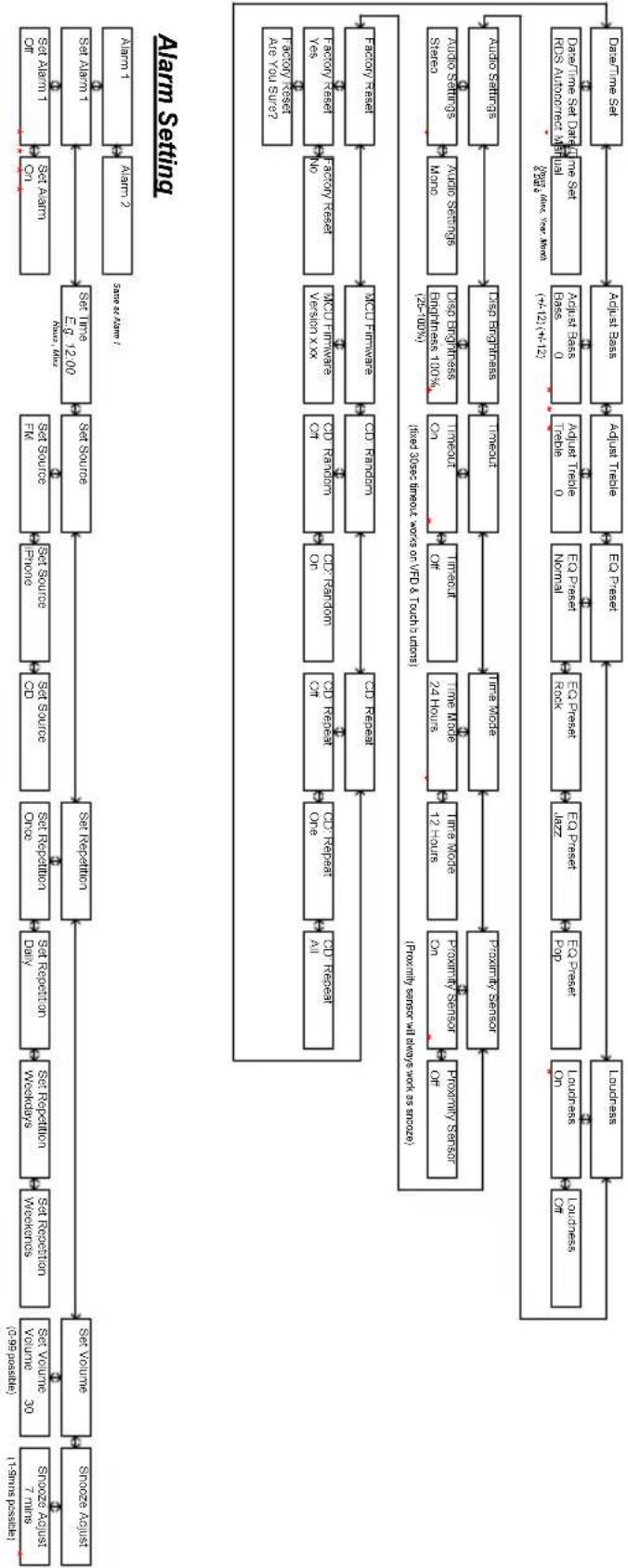
flowchart
graph TD
    A["Search Request"] --> B["Search Request"]
    B --> C["Set Volume 30 (0.99 possible)"]
    C --> D["Set Review"]
    D --> E["Set Rejection"]
    E --> F["Set Rejection"]
    F --> G["Set Source"]
    G --> H["Set Source"]
    H --> I["Set Source"]
    I --> J["Set Link"]
    J --> K["Set Alarm"]
    K --> L["Set Alarm 1"]
    L --> M["Set Alarm 1"]
    M --> N["Set Alarm 2"]
    N --> O["Alarm 1"]
    O --> P["Sone as far?"]
    P --> Q["Sone as far?"]
    Q --> R["Alarm Setting"]

    subgraph Alarm Settings
        S["Search Request"] --> T["Set Review"]
        T --> U["Set Review"]
        U --> V["Set Rejection"]
        V --> W["Set Rejection"]
        W --> X["Set Source"]
        X --> Y["Set Source"]
        Y --> Z["Set Source"]
        Z --> AA["Set Link"]
        AA --> AB["Set Alarm 1"]
        AB --> AC["Set Alarm 1"]
        AC --> AD["Alarm 1"]
        AD --> AE["Sone as far?"]
    end

    subgraph Data Sets
        AF["Data Set"] --> AG["Sone as far?"]
        AG --> AH["Sone as far?"]
        AH --> AI["Sone as far?"]
        AI --> AJ["Sone as far?"]
        AJ --> AK["Sone as far?"]
        AK --> AL["Sone as far?"]
        AL --> AM["Sone as far?"]
        AM --> AN["Sone as far?"]
        AN --> AO["Sone as far?"]
        AO --> AP["Sone as far?"]
        AP --> AQ["Sone as far?"]
        AQ --> AR["Sone as far?"]
        AR --> AS["Sone as far?"]
    end

    subgraph Data Sources
        AT["Data Set"] --> AU["Sone as far?"]
        AU --> AV["Sone as far?"]
        AV --> AW["Sone as far?"]
        AW --> AX["Sone as far?"]
        AX --> AY["Sone as far?"]
        AY --> AZ["Sone as far?"]
        AZ --> BA["Sone as far?"]
        BA --> BB["Sone as far?"]
        BB --> BC["Sone as far?"]
        BC --> BD["Sone as far?"]
        BD --> BE["Sone as far?"]
        BE --> BF["Sone as far?"]
        BF --> BG["Sone as far?"]
        BG --> BH["Sone as far?"]
        BH --> BI["Sone as far?"]
    end

    subgraph Data Methods
        BJ["Data Set"] --> BK["Sone as far?"]
        BK --> BL["Sone as far?"]
        BL --> BM["Sone as far?"]
        BM --> BN["Sone as far?"]
        BN --> BO["Sone as far?"]
        BO --> BP["Sone as far?"]
        BP --> BQ["Sone as far?"]
        BQ --> BR["Sone as far?"]
        BR --> BS["Sone as far?"]
        BS --> BT["Sone as far?"]
        BT --> BU["Sone as far?"]
        BU --> BV["Sone as far?"]
        BV --> BW["Sone as far?"]
        BW --> BX["Sone as far?"]
        BX --> BY["Sone as far?"]
    end

    subgraph Data Sources
        BZ["Data Set"] --> CA["Sone as far?"]
        CA --> CB["Sone as far?"]
        CB --> CC["Sone as far?"]
        CC --> CD["Sone as far?"]
        CD --> CE["Sone as far?"]
        CE --> CF["Sone as far?"]
        CF --> CG["Sone as far?"]
        CG --> CH["Sone as far?"]
        CH --> CI["Sone as far?"]
        CI --> CJ["Sone as far?"]
        CJ --> CK["Sone as far?"]
        CK --> CL["Sone as far?"]
        CL --> CM["Sone as far?"]
        CM --> CN["Sone as far?"]
        CN --> CO["Data Set"] & CO["Data Set"] & CO["Data Set"] & CO["Data Set"] & CO["Data Set"] & CO["Data Set"] & CO["Data Set"] & CO["Data Set"] & CO["Data Set"] & CO["Data Set"] & CO["Data Set"] & CO["Data Set"] & CO["Data Set"] & CO["Data Set"] & CO["Data Set"] & CO["Data Set"] & CO["Data Set"] & CO["Data Set"] &
    end

    %% Note: The chart is a hierarchical diagram illustrating the hierarchical structure of the Alarm Settings. Each level of the Alarm Settings corresponds to a specific number of samples or units, with some levels having zero samples or units. The data sets are presented in a structured format with labels such as “Rxmy Sensors at Mbps work as source” and “(Red to Blue)”, “Inset size ranges works on VFD & Touch units”. The data sets are presented in a structured format with labels such as “Rxmy Sensors at Mbps work as source”. The data sets are presented in a structured format with labels such as “Inset size ranges works on VFD & Touch units”. The data sets are presented in a structured format with labels such as “Rxmy Sensors at Mbps work as source”. The data sets are presented in a structured format with labels such as “Rxmy Sensors at Mbps work as source”. The data sets are presented in a structured format with labels such as “Rxmy Sensors at Mbps work as source”. The data sets are presented in a structured format with labels such as “Rxmy Sensors at Mbps work as source”. The data sets are presented in a structured format with labels such as “Rxmy Sensors at Mbps work as source”. The data sets are presented in an array format with values ranging from 0 to 12. The data sets are presented in a matrix format with values ranging from 0 to 12. The data sets are presented in a matrix format with values ranging from 0 to 12. The data sets are presented in a matrix format with values ranging from 0 to 12. The data sets are presented in a matrix format with values ranging from 0 to 12. The data sets are presented in a matrix format with values ranging from 0 to 12. The data sets are presented in a grid format with values ranging from 0 to 12. The data sets are presented in a grid format with values ranging from 0 to 12. The data sets are presented in a grid format with values ranging from 0 to 12. The data sets are presented in a grid format with values ranging from 0 to 12. The data sets are presented in a grid format with values ranging from 0 to 12. The data sets are presented in a mesh format with values ranging from 0 to 12. The data sets are presented in a mesh format with values ranging from 0 to 12. The data sets are presented in a mesh format with values ranging from 0 to 12. The data sets are presented in a mesh format with values ranging from 0 to 12. The data sets are presented in a mesh format with values ranging from 0 to 12. The data sets are presented in a grid format with values ranging from 0 to 12. The data sets are presented in a grid format with values ranging from 0 to 12. The data sets are presented in a grid format with values ranging from 0 to 12. The data sets are presented in a grid format with values ranging from 0 to 12. The data sets are presented in a net value of -25-70%.
    end
[1] Default volume is 30, last volume after a power cycle is memorized
[2] Menu timeout from anywhere is 5 secs
[3]* indicates default setting
[4] Entering menu level 2 requires a enter press, settings below in level 2 are instant when altered by - and - with the exception of Factory Reset, which requires another enter press to be executed.

flowchart
graph TD
    A["Set Alarm 1"] --> B["Set Alarm 2"]
    B --> C["Set Alarm 3"]
    C --> D["Set Alarm 4"]
    D --> E["Set Alarm 5"]
    E --> F["Set Alarm 6"]
    F --> G["Set Alarm 7"]
    G --> H["Set Alarm 8"]
    H --> I["Set Alarm 9"]
    I --> J["Set Alarm 10"]
    J --> K["Set Alarm 11"]
    K --> L["Set Alarm 12"]
    L --> M["Set Alarm 13"]
    M --> N["Set Alarm 14"]
    N --> O["Set Alarm 15"]
    O --> P["Set Alarm 16"]
    P --> Q["Set Alarm 17"]
    Q --> R["Set Alarm 18"]
    R --> S["Set Alarm 19"]
    S --> T["Set Alarm 20"]
    T --> U["Set Alarm 21"]
    U --> V["Set Alarm 22"]
    V --> W["Set Alarm 23"]
    W --> X["Set Alarm 24"]
    X --> Y["Set Alarm 25"]
    Y --> Z["Set Alarm 26"]
    Z --> AA["Set Alarm 27"]
    AA --> AB["Set Alarm 28"]
    AB --> AC["Set Alarm 29"]
    AC --> AD["Set Alarm 30"]
    AD --> AE["Set Alarm 31"]
    AE --> AF["Set Alarm 32"]
    AF --> AG["Set Alarm 33"]
    AG --> AH["Set Alarm 34"]
    AH --> AI["Set Alarm 35"]
    AI --> AJ["Set Alarm 36"]
    AJ --> AK["Set Alarm 37"]
    AK --> AL["Set Alarm 38"]
    AL --> AM["Set Alarm 39"]
    AM --> AN["Set Alarm 40"]
    AN --> AO["Set Alarm 41"]
    AO --> AP["Set Alarm 42"]
    AP --> AQ["Set Alarm 43"]
    AQ --> AR["Set Alarm 44"]
    AR --> AS["Set Alarm 45"]
    AS --> AT["Set Alarm 46"]
    AT --> AU["Set Alarm 47"]
    AU --> AV["Set Alarm 48"]
    AV --> AW["Set Alarm 49"]
    AW --> AX["Set Alarm 50"]
    AX --> AY["Set Alarm 51"]
    AY --> AZ["Set Alarm 52"]
    AZ --> BA["Set Alarm 53"]
    BA --> BB["Set Alarm 54"]
    BB --> BC["Set Alarm 55"]
    BC --> BD["Set Alarm 56"]
    BD --> BE["Set Alarm 57"]
    BE --> BF["Set Alarm 58"]
    BF --> BG["Set Alarm 59"]
    BG --> BH["Set Alarm 60"]
    BH --> BI["Set Alarm 61"]
    BI --> BJ["Set Alarm 62"]
    BJ --> BK["Set Alarm 63"]
    BK --> BL["Set Alarm 64"]
    BL --> BM["Set Alarm 65"]
    BM --> BN["Set Alarm 66"]
    BN --> BO["Set Alarm 67"]
    BO --> BP["Set Alarm 68"]
    BP --> BQ["Set Alarm 69"]
    BQ --> BR["Set Alarm 70"]
    BR --> BS["Set Alarm 71"]
    BS --> BT["Set Alarm 72"]
    BT --> BU["Set Alarm 73"]
    BU --> BV["Set Alarm 74"]
    BV --> BW["Set Alarm 75"]
    BW --> BX["Set Alarm 76"]
    BX --> BY["Set Alarm 77"]
    BY --> BZ["Set Alarm 78"]
    BZ --> CA["Set Alarm 79"]
    CA --> CB["Set Alarm 80"]
    CB --> CC["Set Alarm 81"]
    CC --> CD["Set Alarm 82"]
    CD --> CE["Set Alarm 83"]
    CE --> CF["Set Alarm 84"]
    CF --> CG["Set Alarm 85"]
    CG --> CH["Set Alarm 86"]
    CH --> CI["Set Alarm 87"]
    CI --> CJ["Set Alarm 88"]
    CJ --> CK["Set Alarm 89"]
    CK --> CL["Set Alarm 90"]
Alarm Setting
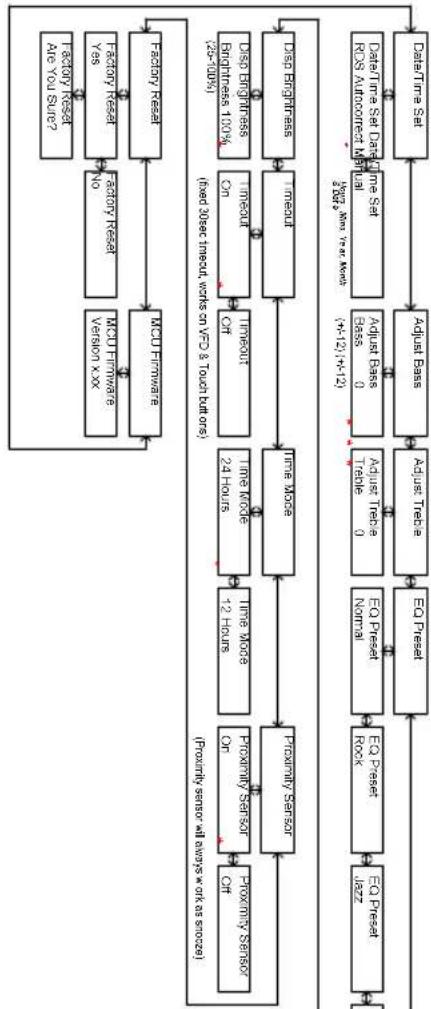
flowchart
graph TD
    A["Data Time Set Data/Time Set NOS Amplification Module"] --> B["Adjust Pass"]
    B --> C["Adjust Trade"]
    C --> D["Trade 0"]
    D --> E["EX Price Normal"]
    E --> F["EX Price Rock"]
    F --> G["EX Press"]
    G --> H["Ex Press"]
    H --> I["Ex Press"]
    I --> J["Ex Press"]
    J --> K["Ex Press"]
    K --> L["Ex Press"]
    L --> M["Ex Press"]
    M --> N["Ex Press"]
    N --> O["Ex Press"]
    O --> P["Ex Press"]
    P --> Q["Ex Press"]
    Q --> R["Ex Press"]
    R --> S["Ex Press"]
    S --> T["Ex Press"]
    T --> U["Ex Press"]
    U --> V["Ex Press"]
    V --> W["Ex Press"]
    W --> X["Ex Press"]
    X --> Y["Ex Press"]
    Y --> Z["Ex Press"]
    Z --> AA["Ex Press"]
    AA --> AB["Ex Press"]
    AB --> AC["Ex Press"]
    AC --> AD["Ex Press"]
    AD --> AE["Ex Press"]
    AE --> AF["Ex Press"]
    AF --> AG["Ex Press"]
    AG --> AH["Ex Press"]
    AH --> AI["Ex Press"]
    AI --> AJ["Ex Press"]
    AJ --> AK["Ex Press"]
    AK --> AL["Ex Press"]
    AL --> AM["Ex Press"]
    AM --> AN["Ex Press"]
    AN --> AO["Ex Press"]
    AO --> AP["Ex Press"]
    AP --> AQ["Ex Press"]
    AQ --> AR["Ex Press"]
    AR --> AS["Ex Press"]
    AS --> AT["Ex Press"]
    AT --> AU["Ex Press"]
    AU --> AV["Ex Press"]
    AV --> AW["Ex Press"]
    AW --> AX["Ex Press"]
    AX --> AY["Ex Press"]
    AY --> AZ["Ex Press"]
    AZ --> BA["Ex Press"]
    BA --> BB["Ex Press"]
    BB --> BC["Ex Press"]
    BC --> BD["Ex Press"]
    BD --> BE["Ex Press"]
    BE --> BF["Ex Press"]
    BF --> BG["Ex Press"]
    BG --> BH["Ex Press"]
    BH --> BI["Ex Press"]
    BI --> BJ["Ex Press"]
    BJ --> BK["Ex Press"]
    BK --> BL["Ex Press"]
    BL --> BM["Ex Press"]
    BM --> BN["Ex Press"]
    BN --> BO["Ex Press"]
    BO --> BP["Ex Press"]
    BP --> BQ["Ex Press"]
    BQ --> BR["Ex Press"]
    BR --> BS["Ex Press"]
    BS --> BT["Ex Press"]
    BT --> BU["Ex Press"]
    BU --> BV["Ex Press"]
    BV --> BW["Ex Press"]
    BW --> BX["Ex Press"]
    BX --> BY["Ex Press"]
    BY --> BZ["Ex Press"]
    BZ --> CA["Ex Press"]
    CA --> CB["Ex Press"]
    CB --> CC["Ex Press"]
    CC --> CD["Ex Press"]
    CD --> CE["Ex Press"]
    CE --> CF["Ex Press"]
    CF --> CG["Ex Press"]
    CG --> CH["Ex Press"]
    CH --> CI["Ex Press"]
    CI --> CJ["Ex Press"]
    CJ --> CK["Ex Press"]
    CK --> CL["Ex Press"]
    CL --> CM["Ex Press"]
    CM --> CN["Ex Press"]
    CN --> CO["Ex Press"]
    CO --> CP["Ex Press"]
    CP --> CQ["Ex Press"]
    CQ --> CR["Ex Press"]
    CR --> CS["Ex Press"]
    CS --> CT["Ex Press"]
    CT --> CU["Ex Press"]
    CU --> CV["Ex Press"]
    CV --> CW["Ex Press"]
    CW --> CX["Ex Press"]
    CX --> CY["Ex Press"]
    CY --> CZ["Ex Press"]
    CZ --> DA["Ex Press"]
    DA --> DB["Ex Press"]
    DB --> DC["Ex Press"]
    DC --> DD["Ex Press"]
    DD --> DE["Ex Press"]
    DE --> DF["Ex Press"]
    DF --> DG["Ex Press"]
    DG --> DH["Ex Press"]
    DH --> DI["Ex Press"]
    DI --> DJ["Ex Press"]
    DJ --> DK["Ex Press"]
    DK --> DL["Ex Press"]
    DL --> DJ
    DJ --> DV["Dx3.2x3 Insett. w/nts on VEG & Touch butons"] --> DW
    DW --> DX
    DX --> DY
Specifications
Model: Tangent fjord CD/FM
Bedieningsorganen: Tiptoetsen en IR afstandsbediening
[1] Default volume is 30, last volume after a power cycle is memorized
[2] Menu timeout from anywhere is 5 secs
[3] * indicates default setting
[4] Entering menu level 2 requires a enter press, settings below in level 2 are instant when altered by 1 and 1 with the exception of Factory Reset, which requires another enter press to be executed.
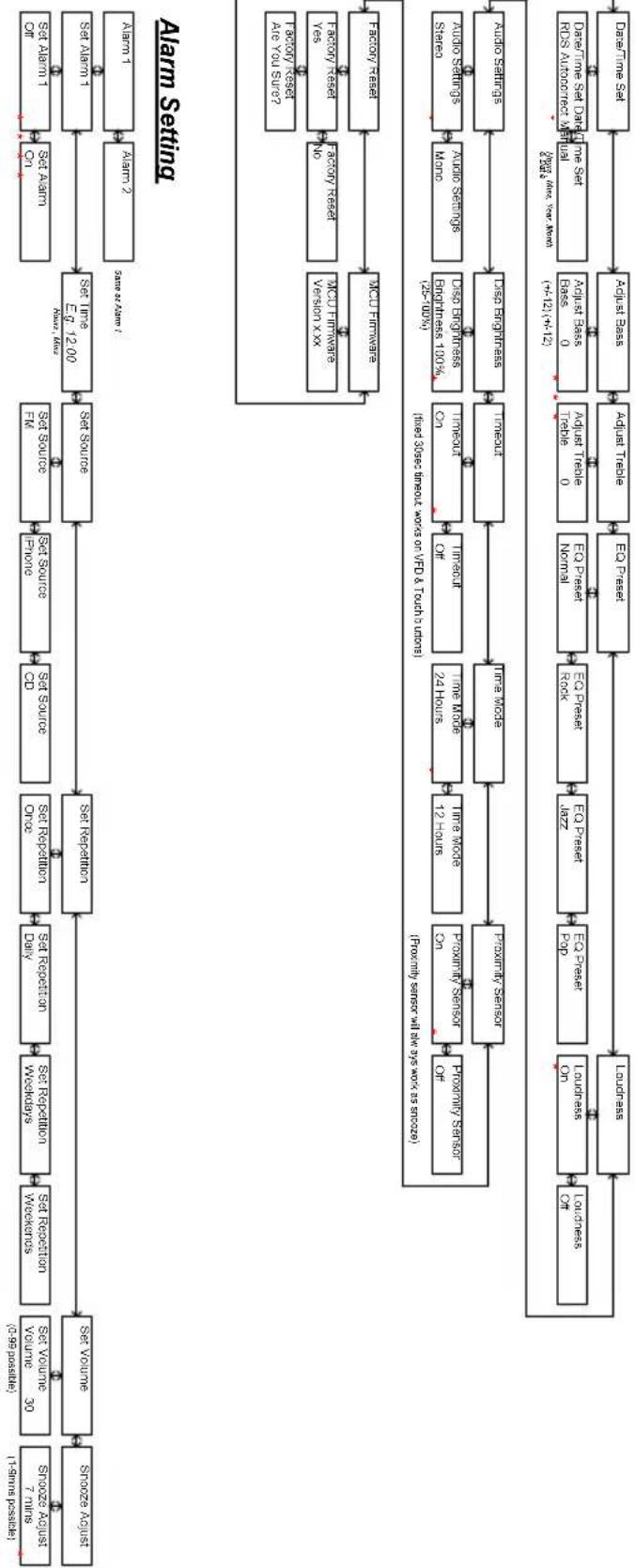
flowchart
graph TD
    A["Start"] --> B["Set Volume"]
    B --> C["Set Repetition"]
    C --> D["Set Source"]
    D --> E["Set Link"]
    E --> F["Set Alarm"]
    F --> G["Alarm 1"]
    F --> H["Alarm 2"]
    G --> I["Set Alarm 1"]
    H --> J["Alarm 3"]
    I --> K["Set Source"]
    K --> L["Set Link"]
    L --> M["Set Alarm 1"]
    M --> N["Alarm 1"]
    M --> O["Alarm 2"]
    N --> P["Set Alarm 1"]
    O --> Q["Alarm 2"]
    P --> R["Set Alarm 1"]
    Q --> S["Alarm 2"]
    R --> T["Set Alarm 1"]
    S --> U["Alarm 2"]
    T --> V["Set Alarm 1"]
    U --> W["Alarm 2"]
    V --> X["Set Alarm 1"]
    W --> Y["Alarm 2"]

    subgraph Alarm Setting
        Z["Alarm Sensor"]
        AA["Factory Reset Version XX"]
        AB["Factory Reset No"]
        AC["Factory Reset Yes"]
        AD["Audio Signals Mono"]
        AE["Audio Signals Auto Signals Staro"]
        AF["Audio Signals Auto Signals Auto Signal"]
        AG["Audio Sets Audit Engines"]
        AH["Audio Sets Audit Presses"]
        AI["Audio Sets Audit Trade"]
        AJ["Audio Sets Audit Press"]
        AK["Audio Sets Audit Press"]
        AL["Audio Sets Audit Presses"]
        AM["Audio Sets Audit Presses"]
        AN["Audio Sets Audit Presses"]
        AO["Audio Sets Audit Presses"]
        AP["Audio Sets Audit Presses"]
        AQ["Audio Sets Audit Presses"]
        AR["Audio Sets Audit Presses"]
        AS["Audio Sets Audit Presses"]
        AT["Audio Sets Audit Presses"]
        AU["Audio Sets Audit Presses"]
        AV["Audio Sets Audit Presses"]
        AW["Audio Sets Audit Presses"]
        AX["Audio Sets Audit Presses"]
        AY["Audio Sets Audit Presses"]
        AZ["Audio Sets Audit Presses"]
        BA["Audio Sets Audit Presses"]
        BB["Audio Sets Audit Presses"]
        BC["Audio Sets Audit Presses"]
        BD["Audio Sets Audit Presses"]
        BE["Audio Sets Audit Presses"]
        BF["Audio Sets Audit Presses"]
        BG["Audio Sets Audit Presses"]
        BH["Audio Sets Audit Presses"]
        BI["Audio Sets Audit Presses"]
        BJ["Audio Sets Audit Presses"]
        BK["Audio Sets Audit Presses"]
        BL["Audio Sets Audit Presses"]
        BM["Audio Sets Audit Presses"]
        BN["Audio Sets Audit Presses"]
        BO["Audio Sets Audit Presses"]
        BP["Audio Sets Audit Presses"]
        BQ["Audio Sets Audit Presses"]
        BR["Audio Sets Audit Presses"]
        BS["Audio Sets Audit Presses"]
        BT["Audio Sets Audit Presses"]
        BU["Audio Sets Audit Presses"]
        BV["Audio Sets Audit Presses"]
        BW["Audio Sets Audit Presses"]
        BX["Audio Sets Audit Presses"]
        BYA["Audio Sets Audit Presses"]
    end

    subgraph Control
        Z
        AA
        AB
        AC
        AD
        AE
        BF
        BG
        BH
        BI
        BJ
        BK
    end

    style Control fill:#f9f9f9,stroke:#333,stroke-width:2px
[1] Default volume is 30, last volume after a power cycle is memorized
[2] Menu timeout from anywhere is 5 secs
[3] indicates default setting
[4] Entering menu level 2 requires a enter press, settings below in level 2 are instant when altered by and then with the exception of Factory Reset, which requires another enter press to be executed.
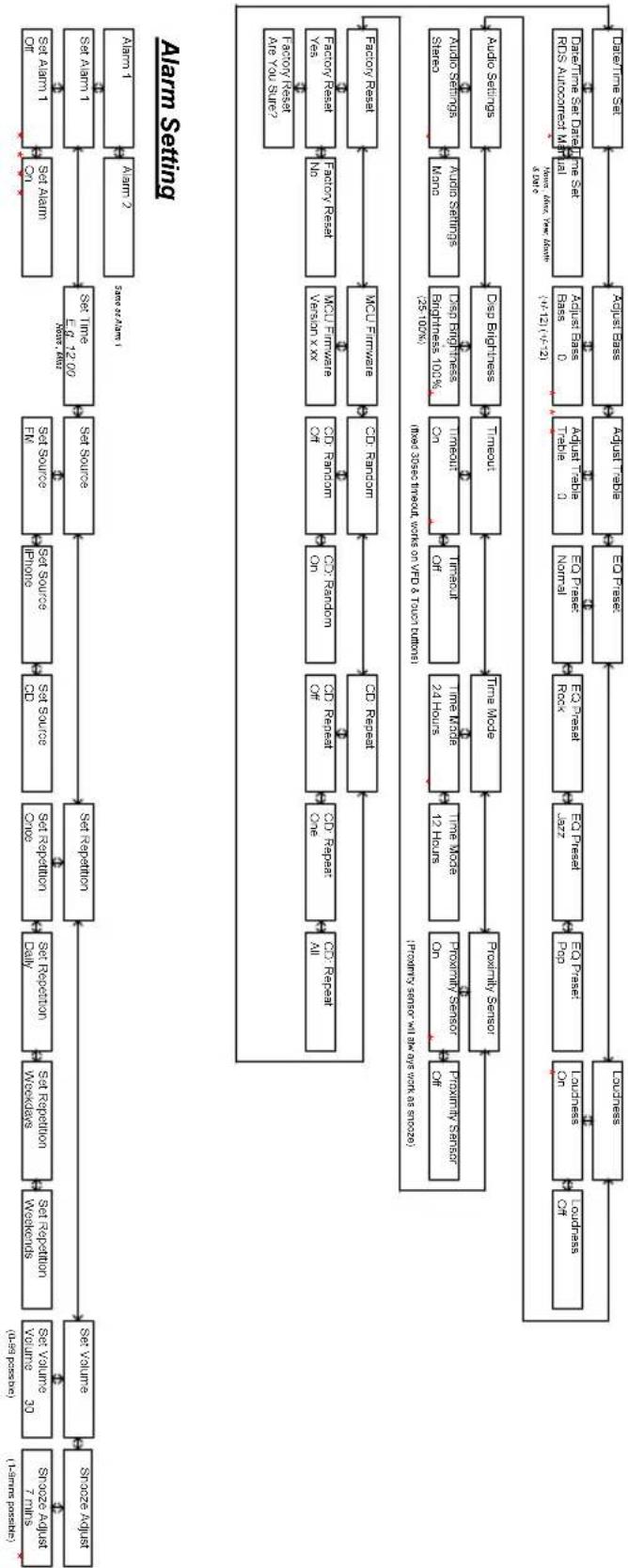
flowchart
graph TD
    A["Source Adjust (1-week possible)"] --> B["Source Adjust"]
    B --> C["Set Volume (30 units) for volume 30"]
    C --> D["Set Repubation Weekends"]
    D --> E["Set Repubation Weekends"]
    E --> F["Set Repubation Daily"]
    F --> G["Set Repubation One"]
    G --> H["Set Source CD"]
    H --> I["Set Source FN"]
    I --> J["Set Source EN"]
    J --> K["Set Time E 12:00"]
    K --> L["Set Alarm 1"]
    L --> M["Set Alarm 2"]
    M --> N["Save as Alarm 1"]

    O["Alarm Setting"] --> P["Collection of All"]
    P --> Q["Collection one"]
    Q --> R["Collection one"]
    R --> S["Collection one"]
    S --> T["Collection one"]
    T --> U["Collection one"]
    U --> V["Collection one"]
    V --> W["Collection one"]
    W --> X["Collection one"]
    X --> Y["Collection one"]
    Y --> Z["Collection one"]

    AA["Alarm 1"] --> AB["Save as Alarm 1"]
    AB --> AC["Collection of Air You Sure"]

    AD["Alarm 2"] --> AE["Save as Alarm 1"]
    AE --> AF["Collection of Air You Sure"]

    AG["Factory Reset Area You Sure"] --> AH["MCU Firmware"]
    AH --> AI["CD Random"]
    AI --> AJ["CD Repeat"]
    AJ --> AK["CD Repeat"]
    AK --> AL["CD Repeat"]
    AL --> AM["CD Repeat"]
    AM --> AN["CD Repeat"]
    AN --> AO["CD Repeat"]

    AP["Factory Reset Yes"] --> AQ["MCU Finance Version XX"]
    AQ --> AR["CD Random"]
    AR --> AS["CD Random"]
    AS --> AT["CD Random"]
    AT --> AU["CD Random"]

    AV["Factory Reset Yea"] --> AW["MCU Finance Version XX"]
    AW --> AX["CD Random"]
    AX --> AY["CD Random"]

    AZ["Factory Reset Are You Sure"] --> BA["MCU Finance Version XX"]
    BA --> BB["CD Random"]
    BB --> BC["CD Random"]

    BD["Factory Reset MAo"] --> BE["Drip Brightness"]
    BE --> BF["Timout"]
    BF --> BG["Time Mode"]

    BH["Audio Setings"] --> BI["Drip Brightness"]
    BI --> BJ["Timout"]
        BJ --> BK["Time Mode"]
        BK --> BL["Time Mode"]
        BL --> BM["Time Mode"]
        BM --> BN["Time Mode"]
        BN --> BO["Time Mode"]
        BO --> BP["Time Mode"]
        BP --> BQ["Time Mode"]
        BQ --> BR["Timout"]
        BR --> BS["Timout"]
        BS --> BT["Timout"]
        BT --> BU["Timout"]
        BU --> BV["Timout"]
        BV --> BW["Timout"]
        BW --> BX["Timout"]
        BX --> BY["Timout"]
        BY --> BZ["Timout"]
        BZ --> CA["Timout"]
        CA --> CB["Timout"]
        CB --> CC["Timout"]
        CC --> CD["Timout"]
        CD --> CE["Timout"]
        CE --> CF["Timout"]
        CF --> GD["Timout"]
        GD --> DH["Timout"]
        DH --> DI["Timout"]
        DI --> DJ["Timout"]
        DJ --> DK["Timout"]
        DK --> DL["Timout"]
        DL --> DN["Timout"]
        DN --> DO["Timout"]
        DO --> DP["Timout"]
        DP --> DR["Timout"]
        DR --> DW["Timout"]
        DW --> BX
        BX --> BY
        BX --> DA["Bus 0"] & DA_bar
        DA_bar & DA_bar_All = (x-12)^(x-21)
        DA_bar & DA_bar_All = (x-12)^(x-21)
        DA_bar & DA_bar_All = (x-12)^(x-21)
        DA_bar & DA_bar_All = (x-12)^(x-21)
        DA_bar & DA_bar_All = (x-12)^(x-21)
        DA_bar & DA_bar_All = (x-12)^{x-21}
    end

    style A fill:#f9f,stroke:#333
    style B fill:#f9f,stroke:#333
    style C fill:#f9f,stroke:#333
    style D fill:#f9f,stroke:#333
    style E fill:#f9f,stroke:#333
    style F fill:#f9f,stroke:#333
    style G fill:#f9f,stroke:#333
    style H fill:#f9f,stroke:#333
    style I fill:#f9f,stroke:#333
    style J fill:#f9f,stroke:#333
    style K fill:#f9f,stroke:#333
    style L fill:#f9f,stroke:#333
    style M fill:#f9f,stroke:#333
    style N fill:#f9f,stroke:#333
    style O fill:#f9f,stroke:#333
    style P fill:#f9f,stroke:#333
    style Q fill:#f9f,stroke:#333
    style R fill:#f9f,stroke:#333
    style S fill:#f9f,stroke:#333
    style T fill:#f9f,stroke:#333
    style U fill:#f9f,stroke:#333
    style V fill:#f9f,stroke:#333
    style W fill:#f9f,stroke:#333
    style X fill:#f9f,stroke:#333
    style Y fill:#f9f,stroke:#333
    style Z fill:#f9f,stroke:#333
Menubeskrivelse – AUX & iPhone Mode
[1] Default volume is 30, last volume after a power cycle is memorized
[2] Menu timeout from anywhere is 5 secs
[3] * indicates default setting
[4] Entering menu level 2 requires a enter press, settings below in level 2 are instant when altered by 1 and 2 with the execution of Factory Reset, which requires another enter press to be executed.

flowchart
graph TD
    A["Input Data"] --> B["Set Volume"]
    B --> C["Set Repetition"]
    C --> D["Set Repetition Once"]
    D --> E["Set Source"]
    E --> F["Set Source"]
    F --> G["Set Source"]
    G --> H["Set Source"]
    H --> I["Set Source"]
    I --> J["Set Source"]
    J --> K["Set Source"]
    K --> L["Set Source"]
    L --> M["Set Source"]
    M --> N["Set Source"]
    N --> O["Set Source"]
    O --> P["Set Source"]
    P --> Q["Set Source"]
    Q --> R["Set Source"]
    R --> S["Set Source"]
    S --> T["Set Source"]
    T --> U["Set Source"]
    U --> V["Set Source"]
    V --> W["Set Source"]
    W --> X["Set Source"]
    X --> Y["Set Source"]
    Y --> Z["Set Source"]
    Z --> AA["Set Source"]
    AA --> AB["Set Source"]
    AB --> AC["Set Source"]
    AC --> AD["Set Source"]
    AD --> AE["Set Source"]
    AE --> AF["Set Source"]
    AF --> AG["Set Source"]
    AG --> AH["Set Source"]
    AH --> AI["Set Source"]
    AI --> AJ["Set Source"]
    AJ --> AK["Set Source"]
    AK --> AL["Set Source"]
    AL --> AM["Set Source"]
    AM --> AN["Set Source"]
    AN --> AO["Set Source"]
    AO --> AP["Set Source"]
    AP --> AQ["Set Source"]
    AQ --> AR["Set Source"]
    AR --> AS["Set Source"]
    AS --> AT["Set Source"]
    AT --> AU["Set Source"]
    AU --> AV["Set Source"]
    AV --> AW["Set Source"]
    AW --> AX["Set Source"]
    AX --> AY["Set Source"]
    AY --> AZ["Set Source"]
    AZ --> BA["Set Source"]
    BA --> BB["Set Source"]
    BB --> BC["Set Source"]
    BC --> BD["Set Source"]
    BD --> BE["Set Source"]
    BE --> BF["Set Source"]
    BF --> BG["Set Source"]
    BG --> BH["Set Source"]
    BH --> BI["Set Source"]
    BI --> BJ["Set Source"]
    BJ --> BK["Set Source"]
    BK --> BL["Set Source"]
    BL --> BM["Set Source"]
    BM --> BN["Set Source"]
    BN --> BO["Set Source"]
    BO --> BP["Set Source"]
    BP --> BQ["Set Source"]
    BQ --> BR["Set Source"]
    BR --> BS["Set Source"]
    BS --> BT["Set Source"]
    BT --> BU["Set Source"]
    BU --> BV["Set Source"]
    BV --> BW["Set Source"]
    BW --> BX["Set Source"]
    BX --> BY["Set Source"]
    BY --> BZ["Set Source"]
    BZ --> CA["Set Source"]
    CA --> CB["Set Source"]
    CB --> CC["Set Source"]
    CC --> CD["Set Source"]
    CD --> CE["Set Source"]
    CE --> CF["Set Source"]
    CF --> CG["Set Source"]
    CG --> CH["Set Source"]
    CH --> CI["Set Source"]
    CI --> CJ["Set Source"]
    CJ --> CK["Set Source"]
Alarm Setting
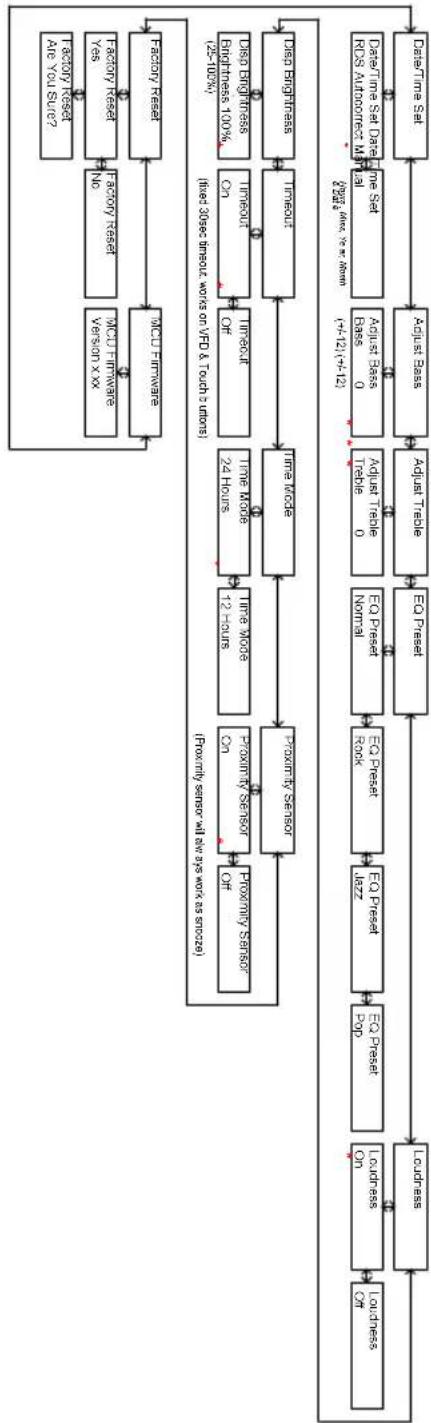
flowchart
graph TD
    A["Data Time Set"] --> B["Adjust Base"]
    B --> C["Adjust Trade"]
    C --> D["EO Presset"]
    D --> E["EO Presset Rock"]
    E --> F["EO Presset Pop"]
    F --> G["Leudness On"]
    G --> H["Leudness On"]
    H --> I["Proximity Sensor Off"]
    I --> J["Proximity Sensor Co"]
    J --> K["Proximity Sensor OF"]
    K --> L["Time Mode 12 Hours"]
    L --> M["Time Mode 24 Hours"]
    M --> N["Time Mode 24 Hours"]
    N --> O["Time Mode 24 Hours"]
    O --> P["Time Mode 24 Hours"]
    P --> Q["Time Mode 24 Hours"]
    Q --> R["Time Mode 24 Hours"]
    R --> S["Time Mode 24 Hours"]
    S --> T["Time Mode 24 Hours"]
    T --> U["Time Mode 24 Hours"]
    U --> V["Time Mode 24 Hours"]
    V --> W["Time Mode 24 Hours"]
    W --> X["Time Mode 24 Hours"]
    X --> Y["Time Mode 24 Hours"]
    Y --> Z["Time Mode 24 Hours"]
    Z --> AA["Time Mode 24 Hours"]
    AA --> AB["Time Mode 24 Hours"]
    AB --> AC["Time Mode 24 Hours"]
    AC --> AD["Time Mode 24 Hours"]
    AD --> AE["Time Mode 24 Hours"]
    AE --> AF["Time Mode 24 Hours"]
    AF --> AG["Time Mode 24 Hours"]
    AG --> AH["Time Mode 24 Hours"]
    AH --> AI["Time Mode 24 Hours"]
    AI --> AJ["Time Mode 24 Hours"]
    AJ --> AK["Time Mode 24 Hours"]
    AK --> AL["Time Mode 24 Hours"]
    AL --> AM["Time Mode 24 Hours"]
    AM --> AN["Time Mode 24 Hours"]
    AN --> AO["Time Mode 24 Hours"]
    AO --> AP["Time Mode 24 Hours"]
    AP --> AQ["Time Mode 24 Hours"]
    AQ --> AR["Time Mode 24 Hours"]
    AR --> AS["Time Mode 24 Hours"]
    AS --> AT["Time Mode 24 Hours"]
    AT --> AU["Time Mode 24 Hours"]
    AU --> AV["Time Mode 24 Hours"]
    AV --> AW["Time Mode 24 Hours"]
    AW --> AX["Time Mode 24 Hours"]
    AX --> AY["Time Mode 24 Hours"]
    AY --> AZ["Time Mode 24 Hours"]
    AZ --> BA["Time Mode 24 Hours"]
    BA --> BB["Time Mode 24 Hours"]
    BB --> BC["Time Mode 24 Hours"]
    BC --> BD["Time Mode 24 Hours"]
    BD --> BE["Time Mode 24 Hours"]
    BE --> BF["Time Mode 24 Hours"]
    BF --> BG["Time Mode 24 Hours"]
    BG --> BH["Time Mode 24 Hours"]
    BH --> BI["Time Mode 24 Hours"]
    BI --> BJ["Time Mode 24 Hours"]
    BJ --> BK["Time Mode 24 Hours"]
    BK --> BL["Time Mode 24 Hours"]
    BL --> BM["Time Mode 24 Hours"]
    BM --> BN["Time Mode 24 Hours"]
    BN --> BO["Time Mode 24 Hours"]
    BO --> BP["Time Mode 24 Hours"]
    BP --> BQ["Time Mode 24 Hours"]
    BQ --> BR["Time Mode 24 Hours"]
    BR --> BS["Time Mode 24 Hours"]
    BS --> BT["Time Mode 24 Hours"]
    BT --> BU["Time Mode 24 Hours"]
    BU --> BV["Time Mode 24 Hours"]
    BV --> BW["Time Mode 24 Hours"]
    BW --> BX["Time Mode 24 Hours"]
    BX --> BY["Time Mode 24 Hours"]
    BY --> BZ["Time Mode 24 Hours"]
    BZ --> CA["Time Mode 24 Hours"]
    CA --> CB["Time Mode 24 Hours"]
    CB --> CC["Time Mode 24 Hours"]
    CC --> DD["Time Mode 24 Hours"]
    DD --> DE["Time Mode 24 Hours"]
    DE --> EF["Time Mode 24 Hours"]
    EF --> BG
    BG --> BG
    BG --> BH
    BH --> BH
    BH --> BH
    BH --> BH
    BH --> BH
    BH --> BH
    BH --> BH
    BH --> BH
Specifikationer
Model: Tangent fjord CD/FM
Knapper: Berøringsknapper og IR fjernbetjening
Strømforsyning: DC 12V/2A
Frekvensbånd: FM (87,5 – 108,0MHz)
Dimensioner: 170mm x 180mm x 170mm (B x H x D)
[1] Default volume is 30, last volume after a power cycle is memorized
[2] Menu timeout from anywhere is 5 secs
[3] indicates default setting
[4] Entering menu level 2 requires a enter press, settings below in level 2 are instant when altered by 1 and 2 with the exception of Facility Reset, which requires another enter press to be executed.
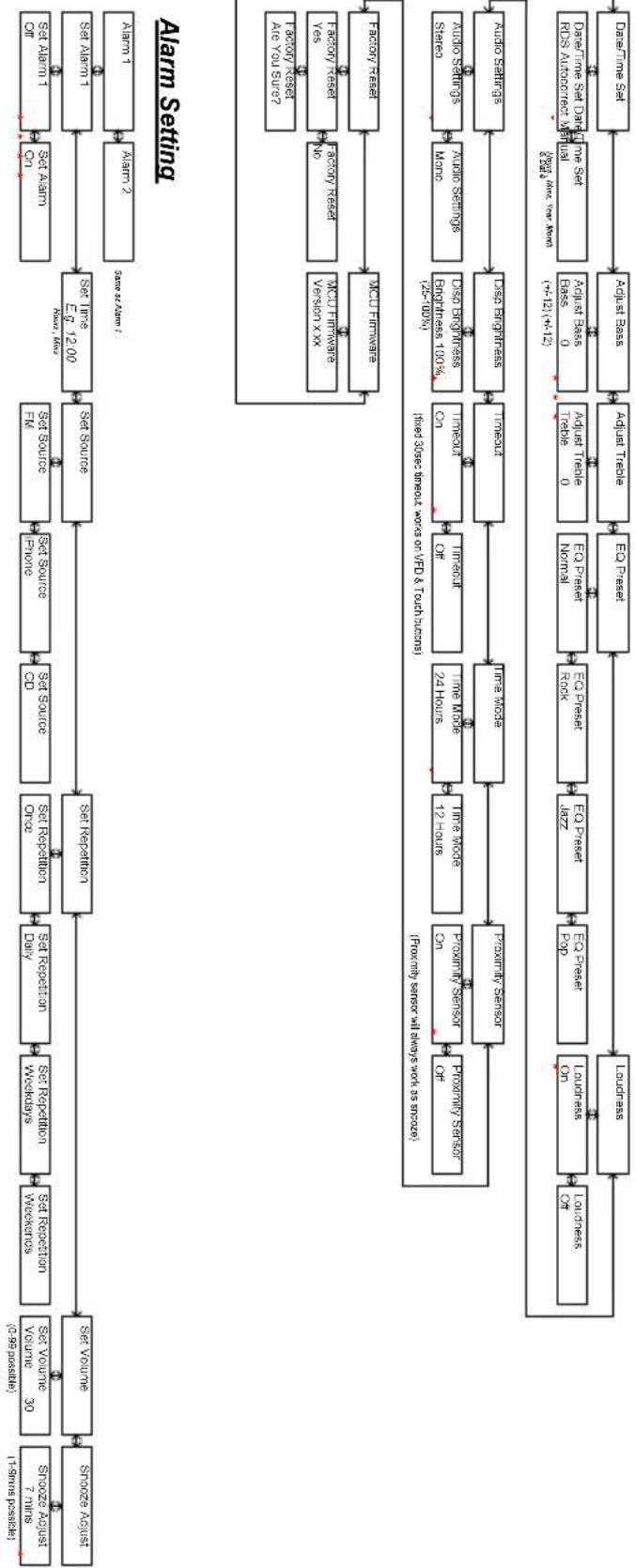
flowchart
graph TD
    A["Start"] --> B["Set Volume"]
    B --> C["Set Repetition"]
    C --> D["Set Source"]
    D --> E["Set Source"]
    E --> F["Set Link"]
    F --> G["Alarm 1"]
    F --> H["Alarm 2"]
    G --> I["Set Alarm"]
    H --> J["Set Alarm 1"]
    I --> K["Set Alarm"]
    J --> L["Set Alarm 1 & 2"]
    K --> M["Alarm Setting"]
    L --> N["Alarm Setting"]
    M --> O["Alarm Setting"]
    N --> P["Alarm 1 & 2"]
    O --> Q["Alarm 1 & 2 & Alarm 2"]
    P --> R["Alarm 1 & 2 & Alarm 2 & Alarm 1 & Alarm 2 & Alarm 3 & Alarm 4 & Alarm 5 & Alarm 6 & Alarm 7 & Alarm 8 & Alarm 9 & Alarm 10 & Alarm 11 & Alarm 12 & Alarm 13 & Alarm 14 & Alarm 15 & Alarm 16 & Alarm 17 & Alarm 18 & Alarm 19 & Alarm 20 & Alarm 21 & Alarm 22 & Alarm 23 & Alarm 24 & Alarm 25 & Alarm 26 & Alarm 27 & Alarm 28 & Alarm 29 & Alarm 30 & Alarm 31 & Alarm 32 & Alarm 33 & Alarm 34 & Alarm 35 & Alarm 36 & Alarm 37 & Alarm 38 & Alarm 39 & Alarm 40 & Alarm 41 & Alarm 42 & Alarm 43 & Alarm 44 & Alarm 45 & Alarm 46 & Alarm 47 & Alarm 48 & Alarm 49 & Alarm 50 & Alarm 51 & Alarm 52 & Alarm 53 & Alarm 54 & Alarm 55 & Alarm 56 & Alarm 57 & Alarm 58 & Alarm 59 & Alarm 60 & Alarm 61 & Alarm 62 & Alarm 63 & Alarm 64 & Alarm 65 & Alarm 66 & Alarm 67 & Alarm 68 & Alarm 69 & Alarm 70 & Alarm 71 & Alarm 72 & Alarm 73 & Alarm 74 & Alarm 75 & Alarm 76 & Alarm 77 & Alarm 78 & Alarm 79 & Alarm 80 & Alarm 81 & Alarm 82 & Alarm 83 & Alarm 84 & Alarm 85 & Alarm 86 & Alarm 87 & Alarm 88 & Alarm 89 & Alarm 90 & <br>    subgraph Legend<br>        P[Alarm Sensor Off"]
        Q["Alarm Sensor On"]
        R["Alarm Sensor Of"]
        S["Alarm Sensor Of"]
        T["Alarm Sensor Of"]
        U["Alarm Sensor Of"]
        V["Alarm Sensor Of"]
        W["Alarm Sensor Of"]
        X["Alarm Sensor Of"]
        Y["Alarm Sensor Of"]
        Z["Alarm Sensor Of"]
        AA["Alarm Sensor Of"]
        AB["Alarm Sensor Of"]
        AC["Alarm Sensor Of"]
        AD["Alarm Sensor Of"]
        AE["Alarm Sensor Of"]
        AF["Alarm Sensor Of"]
        AG["Alarm Sensor Of"]
        AH["Alarm Sensor Of"]
        AI["Alarm Sensor Of"]
        AJ["Alarm Sensor Of"]
        AK["Alarm Sensor Of"]
        AL["Alarm Sensor Of"]
        AM["Alarm Sensor Of"]
        AN["Alarm Sensor Of"]
        AO["Alarm Sensor Of"]
        AP["Alarm Sensor Of"]
        AQ["Alarm Sensor Of"]
        AR["Alarm Sensor Of"]
        AS["Alarm Sensor Of"]
        AT["Alarm Sensor Of"]
        AU["Alarm Sensor Of"]
        AV["Alarm Sensor Of"]
        AW["Alarm Sensor Of"]
        AX["Alarm Sensor Of"]
        AY["Alarm Sensor Of"]
        AZ["Alarm Sensor Of"]
        BA["Alarm Sensor Of"]
        BB["Alarm Sensor Of"]
        BC["Alarm Sensor Of"]
        BD["Alarm Sensor Of"]
        BE["Alarm Sensor Of"]
        BF["Alarm Sensor Of"]
        BG["Alarm Sensor Of"]
        BH["Alarm Sensor Of"]
        BI["Alarm Sensor Of"]
        BJ["Alarm Sensor Of"]
        BK["Alarm Sensor Of"]
        BL["Alarm Sensor Of"]
        BM["Alarm Sensor Of"]
        BN["Alarm Sensor Of"]
        BO["Alarm Sensor Of"]
        BP["Alarm Sensor Of"]
        BQ["Alarm Sensor Of"]
        BW["Alarm Sensor Of"]
        BX["Alarm Sensor Of"]
        BY["Alarm Sensor Of"]
        BZ["Alarm Sensor Of"]
        CA["Alarm Sensor Of"]
        CB["Alarm Sensor Of"]
        CC["Alarm Sensor Of"]
        CD["Alarm Sensor Of"]
        CE["Alarm Sensor Of"]
        CF["Alarm Sensor Of"]
        DG["Alarm Sensor Of"]
        DH["Alarm Sensor Of"]
        DI["Alarm Sensor Of"]
        DJ["Alarm Sensor Of"]
        DK["Alarm Sensor Of"]
        DL["Alarm Sensor Of"]
        DV["Alarm Sensor Of"]
        DW["Alarm Sensor Of"]
        BXV["Alarm Sensor Of"]
        BXW["Alarm Sensor Of"]
        BXXV["Alarm Sensor Of"]
        BXYV["Alarm Sensor Of"]
        BXZV["Alarm Sensor Of"]
        BXZX["Alarm Sensor Of"]
    end
Menybeskrivning – CD Mode
[1] Default volume is 30, last volume after a power cycle is maximized
[2] Menu limit from anywhere is 5 seconds
[3] indicates default setting
[4] Entering menu level 2 level 2 requires a enter press, settings below in level 2 are instant when altered by 1 and 1 with the exception of Factory reset; which requires another enter press to be executed.
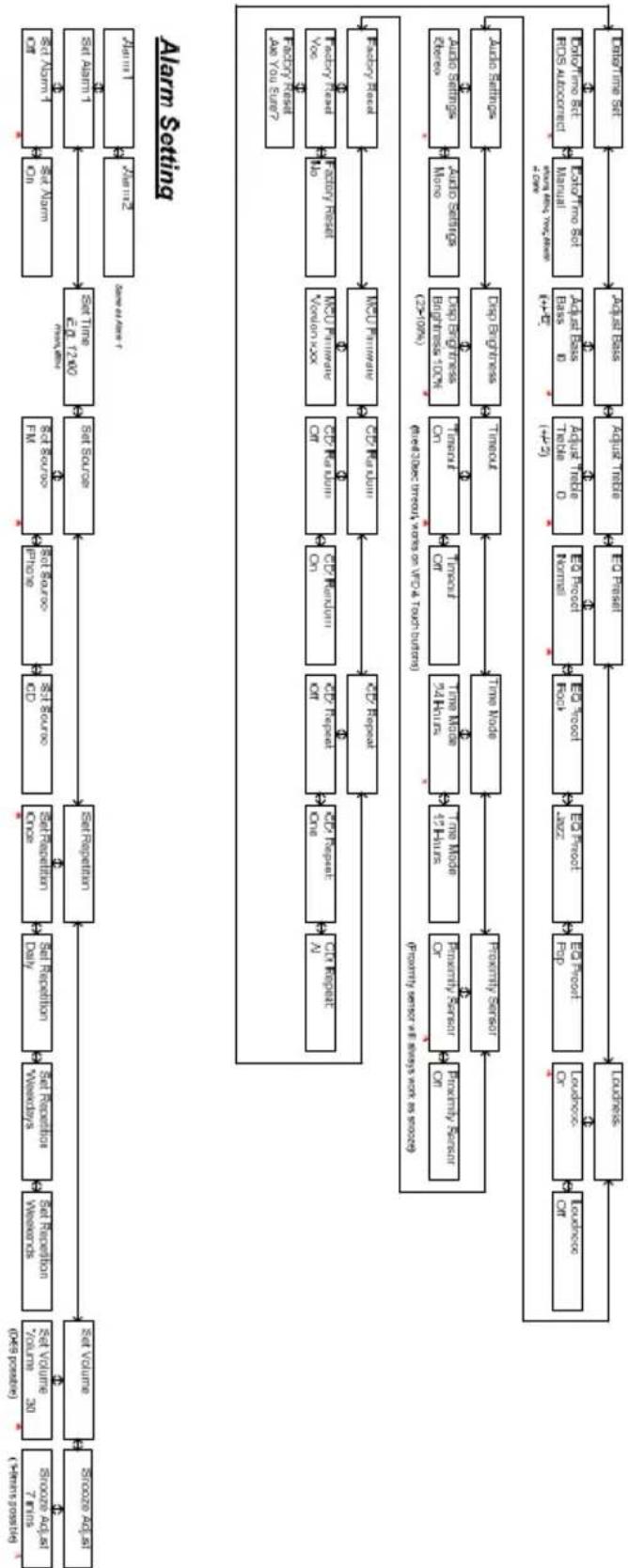
flowchart
graph TD
    A["Alarm Setting"] --> B["Set Volume"]
    B --> C["Set Volume / Volume / Volume / Volume / Volume / Volume / Volume / Volume / Volume / Volume / Volume / Volume / Volume / Volume / Volume / Volume / Volume / Volume / Volume / Volume / Volume / Volume / Volume / Volume / Volume / Volume / Volume / Volume / Volume / Volume / Volume / Volume / Volume / Volume / Volume / Volume / Volume / Volume / Volume / Volume / Volume / Volume / Volume / Volume / Volume / Volume / Volume / Volume / Volume / Volume / Volume"]
    C --> D["Set Publication"]
    D --> E["Set Publication / Daily"]
    E --> F["Set Publication / Close"]
    F --> G["Set Publication / CD"]
    G --> H["Set Publication / Print"]
    H --> I["Set Publication / Print"]
    I --> J["Set Publication / Print"]
    J --> K["Set Publication / Print"]
    K --> L["Set Publication / Print"]
    L --> M["Set Publication / Print"]
    M --> N["Set Publication / Print"]
    N --> O["Set Publication / Print"]
    O --> P["Set Publication / Print"]
    P --> Q["Set Publication / Print"]
    Q --> R["Set Publication / Print"]
    R --> S["Set Publication / Print"]
    S --> T["Set Publication / Print"]
    T --> U["Set Publication / Print"]
    U --> V["Set Publication / Print"]
    V --> W["Set Publication / Print"]
    W --> X["Set Publication / Print"]
    X --> Y["Set Publication / Print"]
    Y --> Z["Set Publication / Print"]
    Z --> AA["Set Publication / Print"]
    AA --> AB["Set Publication / Print"]
    AB --> AC["Set Publication / Print"]
    AC --> AD["Set Publication / Print"]
    AD --> AE["Set Publication / Print"]
    AE --> AF["Set Publication / Print"]
    AF --> AG["Set Publication / Print"]
    AG --> AH["Set Publication / Print"]
    AH --> AI["Set Publication / Print"]
    AI --> AJ["Set Publication / Print"]
    AJ --> AK["Set Publication / Print"]
    AK --> AL["Set Publication / Print"]
    AL --> AM["Set Publication / Print"]
    AM --> AN["Set Publication / Print"]
    AN --> AO["Set Publication / Print"]
    AO --> AP["Set Publication / Print"]
    AP --> AQ["Set Publication / Print"]
    AQ --> AR["Set Publication / Print"]
    AR --> AS["Set Publication / Print"]
    AS --> AT["Set Publication / Print"]
    AT --> AU["Set Publication / Print"]
    AU --> AV["Set Publication / Print"]
    AV --> AW["Set Publication / Print"]
    AW --> AX["Set Publication / Print"]
    AX --> AY["Set Publication / Print"]
    AY --> AZ["Set Publication / Print"]
    AZ --> BA["Set Publication / Print"]
    BA --> BB["Set Publication / Print"]
    BB --> BC["Set Publication / Print"]
    BC --> BD["Set Publication / Print"]
    BD --> BE["Set Publication / Print"]
    BE --> BF["Set Publication / Print"]
    BF --> BG["Set Publication / Print"]
    BG --> BH["Set Publication / Print"]
    BH --> BI["Set Publication / Print"]
    BI --> BJ["Set Publication / Print"]
    BJ --> BK["Set Publication / Print"]
    BK --> BL["Set Publication / Print"]
    BL --> BM["Set Publication / Print"]
    BM --> BN["Set Publication / Print"]
    BN --> BO["Set Publication / Print"]
    BO --> BP["Set Publication / Print"]
    BP --> BQ["Set Publication / Print"]
    BQ --> BR["Set Publication / Print"]
    BR --> BS["Set Publication / Print"]
    BS --> BT["Set Publication / Print"]
    BT --> BU["Set Publication / Print"]
    BU --> BV["Set Publication / Print"]
    BV --> BW["Set Publication / Print"]
    BW --> BX["Set Publication / Print"]
    BX --> BY["Set Publication / Print"]
    BY --> BZ["Set Publication / Print"]
    BZ --> CA["Set Publication / Print"]
    CA --> CB["Set Publication / Print"]
    CB --> CC["Set Publication / Print"]
    CC --> CD["Set Publication / Print"]
    CD --> CE["Set Publication / Print"]
    CE --> CF["Set Publication / Print"]
    CF --> CG["Set Publication / Print"]
    CG --> CH["Set Publication / Print"]
    CH --> CI["Set Publication / Print"]
    CI --> CJ["Set Publication / Print"]
    CJ --> CK["Set Publication / Print"]
    CK --> CL["Set Publication / Print"]
    CL --> CM["Set Publication / Print"]
    CM --> CN["Set Publication / Print"]
    CN --> CO["Set Publication / Print"]
    CO --> CP["Set Publication / Print"]
    CP --> CQ["Set Publication / Print"]
    CQ --> CR["Set Publication / Print"]
    CR --> CS["Set Publication / Print"]
    CS --> CT["Set Publication / Print"]
    CT --> CU["Set Publication / Print"]
    CU --> CV["Set Publication / Print"]
    CV --> CW["Set Publication / Print"]
    CW --> CX["Set Publication / Print"]
    CX --> CY["Set Publication / Print"]
    CY --> CZ["Set Publication / Print"]
Menybeskrivning – AUX & iPhone Mode
[1] Default volume is 30, last volume after a power cycle is memorized
[2] Menu timeout from anywhere is 5 secs
[3] * indicates default setting
[4] Entering menu level 2 requires a enter press, settings below in level 2 are instant when altered by 1 and 2 with the execution of Factory Reset, which requires another enter press to be executed.

flowchart
graph TD
    A["Input Data"] --> B["Set Volume"]
    B --> C["Set Repetition"]
    C --> D["Set Repetition Once"]
    D --> E["Set Source"]
    E --> F["Set Source"]
    F --> G["Set Source"]
    G --> H["Set Source"]
    H --> I["Set Source"]
    I --> J["Set Source"]
    J --> K["Set Source"]
    K --> L["Set Source"]
    L --> M["Set Source"]
    M --> N["Set Source"]
    N --> O["Set Source"]
    O --> P["Set Source"]
    P --> Q["Set Source"]
    Q --> R["Set Source"]
    R --> S["Set Source"]
    S --> T["Set Source"]
    T --> U["Set Source"]
    U --> V["Set Source"]
    V --> W["Set Source"]
    W --> X["Set Source"]
    X --> Y["Set Source"]
    Y --> Z["Set Source"]
    Z --> AA["Set Source"]
    AA --> AB["Set Source"]
    AB --> AC["Set Source"]
    AC --> AD["Set Source"]
    AD --> AE["Set Source"]
    AE --> AF["Set Source"]
    AF --> AG["Set Source"]
    AG --> AH["Set Source"]
    AH --> AI["Set Source"]
    AI --> AJ["Set Source"]
    AJ --> AK["Set Source"]
    AK --> AL["Set Source"]
    AL --> AM["Set Source"]
    AM --> AN["Set Source"]
    AN --> AO["Set Source"]
    AO --> AP["Set Source"]
    AP --> AQ["Set Source"]
    AQ --> AR["Set Source"]
    AR --> AS["Set Source"]
    AS --> AT["Set Source"]
    AT --> AU["Set Source"]
    AU --> AV["Set Source"]
    AV --> AW["Set Source"]
    AW --> AX["Set Source"]
    AX --> AY["Set Source"]
    AY --> AZ["Set Source"]
    AZ --> BA["Set Source"]
    BA --> BB["Set Source"]
    BB --> BC["Set Source"]
    BC --> BD["Set Source"]
    BD --> BE["Set Source"]
    BE --> BF["Set Source"]
    BF --> BG["Set Source"]
    BG --> BH["Set Source"]
    BH --> BI["Set Source"]
    BI --> BJ["Set Source"]
    BJ --> BK["Set Source"]
    BK --> BL["Set Source"]
    BL --> BM["Set Source"]
    BM --> BN["Set Source"]
    BN --> BO["Set Source"]
    BO --> BP["Set Source"]
    BP --> BQ["Set Source"]
    BQ --> BR["Set Source"]
    BR --> BS["Set Source"]
    BS --> BT["Set Source"]
    BT --> BU["Set Source"]
    BU --> BV["Set Source"]
    BV --> BW["Set Source"]
    BW --> BX["Set Source"]
    BX --> BY["Set Source"]
    BY --> BZ["Set Source"]
Alarm Setting

flowchart
graph TD
    A["User Input"] --> B["User Data"]
    B --> C["Data Set"]
    C --> D["Data Access Model"]
    D --> E["Data Storage"]
    E --> F["Data Storage"]
    F --> G["Data Storage"]
    G --> H["Data Storage"]
    H --> I["Data Storage"]
    I --> J["Data Storage"]
    J --> K["Data Storage"]
    K --> L["Data Storage"]
    L --> M["Data Storage"]
    M --> N["Data Storage"]
    N --> O["Data Storage"]
    O --> P["Data Storage"]
    P --> Q["Data Storage"]
    Q --> R["Data Storage"]
    R --> S["Data Storage"]
    S --> T["Data Storage"]
    T --> U["Data Storage"]
    U --> V["Data Storage"]
    V --> W["Data Storage"]
    W --> X["Data Storage"]
    X --> Y["Data Storage"]
    Y --> Z["Data Storage"]
    Z --> A["User Input"]
    A --> C
    C --> D
    D --> E
    E --> F
    F --> G
    G --> H
    H --> I
    I --> J
    J --> K
    K --> L
    L --> M
    M --> N
    N --> O
    O --> P
    P --> Q
    Q --> R
    R --> S
    S --> T
    T --> U
    U --> V
    V --> W
    W --> X
    X --> Y
    Y --> Z
    Z --> A
Specifikationer
Modell: Tangent fjord CD/FM
[1] Default volume is 30, last volume after a power cycle is memorized
[2] Menu timeout from anywhere is 5 secs
[3]* indicates default setting
[4] Entering menu level 2 requires a enter press, settings below in level 2 are instant when altered by - and - with the exception of Factory Reset, which requires another enter press to be executed.

flowchart
graph LR
    A["Input Data"] --> B["Storage"]
    B --> C["Set Version"]
    C --> D["Set Reproduction"]
    D --> E["Set Reproduction Once"]
    E --> F["Set Reproduction Weeks"]
    F --> G["Set Reproduction Weekends"]
    G --> H["Set Reproduction Daily"]
    H --> I["Set Reproduction Once CD"]
    I --> J["Set Reproduction CD"]
    J --> K["Set Reproduction Once One"]
    K --> L["Set Reproduction Once Daily"]
    L --> M["Set Reproduction Weekly"]
    M --> N["Set Reproduction Weekends"]
    N --> O["Set Reproduction Weeks"]
    O --> P["Set Reproduction Weekends"]
    P --> Q["Set Reproduction Once One"]
    Q --> R["Set Reproduction Once One"]
    R --> S["Set Reproduction Once One"]
    S --> T["Set Reproduction Once One"]
    T --> U["Set Reproduction Once One"]
    U --> V["Set Reproduction Once One"]
    V --> W["Set Reproduction Once One"]
    W --> X["Set Reproduction Once One"]
    X --> Y["Set Reproduction Once One"]
    Y --> Z["Set Reproduction Once One"]
    Z --> AA["Set Reproduction Once One"]
    AA --> AB["Set Reproduction Once One"]
    AB --> AC["Set Reproduction Once One"]
    AC --> AD["Set Reproduction Once One"]
    AD --> AE["Set Reproduction Once One"]
    AE --> AF["Set Reproduction Once One"]
    AF --> AG["Set Reproduction Once One"]
    AG --> AH["Set Reproduction Once One"]
    AH --> AI["Set Reproduction Once One"]
    AI --> AJ["Set Reproduction Once One"]
    AJ --> AK["Set Reproduction Once One"]
    AK --> AL["Set Reproduction Once One"]
    AL --> AM["Set Reproduction Once One"]
    AM --> AN["Set Reproduction Once One"]
    AN --> AO["Set Reproduction Once One"]
    AO --> AP["Set Reproduction Once One"]
    AP --> AQ["Set Reproduction Once One"]
    AQ --> AR["Set Reproduction Once One"]
    AR --> AS["Set Reproduction Once One"]
    AS --> AT["Set Reproduction Once One"]
    AT --> AU["Set Reproduction Once One"]
    AU --> AV["Set Reproduction Once One"]
    AV --> AW["Set Reproduction Once One"]
    AW --> AX["Set Reproduction Once One"]
    AX --> AY["Set Reproduction Once One"]
    AY --> AZ["Set Reproduction Once One"]
    AZ --> BA["Set Reproduction Once One"]
    BA --> BB["Set Reproduction Once One"]
    BB --> BC["Set Reproduction Once One"]
    BC --> BD["Set Reproduction Once One"]
    BD --> BE["Set Reproduction Once One"]
    BE --> BF["Set Reproduction Once One"]
    BF --> BG["Set Reproduction Once One"]
    BG --> BH["Set Reproduction Once One"]
    BH --> BI["Set Reproduction Once One"]
    BI --> BJ["Set Reproduction Once One"]
    BJ --> BK["Set Reproduction Once One"]
    BK --> BL["Set Reproduction Once One"]
    BL --> BM["Set Reproduction Once One"]
    BM --> BN["Set Reproduction Once One"]
    BN --> BO["Set Reproduction Once One"]
    BO --> BP["Set Reproduction Once One"]
    BP --> BQ["Set Reproduction Once One"]
    BQ --> BR["Set Reproduction Once One"]
    BR --> BS["Set Reproduction Once One"]
    BS --> BT["Set Reproduction Once One"]
    BT --> BU["Set Reproduction Once One"]
    BU --> BV["Set Reproduction Once One"]
    BV --> BW["Set Reproduction Once One"]
    BW --> BX["Set Reproduction Once One"]
    BX --> BY["Set Reproduction Once One"]
    BY --> BZ["Set Reproduction Once One"]
    BZ --> CA["Set Reproduction Once One"]
    CA --> CB["Set Reproduction Once One"]
    CB --> CC["Set Reproduction Once One"]
    CC --> CD["Set Reproduction Once One"]
    CD --> CE["Set Reproduction Once One"]
    CE --> CF["Set Reproduction Once One"]
    CF --> CG["Set Reproduction Once One"]
    CG --> CH["Set Reproduction Once One"]
    CH --> CI["Set Reproduction Once One"]
    CI --> CJ["Set Reproduction Once One"]
    CJ --> CK["Set Reproduction Once One"]
    CK --> CL["Set Reproduction Once One"]
    CL --> CM["Set Reproduction Once One"]
    CM --> CN["Set Reproduction Once One"]
    CN --> CO["Set Reproduction Once One"]
    CO --> CP["Set Reproduction Once One"]
    CP --> CQ["Set Reproduction Once One"]
    CQ --> CR["Set Reproduction Once One"]
    CR --> CS["Set Reproduction Once One"]
    CS --> CT["Set Reproduction Once One"]
    CT --> CU["Set Reproduction Once One"]
    CU --> CV["Set Reproduction Once One"]
    CV --> CW["Set Reproduction Once One"]
    CW --> CX["Set Reproduction Once One"]
    CX --> CY["Set Reproduction Once One"]
    CY --> CZ["Set Reproduction Once One"]
Alarm Setting
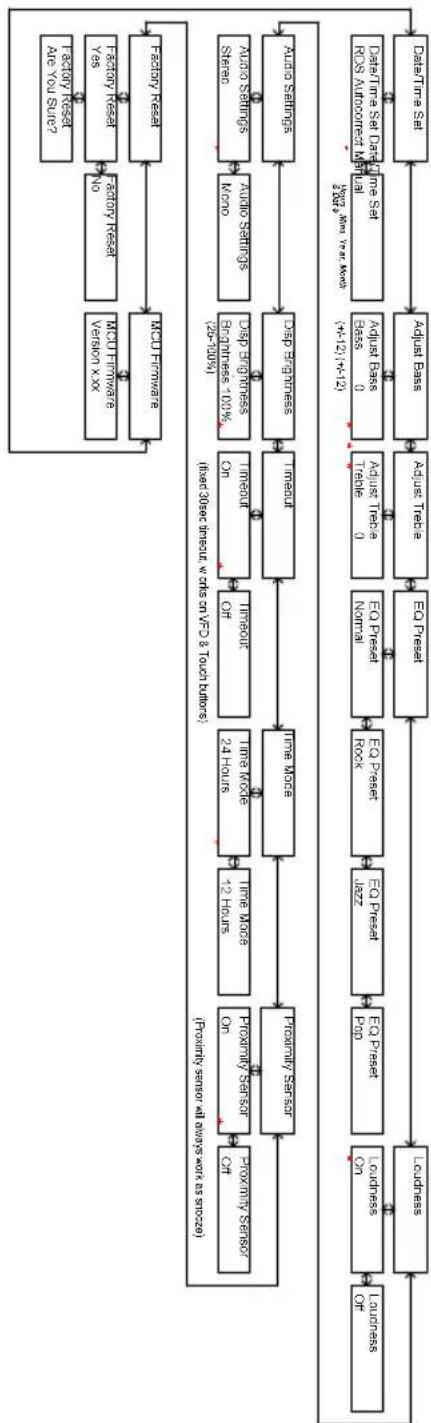
flowchart
graph TD
    A["Data Time Set"] --> B["Adjuus Pass"]
    B --> C["Adjuus Tube"]
    C --> D["EQ Press Normal"]
    D --> E["EQ Press Rock"]
    E --> F["EQ Press Jazz"]
    F --> G["EQ Press Pop"]
    G --> H["Leudness On"]
    H --> I["Leudness Off"]
    I --> J["Leudness"]
    J --> K["Leudness On"]
    K --> L["Leudness On"]
    L --> M["Leudness Off"]

    N["Data Time Set Data Mode Residual Unit (412) - 14-12"] --> O["Adjuus Base pass 0"]
    O --> P["Adjuus Tube 0"]
    P --> Q["Trade 0"]
    Q --> R["EQ Press Normal"]
    R --> S["EQ Press Rock"]
    S --> T["EQ Press Jazz"]
    T --> U["EQ Press Pop"]
    U --> V["Leudness On"]

    W["Audio Settings"] --> X["Adjuus Settings kno"]
    X --> Y["Adjuus Engines 100%"]
    Y --> Z["Impout of Imout of Imout of Imout of Imout of Imout of Imout of Imout of Imout of Imout of Imout of Imout of Imout of Imout of Imout of Imout of Imout of Imout of Imout of Imout of Imout of Imout of Imout of Imout of Imout of Imout of Imout of Imout of Imout of Imout of Imout of Imout of Imout of Imout of Imset"]
    Z --> AA["Impout of Impout of Impout of Imout of Imout of Imout of Imout of Imout of Imout of Imout of Imout of Imout of Imout of Imout of Imout of Imset"]
    AA --> AB["Leudness On"]
    AB --> AC["Leudness On"]
    AC --> AD["Leudness Off"]

    AE["Fraclify sensor at always work as scroze"] --> AF["Fraclify sensor On"]
    AF --> AG["Fraclify Sensor Off"]

    AH["MCU Features"] --> AI["MCU Features"]
    AI --> AJ["MCU Features"]
    AJ --> AK["MCU Features"]

    AL["Fraclify Reset"] --> AM["Fraclify Reset No"]
    AM --> AN["Fraclify Reset Yes"]
    AN --> AO["Fraclify Reset Are You Sut?"]

    AP["Last time based on the output"] --> AQ["Last time based on the output based on the output based on the output based on the output based on the output based on the output based on the output based on the output based on the output based on the output based on the output based on the output based on the output based on the output based on the output based on the output based on the output based on the output based on the output based on the output based on the output based on the output based on the output based on the output based on the output based on the input value"]
[1] Default volume is 30, last volume after a power cycle is mastered
[2] Menu limit from anywhere is 5 secs
[3] indicates default setting
[4] Entering menu level 2 requires a enter press, settings below in level 2 are instant when altered by 10 and 17 with the exception of Factory reset; which requires another enter press to be executed.
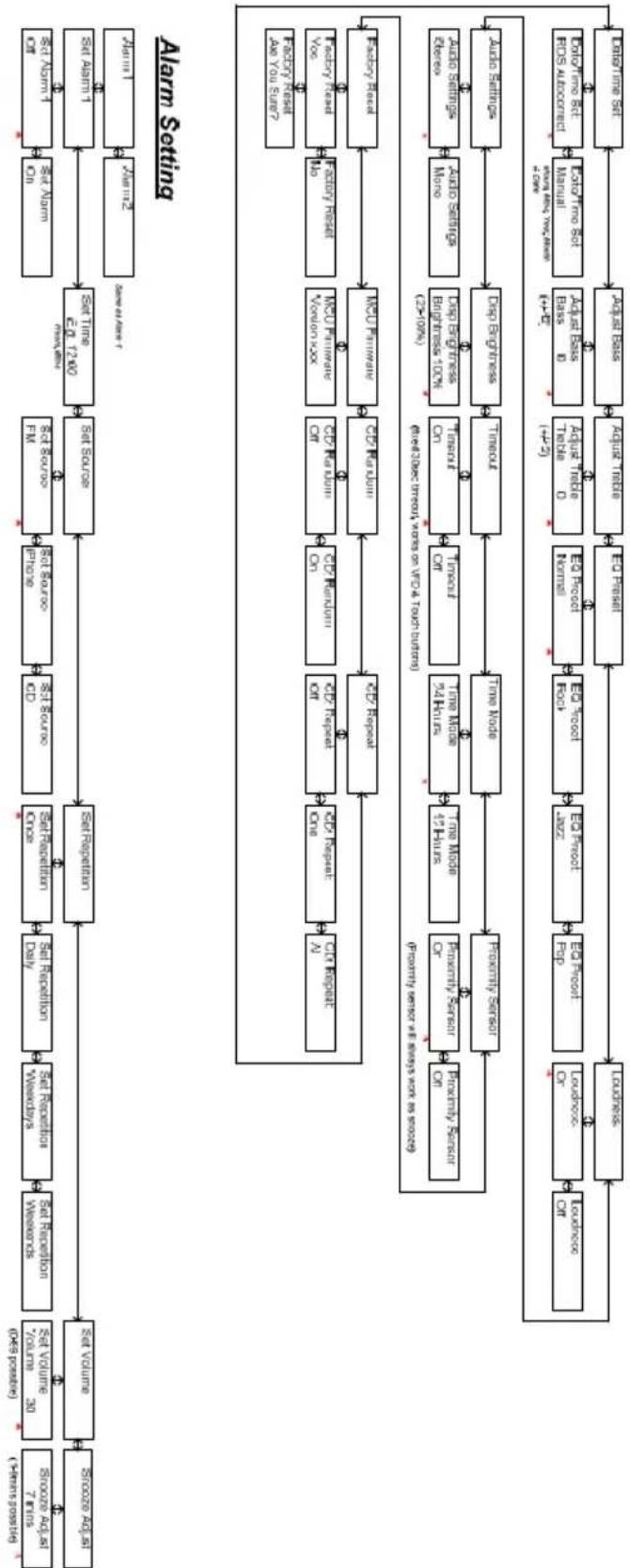
flowchart
graph TD
    A["Alarm Setting"] --> B["Set Volume"]
    B --> C["Set Volume / volume / count / type / possible"]
    C --> D["Set Volume / source / count / type / possible"]
    D --> E["Set Publication / date / time"]
    E --> F["Set Publication / source / date / time"]
    F --> G["Set Source / date / time"]
    G --> H["Set Time / date / time"]
    H --> I["Set Alarm"]
    I --> J["Set Alarm"]
    J --> K["Set Alarm1"]
    K --> L["Set Alarm2"]
    L --> M["Set Alarm1 & 0"]
    M --> N["Set Alarm1 & 0"]
    N --> O["Set Alarm1 & 0"]
    O --> P["Set Alarm1 & 0"]
    P --> Q["Set Alarm1 & 0"]
    Q --> R["Set Alarm1 & 0"]
    R --> S["Set Alarm1 & 0"]
    S --> T["Set Alarm1 & 0"]
    T --> U["Set Alarm1 & 0"]
    U --> V["Set Alarm1 & 0"]
    V --> W["Set Alarm1 & 0"]
    W --> X["Set Alarm1 & 0"]
    X --> Y["Set Alarm1 & 0"]
    Y --> Z["Set Alarm1 & 0"]
    Z --> AA["Set Alarm1 & 0"]
    AA --> AB["Set Alarm1 & 0"]
    AB --> AC["Set Alarm1 & 0"]
    AC --> AD["Set Alarm1 & 0"]
    AD --> AE["Set Alarm1 & 0"]
    AE --> AF["Set Alarm1 & 0"]
    AF --> AG["Set Alarm1 & 0"]
    AG --> AH["Set Alarm1 & 0"]
    AH --> AI["Set Alarm1 & 0"]
    AI --> AJ["Set Alarm1 & 0"]
    AJ --> AK["Set Alarm1 & 0"]
    AK --> AL["Set Alarm1 & 0"]
    AL --> AM["Set Alarm1 & 0"]
    AM --> AN["Set Alarm1 & 0"]
    AN --> AO["Set Alarm1 & 0"]
    AO --> AP["Set Alarm1 & 0"]
    AP --> AQ["Set Alarm1 & 0"]
    AQ --> AR["Set Alarm1 & 0"]
    AR --> AS["Set Alarm1 & 0"]
    AS --> AT["Set Alarm1 & 0"]
    AT --> AU["Set Alarm1 & 0"]
    AU --> AV["Set Alarm1 & 0"]
    AV --> AW["Set Alarm1 & 0"]
    AW --> AX["Set Alarm1 & 0"]
    AX --> AY["Set Alarm1 & 0"]
    AY --> AZ["Set Alarm1 & 0"]
    AZ --> BA["Set Alarm1 & 0"]
    BA --> BB["Set Alarm1 & 0"]
    BB --> BC["Set Alarm1 & 0"]
    BC --> BD["Set Alarm1 & 0"]
    BD --> BE["Set Alarm1 & 0"]
    BE --> BF["Set Alarm1 & 0"]
    BF --> BG["Set Alarm1 & 0"]
    BG --> BH["Set Alarm1 & 0"]
    BH --> BI["Set Alarm1 & 0"]
    BI --> BJ["Set Alarm1 & 0"]
    BJ --> BK["Set Alarm1 & 0"]
    BK --> BL["Set Alarm1 & 0"]
    BL --> BM["Set Alarm1 & 0"]
    BM --> BN["Set Alarm1 & 0"]
    BN --> BO["Set Alarm1 & 0"]
    BO --> BP["Set Alarm1 & 0"]
    BP --> BQ["Set Alarm1 & 0"]
    BQ --> BR["Set Alarm1 & 0"]
    BR --> BS["Set Alarm1 & 0"]
    BS --> BT["Set Alarm1 & 0"]
    BT --> BU["Set Alarm1 & 0"]
    BU --> BV["Set Alarm1 & 0"]
    BV --> BW["Set Alarm1 & 0"]
    BW --> BX["Set Alarm1 & 0"]
    BX --> BY["Set Alarm1 & 0"]
    BY --> BZ["Set Alarm1 & 0"]
    BZ --> CA["Set Alarm1 & 0"]
    CA --> CB["Set Alarm1 & 0"]
    CB --> CC["Set Alarm1 & 0"]
    CC --> CD["Set Alarm1 & 0"]
    CD --> CE["Set Alarm1 & 0"]
    CE --> CF["Set Alarm1 & 0"]
    CF --> CG["Set Alarm1 & 0"]
    CG --> CH["Set Alarm1 & 0"]
    CH --> CI["Set Alarm1 & 0"]
    CI --> CJ["Set Alarm1 & 0"]
    CJ --> CK["Set Alarm1 & 0"]
    CK --> CL["Set Alarm1 & 0"]
    CL --> CM["Set Alarm1 & 0"]
    CM --> CN["Set Alarm1 & 0"]
    CN --> CO["Set Alarm1 & 0"]
    CO --> CP["Set Alarm1 & 0"]
    CP --> CQ["Set Alarm1 & 0"]
    CQ --> CR["Set Alarm1 & 0"]
    CR --> CS["Set Alarm1 & 0"]
    CS --> CT["Set Alarm1 & 0"]
    CT --> CU["Set Alarm1 & 0"]
    CU --> CV[CV Report / on / on / on / on / on / on / on / on / on / on / on / on / on / on / on / on / on / on / on / on / on / on / on / on / on / on / on / on / on / on / on / on / on / on / on / on / on / on / on / on / on / on / on / on / on / on / on / on / on / on / n
        |
        |
        |
        |
        |
        |
        |
        |
        |
        |
        |
        |
        |
        |
        |
        |
        |
        |
        |
        |
        |
        |
        |
        |
        |
        |
        |
        |
        |
        |
        |
        |
        |
        |
        |
        |
        |
        |
        |
        |
        |
        |
        |
        |
        |
        |
        |
        |
        |
        |
        |

        %% Legend
    A
[1] Default volume is 30, last volume after a power cycle is memorized
[2] Menu timeout from anywhere is 5 secs
[3] * indicates default setting
[4] Entering menu level 2 requires a enter press, settings below in level 2 are instant when altered by 1 and 2 with the exception of Factory Reset, which requires another enter press to be executed.

flowchart
graph TD
    A["Input Data"] --> B["Set Volume"]
    B --> C["Set Repetition"]
    C --> D["Set Repetition Once"]
    D --> E["Set Source"]
    E --> F["Set Source"]
    F --> G["Set Source"]
    G --> H["Set Source"]
    H --> I["Set Source"]
    I --> J["Set Source"]
    J --> K["Set Source"]
    K --> L["Set Source"]
    L --> M["Set Source"]
    M --> N["Set Source"]
    N --> O["Set Source"]
    O --> P["Set Source"]
    P --> Q["Set Source"]
    Q --> R["Set Source"]
    R --> S["Set Source"]
    S --> T["Set Source"]
    T --> U["Set Source"]
    U --> V["Set Source"]
    V --> W["Set Source"]
    W --> X["Set Source"]
    X --> Y["Set Source"]
    Y --> Z["Set Source"]
    Z --> AA["Set Source"]
    AA --> AB["Set Source"]
    AB --> AC["Set Source"]
    AC --> AD["Set Source"]
    AD --> AE["Set Source"]
    AE --> AF["Set Source"]
    AF --> AG["Set Source"]
    AG --> AH["Set Source"]
    AH --> AI["Set Source"]
    AI --> AJ["Set Source"]
    AJ --> AK["Set Source"]
    AK --> AL["Set Source"]
    AL --> AM["Set Source"]
    AM --> AN["Set Source"]
    AN --> AO["Set Source"]
    AO --> AP["Set Source"]
    AP --> AQ["Set Source"]
    AQ --> AR["Set Source"]
    AR --> AS["Set Source"]
    AS --> AT["Set Source"]
    AT --> AU["Set Source"]
    AU --> AV["Set Source"]
    AV --> AW["Set Source"]
    AW --> AX["Set Source"]
    AX --> AY["Set Source"]
    AY --> AZ["Set Source"]
    AZ --> BA["Set Source"]
    BA --> BB["Set Source"]
    BB --> BC["Set Source"]
    BC --> BD["Set Source"]
    BD --> BE["Set Source"]
    BE --> BF["Set Source"]
    BF --> BG["Set Source"]
    BG --> BH["Set Source"]
    BH --> BI["Set Source"]
    BI --> BJ["Set Source"]
    BJ --> BK["Set Source"]
    BK --> BL["Set Source"]
    BL --> BM["Set Source"]
    BM --> BN["Set Source"]
    BN --> BO["Set Source"]
    BO --> BP["Set Source"]
    BP --> BQ["Set Source"]
    BQ --> BR["Set Source"]
    BR --> BS["Set Source"]
    BS --> BT["Set Source"]
    BT --> BU["Set Source"]
    BU --> BV["Set Source"]
    BV --> BW["Set Source"]
    BW --> BX["Set Source"]
    BX --> BY["Set Source"]
    BY --> BZ["Set Source"]
Alarm Setting
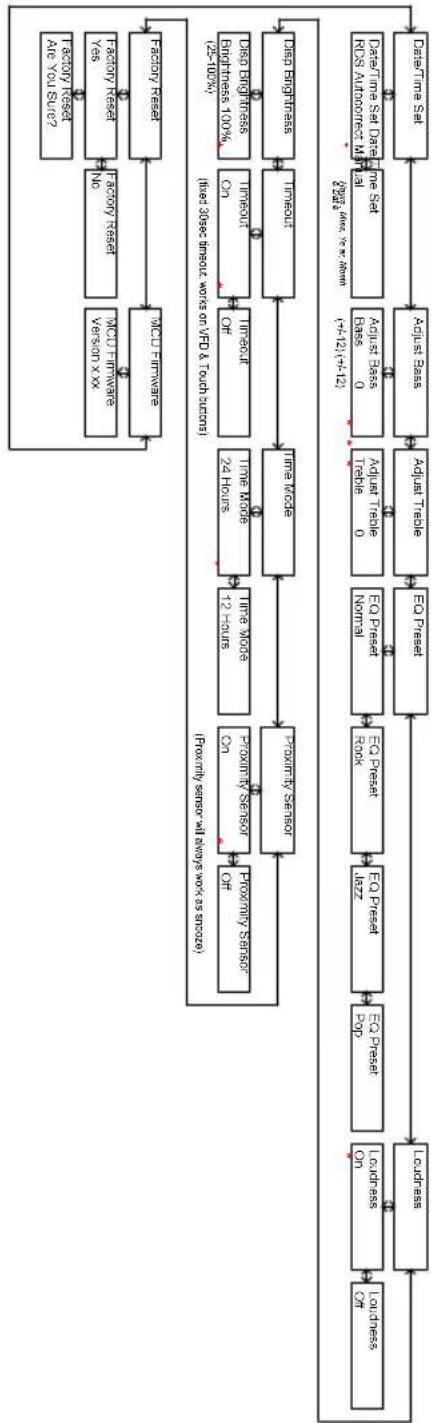
flowchart
graph TD
    A["User Input"] --> B["User Data"]
    B --> C["Data Set"]
    C --> D["Data Access Module"]
    D --> E["Data Storage"]
    E --> F["Data Storage"]
    F --> G["Data Storage"]
    G --> H["Data Storage"]
    H --> I["Data Storage"]
    I --> J["Data Storage"]
    J --> K["Data Storage"]
    K --> L["Data Storage"]
    L --> M["Data Storage"]
    M --> N["Data Storage"]
    N --> O["Data Storage"]
    O --> P["Data Storage"]
    P --> Q["Data Storage"]
    Q --> R["Data Storage"]
    R --> S["Data Storage"]
    S --> T["Data Storage"]
    T --> U["Data Storage"]
    U --> V["Data Storage"]
    V --> W["Data Storage"]
    W --> X["Data Storage"]
    X --> Y["Data Storage"]
    Y --> Z["Data Storage"]
    Z --> A["User Input"]
    A --> C
    C --> D
    D --> E
    E --> F
    F --> G
    G --> H
    H --> I
    I --> J
    J --> K
    K --> L
    L --> M
    M --> N
    N --> O
    O --> P
    P --> Q
    Q --> R
    R --> S
    S --> T
    T --> U
    U --> V
    V --> W
    W --> X
    X --> Y
    Y --> Z
    Z --> A
Tekniset tiedot
Malli: Tangent fjord CD/FM
[1] Default volume is 30, last volume after a power cycle is memorized
[2] Menu timeout from anywhere is 5 secs
[3] * indicates default setting
[4] Entering menu level 2 requires a enter press, settings below in level 2 are instant when altered by 1 and 1 with the exception of Factory Reset, which requires another enter press to be executed.

flowchart
graph TD
    A["Start"] --> B["Set Volume"]
    B --> C["Set Repetition"]
    C --> D["Set Source"]
    D --> E["Set Link"]
    E --> F["Set Alarm"]
    F --> G["Alarm 1"]
    F --> H["Alarm 2"]
    G --> I["Set Alarm 1"]
    H --> J["Alarm 3"]
    I --> K["Set Source"]
    K --> L["Set Link"]
    L --> M["Set Alarm 1"]
    M --> N["Alarm 1"]
    M --> O["Alarm 2"]
    N --> P["Set Alarm 1"]
    O --> Q["Alarm 2"]
    P --> R["Set Alarm 1"]
    Q --> S["Alarm 2"]
    R --> T["Set Alarm 1"]
    S --> U["Alarm 2"]
    T --> V["Set Alarm 1"]
    U --> W["Alarm 2"]
    V --> X["Set Alarm 1"]
    W --> Y["Alarm 2"]

    subgraph Alarm Setting
        Z["Formify sensor w/ always work as success"] --> AA["Priority Sensor Off"]
        AA --> AB["Priority Sensor On"]
        AB --> AC["Priority Sensor Off"]
        AC --> AD["Priority Sensor Off"]
        AD --> AE["Priority Sensor Off"]
        AE --> AF["Priority Sensor Off"]
        AF --> AG["Priority Sensor Off"]
        AG --> AH["Priority Sensor Off"]
        AH --> AI["Priority Sensor Off"]
        AI --> AJ["Priority Sensor Off"]
        AJ --> AK["Priority Sensor Off"]
        AK --> AL["Priority Sensor Off"]
        AL --> AM["Priority Sensor Off"]
        AM --> AN["Priority Sensor Off"]
        AN --> AO["Priority Sensor Off"]
        AO --> AP["Priority Sensor Off"]
        AP --> AQ["Priority Sensor Off"]
        AQ --> AR["Priority Sensor Off"]
        AR --> AS["Priority Sensor Off"]
        AS --> AT["Priority Sensor Off"]
        AT --> AU["Priority Sensor Off"]
        AU --> AV["Priority Sensor Off"]
        AV --> AW["Priority Sensor Off"]
        AW --> AX["Priority Sensor Off"]
        AX --> AY["Priority Sensor Off"]
        AY --> AZ["Priority Sensor Off"]
        AZ --> BA["Priority Sensor Off"]
        BA --> BB["Priority Sensor Off"]
        BB --> BC["Priority Sensor Off"]
        BC --> BD["Priority Sensor Off"]
        BD --> BE["Priority Sensor Off"]
        BE --> BF["Priority Sensor Off"]
        BF --> BG["Priority Sensor Off"]
        BG --> BH["Priority Sensor Off"]
        BH --> BI["Priority Sensor Off"]
        BI --> BJ["Priority Sensor Off"]
        BJ --> BK["Priority Sensor Off"]
        BK --> BL["Priority Sensor Off"]
        BL --> BM["Priority Sensor Off"]
        BM --> BN["Priority Sensor Off"]
        BN --> BO["Priority Sensor Off"]
        BO --> BP["Priority Sensor Off"]
        BP --> BQ["Priority Sensor Off"]
        BQ --> BR["Priority Sensor Off"]
        BR --> BS["Priority Sensor Off"]
        BS --> BT["Priority Sensor Off"]
        BT --> BU["Priority Sensor Off"]
        BU --> BV["Priority Sensor Off"]
        BV --> BW["Priority Sensor Off"]
        BW --> BX["Priority Sensor Off"]
        BX --> BY["Priority Sensor Off"]
        BY --> BZ["Priority Sensor Off"]
        BZ --> CA["Priority Sensor Off"]
        CA --> CB["Priority Sensor Off"]
        CB --> CC["Priority Sensor Off"]
        CC --> CD["Priority Sensor Off"]
        CD --> CE["Priority Sensor Off"]
        CE --> CF["Priority Sensor Off"]
        CF --> CG["Priority Sensor Off"]
        CG --> CH["Priority Sensor Off"]
        CH --> CI["Priority Sensor Off"]
        CI --> CJ["Priority Sensor Off"]
        CJ --> CK["Priority Sensor Off"]
        CK --> CL["Priority Sensor Off"]
        CL --> CM["Priority Sensor Off"]
        CM --> CN["Priority Sensor Off"]
        CN --> CO["Priority Sensor Off"]
        CO --> CP["Priority Sensor Off"]
        CP --> CQ["Priority Sensor Off"]
        CQ --> CR["Priority Sensor Off"]
        CR --> CS["Priority Sensor Off"]
        CS --> CT["Priority Sensor Off"]
        CT --> CU["Priority Sensor Off"]
        CU --> CV["Priority Sensor Off"]
        CV --> CW["Priority Sensor Off"]
        CW --> CX["Priority Sensor Off"]
        CX --> CY["Priority Sensor Off"]
        CY --> CZ["Priority Sensor Off"]
        CZ --> DA["Update Textile Trade 0"] & EO Press Normal
        DA --> DB["EO Press Normal"]
        DB --> DC["EO Press Normal"]
    end

    subgraph Alarm Setting
        DD["Formify sensor w/ always work as success"] --> DE["Update Textile Trade 0"] & EO Press Normal
    end

    style Alarm Setting fill:#f9f,stroke:#333,stroke-width:2px
[1] Default volume is 30, last volume after a power cycle is mastered
[2] Menu limit from anywhere is 5 secs
[3] indicates default setting
[4] Entering menu level 2 requires a enter press, settings below in level 2 are instant when altered by 10 and 17 with the exception of Factory reset; which requires another enter press to be executed.
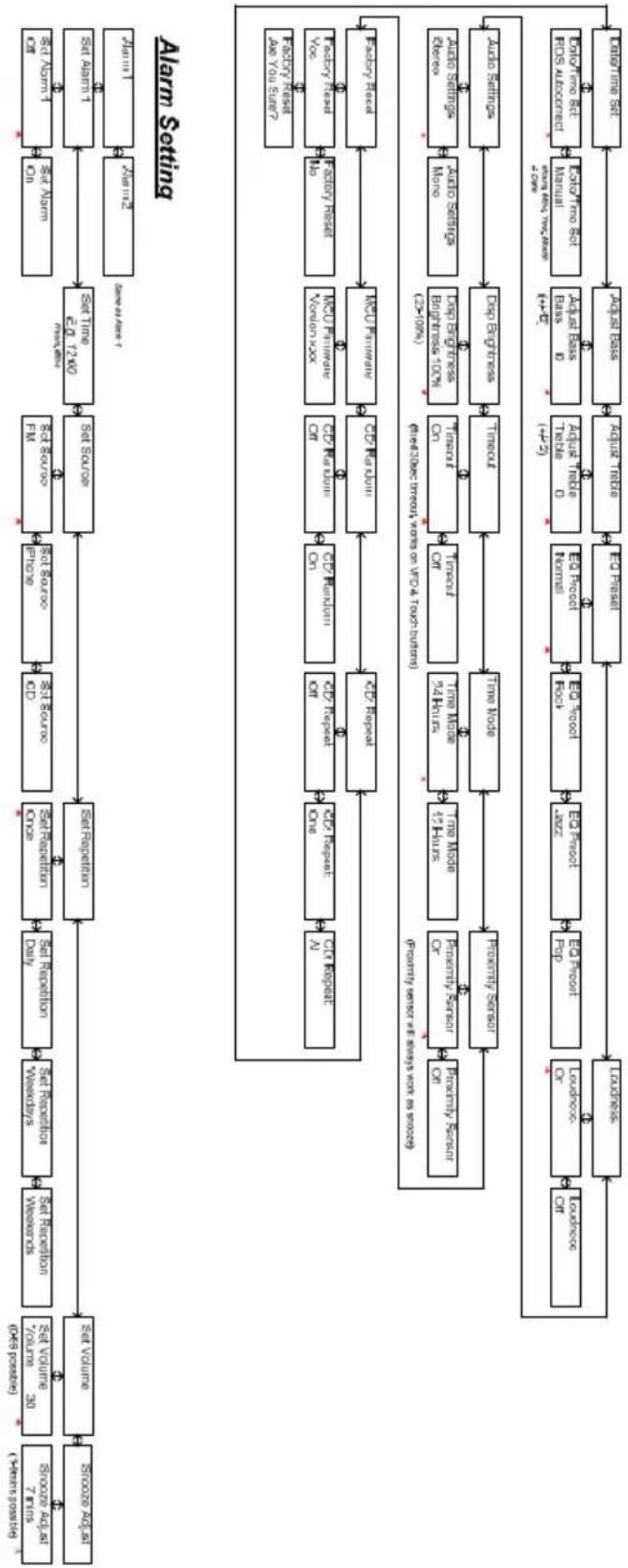
flowchart
graph TD
    A["Source Address (Year's pass) 7 times"] --> B["Source Address (Year's pass) 30 times"]
    B --> C["Set Volume (Year's pass) 2000s"]
    C --> D["Set Request (Year's pass) 3000s"]
    D --> E["Set Request (Year's pass) 4000s"]
    E --> F["Set Request (Year's pass) 5000s"]
    F --> G["Set Request (Year's pass) 6000s"]
    G --> H["Set Request (Year's pass) 7000s"]
    H --> I["Set Request (Year's pass) 8000s"]
    I --> J["Set Request (Year's pass) 9000s"]
    J --> K["Set Request (Year's pass) 10000s"]
    K --> L["Set Request (Year's pass) 11000s"]
    L --> M["Set Request (Year's pass) 12000s"]
    M --> N["Set Request (Year's pass) 13000s"]
    N --> O["Set Request (Year's pass) 14000s"]
    O --> P["Set Request (Year's pass) 15000s"]
    P --> Q["Set Request (Year's pass) 16000s"]
    Q --> R["Set Request (Year's pass) 17000s"]
    R --> S["Set Request (Year's pass) 18000s"]
    S --> T["Set Request (Year's pass) 19000s"]
    T --> U["Set Request (Year's pass) 20000s"]

    subgraph Alarm Setting
        V["Data Address (Year's pass) 7 times"] --> W["Data Address (Year's pass) 30 times"]
        W --> X["Data Address (Year's pass) 40 times"]
        X --> Y["Data Address (Year's pass) 50 times"]
        Y --> Z["Data Address (Year's pass) 60 times"]
        Z --> AA["Data Address (Year's pass) 70 times"]
        AA --> AB["Data Address (Year's pass) 80 times"]
        AB --> AC["Data Address (Year's pass) 90 times"]
        AC --> AD["Data Address (Year's pass) 100 times"]
        AD --> AE["Data Address (Year's pass) 110 times"]
        AE --> AF["Data Address (Year's pass) 120 times"]
        AF --> AG["Data Address (Year's pass) 130 times"]
        AG --> AH["Data Address (Year's pass) 140 times"]
        AH --> AI["Data Address (Year's pass) 150 times"]
        AI --> AJ["Data Address (Year's pass) 160 times"]
        AJ --> AK["Data Address (Year's pass) 170 times"]
        AK --> AL["Data Address (Year's pass) 180 times"]
        AL --> AM["Data Address (Year's pass) 190 times"]
        AM --> AN["Data Address (Year's pass) 200 times"]
    end

    subgraph Data Transfer
        AO["Data Transfer (Year's pass)"] --> AP["Data Transfer (Year's pass)"]
        AP --> AQ["Data Transfer (Year's pass)"]
        AQ --> AR["Data Transfer (Year's pass)"]
        AR --> AS["Data Transfer (Year's pass)"]
        AS --> AT["Data Transfer (Year's pass)"]
        AT --> AU["Data Transfer (Year's pass)"]
        AU --> AV["Data Transfer (Year's pass)"]
        AV --> AW["Data Transfer (Year's pass)"]
        AW --> AX["Data Transfer (Year's pass)"]
        AX --> AY["Data Transfer (Year's pass)"]
        AY --> AZ["Data Transfer (Year's pass)"]
        AZ --> BA["Data Transfer (Year's pass)"]
        BA --> BB["Data Transfer (Year's pass)"]
        BB --> BC["Data Transfer (Year's pass)"]
        BC --> BD["Data Transfer (Year's pass)"]
        BD --> BE["Data Transfer (Year's pass)"]
        BE --> BF["Data Transfer (Year's pass)"]
        BF --> BG["Data Transfer (Year's pass)"]
        BG --> BH["Data Transfer (Year's pass)"]
        BH --> BI["Data Transfer (Year's pass)"]
        BI --> BJ["Data Transfer (Year's pass)"]
        BJ --> BK["Data Transfer (Year's pass)"]
        BK --> BL["Data Transfer (Year's pass)"]
        BL --> BM["Data Transfer (Year's pass)"]
        BM --> BN["Data Transfer (Year's pass)"]
        BN --> BO["Data Transfer (Year's pass)"]
        BO --> BP["Data Transfer (Year's pass)"]
        BP --> BQ["Data Transfer (Year's pass)"]
        BQ --> BR["Data Transfer (Year's pass)"]
        BR --> BS["Data Transfer (Year's pass)"]
        BS --> BT["Data Transfer (Year's pass)"]
        BT --> BU["Data Transfer (Year's pass)"]
        BU --> BV["Data Transfer (Year's pass)"]
        BV --> BW["Data Transfer (Year's pass)"]
        BW --> BX["Data Transfer (Year's pass)"]
        BX --> BY["Data Transfer (Year's pass)"]
        BY --> BZ["Data Transfer (Year's pass)"]
        BZ --> CA["Data Transfer (Year's pass)"]
        CA --> CB["Data Transfer (Year's pass)"]
        CB --> CC["Data Transfer (Year's pass)"]
        CC --> CD["Data Transfer (Year's pass)"]
        CD --> CE["Data Transfer (Year's pass)"]
        CE --> CF["Data Transfer (Year's pass)"]
        CF --> CG["Data Transfer (Year's pass)"]
        CG --> CH["Data Transfer (Year's pass)"]
        CH --> CI["Data Transfer (Year's pass)"]
        CI --> CJ["Data Transfer (Year's pass)"]
        CJ --> CK["Data Transfer (Year's pass)"]
        CK --> CL["Data Transfer (Year's pass)"]
        CL --> CM["Data Transfer (Year's pass)"]
        CM --> CN["Data Transfer (Year's pass)"]
        CN --> CO["Data Transfer (Year's pass)"]
        CO --> CP["Data Transfer (Year's pass)"]
        CP --> CQ["Data Transfer (Year's pass)"]
        CQ --> CR["Data Transfer (Year's pass)"]
        CR --> CS["Data Transfer (Year's pass)"]
        CS --> CT["Data Transfer (Year's pass)"]
        CT --> CU["Data Transfer (Year's pass)"]
        CU --> CV["Data Transfer (Year's pass)"]
        CV --> CW["Data Transfer (Year's pass)"]
        CW --> CX["Data Transfer (Year's pass)"]
        CX --> CY["Data Transfer (Year's pass)"]
        CY --> CZ["Data Transfer (Year's pass)"]
        CZ --> DA["Data Transfer (Year's pass)"]
        DA --> DB["Data Transfer (Year's pass)"]
        DB --> DC
    end

    subgraph Data Comparison
        DE["Auto Settus"] --> DF["Dry Engines"] --> DG["Troux"] --> DH["Troux"] --> DI["Troux"] --> DJ["Troux"] --> DK["Troux"] --> DL["Troux"] --> DV["Troux"] --> DW["Troux"] --> DX["Troux"] --> DY["Troux"] --> DXT["Auto Settus"] & DXT["Bry Cloud"] & DXT["Cry Cloud"] & DXT["Cry Cloud"] & DXT["Cry Cloud"] & DXT["Cry Cloud"] & DXT["Cry Cloud"] & DXT["Cry Cloud"] & DXT["Cry Cloud"] & DXT["Cry Cloud"] & DXT["Cry Cloud"] & DXT["Cry Cloud"] & DXT["Cry Cloud"] & DXT["Cry Cloud"] & DXT["Cry Cloud"] & DXT["Cry Cloud"] & DXT["Cry cloud"] & DXT["Cry cloud"] & DXT["Cry cloud"] & DXT["Cry cloud"] & DXT["Cry cloud"] & DXT["Cry cloud"] & DXT["Cry cloud"] & DXT["Cry cloud"] & DXT["Cry cloud"] & DXT["Cry cloud"] & DXT["Cry cloud"] & DXT["Cry cloud"] & DXT["Cry cloud"] & DXT["Cry cloud"] & DXT["Cry cloud"] &
    end

    subgraph Data Comparison
        CE["Auto Settus"] --> DF["Dry Engines"] --> DG["Troux"] --> DH["Troux"] --> DI["Troux"] --> DJ["Troux"] --> DK["Troux"] --> DL["Troux"] --> DX["Troux"] --> DXT["Auto Settus"] & DXT["Bry Cloud"] & DXT["Cry Cloud"] & DXT["Cry Cloud"] & DXT["Cry Cloud"] & DXT["Cry Cloud"] & DXT["Cry Cloud"] & DXT["Cry cloud"] & DXT["Cry cloud"] & DXT["Cry cloud"] & DXT["Cry cloud"] & DXT["Cry cloud"] & DXT["Cry cloud"] & DXT["Cry cloud"] & DXT["Cry cloud"] & DXT["Cry load"] & DXT["Cry load"] & DXT["Cry load"] & DXT["Cry load"] & DXT["Cry load"] & DXT["Cry load"] & DXT["Cry load"] & DXT["Cry load"] & DXT["Cry load"] & DXT["Cry load"] & DXT["Cry load"] & DXT["Cry load"] & DXT["Cry load"] & DXT["Cry load"] & DXT["Cry load"] &
    end
[1] Default volume is 30, last volume after a power cycle is memorized
[2] Menu timeout from anywhere is 5 secs
[3] Indicates default setting
[4] Entering mean level 2 requires a enter press, setings below in level 2 are instant when altered by "and" and "with the exception of Factory Reset, which requires another enter press to be executed.
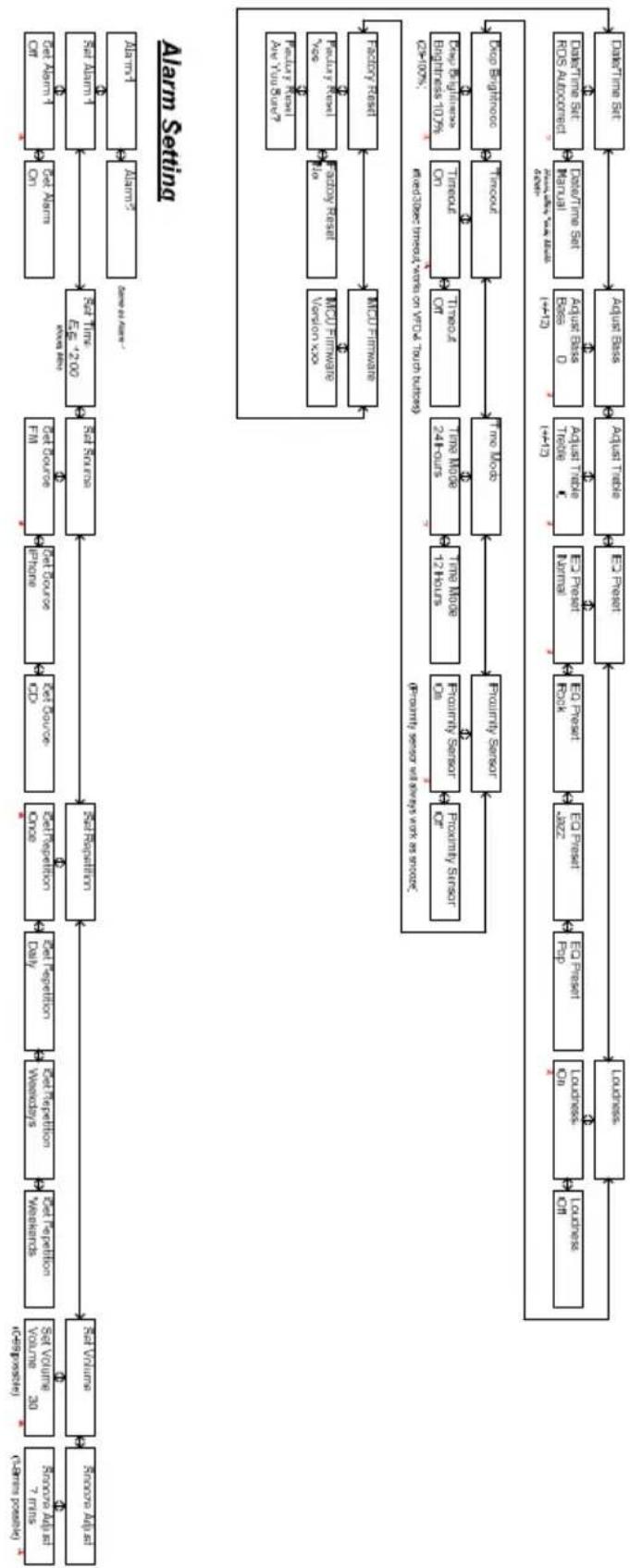
flowchart
graph TD
    A["Launch"] --> B["Alarm1"]
    B --> C["Alarm2"]
    C --> D["Alarm Setting"]
    D --> E["Data Entry 7 Units"]
    D --> F["Data Entry 30 Units"]
    D --> G["Data Entry 20 Units"]
    D --> H["Data Entry 7 Units (Launch possible)"]
    D --> I["Radio Access"]
    I --> J["Radio Access"]
    J --> K["Radio Access"]
    K --> L["Radio Access"]
    L --> M["Radio Access"]
    M --> N["Radio Access"]
    N --> O["Radio Access"]
    O --> P["Radio Access"]
    P --> Q["Radio Access"]
    Q --> R["Radio Access"]
    R --> S["Radio Access"]
    S --> T["Radio Access"]
    T --> U["Radio Access"]
    U --> V["Radio Access"]
    V --> W["Radio Access"]
    W --> X["Radio Access"]
    X --> Y["Radio Access"]
    Y --> Z["Radio Access"]
    Z --> AA["Radio Access"]
    AA --> AB["Radio Access"]
    AB --> AC["Radio Access"]
    AC --> AD["Radio Access"]
    AD --> AE["Radio Access"]
    AE --> AF["Radio Access"]
    AF --> AG["Radio Access"]
    AG --> AH["Radio Access"]
    AH --> AI["Radio Access"]
    AI --> AJ["Radio Access"]
    AJ --> AK["Radio Access"]
    AK --> AL["Radio Access"]
    AL --> AM["Radio Access"]
    AM --> AN["Radio Access"]
    AN --> AO["Radio Access"]
    AO --> AP["Radio Access"]
    AP --> AQ["Radio Access"]
    AQ --> AR["Radio Access"]
    AR --> AS["Radio Access"]
    AS --> AT["Radio Access"]
    AT --> AU["Radio Access"]
    AU --> AV["Radio Access"]
    AV --> AW["Radio Access"]
    AW --> AX["Radio Access"]
    AX --> AY["Radio Access"]
    AY --> AZ["Radio Access"]
    AZ --> BA["Radio Access"]
    BA --> BB["Radio Access"]
    BB --> BC["Radio Access"]
    BC --> BD["Radio Access"]
    BD --> BE["Radio Access"]
    BE --> BF["Radio Access"]
    BF --> BG["Radio Access"]
    BG --> BH["Radio Access"]
    BH --> BI["Radio Access"]
    BI --> BJ["Radio Access"]
    BJ --> BK["Radio Access"]
    BK --> BL["Radio Access"]
    BL --> BM["Radio Access"]
    BM --> BN["Radio Access"]
    BN --> BO["Radio Access"]
    BO --> BP["Radio Access"]
    BP --> BQ["Radio Access"]
    BQ --> BR["Radio Access"]
    BR --> BS["Radio Access"]
    BS --> BT["Radio Access"]
    BT --> BU["Radio Access"]
    BU --> BV["Radio Access"]
    BV --> BW["Radio Access"]
    BW --> BX["Radio Access"]
    BX --> BY["Radio Access"]
    BY --> BZ["Radio Access"]
    BZ --> CA["Radio Access"]
    CA --> CB["Radio Access"]
    CB --> CC["Radio Access"]
    CC --> CD["Radio Access"]
    CD --> CE["Radio Access"]
    CE --> CF["Radio Access"]
    CF --> CG["Radio Access"]
    CG --> CH["Radio Access"]
    CH --> CI["Radio Access"]
    CI --> CJ["Radio Access"]
    CJ --> CK["Radio Access"]
    CK --> CL["Radio Access"]
    CL --> CM["Radio Access"]
    CM --> CN["Radio Access"]
    CN --> CO["Radio Access"]
    CO --> CP["Radio Access"]
    CP --> CQ["Radio Access"]
    CQ --> CR["Radio Access"]
    CR --> CS["Radio Access"]
    CS --> CT["Radio Access"]
    CT --> CU["Radio Access"]
    CU --> CV["Radio Access"]
    CV --> CW["Radio Access"]
    CW --> CX["Radio Access"]
    CX --> CY["Radio Access"]
    CY --> CZ["Radio Access"]
    CZ --> DA["Radio Access"]
    DA --> DB["Radio Access"]
    DB --> DC["Radio Access"]
    DC --> DD["Radio Access"]
    DD --> DE["Radio Access"]
    DE --> DF["Radio Access"]
    DF --> DG["Radio Access"]
    DG --> DH["Radio Access"]
    DH --> DI["Radio Access"]
    DI --> DJ["Radio Access"]
    DJ --> DK["Radio Access"]
    DK --> DL["Radio Access"]
    DL --> DV["Radio Access"]
Specifiche tecniche
Modello: Tangent fjord CD/FM
Banda FM (87.5 - 108.0MHz)
Dimensioni: 170mm x 180mm x 170mm (Larg. x Alt. x Prof.)
[1] Default volume is 30, last volume after a power cycle is memorized
[2] Menu timeout from anywhere is 5 secs
[3] * indicates default setting
[4] Entering menu level 2 requires a enter press, settings below in level 2 are instant when altered by 1 and 2 with the exception of Factory Reset, which requires another enter press to be executed.

flowchart
graph TD
    A["Source A"] --> B["Set Volume"]
    B --> C["Set Replication"]
    C --> D["Set Replication Once"]
    D --> E["Set Replication Weekly"]
    E --> F["Set Replication Weekdays"]
    F --> G["Set Replication Daily"]
    G --> H["Set Replication Weekly"]
    H --> I["Set Replication Weekends"]
    I --> J["Set Volume 30"]
    J --> K["1-99 Position"]
    K --> L["Source A / 7 hours (1-99 possible)"]
    L --> M["Source A / 7 hours (1-99 possible)"]
    M --> N["Substrate"]
    N --> O["Set Volume"]
    O --> P["Set Replication"]
    P --> Q["Set Replication Once"]
    Q --> R["Set Replication Weekly"]
    R --> S["Set Replication Daily"]
    S --> T["Set Replication Weekly"]
    T --> U["Set Replication Weekly"]
    U --> V["Set Replication Weekly"]
    V --> W["Set Replication Weekly"]
    W --> X["Set Replication Weekly"]
    X --> Y["Set Replication Weekly"]
    Y --> Z["Set Replication Weekly"]
    Z --> AA["Set Replication Weekly"]
    AA --> AB["Set Replication Weekly"]
    AB --> AC["Set Replication Weekly"]
    AC --> AD["Set Replication Weekly"]
    AD --> AE["Set Replication Weekly"]
    AE --> AF["Set Replication Weekly"]
    AF --> AG["Set Replication Weekly"]
    AG --> AH["Set Replication Weekly"]
    AH --> AI["Set Replication Weekly"]
    AI --> AJ["Set Replication Weekly"]
    AJ --> AK["Set Replication Weekly"]
    AK --> AL["Set Replication Weekly"]
    AL --> AM["Set Replication Weekly"]
    AM --> AN["Set Replication Weekly"]
    AN --> AO["Set Replication Weekly"]
    AO --> AP["Set Replication Weekly"]
    AP --> AQ["Set Replication Weekly"]
    AQ --> AR["Set Replication Weekly"]
    AR --> AS["Set Replication Weekly"]
    AS --> AT["Set Replication Weekly"]
    AT --> AU["Set Replication Weekly"]
    AU --> AV["Set Replication Weekly"]
    AV --> AW["Set Replication Weekly"]
    AW --> AX["Set Replication Weekly"]
    AX --> AY["Set Replication Weekly"]
    AY --> AZ["Set Replication Weekly"]
    AZ --> BA["Set Replication Weekly"]
    BA --> BB["Set Replication Weekly"]
    BB --> BC["Set Replication Weekly"]
    BC --> BD["Set Replication Weekly"]
    BD --> BE["Set Replication Weekly"]
    BE --> BF["Set Replication Weekly"]
    BF --> BG["Set Replication Weekly"]
    BG --> BH["Set Replication Weekly"]
    BH --> BI["Set Replication Weekly"]
    BI --> BJ["Set Replication Weekly"]
    BJ --> BK["Set Replication Weekly"]
    BK --> BL["Set Replication Weekly"]
    BL --> BM["Set Replication Weekly"]
    BM --> BN["Set Replication Weekly"]
    BN --> BO["Set Replication Weekly"]
    BO --> BP["Set Replication Weekly"]
    BP --> BQ["Set Replication Weekly"]
    BQ --> BR["Set Replication Weekly"]
    BR --> BS["Set Replication Weekly"]
    BS --> BT["Set Replication Weekly"]
    BT --> BU["Set Replication Weekly"]
    BU --> BV["Set Replication Weekly"]
    BV --> BW["Set Replication Weekly"]
    BW --> BX["Set Replication Weekly"]
    BX --> BY["Set Replication Weekly"]
    BY --> BZ["Set Replication Weekly"]
    BZ --> CA["Set Replication Weekly"]
    CA --> CB["Set Replication Weekly"]
    CB --> CC["Set Replication Weekly"]
    CC --> CD["Set Replication Weekly"]
    CD --> CE["Set Replication Weekly"]
    CE --> CF["Set Replication Weekly"]
    CF --> CG["Set Replication Weekly"]
    CG --> CH["Set Replication Weekly"]
    CH --> CI["Set Replication Weekly"]
    CI --> CJ["Set Replication Weekly"]
    CJ --> CK["Set Replication Weekly"]
    CK --> CL["Set Replication Weekly"]
    CL --> CM["Set Replication Weekly"]
    CM --> CN["Set Replication Weekly"]
    CN --> CO["Set Replication Weekly"]
    CO --> CP["Set Replication Weekly"]
    CP --> CQ["Set Replication Weekly"]
    CQ --> CR["Set Replication Weekly"]
    CR --> CS["Set Replication Weekly"]
    CS --> CT["Set Replication Weekly"]
    CT --> CU["Set Replication Weekly"]
    CU --> CV["Set Replication Weekly"]
    CV --> CW["Set Replication Weekly"]
    CW --> CX["Set Replication Weekly"]
    CX --> CY["Set Replication Weekly"]
    CY --> CZ["Set Replication Weekly"]
    CZ --> DA["Set Replication Weekly"]
    DA --> DB["Set Replication Weekly"]
    DB --> DC["Set Replication Weekly"]
    DC --> DD["Set Replication Weekly"]
    DD --> DE["Set Replication Weekly"]
    DE --> DF["Set Replication Weekly"]
    DF --> DG["Set Replication Weekly"]
    DG --> DH["Set Replication Weekly"]
    DH --> DI["Set Replication Weekly"]
    DI --> DJ["Set Replication Weekly"]
    DJ --> DK["Set Replication Weekly"]
    DK --> DL["Set Replication Weekly"]
    DL --> DM["Set Replication Weekly"]
    DM --> DN["Set Replication Weekly"]
    DN --> DO
Alarm Setting
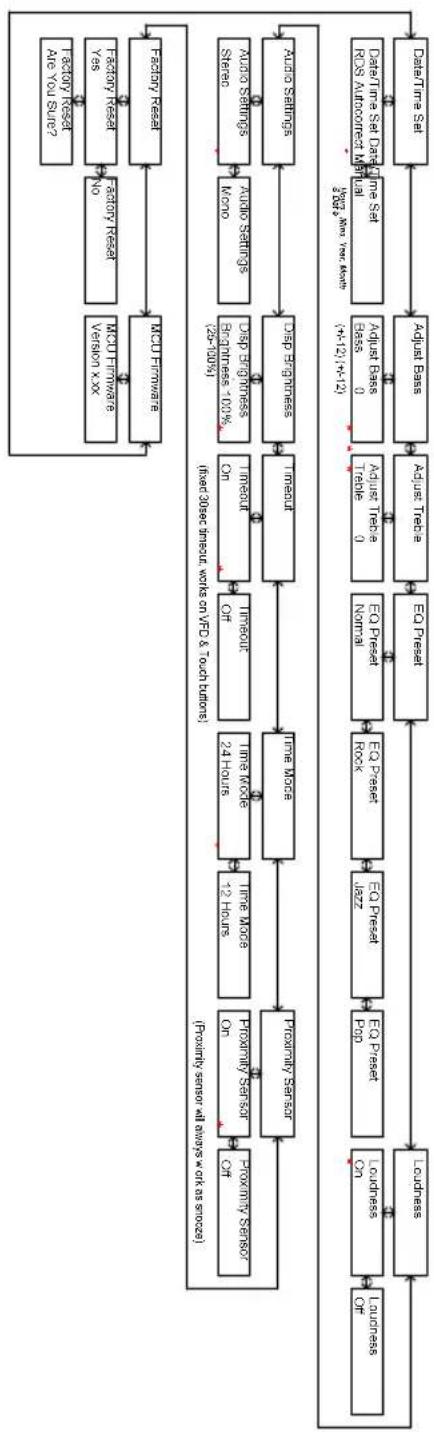
flowchart
graph TD
    A["Data Time Set"] --> B["Adjust Pass"]
    B --> C["EQ Press"]
    C --> D["EO Press Normal"]
    D --> E["EO Press Book"]
    E --> F["EO Press Book"]
    F --> G["Time Mode"]
    G --> H["Time Mode On"]
    H --> I["Proximity Sensor On"]
    I --> J["Proximity Sensor Off"]

    K["Data Time Set Data Time Set RQS Amplification Manual (4-12) (4-12)"]
    L["Data Time Set Data Time Set RQS Amplification Manual (4-12) (4-12)"]
    M["Data Time Set Data Time Set RQS Amplification Manual (4-12) (4-12)"]
    N["Data Time Set Data Time Set RQS Amplification Manual (4-12)"]
    O["Data Time Set Data Time Set RQS Amplification Manual (4-12)"]
    P["Audio Systems Staro"] --> Q["Audio Settings Nano"]
    Q --> R["Audio Engines 100%"]
    R --> S["Audio Engines"]
    S --> T["Deep Engines"]
    T --> U["Deep Engines"]

    V["Audio Systems"] --> W["Audio Systems Nano"]
    W --> X["Audio Engines"]
    X --> Y["Deep Engines"]
    Y --> Z["Time Mode On"]
    Z --> AA["Time Mode On"]
    AA --> AB["Time Mode On 24 Hours"]

    AC["Data Time Set Data Time Set RQS Amplification Manual (4-12) (4-12)"]
    AD["Data Time Set Data Time Set RQS Amplification Manual (4-12)"]
    AE["Data Time Set Data Time Set RQS Amplification Manual (4-12)"]
    AF["Audio Systems Staro"] --> AG["Audio Systems Nano"]
    AG --> AH["Audio Engines"]
    AH --> AI["Deep Engines"]
    AI --> AJ["Deep Engines"]

    AK["Data Time Set Data Time Set RQS Amplification Manual (4-12) (4-12)"]
    AL["Data Time Set Data Time Set RQS Amplification Manual (4-12)"]
    AM["Audio Systems Nano"] --> AN["Audio Engines"]
    AN --> AO["Audio Engines"]
    AO --> AP["Audio Engines"]

    AQ["Data Time Set Data Time Set RQS Amplification Manual (4-12) (4-12)"]
    AR["Audio Systems Staro"] --> AS["Audio Systems Nano"]
    AS --> AT["Audio Engines"]
    AT --> AU["Deep Engines"]
    AU --> AV["Deep Engines"]

    AW["Data Time Set Data Time Set RQS Amplification Manual (4-12) (4-12)"]
    AX["Audio Systems Nano"] --> AY["Audio Engines"]
    AY --> AZ["Audio Engines"]
    AZ --> BA["Audio Engines"]

    BB["Data Time Set Data Time Set RQS Amplification Manual (4-12) (4-12)"]
    BC["Audio Systems Staro"] --> BD["Audio Systems Nano"]
    BD --> BE["Audio Engines"]
    BE --> BF["Audio Engines"]

    BG["Data Time Set Data Time Set RQS Amplification Manual (4-12) (4-12)"]
    BH["Audio Systems Nano"] --> BI["Audio Engines"]
    BI --> BJ["Audio Engines"]

    BK["Data Time Set Data Time Set RQS Amplification Manual (4-12) (4-12)"]
    BL["Audio Systems Staro"] --> BM["Audio Systems Nano"]
    BM --> BN["Audio Engines"]
    BN --> BO["Audio Engines"]

    BP["Audio Systems Nano"] --> BQ["Audio Engines"]
    BQ --> BR["Audio Engines"]

    BS["Data Time Set Data Time Set RQS Amplification Manual (4-12) (4-12)"]
    BT["Audio Systems Staro"] --> BU["Audio Systems Nano"]
    BU --> BV["Audio Engines"]
    BV --> BW["Audio Engines"]

    BX["Audio Systems Nano"] --> BY["Audio Engines"]
    BY --> BZ["Audio Engines"]

    CA["Data Time Set Data Time Set RQS Amplification Manual (4-12) (4-12)"]
    CB["Audio Systems Staro"] --> CC["Audio Systems Nano"]
    CC --> CD["Audio Engines"]
    CD --> CE["Audio Engines"]

    CF["Audio Systems Nano"] --> CG["Audio Engines"]
    CG --> CH["Audio Engines"]

    CI["Audio Systems Staro"] --> CJ["Audio Systems Nano"]
    CJ --> CK["Audio Engines"]
    CK --> CL["Audio Engines"]

    CM["Data Time Set Data Time Set RQS Amplification Manual (4-12) (4-12)"]
    CN["Data Time Set Data Time Set RQS Amplification Manual (4-12)"]
[1] Default volume is 30, last volume after a power cycle is mastered
[2] Menu limit from anywhere is 5 secs
[3] indicates default setting
[4] Entering menu level 2 requires a enter press, settings below in level 2 are instant when altered by 10 and 17 with the exception of Factory reset; which requires another enter press to be executed.
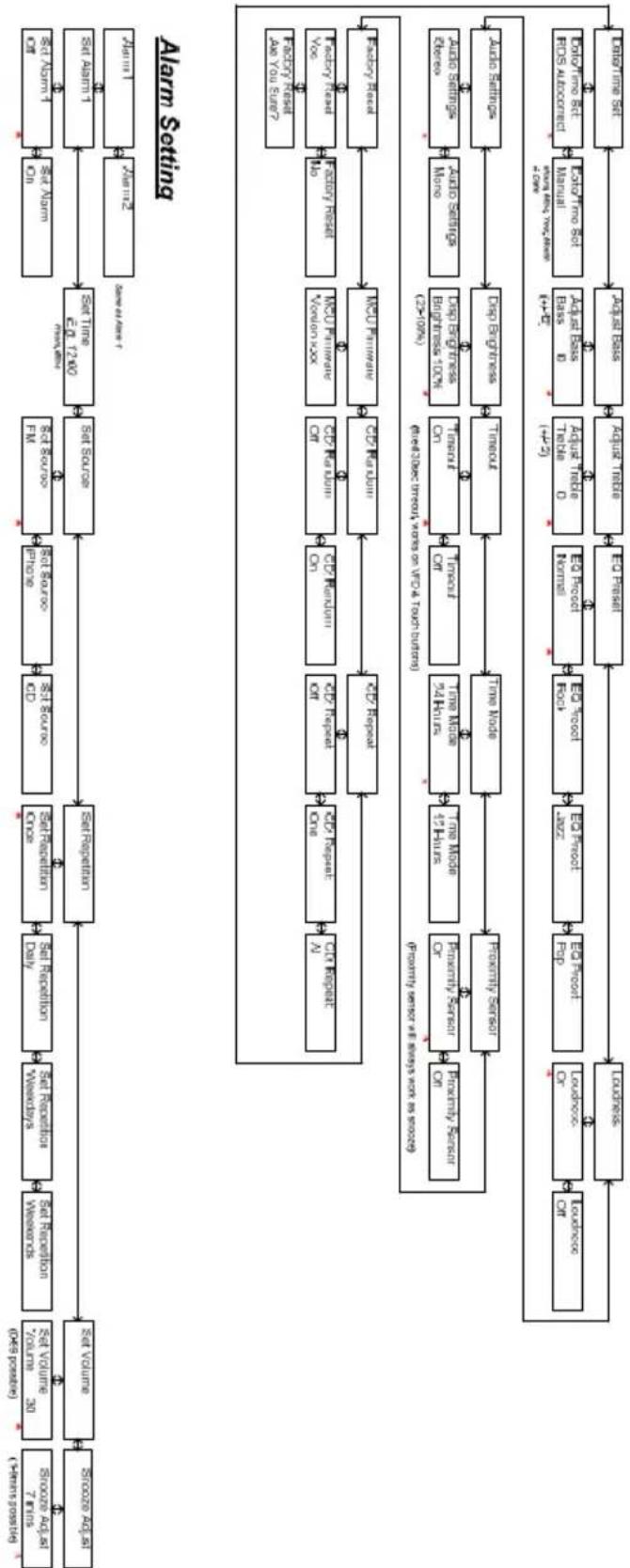
flowchart
graph TD
    A["Alarm Setting"] --> B["Set Volume"]
    B --> C["Set Volume / volume / count / type / possible"]
    C --> D["Set Volume / source / count / type / possible"]
    D --> E["Set Publication / date / time"]
    E --> F["Set Publication / source / date / time"]
    F --> G["Set Source / date / time"]
    G --> H["Set Time / date / time"]
    H --> I["Set Alarm"]
    I --> J["Set Alarm"]
    J --> K["Set Alarm1"]
    K --> L["Set Alarm2"]
    L --> M["Set Alarm1 & 0"]
    M --> N["Set Alarm1 & 0"]
    N --> O["Set Alarm1 & 0"]
    O --> P["Set Alarm1 & 0"]
    P --> Q["Set Alarm1 & 0"]
    Q --> R["Set Alarm1 & 0"]
    R --> S["Set Alarm1 & 0"]
    S --> T["Set Alarm1 & 0"]
    T --> U["Set Alarm1 & 0"]
    U --> V["Set Alarm1 & 0"]
    V --> W["Set Alarm1 & 0"]
    W --> X["Set Alarm1 & 0"]
    X --> Y["Set Alarm1 & 0"]
    Y --> Z["Set Alarm1 & 0"]
    Z --> AA["Set Alarm1 & 0"]
    AA --> AB["Set Alarm1 & 0"]
    AB --> AC["Set Alarm1 & 0"]
    AC --> AD["Set Alarm1 & 0"]
    AD --> AE["Set Alarm1 & 0"]
    AE --> AF["Set Alarm1 & 0"]
    AF --> AG["Set Alarm1 & 0"]
    AG --> AH["Set Alarm1 & 0"]
    AH --> AI["Set Alarm1 & 0"]
    AI --> AJ["Set Alarm1 & 0"]
    AJ --> AK["Set Alarm1 & 0"]
    AK --> AL["Set Alarm1 & 0"]
    AL --> AM["Set Alarm1 & 0"]
    AM --> AN["Set Alarm1 & 0"]
    AN --> AO["Set Alarm1 & 0"]
    AO --> AP["Set Alarm1 & 0"]
    AP --> AQ["Set Alarm1 & 0"]
    AQ --> AR["Set Alarm1 & 0"]
    AR --> AS["Set Alarm1 & 0"]
    AS --> AT["Set Alarm1 & 0"]
    AT --> AU["Set Alarm1 & 0"]
    AU --> AV["Set Alarm1 & 0"]
    AV --> AW["Set Alarm1 & 0"]
    AW --> AX["Set Alarm1 & 0"]
    AX --> AY["Set Alarm1 & 0"]
    AY --> AZ["Set Alarm1 & 0"]
    AZ --> BA["Set Alarm1 & 0"]
    BA --> BB["Set Alarm1 & 0"]
    BB --> BC["Set Alarm1 & 0"]
    BC --> BD["Set Alarm1 & 0"]
    BD --> BE["Set Alarm1 & 0"]
    BE --> BF["Set Alarm1 & 0"]
    BF --> BG["Set Alarm1 & 0"]
    BG --> BH["Set Alarm1 & 0"]
    BH --> BI["Set Alarm1 & 0"]
    BI --> BJ["Set Alarm1 & 0"]
    BJ --> BK["Set Alarm1 & 0"]
    BK --> BL["Set Alarm1 & 0"]
    BL --> BM["Set Alarm1 & 0"]
    BM --> BN["Set Alarm1 & 0"]
    BN --> BO["Set Alarm1 & 0"]
    BO --> BP["Set Alarm1 & 0"]
    BP --> BQ["Set Alarm1 & 0"]
    BQ --> BR["Set Alarm1 & 0"]
    BR --> BS["Set Alarm1 & 0"]
    BS --> BT["Set Alarm1 & 0"]
    BT --> BU["Set Alarm1 & 0"]
    BU --> BV["Set Alarm1 & 0"]
    BV --> BW["Set Alarm1 & 0"]
    BW --> BX["Set Alarm1 & 0"]
    BX --> BY["Set Alarm1 & 0"]
    BY --> BZ["Set Alarm1 & 0"]
    BZ --> CA["Set Alarm1 & 0"]
    CA --> CB["Set Alarm1 & 0"]
    CB --> CC["Set Alarm1 & 0"]
    CC --> CD["Set Alarm1 & 0"]
    CD --> CE["Set Alarm1 & 0"]
    CE --> CF["Set Alarm1 & 0"]
    CF --> CG["Set Alarm1 & 0"]
    CG --> CH["Set Alarm1 & 0"]
    CH --> CI["Set Alarm1 & 0"]
    CI --> CJ["Set Alarm1 & 0"]
    CJ --> CK["Set Alarm1 & 0"]
    CK --> CL["Set Alarm1 & 0"]
    CL --> CM["Set Alarm1 & 0"]
    CM --> CN["Set Alarm1 & 0"]
    CN --> CO["Set Alarm1 & 0"]
    CO --> CP["Set Alarm1 & 0"]
    CP --> CQ["Set Alarm1 & 0"]
    CQ --> CR["Set Alarm1 & 0"]
    CR --> CS["Set Alarm1 & 0"]
    CS --> CT["Set Alarm1 & 0"]
    CT --> CU["Set Alarm1 & 0"]
    CU --> CV[CV Report / on/ on/ on/ on/ on/ on/ on/ on/ on/ on/ on/ on/ on/ on/ on/ on/ on/ on/ on/ on/ on/ on/ on/ on/ on/ on/ on/ on/ on/ on/ on/ on/ on/ on/ on/ on/ on/ on/ on/ on/ on/ on/ on/ on/ on/ on/ on/ on/ on/ on/ on/
    subgraph System Settings
        direction TB
        direction LR
        direction UA
        direction Y
        direction Z
        direction AB
        direction AC
        direction AD
        direction AE
        direction AF
        direction AG
        direction AH
        direction AI
        direction AJ
        direction AK
        direction AL
        direction AM
        direction AN
        direction AO
        direction AP
        direction AQ
        direction AR
        direction AS
        direction AT
        direction AU
        direction AV
        direction AW
        direction AX
        direction AY
        direction AZ
        direction BA
        direction BB
        direction BC
        direction BD
        direction BE
        direction BF
        direction BG
        direction BH
        direction BI
        direction BJ
        direction BK
        direction BL
        direction BM
        direction BN
        direction BO
        direction BP
        direction CA
        direction CAY
        direction CAZ
        direction CAZ
        direction CAZ
        direction CAZ
        direction CAZ
        direction CAZ
        direction CAZ
        direction CAZ
        direction CAZ
        direction CAZ
        direction CAZ
        direction CAZ
        direction CAZ
        direction CAZ
        direction CAZ
        direction CAZ
        direction CAZ
        direction CAZ
        direction CAZ
        direction CAZ
        direction CA2A
        direction CA2B
        direction CA2C
        direction CA2D
        direction CA2E
        direction CA2F
        direction CA2G
        direction CA2H
        direction CA2I
        direction CA2J
        direction CA2K
        direction CA2L
        direction CA2M
        direction CA2N
        direction CA2O
        direction CA2P
        direction CA2Q
        direction CA2R
        direction CA2S
        direction CA2T
        direction CA2U
        direction CA2V
        direction CA2W
        direction CA2X
        direction CA2Y
        direction CA2Z
        direction CA2X
        direction CA2Y
        direction CA2Z
        direction CA2X
        direction CA2Y
        direction CA2W
        direction CA2X
        direction CA2Y
        direction CA2X
        direction CA2Y
        direction CA2W
        direction CA2X
        direction CA2Y
        direction CA2X
        direction CA2Y
        direction CA2W
        direction CA2X
        direction CA2Y
        direction CA2X
        direction CA2Y
        directional arrows from the alarm settings to the alarm settings.
            direction TB
            directional UA
            directional YA
            directional ZM
            directional ABX, YA, ZM, ZM, ZM, ZM, ZM, ZM, ZM, ZM, ZM, ZM, ZM, ZM, ZM, ZM, ZM, ZM, ZM, ZM, ZM, ZM, ZM, ZM, ZM, ZM, ZM, ZM, ZM, ZM, ZM, ZM, ZM, ZM, ZM, ZM,
            directional TB
            directional UA
            directional YA
            directional ZM, ZM, ZM, ZM, ZM, ZM, ZM, ZM, ZM, ZM, ZM, ZM, ZM, ZM, ZM, ZM, ZM, ZM, ZM, ZM, ZM, ZM, ZM, ZM, ZM, ZM, ZM, ZM, ZM, ZM, ZM, ZM, ZM, BZ-7-7-7-7-7-7-7-7-7-7-7-7-7-7-7-7-7-7-7-7-7-7-7-7-7-7-7-7-7-7-7-7-7-7-7-7-7-7-7-7-7-7-7-7-7-7-7-7-7-7-6-6-6-6-6-6-6-6-6-6-6-6-6-6-6-6-6-6-6-6-6-6-6-6-6-6-6-6-6-6-6-6-6-6-6-6-6-6-6-6 -6.6 -6.6 -6.6 -6.6 -6.6 -6.6 -6.6 -6.6 -6.6 -6.6 -6.6 -6.6 -6.6 -6.6 -6.6 -6.6 -6.6 -6.6 -6.6 -6.6 -6.6 -6.6 -6.6 -6.4 -6.4 -6.4 -6.4 -6.4 -6.4 -6.4 -6.4 -6.4 -6.4 -6.4 -6.4 -6.4 -6.4 -6.4 -6.4 -6.4 -6.4 -6.4 -6.4 -5.8 -5.8 -5.8 -5.8 -5.8 -5.8 -5.8 -5.8 -5.8 -5.8 -5.8 -5.8 -5.8 -5.8 -5.8 -5.8 -5.8 -5.8 -5.8 -5.8 -5.8 -5.8 -5.8 -5.8 -5.8 -5.9 -5.9 -5.9 -5.9 -5.9 -5.9 -5.9 -5.9 -5.9 -5.9 -5.9 -5.9 -5.9 -5.9 -5.9 -5.9 -5.9 -5.9 -5.9 -5.9 -5.9 -5.9 -5.9 -5.9 -5.9 -5.8 -5.8 -5.8 -5.8 -5.8 -5.8 -5.8 -5.8 -5.8 -5.8 -5.8 -5.8 -5.8 -5.8 -5.8 -5.8 -5.8 -5.8 -5.8 -5.8 -5.8 -5.8 -5.8 -5.8 -5.3<nl>
[1] Default volume is 30, last volume after a power cycle is memorized
[2] Menu timeout from anywhere is 5 secs
[3] * indicates default setting
[4] Entering menu level 2 requires a enter press, settings below in level 2 are instant when altered by 1 and 2 with the exception of Factory Reset, which requires another enter press to be executed.

flowchart
graph TD
    A["Input Processing"] --> B["Set Volume"]
    B --> C["Set Repetition"]
    C --> D["Set Repetition Once"]
    D --> E["Set Source Finance"]
    E --> F["Set Source FIN"]
    F --> G["Set Link Eq 12.00"]
    G --> H["Set Alarm 1"]
    H --> I["Set Alarm ON"]
    I --> J["Set Alarm 2"]
    J --> K["Alarm 1"]
    K --> L["Alarm 2"]
    L --> M["1-1 system process"]
    M --> N["Stoozo Adjust / 1-99 psoriasis / ns / ns / ns persist"]
    N --> O["Stoozo Adjust / 30 ns / ns persist"]
    O --> P["Skoozo Adjust / 1-99 psoriasis / ns / ns persist"]
Alarm Setting
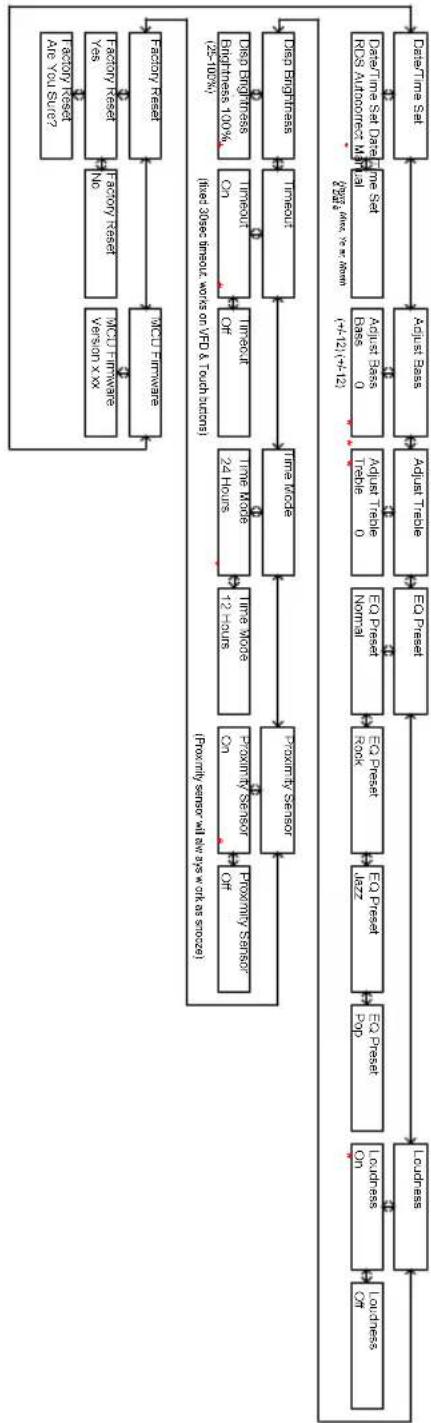
flowchart
System architecture flowchart showing data processing and storage components from user input to data storage output, including sensor inputs, cache usage, and data transfer stages.Especificaciones
Modelo: Tangent fjord CD/FM
[1] Default volume is 30, last volume after a power cycle is memorized
[2] Menu timeout from anywhere is 5 secs
[3] * indicates default setting
[4] Entering menu level 2 requires a enter press, settings below in level 2 are instant when altered by 1 and 1 with the exception of Factory Reset, which requires another enter press to be executed.
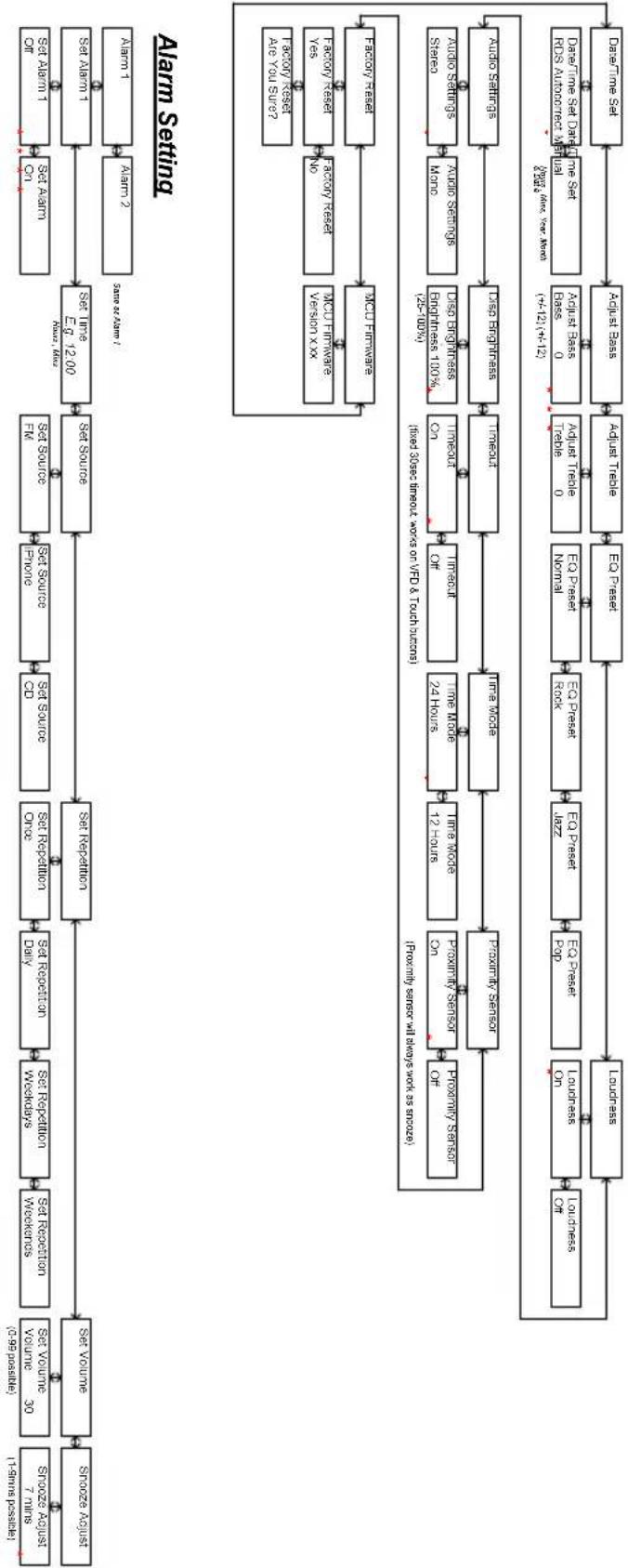
flowchart
graph TD
    A["Start: 1-10ms postlet"] --> B["Stooze August (0.99 psstle)"]
    B --> C["Stove Volume 30"]
    C --> D["Set Repetition Weekdays"]
    D --> E["Set Repetition Weekdays"]
    E --> F["Set Repetition Day"]
    F --> G["Set Repetition Day"]
    G --> H["Set Source Drive"]
    H --> I["Set Source Front"]
    I --> J["Set Source FM"]
    J --> K["Set Source EQ 1200"]
    K --> L["Set Alarm On"]
    L --> M["Set Alarm Of"]
    M --> N["Set Alarm Of"]
    N --> O["Set Alarm Of"]
    O --> P["Alarm 1 Alarm 2 Same as Alarm?"]

    subgraph Alarm Setting
        Q["Formify sensor at low/low work as secure"]
        R["Proximity Sensor Off"]
        S["Proximity Sensor On"]
        T["Proximity Sensor Out"]
        U["Polarity Sensor"]
        V["Polarity Sensor Out"]
        W["Polarity Sensor Out"]
        X["Polarity Sensor Out"]
        Y["Polarity Sensor Out"]
        Z["Polarity Sensor Out"]
        AA["Polarity Sensor Out"]
        AB["Polarity Sensor Out"]
        AC["Polarity Sensor Out"]
        AD["Polarity Sensor Out"]
        AE["Polarity Sensor Out"]
        AF["Polarity Sensor Out"]
        AG["Polarity Sensor Out"]
        AH["Polarity Sensor Out"]
        AI["Polarity Sensor Out"]
        AJ["Polarity Sensor Out"]
        AK["Polarity Sensor Out"]
        AL["Polarity Sensor Out"]
        AM["Polarity Sensor Out"]
        AN["Polarity Sensor Out"]
        AO["Polarity Sensor Out"]
        AP["Polarity Sensor Out"]
        AQ["Polarity Sensor Out"]
        AR["Polarity Sensor Out"]
        AS["Polarity Sensor Out"]
        AT["Polarity Sensor Out"]
        AU["Polarity Sensor Out"]
        AV["Polarity Sensor Out"]
        AW["Polarity Sensor Out"]
        AX["Polarity Sensor Out"]
        AY["Polarity Sensor Out"]
        AZ["Polarity Sensor Out"]
        BA["Polarity Sensor Out"]
        BB["Polarity Sensor Out"]
        BC["Polarity Sensor Out"]
        BD["Polarity Sensor Out"]
        BE["Polarity Sensor Out"]
        BF["Polarity Sensor Out"]
        BG["Polarity Sensor Out"]
        BH["Polarity Sensor Out"]
        BI["Polarity Sensor Out"]
        BJ["Polarity Sensor Out"]
        BK["Polarity Sensor Out"]
        BL["Polarity Sensor Out"]
        BM["Polarity Sensor Out"]
        BN["Polarity Sensor Out"]
        BO["Polarity Sensor Out"]
        BP["Polarity Sensor Out"]
        BQ["Polarity Sensor Out"]
        BR["Polarity Sensor Out"]
        BS["Polarity Sensor Out"]
        BT["Polarity Sensor Out"]
        BU["Polarity Sensor Out"]
        BV["Polarity Sensor Out"]
        BW["Polarity Sensor Out"]
        BX["Polarity Sensor Out"]
        BY["Polarity Sensor Out"]
        BZ["Polarity Sensor Out"]
        CA["Polarity Sensor Out"]
        CB["Polarity Sensor Out"]
        CC["Polarity Sensor Out"]
        CD["Polarity Sensor Out"]
        CE["Polarity Sensor Out"]
        CF["Polarity Sensor Out"]
        GD["Polarity Sensor Out"]
        DH["Polarity Sensor Out"]
        DI["Polarity Sensor Out"]
        DJ["Polarity Sensor Out"]
        DK["Polarity Sensor Out"]
        DL["Polarity Sensor Out"]
        DN["Polarity Sensor Out"]
        DOP["Polarity Sensor Out"]
        DPZ["Polarity Sensor Out"]
        DPZP["Latz"] --> DPZP["Latz"] --> DPZP["Latz"] --> DPZP["Latz"] --> DPZP["Latz"] --> DPZP["Latz"] --> DPZP["Latz"] --> DPZP["Latz"] --> DPZP["Latz"] --> DPZP["Latz"] --> DPZP["Latz"] --> DPZP["Latz"] --> DPZP["Latz"] --> DPZP
    end
[1] Default volume is 30, last volume after a power cycle is mastered
[2] Menu limit from anywhere is 5 secs
[3] indicates default setting
[4] Entering menu level 2 requires a enter press, settings below in level 2 are instant when altered by 10 and 17 with the exception of Factory reset; which requires another enter press to be executed.
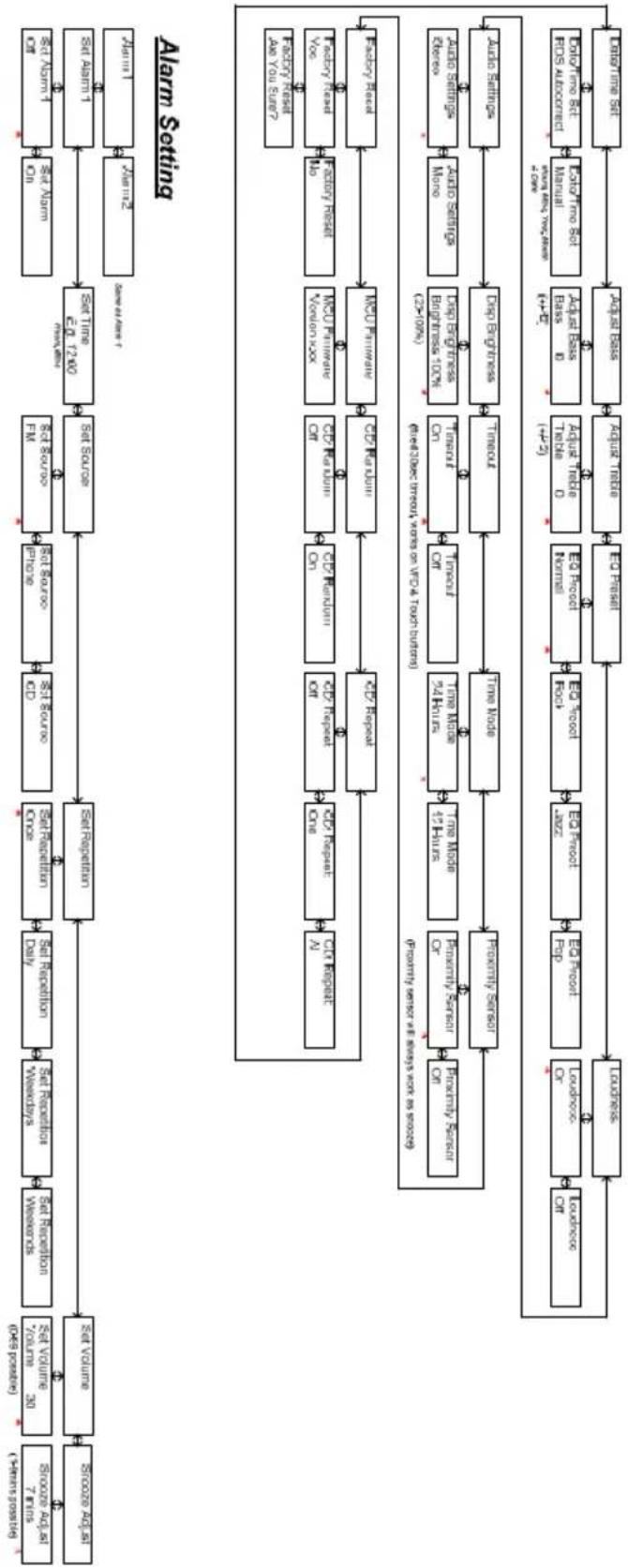
flowchart
Alarm setting flowchart detailing data processing from source address to destination, including key steps like C0/CD/SPD/SPD request, time mode, and data transfer.[1] Default volume is 30, last volume after a power cycle is memorized
[2] Mean timeout from anywhere is 5 secs
[3] indicates default setting
[4] Entering menu level 2 requires a enter press, settings below in level 2 are instant when altered by != and != with the exception of Factory Reset, which requires another enter press to be executed.

flowchart
graph TD
    A["Input Data"] --> B["Set Volume"]
    B --> C["Set Repetition"]
    C --> D["Set Repetition Once"]
    D --> E["Set Source"]
    E --> F["Set Source"]
    F --> G["Set Source"]
    G --> H["Set Source"]
    H --> I["Set Source"]
    I --> J["Set Source"]
    J --> K["Set Source"]
    K --> L["Set Source"]
    L --> M["Set Source"]
    M --> N["Set Source"]
    N --> O["Set Source"]
    O --> P["Set Source"]
    P --> Q["Set Source"]
    Q --> R["Set Source"]
    R --> S["Set Source"]
    S --> T["Set Source"]
    T --> U["Set Source"]
    U --> V["Set Source"]
    V --> W["Set Source"]
    W --> X["Set Source"]
    X --> Y["Set Source"]
    Y --> Z["Set Source"]
    Z --> AA["Set Source"]
    AA --> AB["Set Source"]
    AB --> AC["Set Source"]
    AC --> AD["Set Source"]
    AD --> AE["Set Source"]
    AE --> AF["Set Source"]
    AF --> AG["Set Source"]
    AG --> AH["Set Source"]
    AH --> AI["Set Source"]
    AI --> AJ["Set Source"]
    AJ --> AK["Set Source"]
    AK --> AL["Set Source"]
    AL --> AM["Set Source"]
    AM --> AN["Set Source"]
    AN --> AO["Set Source"]
    AO --> AP["Set Source"]
    AP --> AQ["Set Source"]
    AQ --> AR["Set Source"]
    AR --> AS["Set Source"]
    AS --> AT["Set Source"]
    AT --> AU["Set Source"]
    AU --> AV["Set Source"]
    AV --> AW["Set Source"]
    AW --> AX["Set Source"]
    AX --> AY["Set Source"]
    AY --> AZ["Set Source"]
    AZ --> BA["Set Source"]
    BA --> BB["Set Source"]
    BB --> BC["Set Source"]
    BC --> BD["Set Source"]
    BD --> BE["Set Source"]
    BE --> BF["Set Source"]
    BF --> BG["Set Source"]
    BG --> BH["Set Source"]
    BH --> BI["Set Source"]
    BI --> BJ["Set Source"]
    BJ --> BK["Set Source"]
    BK --> BL["Set Source"]
    BL --> BM["Set Source"]
    BM --> BN["Set Source"]
    BN --> BO["Set Source"]
    BO --> BP["Set Source"]
    BP --> BQ["Set Source"]
    BQ --> BR["Set Source"]
    BR --> BS["Set Source"]
    BS --> BT["Set Source"]
    BT --> BU["Set Source"]
    BU --> BV["Set Source"]
    BV --> BW["Set Source"]
    BW --> BX["Set Source"]
    BX --> BY["Set Source"]
    BY --> BZ["Set Source"]
    BZ --> CA["Set Source"]
    CA --> CB["Set Source"]
    CB --> CC["Set Source"]
    CC --> CD["Set Source"]
    CD --> CE["Set Source"]
    CE --> CF["Set Source"]
    CF --> CG["Set Source"]
    CG --> CH["Set Source"]
    CH --> CI["Set Source"]
    CI --> CJ["Set Source"]
    CJ --> CK["Set Source"]
Alarm Setting
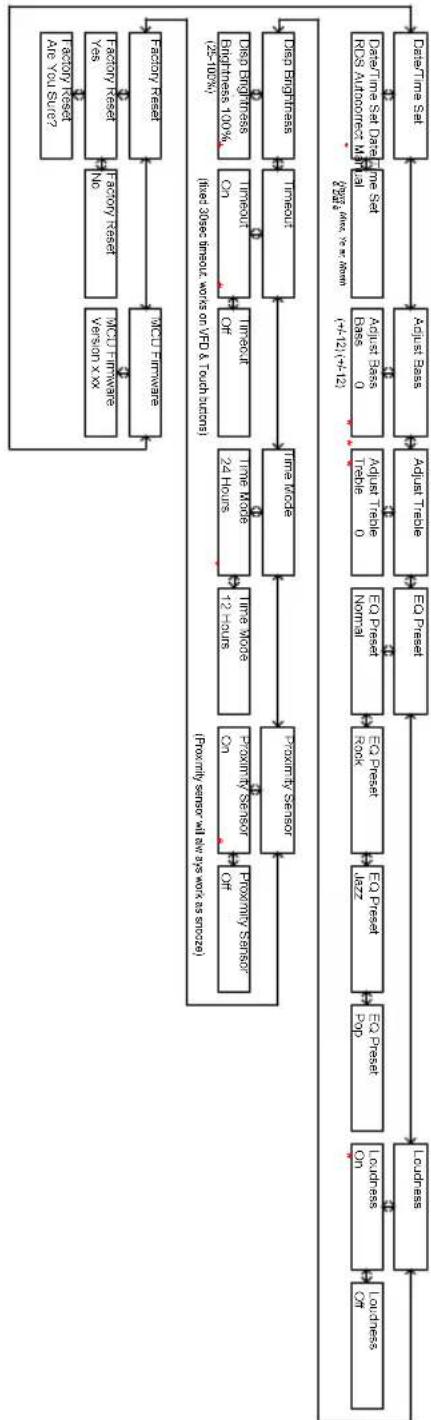
flowchart
graph TD
A["Data Time Set"] --> B["Adjust Base"]
B --> C["Adjust Trade"]
C --> D["E0 Press"]
D --> E["E0 Press"]
E --> F["EO Press"]
F --> G["EO Press"]
G --> H["EO Press"]
H --> I["EO Press"]
I --> J["EO Press"]
J --> K["Loudness"]
K --> L["Longness On"]
L --> M["Longness On"]
M --> N["Loudness On"]
N --> O["Longness On"]
O --> P["Loudness On"]
P --> Q["Loudness On"]
Q --> R["Longness On"]
R --> S["Longness On"]
S --> T["Loudness On"]
T --> U["Loudness On"]
U --> V["Longness On"]
V --> W["Loudness On"]
W --> X["Loudness On"]
X --> Y["Loudness On"]
Y --> Z["Loudness On"]
Z --> AA["Loudness On"]
AA --> AB["Loudness On"]
AB --> AC["Loudness On"]
AC --> AD["Loudness On"]
AD --> AE["Loudness On"]
AE --> AF["Loudness On"]
AF --> AG["Loudness On"]
AG --> AH["Loudness On"]
AH --> AI["Loudness On"]
AI --> AJ["Loudness On"]
AJ --> AK["Loudness On"]
AK --> AL["Loudness On"]
AL --> AM["Loudness On"]
AM --> AN["Loudness On"]
AN --> AO["Loudness On"]
AO --> AP["Loudness On"]
AP --> AQ["Loudness On"]
AQ --> AR["Loudness On"]
AR --> AS["Loudness On"]
AS --> AT["Loudness On"]
AT --> AU["Loudness On"]
AU --> AV["Loudness On"]
AV --> AW["Loudness On"]
AW --> AX["Loudness On"]
AX --> AY["Loudness On"]
AY --> AZ["Loudness On"]
AZ --> BA["Loudness On"]
BA --> BB["Loudness On"]
BB --> BC["Loudness On"]
BC --> BD["Loudness On"]
BD --> BE["Loudness On"]
BE --> BF["Loudness On"]
BF --> BG["Loudness On"]
BG --> BH["Loudness On"]
BH --> BI["Loudness On"]
BI --> BJ["Loudness On"]
BJ --> BK["Loudness On"]
BK --> BL["Loudness On"]
BL --> BM["Loudness On"]
BM --> BN["Loudness On"]
BN --> BO["Loudness On"]
BO --> BP["Loudness On"]
BP --> BQ["Loudness On"]
BQ --> BR["Loudness On"]
BR --> BS["Loudness On"]
BS --> BT["Loudness On"]
BT --> BU["Loudness On"]
BU --> BV["Loudness On"]
BV --> BW["Loudness On"]
BW --> BX["Loudness On"]
BX --> BY["Loudness On"]
BY --> BZ["Loudness On"]
BZ --> CA["Loudness On"]
CA --> CB["Loudness On"]
CB --> CC["Loudness On"]
CC --> CD["Loudness On"]
CD --> CE["Loudness On"]
CE --> CF["Loudness On"]
CF --> CG["Loudness On"]
CG --> CH["Loudness On"]
CH --> CI["Loudness On"]
CI --> CJ["Loudness On"]
CJ --> CK["Loudness On"]
CK --> CR["Loudness On"]
CR --> CS["Loudness On"]
CS --> CT["Loudness On"]
CT --> CU["Loudness On"]
CU --> CY["Loudness On"]
CY --> CB
CB --> DD["Loudness On"]
DD --> DE["Bus 0, Trade 0, Trade 0, Trade 0, Trade 0, Trade 0, Trade 0, Trade 0, Trade 0, Trade 0, Trade 0, Trade 0, Trade 0, Trade 0, Trade 0, Trade 0, Trade 0, Trade 0, Trade 0, Trade 0, Trade 0, Trade 0, Trade 0, Trade 0, Trade 0, Trade 0, etc. <br> note1["Data Time Set Data Date" indicates the same point of the data time period. The data is based on the equation "Bus" has been shown in brackets of +12.1 to +12.2""]
note2["Data Time Set Data Date" indicates the same point of the data time period. The data is based on the equation "Bus" has been shown in brackets of +12.1 to +12.2"]
subgraph Legend
direction TB
direction LR
direction SC
direction TB
direction SC
direction TB
direction SC
direction TB
direction SC
direction TB
direction SC
direction TB
direction SC
direction TB
direction SC
direction TB
direction SC
direction TB
direction SC
direction TB
direction SC
direction TB
direction SC
direction TB
direction SC
direction TB
direction SC
direction TB
direction SCC
direction SCC
direction SCC
direction SCC
direction SCC
direction SCC
direction SCC
direction SCC
direction SCC
direction SCC
direction SCC
direction SCC
direction SCC
direction SCC
direction SCC
direction SCC
direction SCC
direction SCC
direction SCC
direction SCC
direction SCC
direction SCC
direction SCC
direction SCC
direction SCC
direction CSC
direction CSC
direction CSC
direction CSC
direction CSC
direction CSC
direction CSC
direction CSC
direction CSC
direction CSC
direction CSC
direction CSC
direction CSC
direction CSC
direction CSC
direction CSC
direction CSC
direction CSC
direction CSC
direction CSC
direction CSC
direction CSC
direction CSC
direction CSC
direction CSC
direction SSC
direction SSC
direction SSC
direction SSC
direction SSC
direction SSC
direction SSC
direction SSC
direction SSC
direction SSC
direction SSC
direction SSC
direction SSC
direction SSC
direction SSC
direction SSC
direction SSC
direction SSC
direction SSC
direction SSC
direction SSC
direction SSC
direction SSC
direction SSC
direction SSC
direction CSC
direction CSC
direction CSC
direction CSC
direction CSC
direction CSC
direction CSC
direction CSC
direction CSC
direction CSC
direction CSC
direction CSC
direction CSC
direction CSC
direction CSC
direction CSC
directional CSCs:
directional CSCs:
Direction CSCs: +12.1 to +12.2; y = y_c;
Direction CSCs: -12.1 to -12.2; y_c = y_c;
Direction CSCs: +12.1 to +12.2; y_c = y_c;
Direction CSCs: -12.1 to -12.2; y_c = y_c;
Direction CSCs: +12.1 to +12.2; y_c = y_c;
Direction CSCs: -12.1 to -12.2; y_c = y_c;
Direction CSCs: +12.1 to +12.2; y_c = y_c;
Direction CSCc: +12.1 to +12.2; y_c = y_c;
Direction CSCc: -12.1 to -12.2; y_c = y_c;
Direction CSCc: +12.1 to +12.2; y_c = y_c;
Direction CSCc: -12.1 to -12.2; y_c = y_c;
Direction CSCc: +12.1 to +12.2; y_c = y_c;
Direction CSCc: -12.1 to -12.2; y_c=?
Direction CSCc: +12.1 to +12.2; y_c = y_c;
Direction CSCc: -12.1 to -12.2; y_c = y_c;
Direction CSCc: +12.1 to +12.2; y_c = y_c;
Direction CSCc: -12.1 to -12.2; y_c = y_c;
Direction CSCc: +14.1 to +14.2; y_c = y_c;
Direction CSCc: -14.1 to -14.2; y_c = y_c;
Direction CSCc: +14.1 to +14.2; y_c = y_c;
Direction CSCc: -14.1 to -14.2; y_c = y_c;
Direction CSCc: +14.1 to +14.2; y_c = y_c;
Direction CSCc: -14.1 to -14.2; y_c = y_ey;
Direction CSCc: +14.1 to +14.2; y_c = y_ey;
Direction CSCc: -14.1 to -14.2; y_c = y_ey;
Direction CSCc: +14.1 to +14.2; y_c = y_ey;
Direction CSCc: -14.1 to -14.2; y_c = y_ey;
Direction CSCc: +14.1 to +14.2; y_c = y_ey;
Direction OSCc:
Direction OSCc: +
Direction OSCc: -
Direction OSCc: -
Direction OSCc: -
Direction OSCc: -
Direction OSCc: -
Direction OSCc: -
Direction OSCc: -
Direction OSCc: -
Direction OSCc: -
Direction OSCc: -
Direction OSCc: -
Direction OSCc: -
Direction OSCc: -
Direction OSCc: -
Direction OSCc: -
Direction OSCc: -
Direction OSCc: -
Direction OSCC: -
Direction OSCc: -
Direction OSCc: -
Direction OSCc: -
Direction OSCc: -
Direction OSCc: -
Direction OSCc: -
Direction OSCc: -
Direction OSCc: -
Direction OSCc: -
Direction OSCc: -
Direction OSCc: -
Direction OSCc: -
Direction OSCc: -
Direction OSCc: -
Direction OSCc: -
Direction OSCc: -
directional data:
end
%% Legend labels:
- Lulouless ON,
- Lulouless ON,
- Lulouless ON,
- Lulouless ON,
- Lulouless ON,
- Lulouless ON,
- Lulouless ON,
- Lulouless ON,
- Lulouless ON,
- Lulouless ON,
- Lulouless ON,
- Lulouless ON,
- Lulouless ON,
- Lulouless ON,
- Lulouless ON,
- Longless ON,
- Longless ON,
- Longless ON,
- Longless ON,
- Longless ON,
- Longless ON,
- Longless ON,
- Longless ON,
- Longless ON,
- Longless ON,
- Longless ON,
- Longless ON,
- Longless ON,
- Longless ON,
- Longless ON,
- Longless ON,
- Longless ON,
- Longless ON,
- Longless ON,
- Longless ON,
- Lulouless ON,
- Lulouless ON,
- Lulouless ON,
- Lulouless ON,
- Lulouless ON,
- Lulouless ON,
- Lulouless ON,
- Lulouless ON,
- Lulouless ON,
- Lulouless ON,
- Lulouless ON,
- Lulouless ON,
- Longless ON,
- Longless ON,
- LongLessON,
- LonglessON,
- LonglessON,
- LonglessON,
- LonglessON,
- LonglessON,
- LonglessON,
- LonglessON,
- LonglessON,
- LonglessON,
- LonglessON,
- LonglessON,
- LonglessON,
- LonglessON,
- LonglessON,
- LonglessON,
- LonglessON,
- LonglessON,
- LonglessON,
- LonglessON,
- LonglessON,
- Longlasson ON,
- Longlasson ON,
- Longlasson ON,
- Longlasson ON,
- Longlasson ON,
- Longlasson ON,
- Longlasson ON,
- Longlasson ON,
- Longlasson ON,
- Longlasson ON,
- Longlasson ON,
- Longlasson ON,
- Longlasson ON,
- Longlasson ON,
- Longlasson ON,
- Longlasson ON,
- Longlasson ON,
- Longlssan ON,
- Longlassan ON,
- Longlassan ON,
- Longlassan ON,
- Longlassan ON,
- Longlassan ON,
- Longlassan ON,
- Longlassan ON,
- Longlassan ON,
- Longlassan ON,
- Longlassan ON,
- Longlassan ON,
- Longlassan ON,
- Longlassan ON,
- Longlassan ON,
- Longlassan ON,
- Longlassan ON,
- Longlassan ON,
Ludessan ON,
Ludessan ON,
Ludessan ON,
Ludessan ON, Ludessan ON, Ludessan ON, Ludessan ON, Ludessan ON, Ludessan ON, Ludessan ON, Ludessan ON, Ludessan ON, Ludessan ON, Ludessan ON, Ludessan ON, Ludessan ON, Ludessan ON, Ludessan ON, Ludessan ON, Ludessan ON, Ludessan OR |
Especificações
Modelo: Tangent fjord CD/FM
Design by Jacob Jensen
Choosing a radio for your home has until now often meant a compromise between technical features, acoustic performance, ease of operation, an aesthetic quality. With Tangent Fjord, this compromise is eliminated for the first time, allowing you to bring home a radio that satisfies demanding ears, critical eyes, and curious fingers.
Tangent Fjord is a small radio with a big sound. It appears as a minimalistic sculpture in the home, inviting operation all by itself. The high-quality materials and seductive finger-touch panel makes Tangent Fjord a physical expression for the satisfaction we experience, when quality in all aspects makes form and function unite on a higher level.
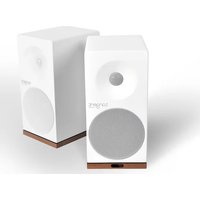


- Design by Jacob Jensen
- UK - USER MANUAL
- Front Panel
- Remote Control
- Notes
- Menu Description – FM Mode
- Menu Description – CD Mode
- Menu Description – AUX & iPhone Mode
- Specifications
- FR - MANUEL D'UTILISATION
- Vue du dessus
- Description du menu – CD Mode
- Description du menu – AUX & iPhone Mode
- Technische Daten
- Menubeskrivelse – AUX & iPhone Mode
- Specifikationer
- Menybeskrivning – CD Mode
- Menybeskrivning – AUX & iPhone Mode
- Tekniset tiedot
- Specifiche tecniche
- Especificaciones
- Especificações
Brand : TANGENT
Model : Fjord CDFM
Category : Loudspeaker