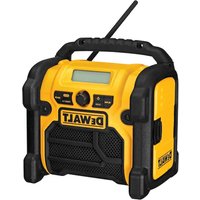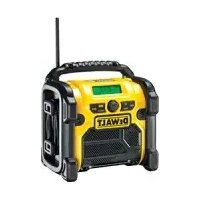
DCR016 T 1 - Radio DEWALT - Free user manual and instructions
Find the device manual for free DCR016 T 1 DEWALT in PDF.



| Features | Details |
|---|---|
| Product type | DEWALT DCR016 T 1 Radio |
| Power supply | Operates on 18V battery or mains power |
| Battery compatibility | Compatible with DEWALT 18V batteries |
| Radio range | FM and AM reception with built-in antenna |
| Connectivity | AUX input for external devices |
| Dimensions | Compact and lightweight for easy transport |
| Control panel | Simple and intuitive controls |
| Usage | Ideal for construction sites, outdoor work, and leisure |
| Maintenance | Regular cleaning and connection checks |
| Safety | Use in a dry environment, avoid exposure to water |
| Warranty | 1-year manufacturer warranty |
| Included accessories | Power cable and user manual |
Frequently Asked Questions - DCR016 T 1 DEWALT
User questions about DCR016 T 1 DEWALT
0 question about this device. Answer the ones you know or ask your own.
Ask a new question about this device
Download the instructions for your Radio in PDF format for free! Find your manual DCR016 T 1 - DEWALT and take your electronic device back in hand. On this page are published all the documents necessary for the use of your device. DCR016 T 1 by DEWALT.
USER MANUAL DCR016 T 1 DEWALT
English (original instructions)
Espanol (traducido de las instrucciones originales) 30
Francais (traduction de la notice d'instructions originale) 39
Italiano (tradotto dalle istruzioni originali) 48
Nederlands (vertaal vanui de originele instructies) 58
Norsk (oversatt fra de originale instruktjonene) 67
Portugues (traduzido das instruções originais) 75
Suomi (kännetty alkuperäisesta käytöchjeesta) 84
Svenska (oversatt frän de ursprungliga instruktionerna) 92
Türkce (original talimatlardan cevrilmistir) 101
EAANVIKA (etarapaaon aro npiwrotunies oynie) 110
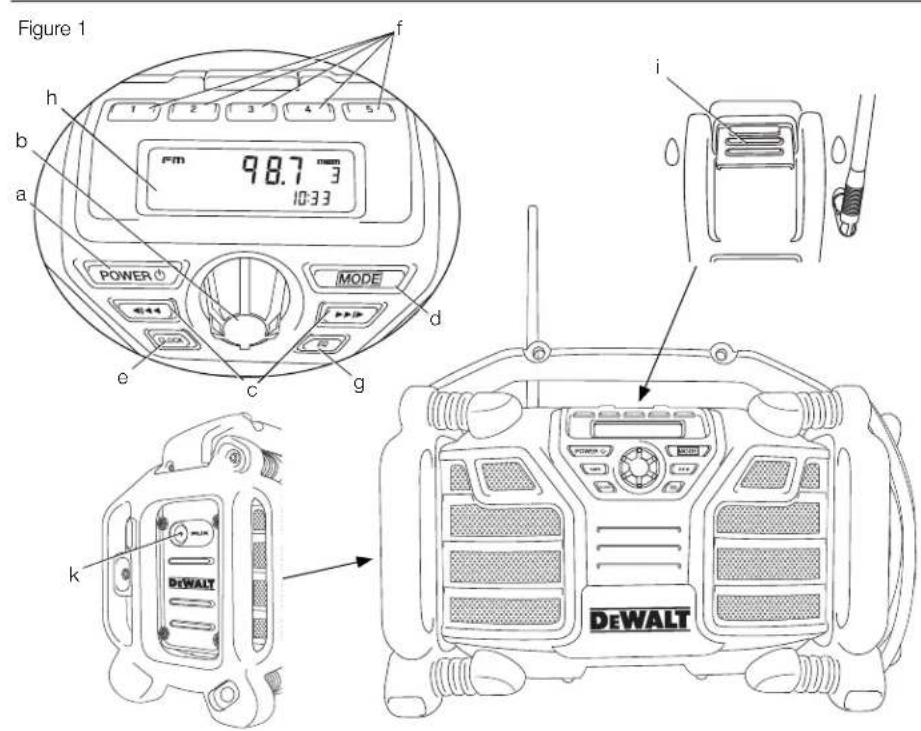
Figure 2
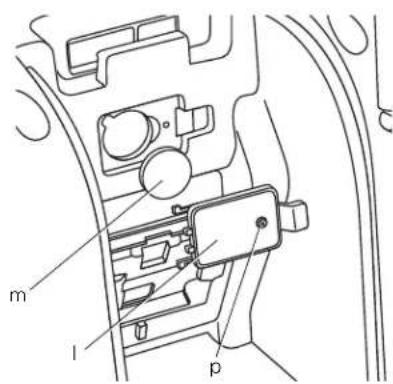
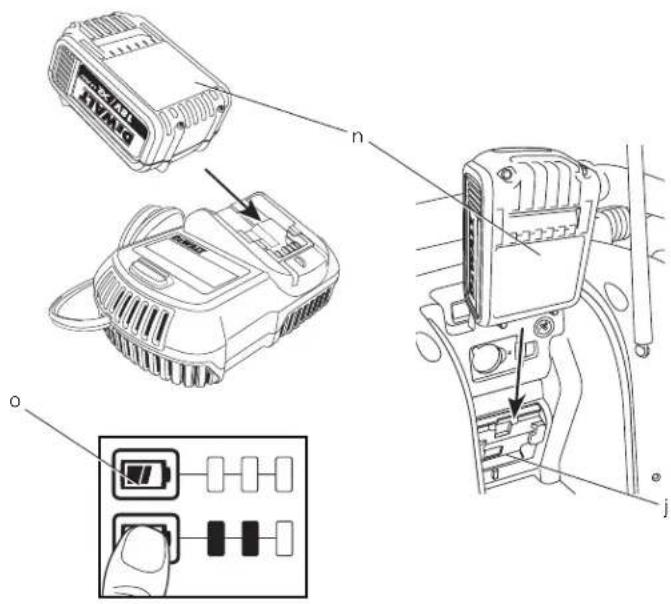
Figure 3
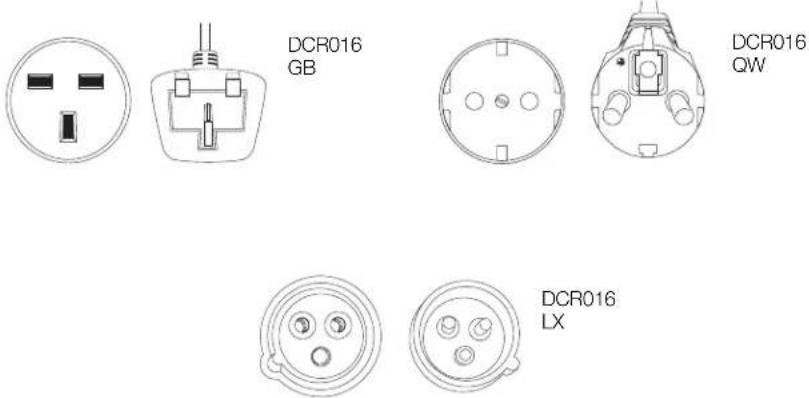
Figure 4
RADIO
DCR016
Tillykke!
Du har valgt et DEWALT-product. Mange ars erfaring, hiserdig produktdviki ng o innovation gor DEWALT en af de mest paliidige partnere for professionelle brugere af elveerktoj.
Tekniske data
| DCR016 | ||
| Stromkilde | ||
| Netspanding | VAC | 230 |
| Batterispanding | VCC | 10,8-18 |
| Batterity | ||
| Vagt | kg | |
Sikringer:
Europa 230 V 16 ampere, stromforsyning
Definitioner: sikkerhedsretningslinjer
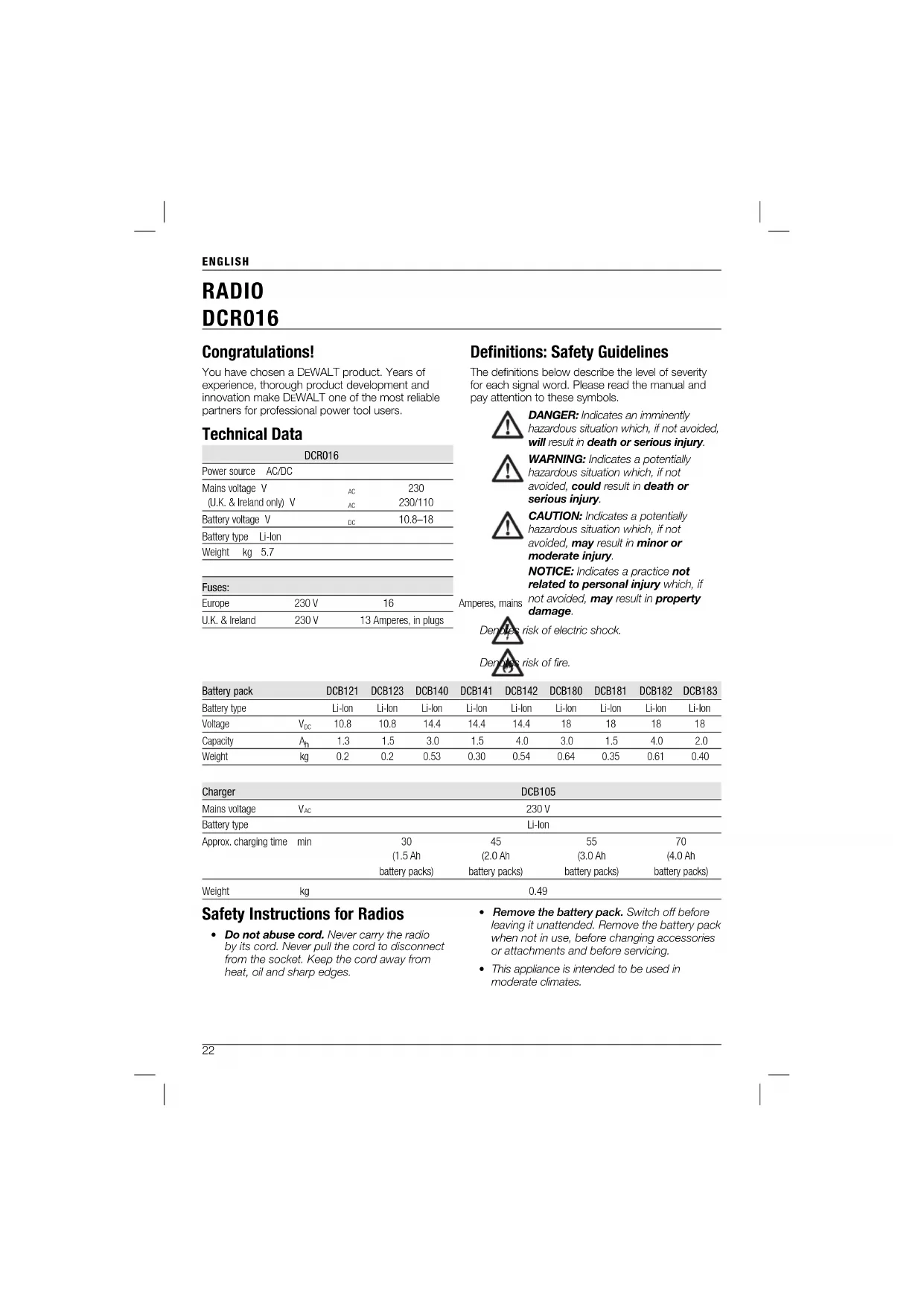
You have chosen a DEWALT product. Years of experience, thorough product development and innovation make DEWALT one of the most reliable partners for professional power tool users.
Technical Data
| DCR016 | ||
| Power source | AC/DC | |
| Mains voltage V | 230 | |
| (U.K. & Ireland only) V | 230/110 | |
| Battery voltage V | 10.8-18 | |
| Battery type LI-on | ||
| Weight kg 5.7 | ||
| Fuses: | ||
| Europe | 230 V | 16 |
| U.K. & Ireland | 230 V | 13 Amperes, in plugs |
Definitions: Safety Guidelines
The definitions below describe the level of severity for each signal word. Please read the manual and pay attention to these symbols.

DANGER: Indicates an imminently hazardous situation which, if not avoided, will result in death or serious injury.

WARNING: Indicates a potentially hazardous situation which, if not avoided, could result in death or serious injury.

CAUTION: Indicates a potentially hazardous situation which, if not avoided, may result in minor or moderate injury.
NOTICE: Indicates a practice not related to personal injury which, if not avoided, may result in property damage.

risk of electric shock.

isk of fire.
| Battery pack | DCB121 | DCB123 | DCB140 | DCB141 | DCB142 | DCB180 | DCB181 | DCB182 | DCB183 | |
| Battery type | Li-Ion | Li-Ion | Li-Ion | Li-Ion | Li-Ion | Li-Ion | Li-Ion | Li-Ion | Li-Ion | |
| Voltage | VDC | 10.8 | 10.8 | 14.4 | 14.4 | 14.4 | 18 | 18 | 18 | 18 |
| Capacity | A1 | 1.3 | 1.5 | 3.0 | 1.5 | 4.0 | 3.0 | 1.5 | 4.0 | 2.0 |
| Weight | kg | 0.2 | 0.2 | 0.53 | 0.30 | 0.54 | 0.64 | 0.35 | 0.61 | 0.40 |
| Charger | DCB105 | ||||
| Mains voltage | VAC | 230 V | |||
| Battery type | Li-Ion | ||||
| Approx. charging time | min | 30 | 45 | 55 | 70 |
| (1.5 Ah battery packs) | (2.0 Ah battery packs) | (3.0 Ah battery packs) | (4.0 Ah battery packs) | ||
| Weight | kg | 0.49 | |||
Safety Instructions for Radios
-
Do not abuse cord. Never carry the radio by its cord. Never pull the cord to disconnect from the socket. Keep the cord away from heat, oil and sharp edges.
-
Remove the battery pack. Switch off before leaving it unattended. Remove the battery pack when not in use, before changing accessories or attachments and before servicing.
This appliance is intended to be used in moderate climates.
ENGLISH
- This appliance is not intended for use by persons (including children) with reduced physical, sensory or mental capabilities, or lack of experience and knowledge, unless they have been given supervision or instruction concerning use of the appliance by a person responsible for their safety.
Children should be supervised to ensure that they do not play with the appliance. - Charger/radio shall not be exposed to dripping or splashing; no objects filled with liquids, such as vases, shall be placed on it.
No exposed flame sources, such as lighted candles, should be placed on the radio/charger. - Mains plug is used as the disconnect device; the disconnect device (plug) shall remain readily operable.
Markings on Radio
The following pictograms are shown on the radio:

Read instruction manual.
Important Safety Instructions for All Battery Chargers
SAVE THESE INSTRUCTIONS: This manual contains important safety and operating instrc tions for the DCB105 battery charger.
Before using the charger, read all instructions and cautionary markings on charger, battery pack and product using the battery pack.

WARNING: Shock hazard. Do not allow any liquid to get inside charger. Electric shock may result.

CAUTION: Burn hazard. To reduce the risk of injury, charge only DEWALT rechargeable battery packs. Other types of batteries may overheat and burst resulting in personal injury and property damage.

CAUTION: Children should be supervised to ensure that they do not play with the appliance.

CAUTION: Danger of explosion if internal battery is incorrectly replaced. Replace only with the same or equivalent type.
NOTICE: Under certain conditions, with the charger plugged in to the power supply, the exposed charging contacts
inside the charger can be shorted by foreign material. Foreign materials of a conductive nature such as, but not limited to, steel wool, aluminum foil or any buildup of metallic particles should be kept away from charger cavities. Always unplug the charger from the power supply when there is no battery pack in the cavity. Unplug charger before attempting to clean.
DO NOT attempt to charge the battery pack with any chargers other than the ones in this manual. The charger and battery pack are specifically designed to work together.
These chargers are not intended for any uses other than charging DEWALT rechargeable batteries. Any other uses may result in risk of fire, electric shock or electrocution.
- Do not expose charger to rain or snow.
- Pull by plug rather than cord when disconnecting charger. This will reduce risk of damage to electric plug and cord.
- Make sure that cord is located so that it will not be stepped on, tripped over or otherwise subjected to damage or stress.
- Do not use an extension cord unless it is absolutely necessary. Use of improper extension cord could result in risk of fire, electric shock or electrocution.
- When operating a charger outdoors, always provide a dry location and use an extension cord suitable for outdoor use. Use of a cord suitable for outdoor use reduces the risk of electric shock.
- Do not block the ventilation slots on the charger. The ventilation slots are located on the top and sides of the charger. Place the charger in a position away from any heat source.
- Do not operate charger with damaged cord or plug - have them replaced immediately.
- Do not operate charger if it has received a sharp blow, been dropped or otherwise damaged in any way. Take it to an authorised service centre.
- Do not disassemble the charger; take it to an authorised service centre when service or repair is required. Incorrect reassembly may result in a risk of electric shock, electrocution or fire.
ENGLISH
- Disconnect the charger from the outlet before attempting any cleaning. This will reduce the risk of electric shock. Removing the battery pack will not reduce this risk.
NEVER attempt to connect 2 chargers together. - The charger is designed to operate on standard 230 V household electrical power. Do not attempt to use it on any other voltage. This does not apply to the vehicular charger.
SAVE THESE INSTRUCTIONS
Chargers
The DCB105 charger accepts 10.8 V, 14.4 V and 18 V Li-Ion (DCB121, DCB123, DCB140, DCB141, DCB142, DCB180, DCB181, DCB182, and DCB183) battery packs.
This charger requires no adjustment and is designed to be as easy as possible to operate.
Charging Procedure (fi g. 3)
- Plug the charger into an appropriate 230 V outlet before inserting the battery pack.
- Insert the battery pack (n) into the charger, making sure the pack is fully seated in the charger. The red (charging) light will blink continuously indicating that the charging process has started.
- The completion of charge will be indicated by the red light remaining ON continuously. The pack is fully charged and may be used at this time or left in the charger.
NOTE: To ensure maximum performance and life of Li-ion batteries, charge the battery pack fully before first use.
Charging Process
Refer to the table below for the state of charge of the battery pack.
State of charge
barging 1 1 1 by charged
hot/cold pack delay
problem pack or charger 1
This charger will not charge a faulty battery pack. The charger will indicate faulty battery by refusing to light or by displaying problem pack or charger blink pattern.
NOTE: This could also mean a problem with a charger.
If the charger indicates a problem, take the charger and battery pack to be tested at an authorised service centre.
Hot/Cold Pack Delay
When the charger detects a battery that is too hot or too cold, it automatically starts a hot/cold pack delay, suspending charging until the battery has reached an appropriate temperature. The charger then automatically switches to the pack charging mode. This feature ensures maximum battery life.
XR Li-Ion tools are designed with an Electronic Protection System that will protect the battery against overloading, overheating or deep discharge.
The tool will automatically turn off if the Electronic Protection System engages. If this occurs, place the Li-Ion battery on the charger until it is fully charged.
A cold battery pack will charge at about half the rate of a warm battery pack. The battery pack will charge at that slower rate throughout the entire charging cycle and will not return to maximum charge rate even if the battery warms.
Important Safety Instructions for All Battery Packs
When ordering replacement battery packs, be sure to include the catalog number and voltage.
The battery pack is not fully charged out of the carton. Before using the battery pack and charger, read the safety instructions below and then follow the charging procedures outlined.
READ ALL INSTRUCTIONS
- Do not charge or use the battery pack in explosive atmospheres, such as in the presence of flammable liquids, gases or dust. Inserting or removing the battery pack from the charger may ignite the dust or fumes.
- Never force the battery pack into charger. Do not modify the battery pack in any way to fit into a non-compatible charger as battery pack may rupture causing serious personal injury.
-
Charge the battery packs only in designated DEWALT chargers.
DO NOT splash or immerse in water or other liquids. -
Do not store or use the tool and battery pack in locations where the temperature may reach or exceed 40^ ( 105^ ) (such as outside sheds or metal buildings in summer).
- Batteries shall not be exposed to excessive heat such as sunshine, fire or the like.
- For best results, make sure the battery pack is fully charged before use.
WARNING: Never attempt to open the battery pack for any reason. If the battery pack case is cracked or damaged, do not insert it into the charger. Do not crush, drop or damage battery pack. Do not use a battery pack or charger that has received a sharp blow, been dropped, run over or damaged in any way (e.g., pierced with a nail, hit with a hammer, stepped on). Electric shock or electrocution may result. Damaged battery packs should be returned to the service centre for recycling.
CAUTION: When not in use, place tool on its side on a stable surface where it will not cause a tripping or falling hazard. Some tools with large battery packs will stand upright on the battery pack but may be easily knocked over.
SPECIFIC SAFETY INSTRUCTIONS FOR LITHIUM ION (Li-Ion)
- Do not incinerate the battery pack even if it is severely damaged or is completely worn out. The battery pack can explode in a fire. Toxic fumes and materials are created when lithium ion battery packs are burned.
- If battery contents come into contact with the skin, immediately wash the area with mild soap and water. If the battery liquid gets into the eye, rinse water over the open eye for 15 minutes or until imitation ceases. If medical attention is needed, the battery electrolyte is composed of a mixture of liquid organic carbonates and lithium salts.
- Contents of opened battery cells may cause respiratory irritation. Provide fresh air. If symptoms persist, seek medical attention.

WARNING: Burn hazard. Battery liquid may be flammable if exposed to spark or flame.
Battery Pack
BATTERY TYPE
The DCR016 operates on 10.8 volt, 14.4 volt and 18 volt XR Li-Ion battery packs.
The DCB121, DCB123, DCB140, DCB141, DCB142, DCB180, DCB181, DCB182 and DCB183 battery packs may be used. Refer to Technical Data for more information.
Storage Recommendations
- The best storage place is one that is cool and dry away from direct sunlight and excess heat or cold. For optimum battery performance and life, store battery packs at room temperature when not in use.
- For long storage, it is recommended to store a fully charged battery pack in a cool, dry place out of the charger for optimal results.
NOTE: Battery packs should not be stored completely depleted of charge. The battery pack will need to be recharged before use.
Labels on Charger and Battery Pack
In addition to the pictographs used in this manual, the labels on the charger and the battery pack show the following pictographs:

Read instruction manual before use.

Charging.

Fully charged.

Hot/cold pack delay.

Problem pack or charger.

Problem powerline.

Do not probe with conductive objects.

Do not charge damaged battery packs.

DCB105
Use only with DEWALT battery packs. Others may burst, causing personal injury and damage.
ENGLISH

Do not expose to water.

Have defective cords replaced immediately.

Charge only between 4^ and 40^ .

Discard the battery pack with due care for the environment.
LHON

Do not incinerate the battery pack.
Lilion
Charges Li-ion battery packs.

See Technical Data for charging time.
Package Contents
The package contains:
1 Radio
1 Instruction manual
1 Exploded drawing
- Check for damage to the radio, parts or accessories which may have occurred during transport.
Take the time to thoroughly read and understand this manual prior to operation.
Description (fi g. 1-3)

WARNING: Never modify the radio or any part of it. Damage or personal injury could result.
a. Power button
b. Volume dial
c. Arrow buttons
d.Mode button
e. Clock button
f. Memory buttons
g.EQ button
h. LCD display
i. Battery compartment latch
j. Battery receptacle
k. Auxiliary port
1. Coin cell battery door
m. Coin cell battery
n. Battery pack
o. Fuel gauge
Electrical Safety
Always check that the battery pack voltage corresponds to the voltage on the rating plate. Also make sure that the voltage of your charger corresponds to that of your mains.

WARNING: Risk of electric shock. Use in dry locations only.
If the supply cord is damaged, it must be replaced by a specially prepared cord available through the DEWALT service organisation.
Mains Plug Replacement (U.K. & Ireland Only)
If a new mains plug needs to be fitted:
- Safely dispose of the old plug.
- Connect the brown lead to the live terminal in the plug.
- Connect the blue lead to the neutral terminal.

IG: No connection is to be made to the earth terminal.
Follow the fitting instructions supplied with good quality plugs. Recommended fuse: 13 A.
Using an Extension Cable
If an extension cable is required, use an approved 3-core extension cable suitable for the power input of this tool (see Technical Data). The minimum conductor size is 1.5mm^2 ; the maximum length is 30m .
When using a cable reel, always unwind the cable completely.
ASSEMBLY AND ADJUSTMENTS
Inserting a Battery Pack (fi g. 1, 3)

WARNING: Use only DEWALT battery packs and chargers.
NOTE: Make sure your battery pack is fully charged. If the battery pack does not produce sufficient power, charge the battery pack following the instructions in the manual of the charger.
NOTE: To ensure maximum performance and life of Li-ion batteries, charge the battery for a minimum of 10 hours before first use.
- Release the latch (i) to open the battery compartment cover.
- Insert the battery pack (n) into the receptacle until it is fully seated.
- Close and latch the battery compartment cover.
FUEL GAUGE BATTERY PACKS (FIG. 3)
Some DEWALT battery packs include a fuel gauge which consists of three green LED lights that indicate the level of charge remaining in the battery pack.
To actuate the fuel gauge, press and hold the fuel gauge button (o). A combination of the three green LED lights will illuminate designating the level of charge left. When the level of charge in the battery is below the usable limit, the fuel gauge will not illuminate and the battery will need to be recharged.
NOTE: The fuel gauge is only an indication of the charge left on the battery pack. It does not indicate tool functionality and is subject to variation based on product components, temperature and end-user application.
To Install the Coin Cell Battery (fig. 1, 2)
WARNING: When replacing battery, replace it with the same brand and type. Observe correct polarity (+ and -) when replacing batteries. Do not store or carry batteries so that metal objects can contact exposed battery terminals.
Your radio is equipped with memory capacity in order to store the time and your selected memory channels. When the radio is OFF, this memory capacity is powered by one coin cell battery that is included with the radio.
- Turn the radio off and unplug from the power source.
- Open the battery compartment by lifting the battery compartment latch (i).
- Unscrew the screw (p) on the battery door (I).
- Press down on the battery door latch and pull to open.
- Install the coin cell battery (m) according to the diagram inside the coin cell battery area.
- Replace the battery door, insert screw and tighten.
- Securely close the battery compartment.
NOTE: To reset the LCD display, clock and presets, remove the coin cell battery and re-install it. Follow this procedure if the screen seems to lock in place.
OPERATION
Instructions for Use
WARNING: Always observe the safety instructions and applicable regulations.
WARNING: Do not place the radio in locations where it may be exposed to dripping or splashing.
AC Operation (fi g. 4)
Unwrap power cord and plug into 110 or 230 V AC wall outlet.
Operating the Radio (fi g. 1)
POWER/VOLUME ADJUSTMENT
- To turn the radio on, press the power button (a).
- Turn the dial (b) clockwise to increase the volume. To decrease the volume, turn anticlockwise.
MODE FUNCTION
To choose one of the mode functions (FM, AM, or AUX), push the mode button (d) until the desired function is found. For example, if the radio is on FM, seen in upper left portion of LCD display (h), push the mode button twice to change to AUX.
TUNE OR SEEK FUNCTION
There are two methods for finding the desired frequency.
To Tune: Push the right arrow to move the tuner up the frequency band. Push the left arrow to move the tuner down the frequency band.
To Seek: Press the right arrow button (c) once and release. The tuner frequency will increase to seek the first radio station with acceptable clarity and stop at that station. The right arrow button may be pressed again to continue seeking a radio station at higher frequencies. The left arrow button may be pressed to seek radio stations at lower frequencies. The seek function is available in AM and FM modes.
TO PROGRAM THE MEMORY BUTTONS
Ten FM and five AM radio stations may be independently set. After programming the buttons, pressing 1, 2, 3, 4 or 5 will instantly change the frequency to the preset station.
- Turn power on.
- Set the radio to desired station (see Tune or Seek Function).
ENGLISH
- Press and hold one of the desired memory buttons (f). The station setting begins flashing in the LCD display (h). Continue to hold the button down until the flashing stops. The memory button is now set.
- Repeat steps 2 and 3 to set the other memory buttons.
TO PROGRAM THE CLOCK
- Turn power on (see Power/Volume Adjustment).
- Push and hold clock button (e) until the LCD display (h) begins flashing.
- Press the left arrow button repeatedly to increment the hour of the displayed time or press and hold the button to increment continuously. Use the right arrow button to adjust the minute in the same manner.
NOTE: If you do not press a button within 5 seconds, the clock programming feature will automatically return to the previous setting.
- Once the time is set, push and hold the clock button until the time on the LCD display stops flashing.
TO ADJUST THE EQ
Sound quality can be adjusted by changing the equalization of the bass or treble of the radio.
- Press the EQ button (g) to select bass or treble.
- Press the right arrow button to increase the selected setting or the left arrow button to decrease it.
- Once desired adjustment is achieved, leave all buttons released for more than 3 seconds. The procedure will exit and the equalization adjustment will remain activated.
Important Radio Notes
- The radio will run up to 8 hours on a fully charged 4.0 amp hour battery. Using batteries of lower voltage or capacity will produce less run time.
- Reception will vary depending on location and strength of radio signal.
- Certain generators may cause background noise.
-
AM reception will most likely be clearer when powered by a battery pack.
-
To use the auxiliary port (k), plug the output jack from a CD or iPodMP3 player into the port (fig. 1). The sound from the external source plays through the speakers of the DCR016.
-
iPod is a registered trademark of Apple Inc.
MAINTENANCE
Your DEWALT radio has been designed to operate over a long period of time with a minimum of maintenance. Continuous satisfactory operation depends upon proper care.
Service Notes
This product is not user serviceable. There are no user serviceable parts inside the radio. Servicing at an authorised service centre is required to avoid damage to static sensitive internal components.

Cleaning
WARNING: Never use solvents or other harsh chemicals for cleaning the non-metallic parts of the radio. These chemicals may weaken the materials used in these parts. Use a cloth dampened only with water and mild soap. Never let any liquid get inside the radio; never immerse any part of the radio into a liquid.
CHARGER CLEANING INSTRUCTIONS
WARNING: Shock hazard. Disconnect the charger from the AC outlet before cleaning. Dirt and grease may be removed from the exterior of the radio using a cloth or soft non-metallic brush. Do not use water or any cleaning solutions.
Optional Accessories
WARNING: Since accessories, other than those offered by DEWALT, have not been tested with this product, use of such accessories with this radio could be hazardous. To reduce the risk of injury, only DEWALT recommended accessories should be used with this product.
Consult your dealer for further information on the appropriate accessories.
Protecting the Environment
Separate collection. This product must not be disposed of with normal household waste.
Should you find one day that your DEWALT product needs replacement, or if it is of no further use to you, do not dispose of it with household waste. Make this product available for separate collection.

Separate collection of used products and packaging allows materials to be recycled and used again. Re-use of recycled materials helps prevent environmental pollution and reduces the demand for raw materials.
Local regulations may provide for separate collection of electrical products from the household, at municipal waste sites or by the retailer when you purchase a new product.
DEWALT provides a facility for the collection and recycling of DeWALT products once they have reached the end of their working life. To take advantage of this service please return your product to any authorised repair agent who will collect them on our behalf.
You can check the location of your nearest authorised repair agent by contacting your local DEWALT office at the address indicated in this manual. Alternatively, a list of authorised DEWALT repair agents and full details of our after-sales service and contacts are available on the Internet at: www.2helpU.com.

Rechargeable Battery Pack
This long life battery pack must be recharged when it fails to produce sufficient power on jobs which were easily done before. At the end of its technical life, discard it with due care for our environment:
- Run the battery pack down completely, then remove it from the radio.
- Li-Ion, NiCd and NiMH cells are recyclable. Take them to your dealer or a local recycling station. The collected battery packs will be recycled or disposed of properly.
GUARANTEE
DEWALT is confident of the quality of its products and offers an outstanding guarantee for professional users of the product. This guarantee statement is in addition to and in no way prejudices your contractual rights as a professional user or your statutory rights as a private non-professional user. The guarantee is valid within the territories of the Member States of the European Union and the European Free Trade Area.
30 DAY NO RISK SATISFACTION GUARANTEE
If you are not completely satisfied with the performance of your DEWALT tool, simply return it within 30 days, complete with all original components, as purchased, to the point of purchase, for a full refund or exchange. The product must have been subject to fair wear and tear and proof of purchase must be produced.
- ONE YEAR FREE SERVICE CONTRACT
If you need maintenance or service for your DEWALT tool, in the 12 months following purchase, you are entitled to one service free of charge. It will be undertaken free of charge at an authorised DEWALT repair agent. Proof of purchase must be produced. Includes labour. Excludes accessories and spare parts unless failed under warranty.
ONE YEAR FULL WARRANTY
If your DEWALT product becomes defective due to faulty materials or workmanship within 12 months from the date of purchase, DEWALT guarantees to replace all defective parts free of charge or - at our discretion - replace the unit free of charge provided that:
The product has not been misused;
The product has been subject to fair wear and tear;
- Repairs have not been attempted by unauthorised persons;
Proof of purchase is produced;
The product is returned complete with all original components.
If you wish to make a claim, contact your seller or check the location of your nearest authorised DEWALT repair agent in the DEWALT catalogue or contact your DEWALT office at the address indicated in this manual. A list of authorised DEWALT repair agents and full details of our after-sales service is available on the Internet at: www.2helpU.com.
ESPANOL
RADIO
DCR016
Enhorabuena!
Suspension de charge.

Batterie rechargeable
PROGRAMMARE I TASTI DI MEMORIA
i. Vergrendeling accucompartment
j. Accuvak
k. Hulppoort
I. Deksel knoopcelbatterij
m. Knoopcelbatterij
n. Accu
o. Vermogenmeter
ACCU'S MET VERMOGENMETER (AFB.3)
WAARSCHUWING: Houd u attiid
AFSTEL-OF ZOEEKFUNCTIE
ATT PROGRAMMERA MINNESKNAPPARNA
TIA NA IPOPAMMATIETE TO POAOI
- Θεότε Σούσημα σελειουργία (avatρέξετε Σπν ενότητα Λειουργία/Púθμιση ευτασης ἡχόι).
- PioeTE KAI KPATnE TATnEvTo KOuPTI poAoyIOU (e) EwC otou apxioe i va aVaoBnVEi n oOovn LCD (h).
- PIEOTo apioTePO TAIKTOBEOUc ETTAVEIAImuEvA ia va auGIOeTE OE Bnata To AVpOuO Wpov TTG EuaVACOeVENV OpaC NIIOTe KAI KpatNIte TO TAIKTPOYIA OUVEXOeVN AuON. XpOaIOTIOInote To DEGIO TAIKTOBEOUc YA va puOBIeTE ME TOV IIO TPOIT0 TA LETTA.
EHMEIOJH:AvEvTIeOETOTIOIOHTOTI TAnKtpoEVTOC
5 DeutepoAeTTWv, n Aetoupyia Tpoypaumatou tou pooyoiu o a EITIoppei autouata otnv nponyuev npouan.
- Otav exi opioei n wpa, TIEOTE kai kpatnoTE TATnuevo To TAIKTPO pooyiou ewc otou Otaatnae i va aovoo bnei n wpa oyn obov n LCD.
TIA NA PYOMIETE TON IZOZTAOMIETH
Mtopeite va pubiote TnV tioTnTa Tou hou aalagovtac nV IOoataaian TwV mTawv n TPIuWTO paoipowou.
EAAHNIKA
- PIEOT TO PAJKTPO IOOOTAeIOI (EQ) (g) YIA va ETIAEETE MTAGA n TPIJA.
- PIEOT TO DEGIO TANKTO BEOUc YIA VA auNGoETe TIV ETILEVeuN pOuIaion n To apIOTEPO TAnKTO BEOUc YIA VA TIV MEIOWeT.
- Otav etinuexte nV etiuntnpouhion, TepiueveTe kai mnu TieeTe kaveva TAnktpo aia akoua 3 deutepoAetta. Oa yive Edooc atto n OladiKaiaoi Ka npuHuaio oOoTaHIOIg Oa TapaueiveEevpyoToinjevN.