SDMHS75D - Monitor SONY - Free user manual and instructions
Find the device manual for free SDMHS75D SONY in PDF.


User questions about SDMHS75D SONY
0 question about this device. Answer the ones you know or ask your own.
Ask a new question about this device
Download the instructions for your Monitor in PDF format for free! Find your manual SDMHS75D - SONY and take your electronic device back in hand. On this page are published all the documents necessary for the use of your device. SDMHS75D by SONY.
USER MANUAL SDMHS75D SONY
This display is designed for use in Japan only and cannot be used in any other country.
主女仕樣
SDM-HS75D
Operating Instructions
GB
SDM-HS75D
SDM-HS95D
Owner's Record
The model and serial numbers are located at the rear of the unit. Record these numbers in the spaces provided below. Refer to them whenever you call upon your dealer regarding this product. Model No. __ Serial No. ____
WARNING
To reduce the risk of fire or electric shock, do not expose this apparatus to rain or moisture.
Dangerously high voltages are present inside the unit. Do not open the cabinet. Refer servicing to qualified personnel only.
FCC Notice
This equipment has been tested and found to comply with the limits for a Class B digital device, pursuant to Part 15 of the FCC Rules. These limits are designed to provide reasonable protection against harmful interference in a residential installation. This equipment generates, uses, and can radiate radio frequency energy and, if not installed and used in accordance with the instructions, may cause harmful interference to radio communications. However, there is no guarantee that interference will not occur in a particular installation. If this equipment does cause harmful interference to radio or television reception, which can be determined by turning the equipment off and on, the user is encouraged to try to correct the interference by one or more of the following measures:
- Reorient or relocate the receiving antenna.
- Increase the separation between the equipment and receiver.
- Connect the equipment into an outlet on a circuit different from that to which the receiver is connected.
- Consult the dealer or an experienced radio/TV technician for help. You are cautioned that any changes or modifications not expressly approved in this manual could void your authority to operate this equipment.
IMPORTANT
If you have any questions about this product, you may call; Sony Customer Information Services Center 1-800-222-7669 or http://www.roy.com/
Declaration of Conformity
Trade Name:SONY
Model: SDM-HS75D
SDM-HS95D
Responsible Party: Sony Electronics Inc.
Address: 16530 Via Esprillo, San Diego,
CA 92127 U.S.A.
Telephone Number: 858-942-2230
This device complies with part 15 of the FCC rules. Operation is subject to the following two conditions: (1) This device may not cause harmful interference, and (2) this device must accept any interference received, including interference that may cause undesired operation.
NOTICE
This notice is applicable for USA/Canada only.
If shipped to USA/Canada, install only a UL LISTED/CSA
LABELLED power supply cord meeting the following
specifications:
SPECIFICATIONS
Plug Type Nema-Plug 5-15p
Cord Type SVT or SJT, minimum 3 × 18 AWG
Length Maximum 15 feet
Rating Minimum 7 A, 125 V
NOTICE
As an ENERGY STAR Partner, Sony Corporation has determined that this product meets the ENERGY STAR guidelines for energy efficiency.
Table of Contents
Precautions. 4
Identifying parts and controls 5
Setup. 7
Step 1: Open the stand .7
Step 2: Connect the display to your computer . 7
Step 3: Connect the power cord. 8
Step 4: Secure the cords and replace the back cover .8
Step 5: Turn on the monitor and computer 8
Adjusting the tilt 9
Selecting the input signal (INPUT button). 9
Customizing Your Monitor 10
Adjusting to the desired brightness. 10
Navigating the menu. 10
Adjusting the backlight (BACKLIGHT) 11
Adjusting the contrast (CONTRAST) 12
Adjusting the black level of an image (BRIGHTNESS). 12
Adjusting the picture's sharpness and centering (SCREEN) (analog RGB signal only) 12
Adjusting the color temperature (COLOR) 13
Changing the gamma setting (GAMMA). 14
Adjusting the sharpness (SHARPNESS) 14
Changing the menu's position (MENU POSITION) 14
Changing the input automatically (INPUT SENSING) 14
Selecting the on-screen menu language (LANGUAGE). 15
Additional settings. 15
Technical Features 16
Power saving function. 16
Reducing the power consumption (mode) 16
Automatic picture quality adjustment function
(analog RGB signal only) 16
Troubleshooting. 17
On-screen messages 17
Trouble symptoms and remedies 18
Specifications. 20
-
Macintosh is a trademark licensed to Apple Computer, Inc., registered in the U.S.A. and other countries.
-
Windows® and MS-DOS are registered trademarks of Microsoft Corporation in the United States and other countries.
- IBM PC/AT and VGA are registered trademarks of IBM Corporation of the U.S.A.
VESA and DDC are trademarks of the Video Electronics Standards Association. - ENERGY STAR is a U.S. registered mark.
- Adobe and Acrobat are trademarks of Adobe Systems Incorporated.
- All other product names mentioned herein may be the trademarks or registered trademarks of their respective companies.
- Furthermore, "TM" and "8" are not mentioned in each case in this manual.
Precautions
Warning on power connections
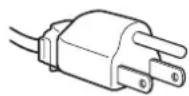
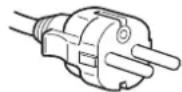
- Use the supplied power cord. If you use a different power cord, be sure that it is compatible with your local power supply.
For the customers in the U.S.A.
If you do not use the appropriate cord, this monitor will not conform to mandatory FCC standards.
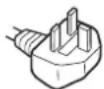
For the customers in the UK
If you use the monitor in the UK, be sure to use the appropriate UK power cord.
Example of plug types
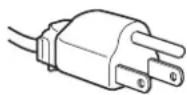
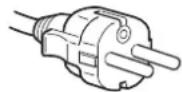
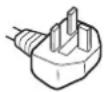
for 100 to 120V AC for 200 to 240V AC for 240V AC only
The equipment should be installed near an easily accessible outlet.
Installation
Do not install or leave the monitor:
- In places subject to extreme temperatures, for example near a radiator, heating vent, or in direct sunlight. Subjecting the monitor to extreme temperatures, such as in an automobile parked in direct sunlight or near a heating vent, could cause deformations of the casing or malfunctions.
- In places subject to mechanical vibration or shock.
- Near any equipment that generates a strong magnetic field, such as a TV or various other household appliances.
- In places subject to inordinate amounts of dust, dirt, or sand, for example near an open window or an outdoor exit. If setting up temporarily in an outdoor environment, be sure to take adequate precautions against airborne dust and dirt. Otherwise irreparable malfunctions could occur.
Place this unit on a flat surface. Do not place it on an uneven surface like the edge of a desk. If a part of this unit sticks out from such surface, it may fall or cause damaged and injury.
Handling the LCD screen
- Do not leave the LCD screen facing the sun as it can damage the LCD screen. Take care when you place the monitor by a window.
- Do not push on or scratch the LCD screen. Do not place a heavy object on the LCD screen. This may cause the screen to lose uniformity or cause LCD panel malfunctions.
- If the monitor is used in a cold place, a residual image may appear on the screen. This is not a malfunction. The screen returns to normal as the temperature rises to a normal operating level.
- If a still picture is displayed for a long time, a residual image may appear for a while. The residual image will eventually disappear.
- The LCD panel becomes warm during operation. This is not a malfunction.
Note on the LCD (Liquid Crystal Display)
Please note that the LCD screen is made with high-precision technology. However, black points or bright points of light (red, blue, or green) may appear constantly on the LCD screen, and irregular colored stripes or brightness may appear on the LCD screen. This is not malfunction.
(Effective dots: more than 99.99% )
Maintenance
- Be sure to unplug the power cord from the power outlet before cleaning your monitor.
- Clean the LCD screen with a soft cloth. If you use a glass cleaning liquid, do not use any type of cleaner containing an anti-static solution or similar additive as this may scratch the LCD screen's coating.
- Clean the cabinet, panel, and controls with a soft cloth lightly moistened with a mild detergent solution. Do not use any type of abrasive pad, scouring powder, or solvent, such as alcohol or benzine.
- Do not rub, touch, or tap the surface of the screen with sharp or abrasive items such as a ballpoint pen or screwdriver. This type of contact may result in a scratched picture tube.
- Note that material deterioration or LCD screen coating degradation may occur if the monitor is exposed to volatile solvents such as insecticide, or if prolonged contact is maintained with rubber or vinyl materials.
Transportation
- Disconnect all cables from the monitor and grasp the monitor firmly with both hands when transporting. If you drop the monitor, you may be injured or the monitor may be damaged.
- When you transport this monitor for repair or shipment, use the original carton and packing materials.
Installation on a wall or a mounting arm
If you intend to install the display on a wall or a mounting arm, be sure to consult qualified personnel.
Note that the back cover must be removed for this type of installation.
Disposal of the monitor
- Do not dispose of this monitor with general household waste.
- The fluorescent tube used in this monitor contains mercury. Disposal of this monitor must be carried out in accordance to the regulations of your local sanitation authority.
Identifying parts and controls
See the pages in parentheses for further details.
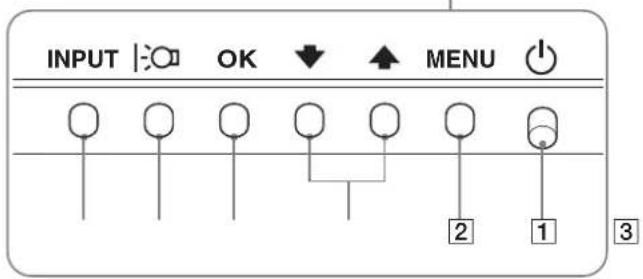
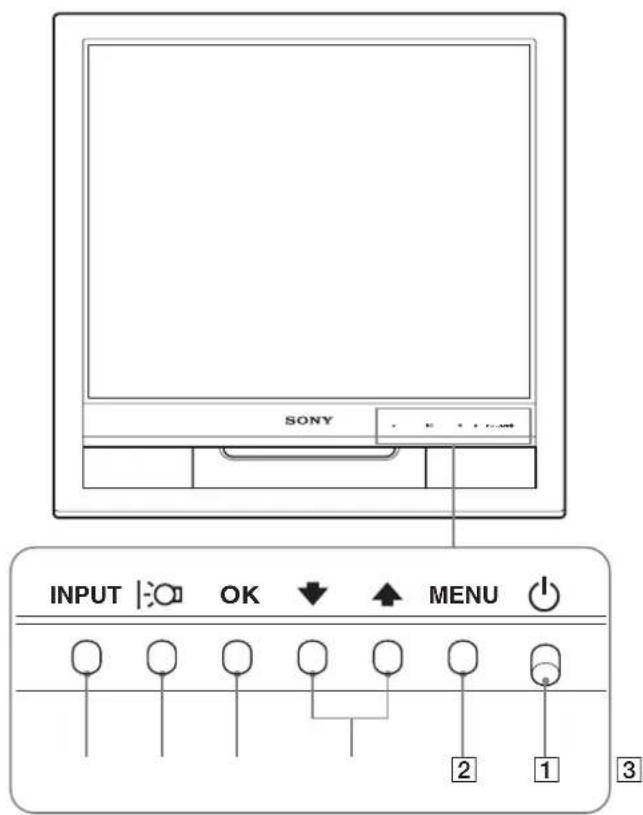
The (power) switch and the control buttons are on the lower right part of the front of the monitor.
Front of the display
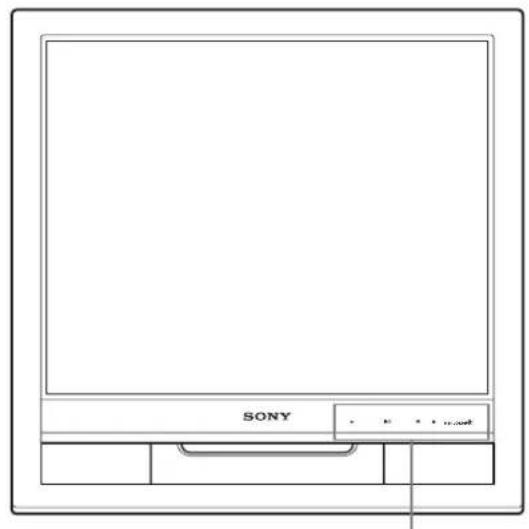
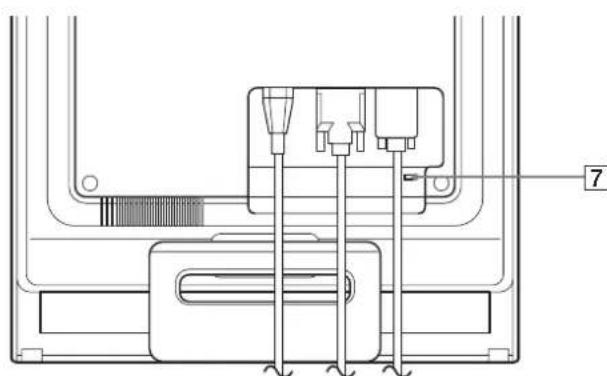
Rear of the display
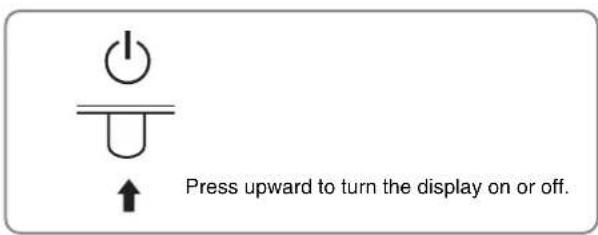
1 (Power) switch and indicator (pages 8, 16)
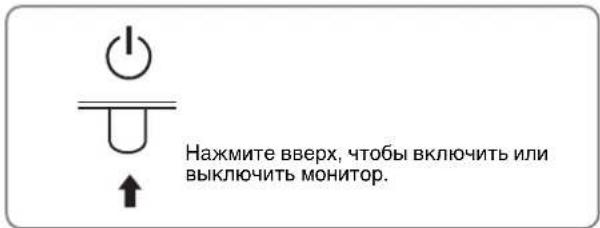
To turn the display on or off, press the (power) switch upward.
The power indicator lights up in green when the display is turned on, and lights up in orange when the monitor is in power saving mode.
2 MENU button (pages 10, 11)
This button displays or closes the main menu.
3 ↓/↑ buttons (page 11)
These buttons function as the / buttons when selecting the menu items and making adjustments.
4 OK button (page 11)
This button selects the item or executes the settings in the menu.
5:Button (page 10)
This button is used to change the brightness of the screen.
6 INPUT button (page 9)
This button switches the video input signal between INPUT1 and INPUT2 when two computers are connected to the
monit 6
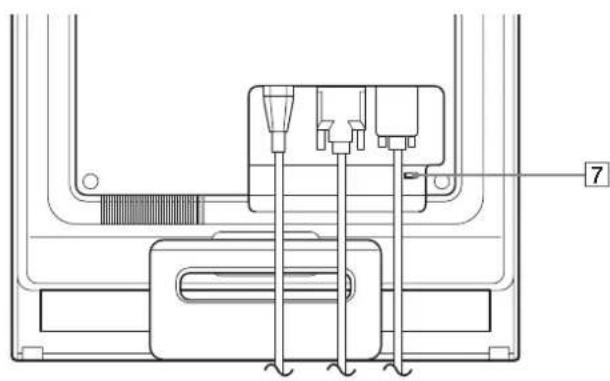
7 Security Lock Hole
The security lock hole should be applied with the Kensington Micro Saver Security System.
Micro Saver Security System is a trademark of Kensington.
Rear of the display

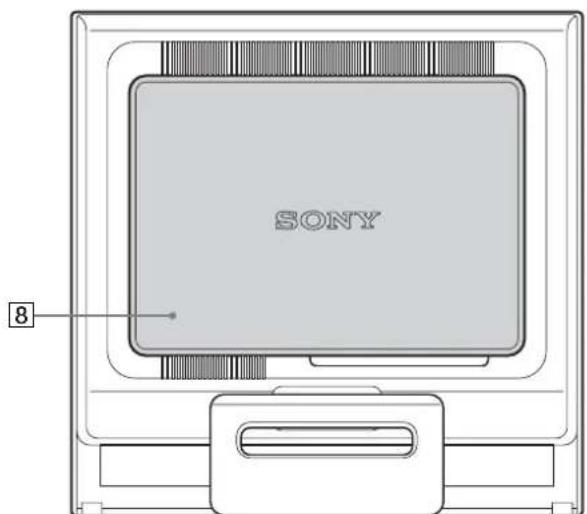
Remove the back cover.

Back cover (page 8)
Remove this cover when you connect/disconnect cables or cords.
9 AC IN connector (page 8)
Connect the power cord (supplied).
DVI-D input connector (digital RGB) for INPUT1 (page 7)
This connector inputs digital RGB video signals that comply with DVI Rev.1.0.
11 HD15 input connector (analog RGB) (page 7)
This connector inputs analog RGB video signals (0.7 Vp-p, positive) and SYNC signals.
Setup
Before using your monitor, check that the following items are included in your carton:
- LCD display
Power cord
HD15-HD15 video signal cable (analog RGB)
DVI-D video signal cable (digital RGB)
Cord strap - CD-ROM (utility software for Windows/Macintosh, Operating Instructions, etc.)
Warranty card - Quick Setup Guide
Step 1: Open the stand
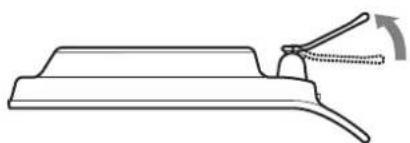
Note
The stand is folded at the factory. Be sure not to place the display vertically with the stand as it is. Otherwise, the display may topple over.
Step 2:Connect the display to your computer
Turn off the monitor and computer before connecting.
Notes
- Do not touch the pins of the video signal cable connector as this might bend the pins.
- Check the alignment of the HD15 connector to prevent bending the pins of the video signal cable connector.
Connect a computer equipped with a DVI output connector (digital RGB)
Using the supplied DVI-D video signal cable (digital RGB), connect the computer to the monitor's DVI-D input connector (digital RGB)
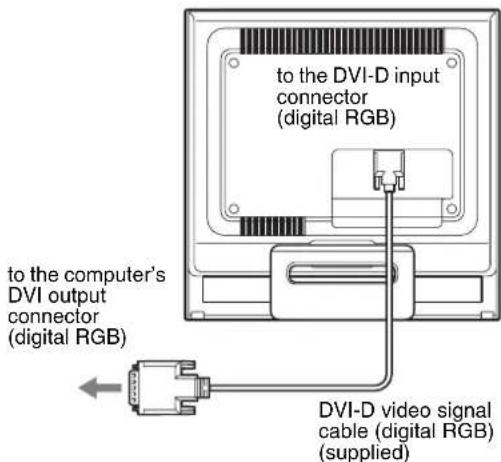
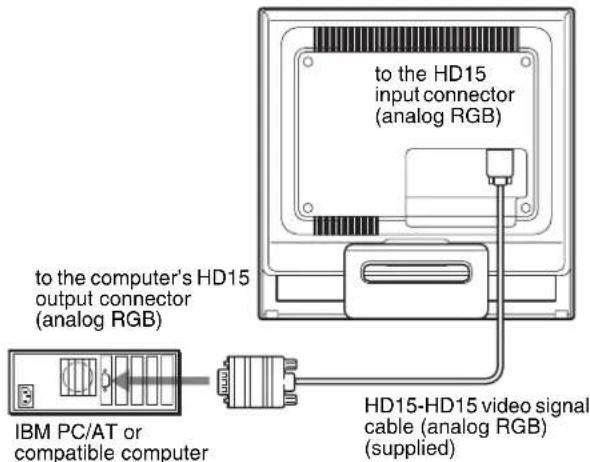
Connect a computer equipped with an HD15 output connector (analog RGB)
Using the supplied HD15-HD15 video signal cable (analog RGB), connect the computer to the monitor's HD15 input connector (analog RGB).
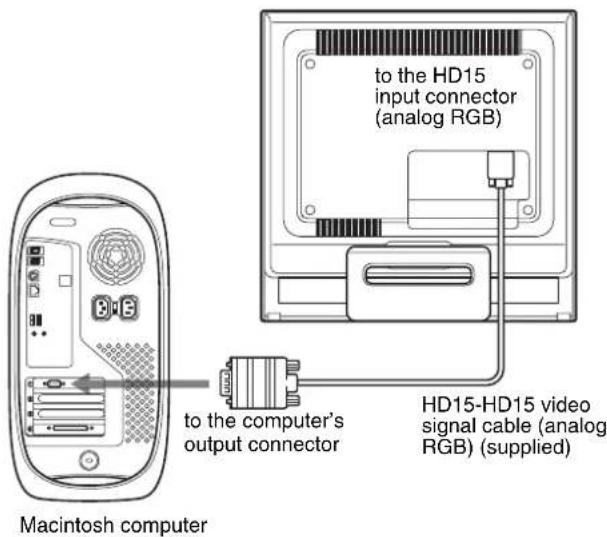
Connect the computer according to the following illustrations.
- Connecting to an IBM PC/AT or compatible computer
Connecting to a Macintosh computer
When connecting this monitor to a Macintosh computer, use the Macintosh adapter (not supplied) if necessary. Connect the Macintosh adapter to the computer before connecting the cable.
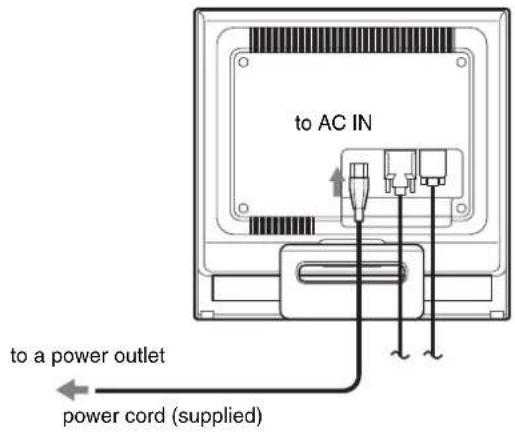
Step 3:Connect the power cord
With the monitor and computer switched off, first connect the power cord to the monitor, then connect it to a power outlet.
Step 4: Secure the cords and replace the back cover
1 Bundle the cables and cords.
Using the supplied cord strap, bundle the cables and cords.
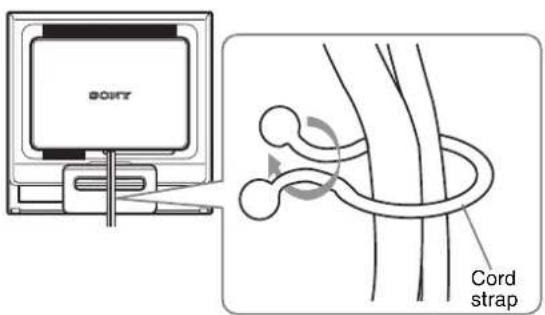
The illustration of the back of the monitor shown here is that of the SDM-HS75D.
The same applies for the other models.
2 Replace the back cover.
Step 5:Turn on the monitor and computer
1 Press the (power) switch upward.
The (power) indicator of the monitor lights up in green.
2 Turn on the computer.
The installation of your monitor is complete. If necessary, use the monitor's controls to adjust the picture.
If no picture appears on your screen
- Check that the power cord and the video signal cable are properly connected.
- If NO INPUT SIGNAL appears on the screen:
The computer is in the power saving mode. Try pressing any key on the keyboard or moving the mouse.
- If CABLE DISCONNECTED appears on the screen:
Check that the video signal cable is properly connected.
- If OUT OF RANGE appears on the screen:
Reconnect the old monitor. Then adjust the computer's graphics board within the following ranges.
| Analog RGB Digital RGB | |
| Horizontal frequency | 28-80 kHz 28-64 kHz |
| Vertical frequency | 48-75 Hz 60 Hz |
| Resolution | 1280 × 1024 or less 1280 × 1024 or less |
For more information about the on-screen messages, see "Trouble symptoms and remedies" on page 18.
No need for specific drivers
The monitor complies with the "DDC" Plug & Play standard and automatically detects all the monitor's information. No specific driver needs to be installed to the computer.
The first time you turn on your computer after connecting the monitor, the setup Wizard may appear on the screen. In this case, follow the on-screen instructions. The Plug & Play monitor is automatically selected so that you can use this monitor.
The vertical frequency turns to 60Hz
Since flickers are unobtrusive on the monitor, you can use it as it is. You do not need to set the vertical frequency to any particular high value.
Adjusting the tilt
This display can be adjusted within the angles shown below.
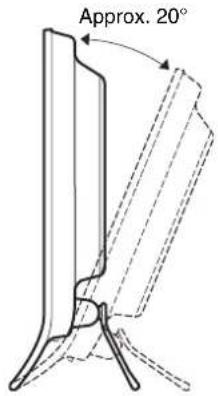
Grasp the lower sides of the LCD panel, then adjust screen tilt.
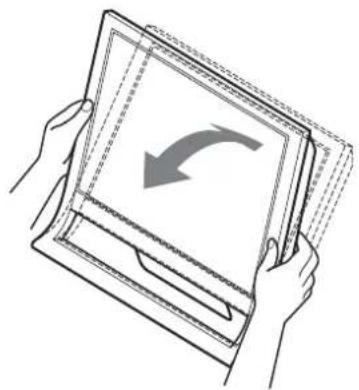
To use the display comfortably
This display is designed so that you can set it up at a comfortable viewing angle. Adjust the viewing angle of your display according to the height of the desk and chair, and so that light is not reflected from the screen to your eyes.
Note
When adjusting the screen tilt, make sure not to knock or drop the display off the desk.
Selecting the input signal (INPUT button)
Press the INPUT button.
The input signal change each time you press this button.
| INPUT | |
| On-screen message | Input signal configuration |
| (Appears about 5 seconds on the upper left corner.) | |
| INPUT1: DVI-D DVI-D input connector (digital RGB) for INPUT1 | |
| INPUT2: HD15 HD15 input connector (analog RGB) for INPUT2 | |
Customizing Your Monitor
Before making adjustments
Connect the monitor and the computer, and turn them on. Wait for at least 30 minutes before making adjustments for the best result.
You can make numerous adjustments to your monitor using the on-screen menu.
Adjusting to the desired brightness
Pressing the button, you can change the brightness of the screen. Each time you press the button, the changes as follows.
USER HIGH MIDDLE LOW USER ...
The brightness of the screen will decrease as the mode setting changes from HIGH to LOW.
If you select USER, you can adjust the backlight level by pressing the / buttons, the same as when you select BACKLIGHT using the menu.
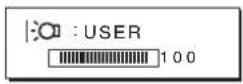
Only while the mode is set to USER, are the BACKLIGHT, CONTRAST, and BRIGHTNESS items of the menu available (page 11).
If you select LOW, the power consumption is reduced (page 16).
Navigating the menu
Press the MENU button to display the main menu on your screen. See page 11 for more information on using the MENU button.
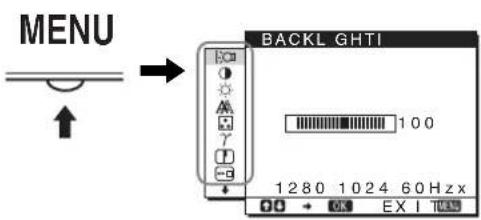
Use the / and OK buttons to select the icons in the above main menu illustration. The following 1 to 10 menu appears. Keep pressing to scroll down until the icons in menu 9 and 10 appear. See page 11 for more information on using the / and OK buttons.
1 BACKLIGHTO (page 11)
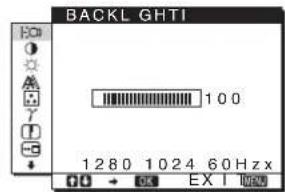
Select the BACKLIGHT menu to adjust the brightness of the backlight.
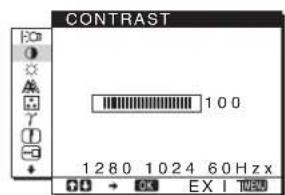
2 CONTRAST (page 12)
Select the CONTRAST menu to adjust the picture contrast.
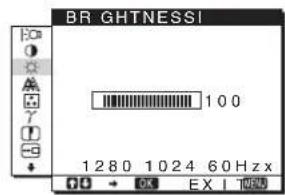
BRIGHTNESS (page 12)
Select the BRIGHTNESS menu to adjust the picture brightness (black level).
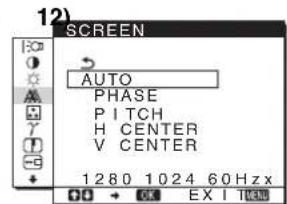
4 SCREEN
Select the SCREEN menu to adjust the picture's sharpness (phase/pitch) or its centering (horizontal/vertical position).
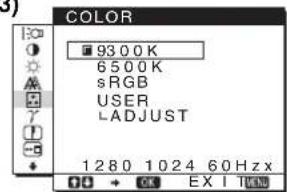
5 COLOR
(page
Select the COLOR menu to adjust the color temperature of the picture. This adjusts the tone of the screen. While COLOR is set to sRGB, you cannot adjust CONTRAST, BRIGHTNESS or GAMMA.
13)
6 GAMMA
(page
Select the GAMMA menu to change the picture's color shade setting.
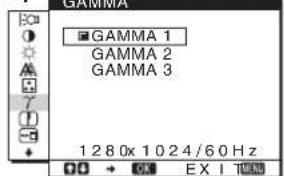
14)
7 SHARPNESS (page 14)
Select the SHARPNESS menu to adjust to sharpen the edge of images.
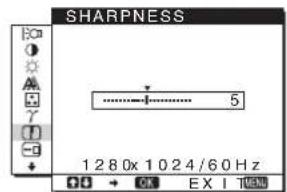
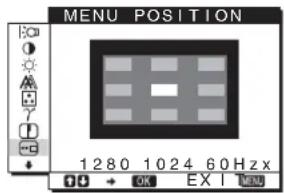
8 MENU POSITION-3 (page 14)
Select the MENU POSITION to change the onscreen menu position.
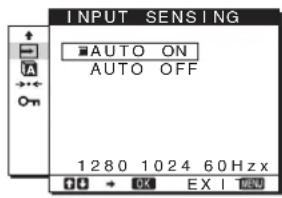
9 INPUT SENSING (page 14)
The monitor automatically detects an input signal to an input terminal, and changes the input automatically before the monitor goes into the power saving mode.
10 LANGUAGEAG (page
Select LANGUAGE to change the language used on menus or messages.
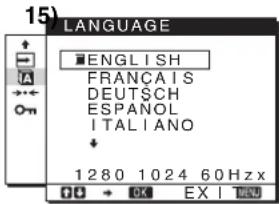
11 Other menus (page 15)
Set the following menu items.
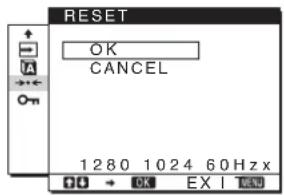
- RESET
MENULONCK
Using the MENU, / , and OK buttons
1 Display the main menu.
Press the MENU button to display the main menu on your screen.
2 Select the menu you want to adjust.
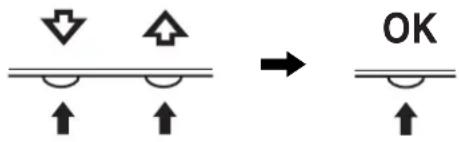
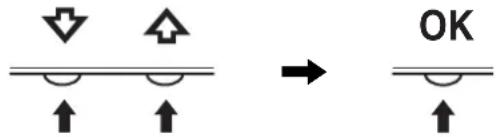
Press the / buttons to display the desired menu. Press the OK button to select the menu item.
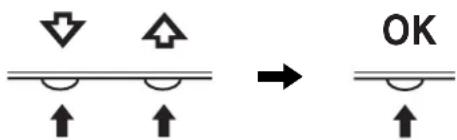
3 Adjust the menu.
Press the / buttons to make the adjustment, then press the OK button.
When you press the OK button, the setting is stored, then the display returns to the previous menu.
4 Close the menu.
Press the MENU button once to return to normal viewing. If no buttons are pressed, the menu closes automatically after about 45 seconds.
Resetting the adjustments
You can reset the adjustments using the RESET menu. See page 15 for more information on resetting the adjustments.
Adjusting the backlight (BACKLIGHT)
If the screen is too bright, adjust the backlight and make the screen easier to see.
Note
The backlight cannot be adjusted when the mode is set to HIGH, MIDDLE, or LOW (page 10).
1 Press the MENU button.
The main menu appears on the screen.
2 Press the / buttons to select BACKLIGHT and press the OK button.
The BACKLIGHT menu appears on the screen.
3 Press the / buttons to adjust the light level and press the OK button.
Adjusting the contrast (CONTRAST)
Adjust the picture contrast.
Note
The contrast cannot be adjusted when the mode is set to HIGH, MIDDLE, or LOW (page 10).
1 Press the MENU button.
The main menu appears on the screen.
2 Press the / buttons to select ① (CONTRAST) and press the OK button.
The CONTRAST menu appears on the screen.
3 Press the / buttons to adjust the contrast and press the OK button.
Adjusting the black level of an image (BRIGHTNESS)
Adjust the picture brightness (black level).
Note
The brightness cannot be adjusted when the mode is set to HIGH, MIDDLE, or LOW (page 10).
1 Press the MENU button.
The main menu appears on the screen.
2 Press the / buttons to select (BRIGHTNESS) and press the OK button.
The BRIGHTNESS menu appears on the screen.
3 Press the / buttons to adjust the brightness and press the OK button.
Adjusting the picture's sharpness and centering (SCREEN) (analog RGB signal only)
Automatic picture quality adjustment function
When the monitor receives an input signal, it automatically adjusts the picture's position and sharpness (phase/pitch), and ensures that a clear picture appears on the screen (page 16).
Note
While the automatic picture quality adjustment function is activated, only the (power) switch will operate.
If the automatic picture quality adjustment function of this monitor seems to not completely adjust the picture
You can make further automatic adjustment of the picture quality for the current input signal. (See AUTO below.)
If you still need to make further adjustments to the picture quality
You can manually adjust the picture's sharpness (phase/pitch) and position (horizontal/vertical position).
These adjustments are stored in memory and automatically recalled when the display receives the same input signal.
These settings may have to be repeated if you change the input signal after reconnecting your computer.
Make further automatic adjustments to the picture quality for the current input signal (AUTO)
1 Press the MENU button.
The main menu appears on the screen.
2 Press the / buttons to select (SCREEN) and press the OK button.
The SCREEN menu appears on the screen.
3 Press the / buttons to select AUTO and press the OK button.
Make the appropriate adjustments of the screen's phase, pitch and horizontal/vertical position for the current input signal and store them.
4 Press the / buttons to select and press the OK button.
Return to the menu screen.
Adjust the picture's sharpness manually (PHASE/PITCH)
You can adjust the picture's sharpness as follows.
1 Set the resolution to 1280 × 1024 on the computer.
2 Load the CD-ROM.
3 Start the CD-ROM, select the region and model, and display the test pattern.
For Windows
Click [Utility] [Windows]/[Win Utility.exe].
For Macintosh
Click [Utility] [Mac]/[Mac Utility].
4 Press the MENU button.
The main menu appears on the screen.
5 Press the / buttons to select (SCREEN) and press the OK button.
The SCREEN menu appears on the screen.
6 Press the / buttons to select PHASE and press the OK button.
The PHASE menu appears on the screen.
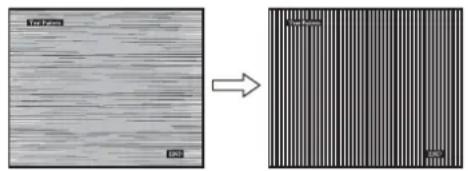
7 Press the / buttons until the horizontal stripes are at a minimum.
Adjust so that the horizontal stripes are at a minimum.
8 Press the OK button.
Return to the SCREEN menu.
If vertical stripes are observed over the entire screen, adjust pitch by the following steps.
9 Press the / buttons to select PITCH and press the OK button.
The PITCH menu appears on the screen.
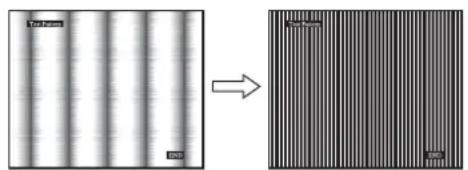
10 Press the / buttons until the vertical stripes disappear.
Adjust so that the vertical stripes disappear.
11 Click END on the screen to turn off the test pattern.
12 Press the OK button.
Return to the SCREEN menu.
13 Press the / buttons to select and press the OK button.
Return to the menu screen.
Adjust the picture's position manually (H CENTER/V CENTER)
If the picture is not in the center of the screen, adjust the picture's centering as follows.
1 Set the resolution to 1280 × 1024 on the computer.
2 Load the CD-ROM.
3 Start the CD-ROM, select the region and model, and display the test pattern.
For Windows
Click [Utility] [Windows]/[Win Utility.exe].
For Macintosh
Click [Utility] [Mac]/[Mac Utility].
4 Press the MENU button.
The main menu appears on the screen.
5 Press the / buttons to select (SCREEN) and press the OK button.
The SCREEN menu appears on the screen.
6 Press the / buttons to select H CENTER or V CENTER and press the OK button.
The H CENTER or V CENTER menu appears on the screen.
7 Press the / buttons to center the test pattern in the screen.
8 Click END on the screen to turn off the test pattern.
9 Press the OK button.
Return to the SCREEN menu.
10 Press the / buttons to select and press the OK button.
Return to the menu screen.
Adjusting the color temperature (COLOR)
You can select the color level of the picture's white color field from the default color temperature settings.
Also, if necessary, you can fine tune the color temperature.
You can set the desired color temperature for each mode of the brightness of screen.
1 Press the MENU button.
The main menu appears on the screen.
2 Press the / buttons to select (COLOR) and press the OK button.
The COLOR menu appears on the screen.
3 Press the / buttons to select the desired color temperature and press the OK button.
Whites will change from a bluish hue to reddish hue as the temperature is lowered from 9300K (default setting) to 6500K.
While "USER" is selected for the brightness of screen, you can set the color temperature to "sRGB."
When you select "sRGB," the colors adjust to the sRGB profile. (The sRGB color setting is an industry-standard color space protocol designed for computer products.) If you select "sRGB," the color settings of your computer must be set to the sRGB profile.
Notes
- If a connected computer or other equipment is not sRGB-compliant, color cannot be adjusted to the sRGB profile.
- While COLOR is set to sRGB, you cannot adjust CONTRAST, BRIGHTNESS or GAMMA.
Fine tuning the color temperature (USER ADJUSTMENT)
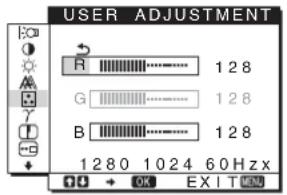
1 Press the / buttons to select ADJUST and press the OK button.
The USER ADJUSTMENT menu appears on the screen.
2 Press the / buttons to select R (Red) or B (Blue) and press the OK button. Then press the / buttons to adjust the color temperature and press the OK button.
Since this adjustment changes the color temperature by increasing or decreasing the R and B components with respect to G (green), the G component is fixed.
3 Press the / buttons to select , then press the OK button.
The new color setting is stored in memory for USER and automatically recalled whenever USER is selected.
The main menu appears on the screen.
Changing the gamma setting (GAMMA)
You can associate the picture's color shade on the screen with the picture's original color shade.
1 Press the MENU button.
The main menu appears on the screen.
2 Press the / buttons to select (GAMMA) and press the OK button.
The GAMMA menu appears on the screen.
3 Press the / buttons to select the desired mode and press the OK button.
Adjusting the sharpness (SHARPNESS)
Adjust to sharpen the edge of images, etc.
1 Press the MENU button.
The main menu appears on the screen.
2 Press the / buttons to select (SHARPNESS) and press the OK button.
The SHARPNESS menu appears on the screen.
3 Press the / buttons to adjust the sharpness and press the OK button.
Changing the menu's position (MENU POSITION)
You can change the menu position if it is blocking an image on the screen.
1 Press the MENU button.
The main menu appears on the screen.
2 Press the / buttons to select (MENU POSITION) and press the OK button.
The MENU POSITION menu appears on the screen.
3 Press the / buttons to select the desired position and press the OK button.
There are three positions each for the top, center and bottom of the screen.
Changing the input automatically (INPUT SENSING)
When you select AUTO ON in the INPUT SENSING menu, the monitor automatically detects an input signal to an input terminal, and changes the input automatically before the monitor goes into the power saving mode.
1 Press the MENU button.
The main menu appears on the screen.
2 Press the / buttons to select (INPUT SENSING) and press the OK button.
The INPUT SENSING menu appears on the screen.
3 Press the / buttons to select the desired mode and press the OK button.
- AUTO ON: When the selected input terminal has no input signal, or when you select an input terminal by the INPUT button on the monitor and the terminal has no input signal, the on-screen message appears (page 17) and the monitor checks the input signal to another input terminal automatically to change the input.
When the input is changed, the selected input terminal is displayed on the left upper of the screen.
When there is no input signal, the monitor goes into the power saving mode automatically.
- AUTO OFF: The input is not changed automatically.
Press the INPUT button to change the input.
Selecting the on-screen menu language (LANGUAGE)
You can change the language used on menus or messages displayed on this monitor.
1 Press the MENU button.
The main menu appears on the screen.
2 Keep pressing the button until the icon of the desired option item appears.
3 Press the / buttons to select (LANGUAGE) and press the OK button.
The LANGUAGE menu appears on the screen.
4 Press the / buttons to select a language and press the OK button.
- ENGLISH
FRANÇAIS: French - DEUTSCH: German
- ESPANOL: Spanish
ITALIANO:Italian - NEDERLANDS: Dutch
SVENSKA: Swedish
:RvSiKu
·曲本蕴ese
·中文: C h i n e s e
Additional settings
You can adjust the following options:
- RESET
-MENU LOCK
1 Press the MENU button.
The main menu appears on the screen.
2 Keep pressing the button until the icon of the desired option item appears.
3 Press the / buttons to select the desired option item and press the OK button.
Adjust the selected option item according to the following instructions.
Resetting the adjustment data to the defaults
You can reset the adjustments to the default settings.
1 Press the / buttons to select (RESET) and press the OK button.
The RESET menu appears on the screen.
2 Press the / buttons to select the desired mode and press the OK button.
- OK: To reset all of the adjustment data to the default settings. Note that the LANGUAGE) setting is not reset by this method.
- CANCEL: To cancel resetting and return to the menu screen.
Locking the menus and controls
You can lock the control of buttons to prevent accidental adjustments or resetting.
1 Press the / buttons to select ON (MENU LOCK) and press the OK button.
The MENU LOCK menu appears on the screen.
2 Press the / buttons to select ON or OFF and press the OK button.
- ON: Only the (power) switch will operate. If you attempt any other operation, the OMENU LOCK icon appears on the screen.
- OFF:Set MENU LOCK) to OFF. If you set the (MENU LOCK) item to ON, only this menu item can be selected.
Technical Features
Power saving function
This monitor meets the power-saving guidelines set by VESA, ENERGY STAR, and NUTEK. If the monitor is connected to a computer or video graphics board that is DPMS (Display Power Management Standard) for Analog input/DMPM (DVI Digital Monitor Power Management) for Digital input compliant, the monitor will automatically reduce power consumption as shown below.
SDM-HS75D
| Power mode Power consumption (power) indicator | |
| normal operation | 45 W (max.) green |
| active off* (deep sleep)** | 1.0 W (max.) orange |
| power off 1.0 W (max.) off | |
SDM-HS95D
| Power mode Power consumption | ( power) indicator | |
| normal operation | 50 W (max.) green | |
| active off* (deep sleep)** | 1.0 W (max.) | orange |
| power off 1.0 W (max.) | off | |
- When your computer enters the "active off" mode, the input signal is cut and NO INPUT SIGNAL appears on the screen. After 5 seconds, the monitor enters the power saving mode.
** "deep sleep" is the power saving mode defined by the Environmental Protection Agency.
Reducing the power consumption
(m o d e)
If you set the mode to LOW by pressing the button on the front of the monitor, the backlight level is reduced and the power consumption is reduced, too.
Press the button several times until LOW appears.
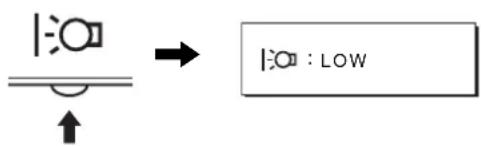
LOW appears on the screen and the backlight level is reduced. LOW automatically disappears after about 5 seconds.
Automatic picture quality adjustment function (analog RGB signal only)
When the monitor receives an input signal, it automatically adjusts the picture's position and sharpness (phase/pitch), and ensures that a clear picture appears on the screen.
The factory preset mode
When the monitor receives an input signal, it automatically matches the signal to one of the factory preset modes stored in the monitor's memory to provide a high quality picture at the center of the screen. If the input signal matches the factory preset mode, the picture appears on the screen automatically with the appropriate default adjustments.
If input signals do not match one of the factory preset modes
When the monitor receives an input signal that does not match one of the factory preset modes, the automatic picture quality adjustment function of this monitor is activated to ensure that a clear picture always appears on the screen (within the following monitor frequency ranges):
Horizontal frequency: 28 - 80kHz
Vertical frequency: 48 - 75Hz
Consequently, the first time the monitor receives input signals that do not match one of the factory preset modes, the monitor may take a longer time than normal to display the picture on the screen. This adjustment data is automatically stored in memory so that next time, the monitor will function in the same way as when the monitor receives the signals that match one of the factory preset modes.
Note
There is no need to adjust the digital RGB signals of the DVI-D input connector for INPUT1.
If you adjust the phase, pitch, and picture position manually
For some input signals, the automatic picture quality adjustment function of this monitor may not completely adjust the picture position, phase, and pitch. In this case, you can set these adjustments manually (page 12). If you set these adjustments manually, they are stored in memory as user modes and automatically recalled whenever the monitor receives the same input signals.
Note
While the automatic picture quality adjustment function is activated, only the (power) switch will operate.
Troubleshooting
Before contacting technical support, refer to this section.
On-screen messages
If there is something wrong with the input signal, one of the following messages appears on the screen. To solve the problem, see "Trouble symptoms and remedies" on page 18.
If OUT OF RANGE appears on the screen
This indicates that the input signal is not supported by the monitor's specifications. Check the following items.
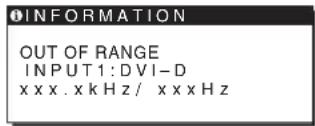
If "xxx.x kHz/xxx Hz" is displayed
This indicates that either the horizontal or vertical frequency is not supported by the monitor's specifications.
The figures indicate the horizontal and vertical frequencies of the current input signal.
If "RESOLUTION >1280× 1024 " is displayed
This indicates that the resolution is not supported by the monitor's specifications (1280 × 1024 or less).
If NO INPUT SIGNAL appears on the screen
This indicates that no signal is being input.
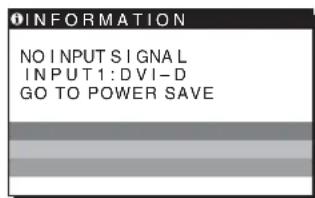
GO TO POWER SAVE
The monitor will enter the power saving mode after about 5 seconds from the time the message is displayed.
If CABLE DISCONNECTED appears on the screen
This indicates that the video signal cable has been disconnected.
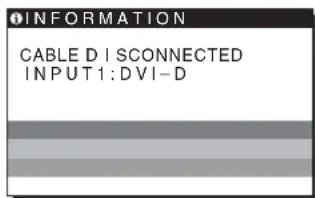
Trouble symptoms and remedies
If a problem is caused by the connected computer or other equipment, please refer to the connected equipment's instruction manual.
| Symptom Check these items | |
| No picture | |
| If the (power) indicator is not lit, or if the (power) indicator will not light up when the (power) switch is pressed, | Check that the power cord is properly connected. |
| If CABLE DISCONNECTED appears on the screen, | Check that the video signal cable is properly connected and all plugs are firmly seated in their sockets (page 7).Check that the video input connector's pins are not bent or pushed in.A non-supplied video signal cable is connected. If you connect a non-supplied video signal cable, CABLE DISCONNECTED may appear on the screen before entering the power saving mode. This is not a malfunction. |
| If NO INPUT SIGNAL appears on the screen, or the (power) indicator is orange, | Check that the video signal cable is properly connected and all plugs are firmly seated in their sockets (page 7).Check that the video input connector's pins are not bent or pushed in.Problems caused by a computer or other equipment connected, and not caused by the monitorThe computer is in the power saving mode. Try pressing any key on the keyboard or moving the mouseCHECK that your graphics board is installed properly.Check that the computer's power is on.Restart the computer. |
| If OUT OF RANGE appears on the screen, | Problems caused by a computer or other equipment connected, and not caused by the monitorCheck that the video frequency range is within that specified for the monitor. If you replaced an old monitor with this monitor, reconnect the old monitor and adjust the computer's graphics board within the following ranges:Horizontal: 28-80 kHz (analog RGB), 28-64 kHz (digital RGB)Vertical: 48-75 Hz (analog RGB), 60 Hz (digital RGB)Resolution: 1280 x 1024 or less |
| If you are using Windows and replaced an old monitor with this monitor, | If you replaced an old monitor with this monitor, reconnect the old monitor and do the following. Select "SONY" from the "Manufacturers" list and select "SDM-HS75D" or "SDM-HS95D" from the "Models" list in the Windows device selection screen. If the model name of this monitor does not appear in the "Models" list, try "Plug & Play." |
| If using a Macintosh system, | If you use the Macintosh adapter (not supplied), check that the Macintosh adapter and the video signal cable are properly connected (page 7). |
| Picture flickers, bounces, oscillates, or is scrambled | Adjust the pitch and phase (page 12).Try plugging the monitor into a different AC outlet, preferably on a different circuit.Problems caused by a computer or other equipment connected, and not caused by the monitorCheck your graphics board manual for the proper monitor setting Confirm that the graphics mode (VESA, Macintosh 19" Color, etc.) and the frequency of the input signal are supported by this monitor. Even if the frequency is within the proper range, some graphics boards may have a sync pulse that is too narrow for the monitor to sync correctly.Adjust the computer's refresh rate (vertical frequency) to obtain the best possible picture. |
| Picture is fuzzy · Adjust the brightness and contrast (page 12). · Adjust the pitch and phase (page 12). ■ Problems caused by a computer or other equipment connected, and not caused by the monitor · Set the resolution to 1280 × 1024 on your computer. | |
| Picture is ghosting | · Eliminate the use of video cable extensions and/or video switch boxes. · Check that all plugs are firmly seated in their sockets. |
| Picture is not centered or sized properly | · Adjust the pitch and phase (page 12). · Adjust the picture position (page 13). Note that some video modes do not fill the screen to the edges. |
| Picture is too small | ■ Problems caused by a computer or other equipment connected, and not caused by the monitor · Set the resolution to 1280 × 1024 on your computer. |
| Picture is dark | · Adjust the brightness using the BRIGHTNESS menu (page 12). · Adjust the backlight (page 11). · Adjust the brightness using the button (page 10). · It takes a few minutes for the display to become bright after turning on the monitor. |
| Wavy or elliptical pattern (moire) is visible | · Adjust the pitch and phase (page 12). |
| Color is not uniform · Adjust the pitch and phase (page 12). | |
| White does not look white · Adjust the color temperature (page 13). | |
| Monitor buttons do not operate (appears on the screen) | · If the menu lock is set to ON, set it to OFF (page 15). |
| The monitor turns off after a while | ■ Problems caused by a computer or other equipment connected, and not caused by the monitor · Set the computer's power saving setting to off. |
| Resolution displayed on the menu screen is incorrect | · Depending on the graphics board setting, the resolution displayed on the menu screen may not coincide with the one set on the computer. |
GB
If any problem persists, call your authorized Sony dealer and give the following information:
- Model name: SDM-HS75D or SDM-HS95D
- Serial number
- Detailed description of the problem
- Date of purchase
- Name and specifications of your computer and graphics board
Specifications
SDM-HS75D
LCD panel Panel type: a-Si TFT Active Matrix
Picture size: 17.0 inch
Input signal format RGB operating frequency*
Horizontal: 28 - 80kHz (analog RGB)
28-64 kHz (digital RGB)
Vertical: 48 - 75Hz (analog RGB)
60 Hz (digital RGB)
Resolution Horizontal: Max.1280 dots
Vertical: Max.1024 lines
Input signal levels Analog RGB video signal
0.7 Vp-p, 75 Ω, positive
SYNC signal
TTL level, 2.2k
positive or negative
(Separate horizontal and vertical)
Digital RGB (DVI) signal: TMDS
(Single link)
Power requirements 100-240 V, 50-60 Hz
Max. 1.0 A
Power consumption Max. 45 W
Operating temperature 5-35 C
Dimensions (width/height/depth)
Display (upright):
Approx. 388× 382.5× 139.2mm
(15^1 / 4 × 15 × 5^1 / 2 inches)
Mass Approx. 5kg (11 lb).
3/8 oz.)
Plug & Play DDC2B
Accessories See page 7.
SDM-HS95D
LCD panel Panel type: a-Si TFT Active Matrix
Picture size: 19.0 inch
Input signal format RGB operating frequency*
Horizontal: 28 - 80kHz (analog RGB)
28-64 kHz (digital RGB)
Vertical: 48 - 75Hz (analog RGB)
60Hz (digital RGB)
Resolution Horizontal: Max.1280 dots
Vertical: Max.1024 lines
Input signal levels Analog RGB video signal
0.7 Vp-p, 75 Ω, positive
SYNC signal
TTL level, 2.2k
positive or negative
(Separate horizontal and vertical)
Digital RGB (DVI) signal: TMDS
(Single link)
Power requirements 100-240 V, 50-60 Hz
Max. 1.0 A
Power consumption Max. 50 W
Operating temperature 5-35 ^ C
Dimensions (width/height/depth)
Display (upright):
Approx. 435× 418× 146mm
(17^1 / 8 × 16^1 / 2 × 5^3 / 4 inches)
Mass Approx. 6kg (13 lb. 3
5/8 oz.)
Plug & Play DDC2B
Accessories See page 7.
- Recommended horizontal and vertical timing condition
Horizontal sync width duty should be more than 4.8% of total horizontal time or 0.8~ s whichever is larger.
Horizontal blanking width should be more than 2.5 sec
Vertical blanking width should be more than 450~ sec
Design and specifications are subject to change without notice.
TFTLCDColor ComputerDisplay
Mode d'emploi_
FR
SDM-HS75D
SDM-HS95D
Owner's Record
The model and serial numbers are located at the rear of the unit. Record these numbers in the spaces provided below. Refer to them whenever you call upon your dealer regarding this product. Model No. __ Serial No. ____
WARNING
To reduce the risk of fire or electric shock, do not expose this apparatus to rain or moisture.
Dangerously high voltages are present inside the unit. Do not open the cabinet. Refer servicing to qualified personnel only.
FCC Notice
This equipment has been tested and found to comply with the limits for a Class B digital device, pursuant to Part 15 of the FCC Rules. These limits are designed to provide reasonable protection against harmful interference in a residential installation. This equipment generates, uses, and can radiate radio frequency energy and, if not installed and used in accordance with the instructions, may cause harmful interference to radio communications. However, there is no guarantee that interference will not occur in a particular installation. If this equipment does cause harmful interference to radio or television reception, which can be determined by turning the equipment off and on, the user is encouraged to try to correct the interference by one or more of the following measures:
- Reorient or relocate the receiving antenna.
- Increase the separation between the equipment and receiver.
- Connect the equipment into an outlet on a circuit different from that to which the receiver is connected.
- Consult the dealer or an experienced radio/TV technician for help. You are cautioned that any changes or modifications not expressly approved in this manual could void your authority to operate this equipment.
IMPORTANT
If you have any questions about this product, you may call; Sony Customer Information Services Center 1-800-222-7669 or http://www.sony.com/
Declaration of Conformity
Trade Name:SONY
Model: SDM-HS75D
SDM-HS95D
Responsible Party: Sony Electronics Inc.
Address: 16530 Via Esprillo, San Diego
CA 92127 U.S.A.
Telephone Number: 858-942-2230
This device complies with part 15 of the FCC rules. Operation is subject to the following two conditions: (1) This device may not cause harmful interference, and (2) this device must accept any interference received, including interference that may cause undesired operation.
NOTICE
This notice is applicable for USA/Canada only.
If shipped to USA/Canada, install only a UL LISTED/CSA
LABELLED power supply cord meeting the following
specifications:
SPECIFICATIONS
Plug Type Nema-Plug 5-15p
Cord Type SVT or SJT, minimum 3 × 18 AWG
Length Maximum 15 feet
Rating Minimum 7 A, 125 V
NOTICE
As an ENERGY STAR Partner, Sony Corporation has determined that this product meets the ENERGY STAR guidelines for energy efficiency.
Table des matieres
Precautions. 4
Specifications techniques
Consummation electrique Max. 45 W
Consummation electrode Max. 50 W
The model and serial numbers are located at the rear of the unit. Record these numbers in the spaces provided below. Refer to them whenever you call upon your dealer regarding this product. Model No. __ Serial No. ____
WARNING
To reduce the risk of fire or electric shock, do not expose this apparatus to rain or moisture.
Dangerously high voltages are present inside the unit. Do not open the cabinet. Refer servicing to qualified personnel only.
FCC Notice
This equipment has been tested and found to comply with the limits for a Class B digital device, pursuant to Part 15 of the FCC Rules. These limits are designed to provide reasonable protection against harmful interference in a residential installation. This equipment generates, uses, and can radiate radio frequency energy and, if not installed and used in accordance with the instructions, may cause harmful interference to radio communications. However, there is no guarantee that interference will not occur in a particular installation. If this equipment does cause harmful interference to radio or television reception, which can be determined by turning the equipment off and on, the user is encouraged to try to correct the interference by one or more of the following measures:
- Reorient or relocate the receiving antenna.
- Increase the separation between the equipment and receiver.
- Connect the equipment into an outlet on a circuit different from that to which the receiver is connected.
- Consult the dealer or an experienced radio/TV technician for help. You are cautioned that any changes or modifications not expressly approved in this manual could void your authority to operate this equipment.
IMPORTANT
If you have any questions about this product, you may call; Sony Customer Information Services Center 1-800-222-7669 or http://www.roy.com/
Declaration of Conformity
Trade Name:SONY
Model:SDM-HS75D
SDM-HS95D
Responsible Party: Sony Electronics Inc.
Address: 16530 Via Esprillo, San Diego,
CA 92127 U.S.A.
Telephone Number: 858-942-2230
This device complies with part 15 of the FCC rules. Operation is subject to the following two conditions: (1) This device may not cause harmful interference, and (2) this device must accept any interference received, including interference that may cause undesired operation.
NOTICE
This notice is applicable for USA/Canada only.
If shipped to USA/Canada, install only a UL LISTED/CSA
LABELLED power supply cord meeting the following specifications:
SPECIFICATIONS
Plug Type Nema-Plug 5-15p
Cord Type SVT or SJT, minimum 3 × 18 AWG
Length Maximum 15 feet
Rating Minimum 7 A, 125 V
NOTICE
As an ENERGY STAR Partner, Sony Corporation has determined that this product meets the ENERGY STAR guidelines for energy efficiency.
Inhalt
The model and serial numbers are located at the rear of the unit. Record these numbers in the spaces provided below. Refer to them whenever you call upon your dealer regarding this product. Model No. __ Serial No. ____
WARNING
To reduce the risk of fire or electric shock, do not expose this apparatus to rain or moisture.
Dangerously high voltages are present inside the unit. Do not open the cabinet. Refer servicing to qualified personnel only.
FCC Notice
This equipment has been tested and found to comply with the limits for a Class B digital device, pursuant to Part 15 of the FCC Rules. These limits are designed to provide reasonable protection against harmful interference in a residential installation. This equipment generates, uses, and can radiate radio frequency energy and, if not installed and used in accordance with the instructions, may cause harmful interference to radio communications. However, there is no guarantee that interference will not occur in a particular installation. If this equipment does cause harmful interference to radio or television reception, which can be determined by turning the equipment off and on, the user is encouraged to try to correct the interference by one or more of the following measures:
- Reorient or relocate the receiving antenna.
- Increase the separation between the equipment and receiver.
- Connect the equipment into an outlet on a circuit different from that to which the receiver is connected.
- Consult the dealer or an experienced radio/TV technician for help. You are cautioned that any changes or modifications not expressly approved in this manual could void your authority to operate this equipment.
IMPORTANT
If you have any questions about this product, you may call; Sony Customer Information Services Center 1-800-222-7669 or http://www.roy.com/
Declaration of Conformity
Trade Name:SONY
Model:SDM-HS75D
SDM-HS95D
Responsible Party: Sony Electronics Inc.
Address: 16530 Via Esprillo, San Diego,
CA 92127 U.S.A.
Telephone Number: 858-942-2230
This device complies with part 15 of the FCC rules. Operation is subject to the following two conditions: (1) This device may not cause harmful interference, and (2) this device must accept any interference received, including interference that may cause undesired operation.
NOTICE
This notice is applicable for USA/Canada only.
If shipped to USA/Canada, install only a UL LISTED/CSA
LABELLED power supply cord meeting the following
specifications:
SPECIFICATIONS
Plug Type Nema-Plug 5-15p
Cord Type SVT or SJT, minimum 3 × 18 AWG
Length Maximum 15 feet
Rating Minimum 7 A, 125 V
NOTICE
As an ENERGY STAR Partner, Sony Corporation has determined that this product meets the ENERGY STAR guidelines for energy efficiency.
Índice
Precauciones 4
(Horizontal y vertical
independiente)
(Horizontal y vertical
independiente)
TTL (logica de transistor a transistor)
The model and serial numbers are located at the rear of the unit. Record these numbers in the spaces provided below. Refer to them whenever you call upon your dealer regarding this product. Model No. __ Serial No. ____
WARNING
To reduce the risk of fire or electric shock, do not expose this apparatus to rain or moisture.
Dangerously high voltages are present inside the unit. Do not open the cabinet. Refer servicing to qualified personnel only.
FCC Notice
This equipment has been tested and found to comply with the limits for a Class B digital device, pursuant to Part 15 of the FCC Rules. These limits are designed to provide reasonable protection against harmful interference in a residential installation. This equipment generates, uses, and can radiate radio frequency energy and, if not installed and used in accordance with the instructions, may cause harmful interference to radio communications. However, there is no guarantee that interference will not occur in a particular installation. If this equipment does cause harmful interference to radio or television reception, which can be determined by turning the equipment off and on, the user is encouraged to try to correct the interference by one or more of the following measures:
- Reorient or relocate the receiving antenna.
- Increase the separation between the equipment and receiver.
- Connect the equipment into an outlet on a circuit different from that to which the receiver is connected.
- Consult the dealer or an experienced radio/TV technician for help. You are cautioned that any changes or modifications not expressly approved in this manual could void your authority to operate this equipment.
IMPORTANT
If you have any questions about this product, you may call; Sony Customer Information Services Center 1-800-222-7669 or http://www.roy.com/
Declaration of Conformity
Trade Name:SONY
Model:SDM-HS75D
SDM-HS95D
Responsible Party: Sony Electronics Inc.
Address: 16530 Via Esprillo, San Diego,
CA 92127 U.S.A.
Telephone Number: 858-942-2230
This device complies with part 15 of the FCC rules. Operation is subject to the following two conditions: (1) This device may not cause harmful interference, and (2) this device must accept any interference received, including interference that may cause undesired operation.
NOTICE
This notice is applicable for USA/Canada only.
If shipped to USA/Canada, install only a UL LISTED/CSA
LABELLED power supply cord meeting the following
specifications:
SPECIFICATIONS
Plug Type Nema-Plug 5-15p
Cord Type SVT or SJT, minimum 3 × 18 AWG
Length Maximum 15 feet
Rating Minimum 7 A, 125 V
NOTICE
As an ENERGY STAR Partner, Sony Corporation has determined that this product meets the ENERGY STAR guidelines for energy efficiency.
Indice
Precauzioni 4
The model and serial numbers are located at the rear of the unit. Record these numbers in the spaces provided below. Refer to them whenever you call upon your dealer regarding this product. Model No. __ Serial No. ____
WARNING
To reduce the risk of fire or electric shock, do not expose this apparatus to rain or moisture.
Dangerously high voltages are present inside the unit. Do not open the cabinet. Refer servicing to qualified personnel only.
FCC Notice
This equipment has been tested and found to comply with the limits for a Class B digital device, pursuant to Part 15 of the FCC Rules. These limits are designed to provide reasonable protection against harmful interference in a residential installation. This equipment generates, uses, and can radiate radio frequency energy and, if not installed and used in accordance with the instructions, may cause harmful interference to radio communications. However, there is no guarantee that interference will not occur in a particular installation. If this equipment does cause harmful interference to radio or television reception, which can be determined by turning the equipment off and on, the user is encouraged to try to correct the interference by one or more of the following measures:
- Reorient or relocate the receiving antenna.
- Increase the separation between the equipment and receiver.
- Connect the equipment into an outlet on a circuit different from that to which the receiver is connected.
- Consult the dealer or an experienced radio/TV technician for help. You are cautioned that any changes or modifications not expressly approved in this manual could void your authority to operate this equipment.
IMPORTANT
If you have any questions about this product, you may call; Sony Customer Information Services Center 1-800-222-7669 or http://www.sony.com/
Declaration of Conformity
Trade Name:SONY
Model: SDM-HS75D
SDM-HS95D
Responsible Party: Sony Electronics Inc.
Address: 16530 Via Esprillo, San Diego,
CA 92127 U.S.A.
Telephone Number: 858-942-2230
This device complies with part 15 of the FCC rules. Operation is subject to the following two conditions: (1) This device may not cause harmful interference, and (2) this device must accept any interference received, including interference that may cause undesired operation.
NOTICE
This notice is applicable for USA/Canada only.
If shipped to USA/Canada, install only a UL LISTED/CSA
LABELLED power supply cord meeting the following specifications:
SPECIFICATIONS
Plug Type Nema-Plug 5-15p
Cord Type SVT or SJT, minimum 3 × 18 AWG
Length Maximum 15 feet
Rating Minimum 7 A, 125 V
NOTICE
As an ENERGY STAR Partner, Sony Corporation has determined that this product meets the ENERGY STAR guidelines for energy efficiency.
Indices
Precauções 4
Regular a nitidez (SHARPNESS) 14
Alterar a posicao do menu (MENU POSITION) 14
Alterar automaticamente a entrada (INPUT SENSING) 14
SeLECTIONAROidioma do menu no ecrA(LANGUAGE) 15
Regular a nitidez (SHARPNESS)
Regular para augmentar a nitidez do contorno das imagens, etc.
1 Prima o botao MENU.
Surge no cera o menu principal.
Resolucao Horizontal: Max.1280 pontos
The model and serial numbers are located at the rear of the unit. Record these numbers in the spaces provided below. Refer to them whenever you call upon your dealer regarding this product. Model No. __ Serial No. ____
WARNING
To reduce the risk of fire or electric shock, do not expose this apparatus to rain or moisture.
Dangerously high voltages are present inside the unit. Do not open the cabinet. Refer servicing to qualified personnel only.
FCC Notice
This equipment has been tested and found to comply with the limits for a Class B digital device, pursuant to Part 15 of the FCC Rules. These limits are designed to provide reasonable protection against harmful interference in a residential installation. This equipment generates, uses, and can radiate radio frequency energy and, if not installed and used in accordance with the instructions, may cause harmful interference to radio communications. However, there is no guarantee that interference will not occur in a particular installation. If this equipment does cause harmful interference to radio or television reception, which can be determined by turning the equipment off and on, the user is encouraged to try to correct the interference by one or more of the following measures:
- Reorient or relocate the receiving antenna.
- Increase the separation between the equipment and receiver.
- Connect the equipment into an outlet on a circuit different from that to which the receiver is connected.
- Consult the dealer or an experienced radio/TV technician for help. You are cautioned that any changes or modifications not expressly approved in this manual could void your authority to operate this equipment.
IMPORTANT
If you have any questions about this product, you may call; Sony Customer Information Services Center 1-800-222-7669 or http://www.roy.com/
Declaration of Conformity
Trade Name:SONY
Model:SDM-HS75D
SDM-HS95D
Responsible Party: Sony Electronics Inc.
Address: 16530 Via Esprillo, San Diego,
CA 92127 U.S.A.
Telephone Number: 858-942-2230
This device complies with part 15 of the FCC rules. Operation is subject to the following two conditions: (1) This device may not cause harmful interference, and (2) this device must accept any interference received, including interference that may cause undesired operation.

BZ03
I3ROBtJIb:COHKnKopnopeuH AApEc:6-7-35KntaunHaRaba,
UHHaraba-Ky, Tokno 141-0001, RnOH
CtpanaH-npou3BODHTeIb:KtTae
NOTICE
This notice is applicable for USA/Canada only. If shipped to USA/Canada, install only a UL LISTED/CSA LABELLED power supply cord meeting the following specifications: SPECIFICATIONS Plug Type Nema-Plug 5-15p Cord Type SVT or SJT, minimum 3× 18 AWG Length Maximum 15 feet Rating Minimum 7 A, 125 V
NOTICE
As an ENERGY STAR Partner, Sony Corporation has determined that this product meets the ENERGY STAR guidelines for energy efficiency.
Copepknne
Mepbl npedocTopoxhoctn. 4
IeHTnФkaHn DeTaneu n opraHOynpaBneHn. 5
IoproToBka K pa6oTe. 7
IoproToBka Kpa6oTe 1: PaKpoIe noCTaBky .7
IoproToBka K pa6oTe 2: IopKIOUHTe DnCnJIe K KOMNbIoTepy 7
IoproTOBka K pa6oTe 3: IopKIOUHTe Ka6eNb NtAHN 8
IoproTOBka Kpa6oTe 4:3aKpeHJIeHne Ka6eNe u yCTaHOBka 3aJHei KpbIuKN Ha MeCTO. 8
Iodrotobka K pa6ote 5: BkJIIOueHne MOHITopa N KOMNbIOTepa . 8
PerynilpoBka HaKloHa 9
Bb6op BxoDHoro cHnHaJa (KhOnKa INPUT). 9
PerylnpoBka ypOBHЯ chePHoro zBeTa n3o6paXeHnA (RPKOCTb) 12
PeryunpoBka pe3KocTn uceHtpoBKn n3o6paXeHna (3KPAH) (ToIbko aHaJorobBi CnHrHan RGB). 12
IodctpoiKa CBETOBOTempeatpyb(LBET) 13
I3meHHeHaCTpoKn rammbl (GAMMA) 14
Perylnpobka pe3KocTn (PE3KOCTb) 14
I3meHHeNoJIOKeHHaKpaHHoro MeHIO (IO3 MEHIO) 14
ABTOMaTnueckoe nepeKJIuOeHne BXoJa (PACIO3H BXOJa). .14
Bb6op 3bka B 3kpaHHoM MeHIO (LANGUAGE) 15
IOnonHnTeNbHbIe HaCTpoiKn. 15
Texnueckne oc06eHHoctn 16
CmPTOMbI HeNoJaOK I DeiCTBnI NO IN yCTpaHeHIO 18
Texnueckne xapaKTepeNCTuKN 20
MepblnpedoctoPOXHOCn
MepblpeoTOPOXHOCTn npn NOKJIIOHcHm K ceTN 3JKeKTpOHTaHH
- IVcnoIb3yIte Ka6eIb NITaHnI, NOCTaBJIeMbI C MOHTOPOM.
Pn IVcnoIb3OBAHnI DpyrOro Ka6eIb NITaHnI y6eIITecb B TOM, YTO OH NIOxOJNT IINr IVcnoIb3OBAHnI B MecTHOH CeTI.
DnIy nOKynatenei B CUSA
Pn IVcnoIb3OBAHnI HECOOBTBeTCTByIOUeRo Ka6eIb NITaHnI MOHTOp He 6yJeT OTBeHaTb 06raTeNbHbIM CTaHdaptam FCC.
DnIy nOKynatenei B BenNKo6pTaHnn
Pn IVcnoIb3OBAHnI MOHTopA B BenNKo6pTaHnn
NOJIb3yIITecb COOTBeTCTByIOUm Ka6eIeM NITaHn IINr BENIKo6pTaHnn.
PpMepbCteBbX BNOK
ДА 100-120В
ПЕМЕСHERGOТOKA
ДИЗ 200-240В
ПЕМЕСHERHOТОKA
Tobko DnB 240 B nepeMeHHoro ToKa
CetBaP03eTkaDOnJHaHaxOuNTbcBJeRKOoCTyTHOM MeTe B6n3nOT np6opa.
YCTaHOBka
He yctaHaBnBaIte n He octaBnTe MOHTOP:
B MecTax, NOBVerpeHbIX BO3DeIcTBIO BbICOKNX TemnepaTyp, HApnpMep, PAdOM C 6aTapeAIMN, HarpeBaTeJIbHbIMN BO3DyXOBoDAIMN, ININ B MeCTax, rDe BO3MOxHO NOnaDaHne IpMaOro COJIHeYHO RCBeTA. Pa3MeueHHe MOHITopa B MecTax, NOBpeRkeHHbIX BO3DeIcTBIO BbICOKNX TempeATyp, HApnpMep, B ABTomO6nIaX, pInpAPKOBaHbIX B COJIHeYHO MecTax ININ PAdOM C HarpeBaTeJIbHbIMN BO3DyXOBoDAIMN, MOKeT INPBeCTN K DeOpMaun KOpNyCa INN K HenCnPaBHOCTAM.
B MeCTax, rIe npCyTcByet Bn6paunr nn pe3Kne MExaHueckne BO3dienCTBnR.
PdOM CIO6bIM O6pOyOBaHMe, KOTope N3NyaaTe CNJbHOe MaHHTHOe NOne, HAnpMep, TeNeBn3OpAMN ININ DpyrMMDOMaHNMn Pnp6opAMn.
B MecTaX, TDe MoKET cKaIINBaTbCm MHOrO Nblnn, rpr3n Nll necka, HAnpIMep, PdOM COTKpbITbIM OKHOM NII BbIXoDM N1 NMOeHHN. Ecln yCTpoCTBO nepeHocNTcNo yNue, 063aTeJIbHO npIMITE COOTBeTCTBYIOUne MEPbI pPeIOCTOPOXHOCTN IpOTNB CyUeCTByIOUeB BO3dyXe Nblnn I rpr3n. B IpOTNBOM Cnyae yCTpoCTBO MoKet 6bIb 6e3BO3BpaTHo NOBpeJxDEHO.
YcTaHOBnTe CnCTeMy HaPoBHyIO NobEpxHocTb.He
yCTaHaBnBaIte ee Ha HepOBHoi NOBepxHocTn:HaPnMep,
Ha KpaO CToJa.Ecn YacTb CnCTeMb I BbCTynaET 3a KpaN IOBepXHOCTn,Ha KOtOpOI OHa YcTaHOBJIeHa,3TO MOKeT CTAb
npuHHo NpAdeHnR, TpaMbI INI NIONMKYcTPOIcTBa.
06cnyxmbaHneKpaHa KKd
He octabnIte 3KpaH KKnB MeCTax, rIe Ha Hero naaet coJIHue, TaK KaK 3TO MOKeT npIBecTN K erO NOBpeXDeHIO. Co6IIOJaTe ocTopoXHoCTb npn pa3MeueHm MoHToPA y OKHa.
He ToIkaTne H He capanaTne 3kpan KKHe KnaTe TAAKeIbe npEmdetb Ha 3kpan KK.3To MoKet npBecTu K NCKpNBEnHIO 3kpaHa HnHcnpabHOCTn NaHeJN KKd.
- EcJIN MOHITOP INCNOJb3yETcB XOIOJHOM MeCTe,TO Ha 3KpaHE MoKET NORBNTCR OCTaTOUHOe N3O6paXeHne.3To He RBAJIeTc HEnOnaIcko.3KpaH BO3BpauaTecR K O6bIHyOMy BOCPonu3BeDeHIO,KAK TOnbKO TempePaTypa CTAHOBNTcH HopMaJIbHoI.
- EcIn B TeueHne DoIrO BoPemHeN OTo6paXaETCa HEnoDbXnHOe N3o6paXeHne, To Ha 3KpaHe MoKeT HeHaDoIro NoBnTBcA OCTaTOOHoe N3o6paXeHne. OctaTOHoe N3o6paXeHne CO BpEmHeM IChe3HET.
- NaHeJIb KKД HarpeBaETcBO Bpemr pa60TbI. 3TO He ABnAeTc HenoJaKoI.
PnmeaHne no KKd (KndkoKpncTaJIInueckomy dncnleio)
06patnte BnmaHne Ha To, 4TO 3KpaH KKД n3rotobJeH NO BBICOKOTOH TeXHONORIN. ODAHO HA 3KpaH KKД MORYT NOCTOHH NOBJIATbC HEPbIe NIN CBETlbIE TOKn (kpachIbe, rony6bIe NIN 3eJIeHbIe), a TAKKe HENpabNtBbIe UBeTHbIe NIOcbl IIN JPKHe PNTHa. 3To HE RBLNETCH HeNoJaKOJ.
(3ффektнвhoeчсноTOuek:60nee99,99%)
yxo
-Пелегд УСТКО MOHITOPA 683aTeIbHO OTKJIIOHTe Ka6eIb NITAHN I3 po3eTKI.
- PpOtpaIte 3KpaH KKD MmKoT KAnbI. PpN NcNoB3OBAHN XmMueCkX CpeCTB DnA UcTKn CTekNa He npIMeHrIe KxIDKOCTN, COepKaunne aHTNCaTNUeCKNe INn aHaONuHhIe Do6aKN, TAK KA OH MOrY TNOpeDNTb NOKpbITne 3KpaHa KKd.
- PpOtpaIte KOpNc, naHeIb n OpraHb ynpAbeHnMaRKOI TKAHbIO, CJIeKa CMOeHHoB B CJa6om pAcTBOpE MoIoUero cpeDCTBa. He noJIb3yItecB rpy6bIMn UeTkAmn, a6pa3uHBbIMn NaCTaMn IIN TaKIMn pAcTBOpHTeJAMn, KaK CInPT IN N6eH3nH.
- He cne dyet npikacatbca K dncnneio, ckpeTn nn CTyata b NO Hemy OCTpbIM NIN NipeWabBIMN PpeMeTaM (wapNKOBO pyKoI, OTBePTKoI). 3TO MOKeT npNBecTn K NOBJIeHIO UapanIH Ha nobepxHOCTN 3JIeKTpoHNO LyyeBOI Tpy6kn.
- 06paTne BHHMaHHe, YTO o6pa6oTKa MOHITopa TaKIMN HeTyUHMn paCTBOpNTeLAMN, KaK INHcEKTNUIbI, ININ erO DInTEJbHbIK KOHTaKT C pe3INHOBbIMN ININ BHNIOOBIMM MaTePnaIaAMN, MoXeT PnIBeCTN K yXyDWeHIO MaTePnaIIOB ININ CTapeHIO NOKpblTNAkpaHa KKД.
TpaHcnOpTuPoBka
- OTCoeHInTe OT MOHTopa BCE Ka6eHN N KpeNko 0xbatnte erO o6eHMn pykam. Ecnm MOHTop ynaTe, Bbl MOxete nOlyuHb NOBpeKdEHe nnn 6yDet NOBpeKdEH cAm MOHTop.
-ПипгьбоЗke MOHITOPа ИИн erO DoCTaBKe BpeMOHTHyIO MacTePcKyo NOIb3yIteCb 3aBOJcKO JApTOHHO Kopo6KoI yIpaKOBOuHbIMMaTePnAnamN.
MONTAX Ha CTHe HnHa HeCyUeMpIyAre
Ecnn BbCobnpaTeB 3akpenntb MOHITOp Ha CTHe nn yCTaHOBT bero Ha Hecyuem pbyare, PpeDbapNTbHo npOKOHcyIbTnpyuTECb KBAJIINpCuPObAHbIMn cneuaNtam.
POMHHTe, YTO DnY yCTaHOBKn TAKORO TINa Heo6xOIMo CHrTb 3aDHIIO NaHeIb.
YTNIN3aUNMOHNTopa
He BbIbpaBbAaTe 3TOT MOHHTOp BmecTe C dpyrMM6bITOBbIMN OTXoAMn.
-Флуоресentнаялама,установпеньв 3Tom MOHHTOpe, codepkn ptyb. TININ3aUNA DAHHORO MOHHTOPA DONKHA npoBODnTBcB COOTBEcTBMN C NHCTpyKUAMM MEChtbix caHITapHbIX opraHOB.
IdeHTnФkaZna DeTaJIeN OpraHOv ynpaBHeHn
CM. cTpaHnBCKo6kax dna noJyueHn noDpo6hix CBeHeHn.
BbIKIOHATen (NITaHne) IN KHOKNynpaBHeHH HAXOJTCBHN3Y Cnpaba Ha nepeDHe NAHEN MOHTOPA.
BvIcpeepnHa dnCpnei
Budc3aHa dncnne
1 BbIKHOaTeJIb HnHnKaTOp (NTaHne) (Ctp.8,16) To6bl BKIOHTb NIN BBKIOHTb DnCnNe, HaxMnte BbIKHOaTeJIb (NTaHne) BBepx. Korda DNcIeB KIOUHe, INNkAToP rOpNT 3eJeHbIM, a Korda MOHToP BpeXMe 3KOHOMN 3Heprm, OH rOpNT opAHKeBbIM.
2 KHonKa MEHIO (ctp. 10, 11)
3Ta KhoNka OTo6paXaet Nn 3akpbBaet nAbHOe MeHIO.
3 KhoNKn / (ctp. 11)
3TN KONK pa6oTaHOT, KaK KHONK 1/↑, npN BbIbope 3JEMEHTOB MEHIO BBINONHeHHn HAcTpoKN.
4 KhoNka OK (cTp. 11)
3a KhoNka BbIbpaet 3JEMeHT NIN PnIMHeT HAcTpOuKy B MeHIO.
5 KhoNka
(ctp. 10)
3Ta KhONKa IcNoIb3yETcA IINrN3MeHeHrApKocTn 3kpaHa.
6 KHonka INPUT (ctp. 9)
C NOMOJIbO 3ToK HONIK MOXHO NEpeKIOHcTb BXoHOB BnDEocrHaN MeKJy INPUT1 n INPUT2, KOrda Dba KOMNbIOTepa NoKJIIOHeHb K MoHITopy.
7 OTBepCTHe 3aunTHoH 6JOKnPOBKn
OTBAPETNE 3aHTHO6LOKINPOBKN He06xOJIMo
MCNOHBOBATEI CNCTEM 6e3OnacHOCTN Kensington
Micro Saver Security System.
Micro Saver Security System - 3apernctpnpOBaHHbI TOBAPHbI 3hak Kensington.
Budc3aHa ducnnei
CHMNMe 3aHIOKpbIky.
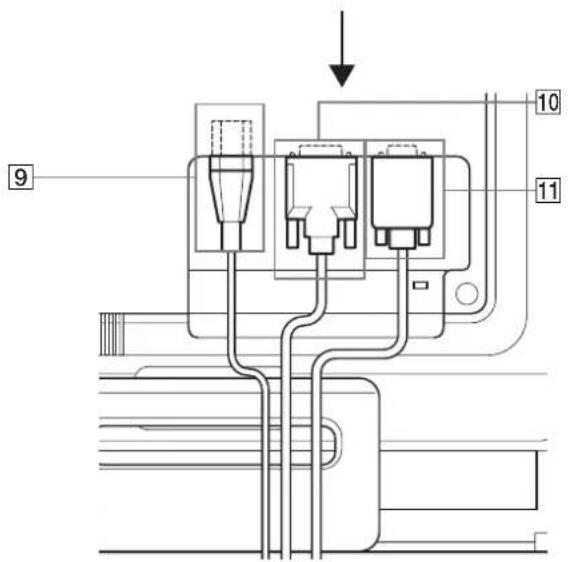
8 3aHnKpbuKa(cTp.8)
CHIMITE 3Ty KpbIaKy npn NOdkNIOueHm/OTKIOueHm Ka6enei.
9 The3do AC IN (ctp. 8)
PoiKluOHTe Ka6bI nHTaHn (npnnaeraTcR).
10 BxOJHoe rHe3do DVI-D (uΦpOBoR RGB) dIa BXOД1 (CTp.7)
Yepe3 3TO rHe3IO noDAIOCTC uDpOBoBie BnDEOCnHaBb RGB, COOTBeTCTByIOUne DVI Rev.1.0.
11 Bxodhoe rhe3do HD15 (aHaNoorOBbR RGB) (cTp.7)
Yepe3 3TO rHe3DO nOdaOTcA anaIorOBb BnDeoCnHnBnRGB (0,7 Vp-p, noNoxnt.) n CnHaNbl CNHXPOHn3aun.
Pojrotobka k pa6oTe
IpeepncnojboaHm MOHTopa npOBepbTe haJIyue B Kopo6ke cneyuux npHaJnxHocTei:
-ДиспелжКД
Ka6eIb nTuHaN
Ka6eIb BnDeocnHaHd15-HD15 (aHaIorOBbR RGB)
- Ka6eIb BnIeOcnHana DVI-D (uIcIpPoBoi RGB)
XomyTДЛЯкбел徳
- CD-ROM (nporpammbi DnWindows n Macintosh, nHCTpyKuIN NO 3Kcnnyataunn T.D.)
-「apaHTnHbT TaHO
PykoBoDCTBO no 6bIcTpo yctaHOBKe
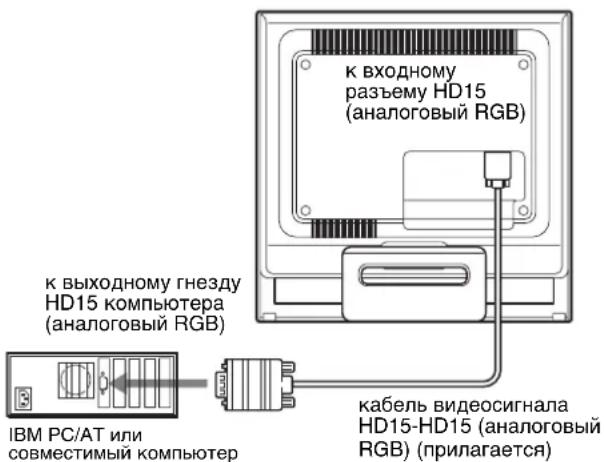
I OndKJIoueHne K KomnbTepy IBM PC/AT nnn COBmecTnMOMy C HMM
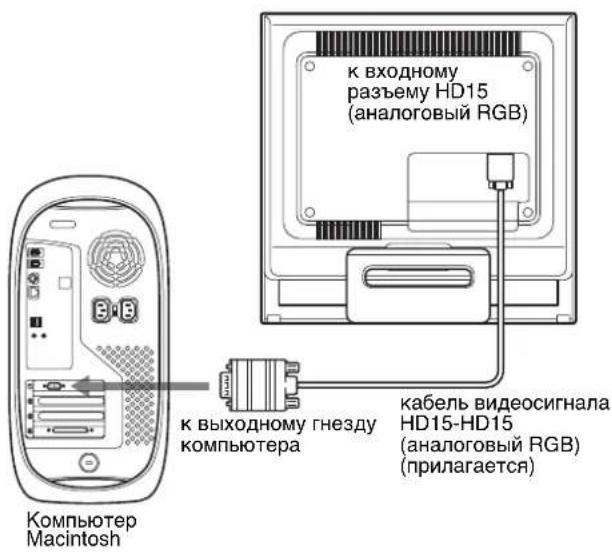
IpoKJIIOUeHHe K KOMNbIOTepy Macintosh
PnnoKIOHcHm 3TOO MOHITOPa KOMMbTepy Macintosh nNoB3yIe npn Heo6xoDMOCTHnpuNaraEmb aanTep dMaicintosh (He BxOJNT B KOMNKeT). IpeXoHNK dJa Macintosh Heo6xoDIMO NOKJIouaTB K KombTepy do NoKIOUeHHKa6EJI.
2YCTAHOBNTe3aHIOKpbIHKyHaMeCTO.
Tak KaM MepaunpaPnKTHeHsAMETbHaMOHHTope,MOXHO mONb30BaTb 3OT npaMeTp. He HyxHo yCTaHaBnBaTb dIa BEPTkA bHp a3BePTKn 6oee BblcOKoe 3HaHeHne.
PerylnpOBka HaKNoHa
MOnHO yCTaHbNbTaB bYo6Hoe NOIOKeHne,
mMeHRe yrIbHaKNoHa,KaK noka3aHo Ha pncyHKe Hnke.
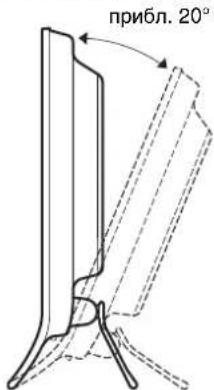
B3A BnCb 3a HxHnE yrbl naHEn NKKD, oTpeynpyTe hKnOHNkpaHa.
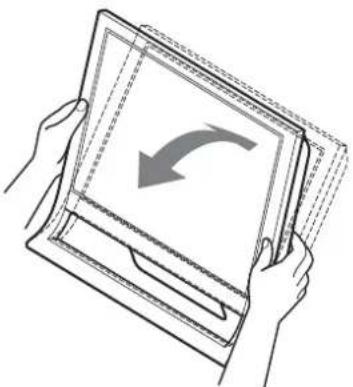
Iydo6cTBaHCNOJb3OBAHHINCnJIeA
KoHCTpyKUH 3TOO DcNNEI NO3BOJET HAcTPOHTb ERO Ha yIO6bH yRrN HAKNoHa. OTpErpyNpyTe yRrN HAKNoHa dCnNEB B COOTBEcTBUN C BblCOTOn CTOna N CTyNa, a TAKKe TAKIM O6pa3OM, YTO6bl CBet He nonaJaB B rna3a, OtpaxKaCb OT MOHNTOpA.
PpmeaHne
PnpeynipOBKe hKnOHa MOHITopa coBIOdaIte ocTOPOXHOCTb, TObbl He yapntb MOHITOp HyeypOHNT bero cTona.
Bb6op BXoHoro cnHaJa (KhoNka INPUT)
Haxmnte KhoNky INPUT.
BxOJaun CnHn N3MeHReTc npKKaJOM HaKaTn KHOKN.
Peped BbInoJIHeHnEM peryIInpoBOK
IIOcOeINHHTe MOHITOP K KOMNbIOTepy, a 3aTeM BKJIOUHTe INX.
IIOOJXITHe MeHHee 30 MNHyT NepeBbInOpHEHEmperynpOBOK nAn nonyehnHaunnyuNX pe3yNbTaTOB.
BolbawaracbHacTpoekMOHTopa npOn3BOJNTCA NOMOsbIO 3KpaHHORo MeHO.
Hac troponka Heo6xOdmoI npKocTn
HaKMa KONky MoXHO N3MeHHTb RpKoCTb 3KpaHa.
Pn KaKdOM HaxaTN KONKu 3KMM 3N3FeTcra
CneyUOUM 6pa3OM.
PYHAR→RPKAR→CPEHRA→TEMHA→PYHAR...
Pn n3MeHn npaMeTpapeXnMa I RPKAR K
TEMHAr pKocTB 3kpaHa CHXKaETcR.
Pn BbIbope PYHAR MOxHO n3MeHArb yPoBeHb NOcBETKn,
Haxmam KHONK TAK Xe, KaK npn BbIbope
IOCBETKA c NOMOuMo MeHO.
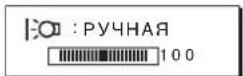
ToIbKO KOrda IIN pexHimaCCTaHOBHeO 3HaeHHe
PYUHAR,6yDyT DocTyHbI NyHKtbl MeHIO NOICCBETKA, KOHTPACTn RPKOCTb (cTp.11).
PpN BbOppe 3HaueHn TEmHAn notpe6neHne 3heprn cHnxKaTeC (cTp.16).
IepemeueHne no 3kpaHHOMy MeHIO
Haxmte KhONky MEHIO nna OTo6paKeHHa 3KpaHe rnaBHoro MeHIO (MENU). Cm. ctp. 11 nna noyehnnoDpO6bIx CBeHn o KhoNKe MEHIO.
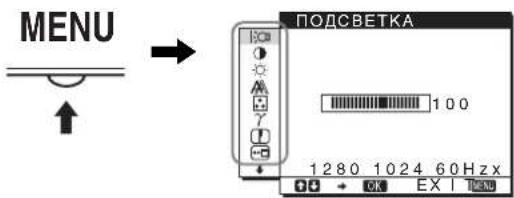
C nOMOJIbKO HONOK / n OK BbIbepnTe 3HaKU, yKa3aHHBle Ha pncyHke rnaBHoro MeHIO. Ha 3KpaHe nOBnAEtCg ODAHO n3 CneIyoIux MeHIO: c 1 no 10. YdEpxkBaJ HaxaToi KhoNky ,npOKpyTIne MeHIO, nOK He nOBRTc3HaKn B MeHIO c 9 no 10.Cm. cTp. 11 dJa nOnyehnJ dOnonHntBJhBix CBeHeHn o6 nCnoJIb3OBAHN KONOK / n OK.
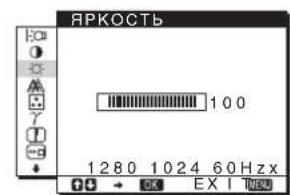
1 NODCBETKA (cTp.11) Bb6epnte MeHIO NOCBETKA,HTo6bl OTperynipoBaTbApKocTbN NOCDBETKY.
2 KOHTPACT (ctp.12) BbI6epNTe MeHIO KOHTPACT, TTo6bl HAcTpOuTb KOHTpactHOCTb 306paXeHnA.
3 RPKOCTb (ctp.12) Bbl6epnte MeH0 RPKOCTb, yTo6bI OTpeYnipoBaTb RPKoCTb N3o6paKeHn (ypOBeh cepHO rBeTa).
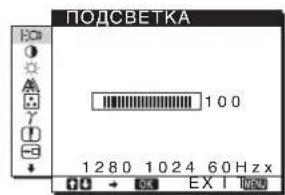
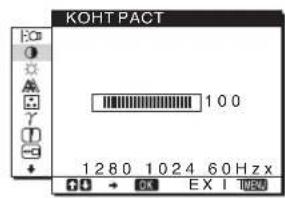
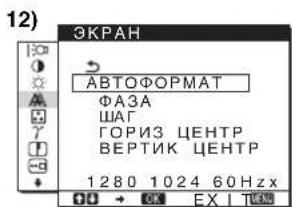
4 3KPAH (ctp. Bb6epnte MeHIO 3KPAH, T06bl OTperyInpoBaTb pe3KocTb (pa3a/War) n noJoxHeNe (no rOpN3OHTan/No BEPTnKaJI) n3O6paXeHNA.
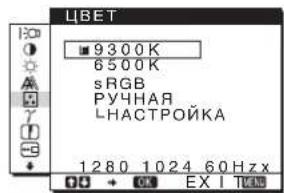
5 UBEc (cTp.13) BbIbepHTe MeHIO LBT, YTO6bI OTpeyINPOBaT bETOBYIO TEMNEpaTyP yIO6paXKeH.NpN 3ToM HAcTpaINBaOTc RbETOBBIE TOHa Ha 3KpaHe.KoJaB MEHO LBT BbIpaH npaMeTp sRGB, HeNb3a BblOJIHnTB HAcTpoiKy npaMeTPOB MeHO KOHTPACT, RPKOCTb INI GAMMA.
6 GAMMA (cTp. 14) BbIbepHTe MeHIO GAMMA, UTObI IN3MeHHTb LBeTobOu OTTeHOK N3O6paXKeHnA.
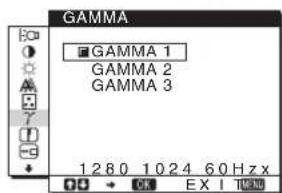
7 PE3KOCTb (ctp.14) Bbl6epnte MeHIO PE3KoCTb nIa perynpoBn pe3KocTn KpOMOK n306paJxehn.
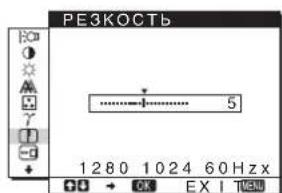
8 IO3 MEHIOcTp.14) BbIepeNTe MeHIO IO3 MEHIO, YTO6bI N3MeHHTb NOJOKeHHe MeHIO Ha 3KpaHe.
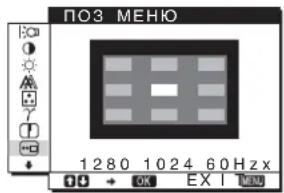
9 PACNO3H BXODA (ctp.14) MoHTOp aBTOMaTnueckn 06HapKbBaET BxOdHoi CnHaC BxOdHoro pa3bemaNpeekIIOuaeTcH Ha Hero, npexJe cM MOHTOp nepeiDeT B peKm 3KOHOmn 3Heprn.
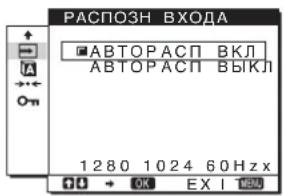
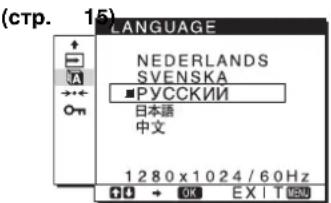
10 LALUAGB BbIePeTe LALUAGE, 3To6bI N3MeHHTb 83bIK, IcNoJIb3yEmbl DnI OTo6paKeHn MeHIO n coo6uhen.
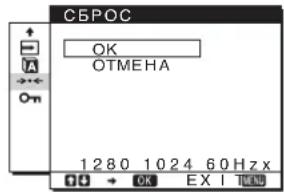
11 Dpyrme MeHIO (cTp. 15) HactpoTe cneDyOuNe 3nEmeHTbMeHIO. C6POC -EJIOKIPOBKA MEHIO
IcnoJb3ObaHne KhoNOK MEHIO, / n OK
1 OTo6paXeHne rJaBHoro MeHIO (MENU). HaxmTe KhoNky MEHIO nIra OTo6paXeHnHa 3KpaHe rJaBHoro MeHIO (MENU).
2 Bb6epnte MeHIO, B KOTOPOM Heo6xOJMO BbINOJHHTb noctpoKy. HaxMITE KHOKN / OTo6paKeHHaHyKHOMeHIO HaxMITE KHOKN OK dNBA bIb6opa 3nemeHTa MeHIO.
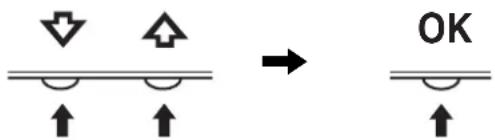
3 BbINOJIHnTe NOcTpOmy MeHIO. HaxMMTe KHOKN / nIaB bINONHeHnHaCTpoKn, 3aTeM HaxMMTe KHOKN OK. Pn HaxKaTmN KHOKN OK HaCTpoKn CoXpaHnOTcA, a DnCnJIe BO3BpaucaETcK npdebluyemMy MeHIO.
4 3akpoTe MeHIO. Haxmnte KhoNky MEHIO oINH pa3 IaB Bo3BpaTa B HopMaJIbHbI peXIM npocMToPa.EcII KhoNk He 6bln HaKaTbI,TO 3KpaHHoe MeHIO ABTomTuYeCKn NChe3aet Pn6Ibn3nteJbHO uepe3 45 cKeYnD.
C6poc HacTpoek
C6pocntb HacTpoKIMoXHc NOMOaBIO MeHO CBPOC CM. cTp. 15 nIpyeHHn oIpO6hIX CBeDeHn O BblOnHeHHn c6poca HacTpoEk.
Peru npobka noocbETkn (POnCBETKA)
Ecn 3KpaH CnWkOM Apkn, HAcTpoTe NoCDBeTKy, YTo6bIC Hm 6blno ydo6hee pa6oTaB.
PImpeHneIIOcBETky HeJIb3a HaCTponTb, KOrJa dNppeXnMaOCTaHOBNeHo 3NaChEe RPKAR, CPEIHAR INI TEMHAR (ctp.10).
1 HaxmTe KhoNky MEHIO. Ha 3KpaHe nOBuTc rnaBHOe MeHIO.
2 Haxmte KhoNk / nBb6opa ;(NOCBETKA)Haxmte KhoNky OK. Ha 3KpaHe NOBnTcMeHIO NOCBETKA.
3 Haxmte KONKn / ,YTO6bI OTpynpoBaTb ypoBeH nOcBETKn, Haxmte KONky OK.
PereynipoBka KOHTpactHOCTN (KOHTPACT)
HaCtpoTe KOHTpAcTHOCTb N3O6paKeHnA.
PnmeaHne
KoHTpactHocTB HeJIb3HaCtponTb, KOrda nIpeXmAmcycTaHOBHeNo 3NaHeHne RPKAR, CPEHRA nn TEMHAR (ctp.10).
1 HaxmTe KhONky MEHIO.
Ha 3KpaHne NOBHTCraJNaBHOe MeHIO.
2 HaxMnte KhoNkI / IaBb6opa (KOHTPACT) n HaxMnte KhoNky OK.
Ha 3KpaHe nOABNTcMaHIO KOHTPACT.
3 HaKMnTe KHONKn / ,YTO6bI OTPeryNIpOBA Tb KOHTpactHOCTb,HaKMnTe KHONKy OK.
Perylnpobka ypOBHЯ chehoro zBeta n3o6paXeHnA (APKOCTb)
HactpoTe npKocTb n06paXeHHa (ypoBeHb YepHoro).
PpmeaHne
Rpkocb HnB3HaCtpoTb, KOrda nIpeXnMaJ-0TaHOBneHo 3NaueHHe RPKAR, CPEHNRnn TEmHAR (ctp.10).
1 HaxmTe KhONky MEHIO.
Ha 3KpaHe NOABNTCA rnaBHOe MeHIO.
2 HaxMnte KhoNk / dIaBbIbOpa (RPKoCTb) n HaxMnte KhoNky OK.
Ha 3KpaHe NORBNTcMHeIO RPKOCTb.
3 HaKMTe KHONK / ,YTO6bI OTpeRyInpObaTb RPKoCTb, H KaMNTe KHNKy OK.
PerynpoBka pe3Koctn n ceHTpOBKn n3o6paXeHn (3KPAH) (ToIbKO aHaIorOBbl cnHaJ RGB)
Функца ABTomaTnueckoPerylnpOBKn KauectBa n306paXeHn
Pn npneMe BxOndoro CnHaJa MoHntOp
aBtOMaTHueCKn peYInpyET NOIOKeHne n
pe3KocTb N3o6paXeHn (Fa3a/ua) n
oBeCneuBaet YETKoe N3o6paXeHne Ha 3KpaHe
(cTp.16).
Ppmeuahne
EcnnakTHBn3NPOBaHaФyHKuHnABTOMaTHueckOpeYynIpOBKn KaueCTBa N3o6paKeHHa,pa6oTaET TOnbKO BbIKNoHuateIeN (nITAHHe).
Ecnn npnncnoB3oBaHnnyHKcnnn ABTomTuYeCKOpeRyInpOBKn KaueCTBa N3o6paXeHn 3TOro MoHTopapN3o6paXeHne HAcTpoEHO He NoIHOCTbIO
MoxHO BbINONHtB daIbHeNHyO ABTomAtueckyHO HAcTpoiKy KaueCTBa N3o6paXeHnI Ia TeKyuIero BXOHDoro cnHaHa. (Cm. onncahne fynkun ABTOΦOPMAT nHexe.)
Ecnn Tpe6yeTc BbINOHNHTb DonoJHnTeNbHyOp perynipOBky KaecTba N3o6paKeHHa
MoxHO BpyHryO OTPeYnnpOBaTb pe3KocTb (pa3a/la) n noJoxHeHne (no rOpnsOHTaN/no BepTnKaA) n306paxHeHn.
3TN HAcTPOKNI COXpAHOTC B NAMrN aBtOMaTHeCKN Bbl3bIAOTc KaKdbI pa3, KOrDa dncnne IOnycaet TaKo JKe BXOHDH CnHaJ.
Bo3MOxH0, 3TN HacTPOKn npuDetcN NOBtOpntb, ecIn n3MeHeB BXoHDn CnHaJ NocNe NOBtOPHO NOKJIoueHn KOMIbIOTepa.
Дальнше abTomatneckne HabtpoNK KaueCTBa n306paXeHnЯ ДЯ TeKyuIero BXoDHorO cnHaJa (ABTOΦOPMAT)
1 Haxmte KhoNky MEHIO.
Ha 3KpaHnOBaTc rJaBHOe MeHIO.
2 HaxMnte KhoNkU /↑ДЯ BbIbopa (3KPAH) n HaxMnte KhoNky OK.
Ha 3KpaHe NOABNTCA MeHIO 3KPAH.
3 HaxMMTe KHONK↓/↑ДЯ Bbl6opa ABTOΦOPMAT n HaxMMTe KHONKY OK.
BbINOHNHTe COOTBeTcTBIOUne HAcTPOKn Faa3bI 3KpaHa, WaRa I NOLOXeHnIO rOpN3OHTaJI/BepTKaJIIN DJIa TeKyuero BxOdhoro CnHana N CoXPaHnte IN.
4 HaxMNTe KHOKN / ДЯ BbIbOpa 乌HaxMNTe KhoNky OK.
CHOBA NOBHTCA 3KpaH MeHIO.
PerynnpOBka pe3KocTn 3o6paXeHnBpyHyIO (A3A/UA)
Pe3KocTb H3O6paXeHnMOxHo OTopeRyIIpOBaTb CneDyUoMm 06pa3OM.
1 YctaHOBHTe pa3peSeHne 1280 × 1024 Ha KOMNbTepe.
2 BCTaBbTe KOMnAkr-ДИСК.
3 3anyctnte KOMnakT-DnCK, yKaXnTe perNoH MmoJeB n OTo6pa3nTe TectObBm Ia6nOH. DnA Windows
BbIbepeTe [Utility] [Windows]/[Win Utility.exe].
ДЯ Macintosh
BbIepeNTe [Utility] [Mac]/[Mac Utility].
4 HaxmTe KhoNky MEHIO.
Ha 3KpaHne NOABITcraIaBHOe MeHIO.
5 HaxMnte KONKn / nBbIbopa (3KPAH) HaxMnte KONky OK.
Ha 3KpaHe NOBuNTcMeHIO 3KPAH.
6 HaxMnte KONKn / dnn BbIbopa A3A n HaxMnte KONky OK.
Ha 3KpaHe NOBuTcMaHIO A3A.
7 HaxnmaTe KhONK / , noka ropn3oHTaIbHbie NOLOcBi He cTAHyT MUNHmAbHbIMN.
Otperynpyte TaKIM o6pa3OM, qTo6bl rOpu3oHTaIbHbie noIocbl 6blMNHMmaNbHbIMN.
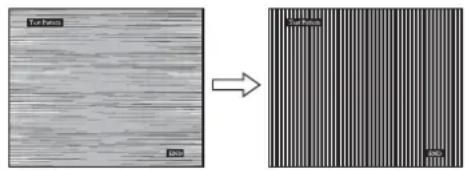
8 Haxmte KhoNky OK.
BepHntecb MeHIO 3KPAH.
EcHnHaBcEM3KpaHe BnDhBbBepTnKaIbHbI NOncbl, OtperyInpyTe WaR, BbINOnHNB CneDyIOUne DeiCTBna.
9 HaXMMTe KONKn / nBbIbopa IaI n HaxMMTe KONky OK.
Ha 3KpaHe NOBNTcMeHIOU
10 HaxmMaTe KONKn / noka He nCye3HyT BepTKKaJbHbe NOIocbl.
OtperyIpyyTe TaKIM 6pa3OM, YTO6bI BepTtKaJIbHbIe noJocblncye3nn.
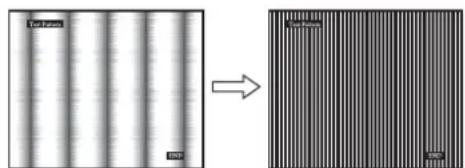
11 Haxmte KhoNky END Ha 3KpaHe, YTo6bI OTKnIOHTb TECTOBbI WAbNoH.
12Haxmnte KhoNky OK.
BepHTecbMeHIO 3KPAH.
13 HaxMITE KONKn / nBb6opa n HaxMITE KONky OK.
CHOBA NORBINTCA 3KpaH MEHO.
PyuHa peryInpOBka noJoxeHn H3o6paXeHn (TOPI3 LHTP/BEPTIK LHTHP)
Ecnnn 306paXeHne paCnONoXeHO He no ceHTpy 3KpaHa, OtperynpuyTe cHTPoBky n306paXeHnra CNeDyUoMm 6bpa3om.
1 YcTaHOBnTe pa3peSeHne 1280 × 1024 Ha KOMNbITope.
2 BCTaBbTe KOMnAaKT-DnCK.
3 3anyctnte KOMnakT-DnCK, yKaxnTe pernoH Mmoelb n OTo6pa3nte TectObbl W6NoH.
DnWindows
BbIbepeTe [Utility] [Windows]/[Win Utility.exe].
MaTosh
BbIepeNTe [Utility] [Mac]/[Mac Utility].
4 HaxMMTe KhoNky MEHIO.
Ha 3Kpahe NOBHTCA TnaBHOE MeHIO.
5 HaxMnte KONKn / nA BbIbopa (3KPAH) n HaxMnte KONky OK.
Ha 3KpaHe NOBHTcMa HIO 3KPAH.
6 HaxMMTe KHOJIKI / BbBb6opa TOPN3 CEHTP nn BEPTNK CEHTP n HaxMMTe KhoNky OK. Ha 3KpaHe NoRbNTcMaHIO TOPN3 CEHTP nn BEPTNK CEHTP.
7 HaxMMTE KHOKNI / nIepeMeueHnTecTOBOO 1a6JHOHa B ceHTp 3KpaHa.
8 Haxmte KONky [END] Ha 3KpaHe, YTo6bl OTKnIOHTb TECTOBbl WAp6JIoH.
9 HaXMMTe KhoNky OK.
BepHntecb MeHIO 3KPAH.
10 Haxmte KhoiKn / nBb6opa Haxmte KhoNky OK.
CHOBA NOABNTCA 3KpaH MeHIO.
Подстponka CBeTOBOI Tempepatypbl (LBT)
Moxho Bb6paTb ypoBeHb CBeTa 6eIoro nOJI N3o6paKeHHn I3 CNeIyUOxN HAcTpoE KCBETOBON TempeaTypbI NO yMOJUHaHHIO.
Takke npn Heo6xOIMOCtM MoXHO ToHOb HAcTpOnTb UBeToBvIO TempepaTyP.
1 Haxmte KhONky MEHIO.
Ha 3KpaHne nOBuTcra TaBHOe MeHIO.
2 HaxMnte KONKn / nBb6opa (LBT) n HaxMnte KONky OK.
Ha 3kpAne NOBNTcMeHIO LBT.
3 HaKMnTe KONKn / nA Bb6opa Heo6xOuMoN OBeTOBOI TemnepaTypbl, a 3aTeM HaKMnTe KONKy OK.
Pn yMeHbWeHH TEmpePaTypbC 9300K (HaCTpOka no yMonuahHIO) Do 6500K CInHeBaTbIe OTTeHN B 6eON McBete 6ydyT CmEHrTaCB KpaCHOBaTbIMN.
Korda nnapaMeTpa npKocTu Ha 3KpaHe BbIbpaHO 3NaueHne "PYHAR", MoXHo BbIbpaTb UBeTObyIO Tempepaty "sRGB."
При Вьборе napametpa "sRGB" Habстpoиkaцета 6удевионна corlacho npocnilo sRGB. (MодьсмшеняцьETOB sRGB (kpachn-3eileHbIc-HHIN) ABJIeTcH cTahdapTHbIM npomblIeHHbIM npOTOKOJOM dIЯ ONICAHN zeta n36bpaxeHbB KOMNbItePBOH npOdykuzi.) Ecnbl BvbaHnapaMetp "sRGB",цbetobbie Hacstpoик KMnblTepeДолжныу CTaHaBnBaTbCB aCOOTBeTCTBn C npocnilem sRGB.
PpmeaHn
- Ecni noCooeaHHeHH KOMnBtoper Nnn KaKoe-Jn6o dpyroe oobpyoBaHne He nBraTcOBMeCTmblc npoDfne mSRGB, Ubet He ydaTcHACHTponb B COOTETCBn C npOoNem sRGB.
Korda B MeHO LIBET BbI6paH npaAMetp sRGB, HnB3a BbINOnHnTb HacptpoKy npaAMetpoB MeHO KOHTPACT, RPKOCTb nn GAMMA.
ToHnHa HAcTpoKa UBeTOBOI TempeaTypbI (PYHAR HACTP)
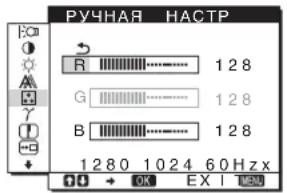
1 HaxMnte KhoNk n/↑ nIa BbIbopa HACTPOIKA n HaxMnte KhoNky OK.
Ha 3kpaHne noBnTc MeHIO PYHAR HACTP.
2 HaxMHTe KHONK / ,YTO6bI Bb16paTb R (KpachbI) NnB (CnH),a 3aTEM HAXMHTe KHONKY OK.3aTEM HAXMHTe KHONK / dNHaHCTpoiKN UBeTOBOI TEMNEpatpybl, a NOTOM HAXMHTe KHONKY OK.
NockoIbky 3Ta HacTPOKa CBeTOBOn TEMNEpaTypbI N3MeHHeTcra NyTEM yBeJIuYeHn IIN yMeHbUeHncoCTabJIaIOxR IN B OTHOCTeJIbHO G (3eJIeHbI), COCTabJIaIOuaG OCTaETcHnEHI3MeHHoN.
3 HaxMnte KONKn / dnn BB6opa 3nemeHTa , a 3aTEM HaxMnte KONky OK.
Hobar hactpoika zBeTa coxpaHTcB namrN dna 3nementa PYHAR n6ydt BbI3bIbATcB n3 namrN kaxdbip a3 npn BbIbope 3nementa PYHAR. Ha 3kpahe noBHTc rnaBHOe MeHO.
N3MeHeHne HacTpoKn rAMMbI (GAMMA)
Moxho CONOCTaBt bZeTOBoI OTteHOK n3o6paXeHnHa 3KpaHe C ZeTObBIM OTteHKOM n3o6paXeHnOprInHa.
1 HaxmTe KhoNky MEHIO.
Ha 3KpaHe nOBuTcra INaBHOe MeHIO.
2 HaxMHTe KONKn / nBbIbopa (GAMMA) n HaxMHTe KONky OK.
Ha 3KpaHe NOBITcMeHIO GAMMA.
3 HaxMMTe KhoNk / ,YTo6bI Bbl6paTb HyXHbIpeXMM, HaxMMTe KhoNky OK.
PereynipoBka pe3KocTn (PE3KOCTb)
PeryInpOBKa BbINOJIHReTc dЯ yBeJIuYeHnpe3KocTn KpOMOK n3o6paJKeHn n T.d.
1 HaxmTe KhONky MEHIO.
Ha 3KpaHe NOBnTcraJnABHOe MeHIO.
2 HaxMnte KONKn / dIa Bb6opa 3JeMeHTa (PE3KoCTb) n HaxMnte KOnKy OK.
Ha 3KpaHe NOBHTcMeHIO PE3KOCTb.
3 HaKMnTe KHONKn / ,YTO6bI OTPeryJnHPOBaTb pe3KOcTB, HauKMnTe KHONKy OK.
I3MeHeHne IIOJKeHn 3KpaHHOro MeHIO (IO3 MEHIO)
Moxho n3MeHnTb noLoKeHne MeHIO, ecn oHO 3aropaxuBaet 136paXeHne Ha 3KpAhe.
1 HaXmTe KhoNky MEHIO.
Ha 3KpaHnOBnTc rnaBHOe MeHIO.
2 HaxMMTe KHONK↓/↑ДЯ BbI6opa (ПОЗ MEHIO) И HAXMMTe KHONky OK.
Ha 3KpaHe IOBNTCA MeHIO IO3 MEHIO.
3 HaxMMTe KONKn / DnBb6opa Heo6xOuMOro nIOJoxEHHa, a 3aTeHaxMMTe KONky OK.
IMeetca Tpu NonoXeHnI dIaBepxHe, cpeHne I HxHHe yactn 3KpaHa COOTBeTCTBeHHO.
A B T O M A T N U C E K O E N epeKJI U O Y e H N e B X O D a (P A C P O 3 H B X O D A)
Ecnn Bb6paTb 3NaueHne ABTOPACn BKn B MeHIO PACNO3H BXODA, MOHTOP aBOMaTHNeCKn O6hApYKNT BXoHOH CnHaC BxOJHO rpoa3BeMa NpeKeKnIOuHTcHa Hrero, npexJeem MOHTOp nepeeIeB peXm 3KOHOMN 3Heprnn.
1 Haxmte KhoNky MENU.
Ha əkpahe nOBnTc rnaBHOe MeHIO.
2 HaXMMTe KONKky ↑, YTO6bl BbIb6paTb (PACIO3H BXODA), n 3aTEM HaXMMTe KONKky OK. Ha 3kpaHe NOABJIeTc MeHIO PACIO3H BXODA.
3 HaxMnte KONKn / ,YTO6bI Bb6paTb HyXhBi peKm, n HaxMnte KONky OK.
- ABTOPACJI BKJI:
EcHnHa BbIbpaHHOM BxOdHOM pa3bEmoCTByET BXOHOH CnHAn IINecnBxOHOH pa3bEM BbIbPaETcC NOMOsbKHOKN INPUT Ha MoHTope H a 3TOMpa3bEmoTCyTCTByET BXOHOH CnHAn,Ha3KpAne NOBHTc COO6eHne (CTp.17)MOHTopaBTOMaTHueCKN PPOBepNT HANUHeBXOHOr CnHAnla Ha DpyuX BxOdHbIXpa3bEmax N 3MeHNT BXOD.
PnN3MeHEnBxOda BbIbpaHHbBxOHO pa3bEm OTo6paxaETcB IeBOM BepXhem yrny 3kpaHa.
PnOTcTbMn BXoHOrO CnHaJa MOHITOp aBTOMaTHeCKN NepExoDnT BpeXm 3KOHOMn 3Heprnn.
- ABTOPACJI BblKI:
AbTomatueeKoe n3MeHeHne BxOda He BbIIOJIHReTc.HaxMITE KHOJky INPUT n3MeHeHHn BXoHOro pa3bema.
BbI6Op Ra3bIka B 3KpaHHOM MeHIO (LANGUAGE)
Moxho N3MeHbTb3bK, NcNoJIb3yeMbI dJa OTo6paKeHn MeHIO N COO6eHn Ha 3Tom MOHTope.
1 HaxmTe KhoNky MEHIO.
Ha 3kpaHne NOABNTcra JnaBHOe MeHIO.
2 DePKnTe KONky HaxKaToI Do noABJeHn8 3HaUKa Heo6xOuMOro napaMeTpa.
3 HaxMMTe KONKn / DnBb6opa (LANGUAGE) n HaxMMTe KONky OK.
Ha 3KpaHe NOBHTcMHeIO LANGUAGE.
4 HaXMMTe KONKn / , YTO6bI Bb16paTb Ra3bIK, HxMMTe KONKy OK.
- ENGLISH: Aŋrπηικκη
- FRANÇAIS: ΦρaHúzǎcknǐ
- DEUTSCH: Hemeukn
- ESPACOL: ИсторICAL
ITALIANO:ITaJIbAHHCKM - NEDERLANDS: Голандский
SVENSKA: ьeckn
-PyCCKN
图HCKN
中Kntaickn
EcnBxOndhie CnHbI He COOTBeTCTBYOT HN ODHOMY N3 PpeDbapntelbHO yCTaHOBJIeHHbIX Ha 3aBOde peKIMMOB
Pn npneMoHITOpOM BxOJHO RnHa, He COOTBETCTBYUeRO HN ODHOMY N3 PpeDbapNTbHo yCTaHOBJEHbIX Ha 3aBOe peKIMOB, AKTNb3npyETcA yHKu aBTOMaTNUeCKo peyIINPOBKn KaeeCTBa n36paXeHH MoHTOPa, KOTopA oBeCneHuBaET NOCTORHH QeTKoe n36paXeHHe Ha 3kPaHe (B CNeDyUux DmAna3OHax qACTOT CnHXPOH3auu MoHTOPa):
Yactota ropu3oHTaIbHOn pa3BepTkN:
28-80KΓ
YactotaBepTkaJIbHOpa3BepTkn:
48-75
T
I03OMy, KOrda Ha MoHITOp NepBbI pa3 NoCTyaNET BxOHOcHnA, He COOTBeTCTByUoN Hn ODNOMy n3 PpeDbapntelbHO yCTaHOBJIeHHbIX Ha 3aBODe peXIMOB, dIa OTobpaKeHHn I3O6paXeHHa Tpe6yETcBAoJIbe BPemHe, Yem OBtuHO. DaHbIe 3TOI HAcTPOIKn ABTomATuYeCKn COxpaHrHTcB nAMrTI, PO3OMy B CNeDyUoN pa3 MOHITOp 6yDet pa6oTaTB TaK, KaK pRn PpMe CnHaIOB, COOTBeTCTByUoN X ODNOMy n3 PpeDbapntelbHO yCTaHOBJIeHHbIX Ha 3aBODe peXIMOB.
PpmeaHne
HactpanBaTb unfppoBOn CnHaR RGB c BxOdnoro pa3beMa DVI-D nBXA0DA1 HET Heo6xOIMOCTN.
B cnyae perynipobkn pa3bl, wara n noLoKeHHn 3o6paxeHHn BpyHyIO
ДЯ HeKOTOpbIX BXoDHbIX CnHAnOBФyHKUINABTOMaTHueCKO peryIInpOBKn KaeCTBa n3o6paKeHN 3TOOMOHITOPa MOKeT He Do KOHua HAcTPOINb NOIOXKeHneN3o6paKeHN, p3ay u War. B 3ToM CNyae 3Tu HAcTPOIKyMOxHO BbINONHtB BpyHyIO (cTp.12).Ecnn HAcTPOIKYCTAHOBJIeHb BpyHyIO, OHn COxPahHOTcB NAmATn KaNKoJIb3OBAteJIbCKNe peXIMbl N ABTomaTHueCKN BbI3bBAOTcKaKJbI pa3, KOrJa Ha MOHTOp NoCTyNaIOT TaKHe XeBXoDHbIE CnHAnbl.
PnmueyaHne
EcniakTNBnNPOBaHcYHKaABTOMaTHeCKo peryNIOpBKn KaecTBa N3O6paXeHN, pa60TaET ToIbKO BbIKNoUaTeNb (NTaHne).
YcTpaHHeH HenCnPaBHOCTeI
IpejXeYemObpatntbCBAcnyk6yTexHnueckoNIOdepKKn, O3HaKOBtEcB CdaHHbIM pa3DenOM.
3KpaHbIe coo6ueHnIa
EcHTo-To He B NopAKe Co BXOHN CnHAnOM,Ha 3KpaHe NOBnEaTc OAno H3 CneIyUOnx COO6eHn. Dnay yCTpAHENr HEnOJaKn CM. pa3dE "CmNTombI HEnOJaDOK n DeiCTBnR No Ix YCTpAHEnHIO" Ha cTp.18.
EcnHa 3KpaHne NOBJIaETc COo6ueHHe HEOIyCT PAPPEKIM
3To yka3bibaet Ha To, YTO BXOHN CINHAN He COOTBETCTBYET XapaKTePncTnKAM MOHITopa. PpOBepbTe cNeDyIOUee.
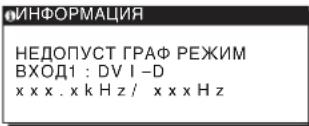
EcnHa 3KpaHe OTo6paXaETcH "xxx.xkHz/ xxxHz"
3To yKa3bIbaet Ha To, YTO JIn6o YaCTota rOpn3OHTaJbHOJ
pa3BepTKn, JIn6o YaCTota BepTkaJIbHOJ pa3BepTKn He COOTBeTCTByeT XapaKTePncTnKaM MOHITopa.
Uinpbl O3HaJaOT YaCToTB rOpn3OHTaJIbHOJ
BepTkaJIbHOJ pa3BepTKn TeKyueero BXoHOrO CnHaJa.
EcnHa3KpaHe OTo6paxaetc“PA3PEUHEHNE>1280 ×1024
3To yKa3bIbaeT Ha To, 3To 3To pa3peWeHne He COOTBeTCTByeT XapaKTePncTnKam MOHTopa (1280×1024 HJN HNXe).
EcnHa 3KpaHe NOBnEeTcCoO6ueHne HET CnHAA
3To yka3bIbaET Ha TO, YTO B HAcTOraMIM MOMENT CINHaJ He noJaETcA.
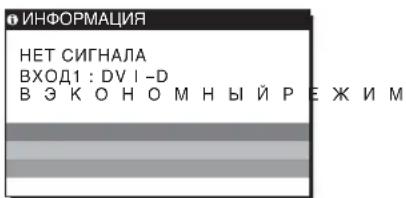
B 3KOHOMHbI PEXKIM
Pa3mepn06paXkEHa:19,0
IIOHMOB
ΦopMaT BXOДHOrO CnHana
Paboya yactota RGB*
No ropnzohtani:
28-80K(aHaIIOBbRGB)
28-64K(uΦpOBoR RGB)
NoBepTnKaIa:
The model and serial numbers are located at the rear of the unit. Record these numbers in the spaces provided below. Refer to them whenever you call upon your dealer regarding this product. Model No. __ Serial No. ____
WARNING
To reduce the risk of fire or electric shock, do not expose this apparatus to rain or moisture.
Dangerously high voltages are present inside the unit. Do not open the cabinet. Refer servicing to qualified personnel only.
FCC Notice
This equipment has been tested and found to comply with the limits for a Class B digital device, pursuant to Part 15 of the FCC Rules. These limits are designed to provide reasonable protection against harmful interference in a residential installation. This equipment generates, uses, and can radiate radio frequency energy and, if not installed and used in accordance with the instructions, may cause harmful interference to radio communications. However, there is no guarantee that interference will not occur in a particular installation. If this equipment does cause harmful interference to radio or television reception, which can be determined by turning the equipment off and on, the user is encouraged to try to correct the interference by one or more of the following measures:
- Reorient or relocate the receiving antenna.
- Increase the separation between the equipment and receiver.
- Connect the equipment into an outlet on a circuit different from that to which the receiver is connected.
- Consult the dealer or an experienced radio/TV technician for help. You are cautioned that any changes or modifications not expressly approved in this manual could void your authority to operate this equipment.
IMPORTANT
If you have any questions about this product, you may call; Sony Customer Information Services Center 1-800-222-7669 or http://www.sony.com/
Declaration of Conformity
Trade Name:SONY
Model: SDM-HS75D
SDM-HS95D
Responsible Party: Sony Electronics Inc.
Address: 16530 Via Esprillo, San Diego,
CA 92127 U.S.A.
Telephone Number: 858-942-2230
This device complies with part 15 of the FCC rules. Operation is subject to the following two conditions: (1) This device may not cause harmful interference, and (2) this device must accept any interference received, including interference that may cause undesired operation.
NOTICE
This notice is applicable for USA/Canada only.
If shipped to USA/Canada, install only a UL LISTED/CSA
LABELLED power supply cord meeting the following
specifications:
SPECIFICATIONS
Plug Type Nema-Plug 5-15p
Cord Type SVT or SJT, minimum 3 × 18 AWG
Length Maximum 15 feet
Rating Minimum 7 A, 125 V
NOTICE
As an ENERGY STAR Partner, Sony Corporation has determined that this product meets the ENERGY STAR guidelines for energy efficiency.
8 Bakre panel (sid. 8)
Klicka pa [Utility] [Windows]/[Win Utility.exe].
For Macintosh
Klicka pã [Utility] [Mac]/[Mac Utility].
4 Tryck på MENU-knappen.
Digital RGB-signal (DVI):
TMDS (Enkelänk)
-240V,50-60Hz
Max. 1,0 A
Digital RGB-signal (DVI):
TMDS (Enkel lang)
Stromforsorjning 100
-240 V, 50-60 Hz,
Max. 1,0 A
The model and serial numbers are located at the rear of the unit. Record these numbers in the spaces provided below. Refer to them whenever you call upon your dealer regarding this product. Model No. __ Serial No. ____
WARNING
To reduce the risk of fire or electric shock, do not expose this apparatus to rain or moisture.
Dangerously high voltages are present inside the unit. Do not open the cabinet. Refer servicing to qualified personnel only.
FCC Notice
This equipment has been tested and found to comply with the limits for a Class B digital device, pursuant to Part 15 of the FCC Rules. These limits are designed to provide reasonable protection against harmful interference in a residential installation. This equipment generates, uses, and can radiate radio frequency energy and, if not installed and used in accordance with the instructions, may cause harmful interference to radio communications. However, there is no guarantee that interference will not occur in a particular installation. If this equipment does cause harmful interference to radio or television reception, which can be determined by turning the equipment off and on, the user is encouraged to try to correct the interference by one or more of the following measures:
- Reorient or relocate the receiving antenna.
- Increase the separation between the equipment and receiver.
- Connect the equipment into an outlet on a circuit different from that to which the receiver is connected.
- Consult the dealer or an experienced radio/TV technician for help. You are cautioned that any changes or modifications not expressly approved in this manual could void your authority to operate this equipment.
IMPORTANT
If you have any questions about this product, you may call; Sony Customer Information Services Center 1-800-222-7669 or http://www.roy.com/
Declaration of Conformity
Trade Name:SONY
Model: SDM-HS75D
SDM-HS95D
Responsible Party: Sony Electronics Inc.
Address: 16530 Via Esprillo, San Diego,
CA 92127 U.S.A.
Telephone Number: 858-942-2230
This device complies with part 15 of the FCC rules. Operation is subject to the following two conditions: (1) This device may not cause harmful interference, and (2) this device must accept any interference received, including interference that may cause undesired operation.
NOTICE
This notice is applicable for USA/Canada only.
If shipped to USA/Canada, install only a UL LISTED/CSA
LABELLED power supply cord meeting the following
specifications:
SPECIFICATIONS
Plug Type Nema-Plug 5-15p
Cord Type SVT or SJT, minimum 3 × 18 AWG
Length Maximum 15 feet
Rating Minimum 7 A, 125 V
NOTICE
As an ENERGY STAR Partner, Sony Corporation has determined that this product meets the ENERGY STAR guidelines for energy efficiency.
Inhoudsopgave
The model and serial numbers are located at the rear of the unit. Record these numbers in the spaces provided below. Refer to them whenever you call upon your dealer regarding this product. Model No. __ Serial No. ____
WARNING
To reduce the risk of fire or electric shock, do not expose this apparatus to rain or moisture.
Dangerously high voltages are present inside the unit. Do not open the cabinet. Refer servicing to qualified personnel only.
FCC Notice
This equipment has been tested and found to comply with the limits for a Class B digital device, pursuant to Part 15 of the FCC Rules. These limits are designed to provide reasonable protection against harmful interference in a residential installation. This equipment generates, uses, and can radiate radio frequency energy and, if not installed and used in accordance with the instructions, may cause harmful interference to radio communications. However, there is no guarantee that interference will not occur in a particular installation. If this equipment does cause harmful interference to radio or television reception, which can be determined by turning the equipment off and on, the user is encouraged to try to correct the interference by one or more of the following measures:
- Reorient or relocate the receiving antenna.
- Increase the separation between the equipment and receiver.
- Connect the equipment into an outlet on a circuit different from that to which the receiver is connected.
- Consult the dealer or an experienced radio/TV technician for help. You are cautioned that any changes or modifications not expressly approved in this manual could void your authority to operate this equipment.
IMPORTANT
If you have any questions about this product, you may call; Sony Customer Information Services Center 1-800-222-7669 or http://www.roy.com/
Declaration of Conformity
Trade Name:SONY
Model: SDM-HS75D
SDM-HS95D
Responsible Party: Sony Electronics Inc.
Address: 16530 Via Esprillo, San Diego,
CA 92127 U.S.A.
Telephone Number: 858-942-2230
This device complies with part 15 of the FCC rules. Operation is subject to the following two conditions: (1) This device may not cause harmful interference, and (2) this device must accept any interference received, including interference that may cause undesired operation.
NOTICE
This notice is applicable for USA/Canada only.
If shipped to USA/Canada, install only a UL LISTED/CSA
LABELLED power supply cord meeting the following specifications:
SPECIFICATIONS
Plug Type Nema-Plug 5-15p
Cord Type SVT or SJT, minimum 3 × 18 AWG
Length Maximum 15 feet
Rating Minimum 7 A, 125 V
NOTICE
As an ENERGY STAR Partner, Sony Corporation has determined that this product meets the ENERGY STAR guidelines for energy efficiency.
Obsah
Priblzn388x382,5x139,2mm
(15 1/4 × 15 × 5 1/2 palcu)
Hmotnost Priblizne 5 kg (11 lb. 3/8 oz.)
Plug & Play DDC2B
PrislustenstvViz strana 7.
SDM-HS95D
LCD panel Typ panelu: a-Si TFT Active
Matrix
The model and serial numbers are located at the rear of the unit. Record these numbers in the spaces provided below. Refer to them whenever you call upon your dealer regarding this product. Model No. __ Serial No. ____
WARNING
To reduce the risk of fire or electric shock, do not expose this apparatus to rain or moisture.
Dangerously high voltages are present inside the unit. Do not open the cabinet. Refer servicing to qualified personnel only.
FCC Notice
This equipment has been tested and found to comply with the limits for a Class B digital device, pursuant to Part 15 of the FCC Rules. These limits are designed to provide reasonable protection against harmful interference in a residential installation. This equipment generates, uses, and can radiate radio frequency energy and, if not installed and used in accordance with the instructions, may cause harmful interference to radio communications. However, there is no guarantee that interference will not occur in a particular installation. If this equipment does cause harmful interference to radio or television reception, which can be determined by turning the equipment off and on, the user is encouraged to try to correct the interference by one or more of the following measures:
- Reorient or relocate the receiving antenna.
- Increase the separation between the equipment and receiver.
- Connect the equipment into an outlet on a circuit different from that to which the receiver is connected.
- Consult the dealer or an experienced radio/TV technician for help. You are cautioned that any changes or modifications not expressly approved in this manual could void your authority to operate this equipment.
IMPORTANT
If you have any questions about this product, you may call; Sony Customer Information Services Center 1-800-222-7669 or http://www.roy.com/
Declaration of Conformity
Trade Name:SONY
Model: SDM-HS75D
SDM-HS95D
Responsible Party: Sony Electronics Inc.
Address: 16530 Via Esprillo, San Diego,
CA 92127 U.S.A.
Telephone Number: 858-942-2230
This device complies with part 15 of the FCC rules. Operation is subject to the following two conditions: (1) This device may not cause harmful interference, and (2) this device must accept any interference received, including interference that may cause undesired operation.
NOTICE
This notice is applicable for USA/Canada only.
If shipped to USA/Canada, install only a UL LISTED/CSA
LABELLED power supply cord meeting the following
specifications:
SPECIFICATIONS
Plug Type Nema-Plug 5-15p
Cord Type SVT or SJT, minimum 3 × 18 AWG
Length Maximum 15 feet
Rating Minimum 7 A, 125 V
NOTICE
As an ENERGY STAR Partner, Sony Corporation has determined that this product meets the ENERGY STAR guidelines for energy efficiency.
Tartalomjegyzék
Ovintezkedesek 4
Alkatreszek es kezeloelemek 5
Uzembe helyezes. 6
The model and serial numbers are located at the rear of the unit. Record these numbers in the spaces provided below. Refer to them whenever you call upon your dealer regarding this product. Model No. __ Serial No. ____
WARNING
To reduce the risk of fire or electric shock, do not expose this apparatus to rain or moisture.
Dangerously high voltages are present inside the unit. Do not open the cabinet. Refer servicing to qualified personnel only.
FCC Notice
This equipment has been tested and found to comply with the limits for a Class B digital device, pursuant to Part 15 of the FCC Rules. These limits are designed to provide reasonable protection against harmful interference in a residential installation. This equipment generates, uses, and can radiate radio frequency energy and, if not installed and used in accordance with the instructions, may cause harmful interference to radio communications. However, there is no guarantee that interference will not occur in a particular installation. If this equipment does cause harmful interference to radio or television reception, which can be determined by turning the equipment off and on, the user is encouraged to try to correct the interference by one or more of the following measures:
- Reorient or relocate the receiving antenna.
- Increase the separation between the equipment and receiver.
- Connect the equipment into an outlet on a circuit different from that to which the receiver is connected.
- Consult the dealer or an experienced radio/TV technician for help. You are cautioned that any changes or modifications not expressly approved in this manual could void your authority to operate this equipment.
IMPORTANT
If you have any questions about this product, you may call; Sony Customer Information Services Center 1-800-222-7669 or http://www.roy.com/
Declaration of Conformity
Trade Name:SONY
Model:SDM-HS75D
SDM-HS95D
Responsible Party: Sony Electronics Inc.
Address: 16530 Via Esprillo, San Diego,
CA 92127 U.S.A.
Telephone Number: 858-942-2230
This device complies with part 15 of the FCC rules. Operation is subject to the following two conditions: (1) This device may not cause harmful interference, and (2) this device must accept any interference received, including interference that may cause undesired operation.
NOTICE
This notice is applicable for USA/Canada only.
If shipped to USA/Canada, install only a UL LISTED/CSA
LABELLED power supply cord meeting the following specifications:
SPECIFICATIONS
Plug Type Nema-Plug 5-15p
Cord Type SVT or SJT, minimum 3 × 18 AWG
Length Maximum 15 feet
Rating Minimum 7 A, 125 V
NOTICE
As an ENERGY STAR Partner, Sony Corporation has determined that this product meets the ENERGY STAR guidelines for energy efficiency.
Spistresci
The model and serial numbers are located at the rear of the unit. Record these numbers in the spaces provided below. Refer to them whenever you call upon your dealer regarding this product. Model No. __ Serial No. ____
WARNING
To reduce the risk of fire or electric shock, do not expose this apparatus to rain or moisture.
Dangerously high voltages are present inside the unit. Do not open the cabinet. Refer servicing to qualified personnel only.
FCC Notice
This equipment has been tested and found to comply with the limits for a Class B digital device, pursuant to Part 15 of the FCC Rules. These limits are designed to provide reasonable protection against harmful interference in a residential installation. This equipment generates, uses, and can radiate radio frequency energy and, if not installed and used in accordance with the instructions, may cause harmful interference to radio communications. However, there is no guarantee that interference will not occur in a particular installation. If this equipment does cause harmful interference to radio or television reception, which can be determined by turning the equipment off and on, the user is encouraged to try to correct the interference by one or more of the following measures:
- Reorient or relocate the receiving antenna.
- Increase the separation between the equipment and receiver.
- Connect the equipment into an outlet on a circuit different from that to which the receiver is connected.
- Consult the dealer or an experienced radio/TV technician for help. You are cautioned that any changes or modifications not expressly approved in this manual could void your authority to operate this equipment.
IMPORTANT
If you have any questions about this product, you may call; Sony Customer Information Services Center 1-800-222-7669 or http://www.roy.com/
Declaration of Conformity
Trade Name:SONY
Model: SDM-HS75D
SDM-HS95D
Responsible Party: Sony Electronics Inc.
Address: 16530 Via Esprillo, San Diego,
CA 92127 U.S.A.
Telephone Number: 858-942-2230
This device complies with part 15 of the FCC rules. Operation is subject to the following two conditions: (1) This device may not cause harmful interference, and (2) this device must accept any interference received, including interference that may cause undesired operation.
NOTICE
This notice is applicable for USA/Canada only.
If shipped to USA/Canada, install only a UL LISTED/CSA
LABELLED power supply cord meeting the following specifications:
SPECIFICATIONS
Plug Type Nema-Plug 5-15p
Cord Type SVT or SJT, minimum 3 × 18 AWG
Length Maximum 15 feet
Rating Minimum 7 A, 125 V
NOTICE
As an ENERGY STAR Partner, Sony Corporation has determined that this product meets the ENERGY STAR guidelines for energy efficiency.
Kazalo
Pozor 4
Del monitorja in elementi za nastavljanje. 5
Nastavitev. 7
Pritisnite INPUT gumb.
Kliknite [Utility] [Windows]/[Win Utility.exe].
Za Macintosh
Kliknite [Utility] [Mac]/[Mac Utility].
4 Pritisnite tipko MENU.
Na zaslonu se prikaze glavni meni.
5 Pritisnite tipki / za izbiro (SCREEN) in pritisnite tipko OK.
Na zaslonu se prikaze meni SCREEN.
6 Pritisnite tipki / , da izberete PHASE in pritisnite tipko OK.
Na zasloun se prikaze meni PHASE.
7 Pritisnite tipki / , dokler niso vodoravni pasovi minimalni.
Nastavljaje tolikoČasa,da so vodoravni pasovi minimalni.
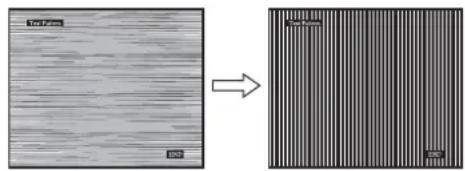
8 Pritisnite tipko OK.
Vrinite se v meni SCREEN.
Kliknite [Utility] [Windows]/[Win Utility.exe].
Za Macintosh
Kliknite [Utility] [Mac]/[Mac Utility].
4 Pritisnite tipko MENU.
Na zaslonu se prikaze glavni meni.
5 Pritisnite tipki / za izbiro (SCREEN) in pritisnite tipko OK.
Na zaslonu se prikaze meni SCREEN.
6 Pritisnite tipki / , da izberete H CENTER ali V CENTER in pritisnite tipko OK.
Na zaslonu se pojavimi H CENTER ali meni V CENTER.
7 Pritisnite tipki / , da središno poravnate preizkusni vzorec na zaslonu.
8 Kliknite [END] na zaslonu za izklop preizkusnega vzorca.
9 Pritisnite tipko OK.
Vrnite se v meni SCREEN.
10 Pritisnite tipki / , da izberete in pritisnite tipko OK.
Vrnite se vzaslon meni.
Nastavitev temperature barve (COLOR)
LCD panel Vrsta panel:
a-Si TFT z.aktivno matrico
Velikost slike: 19,0
Oblika vchodnega Delovna frekvenca RGB*
signala
Horizontalna: 28 - 80kHz (analogni
RGB)
28-64kHz
(digitalni RGB)
Vertikalna: 48 - 75Hz (analogni
RGB)
60 Hz (digitaln RGB)
The model and serial numbers are located at the rear of the unit. Record these numbers in the spaces provided below. Refer to them whenever you call upon your dealer regarding this product. Model No. __ Serial No. ____
WARNING
To reduce the risk of fire or electric shock, do not expose this apparatus to rain or moisture.
Dangerously high voltages are present inside the unit. Do not open the cabinet. Refer servicing to qualified personnel only.
FCC Notice
This equipment has been tested and found to comply with the limits for a Class B digital device, pursuant to Part 15 of the FCC Rules. These limits are designed to provide reasonable protection against harmful interference in a residential installation. This equipment generates, uses, and can radiate radio frequency energy and, if not installed and used in accordance with the instructions, may cause harmful interference to radio communications. However, there is no guarantee that interference will not occur in a particular installation. If this equipment does cause harmful interference to radio or television reception, which can be determined by turning the equipment off and on, the user is encouraged to try to correct the interference by one or more of the following measures:
- Reorient or relocate the receiving antenna.
- Increase the separation between the equipment and receiver.
- Connect the equipment into an outlet on a circuit different from that to which the receiver is connected.
- Consult the dealer or an experienced radio/TV technician for help. You are cautioned that any changes or modifications not expressly approved in this manual could void your authority to operate this equipment.
IMPORTANT
If you have any questions about this product, you may call; Sony Customer Information Services Center
1-800-222-7669 or http://www.sony.com/
Declaration of Conformity
Trade Name:SONY
Model: SDM-HS75D
SDM-HS95D
Responsible Party: Sony Electronics Inc.
Address: 16530 Via Esprillo, San Diego,
CA 92127 U.S.A.
Telephone Number: 858-942-2230
This device complies with part 15 of the FCC rules. Operation is subject to the following two conditions: (1) This device may not cause harmful interference, and (2) this device must accept any interference received, including interference that may cause undesired operation.
NOTICE
This notice is applicable for USA/Canada only.
If shipped to USA/Canada, install only a UL LISTED/CSA
LABELLED power supply cord meeting the following
specifications:
SPECIFICATIONS
Plug Type Nema-Plug 5-15p
Cord Type SVT or SJT, minimum 3 × 18 AWG
Length Maximum 15 feet
Rating Minimum 7 A, 125 V
NOTICE
As an ENERGY STAR Partner, Sony Corporation has determined that this product meets the ENERGY STAR guidelines for energy efficiency.
Içindekiler
Uyarilar 4
Göntü boyu: 19,0 inc
Giri sinyali formati RGB calisma frekansi*
Yatay: 28-80 kHz (analog RGB)
28-64 kHz (djjital RGB)
Dikey: 48-75 Hz (analog RGB)
60Hz (dijital RGB)
Czünurluk Yatay: Maks.1280 nokta
Dikey: Maks.1024 satir
Giri sinyal seviyesi RGB video sinyali
The model and serial numbers are located at the rear of the unit. Record these numbers in the spaces provided below. Refer to them whenever you call upon your dealer regarding this product. Model No. __ Serial No. ____
WARNING
To reduce the risk of fire or electric shock, do not expose this apparatus to rain or moisture.
Dangerously high voltages are present inside the unit. Do not open the cabinet. Refer servicing to qualified personnel only.
FCC Notice
This equipment has been tested and found to comply with the limits for a Class B digital device, pursuant to Part 15 of the FCC Rules. These limits are designed to provide reasonable protection against harmful interference in a residential installation. This equipment generates, uses, and can radiate radio frequency energy and, if not installed and used in accordance with the instructions, may cause harmful interference to radio communications. However, there is no guarantee that interference will not occur in a particular installation. If this equipment does cause harmful interference to radio or television reception, which can be determined by turning the equipment off and on, the user is encouraged to try to correct the interference by one or more of the following measures:
- Reorient or relocate the receiving antenna.
- Increase the separation between the equipment and receiver.
- Connect the equipment into an outlet on a circuit different from that to which the receiver is connected.
- Consult the dealer or an experienced radio/TV technician for help. You are cautioned that any changes or modifications not expressly approved in this manual could void your authority to operate this equipment.
IMPORTANT
If you have any questions about this product, you may call; Sony Customer Information Services Center 1-800-222-7669 or http://www.roy.com/
Declaration of Conformity
Trade Name:SONY
Model: SDM-HS75D
SDM-HS95D
Responsible Party: Sony Electronics Inc.
Address: 16530 Via Esprillo, San Diego, CA
92127 U.S.A.
Telephone Number: 858-942-2230
This device complies with part 15 of the FCC rules. Operation is subject to the following two conditions: (1) This device may not cause harmful interference, and (2) this device must accept any interference received, including interference that may cause undesired operation.
NOTICE
This notice is applicable for USA/Canada only.
If shipped to USA/Canada, install only a UL LISTED/CSA
LABELLED power supply cord meeting the following specifications:
SPECIFICATIONS
Plug Type Nema-Plug 5-15p
Cord Type SVT or SJT, minimum 3 × 18 AWG
Length Maximum 15 feet
Rating Minimum 7 A, 125 V
NOTICE
As an ENERGY STAR Partner, Sony Corporation has determined that this product meets the ENERGY STAR guidelines for energy efficiency.
目录
使用前须知注意事项 4
识别部件和控制钮 5
安装 7
步骤1:打开支架 7
步骤2:将监视器连接到计算机 7
步骤3:连接电源线 8
步骤4:捆扎好电线并关闭后盖 8
步骤5:打开监视器和计算机电源 8
调整倾斜 9
选择输入信号(INPUT按钮) 9
设定监视器 9
调至所需的亮度 9
导航菜单 9
调整背光(背光) 11
调整对比度(对比度) 11
调整图像的黑色电平(亮度) 11