32PW9521 - TV PHILIPS - Free user manual and instructions
Find the device manual for free 32PW9521 PHILIPS in PDF.



User questions about 32PW9521 PHILIPS
0 question about this device. Answer the ones you know or ask your own.
Ask a new question about this device
Download the instructions for your TV in PDF format for free! Find your manual 32PW9521 - PHILIPS and take your electronic device back in hand. On this page are published all the documents necessary for the use of your device. 32PW9521 by PHILIPS.
USER MANUAL 32PW9521 PHILIPS
If this instruction manual does not give an answer or if 'Tips' do not solve your TV problem, you can call your Local Philips Customer or Service Centre. See the supplied World-wide guarantee booklet. Please, have the Model and Product number which you can find at the back of your television set or on the packaging, ready, before calling the Philips helpline.
Model: Product No:
Due to continuous product improvements this manual is subject to change without notice.
Installation
Preparation 2
Keys on top of the TV 2
Your remote control 3-4
To use the menus. 5
Select the menu language and country 5
Store TV channels 6
Automatic installation 6
Manual installation. 6
Give name 6
Reshuffle the programme list. 7
Select favourite TV channels 7
TV setup 7
General 7
Source 8
Decoder 8
Demo 9
Operation
TV menu Picture menu 9-10
Sound menu 10
Features menu. 11
Teletext guide 12
Teletext 13-14
Connect peripheral equipment
Connecting and selecting equipment 15-16
Audio-and video equipment keys 17
Tips 18

EasyLink features are based on the "one touch operation" approach. This means that a sequence of actions are executed at the same time in both the television and the video cassette recorder, provided both are fitted with the EasyLink function and connected with the eurocable supplied with your video recorder.
Preparation
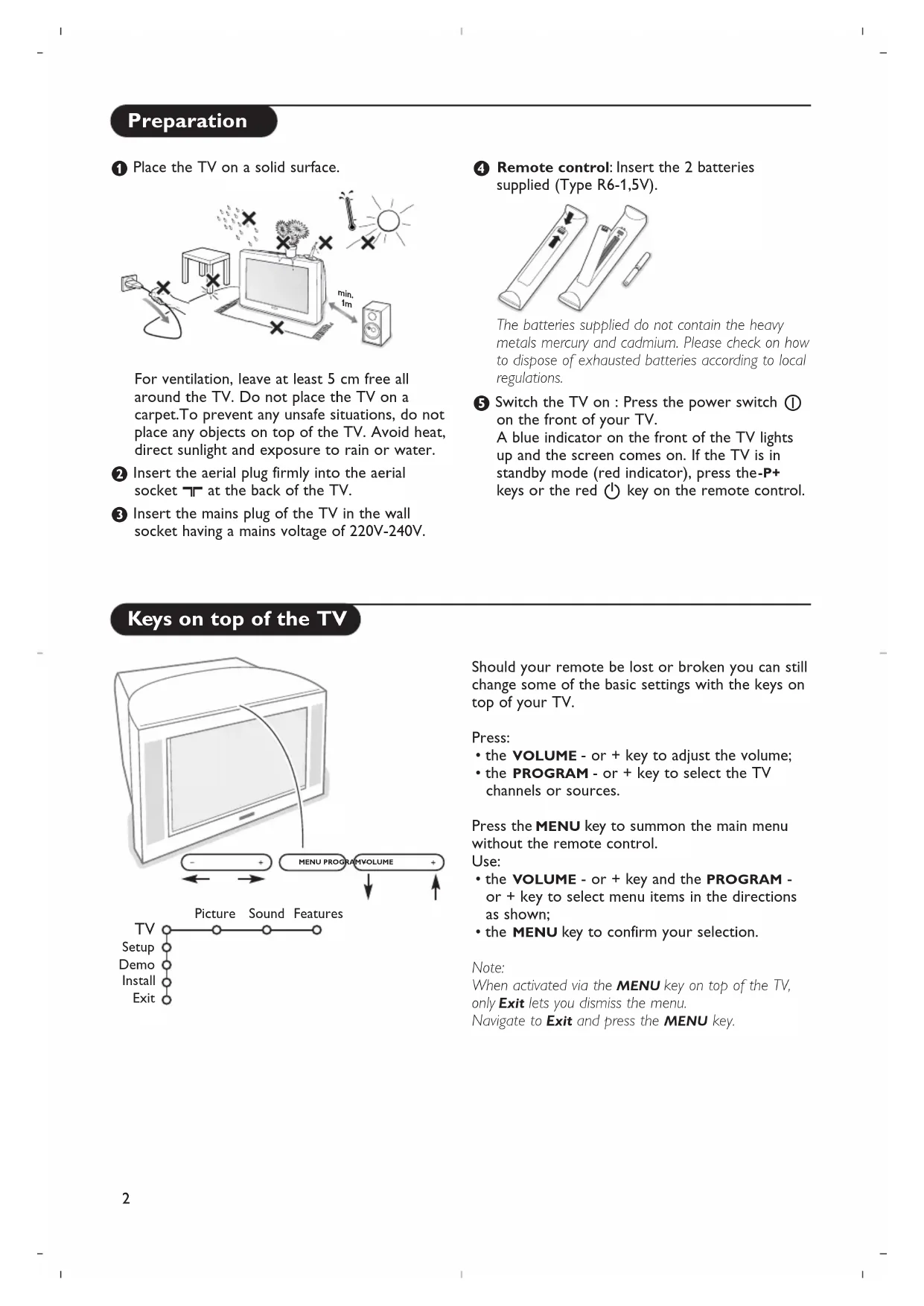
1 Place the TV on a solid surface.
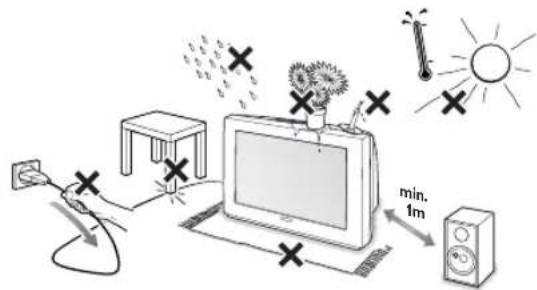
For ventilation, leave at least 5cm free all around the TV. Do not place the TV on a carpet. To prevent any unsafe situations, do not place any objects on top of the TV. Avoid heat, direct sunlight and exposure to rain or water.
Insert the aerial plug firmly into the aerial socket at the back of the TV.
3 Insert the mains plug of the TV in the wall socket having a mains voltage of 220V-240V.
Remote control: Insert the 2 batteries supplied (Type R6-1,5V).
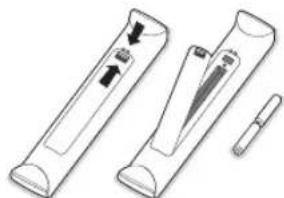
The batteries supplied do not contain the heavy metals mercury and cadmium. Please check on how to dispose of exhausted batteries according to local regulations.
Switch the TV on: Press the power switch ① on the front of your TV. A blue indicator on the front of the TV lights up and the screen comes on. If the TV is in standby mode (red indicator), press the-P+ keys or the red ① key on the remote control.
Keys on top of the TV
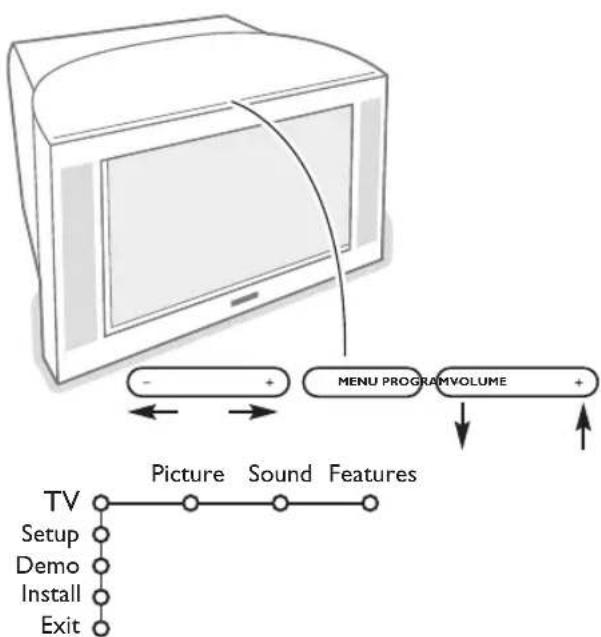
Should your remote be lost or broken you can still change some of the basic settings with the keys on top of your TV.
Press:
- the VOLUME - or + key to adjust the volume;
the PROGRAM - or + key to select the TV channels or sources.
Press the MENU key to summon the main menu without the remote control.
Use:
- the VOLUME - or + key and the PROGRAM - or + key to select menu items in the directions as shown;
- the MENU key to confirm your selection.
Note:
When activated via the MENU key on top of the TV, only Exit lets you dismiss the menu.
Navigate to Exit and press the MENU key.
Use of the remote control
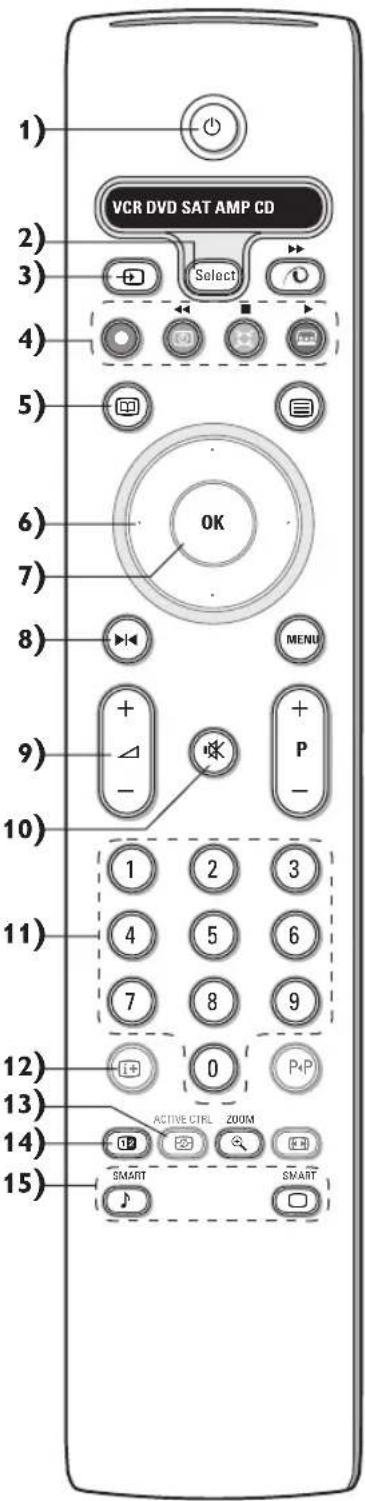
Note: For most keys pressing a key once will activate the function. Pressing a second time will de-activate it. When a key enables multiple options, a small list will be shown. Press repeatedly to select the next item in the list. The list will be removed automatically after 4 seconds or press OK to remove immediately.
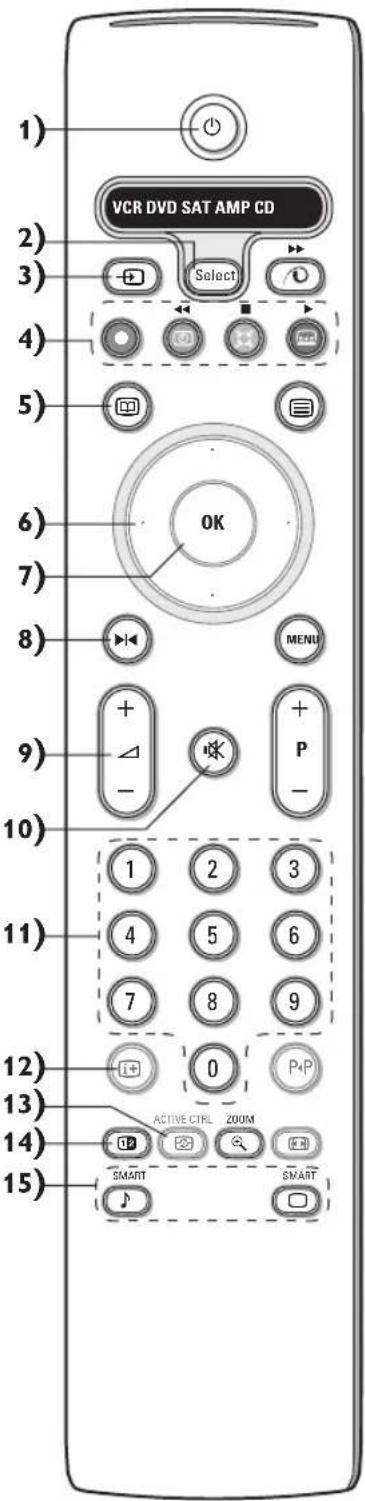
1) Standby
Press to switch the TV on or off. When switched off, a red indicator on the TV lights up.
2) VCR DVD SAT AMP CD
Audio and Video equipment keys (p.17)
3) + Select peripherals (p. 16)
4)
Audio- and Video equipment keys (p.17) Instant record
See Record with your recorder with EasyLink, p.17.
5) Teletext Guide on/off (only available on certain versions) p.12 Press the 12 key to show Teletext Guide on the right half of the screen.
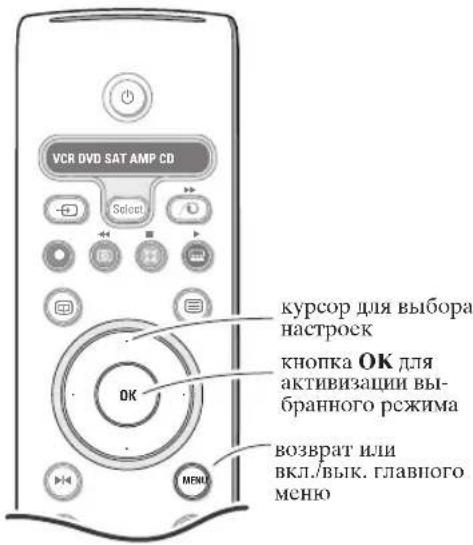
6) Cursor Used to move around the menus and select adjustments.
7) OK Press this key to activate your choice, when in the menus. to display the programme list.
8) Freeze To freeze the picture.
9)-VOL+ (Volume) To adjust the volume.
10) Interrupt the sound or restore it.
11)0/9 Digit keys To select a TV channel. For a two digit programme number, enter the second digit before the dash disappears. To switch immediately to a selected one digit TV channel, keep the digit key pressed a bit longer.
12) On Screen information Press to display information about the selected TV channel and programme. Menu/Remote control info When a menu is on screen, press i+ to display info on the selected menu item. For information on the remote control functions, while the menu info is displayed, press any key on the remote control. The normal function of the key is not executed.
13) Active control (only available on certain versions) see p. 10
14) Dual screen (only available on certain versions)
Press the or key. Press the 12 key to show Teletext or Teletext Guide on the right of the screen.
- Picture/Teletext Guide:
- Press the cursor left/right to select a TV channel.
- Press the cursor down to move the puck to the blue ball in the left screen.
- Press +P- to select another TV channel.
Picture/Teletext: See Active screen selection, p. 13.
3 Press the 12 key to switch off dual screen.
15)Smart keys
To select predefined picture and sound settings. Personal refers to the personal preference settings selected in the sound and picture menu.
Use of the remote control
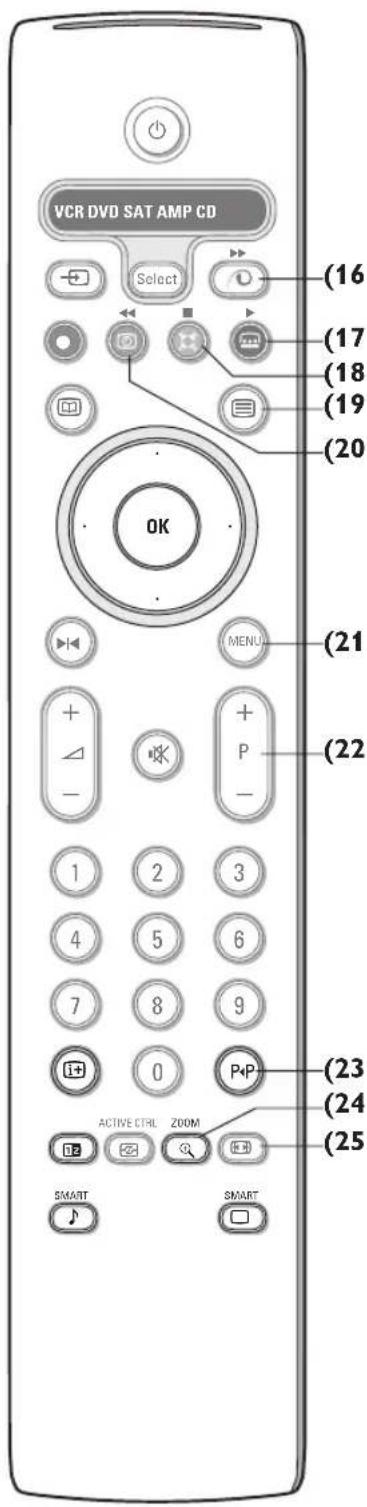
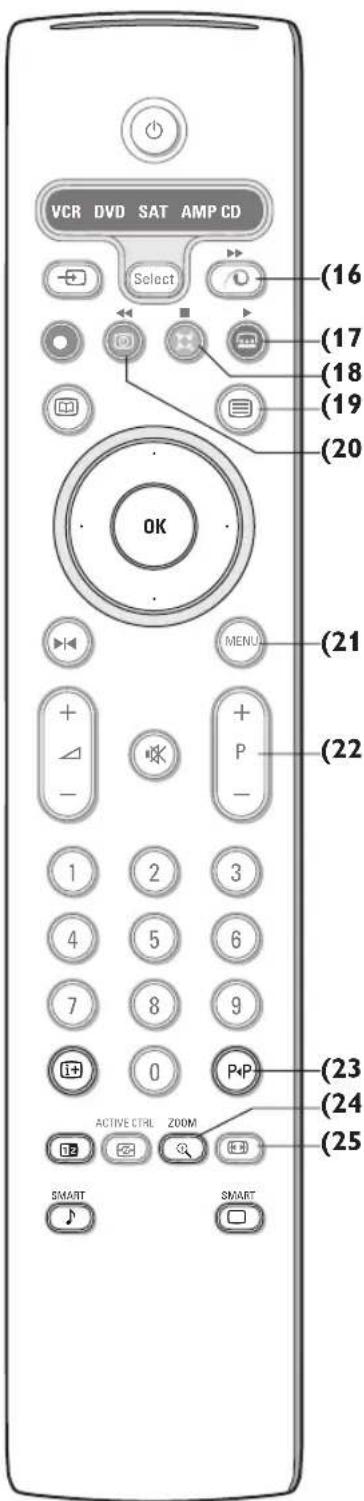
16) Pixel Plus 2 demo on/off
In the right part Pixel Plus 2 and Digital Natural Motion are switched on.
17) Cinema Go: See separate Cinema Link booklet supplied.
18) Surround mode Incredible surround
With stereo transmission, and when Incredible surround is selected, it seems as though the loudspeakers are spread further apart from one another.
Virtual Dolby Surround
Optimal with Dolby surround signals. Enables you to experience the effect of Dolby surround Pro Logic, reproducing a rear sound effect. See Sound menu, 3D effect, p. 10.
Note: You can make the same selection in the Sound menu, surround mode, p. 10.
19) Teletext on/off (only available on certain versions) p. 13
Press the 12 key to show teletext on the right half of the screen.
20) Time display: The time is displayed on the screen.
21)MENU: Main menu on/off see p. 5
22)-P+Programme selection
To browse through the TV channels and sources stored in the favourite list.
23)P4 Smart surf
With this key you can easily switch between 2 up to 9 different TV channels or sources. See General, Smart surf, p. 7.
Press the OK key or wait for the time out to dismiss the Smart surf display.
24)① Zoom on/off
Press the zoom key to activate/deactivate the zoom function.
Press the OK key repeatedly to select one of the zoom magnifications (x1, x4, x9, x16).
Use the cursor up/down, left/right to shift the selected zoom window over the screen with the cursor.
The zoom window is reset after: selecting another TV channel, another picture format or when another picture format is selected automatically.
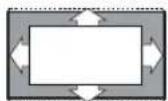
25) Picture format
Press this key repeatedly or press the cursor up/down to select another picture format:
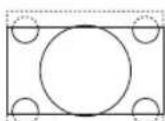
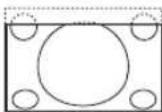
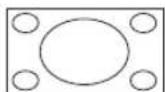
If your television is equipped with a 16:9 screen: Auto format, Super zoom, 4:3, Movie Expand 14:9, Movie Expand 16:9, Subtitle zoom or Wide screen.
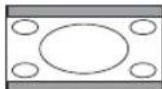
If your television is equipped with a 4:3 screen: Auto format, 4:3 or Vertical Squeeze.
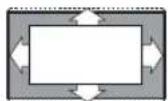
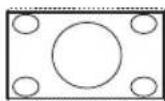
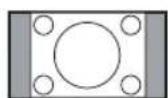
Auto format Super zoom 4:3
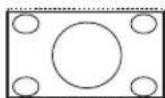
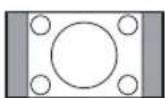
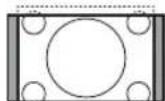
Movie Expand 14:9
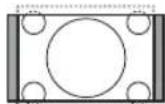
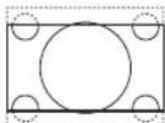
Movie Expand 16:9
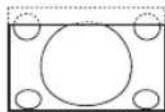
Subtile zoom
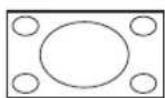
Wide screen
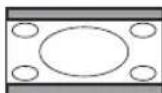
Vertical Squeeze
Auto format makes the picture fill the screen as much as possible.
In case of subtitles in the bottom black bar,Auto format makes the subtitles visible. If subtitles are only partly visible, press cursor up.
In case of a broadcaster logo in the corner of the top black bar, the logo disappears from the screen.
Super zoom removes the black bars on the sides of 4:3 programs with minimal distortion.
When in Movie Expand 14:9, 16:9, Super zoom or Subtitle zoom picture format, you can make subtitles visible with the cursor up/down.
To use the menus
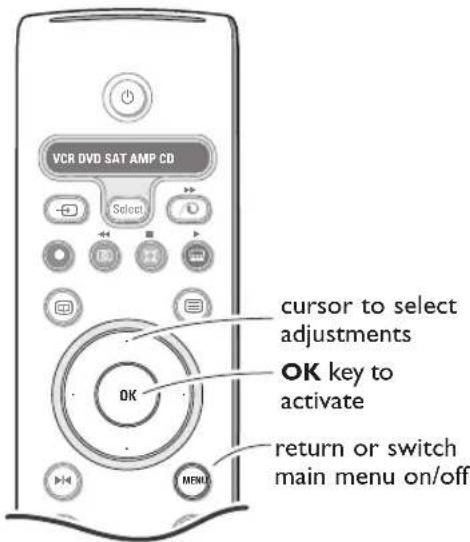
Press the i+ key on the remote control to get information about the selected menu item.
Press the MENU key on the remote control to summon the main menu. At any moment you can exit the menu by pressing the MENU key again.
Note: If you have connected equipment with Cinema Link, more menu items are present.
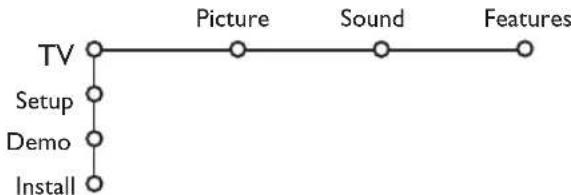
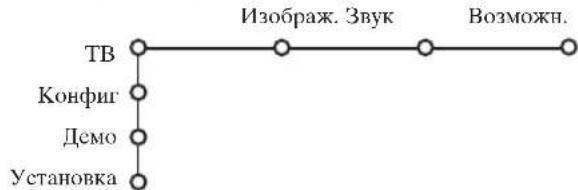
Use the cursor in the up/down direction to select the TV, Setup, Demo or Install menu. Use the cursor left/right to select Picture, Sound or Features.
Note: Sometimes not all the menu items are visible on the screen (indicated by a cluster of blue balls). Use the cursor down or right to reveal all items.
Use the cursor in the left/right direction to select the menu item.
Use the cursor up/down again to select the control you want to select or to adjust.
Note: Items temporary not available or not relevant are displayed in a light grey colour and cannot be selected.
Installation
The installation menu contains the following items:

EasyLink
If your video recorder has an EasyLink function, during installation, the language, country and available channels are automatically transmitted to the video recorder.
Select the menu language and country
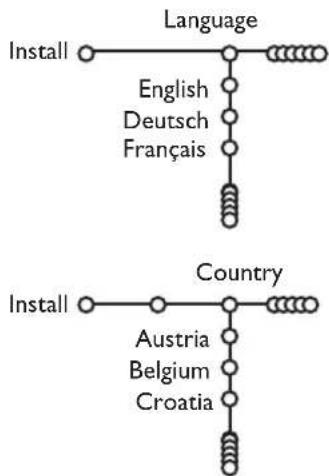
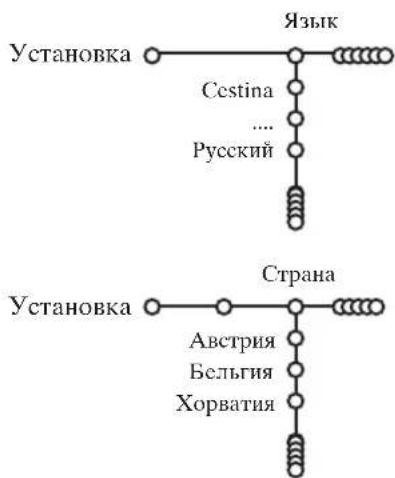
Press the MENU key on the remote control.
Use the cursor down to select Install.
Use the cursor right to select Language. Follow the instructions on screen.
Use the cursor up/down to select your preferred language and press the OK key to confirm your selection.
Use the cursor right to select Country.
Select the country where you are now located and press the OK key. Select Other when none of the countries applies.
7 Proceed with the Install menu.
Store TV channels
After language and country are set correctly, you can now search for and store the TV channels in two different ways: using Automatic Installation or Manual Installation (tuning-in channel by channel). Select your choice with the cursor right.
Automatic installation
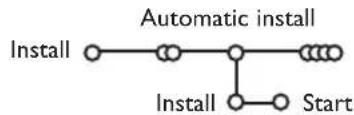
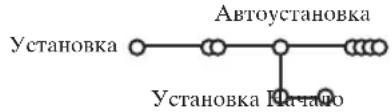
1 Select Automatic install in the Install menu. Note: All channels must be unlocked in order to autoprogram. If requested, enter your code to unlock all channels. (See TV, Features menu, Childlock, p. 11.)
Press the cursor down.The autoprogramming option label Start appears.
Press the cursor right.
The message Searching appears and the progress of autoprogramming is displayed.
If a cable system or a TV channel which broadcasts ACI (Automatic Channel Installation) is detected, a programme list appears. Without ACI broadcast, the channels are numbered according your language and country selection. You can use Reshuffle to renumber them. See p. 7.
It is possible that the cable company or the TV channel displays a broadcast selection menu. Layout and items are defined by the cable company or the TV channel. Make your choice with the cursor and press the OK key.
Manual installation
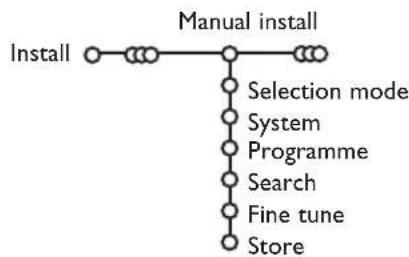
Searching for and storing TV channels is done channel by channel. You must go through every step of the Manual Installation menu.
1 Select Manual install in the Install menu.
Press the cursor down. Follow the instructions on screen.
Note: Search or direct selection of a TV channel. If you know the frequency, the C- or S-channel number, enter the 3 or 2 digits of the frequency or the channel number directly with the digit keys 0 to 9 (e.g. 048). Press the cursor down to proceed.
Repeat to search for another TV channel.
Give name
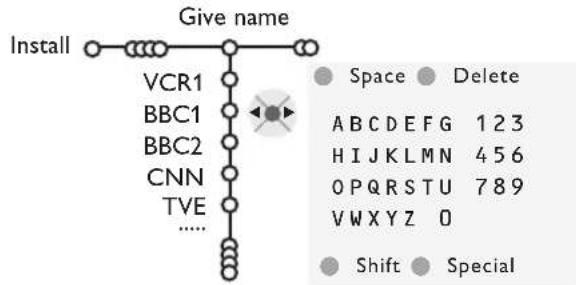
It is possible to change the name stored in the memory or to assign a name to a TV channel for which a name has not yet been entered. A name with up to 5 letters or numbers can be given to the programme numbers 0 to 99.
1 Select Give Name in the Install menu and press the cursor down.
Select the programme number.
Note: keep the cursor up/down pressed to scroll through the programme list quickly.
3 Press the cursor right.
A keyboard appears on the screen. Press the cursor right to enter the keyboard. Press the cursor up/down, left/right to select the first character and press OK. Repeat for every character you want to enter. Select Space to enter a space; Delete to erase the highlighted character in the name entered; Shift to display upper- or lowercase characters on the keyboard; Special to display special characters on the keyboard. Press OK to confirm.
Press the cursor left repeatedly when you have finished the name giving.
5 Select another programme number and repeat steps 3 to 4.
Reshuffle the programme list
You can change the order of the stored TV channels.
1 Select Reshuffle in the Installation menu.
2 Follow the instructions on screen.
Select Favourite TV channels
1 Select Favourite programmes in the Install menu.
Select your programme number with the cursor up/down.
3 Select Yes or No with the cursor right.
Repeat 2 and 3 for every TV channel or external you want to make a favourite or a non-favourite TV channel or external.
TV Setup
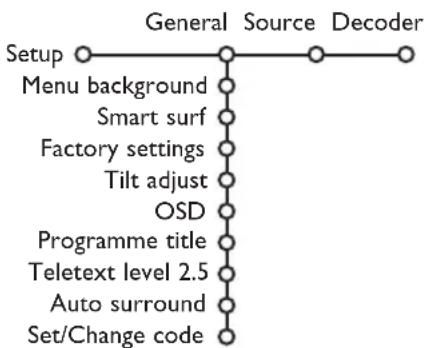
The Setup menu contains items that control the settings of the TV's functions, features, services and peripherals you may have connected.
The General menu allows you to change various settings that are presumably adjusted less frequently than most other settings.
The Source menu allows you to select a source. The Decoder menu allows you to define one or more programme numbers as decoder programme numbers.
Press the + key on the remote control to get information about the selected menu item.
General
Smart surf
1 Select Smart surf.
2 With the cursor left/right, select
- 2 programmes if you want the P4P key to toggle between the current and the previously selected channel,
- 9 programmes if you want the P4P key to summon a list of up to 9 channels which can be selected,
To add/remove a channel or source:
Tune to the channel or source you wish to add or remove. Press the P1P key and press the cursor right to add or remove.
Note: If there are already 9 channels/sources in the list, the one at the bottom of the list will be removed.
Factory settings
This resets the picture and sound settings to their predefined factory values, but maintains the channel installation settings.
OSD (On Screen Display)
See Use of the remote control, p. 3, i+ On screen information.
1 Select OSD.
2 Select Normal to activate the continuous display of the programme number. Also TV channel and programme information are extended. Minimum will display reduced channel information.
Note: When subtitles is switched on, see Features, p.11, continuous display of the programme number is not possible.
Teletext 2.5
Some broadcasters offer the opportunity to see more colours, other background colours and nicer pictures in the teletext pages.
1 Select Teletext 2.5.
Press the cursor right to select Teletext 2.5 On to take advantage of this feature.
Press the cursor right again to select Teletext 2.5 Off if you like the more neutral teletext layout.
The selection made is valid for all channels which broadcast teletext 2.5.
Note: It may take a few seconds before teletext broadcast switches over to Teletext 2.5.
Auto Surround
Sometimes the broadcaster transmits special signals for Surround Sound encoded programmes. The TV automatically switches to the best surround sound mode when Auto Surround is switched On.
Set/Change code
The Child lock feature (see TV, Features, p. 11) allows you to lock channels to prevent others from watching certain programmes. To watch locked channels, a 4-digit code must be entered. The Set/Change code menu item allows you to create or change a Personal Identification Number (PIN).
1 Select Set/Change code.
If no code exists yet, the menu item is set to Set code. If a code has previously been entered, the menu item is set to Change code. Follow the instructions on screen.
Important:You have forgotten your code!
1 Select Change code in the General menu and press OK.
Press the cursor right and enter the overriding code 8-8-8-8.
Press the cursor again and enter a new personal 4-digit code. The previous code is erased and the new code is stored.
Source
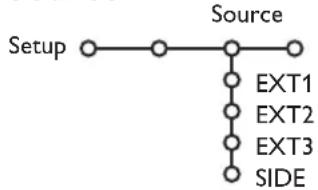
This menu allows you to indicate the peripheral you connected to one of the external inputs.
Press the cursor right to enter the list of types of peripherals attached to the selected input.
2 Select the peripheral device with the cursor up/down.
Once you have selected the source type, e.g. DVD, this source will automatically be selected when your remote control is in DVD mode, see p. 3, and when you press the key on the remote control.
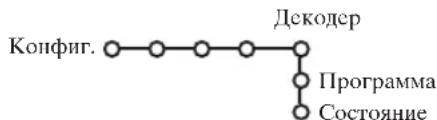
Decoder
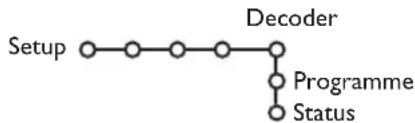
If a decoder or a descrambler is connected, see p. 15, you can define one or more programme numbers as decoder programme numbers.
1 Select Decoder with the cursor right.
2 SelectProgramme.
3 Select the programme number under which you have stored the programme coming from your decoder.
4 Select Status.
- Select the input used to connect your decoder: None,EXT1 or EXT2.
- Select None if you do not want the selected programme number being activated as a decoder programme number.
Note: Select EXT2 when the decoder is connected to your EasyLink video recorder.
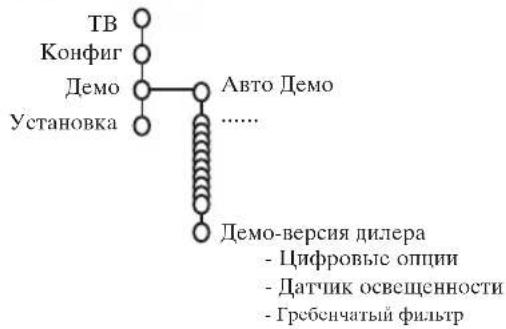
Demo
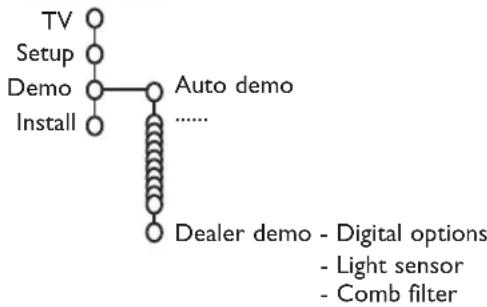
The Demo menu allows to demonstrate the TV features separately or in a continuous loop.
If Auto demo has been selected the demo will automatically present the features sequentially in a loop. Press one of the cursor keys to stop the Auto demo. If one of the features has been selected, this particular feature demo will run only once, and the Demo menu will reappear.
Note:The Dealer demo is not part of the automatic sequence and can only be activated separately.
TV menu
Press the MENU key on the remote control to summon the main menu.
Press the 1 + key on the remote control to get information about the selected menu item.
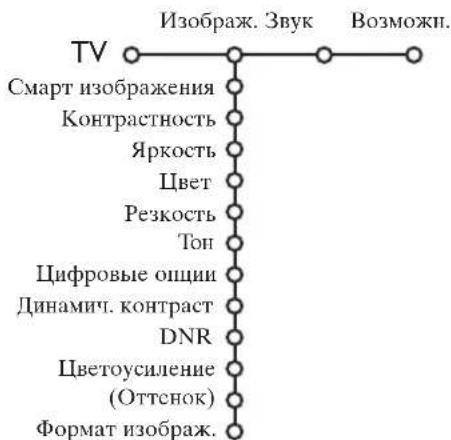
Picture menu
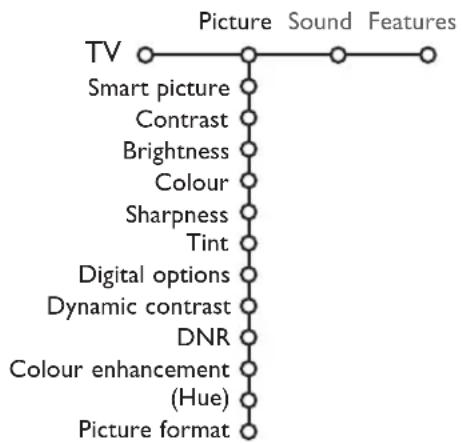
Press the cursor right to select Picture.
Select the menu items in the Picture menu with the cursor up/down.
3 Adjust the settings with the cursor left/right or enter the list of submenu items with the cursor right. Select a submenu item with the cursor up/down.
Note:To remove the menu background before adjusting the picture settings, see Select TV setup, General, p. 7.
Smart picture
Select Smart picture to display a list of predefined picture settings, each corresponding with specific factory settings.
Personal refers to the personal preference settings of picture in the picture menu.
Digital options
Pixel Plus 2 is the most ideal setting, doubles the horizontal resolution and increases the number of lines with 33% . You may consider to select Movie Plus in case a halo effect should disturb you. Dependent on your own preference, select Double lines, or 100Hz Digital Scan.
Note: When 60 Hz NTSC material is used, the options are changed to Pixel Plus 2, Movie Plus or Progressive, progressive scan without motion compensation.
Active Control
The TV continuously measures and corrects all incoming signals in order to provide the best picture possible.
Press the key on the remote control.
The Active Control menu appears.
Press the cursor up/down to select the Active Control values Off, Minimum, Medium (recommended) or Maximum.
The picture settings are being optimised continuously and automatically which is displayed by bars. The menu items can not be selected.
4 Press the cursor right to select Smart Picture.
Press the cursor up/down to select one of the predefined picture settings.
Press the cursor right to select Active Display.
Press the cursor up/down to select Show bars, one of the Dual screen demos or Off.
When you select Dynamic contrast, Pixel Plus 2, Digital Noise Reduction or Digital Natural Motion, the TV screen is divided into two parts: in the left part the selected picture quality setting is switched off; in the right part it is switched on.
Press the key again to switch off the Active Control menu.
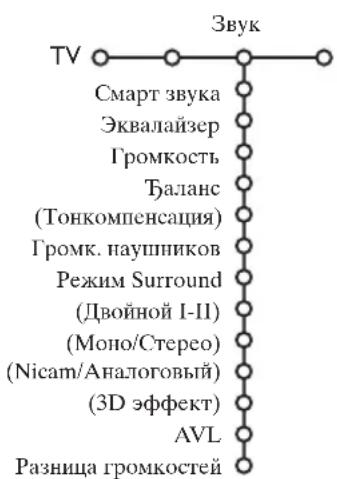
Sound menu
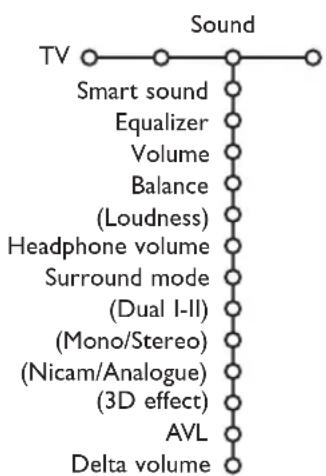
Press the cursor right to select Sound.
Select the menu items in the Sound menu with the cursor up/down and adjust the settings with the cursor left/right. Remember, control settings are at normal mid-range levels when the bar scale is centred.
Smart sound
Select Smart sound to display a list of predefined sound settings, each corresponding with specific factory settings of Treble and Bass.
Personal refers to the personal preference settings of sound in the sound menu.
Notes:
- Some menu items are only available in case of a Cinema Link configuration and when the Cinema Link is activated. Others are steered by the audio receiver instead of by the TV. See the separate Cinema Link booklet supplied.
- Dual I-II is only available with dual sound transmission.
- Mono/Stereo is only selectable in case of analogue stereo transmission.
- Nicam/Analogue is only selectable in case of Nicam transmission.
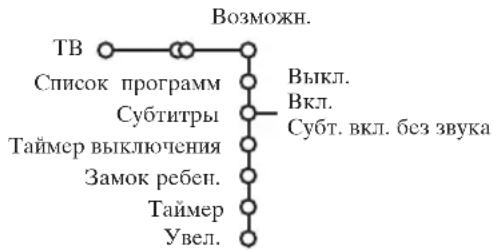
Features menu
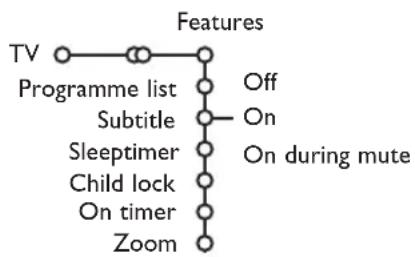
Programme list
Press the OK key to switch over to the selected TV channel or external.
Select subtitles
The subtitle page must be stored for each TV channel:
Switch on teletext and select the proper subtitle page from the index. Switch off teletext.
Subtitle On will automatically display them on the selected TV channels if subtitles are in the transmission.A symbol will indicate that the mode is on.
Select On during mute when you want to have the subtitles automatically displayed only when the sound has been muted with the key on the remote control.
Child lock
1 Select Child lock.

Press the cursor right to enter the Child lock menu.You're summoned to enter your code. Note:You have to re-enter your code each time you enter the child lock menu.
Important: You have forgotten your code! See p. 8.
3 Select one of the menu items of the child lock menu:
- Lock if you want to lock all channels and externals.
-
Custom lock and press the cursor right. Select:
-
Lock after if you want to lock all channels and externals from a certain time onwards. Press the cursor right and enter the time with the cursor up/down and right. Press the OK key to validate.
- Programme lock if you want to lock a certain TV channel or external;
- Select Unlock to disable all locks you have set.
Press the cursor right to select Features.
Select the menu items with the cursor up/down and adjust the settings with the cursor left/right.
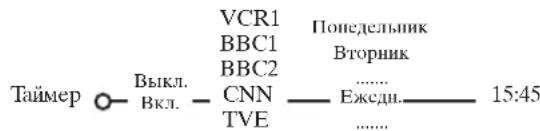
On timer
1 Select On timer with the cursor down.
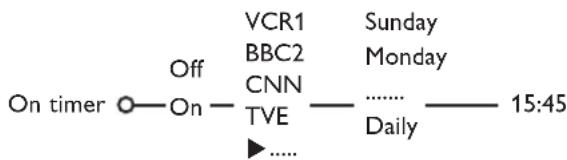
2 Select On with the cursor right.
Press the cursor right again to enter the programme list.
Select the TV channel or external you want your TV to switch to on a selected time and day.
Press the cursor right again to select a day of the week or to select Daily.
Press the cursor right once again to enter the time with the digit keys or with the cursor up/down and press the OK key to activate.
7 Press the MENU key to turn off the menu. Note:To check your timer settings, press the i+ key.
Zoom
1 Select Zoom with the cursor down and press the OK key.
Press the OK key to select one of the zoom magnifications (x1, x4, x9, x16).
3 Additionally you can shift the selected zoom window over the screen with the cursor keys up/down, left/right.
Press the MENU key to turn off the zoom function.
Teletext guide
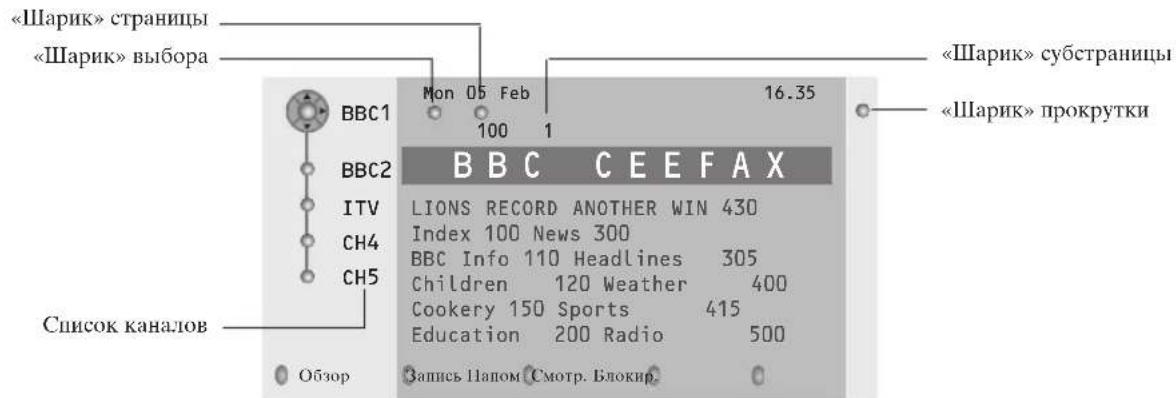
TV channels which broadcast teletext also transmit a page with the programme guide of the day. If the displayed teletext programme guide page satisfies the Video Programming via Teletext (VPT) requirements, it will be possible to record, remind, watch or lock programmes.
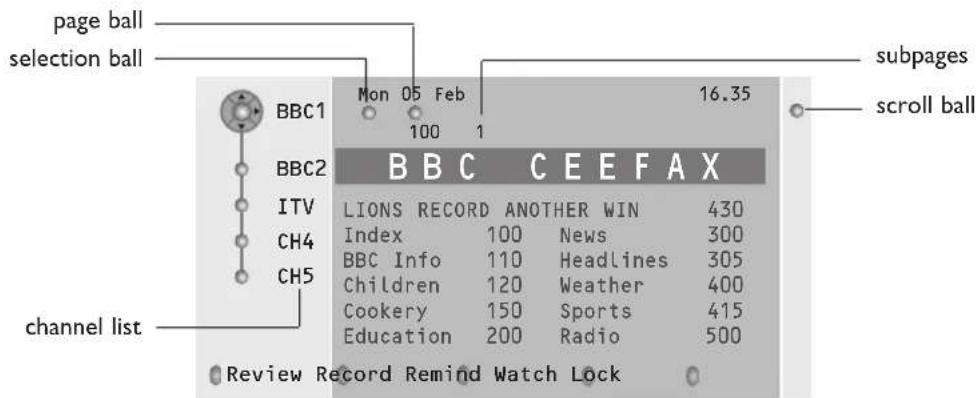
Press the key.
Select a TV channel with the cursor up/down and press OK.
Move the cursor up to the top of the channel list where the name of the selected TV channel reappears.
Press the cursor right to move the puck over the selection ball.
In the teletext index page, look for the programme guide page of the day or the following day.
Enter with the digit keys, the programme guide page number. Press the cursor right twice to move the puck to the right to choose one of the subpages if available.
If the selected programme satisfies the VPT requirements, the TV will remember the last selected teletext page number of that channel that contains programme guide information and indicates which programme starts at what time.
Every time you press the key, the teletext programme guide page of the selected TV channel will be available.
Note:The broadcaster is responsible for the content of the information.
Basic functions
Press one of the grey, red, green, yellow or blue keys to activate a Teletext Guide function. The keys appear in grey if the function is not available.
Review: this menu provides a list of programmes that are marked as reminders, those that have to be recorded and those that are locked. This menu can be used to change or remove marked programmes.
Record: to programme the recording of the video recorder (if it has a NEXTVIEWLink function and is connected to EXT.2).
Remind: to automatically switch on the TV if it is in standby or to display a message if the TV is on.
Lock: to lock certain programmes to prevent recording or watching. For the functions Record, Remind or Lock, a small menu pops up in which you can choose the interval: once, daily or weekly, or clear an earlier made record, remind or lock setting. The default interval is set to Once. To confirm the frequency, press the OK key.
Watch: to watch the selected and currently broadcast programme.
Teletext
Most TV channels broadcast information via teletext. This TV has a 1200 pages memory that will store most broadcasted pages and subpages to reduce waiting time. After each programme change, the memory is refreshed.
Switch Teletext on and off
Press to switch the teletext on.
| 102 | “03 04 05 06 07 08 09 10 11 12” BBC CEEFAX 102 Mon 05 Feb 16.35.22 | ||
| BBC CEEFAX | |||
| LIONS RECORD | ANOTHER | WIN | 430 |
| Index | 100 | News | 300 |
| BBC Info | 110 | Headlines | 305 |
| Children | 120 | Weather | 400 |
| Cookery | 150 | Sports | 415 |
| Education | 200 | Radio | 500 |
| Lottery | 230 | Travel | 550 |
| Finance | 240 | Subtitling | 888 |
| Music | 280 | TV Listings | 600 |
| Red | Green | Yellow | Blue |
Select a Teletext page
- Enter the desired page number with the digit keys, the cursor keys up/down or with the -P+ key.
- Select the options at the bottom of the screen with the colour keys.
Previously selected teletext page
(Only possible in case there is no list of favourite teletext pages available. See p. 14.) Press the P&P key.
Select the index teletext page
Press the grey colour key to display the main index (usually p.100).
Only for T.O.P teletext broadcasts:
Press i+. A T.O.P. overview of the teletext subjects available is displayed. Select with the cursor up/down, left/right the desired subject and press the OK key. Not all TV channels broadcast T.O.P. teletext.
Select subpages
When a selected teletext page consists of different subpages, a list of available subpages appears on the screen. Press the cursor left or right to select the next or previous subpage.
Enlarge a Teletext page
Press repeatedly to display the upper teletext part, the lower teletext part and then to return to the normal teletext page size. When the teletext page is enlarged, you can scroll the text, line by line using the cursor up/down.
Picture/Teletext
Press the key. Press the 12 key to show Teletext on the right of the screen.
Use the cursor keys to select a TV channel.
Press the 12 key to switch off dual screen.
Active screen selection
When in dual screen picture/teletext (12 key), enter the desired page number with the -P+ key, then press the MENU key, then select the left screen (with the blue ball at the top). You can now select a compressed or full screen view of picture/teletext with the 4 key.
Hypertext
With hypertext you can quickly jump to a pagENUM or search for a specific word shown on the current teletext page.
Press the OK key to highlight the first word or a number on the page.
Use the cursor up/down, left/right to select any other word or number you want to search for.
Press the OK key to confirm. The search starts. A message appears at the bottom of the screen to indicate the searching, or that the word or page is not found.
Use the cursor up to exit hypertext.
Teletext menu
(only available in full screen teletext mode)
Press the MENU key to activate the menu.
Press the cursor up/down to select the menu items.
3 Press the cursor right to activate.
Reveal
Reveals/conceals hidden information on a page, such as solutions to riddles and puzzles.
Press the cursor right to activate.
Favourite
You may create a list of eight favourite teletext pages in total, selected from various TV channels.
To add a favourite page to the list:
1 Select a favourite teletext page.
Select Favourite in the teletext menu and press the cursor right to enter the list.
3 Press the cursor right again to add the page.
Press the MENU key to watch the current page.
To watch a favourite page from the list:
When in Teletext, use the P-P key to browse through the favourite pages of the TV channel actually selected.
Note: Only the pages of the current channel can be selected.
Search
Selecting a word
On the keyboard on screen you can type in a random word you want to search for in the teletext pages.Whether upper- or lowercase is used has no influence.
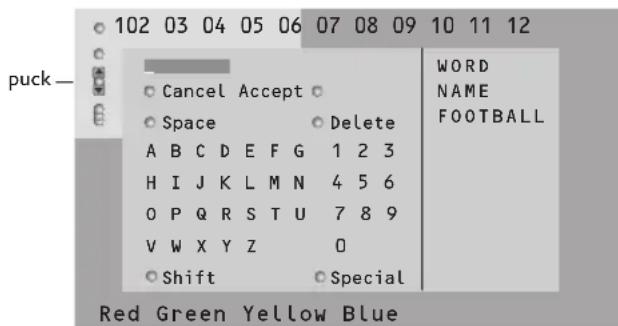
Press the cursor right to enter the keyboard.
Press the cursor left/right, up/down to select the characters, words or functions.
Press the OK key to confirm each character selected.
4 Select Cancel to cancel the word; Space to enter a space; Delete to delete the last character selected; Shift to switch between lowercase or capital characters; Special to display special characters on the keyboard and press the OK key.
Press the cursor left repeatedly to return to the Teletext menu again.
Searching a word
1 Type in the word on screen or select a word from the history list on the right and press OK.
2 Select Accept and press OK again. The message Searching appears.
To cancel the searching or to search for a new word, select Keyboard and press OK.
When a word is not found, a message appears. When the word is found, it is highlighted in the teletext page. To continue the search, press the OK key.
Cycle subpages (if available)
Makes the subpages cycle automatically.
Press the cursor right to activate and to deactivate again.
Timed page
To display a specific page from a selected TV channel at a certain time.
Press the cursor right and select Yes or No.
Enter the time and pagENUMber with the cursor keys or the digit keys.
Note:Teletext does not have to remain switched on, but you should watch the TV channel you have selected the specific page from.
Press the cursor left to return to the TV menu again.
Language
If the displayed characters on screen do not correspond with the characters used by the teletext broadcaster, you can change the language group here.
Select Group 1 or 2 with the cursor right.
Press the MENU key to leave the Teletext menu.
Connect Peripheral Equipment
There is a wide range of audio and video equipment that can be connected to your TV.
The following connection diagrams show you how to connect them.
Depending on the versions, the TV set is equipped with 2 or 3 SCART connectors EXT1, EXT2 and EXT3 located on the rear.
Note: EXT. 1 can handle CVBS and RGB, EXT. 2 CVBS and Y/C, EXT. 3 CVBS and RGB. It is preferred to connect peripherals with RGB output to EXT. 1 or EXT. 3 as RGB provides a better picture quality.
If your recorder is provided with the EasyLink function, it should be connected to EXT. 2 to benefit from the EasyLink functionality.
Recorder (VCR-DVD+RW)
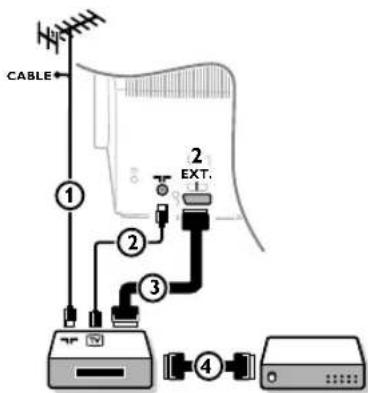
Connect the aerial cables ① ② and, to obtain the optimum picture quality, eurocable ③ as shown. If your recorder does not have a euroconnector, the only possible connection is via the aerial cable.You will therefore need to tune in your recorder's test signal and assign it programme number 0 or store the test signal under a programme number between 90 and 99, see Manual installation, p.6.See the handbook of your recorder.
Decoder and Recorder
Connect a eurocable 4 to your decoder and to the special euroconnector of your recorder. See also the recorder handbook. See Decoder, p. 8. You can also connect your decoder directly to EXT.1 or 2 with a eurocable.
Other equipment (satellite receiver, decoder, DVD, games, etc.)
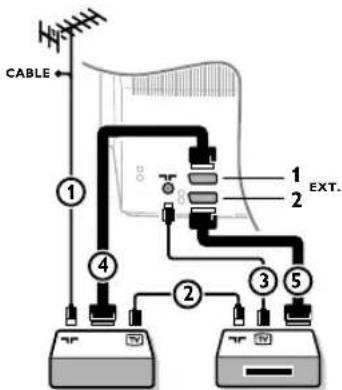
1 Connect the aerial cables ① ② and ③ as shown (only if your peripheral has TV aerial in-/output). Connect your equipment with a eurocable ④ or ⑤ to one of the euroconnectors EXT.1, 2 or 3 to obtain a better picture quality.
2 Look for the test signal of your peripheral in the same way as you do for a recorder.
3 Make a selection in the Setup, Source menu, p. 8.
Side connections
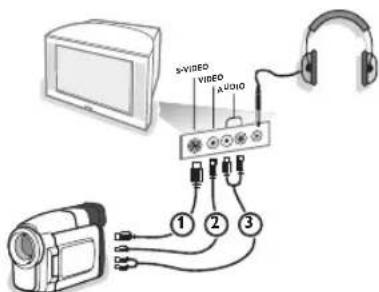
Camera or Camcorder
1 Connect your camera or camcorder as shown.
2 Connect to VIDEO ② and AUDIO L ③ for mono equipment. For stereo equipment also connect AUDIO R ③. S-VHS quality with an S-VHS camcorder is obtained by connecting the S-VHS cables with the S-VIDEO input ① and AUDIO inputs ③.
Do not connect cable ① and ② at the same time. This may cause picture distortion!
Headphone
Insert the plug into the headphone socket as shown.
Press on the remote control to switch off the internal loudspeakers of the TV.
The headache impedance must be between 8 and 1000 Ohm. The headache socket has a 3.5 mm jack.
In the Sound menu select Headphone volume to adjust the headphone volume.
Stereo amplifier and two extra front speakers
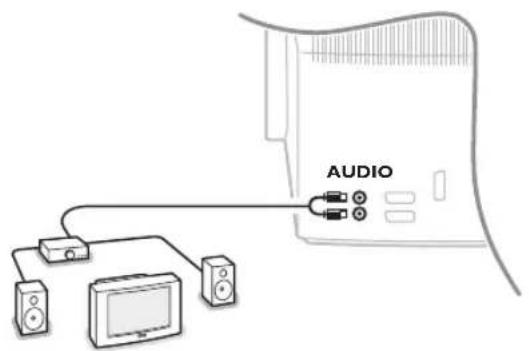
1 Connect the audio cables to the AUDIO input of your amplifier and to AUDIO L and R at the back of your TV.
The output level is controlled by the volume control of the amplifier.
Note: Switch off the TV and your audio amplifier before connecting them. Set the audio amplifier's volume to minimum.
To select connected equipment
Press the + key on the remote control repeatedly to select EXT1,EXT2,EXT3* or SIDE according to where you connected your equipment at the back or the right side of your TV.
Remark : Most equipment (decoder, recorder) carries out the switching itself, when it is switched on.
- Only available on certain versions.
Recorder or DVD with EasyLink
The recorder (VCR or DVD+RW) or DVD can be operated with the remote control via the Recorder or DVD menu on screen.
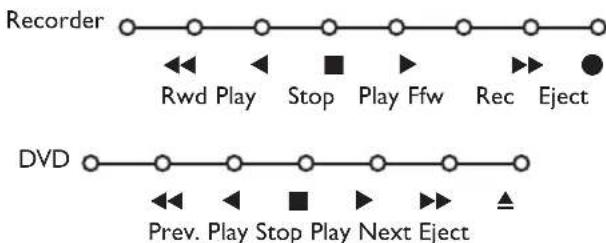
Press the MENU key on the remote control.
2 Select the Recorder or DVD menu with the cursor up/down.
Press the cursor left/right, up/down to select one of the recorder or DVD functions.
The key for recording can be operated in the TV mode. If your EasyLink recorder has the system standby function, when you press the key for 3 seconds, both TV and the recorder are switched to standby.
Audio- and video equipment keys
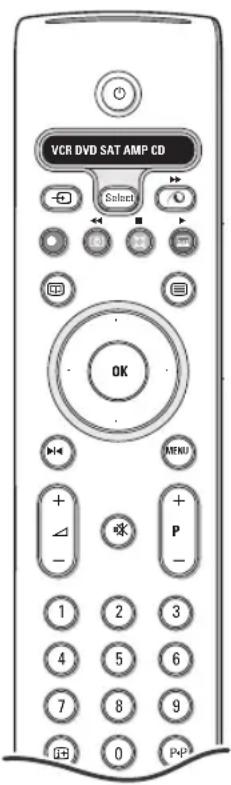
This system remote control operates the following Philips equipment:TV, VCR, DVD, SAT (RC5), AMP (+TUNER), CD;
Press the Select key to operate any of the equipment indicated in the display. Another device can be selected by pressing Select repeatedly within 2 seconds. The led will blink slowly to indicate the device. Press one of the keys on the remote control to operate the peripheral equipment. To return to TV mode press Select while the led is blinking. When no action is taken within 60 seconds, the remote goes back to TV mode.
Note: When the Select key is pressed and held for more than 2 seconds, the RC5/RC6 system select command is transmitted.
to switch to standby
for pause ( VCR,DVD,CD)
for record,
for rewind ( VCR, CD); search down (DVD, AMP)
for stop
for play
for fast forward ( VCR, CD); search up (DVD/AMP)
to select your choice of subtitle language (DVD); RDS news/TA (AMP); to shuffle play (CD)
to select aDVD title; RDS display (AMP); info on screen (CD)
i+ display information
MENU to switch the menu on or off
-P+ for chapter, channel, track selection
0 to 9 digit entry
P-P tape index ( VCR), select a DVD chapter, select a frequency (AMP)
VCR timer
surround on/off ( AMP,CD)
cursor up/down to select the next or the previous disc (CD)
cursor left/right to select the previous or following track (CD) search up/down (AMP)
Additionally the DVD, SAT and CD indicator can be programmed to operate the DVD-R, SAT (RC6), CD-R instead.
Press the Select key repeatedly until no LED is lit.
To program DVD-R, press the OK key + digit 2. To program SAT (RC6), press the OK key + digit 4. To program CD-R, press the OK key + digit 6.
From now on, when the corresponding (DVD, SAT, CD) indicator is selected, the remote control will operate your DVD-R, SAT (RC6) or CD-R.
Note: To return to the modes programmed in the factory, either remove the batteries for a few minutes, or press the OK key + digit 1 (DVD mode); or + digit 3 (SAT-RC5) or + digit 5 (CD mode).
Record with your recorder with EasyLink
In TV mode, it is possible to start a direct recording of the programme which is being displayed on the TV screen. Continue to press the record key on the remote control for more than 2 seconds.
Note:
Switching programme numbers on your TV does not disturb recording!
When recording a programme from a peripheral connected to EXT.1, EXT.3 or SIDE, you can not select another TV programme on the screen.
Tips
| Care of the screen | Do not touch, push or rub or strike the screen with anything hard as this may scratch, mar or damage the screen permanently. And please do not rub with dust clothes with chemical treatment. Do not touch the surface with bare hands or greasy cloth (some cosmetics are detrimental to the screen). Unplug the TV before cleaning the screen.When the surface becomes dusty, please wipe gently with absorbent cotton or other soft materials like chamos soaks. Do not use acetone, toluene and alcohol because they cause chemical damage. Do not use liquid cleaners or aerosol cleaners.Wipe off saliva or water drops as soon as possible. Their long time contact with the screen causes deformations and colour fading. |
| Poor Picture | ·Have you selected the correct TV system in the manual installation menu? ·Is your TV or house aerial located too close to loudspeakers, non-earthy audio equipment or neon lights, etc.? ·Mountains or high buildings can cause double pictures or ghost images. Sometimes you can improve the picture quality by changing the direction of the aerial. ·Is the picture or teletext unrecognisable? Check if you have entered the correct frequency. See Installation, p. 6. ·Are brightness, sharpness and contrast out of adjustment? Select Factory settings in the Setup, General menu, p. 7. ·Sometimes poor picture quality is possible when having activated an S-VHS camera or camcorder connected to the right side of your TV and another peripheral is connected to one of the peripherals at the same time. In this case switch off one of the other peripherals. |
| No picture | ·Is the aerial connected properly? ·Are the plugs tightly connected in the aerial socket? ·Is the aerial cable in good condition and does it have suitable plugs? |
| No sound | ·No sound on any channel? Check the volume isn't at minimum. ·Is the sound interrupted with the mute key? |
| No solution found for your picture or sound problem? | Switch your TV off and then on again once. Never attempt to repair a defective TV yourself. Check with your dealer or call a TV technician. |
| Remote control | ·If your TV no longer responds to the remote control, the batteries may be dead or the wrong mode (TV or other peripheral, see p. 3) is selected. ·Y ou can still use the MENU key and the -/+ keys at the top of your TV. |
| Menu | Have you selected the wrong menu? Press the MENU key again to exit from the menu. |
| Standby | Your TV consumes energy in the standby mode. Energy consumption contributes to air and water pollution. Power consumption: 1 W. |
Information for users in the UK
(Not applicable outside the UK)
Positioning the TV
For the best results, choose a position where light does not fall directly on the screen, and at some distance away from radiators or other sources of heat. Leave a space of at least 5cm all around the TV for ventilation, making sure that curtains, cupboards etc. cannot obstruct the air flow through the ventilation apertures.
The TV is intended for use in a domestic environment only and should never be operated or stored in excessively hot or humid atmospheres.
General Points
Please take note of the section 'Tips' at the end of this booklet.
Interference
The Department of Trade and Industry operates a Radio Interference Investigation Service to help TV license holders improve reception of BBC and IBA programmes where they are being spoilt by interference.
If your dealer cannot help, ask at a main Post Office for the booklet "How to improve Television and Radio Reception".
Mains connection
Before connecting the TV to the mains, check that the mains supply voltage corresponds to the voltage printed on the type plate on the rear panel of the TV. If the mains voltage is different, consult your dealer.
Important
This apparatus is fitted with an approved moulded 13 Amp plug.
To change a fuse in this type of plug proceed as follows :
- Remove fuse cover and fuse.
- Fit new fuse which should be a BS1362 5A,A.S.T.A. or BSI approved type.
- Refit the fuse cover.
In order to maintain conformity to the EMC directive, the mains plug on this product must not be removed.
Connecting the aerial
The aerial should be connected to the socket marked x at the back of the set. An inferior aerial is likely to result in a poor, perhaps unstable picture with ghost images and lack of contrast. Make-shift or set-top aerials are unlikely to give adequate results.
Your dealer will know from experience the most suitable type for your locality.
Should you wish to use the set in conjunction with other equipment, which connects to the aerial socket such as TV games, or a video camera, it is recommended that you consult your dealer on the best method of connection.
Stand (if provided)
Use only the stand provided with the set, making sure that the fixings are properly tightened. A diagram showing how to assemble the stand is packed with the stand. Never use a make-shift stand, or legs fixed with woodscrews.
-
-
-
1
Aide?
Important: you've aublié your code!
1 Selecteer Kinderslot.
Vergrendelen Kinderslot Vergrendeling Vergrendel na Ontgrendelen Programmavergr.
18) Modo Surround Incredible surround
OSD (On Screen Display)
OSD (On Screen Display)
18) Surround stilling Incredible surround
OSD (On Screen Display)
for sokingnedover/oppover (AMP)
18) Surroundlage Incredible surround
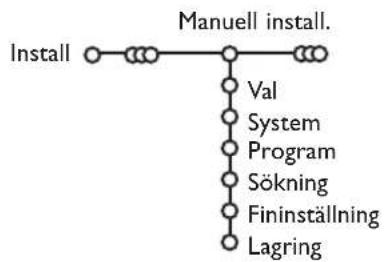
Manuell installation
OSD (On Screen Display)
OSD (On Screen Display)
Data noctynpneHnB peMOHT:
TAPAHNTHbI TAOH (warranty card)
13DAENIE (item)
MOДЛь (type/version) /
HacToaTn TaOn HdeCTBNTeHeh ToIbKO npHaIuHne neaTN 3aONHeHH BcEx npNBBeDeHHbIX Bblwe rpaΦ. (This card is only valid when all information is filled in and the stamp is present.)
ПОКУПАТЕЛь (buyer)
AДPEC(address)
TEJIeΦOH (telephone)
HactoarapaHTn npedocabIeTcN3rOToBtIeM BdoJIHeHne K npaBaAM nOpTeBteJIy,ycTaHOBJIeHHbIM DeCTByIOUIM 3aKOHdaTeNbCTBOM PocCnckoiΦeepauu, Hn B Koem Mpe He OpAunuBaet IX.
Hactoia rapaHTnI DeCTByeT B TeueHne OJHO roJa C DaTbI npIO6peTeHnI N3dEInn I NOpa3yMeBaET rapaHTnHoe 06cLyXnIBaHne N3dEInn B clyuae ObHApXKeHn DEpKToB, CBz3aHHbIX C MaTePnAnAmn I pa6ToN. B 3tOM clyuae noTpe6ntelb IMeet npABo, CpEn IpOyeRo, Ha 6ecnPaTHbI peMOHT n3dEInn. Hactoia rapaHTnI DeIcTBnTeNbHa npi co6nIoHeHN cIeDyUOnx ycNoBn:
1.ИЗделп длжно 6ыт пиобетен.Toькн Ha Teppntopn Pocnn, npuem ncklIOHTeNo dЯ ЛчнbIX 6bitOBbIX hyxd.ИЗделп длжно IncnoJIb3ObTaBcR B cTporom COOTBETCTBn C nHCTpyKUneI NO EKnIyatauN C co6IIOdeHnem npaBn I Tpe6oBaHn 6be0nacHOCTn.
2.063aHHoCTn 13rTOBHTeJIIO HAcTOrueIraPANTM INcNoHryOTcHa TeppuToPM PoCCn npOdaUAMN OfouaIbHbIM NoCnyKBAUOM (cepBc) CEHTpAMN.
3. HacToaJra rapaHTnHe paacnpocTpaHReTcna He depeKtbI n3dJIe, BO3NikUne B pe3yIbTaTe:
a) XMMNueCKO, MEXaHNueCKO INIINHOrO BO3DeICTBnI, IONaBux NIOCTOpOHnIX PpeIMeTOB, HaceKOMbIX BO BHyTpB n3dJIIn;
6) HnnpabnIbHO 3KcPnyatauH, BkIIOUa, Ho He orpaHnHbAba, nCNOJIb3OBAHnEM N3DeJINr HE NO ERO pRmOMy Ha3HaueHIno I yCTaHOBky B 3KcPnyatauHIO N3DeJINr B HApUeHne npabnI n Tpe6oBaHn 6e3OnacHOCTn;
B) IN3HOCA DeTaeN eOTDeIKN, lamn, 6aTaapei, 3aunTHbIX 3KpaHOB, HAKONITeNe MyCopa, pEmHei, UETOK INHBix DeTaeN C ORpAHueHHBM cPOKOM INcOJIb3OBAHIN;
r)peMOHTa n/INn HalaIaIKn I3dJIeNIA,ecNI OHI npOn3BeDeHbI JIO6bIMN INbIMN NlUcAMN KpOme 06cnyKNaBauOuXu CEHTPOB;
)aadantauinN3MeHHeNcO6bIHyC0epbI npImeHHeNn3dJIy, yKa3AHHOB INHCTpyKUINIO 3KcNlyatauIN.
- Hactoiaa rapaHTn DeiCTBnteIbHa IIO ppeIbIeHIM BmecTe C opunHAIOM HactoIeTo TaIOna opunHAnA TObApHOrO ueKa, BblaHHoro IpOdaBcOM, IN3JeNIA, B KOTOpOM 6hApUKeHbI depeKtbl.
5.HactoiaarapaHTnIeNCTBnteHbTAToIbKO nIaI3dJIIN,NCIOB3yEmbIXIIJNUHbIX6bITOBbIXHyK,IHe pacnpocTpaHAreTCHaI3dJIIN,KOTOpbIENCIOB3yOTcIaI KOMMepuecknx,PpOmbIuJeHHbIXINIpOceccnHOaHbXcTeEi.
No BCem BONpocam rapaHTnHOrO 6cbNyKbBaHnHa 3dEInnФINNC 6paauTecb K Baew My MeCTHomy npoabuy.
ΦnmaΦnnc yctHaBnBaet cneDyUuue cpoKn CnyK6bl n3dennr:
Pynna 1-5 net
PaIIO,paIIO6yIuIbHNIKIMarHHTOJIbI,pepeHOChbIE MarHHTOJIbI, TeIefoHHbIe annapaTbI (npoBOHbIe) n npyra npodyKUry, IMeouaJHe0BbUyO CTOnMOCTb.
Pynna 2-7 net
NepcoHaJIbHbIe KOMnblOtepbI npepepeHHbIe ycTpoiCTBa, ZBeTHbIe TeLEBn3Opbl (BKIOUaI npoeKuHOHHbIe), BInDeOMarHnTOfOHObl, ABtOMOBIIbHbIe MaHHTOnbl, Hi-Fi 3ByKOBOcPpON3BOJMaA annpaTypa (BKIOUaY KOMNOHeHTbl), BInDEOKaMepbl npeHOCbIe BInDeOyCTPOICTBa, paDnToTeLefoHbl (6ecpOBoHDhle), UΦpObIe cOTobIe TetefoHbl n annapatypa ngPOBOrHa3NaueHn.
ΦnmaФnnc yJeIeT 60JIbOoe BHNMaHne KaYeCTBy BbInyckaem npodykun. Ppi nCnoJIb3OBaHnn ee dIy IuHbIX (6bITobix) HxJd C cO6JIIODeHEm IpabINl 3KcIIpyataun CpOK IN CnyKbMoKeT 3HaHTeBHO pReBICNTb OfNuaNBbI CpOK CnyKb, YcTAHOJIeHHbI B COOTBeTCTBm C DeIeCTByUcIM 3aKOHOaTeJIbCTBOM O npBaX nOTpeBnteJIe.
ΦnρMaΦnJIπIc
Фадк: (095)755-69-23
Hyjha no.moub?
Ecu omy pyko6o0dcmno no
3Kcnayamauu He daem omega
Ha Bau Bonpoc, a CObembl
He no36oJiom pa3peuumb
Bo3HuKuyc npO6LeMy
cmle6u3Opom, Bbl MoKeMe
no36Onmnb 6 MeCmHb u eHnp
obcayxuehun Kauenmo6 Ulu
B Cep6uc-ueHnp kOmnauu
Philips.
Cm.npuiokeHHbui npocnekm c unfpopmaueei o zapaHmuHOM 06caykuuhaun no 6ceMy mupy. BHumahue: obauaacb 3a nomoubu, umeune haZomobe danhle o modeau u homepe u3deu, komopbie Bbl moKeme naimu na 3adneu cmenke meieeuzuoHNO2 npueMnka uuHa ynaKo6ke.
Mode1b:
Homepu3deua:
B c0a3u cnocmnnbI
co6epuuehcm6o6aunem u3deuun 3ma
uncmpyua no1b306aemeJ M0KcM
6bbmb u3meneHa 6e3
npedapumeabnozo y8edomlenuH.

Hncmpkyuu no ymuu3auuu neu3opa no okouanuu cpoka 066bl
Komnau Philips npudaem 60b uoe 3nauehue co6noedenu npou36o0dmeenbix Hopm oxpahtokpykaoue cpebl. Bau noBmu mele6u3op codepKum mamepuaIbl, donyckaouue ymuuaauu u no6mophoe npumehenue.
IIO OKOHuaHn cPoka cLyK6bl
obopydo6aHn, cneuaaU3upo8an
hble KOMnaHn MoZym 63nmb Ha
ce6n pa3bOpky cmapo20 meLe6u-
3opa c mem, uMo6bl u3bamb u3
He2o Mamepua1bl, donyckaioue
noBmophoe ucNo.1b306aHue u CBe
cmu K MuHmuMy KOluuec60
ymuuzupyeMbIX Mamepua1OB.
IIpoc6a co6liOdamb ycmano6
AenHtbe 6 MeCme Bauezo npoku
baHn npabua no ymuuaauu
cmapbx mele6u3Op6.
Copepknne
YcTaHOBKa
IIOITOTOBKa 2
KHOIIKNHaBepxHeIaHEnTeJIeBN3opa 2
IyIbT IINCTaHIOHOHHoro ynpabJIeHHra 3-4
IcnoJIb3OBaHHe MeHIO 5
MeHIO BbI6opa 3bika n cTpaHbI 5
CoxpaHHeHHe HAcTPOeK TeJIeBn3HOHHbIX KaHaJIOB 6
ABTOyCTaHOBka 6
PyuHa yctaHOBKa 6
3aatab Hm 6
IpepcTaHOBKn B cHnCKe IporpaMM. 7
Bb6op npeIOHTTeIbHbIX TeJIeKaHaJIOB .... 7
Haayabna HacTroika 7
O6nnc yctaHOBKn 7
IcroHnK cnHaJa 8
Iekoep 8
Pexkm JemOnctpa.. 9
3KcnIyataaia
MCHHO TcJcBn30pa
MeHIO nacTpoKn H3o6paKeHHN 9-10
Mennno nactpoKn 3Byka 10
McHIO HAcTPOKNI IOIOJIHHTCJIbHBIX BO3MOXHOCTcI 11
IyTeBOJNTeJIb IIO TeJIeTeKcTу 12
TeJIeTeKcT 13-14
IopKJIIOueHHe BHeHHx yctpoiCTB
CHOMOJIbIO KHOIIKN MENUMoKHO BbI3BaTb
JIaBHOe MeHIO, He HcIOJIb3yIyJIbT
JnCTaHIIOHOHOrO yIpaJIeHN.
HcnoIb3yUte:
KHOIIKNVOLUME-+KHOIIKNPROGRAM-+ IIByBbOpaIyHKTaMeHIO,HaJHMaIXIINIEpeMeIeHHBHyKHOMHaIIpaBJIeHHN,KaIKoKa3aHOHa pHyHKe;
KHONKY MENU JIJI NOITBEPKJENH Bb6opa.
PpuynpaeeHHMeHc nomoukho KNOKu MENu naeepxneunaneu meae6uzopa dna 6bXoda u3 MeHO MOKHO uCNOAB3O6amb moAko nyHKM
BbXoD. Ipeudume K nyKmy BbXoO u HaKmune KhONky MENU.
IcnoJb3ObaHne nyJbTa dNCTaHnHOHHoro ynpabJIeHH
Ppumueaue: 60bHcnaeKnok odhokpamhoe hakamue akmubu3upyem coombemcmyouyfo yHKuho, a noemophoe hakamue deakmusuyem fynkuuio. Eclu hakamue knonku npedno.lazaem b6bop odnozo u3 heckoJkux cepuaanmo6, 6ydem nokaan cncoc omux cepuaanmo6. Iosmopnbie hakamun konknpugodmK b6bopy caedyoue2o nykma u3 cnucka. Ypeez 4 cekyohbi cncoc cepuaanmo nponaadam abmamueecku, dja e2o hemedeHHO zo ydaenure c kpana moKHO hankb KONky OK.
1) Pekm OxHdHa (Standby) HaKMHTe 3Ty KHOIIky IIJI BKJIIOueHn HJIN BbIKJIIOueHn TeJIeBH3opa. B BbIKIIOueHOM COCTOHHI IOPHT KpaCHbI HIIHKaTOP.
2)VCR DVD SAT AMP CD KhoIKN ayINHO BnICoyctpoIcTB (ctp. 17).
3) Bb6op BHeHHx yctpoNCTB (cTp. 16)
4) KhoiKnayuio- n BndeoyctpoiCTB (cTp.17).
3aannbc
CM. 3aIIHc b Ha BnDCO-MaHHTofoH c HcIOJIb3OBaHHem fYHKuH N EasyLink, ctp. 17.
5) MyteboTeJIa TeIeTeKcta ( uMeemca moIbko Ha Hekomopbx ModeJnx)
BKn./BbIKcTp.12
HaKMnTe KHOIIky 12 IIIA IOKa3a IIyTeBOIHTeJIa TeJIeTeKCTa B IIpaBOIIOJIOBHe 3KpAHa.
6) Kypcop 3TN 4 KOHNI O6ccnueHBaOT nepemieHc B McHIO.
7)OK HaKHMaIe 3Ty KHOIIky: JIA aKTHBn3aHb HbIbpaHHo FyHKIN - Ipr OTo6paKeHH MeHIO Ha 3KpaHe.
- JIII NOKa3a CINcKa IIPOrpaMM.
8) Cton Cnyknt nHa octaHOBKn (3amopaxHBaHn) H3o6paKeHH Ha 3KpaHe.
9)-VOL+(PpOMKocTb)
IIpapeyJINpOBKn pOMKocTH.
10)OTKIOUeHHe/BKIOUeHHe 3Byka.
11)0/9 IIHpObIe KHOIIK CJIyKaT IJIa BbIbOpa TcJIeBn3HOHOro KaHaJa. IJIa BbIbOpa JBy3HaUHO HOMcpa IporpaMMbI, BBcIHrTe BTOpy IO TOrO, KaK Hcye3HCT YepToQKa. IJIa HeMeJIteHHoro IpeKeJIIOueHnHa BblbPaHHbI OJHO3HaHbI HOMep KaHaJa HaXMMrTe N yIepXHTe UytB JOnJIbIe HaXaToH KHOIIKy cero HOMepOM.
12) 1+ 3KpaHna HOpMaHn HaKMHTc 3Ty KHOIky IJIa OTO6paXCHN HOpMaHH O BbI6paHHOM TcJIcKaHaJIe IIporpAMMc.
HnΦopMaun o Meu/IIy.IbTe InctaunnoHoro ynpabJeHH
KorHa MeHIO OTo6paKaTe Ha 3KpaHe, HxKMHTe KHOHky I+ IIIA IOJyueHHN HnOopMaHn O BbIbpaHHom NyHKTC McHIO. IINIOJyUCHN HnOpMaHHN O cyHKIIHx IIyJIbTa IInCTaIHNOHHORO yIpBaJIeHHN, HxKMHTe Ha IIyJIbTe JIO6yIO KHONKy, KorHa McHIO INOKa3aHO Ha 3KpaHe. IIpN OTOM COOTBcTcByIOIIee HaXaTOH KHOIIke DeIcTBHe HE BBIOJIHHReTc.
13) Active control (AKTHBHaHacTpOJa) (umeemc moIbko na hekomopbIX ModeJx) cm. ctp. 13.
14) 12 CboeHHb EKpana (uemeemc moIbko Ha hekomopbx Modeaix)
HaXMMTe KHOIIKy HJIN
HaxmTe KhoNky 12 nIy OTo6paKeHH TeJeTeKcTa HIN
IpyeBOHNTJIIO TeJIeTeKCTy B npaBoN YacTH NkpaHa.
2 -H3o6paXeHH/IIyTeBOUHTeJIb IO TeJIeTeKcTy:
-
Iepemeea KypcoB BJIeBO/BIIpaBO BBI6peHrTe TeJIeBN3HOHHb KaHaJI.
-
IepemeeaTe KypCop BHH3 IepemecHTe yka3aTeIb K rOJIy6OMy IIIAPKU B JcBOH YacTH OkpaHa.
-HaKHMnKHOIIKN+K-,BbIMoKTeIpeKeIOHTbcHaIpyroTcJIckKaHaJI.
- 306paXeHHe/TeJeTeKcT: CM. Bb6op aKTHBHorO 3KpaHa, cTp. 13.
HaKMHTe KHOIky 12 IINBbIKIOHHeHHpeKHMa cIBBOEHNO EKPana.
15) J□ IIpeIycTaHOBKn H3o6paKeHHa H 3Byka
O6ccncnHbact Doctyn K HcckoJbKHM IpCdbapntcJbHbIM HaCTpoiKaM 1306paXkeHHN 3ByKOBOrO COpPOBQKeHHN. NyKt MeHIO IepcoHaI. COOTBCCTByET HAcTPOHkAM, KOToPbIC BbIOJIHCbI C NOMOIIbIO MeHIO.
HcnoJb3OBAHHe nyJIbTa dHCTaHIOHOHoro ynpabJIeHHN
16)O BkIIOueHHe/BbIKIOueHHe
dEmOHCTpaunn Pixel Plus 2
IⅡI H3O6paKeHnB IIpaBOuactn 3KpaHapeKHMbI Pixel Plus 2 n IUnfppoBoe ecTeCTBeHHOE IBHXKeHHe BKJIOUeHbI.
18) PekHM Surround Incredible surround
Ipi cTepeoTpaHcJIHH Bb6op Incredible surround co3aet BHeaTJIHe, KaK 6yTO IIHaAMHKn paIOJOKeHbI Ha 6OJIbIIeM paCCToaHH Ipyr OT IpYra, Yem HA caMOM JeJe.
Dolby Virtual surround
YBHeTcIyUHMM Bb6Opom npn Ipepeaue 3Byka B cTaHapTe Dolby surround.
IIO3BOJIAEOTOUYTHTbΦΦeKTB Dolby surround Pro Logic, BOCPONBDOJIaJeHCTBHe «3ByKa c3aIIH. CM.MeHIO HAcTppoIKN 3ByKa, 3DΦΦeKT, cTp.1
IpuMeuHue: MoJHo maKHe 6bIbpaMb 3mom peKum b MeHIO Hacmpouku 36yka, peKum surround, cmp. 11."
19) TeTeTeKCT (uemeemc moIbKO ha nekomopbx ModeaX) BKI./BbIK crp. 13 HaxMHTe KHOIIKY 12 IJIIOKA3a TCJIcTcKCTa B IIpaBOI IOJIOHNC 3KpaHa.
20) OTo6paXeHc BpeMeHH: Ha 3KpaHc oTo6paXaTcra TckyIeC BpeM.
21) MENU ΓλαBBOC MCHIO CM. ctp. 5
22) -P + IIpeekIIOueHHe nporpaMM
KHOKN ClyKaT IINI NcpeKJIIOUChHr TcJIeKaHaJIOB H cHRHaJIOB H3 npyHX hctOuHKOB B cInKe IpeINIOUHTEHn.
23) P-P Smart surf (Cmapt noHck)
C NOMOIIbIO 3TOI KHOIIKn Bbl MOKeTe JERKO IpeKJIIOUaTbcra MEKJy HcCKoJIbKHMN (OT DBYX DO DEBHT) pa3JIuHbIMn TcJIeKaHaJIaMn HJIN HCTOHHKaMn CHrHaJa. Cm. ObIIue yctaHOBKn, CmapT nonck, cTp.7.
HaKMHTe KHOIIky OK HIN IOIOXHNTe HCue3HOBeHHN 3KpaHa CMapT IOncKa.
24) 念 Zoom (H3mCHcHc MacuTa6a H3o6paXchHn)
HaKMHTc KHOIIky ZOOM. HaKMHTc KHOIIky OK H3MCHHH MaIITa6a MoKIO BbIbpaTb OINH IN3 KOeΦpHInHeHTOB yBeJIHcHH IN3O6paXeHH (x1, x4, x9 n x16).
KpOc TOrO, BbMOKeTe IpcMeIaTb BB6paHHOC OKIO YBCINHCHHO H3O6paKCHNII OeKpaIy, IOJIb3yAcB KHOIIKaKn i.
OKNHO ybcIuChHn cOpacbIbAcTc (T.C. IpponaIc T eKpaHa) IocIc: BbIbopa IpyrTO TeJIeBn3HOnHOro KaHaJa, IepexoJa Ha npyToH φOpMaH 306paXKeHH, IIpH ABTomATHueckOM BbIbOpE pIpyrO Hi306paXKeHH, a TaKke IIpH pa6OTc B pcXHMc DByx 3KpaHOB.
(25)ΦopMaT H306paXeHHa
HaKMaHTe IOBTOPO 3Ty KHOIky JIN6O IIepeMeaHTe KypCop BBepx/BHN3 IJI Bbl-6opa OIOHO H3 CIEyIOHX fOpMaTOB H3o5paXeHH:
EeHnTeJIeBnOp HMeet kpaH ccoTHoIIeHem CTopoH 16:9: ABToOpMaT, Super zoom (CBepxkypIiHeHne), 4:3, IIHpOkoKpaH 14:9, IIHpOkoKpaH 16:9,YBeJ. C cy6HTpAMH, IIHpOKn EkpH.
EeH TeIeBn3Op HMeet EkapaH c cooTHOHeHem CtropOH 4:3: ABToOpMaT, 4:3 HnBepHK. cKaTHe.
Antofopmat Super zoom
pm
43
HInpoKo3Kpa14:9
IIIpuokokpan 16:9
YBCJ.C cybTTPAMN
IIIpoKmKpnA
BepTHK.cKaTHc
Pn Bb60pe ABTOO6pMA Ta H3o6paXcHc 3aIOJIHcT 3KpaH MaKCHMaJIbHO BO3 MoXHO CTcIeHH. Pn HaJINuHN cy6HTPOB HA TcMHO IOIOcc B HIXKHe YactH 3KpaHa, B pcXHMc ABTOO6pMA Ta OH BNHbI. EcH N cy6HTpbI BNHbI HC IIOIHocTBIO, IIpeMeCTHc KypCop BBepx. Pn HaJINuHN JIoROTTHia IpePeiaIOe cTAHNN B yJy TcMHO IOIOcbI B CpcXHcYacTH 3KpaHa, JIoROTII ydaJIacTc c 3KpaHa.
BpcKHMc CbepxkyPnHHeHc ydaJIaIOTc CMHHMaJIbHbIMN HCKaXeHHaM NcpHbIC IIIOIOcbI IIO CTropOHAM kpaHa c 3O6paKeHHem φopMaTa 4:3.
IpeKIOHINCBbPexHMb H3O6paKeHHa KHOOPMaT 14:9, KHOOPMaT 16:9 HnCbepykpyHHne, BbMOKeTe CJIeJIaTB cyBHTpbBHNMBIMHa eKpaHc cIO-MoHbIO HAJxATN KHOIOK IIepMeEeHHa KypCopa BBepx/BHH3.
IcnoJIb3ObaHne MeHIO
HaXMHTe KHOIky i+ JIJIa NO.IyueHn HhOpMaunu O BbIpaHHOM IYHKTe MeHo.
HaKMITE KHOIIKy MENU ha IIyJIte TnCTaHIOHHORO yIpaBJIeHn IJIY BbI3OBA rJIABHoro MeHIO. B JHO60I MOMHT Bbl MOKeTe BBInTH n3 MEHIO, IOBOTpHO HaxkAB KHOIIKy MENU.
PpumueaHue: Eau y Bac ecm ycmpoucmba, noKDauoeyHbte c noMooucBio Cinema Link, mo 6 MeHIO npucymcmyom donoAHTmeMbte nyHKmbl.
HaKHMaTe KHOINyIpaBJIeHNy KypcOpOM BBepx/BHn3 JJIY BbIOpa McHIO TB, KoHphr. (KoHpHpyaIIu), DeMo (JeMoHCTpaIIu) HJN YctahOBka. IepemeuaIte Kypcop BICBO/BIIpaBO IIJI BBIOpa H3O6paX., 3ByK, Bo3MOxH.
Pumueanue: Hno2da na ekpane buohnb ne 6ce nykmb MeHIO (na 3mo yka3b1aem ckonienue 2oaybix uapukOB). Nepemecmume kypoc enu uu npabo dan omopaxenua cex nykmoB.
3 IIyBbIbopa IyHKTa McHIO HcIOJIb3yIte KHOIIKn IJyIypaBJIeHHKypcopom IJyIpeMeIeHHN BJIeBO/BIIpaBO.
BHOBb HIOJIb3yIe KypCop IIIEpeMeHHeN BBePx/BHN3, TTO6bI BB6paTb IyXHbI Bam 3JIeMeHT yIIpaBIEHH ININ IPOH3BcCTn HAcTpOHy. CM., HAIIpHMep, MeHIO I3o6paK. (H3o6paKeHne).
PpumueaHue:BpeMeHHo hedocmynhble uu Heakmya.1bHbIe nyHKmbI MeHO BbIOBAMcR Cemao-cepbIM UcEMOM, ux He1b3A bIopamb.
YcTaHOBka
MeHIO YcTaHOBKa coIepKHT cJeIyIOUne IyHKTBI:

ФункuaEASYLink
Ecau Bau udeomazumofon noodepkuaem fynkuuo EasyLink, mo hcmpouku naika, cmpaibu naopa docmynbix kanaio6, cdeanhble 60 epmy ycmahoeku, 6ydym aomamueeckn nepedaibu udeomazumofony.
MehIO BBI6opa J3bika nn cTpaHbI
HaXMMTe KIOIky MENU Ha IyJIbTe JnCTaHIOHOY npabJIeHH.
C IIOMOIbIO Kypcopa IepeMeCTHTecB Bn3 N BbI6epHTe YcraHOBA.
C IIOMOIIbIO Kypcopa IIpeMcCTHTecb BIIpaBO H Bbl6epNTc 3I. CJIeNyITe IOBILIOHMCn Ha 9KpAnE HnCTpyKINM.
HcnoJIb3yIte KypCop IJIIEpeMeIeHHBepx/BHN3 H BbI-6opa HyKHO BAm J3bIka, 3aTeM HaKMITE KHOKNy OK IIJIOITBePckHeHH BbI6opa.
C IIOMOIbIO Kypcopa IIpeMeCTHTecB BIIpaBO H BbI6epNTe NyHKT Ctpana.
6 Bb6cpntc ctpany BaHcero HbHHeHrero Ipe6bHaHHa HaxMMTe KHOIIky OK. Bb6epnTe Pyra,ecHN HyxHaa CtpaHa OTCyTCTByeT B cHcKe.
7 IpoJIOJIkaIte pa6OToY cMeHIO YcTaHOBka.
CoxpaHHe HacTpoE TeJIeBn3NoHHbIX KaHaJIOB
IocJe KoppeKTHoH yCTaHOBKn 3bKa H cTpaHb Bbl MoKeTe HaHTN HyKbIe CTAHIN H aIOOMHTb Hx NaCTPOKN bYMa pa3HbIMn cNoO6aMn: HcIOJIb3yA ABTOycTaHOBky HIn PyHyIO yCTaHOBky (Ha- CTPOKa Ondoro KaHaJa 3a npym).CdeJaanTe BB6Op c IIOMOUbIO IepemeueHHa Kypcopa Bnpabo.
ABTOyCTaHOBKa
1 BbI6epHte ABTOyctaHOBka B MeHIO YCTaHOBka. IIpumueanue: Dan aBmonpozpaMMupoBaun 6ce KaHaIbI doJXHbI 6bMbp a36IoKupOaHbI. B cayuae Zanpoca cucmembl, bEdume Baau PIN-Kod dApa3-6IoKupObaHua 6cex KanaioB. (CM.TB, MeHIO Hacmpouku donoHumeIbHbIX Bo3MOxHocmei, 3Amok peben. (6aoKupObKa docmya dA h demei), cmp. 11).
HaKMTe KHOIIKy IepMeIeHnKypcopa Bn3. IOBHTcJIOJIHNTeJBHbI NyHKT JIA aBTO-IPoPpAMMPOBaHHa Hauaio.
3 Haxmnte KhoIky IepemeHnKypcopa Bnpabo.
4 IIOBHTcOo6HHeHc HnKHa 3KpaHc OTO6pa3HTc HnHKaTOp IIpoIecca ABTOIPOrpaMMHPOBaHH. IocJIe 3aBepeHnA BToMaTHueCKo yCTaHOBKn yKa3aTeJIb CHOba IpeN-ET Ha IyHKT YCTaHOBka.
IIpnO6hApuyKeHHKa6eJIbHOH CnCTEmbI HJIN TeJIeKaHaIOB, IpePaIOuNX IHΦopMauHIO ACI (Automatic Channel Installation - ABTomaTHuecka HaCTpOJa KaHaIOB), IIONCK IIpeKpaIIaTcR N IIoR- BJIaETcR CInCOK IIporpAMM. B OTCyTCTBHe CnCTEmbI ACI KaHaJIbI HyMepyOTcR B COOTBeTCTBHN C Bbl- 6paHHbIMN yCTaHOBKaMn I3bIKA n CTpaHbI. MoXHO HcNOJIb3OBaTb IIpeCTaHOBky IJIaHX IIpeHymepaHnn. CM. cTp.7.
B prde clyaee Kaebbte Komnahu uuu mekehaaba nepeado meho bbiopa npozpam. Bud u hobop nyKmo makoo MeHIO onpeedeiaomc Kaebhoi KomnaHu e uuu mekehao. Bbiepume hyckbu nykM MeHoc nomoubky Kypcopa u Hxkmune Khonky OK.
Pycha yctanobka
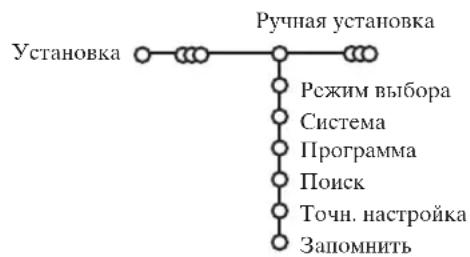
IOnCK cTaanHn H 3aIIOMHHaHHe KaHaIOB IpOIN3BOJNTcKaHaJI 3a KaHaJOM. Bam Hco6xOdHMO IpoTN BCC IIIaHN McHIO PyHOr yCTaHOBKn.
BbI6epHTe IyHKr PyuHa yctaHOBKa B MeHIO YcTaHOBKa.
IepeMeaIte Kypcop Bn3. CJeDyIe IIOBJIIOHmCHa 3KpaHe HhctpyKIIHM.
Ppumueaue: Pouck uuu HenocpedcmbeHHb bblb6op meekana. Ea Bbl 3haeme yacmomy, homep aupno zu KaabeBhozo KaHaa, 6eodume 3 uufpbbl coomoecmoyouue yacmome, c nomuubio uufpoobx Klaabuu om 0 do 9 (hanpupe, 048). Ia npdoJnHeu HaKmume Khonky nepemueeHu Kypcopa Bhu3.
Iobtopntc onncaHHyIO npoucDpy IJIg IporpaMMnpOBaHna KaKdo ro kaHaJa.
3aJaTb Hmra
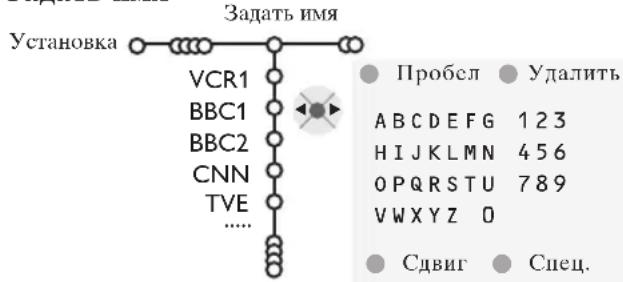
BbMOKeTe H3MeHHTb COxPaHeHHbIe B IaMaTH Ha3BaIIHIIPOrpaMM HIN IIpHcBOHTb Ha3BaIIHHe KaHaJIy,ecJHO OHc HC 6bIO BBcIcHO. Ha3BaHnC dIHHoJIo5
6yKB HIN IIHΦp MOxHo DaTb IIpoIpaMM c HHomepaMH OT 0 Jo 99.
BbI6epHTc IyHKT 3aATb HmB McHIO YCTaHOBka H IepemecHTe Kypcop BHN3.
2 BbI6epHTe HOMep IIporpaMMbl. PpumueaHue: dA 6bIcmpzo nepeMeuHua no cnucky npo2pamM ydepkuBaIme HaKamoi Khonky nepemuenk Kypcopa 6epx/6n3.
3 IepemecHTe Kypcop BnpaBO.
HaKpaHIOBJIIEcra KJIaBnAtypa.
IpeMeCHTe KypCop BIIpaBO IIIA HAaJa pa- 60tbc KJIaBnAtypoI. IpeMeUaR KypCop BBepx/BHN3, BIIeBO/BIIpaBO BbI6epHTe IIepBbI HCMBOJI H aXKMITE OK.II OBTOpHTe 3TO IJIa KaXIOrO cHMBOJIA, KOToPbI BbIXOTHE BBCCTH.BbI6epHTe IIpo6eI JIIA BBOJa IIPO6eJa, YdaIITb IIIA CTnpAHNIOICBEeHHORO cHMBOJIA BO BBOHMOM IIaBaHHN, CdBHI IIIA OTo6paJKeHNA KJIaBnAtype cHMBOJIOB BepxHeRo IJI IN HIXHeRo peHCTpa,CHeu.IIIA OTo6paKeHNA KJIaBnAtype CIeUHaJIbHBIX cHMBOJIOB.IIJA IOITBePxxHeHHaBI6opa HaKMITE OK.
4 PocJIe 3aBepHHeHH BBOJa Ha3BaHN HeCKOJIbKO pa3 HaKMITE KHOIIky IepemIIeHH KypCopa BJIEBO JJIb BO IIpeIbIyIuIy yPOBeHb MeHIO.
BbIbepHTe npyroH HOMep IIporpaMMbl IIO-BTOpHTe IIIaHn C 3 IO 4.
IpectaHOBKn B cHncke npoRpaMM
BbMOKeTe H3MeHrTb IOpRAIOK CJIeIOBAHHB CINCKe 3aIOMHeHHbIX TeJIeBn3NOHHbIX KaHaJIOB.
1 BbI6cpHc IyHKT CoptHpOBKa BMCHIO YCTaHOBka.
CJeIyTe IIOBJIIOIIHMcHa 3KpaHc HHCtpyK-
Bb6op npednoHTTeJbHbIX TeIeKaHaJIOB
BbI6epHTe IyHKT JIO6HMbI e nporpaMMbIB MeHHO YcTaHOBka.
C IIOMOIIbI IO IIepeMeIeHnK Kypcopa BBepx/ BHN3 BBIOEPHTe HOMe IIporpaMMbl.
3 Iepemcua Kypcop BnpaBO, BbI6pntc Ja HnHer.
4 IOBTOPHTE HArH 2 N 3 JIA KaKJIOTeJE-BH3HOHHORO KaHaJa HIN BHeIIHero HCTOHHKa CnHaja, KOTOpBie BbXOTHTe CJIaTb IIpeIIOHTTeJBHbIM JIN6O HCKJIOHTb H3 CIHNCKa IIpeIIOHTaEMbIX KaHaJIOB.
HaujaJIbHaJa HacTpOJa
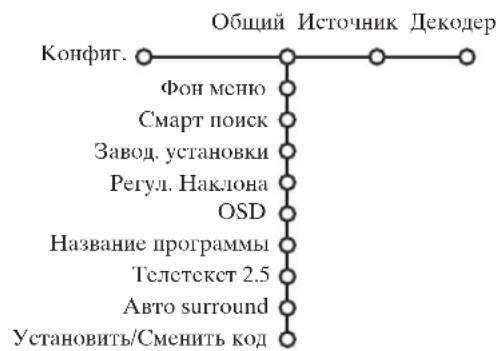
MeHIO KoHfHr. (KOHfHrypaHn) coIepKHT nyHKTbI, yIpaBJIIOUInci CyHKIIINM TeJIeIPnEMHHKa, ycTaHOBKOI pa3JINuHbIX IapamETPOB, CJyKo N BHeIHero O6OpYIOBaHn, KOtOpoe Bbl MoKeTe IOIKIIIOHTb K TeJIeBN3opy.
MeHIO O6nII IO3BOJAEr H3MeHrTb Te HaCTPOkN, KOToPbIc, IIO-BHIMOMOy, H3McHryOTcpeXKe 60JIbHINHCTBa npYHX.
MeHIO NcToHHK IpeHa3HaueHo JJIa BbI6opa NcToHHKa cnHaJa.
MeHIO KeOpE P IO3BOJIAET OINpeIeJIHTb OINH HJH HeCKOJIbKO HOMePOB IPOrpaMM JIA pa6OTbI Yepe3 KeOpE.
IIIyueHHHfOpMaHHO BbI6paHHOM IyHKTe MeHHO HAKMHTe KHOIKy 1+ Ha IIyJIbTe DnCTaHHOHHO ynpabJIeHHJ.
O6nn (o6nne yctanOBKn)
CmapT IOHcK
1 Iepemeeiiaa Kypcop Bn3, BbI6epnte IIyHKT Cmapr nOHCK.
IIepeMeiua KypcOp BHeBO/BIpaBO, BbI6epHTe
2 nporpaMMbI, ecJIN XOTHTe, TTObI KHOIIKa P P IO3BOJIJa IpeKIOHaTbcMxJy TeKyIIM N IpeDbIyIM KaHaJOM,
9 nporpamM,ecHn XOTHTe,HTO6bHaKaTne Ha KHOIIky P4BbI3bIbAIO CINHcOK HeCKOJIbKHX (J0 9) KaHaJIob, H3 KOTOpbIX MOXHO CJeJIaTb BBI-6op,
IIO6aBTEHHydaTeHHKaHaJa HJH HCTOHHKa CHHaJa:
IpeKJIIOHTecb Ha TcJIeKaHaJI HJIN HCToYHK cHHaJa, KOtOpBb BbXOTHe IO6aBHb HJIN ydaJIHTb. HaKMITE KHOIIKy PHP N IepemecTHe KycPCOP BnPaBO JIA IO6aBJEHHa HJIN ydaJIeHHa. IIpumueHne: ecu 6 cnucke yjke umemcn 9 kanaLo8/uCmoHukOB, HUKNH3AmeMeHm cnucka bydem ydaJeH.
3aBODcKHe yctaHOBKn
Pn BbI6ope 3Toro NyHKTa IPOUCXOINT BO3BpAT yCTaHOBOK H3O6paKeHHN H3BYKa KHX IIpeJyCTaHOBJIEHHbIM 3aBOJCKHM 3HaueHHM. OIIHko IIpn 3TOM HaCTpoNk KaHaIOB coxpaHaeTc.
OSD (3KpaHHa HnHkaun)
CM. HIOJIb3OBAHHe IyJIbTa IINCTAHIOHOHO yIpaBJIeHHa, cTp. 3, i+ HOpMaIIHa eKpaHe.
1 Ipcmeiia Kypcop BHN3, BbI6epHTe IIyHKT MEHIO OSD.
2 BbI6epHTe HopMaJIbHbI JIA aKTHBn3aIIIN HyHKIINIOCTOARHOIOKa3a HOMepa IIporpamMbHa 3KpaHe.IPiN aTOM TaKke IpeIOCTaBJIaeTCpaCIIIpeHHaIHHΦOpMaIIIN O TeJIeBUNOHOM KaHaJIe IiporpamMe.IPi NBIOpe IIYHKTA MIMHMAJIbHbIKoJIInyeCTBO IIpeIOCTaBJIaeMoI HΦOpMaIIIN O KaHaJIe YMeHbIIaETCJ.
PpumueaHue:Ko2da 8kauen peKum Cy6mmpb1 -cm. Ionoanmeabhble 603moKHOcmu, cmp.11, Hnpepbui hui noka homepa npospammbi He603MOxhen.
TeJIeTeKCT 2.5
HeKOTOpbIe BeIIaTeJIbHbIe KOMIIaHHN IIpeIOCTaBJIaIOT B pexHMe TeJIteKcTa TaKHe IOnIOJIHHTeJIbHbIE BO3MOXHOCTn, KaK HcIOJIb3OBaHne O6OraIIeIIIOH IIBeTOBOI rAMMbI, IIa6Op pa3JIuHbIX IIBeTobΦoHa N BoJIee KaueCTbcHHbIe H3O6paXKeHHN.
1 BbI6epHTe IyHKT MeHIO TeJIeTeKcT 2.5.
2 Iepemeiua Kypcop BnpaBO, Bb6epnte TeTeKCT 2.5 BkI.. TTO6bl HcIOJIb3OBaTb 3Ty yHKnIO.
3 EcIN BbI IpeJIIOHHTaTe CTAHApTHbI φopMat TeJIeTEKCTA, IepemeUa KypCop BIIpaBO, BbI6epHTe TcJIeTcKCT 2.5 BbIKJ. BaII BbI6Op IOBJIIneT Ha BCE TeJIeKaHaJIbI, IIO KOTOpbIM IpeJaETcRA TeJIeTEKCT. IpuMeuHue: IpeKAnOHeuE TelemekCma 6 peKumTelemekcm 2.5 moKem npouCxodumb c zadepckkou 6 HeckoAko cekyHO.
ABTO Surround
B pIe cJIyAcB BcIIaTeJIbHbIe KOMIIaHHIpeIaOT cIeIIHaJIbHbIe cIHHaJIbI IJIpyOrpMM CO 3ByKObIM COIIPOBOXJDeHNEM CTaHApTaSurround.EcIN IIpn EToM ABTO Surround BKIOUey,TO TeJIeBH3Op aBTOMaTHueCKIIEpeKJIIOuayTcRa Ha JIyIHH peXHM O6bEMHO BOcIPON3BeJeHH 3Byka.
CmeHHtB KOd
3aMOKpe6eH.6IOKnPOBkaIOCTyna IIJIAITei) (CM.MEHIO TeJIeBN3Op, HAcTPOKa IIOIOHNITeIBHBIX BO3MOXHOCTei, cTp.11) IO3BOJAECT Bam 6IOKNPOBaTB KaHaJIbI , YTO6bI IIpeIOBTbATHTb IIOcMOTpJeTBMN OIIpeJEIEHbIX IIpeJaU. JIINIOcMOTpa 3a6IOKNPOBaHbIX KAHaIOB Heo6xOIMO 3HaTb KOI IOCTyIIa. IIYHKTMENHO CMeHNTb KOI IO3BOJIAET CO3JaTb IIINI IN3MeHNTb CBOI IIepCOHaJIbHBIn HJeHTN- PHKAIOHOHHbHOMep (PINH).
1 BbI6epHTe IyHKT MeHIO YcTaHOBka/CMeHHTb KOI.
EeHpaHe KoI He BBOINILcH,Ha3BaHHe HYNK-Ta 6yIET YCTAHOBHTb KOId. EeH KoI 6bl I yKe BBeJeH paHe,Ha3BaHne HYNKTa MeHIO 6yIeT CMeHHTb KoI.CJIeJyTe IOBIAHOIMcH Ha 9KpaHe HHCTpyKIIHM.
BHHMaHHe:EcIn Bb3a6bln K0d!
Bb6epHTc IyHKT CMeHHTb KoD B MeHIO O6-
BBeHrTe yHbepcaJIbIbI KOI 8-8-8-8.
3 ChOBA HaxMMTe KHOIIky yIpaBJIeHHa KypcOpom N BBCdNTc HOBBI IpcOHaJIbHbI YcTbIpeX3HaYHbIKoJ. IIpn 3OM IIpeBldUHII KOI 6yIeT CTePT H3 IaMaHTn, a HOBBI KOI 6yIeT coXpaHeH.
MCTOUHHK (CHHaJa)
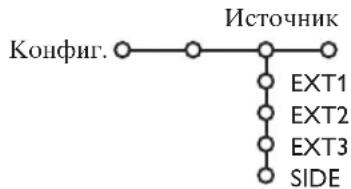
TO MCHIO IO3BOJIACT BbIpaTb BHcIHHeC yCTPOHCTBO,IOIKJIIOUeHHOE K OINHOMY H3 BHeIIHNX BXOIOB.
1IpeMeCTHKe KypCop BnpaBO JJI BxOJaB CINCOK TNIOB BHeIHHX yCTPOECTB, IIOIKJIOUeHHbIX K BbIbpaHHOMY BXOJy.
Bb6epHTe BHeIHHee ycTPOINCTBO, IpeMeIaKypCop BBcpx/BHN3.Ha pncyHKe Ioka3aHO,Kya IIPOIN3BOINtB IOKNIOUoyHne.
IocTe TOrO, KaK BbI BbI6paJH NCTOuHH KcHHaJa, HauPIMep, BuJeOMaHHToΦOH, 3TOT NCTOuHHK 6yIe t ABtOMaTHueCKN BbIbPaTbCk KaKdBi Pa3, KOrJa IIyJIbT INCTaHIOHOrO yIIpaBJIeHNr HaxoIHITcB PexKmE BuJeOMaHHToΦoHa (cm. cTp. 3) I KOrJa BbI HaXMeTe Ha IIbTe KhoNkY
Iekopep
EcN K TeJIeBn3Opy IIOKJIOUeH JeKOJIep HIN JIeIHHΦpaTOp, (cM. cTp. 15), BbI MoKeTe 3aJaTb OINH HIN HeCKOJIbKO HOMePOb IIpoIrpAMM KaK HOMepa IIporpAMM JeKOJIepa.
I Iepemeiua Kypcop BnpaBO, BB16epHte IyHKT MeHIO Jekoep.
2 BbI6epHTe Iporpamma.
BbI6epHTe HOMep IporpaMMbI, KOtopa 6yJeT npHXoNTb Yepe3 JeKOJIep.
BbI6epHrTe CoctOaHne.
BbIepeHTe BXoII, K KOtOpOMy IIOKJIIOueH JeKOJIep: Her,EXT.1 HJIN EXT.2
BbIbpaHte Het,ecIN BbI He XOTHTe, YTO6bI BBIbpaHHa IIpOgPAMMa HcIOJIb3OBaJa JeKOJep.
Ipumueaue: Ecau dekoep nodkauoeh K budeomaznmuohy c noodepekou fynkuuu EasyLink, sbiepune exod EXT.2.
PexHM demOHcTpaHn
MeHIOIeMOIIO3BOJIaTeIPOJEmOHCTpnpOBAbKaK OTJeIbHbIe BO3MOXHOCTn TeJIeBUN3Opa,TaK INHX Ha6Op BHeIIpepbIBHOM IHKJIe.
EcIN BbIpaH peXHM ABTo DEmo,6yIeT IIpeIcTaBJIeHa JEMOHCTpaIIH BCEx BO3MOxHOCTe TEJIeBN3Opa IocTeIOBaTEJIbHO B IIKJIe. HaxMITE OIIHy H3 KHOIIOK yIIpaJIeHN H KypCOpOM IJIa OCTaHOBKNABTomATNueCKO JEMOHCTpaIIH. Ecln BBIOpaH TOJbKO OHa H3 4yHKIIu, 3Ta 4yHKIIu 6yIeT IIPOIeMOHCTpHPOBAHa TOJIbKO OINH pa3, a 3aTeMeHIO JEMO Ncye3HeT c 3kpaHa.
PpumueaHue: Pekum DEmo-6epcua duape Haiaemcn yacmbio a6momamuueckou nocleodogamehocmu u moem 6bimb akmubuzupo6an mo1bko omde1bno.
MeHIO TeJIeBn3opa
HaXMMTe KIOIky MENU Ha IyJIte IINCTaHIOHOYnpaBJIeHHN IJIaBBHO MeHIO.
IIra HIOJyueHH NOpMaHH O BbI6paHHOM NyHKTe MeHIO HaxMMTe KHOHNKy i+ Ha IIyJIbTe
HCTaHIOHHOу npabJIeHHN.
H3o6paeken
HaKMITE KHOIIky IpeMeIeHnKypcopa BnpaBO IIyBXOJa B MeHIO H306paK.
IcpeMeiHa KypCop BBcpx/BHn3,Bb6npaHTc HHTbMEHIO HaCtPOKN3O6paKeHH.
3IpeMeiua KypcOp BIEBO/BIIpaBO, yCTaIOBHTe HxKIIbIe 3NaueHnA JHO, IepMeiua KypcOp BIIpaBO, BOJInTe B CINCOK IIyHKTOB IOIMHeO. BbI6epNTc IyHKT IOIMHeO, IepMeiua KypcOp BBepx/BHN3. Ipumueuue: Iy ydaJeun hfoHa MeHn nepeh hacmpouko npamempo8 u3OpaKeHu, cm. Konpu2, Obiui, cmp.7.
Cmapt n3o6paekhen
bI6epHTe IyHKT CMapr H3o6paXeHHNn IINBbIOJa cIncka IpcIOnIpcIeJIeHHbIX HaCTpOcK H3o6paXeHHN, KaJdA N3 KOTOpbIX COOTBetCTByET OIIpeJIeHHbIM 3aBOIDcHM HAcTPOkAM.
TakxOuyOTHOcTcKIEpcOHaJIbHbIM IpeINoHTTEJIbHbIM HaCTpONKaM H3O6paJckHHB MCHIO HAcTpONKn H3O6paJckHHa.
UdpobbIe oIIHH
CAMO ONTHMAJIbHOY yCTAHOBKO YBJIETc
Pixel Plus 2, KOrJa yDbaHbAcTc
ROPIN3OHTAJIbHOe pa3peWHeHne, a KOJInueCTBO
CTPOK yBeJIINuBaEtcHa 33%. BbI TaKKe
MOXTe BB6paTB pExHM Movie Plus B cIyae
HMeIOUeOcR oΦΦeKta OpeoJA H3OpaXeHnE,
ecJH eTO Bam MeHaeT. OJHaKO, B 3aBCHMocTH
OT BaIIHX IIpcIIIOVtChn, Bbl MOxTe
BB6paTB IBoHHbIE JINHH JIN60 100 T Digital
Scan (100-repIOBOe IINΦpOBoe
cKaHnpOBaHHe).
Ipuemuehue: Ia cua hala cmandapma NTSC c
cachomou 60 Tu uabop sapuaumno u3menenmcn: npucymcmeyem Pixel Plus 2, Movie Plus u
Progressive (nocmpouha pa3eepmka 6e3
Koennencauu dukehenu).
AkhBnaHa NaCTpoHka
TeJIcBn3HOHHbI INPHeMHNk HcIIpepbIBHO N3MepeT N KoppKTHpyET BCE BXOJHUNe CNHaJIbI JITORO, YTObI OecHHTb HAnJyIⅢee BO3MOXHOC KaYecTBO H3O6paKeHHa.
HaKMTe KHOIky Ha IIyJIbTe IINCTaHIOHHO yIpaBJIeHH.
2 IOBHTCMeHIO AKTHBHaHnactpoKa.
IIEpeMeiua KypcOp BBepx/BHn3, Bb6epHTe OHy H3 yCTaHOBOK AKTHBHOH HAcTPOKHN: BIKL., MHHMym, CpeHna (pekomeHIOBAHHOC 3HaueHnc) INIMakchymm. Ipn TOM IIpOCHXoIHn HEIIpepbIBHaa ABTomaTHUcCKa IIacTPOKa H3O6paKeHHN, YTO BnIHIO NIO JINHeHKAM HaCtPOKn. B 3TO BpMa Bb6op IIyHKTOB MEHKO HeBO3MOKeH.
4 Iepemecntte Kypcop BnpaBO N BbI6epHTe Cmapr H3o6paKeHH.
5Ipcmcma Kypcop BBcpx/BHn3,Bb16cpHTc OndHy n3 npceonpe- DeJeHHbIX HacTpoek H3o6paXeHHa.
6 IepemecHTe Kypcop BIPABO N BbIbePHTe AKT. HcnJIeH.
7IpeMeMa KypCop BBepx/BH3,Bb6epTe Nokaatb,OnHy H3
JEMOHCTpaunCINBOEHHORO 3KpaHa HIN BbIK.
Korla Bbl BbIbnpaete DnHaMHeckn KOHTpact,Pixel Plus 2,
DNr (UHPOBc IIIyMOIOaABJeHne) HIN UHPOBOe
ecTeCTBeIHoe DBHXeHne,TeJEBH3HOHbI IN 3KpaII pa3JeJIeTcra
Ha 2 qACTH: BJIeBOu qACTH BbIbPAHHa YcTaHOBka KaueCTBa
H3O6paXCHNBAIKJIOUChHa,aB IIpaBOu qACTH BKJIOUChHa.
8IIJIy BIXOJa H3 MeHIO AKTHBHaJ HaCTpoNka IOBTOPOHaKMITE KHOIKY
Mehio hactpoiKn 3Byka
HaKMNTc KHOIIky IepcMeIeHnKypcopa BIIpaBO IIJIaBXOJaB MeHIO 3Byk.
② Iepemiea KypCop BBepx/BHN3, Bb6paTe IIyHKtbi MeHIO Ha-ctpoKN H3o6paXeIIIN, 3NaueIIINI IapaMeTPOB yCTaHaBJIIBaIOrCc IIOMOIIbIO IepemieIeHHN Kypcopa BJIeBO/BIIpabo.CJeIyET IIpHHMaTB BO BHHMaHHe, YTO HopMaJIbHBe 3NaueIIINy cTaHO-BOK O6bIuHO HaxOJITcB CpeIHeY qAcTH IIKaJIbI (B cJIyae HeHTpPoBAHHO JInHeHOO IIkaJIbI).
Cmapr 3Byka
Bb6epHTe HNKT CMapr 3Byka JIIIBBOda cINHcKa IIpeIOIpe-DeJIeHHbIX YcTaHOBOK BOCIIPOH3BeJeHHa 3ByKa, KaJdAa N3 KOtOpbIX COOTBeTCTByET OIIpeJeHHbIM 3aBOIDKHM HaCTPOHKAM BBICOKHX YaCTOT H bacOB.
Tak xoy OTHOCrTaK IIepcoHaJIbHbIM IIpeIIOHTHeJIbHbIM HAcTpOaKaM 3ByKa B MeHIO HaCtPoKN 3ByKa.
Ppueaue:
- HekomopbI neynmbI meHIO docmynbI moIbKO 6 cIyuae haunuun u akmuBaauu cuMeMbI Cinema Link. PnD dpyzux hacmpoeK npou3o-dumcN nomoubuO paduonpuemuka, a ne mele6u3opa. Cm. omdeIbno npua2aemb no cueme Cinema Link.
- Iynkm Iboiou I-II docmynen mo.1bko npu nauiu uu dooiinoo kaana nepeaqu 36yka.
-Пуним Монo/Cmepeо можем усноаьзовambс moько b сayuae ana lo2060cmepeonepedau. - IyHKm Nicam/AHaIO2ObBu MoKem uCNOa63o6ambcra moIbKO 6 peHume nepeau 6 cmanapme Nicam.
MeHIO BO3MOxHOCTeI
Cnncok nporpamM
HaKMnte KHOIIky OK IIJI IepeKJIIOueHnHa BbI6paHHbIK KaHJI HJIN BHEIHn NCTOuHnK cHHaJa.
Bb6op cy0thrpob
CtpaHnua cy6HTPOB IOJXHa 6bITb 3aONMeHa
IIKaKdIOro TeJIeBUNHOHORO KaHaJa:
BKIOHTe TeIeTEKT H BbI6epHTe HxHyIO
ctpaHHy Cy6HTPOB H3 yKa3aTeJI. BbIKIOuHTe TcJIeTEKT.
IOcIE TORO, Ka HOpMaunr O cy6HTpax coXpaHeHa H bIbpaH IYHKT MeHIO Cy6HTPbI
Bk.(IOKA3aTB cy6HTPbI), cy6HTPbI 6dyT
ABTomaTHueCKN IOKa3aHb Ha BB6paHbIX TeJIeKaHaJAX (ecHN HETpeNaqAva cy6HTpOB).CICIIaJIbHbIM CNMBOJ 6yET yKa3bBaTb,
TO peKHM BKIIIOueH. BbI6epNTe NyHKT Cy6T.
BkI. 6e3 3Byka, ecHN BbIXOTHE, YTO6BI cy6HT-
TPbl ABTomaTHueCKN OTO6paKaJIncb Ha 3KpaHe,
KOrTa 3BYK BbIKIOueH C IIMOIOB KHOINK
Ha IIyJIbTe INCTaHIOOHHO YIIpaBJeHHa.
BIOKHPOBKa IOCTyHa IINIeTeH
1IpeMeiua Kypcop Bn3,Bb6epHTe IyHKT MeHIO 3amok pe6en.
BIOKpOBKa 3amok pc6ch. BIOKpOBaTb BIOKnp.uepe3 noJIb3. BIOKnp.Iporp. Pa36IOKpOB.
2 HaKMnTc KHOIky IcpeMeIeHna Kypcopa BIIpaBO J1Ib BXOJaB MeHIO 3aMOK pe6eH. Bam 6yJeT IIpeJIOXKeHO BBecTH KOJ IOCTYIIa. IpumueuHue: Bam npudemc8bodumcbouk odocmyna KaKDbui pa3, Ko2Da Bbl exoDume b MeHIO 3aMOK pe6eH.
BHHMaHHe:EcJH Bb3a6bIIN cBoi KOI nocTyHa! Cm. cTp. 8.
BbI6epHTe OINH H3 IyHKTOB MeHIO 3aMOK pe-6eH.
- EcJIN BbI XOTHTe 3a6JIOKHPOBaTb BCE KaHaJIbI
BHeIIHHe yCTpOHTBa, BbI6epHTe IIyHKT
BIOKHPOBKa.
BbI6epHTe BIOKnpoBaTb HOB3. HnHaXMHTe Kypcop IepemEeHnBnPaBO. BbI6epHTe:
-6IOKpOBkaYepe3 (ecIN BbI XOTHTe 3a6IOKpOBaTB BCE IporpaMMbI,HaUNHAR C OIPpeJIeHHORO MOMHTa BpeMeHN. IpeMeCTHe KypCop BIIpaBO H BBeJNTe BpeM,IIpeMeIIaKypCop BBepx/BHN3 IN BIIpaBO.HaxMtTe KHOIIKy IAIIIA IOITBepXJeHN.
HaKMITE KHOIIKy IepemeIeHnKypcopa BnpaBO JIA BXOJa B MCHIO Bo3MoKn.
2 Iepemeeiua KypcOp BBepx/BnH3, BbI6paIte NyHKTB1 MeHIO HAcTpoIKN H3O6paKcHII; 3HaueHHI IapameTPOB yCTaHaABJINBaIOTc C IOMoIIbIO IepemeeHHeN KypcOpa BJIeBO/BIIpaBO.
- BIOKnpOBKa IporpAMMbI (ecBn BxOTnte 3a6IOKnpOBaTb OIIpeJeJIeHHbI TeJIeKaHaJI INJIN BHeIHH NCTOCHNK CnHJa;
BbI6epHTe Pa36JIOKnpOB. JJIr OTMeHbI Bcex yCTaHOBJIEHHbIX Bamn 6JIOKpOBOK JOcTyHa.
Taimep
1 Iepemeeiua Kypcop Bn3, BbI6epnte IIyHKT MeHIO TaMep.
KHOIIKOIepeMeIIeIIHc Kypcopa BnpaBO Bb16epHTe BkJ.
Ee pa3 HaxMnTe KHOIIky IepMeIeHnKyp copa BnpaBO JIA BXOJa BCINHcOK IporpaMM.
BbI6epHTc TeJIeKaHaJI HIN BHEIIHec ycTpoiCTBO, BKJIOUeHHe KOTOPORo BxOHTte 3aIporpamMnPOBaTb Ha ONpeJeJIeHHoe Bpemn IeHb.
5 CHOBA IepeMeCTHe KypCop BIIpaBO IIIA BbIOpaIHHaHEJIIN HJIN BbIEepHTe BapHaHT ExeIHeBHO.
6 CHOBA IepeMeCTHRe KypCop BIIpaBO JIIA BBOa BpEmHH C IIOOMIbIO IIcPPOBbIX KHOIOK JINBO C IIOOMIbIO IepeMeIeHNr KypCopa BBepx/BHH3, 3aTeM IIaXMMTe KHOIKy OK JIIA BBeJeHNr B JeNCTBHe CJIaHHOYcTaHOBKn.
7 BbHITte H3 MeHIO,HaXaB KHOIKy MENUM (MeHIO) IpuMeuHue:Jn npocmmpa ycmaHoBok maImepa HaKcMune Knonky
yKpyHneHne
BbI6epHTe IyHKT YKpyHHeHc, IpeMeaJ KypCop BHH3, HHaXMHTe KHOIIKy OK.
HaKHMajA, BbI6epHTe OINH n3 MacHTa6OB yBeJIuueHH (x1, x4, x9, x16).
3 IIOJIHHTeJIbHO BbIMoKTeIepMeaTb BBI-6paHHoe yBeJIHueHHoe OKHO IO 3KpaHy c IO-MOIIbKO HONIK yIIpaBJIeHHK KypcopOM BBepx/BHN3, BJIeBO/BIIpaBO.
HaXMMTE KHOIIKy MENUM M IJIa OTMeHbI yKpyIeHHa.
IyTeBOIOIeJIb IO TeJIeTeKcTу
TeJekhaJIbI, TpaHcJIpyIOJIue TeJIeTeKCT, IpeJaIOT TaKKe cTpaHnUc IIporpAMoIIpeJaUHa TeKyIIN IeH. EcIIN IpeJaBaemar cTpaHnUa TeJIeTeKCTa C IIporpAMoYIOBJIeTBOPReT TpeBOBaHNM. BuJeONIpOrpAMMnPOBaHnC IIOMOJIbO TeJIeTeKCTa (VPT ( Video Programming via Teletext), To BO3MOKHa 3aIHc bIporpAMM, HAIOMHHaHHe O IIporpAMmax, IN IIPOCMOT n 6JIOKNPOBka.
1 HaKMITE KHOIIKy
C I NOMOIIbIO IpepeMeIeHnKypcopa BBepx/BIN3 BbI6epHTe TeJIeKaHaJI Hn KaMnTe KHOIIky OK.
IepeMeCTHe KypCop BBepx B HaiaIO CnNcKa KaHaIOB, Ie IOBJIeTcH MRA BbI6paHHOro TeJIeBN3H OHHO KAHaJa.
CIOOMOIOKHOONIKIIEpeMeHnKypcopaBipabo yctaHOHTe yka3aTeJbHa IapNK> BbI6opa.
Ha ctpaHnue yka3aTeJra TeJIeTeKCTa HauHNTe cTpaHHUYIyIyTeBOUNTEJIO IporpamMAM TeKyIero HIN CJIeJyIOIero JH.
C I NOMOIIbIO IINΦPOBbIX KHOIIOK BBEJIHTE HOMep cTpaHIIbI IIyTeBOJNTeJI IIO IIPORpaMMAM. IBaXJIbI HAXMIte KHOIIKy IcpeMeIeHHKypcopa BIIpaBO IINRA BbI6opa OHOH IN3 cy6ctpaHHI (ccIIH eCTb) C I NOMOIIbIO «IIapHKa»-Yka3aTeJI.
EcnBbI6paHHa IIpOpMaMM yIOBJIeTBOpRe Tpe6OBaHnM VPT, TeJIeBH3Op 3aIOMHHT Homep IocJIeHHe BbI6paHHo CTpaHHbI TEJIeTKcra, COJIepKaIIe INHΦOpMaIIu O IIpOpPAMMe IIpeJaY BbI6paHHOr KaHaJa, II NOKaKET, KAKa IIpeJaA b KAKoe BpeMa HaHcTc.
KaKbI pa3, KOrIa BbHaXMeTe KHOIIky ,B aM 6yIe T NOKa3aHa cTpaHnla IyTeBOINTeJr no Ipo- rpaMMa BBipAHHORo B TeKYuH MOMEHT KaHaJa.
PnmuueaHue: 3a codepaHue unphiopmaun omoeuaem beuaamebnaKomnaun.
OchOBhbleyHKnn
IJIy BbI3OBA yHKnHpeKHMa IYTeBOJNTeJI IO TeJIeTKcTsy/NEXTVIEW MoKHO HcIOJIb3OBaTBcepyIO, KpaCHyIO, 3eJIeHyIO, JKeJI TYIO HO Ly6yIO eKpaHHbIE KJIaBHN. EcII NOppeJeHHaI yHKnH HeIOCTyHHa, ee H3O6paKeHHe OKpaHHBaETC B cepB IIBT.
0630p: 3TO MEHIO IIpeIOCTaBJIeT CINCOK IIpepeaay, IOMeueHHbIX IIJ HAIOOMHaHHa, TEX, KOToPbIE JOJIHKIbI 6bITb 3aIIHcAHI, II 3a6JIOKHPOBAHHbIX IIpeepaay. 3TO MeHIO MOXHO HcIOJIb3OBaTB IIJr CMeHbI HJIn ydaJIeHHN IOMeueHHbIX IIporpaMM.
3aHHc: cIyKHT IJII IIPOrpaMMHPOBaHHa 3aIIINCH BIIeOMaHHToHOHOM (ecJH OH IIOIIepKHBaeT φyHKIIHIO NEXTVIEWLink H IOIKJIIOUeH K BIIeHIeMy BXOy EXT.2).
Hannnne: aBToMaTHuecKn BKIOuHae TeJIeBN3Op, ecIn OH BbIKIOUeH, JIN6O IOKa3bIBaet coo6IeHHe, ecIn TeJIeBN3Op BKIOUeH.
BIOKpOBKa:6IOKpyET 3aHnCb H IPOCMOTp OIIpeJeIeHHbIX IIpeJa.
Piu BBIOBe cyHKiun 3aINCb, HAIOMNHAHHe N BIOKnpOBKa IIOBJIeTc HbeOJIbIOe MeHIO, B KOTOpom Bbl MoKeTe 3aATb HHTepBaJI: TOIbKO OINHaJkbI, eKeINHeBHO HIN pa3 B HeJeJIIO, JINBO ydaJIHTb
paHee CJIJIaHHbIE yCTaHOBKn 3aIHcH, HAIOMNHAHn I 6IOKnpOBKn. IIO yMOJIuaHNIO Bbl6paHa yctaHOBka TOIbKO OINHaJkbI. IIN IOITBePKeHn EIN Bbl6opa HHTepBaJa HAXMITE KHOIKY OK.
Cmptb:III npocMToPa BbIbpaHHo TpaHcJInpyeMoB B TeKyuM MoneHT IpeJaH.
TeJTeKct
BoJIbIHHCTBO TeJIeKaHaIOB OcyIeCTBJIaIOT TpaHCJIaIIIO B peKIMe TeJIeTeKCTa. BaII TeJIeBH3Op MOKeT coXpAHrTb IIaMrtn 1200 cTpaHII, YTO IIO3BOJIaIeT 3aIIncatb BoJIbIHHCTBO IIpHHTbIX CTpaHII IN IOIc-CTpaHII IN TE McMbIM COKpaTHTb BpeMg OxNlaHna. IocJIe KaJIOrO IIpeKJIIOueHn Ha IIpyTuIO pOrpAMMy COJIepKHMoe IaMrtn O6HOBJIaeTcra.
BkJI. H BbIKJI. TeJIeTeKcta
HaKMITE KHOIIKy ⅡJIABKJIIOUeHnTeJIETCKCTa.
| 102 «03 04 05 06 07 08 09 10 11 12» BBC CEEFAX 102 Mon 05 Feb 16.35.22 BBC CEEFAX | ||
| LIONS RECORD ANOTHER WIN 430 | ||
| Index 100 News | 300 | |
| BBC Info | 110 Headlines | 305 |
| Children | 120 Weather | 400 |
| Cookery | 150 Sports 415 | |
| Education | 200 Radio | 500 |
| Lottery | 230 Travel 550 | |
| Finance | 240 Subtitling | 888 |
| Music 280 TV Listings | 600 | |
| Красnéвий 3ельnéвий | Жeелтын | Толубов |
Bb6op ctpaHnIe TeJeTeKcta
-BBeHnTe HxKbH NHomep cTpaHHbIc IHOOMIOHBIO UΦPOBbIX KJIaBNIII, KJIaBNIII IIpeMeIIeIIH N Kypcopa BBePb/X/BHN3, JIN60 HaKIMa KHOIIKy-P+.
-BbI6epHTe BapHaHT B HIXHeYacTHN KpaHa C IOMOIIbIO «IBCTHbIX» KHOIOK.
Paee BbI6paHna CtpaHnTa TeJeTeKcta
HcnoIb30aHue 6o3MoHNO moIbKO 6 mom cIayae, ecu omycm6yem cnucok npednounumeIbIbxcmpauu melemekma (cm. cmp.14). HcnoJIb3yIte KHOIIky P.P.
HaKMnTe cepyIO KHOIIky IIa BbIOJa Ha
KpaH CTpaHnBti IJIaBHOrO ORJIaBJIeHHN (ObIuHo 3TO cTp.100).
ToIbko JJI Te.IeTeKCTa B cTaIaIapTe T.O.P.:
HaXMnTe KHOIky i+.Ha aKpaH eIOBJIaCTc
06HHo 63Op IpeJIarAeMbIX pa3JeIOB TeIE
TeKCTa, IepcIaBaemoro B cTaHApTe T.O.P.
C IOMOIIbIO KHOIIOK IepemeIIeHHa Kypcopa
BBepx/BHN3,BJIeBO/BIIpaBO Bbl6epHTe HxHHb
OB6kT H HaXMnTe KHOIIky OK.
He 6ce meaeuohhie kanaIbI mpanc.iupyiom
Telemekcm, coomsemcyouu cmmandapmy T.O.P.
Bb6op cy6ctpaHH
EcBb6paHna cTpaHnTa TeJIeTeKCTa cocToHT H3 HeCKoJIbKHX cy6cTpaHn, Ha 3KpaHe IIOBJIaTc OJHa H3 Hux.
JIb BB6opa IIpeIbIyIeH ININ CJIeIyIOIIe
cy6cTpaHnIbI IepMeMaIte KypCop BJIeBO HIN BIIpaBO.
YBeJIHueHHe cTpaHHbI TeJIeTeKcTa
IOBTOPO HAKHMaTe KHOIky IIOBTOPO HAKHMAITc KHOIky (3HaOk) IIIA IpOCMOtpa BepxHeu Yactn cTpaHHbI TeJIeTEKCTa, HHXHeu YacTH cTpaHHbI NIIIBo3BpTaK HOPMaJIbHOMy pa3Mepy cTpaHHbI TeJIeTEKCTa. KOrJa cTpaHHua TeJIeTEKCTa yBeJIuYeHa, Bb MOKeTe IIPOKpyHBaTB TEKT IOCTPOUHO, HcIOJIb3yra KHOIKN IIepemeHEna Kypcopa BBepx/BHN3.
H3o6paXeHHa / TeJIeTeKcTa
HaKMNTc KHOIIKy. HaKMNTc KHOIIKy 12 IJIa IOKa3a TeJIeTeKCTa B IIpaBOI IOJIOBHe 3KpaHa.
②Перема Курсop ВббрптTeJcBn3HNOHHbKaHaJI.
HaKMITE KHOIIKY 12 JIIB BIKJIOeHnpeKIMa CBOEHHORO 3KpaHa.
Bb6op akTHBHoro 3KpaHa
BpeKHMcCnBOeHHOrO 3KpaHa H3o6paKeHHe/TeJIETeKCT (KHONKY 12), BBeIHTe HxKbHIOHOMep cTpaHHIIbIC IOMOIIIbIO IIΦpOBbIX KJIaBHI, HaKIMaer KHOIIKy -P+, HaKMNTe KHOIIKy MENU, 3 a TcM BbI6epHTe JcBbI N3KpaH (c IOMOIIbIO rOJIy6Oro IIIapNka B BepXHei YactH).
TeIepbBIMoKete BbIpaTbIOJIHO3KpaHHbI ININ CKaTbIPeXnMbI H3O6paXkeHn/ TeJIETeKCTa KHOIIKOI
NcnoJIb3yraHnepTeKCT,MOxHO6bICTPO IpeeHTK cTpaHHie c ONpeJe.IeHHbIM HOMepOM JIn6o NCKaTB KOHKpeTHoe CIOBO Ha TeKYIeI cTpaHHie TeJIeTEKCTa.
HaXMMTe KHOIIky OK IJI TOrO, YTO6bI IOIcBETHTb IepBoe cIOBO HIN HOMep HaCTpaHnue.
IepemMa KypCop BBepx/BHn3, BJIeBO/BIIpaBO,BIbepHTe JIO6oe JpyrOe CIOBO HIN HOMep,KOTOpBIE BIXOTHe NcKaTb.
3 HaKMHe OK IIJII IOITBepKJHeHn BbI6Opa. HauHHeTc IONc. B HIXKeH YacTH NkpaHa IIOyBJIeTc COOIIeHHe O XOJIe IONcKa, JINHO COOOIIeHHe O TOM, YTO CIOBO HJIN CTpaHnHa He HauJeHbI.
4 IepemecHTe KypcOp BBepx IIJIa BbIXOJa n3 peXIMa rHIIepTeKCTa.
(docmyno mo1bko o pekmu neoHO3KpaHNO20 noka3a Telemekcma)
Haxmntc KhoiKy MENU JIJI BbI3Oba MCHIO.
BbIbpaIte IyHKTbI MeHIO, HcIOJIb3yKHOIIKN IIepemueeHHN Kypcopa BBepx/BHN3.
3 IJIa aKTHBn3aHbBbI6opa IIpeMeCTHTe Kypcop BIIpaBO.
Функшия«ПокаЗ»
I03BOJIEETOKpbIBaTb/IIpTaTbCKpBITyIOHHΦopMaIIOHaCTpaHnE(HaIPnMep,pa3raIKNK3aIaKAMHROTOBOJOMKaM).ⅡIAkTHBn3aIIINBBi6opaIepeMeCHTHe KypCop BIIpaBO.
H36paHHoe
BbMOXeTc CO3HaTb CINHCOK H3BOcMb INpeIIOHTeJIbHbIX CTpaHHII TeJIeTeKCTa, BBI6paHHbIX I3 pa3JINuHbIX TB KaHaJIOB.
IIO6abHnH npEINoHTeJIbHOI CTpaHHbIK CnNcky:
BbIbepnTe ctpaHHu TeJIeTeKcTa.
BbI6epHTe peKHM PpeJIOHTN. B MeHIO TeJIeTeKCTa HnHaKMITE KypCop BIIpaBO JIA BXOJa B CINCOK.
HaKmTe KypCop BnpaBO eue pa3 IJIa IO6aBJeHHcTpaHnbl.
HaxmTe MEnu IJIa IIPOcMoTpa TeKyuIe CTpaHHIIbI.
IIpaocmoTpa npednoHTeJIbHOI ctpaHnBu H3 CnNcKa:
BpeKHe TeIeTeKCTa HcIOJIb3yHTe KJIaBnHUY P1JIA IIPOJINCTbIBaHHB bIb6paHHbIX IpeIIIOHTeJIbHbIX cTpaHHI TeJIeKaHaJIOB.
IpuMeuHue: moKem 6bim bblopana cmpauua moAko mekyueo kana.
Понь
Bb6op cIoba
IIOJIb3yIcB OTo6paKaemH Na 3KpaHe KJIaBHaTpyo, Bb MoKeTe Ha6paTb CIOBO, KOToPOe XOTeJIN 6bI HauTH Ha CTpaHHuaX TeJIeTeKCTa. PernCtpr CMBOJOB (CTPOHbIE HIN IIPOIHCHbIE 6yKBbl) IIpH 3TOM 3HaueHII He HMeET.
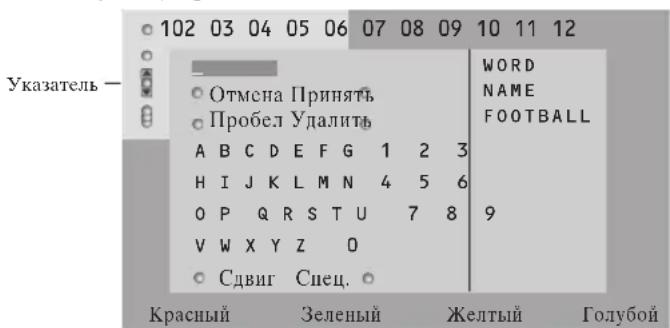
1IepemecHTe Kypcop BIIpaBO IJIpaObTbIC KJIaBnAtypoi.
10JIb3yIteCb KHOIIKAMn IepMeIeHnKypcOpa BJIeBO/BIIpaBO,BBepx/BHN3 JJIa BBIOpa CmBOIOB, CIOB HJH qyHKIIN.
3 HaKImaTe KHOIky OK IJIa IIOITBepKJHeHn KaKJIORO BbIOpaHHO CmMBOJa.
4 Bb6epHTe OTMeHa JIA OTMeHb I BBOJa CIOBa, IIpo6eI JIA BBOJa Ipo6eJa, YJAAITb JIA CTnpaHHa IocJIeHrero BB6paHHORO CNMBOJA,
CDBH JIII IepeKJIIOueHn MEKJy BBOJOM CTPOHHIX 3aJIaBHbIX CHMBOJIOB,
CneHaaTbHbI JIIIOKa3aHa KJIaBnAtype CIEIIHaJIbHbIX CHMBOJIOB. 3aTeM HaxMMTe KHOIKy OK.
HaXMHTe HxHoe YnCIO pa3 KHOIky IepMe-ueHnKypcopa BJIeBO IJIa BO3BpaTa B MeHIO TeJeTeKCTa.
Поньс сюва
HaeneyataaTe cIOBO Ha 3KpaHe Jn6o BbI6epHTe CIOBO H3 CINcKa IIpeBicTOpHn Cnpaba Hn HaxMMTE KHOIKy OK.
BbI6epHTe PpHnHrTb HcHOBa HaXMMtE OK. IIOBHTcra coo6uHeHne o IOHcKe.
3 JIJIOTMEHBIIOHCKAHHIOHCKAHOBOROCIOBA cJIeIyETBbI6paTbKJABHATpyHHaKaTbOK.
4 EcIN cIOBO He HaJIeHO, IOBJIeTc8 COO6IeHHe. EcIN cIOBO HaJIeHO, OHO IIOICBEuHBaETcHa CTpaHnE TeJIeTeKCTa. IIIA IPOJOJKeHHaONCKa HaxMMTE KHOIIky OK.
Hckc cy6ctpannn (ecau cemb cy6cmpanuubt)
ABTOMaTHueckKa CMeHa cy6cTpahnII B INKJIe. Haxmaj KHOIIky IepemeIeHHKypcopa BIPpAO,3aIyCKaHTe NOCtAHBaHbAHTe INKJI abTOMaTHueckO CMeHbI cy6cTpahnII.
3aapanne Bpemenn nokazdla ctpann
JaHHaФyHKnnaO6ecIeHbAcT
IeMOHCTpaHIO OIIpeJeJIeHHO CTpaHHIO B
3aHaHHoeBpem.
HaKMITE KHOIIky IepemeIeHnKypcopa BIIpaBO IIy BbIOopa Da Hn Her.
BcHrC Bpemn HOMcp CtpaHHIbI,IOJIb3yAcB KHOIIKaMn IIpeMeIeHnKypcopa HIN IuΦpo-BbIMN KHOIIKaMn.
PpumueaHHe oB3ameIbHO, ymo6bl meIeMeKcm 6bl 6kIOUeH, ODAKO DOJKeH 6bIMb 6kIOUeH mom kanaI, c komopozo Bbl 6bIbpaau KOHKpmHyO cmpanuuy.
HaKMHTe KHOIIky IepemEIIeHHKypcopa BJIeBOIJIa BO3BpaTa B MeHIO TeJIeBu3Opa.
3bIK
ECJIN CHMBOJIb, BBIOJIMMbIe Ha 3KpaH, He COOTBeCTBYIOT HApOpy CmBOJIOB, HIOJIb3yEmbIX TeJIeBeIIaTeIbHOI KOMIIaHHeI, TpaHCJIpyIOUeI TeJIeTeKcT, 3Ta 4yHKuIg II03BOJIeT I3MeHHTb 3bIKOBYIO rpyIIy. C IIOMOIIbIO KHOIIOK IIepemeIIeHNKypCopa BJIeBO/BIIpaBO B16epHTe Pyma 1 HIN 2.
HaXMMTe KHOIIKy MENU JIJI BbIXOJa N3 MeHIO TeJIeTEKCTa.
IIokJIIOueHHe BHeHHx yCTpoIcTB
CyIeCTByeT IIINPOKHI Kpyr ayINHO- IN BnIEOyCtPoHCTB, KOtOpbIe MOrY 6bITb IIOKNIOUeHbIK BaIIeMy TeJIeBn3Opy. IIINBeHHeHbIe HNKe CXEMbl IINIOCTpHPyOT IOIKJIOUeHNC TaKHX yCTPOHCTB. B 3aBnCHMOCTH OT MOJIeT eJIeBn3Op O6OpYIOBaH 2 IJIN 3 pa3bEmAMM IIN BHeIHHNx yCTPOHCTBEXT1, EXT2 N EXT3, paioIOJOKeHHbIX c3aIIH.
Ppumueaue: Bxod EXT.1 moxem nodepkuabmb cucmembn nepedaun cu2hao BVSS u RGB, bxod EXT.2 - cumeb CVBS u Y/C,EXT.3 moIbko cucmemy CVBS u RGB.Pekomehdymcn nookauam ycmpoucma cbbxodHbIMCuHaOMBcuame RGB K bixoamEXT.1 uU Ext.3,m.K.RGB obecneuaem ayuuee kauecm60 uO6paenenn. Ecau Bau sudeomuzon noodepkaeaem fynkuuO EasyLink, ezo caedyem nookauamk o xodyEXT.2 dnnucnoib3oanun npenuyuecmE EasyLink.
3aHHcbIbAIOoee ycTpoiCtBO (VCR-DVD+RW)(BHeomarHHTofoH, 3aHHcbIbAIOIIu DVD-Ⅱeep)
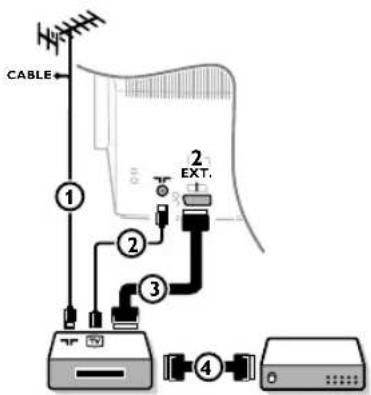
IIOKJIIOHTe, KaIIOKA3aHO Ha pncyHke, aHTeHHbIe Ka6eJIN ①, ② H, IJI IOJIyueHn HAJIyUHIErO KaueCTBa H3o6paKeHHa, CBPOKa6eJIb ③. IIpi OTCyTcTBn ECBPOPa3bema, cINHCTBEHHbIM BO3MOXHBIM CIOOCOBOM IIOKJIIOUeHn RABJETCn AHTeHHbIKa6eJIb. IIOtomy Bam HyxHO 6yJeT HAcTPOHTb TecTOBbI CNHaJI BaIIIErO 3aIHcIBaIOJIeO yCTPOHCTBa H a3HaHTb IJIa 3TOFO CHHaJaI IIporpamMy C HOMepOM 0, JIN6o COxpaHHTb TECTOBbl CNHaJI KAK IIporpamMy C HOMepOM B HHTepBaJIe OT 90 Do 99 (CM. PyHaa YcTaHOBA, cTp.6). CM. pyKOBOCTBO IIO BaIIeMу 3aIHcIBaIOUeMу yCTPOHCTBY.
IeKoepn BnDeomarHHToH
IIOJIIOHTeEBPOKa6JIb ④ K CBOemy JekOJIepy I K cIEHnAJIbHOMy EBpopa3bemy BHNJeOMaHIHTofoHa. CM. TaKKe HNCTpyKIIHIO IO NkCNIyATAuHH BNHeOMaHIHTofoHa. CM. JeKOJIep, cTp.8.Bbl MoKTe TaKKe IIOJIIOHTb JekOJIep EBPOKa6JIem HeIOpeCTBeHHO K BXoJAM EXT.1 HJN 2.
Ipyroe 06opyoBaanne (IpHEmHHK cIyTHNKOBORO cHraJa, IeKOJep, DVD-IIeJep, HrpoBbIe IIpHcTabKn Hip.)
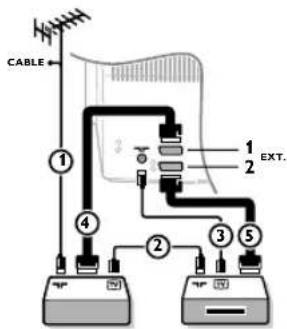
1 IIOKJIIOHITc, KaI NOKa3aHO Ha pHCyHKe, aHTeHHbIe KabeJIN ①, ② H ③ (TOJIbKO B TOM cJIyae, ecJIN IOIOJIHNTEJIbHOE yCTPOHCTBO HmeeT TeJIeBn3HOHHBe aHTeHHbIE BXOJIb/BbIXOJIb). IIOKJIIOHTe YCTPOHCTBO C eBPOKa6eJEM ④ HJN ⑤ K OJHOMy H3 cBPOPa3bEmOB EXT.1, 2 HJN 3 JIIa HOJIyueHn H3OpaXeHn 6oJIee BBICOKOra KaueCTBa.
BbIOJIHHTE HONCK TECTOBORO CHRHaJIA BHEIHIIHrOy cTPOIcTBa TAK JKe, KaK BbI 3TO JeJaJIH B CJIyae C BnDEOMaHHTofoHOM.
BbI6epHTe HxHoe yCTpOcTBo B MeHIO KOHnR., NcTOuHNK (CnHaJa), Ctp. 8.
Подкlioуенн e 6okobbIM pa3beMaM
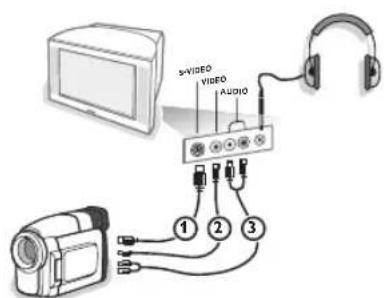
TeTeKaMepa HnBn BnKeKaMepa
1 IIOKJIIOUHTe BnDEOKaMepy, KaK IOKa3aHO Ha pncyHke.
3 IpoH3BeIHTe IOIKIOUeHNK BXOJaM VIDEO ② H AUDIO L ③ JIA MOHOPOHueCKORO yCTPOINCTBa. JIA CTepeoOHueCKORO yCTPOINCTBa IOIDCOEINHITecb TaKke K BXOJy AUDIO R ③ KaeeCTBO cTAnIapTa S-VHS IIpN HcNOJIb3OBaHHN BIIeOKaMEpbS-VHS MOXHO IOJYuHTb IIpN IOIKIOUeHNK BIIeOXBQJy S-VIDEO ① H AUDIO ③ c IOMOIIbIO Ka6eJeS-VHS. He nodcoedunHime ka6eua ① u ② odnoBpeMeHNo! Omo MoKem npueecmu K uckaeHuo u3OpaKeHn. Haynnn
BcTaBbTe IIIKepeB IIpeHa3HaueHHbI JJI HayHINKOB pa3beM
HaXMMTe KHOIky Ha IyJIbTe IINCTaIHIOHORO yIPaBJIeHNIA BbIKJIOUeHHN BcTPOeHHbIX INHAMNKOB TeJIeBH3OpA. HoHoe conpomueaHue hayuHukOB doJxHo cocmaIbMb om 8 do 4000 OM.Pa3Mep 2ne3da aon noKIOUeHHn hayuHukOB-3,5 MM. B McHIO 3Byk BB16epHTe PpOMKocTB HayHHKOB IIpaeryIHPOBKN pOMKOCTH 3Byka B HayIIHHKax. 15
CrepeoychJIHTeJIb n IBa DOIOJIHHTeJIbHbIX FRONT nnHaAMnKa
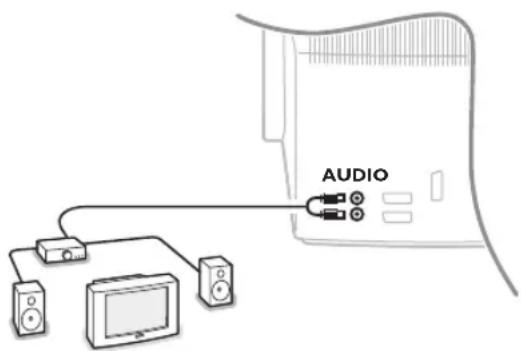
1 IIOKJIIOUHTe ayHOKa6eJIN K 3ByKOBOmy BXOJy yCHIITeJIN K BXOJAM AUDIO L N R Ha 3aJHeN IIaHeJIN TeJIeBUN3Opa.
PeryInpOBKa BbIXOJIIOI rPOMKoCTN OcyIeCTBJIeTcC IOMOIIbIO peryInpOBKn rPOMKOCTYCHINTEJIA.
IpuMeuHue: BbIKIOUme meie6u3Op u 36yKOoU ycuaumeIb neped meM, kak ux coedunmb MeKdy cObo. YcmaHOBume IpOMKocmb 36yKO020 ycuaumeHa MuHmMyM.
Bb6op noKJIOueHHoro yctpoNCTBa
HeckoJIbKO pa3 HaXHMaIte KHOIIky ⅡIa BbI6opa HyxHOrO BXOJa - EXT.1,EXT.2,EXT.3* HIN SIDE-B COOTBeTCTBHN C TEM,KyIa BbI IIOJKJIOUHJIn yCTPOIcTBO Ha 3aJHeN HIN IIpaBOI HAnHeJIN TeJIeBn3Opa.
Ipuueaue: BoJIbUuHcMo ycmpoucM8 (dekodep, budeomazhumooh) camu obecneuaem Heo6xodmoe nepeKluouehue.
*uemeemcmaobkoHa hekomopbxmode
Pekopdep nn DVD c ynnneE EasyLink
YipabJIcHHe 3aIIINcIbIAIOIHMMycTpOiCTBOM (BHeOMaHHTofoHOM HIN IIIIuYIMMDVD) HIN DVD-IIieepm MOKeT OcyIeCTBJIaTbcra IIyIbTa IInCTaHIIOHHORO yipabJIeHnA C IIMOUbHO 3KpaHHbIX MeHIO PeKOpIep HJIN DVD.

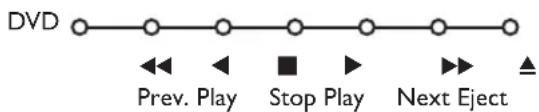
HaKMntc KHOIIKy MENU Ha IyJIbTe JINCTaHIOHOHHoro yIpaBJeHH.
②Перемец Курсop BBepx/BHn3,Быберпге MeHIO Pekopep HIN DVD.
C HOMOIOH KHOIOK IIEpeMeIeHn Kypcopa BJIeBO/BIIpaBO, BBepx/BHN3 BbI6npaHTe HxKHyo 0yHKIINOppeKOpIepa HJIN DVD.
Khonka 1 danaucu, moem ucnolb3o6ambc8 pekume melebu3opa. Ecui Bau buodeomauhumofon c fynkuuei EasyLink noodepkauaem 603moxnocmb nepeboda cuembl 6 pekum ocxudanun, m npu ydepacnnu Khonku 6 meenumpexcekyno kakmeleubop, mak u buodeomauhumofon bblkluoyamocn (nepexodm 6 pekum ocxudanun).
KhoIKN IJIy npabJIeHna aynno- n BndeoyctpoCTBaMn
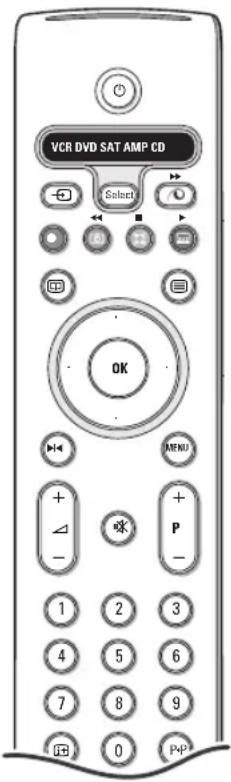
3TOT CNTCMHbI IyJIbT JINCTAHUHOHHOYIIPABJCHNMAOJCt pa6oTaTB co CJcJyIOHM 06OpyOBaHnEM Philips: TeJIeBn3Op (TV), BInDeOMaTHHToOH (VCR), DVD IIIEep (DVD), cIIyTHNKOBbI peChBep (SAT) IIO cTAHApTy RC5, yCINHTeJIb (AMP) IN TIOHeP (+TUNER), a TaKke CD IIIEep (CD).
HaKMHTe KHOIIky Select (BbI6op) IIIBbI6opa IIO6Oro H3 ycTPOIcTB, OTO6paKaemBX Ha IIncIIee. IIpyrOe ycTPOIcTB MOXHO BbI6oPaTb IOBTOPHbIM HaKaTHEm KHOIIKN Select B TceIeHHe HHTepBaJIa BpMeHH 2 cek. Ha bI6paHHoc yCTPOIHCTBO yKa3bIbAcET MeIIEHNO MIIaIOIIIN CBeTOIIIOII. IIIA yIpaJIeHHN BHeIIHHM O6OpYIOBAHm EHaKMHTe OHN H3 KHOIIOK IIyJIbTa IINCTaHIIOHO rOyipABJeHH. IIIA BO3BpTa B peKHM pa6OTbIC TcJCBH3OpOM HAKMHTc KHOIIky Select, IOKa MHract CBCTOINOHN HINHKaTOP. EcII IN TeYEHHe 60 cekyH He 6yIeT IpeIIpHHrTo HnKaHX DeHCTBNI, IIYbT IInc-TAHIOHO YnpabJCnHcMa BCpHCTcR B pcKHM pa6OTbIC TCJCBH3OpOM.
Ipumuehue: Ecu hcamb u ydepkuambk honky Select (Bb6op) haamom cocmonnuu meuenue 6olee 2 cekyhd, 6ydem npoucxodumb nepeda cuzhaa b6bopa cucmemb RC5/RC6.
IcapcbOBDpeKHM OxHuaHn
▶ nay3a (DVD, CD, VCR)
3aTINCb
IepeMoTka (VCR, CD); IOHcBnepcD (DVD, AMP)
CTONI
BocPOnH3BeJeHHe
6bIcTpaIpeMeOTKa BIEpeV (VCR,CD) IONCK Ha3aI (DVD/AMP)
BbI6Op 3bIka cy6THTPOB (DVD); HOBOCTH RDS/TA (AMP); BOCIpOuN3BeJeHHe B IIpoN3BOJIbHOM IopJKe (CD)
BbI6OpHa3BaHHa DVD-ⅡHcKa; Ioka3RDS(AMP); HΦopMaIIHa 3KpaHe (CD)
i+IOKa3 INHΦOPMaIIIN
MENUBKJIIOUCHHC N BbIKJIIOUCHNC MEHIO
-P+ BBI6Op YacTH, KaHaJa, IopOxKn
0-9 BBOJHnCEJI
P P HJIEK MaHHTHOJ JeHTbI (VCR), Bb6op YacTH Ha DVD-ⅡncKe, Bb6op YacTOTbI (AMP)
TaHMeP BnIeOMaTHHToHa
06bemHoe3BvuaHnE (AMP,CD)
Kypcop BBepx/BHN3
IyBbopa CJIeNHyIOHero HIN IpeBbIyHero NcKa (CD)
Kypcop BJIeBO/BIIpaBO
IINBbIbOpaCJIeIyIOIeROHINIIpeIbIyIeIeroTpeKa(CD)
IIINCKA BBepx/BHH3 IO YactOTE (AMP)
IIOJIHHTcJbHO pckHMbl DVD, SAT n CD mOryt 6bIb 3aIIporpaMMHPOBaHbI JIIy npabJIeHHy yctpoIcTBaMH: DVD pekopIep (DVD-R), cIpyTHIKOBbl pcchBep (SAT) IIO cTaHApTy (RC6) n CD pekopIep (CD-R) BmccTo yka3aHHbIX.
HaKMHTe KHOJky Select (Bb6opa) pKHMa HcckOJIbKO pa3 Jo Tex Iop, NOKa CBETOIOHOHbIyKa3aTeJIb He 6yET TpeTb.
2 IIpy 2.
IOIpaMPOBAHn yIpaBJIeHHy DVD-R HaKMHTe KHOIIky OK + Hcpy 2.
IIpy IIOpAMMPOBAHn yIpaBJIeHHN SAT IO cTaHJapTy (RC6),HaXMHTe KHOIIky OK + Hcpy 4.
IIpy IIOpAMMPOBAHn yIpaBJIeHHN CD-R HaKMHTe KHOIIky OK + Hcpy 6.
Teepb, KorJa rOpHT COOTBeTcTBYIOHn INHINKaTop (DVD, SAT, CD),IyJIbT JY 6byET yIpaBJIaTb BaIHMH yCTPOHCTBaMH DVD-R, SAT (RC6) HJn CD-R.
IIpumuehue:Ia 6o36pama K 3a60dcuM ycmaHO6kAm uuu bHbme damapeku Ha necko1bko Muhym, uuu HauKumme KhoNky OK + uuphiy 1 (peKum DVD), uuu + uuphiy 3 (peKum SAT-RC5), uuu + uuphiy 5 (peKum CD).
3aHcB Na BndeomarHHTofoH,IOpeKNaIOuN B03MoXHoCTN EasyLink
BpcKHMcTeJIeBn3Opa MoKHO HaaTaB IIpyMIO 3aIIINb IIporpAMMbI, JcMOHCTpHpyIO- IeHcHa 3KpaIe TeJIeBn3Opa.HaXMMte KHOIKy 3aIHCh ,pacIOJOKeHHyIO IOI KpbIIKOIIyJIbTA INCTaHIINHOHHOYIIpaBJIeHH.
IIpuMeuane : IpeKauoyue npo2pam melebuopa ne meuaem 3anucu! B cayuee zanucu npo2pammbc 6heuneto ycmpoucma, noKDauoyenHOzo K0 exody EXT.1,EXT.3 uau SIDE Bbl He MoJeme bblbdpyzyIO melebuonhyo npo2pamMy na ekpane.
| Ухол за онлайн He | Тураите, He Нжимаite, He Трпт e He ударяп e ПОоверхостс e Краиа KaКИЛПБО TBЕДМ IPIEДМETOM, TAK KAK 3TO MOKEТ ПОцapаATь HIN HeobpaTHMO IOBpeIITb 3KpaI. Пожалійста, He IIpoTIPaIe 3KpaI IN TKAIIbIO C XIMUeCKMn IIPOINTKAMN. He IIpHKacaiTeCb K 3KpaHny pykam NII IN TKAIIbIO, COJIepJauIe JxRbI (HeKOTOpbIe KOCMeTHueCckNe cpeCTBa rSybIeJIbI bI IN POKbIITHЯ). IIpeIe YIcSTKo 3KpaHa OTKIIQUHTe TeLEBHNOP OT cETH. EclI IN OOBepXHOCTb 3AIIbIIJIaIcB, AkKypaTHO IIpOTpIte e TpyIOUChKo, xopoIIIO COIBpaIOUIe IIbIb NII IN DpyrIM aHAIIOYHbIM MaTEPNAJIOM, HApIMeP 6aPbIXKo, CJIeTKA CMOeHHO B CHSTOM 6eH3Hne. He IcIIIOJIb3yIe AICIeTOn, TOLJyOI NII CINrPT, TAK KAK 3TO MOKet IIpNBcCTN K XHMNUCCKOMY IOBpeJxHIIIO. He IcIIIOJIb3yIe XIXIKHNE OUYCTNEI NII IN ChCTIINe a3Po3OJI. KaJIeJIbKn CIIIOII NII BOII yDAJIHTE cpa3y IIO Mepe BO3MOXHOCTN. DoJIOBpeMeHHII KOHTAKT C HINM IIpNBODNT K DeΦopMaIIIN I OBeCiBcYHBAHIO. |
| Плoxoc ИЗображени устан | ПлaxblboJIN BBy BbIbpaIIN CNTEmy TEJIeBEIIaHIN B MEHIO pyuHoi BKN?He HaxoITcra JIN MOHITOP IIN aHTeHna CJIINIKOM 6JIIN3KO K IINHAMKAM, He3a3eMJIeHIOMy aydnoobopyIOBAHIIIO, HeOHOBbIM CBETJIbIKAM N IpyrIM yctpoIcTBAM?I OPbI IN BICOKHe 3DAHIN MOryt BbIbIBaTb JBIOHOHoe 3O6paJxHne IIN «ФaHTOMIOe» 3O6paJxHne Ha 3KpaIe. Иногla KaueCTBO KapTINIKN ydaTeCry IInuHITb IITeM HmCEHENHcTb HAPPAHIN CHTHbI. HIN CHTHbI. HIN BIDIgT S-VHS, IIOIcOcIHcHNOH K pa3bEMam Ha IIpABOIBO IIANeJIbIte TEJIeBISOPa, IIpyaHIN OJIOHbPeMeHHIO HIOJIIOHcHIO R BXODAM EXT.1 IN IN EXT.2 IpyrTO BHEIIHero yctpoCTBa. B 3tOM CJIyuae BbIKJIQUHTe IpyrToe BHEIIHcE OOBpyOBAHne. |
| Het ИЗображени | ПлавьlbHo JIN IIOI KIIIOUeHa aHTeHNa?ПлOTHNo JIN BxOJITIte KeKbpI B pa3bEmbl?He IOBpeJxIe JIN aHTeHbI KabeJIb N IMceT JIN OH IIOXODIaII INIteKeP? |
| Het 3bYka | Het 3bYka IIO Bcem KaHJIaM? IIpOBpeIte, He yCTaHOBJIeHa JIN rPOMKcTb Ia MINIMY. 3bYuk IIpepbIbAcTcI IIpyaHATNI KHOIIKN BbIKJIIOUcHIN 3bYka ? |
| BbI He CMorIII pArePinIb IIpOJIeMyc c I3O6paJxHennem Ba 3bYkom? | ВыклIOчITE И сCHOBA BKIIIOUHTE TeJIeBH3Op. HNKOrIa He IbIaIteCb camOCTOReIbIbHO OTPeMOHTnpOBaTb HEnCIpABHbI TeJIeBIsO3Pc. CBxHITeCb c IIIM IIpODAIOM JINIbBIOHTE TeIeMACTepa. |
| IIyIbI dIcStaHIOH- HoHoro UyipabJIeHnn | EcIJIi BAsI TeJIeBH3Op IpectaII peaHRoBaTb Ha cHrHaJIbIOT IyIbTa IINCTaHII ONHOHO rIyIpaJIeHnn, BO3MOxHO 3aKOHUNJIcIe 3apJIb SaTapeI JINbO yCTaHOB IEN HeVEBpIbIe PeJxIM (TeJIeBH3Opa IIN IpyrTHx yCTpoIcTB, cm. ctr. 3).ДIyIpaJIeHnn TeJIeBH3Opom Bby MochTe IEIOJIb3ObAtb KHOIIKy MENU I KIOIIKN -/+ ,pacIOLOXeIIbIe Na BepXIIe IIaIEJIbTIe TEJIeBH3Opa. |
| Mehio | Bo3MOxIIo, BBy HeBepHO BbIbpaII MEOII?HaJxMITE Ty Jxe KHOIIKy IOBTOPINO IIIA BvIXOJa IIN MeHIO. |
| Pexhim OxHdAnH | TeJIeBH3Op IIOpt6JIeT 3JIeKtpO3HepRIIO H B pexHme OxHdAnHs. PacXOD 3JIeKTPO3HepRIIN BHOIT OIpEJIeHNN BKJIaD B 3aPrj3HeHne BO3dYxa I BOIbI. PacXOD 3JIePRIIN: 1 BT. |
Muy importante :
2 Imagen/Guia teletexto:
OSD (On Screen Display)
surround encender/apagar (AMP, CD)
Guia teletexto 12
Teletexto 13-14

Direcrizes sobre materiais de pletos
OSD (On Screen Display)
Veja Utilizando o Controle Remoto, a p. 3, Informatao naanela.
2 Eikóva/Oδnyoc Teletext
- NIEOTEVKepoopa apotepa/8Ela yia va eNIAEET mAeONTIKO kavaI.
- IeTe Tov Kepoopa kAt w ia va uetakivnoTe To ioko npoc nmuKoukidaTnV apiTepn oovn.
-πεσε+P-γia va επιλέξετε ἀλλο τηλεοπικό καναλι.
Ekova/Teletext: Eite Eunoyn evpyng oovnc, 13.
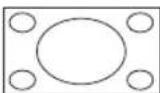
Obov16:9 (Eupia obov)
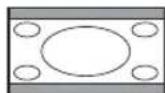
KaBcTm oumieon
Enleoytac To Autoato oxnma n Ekova yieia n v oovn 0oo yivetai nepiooteo. Tnv nepiwn nou unapxouv unotiloi otv kataw maupn ypaun, To Autoato oxna touc epaavi ci. Eav ol unotiloi epaaviovtaeepikwc, niote TOV Kepoopa npoc Ta naW.
TmV nepiTTwON TOU EKNTeTAI TO AoyOTUO TOU OaBou OTN Ywia TNC EAnwu aupnc ypaunc, to AoyOTUo Dv EkpavizTaI OTN oboyn.
Evpyooinon kai anevpyooinon Tou Teletext
IeotyvaevepyoonouoTe to teletext.
| 102 «03 04 05 06 07 08 09 10 11 12» BBC CEEFAX 102 Mon 05 Feb 16.35.22 BBC CEEFAX |
| LIONS RECORD ANOTHER WIN 430 Index 100 News 300 BBC Info 110 Headlines 305 Children 120 Weather 400 Cookery 150 Sports 415 Education 200 Radio 500 Lottery 230 Travel 550 Finance 240 Subtitling 888 Music 280 TV Listings 600 Kókkivoc营业额 Ⅰpaivoc Kɪrpivoc έλανός |
Emioyn iag oελiδaTeletext
Pponyououevn eIIAeYmuEvn oElaia teletext
Smart surf (Gyors kereses)
OSD (On Screen Display)
Zapnuti/vypnuti zvuku Surround (AMP, CD)