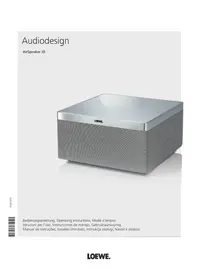
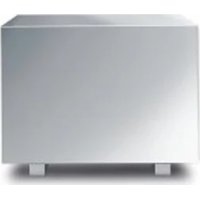
AirSpeaker ID - Loudspeaker LOEWE - Free user manual and instructions
Find the device manual for free AirSpeaker ID LOEWE in PDF.

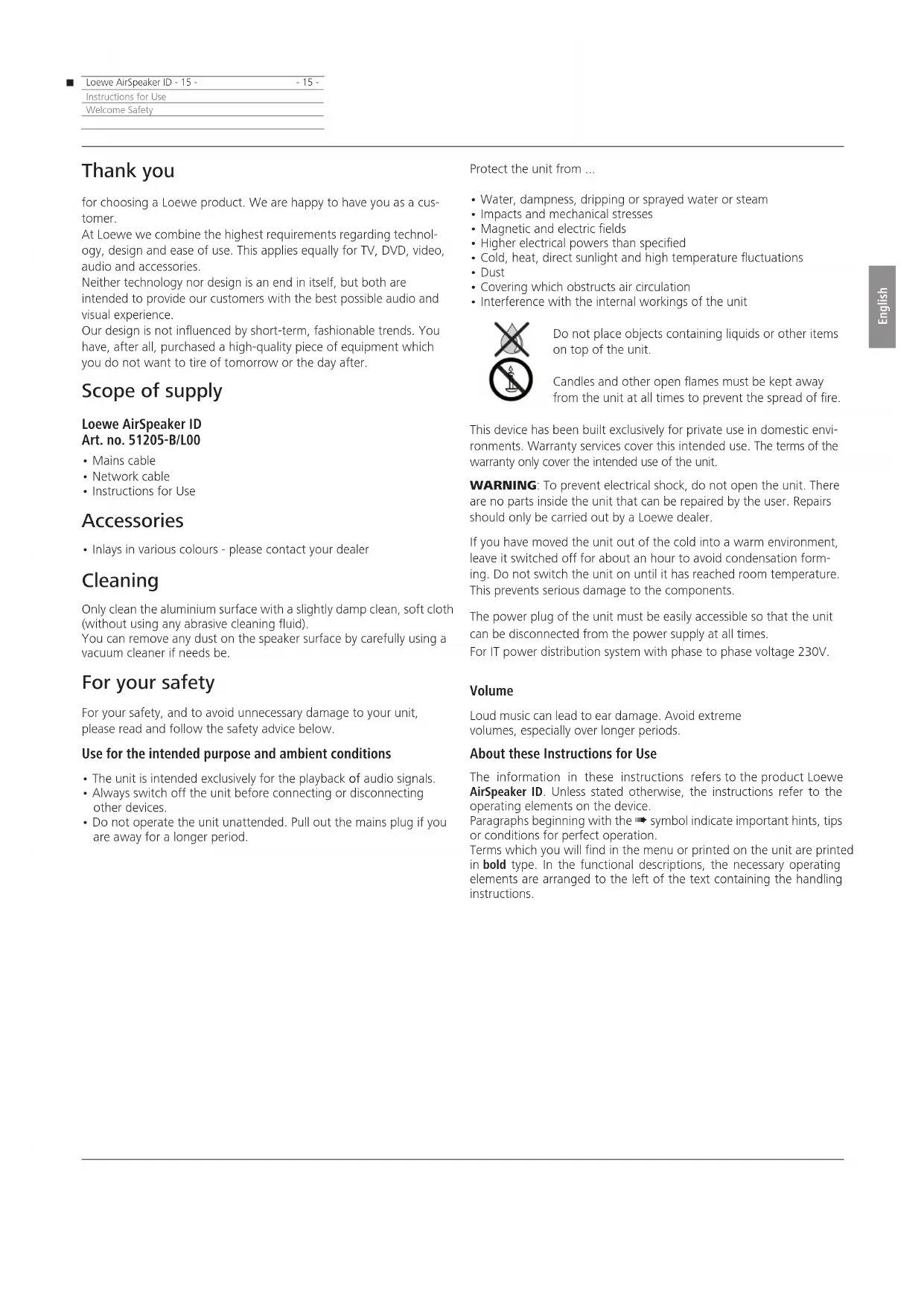


| Product type | Wireless speaker |
| Brand | Loewe |
| Model | AirSpeaker ID |
| Reference | 51205-B/L00 |
| Dimensions (W x H x D) | 24 x 13 x 24 cm |
| Weight | 3.8 kg |
| Power supply | 230 V, 50 Hz |
| Power consumption | 19 W (network standby < 3.5 W, standby < 0.5 W) |
| Interfaces | AUX (3.5 mm jack), USB 2.0 Type A, LAN RJ-45, Wi-Fi 802.11 b/g |
| Main functions | Apple AirPlay, AUX playback, USB mode for iPod/iPhone/iPad, wired/wireless network |
| Controls | On/off, volume, source buttons; optional remote control |
| Indicator lights | Indicate states: on, standby, network, AirPlay, AUX, USB, volume, update |
| Cleaning | Soft slightly damp cloth, vacuum for speaker grille |
| Safety | Do not open, avoid water/humidity, do not expose to heat, disconnect during storms |
| Repairability | Contact your Loewe dealer; no user-serviceable components |
| Supplied accessories | Mains cable, network cable, user manual |
| Operating temperature | 5 to 40 °C |
| Ambient humidity | 30 to 90 % (non-condensing) |
Frequently Asked Questions - AirSpeaker ID LOEWE
User questions about AirSpeaker ID LOEWE
0 question about this device. Answer the ones you know or ask your own.
Ask a new question about this device
Download the instructions for your Loudspeaker in PDF format for free! Find your manual AirSpeaker ID - LOEWE and take your electronic device back in hand. On this page are published all the documents necessary for the use of your device. AirSpeaker ID by LOEWE.
USER MANUAL AirSpeaker ID LOEWE
| Network Setup | Status | SW Update |
| Connection Status | connected | |
| Signal Strength | good | |
| Wireless Channel | 5 | |
| Firmware Version | 3.8.86.1847 | |
| Host Firmware Version | 0.01.08 | |
| SSID | MyHomeNet | |
| WEP Key | Cancel Apply | |
| WPA Key | 1b4uSy0xtlsr22306 | |
Anzeigeelemente
Abmessungen [B x H x T in cm] 24 x 13 x 24
Masse [kg] 3,8
Elektrische Daten
iPod touch (4th generation), iPod touch (3rd generation)
iPod touch (2nd generation)
iPhone 4S, iPhone 4, iPhone 3GS
iPad
iPod touch (4th generation), iPod touch (3rd generation)
iPod touch (2nd generation), iPod touch (1st generation)
iPod classic
iPod nano (6th generation)
iPod nano (5th generation), iPod nano (4th generation)
iPod nano (3rd generation), iPod nano (2nd generation)
iPhone 4, iPhone 3GS, iPhone 3G, iPhone
Schutz der Umwelt
Instructions for Use
Contents
Contents
Control elements. 13
Contents 14
Welcome. 15
Scope of supply. 15
Accessories 15
Cleaning 15
For your safety. 15
Set-up 16
Example configurations. 16
Connection. 16
Switching on/off 16
Network 17
Wired network. 17
Wireless network - Configuration page 17
Start-up 18
Network settings 18
Indicators. 18
Software update. 18
Control. 19
Airplay playback. 19
Playing from external audio sources. 19
iPod operation 19
Troubleshooting 20
Troubleshooting. 20
Technical Data. 21
Environmental protection. 21
Legal information 21
Trademarks 22
Trademarks 22
Declaration of conformity 22
Thank you
for choosing a Loewe product. We are happy to have you as a customer.
At Loewe we combine the highest requirements regarding technology, design and ease of use. This applies equally for TV, DVD, video, audio and accessories.
Neither technology nor design is an end in itself, but both are intended to provide our customers with the best possible audio and visual experience.
Our design is not influenced by short-term, fashionable trends. You have, after all, purchased a high-quality piece of equipment which you do not want to tire of tomorrow or the day after.
Scope of supply
Loewe AirSpeaker ID Art.no.51205-B/L00
- Mains cable
Network cable - Instructions for Use
Accessories
- Inlays in various colours - please contact your dealer
Cleaning
Only clean the aluminium surface with a slightly damp clean, soft cloth (without using any abrasive cleaning fluid).
You can remove any dust on the speaker surface by carefully using a vacuum cleaner if needs be.
For your safety
For your safety, and to avoid unnecessary damage to your unit, please read and follow the safety advice below.
Use for the intended purpose and ambient conditions
- The unit is intended exclusively for the playback of audio signals.
- Always switch off the unit before connecting or disconnecting other devices.
- Do not operate the unit unattended. Pull out the mains plug if you are away for a longer period.
Protect the unit from ...
Water, dampness, dripping or sprayed water or steam
- Impacts and mechanical stresses
Magnetic and electric fields
Higher electrical powers than specified
Cold, heat, direct sunlight and high temperature fluctuations
Dust
- Covering which obstructs air circulation
- Interference with the internal workings of the unit
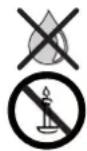
Do not place objects containing liquids or other items on top of the unit.
Candles and other open flames must be kept away from the unit at all times to prevent the spread of fire.
This device has been built exclusively for private use in domestic environments. Warranty services cover this intended use. The terms of the warranty only cover the intended use of the unit.
WARNING: To prevent electrical shock, do not open the unit. There are no parts inside the unit that can be repaired by the user. Repairs should only be carried out by a Loewe dealer.
If you have moved the unit out of the cold into a warm environment, leave it switched off for about an hour to avoid condensation forming. Do not switch the unit on until it has reached room temperature. This prevents serious damage to the components.
The power plug of the unit must be easily accessible so that the unit can be disconnected from the power supply at all times.
For IT power distribution system with phase to phase voltage 230V.
Volume
Loud music can lead to ear damage. Avoid extreme volumes, especially over longer periods.
About these Instructions for Use
The information in these instructions refers to the product Loewe AirSpeaker ID. Unless stated otherwise, the instructions refer to the operating elements on the device.
Paragraphs beginning with the → symbol indicate important hints, tips or conditions for perfect operation.
Terms which you will find in the menu or printed on the unit are printed in bold type. In the functional descriptions, the necessary operating elements are arranged to the left of the text containing the handling instructions.
Loewe AirSpeaker ID-16 -16
Instructions for Use
Set-up/Connection
Switching on/off
Set-up
- Place the unit on an even, firm, horizontal surface.
- Do not set up the unit near strong heat sources or in direct sunlight.
- If setting up in a shelf or a closed cupboard: Leave at least 2.5cm clearance around the unit, so that the air can circulate unhindered and there is no heat backup.
- Incorrect voltages can damage the unit. This device may only be connected to a power supply with the voltage and frequency indicated on the type plate using the mains cable.
- Pull out the power cable during thunderstorms. A voltage surge caused by lightning conducted through the mains could damage the unit.
- If the unit is not to be used for an extended period, the plug should also be disconnected from the mains.
- Position the mains cable in such a way that it can not be damaged. The power cable may not be kinked or laid over sharp edges, stood on or exposed to chemicals; the latter also applies to the unit as a whole. A power cable with damaged insulation can cause electric shocks and poses a fire risk.
- When you want to unplug from the mains, pull on the plug housing rather than on the cable. The cables in the mains plug could otherwise be damaged and could cause a short-circuit when plugged in again.
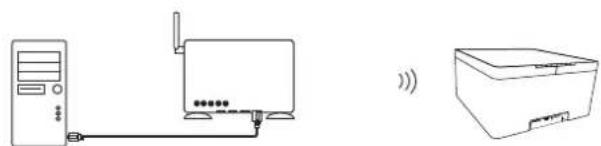
Example configurations

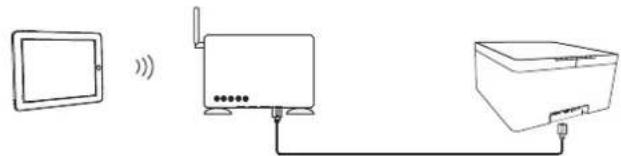
Connection
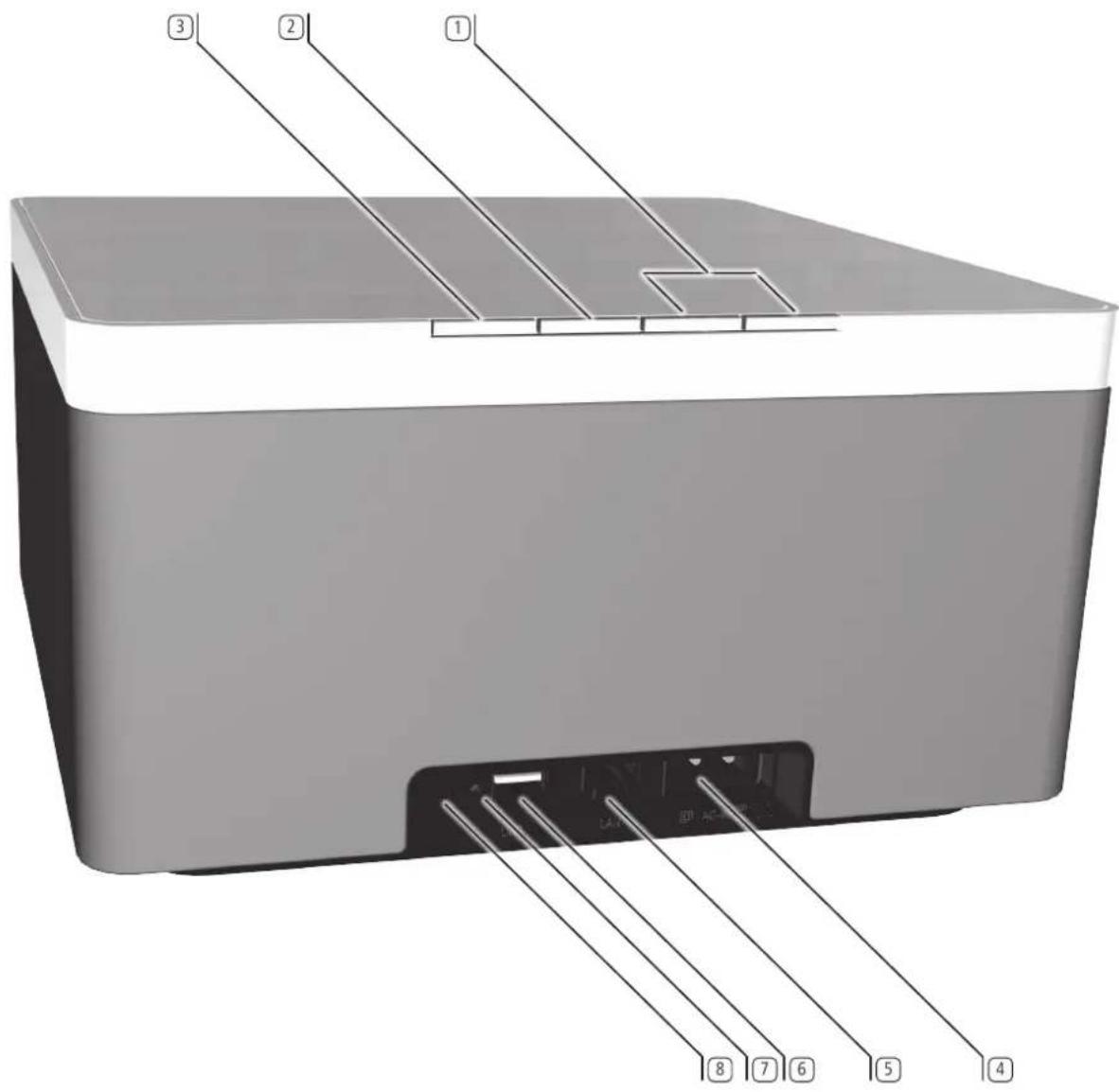
Use the network cable provided to connect the network socket LAN 5 to a network connection (e.g. switch or DSL router) of your home network with a connection to the Internet.
You can connect an external audio source to the socket AUX Use an audio cable with 3.5mm jack (available from your dealer).
Plug the network cable into the network socket AC-IN 4 and connect it to a 220-240V 50/60 Hz socket.
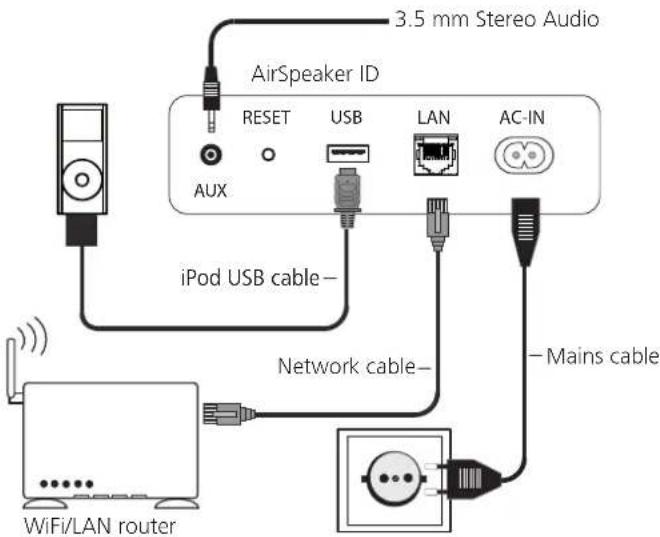
Switching on/off
First establish all cable connections, as described under „Connection". In particular, the AirSpeaker ID must be connected to the cable-based network before switching on, as it would otherwise search for a connection in WLAN mode.
Press the on/off button ③ briefly on the unit.
The unit switches on.
The LED indicator light in the ON/OFF button lights up green.
To switch the device to Network Stand-by mode, press the ON/OFF button ③ on the device for 3 seconds. The LED indicator light in the ON/OFF button lights up orange.
In Network Standby mode the AirSpeaker ID is still "visible" as an AirPlay speaker, but consumes very little power (page 21). After 30 minutes without playback, the AirSpeaker ID automatically switches to Network Standby mode.
To switch the device to Stand-by mode, press the ON/OFF button ① on the device for 5 seconds. The LED indicator light in the ON/OFF button lights up red.
In Stand-by mode the AirSpeaker ID cannot be activated by other devices, instead the ON/OFF button ① has to be pressed again. The power consumption is very low here (page 21).
If you will be absent for some time, first switch off the unit with the ON/OFF button ③ and then pull out the mains plug. You can thus save energy and protect the environment.
Network
Depending on whether the device is connected by wire (Ethernet, Powerline)
or wirelessly (WiFi) to your home network, different settings have to be made.
Loewe recommends use of a wired network (Ethernet, Powerline) to ensure a high stability and quality of the data link. Use a wireless connection only if there is no option. Wireless connections can basically get disturbed due to external influences (e.g. microwave devices) and mostly provide a lower data transmission rate.
The device must be registered in the same logical network as the audio source (such as iPad)
Once you have carried out the relevant steps described in the chapters "Set-up" and "Connection", switch on the unit.
Wired network
If your home network has a DHCP server (e.g. a DSL router), the setup of the network parameters is done automatically. You do not need to set up anything manually.
Wireless network - Configuration page
If you wish to set up a wireless network or if there is no DHCP server in your home network, the AirSpeaker ID must be configured via a direct connection between a PC and the AirSpeaker ID. Please use the network cable provided to connect the AirSpeaker ID to the network cnnection of the PC.
It takes about 2 to 3 minutes from switching on the AirSpeaker ID until a connection to the PC can be established.
It takes about 2 to 3 minutes from switching on the AirSpeaker ID until the device is „visible" in the WLAN.
A message might appear on the PC, stating that only a limited network is available.
After the AirSpeaker ID has completely started, enter this address in the Internet browser to call up the Configuration page: 169.254.111.222.
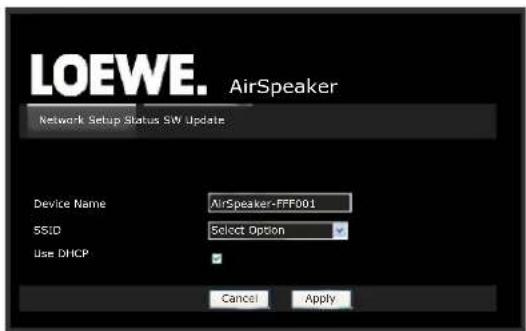
Example of a configuration page.
Then continue with the network settings as described on page 18.
If the AirSpeaker ID is connected to a home network with DHCP server, you can also access the Configuration page via a PC on which Apple iTunes is installed:
Enter the address line in the PC Internet browser: http://AirSpeaker ID-[xxxxxx].local/index.asp where [xxxxxx] stands for the last six characters of the MAC address. You can find the MAC address on the product label on the bottom of the unit
If you change the „Device Name“ manually, the address (see above) via which you can call up the Configuration page of the AirSpeaker ID will also change correspondingly. Please note the altered „Device Name“. The new address is then : http://newname.local/index.asp
Loewe AirSpeaker ID-18 -18
Instructions for Use
Start-up
Basic settings
Network settings
The following network settings can be made:
Device Name The name that is used to identify the unit in the network can be set individually.
SSID Selection of an available wireless n the option Configure Manually
Configure Manually Manual configuration of the WiFi network
Manual SSID Enter the network name of the desired WiFi network
WPA Key Enter the network key of the selected WiFi network
Use DHCP Select this option (box is ticked) to let the WiFi router set the network parameters automatically.
If this option is disabled you can manually set the network parameters.
Select Encryption Type Select the encryption method.
No Encryption The connection is not encrypted (not recommended)
WEP The connection is encrypted with the protocol (not recommended)
WPA The connection is encrypted with the WPA protocol
WPA2 The connection is encrypted with the WPA2 protocol (recommended)
IP Address Fixed IP address assigned to the device
Subnet Mask Subnet mask of the home network (usually 255.255.255.0)
Gateway IP-address of the gateways
Primary DNS IP-address of the primary DNS server
Secondary DNS IP-address of the secondary DNS server
Encryption using the WEP standard is no longer considered safe. If possible, use the standards WPA or WPA2. Please make the appropriate settings in your WiFi router.
You can find an overview of the network parameters, connections and other technical details on the page Status.
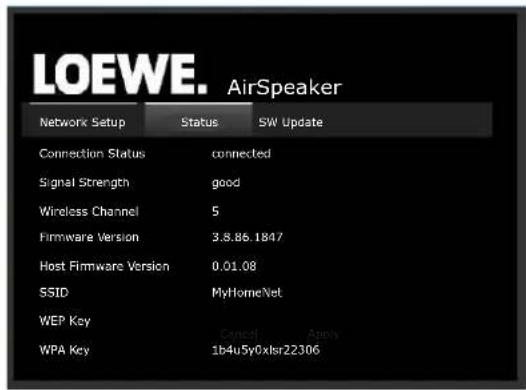
Indicators
The indicators in the buttons on the unit show the different operating states.
| Function | Button | Button S | Button - | Button + |
| Network or Standby | red | |||
| Network Standby | orange | |||
| ON | green | |||
| Network initialising /Network problem | green | flashing yellow | ||
| AirPlay search | flashing violet | |||
| AirPlay mode | green | violet | ||
| AUX mode green | green | |||
| USB mode | green | blue | ||
| Volume up/down | white | white | ||
| Mute | flashing white | flashing white | ||
| Initialize Software update | flashing white or orange | flashing white | flashing white | |
| WiFi Software update | orange | flashing white | flashing white | flashing white |
| Controller Software update | green | flashing white | flashing white | flashing white |
| Error during soft-ware update | flashing orange | |||
| Device error | flashing red |
Software update
You can download a software update suitable for your unit from the Internet, if required.
AirSpeaker ID must be connected by cable to the network for a software update.
The power supply must never be disconnected from the device during the updating process!
Open the Configuration Page as described on page 17.
Chose the tab SW update.
Use the Update function to start the update process. The display in the S button lights up orange. The process takes up to 30 minutes, depending on the speed of the internet connection.
The device restarts after a successful update.
You can download a current version of the instructions for use as a PDF file from the Loewe web page: http://support.loewe.tv/de -Library Instructions for Use This is especially recommended after a software update.
Loewe AirSpeaker ID - 19 - 19 -
Instructions for Use
Control
Play
Airplay playback
The Loewe AirSpeaker ID allows you to play audio signals wirelessly from a compatible Apple device. A list of which Apple models are compatible with the Loewe AirSpeaker ID can be found on page 21.
An operating system with version 4.2.1 or later must be installed in the Apple device.
Press the S button repeatedly until the corresponding LED lights up violet.
Start the audio playback on the Apple device.
Press the symbol (usually located next to the volume control of the application currently playing on the touch screen of the Apple device) and select the Loewe AirSpeaker ID for playback.
Set volume - Application on the Apple device
Set volume - +/- ①buttons on the AirSpeaker ID.
Playing from external audio sources
You can play an external analogue stereo audio source with the Loewe AirSpeaker ID.
The source must be connected to the 3.5 mm jack socket AUX on the rear of the unit.
Press the S button repeatedly until the corresponding LED lights up green.
Start playing the connected audio source.
Set volume + / - ①buttons on the AirSpeaker ID.
Set the volume of your audio source to a high setting and use the +/- buttons 1 on the AirSpeaker ID to select the desired volume, so as to avoid static noises.
- Disconnect your Apple device from the USB connection of the AirSpeaker ID while using the AUX 8 connection as an audio source, so as to avoid static noises.
iPod operation
You can connect your Apple device to the AirSpeaker ID allowing you to listen to your music in the very best quality. If the AirSpeaker ID is switched on, the accumulator of the connected Apple device is charged. A list of which Apple models are compatible with the AirSpeaker ID can be found on page 21.
Connecting the iPod
Connect your Apple device via the iPod USB cable to the USB socket 6 on the unit.
iPod audio play
Press the S button repeatedly until the corresponding LED lights up blue.
Start the audio playback on the Apple device.
If you use the optionally available remote control Assist AirSpeaker ID, you can also control some basic functions of your Apple device via this. Please refer to the user manual of the remote control.
Set volume - Application on the Apple device
Set volume + / - ① buttons on the AirSpeaker ID.
Depending on the software version, your Apple device might not be able to be operated via the AirSpeaker ID. We recommend updating the software of your Apple device to the latest version.
The compatibility with your Apple device can vary depending on the model. For Apple devices supported see page 21.
Faults can occur depending on the Apple device.
- Only disconnect your Apple device from the AirSpeaker ID when there is no access to it.
Loewe AirSpeaker ID - 20
-20
Instructions for Use
Troubleshooting
Troubleshooting
| Problem Possible cause Remedy | ||
| Not working at all. Mains cable not plugged in. Plug the mains cable into a socket | 230V 50 Hz. | |
| No sound. | Defective connections at the input cable. | Connect the cable correctly (page 16). If the problem continues, the cable might be defective. |
| The volume is set at minimum. | Turn up the volume. | |
| The sound is set to mute. | Press or V+ on the remote control to reactivate the audio output and then set the volume level. | |
| The unit is not working properly. | Unplug the mains plug from the mains socket and then try plugging it in again after 90 seconds. | |
| Press the Reset button for > 10 seconds to restore the default settings. Disconnect the device from the power supply for 90 seconds. After this, please carry out the basis settings again. | ||
| Sound interruptions during AirPlay playback | Other devices in your environment might be transmitting on the same radio channel. | Connect the AirSpeaker ID to a wired network or set a free radio channel at your WiFi router. |
| The remote control is not working properly. | The batteries in the remote control are dead. | Replace the batteries with new ones. |
| The PC cannot establish a connection to the AirSpeaker ID. | Check whether Apple iTunes is installed on the PC. | |
| The iPod playback stops and another title is played. | The iPod function "Shake to Shuffle" is activated. | Deactivate this function in your iPod. |
Technical Data
General
Loewe AirSpeaker ID Art. no. 51205-B/L00
Operating temperature [° C] 5 ... 40
Humidity [%] (no condensation) 30 ... 90
Dimensions [W x H x D in cm] 24 x 13 x 24
Weight [kg]
3.8
Electrical data
Mains voltage [Volt 50 Hz]
230
Power consumption [Watt]
3.5
Power consumption in network standby [Watt]
<0.5
Power consumption on standby [Watt]
2
Output stages
4x20
Amplifier nominal power [Watt] (sine)
Interfaces
AUX
Jack socket 3.5 mm
USB
1xV2.0,typeA
LAN
Wired network RJ-45
Wireless Interfaces
Supported standards
801.11b/q
Frequency range
2400-2483,5 MHz
Encryption
WEP, WPA
Wired network
Supported standards
10 Mbit/s Ethernet (10Base-T)
100 Mbit/s Fast Ethernet (100Base-T)
Home networking standard
Audio
Apple AirPlay
Supported Apple devices - Made for
(AirPlay Audio playback)
iPod touch (2nd generation)
iPhone 4S, iPhone 4, iPhone 3GS
iPad
(USB Audio playback)
iPod touch (4th generation), iPod touch (3rd generation)
iPod touch (2nd generation), iPod touch (1st generation)
iPod classic
iPod nano (6th generation)
iPod nano (5th generation), iPod nano (4th generation)
iPod nano (3rd generation), iPod nano (2nd generation)
iPhone 4, iPhone 3GS, iPhone 3G, iPhone
Environmental protection
Cardboard box and packaging
In line with national regulations regarding the disposal of packaging materials, we pay a fee to authorised recyclers who collect packaging from dealers.
The unit

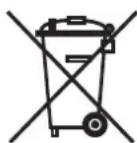
Attention: The EU Directive 2002/96/EC governs the proper return, handling and recycling of used electronic appliances.
Old electronic appliances must therefore be disposed of separately. Never dispose of this unit in normal domestic waste! You can hand in your old unit free of charge at identified collection points or to your dealer if you buy a similar new unit. Additional details about return (also for non EU countries) are available from your local municipal authorities.
Remote control batteries
The batteries provided contain no harmful materials such as cadmium, lead or mercury.
Used batteries should no longer be disposed of in the domestic waste according to the Battery Ordinance. You can dispose of used batteries free of charge at the collection points in commercial outlets. Your dealer will also have a collection point for used batteries.
Legal information
Loewe Opta GmbH is a public limited company of German law with its Head Office in Kronach.
Industriestrasse 11,96317 Kronach
Telephone: +49 9261 99-500
Fax: +49 9261 99-515
Email: ccc@loewe.de
Commercial Register: Municipal Court Coburg, No. HRB 42243
All rights reserved including translation.
Design and technical specifications are subject to change without notice.
Trademarks
Made for

bd iPhone

"Made for iPod" and "Made for iPhone" mean that an electronic accessory has been designed to connect specifically to iPod or iPhone, respectively, and has been certified by the developer to meet Apple performance standards. Apple is not responsible for the operation of this device or its compliance with safety and regulatory standards. Please note that the use of this accessory with iPod or iPhone may affect wireless performance.
iPod and iPhone is a registered trademark of Apple Inc. in the USA and other countries.
The set is CE marked and complies with EU directives. The complete declaration of conformity is included in the detailed operating manual, which you can download from our homepage.
Declaration of conformity

This equipment is in compliance with the essential requirements and other relevant provisions of Directive 1999/5/EC. It may be operated in all countries in the EU and also in Iceland, Norway and Switzerland. In France and Italy it may only be used indoors.
Loewe AirSpeaker ID, Ref. 51205-B/L00
Installation / raccordement
WPA2 (procedure recommende)
| (AirPlay lecture audio) | iPod touch (2nd generation) |
| iPhone 4S, iPhone 4, iPhone 3GS | |
| iPad |
(USB Lecture audio)
AirSpeaker ID Loewe, Cod. art. 51205-B/L00
iPod touch (2nd generation)
iPhone 4S, iPhone 4, iPhone 3GS
iPad
iPod touch (4th generation), iPod touch (3rd generation)
iPod touch (2nd generation), iPod touch (1st generation)
iPod classic
iPod nano (6th generation)
iPod nano (5th generation), iPod nano (4th generation)
iPod nano (3rd generation), iPod nano (2nd generation)
iPhone 4, iPhone 3GS, iPhone 3G, iPhone
iPod touch (2nd generation)
iPhone 4S, iPhone 4, iPhone 3GS
iPad
iPod touch (4th generation), iPod touch (3rd generation)
iPod touch (2nd generation), iPod touch (1st generation)
iPod classic
iPod nano (6th generation)
iPod nano (5th generation), iPod nano (4th generation)
iPod nano (3rd generation), iPod nano (2nd generation)
iPhone 4, iPhone 3GS, iPhone 3G, iPhone
| Network Setup | Status | SW Update |
| Connection Status | connected | |
| Signal Strength | good | |
| Wireless Channel | 5 | |
| Firmware Version | 3.8.86.1847 | |
| Host Firmware Version | 0.01.08 | |
| SSID | MyHomeNet | |
| WEP Key | ||
| WPA Key | 1b4uSy0xlsr22306 | |
Weergave-elementen
iPod touch (2nd generation)
iPhone 4S, iPhone 4, iPhone 3GS
iPad
(USB-audioweergave)
iPod Touch (4th generation), iPod Touch (3rd generation)
iPod Touch (2th generation), iPod Touch (1st generation)
iPod Classic
iPod Nano (6th generation)
iPod Nano (5th generation), iPod Nano (4th generation)
iPod Nano (3rd generation), iPod Nano (2nd generation)
iPhone 4, iPhone 3GS, iPhone 3G, iPhone
Milieu-bescherming
Verpakking en doos
iPod touch (4th generation), iPod touch (3rd generation)
iPod touch (2nd generation)
iPhone 4S, iPhone 4, iPhone 3GS
iPad
iPod touch (4th generation), iPod touch (3rd generation)
iPod touch (2nd generation), iPod touch (1st generation)
iPod classic
iPod nano (6th generation)
iPod nano (5th generation), iPod nano (4th generation)
iPod nano (3rd generation), iPod nano (2nd generation)
iPhone 4, iPhone 3GS, iPhone 3G, iPhone
Környezetvédelem
Csomagolás
iPod touch (4th generation), iPod touch (3rd generation)
iPod touch (2nd generation)
iPhone 4S, iPhone 4, iPhone 3GS
iPad
(USB audioprehravani)
iPod touch (4th generation), iPod touch (3rd generation)
iPod touch (2nd generation), iPod touch (1st generation)
iPod classic
iPod nano (6th generation)
iPod nano (5th generation), iPod nano (4th generation)
iPod nano (3rd generation), iPod nano (2nd generation)
iPhone 4, iPhone 3GS, iPhone 3G, iPhone
OchranaŽivotniho prostre
Obalya kartenoy
Audio Products Group Pty Ltd
67 O'Riordan St
Alexandria NSW 2015, Australia
Tel+61-1300130492
Fax+61-0295780140
E-mail:help@audioproducts.com.au
B NL L
Loewe Opta Benelux NV/SA
Uilenbaan 84
2160 Wommelgem, Belgie
Te+32-3-2709930
Fax+32-3-2710108
E-mail: ccc@loewe.be
BG Darlington Service
193 Kn. Klementina St.
1612 Sofia, Bulgaria
Tel +359-2 9556399
E-mail: darlington@psp-bg.com
CH Telion AG
Rutistrasse 26
Customer Care Center
Industriestafe
1st Floor, 237A Kensington High St
London
W8 6SA, UK
Tel+44-02073681100
Fax+44-02073681101
E-mail: enquiries@loewe-uk.com
King's Tower 28/F, 111 King Lam Street
Kowlaon, Hong Kong
Tel+852-27778988
Fax+852-23100808
E-mail: service@loewe.cn.com
HR Plug&F
Bednjanska 8, 10000 Zagreb
Hrvatska (Kroatia)
Tel+38514929683
Fax+38514929682
E-mail: info@loewe.hr
Loewe Italiana S.r.L.
Viana Monte Baldo, 14/P-14/N
Clear electronic entertainment Ltd
13 Noah Mozes St.
Agish Ravad Building
Tel Aviv 67442, Israel
Tel+972-3-6091100
Fax+972-3-6092200
E-mail: info@loewe.co.il
IND Navshiv Retail Pvt. Ltd.
Block D, Plot No. 7 Shanti Kunj
Vasant Kunj
New Delhi - 110070, India
Tel +91 11 47 65 55 00
Fax+911147676715
E-Mail: admin@navshiv.com
IR MiMoRa HOLDING CO
NO 1001,Afra Tower
Parsa St. Fereshten
Tehran, Iran
Tel +98 921 344 0521
E-Mail: s.zarandooz@gmail.com
SA Salem Agencies & Services Co.
Hamad Al Haqueel Street, Rawdah, Jeddah
21413
Kingdom of Saudi Arabia
Tel+966(2)6654616
Fax+966(2)6607864
E-mail: hkurkjian@aol.com
LV Spartners, SIA
A.Caka Iela 80
Rtgga, LV-1011, Latvia
Tel +3 71-67 29 29 59
Fax+371-67310568
E-mail: olga@dom332.lw
LT A Cappella Ltd.
Ausbros Vartu 5, Pasazo skg.
01129 Vilnius, Lithuania
Tel+370-52122296
Fax+370-52626681
E-mail: info@loewe.it
M Doneo Co. Ltd
34/36 Danny Cremona Street
Hamrun, HMR1514, Malta
Tel+356-21-225381
Fax+356-21-230735
E-mail: service@doneo.com.mt
MA Somara S.A.
377, Rue Mustapha El Maani
20000 Casablanca, Morocco
Tel+212-22220308
Fax+212-22260006
E-mail: somara@somara.ma
N
Premium Consumer Electronics as
Østre Kullerød 5
Audio Products Group Pty Ltd.
67 O Riordan SI
Alexandria NSW 2015, Australia
Tel 0800174781
Fax+61-0295780140
E-mail:help@audioproducts.com.au
P
Mayro Magnetics Portugal, Lda.
Service Center Loewes
Aptekarsky per.4 podjezd 5A
105005 Moscow, Russia
Tel+7-499 940 42 32 (ext. 454)
Fax+7-4957307801
E-mail: service@loewe-cis.ru
S
Kjaerulff 1 AB
Ridbaneqatan 4,Box 9076
200 39 Malmo, Sverige
Tel+46-406797400
Fax+46-406797401
E-mail: loewe@loewe.se
SG
Atlas Sound & Vision Pte Ltd.
10 Winstedt Road #01-18
Singapore 227977
Te1+65-63349320
Fax+65-63391615
E-mail: service@atlas-sv.com
SK
BaSys SK, s.r.o.
P.O.Box 32836, Sheikh Zayed Road
Dubai, UAE
Tel+971-43431441
Fax+971-43437748
E-mail: service@dubaiaudio.com


- Anzeigeelemente
- Elektrische Daten
- Schutz der Umwelt
- Contents
- Thank you
- Scope of supply
- Loewe AirSpeaker ID Art.no.51205-B/L00
- Accessories
- Cleaning
- For your safety
- Use for the intended purpose and ambient conditions
- Volume
- About these Instructions for Use
- Set-up
- Example configurations
- Connection
- Switching on/off
- Network
- Wired network
- Wireless network - Configuration page
- Network settings
- Indicators
- Software update
- Airplay playback
- Playing from external audio sources
- iPod operation
- Connecting the iPod
- iPod audio play
- Technical Data
- General
- Electrical data
- Interfaces
- Wireless Interfaces
- Home networking standard
- Supported Apple devices - Made for
- Environmental protection
- Cardboard box and packaging
- The unit
- Remote control batteries
- Legal information
- Trademarks
- Declaration of conformity
- Loewe AirSpeaker ID, Ref. 51205-B/L00
- AirSpeaker ID Loewe, Cod. art. 51205-B/L00
- Weergave-elementen
- (USB-audioweergave)
- Milieu-bescherming
- Verpakking en doos
- Környezetvédelem
- Csomagolás
- OchranaŽivotniho prostre
- Obalya kartenoy
Brand : LOEWE
Model : AirSpeaker ID
Category : Loudspeaker