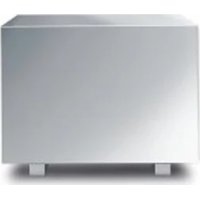
Subwoofer 800 - Loudspeaker LOEWE - Free user manual and instructions
Find the device manual for free Subwoofer 800 LOEWE in PDF.



| Product type | Speaker (Subwoofer) |
| Brand | Loewe |
| Model | Subwoofer 800 |
| Dimensions (W x H x D) | 43 x 34.5 x 43 cm |
| Weight | 27 kg |
| Power supply | 220-240 V, 50/60 Hz |
| Max power consumption | 900 W |
| Nominal power consumption | 170 W |
| Standby power consumption | 0 W |
| Subwoofer frequency range | 27 Hz - 300 Hz (-6 dB) |
| Channel frequency range | 5 x 100 W, 5 Hz - 50 kHz (-3 dB) |
| Adjustable bass intensity | ±12 dB |
| Adjustable crossover frequency | 50 Hz - 250 Hz |
| Phase inverter | Yes |
| Connections | Audiolink 25-pin D-Sub, 6 RCA inputs (FL, Center, FR, RL, Subw, RR) |
| Compatibility | Loewe TVs (chassis L27xx/SL1xx/SL2xx) |
| Features | Auto on/off, equalizer, phase adjustment, bass intensity |
| Safety | Do not open the device, avoid humidity, heat, shocks |
| Cleaning | Soft damp cloth, no corrosive products |
| Repairability | Repairs by Loewe dealer only |
| Warranty | Household use only |
| Included accessories | Audiolink cable, Digital Audiolink/Audiolink converter, network cable, Velcro strip, elastic pads, cover, user manual |
| Manufacturer | Loewe Technologies GmbH, Kronach |
Frequently Asked Questions - Subwoofer 800 LOEWE
User questions about Subwoofer 800 LOEWE
0 question about this device. Answer the ones you know or ask your own.
Ask a new question about this device
Download the instructions for your Loudspeaker in PDF format for free! Find your manual Subwoofer 800 - LOEWE and take your electronic device back in hand. On this page are published all the documents necessary for the use of your device. Subwoofer 800 by LOEWE.
USER MANUAL Subwoofer 800 LOEWE
Guangdong MG Audio Development Co.Ltd
No.8 Jinhu Rd, Xinhua St, Huadu
Reg.GZ.PRC
Tel+86-020-22675666
Fax+86-020-22675777
E-mail: service@loewe-mg.com
Xiamen Tenote Investment Co. Ltd
26F3#XinglinBayOperation
Center,
No.478 xinglinwan Avenue,
Jimei District, Xiamen, Fujian, PRC
Tel+86-4000881566
E-mail: service@loewe-trnt.com
CY
Hadjikyriakos & Sons Ltd.
121 Prodromos Str., P.O Box
21587
1511 Nicosia, Cyprus
Tel +357-22872111
Fax+357-22663391
E-mail: sawvas@hadjkyriakos.com.cy
CZ
BaSys CS s.r.o.
Sodomkova 1478/8
10200 Praha 10 - Hostivar,
Ceská republika
Tel +420 234 706 700
Fax+420234706701
Customer Care Center
Industrieslase 11
1st Floor, 237A Kensington High
St
London
W865A,UK
Te+44-(0)2073681100
Fax+44-020736
E-mail: enquiries@loewe-uk.com
GR RO AL
Clear electronic entertainment Ltd
13 Noah Mozes St.
Agish Ravad Building
Tel Aviv 67442, Israel
Tel +972-3-6091100
Fax+972-3-6092200
E-mail: info@loewe.co.il
IND
Nonplus Ultra Home Automation
Pvt Ltd
First Floor, No. 615, Second Main
Road
Indiranagar Stage I, Indiranagar
Bangalore 560038
India
Tel+918041114599
E-mail: jimmy@nplusultra.in
#
R
Pars Royal Taramesh
LOEWE Gallery
3 Shariati St. Opp. Soheil St.
P.O Box 1914965537
Tehran, Iran
Tel+9821-22391661
E-Mail: info@tarameshgroup.com
JOR
ACCU-TECH Solutions Co.
1-Kharija Al-Ashja Street
Jabal Al-Webdeh
P.O.Box 9668 Amman 11191,
Jordan
Tel: +962-6-465-9985
Fax:+962-6465-0119
E-Mail: info@accutech-solutions.
net
KSA
LOFWE Show Room
Olaya Street, Near Kingdom
Center
RIYADH, SAUDI ARABIA
P.O Box 92831 Riyadh 11663
Tel+966-11-4640927
Fax+966-11-4640759
E-mail: hkkurkjian@gmail.com
LVEST
Kpartners, SIA
A.Caka iela 80
Riga, LV-1011, Latvia
Tel +3 71-67 29 29 59
Fax+371-67310568
E-mail: evgenii.bebnev@loewe.lv
LT
A Cappella Ltd.
Ausros Vartu 5, Pasazo skq.
01129 Vilnius, Lithuania
Tel +370-52122296
Fax+370-52626681
E-mail:info@loewe.it
N
EETEuroparts AS
Olaf Helsetseve 6 (Vekstsenteret)
0694 Oslo, Norge
Tel +47-22919500
E-mail: salg@eeteuroparts.no
P
Gaplasa S.A.
Building 328 1st Floor Beirut,
Lebanon
Tel+9611446777/1587446
Fax+9611582446
E-mail: info@icontrl-eb.com
RUS
Service Center Loewe
Aptekarsky per.4 podjezd 5A
105005 Moscow, Russia
Tel +7-499 940 42 32 (ext. 454)
Fax+7-4957307801
E-mail: service@loewe-cis.ru
S
EET Europarts AB
Loewe Sweden
Box 4124
11 changi south street 3
03-01 builders centre
Singapore 486122
Tel+65-67452028
Fax+65-65467861
E-mail: service@atlas-sv.com
TR
ENKAY GROUP
SERVISPLUS MUSTERI HIZMETLERI
Volco Enterprise Close Corporation
Unit 8
7 on Mastiff (Road)
Longlake Ext 1, Lingbro Business
Park
2165 Johannesburg
Tel+27116081228
Fax+27116081740
E-mail: v63@mweb.co.za
© by Lornee Technologies ©1.09.15
Herzlich willkommen
Vielen Dank,
Loewe Technologies GmbH Printed in Germany
for choosing a Loewe product. We are happy to have you as a customer.
At Loewe we combine the highest standards of technology, design and user friendliness. This applies equally for TV, DVD, video and accessories.
Neither technology nor design is an end in itself, but both are intended to provide our customers with the best possible audio and visual experience.
Our design is not influenced by short-term, fashionable trends. You have, after all, purchased a high-quality piece of equipment which you do not want to get tired of looking at tomorrow or the day after.
The Loewe subwoofer 800 is fine-tuned for use with Loewe TV sets (from chassis L27xx/SL1xx/SL2xx) as well as with Loewe loudspeaker systems.
Loewe TV sets (from chassis L27xx/SL1xx/SL2xx) with an integrated digital multichannel audio decoder transfer the audio signals to the subwoofer via an audiolink cable or via a digital audiolink cable. The Loewe subwoofer 800 then switches itself on and off with the Loewe TV set.
The audio settings can be selected conveniently using the menus of the Loewe TV set.
You can also use the Loewe subwoofer 800 along with an external audio source. However, you then lose the Loewe system advantages (e.g. automatic on/off switching). In this case, see your decoder (e.g. AV receiver) for operating instructions.
Scope of delivery
Loewe Subwoofer 800, Order No. 68206x00 / 30
Individual Subwoofer 800
- Cable Audiolink / 6m / Audiolink 5.1 (only at variant 00)
- Converter Digital Audiolink / Audiolink (only at variant 30)
Network cable (only at variant 30)
- 1 Velcro tape
2 elastic bumpers
Electronic Cover
- Operating Manual
Accessories
Converter Digital Audiolink / Audiolink Order No. 71600080
Cable Audiolink / 1.5m / Audiolink 5.1 Order No.89952001
Cable Audiolink / 10m / Audiolink 5.1 Order No. 89952003
Fabric hose, black (1,8 m) Order No. 31947004
Fabric hose, silver (1,8 m)
Order No. 31947005
For your safety
For your safety and to avoid unnecessary damage to your TV set, please read and observe the following safety instructions:
- Your Individual Sound speaker system is designed exclusively for playing audio signals.
- Always switch off your system (Individual Sound speaker system, TV set and any other connected components) before connecting or disconnecting other equipment or speakers.
- Never operate the Individual Sound speaker system unsupervised. Switch off the power switch or pull out the mains plug during longer periods of absence.
Protect your Individual Sound speaker system against ...
- Damp, moisture, rain, splashing water or dew
- Knocks and mechanical stresses
- Magnetic and electrical fields
- Higher electrical powers than specified
Cold, heat, direct sunlight and extreme temperature variations
Dust - Covering which obstructs air circulation - especially the rear
Manipulations inside the set

Do not place objects containing liquids on top of the unit.
Candles and other open flames must be kept away from the unit at all times to prevent the spread of fire.
Your Individual Sound speaker system was designed exclusively for private use in a domestic environment. The warranty conditions only cover this intended use.
WARNING: TO RULE OUT DANGER OF ELECTRIC SHOCK, NEVER REMOVE THE AMPLIFIER COVER. THERE ARE NO PARTS INSIDE THE HOUSING WHICH CAN BE REPAIRED BY THE USER. HAVE REPAIRS DONE ONLY BY YOUR LOEWE DEALER.
If your have moved your Individual Sound speaker system from a cold to a warm environment, leave it standing for about one hour before switching on because of the possible formation of condensation. Do not switch on until it has reached room temperature. This avoids seriously damaging the components.
Setting up
Cleaning
Only clean your Individual Sound loudspeaker system with a damp, soft, clean cloth (without aggressive cleaning agents).
Installing the Individual Sound speaker system
Basic information
Caution: THE ALUMINIUM SURFACE OF THE LOEWE SUBWOOFER 800 IS VERY SENSITIVE TO SCRATCHING AND IMPACT. AVOID ALL CONTACT WITH SHARP OBJECTS. DO NOT PLACE VASES, CANDLES OR OTHER OBJECTS ON TOP OF THE SUBWOOFER.
- Place subwoofer, standing speaker and satellite speakers with stand on a firm, level base.
- Do not place the subwoofoers and speakers near to strong sources of heat or in direct sunlight.
- When installing on a wall, in a cabinet or a closed shelf: Leave about 10cm free space around the subwoofer to allow air to circulate unhindered and avoid build up of heat or acoustic pressure.
- Pull out the power cable during thunderstorms. Surge voltages caused by lightning strikes can damage the TV through the antenna system and the mains.
- Also remove the antenna and mains plugs in long periods of absence.
- The power plug of the TV set must be easily accessible so that the TV can be disconnected from the power supply at all times.
- Lay the speaker and power cables in such a way that they cannot be damaged. The power cable may not be kinked or laid over sharp edges, not stood on and not exposed to chemicals; the latter also applies to the system as a whole. A power cable with damaged insulation can lead to electric shocks and is a fire risk and must therefore be changed by qualified service personnel before operation of the set continues.
- When removing the power plug, pull the plug housing and not the cable. The wires in the plug could be damaged and cause a short circuit the next time it is plugged in.
- The speakers generate magnetic dispersion fields which act in the vicinity of the housing. We recommend a minimum distance of >0.5m from magnetically sensitive equipment such as CRT-TV sets, magnetic data media etc.
Subwoofer
You can position the subwoofer anywhere on the floor. We recommend the front area of the room but in such a way that the bass tones can radiate freely to the side and downwards.
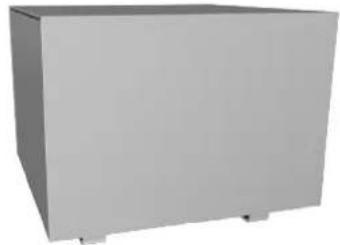

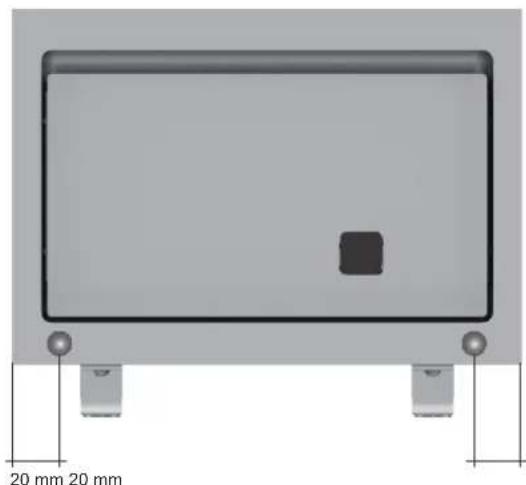
Important: Never obstruct the air vents on the back of the subwoofer. Makes sure it is far enough away ( >10cm ) from the floor or wall.
Mount the two enclosed elastic buffers on the bottom rear of the subwoofer so that the air circulation cannot be obstructed by slipping against the wall.
Setting up
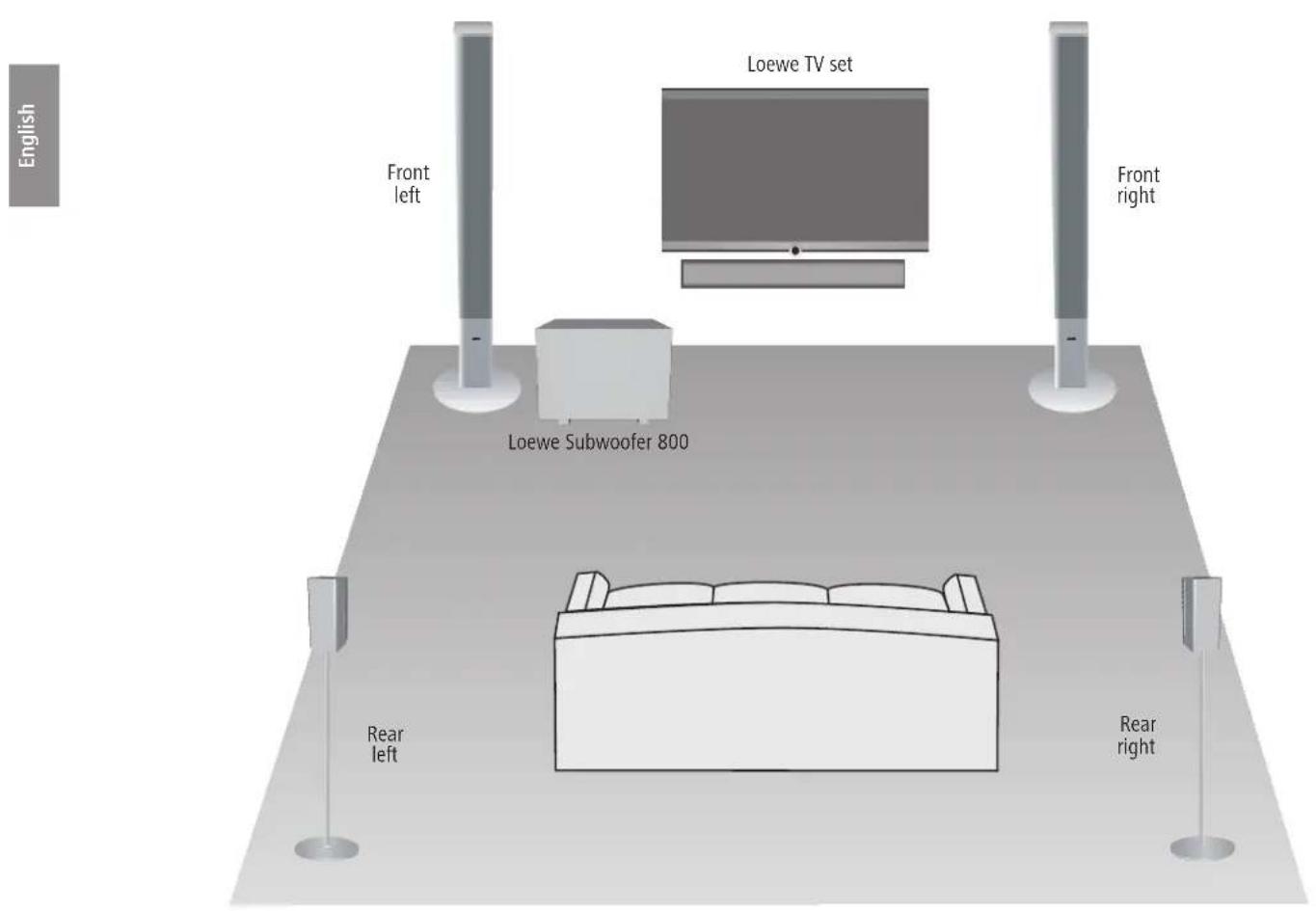
Suggestion for positioning solution
Connection
Wiring Loewe TV set (SL2xx) - Loewe Subwoofer 800
The TV set must be equipped with a Digital Audiolink.
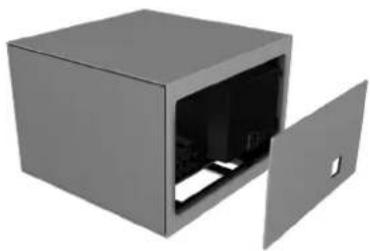
Remove the cover from the back of the subwoofer to gain access to the setting elements and interfaces.

Connect the Digital AudioLink/AudioLink converter (included with the Loewe Subwoofer 800, order no. 68206B30) to the 25-pin Audiolink ② socket of the subwoofer. Use the (CAT5E) network cable to connect the Digital Audiolink of the TV set to the socket of the Digital AudioLink / AudioLink converter.
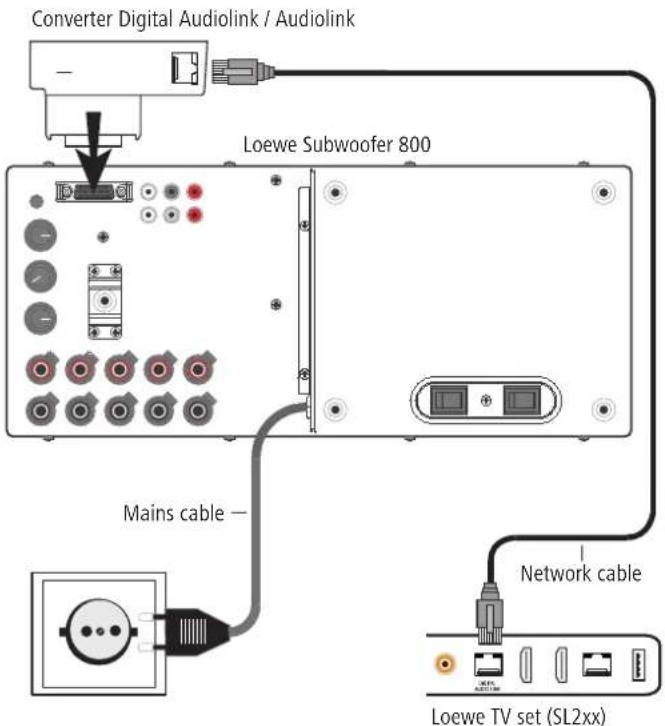
Connection
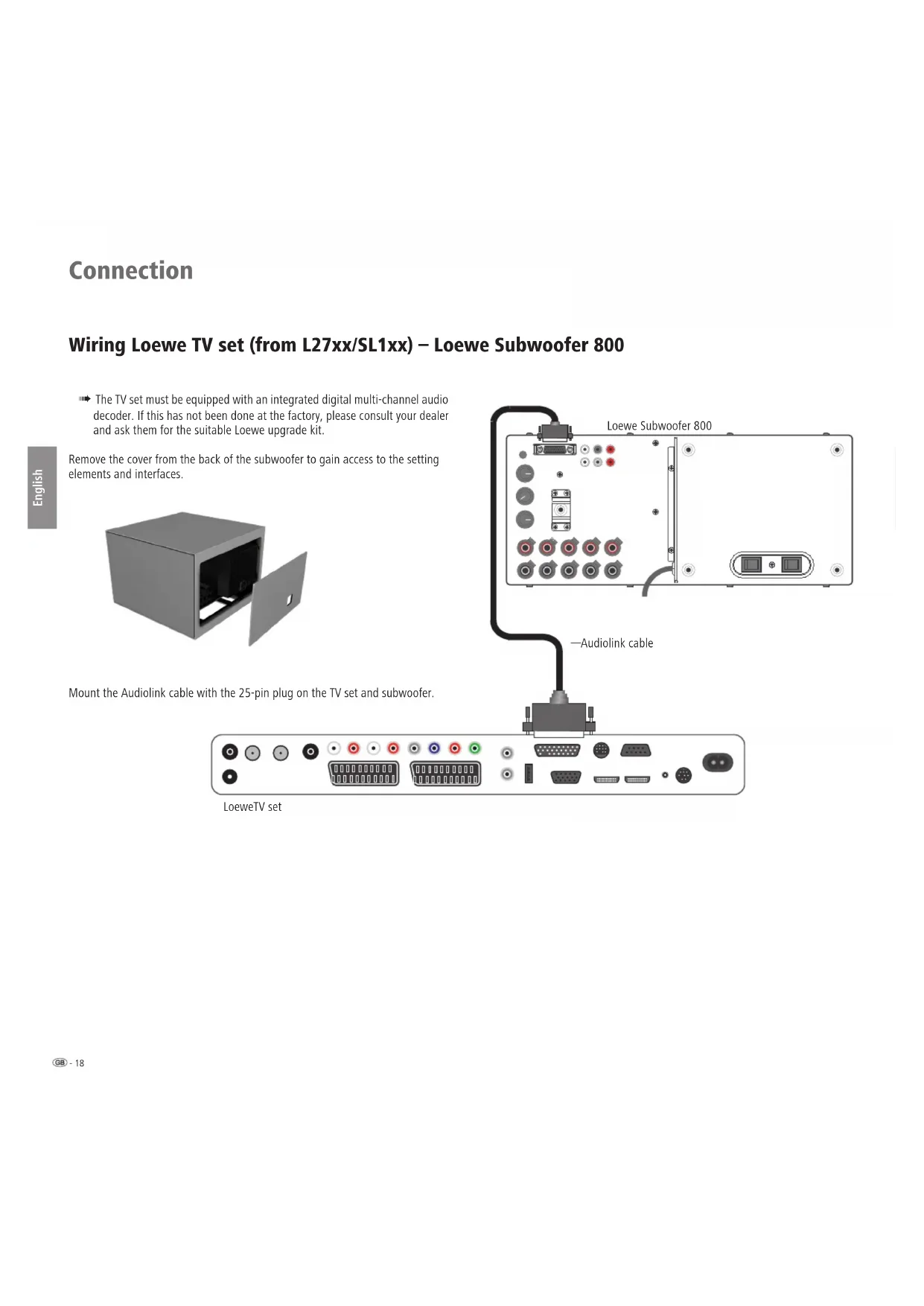
Wiring Loewe TV set (from L27xx/SL1xx) - Loewe Subwoofer 800
The TV set must be equipped with an integrated digital multi-channel audio decoder. If this has not been done at the factory, please consult your dealer and ask them for the suitable Loewe upgrade kit.
Remove the cover from the back of the subwoofer to gain access to the setting elements and interfaces.
Mount the Audiolink cable with the 25-pin plug on the TV set and subwoofer.
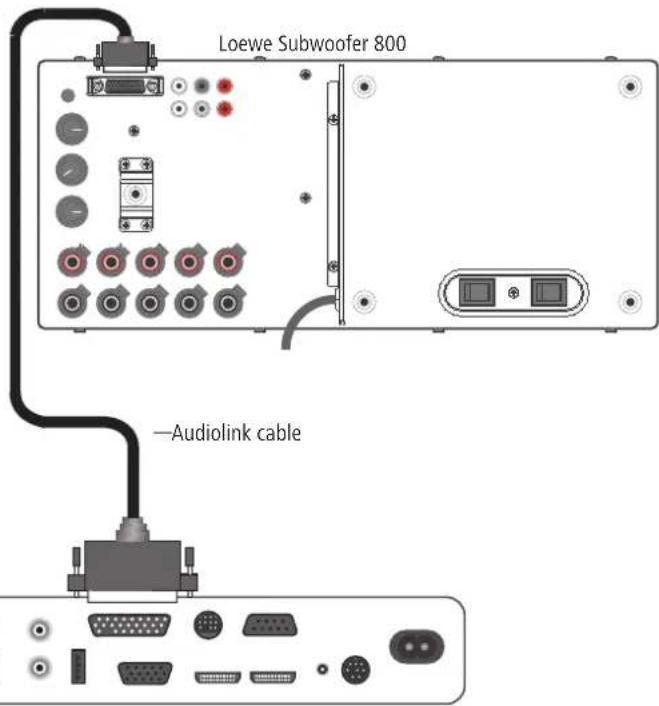

LoeweTV set
Connection
Connecting the speakers to the subwoofer
Connect the speaker cable to the speaker according to the appropriate installation instructions. One of the two wires of the speaker cable is marked black in the usual way. Connect this black marked cable respectively with the black screw terminal to the subwoofer (connection diagram see figure right) and the black terminal on the speaker.
Turn the screw connection of the respective terminal on the subwoofer anticlockwise about 5 turns for this. Feed the wire end into the screw terminal (top right hand side) and close the screw terminal in clockwise direction.
Connect the unmarked wires with the red terminals.
Laying the cables
Feed all cables down through the slot in the housing of the subwoofer. Bundle the cables with the Velcro tape provided.
You can feed the cables tidily out of the subwoofer with the fabric hose available as an accessory.
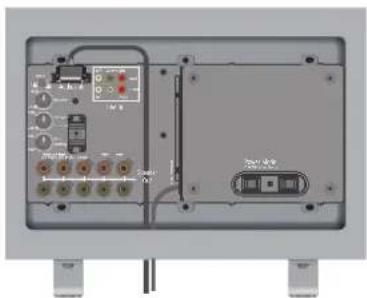
Connecting the subwoofer to the mains
Plug the mains plug of the subwoofer into a 230 V AC socket.
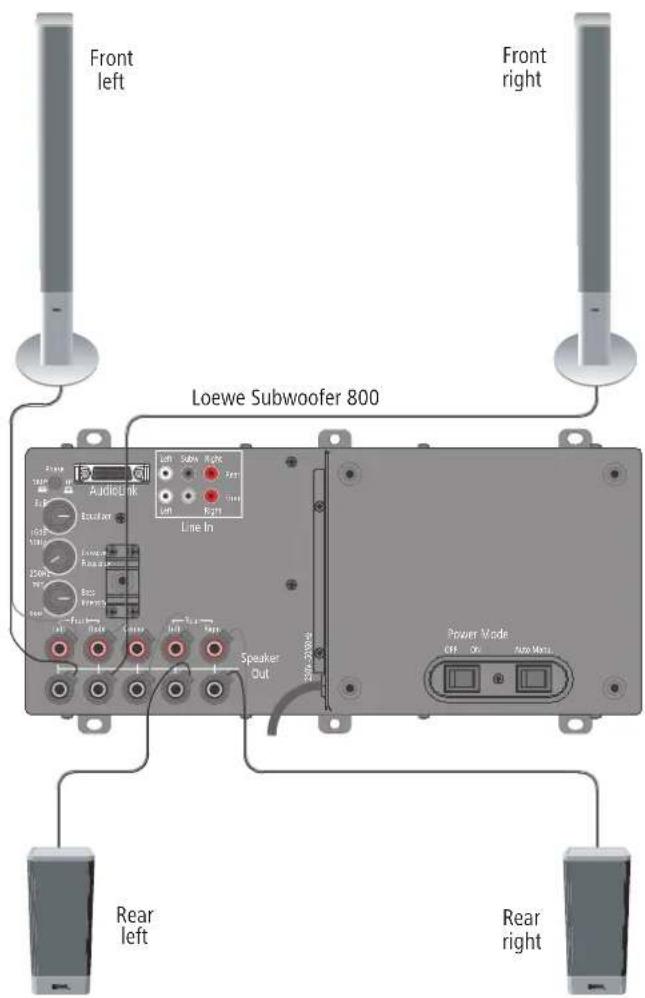
Commissioning and setting
Before beginning with start-up and operation, make sure that all the cables are connected correctly.
Switching the subwoofer on/off
Switch the Power switch ⑨ to the ON position to switch on the energy supply (mains 230V / 50Hz ) for the Loewe Subwoofer 800. Set the switch to OFF to switch off the subwoofer completely.
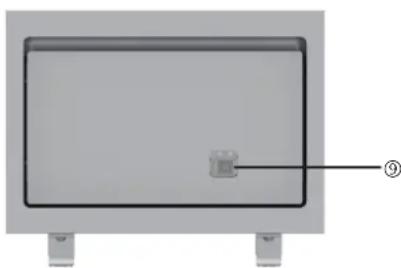
Automatic or manual operation
If the subwoofer is connected as described on page 8 and the Mode switch 回 is in the Auto position, you no longer need to switch the subwoofer on and off separately. After switching on the subwoofer for the first time it is switched on and off automatically with the Loewe TV set.
If the subwoofer is operated on other devices than the Loewe Flat-TV, the Mode switch ⑨ must be switched to the Manu. position. The subwoofer must then be switched on/off manually with the Power switch ⑨ .
Settings on the Loewe TV set
Log in the new devices as described in the operating manual of your Loewe TV set in the chapter "Operating additional equipment - Connecting audio amplifiers".
Setting the equalizer
Using the knob Equalizer ④ you can set the lowest frequency ranges (20 Hz - 50 Hz) for bass playback to be raised or lowered.
- If the Subwoofer is near the corner of the room, then set the knob Equalizer more in the direction min.
- If the Subwoofer is near a wall, then set the knob Equalizer more in the middle position.
- If the Subwoofer is freely positioned in the room, then set the knob Equalizer more in the direction max.
Phase switch
With the phase converter Phase ③ you have the option of optimising the bass playback. However, you can easily make this setting in connection with a Loewe Flat TV (from chassis L27xx/SL1xx/SL2xx with integrated digital multi-channel audio decoder onwards) using a remote control via the TV menu in the sound component assistant (see operating instructions under "Setting loudspeaker system"). The phase converter is designed for systems where settings can not be made using the TV.
We recommend you to proceed as follows:
- Start DVD playback for example and select a title with bass parts.
- Have a second person activate the phase switch whilst you sit and listen.
- Decide for yourself which switch position reproduces the best bass sound.
Bass intensity
Using the controller Bass-Intensity ⑥ you can set the basic bass volume to suit you.
Setting the crossover frequency
The Crossover Frequency knob ⑤ gives you the possibility of setting the limit frequency for bass reproduction between 50Hz and 250Hz depending on which speakers you have connected.
The knob should be set to 250Hz for Loewe Audio Systems because the crossover frequency is set in the Loewe audio sources (TV).
Cover on the subwoofer
After you have made the settings described in "Commissioning and setting", replace the cover on the rear of the subwoofer.
Technical Data
Subwoofer
Dimensions of subwoofer in cm (W x H x D) 43 x 34,5 x 43
Weight subwoofer in kg 27
Digital output stages 6 channels
Principle 1 way, active 250mm ; 2 way, passive 250mm
Mains voltage 220 - 240 Volt; 50/60 Hz
Max. power consumption 900 Watts
Nominal power consumption 170 Watts
Power consumption on standby 0 Watt
Bass intensity ±12 dB
Transmission range subwoofer 300 W 27 Hz - 300 Hz - 6dB
Transmission range channels 5 × 100W 5 Hz - 50 kHz - 3dB
Phase switch yes
Power switch yes
Mode switch yes
System link Audiolink 25-pole D-Sub
Line In RCA socket 6x:FL,Center,FR,RL,Subw,RR
Disposal
Cardboard box and packaging
You have opted for a durable and technically sophisticated product. In line with national regulations regarding the disposal of packaging materials, we pay a fee to authorised recyclers who collect packaging from dealers. However, we recommend that you keep the original cardboard box and the rest of the packaging materials so that the unit can, if necessary, be transported in the safest possible conditions.
The unit
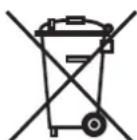
Important: The EU Directive 2002/96/EG governs the proper re-acceptance, handling and recycling of used electronic appliances.
Old electronic appliances must therefore be disposed of separately. Never throw this set in the normal domestic waste. You can hand in your old set free of charge at identified collection points or at your dealer if you buy a similar new set. Other details about re-acceptance (also for non-EU countries) are available from your local administration.
Masthead
Loewe Technologies GmbH Printed in Germany
Industriestraße 11 Editorial date 06/14-7 TB
D-96317 Kronach © Loewe Technologies GmbH, Kronach
www.loewe.de
All rights including translation, technical modifications and errors reserved.
Design and technical specifications are subject to change without notice.
Bienvenue
Nosvouremercions
Converter Digital Audiolink / Audiolink Ref. 71600080
Cable Audiolink / 1.5m / Audiolink 5.1 Ref. 89952001
Cable Audiolink / 10m / Audiolink 5.1
Gaine en tissu, noire (1,8 m) Ref. 31947004
Gaine en tissu, noire (1,8 m) Ref. 31947005
Pour votre sécurité
Loewe Technologies GmbH Printed in Germany
Krachtonteming in stand-by
Basintensiteit
Transmissiebereik subwoofer 300W
Transmissiebereik kanalen 5 × 100 W
Faseschakelaar
Netschakelaar
Modusschakelaar
Systeemlink
Line In
170 Watt
0 Watt
±12 dB
27 Hz - 300 Hz - 6dB
5 Hz - 50 kHz - 3dB
ja
ja
ja
Audiolink 25-pol D-Sub
RCA-ingang 6x:FL,Center,FR,RL,Subw,RR
Afvalverwijdering
Doos en ander verpakkingsmaterialiaal
Loewe litteän television (SL2xx) - Loewe Subwoofer 800
Loewe litteän television (L27xx/SL1xx) - Loewe Subwoofer 800
Loewe Technologies GmbH Printed in Germany



- CY
- CZ
- GR RO AL
- IND
- #
- R
- JOR
- KSA
- LVEST
- LT
- N
- P
- RUS
- S
- TR
- Herzlich willkommen
- Vielen Dank,
- Scope of delivery
- Loewe Subwoofer 800, Order No. 68206x00 / 30
- Accessories
- For your safety
- Setting up
- Cleaning
- Installing the Individual Sound speaker system
- Basic information
- Subwoofer
- Connection
- Wiring Loewe TV set (SL2xx) - Loewe Subwoofer 800
- Wiring Loewe TV set (from L27xx/SL1xx) - Loewe Subwoofer 800
- Connecting the speakers to the subwoofer
- Laying the cables
- Connecting the subwoofer to the mains
- Commissioning and setting
- Switching the subwoofer on/off
- Automatic or manual operation
- Settings on the Loewe TV set
- Setting the equalizer
- Phase switch
- Bass intensity
- Setting the crossover frequency
- Cover on the subwoofer
- Technical Data
- Disposal
- Cardboard box and packaging
- The unit
- Masthead
- Bienvenue
- Nosvouremercions
- Pour votre sécurité
- Afvalverwijdering
- Doos en ander verpakkingsmaterialiaal
- Loewe litteän television (SL2xx) - Loewe Subwoofer 800
- Loewe litteän television (L27xx/SL1xx) - Loewe Subwoofer 800
Brand : LOEWE
Model : Subwoofer 800
Category : Loudspeaker