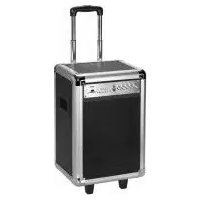
BSS 4823 - Loudspeaker AEG - Free user manual and instructions
Find the device manual for free BSS 4823 AEG in PDF.



| Product type | Portable speaker with wireless microphones |
| Mains power supply | 230 V, 50 Hz |
| DC power supply | 12 V / 5 A (via cigarette lighter adapter) |
| Integrated battery | 12 V, 12000 mAh rechargeable |
| Charging time | Approximately 11 hours |
| Battery life | Up to 36 hours |
| Net weight | Approximately 17 kg |
| Bluetooth | Version V2.1 + EDR |
| Bluetooth range | 15 meters |
| Bluetooth profiles | A2DP, AVRCP |
| Microphones | 2 wireless microphones |
| Microphone frequency | 636-865 MHz |
| Microphone power supply | 2 AA/R6 batteries, 1.5 V each (not included) |
| Auxiliary audio input | 2x RCA |
| USB port | For USB flash drive and charging (5 V / 1 A) |
| SD card slot | Audio file playback |
| Playback functions | Play/pause, next/previous track |
| Audio settings | Bass, Treble, Echo |
| Microphone volume | Adjustable separately |
| Automatic standby mode | After 3 minutes without audio signal |
| Protection class | II |
| Cleaning | Soft, damp cloth, without detergent |
Frequently Asked Questions - BSS 4823 AEG
User questions about BSS 4823 AEG
0 question about this device. Answer the ones you know or ask your own.
Ask a new question about this device
Download the instructions for your Loudspeaker in PDF format for free! Find your manual BSS 4823 - AEG and take your electronic device back in hand. On this page are published all the documents necessary for the use of your device. BSS 4823 by AEG.
USER MANUAL BSS 4823 AEG
natural_image
Exterior view of a black and silver audio amplifier unit (no visible text or symbols)CE
AEG
Location of Controls Page 3
Instruction Manual......Page 35
Technical Specifications Page 39
Disposal Page 40
Język polski
Spis treści
Location of Controls
12 Commande MAIN VOL (Volume)
13 Commande TREBLE (Aigus)
14 Commande BASS (Graves)
15 Commande ECHO (Echo)
16 Commande MIC VOL (Volume du microphone)
Côté
17 Port USB CHARGING
18 Entrée DC-12 V IN
19 Bouton d'alimentation AC/DC POWER
Consommation :....100 W
13 Control (Graves) TREBLE
14 Control (Graves) BASS
15 Control (Ec.) ECHO
Alcance:....aprox. 15 metros
Cordless via Bluetooth
Slot Memory card (6)
Supporto Bluetooth: V2.1 + EDR
Gamma: ca. 15 metri
Thank you for choosing our product. We hope you will enjoy using the appliance.
Symbols in these Instructions for Use

WARNING:
Warns of dangers for your health and indicates potential risks of injury.

CAUTION:
Indicates potential dangers for the device or other objects.

NOTE: Highlights tips and information for you.
General Safety Guidelines
Before using this device, carefully read this user manual and keep it together with the Warranty Certificate, cashier receipt and if possible, the original package inclusive its interior packing. If you hand on the device to any third person, include the user manual as well.
- To avoid the risk of fire or electric shock, you should not expose the device to rain or humidity. Do not use the device near water (e.g. bathroom, swimming pool, humid cellars).
- Do not use the unit in extremely hot, cold, dusty, or damp places.
- The unit is designed solely for private use and its intended purpose. This unit is not designed for commercial use.
• Make sure that the power cable is not bent, pinched, or comes into contact with heat sources.
• Make sure that the power cable is not a tripping hazard.
• Never touch the mains plug or the cord with wet hands. - Always connect the unit to a properly installed plug socket. Be sure the device voltage corresponds to the grid voltage.
• The mains plug must always be easily accessible.
• Always install batteries in the correct direction. - Avoid covering the device's vent openings.
- Never cover the vent holes with objects, such as magazines, tablecloths, curtains etc.
- This appliance shall not be exposed to dripping or splashing water and that no object filled with liquids such as vases shall be placed on apparatus.
- Open sources of fire, such as e.g. burning candles may not be placed onto the unit.
- Never open the device's case. Improper repairs can cause severe danger to the user. If the device or particularly the power cord is damaged, don't use the device any further and have it repaired by a qualified specialist. Check the power cord regularly for damages.
English
- To avoid any danger, a damaged power cord must be replaced only by the producer, its customer service or a similarly qualified person with an equal cord.
- If the device won't be used over an extended period of time, disconnect the power cord and remove the batteries.
- Protect the rechargeable battery from severe shock or pressure.
These symbols may be found on the device and shall indicate the following:
The lightning symbol warns the user of dangerously high voltages inside the case.

The exclamation mark symbol points to important instruction or maintenance remarks in the accompanying guidelines.
Children and disabled persons
- For the safety of your children, keep any packing parts (plastic bags, cartilage, Styrofoam etc.) out of their reach.

WARNING!
Don't let small children play with foils for danger of suffocation!
- This device is not intended for use by persons (including children) with reduced physical, sensory or mental capabilities, or lack of experience and/or knowledge unless they have been given supervision or instructions concerning the use of the device by a person responsible for their safety.
- Supervise children to ensure they do not play with the device.
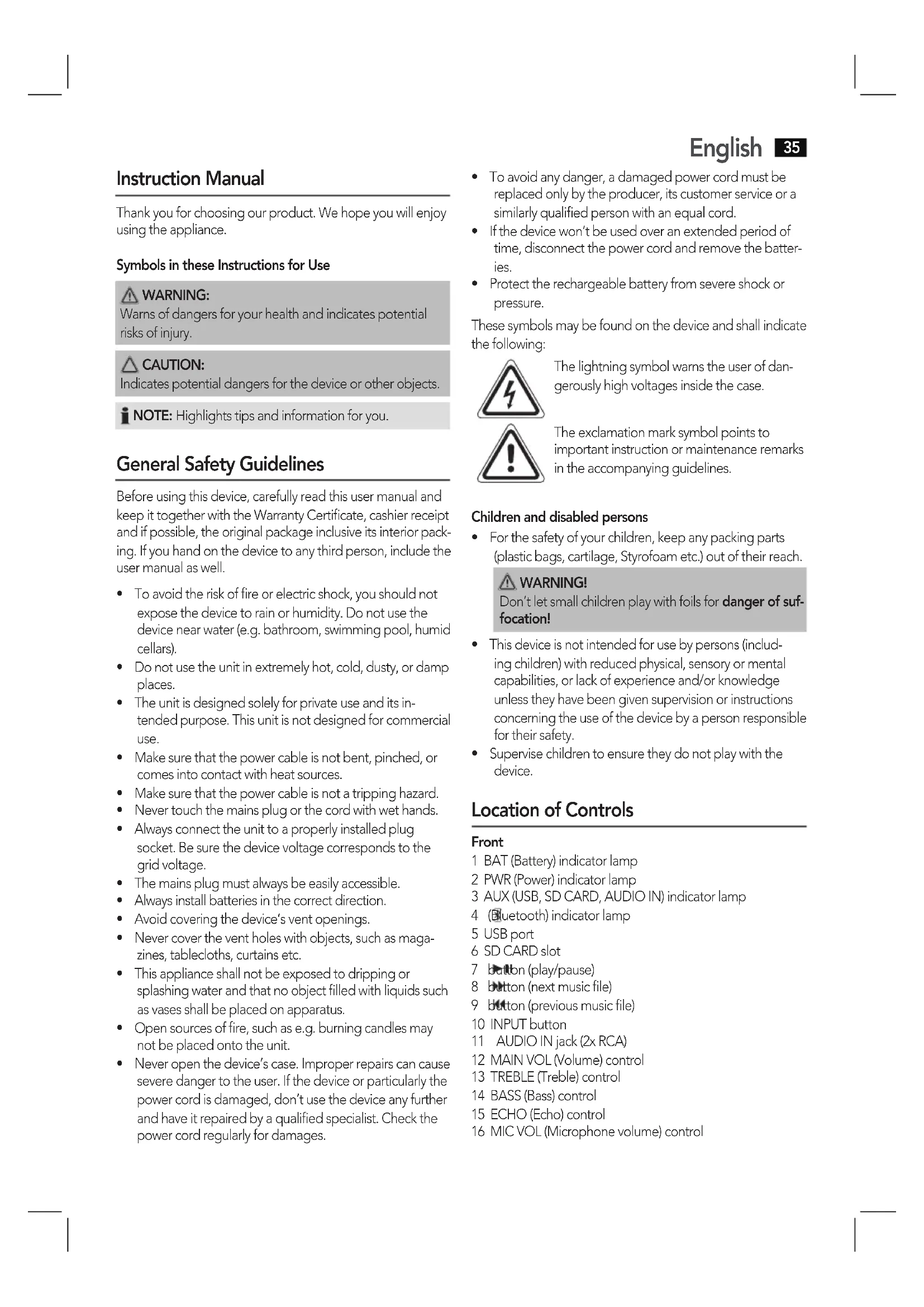
Location of Controls
Front
1 BAT (Battery) indicator lamp
2 PWR (Power) indicator lamp
3 AUX (USB, SD CARD, AUDIO IN) indicator lamp
4 (Bluetooth) indicator lamp
5 USB port
6 SD CARD slot
7 button (play/pause)
8 button (next music file)
9 button (previous music file)
10 INPUT button
11 AUDIO IN jack (2x RCA)
12 MAIN VOL (Volume) control
13 TREBLE (Treble) control
14 BASS (Bass) control
15 ECHO (Echo) control
16 MIC VOL (Microphone volume) control
36 English
Side
17 USB CHARGING port
18 DC-12VIN input
19 AC/DC POWER mains switch
a DC ON (12 V operation)
b OFF (Off)
c AC ON (mains operation)
20 AC INPUT mains cable connector
Carrying handles (not shown)
Rear (not shown)
Extendable handle
Delivery scope (not shown)
2x Microphone
1x 12 V car adapter cable
1x Mains cable
First Use of the Device/Introduction
- Select a proper place for the device. A dry, level, and slip proof surface is suitable.
• Make sure the device is ventilated sufficiently! - Remove the protective film from the device, if present.
Power supply
- Make sure the grid voltage corresponds to the specifications on the rating plate.
- Connect the provided mains cable to the AC INPUT connector (20) on the side of the device.
- Insert the mains plug to a properly installed socket.
- Set the mains switch to "AC ON" position (19c).
i NOTE:
Disconnect from mains power supply during longer periods of non-use.
Operation via 12 V car adapter
The 12 V cigarette lighter adapter is suitable for cars that feature a 12 V power supply with negative grounding.
- Connect the provided car adapter cable to the DC-12 V IN input (18) on the side of the device.
- Connect the other end of the cable to the cigarette lighter receptacle in your car.
- Set the mains switch to "DC ON" position (19a).
- Disconnect the 12 V adapter from the device and cigarette lighter receptacle after use.
△ CAUTION:
• Only use the car adapter cable provided.
- Use the provided car adapter cable for this device only. Do not use for other devices.
- Do not use the device while driving. Make sure the device is securely attached or stored away in order not to fall inside the vehicle in case of an accident.
USB CHARGING port (17)
Use the port on the side of the device to charge your smartphone. When operated via mains cable, the device supplies 5 V/1 A. Use the USB cable of your smartphone for the connection.
i NOTE:
- Due to the variety of smartphone types available and their different charging capacity, the charging time depends on the smartphone used and its operating condition.
• This port is not suitable for playing audio files.
Battery operation
It is possible to operate this device with the built-in battery.
General information
- Charge the battery completely before you use it to operate the device.
- Avoid fully discharging the battery.
- Charge the battery completely after each use.
- When the BAT indicator lamp (1) starts flashing, the battery must be recharged.
Charging the battery
- Connect the mains cable provided to the AC INPUT connector (20) on the side of the device.
- Connect the mains plug to a properly installed socket.
- Set the mains switch to "AC ON" position (19c).
Depending on the battery's capacity charging can take up to 11 hours.
CAUTION:
Never leave the device unattended during charging.
i NOTE:
- The battery can only be charged when the speaker is switched on.
- If you do not use the device for a longer period of time, you should charge the battery at least once every 3 months. Even when switched off, the battery discharges continuously.
- When the battery is almost empty, the BAT indicator lamp will start flashing. The battery requires recharging.
- If the battery has been discharged completely, the device cannot be recharged via mains socket. In such a case, recharge the battery using the DC-12 V IN input (18). Even when switched off (mains switch at OFF position) the battery can be charged via this input.
Operation
AC/DC POWER mains switch (19)
Use the switch to select one of the following operating modes:
English
- DC ON
Set the mains switch to position (a) when you want to operate the device via DC-12 V IN connection or via built-in battery. The PWR indicator lamp lights up green.
- OFF
The device is off. To disconnect the unit completely from the mains, pull the mains plug from the socket.
- AC ON
Set the mains switch to position (c) when you want to operate the device via AC INPUT connection. Or when you want to charge the battery in parallel. The PWR indicator lamp lights up green.
i NOTE:
After approx. 3 minutes without signal input, the device will automatically switch to standby mode. The PWR indicator lamp (2) lights up red. To use the device again, press the INPUT button (10).
If you do not wish to use the device again, set the mains switch to "OFF". Otherwise the built-in battery would discharge.
Volume
Use the MAIN VOL control (12) to adjust the volume as desired.
Select the operating mode
Repeatedly press the INPUT button (10) to select the desired operating mode.
USB→SD CARD→AUDIO IN Bluetooth
i NOTE:
USB and SD CARD operating modes can only be selected, if a proper storage medium has been connected.
Sound settings (13/14)
Use the TREBLE and BASS controls to adjust treble and bass.
i NOTE:
- If necessary, adjust the EQ settings on your playback device in order to generate a better sound.
- Settings adjusted with the TREBLE and BASS controls do not affect the sound of the microphones.
Microphone operation
You may activate the microphones for sing-along function during each operating mode. It is possible to use both microphones at the same time.
Insert batteries (batteries not included)
-
Open the battery compartment on the bottom of the microphones.
-
Insert 2 type AA/R6 1.5 V batteries into each of the two microphones. Make sure that the polarity is correct (see battery compartment).
- Close the battery compartment.
Batteries could leak battery acid. If you do not use the microphones for a longer period of time, remove the batteries.

WARNING:
Do not expose the batteries to intense heat, such as sunlight, fire, or the like. Danger of explosion!

CAUTION:
- Do not mix batteries of different types or old and new batteries.
- Do not dispose of batteries through normal household waste. Return used batteries to dedicated collection facilities or to your dealer.
Using the microphones
- Slide the switch on the microphone upwards. The switch will show "ON". The microphones will automatically connect with the speaker.
- Use the MIC VOL control (16) to adjust the volume of the microphones.
- Use the ECHO control (15) to generate echo effects.
- Switch off the microphones when not in use. Slide the switch downwards. "OFF" appears.

CAUTION:
To avoid audio feedback (sharp whistling sound), use the microphones outside of the speaker's reverberation distance.

IOTE:
The special radio frequencies could cause interference at the TV. When using the microphones try not to place the device near TVs.
Playing back music files
You have four options to play back your own music files: via cable, wireless via Bluetooth, via USB port, or via card slot.
By cable (Cable not included)
- If required, use a suitable adapter (not included). Connect the external device as follows: With a cinch cable (2x RCA) to the AUDIO IN jacks (11).
- Use the INPUT button (10) to select AUX mode.
- Start the playback of your audio source. Listen to the sound playback via the speaker.
- For the further procedure, please refer to the user manual of the external audio source.
38 English
i NOTE:
If possible, adjust the volume of the external unit to a comfortable level.
Cordless via Bluetooth
Bluetooth involves a technology for wireless radio connection of devices over a short distance. Devices with Bluetooth standard are transmitting between 2.402 and 2.480 GHz in the ISM band (Industrial, Scientific and Medical). Interference can be caused for example by WLAN-networks, DAB radios, cordless phones, or microwave ovens which work on the same frequency band.
This device offers you the possibility to use a Bluetooth-enabled device. The functional radius is limited to approx. 15 metres depending on the surroundings and the unit used.
If your playing device supports the A2DP profile (Advanced Audio Distribution Profile) and has a music-player function, then you can also wirelessly transfer music to the device. The A2DP profile involves a multi-vendor Bluetooth profile. By streaming, stereo-audio signals are wirelessly transferred between the playing device (source) and the receiving device. To be able to remotely control the source, the playback device must support the AVRCP profile (Audio Video Remote Control Profile).
Due to the different device manufacturers, models, and software versions, a full functionality cannot be guaranteed.
• Logging on devices (Pairing)
Before you listen to music via the unit, you must pair the devices.
- Ensure, that the Bluetooth function is activated in your player (e.g. mobile phone). For this, refer to the operation manual of your player.
- Use the INPUT button (10) to select Bluetooth mode. The ⏻ indicator lamp (4) lights up. After that, a beep sounds and the indicator lamp starts flashing.
- Chose the Bluetooth menu in your player and register the device in your player. For this, refer to the operation manual of your player. The device "AEG BSS4823" will show in your player as a selection.
i NOTE:
- Only one playback unit can be connected to the speaker. If the speaker is already connected to another playback unit, the speaker will not appear in the BT selection menu.
-
Do you experience any problems when connecting? Problems can occur if too many playback units were previously connected with the speaker. Reset the memory of the speaker by pressing and holding the INPUT button (10) for approx. 3 seconds.
-
Now enter the password "0000" in your player, depending on the device manufacturers, model, and software version.
After successful registration, a beep will sound and the indicator lamp will light up. For the further procedure, please refer to the user manual of the playback unit. If possible, adjust the volume of the external unit to a comfortable level.
i NOTE:
- Depending on the device manufacturer, you need to perform the registration (PAIRING) again to connect the devices.
- The Bluetooth compatibility cannot be ensured for devices (e.g. mobile phones) getting released in the future.
- To ensure an optimal connection, make sure that the battery of your player is completely charged.
- Some of the mobile phone brands have an energy-saving mode. Deactivate the energy-saving mode as it can otherwise result in problems during the data transfer through Bluetooth.
- To be able to transfer audio data, Bluetooth needs to stay activated in your player. Observe the operation manual of your player.
- If a mobile phone on which you are playing music receives a call, the music will be interrupted. The sound however is not played back via the speaker. After you have ended the call, the devices are connected to each other again and playback continues.
USB port (5)
This device has been developed in line with the latest technical advances in the USB field. The wide range of different USB storage devices of all types which are currently on the market, unfortunately do not allow us to guarantee full compatibility with all USB storage devices. For this reason, in rare cases there may be problems in playing back files from USB storage devices. This is not a malfunction of the device.
- Use the INPUT button (10) to select USB mode.
- Connect a USB storage device directly into the port. Playback will automatically start after a few seconds. The AUX indicator lamp flashes during playback.
For operation, please refer to the section "Description of the controls".
i NOTE:
- Always directly connect a USB storage medium to the USB port to prevent any malfunctions.
- The USB port is not designed for charging external devices.
CAUTION:
Switch the device to a different operating mode before you remove the USB storage device.
Memory card slot (6)
- Use the INPUT button (10) to select SD CARD mode.
- Insert the memory card with the contacts facing up into the appropriate slot. Playback will start after a few seconds. The AUX indicator lamp flashes during playback.
For operation of the device, please refer to chapter "Description of the Controls".

CAUTION:
Select another operating mode before removing the memory card.
Description of the controls

NOTE:
Depending on your playback unit, not all functions might be supported.
▶ II(7)
You can pause and continue music playback. Press again to continue playback.
◀ (9)
Press 1 x = Restart of the song from the beginning. (Not during USB/CARD mode)
Press 2 x = Skip to the previous song.
Press 3 x = Skip to the song before the previous song.
▶| (8)
Press to skip to the next song and the following songs.
Cleaning

CAUTION:
Do not submerge the device in water.
• Before cleaning disconnect from mains power supply.
- Clean the device with a soft damp cloth without detergents.
Troubleshooting
| Fault Cause Solution | ||
| Unit cannot be operated. | Unit crashes and "hangs". | Disconnect from the mains for around 5 seconds. Then switch the unit on again. |
| Fault Cause Solution | ||
| No audio signal via the Bluetooth connection | Speaker is not paired to the audio source. | Check whether a connection exists. If necessary, pair the speaker again to the audio source. |
| Volume too low Increase | ase the volume on the speaker. | |
| Increase the volume on the audio source. | ||
| Speaker cannot be connected | Pairing does not work | Check whether the audio source supports the A2DP protocol. |
| Audio source is switched off | Switch on the audio source. | |
| Bluetooth is switched off at the audio source. | Switch on the Blue-tooth function in the audio source. | |
| Bluetooth version is not supported. | Use a different play-back unit. | |
| Sharp whistling sound during microphone operation. | Audio feedback Use | the microphones outside of the speaker's reverbera-tion distance. |
| Battery cannot be recharged. | The battery has been discharged completely. | Charge the battery using the DC-12 V IN input (18). |
| No sound in all operating modes. | Input level too low. | Press and hold ➤ button (8) to increase the input level. |
Technical Specifications
Model: BSS 4823
Power supply: AC 230 V, 50 Hz DC 12 V/5 A
Power Consumption: 100 W
Battery: 12 V 12000 mAh Charging time: approx. 11 hours. Operating time: up to 36 hours.
Protection class:....II
Net weight: approx. 17 kg
Microphones
Voltage supply: 2x 1.5 V type AA/R6
Transmission frequency:636-865 MHz, UHF
Channels: 2
Power: 50 mW
Bluetooth
Bluetooth support: V2.1 + EDR
Range: approx. 15 metres
Transmission frequency: 2.402-2.480 GHz
Protocols: A2DP/AVRCP
40 English
The right to make technical and design modifications in the course of continuous product development remains reserved.
This device has been tested according to all relevant current CE guidelines, such as electromagnetic compatibility and low voltage directives, and has been constructed in accordance with the latest safety regulations.
Disposal
Meaning of the "Wheelie Bin" Symbol
Take care of our environment, do not dispose of electrical appliances via the household waste.
Dispose of obsolete or defective electrical appliances via municipal collection points.
Please help to avoid potential environmental and health impacts through improper waste disposal.
You contribute to recycling and other forms of utilization of old electric and electronic appliances.
Your municipality provides you with information about collecting points.
Battery disposal

The device contains a built-in rechargeable battery. Waste batteries and accumulators must not be disposed of through household waste. Remove the batteries/accumulators bevore disposing of the product. In order to do so, please contact a qualified expert.
CTC Clatronic Sp. z o.o


- Język polski
- Spis treści
- Côté
- Cordless via Bluetooth
- Slot Memory card (6)
- Symbols in these Instructions for Use
- WARNING:
- CAUTION:
- General Safety Guidelines
- English
- Children and disabled persons
- WARNING!
- Location of Controls
- Front
- English
- Side
- Delivery scope (not shown)
- First Use of the Device/Introduction
- Power supply
- i NOTE:
- Operation via 12 V car adapter
- △ CAUTION:
- USB CHARGING port (17)
- Battery operation
- General information
- Charging the battery
- Operation
- AC/DC POWER mains switch (19)
- - DC ON
- - OFF
- - AC ON
- Volume
- Select the operating mode
- Sound settings (13/14)
- Microphone operation
- Insert batteries (batteries not included)
- Using the microphones
- IOTE:
- Playing back music files
- By cable (Cable not included)
- English
- • Logging on devices (Pairing)
- USB port (5)
- Memory card slot (6)
- Description of the controls
- NOTE:
- ▶ II(7)
- ◀ (9)
- ▶| (8)
- Cleaning
- Technical Specifications
- Microphones
- Bluetooth
- English
- Disposal
- Meaning of the "Wheelie Bin" Symbol
- Battery disposal
Brand : AEG
Model : BSS 4823
Category : Loudspeaker