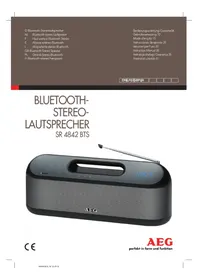
USER MANUAL SR 4842 BTS AEG
Send frequency: 2.402-2.480 GHz
Protocols: A2DP/AVRCP
FM station scanner
Scan FM stations
Range: approximately 15 meters
Transmission frequencies: 2.402-2.480 GHz
Protocols: A2DP/AVRCP
French
30 English Instruction Manual
Thank you for choosing our product. We hope you will enjoy using the appliance.
Symbols in these Instructions for Use
Important information for your safety is specially marked. It is essential to comply with these instructions in order to avoid accidents and prevent damage to the machine:

WARNING:
Warns of dangers for your health and indicates potential risks of injury.

CAUTION:
Indicates potential dangers for the device or other objects.

NOTE: Highlights tips and information for you.
Safety Instructions
Before using this device, carefully read this user manual and keep it together with the Warranty Certificate, cashier receipt and if possible, the original package inclusive its interior packing. If you hand on the device to any third person, include the user manual as well.
- To avoid the risk of fire or electric shock, you should not expose the device to rain or humidity. Do not use the device near water (e.g. bathroom, swimming pool, humid cellars).
- Do not use the unit in extremely hot, cold, dusty, or damp places.
- Keep the device away from heat, direct sunlight and sharp edges.
- The unit is designed solely for private use and its intended purpose. This unit is not designed for commercial use.
- Make sure that the power cable is not bent, pinched, or comes into contact with heat sources.
- Make sure that the power cable is not a tripping hazard.
- Never touch the mains plug or the cord with wet hands.
- Do not use the device with wet hands.
- Always connect the unit to a properly installed plug socket. Be sure the device voltage corresponds to the grid voltage.
- The mains plug must always be easily accessible.
- Avoid covering the device's vent openings. Keep a minimum distance of 30 cm around the device for sufficient ventilation.
- Never cover the vent holes with objects, such as magazines, tablecloths, curtains, etc.
- This appliance shall not be exposed to dripping or splashing water, and no object filled with liquids, such as vases, shall be placed on the apparatus.
- Open sources of fire, such as burning candles, may not be placed onto the unit.
- Never open the device's case. Improper repairs can cause severe danger to the user. If the device or particularly the power cord is damaged, do not use the device any further and have it repaired by a qualified specialist. Check the power cord regularly for damages.
- The device needs to be examined regularly for signs of damage or material fatigue. If damage is noticed, the device may no longer be used.
- Pull the power plug from the socket if the device will be out of use for long periods.
- Pull the power plug from the socket for cleaning or in the case of a fault.
- Avoid damage to your hearing with volume that is too high.
These symbols may be found on the machine and are intended to indicate the following:

The lightning symbol should advise the user of parts in the inside of the device which carry dangerously high voltage levels.

The symbol with an exclamation mark should advise the user of important operation or maintenance instructions in the accompanying documentation.
Children and Frail Individuals
- In order to ensure your children's safety, please keep all packaging (plastic bags, boxes, polystyrene, etc.) out of their reach.

WARNING:
Do not allow small children to play with the foil. There is a danger of suffocation!
- This device is not intended to be used by individuals (including children) who have restricted physical, sensory or mental abilities and/or insufficient knowledge and/or experience, unless they are supervised by an individual who is responsible for their safety or have received instructions on how to use the device. Children should be supervised at all times in order to ensure that they do not play with the device.

CAUTION:
- Risk of explosion in case of improper replacement of the battery. Replace only by the same or an equivalent type.
- Do not expose the built-in battery to hard impacts or pressures.
Overview of the Components
1 Button (on/standby) 2 M button (operating mode) 3 button (previous music file / manual station search) 4 button (play/pause/start automatic station search/accept/refuse call) 5 button (next music file / manual station search) 6 - button (reduce volume) 7 Built-in microphone 8 + button (increase volume) 9 Display 10 Battery charge indicator 11 Indicator lamp "Battery almost empty" 12 Telescopic antenna 13 AUX IN port 14 USB 5V = 1 A port 15 Carrying handle 16 AC IN power cord connection
Delivery scope (not shown)
Mains cable
Start-up of the Device
- Choose a suitable location for the device. Suitable locations are dry, even and antislip surfaces on which you may operate the device easily.
- Make sure there is proper ventilation for the device!
- Remove the protective film from the device, if present.
Power Supply (Mains Cable)
- Make sure the grid voltage corresponds to the figures on the rating plate.
- Connect the supplied power cord with the AC IN connection on the back.
- Insert the mains plug to a properly installed socket.
NOTE:
Disconnect from mains power supply during longer periods of non-use.
Operation with the Built-in Battery
You can also operate the device with the built-in battery. Before you can operate the unit with the battery, you must first charge it.
- The battery will be charged as soon as the device is connected with the power cable to an outlet.
- The indicator light (10) in the display indicates the charge status.
Orange = the battery is being charged - Green = the battery is fully charged
When the indicator light (11) starts flashing, the battery charge is running out and the battery must be charged.
CAUTION:
Never leave the unit unattended during charging.
NOTE:
The charging time varies according to battery use. If the device is out of use for a long period of time, charge the battery at least once every 4 to 8 weeks. The battery will also constantly discharge when switched off. In AUX and Bluetooth operation:
After about 15 minutes with no signal, the device switches off automatically.
General Operation
NOTE:
The buttons on the device are touch buttons. Touch the keys lightly with a finger to perform the function.
Turning the Device on / off
- Turn on the device by keeping the button pressed for approx. 5 seconds. The device turns on with the operation mode used last.
- To turn off the device, keep the button pressed for approx. 3 seconds.
Volume
You can set the desired volume with the buttons + / -
Sound Settings
If necessary, change the EQ setting in your playback unit to create the best sound.
Select the Operating Mode
Repeatedly press the M button to select the desired operating mode.
FM → Bluetooth → AUX
USB Charging Socket
You can charge your smartphone through this jack. Use the USB cable of your smartphone for the connection.
NOTE:
- Due to the different smartphone types that are offered today, and their different charging capacities, the loading duration is dependent on the smartphone used and its operating condition.
- A playback of audio files through this connector is not possible.
Listening to the Radio
Hints for FM Reception
The FM reception depends on the location.
Follow the steps below:
- Completely extend the telescopic antenna.
- If necessary, change the position of the telescopic antenna to improve the reception.
- Depending on the location, some stations may not be received in your region or only with interference. This is not a malfunction of the device!
Scan FM Stations
- Select the radio mode with the M button.
- You have two possibilities to look for and store radio stations.
Automatic Station Scan
Important! Any previously stored radio stations will be overwritten. The device searches only for the strongest stations. Up to max. 30 stations will be memorized with this. Depending on the location, the number of detected stations can differ widely.
Press and hold the / button for approx. 3 seconds.
The device is searching the complete FM frequency band for radio stations. The stations found are stored ascending by frequency.
Tune the desired stations with the + and buttons. When holding down either of the buttons, the device will start scanning until the next radio station is found. The display will show the respective frequency.
The manually tuned stations cannot be stored.
Cycling through the stored stations
You can cycle through the stored stations by repeatedly pressing the / button.
Playing Back Music Files
There are two ways to play music files: using a cable or cordless via Bluetooth.
By Cable (Cable not included)
- If required, use a suitable adapter (not included).
Connect the external device as follows:
- Connect to the AUX-IN socket using a 3.5 mm stereo jack plug cable.
- Use the M button to select AUX mode.
- Start the playback of your audio source. Listen to the sound playback via the speaker.
- For the further procedure, please refer to the user manual of the external audio source.
NOTE:
If possible, adjust the volume of the external unit to a comfortable level.
Playing Back Music via Bluetooth
Bluetooth involves a technology for wireless radio connection of devices over a short distance. Devices with Bluetooth standard are transmitting between 2.402 and 2.480 GHz in the ISM band (Industrial, Scientific and Medical). Interference can be caused for example by WLAN-networks, DAB radios, cordless phones, or microwave ovens which work on the same frequency band.
This device offers you the possibility to use a Bluetooth-enabled device. The functional radius is limited to approx. 15 metres depending on the surroundings and the unit used.
If your playing device supports the A2DP profile (Advanced Audio Distribution Profile) and has a music-player function, then you can also wirelessly transfer music to the device. The A2DP profile involves a multi-vendor Bluetooth profile. By streaming, stereo-audio signals are wirelessly transferred between the playing device (source) and the receiving device. To be able to remotely control the source, the playback device must support the AVRCP profile (Audio Video Remote Control Profile).
Due to the different device manufacturers, models, and software versions, a full functionality cannot be guaranteed.
Logging on Devices (Pairing)
Before you listen to music via the unit, you must pair the devices.
- Ensure that the Bluetooth function is activated in your player (e.g., mobile phone). For this, refer to the operation manual of your player.
- Use the M button to select BLUETOOTH mode. "BLUE" starts flashing in the display. Shortly after that, you will hear the speaker announcing "PAIRING". This signalizes that the device is in pairing mode.
- Choose the Bluetooth menu in your player and register the device in your player. For this, refer to the operation manual of your player. The device "AEG SR 4842 BTS" will show in your player as a selection.

NOTE:
- Only one playback device can be connected with the device at one time. If the device is already connected with another playback device, the device will not appear in the BT selection menu.
- Keep the ⟨ / ⟩ button pressed to disconnect an existing Bluetooth connection. "b" starts flashing in the display.
- Now enter the password "0000" in your player, depending on the device manufacturer, model, and software version.
After successful registration, "BLUE" appears and you will hear the speaker announcing "CONNECTING". For the further procedure, please refer to the user manual of the playback unit. If possible, adjust the volume of the external unit to a comfortable level.
NOTE:
- Depending on the device manufacturer, you need to perform the registration (PAIRING) again to connect the devices.
- In case of problems with the registration of a replay device, deactivate the WiFi and mobile data function in your playback device.
- The Bluetooth compatibility cannot be ensured for devices (e.g., mobile phones) getting released in the future. To ensure an optimal connection, make sure that the battery of your player is completely charged.
- Some mobile phone brands have an energy-saving mode. Deactivate the energy-saving mode as it can otherwise result in problems during the data transfer through Bluetooth.
- To be able to transfer audio data, Bluetooth needs to stay activated in your player. Observe the operation manual of your player.
- If a mobile phone on which you are playing music receives a call, the music will be interrupted. Press the button to receive the call. The sound will be played back through the radio. Speak towards the microphone or transfer the call to your mobile phone. When doing this, please refer to the fade-in on the display of your mobile phone. After you have terminated the phone call, the playback will resume.
- When the devices get disconnected, the speaker will announce "SPEAKERS DISCONNECTED". "BLUE" flashes in the display.
NOTE:
- Not all the functions may be supported depending on the playback device. Depending on the device, you must start the music app on your playback device beforehand.
- Bluetooth music
You can briefly interrupt and resume playback using this button. Pressing again continues playback.
- Speakerphone operation
- Press the button to answer or finish an incoming call.
- Press and hold this button to reject an incoming call.
Press once = Starts the current title again from the beginning.
Press twice = Jumps to the preceding title.
Press three times = Plays a preceding title, etc.
(5)
You can use this button to jump to the next or overnext title etc.
Cleaning
CAUTION:
Do not immerse the device in water.
- Disconnect the mains plug before cleaning.
- You may wipe off external stains, using a slightly damp cloth without any additives.
Troubleshooting
| Problem Cause | Solution | |
| The unit cannot be operated. | The unit is blocked and "hangs". | Disconnect the power supply for 5 seconds. Then switch the device on again. |
| No sound. Volume | me is too low. | Increase the volume. |
| Poor sound quality. | Radio signal too weak. | Try to adjust the antenna position. |
| No audio signal during bluetooth connection. | The device is not registered with the audio source. | Ensure that there is a connection. Register the device with the audio source again, if necessary. |
| Volume too low. | Increase the volume on the device. |
| Increase the volume on the audio source. |
| Device can not be con- nected. | Registration does not work. | Check to see if the audio source supports the A2DP protocol. |
| Audio source is shut off. | Turn on the audio source. |
| Bluetooth is shut off on the audio source. | Turn on the Bluetooth function on the audio source. |
| Bluetooth version is not supported. | Use a different play- back device. |
34 English
Technical Data
Model: SR 4842 BTS
Power supply: AC 100 - 240V~, 50/60Hz
Power consumption: 40W
Protection class: II
Net weight: approx. 2.17 kg
Battery operation: 11.1 V, 2000 mAh, Lithium-Ion
Charging time: approx. 2.5 h
Operating time: up to 8 hours
Radio section
Frequency ranges: FM 87.5 ~ 108.0 MHz
Bluetooth
Bluetooth support: V2.1+EDR
Range: approx. 15 metres
Transmission frequency: 2.402-2.480 GHz
Protocols: A2DP/AVRCP
The right to make technical and design modifications in the course of continuous product development remains reserved.
This device complies with all current CE directives, such as electromagnetic compatibility and low voltage directive, and is manufactured according to the latest safety regulations.
Disposal
Meaning of the "Dustbin" Symbol
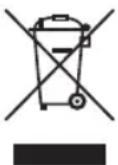
Protect our environment: do not dispose of electrical equipment in the domestic waste.
Please return any electrical equipment that you will no longer use to the collection points provided for their disposal.
This helps avoid the potential effects of incorrect disposal on the environment and human health.
This will contribute to the recycling and other forms of re-utilisation of electrical and electronic equipment.
Information concerning where the equipment can be disposed of can be obtained from your local authority.
Disposal of batteries
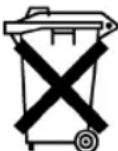
The unit includes a rechargeable battery. Used batteries do not belong in household waste.
The battery must be removed before the product is disposed of. Contact qualified specialists to do so.
Information on where the battery must be disposed of can be found via your local authorities or municipalities.
Instruction manual
CTC Clatronic Sp. z o.o