BC 16.12 STS Plus CAD - Counter SIGMA - Free user manual and instructions
Find the device manual for free BC 16.12 STS Plus CAD SIGMA in PDF.



| Product type | Cycle computer |
| Brand | Sigma |
| Model | BC 16.12 STS Plus CAD |
| Power supply | CR2032 battery |
| Battery life | Approximately 1 year (daily use of one hour) |
| Display | Backlit (activated by SET and RESET buttons) |
| Main functions | Speed, cadence, distance, time, temperature, stopwatch, countdown, partial counter (TS), total distance, total time, average speed, max speed, current/average speed comparison indicator |
| Special functions | Automatic second bike detection, lighting manager, service interval, battery low indicator, memory chip, PC compatible (with Sigma Data Center software) |
| STS features | Wireless synchronization (after 3-4 wheel/crank revolutions), transport mode, "Too many signals" display |
| Mounting | On universal bracket (wired or wireless depending on version) |
| Maintenance | CR2032 battery replacement – only the time needs to be reset |
| Safety | Integrated transport mode (motion sensor); stops displaying total values when no speed signal |
| Spare parts | CR2032 battery, speed sensor, cadence sensor, computer bracket |
| Repairability | Return to dealer or to Sigma for warranty service |
| General information | Legal warranty; PC compatible as an option (separate purchase of software and connection station) |
Frequently Asked Questions - BC 16.12 STS Plus CAD SIGMA
User questions about BC 16.12 STS Plus CAD SIGMA
0 question about this device. Answer the ones you know or ask your own.
Ask a new question about this device
Download the instructions for your Counter in PDF format for free! Find your manual BC 16.12 STS Plus CAD - SIGMA and take your electronic device back in hand. On this page are published all the documents necessary for the use of your device. BC 16.12 STS Plus CAD by SIGMA.
USER MANUAL BC 16.12 STS Plus CAD SIGMA
www.sigma-data-center.com
1. Introduction to the BC 16.12 / BC 16.12 STS 12
1.1 Initial use 12
1.2 Navigation principle 13
1.3 Set-up 14
2. Functions/Properties 14
2.1 General 14
2.2 Special functions 16
2.3 STS features 16
3. Settings/Deletion 18
3.1 Settings 18
3.2 Determining the wheel size 18
3.3 Deleting the functions 18
4. Important Notes / Troubleshooting 19
4.1 Technical data
19
- Warranty Conditions
21
1. Introduction to the BC 16.12 / BC 16.12 STS
1.1 Initial use
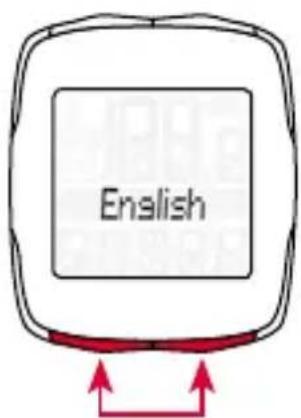
The bike computer comes in "deep sleep mode".
To exit this mode, press and hold the MODE 1 and SET buttons for five seconds.
Once it has woken up, the bike computer will be in the settings menu.
1.2 Navigation principle
1.2.1 Button functions 1.2.2 Assigning the functions
RESET button for
- Deleting the current values
-Scrolling backward
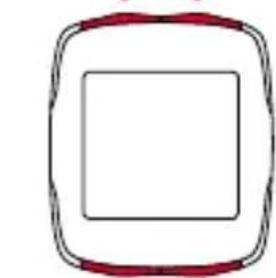
SET button for
- Switching to/from the setting mode
-Scrolling backward
MODE 2 button for
- Switching between several functions
-Scrollingforward
MODE 1 button for
- Switching between the bike functions
-Scrollingforward
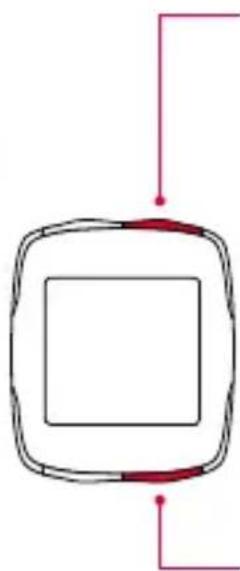
You can access the following functions by pressing the
MODE 2 button:
cadence / 0 cadence / time /stopwatch / countdown timer /
TS distance / TS time / temperature / total distance 1^ / total distance 2^ / total distance / total time 1^ / total time 2^ / total time
- The distinction between bike 1 and bike 2 is only displayed once a second bike has been detected.
You can access the following functions by pressing the
MODE 1 button:
trip distance / trip time / speed / max. speed
1.2 Navigation principle
1.2.3 Display layout
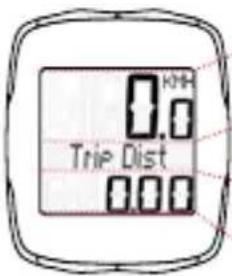
Top field:
Speed
Middle field:
Description of the functions
Bottom field:
Current value
1.3 Set-up
Please see the leaflet provided for the set-up diagrams!
2. Functions/Properties
2.1 General
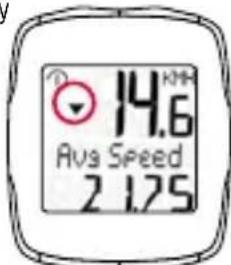
- Current/average speed comparison
If you are traveling at approximately your average speed, nothing is displayed. If you are traveling quicker than your average speed, [ ] is displayed; if you are traveling slower [ ] is displayed. This information is displayed in almost all functions, except the basic settings.
Automatic detection of the second bike
The switchover between bike 1 and bike 2 occurs automatically. You simply need to carry the necessary accessories with you. For the wired device, the universal bracket with appropriate cabling should be purchased as an extra. For the wireless device, a second speed transmitter should be purchased and set to bike 2 (see set-up instructions for further details).
2. Functions / Properties
The total values are only separately displayed for bike 1, bike 2 and bike 1 + 2 once a second bike has been added. If only one bike is used, only the total values for the first bike are displayed.
Light manager Simultaneously press the SET and RESET buttons to switch the light function on/off. The display lights up by pressing any button; the bike computer changes to the respective function when the button is pressed again. On STS devices, the light function is disabled during synchronization (max. 5 minutes). Avoid using the backlight unnecessarily to save the battery!
Service interval The service interval informs you when you have cycled a specified number of kilometers and a bike inspection is due. This service interval can only be enabled/disabled and pre-configured by your specialist retailer. The device comes with the service interval disabled.
- Battery status The battery status of the computer head unit is displayed shortly before the battery runs out. "low/computer" appears on the display. After changing the battery, only the time needs to be re-set.
- Memory chip Thanks to an inbuilt memory chip, all total values and settings are permanently stored in the bike computer. This means that you do not need to reconfigure any settings (except for the time) after changing the battery.
- PC compatibility The bike computer is PC-compatible. After purchasing the SIGMA DATA CENTER software and docking station, you can simply and effortlessly log your total and current values on your PC. You can also configure your bike computer's settings on the PC.
2. Functions / Properties
2.2 Special functions
- Hiding total values during the trip If the BC 16.12/BC 16.12 STS receives speed signals, all the total functions (distance, time) are hidden on the display. If no speed values are received, the functions are once again displayed.
- Showing and hiding cadence functions If the BC 16.12 / BC 16.12 STS are used without the cadence transmitter, all the cadence functions (cadence / 0 cadence) are hidden for this trip after five minutes.
- Trip section (TS) counter This is a separate distance / time counter that is manually started and stopped. The trip section counter makes it possible to evaluate a trip section or interval training session without influencing the total values for the trip.
2.3 STS features
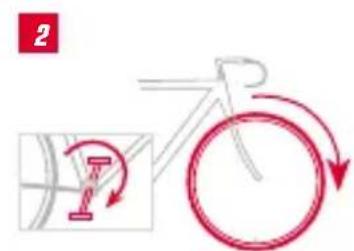
- Synchronization Attach the BC 16.12 STS to the bracket - zeros flash for the speed and cadence. There are two ways of synchronizing the speed / cadence:
-
- → Start cycling – the receiver usually synchronizes with the transmitters after 3-4 wheel / pedal rotations.
-
- → Spin the front wheel or turn the pedals until the speed / cadence values stop flashing. Removing the BC 16.12 STS from the bracket severs the connection

2. Functions/Properties
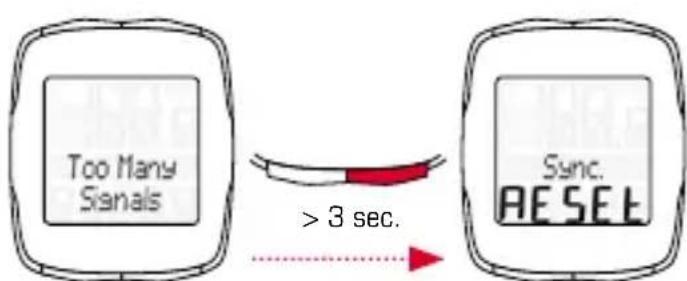
- Message "Too Many Signals" Increase your distance from other cyclists (transmitters) and press any button. Synchronization re-starts. (If the transmission connection is lost during your trip and no longer functions, press and hold the MODE 1 button for more than three seconds to start manual synchronization. "Sync. RESET" flashes on the display)
- Transport mode When transported on a bike rack or in the car (if clicked into the bracket), the BC 16.12 STS switches to "transport mode" via an integrated movement sensor. "Transport" appears on the display. Press any button to exit this mode.
3. Settings/Deletion
3.1 Settings
The following settings can be configured: language / unit / wheel size 1 / wheel size 2 / time / total distance 1 / total distance 2 / total time 1 / total time 2 / contrast. Clear diagrams of how to set each of these functions can be found in the enclosed leaflet.
3.2 Determining the wheel size
To measure your speed precisely, the wheel size must be set on the basis of your tire size. To do this, you can:
A - Calculate the wheel size using the formula provided in the wheel size chart.
B - Determine the value from the drawings in the wheel size chart.
C - Take the value that corresponds to your tire size from the wheel size chart.
3.3 Deleting the functions
Please see the diagrams for how to delete the functions.
Please note that the trip section (TS) counter, stopwatch, and countdown timer are not deleted with the current trip values.
4. Important Notes / Troubleshooting
4.1 Technical data
4.1.1 Battery indicator / replacement
Please see the enclosed diagrams for how to insert or remove the battery. After changing the battery in the computer head unit, only the time needs to be re-set.
BC 16.12 Type CR 2032/
computer head unit: 1.5-year service life*
BC 16.12 STS Type CR 2032/
computer head unit: 1-year service life*
Speed transmitter: Type CR 2032 /
1-year service life*
Cadence transmitter: Type CR 2032 /
1-year service life*
- when used for one hour per day
4.1.2 Troubleshooting
No speed:
- Is the computer correctly fastened into the bracket?
- Check the distance between the magnet and the sensor (max. 5 mm) (with STS, max. 12 mm).
- Is the magnet correctly positioned?
Incorrect speed:
- Are two magnets attached to the bike?
- Is the wheel size correctly set?
Further troubleshooting solutions can be found in our FAQs at www.sigmasport.com
4. Important Notes / Troubleshooting
4.1.3 Min./max./factory settings
| Standard | Min. | Max. | Unit | |
| Current speed 0.0 0 199.8 kmh / mph | ||||
| Trip Dist 0.00 0.00 9,999.9 km / mi | ||||
| Ride Time 0:00:00 0:00:00 999:59:59 h:mm:ss hhh:mm:ss | ||||
| Avg Speed 0.00 0.00 199.8 kmh / mph | ||||
| Max. Speed 0.00 0.00 199.8 kmh / mph | ||||
| Cadence | 0 | 0 | 180 | rpm |
| Ø cadence | 0 | 0 | 180 | rpm |
| Clock | 00:00 | 00:00 | 23:59 | hh:mm |
| Stopwatch | 00:00.0 | 00:00.0 | 9:59:59 | mm:ss,1/10 h:mm:ss |
| Countdown | 0:00:00 | 0:00:00 | 9:59:59 | h:mm:ss |
| TS Distance | 0.00 0.00 9,999.9 km / mi | |||
| TS Time | 0:00:00 0:00:00 999:59:59 h:mm:ss hhh:mm:ss | |||
| Temperature | 0.0 | -10 / 14 | 70 / 158 | °C / °F |
| Tot Dist 1 + 2 | 0 | 0 | 99,999 | km / mi |
| Tot Distance | 0 0 999,99 | km / mi | ||
| Total Time 1 + 2 | 0:00 | 0:00 | 9999:59 | h:mm h.hhh:mm |
| Total Time 0:00 0:00 19,999 | h:mm hh.hhh | |||
| Wheelsize 1 + 2 | 2,155 | 500 | 3,999 | mm |
5. Warranty Conditions
We are liable to our contracting partners for defects in line with legal provisions. In the event of a warranty claim, please contact the retailer from whom you purchased your bike computer. You can also send your bike computer, together with your receipt and all accessories, to the address below. Please ensure you pay sufficient postage.
Warranty claims can be made in the event of material and workmanship errors. The warranty does not cover batteries, wear and tear parts, or wear caused by commercial use or accidents. Warranty claims shall only be valid if the SIGMA product has not been opened without authorization and the purchase receipt is provided.
SIGMA-ELEKTRG GmbH
Dr.-Julius-Leber-Strasse 15
In the event of justified warranty claims, you will receive a replacement device. You will only be entitled to the model available at the time of replacement.
The manufacturer retains the right to make technical modifications.
Batteries must not be disposed of in household waste (European Battery Law)! Please take the batteries to an official collection point for disposal.
Electronic devices must not be disposed of in household waste.
Please take the device to an official waste collection point.

FRANÇAIS
Table des matieres
1. Découverte du BC 16.12 / BC 16.12 STS 22
1.1 Mise en service 22
1.2 Principe de navigation 23
1.3 Montage 24
www.sigma-data-center.com
www.sigma-data-center.com
www.sigma-data-center.com
www.sigma-data-center.com
www.sigma-data-center.com
www.sigma-data-center.com
www.sigma-data-center.com
2. Funkciok es tulajdonsagok
www.sigma-data-center.com

www.sigma-data-center.com
2. Functii / Proprietati
2.2 Functii speciale
2.3 Characteristic STS
www.sigma-data-center.com
This device complies with part 15 of the FCC Rules. Operation is subject to the following two conditions:
[1] This device may not cause harmful interference, and
(2) this device must accept any interference received, including interference that may cause undesired operation.
NOTE: This equipment has been tested and found to comply with the limits for a Class B digital device, pursuant to part 15 of the FCC Rules. These limits are designed to provide reasonable protection against harmful interference in a residential installation. This equipment generates, uses and can radiate radio frequency energy and, if not installed and used in accordance with the instructions, may cause harmful interference to radio communications. However, there is no guarantee that interference will not occur in a particular installation. If this equipment does cause harmful interference to radio or television reception, which can be determined by turning the equipment off
and on, the user is encouraged to try to correct the interference by one or more of the following measures:
- Reorient or relocate the receiving antenna.
- Increase the separation between the equipment and receiver.
- Connect the equipment into an outlet on a circuit different from that to which the receiver is connected.
- Consult the dealer or an experienced radio/TV technician for help.
Changes or modifications not expressly approved by the party responsible for compliance could void the user's authority to operate the equipment.
Notes
BC 16.12 / BC 16.12 ST5
SIGMA-ELEKTRO GmbH
10F, No.192, Zhonggong 2^nd Rd.,
Xitun Dist., Taichung City 407, Taiwan



086130/1

- Introduction to the BC 16.12 / BC 16.12 STS 12
- Functions/Properties 14
- Settings/Deletion 18
- Important Notes / Troubleshooting 19
- Introduction to the BC 16.12 / BC 16.12 STS
- Initial use
- Navigation principle
- Button functions 1.2.2 Assigning the functions
- Display layout
- Top field:
- Middle field:
- Bottom field:
- Set-up
- Functions/Properties
- General
- - Current/average speed comparison →
- Automatic detection of the second bike →
- Functions / Properties
- Special functions
- STS features
- Settings/Deletion
- Settings
- Determining the wheel size
- Deleting the functions
- Important Notes / Troubleshooting
- Technical data
- Battery indicator / replacement
- Troubleshooting
- No speed:
- Incorrect speed:
- Min./max./factory settings
- Warranty Conditions
- SIGMA-ELEKTRG GmbH
- FRANÇAIS
- Table des matieres
- Découverte du BC 16.12 / BC 16.12 STS 22
- Funkciok es tulajdonsagok
- Functii / Proprietati
- Functii speciale
- Characteristic STS
- Notes
- SIGMA-ELEKTRO GmbH
Brand : SIGMA
Model : BC 16.12 STS Plus CAD
Category : Counter