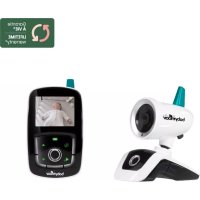
Expert II - Baby monitors BABYMOOV - Free user manual and instructions
Find the device manual for free Expert II BABYMOOV in PDF.



| Product Type | Baby Monitor |
| Brand | Babymoov |
| Model | Expert II |
| Reference | 360500 |
| Maximum Range | 1,000 m in open space |
| Channels | 2 channels + 68 digital codes (136 sub-channels) |
| Encoding | Professional digital to avoid interference |
| Transmitter Power | 3 AA batteries (not included) or 6V AC power adapter |
| Receiver Power | Rechargeable Ni-MH 4.8V battery included or 9V AC adapter |
| Main Functions | Nightlight, temperature indicator (-9°C to +50°C), LED sound level meter, out-of-range alarm, high/low temperature alarm, digital volume control, vibration mode, microphone sensitivity adjustment, Hi/Lo/Elo power |
| Display | Backlit LCD |
| Included Accessories | 1 transmitter, 1 receiver, 1 rapid charger, 1 6V adapter, 1 9V adapter, 1 Ni-MH battery, 1 user manual |
| Care and Cleaning | Clean with a soft dry cloth. Do not use abrasive or chemical products. Do not immerse. |
| Safety | Use only the supplied adapters. Do not open the case. Keep out of reach of children. Do not expose to heat source or moisture. |
| Spare Parts and Repairability | Adapters, rapid charger, rechargeable battery available. No user-repairable parts inside the case. |
| Warranty | Lifetime warranty subject to proper use and sending the warranty card with the receipt. |
| General Information | Manufacturer: Babymoov, 16 rue Jacqueline Auriol, 63100 Clermont-Ferrand, France. www.babymoov.com |
Frequently Asked Questions - Expert II BABYMOOV
User questions about Expert II BABYMOOV
0 question about this device. Answer the ones you know or ask your own.
Ask a new question about this device
Download the instructions for your Baby monitors in PDF format for free! Find your manual Expert II - BABYMOOV and take your electronic device back in hand. On this page are published all the documents necessary for the use of your device. Expert II by BABYMOOV.
USER MANUAL Expert II BABYMOOV
Only for France and DOM TOM.
natural_image
Line drawing of two mobile phone devices with buttons and a base (no text or symbols)NOTICE D'UTILISATION • INSTRUCTION MANUAL BEDIENUNGSANLEITUNG • INSTRUCTIE HANDLEIDING MANUAL DE INSTRUCCIONES • MANUAL DE INSTRUÇÕES MANUALE DI ISTRUZIONI

(France uniquement)
0,12€ par minute
BABYMOOV
natural_image
Line drawing of a handheld electronic device connected to a power outlet (no text or symbols)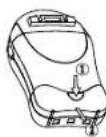
natural_image
Line drawing of a portable electrical lamp connected to a power outlet (no text or symbols)Émetteur
Récepteur
Chargeur rapide
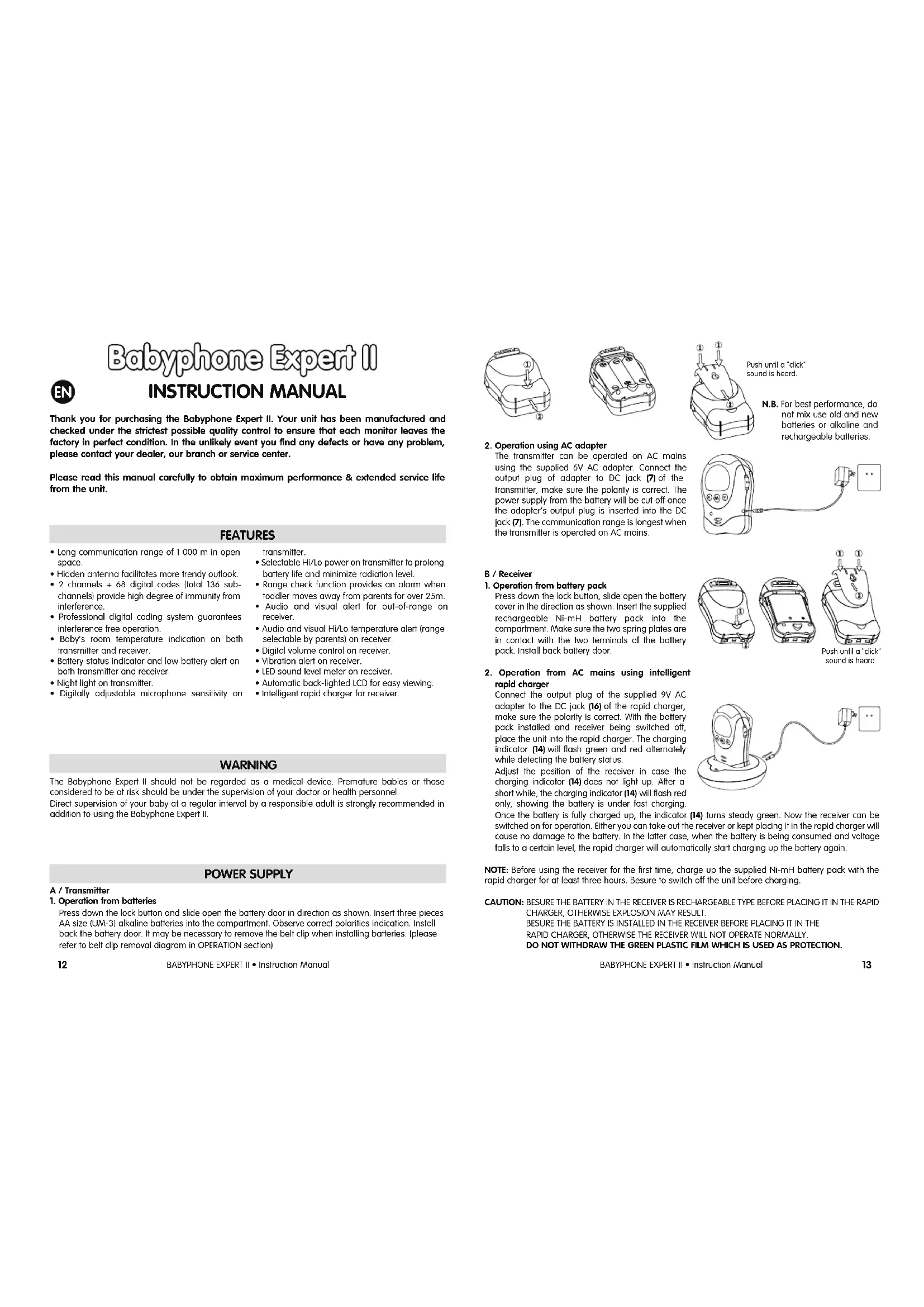
Thank you for purchasing the Babyphone Expert II. Your unit has been manufactured and checked under the strictest possible quality control to ensure that each monitor leaves the factory in perfect condition. In the unlikely event you find any defects or have any problem, please contact your dealer, our branch or service center.
Please read this manual carefully to obtain maximum performance & extended service life from the unit.
FEATURES
- Long communication range of 1 000 m in open space.
- Hidden antenna facilitates more trendy outlook.
- 2 channels + 68 digital codes (total 136 subchannels) provide high degree of immunity from interference.
• Professional digital coding system guarantees interference free operation. - Baby's room temperature indication on both transmitter and receiver.
- Battery status indicator and low battery alert on both transmitter and receiver.
• Night light on transmitter.
• Digitally adjustable microphone sensitivity on
transmitter.
- Selectable Hi/Lo power on transmitter to prolong battery life and minimize radiation level.
- Range check function provides an alarm when toddler moves away from parents for over 25m.
- Audio and visual alert for out-of-range on receiver.
- Audio and visual Hi/Lo temperature alert (range selectable by parents) on receiver.
• Digital volume control on receiver.
• Vibration alert on receiver.
• LED sound level meter on receiver
• Automatic back-lighted LCD for easy viewing.
• Intelligent rapid charger for receiver.
WARNING
The Babyphone Expert II should not be regarded as a medical device. Premature babies or those considered to be at risk should be under the supervision of your doctor or health personnel. Direct supervision of your baby at a regular interval by a responsible adult is strongly recommended in addition to using the Babyphone Expert II.
POWER SUPPLY
A / Transmitter
1. Operation from batteries
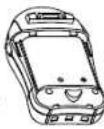
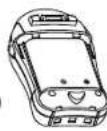
Press down the lock button and slide open the battery door in direction as shown. Insert three pieces AA size (UM-3) alkaline batteries into the compartment. Observe correct polarities indication. Install back the battery door. It may be necessary to remove the belt clip when installing batteries. (please refer to belt clip removal diagram in OPERATION section)
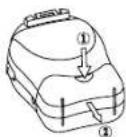
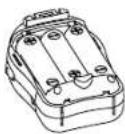
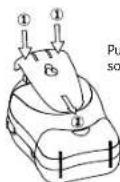
Push until a *click* sound is heard.
N.B. For best performance, do not mix use old and new batteries or alkaline and rechargeable batteries.
2. Operation using AC adapter
The transmitter can be operated on AC mains using the supplied 6V AC adapter. Connect the output plug of adapter to DC jack (7) of the transmitter, make sure the polarity is correct. The power supply from the battery will be cut off once the adapter's output plug is inserted into the DC jack (7). The communication range is longest when the transmitter is operated on AC mains.
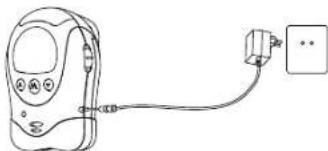
natural_image
Line drawing of a medical or electronic device connected to a wall-mounted power outlet (no text or symbols)B / Receiver
1. Operation from battery pack
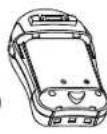
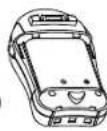
Press down the lock button, slide open the battery cover in the direction as shown. Insert the supplied rechargeable Ni-mH battery pack into the compartment. Make sure the two spring plates are in contact with the two terminals of the battery pack. Install back battery door.
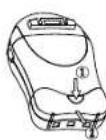
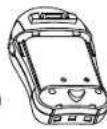
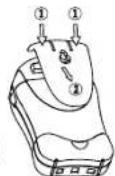
Push until a *click* sound is heard
2. Operation from AC mains using intelligent rapid charger
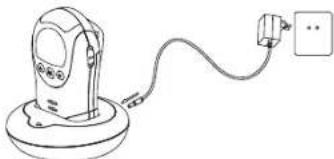
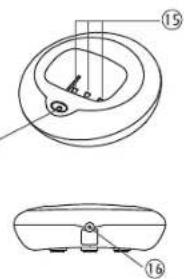
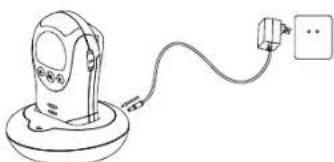
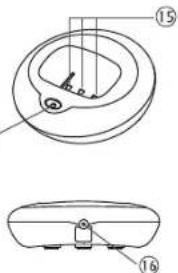
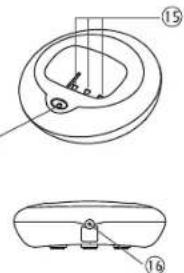
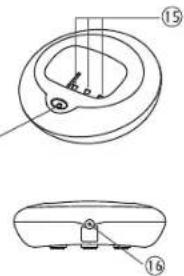
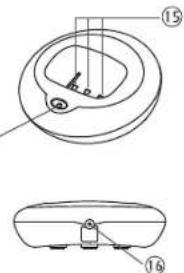
Connect the output plug of the supplied 9V AC adapter to the DC jack (16) of the rapid charger, make sure the polarity is correct. With the battery pack installed and receiver being switched off, place the unit into the rapid charger. The charging indicator (14) will flash green and red alternately while detecting the battery status.
Adjust the position of the receiver in case the charging indicator (14) does not light up. After a short while, the charging indicator (14) will flash red only, showing the battery is under fast charging.
natural_image
Line drawing of a handheld device with a cable and plug, no text or symbols presentOnce the battery is fully charged up, the indicator (14) turns steady green. Now the receiver can be switched on for operation. Either you can take out the receiver or kept placing it in the rapid charger will cause no damage to the battery. In the latter case, when the battery is being consumed and voltage falls to a certain level, the rapid charger will automatically start charging up the battery again.
NOTE: Before using the receiver for the first time, charge up the supplied NI-mH battery pack with the rapid charger for at least three hours. Besure to switch off the unit before charging.
CAUTION: BESURE THE BATTERY IN THE RECEIVER IS RECHARGEABLE TYPE BEFORE PLACING IT IN THE RAPID CHARGER, OTHERWISE EXPLOSION MAY RESULT.
BESURE THE BATTERY IS INSTALLED IN THE RECEIVER BEFORE PLACING IT IN THE
RAPID CHARGER, OTHERWISE THE RECEIVER WILL NOT OPERATE NORMALLY.
DO NOT WITHDRAW THE GREEN PLASTIC FILM WHICH IS USED AS PROTECTION.
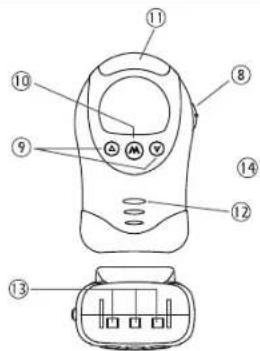
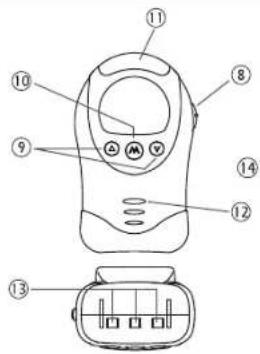
CONTROLS LAYOUT
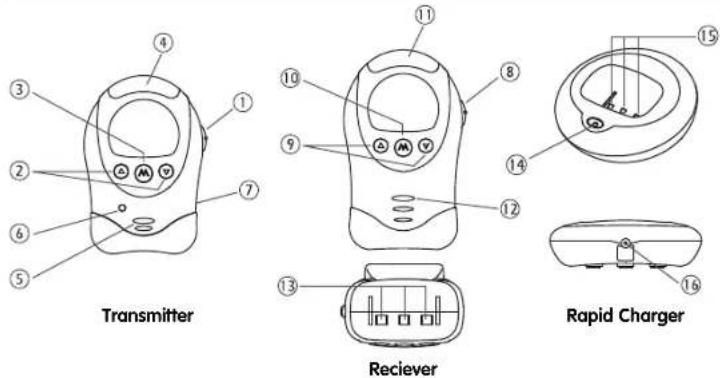
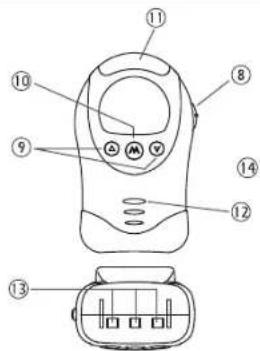
- Power ON/OFF and night light switch
- Up/Down button
- Mode button
- Night light
- Condenser microphone
- Power on indicator
- DC jack
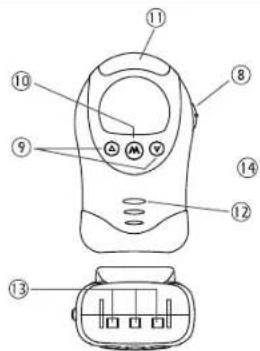
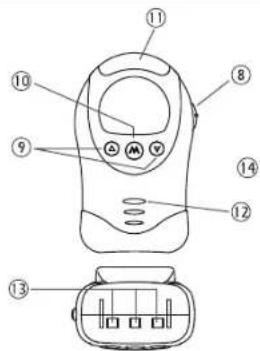
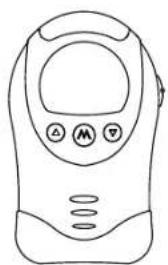
-
Power ON/OFF and vibration switch
-
Up/Down button
- Mode button
- LED sound level meter
- Speaker
- Charging contacts
- Charging indicator
- Charging pins
- DC jack
LCD
OPERATION
TRANSMITTER
- Setting of channel, digital code, output power, Out-of-range alert function and range check function.
a. Set the power ON/OFF switch (1) to ON position to turn on the unit. The power on indicator (6) will light up green and LCD screen shows up. Press and hold mode button (3) for at least 5 seconds to enter into programming mode. A confirmation beep tone will be heard once the unit goes into programming mode successfully and the LCD will show following :
▼ Flashing
▼ Light up steadily
b. Use Up/Down button (2) to select a desired channel (total 2 channels to choose from). Each press of the button will cause the channel no. to advance or retreat one step. Press and hold the Up or Down button (2) will cause the channel no. to scroll up or down rapidly. Confirm your selection by pressing the mode button (3). The LCD will show following: CH 2 is selected.
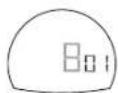
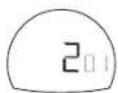
c. Now select the digital code (total 68 digital codes to choose from) using the Up/Down button (2). Each press of the button will cause the digital code to advance or retreat one step. Press and hold the Up or Down button (2) will cause the digital code to scroll up or down rapidly. Confirm your selection by pressing the mode button (3). Remember the channel and digital code you have selected as you need to program the same in the receiver. The LCD will show the following:
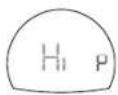
d. Use Up/Down button (2) to select the output power. "Hi" means high power while "Lo" means low power and "Elo" means extra low power. Note with low power, the communication distance will become shorter but the battery life can be prolonged. Besides, the level of emitted radiation is also reduced. When "Elo" is selected, the range check icon will appear on the LCD and the receiver will provide an alarm when the distance between transmitter and receiver exceeds 25m. This range check function is useful to monitor the activities of toddler in park or shopping arcade. The transmitter is placed with the toddler and if he moves further away from the parents for over 25m, the receiver will sound an alarm to alert the parents. Confirm your selection by pressing the mode button (3). The LCD will show the following:
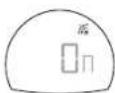
e. Use Up/Down button (2) to select the Out-of-range alert function. On means this function is enabled while OFF means this function is disabled. When set to OFF, the level of emitted radiation is reduced, however, the receiver will not provide an alarm when it falls outside the communication range of transmitter. Confirm your selection by pressing the mode button (3). The LCD will show following:
f. This baby monitor is equipped with a professional grade digital coding system which filters off all the unwanted interference to guarantee the parents will hear no other signal except their own baby. Under normal situation, its is only necessary to program the channel and digital code once. If in the unlikely event your next door neighbour also has the same model of baby monitor and program with the same channel and digital code, then you may need to select a new channel and digital code or otherwise you will hear each other's baby. Repeat the above steps a to c, besure you also program the receiver with the same new channel and digital code.
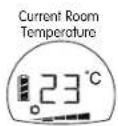
N.B.: Please set the range check function to OFF for normal baby monitor operation or otherwise the communication range between transmitter and receiver will become very short.
- The sensor inside the unit will detect the baby's room temperature and its current reading is shown on the LCD screen of both transmitter as well as receiver. The normal operating range of the temperature sensor is -9^ to +50^ . Temperature outside this range will also be shown in the LCD screen except with less accuracy. In case there is a sudden temperature change (eg. you bring the transmismitter from indoor to outdoor during winter time), the sensor may need to take a few minutes before it can settle to the new environment and show the correct reading on the LCD screen.
- When the power ON/OFF switch (1) is set at ON position, a momentarily press of the mode button (3) will cause the LCD screen to show the different settings in a cyclic order. A screen showing operating channel/digital code, output power setting, out-of-range alert setting or range setting will automatically return to screen showing baby's room temperature after 5 seconds if no further button is pressed.
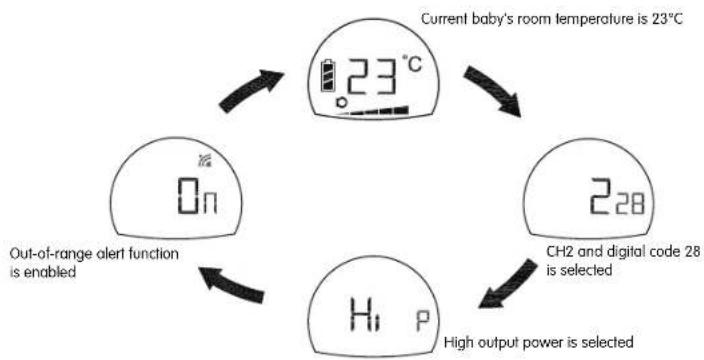
flowchart
graph TD
    A["Current baby's room temperature is 23°C"] --> B["23°C"]
    B --> C["228"]
    C --> D["CH2 and digital code 28 is selected"]
    D --> E["High output power is selected"]
    E --> F["Hi P"]
    F --> G["Out-of-range alert function is enabled"]
- Place the transmitter about 1 m from the crib with the microphone (5) facing towards the baby.
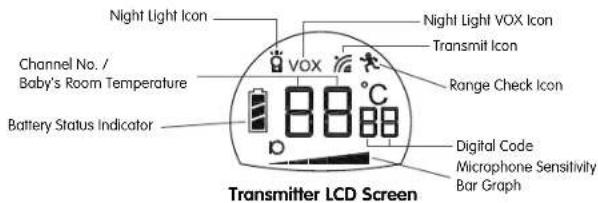
- Adjust the microphone sensitivity using the up/down button (2) such that the unit will be set to transmit whenever the microphone (5) picks up a sound at your desirable loudness level. The microphone sensitivity bar graph in the LCD will also change correspondingly. More segment of bar graph shown means the unit is more sensitive to sound.
- Once the unit is in transmit mode, the LCD will be backlighted and the transmit icon will be shown. The transmitter will return to standby mode a few seconds after the microphone (5) stops picking up any sound and the transmit icon goes off. The LCD backlight will also go off to save battery power.
-
When the Out-of-range alert function is set to On, the transmitter will transmit a signal to the receiver at regular intervals even when the microphone (5) does not pick up any sound. The transmit icon will blink correspondingly in the LCD.
-
The night light (4) can be set permanently ON by moving the power ON/OFF switch (1) to position, the night light icon will be shown in the LCD. The night light can also be set to be VOX (voice activated) by momentarily pressing the mode button (3), the VOX icon will be shown besides the icon. Under VOX mode, the night light will be switched on once the microphone (5) detects a sound and automatically goes off a few seconds after the microphone (5) stops picking up any sound. Momentarily press of the mode button (3) will cause the night light to toggle between permanent ON and VOX.
- The condition of the battery is shown by the battery status indicator ■. When the battery power is being consumed, the segments within the battery status indicator gradually falls. Once the indicator becomes empty, it will start flashing, besides, the transmitter will also send out a signal to the receiver to alert the parents.
- Each time a button is pressed, a beep tone will be heard to validate your entry being recognized by the unit.
RECEIVER
- Setting of channel, digital code, upper/lower temperature limit and Out-of-range alert function.
a. Set the power ON/OFF switch (8) to ON position to turn on the unit. The LCD screen will show up and become backlighted. Press and hold mode button (10) for at least 5 seconds to enter into programming mode. A confirmation beep tone will be heard once the unit goes into programming mode successfully and the LCD will show following:
Flashing
▼ Light up steadily
b. Use Up/Down button (9) to select a channel same as the transmitter. Each press of the button will cause the channel no. to advance or retreat one step. Press and hold the Up or Down button (9) will cause the channel no. to scroll up or down rapidly. Confirm your selection by pressing the mode button (10). The LCD will show following:
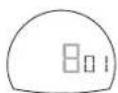
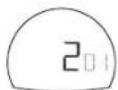
c. Now select the same digital code as the transmitter using the Up/Down button (9). Each press of the button will cause the digital code to advance or retreat one step. Press and hold the Up or Down button (9) will cause the digital code to scroll up or down rapidly. Confirm your selection by pressing the mode button (10). The LCD will show following :
d. Now select the same setting for Out-of-range alert function as per the transmitter using Up/Down button (9). If a different setting is selected, either false alarm will be heard or no alarm will be provided even when receiver falls beyond the communication range of transmitter. Confirm your selection by pressing the mode button (10). The LCD will show following:
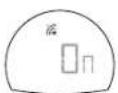
N.B. In case the transmitter is set to operate with range check function, the receiver will automatically enters range check mode no matter the out-of-range setting is ON or OFF.
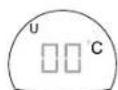
e. Using the Up/Down button (9), set the upper temperature limit above which the unit will provide a temperature alarm. Each press of the button will cause the temperature to advance or retreat one step. Press and hold the Up or Down button (9) will cause the temperature to scroll up or down rapidly. The allowed selectable temperature range is -3°C to +49°C. In case OFF is selected, no upper temperature limit is set. Confirm your selection by pressing the mode button (10). The LCD will show the following:
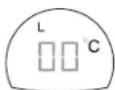
f. Using the Up/Down button (9), set the lower temperature limit below which the unit will provide a temperature alarm. The allowed selectable temperature range is -8°C to +44°C. In case you have made an illogical entry (e.g. you select 15°C as upper limit and 23°C as lower limit), the unit will not accept your entry and will sound two beep tone. In case OFF is selected, no lower temperature limit is set. Confirm your selection by pressing the mode button (10). The LCD will show the following:
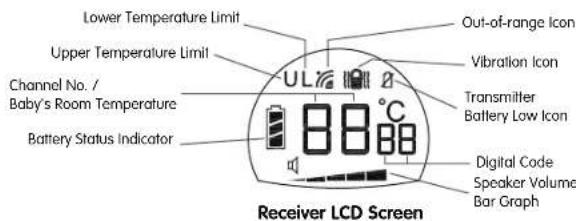
Not yet receive temperature reading from transmitter
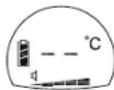
or
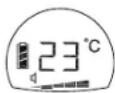
Temperature reading signal received
N.B. II is recommended to have at least ±5^ between the settings of upper and lower temperature limit from the current temperature reading, otherwise the temperature alarm can often be heard whenever the baby's room temperature changes slightly.
- A momentarily press of the mode button (10) will cause the LCD screen to show the different settings in a cyclic order:
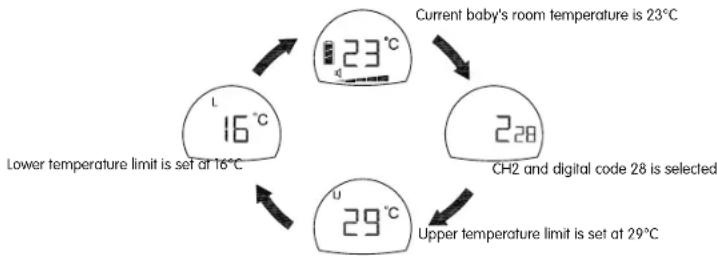
flowchart
graph TD
    A["Current baby's room temperature is 23°C"] --> B["23°C"]
    B --> C["228"]
    C --> D["29°C"]
    D --> E["Upper temperature limit is set at 29°C"]
    E --> F["Lower temperature limit is set at 16°C"]
    F --> A
    G["CH2 and digital code 28 is selected"] --> C
A screen showing the channel/digital code; the out-of-range alert setting, the upper temperature limit setting or the lower temperature limit setting will automatically return to screen showing the baby's room temperature after 5 seconds if no further button is pressed.
- Place the receiver at a reasonable distance away from the transmitter to avoid feedback. Too close a distance will create a screeching sound at the speaker (12).
-
Once the unit receives a signal from the transmitter, the LCD will become backlighted and LEDs in the level meter (11) will light up. The louder the baby's voice, the more number of LED will be lighted up. This feature is useful in case the parents prefer to turn down the speaker volume to keep the environment quiet.
-
The speaker volume can be adjusted using the Up/Down button (9). The volume bar graph in the LCD will also change correspondingly. More segment of bar graph shown means higher volume from speaker (12). When no segment is shown on the LCD, the speaker (12) is totally muted.
- This unit is equipped with a vibrating alert. Set the power ON/OFF switch (8) to position, the vibration icon will also show up in the LCD. Once the received baby's voice is loud enough, the vibrator starts functioning. This feature is useful when the parent is working under very noisy environment (e.g. Vacuum cleaning). To save battery power, it is recommended not to use the vibrating alert frequently.
- When the out-of-range alert function is set to On in both transmitter and receiver, once the receiver is beyond the communication range of the transmitter for over 2 minutes, an out-of-range alarm will be heard. The LED level meter starts flashing together with the out-of-range icon to alert the parents. Besides, the temperature reading will show -°C. The alarm and icon will go off only when the receiver falls back within the communication range of transmitter.
N.B. This alarm will also be heard in case the transmitter is switched off, or its battery has run down, or its power is cut off, or the channel/digital code setting is different between the transmitter and receiver, or the out-of-range alert setting is different between transmitter and receiver. - Whenever the baby's room temperature falls outside the range as preset by the upper and lower temperature limits, an alarm will be heard. Depending on whether the upper or lower limit is exceeded, the correspondingly icon and the current temperature reading start flashing in the LCD.
- The condition of the rechargeable battery pack is shown by the battery status indicator. When the battery power is being consumed, the segments within the battery status indicator gradually falls. Once the indicator becomes empty, its starts flashing and an alarm will be heard, reminding the parents to charge up the battery using the rapid charger. When the receiver is switched on and placed in the rapid charger, the segments within the battery status indicator will flash in turn while battery is being charged. Once charging is completed, the flashing will stop and all three segments show steady up indicating the battery is full.
- When only one segment is left within its battery status indicator, the transmitter will send out a signal to the receiver. The transmitter low battery icon will start flashing in the receiver's LCD and a beep tone alarm will be heard. Once the transmitter battery status indicator becomes totally empty, two beep tones will be heard, urging the parent to replace with new battery for the transmitter.
- Each time a button is pressed, a beep tone will be heard to validate your entry being recognized by the unit.
- The loudness of the alarm and beep tone is fixed and independent from adjustment of the speaker volume.
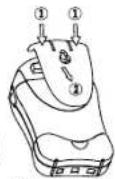
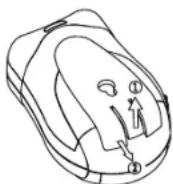
Both the receiver and transmitter can be carried around using the belt clip. To remove the clip, follow diagram as shown.
PRECAUTIONS
- Use only the supplied AC adapters, use of other adapters may cause damage to the Babyphone Expert II.
- When not using the monitor for as long period of time, remove all batteries from the transmitter and receiver to avoid damage due to battery leakage.
-
Disconnect the AC adapter from the wall outlet when the monitor is not to be operated.
-
The Babyphone Expert II is best performed within a temperature range of -9^ to +50^ .
- Do not leave the monitor expose to strong sunlight for a long time or nearby any heat source, moisture and excessive dusty environment.
- Do not open the cabinet, no serviceable part inside.
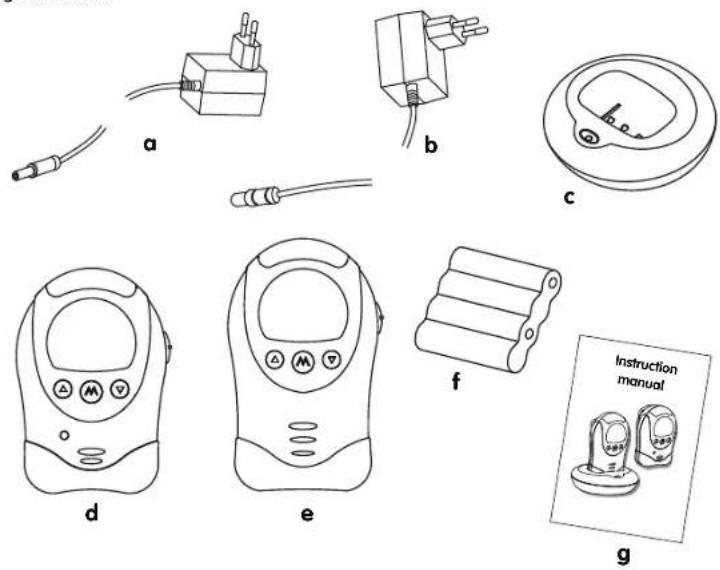
STANDARD ACCESSORIES
a. 6V AC adapter for transmitter,
b. 9V AC adapter for rapid charger.
c. Rapid charger,
d. Transmitter unit,
e. Receiver unit,
f. 4.8V rechargeable Ni-mH battery pack, DO NOT WITHDRAW THE GREEN PLASTIC FILM WHICH IS USED AS PROTECTION.
g. User manual.
TROUBLE SHOOTING GUIDE
| Problem Possible Causes Solution | ||
| • Transmitter has no transmission • Mic sensitivity is too low. | • Battery has run down or AC adapter improperly connected. | • Adjust mic sensitivity higher using up/down button (2).• Replace with new battery or check connection. |
| • Transmitter always on • Mic sensitivity is too high. • Adjust mic sensitivity lower | • Distance between transmitter and receiver exceeds the operating range. | • Set the same channel and digital code in both transmitter and receiver.• Replace with new battery or use AC adapter.• Change Out-of-range alert setting in transmitter to On.• Move the transmitter and receiver closer together. |
| • Out-of-range alarm always on • Channel | or digital code setting is different in transmitter and receiver.• Transmitter's battery has run down.• Out-of-range alert setting in transmitter is Off but setting in receiver is On.• Distance between transmitter and receiver exceeds the operating range. | |
| • Out-of-range alarm sometimes on • Interference from other devices operating on some channel. | • Switch to another channel. | |
| • No Out-of-range alarm • Setting of | Out-of-range alert in both transmitter and receiver is Off• Setting of Out-of-range alert in transmitter is On but in receiver is Off | • Change both settings to On.• Change setting in receiver to On. |
| • Temperature alarm always on | • The upper and lower temperature limit is set too close to the current reading. | • Set the upper and lower temperature limit around 5°C difference from current reading. |
| • Always showing low battery alert | • Battery has run down.• No battery inside receiver.• Battery pack is damaged. | • Recharge battery using charger stand (receiver). Replace with new battery or use AC adapter (transmitter).• Put battery pack back into battery compartment.• Replace with new battery pack. |
| • Battery life is short | • Night light is permanently switched on.• Vibration alert is switched on. | • Switch off night light or set to VOX operate.• Switch off vibration alert. |
| • Many static noise and interference | • Transmitter is located near other electrical appliances. | • Remove the electrical appliances or relocate the transmitter for away from source of interference or change to another channel. |
| • Too short communication range | • Many steel structures between transmitter and receiver.• Output power in transmitter is set to Lo.• Transmitter battery has run down.• Transmitter's range check is set to On. | • Re-locate transmitter or receiver.• Change output power setting to Hi.• Replace with new battery or use AC adapter.• Set range check function to off. |
Babyphone Expert II

BEDIENUNGSANLEITUNG
natural_image
Line drawing of a handheld electronic device connected to a power outlet (no text or symbols)B / Empfänger
1. Batteriebetrieb
natural_image
Line drawing of a portable electrical lamp connected to a power outlet (no text or symbols)natural_image
Line drawing of a handheld electronic device connected to a power outlet (no text or symbols)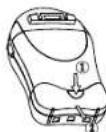
natural_image
Line drawing of a portable electronic device connected to a power outlet (no text or symbols)Zender
Snelle lader
Ontvanger
natural_image
Line drawing of a handheld electronic device connected to a power outlet (no text or symbols)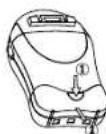
natural_image
Line drawing of a portable electrical lamp connected to a power outlet (no text or symbols)Transmisor
Receptor
Cargador rápido
MANUAL DE INSTRUÇÕES
natural_image
Line drawing of a handheld electronic device connected to a power outlet (no text or symbols)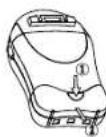
natural_image
Line drawing of a portable electrical lamp connected to a power outlet (no text or symbols)Transmissor
Receptor
Carregador rápido
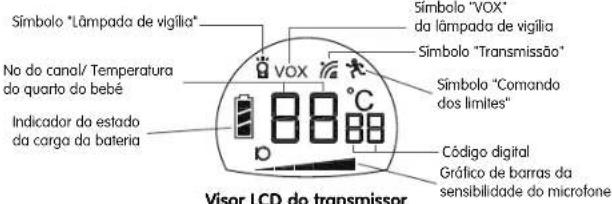
Visor LCD do receptor
natural_image
Line drawing of a handheld electronic device connected to a power outlet (no text or symbols)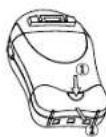
Trasmettitore
Ricevitore
Caricatore rapido
natural_image
Line drawings of electrical components including a cable, a plug, and a socket (no text or symbols)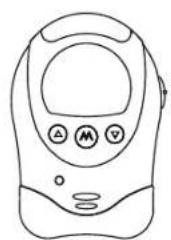
natural_image
Line drawing of a mobile phone with control buttons (no text or symbols)d
natural_image
Line drawing of a handheld electronic device with control buttons (no text or symbols)e

f
g
TABELLA DIAGNOSI GUASTI

- FEATURES
- WARNING
- POWER SUPPLY
- A / Transmitter
- Operation from batteries
- Operation using AC adapter
- B / Receiver
- Operation from battery pack
- Operation from AC mains using intelligent rapid charger
- OPERATION
- TRANSMITTER
- RECEIVER
- PRECAUTIONS
- STANDARD ACCESSORIES
- Babyphone Expert II
- BEDIENUNGSANLEITUNG
- B / Empfänger
- Batteriebetrieb
- MANUAL DE INSTRUÇÕES
Brand : BABYMOOV
Model : Expert II
Category : Baby monitors