PA330 Audio - Baby monitors GIGASET - Free user manual and instructions
Find the device manual for free PA330 Audio GIGASET in PDF.



| Product type | Audio baby monitor |
| Brand | Gigaset |
| Model | PA330 Audio |
| Parent unit power supply | 2 NiMH AAA 550 mAh rechargeable batteries or mains adapter (6V, 500 mA) |
| Baby unit power supply | Mains adapter (6V, 500 mA, included) |
| Range in open field | Up to 300 m |
| Voice activation (VOX) | Yes, can be activated/deactivated |
| ECO mode | Yes, dynamic power reduction |
| Visual crying indicator | 3 orange LEDs according to sound intensity |
| Out-of-range alarm | Audible beep and green LED flashing |
| Low battery alarm | Fixed red light and audible signal |
| Parent unit paging function | From baby unit, beep on parent unit |
| Volume adjustment | 10 levels, + and - buttons |
| Compatible battery types (parent unit) | Only NiMH AAA 550 mAh rechargeable batteries |
| Mains adapter | TEN PAO S003IV0600050, input 100-240V, output 6V 500mA |
| Care and cleaning | Damp cloth, do not immerse, do not use liquid products |
| Safety | Keep out of reach of children (min distance 1 m), do not use in damp rooms |
| Warranty | 24 months (6 months for consumable parts) |
| Customer service | www.gigaset.com/service, phone FR: 0157 324 522, CH: 0848 212 000 |
Frequently Asked Questions - PA330 Audio GIGASET
User questions about PA330 Audio GIGASET
0 question about this device. Answer the ones you know or ask your own.
Ask a new question about this device
Download the instructions for your Baby monitors in PDF format for free! Find your manual PA330 Audio - GIGASET and take your electronic device back in hand. On this page are published all the documents necessary for the use of your device. PA330 Audio by GIGASET.
USER MANUAL PA330 Audio GIGASET
Important advice. 16
Pack contents 17
Product description 18
Power sources. 19
Switching on and connection between the 2 units 20
Position of the baby unit 20
Adjusting the volume on the parent unit. 20
Visual crying indicators 20
Alarm with low battery charge state (mains adapter not connected) 21
Range of the appliance and "out of range" alarm signal 21
Voice control (VOX system) on the parent unit. 21
ECO MODE on the parent unit 21
Search function between the parent unit and the baby unit 21
Trouble-shooting 22
Disposal. 23
Customer Service & Help 24
Warranty Certificate. 25
Authorisation. 25
Safety information
Warning
This baby monitoring device complies with all the relevant standards with regard to electromagnetic fields and is safe to use if it is used as described in the operating instructions. Therefore, please read these operating instructions carefully before you use the device.
Explain the contents to your children and tell them about the dangers of using the device.
The Babyphone was developed to provide extra security during the times when you can not be in the same room as your baby. This system does not replace responsible supervision of the baby by an adult. During use, an adult must always remain within the range of the Babyphone. The Babyphone is neither a medical device nor a device to prevent cot death. It is important that you check that your baby is well at regular intervals.
Safety information
| ! | Take care that the baby unit and the cable are always out of reach of your child (at least 1 metre distance). Never place the baby unit in the cot or playpen. |
| Only use the mains unit supplied. Do not use any other plug-in mains units, as this could damage the device or the rechargeable batteries. Ensure that the voltage of the plug socket corresponds to that of the mains unit. A damaged mains unit must only be replaced with an original spare part. | |
| Do not use non-rechargeable alkaline batteries in the parent unit. Only use rechargeable batteries which comply with the specification (see “Technical Data”). Batteries and rechargeable batteries may explode if they are exposed to direct sunlight, fire or other sources of high temperature. Parent unit: Only use rechargeable batteries which comply with the specification (2x 550mAh AAA NiMH) as otherwise serious damage to health or injuries cannot be ruled out. Batteries which are obviously damaged must be replaced immediately. This prevents damage due to leaking batteries or rechargeable batteries. 1. Remove the batteries/rechargeable batteries if you intend not to use the Babyphone for one month or longer. 2. Do not leave discharged batteries in the Babyphone. | |
| The function of medical devices can be impaired. Note the technical conditions of the relevant environment, e.g. doctor's surgery. Please obtain information from the manufacturer of the device of you use medical devices (e.g. a pacemaker). The manufacturer can provide information with regard to the extent to which the device is immune to high frequency energies (See “Technical Data” for information about your Gigaset product). | |
| The devices are not protected against splashed water. Therefore do not use them in wet areas such as bathrooms or showers. Do not immerse any part of the Babyphone in water or other liquids. | |
| With the exception of the battery compartment cover, the device and the mains unit must not be opened, as this may cause electric shocks. If the device does not function correctly, please do NOT try to remedy the problem yourself. In this case, please contact the Gigaset hotline. Do not use defective devices, as these may interfere with other radio services. | |
| Do not immerse the parent or the baby unit in water and do not clean them under running water. Do not use cleaning spray or cleaning agents. 1. Pull the charging adapter of the parent or baby unit out of the socket if it plugged in. 2. Clean the parent and baby unit with a damp cloth. 3. Only clean the charging adapter with a dry cloth. Take care that both units are dry before reconnecting them to the mains. | |
| Only pass your Gigaset Babyphone on to other people together with the operating instructions. |
en
Thank you for choosing the Gigaset babyphone. This appliance is an electronic wireless communication system that allows you to keep an eye on baby while he is asleep.
Important advice
- This baby alarm CANNOT IN ANY CIRCUMSTANCES REPLACE the supervision of the baby by an adult.
- The transmitter is designed to detect sounds at a normal level within a radius of approximately 1 to 1.5 metres. It cannot detect soundless activities such as the baby's movements.
- Always make sure that electrical appliances and their wires are kept out of children's reach.
- Remove all the batteries from the battery compartment when the receiver is not going to be used for long periods.
- To enjoy maximum range, we suggest that you plug the transmitter into the mains supply.
- If there is too short a distance between the receiver and the transmitter, you may obtain a Larsen effect (very shrill sound). To avoid this, simply increase the distance between the receiver and the transmitter or lower the volume on the receiver.
- If there is too great a distance between the receiver and the transmitter, you may hear interference. This shows that you have reached the maximum range for your appliance. To solve this problem, simply reduce the distance between the receiver and the transmitter.
- The appliance's range varies according to the obstacles it meets (lie of the land, number of partition walls between the transmitter and the receiver, the presence of metal structures, level of charge of the batteries, etc.).
- The system should not be used to eavesdrop on private conversations. This type of use is strictly illegal.
- Please read all the instructions carefully before you use this baby alarm. Keep this leaflet, as it may be used for identification purposes in case of theft.
- Never try to take your baby alarm apart yourself.
- Keep the appliances well away from all sources of heat (maximum 40^ ) and humidity.
- Check regularly that your baby alarm is working properly.
Introduction
- Clean the appliance with a soft, dry cloth. Do not immerse it in water or expose it to water drops or splashes.
- The adapters may become warm when the appliance is in use; when you use them, make sure that the heat can disperse and do not cover them.
- The appliance should not be dropped or subjected to violent impacts.
- Use this product only with the electrical connection included or supplied as an accessory.
- Do not place sources of naked flames, such as lit candles, on the appliance.
- Please care for the environment: do not throw used batteries out with the household rubbish, dispose of them in the collection points provided.
N.B.
to avoid all risk of electrocution, do not expose the appliance to rain or damp conditions.
- Batteries should not be exposed to excessive heat (sun, fire, etc.)
- The power supply adapter acts as an insulation device and should be easily accessible.
Pack contents
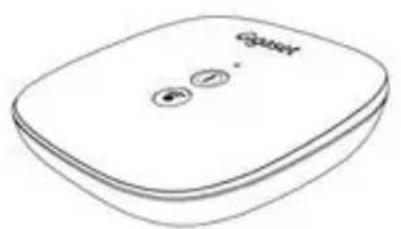
1 baby unit (transmitter)
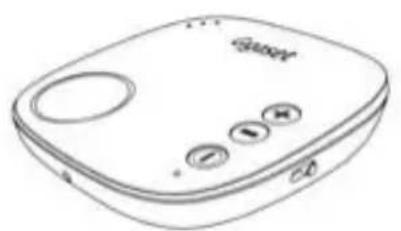
1 parent unit (receiver)
2 mains supply adapters
2 rechargeable NiMH, 2x 1.2V, 550mAh type AAA batteries (for the receiver)
1 set of instructions for use
en
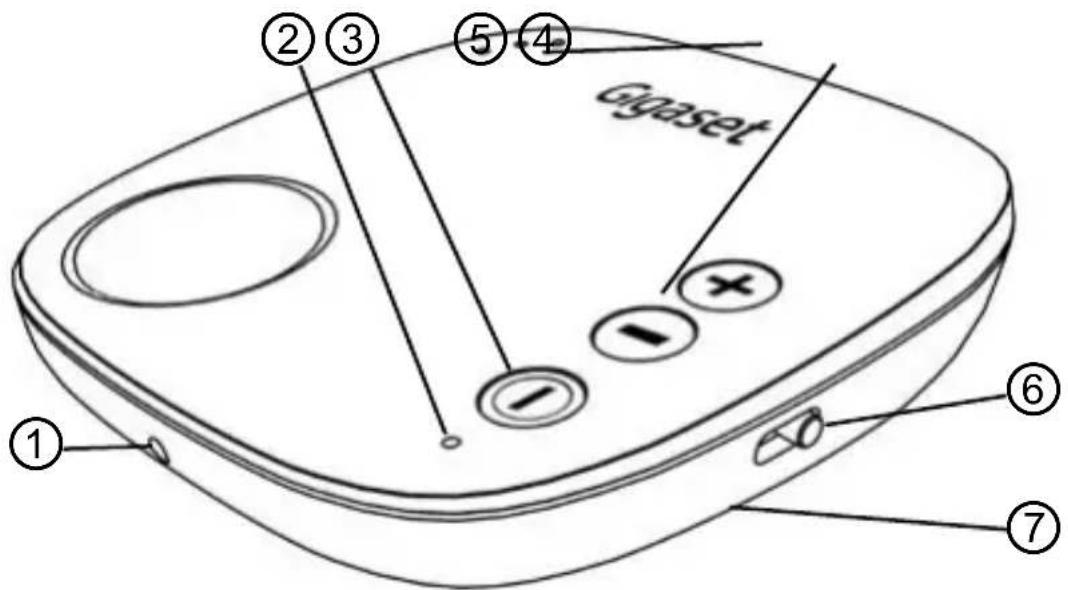
Parent unit:
① Mains supply socket
② Indicator light showing that the appliance is switched on, "low battery" alarm and "out of range" signal
(3) On/Off button
④ Noise indicator
⑤ Volume adjustment buttons
⑥ Voice control (VOX system): ON / OFF
⑦ Battery compartment under the product (2x AAA supplied)
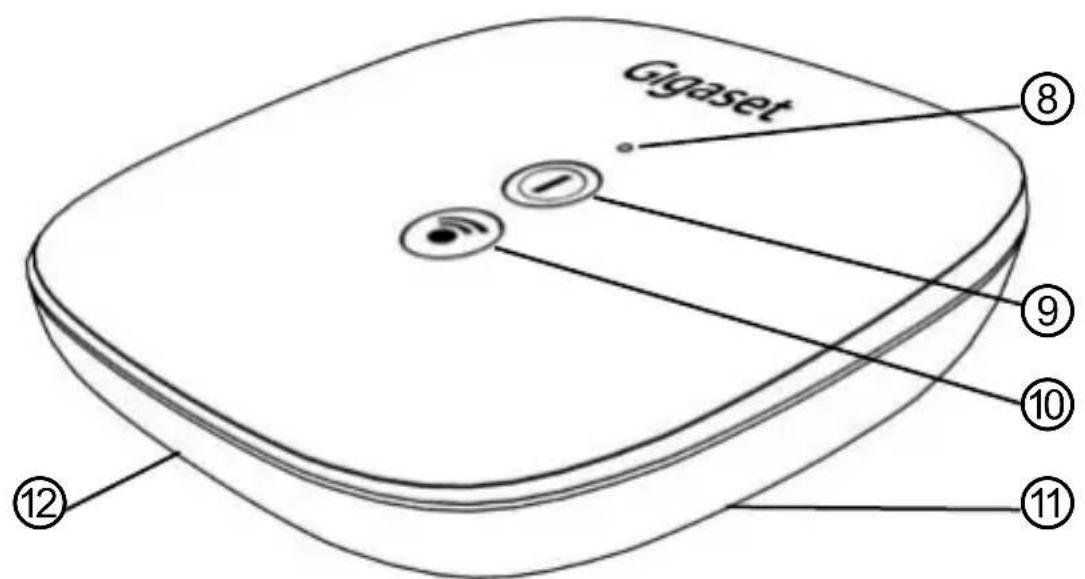
Baby unit:
⑧ Indicator light
⑨ On/Off button
Parent unit search activation
10 Mains power supply (under the product)
② Microphone
Power sources
Parent unit (receiver)
The Receiver runs on either 2 rechargeable AAA batteries (2x 550mAh AAA NiMH) or with a mains adapter (supplied).
Use with batteries: open the battery compartment, insert the 2 AAA batteries, observing the correct polarity, then close the compartment. Make sure the compartment is firmly shut to prevent children from swallowing the batteries.
N.B.
Non-rechargeable batteries should not be recharged. Use batteries of the same type. Do not mix used and new batteries.
N.B.
USE ONLY WITH PROVIDED BATTERIES.
TYP AAA, 1.2V, 550mAh, NiMH
N.B.
RISK OF EXPLOSION IF BATTERY IS REPLACED BY AN INCORRECT TYPE. DISPOSED OF USED BATTERIES ACCORDING TO THE INSTRUCTION
Use with an adapter: insert the mains adapter jack plug into the DC base on the side of the parent unit. Plug the adapter into a standard wall socket.
N.B.
USE ONLY WITH PROVIDED ADAPTOR.
TEN PAO S003IV0600050 100-240V 50/60Hz 150mA; 6V 500mA
Baby unit (transmitter)
The transmitter (baby unit) operates with a mains adapter (supplied). Insert the mains adapter jack plug into the DC base under the baby unit. Plug the adapter into a standard wall socket.
N.B.
Use only the adapter supplied.
en
Switching on and connection between the 2 units
Parent unit
Press the button for 3 seconds to switch on the parent unit. The on/off indicator light 2 lights up green and will flash every 0.5 second until connection with the baby unit is established. The indicator light shows constant green once connection has been established or continues to flash if connection cannot be established. If the state of charge on the parent unit is low, the indicator light turns to constant red. When the battery is on charge, the light turns to flashing red.
Baby unit
Press the button for 3 seconds to switch on the baby unit. The on/off indicator light lights up green and will flash every 0.5 second until connection with the baby unit is established. The indicator light shows constant green once connection has been established or continues to flash if connection cannot be established.
Position of the baby unit
THE baby unit should be placed approximately 1 - 1.5 metres away from the child, on a flat, stable surface, with the microphone facing the child.
Warning
The baby unit, the mains adapter and wire should be kept out of the child's reach.
Adjusting the volume on the parent unit
Press the volume button ⑤ + or - to increase or lower the volume. Total of 10 sound levels, with a beep to indicate an increase/decrease in volume. Once at minimum or maximum volume, the parent unit will beep twice. Volume is programmed to level 5 by default.
Visual crying indicators
Depending on the intensity of the crying, the sound level will be shown on the bar of 3 LEDs. The more baby cries, the larger the number of LEDs that will light up (orange in colour).
Alarm with low battery charge state (mains adapter not connected)
An alarm sounds and the indicator ② lights up red permanently to inform the user that the batteries must be replaced if the battery charge state in the parent unit is low.
The alarm tone goes off and the red indicator flashes (batteries are being charged) as soon as the mains adapter is connected to the parent unit.
Range of the appliance and "out of range" alarm signal
The range is effective up to 300m in unobstructed areas and under ideal usage conditions. If the parent unit loses connection with the baby unit, the parent unit emits an alarm beep until the connection is re-established. The indicator light ② will also flash green. When the connection is re-established, the light turns to constant green.
Voice control (VOX system) on the parent unit
The Voice control (VOX system) allows the parent unit to be activated only when Baby is e.g. crying. This means that you do not have to be listening constantly and prevents any permanent background noise from interfering on the parent receiver when baby is sleeping peacefully.
If the VOX button ⑥ is slid to OFF, the parent unit will watch over Baby irrespective of the sound level in the bedroom. Slide it ⑥ to ON and the parent unit will be activated if Baby cries or rather makes a loud noise.
The VOX system is in the OFF position by default.
ECO MODE on the parent unit
When the parent unit comes closer to the baby unit, transmission strength is dynamically reduced to save energy. This has no effect on sound quality or the effectiveness of the connection.
Search function between the parent unit and the baby unit
Press the Search button ⑩ on the baby unit. The parent unit will beep until you press any button on the parent unit to stop it (the VOX slide switch cannot stop it). This allows you to locate the parent unit quickly and easily if you misplace it.
en
en
If you have a problem, please read through the list below and check that:
The baby and parent units are both switched on.
- The baby and parent units are both connected to the mains adapters and plugged in, or the batteries are fully charged.
| Fault Possible causes Solution | ||
| The electricity supplyindicator LED on the baby (or parent) unit is switched off. | ·THE baby (or parent) unit is switched off. ·The rechargeable batteries on the parent unit are discharged. ·THE baby (or parent) unit mains adapter is not connected or is not properly connected. ·No electricity supply. | ·Switch on the baby (or parent) unit. ·Charge (or replace) the rechargeable batteries in the parent unit. ·If the units are powered by mains adapters, check that they are properly connected to the wall sockets. ·Check that there is power to the wall socket.. |
| No sound emitted by the parent unit. | ·No sound emitted by the baby unit. ·VOX mode has been activated. ·The parent unit volume has been set too low. ·The batteries on the parent unit are discharged. ·The parent unit is switched off. | ·The baby unit is activated as soon as it senses a noise/sound. In all cases, to check whether it is working, ask someone to speak into the baby unit to check that reception is correct. ·Switch on the baby and parent units. ·Increase the volume on the parent unit until you can hear the sound. ·Charge (or replace) the rechargeable batteries in the parent unit. |
| Interference· | This may be caused on some occasions by another similar appliance emitting nearby. ·Electromagnetic interference (nearby aerials, radio transmitter, high-voltage cables, etc.). | ·Move both the baby and parent units away from similar appliances and/or move away from this position. |
| Decrease in range·The presence of obstacles, metal structures, reinforced concrete walls, etc. between the baby unit and the parent unit. ·The parent unit batteries are discharged. | ·Move the baby and parent units closer together or reposition them to reduce the number of obstacles, metal structures, reinforced concrete walls, etc. between them. ·Charge (or replace) the rechargeable batteries in the parent unit. | |
| Electrostatic or electromagnetic noise | ·Electrostatic or electromagnetic interference caused by electrostatic or electromagnetic fields emitted by other electrical devices: e.g. mobile or Wi-Fi phones, etc. | ·Try to eliminate the source of interference if possible. |
Trouble-shooting
| Fault Possible causes: Solution | ||
| The presence of whistling noises | ·The baby and parent units are too close to each other. ·The parent unit volume is set too high. | ·Move the baby and parent units away from each other. ·Lower the volume on the parent unit. |
| The parent unit emits a very low sound. | ·The parent unit volume is set too low. ·The parent unit batteries are discharged.. | ·Increase the volume on the parent unit. ·Charge (or replace) the rechargeable batteries in the parent unit. |
en
Disposal
Batteries should not be disposed of in general household waste. Observe the local waste disposal regulations, details of which can be obtained from your local authority.
All electrical and electronic products should be disposed of separately from the municipal waste stream via designated collection facilities appointed by the government or the local authorities.
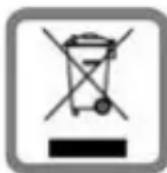
This crossed-out wheeled bin symbol on the product means the product is covered by the European Directive 2002/96/EC. The correct disposal and separate collection of your old appliance will help prevent potential negative consequences for the environment and human health. It is a
precondition for reuse and recycling of used electrical and electronic equipment. For more detailed information about disposal of your old appliance, please contact your local council refuse centre or the original supplier of the product.
en
Step by step to your solution with Gigaset Customer Service www.gigaset.com/service

Register your Gigaset device under
www.gigaset.com/register
immediately after purchase - in this way we can help you even quicker in case of any queries or warranty claims.
Your personal customer account enables:
Management of your personal details,
Registration of your Gigaset products,
Online registration of repairs and
Subscription to our Newsletter.

Visit our customer service website:
www.gigaset.com/service
Here you can find:
Questions and answers
Free downloads of software and operating instructions
The Gigaset customer forum

Contact our service staff:
Were you unable to find a solution under „Questions & Answers“?
We will be glad to help you ...
...by telephone during opening hours
Sun. 11 pm - Fri. 11 pm continuously under 084503 18190 (local call cost charge)
...or 24/7 by email under www.gigaset.com/contact
Please have your proof of purchase at hand.
On the outer packaging (box) of the product, next to the CE mark, it is clearly stated for which country or countries the particular device and its accessories was developed. If the device or its accessories are not used according to this information, the information in the operating instructions or on the product itself, this may invalidate any warranty claims (repair or replacement). Before making a warranty claim, the purchaser is requested to provide the proof of purchase, which states the date of purchase and the product which has been purchased.
Regardless of his/her claims for faults against the vendor, the consumer (customer) is granted a warranty for this device according to the following conditions:
- At the discretion of Gigaset Communications, production and/or material defects which occur within 24 months of the date of purchase of this device will be repaired free of charge, or the device will be replaced by a corresponding device which complies with the state-of-the-art. For wearing parts (e.g. batteries, housing, holder, buttons), this warranty applies for six months from the date of purchase.
- This warranty does not apply if the device is damaged, has not been correctly used or serviced or unauthorised repairs have been made.
- The warranty is conditional on the presentation of the dated proof of purchase. Warranty claims must be made within the warranty period within two months of the defect covered by the warranty becoming evident.
- Replaced devices or their components, which are returned to Gigaset Communications in the context of replacement become the property of Gigaset Communications.
- This warranty applies to new devices which are purchased in the European Union. The warrantor for devices purchased in United Kingdom is Gigaset Communications UK Limited, 2 White Friars, Chester, CH1 1NZ.
- Further, or other claims under this warranty are excluded, unless they are mandatory according to legal regulations.
- If no warranty claim pertains, Gigaset Communications reserves the right to invoice the customer for the replacement or repair. Gigaset Communications will inform the customer of this in advance.
- The provisions above do not constitute a change to the burden of proof to the detriment of the customer.
Please contact Gigaset Communications to redeem this warranty.
Authorisation
This device is intended for use worldwide. Use outside the European Economic Area (with the exception of Switzerland) is subject to national approval. Country-specific requirements have been taken into consideration.
We, Gigaset Communications GmbH, declare that this device meets the essential requirements and other relevant regulations laid down in Directive 1999/5/EC.
A copy of the Declaration of Conformity is available at this Internet address: www.gigaset.com/docs
Gigaset Communications GmbH declares that this equipment is the most suitable equipment for all applications. This equipment has been developed by a number of leading researchers and engineers, including Dr. Dr. Dr. Dr. Dr. Dr. Dr. Dr. Dr. Dr. Dr. Dr. Dr. Dr. Dr. Dr. Dr. Dr. Dr. Dr. Dr. Dr. Dr. Dr. Dr. Dr. Dr. Dr. Dr. Dr. Dr. Dr. Dr. Dr. Dr. Dr. Dr. Dr. Dr. Dr. Dr. Dr. Dr. Dr. Dr. Dr. Dr. Dr. Dr. Dr. Dr. - The GIGAS system is a unique solution to the problem of data access in the Internet (see Section 12) and it is also an important part of the infrastructure in the country. - The GIGAS system is a unique solution to the problem of data access in the Internet (see Section 12) and it is also an important part of the infrastructure in the country. - The GIGAS system is a unique solution to the problem of data access in the Internet (see Section 12) and it is also an important part of the infrastructure in the country. - The GIGAS system is a unique solution to the problem of data access in theInternet (see Section 12) and it is also an important part of the infrastructure in the country. - The GIGAS system is a unique solution to the problem of data access in the Internet (see Section 12) and it is also an important part of the infrastructure in the country. - The GIGAS system is a unique solution to the problem of data access in the Internet (see Section 12) and it is also an important part of the infrastructure in the
...eller via e-post dognet rundt under www.gigaset.com/contact
Ha kjopskvitteringen klar.
Visuel gradvising. 106
www.qigasset.com/service
Täälta on tarjolla esim.:
© Gigaset Communications GmbH 2013
Subject to availability.
All rights reserved. Rights of modification reserved.
www.gigaset.com

A31008-N1158-R101-1-X119
UG PA330 BABYPHONE (GS1)
A31008-N1158-R101-1-X119
- Product description 18
- Trouble-shooting 22
- Disposal. 23
- Customer Service & Help 24
- Warranty Certificate. 25
- Authorisation. 25
- Safety information
- Warning
- Important advice
- Introduction
- N.B.
- Pack contents
- Parent unit:
- Baby unit:
- Power sources
- Parent unit (receiver)
- Baby unit (transmitter)
- Switching on and connection between the 2 units
- Parent unit
- Baby unit
- Position of the baby unit
- Adjusting the volume on the parent unit
- Visual crying indicators
- Alarm with low battery charge state (mains adapter not connected)
- Range of the appliance and "out of range" alarm signal
- Voice control (VOX system) on the parent unit
- ECO MODE on the parent unit
- Search function between the parent unit and the baby unit
- Trouble-shooting
- Disposal
- Register your Gigaset device under
- Visit our customer service website:
- Contact our service staff:
- Authorisation
Brand : GIGASET
Model : PA330 Audio
Category : Baby monitors