Baby 100 Audio - Baby monitors GIGASET - Free user manual and instructions
Find the device manual for free Baby 100 Audio GIGASET in PDF.



| Product Type | Baby monitor (babyphone) - audio |
| Brand | Gigaset |
| Model | Baby 100 Audio |
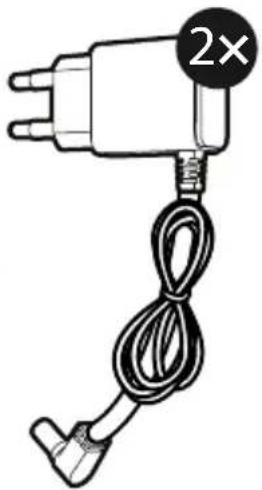
| Power Supply | 2 power adapters 6V DC / 400 mA (model VT05EEU06040); rechargeable Ni-MH AAA 950 mAh batteries |
| Transmission Frequency | DECT: 1881.792 – 1897.344 MHz, max power 0.25 W |
| Number of Channels | 10 |
| Approximate Range | Up to 50 m indoors, up to 300 m outdoors (varies by environment) |
| Main Features | Two-way talk-back, sound level indicator (3 levels), night light, built-in lullabies, voice recording (20 sec), alarm timer, temperature sensor on baby unit |
| Display | LCD screen on parent unit with battery and sound level indicators |
| Approximate Dimensions | Parent unit: approx. 8 x 5 x 2.5 cm; Baby unit: approx. 9 x 7 x 4 cm |
| Approximate Weight | Parent unit: approx. 100 g; Baby unit: approx. 200 g (with batteries) |
| Care and Cleaning | Clean with a damp cloth; do not immerse in water; do not use solvents |
| Safety | Installation by an adult, safety distance >1 m from the bed; does not replace parental supervision; risk of strangulation from cables |
| Manufacturer Warranty | 24 months (wear parts: 12 months) – see conditions in the manual |
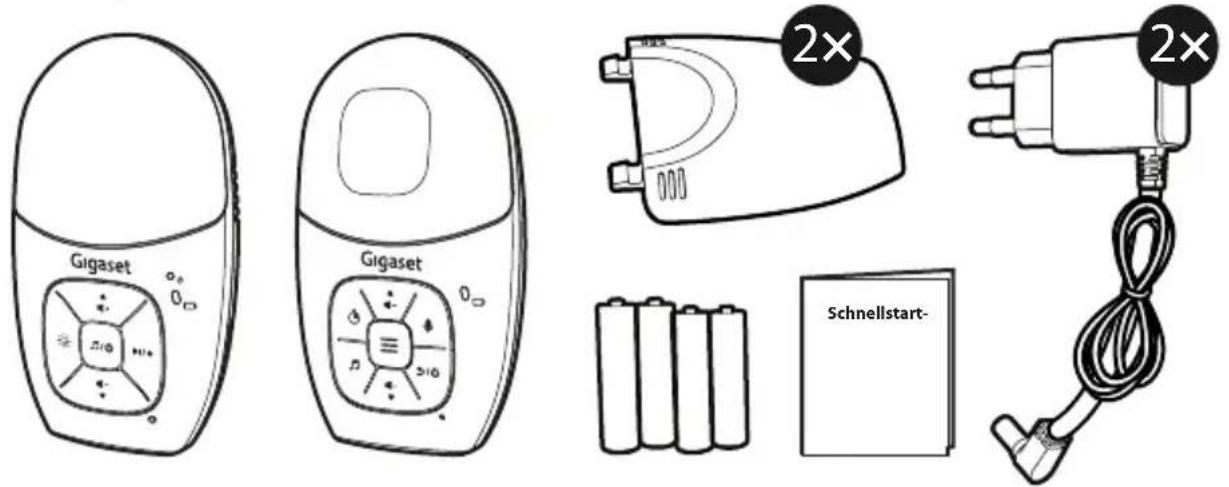
| Supplied Accessories | Baby unit, parent unit, 2 power adapters, 2 rechargeable AAA 950 mAh batteries, belt clips |
| Operating Temperature | 0 °C to 40 °C |
Frequently Asked Questions - Baby 100 Audio GIGASET
User questions about Baby 100 Audio GIGASET
0 question about this device. Answer the ones you know or ask your own.
Ask a new question about this device
Download the instructions for your Baby monitors in PDF format for free! Find your manual Baby 100 Audio - GIGASET and take your electronic device back in hand. On this page are published all the documents necessary for the use of your device. Baby 100 Audio by GIGASET.
USER MANUAL Baby 100 Audio GIGASET
This guide contains important information.
Please keep it for future reference.
For more information about products, downloads,
resources and more visit
www.gigaset.com/manuals

VTech Telecommunications Ltd.
Modell: VT05EEU06040

Yiyang Corun Battery Co., Ltd.
Modell: AAA 950 mAH NiMH (Ni-MH AAA950)
natural_image
Simple line drawing of a curved mechanical component with two side notches and a circular indicator labeled '2×' (no text or symbols on the diagram itself)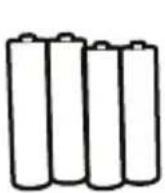
natural_image
Simple line drawing of a plug with a cable and a 2× mark indicator (no text or symbols on the plug itself)natural_image
Illustration of a hand washing machine with a black arrow indicating the handle (no text or symbols present)2
natural_image
Technical line drawing of a handheld device with internal components and ventilation slots (no text or symbols)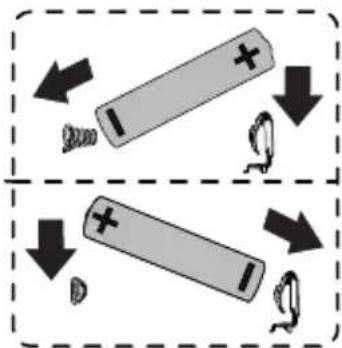
3
natural_image
Diagram of a device's internal structure with a directional arrow indicating rotation (no text or symbols present)Hinweise:
natural_image
Line drawing of a portable electronic device with ventilation slots and a small plug attached (no text or symbols)Elterneinheit
natural_image
Line drawing of a portable air conditioner with a plug inserted into the front panel (no text or symbols)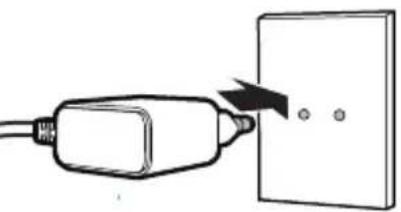
natural_image
Simple line drawing of a plug inserted into a wall socket with three dots nearby (no text or symbols)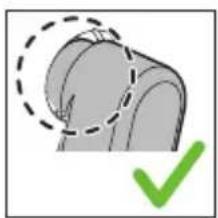
natural_image
Illustration of a mechanical joint with a green checkmark indicating selection (no text or symbols present)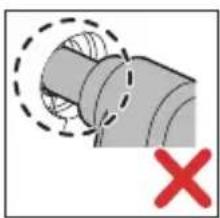
natural_image
Diagram of a pipe joint with dashed lines indicating hidden edges and a red X mark (no text or symbols)Hinweise:
1 Nachtlicht
VTech Telecommunications Ltd. 23/F., Tai Ping Industrial Centre, Block 1, 57 Ting Kok Road, Tai Po, Hongkong.
Importeur
Important Safety Instructions
The applied nameplate is located at the bottom of the baby unit base.
When in use, basic safety precautions should always be followed to reduce the risk of fire, electric shock and injury, including the following:
1 Follow all warnings and instructions marked on the product.
2 Adult setup is required.
3 CAUTION: Do not install the baby unit at a height above 2 metres.
4 This product is intended as an aid. It is not a substitute for responsible and proper adult supervision and should not be used as such.
5 This product is not intended for use as a medical monitor.
6 Do not use this product near water, for example, near to a bath, sink, swimming pool or shower.
7 CAUTION: Use only the battery provided. There may be a risk of explosion if a wrong type of battery is used for the parent unit. There may be a risk of explosion if a wrong type of battery is used for the parent unit. The battery cannot be subjected to high or low extreme temperature and low air pressure at high altitude during use, storage or transportation. Disposal of batteries in fire or a hot oven, mechanically crushing or cutting the battery can result in an explosion. Subjecting products or batteries to an extremely high temperature environment can result in explosion or leakage of flammable liquids, or gas. Products or batteries subjected to extremely low air pressures may result in explosion or leakage of flammable liquids, or gas.
8 Use only the power adaptors supplied with this product. Incorrect power adaptor polarity or voltage can seriously damage the product.

Power adaptor information:
Output: 6 V DC 400 mA
VTech Telecommunications Ltd.
Model: VT05EEU06040

Rechargeable battery information:
Yiyang Corun Battery Co., Ltd.
Model: AAA 950 mAH NiMH (Ni-MH AAA950)
9 The power adaptor is intended to be correctly oriented in a vertical or floor mount position. The prongs are not designed to hold the plug in place if it is plugged into a ceiling, under-the-table or cabinet outlet.
10 For pluggable equipment, the socket-outlet (power adaptor) should be installed near the equipment and should be easily accessible.
11 Unplug this product from the wall outlet before cleaning. Do not use liquid or aerosol cleaners. Use a damp cloth for cleaning.
12 Do not modify the power adaptors or replace with other third-party adaptors.
13 Do not allow anything to rest on the power cords. Do not install this product where the cords may be walked on or damaged.
14 The product should only be operated from a power source indicated on the power adaptor label or marking. If you are unsure of the type of power supply in your home, consult your dealer or electricity supply provider.
15 Do not overload wall outlets or use an extension cord.
16 Do not place this product on an unstable table, shelf, stand or other unstable surfaces.
17 This product should not be placed in any area where proper ventilation is not provided. Any slots or openings in the back or bottom of this product are provided for ventilation. To protect from overheating, openings must not be blocked by placing the product on a soft surface such as a bed, sofa or rug. This product should never be placed near or over a radiator or heat source.
18 Never insert any objects through any apertures or slots in the product as this can be dangerous and cause damage to the battery or other internal parts. Never spill any liquids on the product.
19 To reduce the risk of electric shock, do not disassemble this product, but take it to an authorised service facility. Disassembling or removing parts of the product other than battery replacement via a battery door (if applicable) may expose dangerous voltages or other risks.
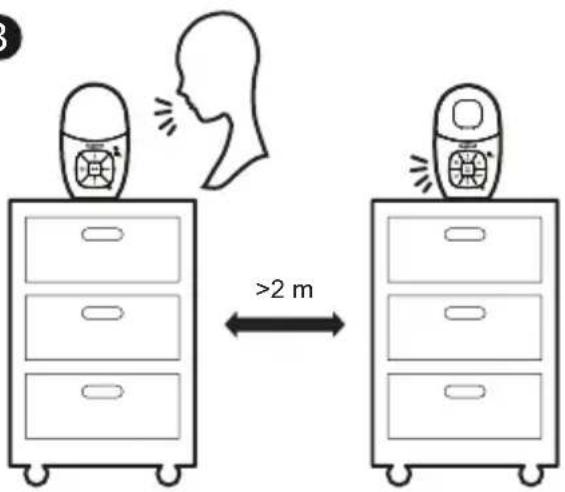
20 You should test the sound reception every time you turn on the units or move one of the components.
21 Periodically examine all components for damage.
22 There is a very low risk of privacy loss when using certain electronic devices, such as baby monitors, cordless telephones, etc. To protect your privacy, make sure the product has never been used before purchase, reset the baby monitor periodically by powering off and then powering on the units, and power off the baby monitor if you are not intending to use it for some time.
23 Children should be supervised to ensure that they do not play with the product.
24 The small parts of this monitor can be swallowed by babies or small children. Keep these parts out of reach of children.
25 The product is not intended for use by persons (including children) with reduced physical, sensory or mental capabilities, or lack of experience and knowledge, unless they have been given supervision or instruction concerning use of the appliance by a person responsible for their safety.
SAVE THESE INSTRUCTIONS.
Cautions
- Use and store the product at a temperature between 0^ and 40^ .
- Mishandling batteries can cause burn, fire or explosion hazards.
- Batteries should not be exposed to excessive heat such as bright sunshine or fire.
- Do not expose the product to extreme cold, heat or direct sunlight. Do not place the product close to a heating source.

- Warning—Strangulation Hazard—Children have STRANGLED in cords. Keep this cord out of the reach of children (more than 0.9m away). Do not remove warning label on the adaptor cord.
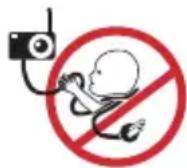
- Never place the baby unit inside the baby's cot or playpen. Never cover the baby unit or parent unit with anything such as a towel or a blanket.
- Other electronic products can cause interference to your parent unit and baby unit. Try installing your baby unit as far away as possible from the following electronic devices: wireless routers, radios, mobile telephones, intercoms, room monitors, televisions, personal computers, kitchen appliances (e.g. microwave ovens) and cordless telephones.
What's Included
Baby Unit Parent Unit
Connect, Charge, and Power On the Baby Monitor
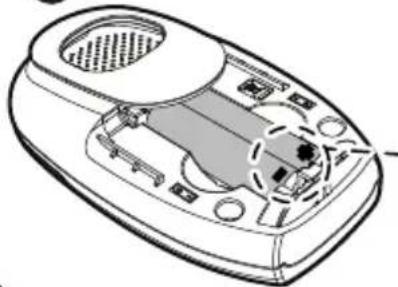
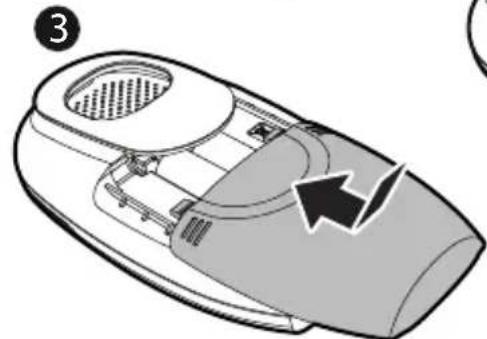
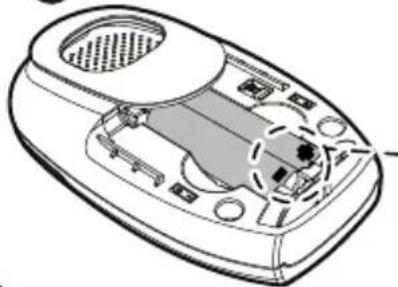
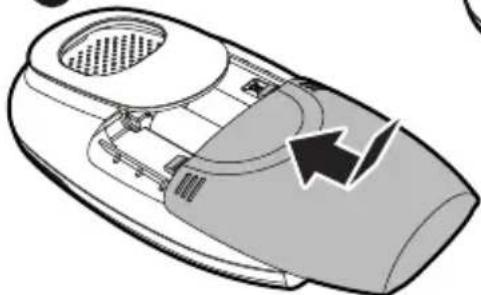
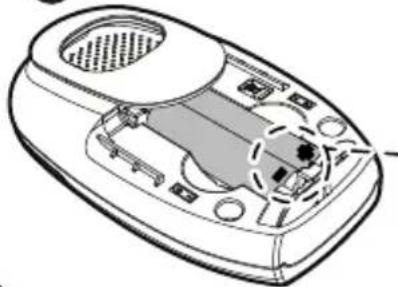
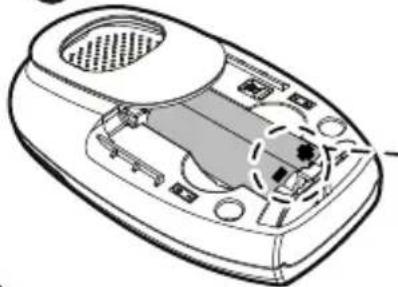
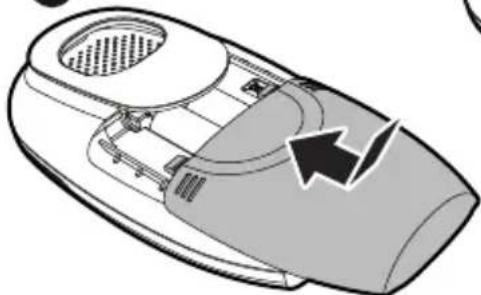
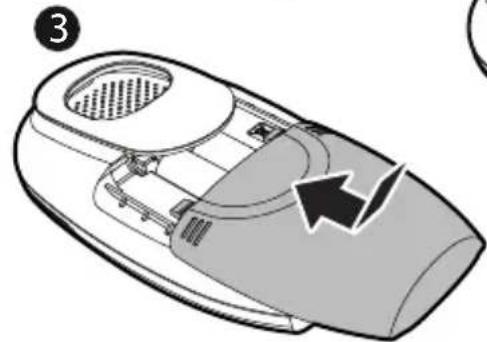
Install Parent Unit Batteries
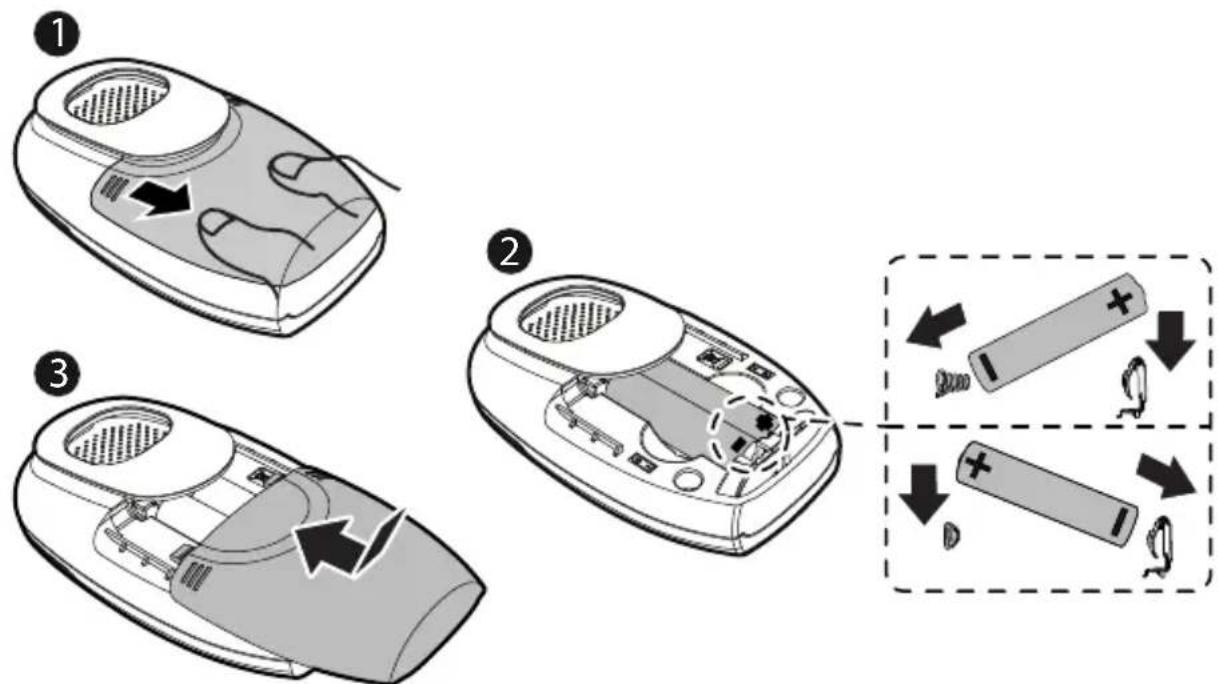
Note:
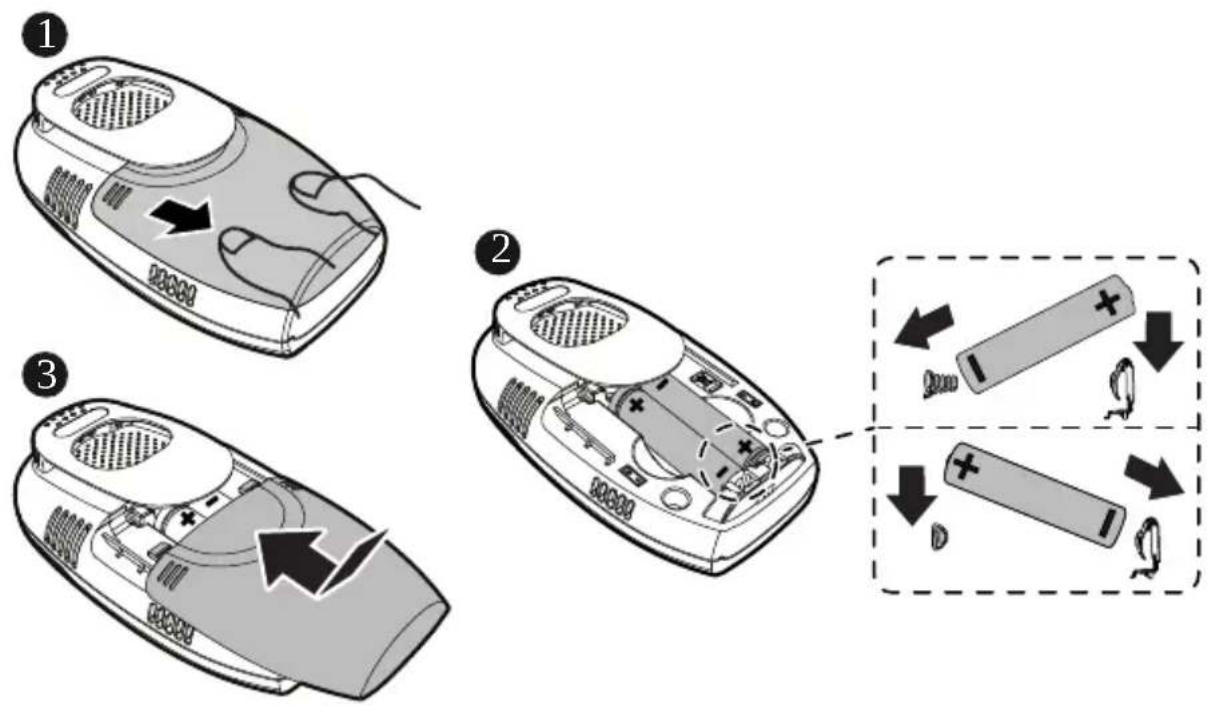
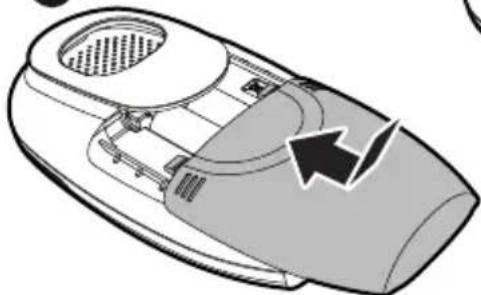
- Only use and replace batteries with models listed in Important Safety Instructions (8).
- If the Baby Monitor is not intended to be used for long periods, disconnect and remove the batteries to prevent possible leakage.
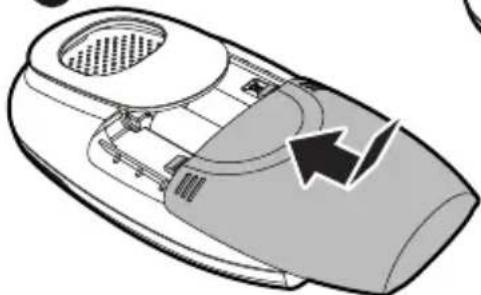
Install Baby Unit Batteries
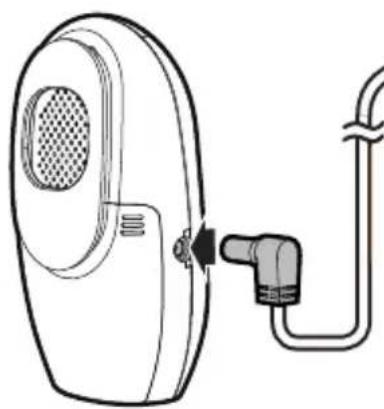
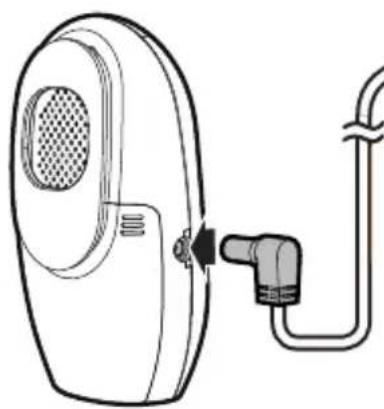
Connect the Baby Monitor
Notes:
- Use only the power adaptors supplied with this product.
• If your Baby Monitor is connected to a timer controlled socket, make sure it is switched on. - Connect the power adaptors in a vertical or floor mount position only.
• Make sure Parent Unit, Baby Unit and the power adaptor cords are out of reach of children.
©
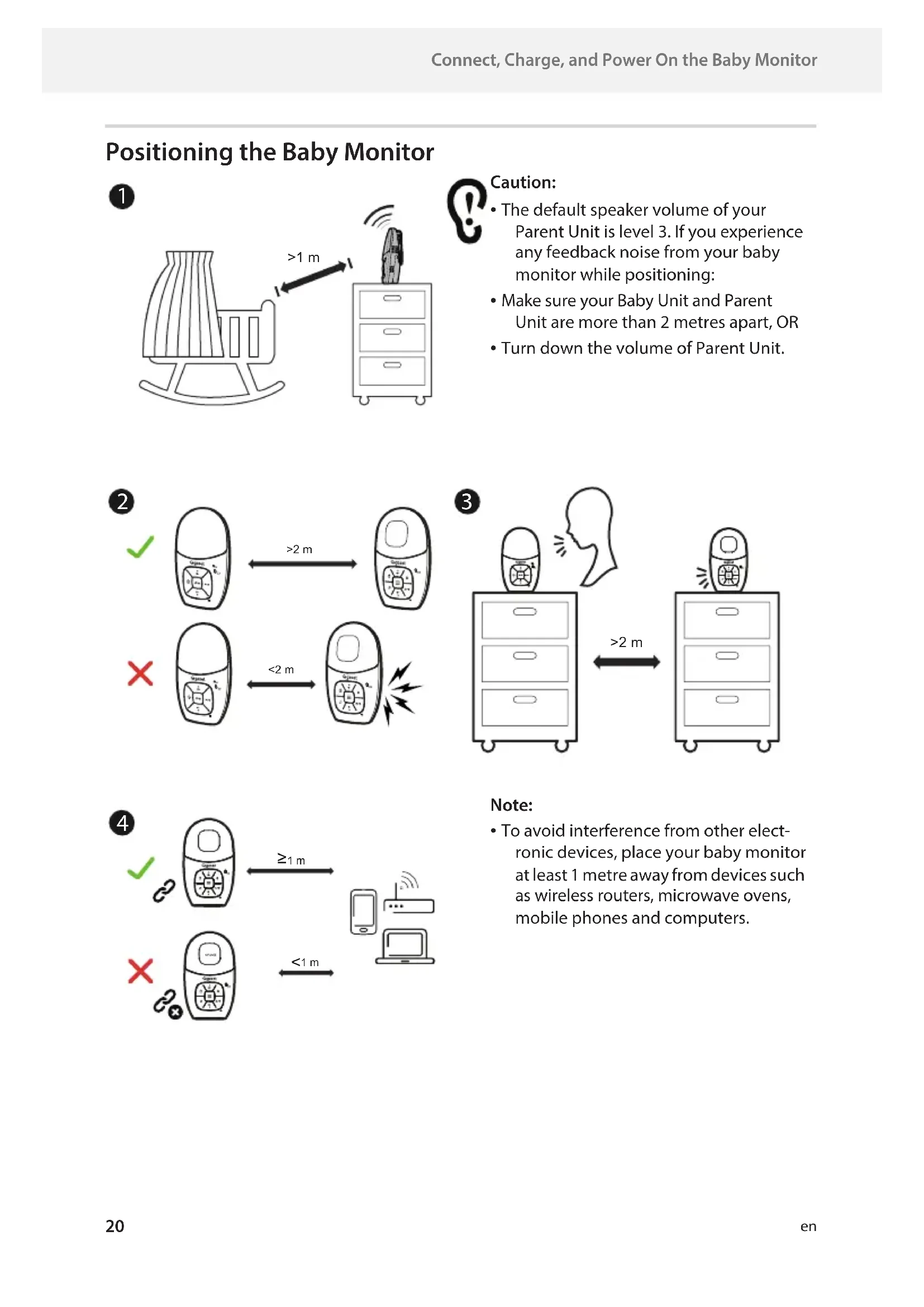
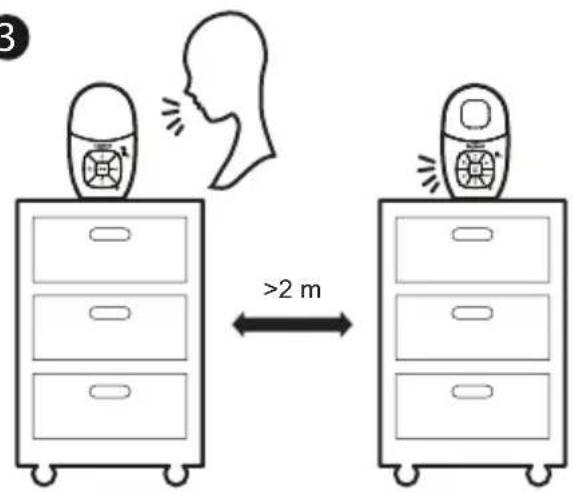
Positioning the Baby Monitor
1
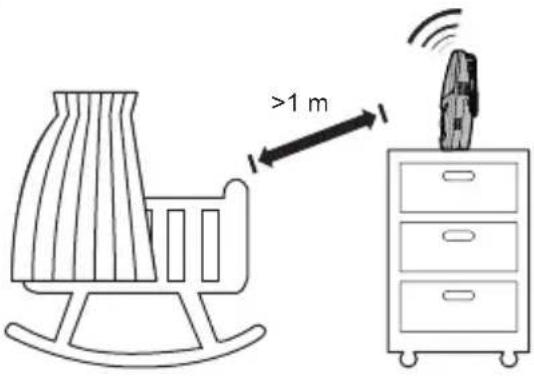
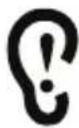
Caution:
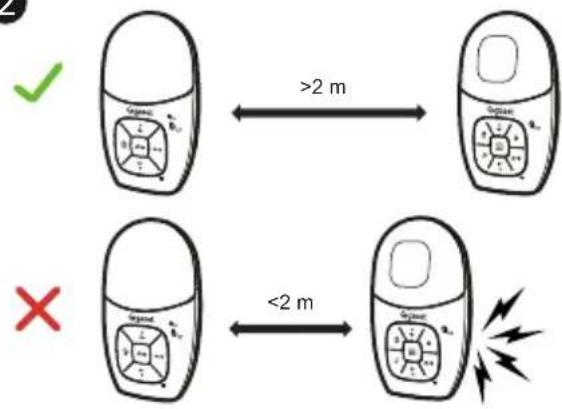
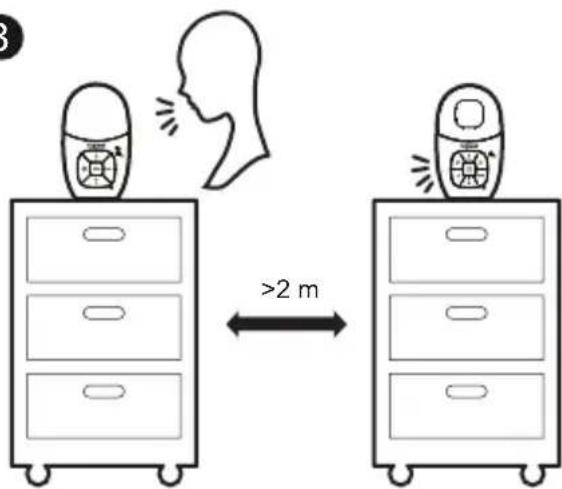
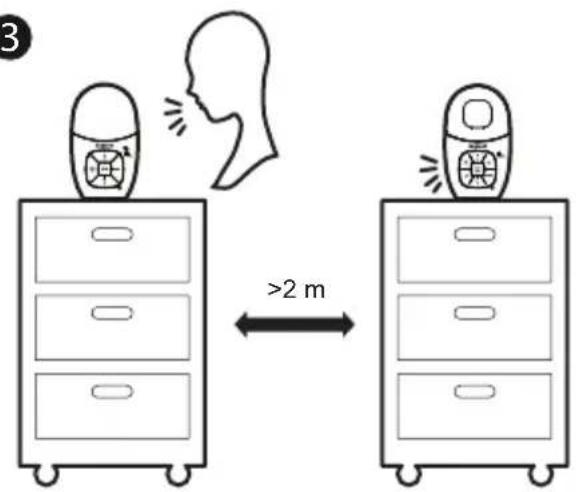
- The default speaker volume of your Parent Unit is level 3. If you experience any feedback noise from your baby monitor while positioning:
• Make sure your Baby Unit and Parent Unit are more than 2 metres apart, OR - Turn down the volume of Parent Unit.
2
flowchart
graph TD
    A["Green checkmark"] -->|>2 m| B["Cell with 3D grid"]
    C["Red X"] -->|<2 m| D["Cell with 3D grid"]
    style A fill:#fff,stroke:#000
    style C fill:#fff,stroke:#000
    style B fill:#fff,stroke:#000
    style D fill:#fff,stroke:#000
3
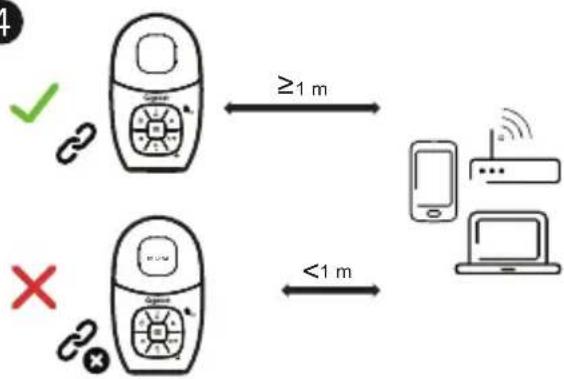
4
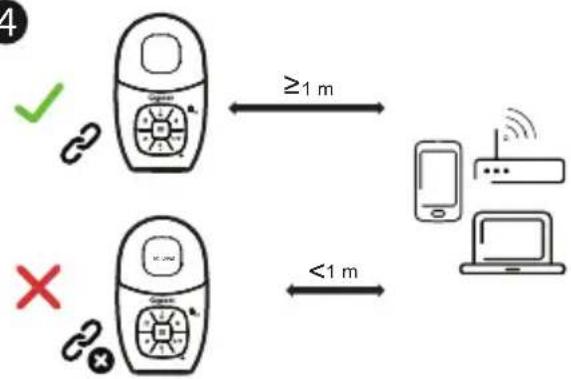
flowchart
graph TD
    A["Device 1"] -->|≥1 m| B["Device 2"]
    C["Device 3"] -->|<1 m| B
    D["Switch"] --> A
    E["Switch"] --> C
Note:
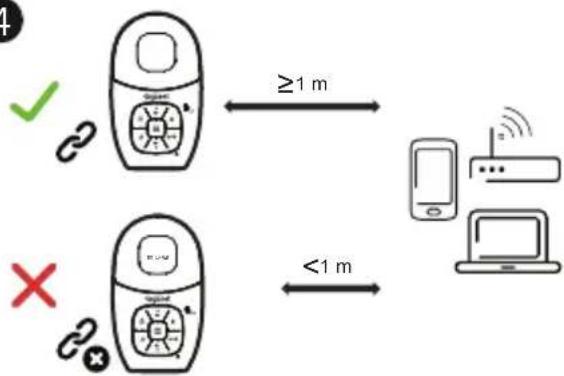
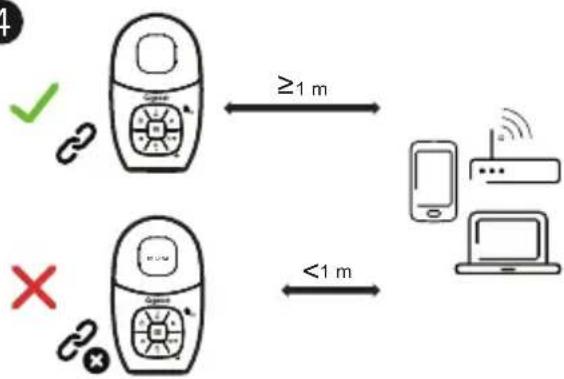
• To avoid interference from other electronic devices, place your baby monitor at least 1 metre away from devices such as wireless routers, microwave ovens, mobile phones and computers.
Overview
Baby Unit
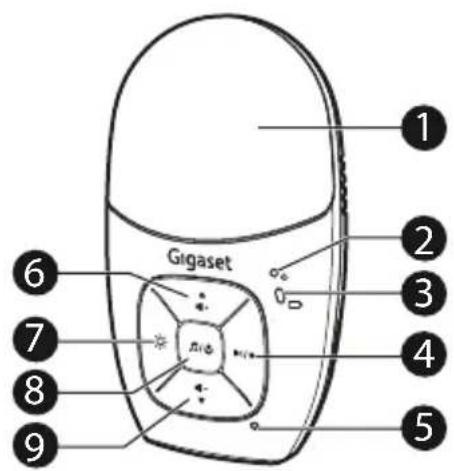
1 Night light
- On when night light is turned on manually.
- Off when night light is turned off manually.
2 POWER light
- On when Baby Unit is powered on.
- Off when Baby Unit is turned off.
3 Battery indication light □
- On when Baby Unit's batteries are charging.
- Flashes when the batteries are low and need charging.
4 ▶1/○
- Press to play the next lullaby.
- Press and hold to record your own voice for up to 20 seconds. Release when finished recording. The recorded voice will be saved as SONG 5.
5 Microphone


Press to increase the speaker volume (Level 1 to Level 5).
7
• Press to turn the night light on or off.
- Press and hold to adjust the brightness of the night light.
8 ♪/⏻
- Press and hold to power on, and the power light turns on.
- Press and hold to power off, and the power light turns off.
- When Baby Unit is powered on, press to play the selected lullaby or the recorded voice. Press again to stop playing.
9

- Press to decrease the speaker volume (Level 1 to Level 5).
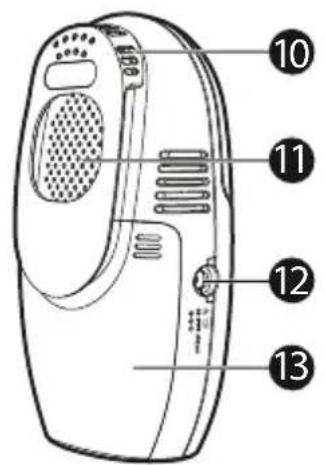
10 Belt clip with temperature sensor
11Speaker
12 Power Jack
13 Battery compartment cover
Parent Unit
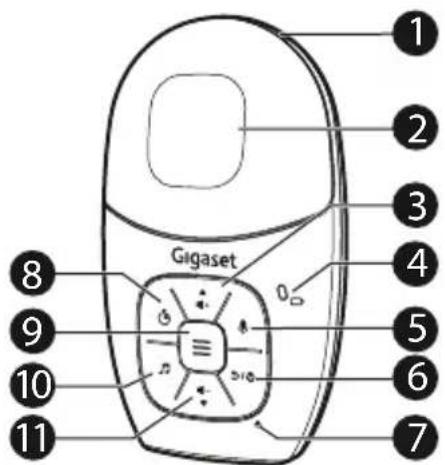
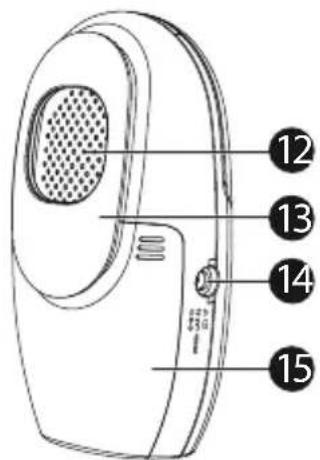
1 3- level sound indicator light
- Green when low sound level is detected by Baby Unit.
- Green and amber when moderate sound level is detected by Baby Unit.
- Green, amber and red when high sound level is detected by Baby Unit (e.g. baby crying loudly).
2 LCD display
3

- Press to increase the speaker volume (Level 1 to Level 5).
- While in a menu, press to scroll up.
4 Battery indication light □
- On when the Parent Unit's batteries are charging.
- Flashes when the batteries are low and need charging.
5

- Press and hold to talk to your baby.
6

- Press and hold to power on and
• power off Parent Unit. - While in a menu, press to return to the previous menu.
7 Microphone
8

- When in idle mode, press to set the alarm timer or check the remaining time.
- When setting the alarm timer, press up or down once to increase or decrease the cooldown by 30 minutes. The maximum time is 24 hours.
- Press the alarm key again to confirm the setting and exit.
- When the time is up, press any key on the parent unit to silence the alarm.
9

- Press to enter the main menu.
- While in a menu, press to choose an item, or save a setting.
- When setting the alarm timer, press to exit.
10

- Press to play or stop playing the lullaby or recorded voice.
- When setting the alarm timer, press to reset the timer.
11


- Press to decrease the speaker volume (Level 1 to Level 5).
- Press repeatedly until the volume reaches the minimum to turn it off.
- While in a menu, press to scroll down.
12 Speaker
13 Belt clip
14 Power Jack
15 Battery compartment cover
Appendix
General Product Care
To keep this product working well and looking good, follow these guidelines:
- Avoid placing near heating appliances and devices that generate electrical noise (for example, motors or fluorescent lamps).
- DO NOT expose to direct sunlight or moisture.
- Avoid dropping the product or treating roughly.
- Clean with a soft damp cloth.
• DO NOT immerse the Parent Unit and the Baby Unit in water and do not clean under running water. - DO NOT use solvents, household cleaning sprays, or liquid cleaners.
• Make sure the Parent Unit and the Baby Unit are dry before reconnecting to the mains.
Storage
If the audio baby monitor will not be used for an extended period of time, store the Parent Unit, the Baby Unit, and the adaptors in a cool, dry place.
Guarantee Certificate
Unless otherwise specified, the guarantor (hereinafter referred to as "Gigaset Technologies") grants the consumer (customer) a durability warranty under the following conditions (warranty conditions), without prejudice to the consumer's statutory rights relating to defects. The customer's warranty rights are not limited by this warranty. Warranty rights can be asserted free of charge. This warranty represents an obligation on the part of the guarantor in addition to the statutory warranty rights that can be asserted free of charge for defect claims.
Warranty conditions:
- New devices (telephones, smartphones) and their components in which a defect is detected within 24 months from the date of purchase resulting from a manufacturing and/or materials fault will, at the customer's discretion, be exchanged free of charge for a technologically current device or repaired by Gigaset Technologies. This durability warranty applies for 12 months from the date of purchase for parts subject to wear (all moving parts that can be replaced by the customer itself, e.g. spare parts, batteries, keyboards, housing).
- This warranty does not apply in the event a defect to devices is attributable to improper treatment and/or a failure to follow the operating guides.
- This warranty does not cover any services provided by the appointed dealer or by the customer himself (e.g. installation, configuration, software downloads). Manuals and, where applicable, accompanying software on a separate data carrier are also excluded from the warranty.
- Proof of purchase plus date of purchase are required as evidence of a valid warranty. Warranty claims must be asserted within two (2) months of the awareness of a warranty event.
- Replaced devices or their components returned to Gigaset Technologies during the course of an exchange are transferred to the ownership of Gigaset Technologies.
-
This warranty applies to new devices acquired within the European Union. These will be exchanged free of charge for a technologically current device or repaired by Gigaset Technologies. The warrantor is Gigaset Technologies GmbH, Frankenstraße 2, D-46395 Bocholt.
-
No further or different claims arising from this manufacturer's warranty will be accepted. Gigaset Technologies accepts no liability for operational interruptions, loss of profit and loss of data, software additionally installed by the customer or other information. The customer is responsible for safeguarding these. The liability disclaimer does not apply if liability is mandatory, for example under the Product Liability Act, in cases of wilful intent, gross negligence, injury to life, limb and health or breach of material contractual obligations. Claims for damages in respect of breach of material contractual obligations are however limited to foreseeable losses typical for the contract, unless liability is as a result of wilful intent, gross negligence, injury to life, limb and health or under the Product Liability Act.
- Successful assertion of a warranty claim does not extend the term of the warranty.
- Unless there is a warranty event, Gigaset Technologies reserves the right to charge the customer for an exchange or repair. Gigaset Technologies will inform the customer of this in advance.
- Any change to the rules governing burden of proof to the detriment of the customer is not connected with the above rules.
- Federal German law applies to this warranty, to the exclusion of the United Nations Convention on Contracts for the International Sale of Goods (CISG). This choice of law does not deprive the consumer of the protection he/she would have been granted under provisions that cannot be derogated from by agreement, according to the law of the country in which he/she has her habitual residence ('favourability principle").
Please contact the warrantor's customer services to redeem and assert this warranty. You can find the relevant telephone number in our Service Portal at www.gigaset.com/service.
Disposal
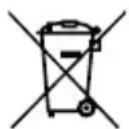
The crossed-out wheelie bin symbols on products and batteries, or on their respective packaging, indicates they must not be disposed of in domestic waste as they contain substances that can be damaging to the environment and human health.
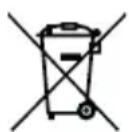
The chemical symbols Hg, Cd or Pb, where marked, indicate that the battery contains more than the specified value of mercury (Hg), cadmium (Cd) or lead (Pn) set out in Battery Directive (2006/66/EC).
The solid bar indicates that the product was placed on the market after 13th August, 2005. Help protect the environment by disposing of your product or batteries responsibly.
Declaration of Conformity

This product is intended for use within Europe.

This equipment compiles with the essential requirements for the Radio Equipment and Telecommunications Terminal Equipment Directive 2014/53/EU.
Gigaset Technologies GmbH (Gigaset is a Member of VTech Group of Companies) declares that Gigaset BABY100 Audio is in compliance with the essential requirements and other relevant provisions of Directive 2014/53/EU.
The Declaration of Conformity for the Gigaset BABY100 Audio is available from www.gigaset.com/docs.
Manufacturer
VTech Telecommunications Ltd. 23/F., Tai Ping Industrial Centre, Block 1, 57 Ting Kok Road, Tai Po, Hongkong.
Importer
Find the answer to your questions and get assistance at your own pace. Scan the QR code to access the Online Support Page or visit service.gigaset.com.
Important:
Please retain your sales receipt as proof of the date of purchase.
Technical Specifications
Gigaset BABY100 Audio
| Frequency control Crystal controlled | PLL synthesizer |
| Transmit frequency Baby Unit: 1881.792 - 1897.344 MHzParent Unit: 1881.792 - 1897.344 MHzMaximum power used by the transmitter: 0.25 W (250 mW) | |
| Channels 10 | |
| Power requirements | Baby Unit / Parent Unit:AAA 950 mAh Ni-MH batteryBaby Unit / Parent Unit power adaptors:Output: 6 V DC 400 mA |
Power adapter
| Manufacturer | VTech Telecommunications (Qingyuan) LimitedHandelsregister: 91441800770998532YZone 1, Qing Yuan Hi-Tech industrial Development Zone, Qingyuan, Guangdong. |
| Model identifier VT05EEU06040 | |
| Input voltage 100 - 240 V / 0,15 A | |
| Input AC frequency 50/60 Hz | |
| Output voltage 6,0 V | |
| Output current 0,4 A | |
| Output power 2,4 W | |
| Average active efficiency > 72,88 % | |
| No-load power consumption < 0,1 W |
VTech Telecommunications Ltd.
Modelo: VT05EEU06040

Yiyang Corun Battery Co., Ltd.
Modelo: AAA 950 mAH NiMH (Ni-MH AAA950)
natural_image
Simple line drawing of a curved mechanical component with two side connectors and a 2× symbol (no text or labels)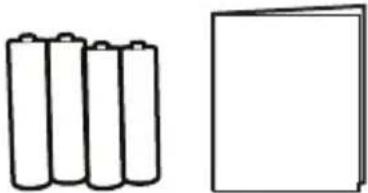
natural_image
Simple line drawing of four batteries and one blank rectangle (no text or symbols)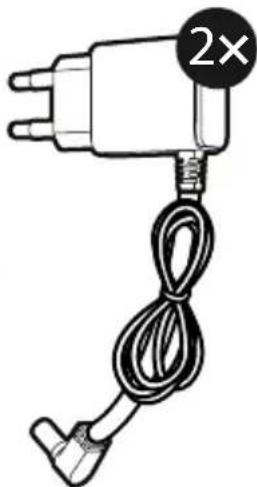
natural_image
Simple line drawing of a hairdryer with a 2× speed limit label (no text or symbols on the object itself)natural_image
Illustration of a hand washing machine with a black arrow indicating the handle (no text or symbols present)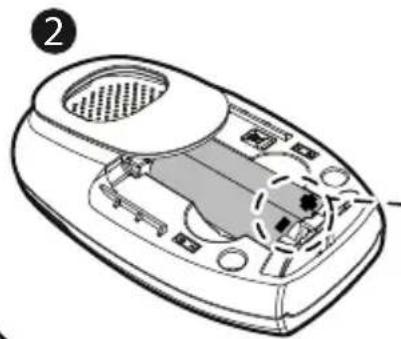
natural_image
Line drawing of a device interior with labeled parts (no text or symbols)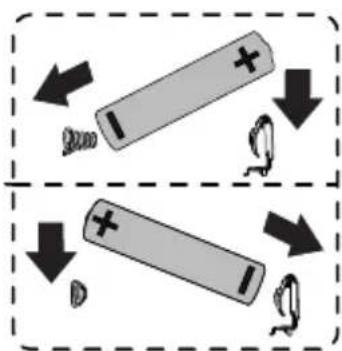
natural_image
Diagram of a vacuum cleaner with labeled parts and an arrow indicating airflow direction (no text or symbols present)Indicaciones:
natural_image
Line drawing of a portable electronic device with ventilation slots and a small plug attached (no text or symbols)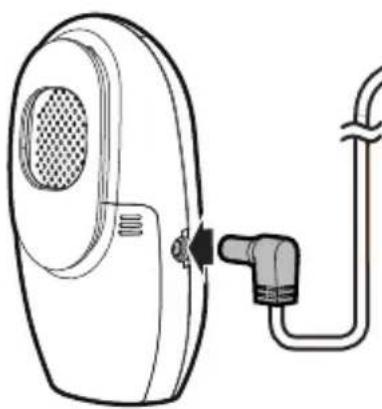
natural_image
Line drawing of a portable electronic device with a cable and connector (no text or symbols)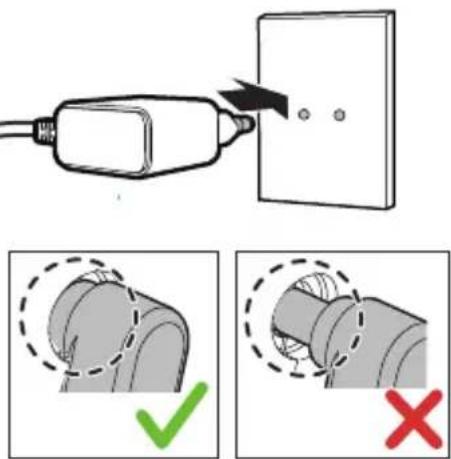
Indicaciones:
flowchart
graph LR
    A["Cell with charge distribution"] <-->|>2 m| B["Cell with charge distribution"]
    C["Cell with charge distribution"] <-->|<2 m| D["Cell with charge distribution"]
3
4
flowchart
graph LR
    A["Device 1"] -->|≥1 m| B["Router"]
    C["Device 2"] -->|<1 m| B
    style A fill:#f9f,stroke:#333
    style C fill:#f9f,stroke:#333
    style B fill:#ccf,stroke:#333
Indicación:
1 Luz nocturna
VTech Telecommunications Ltd. 23/F., Tai Ping Industrial Centre, Block 1, 57 Ting Kok Road, Tai Po, Hong Kong.
Importador
VTech Telecommunications Ltd.
Yiyang Corun Battery Co., Ltd.
natural_image
Simple line drawing of a device component with a 2× multiplier label (no text or symbols on the diagram itself)
natural_image
Simple line drawing of four batteries and one blank rectangle (no text or symbols)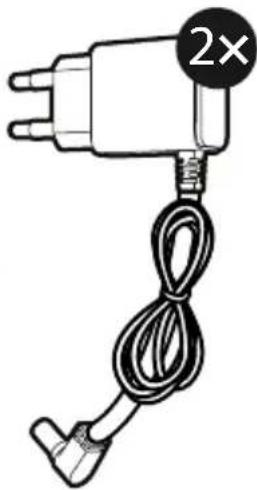
natural_image
Simple line drawing of a utility pole with a 2× speed limit indicator (no text or symbols on the device itself)Connector, charger et allumer le babyphone
natural_image
Illustration of a hand washing machine with a black arrow indicating the handle (no text or symbols present)2
natural_image
Technical line drawing of a remote control device with labeled ports and internal components (no text or symbols)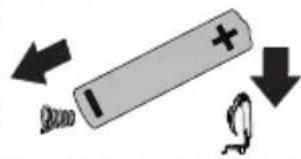
3
natural_image
Diagram of a device's internal structure with a directional arrow indicating rotation (no text or symbols present)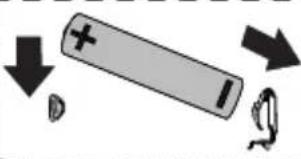
natural_image
Simple diagram showing a battery with positive charge and downward arrow, next to a curved arrow and a circular symbol (no text or labels)Remarques :
natural_image
Line drawing of a portable electronic device with ventilation slots and a plug inserted (no text or symbols)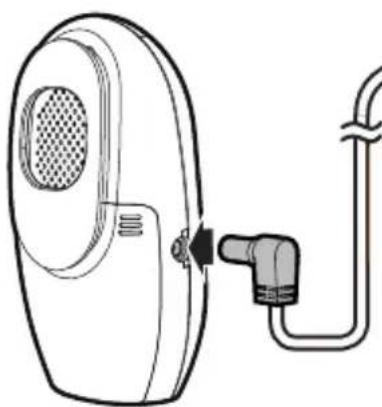
natural_image
Line drawing of a portable air conditioner with a plug inserted into the front panel (no text or symbols)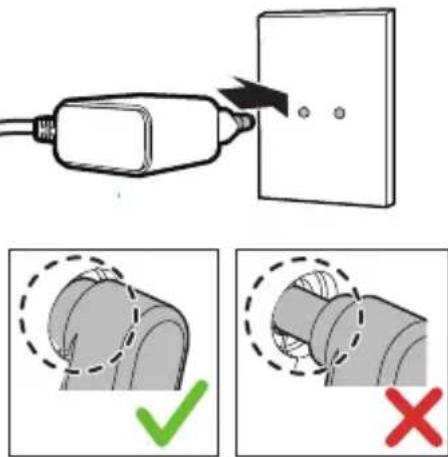
Remarques :
flowchart
graph LR
    A["Cell with charge distribution"] <-->|>2 m| B["Cell with charge distribution"]
    C["Cell with charge distribution"] <-->|<2 m| D["Cell with charge distribution"]
    style A fill:#f9f,stroke:#333
    style B fill:#ccf,stroke:#333
    style C fill:#cfc,stroke:#333
    style D fill:#fcc,stroke:#333
3
4
flowchart
graph TD
    A["Device 1"] -->|≥1 m| B["Device 2"]
    C["Device 3"] -->|<1 m| B
    D["Switch"] --> A
    E["Switch"] --> C
Remarque :
1 Veilleuse
natural_image
Two identical diagrams of a waste bin with diagonal lines crossing, no text or symbols present.
VTech Telecommunications Ltd. 23/F., Tai Ping Industrial Centre, Block 1, 57 Ting Kok Road, Tai Po, Hongkong.
Importateur
Gigaset Technologies GmbH | Frankenstrasse 2 | D-46395 Bocholt.
Service après-vente
VTech Telecommunications Ltd.
Modello: VT05EEU06040

Yiyang Corun Battery Co., Ltd.
Modello: AAA 950 mAH NiMH (Ni-MH AAA950)
natural_image
Simple line drawing of four batteries and one blank rectangle (no text or symbols)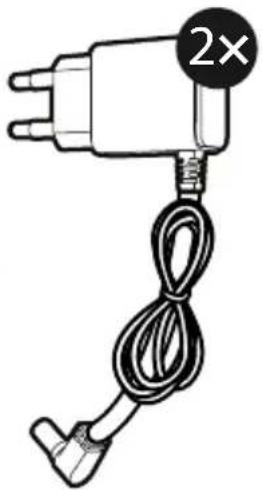
natural_image
Simple line drawing of a utility pole with a 2× speed limit indicator (no text or symbols on the object itself)natural_image
Illustration of a hand washing machine with a black arrow indicating the handle (no text or symbols present)2
natural_image
Technical line drawing of a handheld device with internal components and ventilation slots (no text or symbols)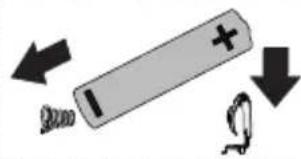
3
natural_image
Diagram of a device's internal structure with a directional arrow indicating rotation (no text or symbols present)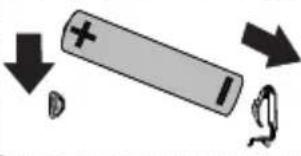
natural_image
Diagram showing a battery with positive charge and downward arrow, next to a broken ring (no text or symbols)Avvertenze:
Avvertenze:
1 Luce notturna
VTech Telecommunications Ltd. 23/F., Tai Ping Industrial Centre, Block 1, 57 Ting Kok Road, Tai Po, Hongkong.
Importatore
VTech Telecommunications Ltd.
Model: VT05EEU06040

Technische gegevens van de accu's:
Yiyang Corun Battery Co., Ltd.
Model: AAA 950 mAh NiMH (NiMH AAA950)
natural_image
Simple line drawing of a curved mechanical component with two side tabs and a circular indicator labeled '2×' (no text or symbols on the diagram itself)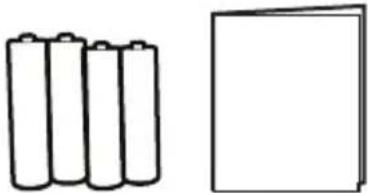
natural_image
Simple line drawing of four batteries and one blank rectangle (no text or symbols)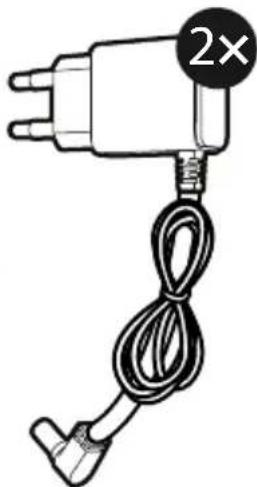
natural_image
Simple line drawing of a hairdryer with a 2× speed limit label (no text or symbols on the object itself)natural_image
Illustration of a hand washing machine with a black arrow indicating the handle (no text or symbols present)2
natural_image
Technical line drawing of a handheld device with internal components and ventilation slots (no text or symbols)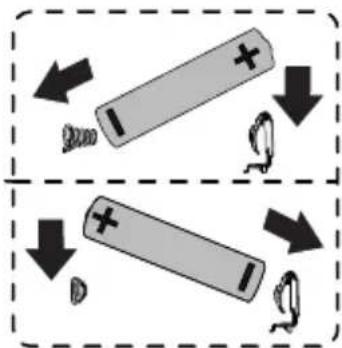
3
natural_image
Diagram of a device's internal structure with a directional arrow indicating rotation (no text or symbols present)Opmerkingen:
natural_image
Line drawing of a portable electronic device with ventilation slots and a small plug attached (no text or symbols)Ouderunit
natural_image
Line drawing of a portable air conditioner with a plug inserted into the side panel (no text or symbols)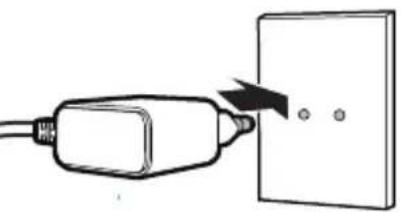
natural_image
Simple line drawing of a plug inserted into a wall socket with three dots nearby (no text or symbols)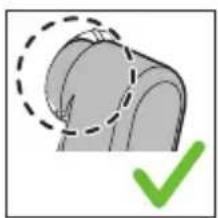
natural_image
Illustration of a mechanical component with a green checkmark indicating selection (no text or symbols present)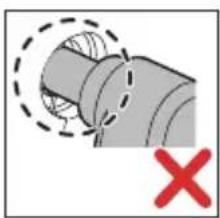
natural_image
Diagram of a pipe joint with dashed lines indicating hidden edges and a red X mark (no text or symbols)Opmerkingen:
flowchart
graph LR
    A["Cell with charge distribution"] <-->|>2 m| B["Cell with charge distribution"]
    C["Cell with charge distribution"] <-->|<2 m| D["Cell with charge distribution"]
    style A fill:#f9f,stroke:#333
    style B fill:#ccf,stroke:#333
    style C fill:#cfc,stroke:#333
    style D fill:#fcc,stroke:#333
3
4
flowchart
graph TD
    A["Device 1"] -->|≥1 m| B["Device 2"]
    C["Device 3"] -->|<1 m| B
    D["Switch"] --> A
    E["Switch"] --> C
Let op:
1 Nachtlampje
2 POWER-led (stroomindicator)
VTech Telecommunications Ltd. 23/F., Tai Ping Industrial Centre, Block 1, 57 Ting Kok Road, Tai Po, Hongkong.
Importeur
Gigaset Technologies GmbH | Frankenstraße 2 | 46395 Bocholt (D).
Klantenservice
VTech Telecommunications Ltd.
Modelo: VT05EEU06040

Yiyang Corun Battery Co., Ltd.
Modelo: AAA 950 mAH NiMH (Ni-MH AAA950)
natural_image
Simple line drawing of a curved mechanical component with two side connectors and a circular indicator labeled '2×' (no text or symbols on the diagram itself)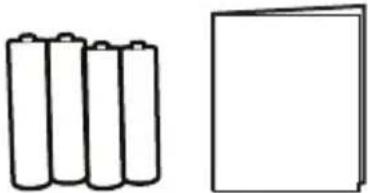
natural_image
Simple line drawing of four batteries and one blank rectangle (no text or symbols)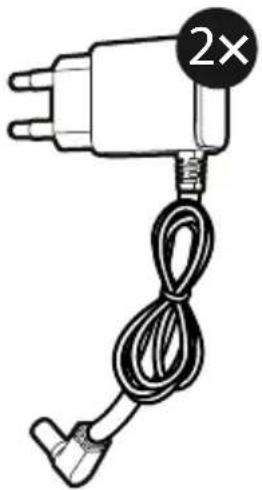
natural_image
Simple line drawing of a plug with a cord and a 2× multiplier label (no text or symbols on the plug itself)Conectar, carregar e ligar o intercomunicador
natural_image
Illustration of a hand washing machine with a black arrow indicating the handle (no text or symbols present)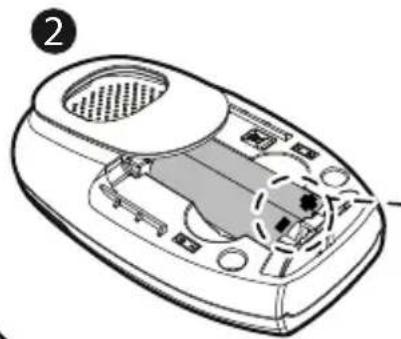
natural_image
Line drawing of a device's internal components, possibly a refrigerator or scanner, with no visible text or symbols.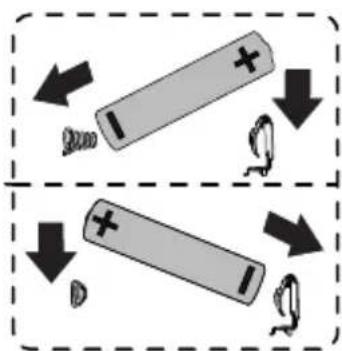
natural_image
Diagram of a vacuum cleaner internal component with no visible text or symbolsAvisos:
natural_image
Line drawing of a portable electronic device with ventilation slots and a plug inserted (no text or symbols)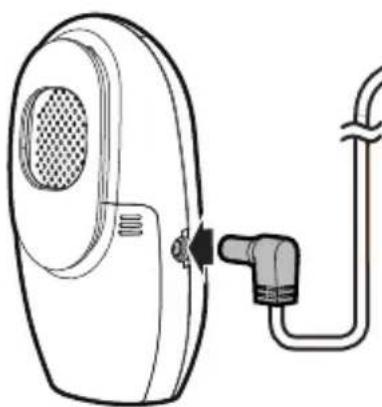
natural_image
Line drawing of a portable air conditioner with a plug inserted into the front panel (no text or symbols)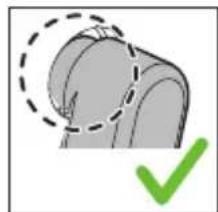
natural_image
Illustration of a curved object with a dashed outline and a green checkmark (no text or symbols)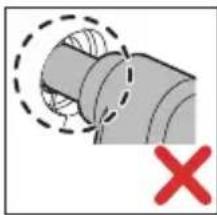
natural_image
Diagram of a pipe joint with dashed lines indicating hidden edges and a red X mark (no text or symbols)Avisos:
1 Luz nocturna
natural_image
Two identical diagrams of a waste bin with cross-bracing, no text or symbols presentVTech Telecommunications Ltd. 23/F, Tai Ping Industrial Centre, Bloco 1, 57 Ting Kok Road, Tai Po, Hongkong.
Importador
Subject to availability.
All rights reserved. Rights of modification reserved.
www.gigaset.com
(Gigaset is a Member of VTech Group of Companies)
- Hinweise:
- Nachtlicht
- Importeur
- Important Safety Instructions
- SAVE THESE INSTRUCTIONS.
- Cautions
- What's Included
- Connect, Charge, and Power On the Baby Monitor
- Install Parent Unit Batteries
- Note:
- Install Baby Unit Batteries
- Connect the Baby Monitor
- Notes:
- Positioning the Baby Monitor
- Caution:
- Overview
- Baby Unit
- Night light
- POWER light
- Battery indication light □
- ▶1/○
- Microphone
- 7
- ♪/⏻
- 9
- Belt clip with temperature sensor
- 11Speaker
- Power Jack
- Battery compartment cover
- Parent Unit
- 3- level sound indicator light
- LCD display
- Battery indication light □
- Microphone
- Speaker
- Belt clip
- Power Jack
- Battery compartment cover
- Appendix
- General Product Care
- Storage
- Guarantee Certificate
- Warranty conditions:
- Disposal
- Declaration of Conformity
- Manufacturer
- Importer
- Technical Specifications
- Indicaciones:
- Indicación:
- Luz nocturna
- Importador
- Connector, charger et allumer le babyphone
- Remarques :
- Remarque :
- Veilleuse
- Importateur
- Service après-vente
- Avvertenze:
- Luce notturna
- Importatore
- Opmerkingen:
- Let op:
- Nachtlampje
- POWER-led (stroomindicator)
- Klantenservice
- Conectar, carregar e ligar o intercomunicador
- Avisos:
Brand : GIGASET
Model : Baby 100 Audio
Category : Baby monitors